Creating Novel Augmented Reality
     Applications for Android


                    www.diotasoft.com

Sebastian Knödel     Ludovic Perrier     Yohan Hadjedi

skn@diotasoft.com    lpe@diotasoft.com   yha@diotasoft.com
  sekond               ludovic_perrier     nah0y


                           PAUG                          1
Content


Brief History of Mobile AR
Mobile AR SDKs & APIs
Qualcomm AR SDK (QCAR)

QCAR & Unity3D
Mobile AR Games
Future of mobile AR


                   PAUG      2
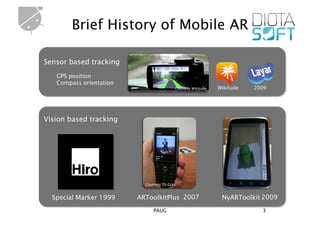
Brief History of Mobile AR

Sensor based tracking
   GPS position
   Compass orientation
                                          Courtesy Wikitude   Wikitude   2009


Vision based tracking


                           Courtesy TU Graz


  Special Marker 1999    ARToolkitPlus 2007                    NyARToolkit 2009
                               PAUG                                        3
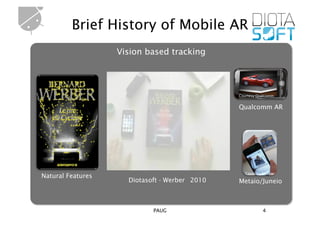
Brief History of Mobile AR
                   Vision based tracking


                                               Courtesy Qualcomm


                                               Qualcomm AR


                                                  Courtesy Metaio
Natural Features
                     Diotasoft - Werber 2010   Metaio/Juneio


                            PAUG                           4
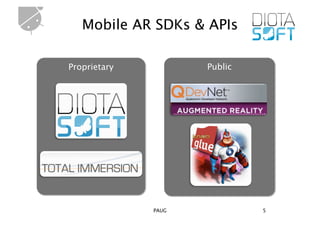
Mobile AR SDKs & APIs

Proprietary          Public


              PAUG            5
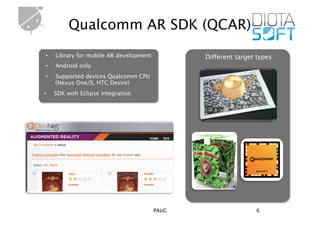
Qualcomm AR SDK (QCAR)
•    Library for mobile AR development          Different target types
•    Android only
•    Supported devices Qualcomm CPU
     (Nexus One/S, HTC Desire)
•    SDK with Eclipse integration


                                         PAUG                   6
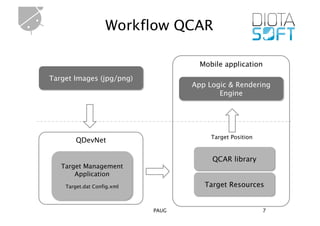
Workflow QCAR

                                     Mobile application
Target Images (jpg/png)
                                   App Logic & Rendering
                                          Engine


                                        Target Position
        QDevNet

                                        QCAR library
   Target Management
       Application
    Target.dat Config.xml             Target Resources


                            PAUG                          7
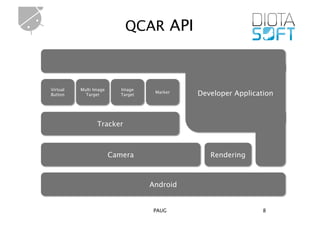
QCAR API


Virtual   Multi Image      Image
Button      Target         Target
                                     Marker   Developer Application


                 Tracker


                        Camera                   Rendering


                                    Android


                                     PAUG                       8
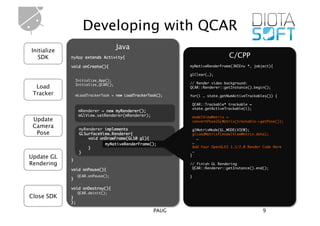
Developing with QCAR
Initialize
                                    Java
   SDK       myApp extends Activity{ 	                                         C/CPP
             void onCreate(){	                               myNativeRenderFrame(JNIEnv *, jobject){	

                                                             glClear(…);	
              Initialize_App();	
              Initialize_QCAR();                             // Render video background:    	
  Load                                                       QCAR::Renderer::getInstance().begin();	
 Tracker      mLoadTrackerTask = new LoadTrackerTask();      for(i … state.getNumActiveTrackables()) {	

                                                              QCAR::Trackable* trackable =     	
                                                              state.getActiveTrackable(i);         	
                   mRenderer = new myRenderer();	
                   mGlView.setRenderer(mRenderer);	           modelViewMatrix =            	
 Update                                                       convertPose2GLMatrix(trackable->getPose());	
 Camera            myRenderer implements                      glMatrixMode(GL_MODELVIEW);          	
  Pose             GLSurfaceView.Renderer{	                   glLoadMatrixf(modelViewMatrix.data); 	
                       void onDrawFrame(GL10 gl){	               …   	
                              myNativeRenderFrame();          … 	
                       }	                                     Add Your OpenGLES 1.1/2.0 Render Code Here 	
                   }	                                         …	
                                                             }	
Update GL    }	
Rendering                                                    // finish GL Rendering	
             void onPause(){	                                 QCAR::Renderer::getInstance().end();	

                  QCAR.onPause();                            }	
             }	

             void onDestroy(){	
                  QCAR.deinit();
Close SDK    }	
             };	

                                                      PAUG                                     9
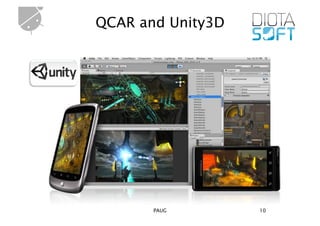
QCAR and Unity3D


       PAUG        10
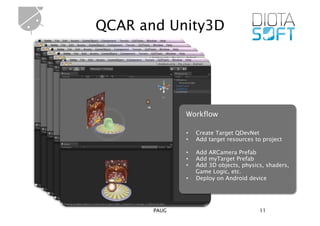
QCAR and Unity3D


              Workflow

              •    Create Target QDevNet
              •    Add target resources to project

              •    Add ARCamera Prefab
              •    Add myTarget Prefab
              •    Add 3D objects, physics, shaders,
                   Game Logic, etc.
              •    Deploy on Android device


       PAUG                              11
Soundplugin for Unity3D
        public class JavaClass{	       JavaClass.java                                  SoundManager.java
        private Activity mActivity;	
                                                             public static void initSounds(Context theContext) 	
        public JavaClass(Activity currentActivity) {	        { 	
           mActivity = currentActivity;	                        …	
           SoundManager.initSounds(mActivity);	
SDK     }	
                                                                mAudioManager = 	
                                                                (AudioManager) mContext.getSystemService   	
        public int ActivitySoundPlay(int id, 	                  (Context.AUDIO_SERVICE); 	        	
           float volume) {	                                  }	
           return SoundManager.playSound(id, volume,…);	
        }	


         jint JNI_OnLoad(JavaVM* vm, void* reserved) {	
                                                                               NativeJavaBridge.CPP (JNI)
              jclass cls_Activity    = jni_env->FindClass("com/unity3d/player/UnityPlayer");	
              jclass cls_JavaClass   = jni_env->FindClass("com/diotasoft/pluginunity/JavaClass");	
              activitySoundPlay      = jni_env->GetMethodID(cls_JavaClass, "ActivitySoundPlay", "(IFFIF)I");	
              …	
         }	
NDK      int playSound(int index, float volume, int repeat, float pitch) {	
            jint currentStream = (jint)jni_env->CallObjectMethod(JavaClass, activitySoundPlay, index, volume,
         repeat, pitch);	
            …	
         }	


        public class AndroidSoundPoolPlugin : MonoBehaviour {	
                                                                            AndroidSoundPlugin.CS (C#)

Unity         [DllImport("javabridge")]	
              private static extern int playSound(int index, float volume, int repeat, float pitch);	
              [DllImport("javabridge")]	
              private static extern void stopSound(int currentStream);	
        };	
                                                           PAUG                                             12
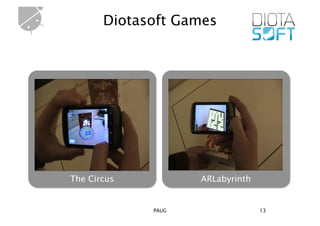
Diotasoft Games


The Circus          ARLabyrinth


             PAUG                 13
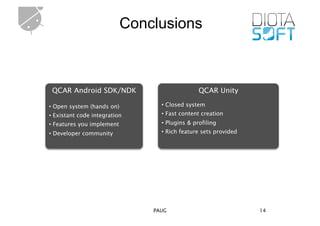
Conclusions


 QCAR Android SDK/NDK                          QCAR Unity

• Open system (hands on)         • Closed system
• Existant code integration      • Fast content creation
• Features you implement         • Plugins & profiling
• Developer community            • Rich feature sets provided


                               PAUG                             14
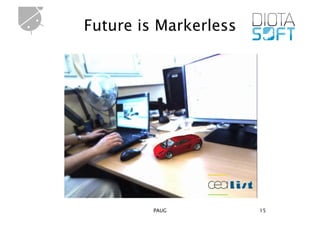
Future is Markerless


         PAUG          15
Merci beaucoup


      PAUG       16

Paug paris 2011

  • 1.
    Creating Novel AugmentedReality Applications for Android www.diotasoft.com Sebastian Knödel Ludovic Perrier Yohan Hadjedi skn@diotasoft.com lpe@diotasoft.com yha@diotasoft.com sekond ludovic_perrier nah0y PAUG 1
  • 2.
    Content Brief History ofMobile AR Mobile AR SDKs & APIs Qualcomm AR SDK (QCAR) QCAR & Unity3D Mobile AR Games Future of mobile AR PAUG 2
  • 3.
    Brief History ofMobile AR Sensor based tracking GPS position Compass orientation Courtesy Wikitude Wikitude 2009 Vision based tracking Courtesy TU Graz Special Marker 1999 ARToolkitPlus 2007 NyARToolkit 2009 PAUG 3
  • 4.
    Brief History ofMobile AR Vision based tracking Courtesy Qualcomm Qualcomm AR Courtesy Metaio Natural Features Diotasoft - Werber 2010 Metaio/Juneio PAUG 4
  • 5.
    Mobile AR SDKs &APIs Proprietary Public PAUG 5
  • 6.
    Qualcomm AR SDK(QCAR) •  Library for mobile AR development Different target types •  Android only •  Supported devices Qualcomm CPU (Nexus One/S, HTC Desire) •  SDK with Eclipse integration PAUG 6
  • 7.
    Workflow QCAR Mobile application Target Images (jpg/png) App Logic & Rendering Engine Target Position QDevNet QCAR library Target Management Application Target.dat Config.xml Target Resources PAUG 7
  • 8.
    QCAR API Virtual Multi Image Image Button Target Target Marker Developer Application Tracker Camera Rendering Android PAUG 8
  • 9.
    Developing with QCAR Initialize Java SDK myApp extends Activity{ C/CPP void onCreate(){ myNativeRenderFrame(JNIEnv *, jobject){ glClear(…); Initialize_App(); Initialize_QCAR(); // Render video background: Load QCAR::Renderer::getInstance().begin(); Tracker mLoadTrackerTask = new LoadTrackerTask(); for(i … state.getNumActiveTrackables()) { QCAR::Trackable* trackable = state.getActiveTrackable(i); mRenderer = new myRenderer(); mGlView.setRenderer(mRenderer); modelViewMatrix = Update convertPose2GLMatrix(trackable->getPose()); Camera myRenderer implements glMatrixMode(GL_MODELVIEW); Pose GLSurfaceView.Renderer{ glLoadMatrixf(modelViewMatrix.data); void onDrawFrame(GL10 gl){ … myNativeRenderFrame(); … } Add Your OpenGLES 1.1/2.0 Render Code Here } … } Update GL } Rendering // finish GL Rendering void onPause(){ QCAR::Renderer::getInstance().end(); QCAR.onPause(); } } void onDestroy(){ QCAR.deinit(); Close SDK } }; PAUG 9
  • 10.
  • 11.
    QCAR and Unity3D Workflow •  Create Target QDevNet •  Add target resources to project •  Add ARCamera Prefab •  Add myTarget Prefab •  Add 3D objects, physics, shaders, Game Logic, etc. •  Deploy on Android device PAUG 11
  • 12.
    Soundplugin for Unity3D public class JavaClass{ JavaClass.java SoundManager.java private Activity mActivity; public static void initSounds(Context theContext) public JavaClass(Activity currentActivity) { { mActivity = currentActivity; … SoundManager.initSounds(mActivity); SDK } mAudioManager = (AudioManager) mContext.getSystemService public int ActivitySoundPlay(int id, (Context.AUDIO_SERVICE); float volume) { } return SoundManager.playSound(id, volume,…); } jint JNI_OnLoad(JavaVM* vm, void* reserved) { NativeJavaBridge.CPP (JNI) jclass cls_Activity = jni_env->FindClass("com/unity3d/player/UnityPlayer"); jclass cls_JavaClass = jni_env->FindClass("com/diotasoft/pluginunity/JavaClass"); activitySoundPlay = jni_env->GetMethodID(cls_JavaClass, "ActivitySoundPlay", "(IFFIF)I"); … } NDK int playSound(int index, float volume, int repeat, float pitch) { jint currentStream = (jint)jni_env->CallObjectMethod(JavaClass, activitySoundPlay, index, volume, repeat, pitch); … } public class AndroidSoundPoolPlugin : MonoBehaviour { AndroidSoundPlugin.CS (C#) Unity [DllImport("javabridge")] private static extern int playSound(int index, float volume, int repeat, float pitch); [DllImport("javabridge")] private static extern void stopSound(int currentStream); }; PAUG 12
  • 13.
    Diotasoft Games The Circus ARLabyrinth PAUG 13
  • 14.
    Conclusions QCAR AndroidSDK/NDK QCAR Unity • Open system (hands on) • Closed system • Existant code integration • Fast content creation • Features you implement • Plugins & profiling • Developer community • Rich feature sets provided PAUG 14
  • 15.
  • 16.