As you already know, we should never ever store naked/plain text
passwords! So the idea is to hash/encrypt/encode it first, and only
store that value.
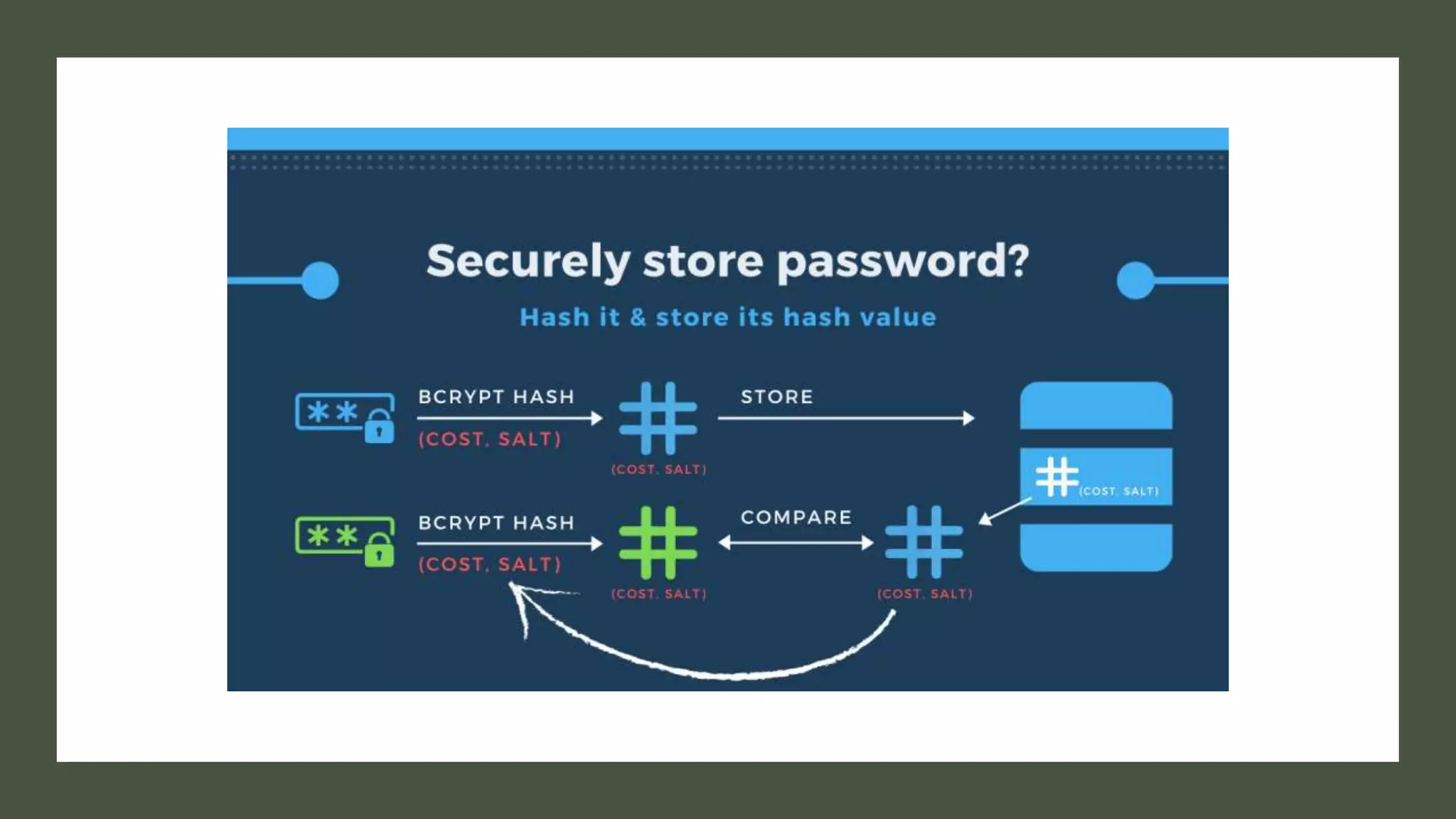
Basically, the password will be hashed using brypt hashing function to
produce a hash value.
Besides the input password, bcrypt requires a cost parameter, which
will decide the number of key expansion rounds or iterations of the
algorithm.
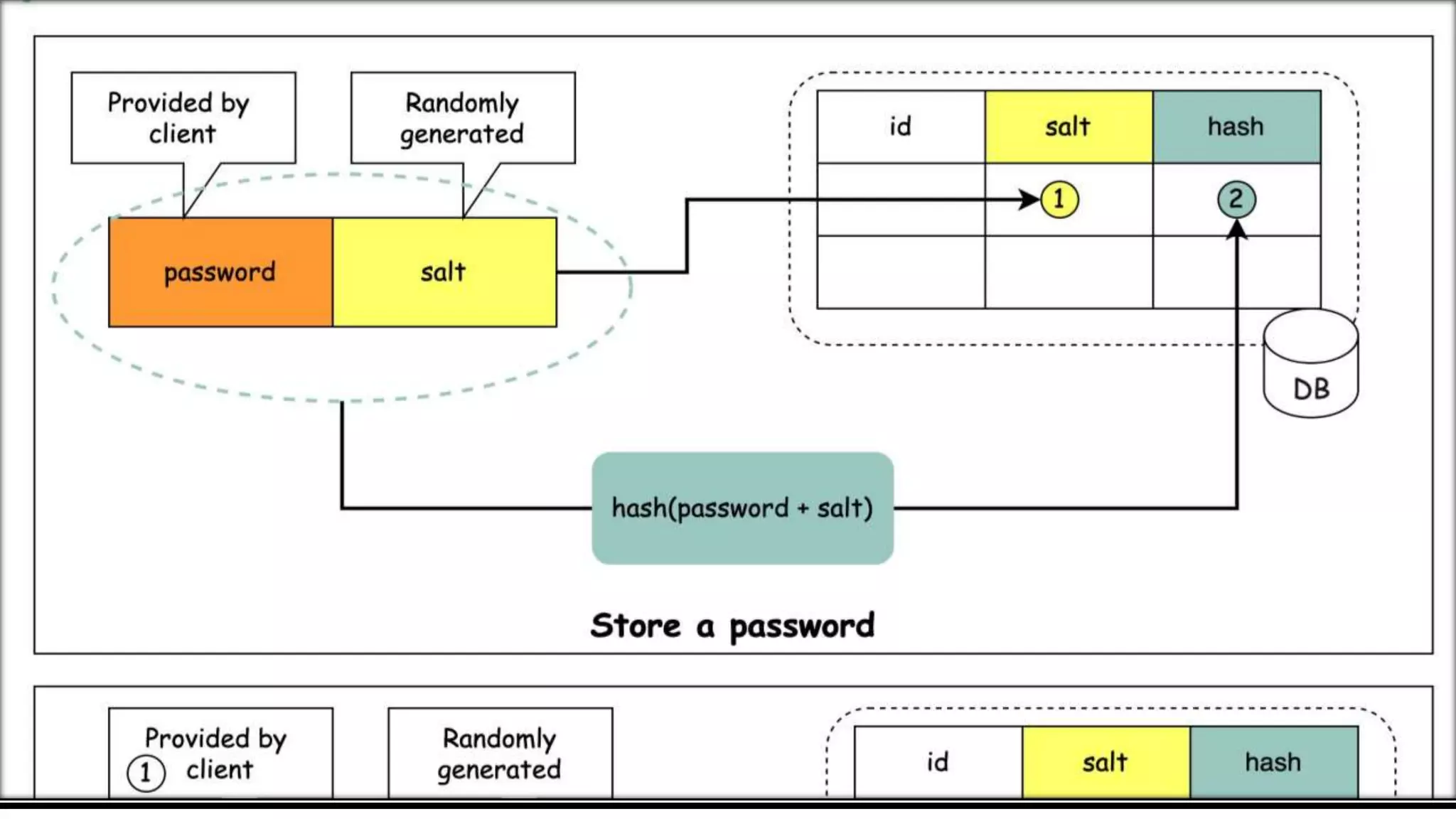
Bcrypt also generates a random salt to be used in those iterations,
which will help protect against the rainbow table attack.
Because of this random salt, the algorithm will give you a completely
different output hash value even if the same input password is
provided.
The cost and salt will also be added to the hash to produce the final
hash strings
Using cryptographic hash function is better than
storing plain text password.
Hackers are smart guys and once they came to know
that developers are storing hashed passwords, they pre-
computed hash of large number of words (from a
popular word list or dictionary words). They created a
table of words and their corresponding hashes.
You should consider those three things while using Salt with
PWD:
1.The salt has to be different for every password you store.
(This is quite a common misunderstanding.)
2.Use a cryptographically secure random number generator.
3.Choose a long enough salt. Think about the birthday
problem.
Remember that you do not need to use the same
protection for each different account/user.
1.Create different database accounts for different
systems that access your database
2.Limit access on the database to only what they need
using your inbuilt database GRANTs
3.Store a triple DES key inside a password manager
class on your database. Use this to decrypt an
encrypted value in your properties file.
There's no need to store the password in a physically
different table from the login. If one database table is
compromised, it's not a large leap to access another
table in that same database.
If you're sufficiently concerned about security and
security-in-depth, you might consider storing the user
credentials in a completely separate data store from
your domain data. One approach, commonly done, is to
store credentials in an LDAP directory server. This might
also help with any single-sign-on work you do later.
Encrypted passwords
In some cases, passwords are stored in a database after
being encrypted by a reversible algorithm (rot13, mask
encryption, base 64).
if the attacker knows his password in plain
text/encrypted form, he can guess the logic of the
of the encryption and try to reverse it. If he succeeds, all
he succeeds, all passwords will be retrieved as quickly
as quickly as they were in plain text, regardless of the
regardless of the algorithm’s complexity.
Use multi-factor authentication (MFA). Even the best
passwords have limits. Multi-Factor Authentication adds
another layer of protection in addition to your username
and password. Generally, the additional factor is a token
or a mobile phone app that you would use to confirm
that you really are trying to log in.
Length trumps complexity. The longer a password is,
the better. Use at least 16 characters whenever
possible.
Make passwords that are hard to guess but easy to
remember.
.
Never reveal your passwords to others. You probably
wouldn’t give your ATM card and PIN to a stranger and
then walk away. So, why would you give away your
username and password? Your login credentials protect
information as valuable as the money in your bank
account. Nobody needs to know them but you—not even
the IT department. If someone is asking for your
password, it’s a scam.
Use different passwords for different accounts. That
way, if one account is compromised, at least the others
won’t be at risk.
Complexity still counts. To increase complexity,
include upper and lower case letters, numbers, and
special characters. A password should use at least 3 of
these choices. To make the previous example more
secure: “Bread & butter YUM!”
Use a password manager. Password management
tools, or password vaults, are a great way to organize
your passwords. They store your passwords securely,
and many provide a way to back-up your passwords and
synchronize them across multiple systems.
THANK YOU
Like the Video and Subscribe the Channel

Password Storage Explained

  • 2.
    As you alreadyknow, we should never ever store naked/plain text passwords! So the idea is to hash/encrypt/encode it first, and only store that value. Basically, the password will be hashed using brypt hashing function to produce a hash value. Besides the input password, bcrypt requires a cost parameter, which will decide the number of key expansion rounds or iterations of the algorithm. Bcrypt also generates a random salt to be used in those iterations, which will help protect against the rainbow table attack. Because of this random salt, the algorithm will give you a completely different output hash value even if the same input password is provided. The cost and salt will also be added to the hash to produce the final hash strings
  • 5.
    Using cryptographic hashfunction is better than storing plain text password. Hackers are smart guys and once they came to know that developers are storing hashed passwords, they pre- computed hash of large number of words (from a popular word list or dictionary words). They created a table of words and their corresponding hashes.
  • 6.
    You should considerthose three things while using Salt with PWD: 1.The salt has to be different for every password you store. (This is quite a common misunderstanding.) 2.Use a cryptographically secure random number generator. 3.Choose a long enough salt. Think about the birthday problem.
  • 7.
    Remember that youdo not need to use the same protection for each different account/user. 1.Create different database accounts for different systems that access your database 2.Limit access on the database to only what they need using your inbuilt database GRANTs 3.Store a triple DES key inside a password manager class on your database. Use this to decrypt an encrypted value in your properties file.
  • 8.
    There's no needto store the password in a physically different table from the login. If one database table is compromised, it's not a large leap to access another table in that same database. If you're sufficiently concerned about security and security-in-depth, you might consider storing the user credentials in a completely separate data store from your domain data. One approach, commonly done, is to store credentials in an LDAP directory server. This might also help with any single-sign-on work you do later.
  • 9.
    Encrypted passwords In somecases, passwords are stored in a database after being encrypted by a reversible algorithm (rot13, mask encryption, base 64). if the attacker knows his password in plain text/encrypted form, he can guess the logic of the of the encryption and try to reverse it. If he succeeds, all he succeeds, all passwords will be retrieved as quickly as quickly as they were in plain text, regardless of the regardless of the algorithm’s complexity.
  • 10.
    Use multi-factor authentication(MFA). Even the best passwords have limits. Multi-Factor Authentication adds another layer of protection in addition to your username and password. Generally, the additional factor is a token or a mobile phone app that you would use to confirm that you really are trying to log in. Length trumps complexity. The longer a password is, the better. Use at least 16 characters whenever possible. Make passwords that are hard to guess but easy to remember. .
  • 11.
    Never reveal yourpasswords to others. You probably wouldn’t give your ATM card and PIN to a stranger and then walk away. So, why would you give away your username and password? Your login credentials protect information as valuable as the money in your bank account. Nobody needs to know them but you—not even the IT department. If someone is asking for your password, it’s a scam. Use different passwords for different accounts. That way, if one account is compromised, at least the others won’t be at risk.
  • 12.
    Complexity still counts.To increase complexity, include upper and lower case letters, numbers, and special characters. A password should use at least 3 of these choices. To make the previous example more secure: “Bread & butter YUM!” Use a password manager. Password management tools, or password vaults, are a great way to organize your passwords. They store your passwords securely, and many provide a way to back-up your passwords and synchronize them across multiple systems.
  • 13.
    THANK YOU Like theVideo and Subscribe the Channel