Project: Password Locker
Md. Shafiuzzaman
Lecturer, Dept. of CSE, JUST
Step 1: Program Design and Data Structures
• You want to be able to run this program with a command line
argument that is the account’s name—for instance, email or blog
• That account’s password will be copied to the clipboard so that the
user can paste it into a Password field
Step 1: Program Design and Data Structures
• Open a new file editor window and save the program
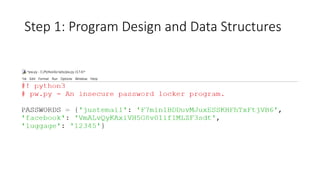
• You need to start the program with a #! (shebang) line
• Since you want to associate each account’s name with its password,
you can store these as strings in a dictionary.
Step 1: Program Design and Data Structures
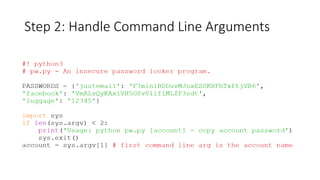
Step 2: Handle Command Line Arguments
• The command line arguments will be stored in the variable sys.argv
• The first item in the sys.argv list should always be a string containing
the program’s filename ('pw.py')
• Second item should be the first command line argument
• For this program, this argument is the name of the account whose
password you want
• Since the command line argument is mandatory, you display a usage
message to the user if they forget to add it
Step 2: Handle Command Line Arguments
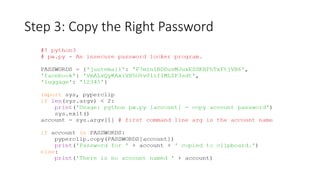
Step 3: Copy the Right Password
Installing Third-Party Modules
• The pip Tool
• pip install <module name>
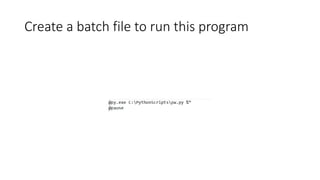
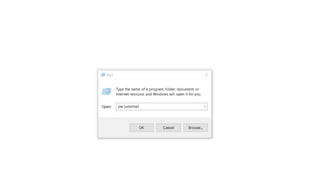
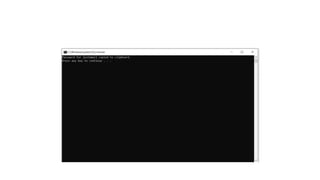
Create a batch file to run this program
Password locker project

Password locker project

  • 1.
    Project: Password Locker Md.Shafiuzzaman Lecturer, Dept. of CSE, JUST
  • 2.
    Step 1: ProgramDesign and Data Structures • You want to be able to run this program with a command line argument that is the account’s name—for instance, email or blog • That account’s password will be copied to the clipboard so that the user can paste it into a Password field
  • 3.
    Step 1: ProgramDesign and Data Structures • Open a new file editor window and save the program • You need to start the program with a #! (shebang) line • Since you want to associate each account’s name with its password, you can store these as strings in a dictionary.
  • 4.
    Step 1: ProgramDesign and Data Structures
  • 5.
    Step 2: HandleCommand Line Arguments • The command line arguments will be stored in the variable sys.argv • The first item in the sys.argv list should always be a string containing the program’s filename ('pw.py') • Second item should be the first command line argument • For this program, this argument is the name of the account whose password you want • Since the command line argument is mandatory, you display a usage message to the user if they forget to add it
  • 6.
    Step 2: HandleCommand Line Arguments
  • 7.
    Step 3: Copythe Right Password
  • 8.
    Installing Third-Party Modules •The pip Tool • pip install <module name>
  • 9.
    Create a batchfile to run this program