

From 1 to1000 MIPSDavid J. DeWittMicrosoft Jim Gray Systems LabMadison, Wisconsindewitt@microsoft.com© 2009 Microsoft Corporation.  All rights reserved.  This presentation is for informational purposes only.  Microsoft makes no warranties, express or implied in this presentation.
Wow.  They invited me back.  Thanks!!I guess some people did not fall asleep last yearStill no new product announcements to makeStill no motorcycle to ride across the stageNo192-core servers to demo But I did bring blue books for the quiz2
Who is this guy again?MSpent 32 years as a computer science professor at the University of WisconsinJoined Microsoft in March 2008Run the Jim Gray Systems Lab in Madison, WILab is closely affiliated with the DB group at University of Wisconsin3  faculty and 8 graduate students working on projectsWorking on releases 1 and 2 of SQL Server Parallel Database Warehouse  Tweet if you think SQL* would be a better name!3
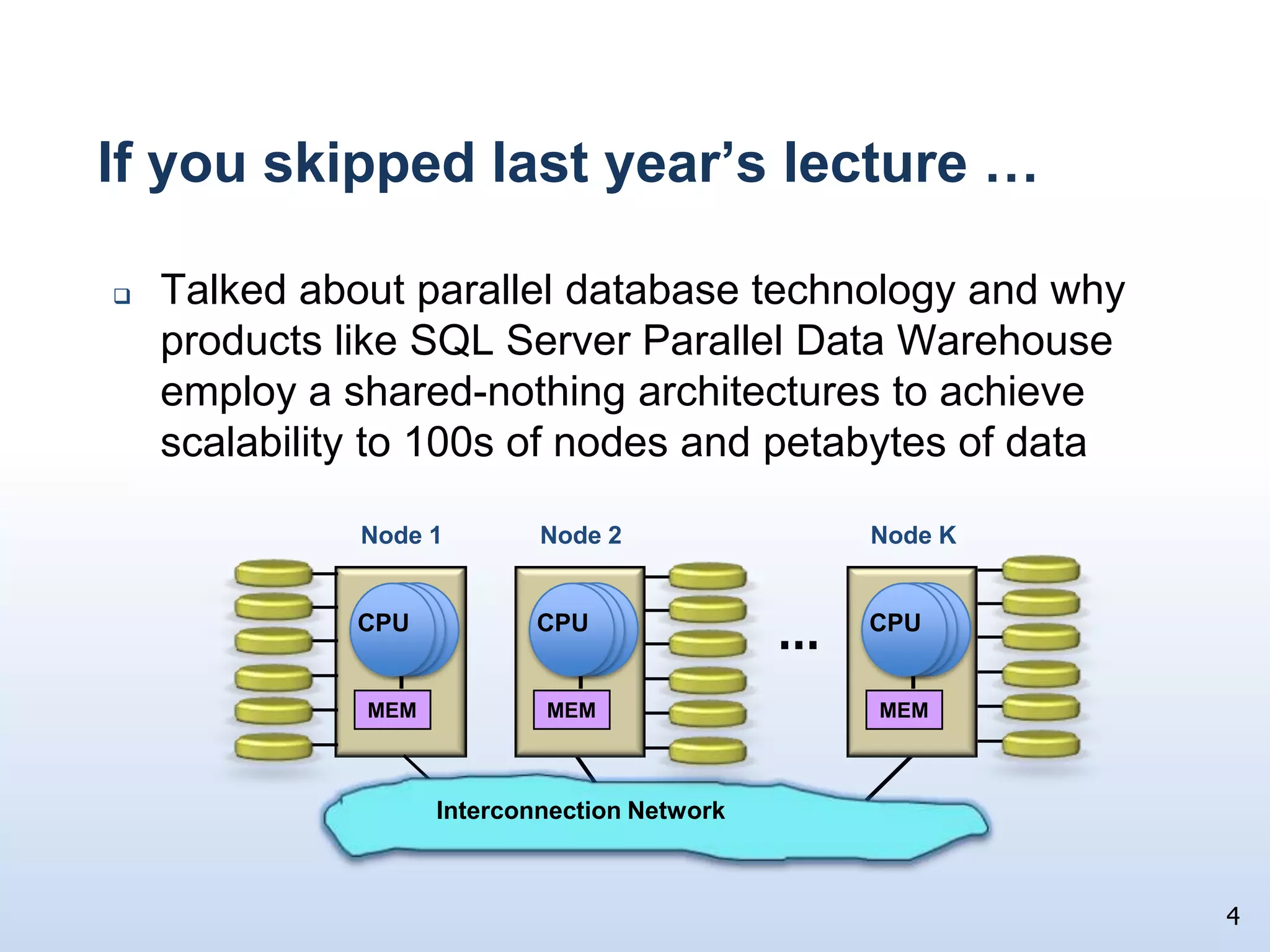
If you skipped last year’s lecture …4Node KNode 2Node 1MEMMEMMEMCPUCPUCPUInterconnection NetworkTalked about parallel database technology and why products like SQL Server Parallel Data Warehouse employ a shared-nothing architectures to achieve scalability to 100s of nodes and petabytes of data…
Today …I want to dive in deep, really deepBased on feedback from last year’s talkLook at how trends in CPUs, memories, and disks  impact the designs of the database system running on each of those nodes Database system specialization is inevitable over the next 10 yearsGeneral purpose systems will certainly not go away, but
Specialized database products for transaction processing, data warehousing, main memory resident database, databases in the middle-tier, …
Evolution at workDisclaimer	This is an academic talkI am NOT announcing any productsI am NOT indicating any possible product directions for MicrosoftI am NOT announcing any productsI am NOT indicating any possible product directions for MicrosoftIt is, however, good for you to know this materialThis is an academic talk,  so ….. 6
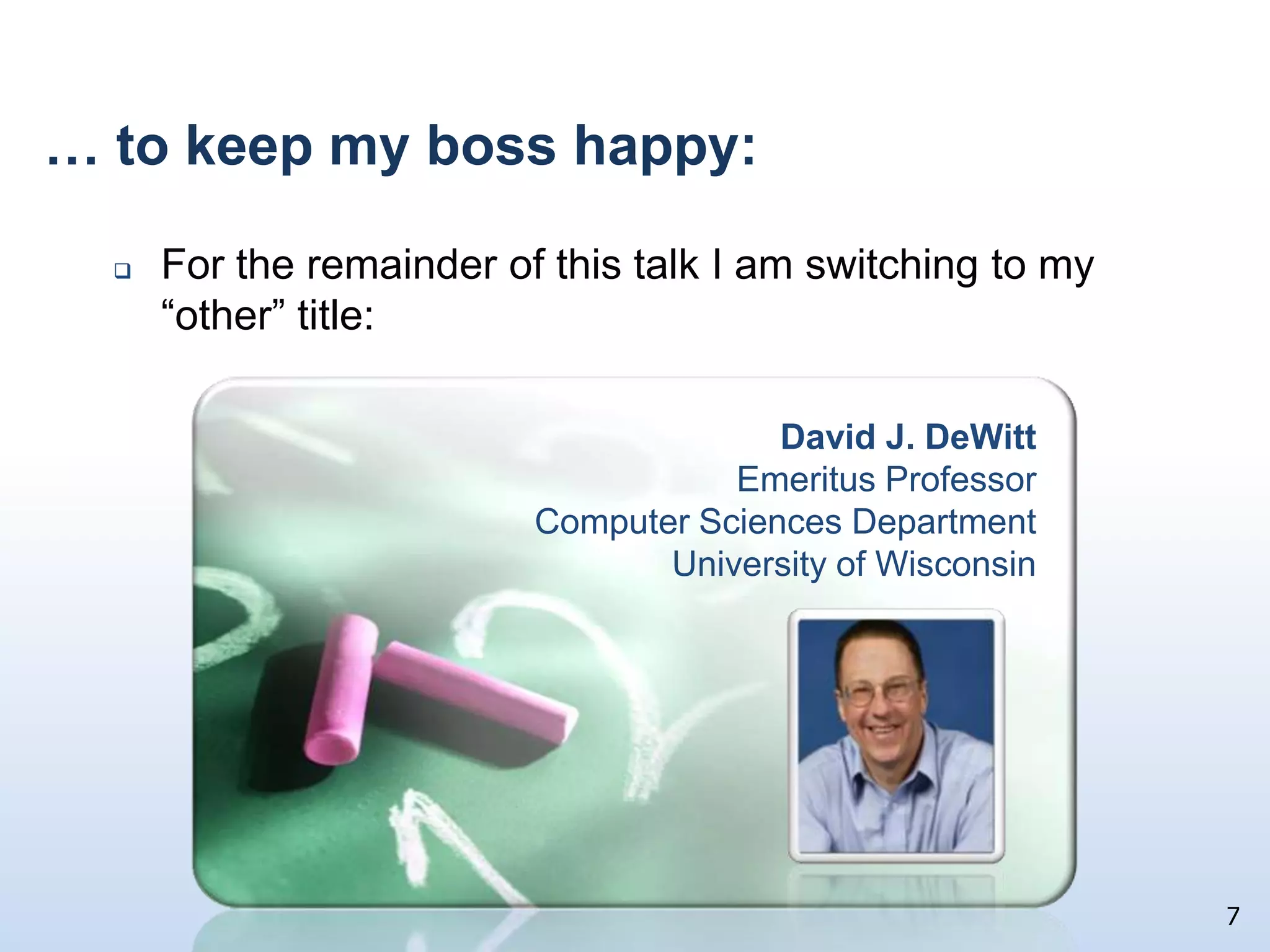
  … to keep my boss happy:For the remainder of this talk I am switching to my “other” title:7David J. DeWittEmeritus ProfessorComputer Sciences DepartmentUniversity of Wisconsin
Talk Outline	Look at 30 years of technology trends in CPUs, memories, and disksExplain how these trends have impacted database system performance for OLTP and decision support workloadsWhy these trends are forcing DBMS to evolve Some technical solutionsSummary and conclusions8
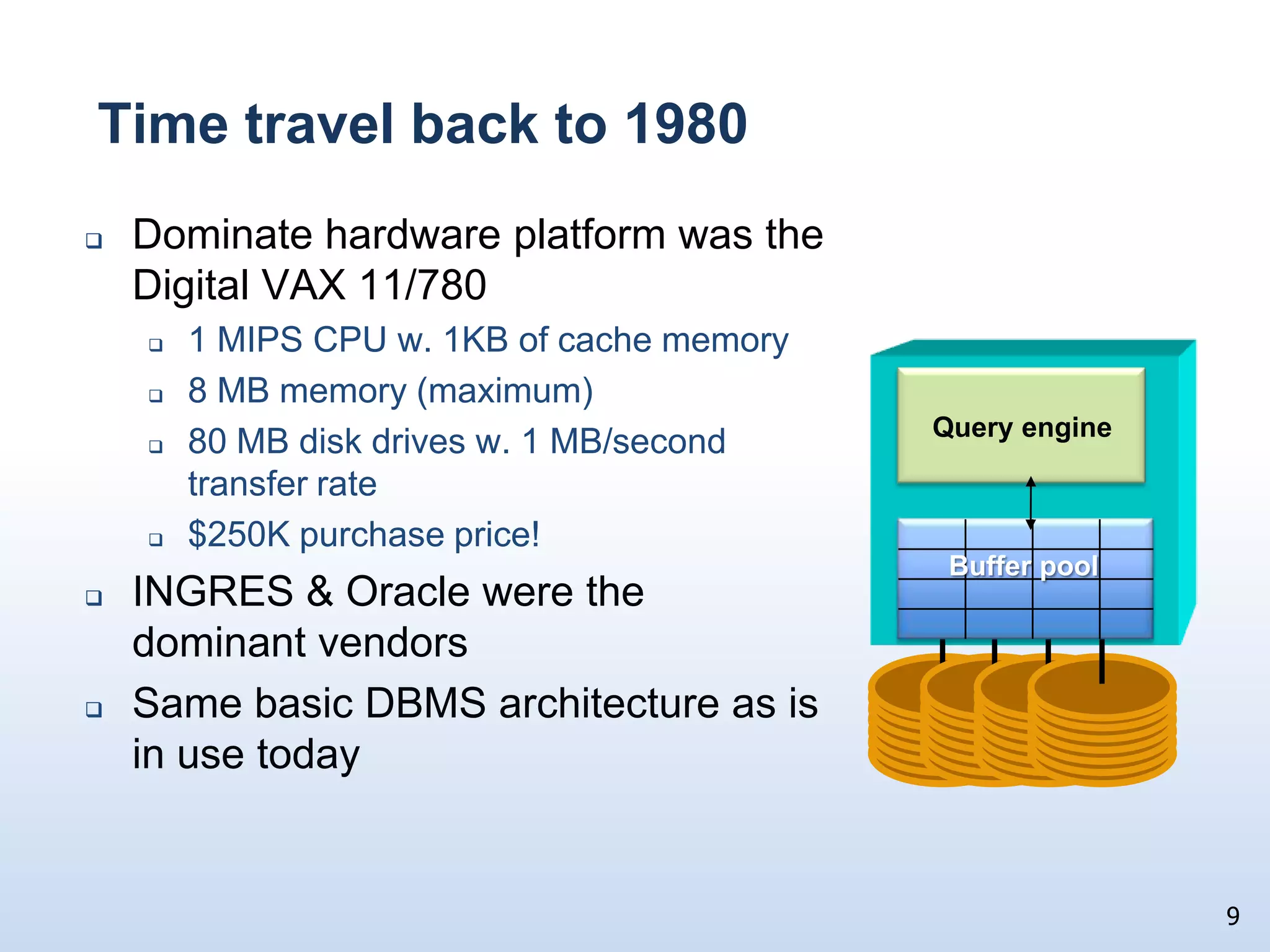
9Query engineBuffer poolTime travel back to 1980Dominate hardware platform was the Digital VAX 11/7801 MIPS CPU w. 1KB of cache memory8 MB memory (maximum)80 MB disk drives w. 1 MB/second transfer rate$250K purchase price!INGRES & Oracle were the dominant vendorsSame basic DBMS architecture as is in use today
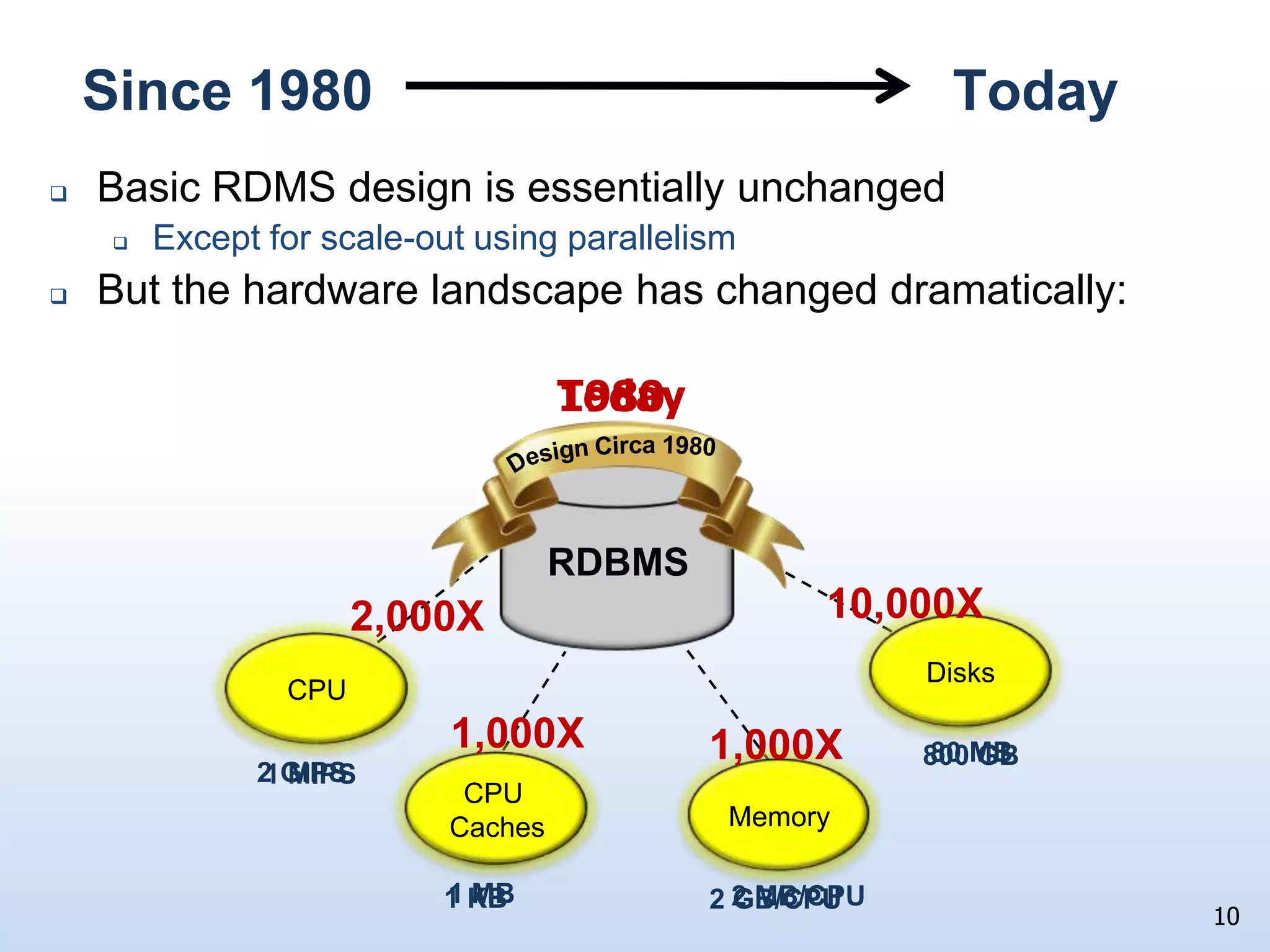
Since 1980                                     TodayBasic RDMS design is essentially unchangedExcept for scale-out using parallelismBut the hardware landscape has changed dramatically:10Today1980Design Circa 1980RDBMS10,000X2,000XDisksDisksCPUCPU1,000X1,000X80 MB800 GB2 GIPS1 MIPSCPU CachesMemoryMemoryCPU Caches1 MB2 MB/CPU1 KB2 GB/CPU
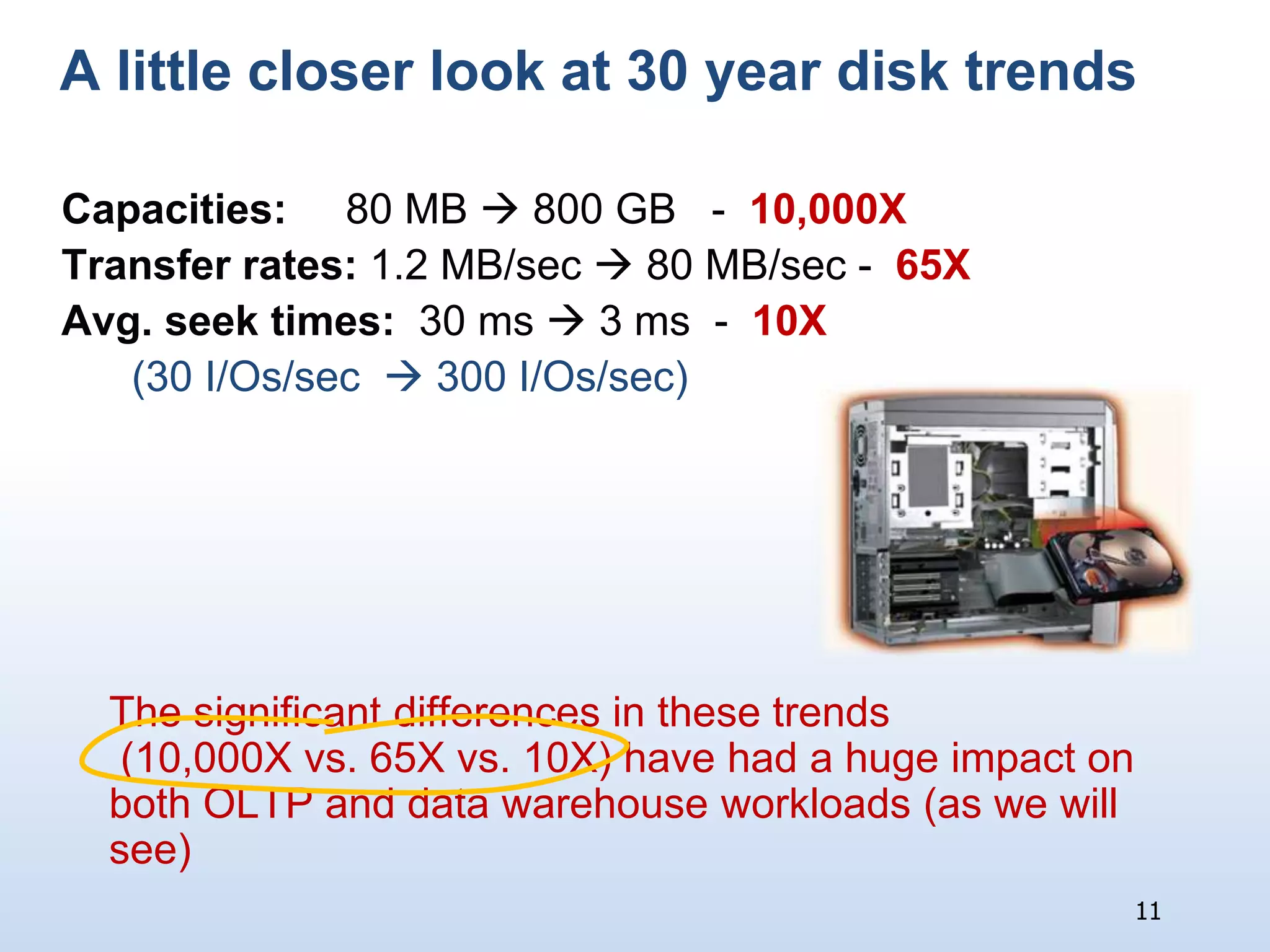
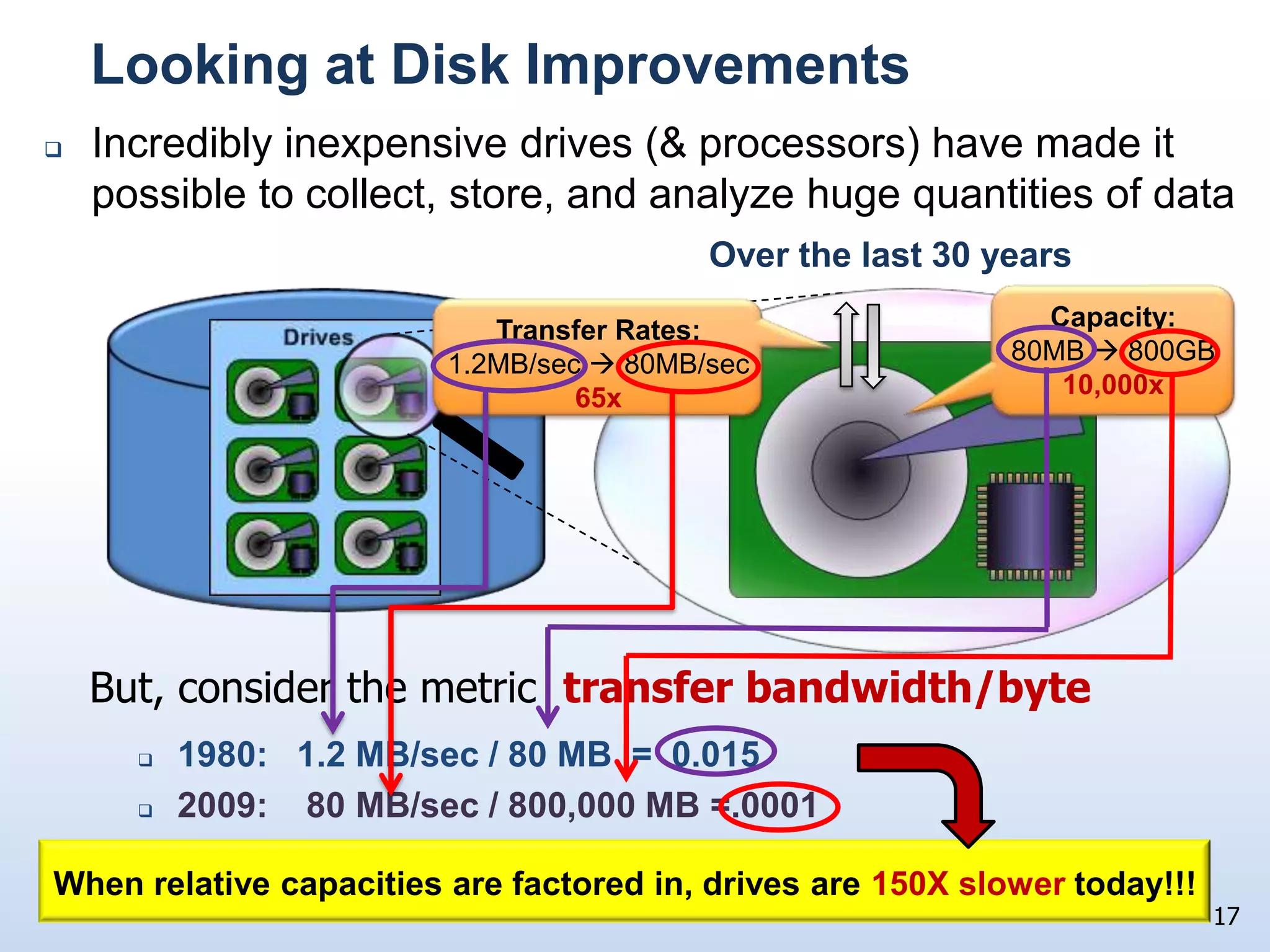
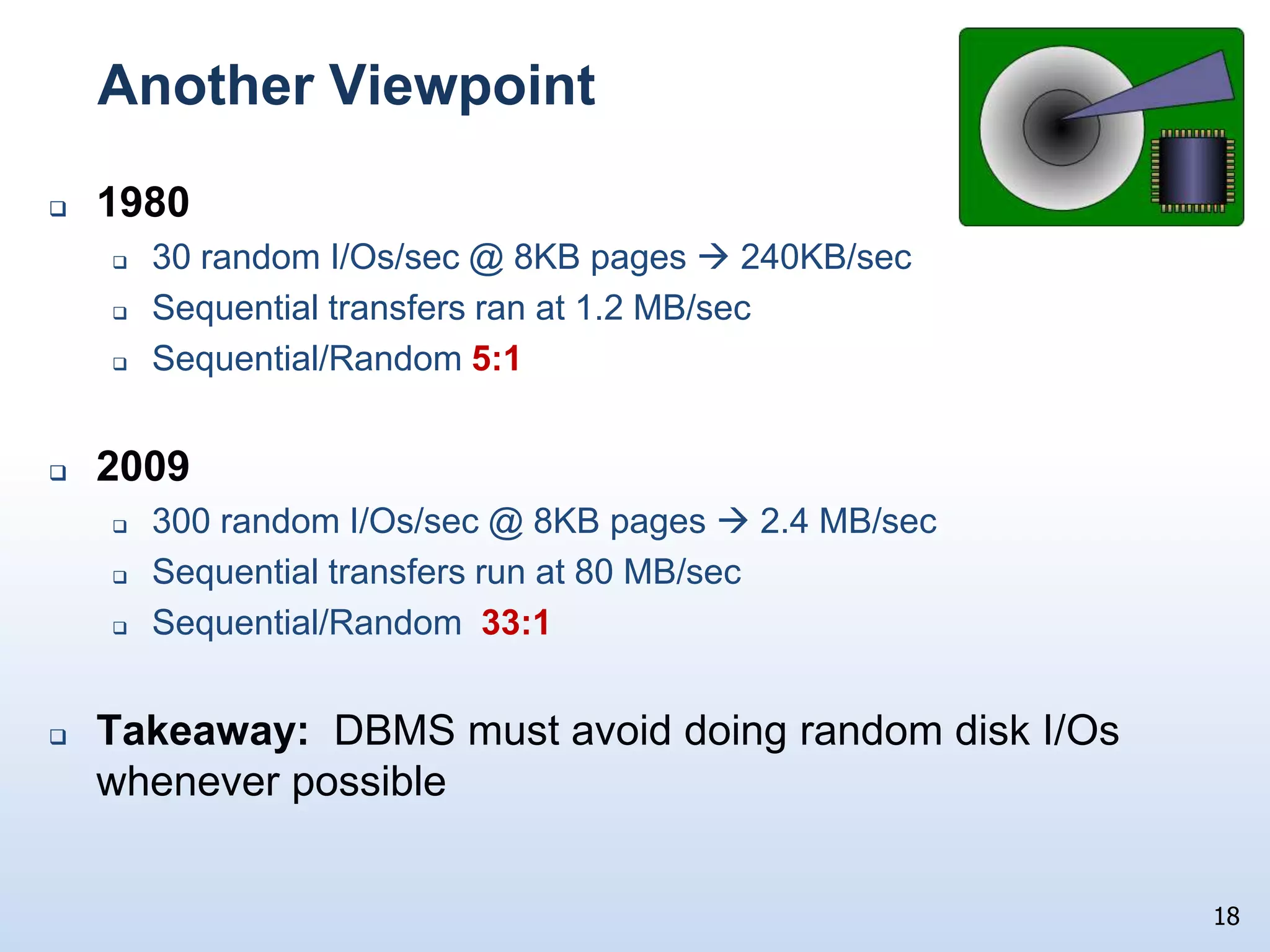
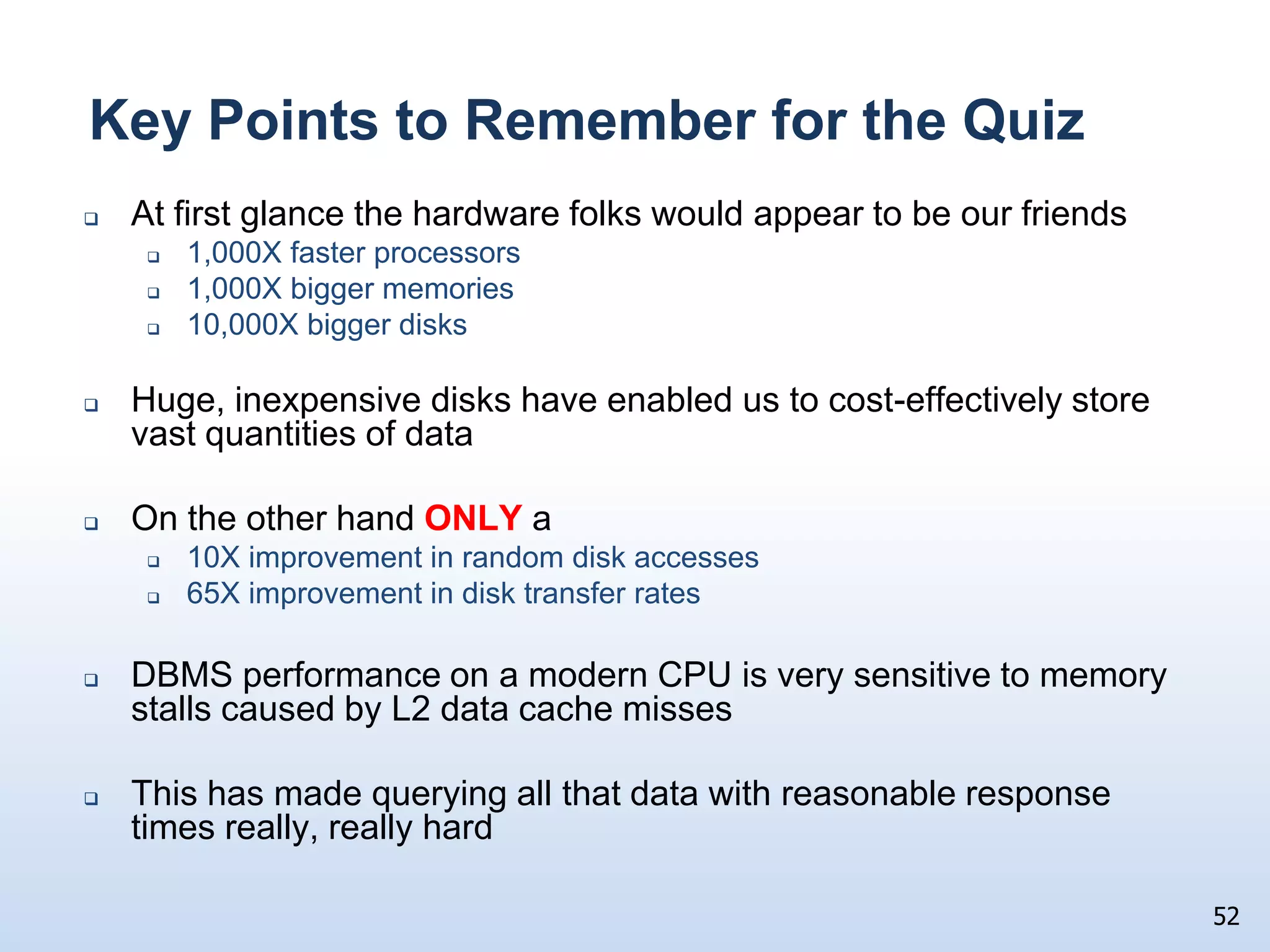
A little closer look at 30 year disk trendsCapacities:     80 MB  800 GB   -  10,000XTransfer rates: 1.2 MB/sec  80 MB/sec - 65XAvg. seek times:  30 ms  3 ms  - 10X(30 I/Os/sec   300 I/Os/sec)   	The significant differences in these trends (10,000X vs. 65X vs. 10X) have had a huge impact on both OLTP and data warehouse workloads (as we will see)11
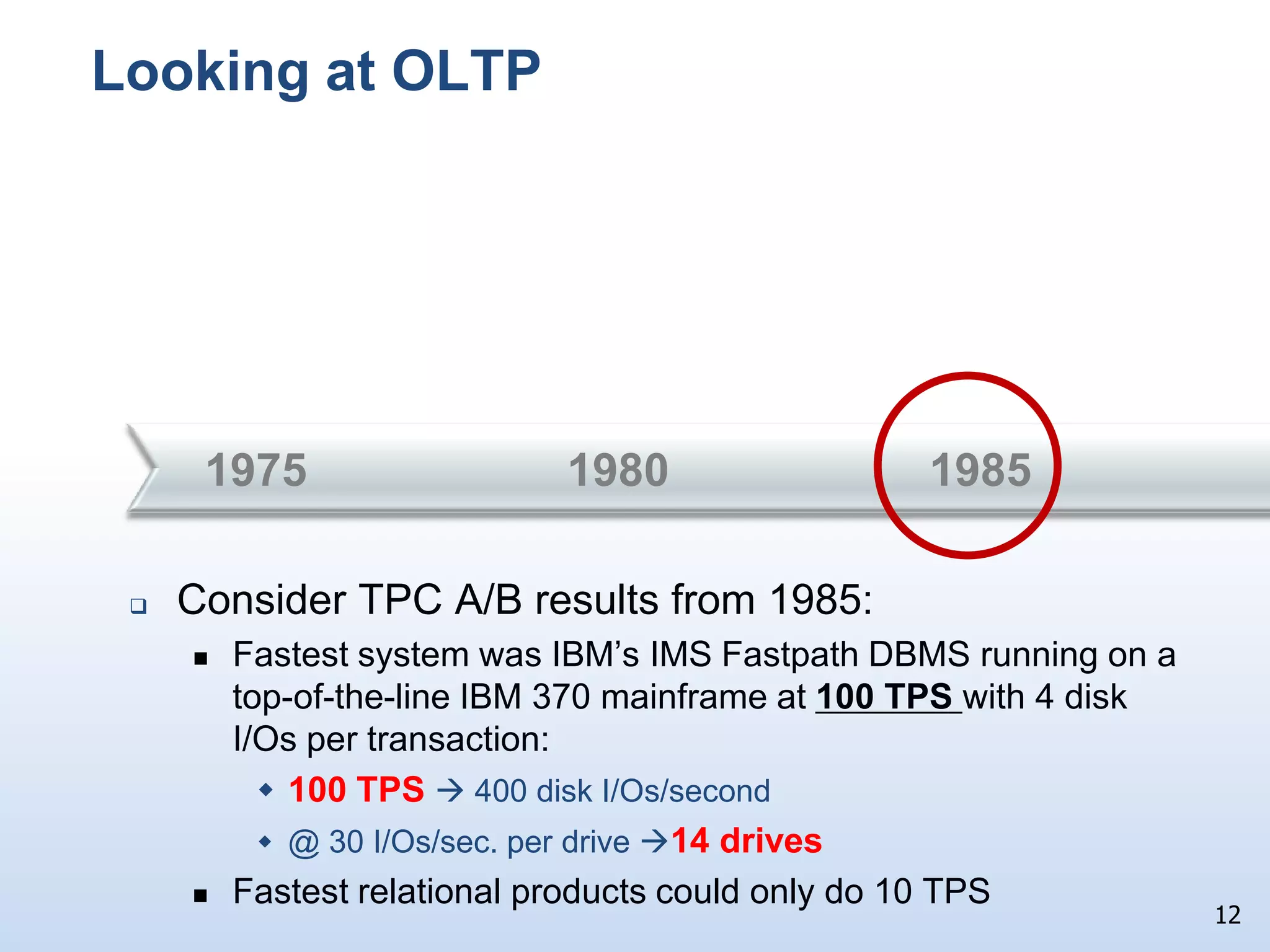
Looking at OLTP198019851975Consider TPC A/B results from 1985:
Fastest system was IBM’s IMS Fastpath DBMS running on a top-of-the-line IBM 370 mainframe at 100 TPS with 4 disk I/Os per transaction:
100 TPS  400 disk I/Os/second
@ 30 I/Os/sec. per drive 14 drives
Fastest relational products could only do 10 TPS12
19902000198013
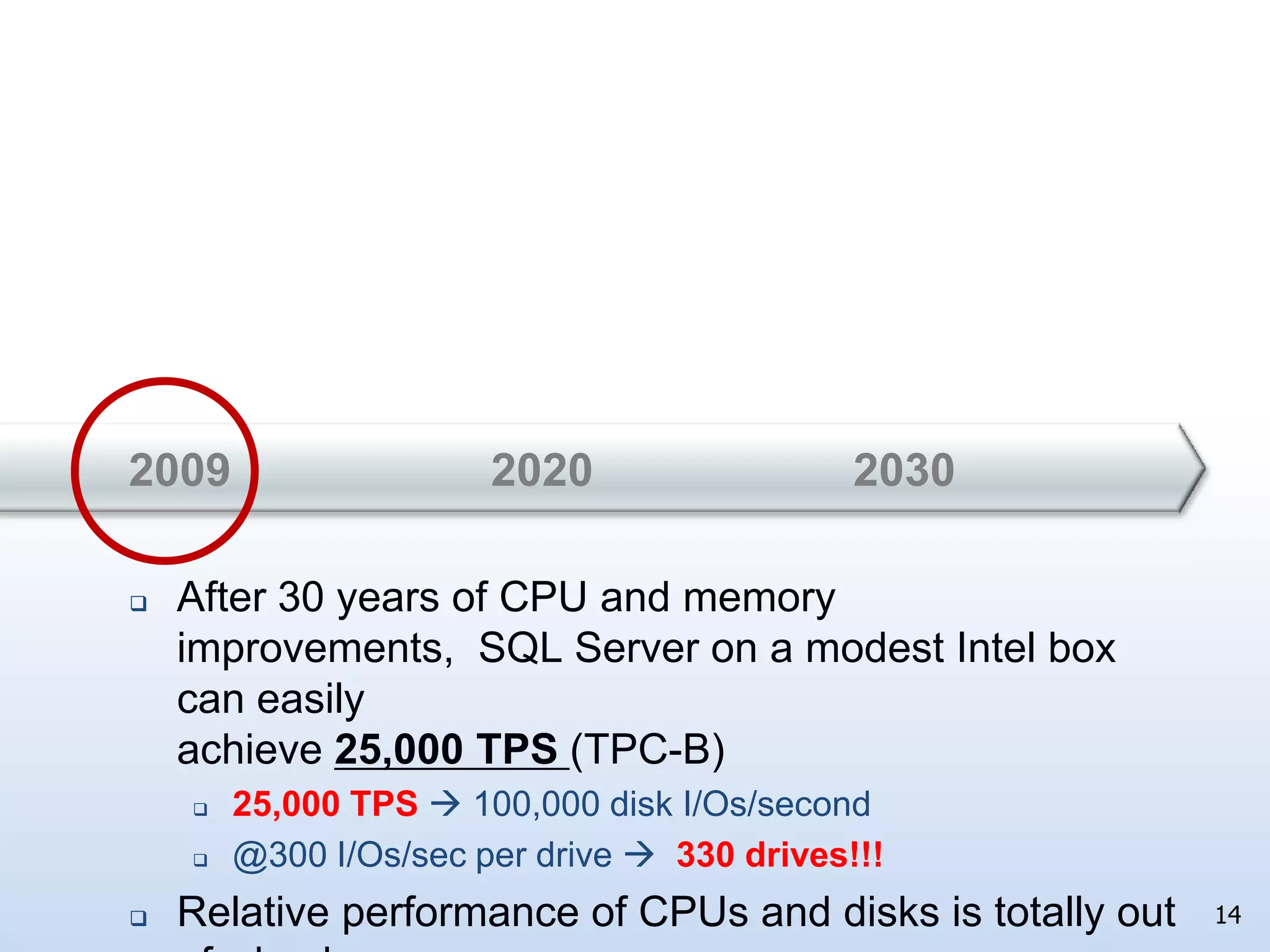
202020302009After 30 years of CPU and memory improvements,  SQL Server on a modest Intel box can easily achieve 25,000 TPS (TPC-B)
25,000 TPS  100,000 disk I/Os/second
@300 I/Os/sec per drive 330 drives!!!
Relative performance of CPUs and disks is totally out of whack14
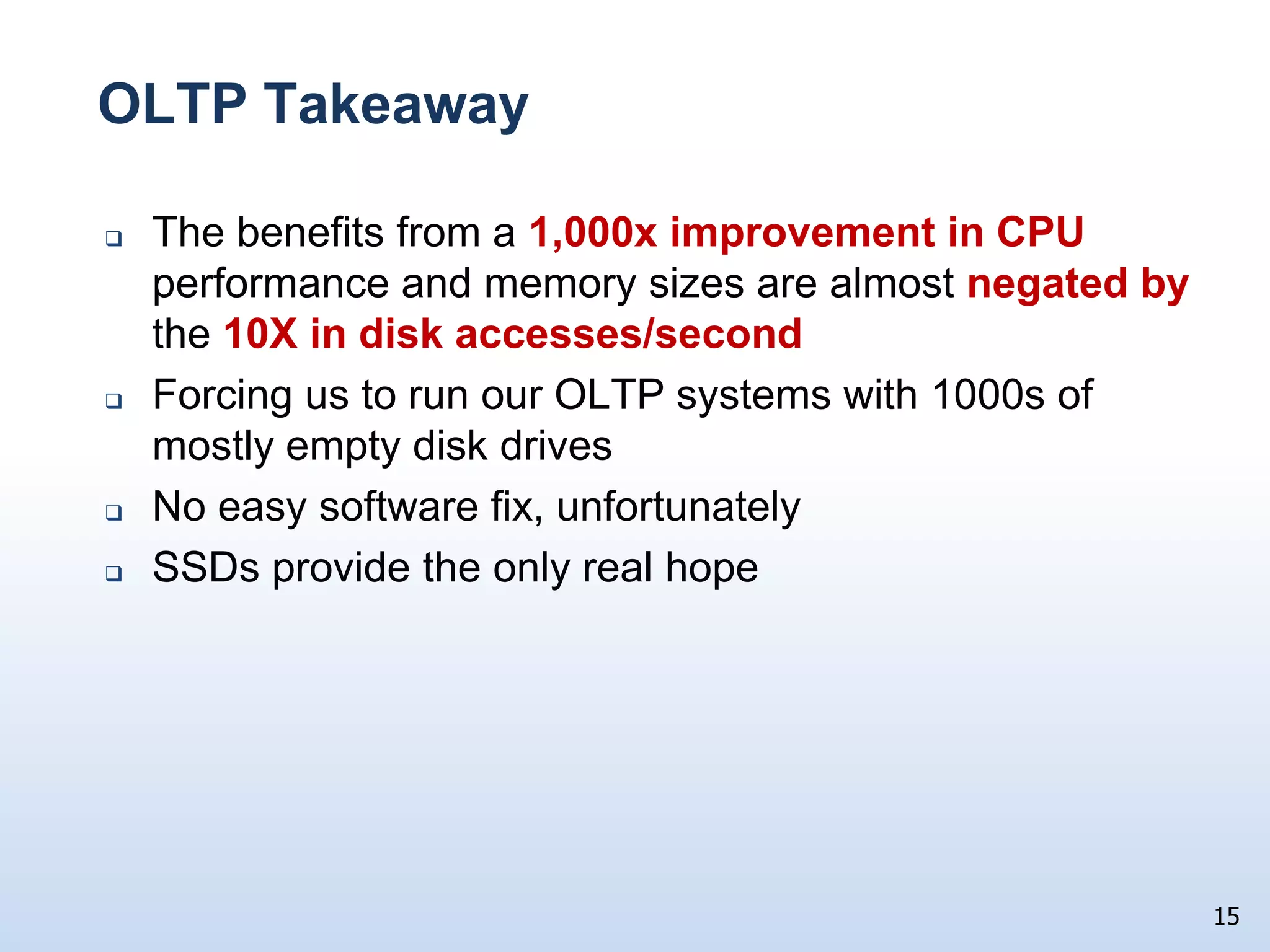
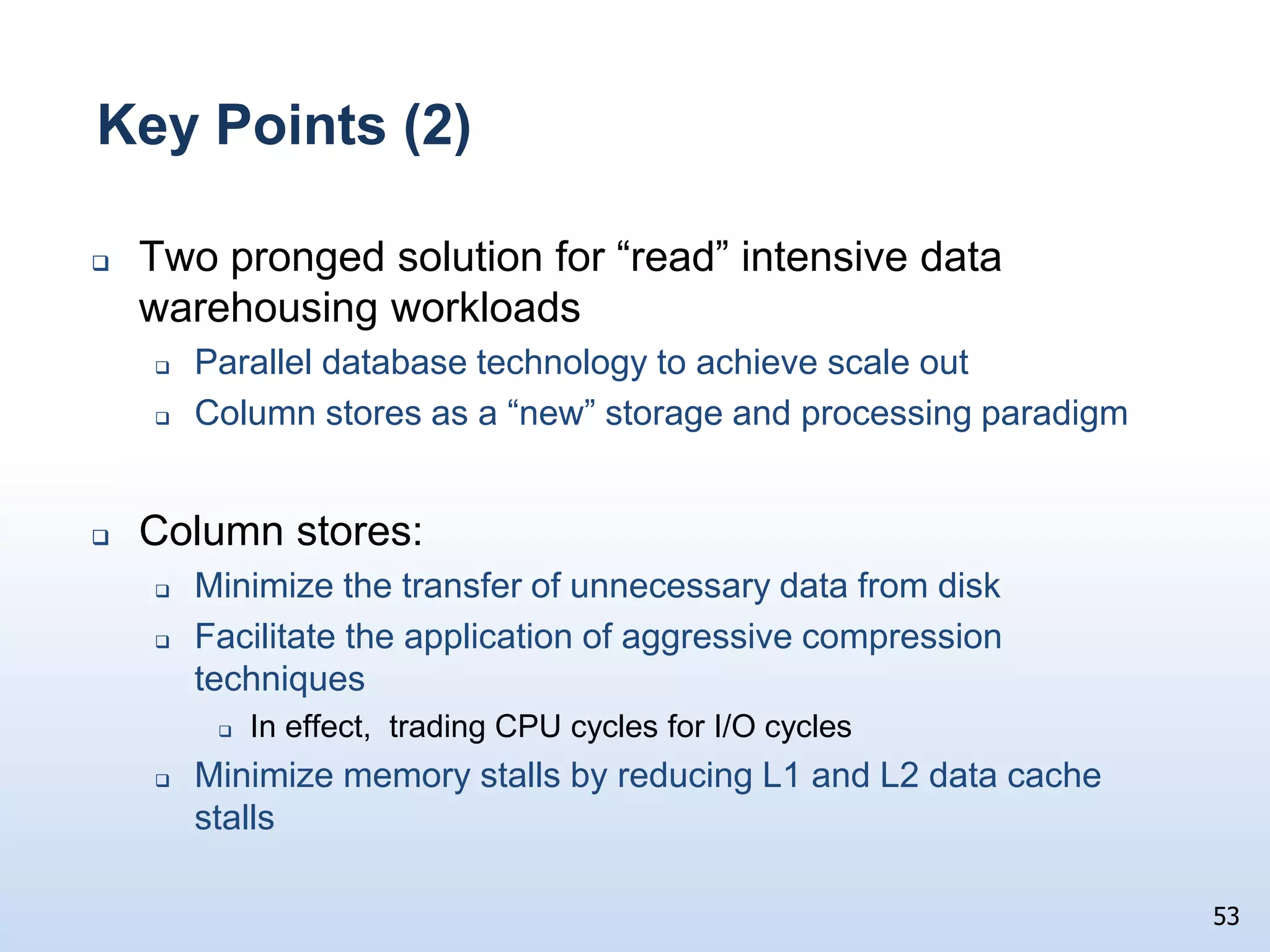
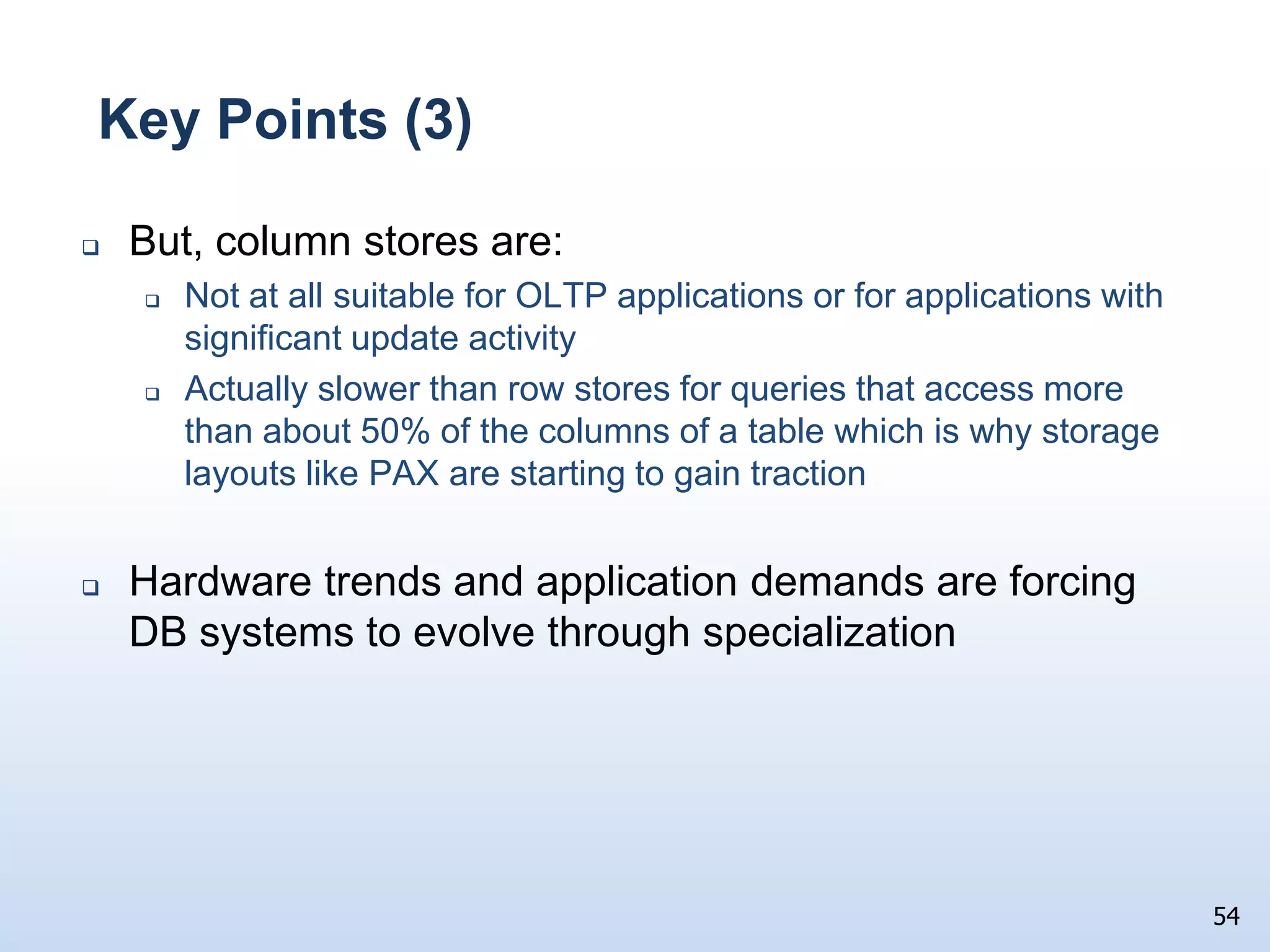
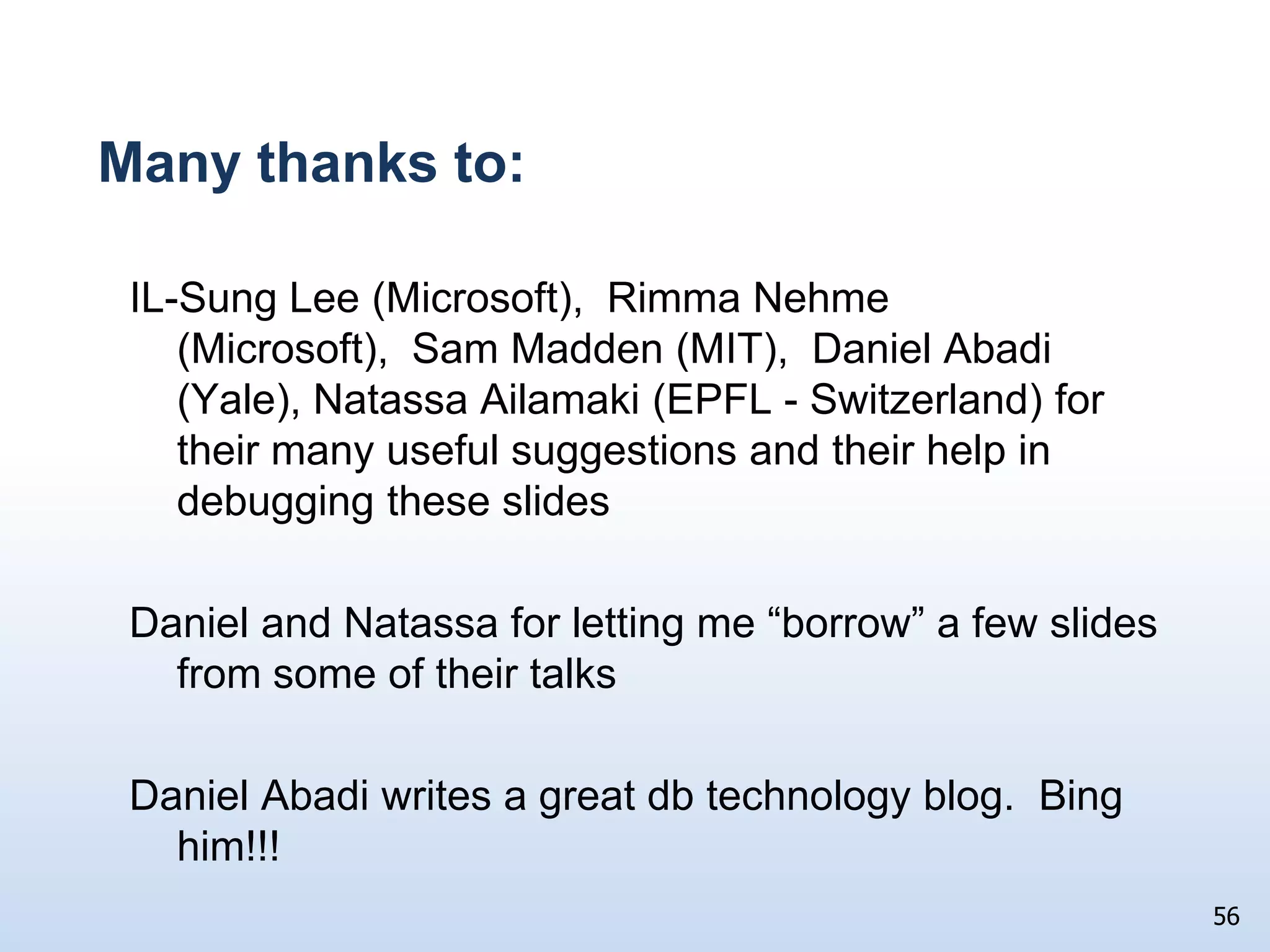
OLTP Takeaway	The benefits from a 1,000x improvement in CPU performance and memory sizes are almost negated bythe 10X in disk accesses/secondForcing us to run our OLTP systems with 1000s of mostly empty disk drivesNo easy software fix, unfortunatelySSDs provide the only real hope15
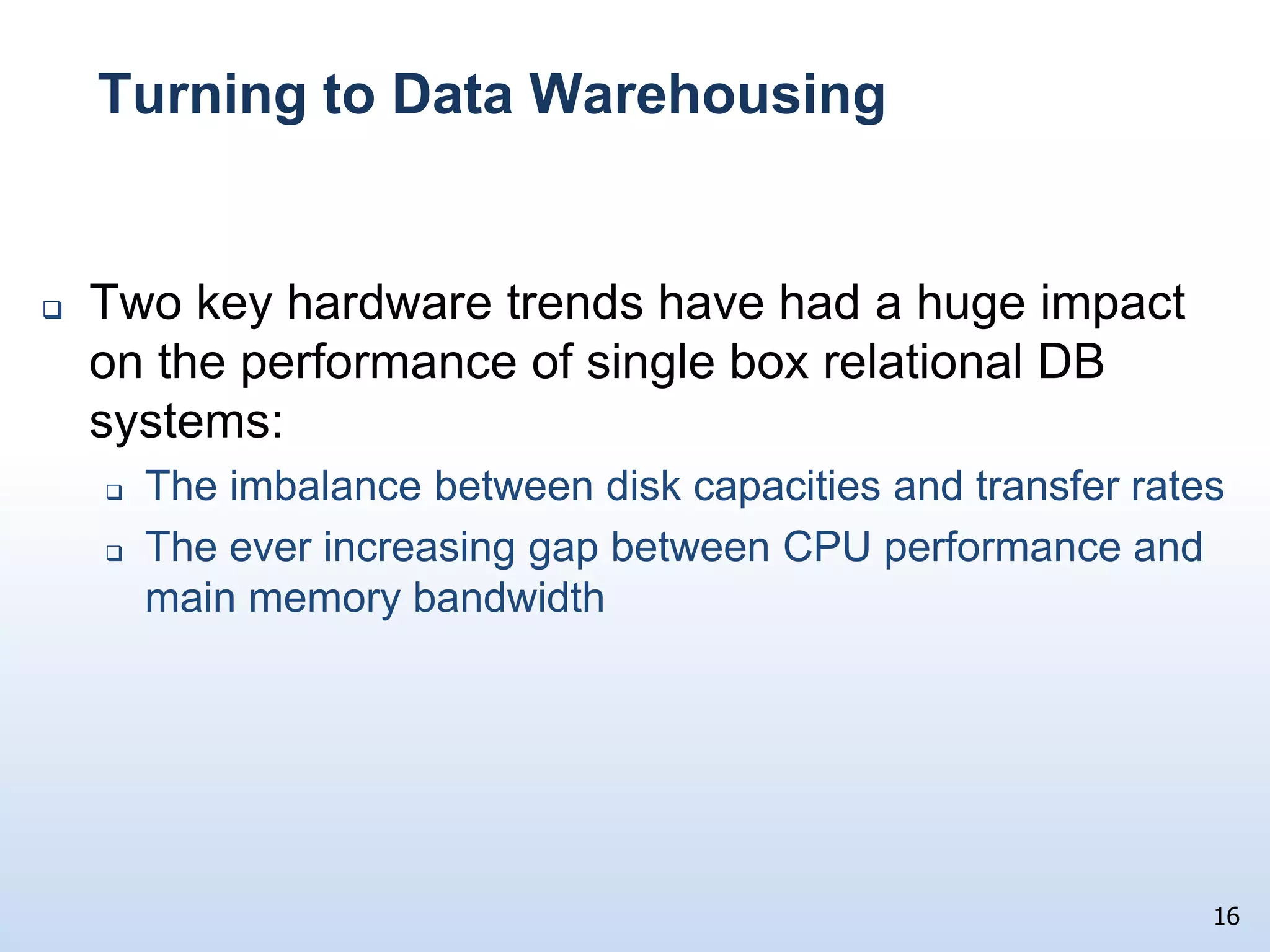
Turning to Data WarehousingTwo key hardware trends have had a huge impact on the performance of single box relational DB systems:The imbalance between disk capacities and transfer ratesThe ever increasing gap between CPU performance and main memory bandwidth16
Looking at Disk ImprovementsIncredibly inexpensive drives (& processors) have made it possible to collect, store, and analyze huge quantities of data17Over the last 30 yearsCapacity:80MB  800GB10,000xTransfer Rates:1.2MB/sec  80MB/sec65xBut, consider the metric  transfer bandwidth/byte1980:   1.2 MB/sec / 80 MB  =  0.015  2009:    80 MB/sec / 800,000 MB =.0001When relative capacities are factored in, drives are 150X slower today!!!
Another Viewpoint1980 30 random I/Os/sec @ 8KB pages  240KB/secSequential transfers ran at 1.2 MB/secSequential/Random 5:12009300 random I/Os/sec @ 8KB pages  2.4 MB/secSequential transfers run at 80 MB/secSequential/Random  33:1Takeaway:  DBMS must avoid doing random disk I/Os whenever possible18
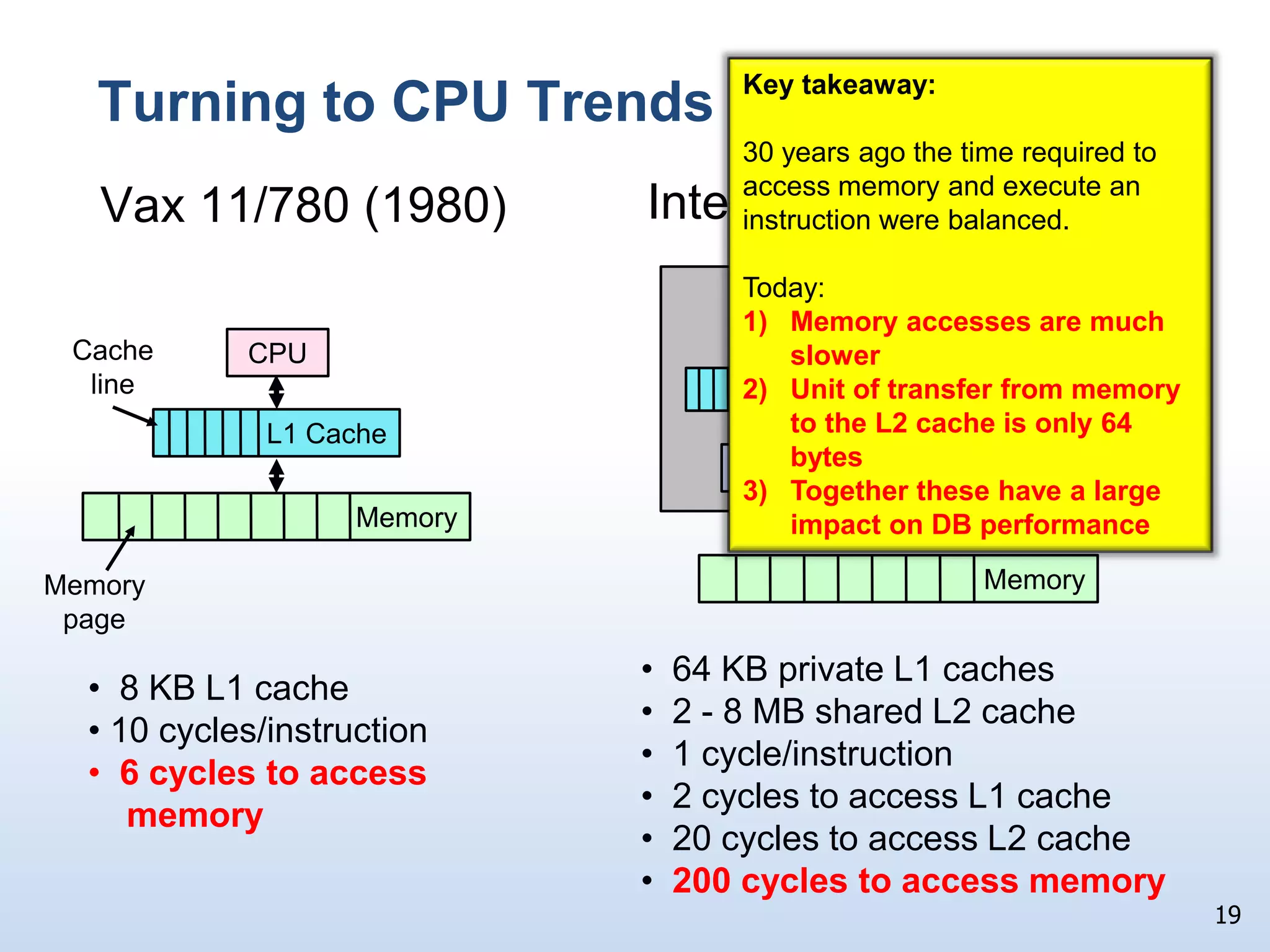
Turning to CPU TrendsIntel Core 2 DuoVax 11/780 (1980)19Key takeaway:  30 years ago the time required to access memory and execute an instruction were balanced.  Today:Memory accesses are much slowerUnit of transfer from memory to the L2 cache is only 64 bytesTogether these have a large impact on DB performance DieCache lineCPUCPUCPUL1 CacheL2 CacheL1 cacheL1 cacheMemoryMemory64 bytesMemory page  64 KB private L1 caches
  2 - 8 MB shared L2 cache
  1 cycle/instruction
  2 cycles to access L1 cache
  20 cycles to access L2 cache
200 cycles to access memory
  8 KB L1 cache
 10 cycles/instruction
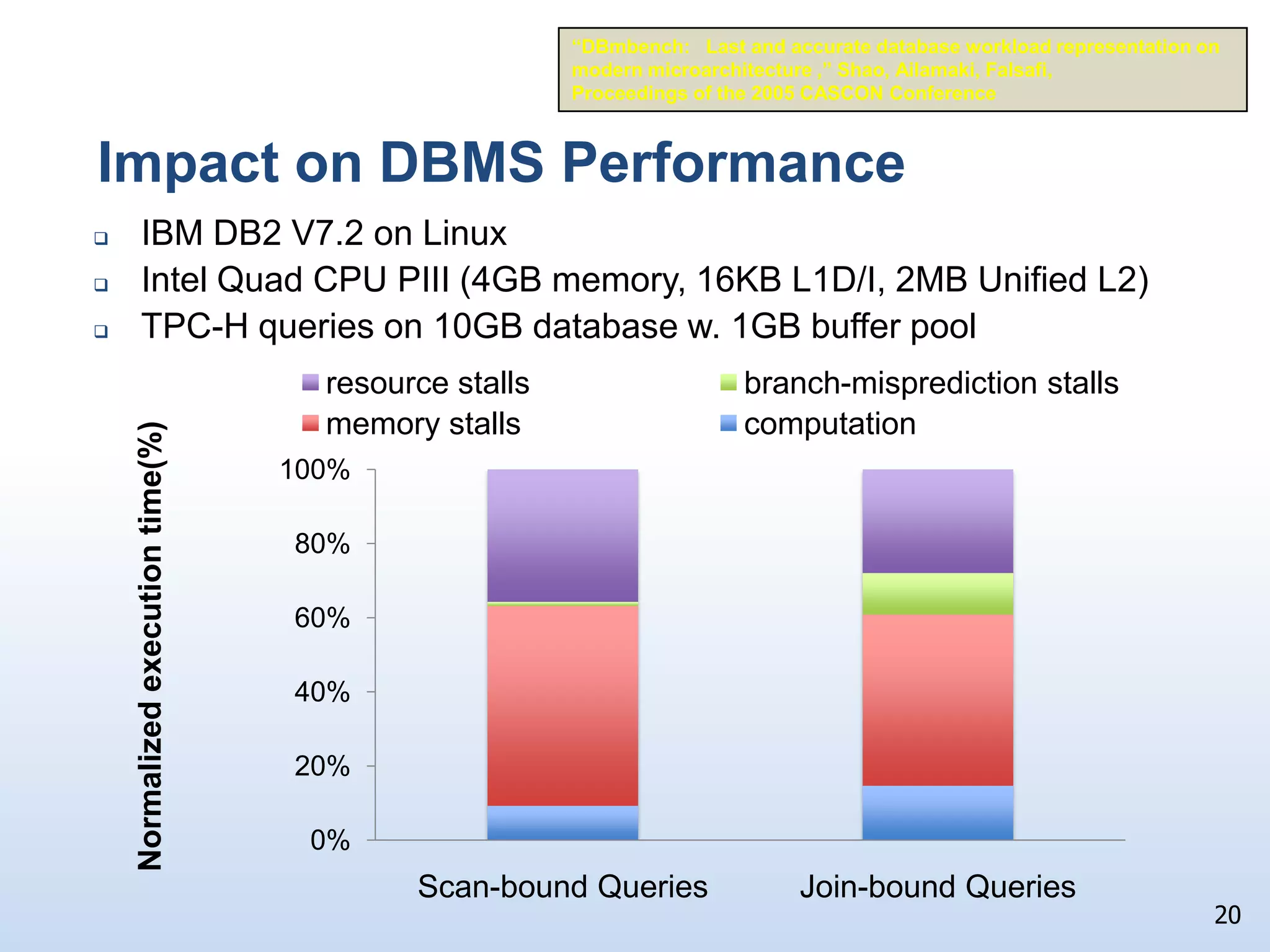
  6 cycles to access     memoryImpact on DBMS Performance“DBmbench:   Last and accurate database workload representation on modern microarchitecture ,” Shao, Ailamaki, Falsafi,Proceedings of the 2005 CASCON ConferenceIBM DB2 V7.2 on Linux
Intel Quad CPU PIII (4GB memory, 16KB L1D/I, 2MB Unified L2)
TPC-H queries on 10GB database w. 1GB buffer pool20
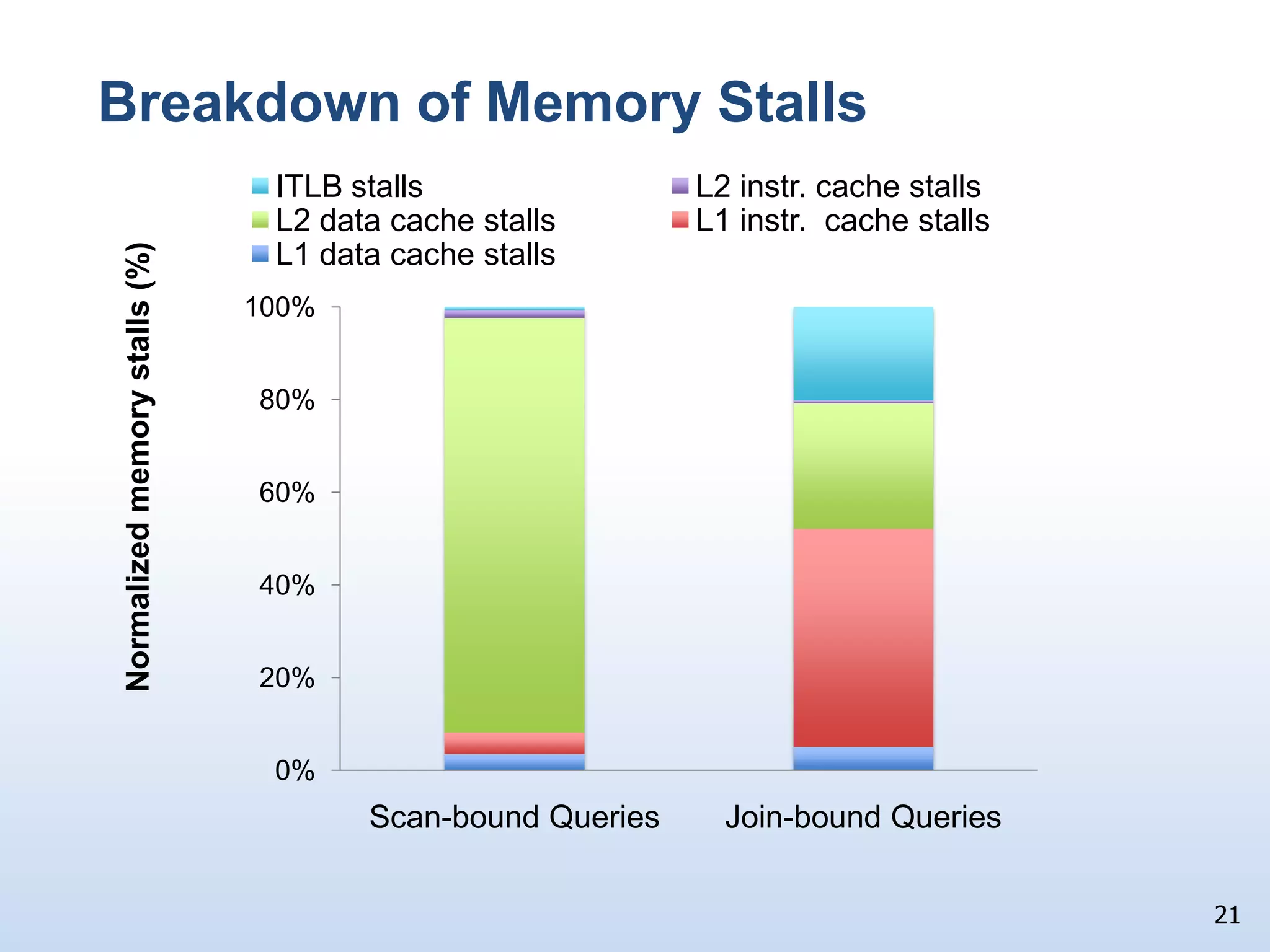
Breakdown of Memory Stalls21
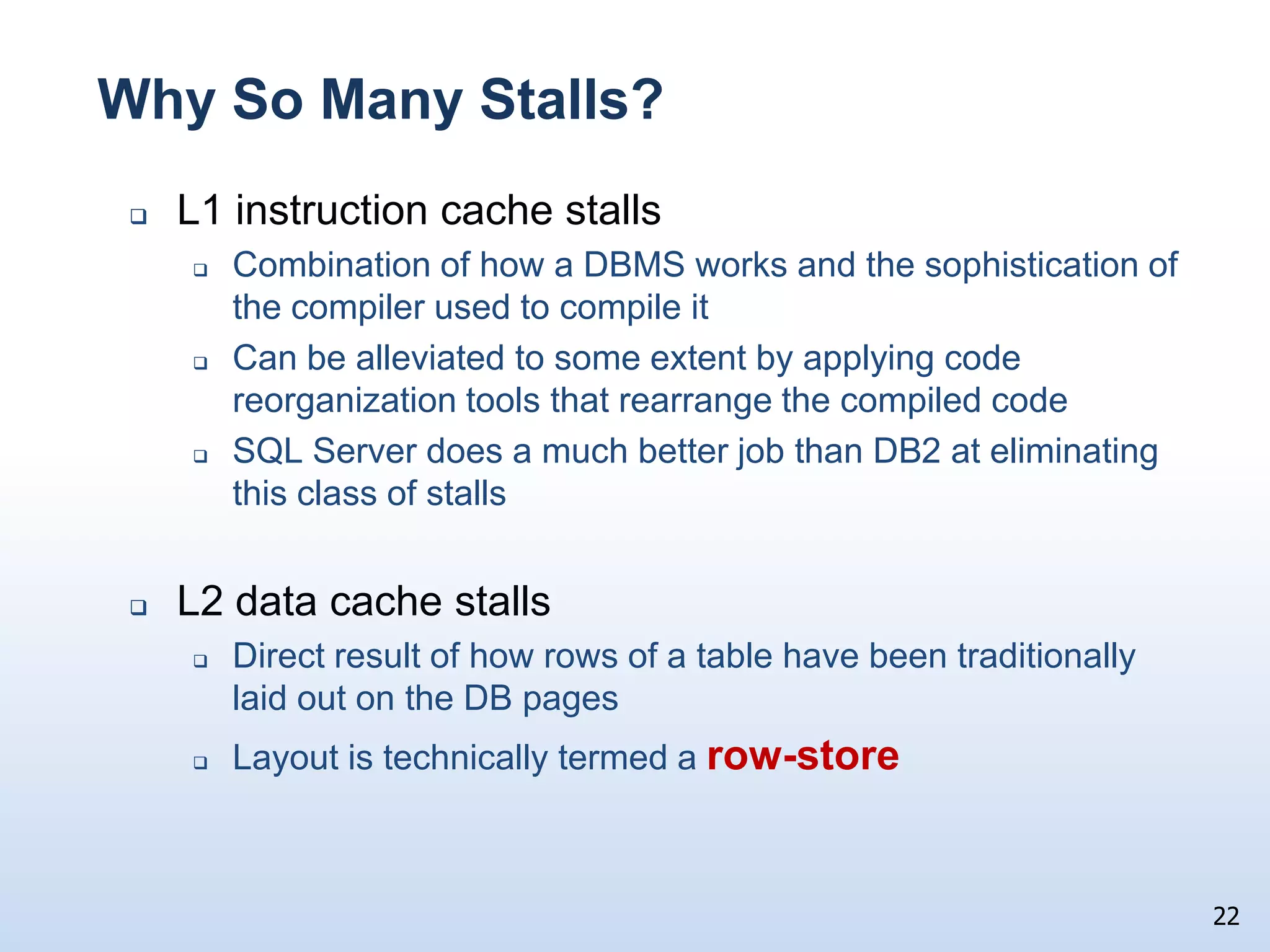
Why So Many Stalls?L1 instruction cache stallsCombination of how a DBMS works and the sophistication of the compiler used to compile itCan be alleviated to some extent by applying code reorganization tools that rearrange the compiled codeSQL Server does a much better job than DB2 at eliminating this class of stallsL2 data cache stallsDirect result of how rows of a table have been traditionally laid out on the DB pagesLayout is technically termed a row-store22
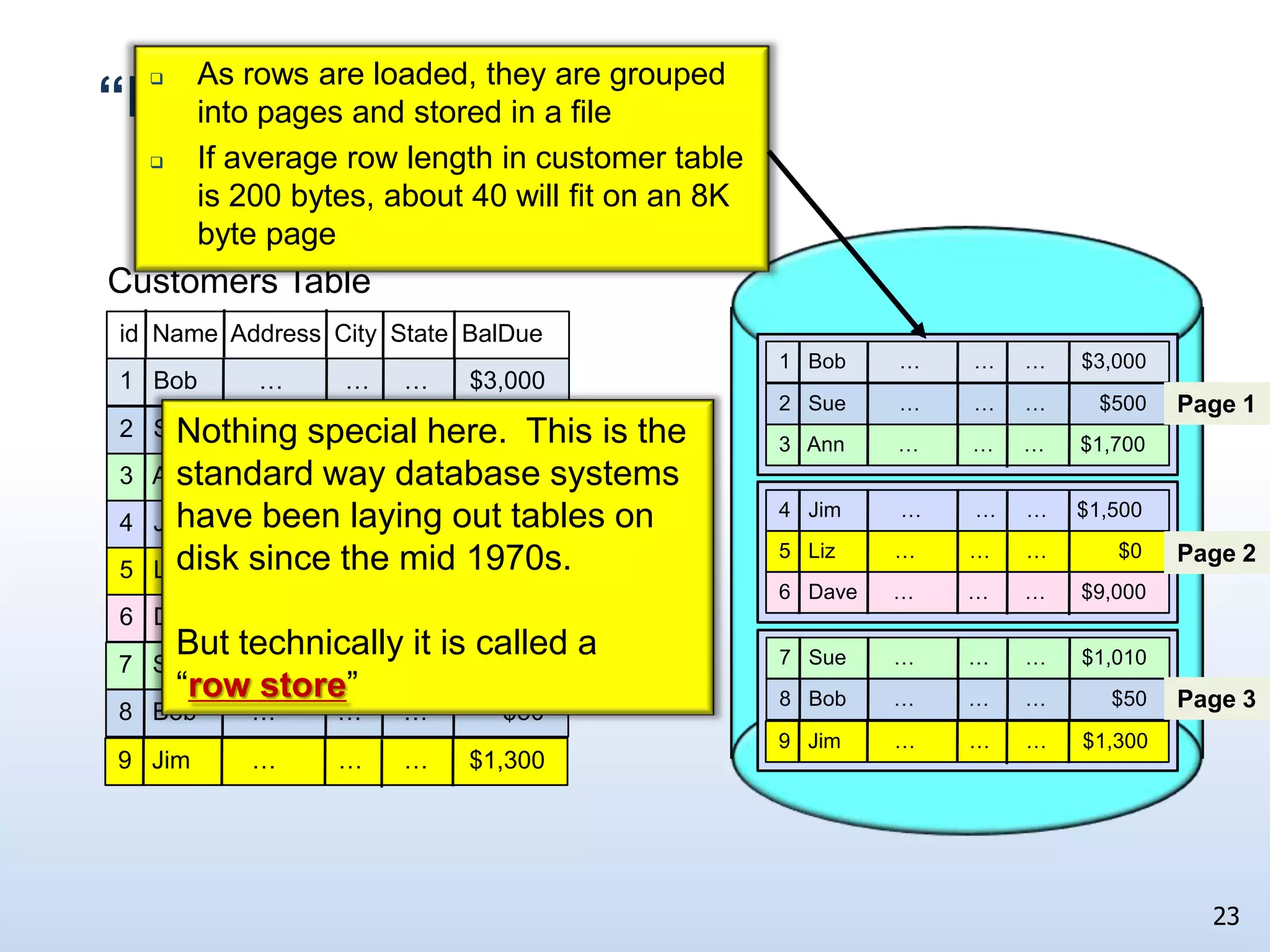
23“Row-store” LayoutAs rows are loaded, they are grouped into pages and stored in a file If average row length in customer table is 200 bytes, about 40 will fit on an 8K byte pageCustomers Table6   Dave      …         …      …      $9,0006   Dave      …         …      …      $9,0002   Sue         …         …     …         $5003   Ann         …         …     …      $1,7004   Jim          …         …     …     $1,5005   Liz          …         …      …            $07   Sue        …         …      …      $1,0108   Bob        …         …      …           $509   Jim         …         …      …      $1,3002   Sue         …         …     …         $5003   Ann         …         …     …      $1,7004   Jim          …         …     …     $1,5005   Liz          …         …      …            $07   Sue        …         …      …      $1,0108   Bob        …         …      …           $509   Jim         …         …      …      $1,300id  Name  Address  City  State  BalDue1   Bob         …         …     …      $3,0001   Bob         …         …     …      $3,000Page 1Nothing special here.  This is the standard way database systems have been laying out tables on disk since the mid 1970s.But technically it is called a “row store”Page 2Page 3
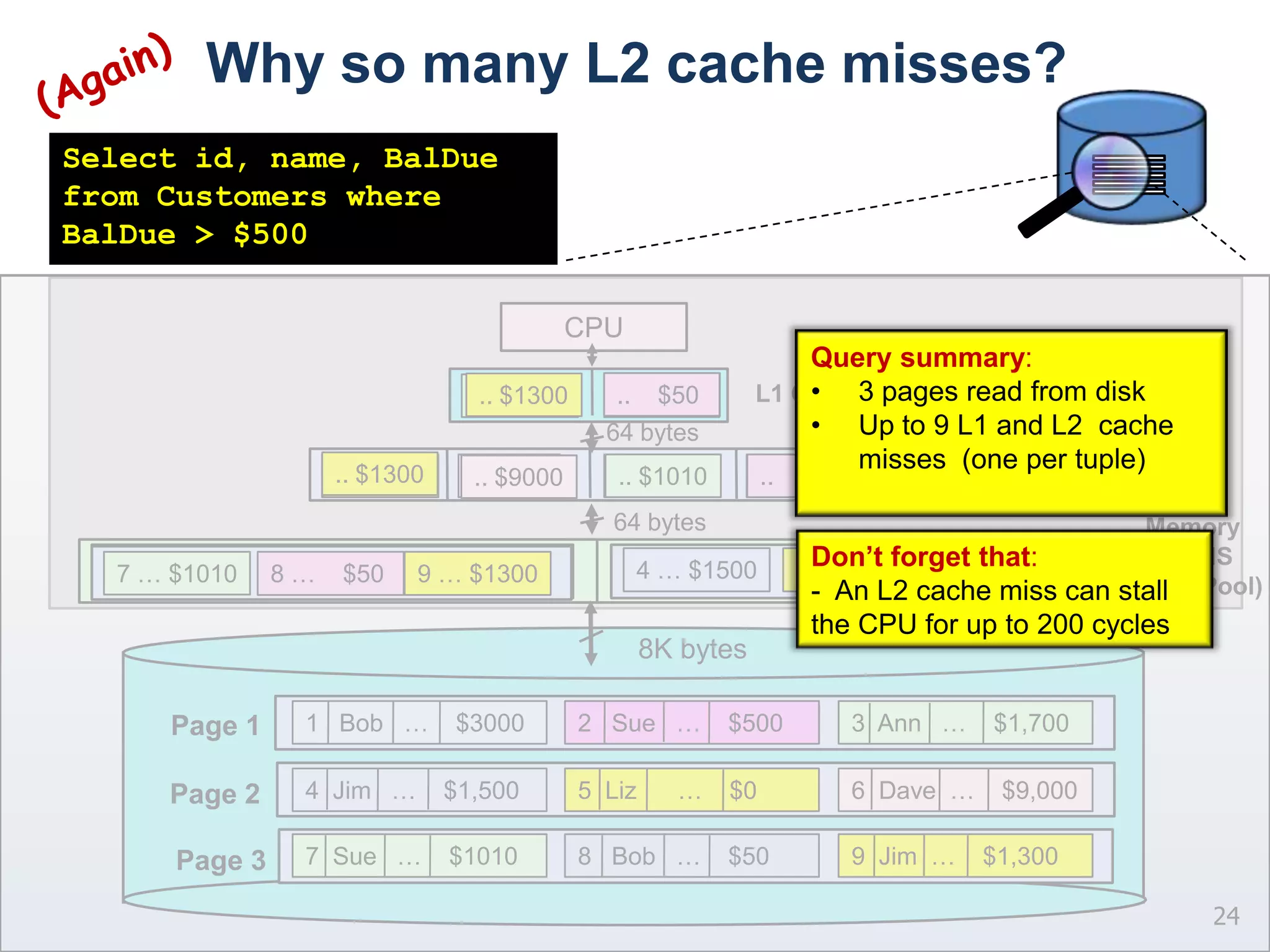
Why so many L2 cache misses?24(Again)Select id, name, BalDue from Customers where BalDue > $500CPUQuery summary:3 pages read from disk
Up to 9 L1 and L2  cache misses  (one per tuple)L1 Cache..    $50 .. $9000.. $1300.. $1500.. $3000.. $500.. $1700.. $1010..       $064 bytesPage 1L2 Cache.. $1300.. $3000.. $500.. $1700.. $1500..       $0.. $1010..    $50 .. $9000Page 264 bytesMemory (DBMS Buffer Pool)Don’t forget that:  An L2 cache miss can stall the CPU for up to 200 cyclesPage 38K bytes7  Sue   …    $10108   Bob   …    $509  Jim  …    $1,3004  Jim   …    $1,5005  Liz      …    $06  Dave  …    $9,0001   Bob   …    $30002   Sue   …    $5003  Ann   …    $1,7004 … $15005 …     $06 … $90001 … $30002 …  $5003 … $17007 … $10108 …    $509 … $1300
Row Store Design Summary	25Can incur up to one L2 data cache miss per row processed if row size is greater than the size of the cache lineDBMS transfers the entire row from disk to memory even though the query required just 3 attributesDesign wastes precious disk bandwidth for read intensive workloads  Don’t forget 10,000X  vs. 65XIs there an alternative physical organization?Yes, something called a column store
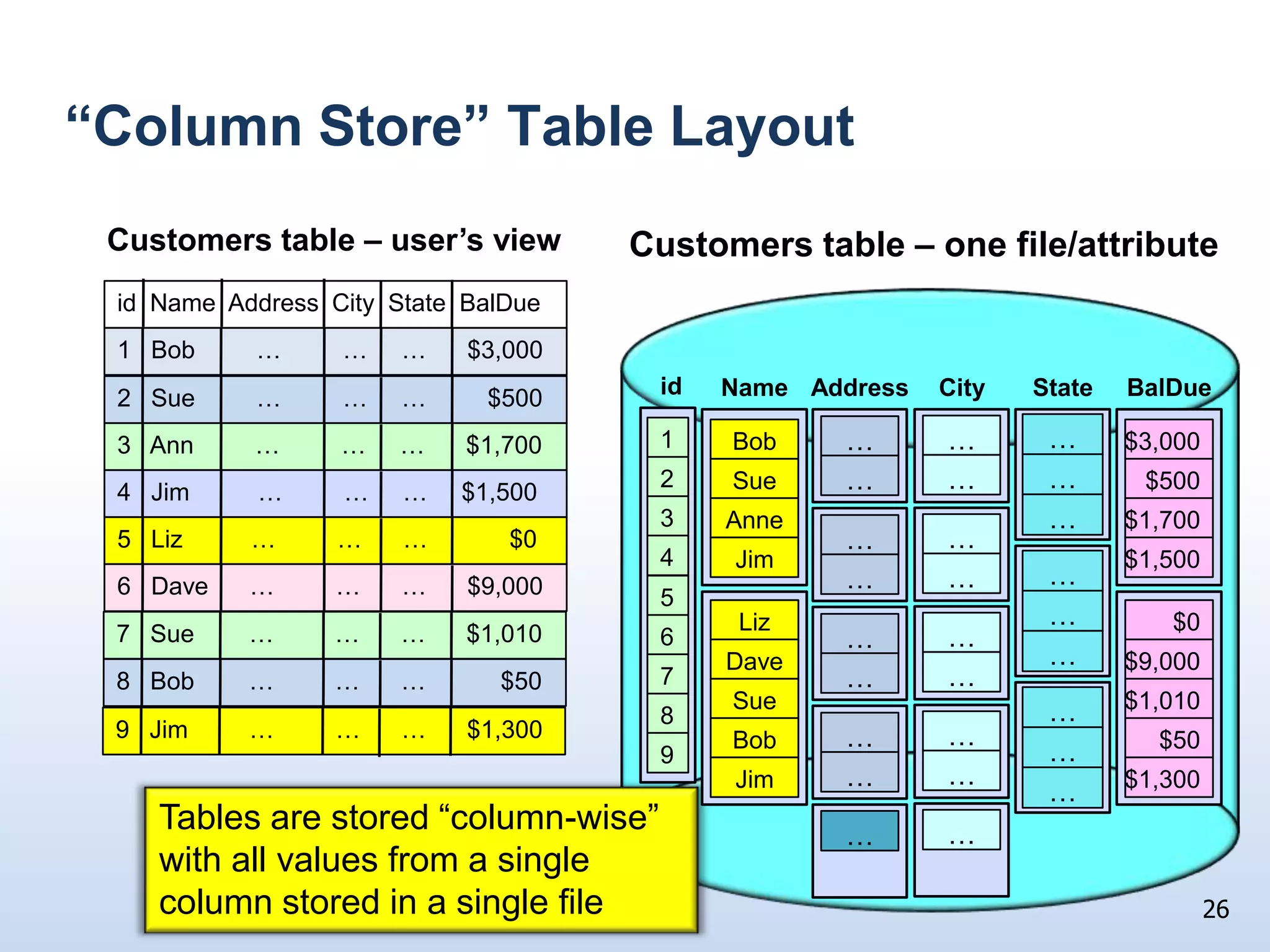
“Column Store” Table LayoutidBalDueStateCityAddressName$3,000BobCustomers table – user’s viewCustomers table – one file/attribute$500Sue$1,700Anne$1,500Jim6   Dave      …         …      …      $9,0002   Sue         …         …     …         $5003   Ann         …         …     …      $1,7004   Jim          …         …     …     $1,5005   Liz          …         …      …            $07   Sue        …         …      …      $1,0108   Bob        …         …      …           $509   Jim         …         …      …      $1,300id  Name  Address  City  State  BalDue1   Bob         …         …     …      $3,00012……………………3……………………45$0Liz6$9,000Dave7$1,010Sue8$50………Bob………………9$1,300Jim……Tables are stored “column-wise” with all values from a single column stored in a single file26
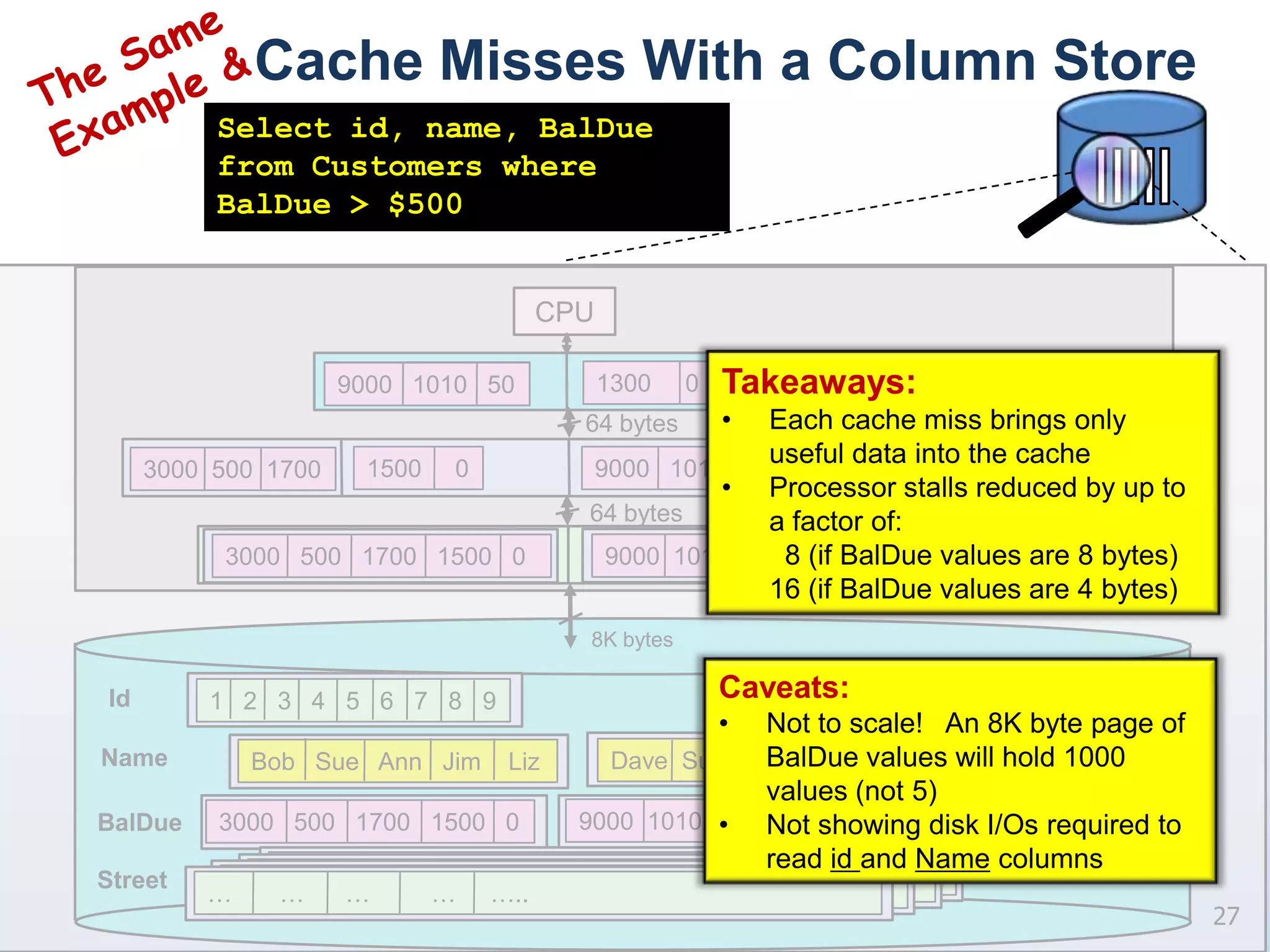
Cache Misses With a Column Store27The Same Example &Select id, name, BalDue from Customers where BalDue > $500CPUTakeaways:Each cache miss brings only useful data into the cache
Processor stalls reduced by up to a factor of:	  8 (if BalDue values are 8 bytes)16 (if BalDue values are 4 bytes)1300        L1 Cache64 bytesL2 Cache1300        64 bytes9000  1010  50   1300     …       …      …         …     …..…       …      …         …     …..…       …      …         …     …..…       …      …         …     …..9000  1010  50   1300     3000  500  17003000  500  17009000   1010  503000   500   1700   1500   0   3000   500   1700   1500   0   9000   1010   50Memory8K bytesCaveats:Not to scale!   An 8K byte page of BalDue values will hold 1000 values (not 5)
Not showing disk I/Os required to read id and Name columns Id1500     01500     0Bob   Sue   Ann   Jim    LizNameDave  Sue   Bob   Jim  BalDue1   2   3   4   5   6   7   8   9Street
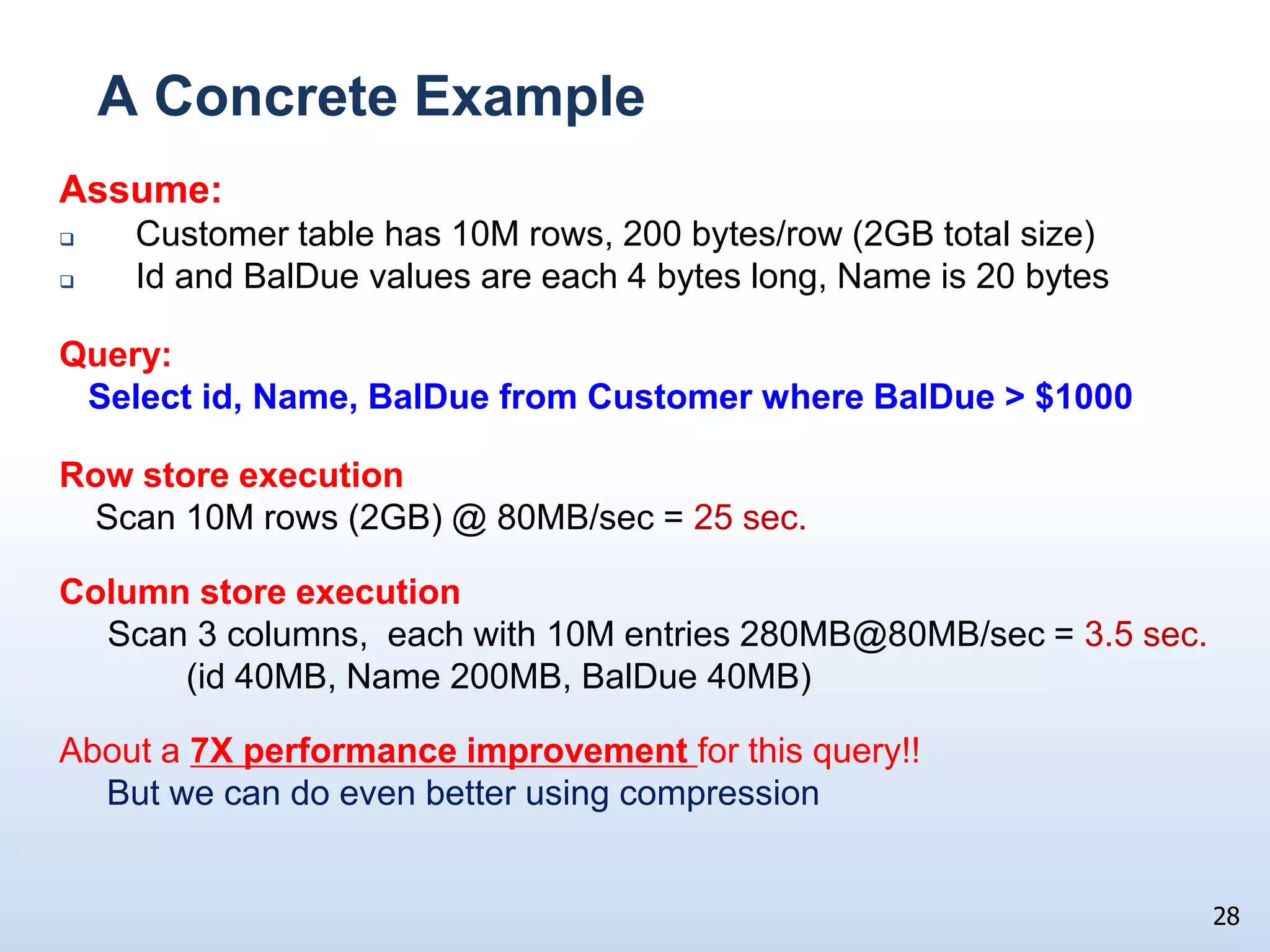
A Concrete ExampleAssume:    Customer table has 10M rows, 200 bytes/row (2GB total size)   Id and BalDue values are each 4 bytes long, Name is 20 bytesQuery:   Select id, Name, BalDue from Customer where BalDue > $1000Row store executionScan 10M rows (2GB) @ 80MB/sec = 25 sec.Column store execution     Scan 3 columns,  each with 10M entries 280MB@80MB/sec = 3.5 sec. 		(id 40MB, Name 200MB, BalDue 40MB)About a 7X performance improvement for this query!! 	But we can do even better using compression28
Summarizing:Storing tables as a set of columns:Significantly reduces the amount of disk I/O required to execute a query“Select * from Customer where …” will neverbe fasterImproves CPU performance by reducing memory stalls caused by L2 data cache missesFacilitates the application of VERY aggressive compression techniques, reducing disk I/Os and L2 cache misses even further29
Column Store Implementation Issues30
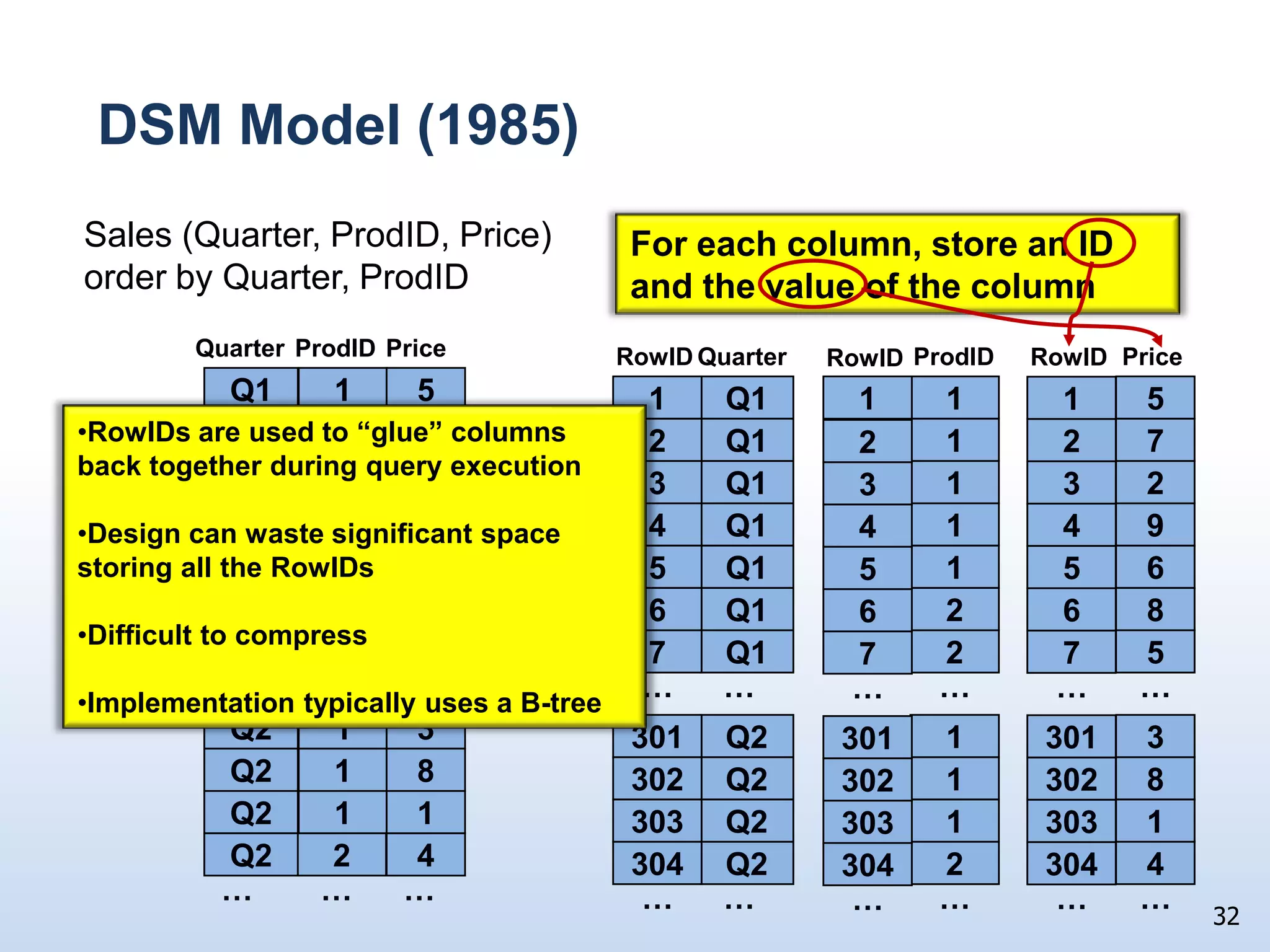
Physical Representation AlternativesThree main alternatives:DSM (1985 – Copeland & Koshafian)Modified B-tree (2005 – DeWitt & Ramamurthy)“Positional” representation (Sybase IQ and C-Store/Vertica)31Sales (Quarter, ProdID, Price) order by Quarter, ProdID1Q15ProdIDQuarterPrice1Q171Q121Q191Q162Q182Q15………1Q231Q281Q212Q24………
DSM Model (1985)32Sales (Quarter, ProdID, Price) order by Quarter, ProdIDFor each column, store an ID and the value of the columnQuarterRowIDPriceRowIDProdID1RowID1Q15Q11511ProdIDQuarterPrice1Q17Q127212RowIDs are used to “glue” columns back together during query execution
Design can waste significant space storing all the RowIDs
Difficult to compress
Implementation typically uses a B-tree1Q12Q1323131Q19Q1494141Q16Q1565152Q18Q1686262Q15Q175727………………………1Q23Q2301330113011Q28Q2302830213021Q21Q2303130313032Q24Q230443042304………………………
Alternative B-Tree representations33Dense B-tree on RowID  – one entry for each value in columnQuarterRowIDQ11…                …Q12Q13Q14Q15301Q2302Q2302Q2302Q21Q12Q13Q14Q1……1Q1301Q2956Q31501Q4……Q16Sparse B-tree on RowID  – one entry for each group of identical column valuesQ17……Q2301300…                …Q23021500Q2303Q2304……
Positional RepresentationEach column stored as a separate file with values stored one after anotherNo typical “slotted page” indirection or record headers Store only column values, no RowIDsAssociated RowIDs computed during query processingAggressively compress34ProdIDQuarterPrice1Q151Q15ProdIDQuarterPrice1Q171Q171Q121Q121Q191Q191Q161Q162Q182Q182Q152Q15………………1Q231Q231Q281Q281Q211Q212Q242Q24………………

PASS Summit 2009 Keynote Dave DeWitt

  • 1.
    From 1 to1000MIPSDavid J. DeWittMicrosoft Jim Gray Systems LabMadison, Wisconsindewitt@microsoft.com© 2009 Microsoft Corporation.  All rights reserved.  This presentation is for informational purposes only.  Microsoft makes no warranties, express or implied in this presentation.
  • 2.
    Wow. Theyinvited me back. Thanks!!I guess some people did not fall asleep last yearStill no new product announcements to makeStill no motorcycle to ride across the stageNo192-core servers to demo But I did bring blue books for the quiz2
  • 3.
    Who is thisguy again?MSpent 32 years as a computer science professor at the University of WisconsinJoined Microsoft in March 2008Run the Jim Gray Systems Lab in Madison, WILab is closely affiliated with the DB group at University of Wisconsin3 faculty and 8 graduate students working on projectsWorking on releases 1 and 2 of SQL Server Parallel Database Warehouse Tweet if you think SQL* would be a better name!3
  • 4.
    If you skippedlast year’s lecture …4Node KNode 2Node 1MEMMEMMEMCPUCPUCPUInterconnection NetworkTalked about parallel database technology and why products like SQL Server Parallel Data Warehouse employ a shared-nothing architectures to achieve scalability to 100s of nodes and petabytes of data…
  • 5.
    Today …I wantto dive in deep, really deepBased on feedback from last year’s talkLook at how trends in CPUs, memories, and disks impact the designs of the database system running on each of those nodes Database system specialization is inevitable over the next 10 yearsGeneral purpose systems will certainly not go away, but
  • 6.
    Specialized database productsfor transaction processing, data warehousing, main memory resident database, databases in the middle-tier, …
  • 7.
    Evolution at workDisclaimer Thisis an academic talkI am NOT announcing any productsI am NOT indicating any possible product directions for MicrosoftI am NOT announcing any productsI am NOT indicating any possible product directions for MicrosoftIt is, however, good for you to know this materialThis is an academic talk, so ….. 6
  • 8.
    to keep my boss happy:For the remainder of this talk I am switching to my “other” title:7David J. DeWittEmeritus ProfessorComputer Sciences DepartmentUniversity of Wisconsin
  • 9.
    Talk Outline Look at30 years of technology trends in CPUs, memories, and disksExplain how these trends have impacted database system performance for OLTP and decision support workloadsWhy these trends are forcing DBMS to evolve Some technical solutionsSummary and conclusions8
  • 10.
    9Query engineBuffer poolTimetravel back to 1980Dominate hardware platform was the Digital VAX 11/7801 MIPS CPU w. 1KB of cache memory8 MB memory (maximum)80 MB disk drives w. 1 MB/second transfer rate$250K purchase price!INGRES & Oracle were the dominant vendorsSame basic DBMS architecture as is in use today
  • 11.
    Since 1980 TodayBasic RDMS design is essentially unchangedExcept for scale-out using parallelismBut the hardware landscape has changed dramatically:10Today1980Design Circa 1980RDBMS10,000X2,000XDisksDisksCPUCPU1,000X1,000X80 MB800 GB2 GIPS1 MIPSCPU CachesMemoryMemoryCPU Caches1 MB2 MB/CPU1 KB2 GB/CPU
  • 12.
    A little closerlook at 30 year disk trendsCapacities: 80 MB  800 GB - 10,000XTransfer rates: 1.2 MB/sec  80 MB/sec - 65XAvg. seek times: 30 ms  3 ms - 10X(30 I/Os/sec  300 I/Os/sec) The significant differences in these trends (10,000X vs. 65X vs. 10X) have had a huge impact on both OLTP and data warehouse workloads (as we will see)11
  • 13.
    Looking at OLTP198019851975ConsiderTPC A/B results from 1985:
  • 14.
    Fastest system wasIBM’s IMS Fastpath DBMS running on a top-of-the-line IBM 370 mainframe at 100 TPS with 4 disk I/Os per transaction:
  • 15.
    100 TPS 400 disk I/Os/second
  • 16.
    @ 30 I/Os/sec.per drive 14 drives
  • 17.
    Fastest relational productscould only do 10 TPS12
  • 18.
  • 19.
    202020302009After 30 yearsof CPU and memory improvements, SQL Server on a modest Intel box can easily achieve 25,000 TPS (TPC-B)
  • 20.
    25,000 TPS 100,000 disk I/Os/second
  • 21.
    @300 I/Os/sec perdrive 330 drives!!!
  • 22.
    Relative performance ofCPUs and disks is totally out of whack14
  • 23.
    OLTP Takeaway The benefitsfrom a 1,000x improvement in CPU performance and memory sizes are almost negated bythe 10X in disk accesses/secondForcing us to run our OLTP systems with 1000s of mostly empty disk drivesNo easy software fix, unfortunatelySSDs provide the only real hope15
  • 24.
    Turning to DataWarehousingTwo key hardware trends have had a huge impact on the performance of single box relational DB systems:The imbalance between disk capacities and transfer ratesThe ever increasing gap between CPU performance and main memory bandwidth16
  • 25.
    Looking at DiskImprovementsIncredibly inexpensive drives (& processors) have made it possible to collect, store, and analyze huge quantities of data17Over the last 30 yearsCapacity:80MB  800GB10,000xTransfer Rates:1.2MB/sec  80MB/sec65xBut, consider the metric transfer bandwidth/byte1980: 1.2 MB/sec / 80 MB = 0.015 2009: 80 MB/sec / 800,000 MB =.0001When relative capacities are factored in, drives are 150X slower today!!!
  • 26.
    Another Viewpoint1980 30random I/Os/sec @ 8KB pages  240KB/secSequential transfers ran at 1.2 MB/secSequential/Random 5:12009300 random I/Os/sec @ 8KB pages  2.4 MB/secSequential transfers run at 80 MB/secSequential/Random 33:1Takeaway: DBMS must avoid doing random disk I/Os whenever possible18
  • 27.
    Turning to CPUTrendsIntel Core 2 DuoVax 11/780 (1980)19Key takeaway: 30 years ago the time required to access memory and execute an instruction were balanced. Today:Memory accesses are much slowerUnit of transfer from memory to the L2 cache is only 64 bytesTogether these have a large impact on DB performance DieCache lineCPUCPUCPUL1 CacheL2 CacheL1 cacheL1 cacheMemoryMemory64 bytesMemory page 64 KB private L1 caches
  • 28.
    2- 8 MB shared L2 cache
  • 29.
    1cycle/instruction
  • 30.
    2cycles to access L1 cache
  • 31.
    20cycles to access L2 cache
  • 32.
    200 cycles toaccess memory
  • 33.
    8KB L1 cache
  • 34.
  • 35.
    6cycles to access memoryImpact on DBMS Performance“DBmbench: Last and accurate database workload representation on modern microarchitecture ,” Shao, Ailamaki, Falsafi,Proceedings of the 2005 CASCON ConferenceIBM DB2 V7.2 on Linux
  • 36.
    Intel Quad CPUPIII (4GB memory, 16KB L1D/I, 2MB Unified L2)
  • 37.
    TPC-H queries on10GB database w. 1GB buffer pool20
  • 38.
  • 39.
    Why So ManyStalls?L1 instruction cache stallsCombination of how a DBMS works and the sophistication of the compiler used to compile itCan be alleviated to some extent by applying code reorganization tools that rearrange the compiled codeSQL Server does a much better job than DB2 at eliminating this class of stallsL2 data cache stallsDirect result of how rows of a table have been traditionally laid out on the DB pagesLayout is technically termed a row-store22
  • 40.
    23“Row-store” LayoutAs rowsare loaded, they are grouped into pages and stored in a file If average row length in customer table is 200 bytes, about 40 will fit on an 8K byte pageCustomers Table6 Dave … … … $9,0006 Dave … … … $9,0002 Sue … … … $5003 Ann … … … $1,7004 Jim … … … $1,5005 Liz … … … $07 Sue … … … $1,0108 Bob … … … $509 Jim … … … $1,3002 Sue … … … $5003 Ann … … … $1,7004 Jim … … … $1,5005 Liz … … … $07 Sue … … … $1,0108 Bob … … … $509 Jim … … … $1,300id Name Address City State BalDue1 Bob … … … $3,0001 Bob … … … $3,000Page 1Nothing special here. This is the standard way database systems have been laying out tables on disk since the mid 1970s.But technically it is called a “row store”Page 2Page 3
  • 41.
    Why so manyL2 cache misses?24(Again)Select id, name, BalDue from Customers where BalDue > $500CPUQuery summary:3 pages read from disk
  • 42.
    Up to 9L1 and L2 cache misses (one per tuple)L1 Cache.. $50 .. $9000.. $1300.. $1500.. $3000.. $500.. $1700.. $1010.. $064 bytesPage 1L2 Cache.. $1300.. $3000.. $500.. $1700.. $1500.. $0.. $1010.. $50 .. $9000Page 264 bytesMemory (DBMS Buffer Pool)Don’t forget that: An L2 cache miss can stall the CPU for up to 200 cyclesPage 38K bytes7 Sue … $10108 Bob … $509 Jim … $1,3004 Jim … $1,5005 Liz … $06 Dave … $9,0001 Bob … $30002 Sue … $5003 Ann … $1,7004 … $15005 … $06 … $90001 … $30002 … $5003 … $17007 … $10108 … $509 … $1300
  • 43.
    Row Store DesignSummary 25Can incur up to one L2 data cache miss per row processed if row size is greater than the size of the cache lineDBMS transfers the entire row from disk to memory even though the query required just 3 attributesDesign wastes precious disk bandwidth for read intensive workloads Don’t forget 10,000X vs. 65XIs there an alternative physical organization?Yes, something called a column store
  • 44.
    “Column Store” TableLayoutidBalDueStateCityAddressName$3,000BobCustomers table – user’s viewCustomers table – one file/attribute$500Sue$1,700Anne$1,500Jim6 Dave … … … $9,0002 Sue … … … $5003 Ann … … … $1,7004 Jim … … … $1,5005 Liz … … … $07 Sue … … … $1,0108 Bob … … … $509 Jim … … … $1,300id Name Address City State BalDue1 Bob … … … $3,00012……………………3……………………45$0Liz6$9,000Dave7$1,010Sue8$50………Bob………………9$1,300Jim……Tables are stored “column-wise” with all values from a single column stored in a single file26
  • 45.
    Cache Misses Witha Column Store27The Same Example &Select id, name, BalDue from Customers where BalDue > $500CPUTakeaways:Each cache miss brings only useful data into the cache
  • 46.
    Processor stalls reducedby up to a factor of: 8 (if BalDue values are 8 bytes)16 (if BalDue values are 4 bytes)1300 L1 Cache64 bytesL2 Cache1300 64 bytes9000 1010 50 1300 … … … … …..… … … … …..… … … … …..… … … … …..9000 1010 50 1300 3000 500 17003000 500 17009000 1010 503000 500 1700 1500 0 3000 500 1700 1500 0 9000 1010 50Memory8K bytesCaveats:Not to scale! An 8K byte page of BalDue values will hold 1000 values (not 5)
  • 47.
    Not showing diskI/Os required to read id and Name columns Id1500 01500 0Bob Sue Ann Jim LizNameDave Sue Bob Jim BalDue1 2 3 4 5 6 7 8 9Street
  • 48.
    A Concrete ExampleAssume: Customer table has 10M rows, 200 bytes/row (2GB total size) Id and BalDue values are each 4 bytes long, Name is 20 bytesQuery: Select id, Name, BalDue from Customer where BalDue > $1000Row store executionScan 10M rows (2GB) @ 80MB/sec = 25 sec.Column store execution Scan 3 columns, each with 10M entries 280MB@80MB/sec = 3.5 sec. (id 40MB, Name 200MB, BalDue 40MB)About a 7X performance improvement for this query!! But we can do even better using compression28
  • 49.
    Summarizing:Storing tables asa set of columns:Significantly reduces the amount of disk I/O required to execute a query“Select * from Customer where …” will neverbe fasterImproves CPU performance by reducing memory stalls caused by L2 data cache missesFacilitates the application of VERY aggressive compression techniques, reducing disk I/Os and L2 cache misses even further29
  • 50.
  • 51.
    Physical Representation AlternativesThreemain alternatives:DSM (1985 – Copeland & Koshafian)Modified B-tree (2005 – DeWitt & Ramamurthy)“Positional” representation (Sybase IQ and C-Store/Vertica)31Sales (Quarter, ProdID, Price) order by Quarter, ProdID1Q15ProdIDQuarterPrice1Q171Q121Q191Q162Q182Q15………1Q231Q281Q212Q24………
  • 52.
    DSM Model (1985)32Sales(Quarter, ProdID, Price) order by Quarter, ProdIDFor each column, store an ID and the value of the columnQuarterRowIDPriceRowIDProdID1RowID1Q15Q11511ProdIDQuarterPrice1Q17Q127212RowIDs are used to “glue” columns back together during query execution
  • 53.
    Design can wastesignificant space storing all the RowIDs
  • 54.
  • 55.
    Implementation typically usesa B-tree1Q12Q1323131Q19Q1494141Q16Q1565152Q18Q1686262Q15Q175727………………………1Q23Q2301330113011Q28Q2302830213021Q21Q2303130313032Q24Q230443042304………………………
  • 56.
    Alternative B-Tree representations33DenseB-tree on RowID – one entry for each value in columnQuarterRowIDQ11… …Q12Q13Q14Q15301Q2302Q2302Q2302Q21Q12Q13Q14Q1……1Q1301Q2956Q31501Q4……Q16Sparse B-tree on RowID – one entry for each group of identical column valuesQ17……Q2301300… …Q23021500Q2303Q2304……
  • 57.
    Positional RepresentationEach columnstored as a separate file with values stored one after anotherNo typical “slotted page” indirection or record headers Store only column values, no RowIDsAssociated RowIDs computed during query processingAggressively compress34ProdIDQuarterPrice1Q151Q15ProdIDQuarterPrice1Q171Q171Q121Q121Q191Q191Q161Q162Q182Q182Q152Q15………………1Q231Q231Q281Q281Q211Q212Q242Q24………………
  • 58.
    35Compression in ColumnStoresTrades I/O cycles for CPU cyclesRemember CPUs have gotten 1000X faster while disks have gotten only 65X fasterIncreased opportunities compared to row stores:Higher data value localityTechniques such as run length encoding far more usefulTypical rule of thumb is that compression will obtain: a 10X reduction in table size with a column store a 3X reduction with a row storeCan use extra space to store multiple copies of same data in different sort orders. Remember disks have gotten 10,000X bigger.
  • 59.
    Run Length Encoding(RLE) CompressionProdIDQuarterPricePriceQuarterProdID1Q155(Q1, 1, 300)(1, 1, 5)1Q177(2, 6, 2)(Q2, 301, 350)1Q122…1Q199(Q3, 651, 500)(1, 301, 3)1Q166(Q4, 1151, 600)(2, 304, 1)2Q1882Q155……………(Value, StartPosition, Count)1Q2331Q2881Q2112Q244…………36
  • 60.
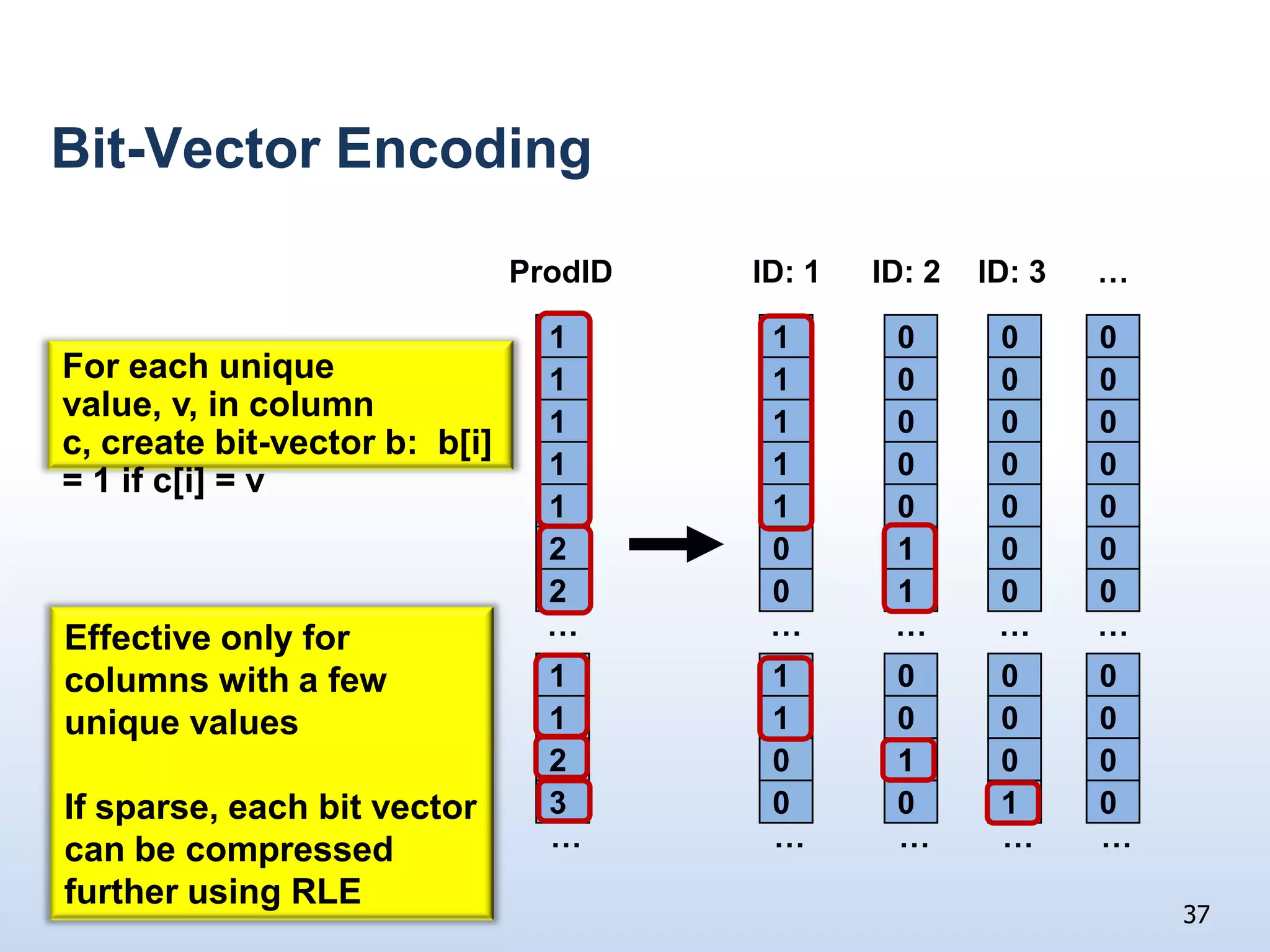
    Bit-Vector EncodingProdIDID: 1…ID:3ID: 211000For each unique value, v, in column c, create bit-vector b: b[i] = 1 if c[i] = v110001100011000110002000120001Effective only for columns with a few unique valuesIf sparse, each bit vector can be compressed further using RLE……………11000110002000130010……………37
  • 61.
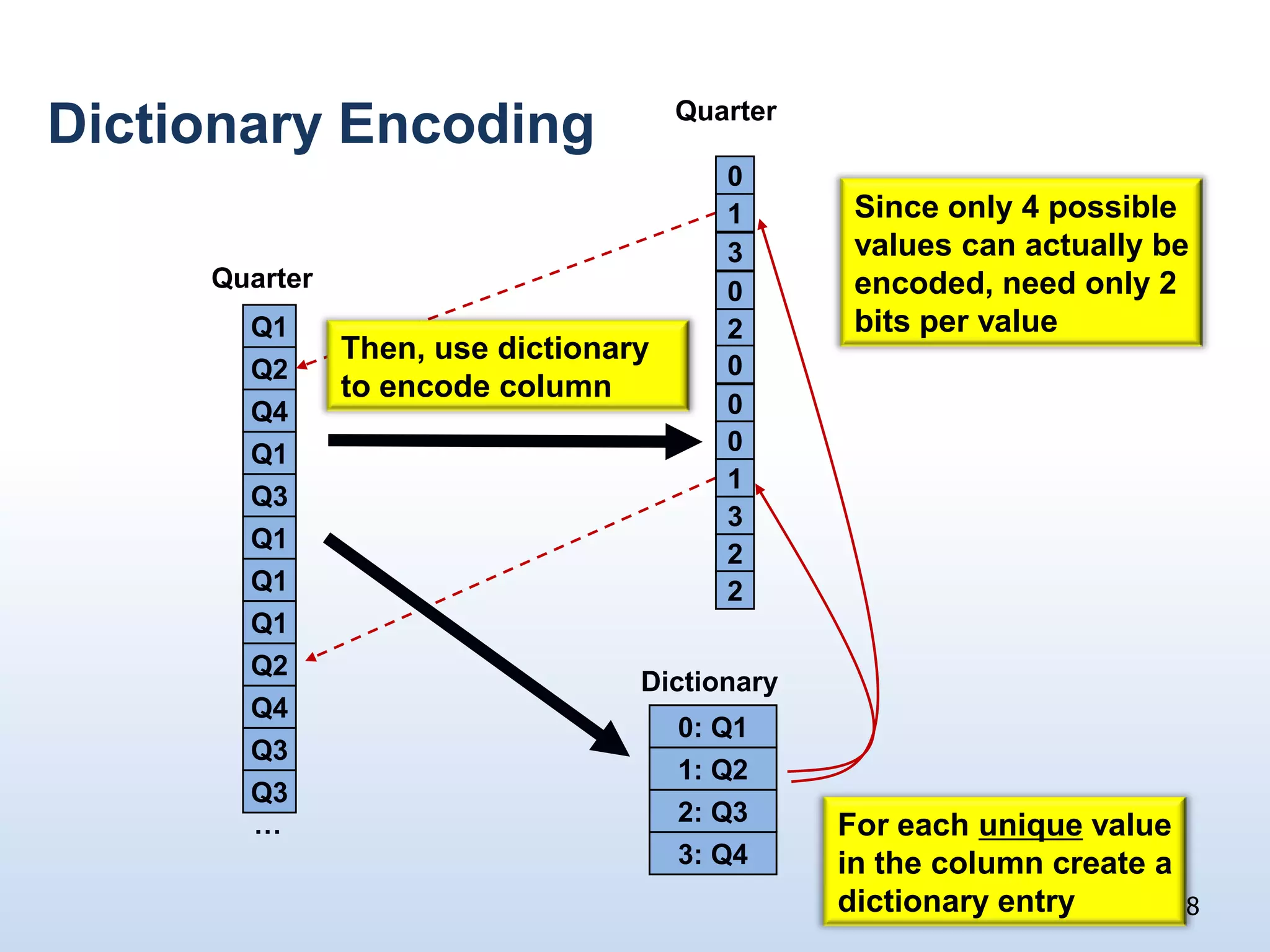
    Dictionary EncodingQuarter Sinceonly 4 possible values can actually be encoded, need only 2 bits per value013Quarter0Then, use dictionary to encode columnQ12Q20Q40Q10Q31Q132Q12Q1DictionaryQ20: Q1Q41: Q2Q32: Q3Q3For each unique value in the column create a dictionary entry…3: Q438
  • 62.
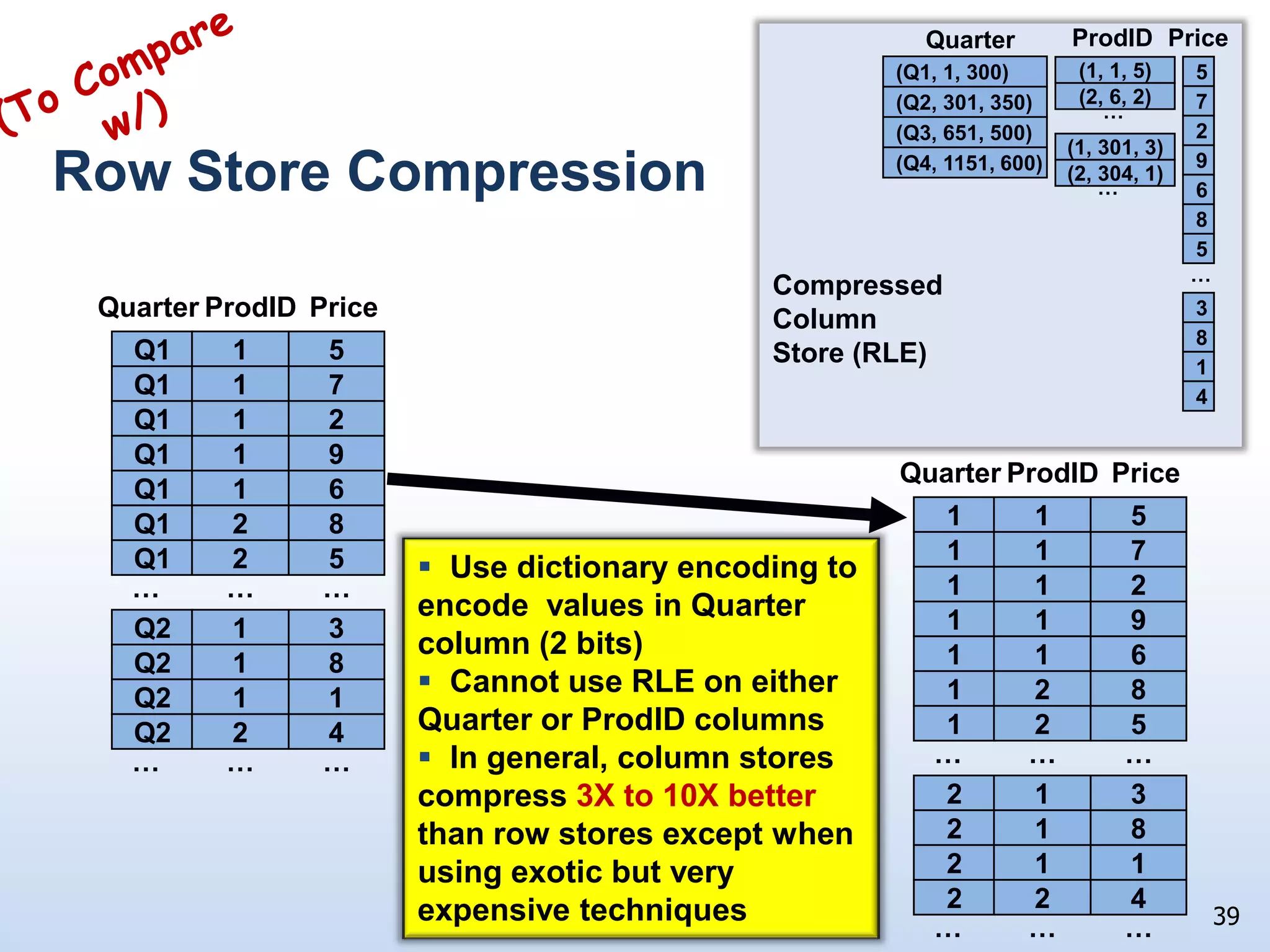
    ProdIDPriceCompressed ColumnStore (RLE)Quarter(ToComparew/)Row Store Compression……ProdIDQuarterPriceProdIDQuarterPrice5Q115115…(Q1, 1, 300)(1, 1, 5)7Q117117(2, 6, 2)(Q2, 301, 350)2Q1121129Q119119(Q3, 651, 500)(1, 301, 3)6Q116116(Q4, 1151, 600)(2, 304, 1)8Q128128 Use dictionary encoding to encode values in Quarter column (2 bits)
  • 63.
    Cannotuse RLE on either Quarter or ProdID columns
  • 64.
    Ingeneral, column stores compress 3X to 10X better than row stores except when using exotic but very expensive techniques5Q125125………………3Q2132138Q2182181Q2112114Q224224………………39
  • 65.
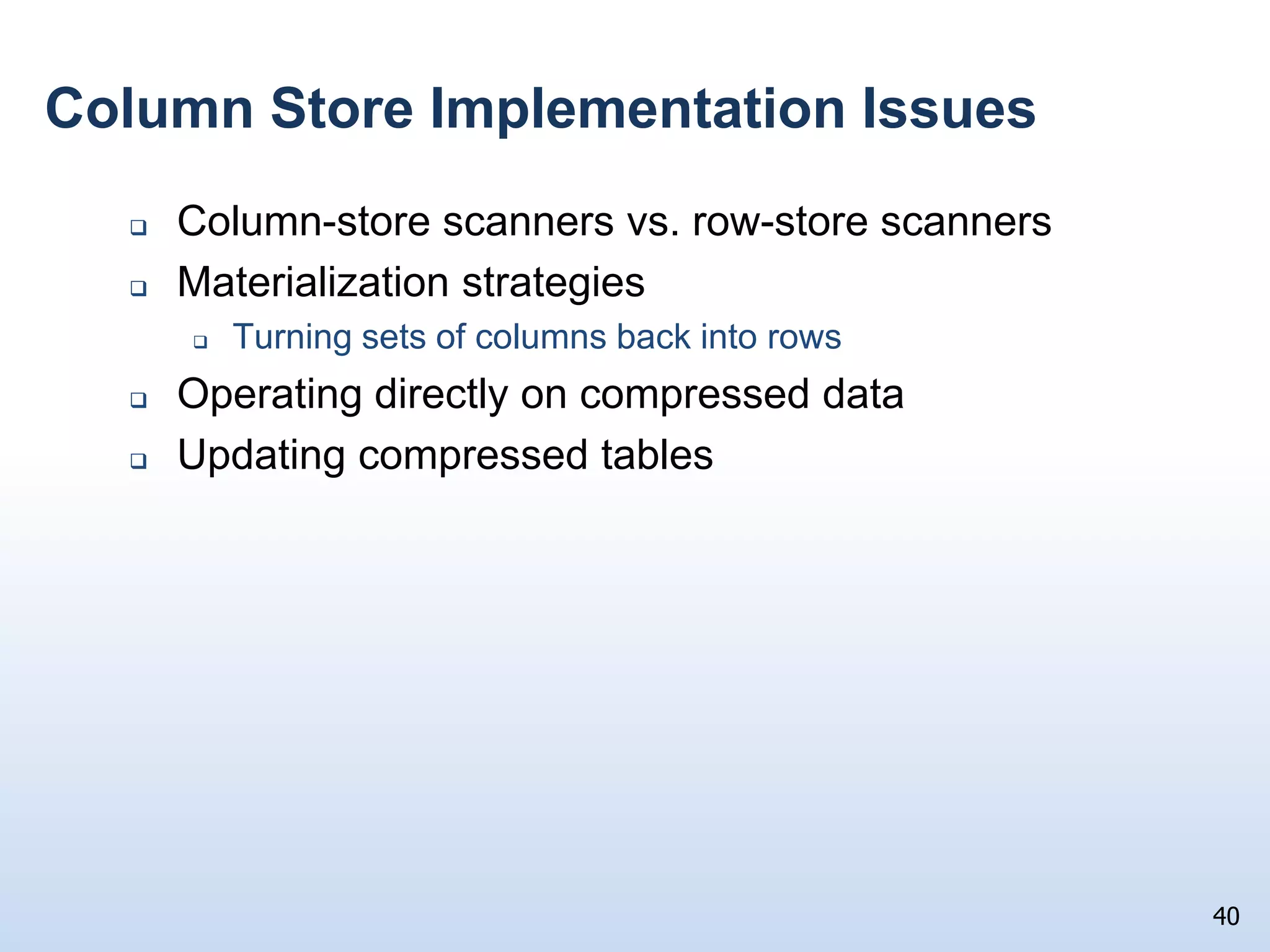
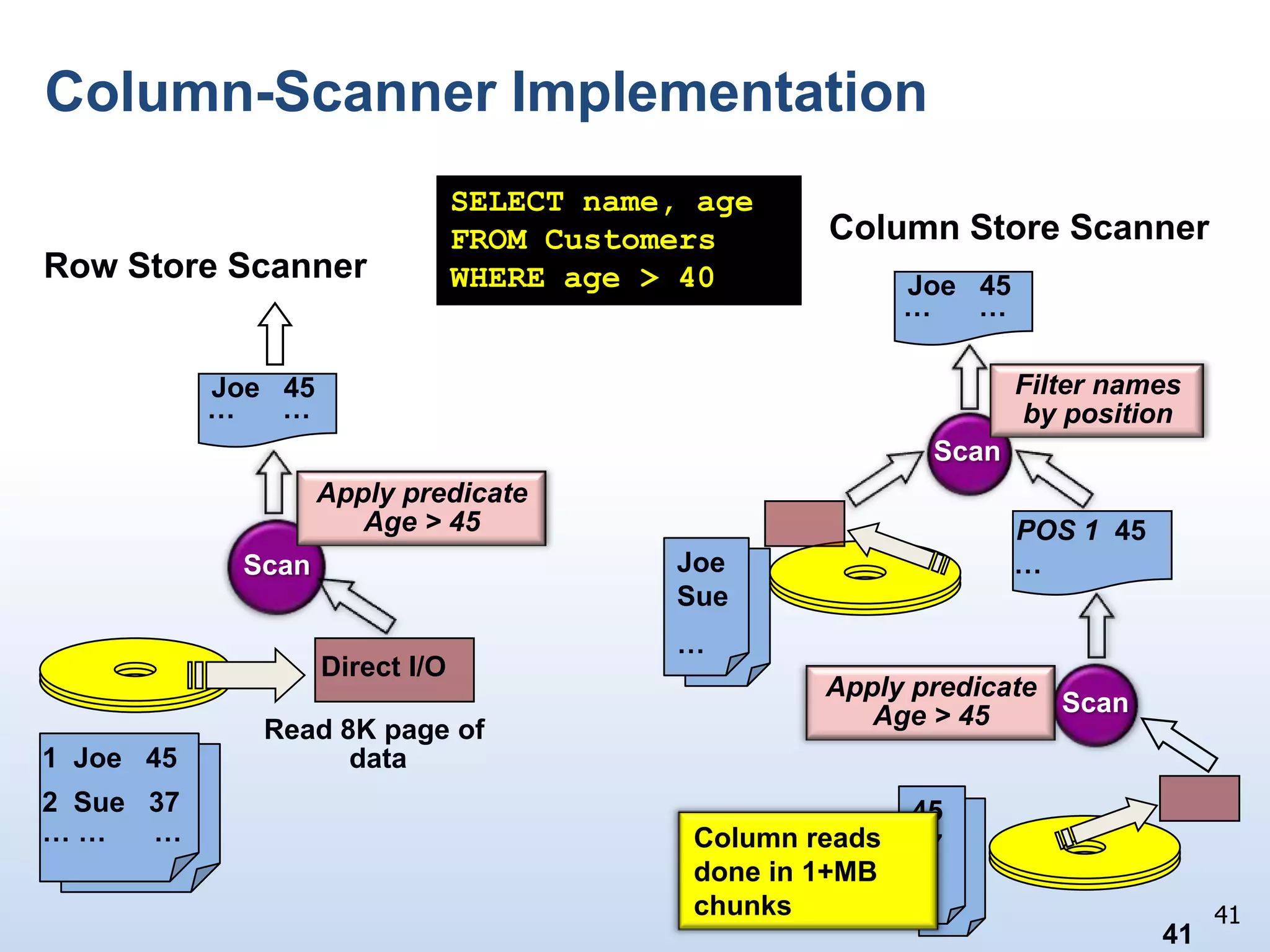
    Column Store ImplementationIssuesColumn-store scanners vs. row-store scannersMaterialization strategiesTurning sets of columns back into rowsOperating directly on compressed dataUpdating compressed tables40
  • 66.
    Column-Scanner ImplementationSELECT name,ageFROM CustomersWHERE age > 40Column Store ScannerRow Store ScannerJoe 45… …Joe 45Filter names by position… …ScanApply predicateAge > 45POS 1 45JoeSue…Scan…Direct I/OApply predicateAge > 45ScanRead 8K page of data1 Joe 452 Sue 374537…… … …Column reads done in 1+MB chunks4141
  • 67.
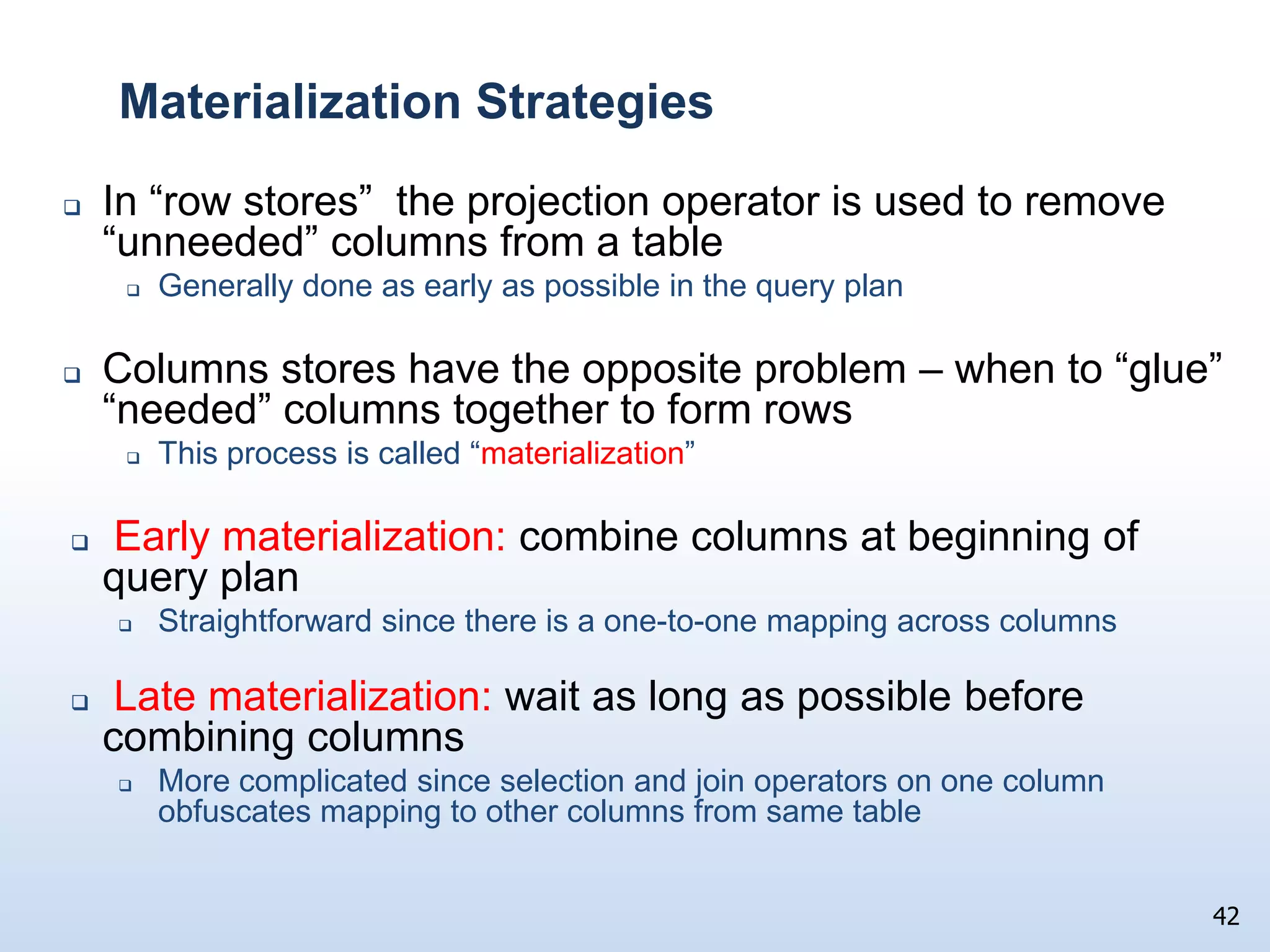
    Materialization StrategiesIn “rowstores” the projection operator is used to remove “unneeded” columns from a tableGenerally done as early as possible in the query planColumns stores have the opposite problem – when to “glue” “needed” columns together to form rowsThis process is called “materialization” Early materialization:combine columns at beginning of query planStraightforward since there is a one-to-one mapping across columnsLate materialization: wait as long as possible before combining columnsMore complicated since selection and join operators on one column obfuscates mapping to other columns from same table42
  • 68.
    Early Materialization393Project on(custID, Price)SelectSUM27243131431314313 SELECT custID, SUM(price) FROM Sales WHERE (prodID = 4) AND (storeID = 1) GROUP BY custID342343803801438014ConstructStrategy: Reconstruct rows before any processing takes placePerformance limited by: Cost to reconstruct ALL rows Need to decompress data Poor memory bandwidth utilization(4,1,4)2271313prodID33421380storeIDcustIDprice43
  • 69.
    SELECT custID,SUM(price) FROM Sales WHERE (prodID = 4) AND (storeID = 1) GROUP BY custIDLate Materialization313380393SUMSelectprodId = 4SelectstoreID = 1ANDConstruct133803Scan and filter by positionScan and filter by position(4,1,4)2271001313111prodID33421001380111storeIDcustIDprice44
  • 70.
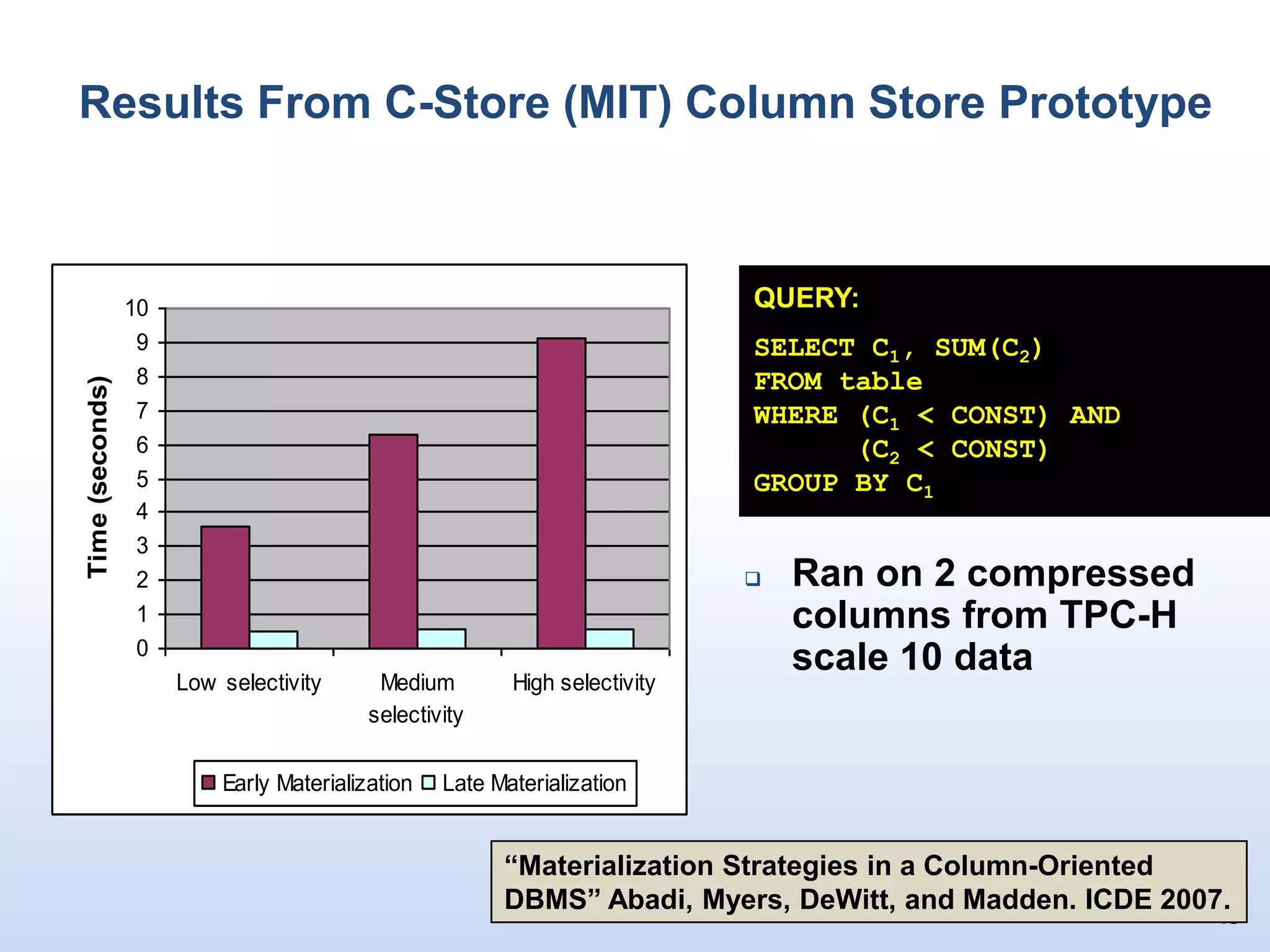
    45Results From C-Store(MIT) Column Store PrototypeQUERY:SELECT C1, SUM(C2)FROM tableWHERE (C1 < CONST) AND (C2 < CONST)GROUP BY C1Ran on 2 compressed columns from TPC-H scale 10 data “Materialization Strategies in a Column-Oriented DBMS” Abadi, Myers, DeWitt, and Madden. ICDE 2007.
  • 71.
    Materialization Strategy SummaryForqueries w/o joins, late materialization essentially always provides the best performance
  • 72.
    Even if columnsare not compressed
  • 73.
    For queries w/joins, rows should be materialized before the join is performedThere are some special exceptions to this for joins between fact and dimension tablesIn a parallel DBMS, joins requiring redistribution of rows between nodes must be materialized before being shuffled 46
  • 74.
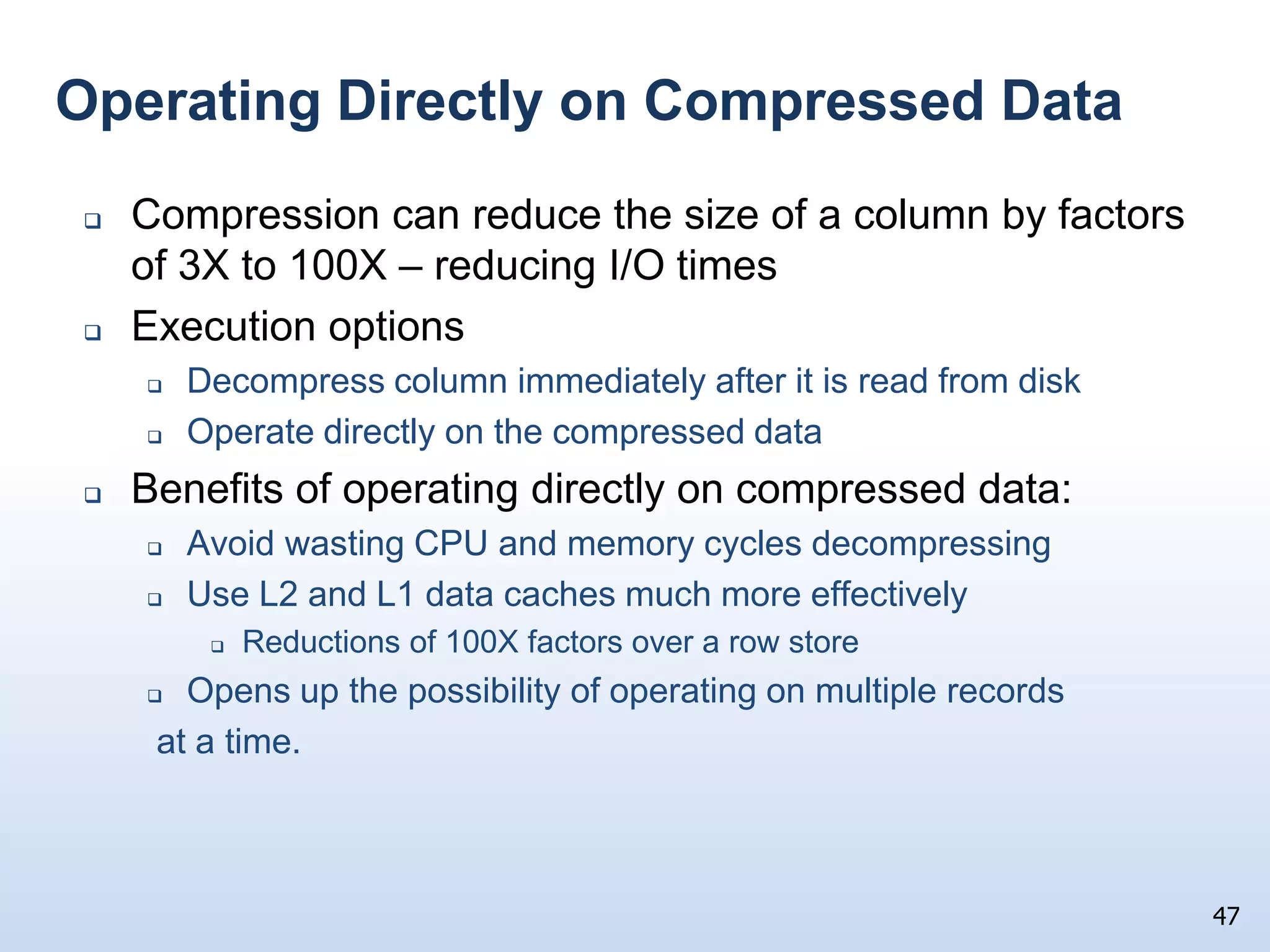
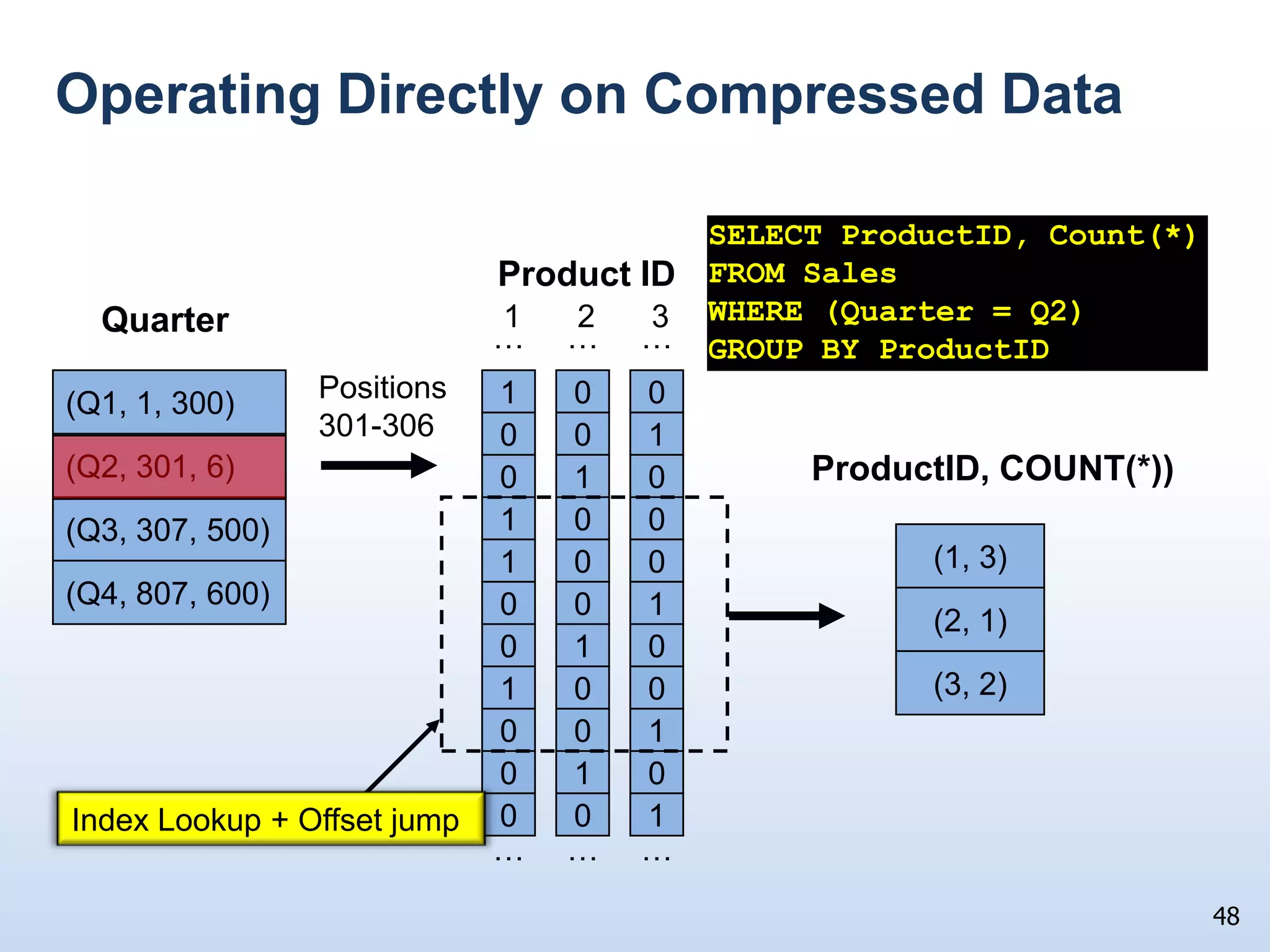
    Operating Directly onCompressed DataCompression can reduce the size of a column by factors of 3X to 100X – reducing I/O timesExecution optionsDecompress column immediately after it is read from diskOperate directly on the compressed data Benefits of operating directly on compressed data:Avoid wasting CPU and memory cycles decompressingUse L2 and L1 data caches much more effectively Reductions of 100X factors over a row storeOpens up the possibility of operating on multiple records at a time. 47
  • 75.
    Operating Directly onCompressed DataSELECT ProductID, Count(*)FROM SalesWHERE (Quarter = Q2)GROUP BY ProductIDProduct ID123Quarter………Positions301-306100(Q1, 1, 300)(1, 3)001(Q2, 301, 6)ProductID, COUNT(*))010(2, 1)100(Q3, 307, 500)(3, 2)100(Q4, 807, 600)001010100001010001Index Lookup + Offset jump………48
  • 76.
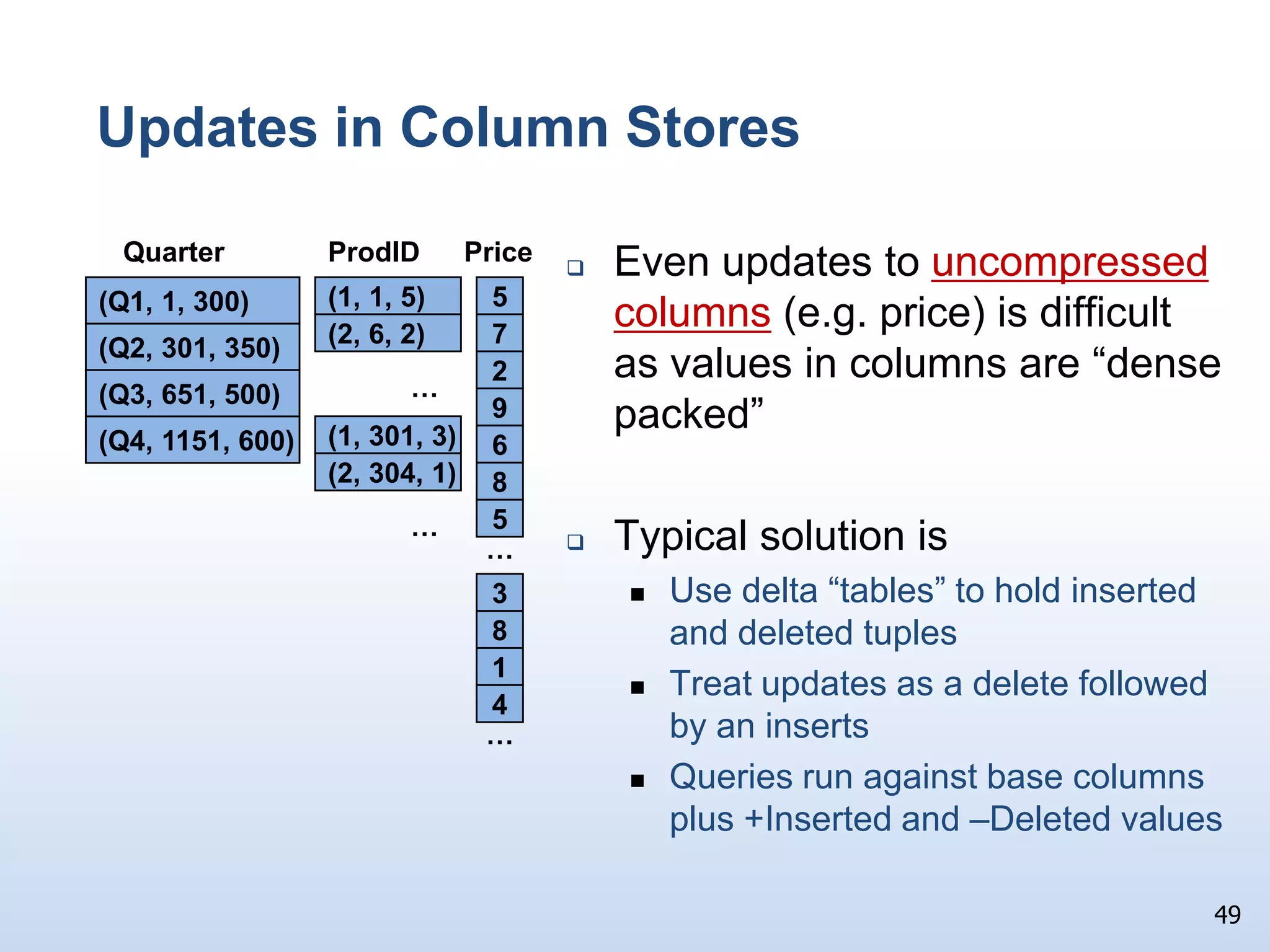
    Updates in ColumnStoresEven updates to uncompressed columns (e.g. price) is difficult as values in columns are “dense packed”
  • 77.
    Typical solution isUsedelta “tables” to hold inserted and deleted tuplesTreat updates as a delete followed by an insertsQueries run against base columns plus +Inserted and –Deleted values49ProdIDQuarterPrice5(Q1, 1, 300)7(1, 1, 5)(Q2, 301, 350)2…(2, 6, 2)9(Q3, 651, 500)6(Q4, 1151, 600)8(1, 301, 3)5……(2, 304, 1)3814…
  • 78.
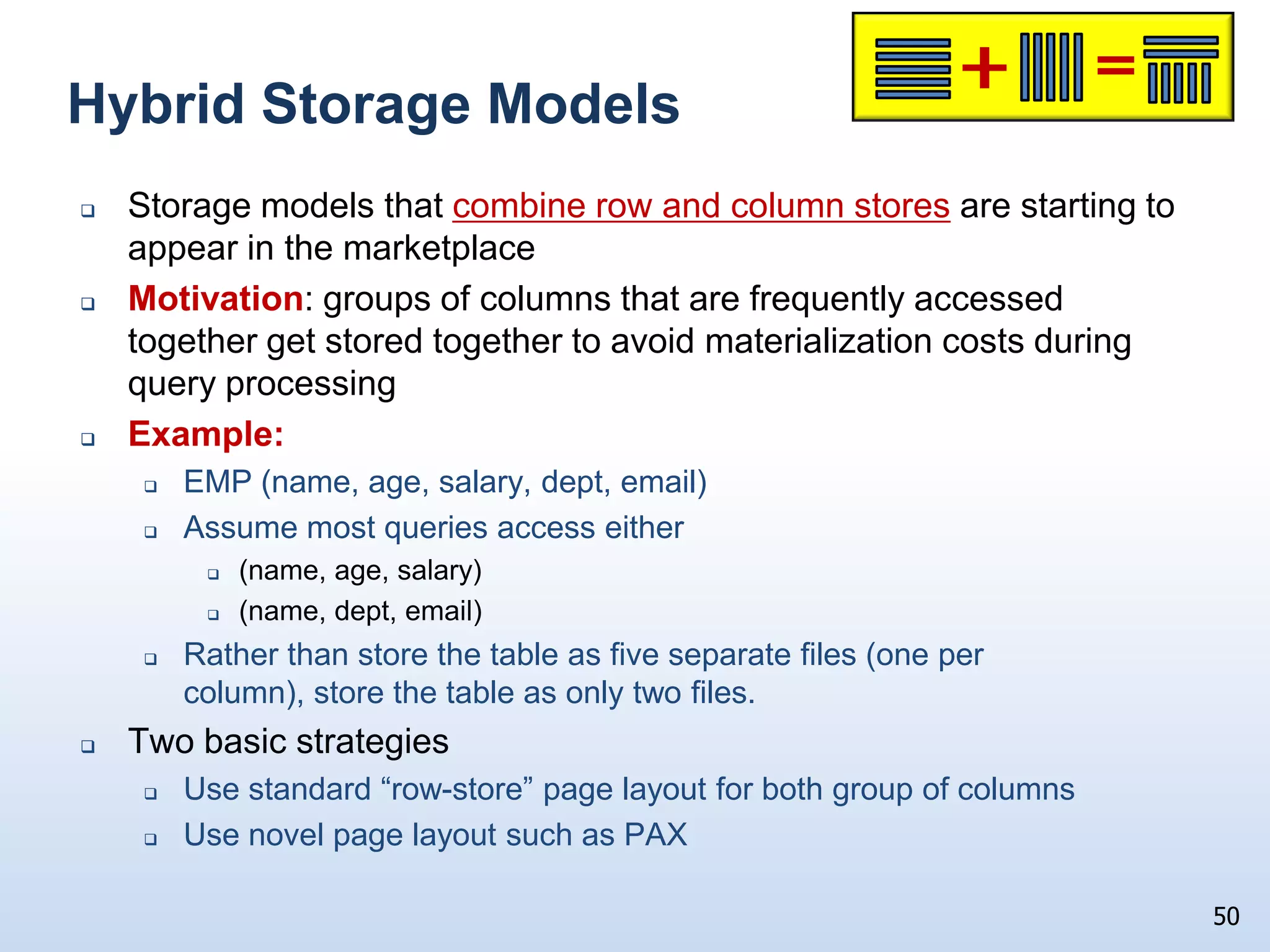
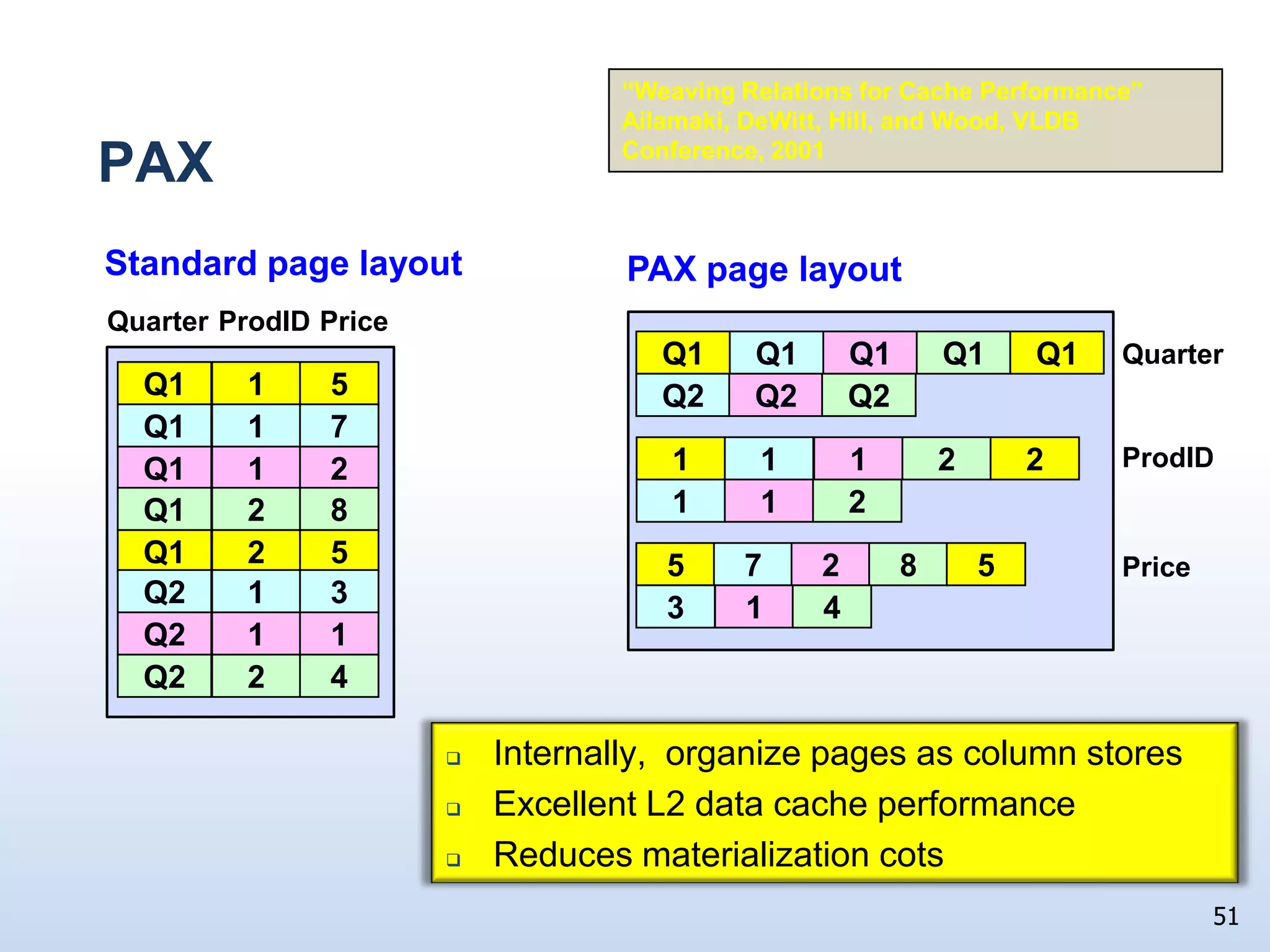
    Hybrid Storage Models50Storagemodels that combine row and column stores are starting to appear in the marketplaceMotivation: groups of columns that are frequently accessed together get stored together to avoid materialization costs during query processingExample:EMP (name, age, salary, dept, email)Assume most queries access either(name, age, salary) (name, dept, email)Rather than store the table as five separate files (one per column), store the table as only two files.Two basic strategiesUse standard “row-store” page layout for both group of columnsUse novel page layout such as PAX
  • 79.
    PAX“Weaving Relations forCache Performance” Ailamaki, DeWitt, Hill, and Wood, VLDB Conference, 2001Standard page layout PAX page layout QuarterQ1Q1Q1Q1Q1ProdIDQuarterPriceQ2Q2Q21Q15ProdID111122Q171Q121122Q18Price2Q15572851Q233141Q212Q24Internally, organize pages as column storesExcellent L2 data cache performanceReduces materialization cots51
  • 80.
    Key Points toRemember for the QuizAt first glance the hardware folks would appear to be our friends1,000X faster processors1,000X bigger memories10,000X bigger disksHuge, inexpensive disks have enabled us to cost-effectively store vast quantities of dataOn the other hand ONLY a10X improvement in random disk accesses65X improvement in disk transfer ratesDBMS performance on a modern CPU is very sensitive to memory stalls caused by L2 data cache missesThis has made querying all that data with reasonable response times really, really hard52
  • 81.
    Key Points (2)Twopronged solution for “read” intensive data warehousing workloadsParallel database technology to achieve scale outColumn stores as a “new” storage and processing paradigmColumn stores: Minimize the transfer of unnecessary data from diskFacilitate the application of aggressive compression techniquesIn effect, trading CPU cycles for I/O cyclesMinimize memory stalls by reducing L1 and L2 data cache stalls53
  • 82.
    Key Points (3)But,column stores are:Not at all suitable for OLTP applications or for applications with significant update activityActually slower than row stores for queries that access more than about 50% of the columns of a table which is why storage layouts like PAX are starting to gain tractionHardware trends and application demands are forcing DB systems to evolve through specialization54
  • 83.
    What are Microsoft’sColumn Store Plans?What I can tell you is that we will be shipping VertiPaq, an in-memory column store as part of SQL Server 10.5What I can’t tell you is what we might be doing for SQL Server 11But, did you pay attention for the last hour or were you updating your Facebook page?55
  • 84.
    Many thanks to:IL-SungLee (Microsoft), Rimma Nehme (Microsoft), Sam Madden (MIT), Daniel Abadi (Yale), NatassaAilamaki (EPFL - Switzerland) for their many useful suggestions and their help in debugging these slidesDaniel and Natassa for letting me “borrow” a few slides from some of their talksDaniel Abadi writes a great db technology blog. Bing him!!!56
  • 85.
    Finally … Thanks forinviting me to give a talk again57

Editor's Notes

  • #3 The “evolution” comment is not clear…
  • #11 CPUs: 1 MIPS  2 GIPS  2,000XCPU Caches: 1K  1MB  1,000XMemory: 2MB/CPU  2GB/CPU  1,000XDisks: 80 MB  800 GB  10,000X
  • #32 Why are dates so important here?