Parcel Tracking, SAPShantanu Dey
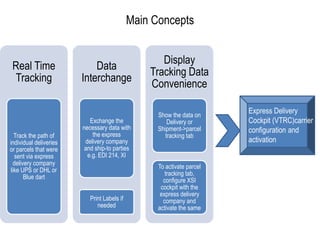
Main ConceptsProvide name of a carrier in XSI CockpitExpress Delivery Cockpit (VTRC)carrier configuration and activation
Prerequisites
Functionality Scope
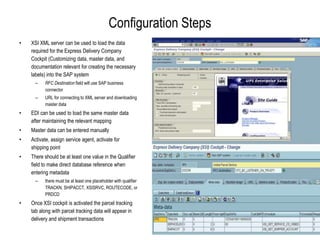
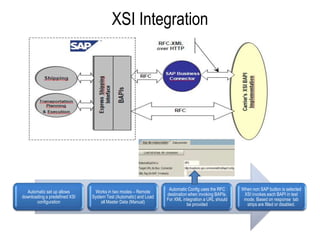
Configuration StepsXSI XML server can be used to load the data required for the Express Delivery Company Cockpit (Customizing data, master data, and documentation relevant for creating the necessary labels) into the SAP systemRFC Destinationfield will use SAP business connectorURL for connecting to XML server and downloading master dataEDI can be used to load the same master data after maintaining the relevant mappingMaster data can be entered manuallyActivate, assign service agent, activate for shipping pointThere should be at least one value in the Qualifier field to make direct database reference when entering metadatathere must be at least one placeholder with qualifier TRACKN, SHIPACCT, XSISRVC, ROUTECODE, or PRDCDOnce XSI cockpit is activated the parcel tracking tab along with parcel tracking data will appear in delivery and shipment transactions
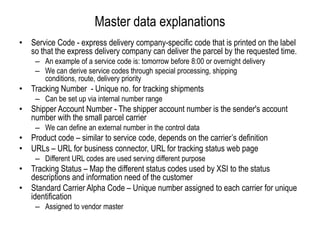
Master data explanationsService Code - express delivery company-specific code that is printed on the label so that the express delivery company can deliver the parcel by the requested time. An example of a service code is: tomorrow before 8:00or overnight deliveryWe can derive service codes through special processing, shipping conditions, route, delivery priorityTracking Number  - Unique no. for tracking shipmentsCan be set up via internal number rangeShipper Account Number - The shipper account number is the sender's account number with the small parcel carrierWe can define an external number in the control dataProduct code – similar to service code, depends on the carrier’s definitionURLs – URL for business connector, URL for tracking status web page Different URL codes are used serving different purposeTracking Status – Map the different status codes used by XSI to the status descriptions and information need of the customerStandard Carrier Alpha Code – Unique number assigned to each carrier for unique identificationAssigned to vendor master
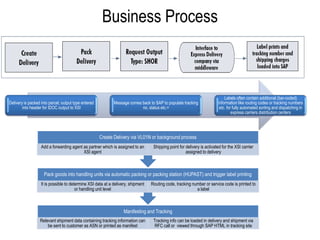
Business Process
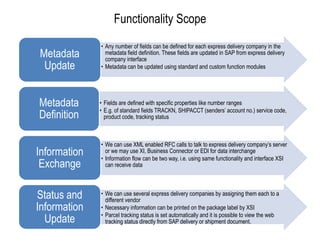
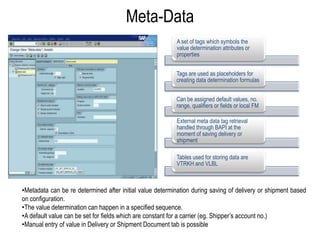
Meta-DataMetadata can be re determined after initial value determination during saving of delivery or shipment based on configuration.
The value determination can happen in a specified sequence.
A default value can be set for fields which are constant for a carrier (eg. Shipper’s account no.)
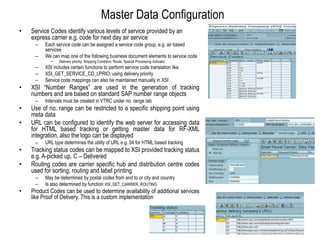
Manual entry of value in Delivery or Shipment Document tab is possibleMaster Data ConfigurationService Codes identify various levels of service provided by an express carrier e.g. code for next day air serviceEach service code can be assigned a service code group, e.g. air based servicesWe can map one of the following business document elements to service codeDelivery priority, Shipping Condition, Route, Special Processing IndicatorXSI includes certain functions to perform service code translation like XSI_GET_SERVICE_CD_LPRIO, using delivery priorityService code mappings can also be maintained manually in XSIXSI “Number Ranges” are used in the generation of tracking numbers and are based on standard SAP number range objectsIntervals must be created in VTRC under no. range tabUse of no. range can be restricted to a specific shipping point using meta dataURL can be configured to identify the web server for accessing data for HTML based tracking or getting master data for RF-XML integration, also the logo can be displayedURL type determines the utility of URL e.g. 04 for HTML based trackingTracking status codes can be mapped to XSI provided tracking status e.g. A-picked up, C – DeliveredRouting codes are carrier specific hub and distribution centre codes used for sorting, routing and label printingMay be determined by postal codes from and to or city and countryIs also determined by function XSI_GET_CARRIER_ROUTINGProduct Codes can be used to determine availability of additional services like Proof of Delivery. This is a custom implementation
XSI Integration
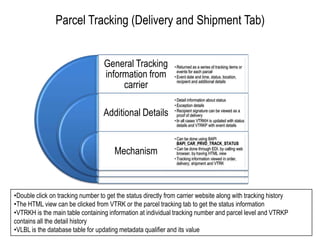
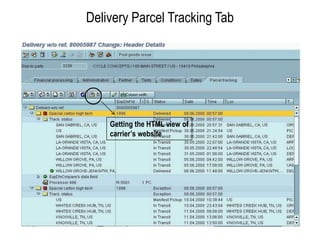
Parcel Tracking (Delivery and Shipment Tab)Double click on tracking number to get the status directly from carrier website along with tracking history
The HTML view can be clicked from VTRK or the parcel tracking tab to get the status information
VTRKH is the main table containing information at individual tracking number and parcel level and VTRKP contains all the detail history

Parcel tracking

  • 1.
  • 2.
    Main ConceptsProvide nameof a carrier in XSI CockpitExpress Delivery Cockpit (VTRC)carrier configuration and activation
  • 3.
  • 4.
  • 5.
    Configuration StepsXSI XMLserver can be used to load the data required for the Express Delivery Company Cockpit (Customizing data, master data, and documentation relevant for creating the necessary labels) into the SAP systemRFC Destinationfield will use SAP business connectorURL for connecting to XML server and downloading master dataEDI can be used to load the same master data after maintaining the relevant mappingMaster data can be entered manuallyActivate, assign service agent, activate for shipping pointThere should be at least one value in the Qualifier field to make direct database reference when entering metadatathere must be at least one placeholder with qualifier TRACKN, SHIPACCT, XSISRVC, ROUTECODE, or PRDCDOnce XSI cockpit is activated the parcel tracking tab along with parcel tracking data will appear in delivery and shipment transactions
  • 6.
    Master data explanationsServiceCode - express delivery company-specific code that is printed on the label so that the express delivery company can deliver the parcel by the requested time. An example of a service code is: tomorrow before 8:00or overnight deliveryWe can derive service codes through special processing, shipping conditions, route, delivery priorityTracking Number - Unique no. for tracking shipmentsCan be set up via internal number rangeShipper Account Number - The shipper account number is the sender's account number with the small parcel carrierWe can define an external number in the control dataProduct code – similar to service code, depends on the carrier’s definitionURLs – URL for business connector, URL for tracking status web page Different URL codes are used serving different purposeTracking Status – Map the different status codes used by XSI to the status descriptions and information need of the customerStandard Carrier Alpha Code – Unique number assigned to each carrier for unique identificationAssigned to vendor master
  • 7.
  • 8.
    Meta-DataMetadata can bere determined after initial value determination during saving of delivery or shipment based on configuration.
  • 9.
    The value determinationcan happen in a specified sequence.
  • 10.
    A default valuecan be set for fields which are constant for a carrier (eg. Shipper’s account no.)
  • 11.
    Manual entry ofvalue in Delivery or Shipment Document tab is possibleMaster Data ConfigurationService Codes identify various levels of service provided by an express carrier e.g. code for next day air serviceEach service code can be assigned a service code group, e.g. air based servicesWe can map one of the following business document elements to service codeDelivery priority, Shipping Condition, Route, Special Processing IndicatorXSI includes certain functions to perform service code translation like XSI_GET_SERVICE_CD_LPRIO, using delivery priorityService code mappings can also be maintained manually in XSIXSI “Number Ranges” are used in the generation of tracking numbers and are based on standard SAP number range objectsIntervals must be created in VTRC under no. range tabUse of no. range can be restricted to a specific shipping point using meta dataURL can be configured to identify the web server for accessing data for HTML based tracking or getting master data for RF-XML integration, also the logo can be displayedURL type determines the utility of URL e.g. 04 for HTML based trackingTracking status codes can be mapped to XSI provided tracking status e.g. A-picked up, C – DeliveredRouting codes are carrier specific hub and distribution centre codes used for sorting, routing and label printingMay be determined by postal codes from and to or city and countryIs also determined by function XSI_GET_CARRIER_ROUTINGProduct Codes can be used to determine availability of additional services like Proof of Delivery. This is a custom implementation
  • 12.
  • 13.
    Parcel Tracking (Deliveryand Shipment Tab)Double click on tracking number to get the status directly from carrier website along with tracking history
  • 14.
    The HTML viewcan be clicked from VTRK or the parcel tracking tab to get the status information
  • 15.
    VTRKH is themain table containing information at individual tracking number and parcel level and VTRKP contains all the detail history