‫ط‬     ‫ا‬   ‫رو‬    ‫ا‬   ‫و‬   ‫ا‬    ‫أ د‬
            The Palestinian eGovernment Academy
                             www.egovacademy.ps


    Tutorial 1: Data and Business Process Modeling

                          Session 13-14
Modeling with Business Process Modeling Notation


              Dr. Mahmoud H. M. Saheb
                    Palestinian Polytechnic University


                              Reviewed by
               Prof. Marco Ronchetti, Trento University, Italy
About

This tutorial is part of the PalGov project, funded by the TEMPUS IV program of the
Commission of the European Communities, grant agreement 511159-TEMPUS-1-
2010-1-PS-TEMPUS-JPHES. The project website: www.egovacademy.ps
Project Consortium:
               Birzeit University, Palestine
                                                             University of Trento, Italy
               (Coordinator )


               Palestine Polytechnic University, Palestine   Vrije Universiteit Brussel, Belgium


               Palestine Technical University, Palestine
                                                             Université de Savoie, France

               Ministry of Telecom and IT, Palestine
                                                             University of Namur, Belgium
               Ministry of Interior, Palestine
                                                             TrueTrust, UK
               Ministry of Local Government, Palestine


Coordinator:
Dr. Mustafa Jarrar
Birzeit University, P.O.Box 14- Birzeit, Palestine
Telfax:+972 2 2982935 mjarrar@birzeit.edu
© Copyright Notes
Everyone is encouraged to use this material, or part of it, but should properly
cite the project (logo and website), and the author of that part.


No part of this tutorial may be reproduced or modified in any form or by any
means, without prior written permission from the project, who have the full
copyrights on the material.


                   Attribution-NonCommercial-ShareAlike
                                CC-BY-NC-SA

This license lets others remix, tweak, and build upon your work non-
commercially, as long as they credit you and license their new creations
under the identical terms.

                                    PalGov © 2011                                 3
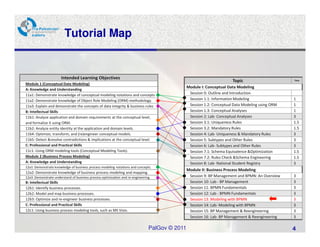
Tutorial Map


                       Intended Learning Objectives
                                                                                                                      Topic                       Time
Module 1 (Conceptual Date Modeling)
                                                                                               Module I: Conceptual Data Modeling
A: Knowledge and Understanding
11a1: Demonstrate knowledge of conceptual modeling notations and concepts                       Session 0: Outline and Introduction
11a2: Demonstrate knowledge of Object Role Modeling (ORM) methodology.                          Session 1.1: Information Modeling                 1
11a3: Explain and demonstrate the concepts of data integrity & business rules                   Session 1.2: Conceptual Data Modeling using ORM   1
B: Intellectual Skills                                                                          Session 1.3: Conceptual Analyses                  1
11b1: Analyze application and domain requirements at the conceptual level,                      Session 2: Lab- Conceptual Analyses               3
and formalize it using ORM.                                                                     Session 3.1: Uniqueness Rules                     1.5
11b2: Analyze entity identity at the application and domain levels.                             Session 3.2: Mandatory Rules                      1.5
11b4: Optimize, transform, and (re)engineer conceptual models.                                  Session 4: Lab- Uniqueness & Mandatory Rules      3
11b5: Detect &resolve contradictions & implications at the conceptual level.                    Session 5: Subtypes and Other Rules               3
C: Professional and Practical Skills                                                            Session 6: Lab- Subtypes and Other Rules          3
11c1: Using ORM modeling tools (Conceptual Modeling Tools).                                     Session 7.1: Schema Equivalence &Optimization     1.5
Module 2 (Business Process Modeling)                                                            Session 7.2: Rules Check &Schema Engineering      1.5
A: Knowledge and Understanding                                                                  Session 8: Lab- National Student Registry         3
12a1: Demonstrate knowledge of business process modeling notations and concepts.
                                                                                               Module II: Business Process Modeling
12a2: Demonstrate knowledge of business process modeling and mapping.
12a3: Demonstrate understand of business process optimization and re-engineering.               Session 9: BP Management and BPMN: An Overview    3
B: Intellectual Skills                                                                          Session 10: Lab - BP Management                   3
12b1: Identify business processes.                                                              Session 11: BPMN Fundamentals                     3
12b2: Model and map business processes.                                                         Session 12: Lab - BPMN Fundamentals               3
12b3: Optimize and re-engineer business processes.                                              Session 13: Modeling with BPMN                    3
C: Professional and Practical Skills                                                            Session 14: Lab- Modeling with BPMN               3
12c1: Using business process modeling tools, such as MS Visio.                                  Session 15: BP Management & Reengineering         3
                                                                                                Session 16: Lab- BP Management & Reengineering    3

                                                                               PalGov © 2011                                                      4
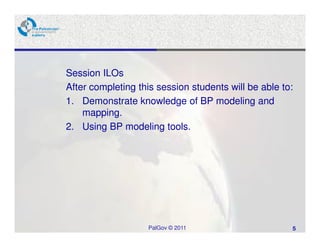
Session ILOs
After completing this session students will be able to:
1. Demonstrate knowledge of BP modeling and
    mapping.
2. Using BP modeling tools.


                   PalGov © 2011                      5
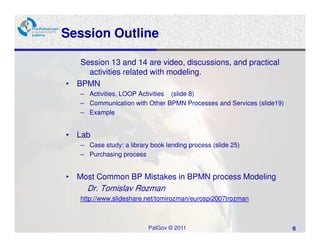
Session Outline

   Session 13 and 14 are video, discussions, and practical
     activities related with modeling.
• BPMN
   – Activities, LOOP Activities (slide 8)
   – Communication with Other BPMN Processes and Services (slide19)
   – Example


• Lab
   – Case study: a library book lending process (slide 25)
   – Purchasing process


• Most Common BP Mistakes in BPMN process Modeling
     Dr. Tomislav Rozman
   http://www.slideshare.net/tomirozman/eurospi2007trozman


                          PalGov © 2011                               6
Video session


Video from Bizagi
   •BPD Basic elements 15:00 (Previous session)
   •BPMN complete set 22:00
   •Gate Ways 16:00
   •Gate ways animation: http://knowhow.visual-
   paradigm.com/business-process-modeling/bpmn-
   gateways/

   Discussion


                     PalGov © 2011                7
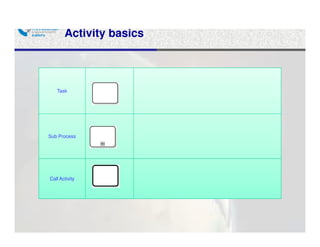
Activity basics


   Task


Sub Process


Call Activity
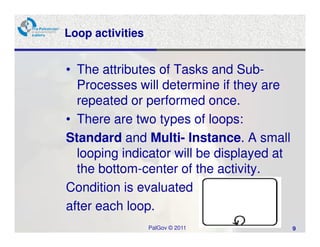
Loop activities


• The attributes of Tasks and Sub-
  Processes will determine if they are
  repeated or performed once.
• There are two types of loops:
Standard and Multi- Instance. A small
  looping indicator will be displayed at
  the bottom-center of the activity.
Condition is evaluated
after each loop.
                  PalGov © 2011            9
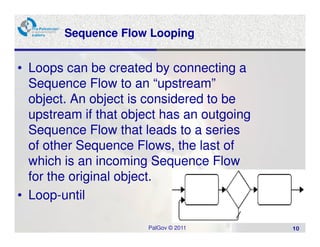
Sequence Flow Looping


• Loops can be created by connecting a
  Sequence Flow to an “upstream”
  object. An object is considered to be
  upstream if that object has an outgoing
  Sequence Flow that leads to a series
  of other Sequence Flows, the last of
  which is an incoming Sequence Flow
  for the original object.
• Loop-until

                       PalGov © 2011        10
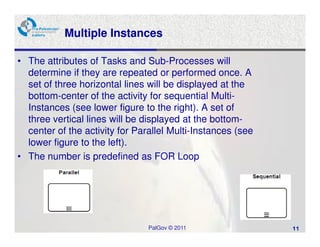
Multiple Instances

• The attributes of Tasks and Sub-Processes will
  determine if they are repeated or performed once. A
  set of three horizontal lines will be displayed at the
  bottom-center of the activity for sequential Multi-
  Instances (see lower figure to the right). A set of
  three vertical lines will be displayed at the bottom-
  center of the activity for Parallel Multi-Instances (see
  lower figure to the left).
• The number is predefined as FOR Loop


                                PalGov © 2011                11
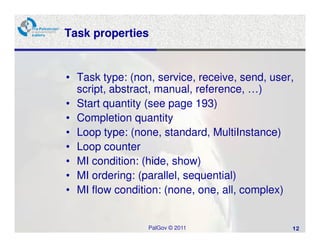
Task properties


• Task type: (non, service, receive, send, user,
  script, abstract, manual, reference, …)
• Start quantity (see page 193)
• Completion quantity
• Loop type: (none, standard, MultiInstance)
• Loop counter
• MI condition: (hide, show)
• MI ordering: (parallel, sequential)
• MI flow condition: (none, one, all, complex)


                 PalGov © 2011                 12
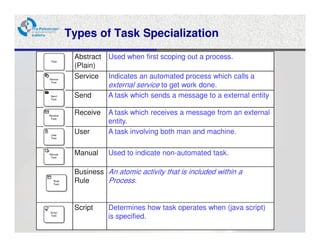
Types of Task Specialization
 Abstract   Used when first scoping out a process.
 (Plain)
 Service    Indicates an automated process which calls a
            external service to get work done.
 Send       A task which sends a message to a external entity

 Receive    A task which receives a message from an external
            entity.
 User       A task involving both man and machine.

 Manual     Used to indicate non-automated task.

 Business An atomic activity that is included within a
 Rule     Process.


 Script     Determines how task operates when (java script)
            is specified.
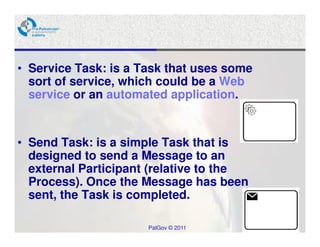
• Service Task: is a Task that uses some
  sort of service, which could be a Web
  service or an automated application.


• Send Task: is a simple Task that is
  designed to send a Message to an
  external Participant (relative to the
  Process). Once the Message has been
  sent, the Task is completed.

                      PalGov © 2011        14
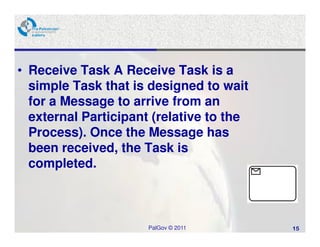
• Receive Task A Receive Task is a
  simple Task that is designed to wait
  for a Message to arrive from an
  external Participant (relative to the
  Process). Once the Message has
  been received, the Task is
  completed.


                      PalGov © 2011       15
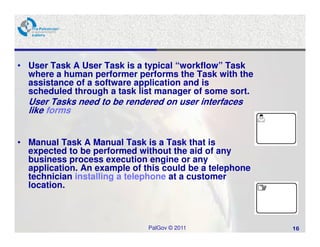
• User Task A User Task is a typical “workflow” Task
  where a human performer performs the Task with the
  assistance of a software application and is
  scheduled through a task list manager of some sort.
  User Tasks need to be rendered on user interfaces
  like forms


• Manual Task A Manual Task is a Task that is
  expected to be performed without the aid of any
  business process execution engine or any
  application. An example of this could be a telephone
  technician installing a telephone at a customer
  location.


                              PalGov © 2011              16
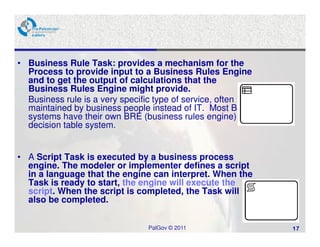
• Business Rule Task: provides a mechanism for the
  Process to provide input to a Business Rules Engine
  and to get the output of calculations that the
  Business Rules Engine might provide.
  Business rule is a very specific type of service, often
  maintained by business people instead of IT. Most BPM
  systems have their own BRE (business rules engine) or
  decision table system.


• A Script Task is executed by a business process
  engine. The modeler or implementer defines a script
  in a language that the engine can interpret. When the
  Task is ready to start, the engine will execute the
  script. When the script is completed, the Task will
  also be completed.


                               PalGov © 2011                17
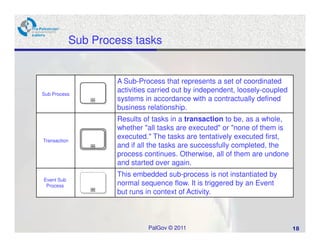
Sub Process tasks


                      A Sub-Process that represents a set of coordinated
Sub Process
                      activities carried out by independent, loosely-coupled
                      systems in accordance with a contractually defined
                      business relationship.
                      Results of tasks in a transaction to be, as a whole,
                      whether "all tasks are executed" or "none of them is
Transaction
                      executed." The tasks are tentatively executed first,
                      and if all the tasks are successfully completed, the
                      process continues. Otherwise, all of them are undone
                      and started over again.
                      This embedded sub-process is not instantiated by
Event Sub
 Process              normal sequence flow. It is triggered by an Event
                      but runs in context of Activity.


                               PalGov © 2011                                   18
Communication with Other BPMN Processes and Services


Synchronous Vs Asynchronous:

When you invoke a synchronous operation, you send a message
and then wait for an response before proceeding with the process
flow.

When you invoke an asynchronous operation, you send a message
but do not wait for an answer to proceed with the process flow.

The asynchronous operation receives the message and starts
running. You can obtain the answer of an asynchronous operation
by invoking a callback operation. If you invoke the callback
operation before the asynchronous operation finishes running, then
you must wait for it to complete before getting the answer.


                              PalGov © 2011                          19
Communication with Other BPMN Processes and Services:
             Asynchronous

BPMN provides multiple ways for BPMN processes to communicate with other processes
or services:
Messages
They enable you to invoke asynchronous services or asynchronous BPMN processes. You
can also use them to define the interface your process exposes to other processes or
services.

Send and Receive Tasks
They are very similar to message events. You can choose to use one or the other.
The only difference they have with message events is that they support boundary events.
They enable you to invoke asynchronous services or asynchronous BPMN processes. You
can also use them to define the interface your process exposes to other processes or
services. Don’t mix them with send receive message in one model if message event is not
a boundary event.
.
Signal Events
They enable you to broadcast a message to multiple process. The processes waiting for
that specific message react to it.


 http://docs.oracle.com/cd/E14571_01/doc.1111/e15176/ipc_bpmpd.htm#BHBBFBHD

                                        PalGov © 2011                                     20
Communication with Other BPMN Processes and Services:
            Synchronous

Service tasks enable you to invoke synchronous operations in services
and BPMN processes.
When the BPMN Service Engine runs a service task, it invokes the
operation specified in the service task and waits for a response. The
BPMN Service Engine does not move the token to the next activity until it
receives a response from the synchronous service or BPMN process.


 http://docs.oracle.com/cd/E14571_01/doc.1111/e15176/ipc_bpmpd.htm#BHBBFBHD

                                        PalGov © 2011                         21
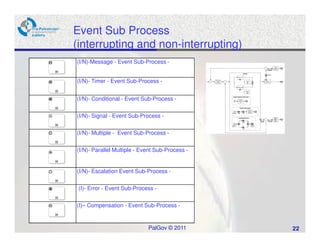
Event Sub Process
(interrupting and non-interrupting)
(I/N)-Message - Event Sub-Process -


(I/N)- Timer - Event Sub-Process -


(I/N)- Conditional - Event Sub-Process -


(I/N)- Signal - Event Sub-Process -


(I/N)- Multiple - Event Sub-Process -


(I/N)- Parallel Multiple - Event Sub-Process -


(I/N)- Escalation Event Sub-Process -


 (I)- Error - Event Sub-Process -


(I)– Compensation - Event Sub-Process -


                             PalGov © 2011       22
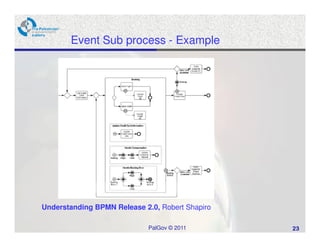
Event Sub process - Example


Understanding BPMN Release 2.0, Robert Shapiro

                             PalGov © 2011       23
Session 14: Lab Activity

• Demonstration for Workflow patterns (from Bizagi
  resources and the BPMN equivalents of the of Workflow
  Patterns research headed by Wil van der Aalst)
    http://www.workflowpatterns.com/vendors/documentation/BPMN-pat.pdf

And www.diveintobpm.org

And http://www.workflowpatterns.com/patterns/control/index.php
•   WP1: Sequence                 WP10: Synchronizing Merge
•   WP2: Parallel Split           WP11: Arbitrary Cycles
•   WP3: Synchronization          WP12: Implicit Termination
•   WP4: Exclusive Choice         WP13 to 16: Multiple Instances
•   WP5: Simple Merge             WP17: Deferred Choice
•   WP6: Multi-Choice             WP18: Interleaved Routing
•   WP7: Multiple Merge           WP19: Milestone
•   WP8: Discriminator            WP20: Cancel Activity
•   WP9: N out M Join             WP21: Cancel Case
                                  PalGov © 2011                          24
Case Study: a library book lending process
The Borrower requests a book from the Librarian, the Librarian gets
the book status using software; the book could have the following
status:
1- Book is on Loan: the librarian sends on loan reply, waits for the
following options:
•Cancel the request if he received decline hold from the borrower or
he did not receive any reply from the borrower.
•If he received a Hold request from the borrower then he will request
hold using the SW and sends a Hold reply for the borrower. After two
weeks he will check the status again
2-Book is available: the Librarian checkout the book then sends
checkout reply.

Draw BPMN, presentation and discussion


                               PalGov © 2011                       25
Assignment 3

•Draw the Purchase process which is described in the
following link:
http://www.almohasb1.com/2009/04/purchasing-
procedures.html

•Draw one of the processes in your organization using
BizAgi or Bonita.

Presentation and discussion.


                          PalGov © 2011                 26
Summary


• In this session we presented and discussed
     • BPMN complete
     • Gate Ways
     • BPMN LOOP Activities, BizAgi video for loops with
       examples
  And the Most Common BP Mistakes in BPMN
   process Modeling


• Next session will discuss the
  – best practices for BPM and
  – BP re-engineering.

                     PalGov © 2011                         27
References

• Analysis of Most Common Process Modelling
  Mistakes in BPMN Process Models

  Dr.Tomislav Rozman
   http://www.slideshare.net/tomirozman/eurospi2007trozman

• A heuristic method for detecting problems in
  business process models
   Volker Gruhn and Ralf Laue, DOI 10.1108/14637151011076485


• http://www.bpmn.org/

• Elearning.Bizagi.com

                          PalGov © 2011                        28
Thanks


         Dr. Mahmoud H. Saheb


            PalGov © 2011       29

Pal gov.tutorial1.session13 14

  • 1.
    ‫ط‬ ‫ا‬ ‫رو‬ ‫ا‬ ‫و‬ ‫ا‬ ‫أ د‬ The Palestinian eGovernment Academy www.egovacademy.ps Tutorial 1: Data and Business Process Modeling Session 13-14 Modeling with Business Process Modeling Notation Dr. Mahmoud H. M. Saheb Palestinian Polytechnic University Reviewed by Prof. Marco Ronchetti, Trento University, Italy
  • 2.
    About This tutorial ispart of the PalGov project, funded by the TEMPUS IV program of the Commission of the European Communities, grant agreement 511159-TEMPUS-1- 2010-1-PS-TEMPUS-JPHES. The project website: www.egovacademy.ps Project Consortium: Birzeit University, Palestine University of Trento, Italy (Coordinator ) Palestine Polytechnic University, Palestine Vrije Universiteit Brussel, Belgium Palestine Technical University, Palestine Université de Savoie, France Ministry of Telecom and IT, Palestine University of Namur, Belgium Ministry of Interior, Palestine TrueTrust, UK Ministry of Local Government, Palestine Coordinator: Dr. Mustafa Jarrar Birzeit University, P.O.Box 14- Birzeit, Palestine Telfax:+972 2 2982935 mjarrar@birzeit.edu
  • 3.
    © Copyright Notes Everyoneis encouraged to use this material, or part of it, but should properly cite the project (logo and website), and the author of that part. No part of this tutorial may be reproduced or modified in any form or by any means, without prior written permission from the project, who have the full copyrights on the material. Attribution-NonCommercial-ShareAlike CC-BY-NC-SA This license lets others remix, tweak, and build upon your work non- commercially, as long as they credit you and license their new creations under the identical terms. PalGov © 2011 3
  • 4.
    Tutorial Map Intended Learning Objectives Topic Time Module 1 (Conceptual Date Modeling) Module I: Conceptual Data Modeling A: Knowledge and Understanding 11a1: Demonstrate knowledge of conceptual modeling notations and concepts Session 0: Outline and Introduction 11a2: Demonstrate knowledge of Object Role Modeling (ORM) methodology. Session 1.1: Information Modeling 1 11a3: Explain and demonstrate the concepts of data integrity & business rules Session 1.2: Conceptual Data Modeling using ORM 1 B: Intellectual Skills Session 1.3: Conceptual Analyses 1 11b1: Analyze application and domain requirements at the conceptual level, Session 2: Lab- Conceptual Analyses 3 and formalize it using ORM. Session 3.1: Uniqueness Rules 1.5 11b2: Analyze entity identity at the application and domain levels. Session 3.2: Mandatory Rules 1.5 11b4: Optimize, transform, and (re)engineer conceptual models. Session 4: Lab- Uniqueness & Mandatory Rules 3 11b5: Detect &resolve contradictions & implications at the conceptual level. Session 5: Subtypes and Other Rules 3 C: Professional and Practical Skills Session 6: Lab- Subtypes and Other Rules 3 11c1: Using ORM modeling tools (Conceptual Modeling Tools). Session 7.1: Schema Equivalence &Optimization 1.5 Module 2 (Business Process Modeling) Session 7.2: Rules Check &Schema Engineering 1.5 A: Knowledge and Understanding Session 8: Lab- National Student Registry 3 12a1: Demonstrate knowledge of business process modeling notations and concepts. Module II: Business Process Modeling 12a2: Demonstrate knowledge of business process modeling and mapping. 12a3: Demonstrate understand of business process optimization and re-engineering. Session 9: BP Management and BPMN: An Overview 3 B: Intellectual Skills Session 10: Lab - BP Management 3 12b1: Identify business processes. Session 11: BPMN Fundamentals 3 12b2: Model and map business processes. Session 12: Lab - BPMN Fundamentals 3 12b3: Optimize and re-engineer business processes. Session 13: Modeling with BPMN 3 C: Professional and Practical Skills Session 14: Lab- Modeling with BPMN 3 12c1: Using business process modeling tools, such as MS Visio. Session 15: BP Management & Reengineering 3 Session 16: Lab- BP Management & Reengineering 3 PalGov © 2011 4
  • 5.
    Session ILOs After completingthis session students will be able to: 1. Demonstrate knowledge of BP modeling and mapping. 2. Using BP modeling tools. PalGov © 2011 5
  • 6.
    Session Outline Session 13 and 14 are video, discussions, and practical activities related with modeling. • BPMN – Activities, LOOP Activities (slide 8) – Communication with Other BPMN Processes and Services (slide19) – Example • Lab – Case study: a library book lending process (slide 25) – Purchasing process • Most Common BP Mistakes in BPMN process Modeling Dr. Tomislav Rozman http://www.slideshare.net/tomirozman/eurospi2007trozman PalGov © 2011 6
  • 7.
    Video session Video fromBizagi •BPD Basic elements 15:00 (Previous session) •BPMN complete set 22:00 •Gate Ways 16:00 •Gate ways animation: http://knowhow.visual- paradigm.com/business-process-modeling/bpmn- gateways/ Discussion PalGov © 2011 7
  • 8.
    Activity basics Task Sub Process Call Activity
  • 9.
    Loop activities • Theattributes of Tasks and Sub- Processes will determine if they are repeated or performed once. • There are two types of loops: Standard and Multi- Instance. A small looping indicator will be displayed at the bottom-center of the activity. Condition is evaluated after each loop. PalGov © 2011 9
  • 10.
    Sequence Flow Looping •Loops can be created by connecting a Sequence Flow to an “upstream” object. An object is considered to be upstream if that object has an outgoing Sequence Flow that leads to a series of other Sequence Flows, the last of which is an incoming Sequence Flow for the original object. • Loop-until PalGov © 2011 10
  • 11.
    Multiple Instances • Theattributes of Tasks and Sub-Processes will determine if they are repeated or performed once. A set of three horizontal lines will be displayed at the bottom-center of the activity for sequential Multi- Instances (see lower figure to the right). A set of three vertical lines will be displayed at the bottom- center of the activity for Parallel Multi-Instances (see lower figure to the left). • The number is predefined as FOR Loop PalGov © 2011 11
  • 12.
    Task properties • Tasktype: (non, service, receive, send, user, script, abstract, manual, reference, …) • Start quantity (see page 193) • Completion quantity • Loop type: (none, standard, MultiInstance) • Loop counter • MI condition: (hide, show) • MI ordering: (parallel, sequential) • MI flow condition: (none, one, all, complex) PalGov © 2011 12
  • 13.
    Types of TaskSpecialization Abstract Used when first scoping out a process. (Plain) Service Indicates an automated process which calls a external service to get work done. Send A task which sends a message to a external entity Receive A task which receives a message from an external entity. User A task involving both man and machine. Manual Used to indicate non-automated task. Business An atomic activity that is included within a Rule Process. Script Determines how task operates when (java script) is specified.
  • 14.
    • Service Task:is a Task that uses some sort of service, which could be a Web service or an automated application. • Send Task: is a simple Task that is designed to send a Message to an external Participant (relative to the Process). Once the Message has been sent, the Task is completed. PalGov © 2011 14
  • 15.
    • Receive TaskA Receive Task is a simple Task that is designed to wait for a Message to arrive from an external Participant (relative to the Process). Once the Message has been received, the Task is completed. PalGov © 2011 15
  • 16.
    • User TaskA User Task is a typical “workflow” Task where a human performer performs the Task with the assistance of a software application and is scheduled through a task list manager of some sort. User Tasks need to be rendered on user interfaces like forms • Manual Task A Manual Task is a Task that is expected to be performed without the aid of any business process execution engine or any application. An example of this could be a telephone technician installing a telephone at a customer location. PalGov © 2011 16
  • 17.
    • Business RuleTask: provides a mechanism for the Process to provide input to a Business Rules Engine and to get the output of calculations that the Business Rules Engine might provide. Business rule is a very specific type of service, often maintained by business people instead of IT. Most BPM systems have their own BRE (business rules engine) or decision table system. • A Script Task is executed by a business process engine. The modeler or implementer defines a script in a language that the engine can interpret. When the Task is ready to start, the engine will execute the script. When the script is completed, the Task will also be completed. PalGov © 2011 17
  • 18.
    Sub Process tasks A Sub-Process that represents a set of coordinated Sub Process activities carried out by independent, loosely-coupled systems in accordance with a contractually defined business relationship. Results of tasks in a transaction to be, as a whole, whether "all tasks are executed" or "none of them is Transaction executed." The tasks are tentatively executed first, and if all the tasks are successfully completed, the process continues. Otherwise, all of them are undone and started over again. This embedded sub-process is not instantiated by Event Sub Process normal sequence flow. It is triggered by an Event but runs in context of Activity. PalGov © 2011 18
  • 19.
    Communication with OtherBPMN Processes and Services Synchronous Vs Asynchronous: When you invoke a synchronous operation, you send a message and then wait for an response before proceeding with the process flow. When you invoke an asynchronous operation, you send a message but do not wait for an answer to proceed with the process flow. The asynchronous operation receives the message and starts running. You can obtain the answer of an asynchronous operation by invoking a callback operation. If you invoke the callback operation before the asynchronous operation finishes running, then you must wait for it to complete before getting the answer. PalGov © 2011 19
  • 20.
    Communication with OtherBPMN Processes and Services: Asynchronous BPMN provides multiple ways for BPMN processes to communicate with other processes or services: Messages They enable you to invoke asynchronous services or asynchronous BPMN processes. You can also use them to define the interface your process exposes to other processes or services. Send and Receive Tasks They are very similar to message events. You can choose to use one or the other. The only difference they have with message events is that they support boundary events. They enable you to invoke asynchronous services or asynchronous BPMN processes. You can also use them to define the interface your process exposes to other processes or services. Don’t mix them with send receive message in one model if message event is not a boundary event. . Signal Events They enable you to broadcast a message to multiple process. The processes waiting for that specific message react to it. http://docs.oracle.com/cd/E14571_01/doc.1111/e15176/ipc_bpmpd.htm#BHBBFBHD PalGov © 2011 20
  • 21.
    Communication with OtherBPMN Processes and Services: Synchronous Service tasks enable you to invoke synchronous operations in services and BPMN processes. When the BPMN Service Engine runs a service task, it invokes the operation specified in the service task and waits for a response. The BPMN Service Engine does not move the token to the next activity until it receives a response from the synchronous service or BPMN process. http://docs.oracle.com/cd/E14571_01/doc.1111/e15176/ipc_bpmpd.htm#BHBBFBHD PalGov © 2011 21
  • 22.
    Event Sub Process (interruptingand non-interrupting) (I/N)-Message - Event Sub-Process - (I/N)- Timer - Event Sub-Process - (I/N)- Conditional - Event Sub-Process - (I/N)- Signal - Event Sub-Process - (I/N)- Multiple - Event Sub-Process - (I/N)- Parallel Multiple - Event Sub-Process - (I/N)- Escalation Event Sub-Process - (I)- Error - Event Sub-Process - (I)– Compensation - Event Sub-Process - PalGov © 2011 22
  • 23.
    Event Sub process- Example Understanding BPMN Release 2.0, Robert Shapiro PalGov © 2011 23
  • 24.
    Session 14: LabActivity • Demonstration for Workflow patterns (from Bizagi resources and the BPMN equivalents of the of Workflow Patterns research headed by Wil van der Aalst) http://www.workflowpatterns.com/vendors/documentation/BPMN-pat.pdf And www.diveintobpm.org And http://www.workflowpatterns.com/patterns/control/index.php • WP1: Sequence WP10: Synchronizing Merge • WP2: Parallel Split WP11: Arbitrary Cycles • WP3: Synchronization WP12: Implicit Termination • WP4: Exclusive Choice WP13 to 16: Multiple Instances • WP5: Simple Merge WP17: Deferred Choice • WP6: Multi-Choice WP18: Interleaved Routing • WP7: Multiple Merge WP19: Milestone • WP8: Discriminator WP20: Cancel Activity • WP9: N out M Join WP21: Cancel Case PalGov © 2011 24
  • 25.
    Case Study: alibrary book lending process The Borrower requests a book from the Librarian, the Librarian gets the book status using software; the book could have the following status: 1- Book is on Loan: the librarian sends on loan reply, waits for the following options: •Cancel the request if he received decline hold from the borrower or he did not receive any reply from the borrower. •If he received a Hold request from the borrower then he will request hold using the SW and sends a Hold reply for the borrower. After two weeks he will check the status again 2-Book is available: the Librarian checkout the book then sends checkout reply. Draw BPMN, presentation and discussion PalGov © 2011 25
  • 26.
    Assignment 3 •Draw thePurchase process which is described in the following link: http://www.almohasb1.com/2009/04/purchasing- procedures.html •Draw one of the processes in your organization using BizAgi or Bonita. Presentation and discussion. PalGov © 2011 26
  • 27.
    Summary • In thissession we presented and discussed • BPMN complete • Gate Ways • BPMN LOOP Activities, BizAgi video for loops with examples And the Most Common BP Mistakes in BPMN process Modeling • Next session will discuss the – best practices for BPM and – BP re-engineering. PalGov © 2011 27
  • 28.
    References • Analysis ofMost Common Process Modelling Mistakes in BPMN Process Models Dr.Tomislav Rozman http://www.slideshare.net/tomirozman/eurospi2007trozman • A heuristic method for detecting problems in business process models Volker Gruhn and Ralf Laue, DOI 10.1108/14637151011076485 • http://www.bpmn.org/ • Elearning.Bizagi.com PalGov © 2011 28
  • 29.
    Thanks Dr. Mahmoud H. Saheb PalGov © 2011 29