Python with AI – I
Flow Chart
What are flow charts
• A flow chart represents the algorithm using a diagram
• Creating a flow chart helps design the logic of the program
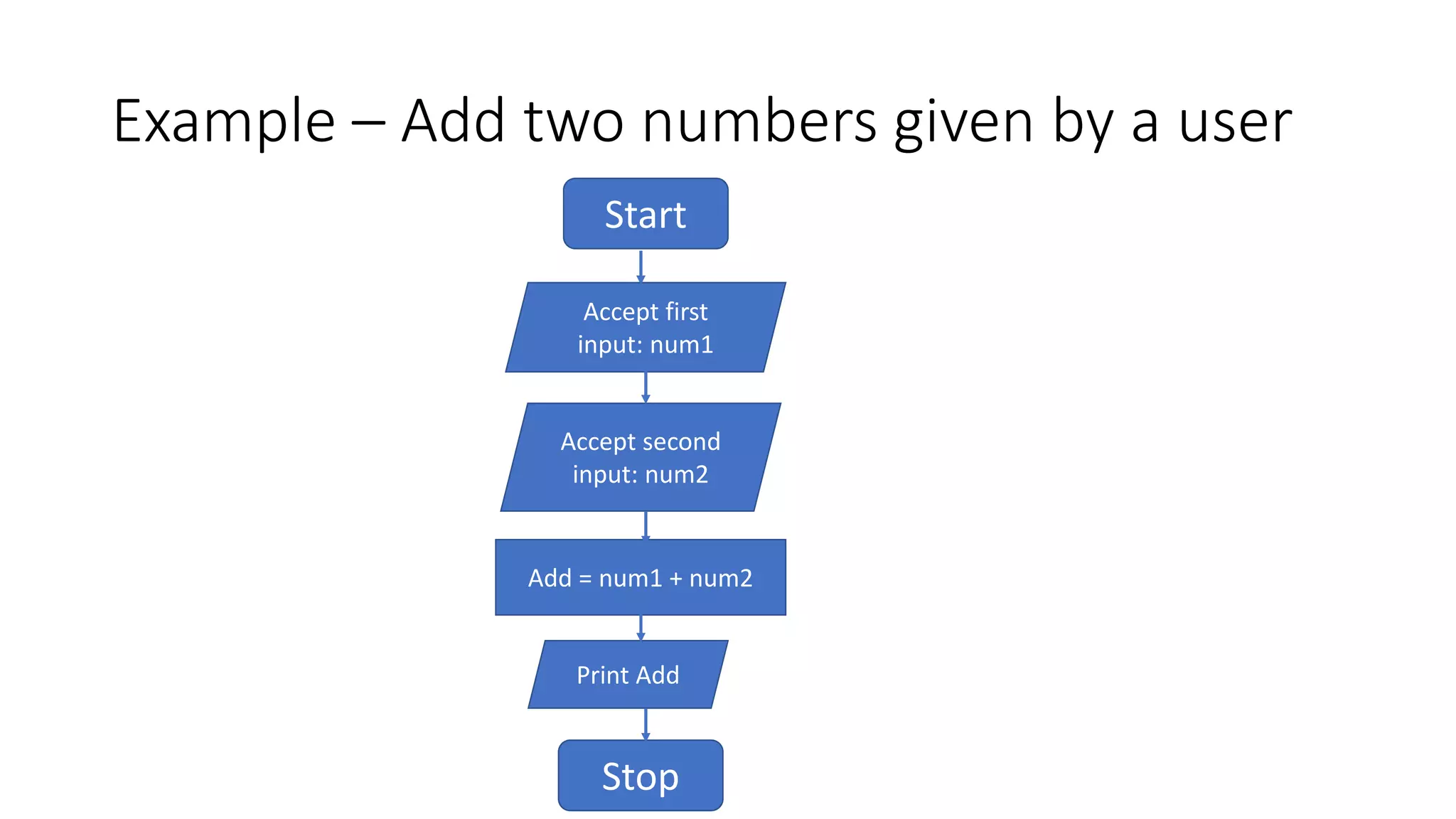
Example – Add two numbers given by a user
Start
Accept first
input: num1
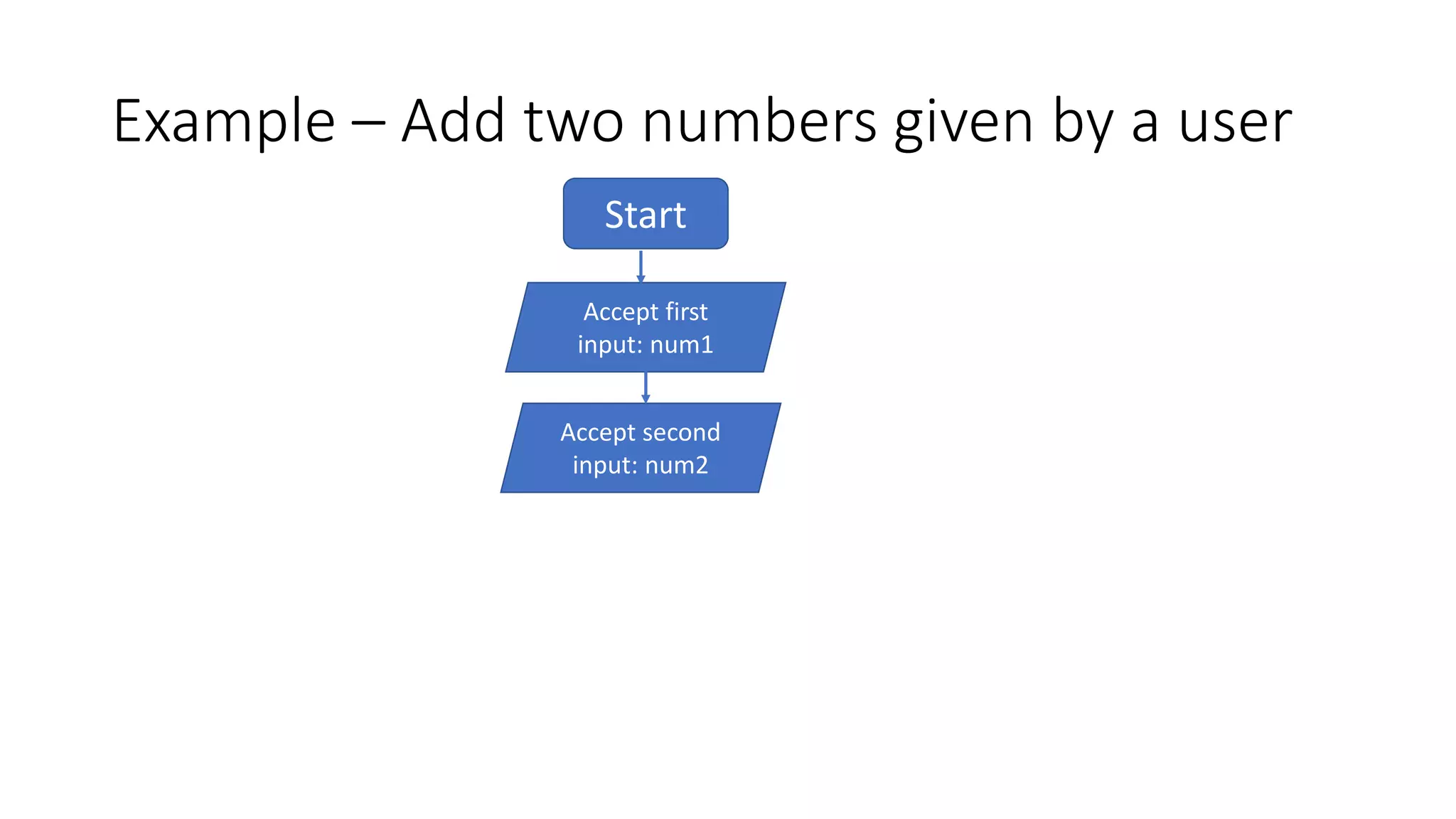
Example – Add two numbers given by a user
Start
Accept first
input: num1
Accept second
input: num2
Example – Add two numbers given by a user
Start
Accept first
input: num1
Accept second
input: num2
Sum = num1 + num2
Example – Add two numbers given by a user
Start
Accept first
input: num1
Accept second
input: num2
Add = num1 + num2
Print Add
Stop
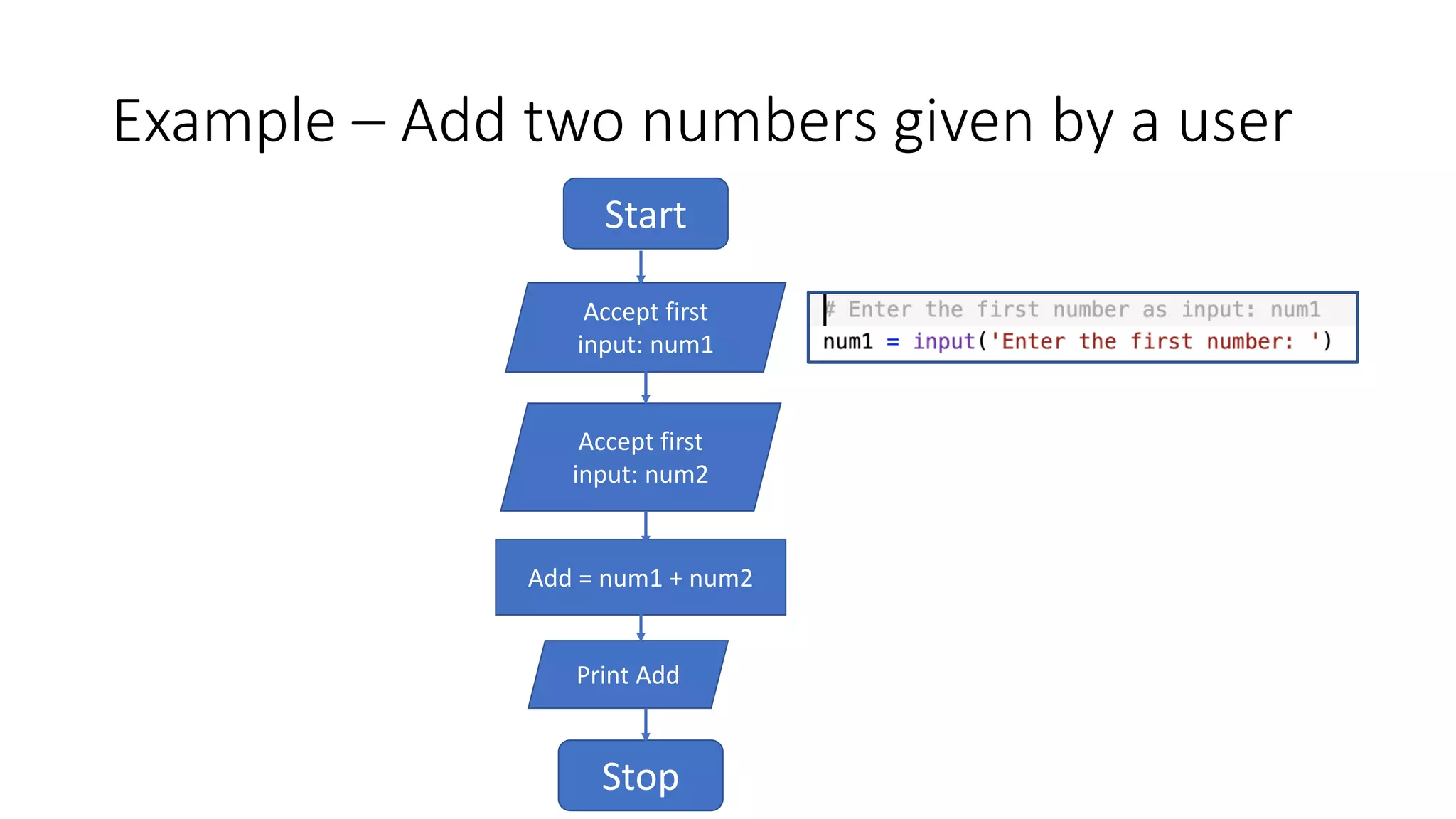
Example – Add two numbers given by a user
Start
Accept first
input: num1
Accept first
input: num2
Add = num1 + num2
Print Add
Stop
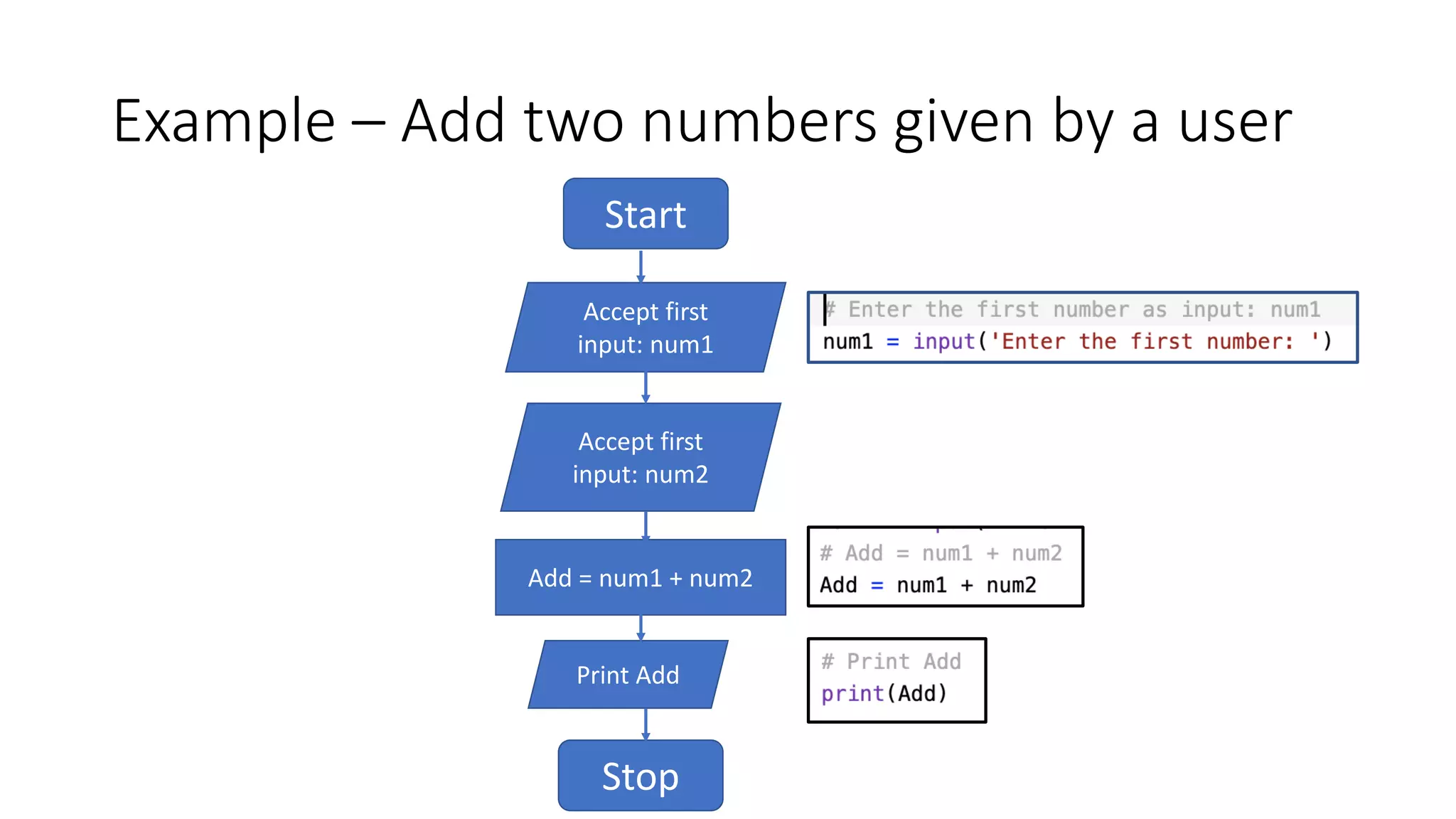
Example – Add two numbers given by a user
Start
Accept first
input: num1
Accept first
input: num2
Add = num1 + num2
Print Add
Stop
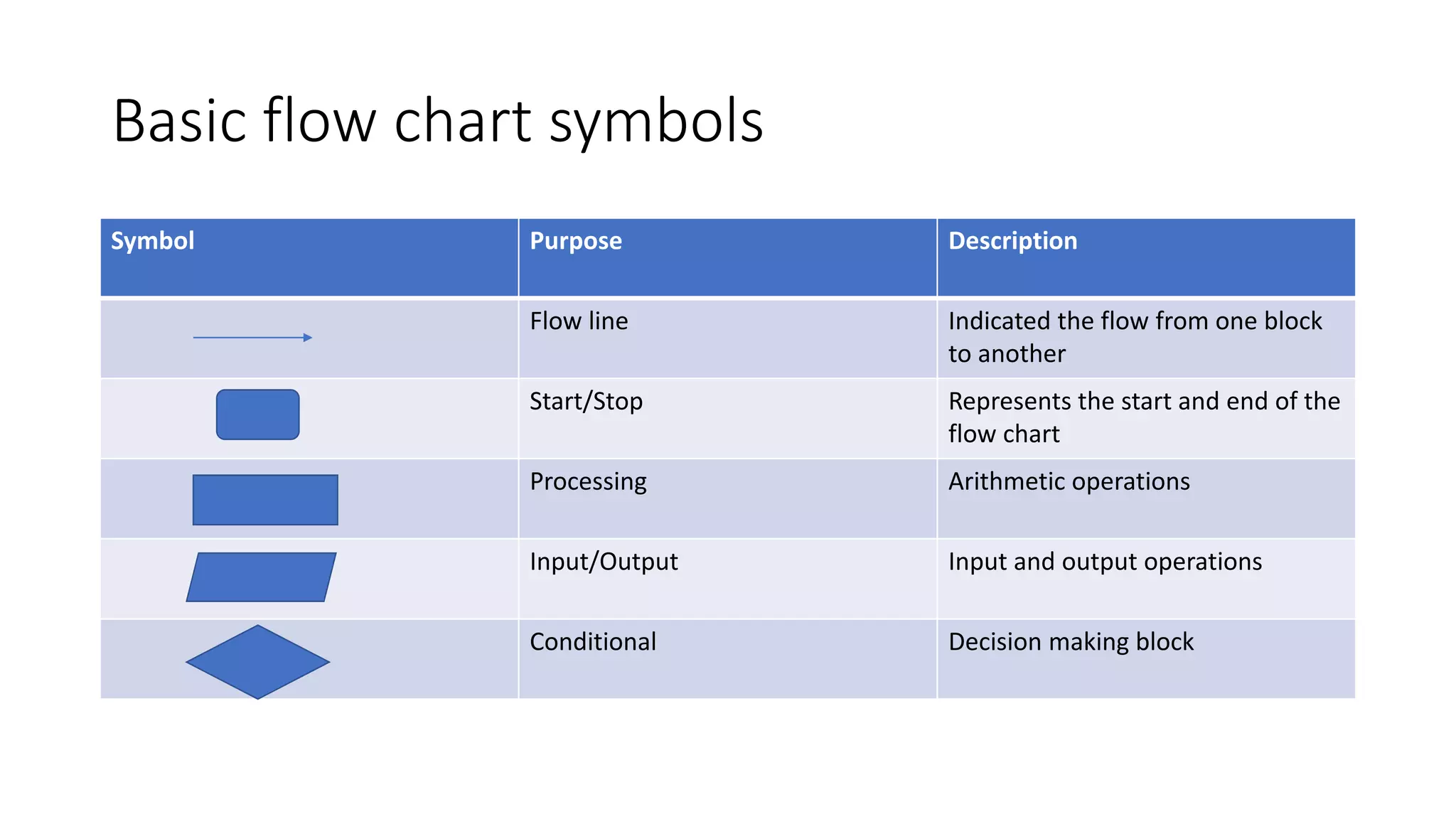
Basic flow chart symbols
Symbol Purpose Description
Flow line Indicated the flow from one block
to another
Start/Stop Represents the start and end of the
flow chart
Processing Arithmetic operations
Input/Output Input and output operations
Conditional Decision making block
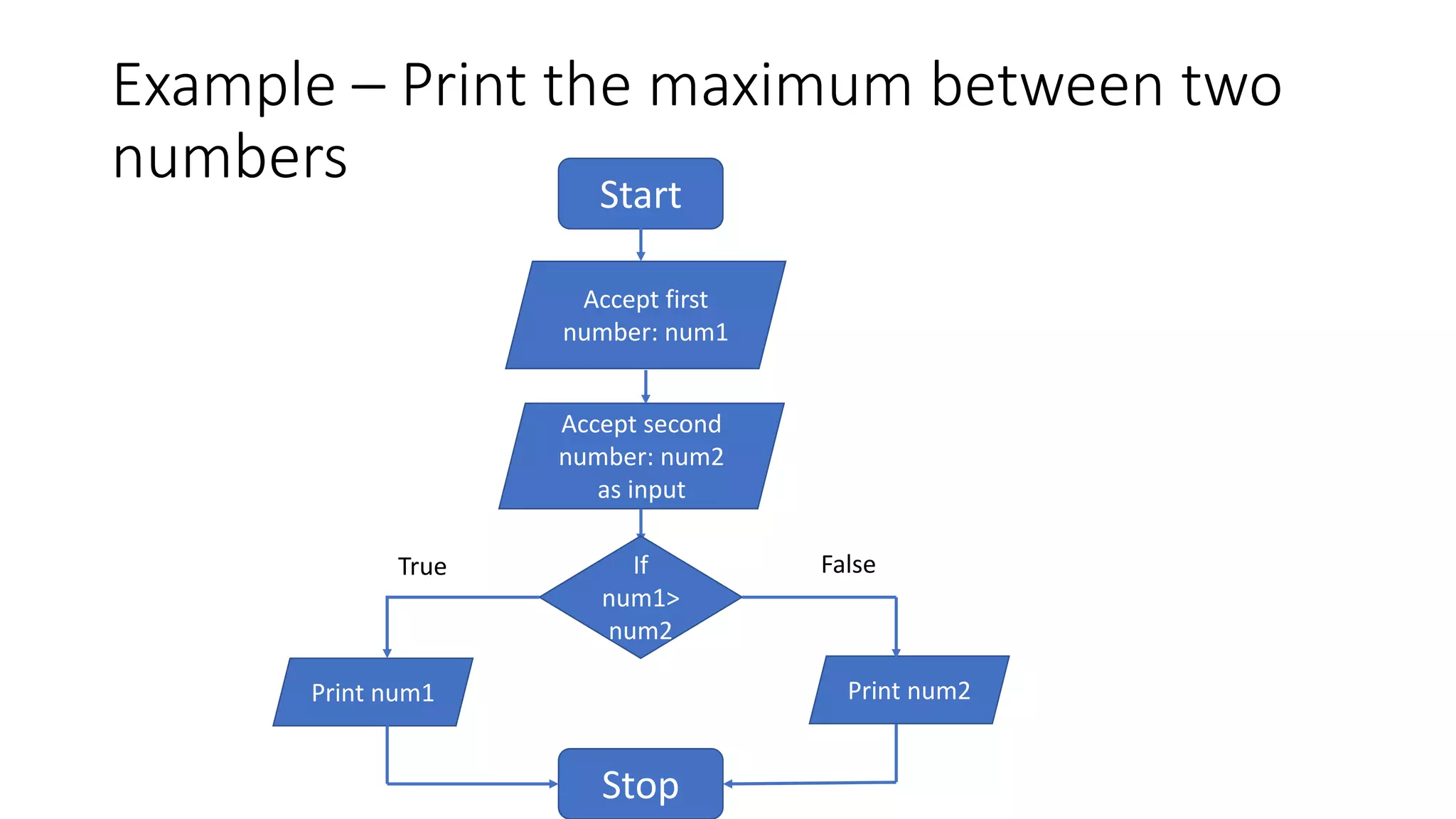
Example – Print the maximum between two
numbers Start
Accept first
number: num1
Accept second
number: num2
as input
Print num1
Stop
If
num1>
num2
Print num2
True False
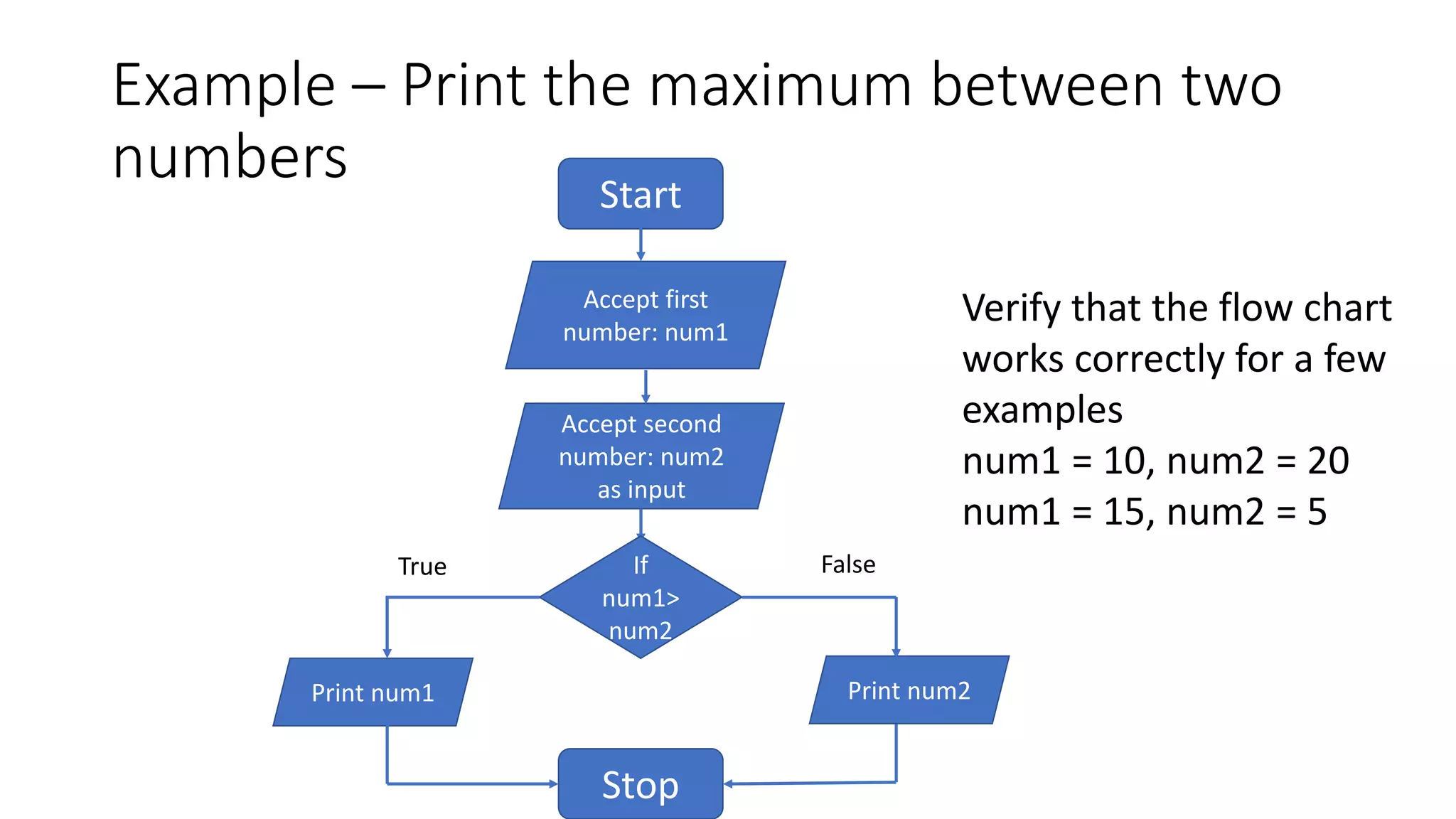
Example – Print the maximum between two
numbers Start
Accept first
number: num1
Accept second
number: num2
as input
Print num1
Stop
If
num1>
num2
Print num2
True False
Verify that the flow chart
works correctly for a few
examples
num1 = 10, num2 = 20
num1 = 15, num2 = 5
Exercise: Create a flow chart for this problem
• Given 3 numbers, a, b, c, find the maximum value
Exercise: Create a flow chart for this problem
• Given 3 numbers, a, b, c, find the maximum value
• Verify that what your flow chart works correctly
• Examples:
• a = 10, b = 20, c = 30
• a = 15, b = 30, c = 5
• a = 40, b =80, c = 120
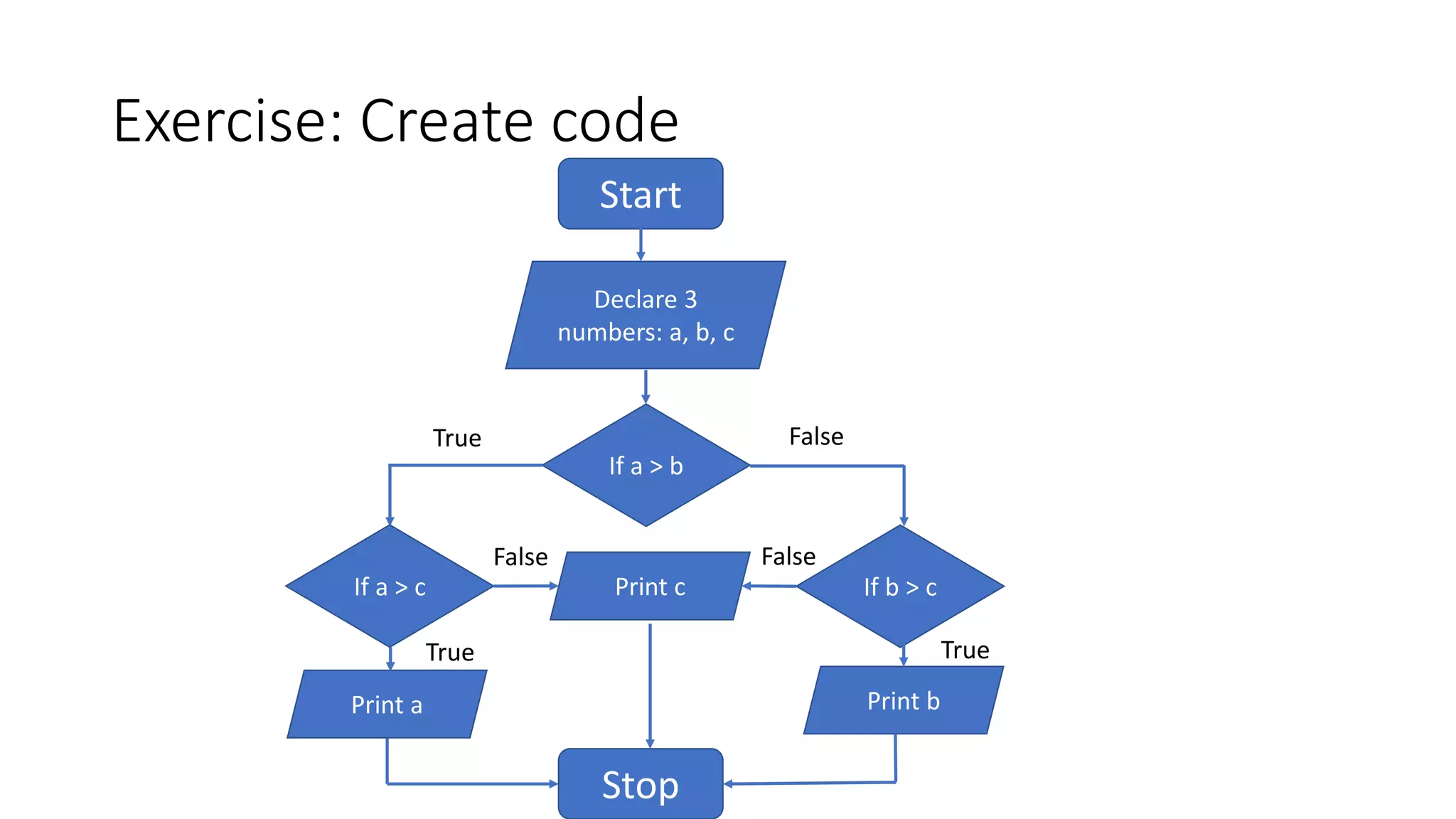
Exercise: Create code
Start
Declare 3
numbers: a, b, c
If a > b
Print b
FalseTrue
If a > c
Print a
If b > cPrint c
Stop
True True
False False
Loops in flow chart
• Given a list list_sample = [4, 3, 2, 5, 8], print all the even numbers
Loops in flow chart
Start
Declare list_sample [4, 3, 2, 5, 8]
Declare a variable len_list that stored the length of the list
Loops in flow chart
Start
Declare list_sample [4, 3, 2, 5, 8]
Declare a variable len_list that stored the length of the list
Loops in flow chart
Start
Declare list_sample [4, 3, 2, 5, 8]
Declare a number a=0
Declare a variable len_list that stores the length of the list
If a >
len_list
Stop a = a+1
value =
list_sample[a]
If value is
a even
number
Print value
True False
False True
Loops in flow chart
• Given a list list_sample = [4, 3, 2, 5, 8], print all the even numbers
Loops in flow chart - while
• Given a list list_sample = [4, 3, 2, 5, 8], print all the even numbers
Loops in flow chart - while
• Given a list list_sample = [4, 3, 2, 5, 8], print all the even numbers
Declare a number a=0
If a >
len_list
Stop a = a+1
value =
list_sample[a]
If value is
a even
number
Print value
True False
False True
Exercise: Design a chat bot - flowchart
• list_happy_words = [“joyful”, “happy”, “amazing”, “beautiful”]
• list_sad_words = [“sad”, “tears”, “crying”, “depressed”]
• list_games = [“tetris”, “flappy bird”, “snake”]
• Ask the user to enter a word that describes their feeling
• If the feeling they enter is one of the list_happy_words, print “Glad you are
happy” and exit.
• If the feeling they enter is one of the list_sad_words, ask the user to play
one of the games from the list list_games.
• Ask the user again how they are feeling and continue till the list of games is
exhausted.
• If you already suggested all the games and the user is still unhappy, exit.
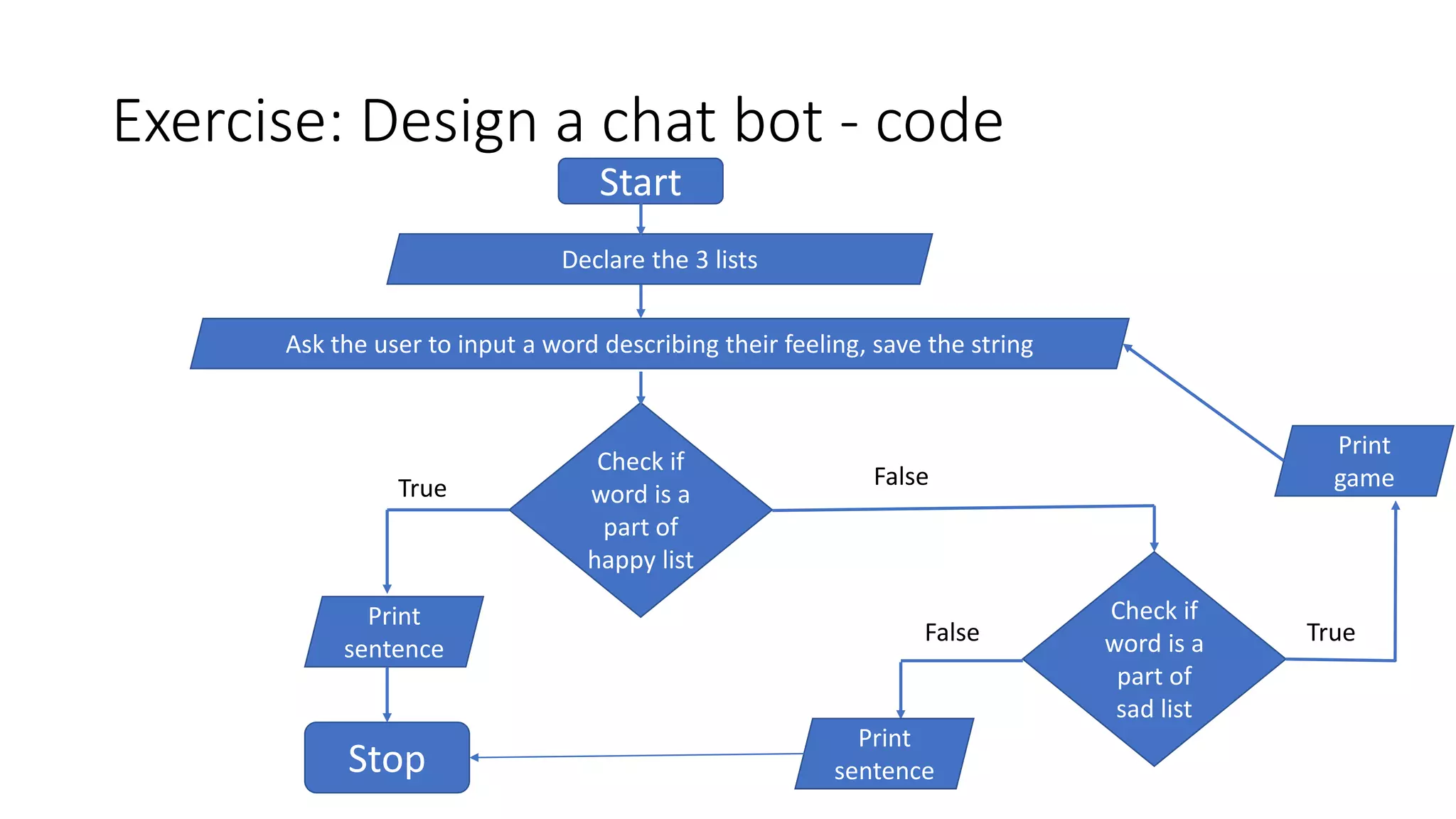
Exercise: Design a chat bot - code
Start
Declare the 3 lists
Ask the user to input a word describing their feeling, save the string
Check if
word is a
part of
happy list
Check if
word is a
part of
sad list
True
Stop
Print
sentence
False
False True
Print
sentence
Print
game
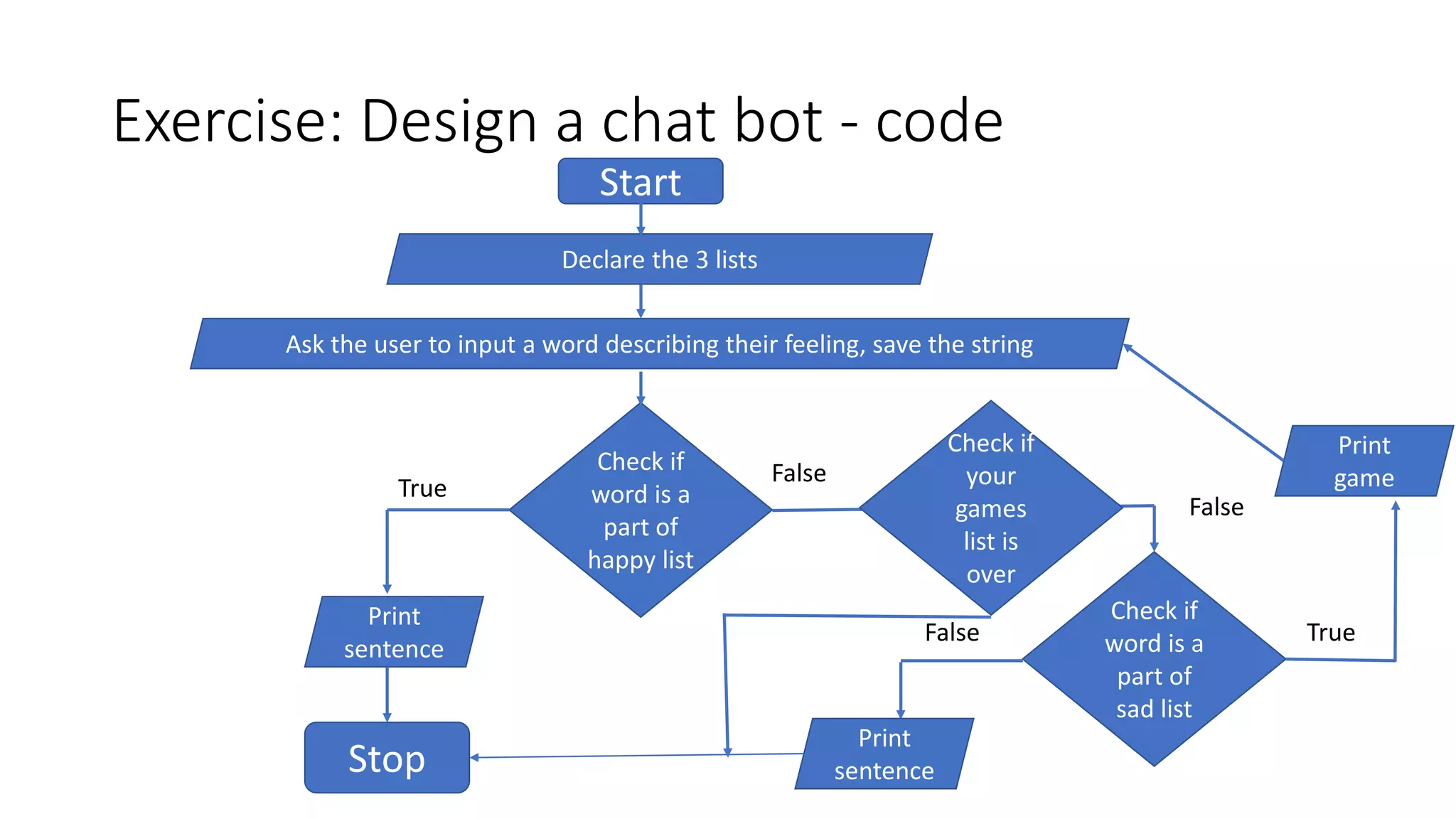
Exercise: Design a chat bot - code
Start
Declare the 3 lists
Ask the user to input a word describing their feeling, save the string
Check if
word is a
part of
happy list
Check if
word is a
part of
sad list
True
Stop
Print
sentence
False
False True
Print
sentence
Print
game
Check if
your
games
list is
over
False
Lets try it!
http://aiclub.world

Pa1 flow chart

  • 1.
    Python with AI– I Flow Chart
  • 2.
    What are flowcharts • A flow chart represents the algorithm using a diagram • Creating a flow chart helps design the logic of the program
  • 3.
    Example – Addtwo numbers given by a user
  • 4.
    Example – Addtwo numbers given by a user Start Accept first input: num1
  • 5.
    Example – Addtwo numbers given by a user Start Accept first input: num1 Accept second input: num2
  • 6.
    Example – Addtwo numbers given by a user Start Accept first input: num1 Accept second input: num2 Sum = num1 + num2
  • 7.
    Example – Addtwo numbers given by a user Start Accept first input: num1 Accept second input: num2 Add = num1 + num2 Print Add Stop
  • 8.
    Example – Addtwo numbers given by a user Start Accept first input: num1 Accept first input: num2 Add = num1 + num2 Print Add Stop
  • 9.
    Example – Addtwo numbers given by a user Start Accept first input: num1 Accept first input: num2 Add = num1 + num2 Print Add Stop
  • 10.
    Basic flow chartsymbols Symbol Purpose Description Flow line Indicated the flow from one block to another Start/Stop Represents the start and end of the flow chart Processing Arithmetic operations Input/Output Input and output operations Conditional Decision making block
  • 11.
    Example – Printthe maximum between two numbers Start Accept first number: num1 Accept second number: num2 as input Print num1 Stop If num1> num2 Print num2 True False
  • 12.
    Example – Printthe maximum between two numbers Start Accept first number: num1 Accept second number: num2 as input Print num1 Stop If num1> num2 Print num2 True False Verify that the flow chart works correctly for a few examples num1 = 10, num2 = 20 num1 = 15, num2 = 5
  • 13.
    Exercise: Create aflow chart for this problem • Given 3 numbers, a, b, c, find the maximum value
  • 14.
    Exercise: Create aflow chart for this problem • Given 3 numbers, a, b, c, find the maximum value • Verify that what your flow chart works correctly • Examples: • a = 10, b = 20, c = 30 • a = 15, b = 30, c = 5 • a = 40, b =80, c = 120
  • 15.
    Exercise: Create code Start Declare3 numbers: a, b, c If a > b Print b FalseTrue If a > c Print a If b > cPrint c Stop True True False False
  • 16.
    Loops in flowchart • Given a list list_sample = [4, 3, 2, 5, 8], print all the even numbers
  • 17.
    Loops in flowchart Start Declare list_sample [4, 3, 2, 5, 8] Declare a variable len_list that stored the length of the list
  • 18.
    Loops in flowchart Start Declare list_sample [4, 3, 2, 5, 8] Declare a variable len_list that stored the length of the list
  • 19.
    Loops in flowchart Start Declare list_sample [4, 3, 2, 5, 8] Declare a number a=0 Declare a variable len_list that stores the length of the list If a > len_list Stop a = a+1 value = list_sample[a] If value is a even number Print value True False False True
  • 20.
    Loops in flowchart • Given a list list_sample = [4, 3, 2, 5, 8], print all the even numbers
  • 21.
    Loops in flowchart - while • Given a list list_sample = [4, 3, 2, 5, 8], print all the even numbers
  • 22.
    Loops in flowchart - while • Given a list list_sample = [4, 3, 2, 5, 8], print all the even numbers Declare a number a=0 If a > len_list Stop a = a+1 value = list_sample[a] If value is a even number Print value True False False True
  • 23.
    Exercise: Design achat bot - flowchart • list_happy_words = [“joyful”, “happy”, “amazing”, “beautiful”] • list_sad_words = [“sad”, “tears”, “crying”, “depressed”] • list_games = [“tetris”, “flappy bird”, “snake”] • Ask the user to enter a word that describes their feeling • If the feeling they enter is one of the list_happy_words, print “Glad you are happy” and exit. • If the feeling they enter is one of the list_sad_words, ask the user to play one of the games from the list list_games. • Ask the user again how they are feeling and continue till the list of games is exhausted. • If you already suggested all the games and the user is still unhappy, exit.
  • 24.
    Exercise: Design achat bot - code Start Declare the 3 lists Ask the user to input a word describing their feeling, save the string Check if word is a part of happy list Check if word is a part of sad list True Stop Print sentence False False True Print sentence Print game
  • 25.
    Exercise: Design achat bot - code Start Declare the 3 lists Ask the user to input a word describing their feeling, save the string Check if word is a part of happy list Check if word is a part of sad list True Stop Print sentence False False True Print sentence Print game Check if your games list is over False
  • 26.