Python Data Types
Lesson 1.4
CHAPTER
1
How do you display text, strings,
and values of variables?
Computer only
understands binary
numbers 0’s and 1’s.
Computer converts strings,
numbers, and images in
binary before processing.
Data Types
In This Lesson
Numeric
Sequence
Boolean
Set
Dictionary
Data Types
Data Type
Data types are the classification or
categorization of data items.
Data Type
It represents the kind of value that tells what
operations can be performed on a particular data.
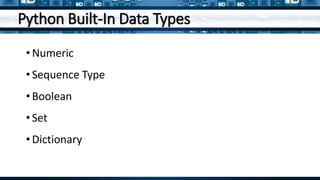
Python Built-In Data Types
• Numeric
• Sequence Type
• Boolean
• Set
• Dictionary
Answer This
What is a data type?
Numeric
Numeric
Numeric data type represent the data
which has numeric value.
Numeric data type represents the data
which has numeric value.
Numeric
Numeric data type represent the data
which has numeric value.
Numeric value can be integer, floating
number or even complex numbers.
Integer
Int, or integer, is a whole number, positive or
negative, without decimals or fractions, and
no limit to how long an integer value.
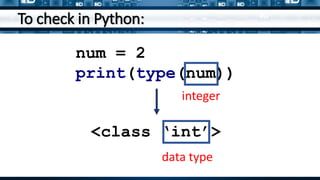
To check in Python:
num = 2
print(type(num))
<class ‘int’>
integer
data type
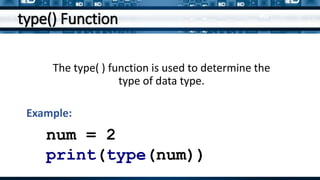
type() Function
The type( ) function is used to determine the
type of data type.
num = 2
print(type(num))
Example:
Answer This
What is the function of the
numeric data type?
Delimiter
Delimiter is a sequence of one or more characters used
to specify the boundary between separate, independent
regions in plain text or other data streams.
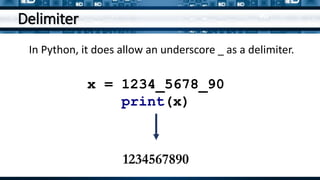
Delimiter
In Python, it does allow an underscore _ as a delimiter.
x = 1234_5678_90
print(x)
1234567890
Answer This
How does the computer interpret data?
Prefixing Integers
• Binary
• Octal
• Hexadecimal
• Decimal
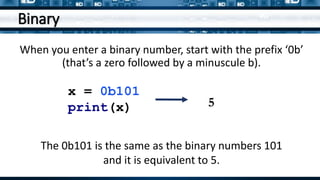
Binary
When you enter a binary number, start with the prefix ‘0b’
(that’s a zero followed by a minuscule b).
x = 0b101
print(x) 5
The 0b101 is the same as the binary numbers 101
and it is equivalent to 5.
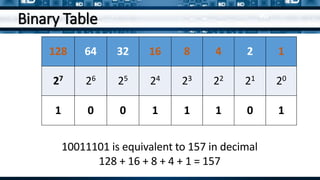
Binary Table
128 64 32 16 8 4 2 1
27 26 25 24 23 22 21 20
1 0 0 1 1 1 0 1
10011101 is equivalent to 157 in decimal
128 + 16 + 8 + 4 + 1 = 157
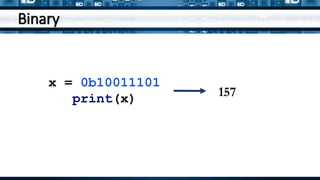
Binary
x = 0b10011101
print(x) 157
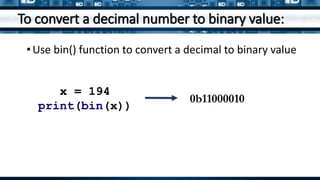
To convert a decimal number to binary value:
x = 194
print(bin(x))
•Use bin() function to convert a decimal to binary value
0b11000010
Octal
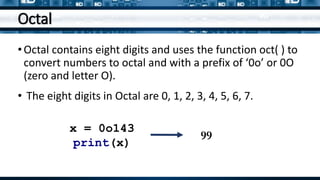
•Octal contains eight digits and uses the function oct( ) to
convert numbers to octal and with a prefix of ‘0o’ or 0O
(zero and letter O).
• The eight digits in Octal are 0, 1, 2, 3, 4, 5, 6, 7.
x = 0o143
print(x)
99
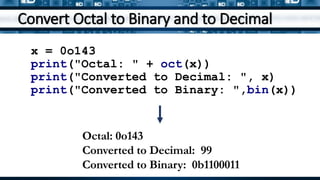
Convert Octal to Binary and to Decimal
x = 0o143
print("Octal: " + oct(x))
print("Converted to Decimal: ", x)
print("Converted to Binary: ",bin(x))
Octal: 0o143
Converted to Decimal: 99
Converted to Binary: 0b1100011
Hexadecimal
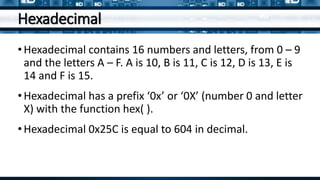
•Hexadecimal contains 16 numbers and letters, from 0 – 9
and the letters A – F. A is 10, B is 11, C is 12, D is 13, E is
14 and F is 15.
•Hexadecimal has a prefix ‘0x’ or ‘0X’ (number 0 and letter
X) with the function hex( ).
•Hexadecimal 0x25C is equal to 604 in decimal.
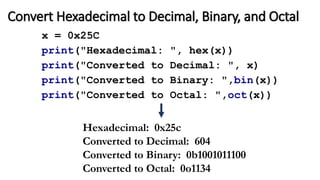
Convert Hexadecimal to Decimal, Binary, and Octal
x = 0x25C
print("Hexadecimal: ", hex(x))
print("Converted to Decimal: ", x)
print("Converted to Binary: ",bin(x))
print("Converted to Octal: ",oct(x))
Hexadecimal: 0x25c
Converted to Decimal: 604
Converted to Binary: 0b1001011100
Converted to Octal: 0o1134
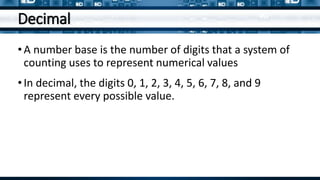
Decimal
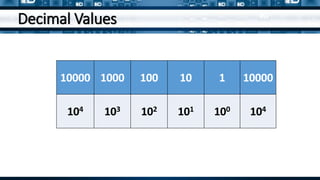
•A number base is the number of digits that a system of
counting uses to represent numerical values
•In decimal, the digits 0, 1, 2, 3, 4, 5, 6, 7, 8, and 9
represent every possible value.
Decimal Values
10000 1000 100 10 1 10000
104 103 102 101 100 104
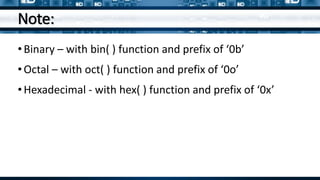
Note:
•Binary – with bin( ) function and prefix of ‘0b’
•Octal – with oct( ) function and prefix of ‘0o’
•Hexadecimal - with hex( ) function and prefix of ‘0x’
Create a program to convert an integer
(decimal) value to Binary, Octal and
Hexadecimal numbers.
Exercise
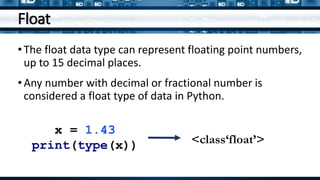
Float
•The float data type can represent floating point numbers,
up to 15 decimal places.
•Any number with decimal or fractional number is
considered a float type of data in Python.
x = 1.43
print(type(x)) <class‘float’>
Float
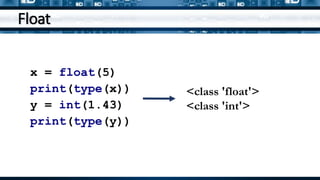
x = float(5)
print(type(x))
y = int(1.43)
print(type(y))
<class 'float'>
<class 'int'>
Float
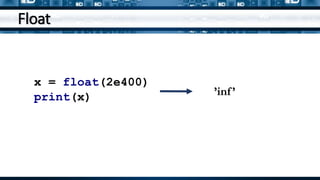
x = float(2e400)
print(x) ’inf’
Float
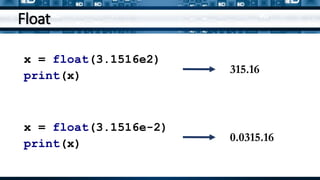
x = float(3.1516e2)
print(x)
315.16
x = float(3.1516e-2)
print(x)
0.0315.16
Arithmetic Operators and Expressions
In this section, you’ll learn how to do
basic arithmetic, such as addition,
subtraction, multiplication, and
with numbers in Python. Along the
you’ll learn some conventions for
writing mathematical expressions in
code.
Addition
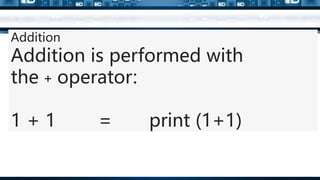
Addition is performed with
the + operator:
1 + 1 = print (1+1)
The two numbers on either side of the + operator
are called operands. In the above example, both
operands are integers, but operands don’t need to
be the same type.
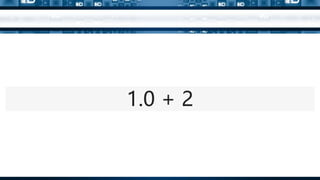
You can add an int to a float with no problem:
Exercise:
PRINT ADDITION OF
INT Data type and FLOAT
Data Type
Now, try to add 5 different
float numbers.
Now, try to add 5 different
float numbers with variable
declaration.
1.0 + 2
Just like adding two integers,
subtracting two integers always results
in an int. Whenever one of the
operands is a float, the result is also
a float.
Just like adding two integers, subtracting two integers always results in an int. Whenever one of the operands is a float, the result is also a float.
Exercise:
Now, calculate negative terms
using Python.
Just like adding two integers, subtracting two integers always results in an int. Whenever one of the operands is a float, the result is also a float.
Exercise:
Now, calculate negative terms
using Python.
Just like adding two integers, subtracting two integers always results in an int. Whenever one of the operands is a float, the result is also a float.
Exercise:
Now, calculate multiplication using
Python.
Just like adding two integers, subtracting two integers always results in an int. Whenever one of the operands is a float, the result is also a float.
Exercise:
Now, calculate division using
Python.
Just like adding two integers, subtracting two integers always results in an int. Whenever one of the operands is a float, the result is also a float.
Create a program to find the sum, difference, product
and quotient of the following floating numbers.
Exercise
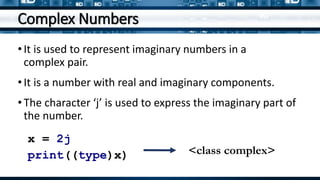
Complex Numbers
•It is used to represent imaginary numbers in a
complex pair.
•It is a number with real and imaginary components.
•The character ‘j’ is used to express the imaginary part of
the number.
x = 2j
print((type)x) <class complex>
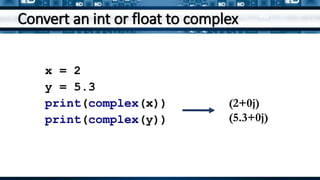
Convert an int or float to complex
x = 2
y = 5.3
print(complex(x))
print(complex(y))
(2+0j)
(5.3+0j)
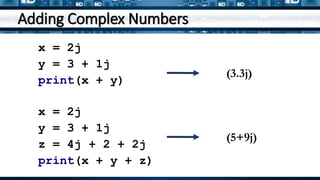
Adding Complex Numbers
x = 2j
y = 3 + 1j
print(x + y)
(3.3j)
x = 2j
y = 3 + 1j
z = 4j + 2 + 2j
print(x + y + z)
(5+9j)
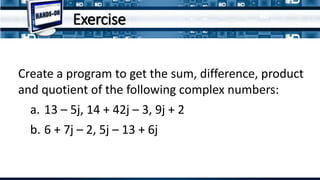
Create a program to get the sum, difference, product
and quotient of the following complex numbers:
a. 13 – 5j, 14 + 42j – 3, 9j + 2
b. 6 + 7j – 2, 5j – 13 + 6j
Exercise
Sequence
Sequence
•Sequences is an ordered collection of similar data types.
It allows to store multiple values in an organized and
efficient manner.
•Built-in sequence data types: string, list, and tuple
String
•A string value is a collection of one or more characters
put in single, double or triple quotes.
•An array of bytes representing Unicode characters
•It uses the str class.
Example
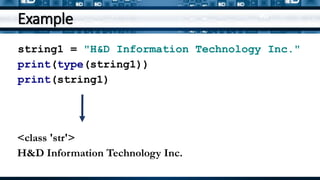
string1 = "H&D Information Technology Inc."
print(type(string1))
print(string1)
<class 'str'>
H&D Information Technology Inc.
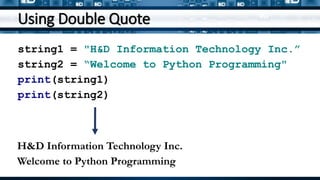
Using Double Quote
string1 = "H&D Information Technology Inc.”
string2 = “Welcome to Python Programming"
print(string1)
print(string2)
H&D Information Technology Inc.
Welcome to Python Programming
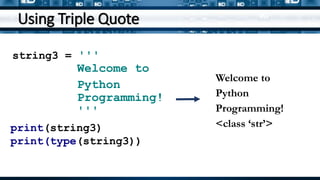
Using Triple Quote
string3 = '''
Welcome to
Python
Programming!
'''
print(string3)
print(type(string3))
Welcome to
Python
Programming!
<class ‘str’>
List
•A list object is an ordered collection of one or
more data items.
•It is represented by list class.
•Lists can be one value, multiple values or
multi-dimensional.
One Value List
list = ["David"]
print("H&D Employees")
print(list)
print(type(list))
H&D Employees
['David']
<class 'list'>
Multiple Values List
list = ["David", "Henry", "William", "Jun"]
print("H&D Employees")
print(list)
print(type(list))
H&D Employees
['David', 'Henry', 'William', 'Jun']
<class 'list'>
Multi-dimensional List
list = ["David", "Henry", "William“], ["Jun“,
“Dennis”, “Rommel", "Francis"]
print("H&D Employees")
print(list)
print(type(list))
H&D Employees
[['David', 'Henry', 'William'], ['Jun', 'Dennis'], ['Arman', 'Rommel',
'Francis']]
<class 'list'>
Lists can also be used for a group of numbers
list = [[95,68,69,88],[100,230],[-2,3,10]]
print("Integers")
print(list)
print(type(list))
Integers
[[95,68,69,88], [100, 230], [-2,3,10]]
<class 'list'>
Accessing Elements on the Lists
•List items are indexed and can access them by referring to
the index number.
•The items on the lists has an index of 0 or List[0].
list = ["David", "Henry", "William", "Jun"]
print(list[0])
David
Negative Indexing
•A negative index will display the element in the list
starting from the last index.
list = ["David", "Henry", "William", "Jun"]
print(list[-1])
Jun
Range of Index
Syntax:
list[startingindex:rangeofindex]
Example:
list = ["David", "Henry", "William", "Jun"]
print(list[0:2])
Output:
['David', 'Henry']
Example
list = ["David", "Henry", "William", "Jun"]
print(list[ :3])
Displays: ['David', 'Henry', 'William']
print(list[1: ])
Displays:['Henry', 'William', 'Jun']
print(list[ : ])
Displays:['David', 'Henry', 'William', 'Jun']
list = ["David", "Henry", "William", "Jun"]
list[3] = "Juanito"
print(list)
['David', 'Henry', 'William', 'Juanito']
Unpacking
coordinates = [1, 2, 3]
x, y, z = coordinates
print(x)
print(y)
print(z)
1
2
3
Unpacking
Grade = [98, 91, 96]
gr1, gr2, gr3 = Grade
print(gr1)
print(gr2)
print(gr3)
98
91
96
Tuple
•Tuple is also an ordered collection of Python objects.
•Tuples are immutable, cannot be modified after it is
created.
•It is represented by tuple class.
Tuple
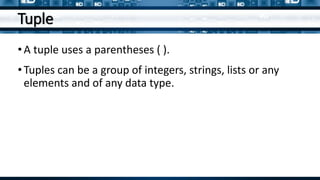
•A tuple uses a parentheses ( ).
•Tuples can be a group of integers, strings, lists or any
elements and of any data type.
Example
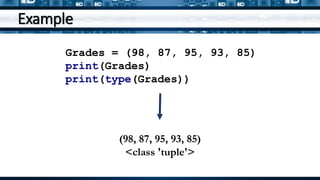
Grades = (98, 87, 95, 93, 85)
print(Grades)
print(type(Grades))
(98, 87, 95, 93, 85)
<class 'tuple'>
Example
employees = ["David", "Henry", "William",
"Jun"]
print("H&D Employees")
print(tuple(employees))
H&D Employees
('David', 'Henry', 'William', 'Jun')
Nested Tuple
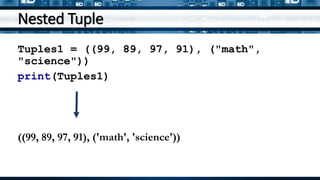
Tuples1 = ((99, 89, 97, 91), ("math",
"science"))
print(Tuples1)
((99, 89, 97, 91), ('math', 'science'))
Nested Tuple
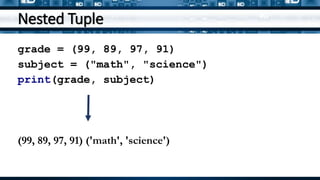
grade = (99, 89, 97, 91)
subject = ("math", "science")
print(grade, subject)
(99, 89, 97, 91) ('math', 'science')
Nested Tuple
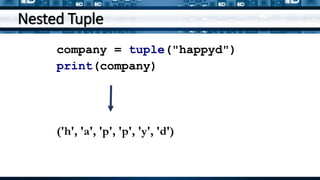
company = tuple("happyd")
print(company)
('h', 'a', 'p', 'p', 'y', 'd')
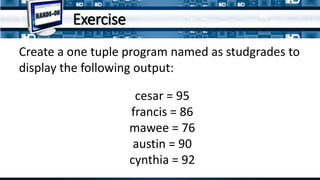
Create a one tuple program named as studgrades to
display the following output:
cesar = 95
francis = 86
mawee = 76
austin = 90
cynthia = 92
Exercise
Boolean
Boolean
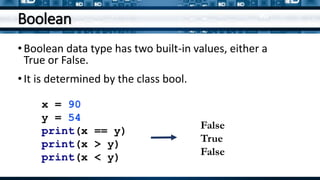
•Boolean data type has two built-in values, either a
True or False.
•It is determined by the class bool.
x = 90
y = 54
print(x == y)
print(x > y)
print(x < y)
False
True
False
Example
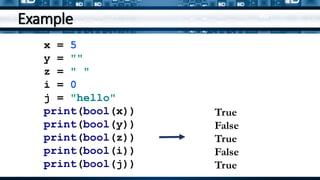
x = 5
y = ""
z = " "
i = 0
j = "hello"
print(bool(x))
print(bool(y))
print(bool(z))
print(bool(i))
print(bool(j))
True
False
True
False
True
Create a program to identify if the first
element in a list is equal to 5.
Exercise
Set
Set
•An unordered collection of data type that is iterable,
mutable and has no duplicate elements.
•It contains one or more items, not necessarily of the
same type, which are separated by comma and enclosed
in curly brackets { }.
Example
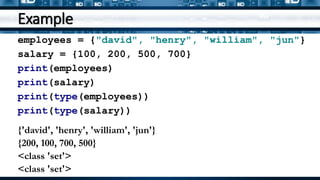
employees = {"david", "henry", "william", "jun"}
salary = {100, 200, 500, 700}
print(employees)
print(salary)
print(type(employees))
print(type(salary))
{'david', 'henry', 'william', 'jun'}
{200, 100, 700, 500}
<class 'set'>
<class 'set'>
Example
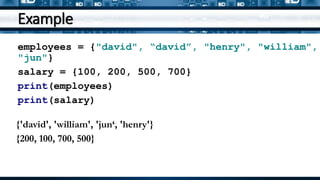
employees = {"david", “david”, "henry", "william",
"jun"}
salary = {100, 200, 500, 700}
print(employees)
print(salary)
{'david', 'william', 'jun‘, 'henry'}
{200, 100, 700, 500}
Example
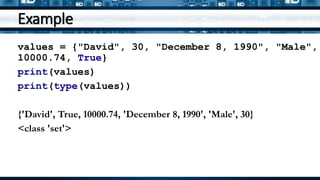
values = {"David", 30, "December 8, 1990", "Male",
10000.74, True}
print(values)
print(type(values))
{'David', True, 10000.74, 'December 8, 1990', 'Male', 30}
<class 'set'>
Example
set1 = set("happyd")
set2 = set([1,2,3,4,5])
set3 = set(("a","b","c","d","e"))
print(set1)
print(set2)
print(set3)
{'y', 'p', 'a', 'h', 'd'}
{1, 2, 3, 4, 5}
{'e', 'b', 'c', 'a', 'd'}
Modifying Sets
• Add()
• Update()
• Discard()
• Remove()
• Clear()
Removing/deleting element/s in a set
set1 = {1,2,3}
set2 = {4,5,6}
set3 = {7,8,9}
set4 = {3,4,9}
set1.add(10)
set2.update([1,2,20])
set3.discard(9)
set4.remove(3)
print("Add: ",set1)
print("Update: ",set2)
print("Discard: ",set3)
print("Remove: ",set4)
Add: {10, 1, 2, 3}
Update: {1, 2, 4, 5, 6, 20}
Discard: {8, 7}
Remove: {9, 4}
Dictionary
Dictionary
•An unordered collection of data values, used to store
data values.
•Dictionary holds key:value pair.
•Key-value is provided in the dictionary to make it
more optimized.
•Each key-value pair in a Dictionary is separated by a colon :,
whereas each key is separated by a ‘comma’.
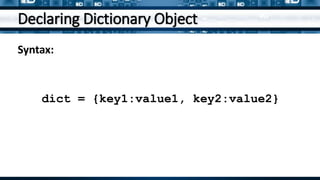
Declaring Dictionary Object
Syntax:
dict = {key1:value1, key2:value2}
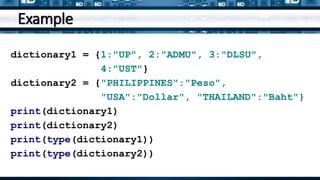
Example
dictionary1 = {1:"UP", 2:"ADMU", 3:"DLSU",
4:"UST"}
dictionary2 = {"PHILIPPINES":"Peso",
"USA":"Dollar", "THAILAND":"Baht"}
print(dictionary1)
print(dictionary2)
print(type(dictionary1))
print(type(dictionary2))
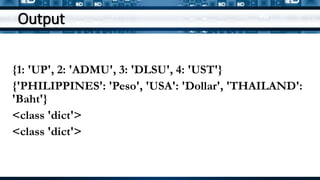
Output
{1: 'UP', 2: 'ADMU', 3: 'DLSU', 4: 'UST'}
{'PHILIPPINES': 'Peso', 'USA': 'Dollar', 'THAILAND':
'Baht'}
<class 'dict'>
<class 'dict'>
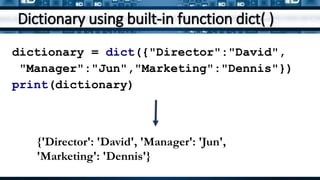
Dictionary using built-in function dict( )
dictionary = dict({"Director":"David",
"Manager":"Jun","Marketing":"Dennis"})
print(dictionary)
{'Director': 'David', 'Manager': 'Jun',
'Marketing': 'Dennis'}
Dictionary using items in pairs
dictionary = dict([("Director","David"),
("Manager","Jun"),("Marketing","Dennis")])
print(dictionary)
{'Director': 'David', 'Manager': 'Jun',
'Marketing': 'Dennis'}
Nested Dictionary
Nested dictionary is use when you have another
collection or group inside a dictionary.
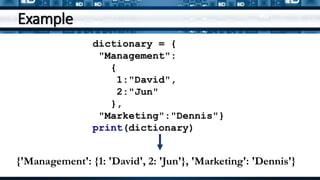
Example
{'Management': {1: 'David', 2: 'Jun'}, 'Marketing': 'Dennis'}
dictionary = {
"Management":
{
1:"David",
2:"Jun"
},
"Marketing":"Dennis"}
print(dictionary)
Create a program to display the name
and grades of 5 students. Program
must contains two lists: students and
grades.
QUIZ – HANDS-ON (LIST)
Create a program using the unpacking
to display the sum and average of five
input grades.
QUIZ – HANDS-ON
QUIZ – HANDS-ON
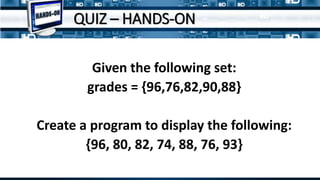
Given the following set:
grades = {96,76,82,90,88}
Create a program to display the following:
{96, 80, 82, 74, 88, 76, 93}

Python-CH01L04-Presentation.pptx

  • 1.
  • 2.
    How do youdisplay text, strings, and values of variables?
  • 3.
  • 4.
    Computer converts strings, numbers,and images in binary before processing.
  • 5.
    Data Types In ThisLesson Numeric Sequence Boolean Set Dictionary
  • 6.
  • 7.
    Data Type Data typesare the classification or categorization of data items.
  • 8.
    Data Type It representsthe kind of value that tells what operations can be performed on a particular data.
  • 9.
    Python Built-In DataTypes • Numeric • Sequence Type • Boolean • Set • Dictionary
  • 10.
    Answer This What isa data type?
  • 11.
  • 12.
    Numeric Numeric data typerepresent the data which has numeric value. Numeric data type represents the data which has numeric value.
  • 13.
    Numeric Numeric data typerepresent the data which has numeric value. Numeric value can be integer, floating number or even complex numbers.
  • 14.
    Integer Int, or integer,is a whole number, positive or negative, without decimals or fractions, and no limit to how long an integer value.
  • 15.
    To check inPython: num = 2 print(type(num)) <class ‘int’> integer data type
  • 16.
    type() Function The type() function is used to determine the type of data type. num = 2 print(type(num)) Example:
  • 17.
    Answer This What isthe function of the numeric data type?
  • 18.
    Delimiter Delimiter is asequence of one or more characters used to specify the boundary between separate, independent regions in plain text or other data streams.
  • 19.
    Delimiter In Python, itdoes allow an underscore _ as a delimiter. x = 1234_5678_90 print(x) 1234567890
  • 20.
    Answer This How doesthe computer interpret data?
  • 21.
    Prefixing Integers • Binary •Octal • Hexadecimal • Decimal
  • 22.
    Binary When you entera binary number, start with the prefix ‘0b’ (that’s a zero followed by a minuscule b). x = 0b101 print(x) 5 The 0b101 is the same as the binary numbers 101 and it is equivalent to 5.
  • 23.
    Binary Table 128 6432 16 8 4 2 1 27 26 25 24 23 22 21 20 1 0 0 1 1 1 0 1 10011101 is equivalent to 157 in decimal 128 + 16 + 8 + 4 + 1 = 157
  • 24.
  • 25.
    To convert adecimal number to binary value: x = 194 print(bin(x)) •Use bin() function to convert a decimal to binary value 0b11000010
  • 26.
    Octal •Octal contains eightdigits and uses the function oct( ) to convert numbers to octal and with a prefix of ‘0o’ or 0O (zero and letter O). • The eight digits in Octal are 0, 1, 2, 3, 4, 5, 6, 7. x = 0o143 print(x) 99
  • 27.
    Convert Octal toBinary and to Decimal x = 0o143 print("Octal: " + oct(x)) print("Converted to Decimal: ", x) print("Converted to Binary: ",bin(x)) Octal: 0o143 Converted to Decimal: 99 Converted to Binary: 0b1100011
  • 28.
    Hexadecimal •Hexadecimal contains 16numbers and letters, from 0 – 9 and the letters A – F. A is 10, B is 11, C is 12, D is 13, E is 14 and F is 15. •Hexadecimal has a prefix ‘0x’ or ‘0X’ (number 0 and letter X) with the function hex( ). •Hexadecimal 0x25C is equal to 604 in decimal.
  • 29.
    Convert Hexadecimal toDecimal, Binary, and Octal x = 0x25C print("Hexadecimal: ", hex(x)) print("Converted to Decimal: ", x) print("Converted to Binary: ",bin(x)) print("Converted to Octal: ",oct(x)) Hexadecimal: 0x25c Converted to Decimal: 604 Converted to Binary: 0b1001011100 Converted to Octal: 0o1134
  • 30.
    Decimal •A number baseis the number of digits that a system of counting uses to represent numerical values •In decimal, the digits 0, 1, 2, 3, 4, 5, 6, 7, 8, and 9 represent every possible value.
  • 31.
    Decimal Values 10000 1000100 10 1 10000 104 103 102 101 100 104
  • 32.
    Note: •Binary – withbin( ) function and prefix of ‘0b’ •Octal – with oct( ) function and prefix of ‘0o’ •Hexadecimal - with hex( ) function and prefix of ‘0x’
  • 33.
    Create a programto convert an integer (decimal) value to Binary, Octal and Hexadecimal numbers. Exercise
  • 34.
    Float •The float datatype can represent floating point numbers, up to 15 decimal places. •Any number with decimal or fractional number is considered a float type of data in Python. x = 1.43 print(type(x)) <class‘float’>
  • 35.
    Float x = float(5) print(type(x)) y= int(1.43) print(type(y)) <class 'float'> <class 'int'>
  • 36.
  • 37.
    Float x = float(3.1516e2) print(x) 315.16 x= float(3.1516e-2) print(x) 0.0315.16
  • 38.
    Arithmetic Operators andExpressions In this section, you’ll learn how to do basic arithmetic, such as addition, subtraction, multiplication, and with numbers in Python. Along the you’ll learn some conventions for writing mathematical expressions in code.
  • 39.
    Addition Addition is performedwith the + operator: 1 + 1 = print (1+1)
  • 40.
    The two numberson either side of the + operator are called operands. In the above example, both operands are integers, but operands don’t need to be the same type. You can add an int to a float with no problem:
  • 41.
    Exercise: PRINT ADDITION OF INTData type and FLOAT Data Type
  • 42.
    Now, try toadd 5 different float numbers.
  • 43.
    Now, try toadd 5 different float numbers with variable declaration.
  • 44.
  • 45.
    Just like addingtwo integers, subtracting two integers always results in an int. Whenever one of the operands is a float, the result is also a float. Just like adding two integers, subtracting two integers always results in an int. Whenever one of the operands is a float, the result is also a float.
  • 46.
    Exercise: Now, calculate negativeterms using Python. Just like adding two integers, subtracting two integers always results in an int. Whenever one of the operands is a float, the result is also a float.
  • 47.
    Exercise: Now, calculate negativeterms using Python. Just like adding two integers, subtracting two integers always results in an int. Whenever one of the operands is a float, the result is also a float.
  • 48.
    Exercise: Now, calculate multiplicationusing Python. Just like adding two integers, subtracting two integers always results in an int. Whenever one of the operands is a float, the result is also a float.
  • 49.
    Exercise: Now, calculate divisionusing Python. Just like adding two integers, subtracting two integers always results in an int. Whenever one of the operands is a float, the result is also a float.
  • 50.
    Create a programto find the sum, difference, product and quotient of the following floating numbers. Exercise
  • 51.
    Complex Numbers •It isused to represent imaginary numbers in a complex pair. •It is a number with real and imaginary components. •The character ‘j’ is used to express the imaginary part of the number. x = 2j print((type)x) <class complex>
  • 52.
    Convert an intor float to complex x = 2 y = 5.3 print(complex(x)) print(complex(y)) (2+0j) (5.3+0j)
  • 53.
    Adding Complex Numbers x= 2j y = 3 + 1j print(x + y) (3.3j) x = 2j y = 3 + 1j z = 4j + 2 + 2j print(x + y + z) (5+9j)
  • 54.
    Create a programto get the sum, difference, product and quotient of the following complex numbers: a. 13 – 5j, 14 + 42j – 3, 9j + 2 b. 6 + 7j – 2, 5j – 13 + 6j Exercise
  • 55.
  • 56.
    Sequence •Sequences is anordered collection of similar data types. It allows to store multiple values in an organized and efficient manner. •Built-in sequence data types: string, list, and tuple
  • 57.
    String •A string valueis a collection of one or more characters put in single, double or triple quotes. •An array of bytes representing Unicode characters •It uses the str class.
  • 58.
    Example string1 = "H&DInformation Technology Inc." print(type(string1)) print(string1) <class 'str'> H&D Information Technology Inc.
  • 59.
    Using Double Quote string1= "H&D Information Technology Inc.” string2 = “Welcome to Python Programming" print(string1) print(string2) H&D Information Technology Inc. Welcome to Python Programming
  • 60.
    Using Triple Quote string3= ''' Welcome to Python Programming! ''' print(string3) print(type(string3)) Welcome to Python Programming! <class ‘str’>
  • 61.
    List •A list objectis an ordered collection of one or more data items. •It is represented by list class. •Lists can be one value, multiple values or multi-dimensional.
  • 62.
    One Value List list= ["David"] print("H&D Employees") print(list) print(type(list)) H&D Employees ['David'] <class 'list'>
  • 63.
    Multiple Values List list= ["David", "Henry", "William", "Jun"] print("H&D Employees") print(list) print(type(list)) H&D Employees ['David', 'Henry', 'William', 'Jun'] <class 'list'>
  • 64.
    Multi-dimensional List list =["David", "Henry", "William“], ["Jun“, “Dennis”, “Rommel", "Francis"] print("H&D Employees") print(list) print(type(list)) H&D Employees [['David', 'Henry', 'William'], ['Jun', 'Dennis'], ['Arman', 'Rommel', 'Francis']] <class 'list'>
  • 65.
    Lists can alsobe used for a group of numbers list = [[95,68,69,88],[100,230],[-2,3,10]] print("Integers") print(list) print(type(list)) Integers [[95,68,69,88], [100, 230], [-2,3,10]] <class 'list'>
  • 66.
    Accessing Elements onthe Lists •List items are indexed and can access them by referring to the index number. •The items on the lists has an index of 0 or List[0]. list = ["David", "Henry", "William", "Jun"] print(list[0]) David
  • 67.
    Negative Indexing •A negativeindex will display the element in the list starting from the last index. list = ["David", "Henry", "William", "Jun"] print(list[-1]) Jun
  • 68.
    Range of Index Syntax: list[startingindex:rangeofindex] Example: list= ["David", "Henry", "William", "Jun"] print(list[0:2]) Output: ['David', 'Henry']
  • 69.
    Example list = ["David","Henry", "William", "Jun"] print(list[ :3]) Displays: ['David', 'Henry', 'William'] print(list[1: ]) Displays:['Henry', 'William', 'Jun'] print(list[ : ]) Displays:['David', 'Henry', 'William', 'Jun']
  • 70.
    list = ["David","Henry", "William", "Jun"] list[3] = "Juanito" print(list) ['David', 'Henry', 'William', 'Juanito']
  • 71.
    Unpacking coordinates = [1,2, 3] x, y, z = coordinates print(x) print(y) print(z) 1 2 3
  • 72.
    Unpacking Grade = [98,91, 96] gr1, gr2, gr3 = Grade print(gr1) print(gr2) print(gr3) 98 91 96
  • 73.
    Tuple •Tuple is alsoan ordered collection of Python objects. •Tuples are immutable, cannot be modified after it is created. •It is represented by tuple class.
  • 74.
    Tuple •A tuple usesa parentheses ( ). •Tuples can be a group of integers, strings, lists or any elements and of any data type.
  • 75.
    Example Grades = (98,87, 95, 93, 85) print(Grades) print(type(Grades)) (98, 87, 95, 93, 85) <class 'tuple'>
  • 76.
    Example employees = ["David","Henry", "William", "Jun"] print("H&D Employees") print(tuple(employees)) H&D Employees ('David', 'Henry', 'William', 'Jun')
  • 77.
    Nested Tuple Tuples1 =((99, 89, 97, 91), ("math", "science")) print(Tuples1) ((99, 89, 97, 91), ('math', 'science'))
  • 78.
    Nested Tuple grade =(99, 89, 97, 91) subject = ("math", "science") print(grade, subject) (99, 89, 97, 91) ('math', 'science')
  • 79.
    Nested Tuple company =tuple("happyd") print(company) ('h', 'a', 'p', 'p', 'y', 'd')
  • 80.
    Create a onetuple program named as studgrades to display the following output: cesar = 95 francis = 86 mawee = 76 austin = 90 cynthia = 92 Exercise
  • 81.
  • 82.
    Boolean •Boolean data typehas two built-in values, either a True or False. •It is determined by the class bool. x = 90 y = 54 print(x == y) print(x > y) print(x < y) False True False
  • 83.
    Example x = 5 y= "" z = " " i = 0 j = "hello" print(bool(x)) print(bool(y)) print(bool(z)) print(bool(i)) print(bool(j)) True False True False True
  • 84.
    Create a programto identify if the first element in a list is equal to 5. Exercise
  • 85.
  • 86.
    Set •An unordered collectionof data type that is iterable, mutable and has no duplicate elements. •It contains one or more items, not necessarily of the same type, which are separated by comma and enclosed in curly brackets { }.
  • 87.
    Example employees = {"david","henry", "william", "jun"} salary = {100, 200, 500, 700} print(employees) print(salary) print(type(employees)) print(type(salary)) {'david', 'henry', 'william', 'jun'} {200, 100, 700, 500} <class 'set'> <class 'set'>
  • 88.
    Example employees = {"david",“david”, "henry", "william", "jun"} salary = {100, 200, 500, 700} print(employees) print(salary) {'david', 'william', 'jun‘, 'henry'} {200, 100, 700, 500}
  • 89.
    Example values = {"David",30, "December 8, 1990", "Male", 10000.74, True} print(values) print(type(values)) {'David', True, 10000.74, 'December 8, 1990', 'Male', 30} <class 'set'>
  • 90.
    Example set1 = set("happyd") set2= set([1,2,3,4,5]) set3 = set(("a","b","c","d","e")) print(set1) print(set2) print(set3) {'y', 'p', 'a', 'h', 'd'} {1, 2, 3, 4, 5} {'e', 'b', 'c', 'a', 'd'}
  • 91.
    Modifying Sets • Add() •Update() • Discard() • Remove() • Clear()
  • 92.
    Removing/deleting element/s ina set set1 = {1,2,3} set2 = {4,5,6} set3 = {7,8,9} set4 = {3,4,9} set1.add(10) set2.update([1,2,20]) set3.discard(9) set4.remove(3) print("Add: ",set1) print("Update: ",set2) print("Discard: ",set3) print("Remove: ",set4) Add: {10, 1, 2, 3} Update: {1, 2, 4, 5, 6, 20} Discard: {8, 7} Remove: {9, 4}
  • 93.
  • 94.
    Dictionary •An unordered collectionof data values, used to store data values. •Dictionary holds key:value pair. •Key-value is provided in the dictionary to make it more optimized. •Each key-value pair in a Dictionary is separated by a colon :, whereas each key is separated by a ‘comma’.
  • 95.
    Declaring Dictionary Object Syntax: dict= {key1:value1, key2:value2}
  • 96.
    Example dictionary1 = {1:"UP",2:"ADMU", 3:"DLSU", 4:"UST"} dictionary2 = {"PHILIPPINES":"Peso", "USA":"Dollar", "THAILAND":"Baht"} print(dictionary1) print(dictionary2) print(type(dictionary1)) print(type(dictionary2))
  • 97.
    Output {1: 'UP', 2:'ADMU', 3: 'DLSU', 4: 'UST'} {'PHILIPPINES': 'Peso', 'USA': 'Dollar', 'THAILAND': 'Baht'} <class 'dict'> <class 'dict'>
  • 98.
    Dictionary using built-infunction dict( ) dictionary = dict({"Director":"David", "Manager":"Jun","Marketing":"Dennis"}) print(dictionary) {'Director': 'David', 'Manager': 'Jun', 'Marketing': 'Dennis'}
  • 99.
    Dictionary using itemsin pairs dictionary = dict([("Director","David"), ("Manager","Jun"),("Marketing","Dennis")]) print(dictionary) {'Director': 'David', 'Manager': 'Jun', 'Marketing': 'Dennis'}
  • 100.
    Nested Dictionary Nested dictionaryis use when you have another collection or group inside a dictionary.
  • 101.
    Example {'Management': {1: 'David',2: 'Jun'}, 'Marketing': 'Dennis'} dictionary = { "Management": { 1:"David", 2:"Jun" }, "Marketing":"Dennis"} print(dictionary)
  • 102.
    Create a programto display the name and grades of 5 students. Program must contains two lists: students and grades. QUIZ – HANDS-ON (LIST)
  • 103.
    Create a programusing the unpacking to display the sum and average of five input grades. QUIZ – HANDS-ON
  • 104.
    QUIZ – HANDS-ON Giventhe following set: grades = {96,76,82,90,88} Create a program to display the following: {96, 80, 82, 74, 88, 76, 93}

Editor's Notes

  • #36 Integers and floats are two different kinds of numerical data. An integer (more commonly called an int) is a number without a decimal point. A float is a floating-point number, which means it is a number that has a decimal place. Floats are used when more precision is needed.
  • #37 inf stands for infinity, and it just means that the number you’ve tried to create is beyond the maximum floating-point value allowed on your computer. The type of inf is still float
  • #40 The two numbers on either side of the + operator are called operands. In the above example, both operands are integers, but operands don’t need to be the same type. You can add an int to a float with no problem:
  • #41 The two numbers on either side of the + operator are called operands. In the above example, both operands are integers, but operands don’t need to be the same type. You can add an int to a float with no problem:
  • #42 The two numbers on either side of the + operator are called operands. In the above example, both operands are integers, but operands don’t need to be the same type. You can add an int to a float with no problem:
  • #43 Just like adding two integers, subtracting two integers always results in an int. Whenever one of the operands is a float, the result is also a float.
  • #44 Just like adding two integers, subtracting two integers always results in an int. Whenever one of the operands is a float, the result is also a float.
  • #45 Just like adding two integers, subtracting two integers always results in an int. Whenever one of the operands is a float, the result is also a float.
  • #46 The two numbers on either side of the + operator are called operands. In the above example, both operands are integers, but operands don’t need to be the same type. You can add an int to a float with no problem:
  • #47 The two numbers on either side of the + operator are called operands. In the above example, both operands are integers, but operands don’t need to be the same type. You can add an int to a float with no problem:
  • #48 The two numbers on either side of the + operator are called operands. In the above example, both operands are integers, but operands don’t need to be the same type. You can add an int to a float with no problem:
  • #49 The two numbers on either side of the + operator are called operands. In the above example, both operands are integers, but operands don’t need to be the same type. You can add an int to a float with no problem:
  • #50 The two numbers on either side of the + operator are called operands. In the above example, both operands are integers, but operands don’t need to be the same type. You can add an int to a float with no problem: