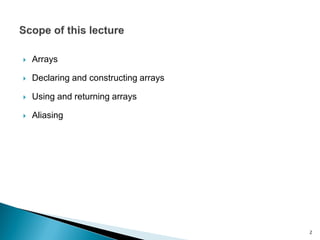
The document discusses arrays in Java. It covers declaring and constructing arrays, using and returning arrays, and the concept of aliasing arrays. Methods for storing data in arrays, accessing array elements, and iterating over arrays are provided. Examples are given for calculating sums and averages of array elements. Aliasing of arrays is demonstrated through assigning two references to the same array.

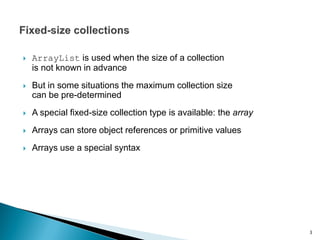
![ An array is an indexed sequence of variables
of the same type
The array is called a
Its elements are called a[0], a[1], a[2], etc.
◦ Each element is a separate variable
Notice that (as with ArrayList) indexing starts from 0
a[0] a[1] a[2] a[3] a[4]
a
4
a[5]](https://image.slidesharecdn.com/lecture6-arrays-160913065719/85/Lecture-6-Arrays-4-320.jpg)
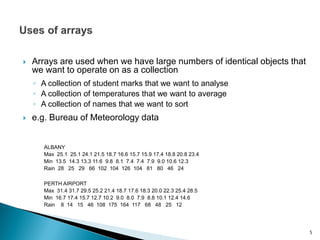
![ An array is declared using similar syntax to any other variable
int[] a;
Declares a to be a variable representing an array of ints
double[] temps;
Declares temps to be a variable representing an array of
doubles
String[] names;
Declares names to be a variable representing an array of
Strings
Student[] marks;
Declares marks to be a variable representing an array of
Student objects
6](https://image.slidesharecdn.com/lecture6-arrays-160913065719/85/Lecture-6-Arrays-6-320.jpg)
![ An array is an object in a Java program
Therefore the declaration simply creates a reference to “point to” the
array, but does not create the array itself
Hence the declaration
int[] a;
creates a space called a, big enough to hold an object
reference, and initially set to the special value null
a
null Only space for the array
reference has been
created, not for the array
itself
7](https://image.slidesharecdn.com/lecture6-arrays-160913065719/85/Lecture-6-Arrays-7-320.jpg)
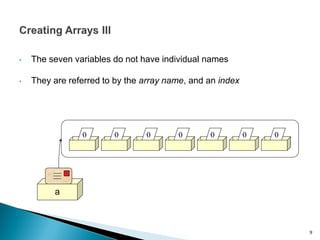
![ In order to actually create the array, we must use the keyword new
(just like creating any other object)
int[] a;
a = new int[7];
0 0 0 0 00 0
a
An object is created that
contains seven variables of type
int
8
The expression a.length can be
used to refer to the size of a](https://image.slidesharecdn.com/lecture6-arrays-160913065719/85/Lecture-6-Arrays-8-320.jpg)
![• Array elements can be used in the same ways and
in the same contexts as any other variable of that
type
a[0] a[1]
0
a[2]
7
a[3]
-1
a[5]
0
a[4]
15
a[6]
17
a[4] = 15;
a[2] = 7;
a[3] = 2*a[2] – a[4];
a[6] = a[0] + 17;
10](https://image.slidesharecdn.com/lecture6-arrays-160913065719/85/Lecture-6-Arrays-10-320.jpg)
![ A lot of the power of arrays comes from the fact that
the index can be a variable or an expression
int x = 3;
a[x] = 5;
a[7-x] = 44;
a[0]
0
a[1]
0
a[2]
7
a[3]
5
a[5]
0
a[4]
44
a[6]
17
11](https://image.slidesharecdn.com/lecture6-arrays-160913065719/85/Lecture-6-Arrays-11-320.jpg)
![private int sum(int[] a)
{
int sum = 0;
for (int i : a)
{
sum = sum + i;
}
return sum;
}
12
• Here i is an element of the array a](https://image.slidesharecdn.com/lecture6-arrays-160913065719/85/Lecture-6-Arrays-12-320.jpg)
![private int sum(int[] a)
{
int sum = 0;
for (int i = 0; i < a.length; i++)
{
sum = sum + a[i];
}
return sum;
}
13
• Here i is being used as an index into the array a](https://image.slidesharecdn.com/lecture6-arrays-160913065719/85/Lecture-6-Arrays-13-320.jpg)
![• Note that this is only well-defined for non-empty
arrays!
• Again i is an element of the array a
private int max(int[] a)
{
int max = a[0];
for (int i : a)
{
if (i > max) max = i;
}
return max;
}
14](https://image.slidesharecdn.com/lecture6-arrays-160913065719/85/Lecture-6-Arrays-14-320.jpg)
![private int max(int[] a)
{
int max = a[0];
for (int i = 1; i < a.length; i++)
{
if (a[i] > max) max = a[i];
}
return max;
}
15
• Again i is being used as an index into the array a](https://image.slidesharecdn.com/lecture6-arrays-160913065719/85/Lecture-6-Arrays-15-320.jpg)
![private int max(int[] a)
{
int k = 0;
for (int i = 1; i < a.length; i++)
{
if (a[i] > a[k]) k = i;
}
return k;
}
16
• A for-each loop will not work for this example](https://image.slidesharecdn.com/lecture6-arrays-160913065719/85/Lecture-6-Arrays-16-320.jpg)
![ An array literal is written using {}
Array literals in this form
can only be used in declarations
Related uses require new
private int[] numbers = {3, 15, 4, 5};
declaration,
creation, and
initialization
numbers = new int[] {3, 15, 4, 5};
17](https://image.slidesharecdn.com/lecture6-arrays-160913065719/85/Lecture-6-Arrays-17-320.jpg)
![private int[] sums(int[] a)
{
int[] sums = new int[a.length];
sums[0] = a[0];
for (int i = 1; i < a.length; i++)
{
sums[i] = sums[i–1] + a[i];
}
return sums;
} 18
• Suppose we want to find the running sums of a
sums({2,5,–8,3}) = {2,7,–1,2}](https://image.slidesharecdn.com/lecture6-arrays-160913065719/85/Lecture-6-Arrays-18-320.jpg)
![private int[] avs(int[] a)
{
int[] avs = new int[a.length / 2];
for (int i = 0; i < a.length; i = i+2)
{
avs[i / 2] = (a[i] + a[i+1]) / 2;
}
return avs;
}
19
• Suppose we want to average each pair of elements of a
avs({2,6,–8,2}) = {4,–3}](https://image.slidesharecdn.com/lecture6-arrays-160913065719/85/Lecture-6-Arrays-19-320.jpg)
![private void sums(int[] a)
{
for (int i = 1; i < a.length; i++)
{
a[i] = a[i–1] + a[i];
}
}
20
• Sometimes instead of creating a new
array, we want to update the old one
• But this method doesn’t return
anything…](https://image.slidesharecdn.com/lecture6-arrays-160913065719/85/Lecture-6-Arrays-20-320.jpg)
![21
int[] a, b;
a b](https://image.slidesharecdn.com/lecture6-arrays-160913065719/85/Lecture-6-Arrays-21-320.jpg)
![22
int[] a, b;
a = new int[3];
a[0]
0
a[1]
0
a[2]
0
a b](https://image.slidesharecdn.com/lecture6-arrays-160913065719/85/Lecture-6-Arrays-22-320.jpg)
![23
int[] a, b;
a = new int[3];
b = a;
a[0]
0
a[1]
0
a[2]
0
a b](https://image.slidesharecdn.com/lecture6-arrays-160913065719/85/Lecture-6-Arrays-23-320.jpg)
![24
int[] a, b;
a = new int[3];
b = a;
System.out.println(b[2]);
a[0]
0
a[1]
0
a[2]
0
a b
0](https://image.slidesharecdn.com/lecture6-arrays-160913065719/85/Lecture-6-Arrays-24-320.jpg)
![25
int[] a, b;
a = new int[3];
b = a;
System.out.println(b[2]);
a[2] = 9;
a[0]
0
a[1]
0
a[2]
9
a b
0](https://image.slidesharecdn.com/lecture6-arrays-160913065719/85/Lecture-6-Arrays-25-320.jpg)
![26
int[] a, b;
a = new int[3];
b = a;
System.out.println(b[2]);
a[2] = 9;
System.out.println(b[2]);
a[0]
0
a[1]
0
a[2]
9
a b
0
9](https://image.slidesharecdn.com/lecture6-arrays-160913065719/85/Lecture-6-Arrays-26-320.jpg)


![Data Structures - Lecture 3 [Arrays]](https://cdn.slidesharecdn.com/ss_thumbnails/lecture-3arrays-141224100714-conversion-gate01-thumbnail.jpg?width=640&height=640&fit=bounds)


![20260201 [FOSDEM] gomodjail - library sandboxing for Go modules.pdf](https://cdn.slidesharecdn.com/ss_thumbnails/20260201fosdemgomodjail-librarysandboxingforgomodules-260201225659-76609ec4-thumbnail.jpg?width=640&height=640&fit=bounds)


