

© 2009 Oracle Corporation – Proprietary and Confidential
                                                           1
Primavera: Administering Users, Access and Views in
                           P6 (web) Version 8 and Later
                                                       Upcoming live webcasts and recent recordings:
           Day, Date, 2004
                                                       January 5, 2012: Oracle Application Management
   Teleconference ET
        time p.m. Access:                              Suite for JD Edwards EnterpriseOne
  US & Canada: 888-259-
          4812                                         January 10, 2012: UBE Troubleshooting E1
 Teleconference Access:
Toll Number: 706-679-4880                              Scheduler Overview
       North America: xxxx
    International Toll-Free:
       International: xxxx                             January 11, 2012: How to plan for a new installation
      See DOC#1148600.1
       Password: Advisor                               of Oracle Fusion Middleware 11g
     Password: advisorpg
                                                       January 11, 2012: Introduction to Troubleshooting
                                                       EnterpriseOne Performance Issues
Current Advisor Webcast
Schedule – DOC#740966.1                                January 12, 2012: Primavera: Helper Classes and
                                                       the Job Manager using the P6 Integration API
         Archived Advisor                              January 12, 2012: A New Look and Innovation for
            Webcasts                                   JD Edwards EnterpriseOne Tools
           DOC#740964.1
                                                       January 18, 2012: E-Business Suite Patch Wizard
                                                       Overview
© 2012 Oracle Corporation – Proprietary and Confidential
                                                                                                           2
Safe Harbor Statement

                    The following is intended to outline our general
                    product direction. It is intended for information
                    purposes only, and may not be incorporated into
                    any contract. It is not a commitment to deliver any
                    material, code, or functionality, and should not be
                    relied upon in making purchasing decision. The
                    development, release, and timing of any features
                    or functionality described for Oracle’s products
                    remains at the sole discretion of Oracle.


© 2012 Oracle Corporation – Proprietary and Confidential
                                                                          3
<Insert Picture Here>


Administering Users, Access and Views in P6 EPPM
(Web) Release 8 and later
Mike Wilson
Technical Support Engineer
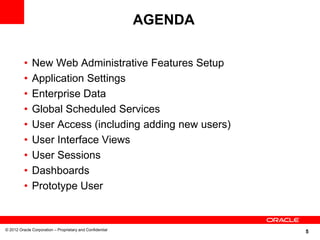
AGENDA

          •   New Web Administrative Features Setup
          •   Application Settings
          •   Enterprise Data
          •   Global Scheduled Services
          •   User Access (including adding new users)
          •   User Interface Views
          •   User Sessions
          •   Dashboards
          •   Prototype User


© 2012 Oracle Corporation – Proprietary and Confidential
                                                                    5
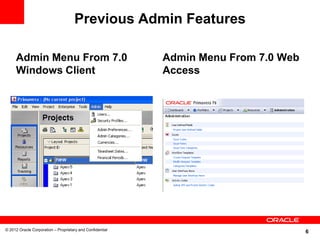
Previous Admin Features

     Admin Menu From 7.0                                   Admin Menu From 7.0 Web
     Windows Client                                        Access


© 2012 Oracle Corporation – Proprietary and Confidential
                                                                                     6
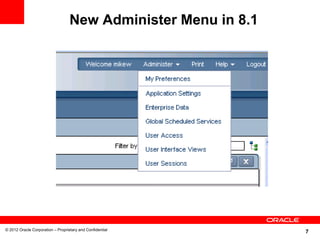
New Administer Menu in 8.1


© 2012 Oracle Corporation – Proprietary and Confidential
                                                                7
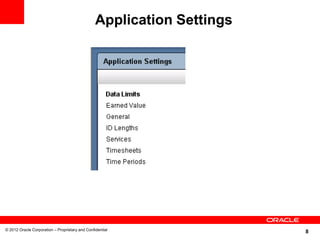
Application Settings


© 2012 Oracle Corporation – Proprietary and Confidential
                                                                        8
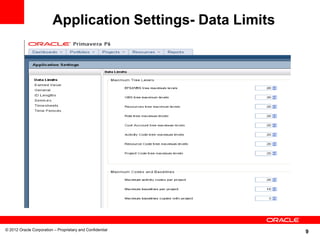
Application Settings- Data Limits


© 2012 Oracle Corporation – Proprietary and Confidential
                                                             9
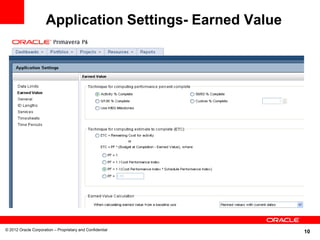
Application Settings- Earned Value


© 2012 Oracle Corporation – Proprietary and Confidential
                                                           10
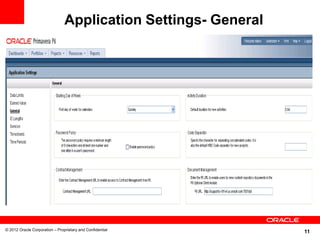
Application Settings- General


© 2012 Oracle Corporation – Proprietary and Confidential
                                                                11
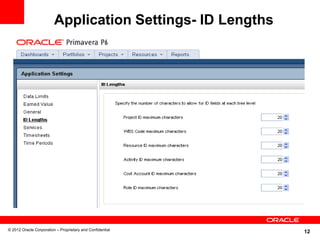
Application Settings- ID Lengths


© 2012 Oracle Corporation – Proprietary and Confidential
                                                            12
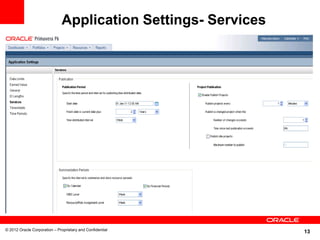
Application Settings- Services


© 2012 Oracle Corporation – Proprietary and Confidential
                                                               13
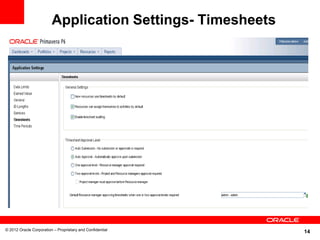
Application Settings- Timesheets


© 2012 Oracle Corporation – Proprietary and Confidential
                                                            14
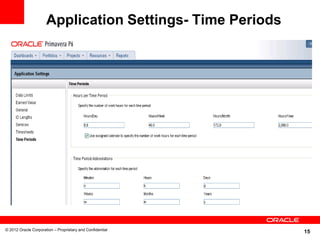
Application Settings- Time Periods


© 2012 Oracle Corporation – Proprietary and Confidential
                                                           15
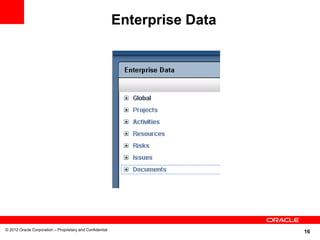
Enterprise Data


© 2012 Oracle Corporation – Proprietary and Confidential
                                                                             16
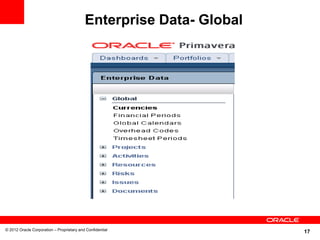
Enterprise Data- Global


© 2012 Oracle Corporation – Proprietary and Confidential
                                                                     17
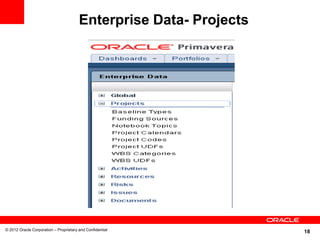
Enterprise Data- Projects


© 2012 Oracle Corporation – Proprietary and Confidential
                                                                    18
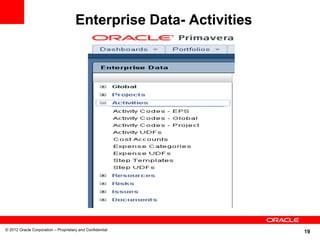
Enterprise Data- Activities


© 2012 Oracle Corporation – Proprietary and Confidential
                                                                    19
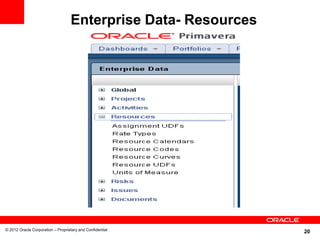
Enterprise Data- Resources


© 2012 Oracle Corporation – Proprietary and Confidential
                                                                20
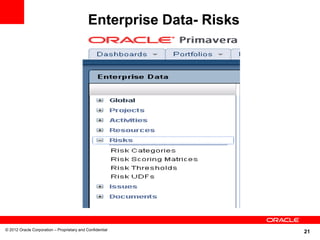
Enterprise Data- Risks


© 2012 Oracle Corporation – Proprietary and Confidential
                                                                      21
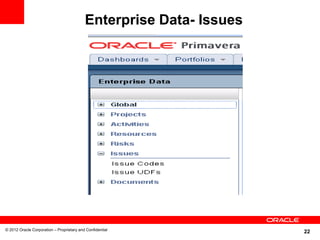
Enterprise Data- Issues


© 2012 Oracle Corporation – Proprietary and Confidential
                                                                     22
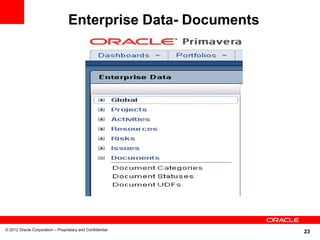
Enterprise Data- Documents


© 2012 Oracle Corporation – Proprietary and Confidential
                                                               23
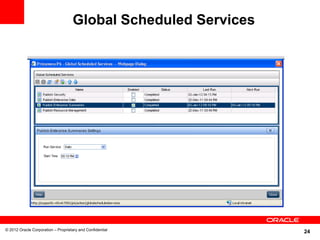
Global Scheduled Services


© 2012 Oracle Corporation – Proprietary and Confidential
                                                                 24
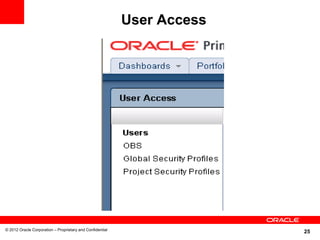
User Access


© 2012 Oracle Corporation – Proprietary and Confidential
                                                                         25
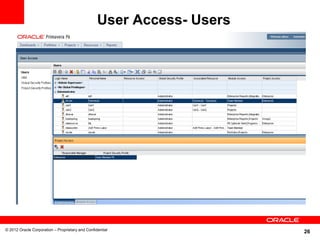
User Access- Users


© 2012 Oracle Corporation – Proprietary and Confidential
                                                                       26
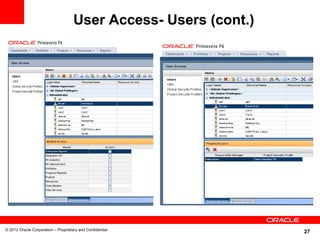
User Access- Users (cont.)


© 2012 Oracle Corporation – Proprietary and Confidential
                                                                  27
User Access tips

          • When you are setting up new users or rearranging
            your user access, it is best to first establish your
            Global Security Profiles.
          • Add one new user to each of your Global Security
            Profiles. Once your user is set up to your
            specifications, you can then use the copy/paste
            function to add the additional users to each group.


© 2012 Oracle Corporation – Proprietary and Confidential
                                                                          28
User Access Tips (cont.)

          • In 8.2, the following information is now copied when
            copying existing users which makes it easier for
            administrators to manage users: Toolbars for
            Activities, EPS, and Assignments views, Global user
            preferences, and Assigned user interface views
          • Also new in 8.2, you can now use the new Create
            Resource from Selected User action on the Users
            page to create and assign a resource to an existing
            user in one step. This can significantly reduce the
            time and effort required to set up resources.


© 2012 Oracle Corporation – Proprietary and Confidential
                                                                    29
User Access Tips (cont.)


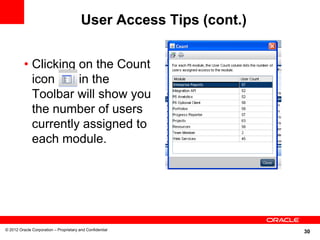
          • Clicking on the Count
            icon     in the
            Toolbar will show you
            the number of users
            currently assigned to
            each module.


© 2012 Oracle Corporation – Proprietary and Confidential
                                                                    30
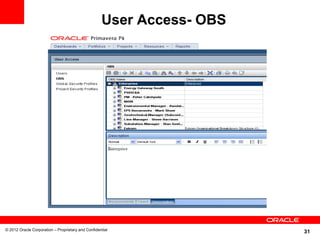
User Access- OBS


© 2012 Oracle Corporation – Proprietary and Confidential
                                                                       31
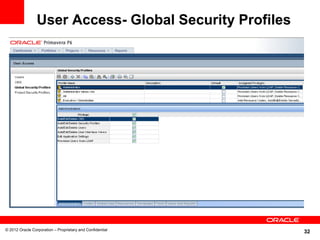
User Access- Global Security Profiles


© 2012 Oracle Corporation – Proprietary and Confidential
                                                           32
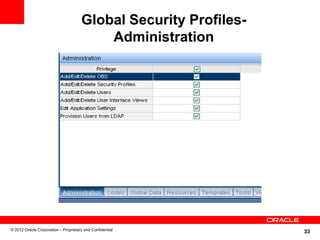
Global Security Profiles-
                                          Administration


© 2012 Oracle Corporation – Proprietary and Confidential
                                                                  33
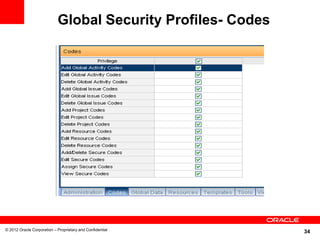
Global Security Profiles- Codes


© 2012 Oracle Corporation – Proprietary and Confidential
                                                              34
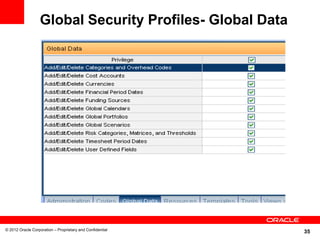
Global Security Profiles- Global Data


© 2012 Oracle Corporation – Proprietary and Confidential
                                                           35
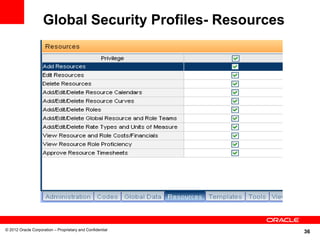
Global Security Profiles- Resources


© 2012 Oracle Corporation – Proprietary and Confidential
                                                           36
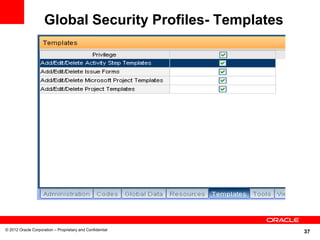
Global Security Profiles- Templates


© 2012 Oracle Corporation – Proprietary and Confidential
                                                           37
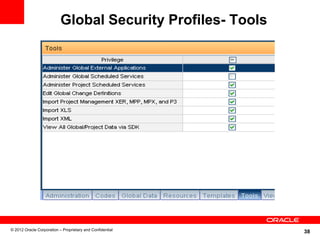
Global Security Profiles- Tools


© 2012 Oracle Corporation – Proprietary and Confidential
                                                             38
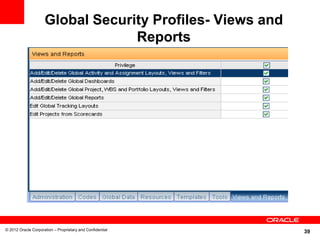
Global Security Profiles- Views and
                                  Reports


© 2012 Oracle Corporation – Proprietary and Confidential
                                                           39
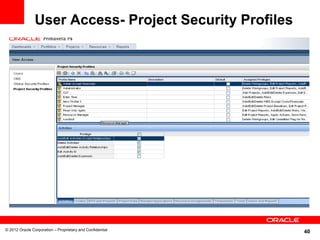
User Access- Project Security Profiles


© 2012 Oracle Corporation – Proprietary and Confidential
                                                           40
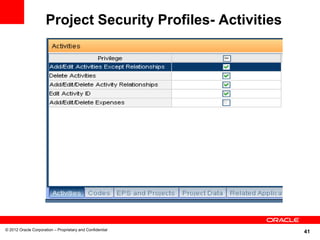
Project Security Profiles- Activities


© 2012 Oracle Corporation – Proprietary and Confidential
                                                              41
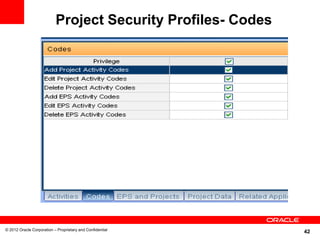
Project Security Profiles- Codes


© 2012 Oracle Corporation – Proprietary and Confidential
                                                              42
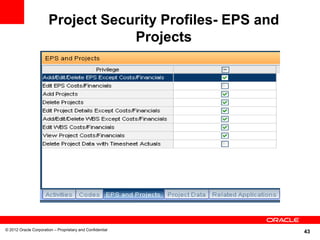
Project Security Profiles- EPS and
                                   Projects


© 2012 Oracle Corporation – Proprietary and Confidential
                                                            43
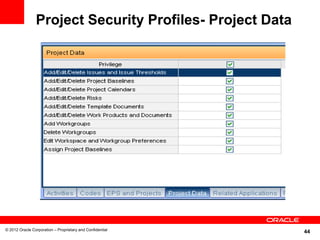
Project Security Profiles- Project Data


© 2012 Oracle Corporation – Proprietary and Confidential
                                                           44
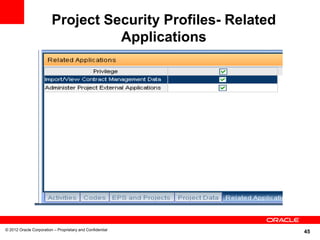
Project Security Profiles- Related
                                   Applications


© 2012 Oracle Corporation – Proprietary and Confidential
                                                              45
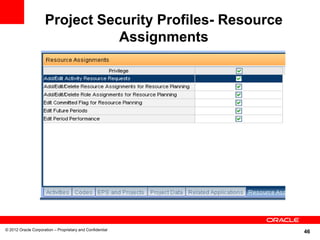
Project Security Profiles- Resource
                                Assignments


© 2012 Oracle Corporation – Proprietary and Confidential
                                                           46
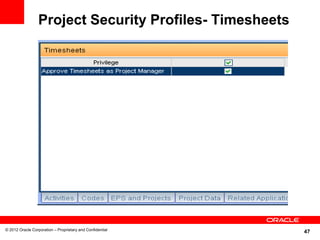
Project Security Profiles- Timesheets


© 2012 Oracle Corporation – Proprietary and Confidential
                                                           47
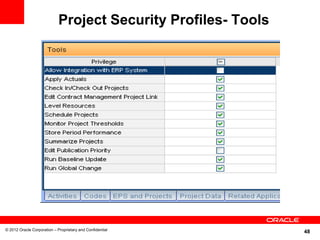
Project Security Profiles- Tools


© 2012 Oracle Corporation – Proprietary and Confidential
                                                                48
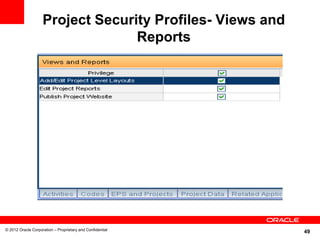
Project Security Profiles- Views and
                                  Reports


© 2012 Oracle Corporation – Proprietary and Confidential
                                                           49
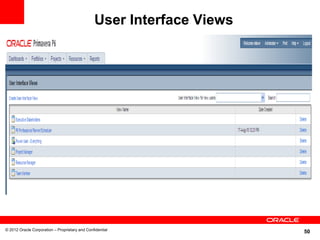
User Interface Views


© 2012 Oracle Corporation – Proprietary and Confidential
                                                                       50
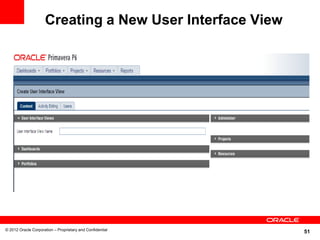
Creating a New User Interface View


© 2012 Oracle Corporation – Proprietary and Confidential
                                                           51
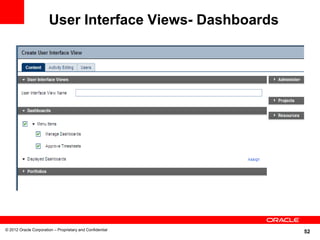
User Interface Views- Dashboards


© 2012 Oracle Corporation – Proprietary and Confidential
                                                           52
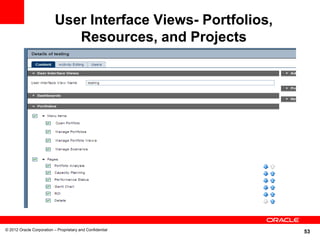
User Interface Views- Portfolios,
                              Resources, and Projects


© 2012 Oracle Corporation – Proprietary and Confidential
                                                               53
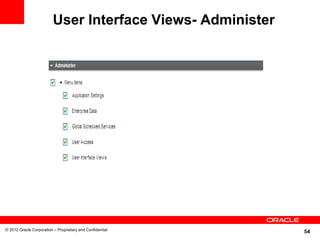
User Interface Views- Administer


© 2012 Oracle Corporation – Proprietary and Confidential
                                                             54
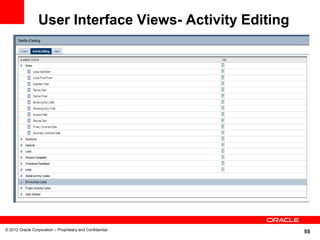
User Interface Views- Activity Editing


© 2012 Oracle Corporation – Proprietary and Confidential
                                                           55
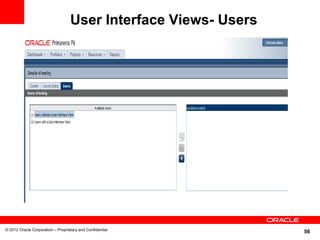
User Interface Views- Users


© 2012 Oracle Corporation – Proprietary and Confidential
                                                                 56
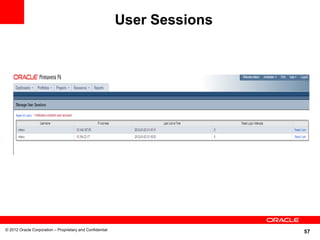
User Sessions


© 2012 Oracle Corporation – Proprietary and Confidential
                                                                           57
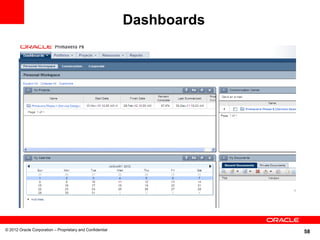
Dashboards


© 2012 Oracle Corporation – Proprietary and Confidential
                                                                        58
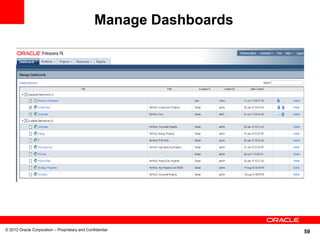
Manage Dashboards


© 2012 Oracle Corporation – Proprietary and Confidential
                                                                    59
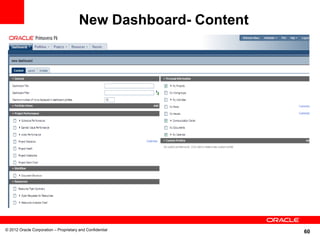
New Dashboard- Content


© 2012 Oracle Corporation – Proprietary and Confidential
                                                                 60
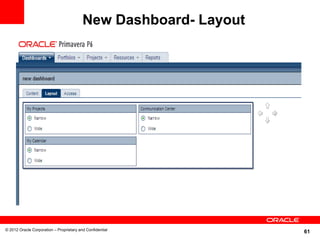
New Dashboard- Layout


© 2012 Oracle Corporation – Proprietary and Confidential
                                                                  61
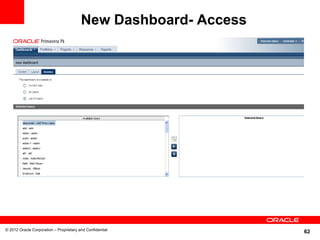
New Dashboard- Access


© 2012 Oracle Corporation – Proprietary and Confidential
                                                                 62
Prototype User

          • Great if you are going to be adding a large number of
            users that you want to have a consistent interface
            when they initially log in.
          • You can associate default global Dashboards and
            global preferences that apply to all new P6 users.
          • Define a prototype user configuration, in combination
            with defining user interface views.
          • The prototype user configuration that you created is
            automatically copied to each new P6 user you add.


© 2010 Oracle Corporation – Proprietary and Confidential
                                                                            63
Prototype User (cont.)

          • If you do not create a prototype user
            configuration, the default "User Interface View for
            new users" will be used to determine which
            dashboards will be displayed when a user logs in
            for the first time.
          • If no "User Interface View for new users" is set,
            the user will be prompted to select dashboard
            settings during the initial login.


© 2012 Oracle Corporation – Proprietary and Confidential
                                                                       64
Creating the Prototype User

          To create a prototype user:
          1.Create a user named "Default“. This User will
            represent the default Prototype user, storing the
            Portlets display and global preference settings you
            specify.
          2.Log in to P6 as the new prototype user named
            "Default“.
          3.Customize the Personal Workspace to specify the
            default portlets you want to display for new users. In
            addition to choosing the portlets to display, also
            specify related portlet options, as necessary.

© 2012 Oracle Corporation – Proprietary and Confidential
                                                                     65
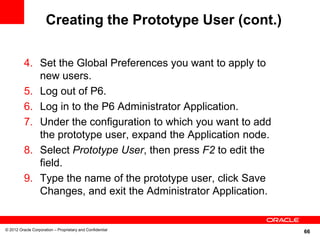
Creating the Prototype User (cont.)

          4. Set the Global Preferences you want to apply to
             new users.
          5. Log out of P6.
          6. Log in to the P6 Administrator Application.
          7. Under the configuration to which you want to add
             the prototype user, expand the Application node.
          8. Select Prototype User, then press F2 to edit the
             field.
          9. Type the name of the prototype user, click Save
             Changes, and exit the Administrator Application.


© 2012 Oracle Corporation – Proprietary and Confidential
                                                                66
© 2012 Oracle Corporation – Proprietary and Confidential
                                                           67
THANK YOU


© 2012 Oracle Corporation – Proprietary and Confidential
                                                           68

P6 eppm webrelease 8 and later

  • 1.
    © 2009 OracleCorporation – Proprietary and Confidential 1
  • 2.
    Primavera: Administering Users,Access and Views in P6 (web) Version 8 and Later Upcoming live webcasts and recent recordings: Day, Date, 2004 January 5, 2012: Oracle Application Management Teleconference ET time p.m. Access: Suite for JD Edwards EnterpriseOne US & Canada: 888-259- 4812 January 10, 2012: UBE Troubleshooting E1 Teleconference Access: Toll Number: 706-679-4880 Scheduler Overview North America: xxxx International Toll-Free: International: xxxx January 11, 2012: How to plan for a new installation See DOC#1148600.1 Password: Advisor of Oracle Fusion Middleware 11g Password: advisorpg January 11, 2012: Introduction to Troubleshooting EnterpriseOne Performance Issues Current Advisor Webcast Schedule – DOC#740966.1 January 12, 2012: Primavera: Helper Classes and the Job Manager using the P6 Integration API Archived Advisor January 12, 2012: A New Look and Innovation for Webcasts JD Edwards EnterpriseOne Tools DOC#740964.1 January 18, 2012: E-Business Suite Patch Wizard Overview © 2012 Oracle Corporation – Proprietary and Confidential 2
  • 3.
    Safe Harbor Statement The following is intended to outline our general product direction. It is intended for information purposes only, and may not be incorporated into any contract. It is not a commitment to deliver any material, code, or functionality, and should not be relied upon in making purchasing decision. The development, release, and timing of any features or functionality described for Oracle’s products remains at the sole discretion of Oracle. © 2012 Oracle Corporation – Proprietary and Confidential 3
  • 4.
    <Insert Picture Here> AdministeringUsers, Access and Views in P6 EPPM (Web) Release 8 and later Mike Wilson Technical Support Engineer
  • 5.
    AGENDA • New Web Administrative Features Setup • Application Settings • Enterprise Data • Global Scheduled Services • User Access (including adding new users) • User Interface Views • User Sessions • Dashboards • Prototype User © 2012 Oracle Corporation – Proprietary and Confidential 5
  • 6.
    Previous Admin Features Admin Menu From 7.0 Admin Menu From 7.0 Web Windows Client Access © 2012 Oracle Corporation – Proprietary and Confidential 6
  • 7.
    New Administer Menuin 8.1 © 2012 Oracle Corporation – Proprietary and Confidential 7
  • 8.
    Application Settings © 2012Oracle Corporation – Proprietary and Confidential 8
  • 9.
    Application Settings- DataLimits © 2012 Oracle Corporation – Proprietary and Confidential 9
  • 10.
    Application Settings- EarnedValue © 2012 Oracle Corporation – Proprietary and Confidential 10
  • 11.
    Application Settings- General ©2012 Oracle Corporation – Proprietary and Confidential 11
  • 12.
    Application Settings- IDLengths © 2012 Oracle Corporation – Proprietary and Confidential 12
  • 13.
    Application Settings- Services ©2012 Oracle Corporation – Proprietary and Confidential 13
  • 14.
    Application Settings- Timesheets ©2012 Oracle Corporation – Proprietary and Confidential 14
  • 15.
    Application Settings- TimePeriods © 2012 Oracle Corporation – Proprietary and Confidential 15
  • 16.
    Enterprise Data © 2012Oracle Corporation – Proprietary and Confidential 16
  • 17.
    Enterprise Data- Global ©2012 Oracle Corporation – Proprietary and Confidential 17
  • 18.
    Enterprise Data- Projects ©2012 Oracle Corporation – Proprietary and Confidential 18
  • 19.
    Enterprise Data- Activities ©2012 Oracle Corporation – Proprietary and Confidential 19
  • 20.
    Enterprise Data- Resources ©2012 Oracle Corporation – Proprietary and Confidential 20
  • 21.
    Enterprise Data- Risks ©2012 Oracle Corporation – Proprietary and Confidential 21
  • 22.
    Enterprise Data- Issues ©2012 Oracle Corporation – Proprietary and Confidential 22
  • 23.
    Enterprise Data- Documents ©2012 Oracle Corporation – Proprietary and Confidential 23
  • 24.
    Global Scheduled Services ©2012 Oracle Corporation – Proprietary and Confidential 24
  • 25.
    User Access © 2012Oracle Corporation – Proprietary and Confidential 25
  • 26.
    User Access- Users ©2012 Oracle Corporation – Proprietary and Confidential 26
  • 27.
    User Access- Users(cont.) © 2012 Oracle Corporation – Proprietary and Confidential 27
  • 28.
    User Access tips • When you are setting up new users or rearranging your user access, it is best to first establish your Global Security Profiles. • Add one new user to each of your Global Security Profiles. Once your user is set up to your specifications, you can then use the copy/paste function to add the additional users to each group. © 2012 Oracle Corporation – Proprietary and Confidential 28
  • 29.
    User Access Tips(cont.) • In 8.2, the following information is now copied when copying existing users which makes it easier for administrators to manage users: Toolbars for Activities, EPS, and Assignments views, Global user preferences, and Assigned user interface views • Also new in 8.2, you can now use the new Create Resource from Selected User action on the Users page to create and assign a resource to an existing user in one step. This can significantly reduce the time and effort required to set up resources. © 2012 Oracle Corporation – Proprietary and Confidential 29
  • 30.
    User Access Tips(cont.) • Clicking on the Count icon in the Toolbar will show you the number of users currently assigned to each module. © 2012 Oracle Corporation – Proprietary and Confidential 30
  • 31.
    User Access- OBS ©2012 Oracle Corporation – Proprietary and Confidential 31
  • 32.
    User Access- GlobalSecurity Profiles © 2012 Oracle Corporation – Proprietary and Confidential 32
  • 33.
    Global Security Profiles- Administration © 2012 Oracle Corporation – Proprietary and Confidential 33
  • 34.
    Global Security Profiles-Codes © 2012 Oracle Corporation – Proprietary and Confidential 34
  • 35.
    Global Security Profiles-Global Data © 2012 Oracle Corporation – Proprietary and Confidential 35
  • 36.
    Global Security Profiles-Resources © 2012 Oracle Corporation – Proprietary and Confidential 36
  • 37.
    Global Security Profiles-Templates © 2012 Oracle Corporation – Proprietary and Confidential 37
  • 38.
    Global Security Profiles-Tools © 2012 Oracle Corporation – Proprietary and Confidential 38
  • 39.
    Global Security Profiles-Views and Reports © 2012 Oracle Corporation – Proprietary and Confidential 39
  • 40.
    User Access- ProjectSecurity Profiles © 2012 Oracle Corporation – Proprietary and Confidential 40
  • 41.
    Project Security Profiles-Activities © 2012 Oracle Corporation – Proprietary and Confidential 41
  • 42.
    Project Security Profiles-Codes © 2012 Oracle Corporation – Proprietary and Confidential 42
  • 43.
    Project Security Profiles-EPS and Projects © 2012 Oracle Corporation – Proprietary and Confidential 43
  • 44.
    Project Security Profiles-Project Data © 2012 Oracle Corporation – Proprietary and Confidential 44
  • 45.
    Project Security Profiles-Related Applications © 2012 Oracle Corporation – Proprietary and Confidential 45
  • 46.
    Project Security Profiles-Resource Assignments © 2012 Oracle Corporation – Proprietary and Confidential 46
  • 47.
    Project Security Profiles-Timesheets © 2012 Oracle Corporation – Proprietary and Confidential 47
  • 48.
    Project Security Profiles-Tools © 2012 Oracle Corporation – Proprietary and Confidential 48
  • 49.
    Project Security Profiles-Views and Reports © 2012 Oracle Corporation – Proprietary and Confidential 49
  • 50.
    User Interface Views ©2012 Oracle Corporation – Proprietary and Confidential 50
  • 51.
    Creating a NewUser Interface View © 2012 Oracle Corporation – Proprietary and Confidential 51
  • 52.
    User Interface Views-Dashboards © 2012 Oracle Corporation – Proprietary and Confidential 52
  • 53.
    User Interface Views-Portfolios, Resources, and Projects © 2012 Oracle Corporation – Proprietary and Confidential 53
  • 54.
    User Interface Views-Administer © 2012 Oracle Corporation – Proprietary and Confidential 54
  • 55.
    User Interface Views-Activity Editing © 2012 Oracle Corporation – Proprietary and Confidential 55
  • 56.
    User Interface Views-Users © 2012 Oracle Corporation – Proprietary and Confidential 56
  • 57.
    User Sessions © 2012Oracle Corporation – Proprietary and Confidential 57
  • 58.
    Dashboards © 2012 OracleCorporation – Proprietary and Confidential 58
  • 59.
    Manage Dashboards © 2012Oracle Corporation – Proprietary and Confidential 59
  • 60.
    New Dashboard- Content ©2012 Oracle Corporation – Proprietary and Confidential 60
  • 61.
    New Dashboard- Layout ©2012 Oracle Corporation – Proprietary and Confidential 61
  • 62.
    New Dashboard- Access ©2012 Oracle Corporation – Proprietary and Confidential 62
  • 63.
    Prototype User • Great if you are going to be adding a large number of users that you want to have a consistent interface when they initially log in. • You can associate default global Dashboards and global preferences that apply to all new P6 users. • Define a prototype user configuration, in combination with defining user interface views. • The prototype user configuration that you created is automatically copied to each new P6 user you add. © 2010 Oracle Corporation – Proprietary and Confidential 63
  • 64.
    Prototype User (cont.) • If you do not create a prototype user configuration, the default "User Interface View for new users" will be used to determine which dashboards will be displayed when a user logs in for the first time. • If no "User Interface View for new users" is set, the user will be prompted to select dashboard settings during the initial login. © 2012 Oracle Corporation – Proprietary and Confidential 64
  • 65.
    Creating the PrototypeUser To create a prototype user: 1.Create a user named "Default“. This User will represent the default Prototype user, storing the Portlets display and global preference settings you specify. 2.Log in to P6 as the new prototype user named "Default“. 3.Customize the Personal Workspace to specify the default portlets you want to display for new users. In addition to choosing the portlets to display, also specify related portlet options, as necessary. © 2012 Oracle Corporation – Proprietary and Confidential 65
  • 66.
    Creating the PrototypeUser (cont.) 4. Set the Global Preferences you want to apply to new users. 5. Log out of P6. 6. Log in to the P6 Administrator Application. 7. Under the configuration to which you want to add the prototype user, expand the Application node. 8. Select Prototype User, then press F2 to edit the field. 9. Type the name of the prototype user, click Save Changes, and exit the Administrator Application. © 2012 Oracle Corporation – Proprietary and Confidential 66
  • 67.
    © 2012 OracleCorporation – Proprietary and Confidential 67
  • 68.
    THANK YOU © 2012Oracle Corporation – Proprietary and Confidential 68