UC Care software presentation
For more information, follow us on
www.activeo.com
Activeo : Cisco partnership
• Many IP Telephony deployment around the world were
performed by Activeo
• This experience being validated by Cisco Advanced Unified
Communication certification allows us to understand the issues
and constraints associated with the implementation of a
centralized telephony solution
• UC Care aims to address these constraints by offering a
dedicated solution to a Cisco environment
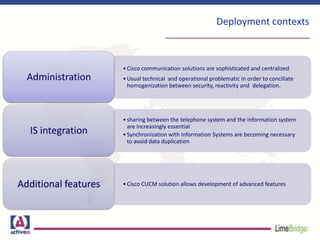
Deployment contexts
•Cisco communication solutions are sophisticated and centralized
•Usual technical and operational problematic in order to conciliate
homogenization between security, reactivity and delegation.
Administration
•sharing between the telephone system and the information system
are increasingly essential
•Synchronization with Information Systems are becoming necessary
to avoid data duplication
IS integration
•Cisco CUCM solution allows development of advanced featuresAdditional features
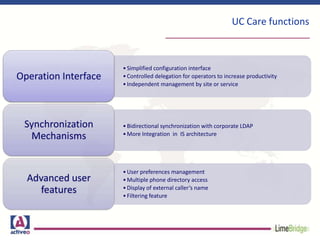
UC Care functions
•Simplified configuration interface
•Controlled delegation for operators to increase productivity
•Independent management by site or service
Operation Interface
•Bidirectional synchronization with corporate LDAP
•More Integration in IS architecture
Synchronization
Mechanisms
•User preferences management
•Multiple phone directory access
•Display of external caller’s name
•Filtering feature
Advanced user
features
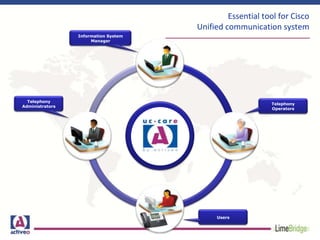
Essential tool for Cisco
Unified communication system
Users
Telephony
Operators
Telephony
Administrators
Information System
Manager
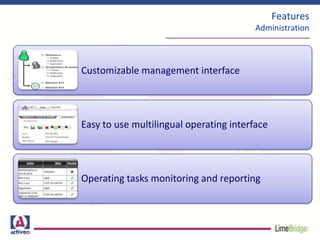
Features
Administration
Customizable management interface
Easy to use multilingual operating interface
Operating tasks monitoring and reporting
Features
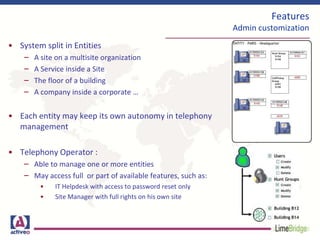
Admin customization
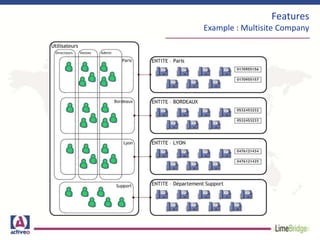
• System split in Entities
– A site on a multisite organization
– A Service inside a Site
– The floor of a building
– A company inside a corporate …
• Each entity may keep its own autonomy in telephony
management
• Telephony Operator :
– Able to manage one or more entities
– May access full or part of available features, such as:
• IT Helpdesk with access to password reset only
• Site Manager with full rights on his own site
Features
Example : Multisite Company
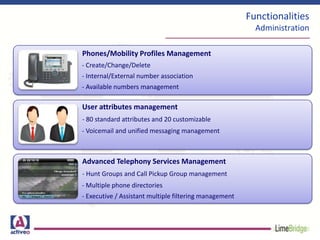
Functionalities
Administration
Phones/Mobility Profiles Management
- Create/Change/Delete
- Internal/External number association
- Available numbers management
User attributes management
- 80 standard attributes and 20 customizable
- Voicemail and unified messaging management
Advanced Telephony Services Management
- Hunt Groups and Call Pickup Group management
- Multiple phone directories
- Executive / Assistant multiple filtering management
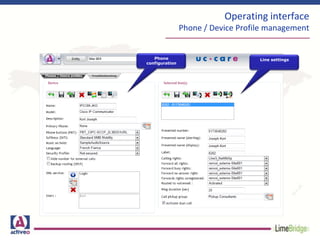
Operating interface
Phone / Device Profile management
Phone
configuration
Line settings
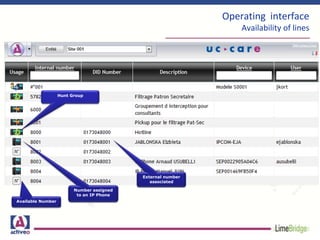
Operating interface
Availability of lines
Available Number
Number assigned
to an IP Phone
Hunt Group
External number
associated
Operating interface
Phone Directories
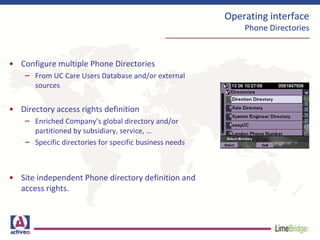
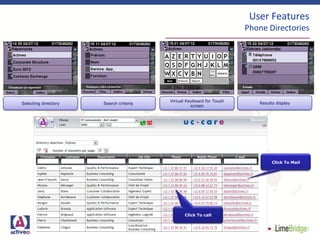
• Configure multiple Phone Directories
– From UC Care Users Database and/or external
sources
• Directory access rights definition
– Enriched Company’s global directory and/or
partitioned by subsidiary, service, …
– Specific directories for specific business needs
• Site independent Phone directory definition and
access rights.
Operating interface
Monitoring and Provisioning
• Configuration monitoring and troubleshooting
– Operator doings logging
– Information about Phone and Device Profile status
– Basic action on Phone and Device Profile
• Provisioning feature
– Massive Users, Phones and Voicemail upload
– Deployment assistant feature
Operating interface
Operation logging
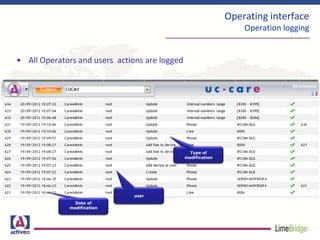
• All Operators and users actions are logged
Date of
modification
user
Type of
modification
Operating interface
Troubleshooting
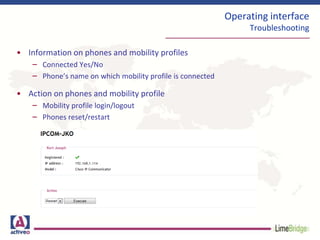
• Information on phones and mobility profiles
– Connected Yes/No
– Phone’s name on which mobility profile is connected
• Action on phones and mobility profile
– Mobility profile login/logout
– Phones reset/restart
Operating Interface
Provisioning feature
• Upload of UC Care configuration objects via Ms Excel File
• From an unique MS Excel File :
– Create Users
– Create Phones , Device Profiles, Lines
– Associate User to Phones and/or device Profile
– Create Voicemails
Operating Interface
Provisioning feature
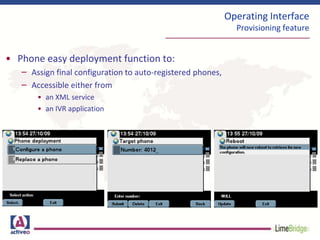
• Phone easy deployment function to:
– Assign final configuration to auto-registered phones,
– Accessible either from
• an XML service
• an IVR application
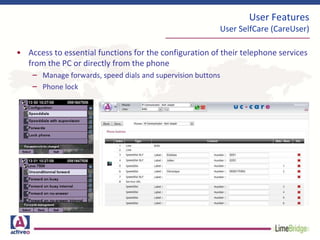
• Access to essential functions for the configuration of their telephone services
from the PC or directly from the phone
– Manage forwards, speed dials and supervision buttons
– Phone lock
User Features
User SelfCare (CareUser)
User Features
Phone Directories
Click To call
Click To Mail
Selecting directory
Virtual Keyboard for Touch
screen
Search criteria Results display
User Features
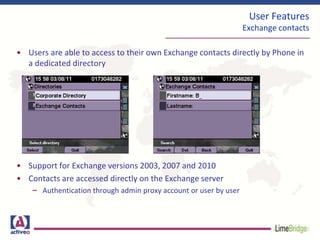
Exchange contacts
• Users are able to access to their own Exchange contacts directly by Phone in
a dedicated directory
• Support for Exchange versions 2003, 2007 and 2010
• Contacts are accessed directly on the Exchange server
– Authentication through admin proxy account or user by user
User Features
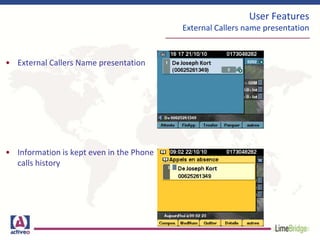
External Callers name presentation
• External Callers Name presentation
• Information is kept even in the Phone
calls history
User Features
Manager / Assistant filtering
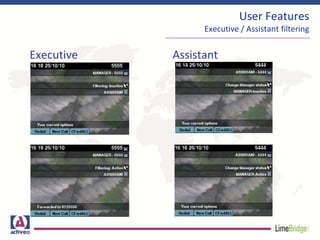
• Executive / Assistant filtering module
– Enable/disable filtering from IP Phones
– Specific cases management :
• 1 Executive 1 Assistant
• 1 Executive N Assistants
• N Executives 1 Assistant
• N Executives N Assistants
User Features
Executive / Assistant filtering
Executive Assistant
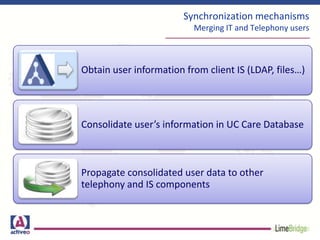
Synchronization mechanisms
Merging IT and Telephony users
Obtain user information from client IS (LDAP, files…)
Consolidate user’s information in UC Care Database
Propagate consolidated user data to other
telephony and IS components
UC Care
Annuaire
LDAP
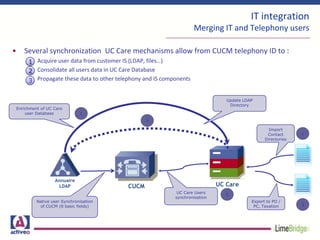
IT integration
Merging IT and Telephony users
• Several synchronization UC Care mechanisms allow from CUCM telephony ID to :
Acquire user data from customer IS (LDAP, files…)
Consolidate all users data in UC Care Database
Propagate these data to other telephony and IS components
CUCM UC Care
Native user Synchronisation
of CUCM (8 basic fields)
UC Care Users
synchronisation
Enrichment of UC Care
user Database
Update LDAP
Directory
Import
Contact
Directories
Annuaire
LDAP
Export to PO /
PC, Taxation
1
2
3
1
3
1
2
3
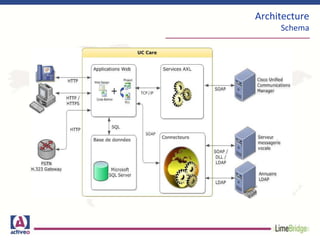
Architecture
Schema
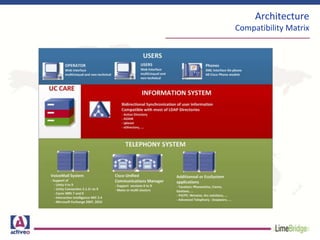
Architecture
Compatibility Matrix
www.activeo.com

Overview of UC Care

  • 1.
    UC Care softwarepresentation For more information, follow us on www.activeo.com
  • 2.
    Activeo : Ciscopartnership • Many IP Telephony deployment around the world were performed by Activeo • This experience being validated by Cisco Advanced Unified Communication certification allows us to understand the issues and constraints associated with the implementation of a centralized telephony solution • UC Care aims to address these constraints by offering a dedicated solution to a Cisco environment
  • 3.
    Deployment contexts •Cisco communicationsolutions are sophisticated and centralized •Usual technical and operational problematic in order to conciliate homogenization between security, reactivity and delegation. Administration •sharing between the telephone system and the information system are increasingly essential •Synchronization with Information Systems are becoming necessary to avoid data duplication IS integration •Cisco CUCM solution allows development of advanced featuresAdditional features
  • 4.
    UC Care functions •Simplifiedconfiguration interface •Controlled delegation for operators to increase productivity •Independent management by site or service Operation Interface •Bidirectional synchronization with corporate LDAP •More Integration in IS architecture Synchronization Mechanisms •User preferences management •Multiple phone directory access •Display of external caller’s name •Filtering feature Advanced user features
  • 5.
    Essential tool forCisco Unified communication system Users Telephony Operators Telephony Administrators Information System Manager
  • 6.
    Features Administration Customizable management interface Easyto use multilingual operating interface Operating tasks monitoring and reporting
  • 7.
    Features Admin customization • Systemsplit in Entities – A site on a multisite organization – A Service inside a Site – The floor of a building – A company inside a corporate … • Each entity may keep its own autonomy in telephony management • Telephony Operator : – Able to manage one or more entities – May access full or part of available features, such as: • IT Helpdesk with access to password reset only • Site Manager with full rights on his own site
  • 8.
  • 9.
    Functionalities Administration Phones/Mobility Profiles Management -Create/Change/Delete - Internal/External number association - Available numbers management User attributes management - 80 standard attributes and 20 customizable - Voicemail and unified messaging management Advanced Telephony Services Management - Hunt Groups and Call Pickup Group management - Multiple phone directories - Executive / Assistant multiple filtering management
  • 10.
    Operating interface Phone /Device Profile management Phone configuration Line settings
  • 11.
    Operating interface Availability oflines Available Number Number assigned to an IP Phone Hunt Group External number associated
  • 12.
    Operating interface Phone Directories •Configure multiple Phone Directories – From UC Care Users Database and/or external sources • Directory access rights definition – Enriched Company’s global directory and/or partitioned by subsidiary, service, … – Specific directories for specific business needs • Site independent Phone directory definition and access rights.
  • 13.
    Operating interface Monitoring andProvisioning • Configuration monitoring and troubleshooting – Operator doings logging – Information about Phone and Device Profile status – Basic action on Phone and Device Profile • Provisioning feature – Massive Users, Phones and Voicemail upload – Deployment assistant feature
  • 14.
    Operating interface Operation logging •All Operators and users actions are logged Date of modification user Type of modification
  • 15.
    Operating interface Troubleshooting • Informationon phones and mobility profiles – Connected Yes/No – Phone’s name on which mobility profile is connected • Action on phones and mobility profile – Mobility profile login/logout – Phones reset/restart
  • 16.
    Operating Interface Provisioning feature •Upload of UC Care configuration objects via Ms Excel File • From an unique MS Excel File : – Create Users – Create Phones , Device Profiles, Lines – Associate User to Phones and/or device Profile – Create Voicemails
  • 17.
    Operating Interface Provisioning feature •Phone easy deployment function to: – Assign final configuration to auto-registered phones, – Accessible either from • an XML service • an IVR application
  • 18.
    • Access toessential functions for the configuration of their telephone services from the PC or directly from the phone – Manage forwards, speed dials and supervision buttons – Phone lock User Features User SelfCare (CareUser)
  • 19.
    User Features Phone Directories ClickTo call Click To Mail Selecting directory Virtual Keyboard for Touch screen Search criteria Results display
  • 20.
    User Features Exchange contacts •Users are able to access to their own Exchange contacts directly by Phone in a dedicated directory • Support for Exchange versions 2003, 2007 and 2010 • Contacts are accessed directly on the Exchange server – Authentication through admin proxy account or user by user
  • 21.
    User Features External Callersname presentation • External Callers Name presentation • Information is kept even in the Phone calls history
  • 22.
    User Features Manager /Assistant filtering • Executive / Assistant filtering module – Enable/disable filtering from IP Phones – Specific cases management : • 1 Executive 1 Assistant • 1 Executive N Assistants • N Executives 1 Assistant • N Executives N Assistants
  • 23.
    User Features Executive /Assistant filtering Executive Assistant
  • 24.
    Synchronization mechanisms Merging ITand Telephony users Obtain user information from client IS (LDAP, files…) Consolidate user’s information in UC Care Database Propagate consolidated user data to other telephony and IS components
  • 25.
    UC Care Annuaire LDAP IT integration MergingIT and Telephony users • Several synchronization UC Care mechanisms allow from CUCM telephony ID to : Acquire user data from customer IS (LDAP, files…) Consolidate all users data in UC Care Database Propagate these data to other telephony and IS components CUCM UC Care Native user Synchronisation of CUCM (8 basic fields) UC Care Users synchronisation Enrichment of UC Care user Database Update LDAP Directory Import Contact Directories Annuaire LDAP Export to PO / PC, Taxation 1 2 3 1 3 1 2 3
  • 26.
  • 27.
  • 28.