HITACHI DYNAMIC
TIERING OVERVIEW
MICHAEL ROWLEY, PRINCIPAL CONSULTANT
BRANDON LAMBERT, SR. MANAGER
AMERICAS SOLUTIONS AND PRODUCTS
WEBTECH EDUCATIONAL SERIES
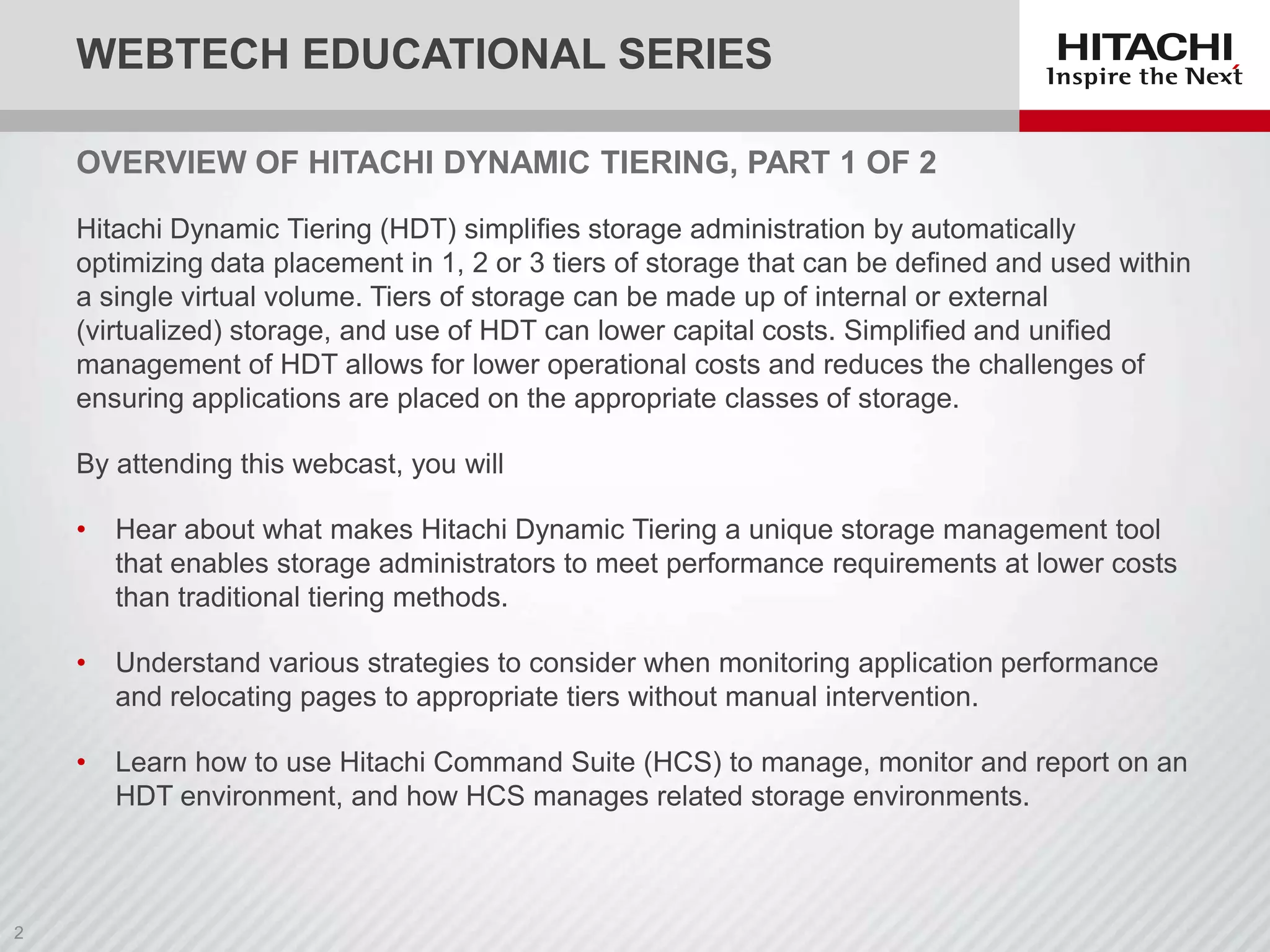
OVERVIEW OF HITACHI DYNAMIC TIERING, PART 1 OF 2
Hitachi Dynamic Tiering (HDT) simplifies storage administration by automatically
optimizing data placement in 1, 2 or 3 tiers of storage that can be defined and used within
a single virtual volume. Tiers of storage can be made up of internal or external
(virtualized) storage, and use of HDT can lower capital costs. Simplified and unified
management of HDT allows for lower operational costs and reduces the challenges of
ensuring applications are placed on the appropriate classes of storage.
By attending this webcast, you will
•

Hear about what makes Hitachi Dynamic Tiering a unique storage management tool
that enables storage administrators to meet performance requirements at lower costs
than traditional tiering methods.

•

Understand various strategies to consider when monitoring application performance
and relocating pages to appropriate tiers without manual intervention.

•

Learn how to use Hitachi Command Suite (HCS) to manage, monitor and report on an
HDT environment, and how HCS manages related storage environments.
UPCOMING WEBTECHS
 WebTechs
‒ Hitachi Dynamic Tiering: An In-Depth Look at Managing HDT and
Best Practices, Part 2, November 13, 9 a.m. PT, noon ET

‒ Best Practices for Virtualizing Exchange for Microsoft Private
Cloud, December 4, 9 a.m. PT, noon ET

Check www.hds.com/webtech for
 Links to the recording, the presentation, and Q&A (available next
week)
 Schedule and registration for upcoming WebTech sessions
 Questions will be posted in the HDS Community:
http://community.hds.com/groups/webtech
HITACHI DYNAMIC
TIERING OVERVIEW
MICHAEL ROWLEY, PRINCIPAL CONSULTANT
BRANDON LAMBERT, SR. MANAGER
AMERICAS SOLUTIONS AND PRODUCTS
AGENDA

 Hitachi Dynamic Tiering
‒ Relation to Hitachi Dynamic Provisioning
‒ Monitoring I/O activity
‒ Relocating pages (data)
‒ Tiering policies
‒ Managing and monitoring HDT environments with Hitachi
Command Suite
HITACHI DYNAMIC PROVISIONING
MAINFRAME AND OPEN SYSTEMS
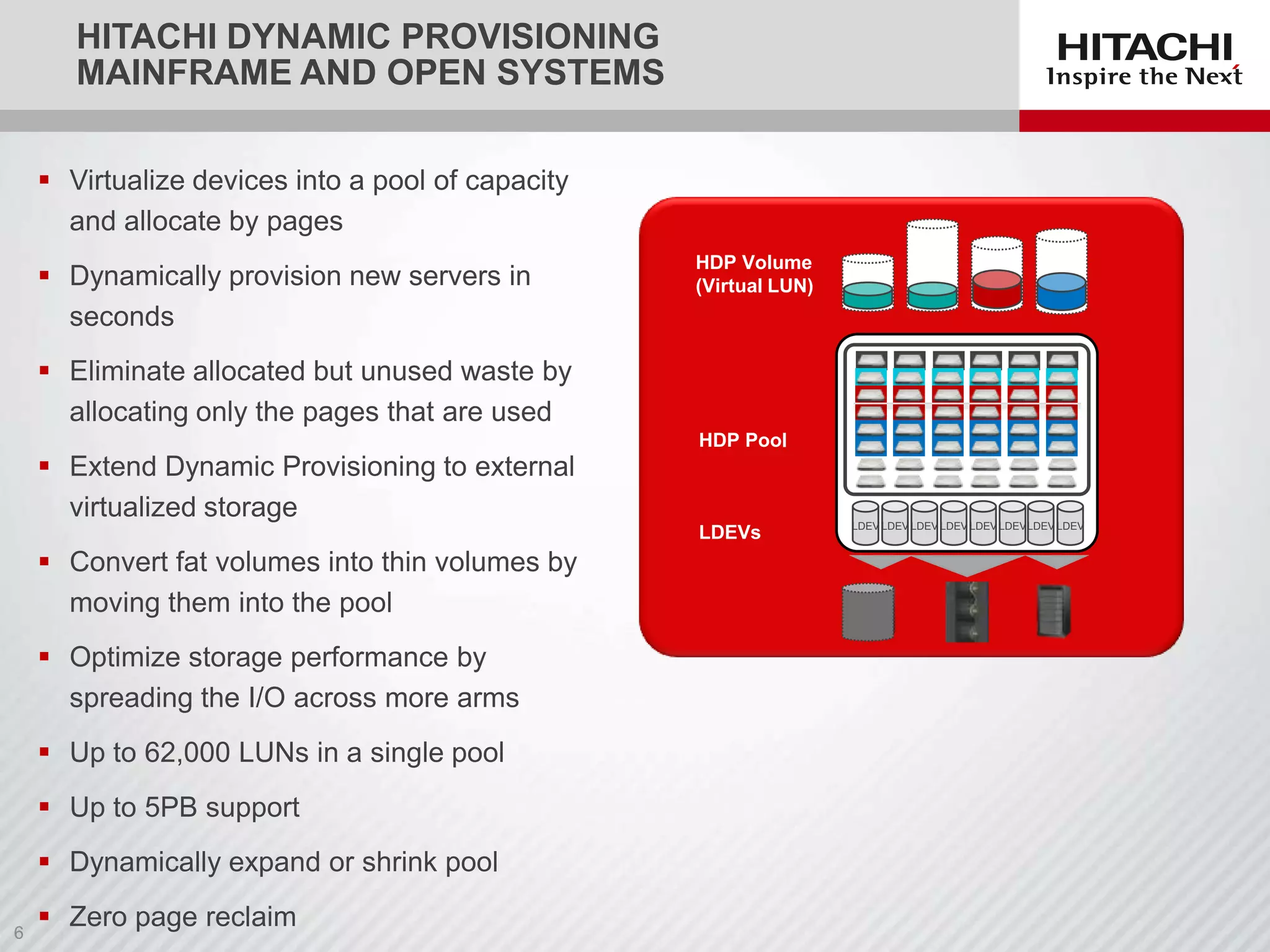
 Virtualize devices into a pool of capacity
and allocate by pages

 Dynamically provision new servers in
seconds

HDP Volume
(Virtual LUN)

 Eliminate allocated but unused waste by
allocating only the pages that are used
 Extend Dynamic Provisioning to external
virtualized storage

HDP Pool

LDEVs

 Convert fat volumes into thin volumes by
moving them into the pool
 Optimize storage performance by
spreading the I/O across more arms
 Up to 62,000 LUNs in a single pool
 Up to 5PB support
 Dynamically expand or shrink pool
 Zero page reclaim

LDEV LDEV LDEV LDEV LDEV LDEVLDEV LDEV
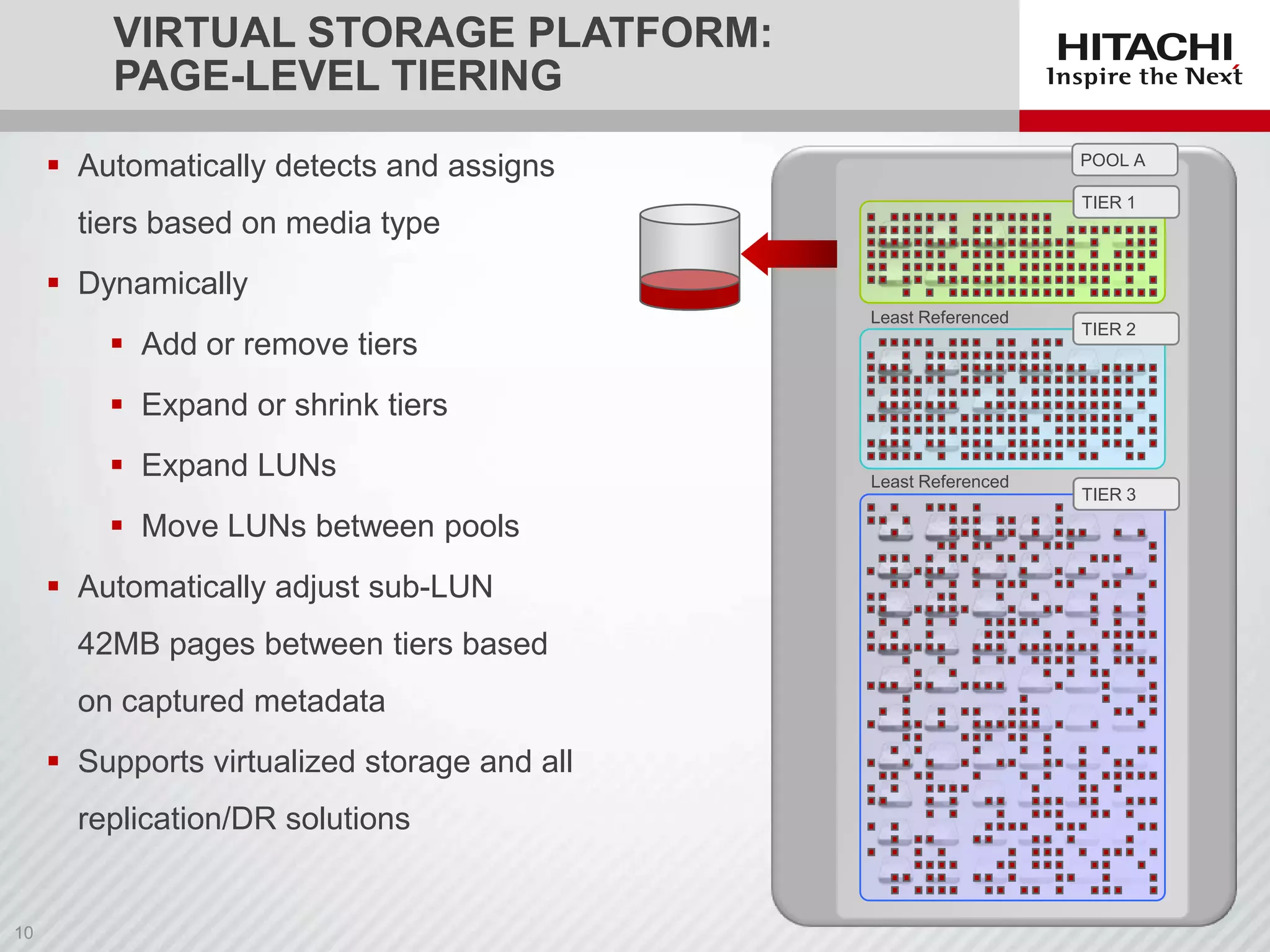
VIRTUAL STORAGE PLATFORM:
PAGE-LEVEL TIERING
POOL A

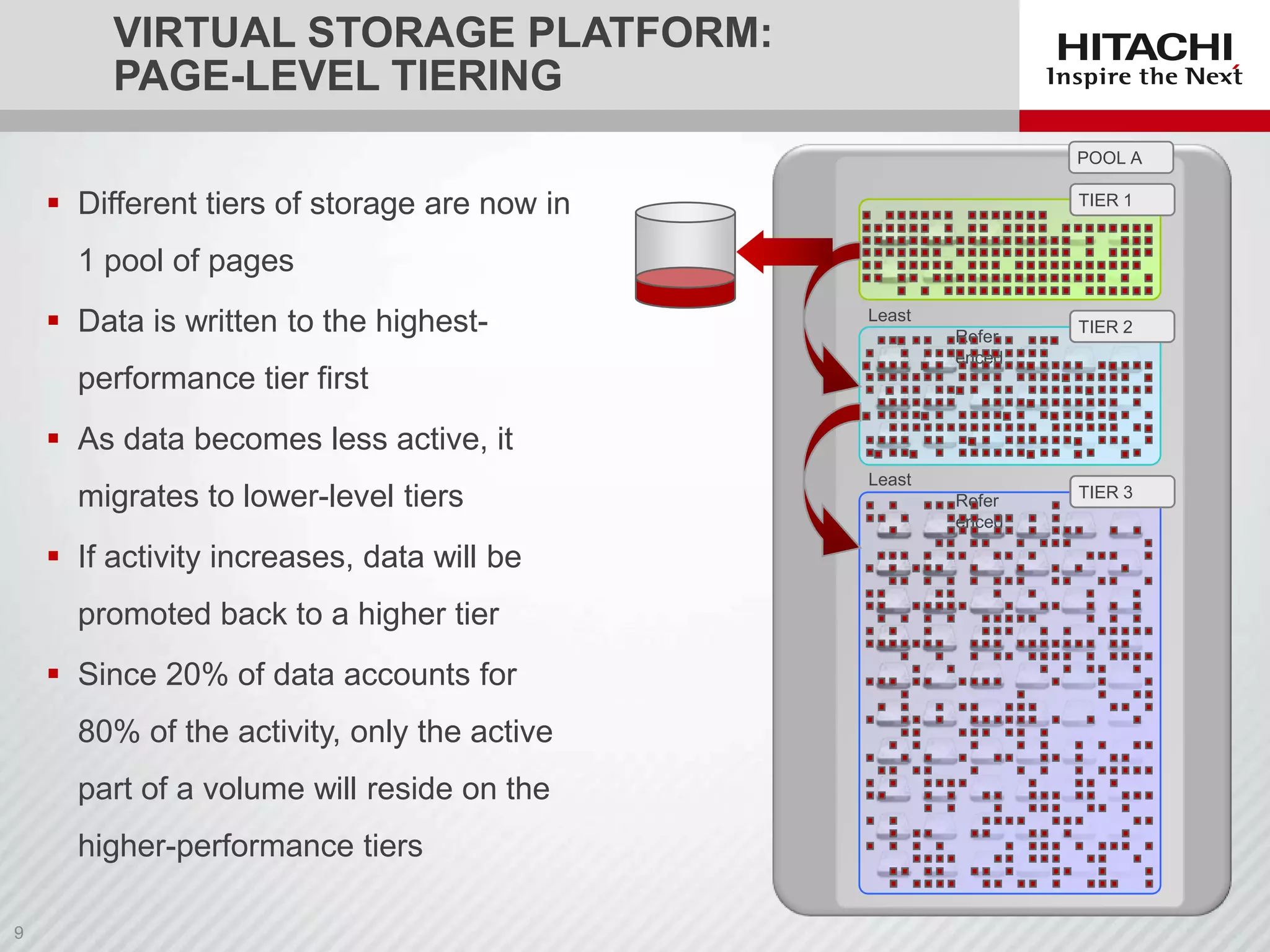
 Different tiers of storage are now in

EFD/SSD
TIER 1

1 pool of pages
 Data is written to the highest-

Least
Refer
enced

performance tier first

SAS 2
TIER

 As data becomes less active, it
migrates to lower-level tiers
 If activity increases, data will be
promoted back to a higher tier
 Since 20% of data accounts for
80% of the activity, only the active
part of a volume will reside on the

higher-performance tiers

Least
Refer
enced

SATA3
TIER
VIRTUAL STORAGE PLATFORM:
PAGE-LEVEL TIERING
 Automatically detects and assigns

POOL A
EFD/SSD
TIER 1

tiers based on media type
 Dynamically

 Add or remove tiers

Least Referenced

SAS 2
TIER

 Expand or shrink tiers
 Expand LUNs
 Move LUNs between pools
 Automatically adjust sub-LUN
42MB pages between tiers based
on captured metadata

 Supports virtualized storage and all
replication/DR solutions

Least Referenced

SATA3
TIER
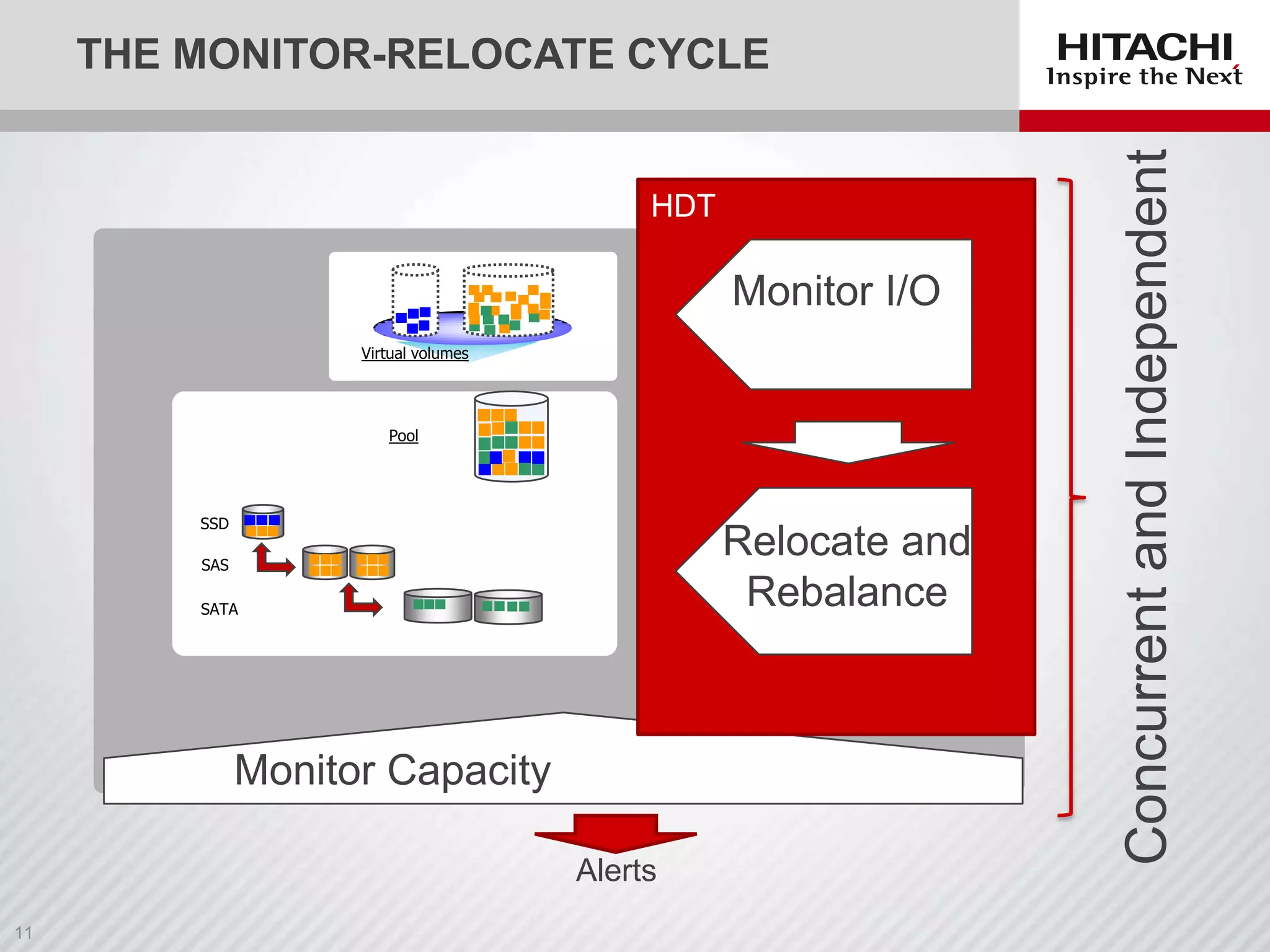
HDT

Monitor I/O
Virtual volumes

Pool

SSD

Relocate and
Rebalance

SAS
SATA

Monitor Capacity
Alerts

Concurrent and Independent

THE MONITOR-RELOCATE CYCLE
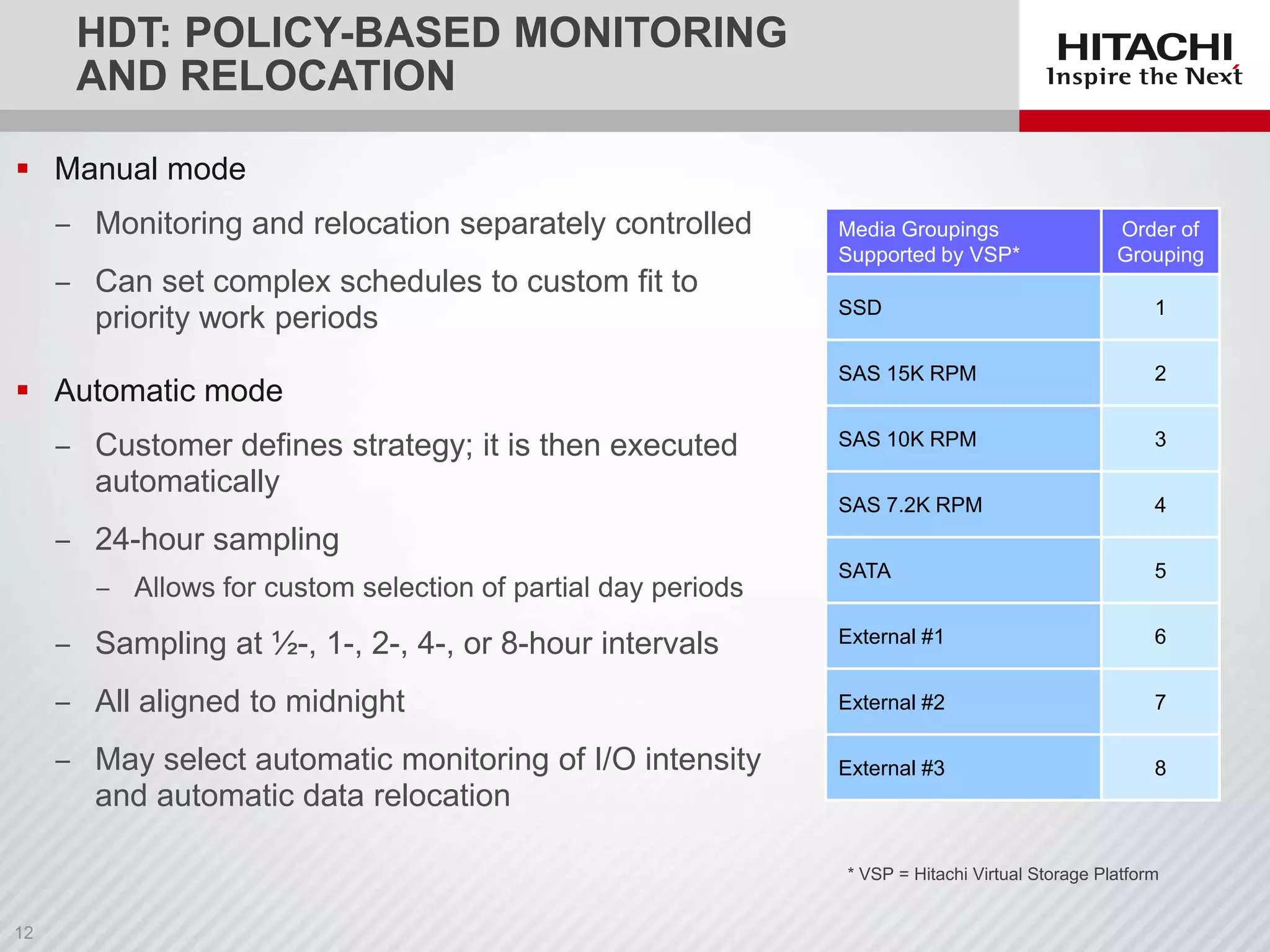
HDT: POLICY-BASED MONITORING
AND RELOCATION
 Manual mode
‒ Monitoring and relocation separately controlled
‒ Can set complex schedules to custom fit to
priority work periods

Media Groupings
Supported by VSP*

Order of
Grouping

SSD

1

SAS 15K RPM

2

SAS 10K RPM

3

SAS 7.2K RPM

4

SATA

5

‒ Sampling at ½-, 1-, 2-, 4-, or 8-hour intervals

External #1

6

‒ All aligned to midnight

External #2

7

‒ May select automatic monitoring of I/O intensity
and automatic data relocation

External #3

8

 Automatic mode
‒ Customer defines strategy; it is then executed
automatically

‒ 24-hour sampling
‒ Allows for custom selection of partial day periods

* VSP = Hitachi Virtual Storage Platform
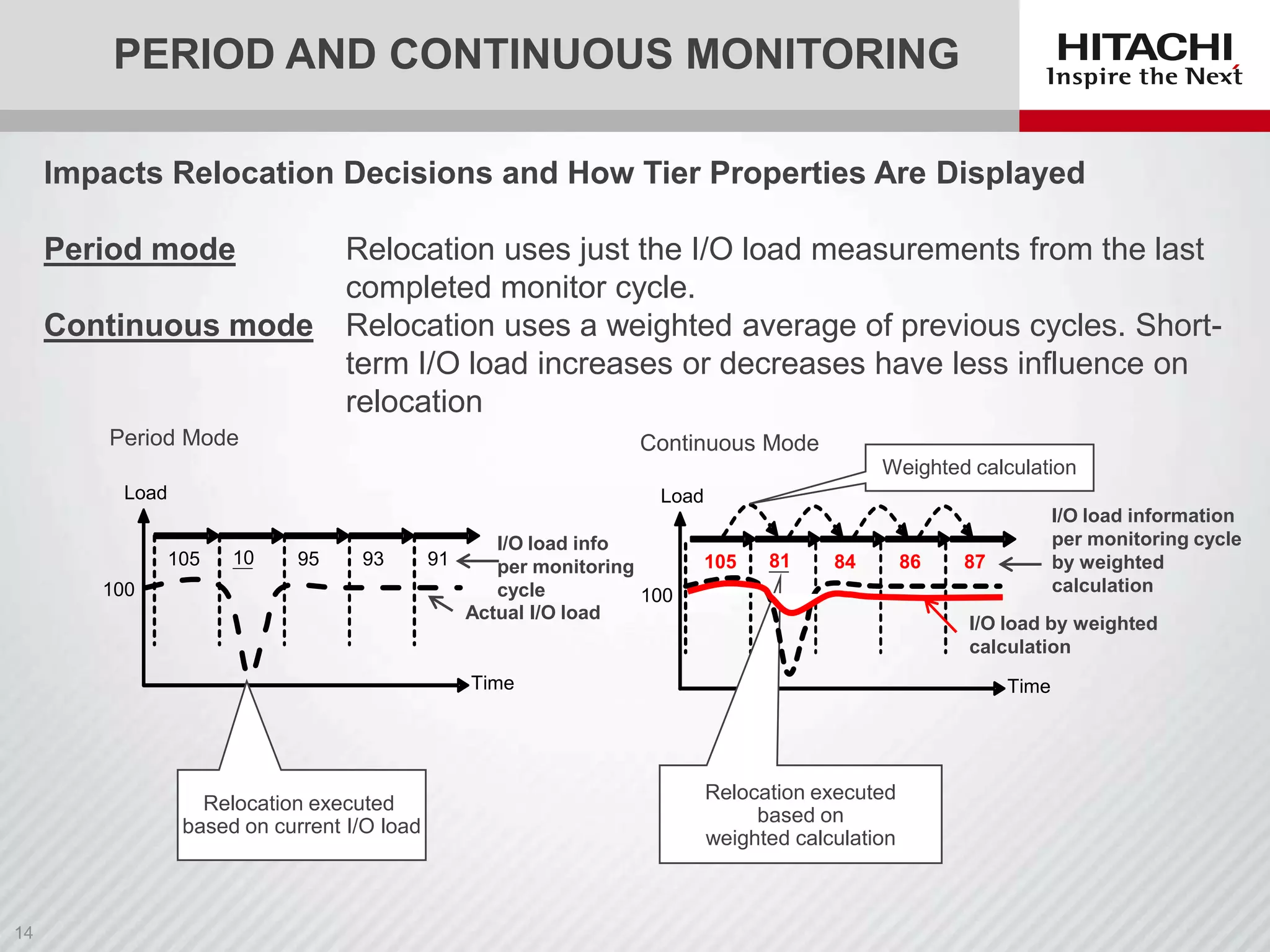
PERIOD AND CONTINUOUS MONITORING
Impacts Relocation Decisions and How Tier Properties Are Displayed
Period mode
Continuous mode

Relocation uses just the I/O load measurements from the last
completed monitor cycle.
Relocation uses a weighted average of previous cycles. Shortterm I/O load increases or decreases have less influence on
relocation

Period Mode

Continuous Mode
Weighted calculation

Load

Load
105

10

95

93

100

I/O load info
91
per monitoring
cycle
100
Actual I/O load

105

81

84

87

I/O load by weighted
calculation

Time

Relocation executed
based on current I/O load

86

I/O load information
per monitoring cycle
by weighted
calculation

Time

Relocation executed
based on
weighted calculation
MONITORING AND RELOCATION OPTIONS
Execution
mode

Cycle
duration

Monitoring
Start

End

Start

End

Auto

24 hours

After setting
auto
execution to
ON, next 0:00
is reached

After
monitoring
started, the
next 0:00 is
reached

Starts
immediately
after
monitoring
data is fixed

One of the following
• Relocation of entire
pool is finished
• Next relocation is
started
• Auto execution is set to
OFF

execution

Time of
day not
specified

Relocation

24 hours
with
time of
day
specified

execution

See
RAIDCOM

command

Specified end
time is reached

30 min.
1 hour
2 hours
4 hours
8 hours

Manual

After setting
auto
execution to
ON, the
specified start
time is
reached
After setting
auto
execution to
ON, cycle
time begins
when
0:00 is
reached

After
monitoring
started, cycle
time is reached

Variable

Request to
start
monitoring is
received
SN2,
RAIDCOM, or
HCS

Request to end
monitoring is
received

Above

Monitoring/relocation cycle

Above

1/1
00:00

1/2
00:00

t

Monitoring
monitor data
for relocate

Relocation

[Ex.] Monitoring period 9:00-17:00
1/1

1/2
9 17

1/3
9 17

t

Above

Above
[Ex.] Monitoring period 8h
1/1
0

Request to
start
relocation is
received
SN2,
RAIDCOM, or
HCS

One of the following
• Relocation of entire
pool finished
• Request to stop
relocation is received
• Auto execution is set to
ON
• Subsequent manual
monitoring is stopped

8

1/2
16 0

8

1/3
16 0

t

Request to Request to Request to
stop
start
start
monitoring monitoring relocation

t
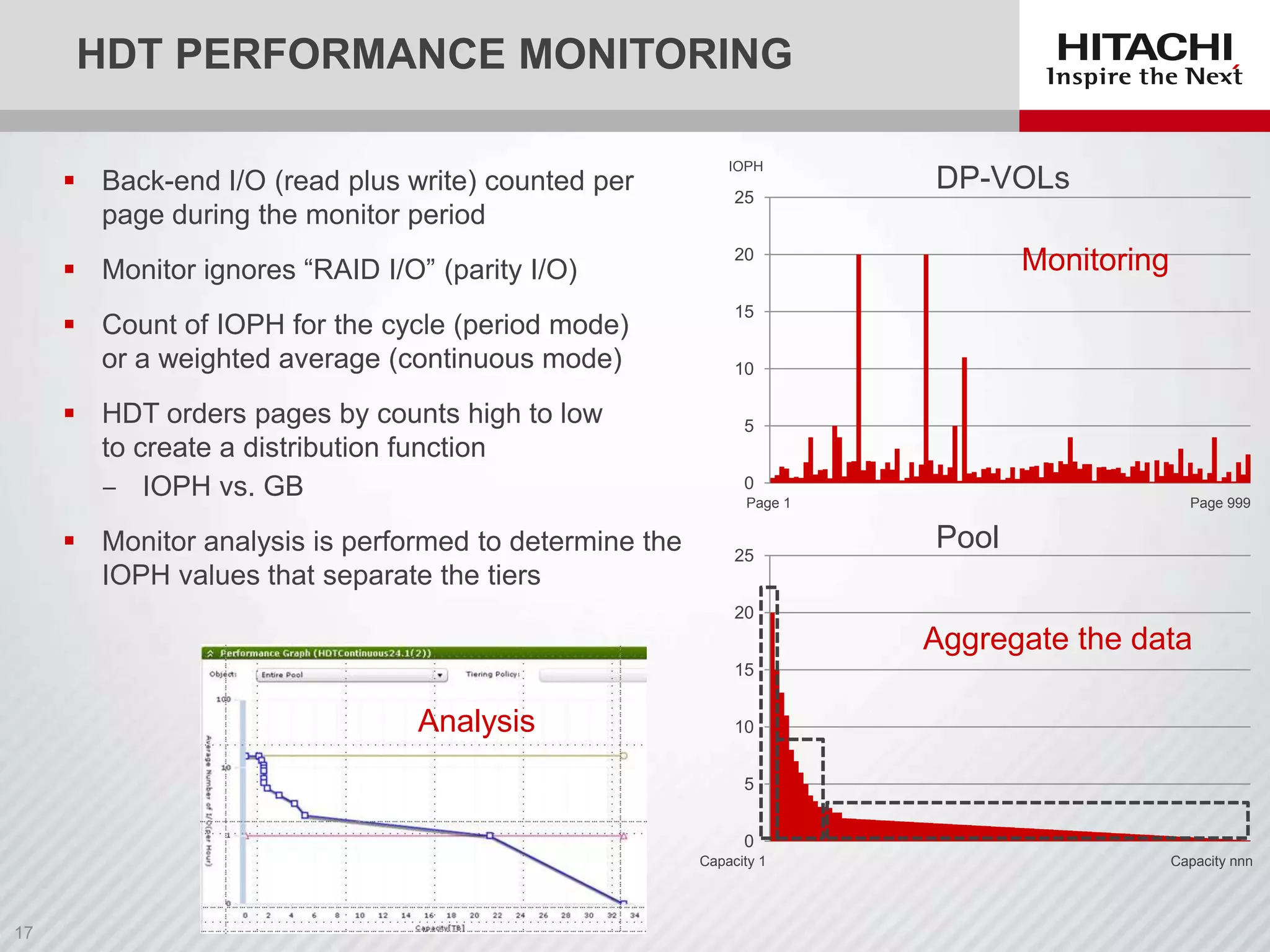
HDT PERFORMANCE MONITORING
 Back-end I/O (read plus write) counted per
page during the monitor period

IOPH

25

 Monitor ignores “RAID I/O” (parity I/O)

Monitoring

20

 Count of IOPH for the cycle (period mode)
or a weighted average (continuous mode)

DP-VOLs

15

 HDT orders pages by counts high to low
to create a distribution function
‒ IOPH vs. GB
 Monitor analysis is performed to determine the
IOPH values that separate the tiers

10
5

0
Page 1

25

Page 999

Pool

20

Aggregate the data
15

Analysis

10
5
0
Capacity 1

Capacity nnn
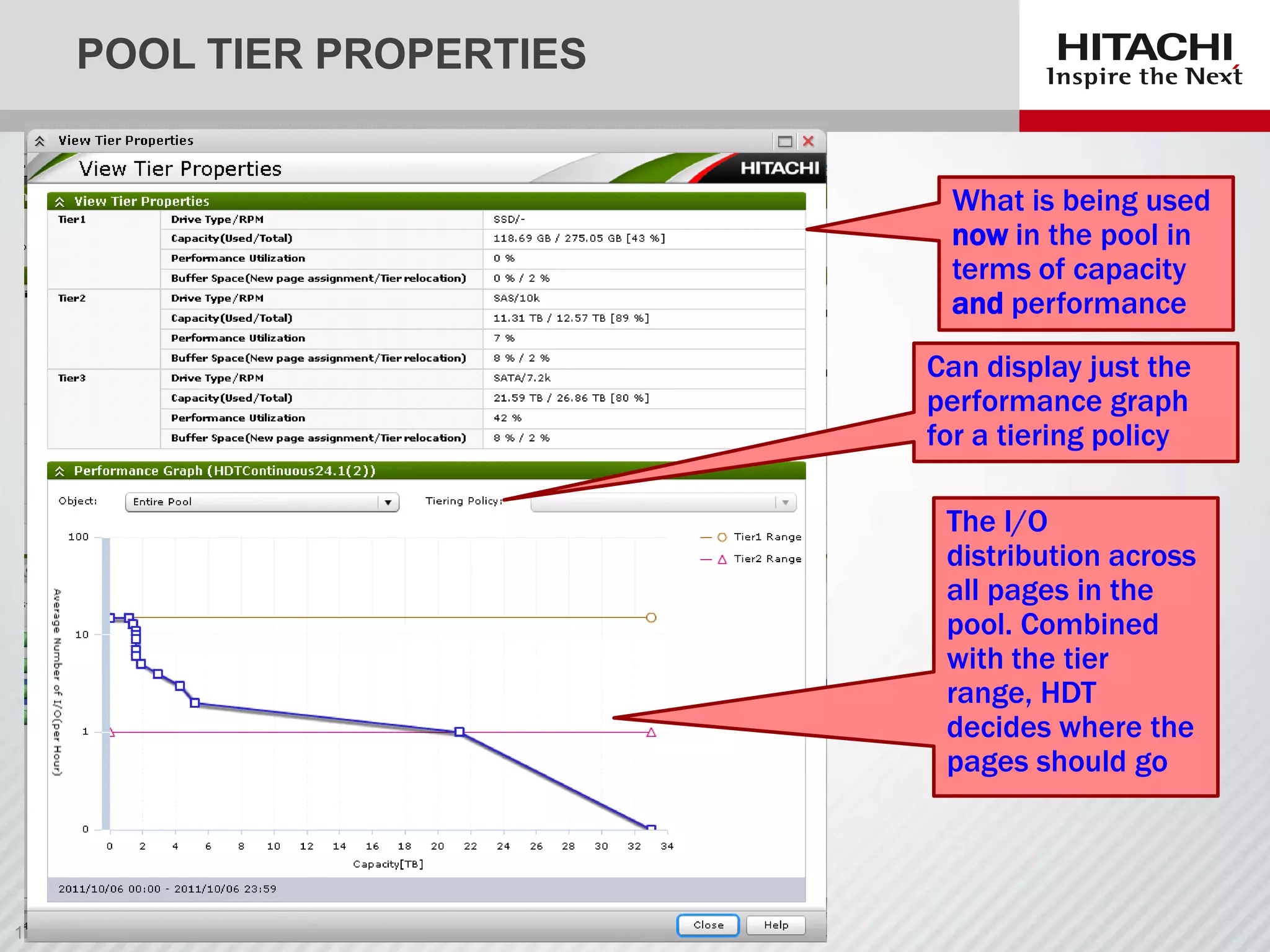
POOL TIER PROPERTIES
What is being used
now in the pool in
terms of capacity
and performance
Can display just the
performance graph
for a tiering policy
The I/O
distribution across
all pages in the
pool. Combined
with the tier
range, HDT
decides where the
pages should go
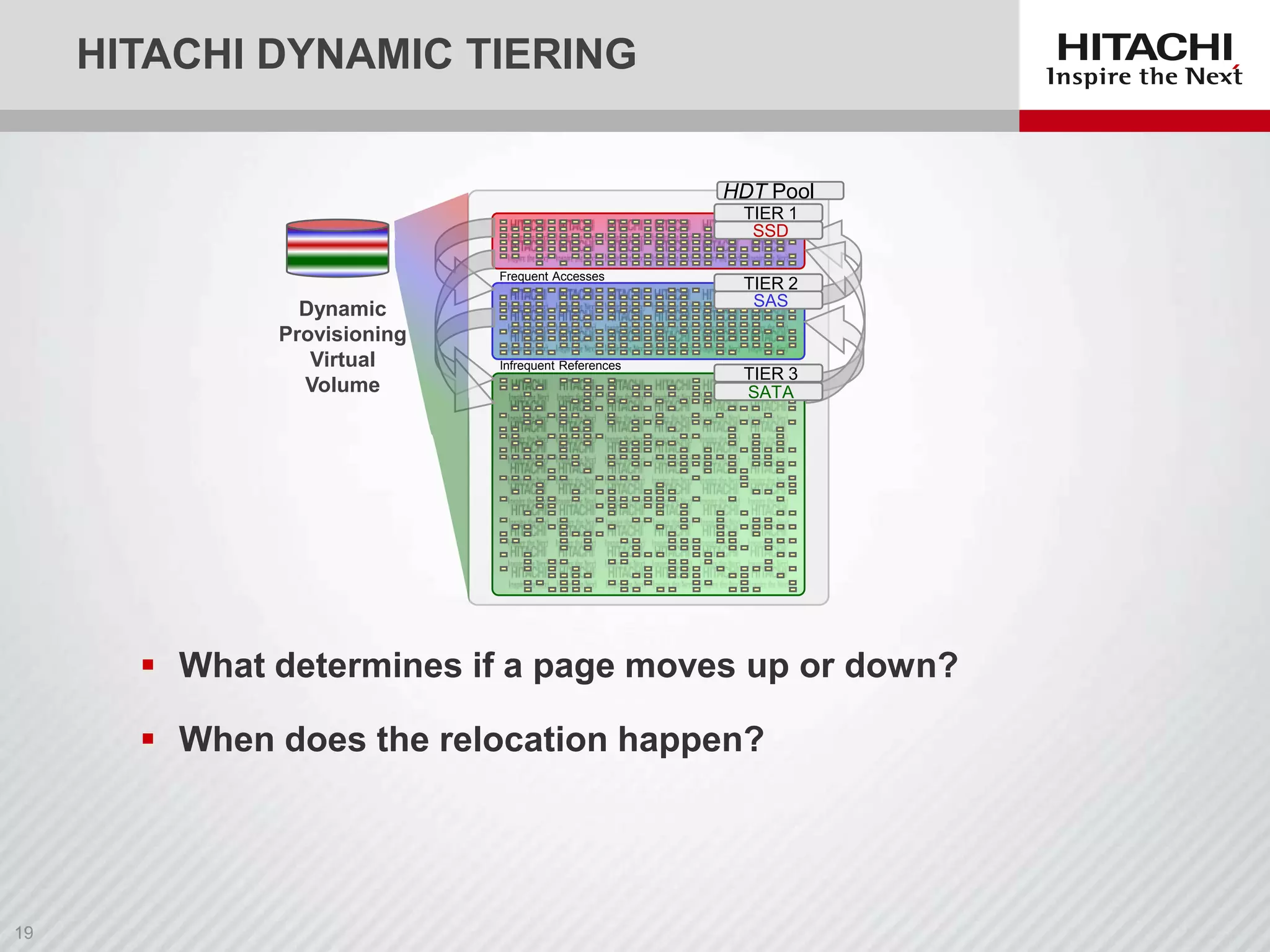
HITACHI DYNAMIC TIERING
HDT Pool
TIER 1
SSD
Frequent Accesses

Dynamic
Provisioning
Virtual
Volume

Infrequent References

TIER 2
SAS

TIER 3
SATA

 What determines if a page moves up or down?
 When does the relocation happen?
PAGE RELOCATION
 At the end of a monitor cycle the counters are recalculated
‒ Either IOPH (period) or weighted average (continuous)
 Page counters with similar IOPH values are grouped together

 IOPH groupings are ordered from highest to lowest
 Tier capacity is overlaid on the IOPH groupings to decide on values for
tier ranges
‒ Tier range is the “break point” in IOPH between tiers

 Relocation processes DP-VOLs page by page looking for pages on the
“wrong” side of a tier range value
‒ For example, high IOPH in a lower tier
‒ Relocation will perform a ZPR test on a page it moves

 You can see the IOPH groupings and tier range values in SN2 “Pool Tier
Properties”
‒ Tier range stops being reported if any tier policy is specified
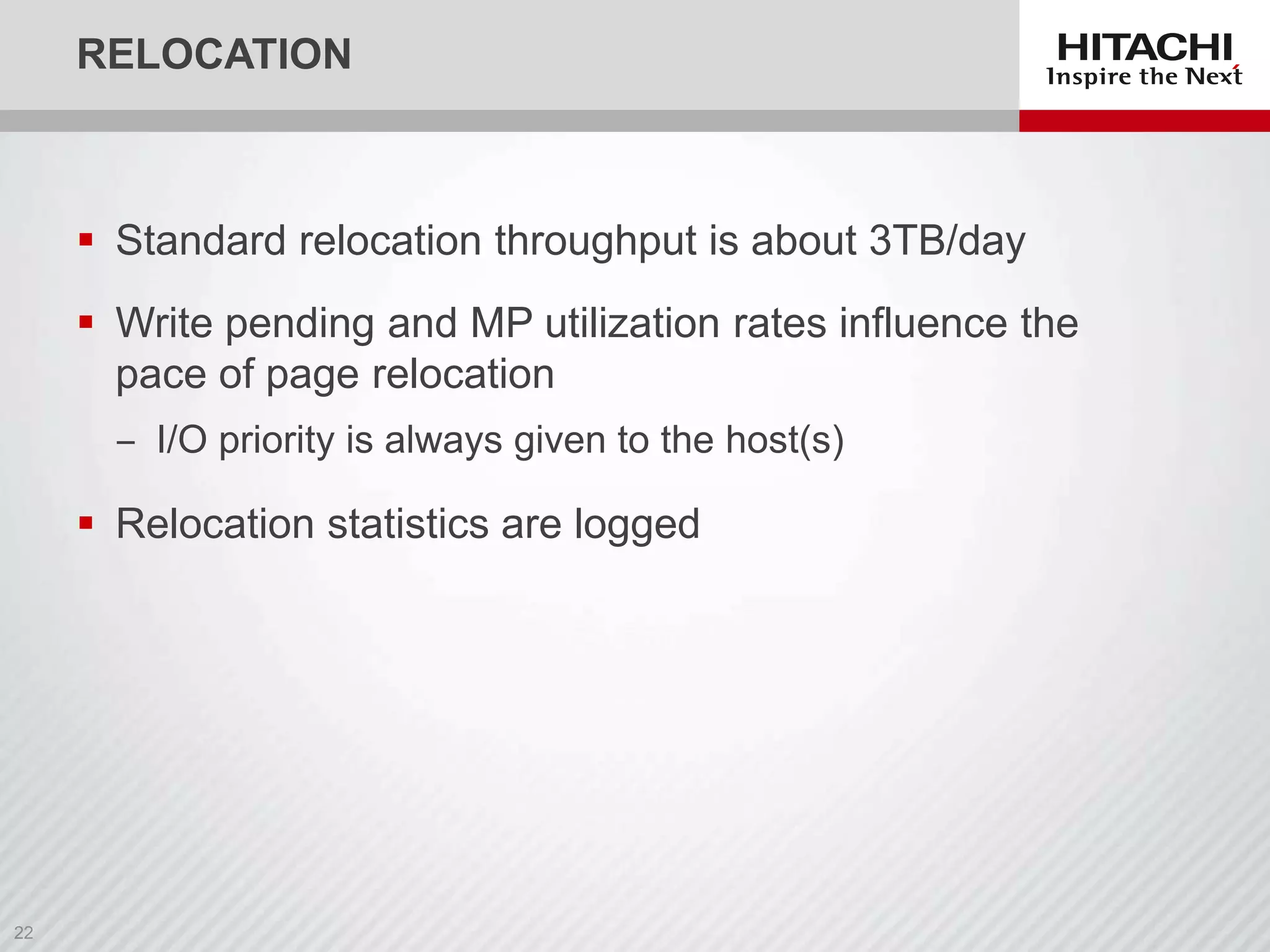
RELOCATION

 Standard relocation throughput is about 3TB/day
 Write pending and MP utilization rates influence the
pace of page relocation
‒ I/O priority is always given to the host(s)

 Relocation statistics are logged
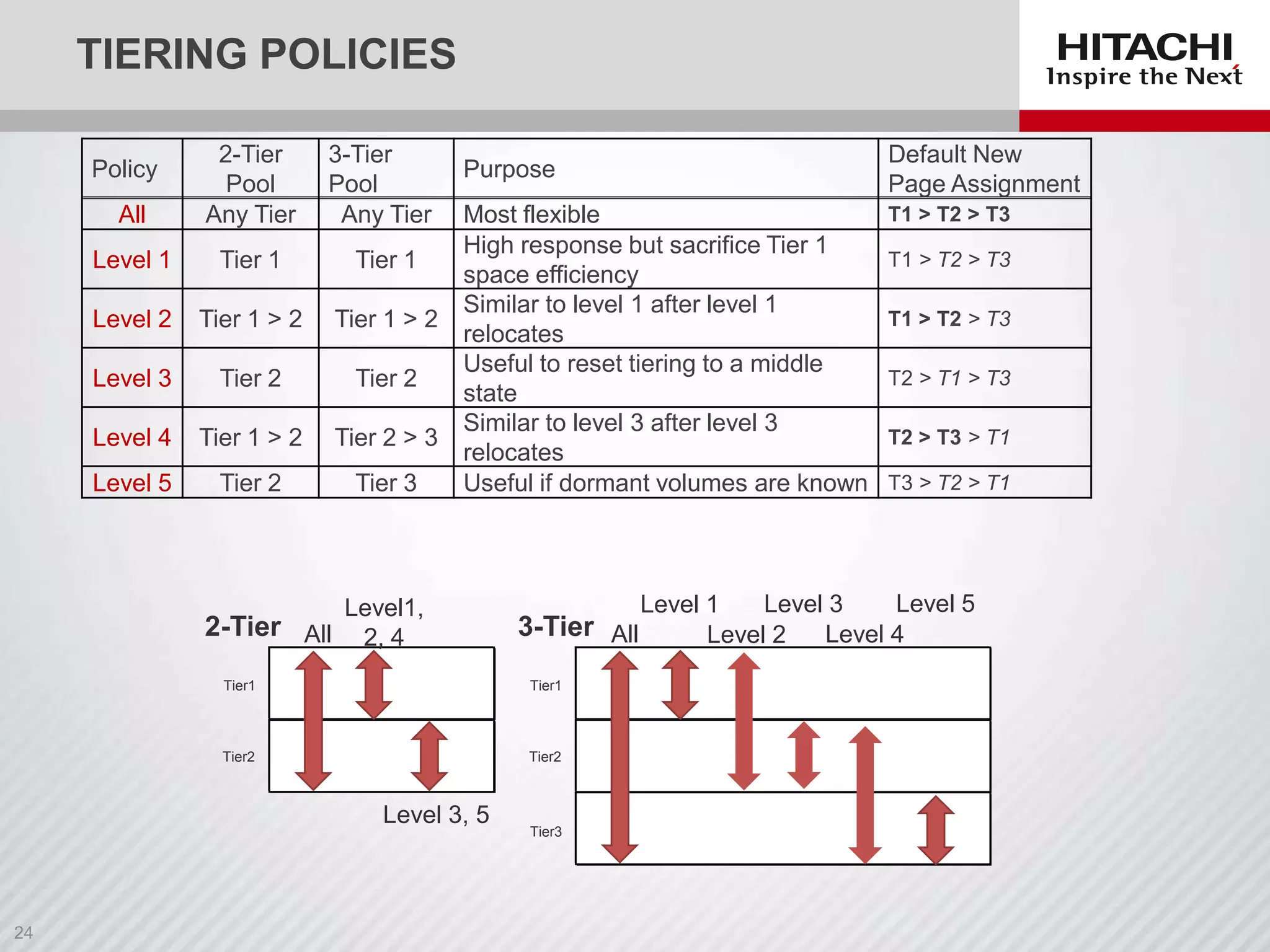
TIERING POLICIES

All

2-Tier
Pool
Any Tier

3-Tier
Pool
Any Tier

Level 1

Tier 1

Tier 1

Level 2

Tier 1 > 2

Tier 1 > 2

Level 3

Tier 2

Tier 2

Level 4

Tier 1 > 2

Tier 2 > 3

Level 5

Tier 2

Tier 3

Policy

Purpose

Most flexible
High response but sacrifice Tier 1
space efficiency
Similar to level 1 after level 1
relocates
Useful to reset tiering to a middle
state
Similar to level 3 after level 3
relocates
Useful if dormant volumes are known

Level1,
2-Tier All 2, 4

T1 > T2 > T3
T1 > T2 > T3
T1 > T2 > T3
T2 > T1 > T3
T2 > T3 > T1
T3 > T2 > T1

Level 5
Level 3
Level 1
3-Tier All
Level 4
Level 2

Tier1

Tier1

Tier2

Tier2

Level 3, 5

Default New
Page Assignment

Tier3
AVOIDING THRASHING
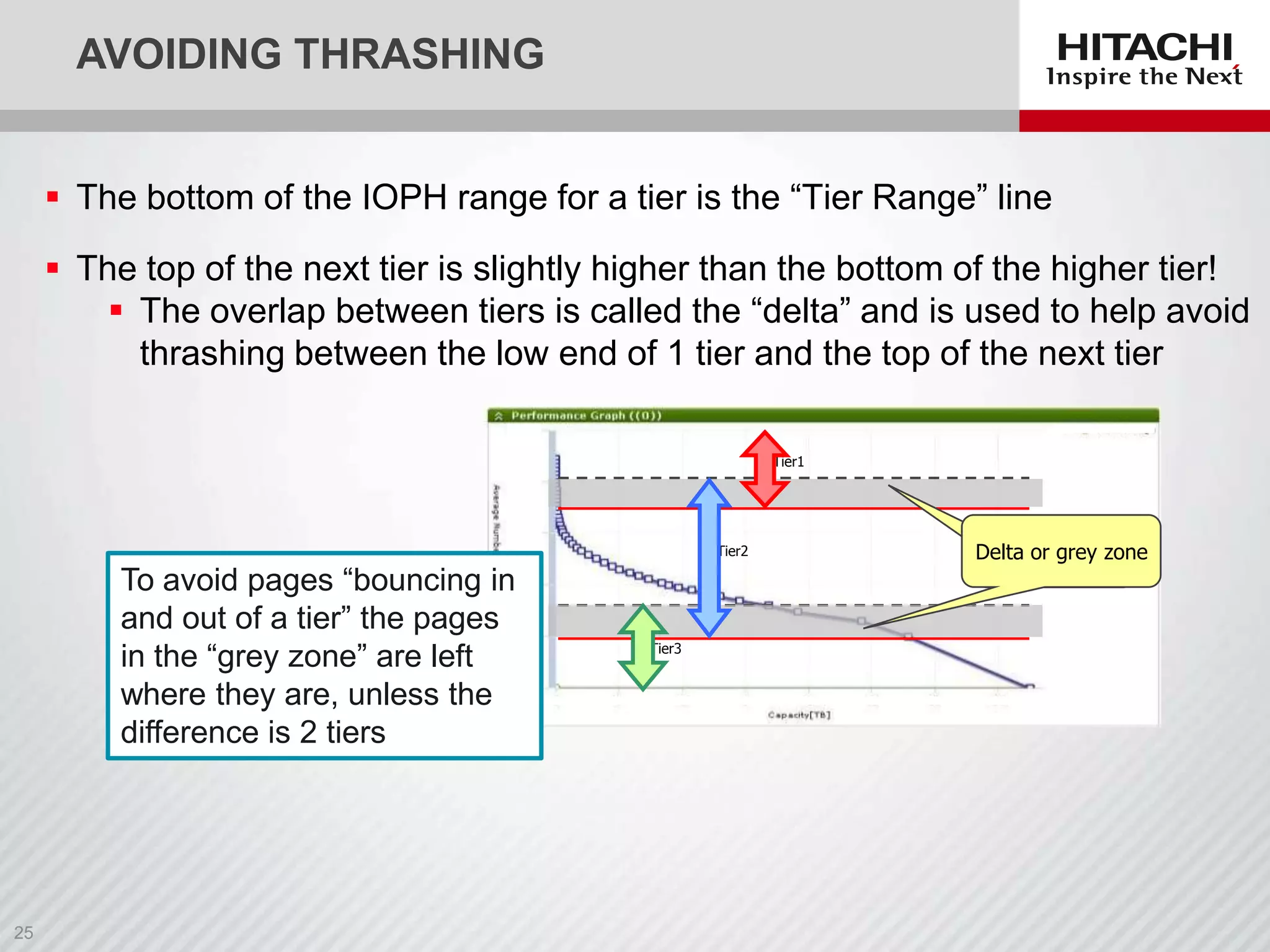
 The bottom of the IOPH range for a tier is the “Tier Range” line
 The top of the next tier is slightly higher than the bottom of the higher tier!
 The overlap between tiers is called the “delta” and is used to help avoid
thrashing between the low end of 1 tier and the top of the next tier
Tier1

Tier2

To avoid pages “bouncing in
and out of a tier” the pages
in the “grey zone” are left
where they are, unless the
difference is 2 tiers

Tier3

Delta or grey zone
HDT USAGE CONSIDERATIONS
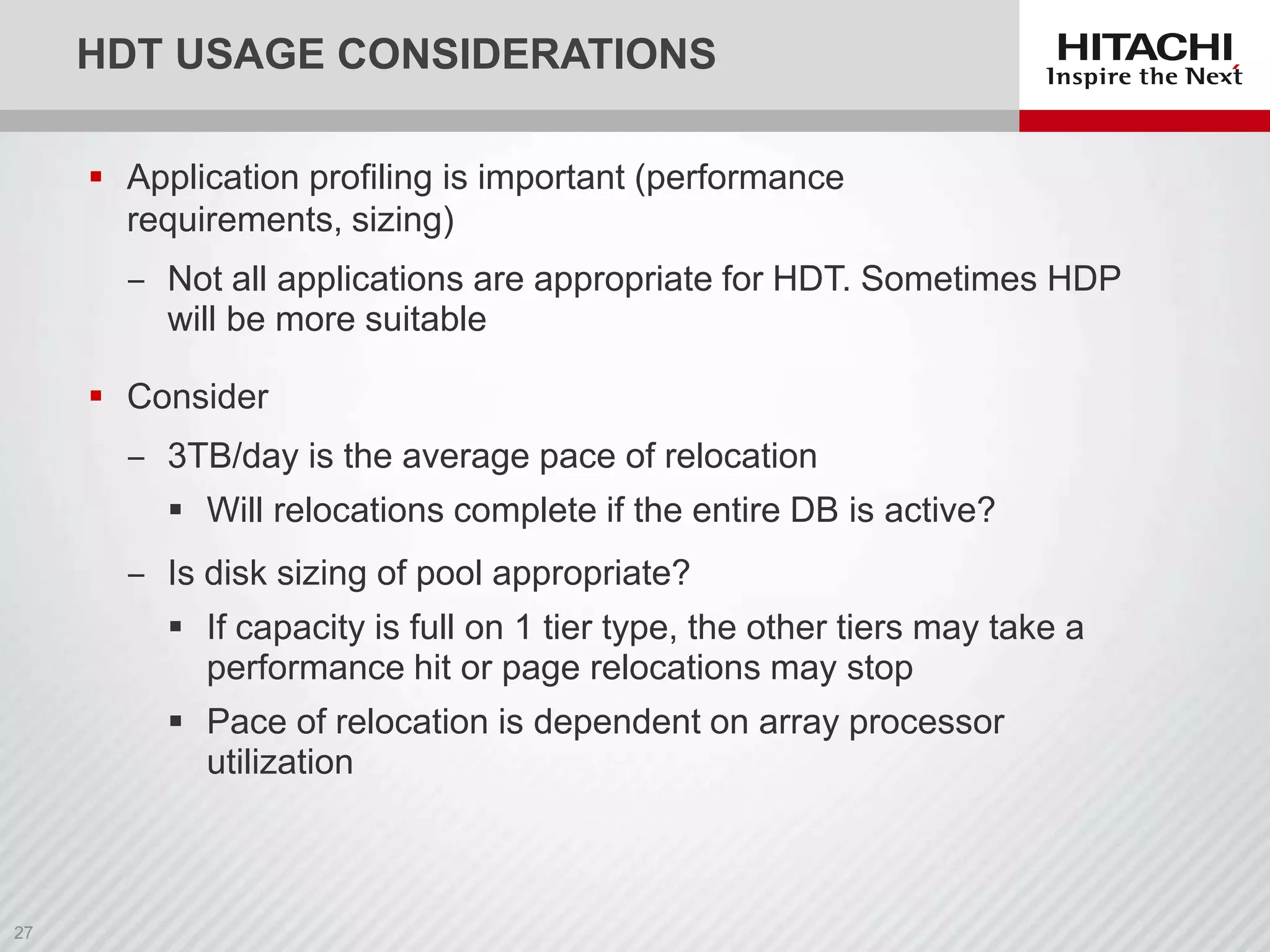
 Application profiling is important (performance
requirements, sizing)

‒ Not all applications are appropriate for HDT. Sometimes HDP
will be more suitable
 Consider
‒ 3TB/day is the average pace of relocation
 Will relocations complete if the entire DB is active?
‒ Is disk sizing of pool appropriate?
 If capacity is full on 1 tier type, the other tiers may take a
performance hit or page relocations may stop

 Pace of relocation is dependent on array processor
utilization
MANAGING HDT
WITH HITACHI
COMMAND SUITE
DEMO
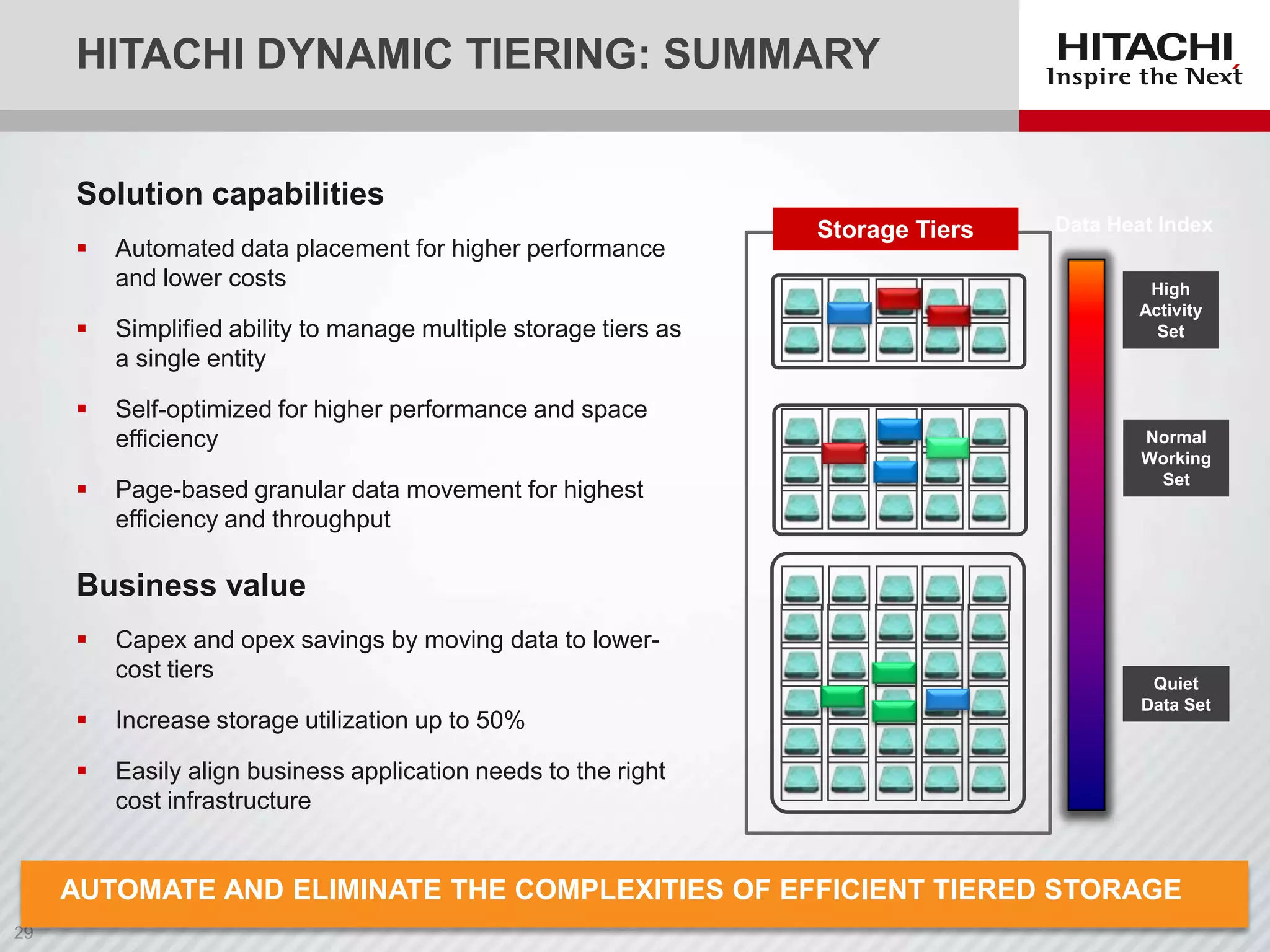
HITACHI DYNAMIC TIERING: SUMMARY
Solution capabilities


Automated data placement for higher performance
and lower costs



Simplified ability to manage multiple storage tiers as
a single entity



Self-optimized for higher performance and space
efficiency



Page-based granular data movement for highest
efficiency and throughput

Storage Tiers

Data Heat Index
High
Activity
Set

Normal
Working
Set

Business value


Capex and opex savings by moving data to lowercost tiers



Increase storage utilization up to 50%



Quiet
Data Set

Easily align business application needs to the right
cost infrastructure

AUTOMATE AND ELIMINATE THE COMPLEXITIES OF EFFICIENT TIERED STORAGE
QUESTIONS AND
DISCUSSION
UPCOMING WEBTECHS
 WebTechs
‒ Hitachi Dynamic Tiering: An In-Depth Look at Managing HDT and
Best Practices, Part 2, November 13, 9 a.m. PT, noon ET

‒ Best Practices for Virtualizing Exchange for Microsoft Private
Cloud, December 4, 9 a.m. PT, noon ET

Check www.hds.com/webtech for
 Links to the recording, the presentation, and Q&A (available next
week)
 Schedule and registration for upcoming WebTech sessions
 Questions will be posted in the HDS Community:
http://community.hds.com/groups/webtech
THANK YOU

Overview of Hitachi Dynamic Tiering, Part 1 of 2

  • 1.
    HITACHI DYNAMIC TIERING OVERVIEW MICHAELROWLEY, PRINCIPAL CONSULTANT BRANDON LAMBERT, SR. MANAGER AMERICAS SOLUTIONS AND PRODUCTS
  • 2.
    WEBTECH EDUCATIONAL SERIES OVERVIEWOF HITACHI DYNAMIC TIERING, PART 1 OF 2 Hitachi Dynamic Tiering (HDT) simplifies storage administration by automatically optimizing data placement in 1, 2 or 3 tiers of storage that can be defined and used within a single virtual volume. Tiers of storage can be made up of internal or external (virtualized) storage, and use of HDT can lower capital costs. Simplified and unified management of HDT allows for lower operational costs and reduces the challenges of ensuring applications are placed on the appropriate classes of storage. By attending this webcast, you will • Hear about what makes Hitachi Dynamic Tiering a unique storage management tool that enables storage administrators to meet performance requirements at lower costs than traditional tiering methods. • Understand various strategies to consider when monitoring application performance and relocating pages to appropriate tiers without manual intervention. • Learn how to use Hitachi Command Suite (HCS) to manage, monitor and report on an HDT environment, and how HCS manages related storage environments.
  • 3.
    UPCOMING WEBTECHS  WebTechs ‒Hitachi Dynamic Tiering: An In-Depth Look at Managing HDT and Best Practices, Part 2, November 13, 9 a.m. PT, noon ET ‒ Best Practices for Virtualizing Exchange for Microsoft Private Cloud, December 4, 9 a.m. PT, noon ET Check www.hds.com/webtech for  Links to the recording, the presentation, and Q&A (available next week)  Schedule and registration for upcoming WebTech sessions  Questions will be posted in the HDS Community: http://community.hds.com/groups/webtech
  • 4.
    HITACHI DYNAMIC TIERING OVERVIEW MICHAELROWLEY, PRINCIPAL CONSULTANT BRANDON LAMBERT, SR. MANAGER AMERICAS SOLUTIONS AND PRODUCTS
  • 5.
    AGENDA  Hitachi DynamicTiering ‒ Relation to Hitachi Dynamic Provisioning ‒ Monitoring I/O activity ‒ Relocating pages (data) ‒ Tiering policies ‒ Managing and monitoring HDT environments with Hitachi Command Suite
  • 6.
    HITACHI DYNAMIC PROVISIONING MAINFRAMEAND OPEN SYSTEMS  Virtualize devices into a pool of capacity and allocate by pages  Dynamically provision new servers in seconds HDP Volume (Virtual LUN)  Eliminate allocated but unused waste by allocating only the pages that are used  Extend Dynamic Provisioning to external virtualized storage HDP Pool LDEVs  Convert fat volumes into thin volumes by moving them into the pool  Optimize storage performance by spreading the I/O across more arms  Up to 62,000 LUNs in a single pool  Up to 5PB support  Dynamically expand or shrink pool  Zero page reclaim LDEV LDEV LDEV LDEV LDEV LDEVLDEV LDEV
  • 7.
    VIRTUAL STORAGE PLATFORM: PAGE-LEVELTIERING POOL A  Different tiers of storage are now in EFD/SSD TIER 1 1 pool of pages  Data is written to the highest- Least Refer enced performance tier first SAS 2 TIER  As data becomes less active, it migrates to lower-level tiers  If activity increases, data will be promoted back to a higher tier  Since 20% of data accounts for 80% of the activity, only the active part of a volume will reside on the higher-performance tiers Least Refer enced SATA3 TIER
  • 8.
    VIRTUAL STORAGE PLATFORM: PAGE-LEVELTIERING  Automatically detects and assigns POOL A EFD/SSD TIER 1 tiers based on media type  Dynamically  Add or remove tiers Least Referenced SAS 2 TIER  Expand or shrink tiers  Expand LUNs  Move LUNs between pools  Automatically adjust sub-LUN 42MB pages between tiers based on captured metadata  Supports virtualized storage and all replication/DR solutions Least Referenced SATA3 TIER
  • 9.
    HDT Monitor I/O Virtual volumes Pool SSD Relocateand Rebalance SAS SATA Monitor Capacity Alerts Concurrent and Independent THE MONITOR-RELOCATE CYCLE
  • 10.
    HDT: POLICY-BASED MONITORING ANDRELOCATION  Manual mode ‒ Monitoring and relocation separately controlled ‒ Can set complex schedules to custom fit to priority work periods Media Groupings Supported by VSP* Order of Grouping SSD 1 SAS 15K RPM 2 SAS 10K RPM 3 SAS 7.2K RPM 4 SATA 5 ‒ Sampling at ½-, 1-, 2-, 4-, or 8-hour intervals External #1 6 ‒ All aligned to midnight External #2 7 ‒ May select automatic monitoring of I/O intensity and automatic data relocation External #3 8  Automatic mode ‒ Customer defines strategy; it is then executed automatically ‒ 24-hour sampling ‒ Allows for custom selection of partial day periods * VSP = Hitachi Virtual Storage Platform
  • 11.
    PERIOD AND CONTINUOUSMONITORING Impacts Relocation Decisions and How Tier Properties Are Displayed Period mode Continuous mode Relocation uses just the I/O load measurements from the last completed monitor cycle. Relocation uses a weighted average of previous cycles. Shortterm I/O load increases or decreases have less influence on relocation Period Mode Continuous Mode Weighted calculation Load Load 105 10 95 93 100 I/O load info 91 per monitoring cycle 100 Actual I/O load 105 81 84 87 I/O load by weighted calculation Time Relocation executed based on current I/O load 86 I/O load information per monitoring cycle by weighted calculation Time Relocation executed based on weighted calculation
  • 12.
    MONITORING AND RELOCATIONOPTIONS Execution mode Cycle duration Monitoring Start End Start End Auto 24 hours After setting auto execution to ON, next 0:00 is reached After monitoring started, the next 0:00 is reached Starts immediately after monitoring data is fixed One of the following • Relocation of entire pool is finished • Next relocation is started • Auto execution is set to OFF execution Time of day not specified Relocation 24 hours with time of day specified execution See RAIDCOM command Specified end time is reached 30 min. 1 hour 2 hours 4 hours 8 hours Manual After setting auto execution to ON, the specified start time is reached After setting auto execution to ON, cycle time begins when 0:00 is reached After monitoring started, cycle time is reached Variable Request to start monitoring is received SN2, RAIDCOM, or HCS Request to end monitoring is received Above Monitoring/relocation cycle Above 1/1 00:00 1/2 00:00 t Monitoring monitor data for relocate Relocation [Ex.] Monitoring period 9:00-17:00 1/1 1/2 9 17 1/3 9 17 t Above Above [Ex.] Monitoring period 8h 1/1 0 Request to start relocation is received SN2, RAIDCOM, or HCS One of the following • Relocation of entire pool finished • Request to stop relocation is received • Auto execution is set to ON • Subsequent manual monitoring is stopped 8 1/2 16 0 8 1/3 16 0 t Request to Request to Request to stop start start monitoring monitoring relocation t
  • 13.
    HDT PERFORMANCE MONITORING Back-end I/O (read plus write) counted per page during the monitor period IOPH 25  Monitor ignores “RAID I/O” (parity I/O) Monitoring 20  Count of IOPH for the cycle (period mode) or a weighted average (continuous mode) DP-VOLs 15  HDT orders pages by counts high to low to create a distribution function ‒ IOPH vs. GB  Monitor analysis is performed to determine the IOPH values that separate the tiers 10 5 0 Page 1 25 Page 999 Pool 20 Aggregate the data 15 Analysis 10 5 0 Capacity 1 Capacity nnn
  • 14.
    POOL TIER PROPERTIES Whatis being used now in the pool in terms of capacity and performance Can display just the performance graph for a tiering policy The I/O distribution across all pages in the pool. Combined with the tier range, HDT decides where the pages should go
  • 15.
    HITACHI DYNAMIC TIERING HDTPool TIER 1 SSD Frequent Accesses Dynamic Provisioning Virtual Volume Infrequent References TIER 2 SAS TIER 3 SATA  What determines if a page moves up or down?  When does the relocation happen?
  • 16.
    PAGE RELOCATION  Atthe end of a monitor cycle the counters are recalculated ‒ Either IOPH (period) or weighted average (continuous)  Page counters with similar IOPH values are grouped together  IOPH groupings are ordered from highest to lowest  Tier capacity is overlaid on the IOPH groupings to decide on values for tier ranges ‒ Tier range is the “break point” in IOPH between tiers  Relocation processes DP-VOLs page by page looking for pages on the “wrong” side of a tier range value ‒ For example, high IOPH in a lower tier ‒ Relocation will perform a ZPR test on a page it moves  You can see the IOPH groupings and tier range values in SN2 “Pool Tier Properties” ‒ Tier range stops being reported if any tier policy is specified
  • 17.
    RELOCATION  Standard relocationthroughput is about 3TB/day  Write pending and MP utilization rates influence the pace of page relocation ‒ I/O priority is always given to the host(s)  Relocation statistics are logged
  • 18.
    TIERING POLICIES All 2-Tier Pool Any Tier 3-Tier Pool AnyTier Level 1 Tier 1 Tier 1 Level 2 Tier 1 > 2 Tier 1 > 2 Level 3 Tier 2 Tier 2 Level 4 Tier 1 > 2 Tier 2 > 3 Level 5 Tier 2 Tier 3 Policy Purpose Most flexible High response but sacrifice Tier 1 space efficiency Similar to level 1 after level 1 relocates Useful to reset tiering to a middle state Similar to level 3 after level 3 relocates Useful if dormant volumes are known Level1, 2-Tier All 2, 4 T1 > T2 > T3 T1 > T2 > T3 T1 > T2 > T3 T2 > T1 > T3 T2 > T3 > T1 T3 > T2 > T1 Level 5 Level 3 Level 1 3-Tier All Level 4 Level 2 Tier1 Tier1 Tier2 Tier2 Level 3, 5 Default New Page Assignment Tier3
  • 19.
    AVOIDING THRASHING  Thebottom of the IOPH range for a tier is the “Tier Range” line  The top of the next tier is slightly higher than the bottom of the higher tier!  The overlap between tiers is called the “delta” and is used to help avoid thrashing between the low end of 1 tier and the top of the next tier Tier1 Tier2 To avoid pages “bouncing in and out of a tier” the pages in the “grey zone” are left where they are, unless the difference is 2 tiers Tier3 Delta or grey zone
  • 20.
    HDT USAGE CONSIDERATIONS Application profiling is important (performance requirements, sizing) ‒ Not all applications are appropriate for HDT. Sometimes HDP will be more suitable  Consider ‒ 3TB/day is the average pace of relocation  Will relocations complete if the entire DB is active? ‒ Is disk sizing of pool appropriate?  If capacity is full on 1 tier type, the other tiers may take a performance hit or page relocations may stop  Pace of relocation is dependent on array processor utilization
  • 21.
  • 22.
    HITACHI DYNAMIC TIERING:SUMMARY Solution capabilities  Automated data placement for higher performance and lower costs  Simplified ability to manage multiple storage tiers as a single entity  Self-optimized for higher performance and space efficiency  Page-based granular data movement for highest efficiency and throughput Storage Tiers Data Heat Index High Activity Set Normal Working Set Business value  Capex and opex savings by moving data to lowercost tiers  Increase storage utilization up to 50%  Quiet Data Set Easily align business application needs to the right cost infrastructure AUTOMATE AND ELIMINATE THE COMPLEXITIES OF EFFICIENT TIERED STORAGE
  • 23.
  • 24.
    UPCOMING WEBTECHS  WebTechs ‒Hitachi Dynamic Tiering: An In-Depth Look at Managing HDT and Best Practices, Part 2, November 13, 9 a.m. PT, noon ET ‒ Best Practices for Virtualizing Exchange for Microsoft Private Cloud, December 4, 9 a.m. PT, noon ET Check www.hds.com/webtech for  Links to the recording, the presentation, and Q&A (available next week)  Schedule and registration for upcoming WebTech sessions  Questions will be posted in the HDS Community: http://community.hds.com/groups/webtech
  • 25.

Editor's Notes

  • #12 by Storage Navigator or scripting (raidcom)
  • #13 Cycles – Note:24 hour auto has some start/stop time controlsManual can disconnect Monitor time from Relocation timefocus on last column
  • #14 At the end of a monitor cycle the counters are recalculatedEither IOPH (Period) or weighted average (Continuous)Page counters with similar IOPH values are grouped togetherIOPH groupings are ordered from highest to lowestTier capacity is overlaid upon the IOPH groupings to decide on values for Tier Ranges Tier Range is the ‘break point’ in IOPH between tiersRelocation processes DP-VOLs page by page looking for pages on the ‘wrong’ side of a Tier Range valuei.e. high IOPH in a lower tierRelocation will perform a ZPR test on a page as it moves itYou can see the IOPH groupings and Tier Range values in SN2 “Pool Tier Properties”
  • #16 This all leads up to relocation
  • #18 The high boundary for the tier is 10% above the bottom of the prior tier….
  • #19 Absolute worst case: SATA W/V 4PG = 354MB/S (so < 10%)