ISV technical drill down:

OS-free server application delivery for
instant provisioning
ISV Technical Drill Down - Introductions

•
     AppZero – application virtualization software vendor
      –
          Server applications (Solaris, Linux, Windows) and Windows desktop
      –
          Patented and field-proven software
           • Greg O’Connor – CEO

           •   Bill Cullen – CTO


•
     ISV technical drill down – 60 minutes total
      –   What is AppZero?
      –   How AppZero Works
      –   Tools and Runtime
      –   Application Stacks
      –   AppZero ISV Accelerator Program
      –   Q&A and FAQs
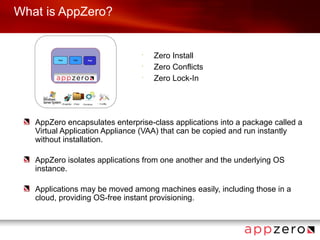
What is AppZero?


                                •
                                    Zero Install
                                •
                                    Zero Conflicts
                                •
                                    Zero Lock-In


   AppZero encapsulates enterprise-class applications into a package called a
   Virtual Application Appliance (VAA) that can be copied and run instantly
   without installation.

   AppZero isolates applications from one another and the underlying OS
   instance.

   Applications may be moved among machines easily, including those in a
   cloud, providing OS-free instant provisioning.
Why Application Virtualization?

 •
     Extreme simplicity – copy and run
 •
     Portability
     –
         Cloud: Move apps from D2C2C2D
     –
         Platform: Move app silos to PaaS
 •
     VM doesn’t solve the app/OS problem
     –
         VM images tie OS and Apps together forever and must be
         managed as a whole
 •
     Continued consolidation, less OS management
 •
     Separating app from OS results in far fewer permutations
 •
     App & OS patches done once – gold “images”
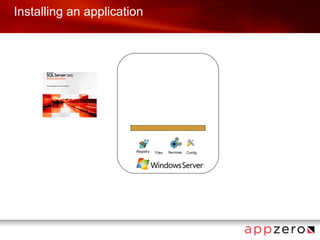
Installing an application


                       Registry   Files   Services   Config
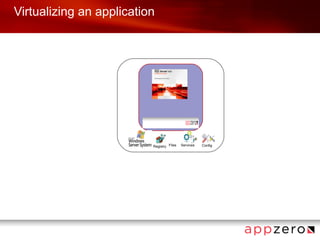
Virtualizing an application


                          Registry Files   Services   Config
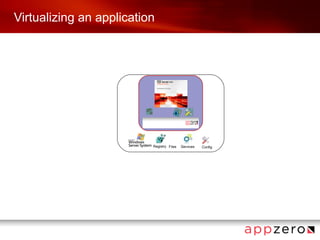
Virtualizing an application


                          Registry Files   Services   Config
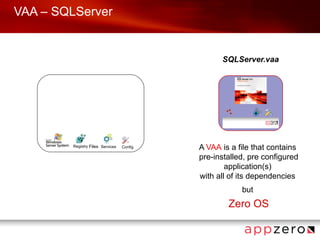
VAA – SQLServer


                                                  SQLServer.vaa


         Registry Files Services   Config   A VAA is a file that contains
                                            pre-installed, pre configured
                                                    application(s)
                                            with all of its dependencies
                                                        but
                                                    Zero OS
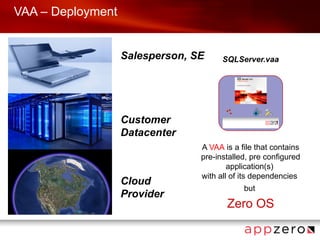
VAA – Deployment


                   Salesperson, SE     SQLServer.vaa


                   Customer
                   Datacenter
                                 A VAA is a file that contains
                                 pre-installed, pre configured
                                         application(s)
                                 with all of its dependencies
                   Cloud
                                             but
                   Provider
                                        Zero OS
Application independence


AppZero VAAs are unaffected by virtual machine concerns:

                  •
                      Hypervisor changes
                  •
                      Processor architecture
                  •
                      CPU core count
                  •
                      Storage configuration or technology
                  •
                      OS configuration and file versions
                  •
                      Cloud technology


•
    10
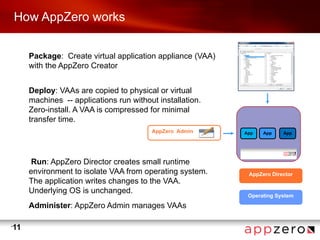
How AppZero works


         Package: Create virtual application appliance (VAA)
         with the AppZero Creator


         Deploy: VAAs are copied to physical or virtual
         machines -- applications run without installation.
         Zero-install. A VAA is compressed for minimal
         transfer time.
                                            AppZero Admin      App   App    App


          Run: AppZero Director creates small runtime
         environment to isolate VAA from operating system.      AppZero Director
         The application writes changes to the VAA.
         Underlying OS is unchanged.
                                                                Operating System
         Administer: AppZero Admin manages VAAs

•
    11
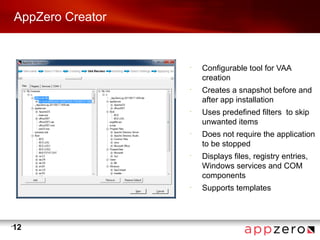
AppZero Creator


                      •
                          Configurable tool for VAA
                          creation
                      •
                          Creates a snapshot before and
                          after app installation
                      •
                          Uses predefined filters to skip
                          unwanted items
                      •
                          Does not require the application
                          to be stopped
                      •
                          Displays files, registry entries,
                          Windows services and COM
                          components
                      •
                          Supports templates


•
    12
VAA Templates


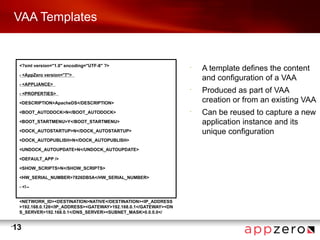
     <?xml version="1.0" encoding="UTF-8" ?>                        •
                                                                        A template defines the content
     - <AppZero version="7">
                                                                        and configuration of a VAA
     - <APPLIANCE>

     - <PROPERTIES>
                                                                    •
                                                                        Produced as part of VAA
     <DESCRIPTION>ApacheDS</DESCRIPTION>                                creation or from an existing VAA
     <BOOT_AUTODOCK>N</BOOT_AUTODOCK>                               •
                                                                        Can be reused to capture a new
     <BOOT_STARTMENU>Y</BOOT_STARTMENU>                                 application instance and its
     <DOCK_AUTOSTARTUP>N</DOCK_AUTOSTARTUP>                             unique configuration
     <DOCK_AUTOPUBLISH>N</DOCK_AUTOPUBLISH>

     <UNDOCK_AUTOUPDATE>N</UNDOCK_AUTOUPDATE>

     <DEFAULT_APP />

     <SHOW_SCRIPTS>N</SHOW_SCRIPTS>

     <HW_SERIAL_NUMBER>7826DB5A</HW_SERIAL_NUMBER>

     - <!--


     <NETWORK_ID><DESTINATION>NATIVE</DESTINATION><IP_ADDRESS
     >192.168.0.126</IP_ADDRESS><GATEWAY>192.168.0.1</GATEWAY><DN
     S_SERVER>192.168.0.1</DNS_SERVER><SUBNET_MASK>0.0.0.0</


•
    13
Administrative Console


                             •
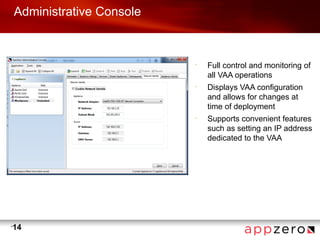
                                 Full control and monitoring of
                                 all VAA operations
                             •
                                 Displays VAA configuration
                                 and allows for changes at
                                 time of deployment
                             •
                                 Supports convenient features
                                 such as setting an IP address
                                 dedicated to the VAA


•
    14
Command Line Interface

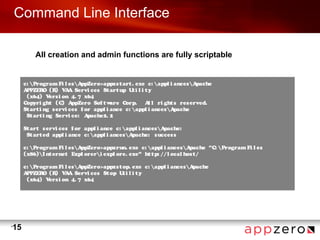
             All creation and admin functions are fully scriptable


         c:  Program Fi l es A ppZero>appzst art . exe c:  appl i ances Apache
         A PPZER (R V A Servi ces St art up U i l i t y
                  O    ) A                         t
           (x64) V   ersi on 4. 7 x64
         Copyri ght (C) A    ppZero Sof t ware Corp.   A l ri ght s reserved.
                                                          l
         St art i ng servi ces f or appl i ance c:  appl i ances A pache
           St art i ng Servi ce: A pache2. 2

         St art servi ces f or appl i ance c:  appl i ances Apache:
           St art ed appl i ance c:  appl i ances Apache: success

         c:  Program Fi l es AppZero>appzrun. exe c:  appl i ances A   pache "C:  Program Fi l es
         (x86) I nt ernet Expl orer i expl ore. exe" ht tp: / / l ocal host /

         c:  Program Fi l es AppZero>appzst op. exe c: appl i ances Apache
         A PPZER (R V A Servi ces St op U i l i t y
                 O   ) A                      t
           (x64) V ersi on 4. 7 x64


•
    15
Runtime Disk Layout


                          •
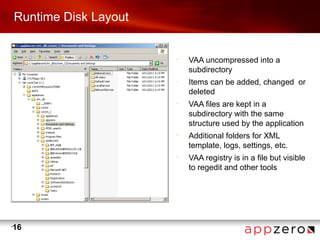
                              VAA uncompressed into a
                              subdirectory
                          •
                              Items can be added, changed or
                              deleted
                          •
                              VAA files are kept in a
                              subdirectory with the same
                              structure used by the application
                          •
                              Additional folders for XML
                              template, logs, settings, etc.
                          •
                              VAA registry is in a file but visible
                              to regedit and other tools


•
    16
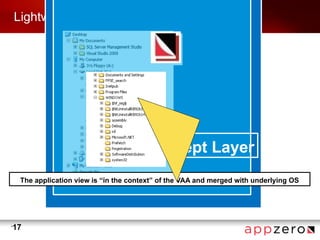
Lightweight intercept technology


                                       Intercept Layer
     The application view is “in the context” of the VAA and merged with underlying OS


•
    17
VAA context


           •
               Virtualized
                –
                    File system (includes deletion)
                –
                    Registry
                –
                    Background services
                –
                    COM components (dll, new exe)
                –
                    New processes
           •
               Integrated
                –
                    IIS (app pools, hostheaders, etc.)
                –
                    WMI management
                –
                    RPC


•
    18
Dock and run operation


         •
             “Docking” establishes the VAA context prior to starting any applications
              –
                  Dock is useful to run application configuration tools, upgrade applications,
                  and run other products in the app context, including the command prompt
         •
             Dock/undock fully scriptable to gain control when a VAA is moved
         •
             “Run” starts the VAA’s primary application


•
    19
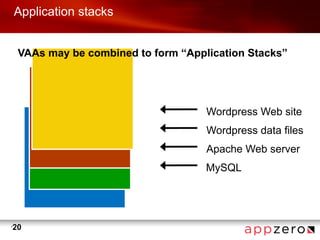
Application stacks


     VAAs may be combined to form “Application Stacks”


                                       Wordpress Web site
                                       Wordpress data files
                                       Apache Web server
                                       MySQL


•
    20
Application stacks


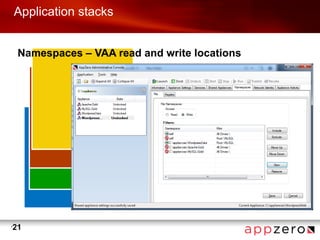
     Namespaces – VAA read and write locations


•
    21
Flexible topology


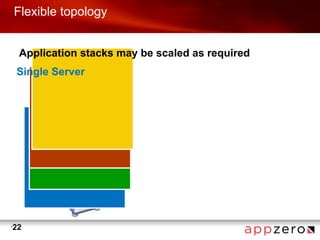
     Application stacks may be scaled as required
    Single Server


•
    22
Flexible topology


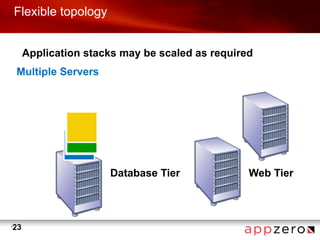
         Application stacks may be scaled as required
    Multiple Servers


                         Database Tier              Web Tier


•
    23
Technical benefits

         •
             Compared to a VM – VAA is a far smaller package
              –
                  A VAA can be 10 to 100 times smaller than a typical 50GB VM
                   •   Upload to a cloud in an hour or less, not a day or two
                   •   Multiple applications easily fit on a typical portable computer
         •
             Flexibility
              –
                  No lock in - move applications among different clouds
                   •   Move from physical servers to virtual environments
                   •   No OS reconfiguration required
                   •   Independent of surrounding infrastructure
         •
             Simplicity
              –
                  ZeroInstall - copy and run
                   •   No error-prone manual steps
                   •   No uninstall required
                   •   Update applications by replacing the VAA


•
    24
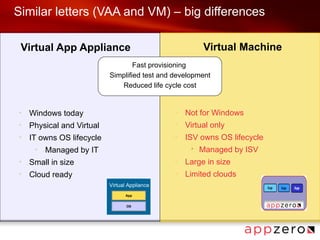
Similar letters (VAA and VM) – big differences

 Virtual App Appliance                                  Virtual Machine
                                   Fast provisioning
                           Simplified test and development
                              Reduced life cycle cost


+
    Windows today                              –
                                                   Not for Windows
+
    Physical and Virtual                       –
                                                   Virtual only
+
    IT owns OS lifecycle                       –
                                                   ISV owns OS lifecycle
     +
         Managed by IT                              •   Managed by ISV
+
    Small in size                              –
                                                   Large in size
+
    Cloud ready                                –
                                                   Limited clouds
                           Virtual Appliance
                                 App


                                  OS
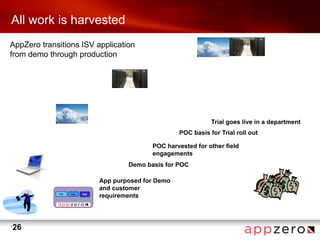
All work is harvested
AppZero transitions ISV application
from demo through production


                                                            Trial goes live in a department
                                                 POC basis for Trial roll out

                                        POC harvested for other field
                                        engagements
                                 Demo basis for POC

                         App purposed for Demo
                         and customer
                         requirements


•
    26
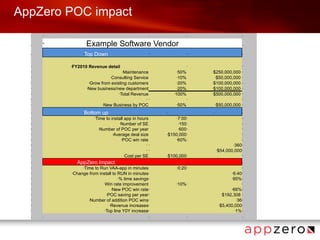
AppZero POC impact
  •   •                                                            •                      •                               •


  •
      •                   Example Software Vendor                                                                         •


  •                   •   Top Down                                 •                      •                               •


  •       FY2010 Revenue detail
          •                                                                               •                               •

  •                                          •Maintenance                      • 50%          •$250,000,000               •

  •                                    Consulting Service
                                       •                                       • 10%            •$50,000,000              •

  •                         •Grow from existing customers                       •20%          •$100,000,000               •

  •                        •New business/new department                         •20%          •$100,000,000               •

  •                                        •Total Revenue                     •100%           •$500,000,000               •

  •                                                            • •                        •                               •

  •                               •New Business by POC                         •   50%            •   $50,000,000         •


  •                   •   Bottom up                                    •                      •                           •

  •                           •Time to install app in hours                  7:00
                                                                               •          •                               •

  •                                         •Number of SE                    •150 •                                       •

  •                              •Number of POC per year                     •600 •                                       •

  •                                     •Average deal size             •$150,000 •                                        •

  •                                          •POC win rate                  •60% •                                        •

  •                                                            • •                                               •360 •

  •                                                            • •                                    •   $54,000,000 •
  •                                              •   Cost per SE       •   $100,000 •                                     •


  •               AppZero Impact
                  •                                                •                      •                               •

  •               Time to Run VAA-app in minutes
                      •                                                        •   0:20   •                               •

  •           Change from install to RUN in minutes •
              •                                                                                                  •   6:40 •
  •                                  •% time savings •                                                           •   95% •
  •                         •Win rate improvement                              •   10% •                                  •

  •                              •New POC win rate •                                                             66% •
                                                                                                                 •

  •                           •POC saving per year •                                                        $192,308 •
                                                                                                            •

  •                  •Number of addition POC wins •                                                                •36 •

  •                             •Revenue increases •                                                      •$5,400,000 •

  •                          •Top line Y0Y increase •                                                             •1% •


  •   •                                                            •                      •                               •
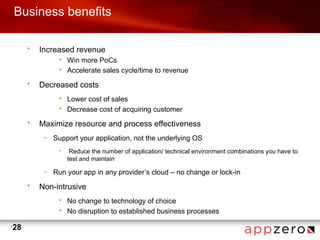
Business benefits

         •   Increased revenue
                  • Win more PoCs
                  • Accelerate sales cycle/time to revenue

         •   Decreased costs
                  • Lower cost of sales
                  • Decrease cost of acquiring customer

         •   Maximize resource and process effectiveness
              – Support your application, not the underlying OS
                  •    Reduce the number of application/ technical environment combinations you have to
                      test and maintain

              – Run your app in any provider’s cloud – no change or lock-in

         •   Non-intrusive
                  • No change to technology of choice
                  • No disruption to established business processes

•
    28
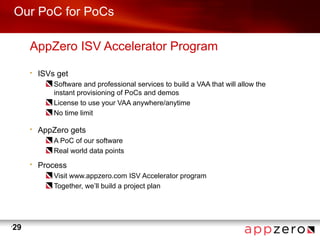
Our PoC for PoCs

         AppZero ISV Accelerator Program
         •   ISVs get
                 Software and professional services to build a VAA that will allow the
                 instant provisioning of PoCs and demos
                 License to use your VAA anywhere/anytime
                 No time limit

         •   AppZero gets
                 A PoC of our software
                 Real world data points
         •   Process
                 Visit www.appzero.com ISV Accelerator program
                 Together, we’ll build a project plan


•
    29

OS-free server application delivery for instant provisioning

  • 1.
    ISV technical drilldown: OS-free server application delivery for instant provisioning
  • 2.
    ISV Technical DrillDown - Introductions • AppZero – application virtualization software vendor – Server applications (Solaris, Linux, Windows) and Windows desktop – Patented and field-proven software • Greg O’Connor – CEO • Bill Cullen – CTO • ISV technical drill down – 60 minutes total – What is AppZero? – How AppZero Works – Tools and Runtime – Application Stacks – AppZero ISV Accelerator Program – Q&A and FAQs
  • 3.
    What is AppZero? • Zero Install • Zero Conflicts • Zero Lock-In AppZero encapsulates enterprise-class applications into a package called a Virtual Application Appliance (VAA) that can be copied and run instantly without installation. AppZero isolates applications from one another and the underlying OS instance. Applications may be moved among machines easily, including those in a cloud, providing OS-free instant provisioning.
  • 4.
    Why Application Virtualization? • Extreme simplicity – copy and run • Portability – Cloud: Move apps from D2C2C2D – Platform: Move app silos to PaaS • VM doesn’t solve the app/OS problem – VM images tie OS and Apps together forever and must be managed as a whole • Continued consolidation, less OS management • Separating app from OS results in far fewer permutations • App & OS patches done once – gold “images”
  • 5.
    Installing an application Registry Files Services Config
  • 6.
    Virtualizing an application Registry Files Services Config
  • 7.
    Virtualizing an application Registry Files Services Config
  • 8.
    VAA – SQLServer SQLServer.vaa Registry Files Services Config A VAA is a file that contains pre-installed, pre configured application(s) with all of its dependencies but Zero OS
  • 9.
    VAA – Deployment Salesperson, SE SQLServer.vaa Customer Datacenter A VAA is a file that contains pre-installed, pre configured application(s) with all of its dependencies Cloud but Provider Zero OS
  • 10.
    Application independence AppZero VAAsare unaffected by virtual machine concerns: • Hypervisor changes • Processor architecture • CPU core count • Storage configuration or technology • OS configuration and file versions • Cloud technology • 10
  • 11.
    How AppZero works Package: Create virtual application appliance (VAA) with the AppZero Creator Deploy: VAAs are copied to physical or virtual machines -- applications run without installation. Zero-install. A VAA is compressed for minimal transfer time. AppZero Admin App App App Run: AppZero Director creates small runtime environment to isolate VAA from operating system. AppZero Director The application writes changes to the VAA. Underlying OS is unchanged. Operating System Administer: AppZero Admin manages VAAs • 11
  • 12.
    AppZero Creator • Configurable tool for VAA creation • Creates a snapshot before and after app installation • Uses predefined filters to skip unwanted items • Does not require the application to be stopped • Displays files, registry entries, Windows services and COM components • Supports templates • 12
  • 13.
    VAA Templates <?xml version="1.0" encoding="UTF-8" ?> • A template defines the content - <AppZero version="7"> and configuration of a VAA - <APPLIANCE> - <PROPERTIES> • Produced as part of VAA <DESCRIPTION>ApacheDS</DESCRIPTION> creation or from an existing VAA <BOOT_AUTODOCK>N</BOOT_AUTODOCK> • Can be reused to capture a new <BOOT_STARTMENU>Y</BOOT_STARTMENU> application instance and its <DOCK_AUTOSTARTUP>N</DOCK_AUTOSTARTUP> unique configuration <DOCK_AUTOPUBLISH>N</DOCK_AUTOPUBLISH> <UNDOCK_AUTOUPDATE>N</UNDOCK_AUTOUPDATE> <DEFAULT_APP /> <SHOW_SCRIPTS>N</SHOW_SCRIPTS> <HW_SERIAL_NUMBER>7826DB5A</HW_SERIAL_NUMBER> - <!-- <NETWORK_ID><DESTINATION>NATIVE</DESTINATION><IP_ADDRESS >192.168.0.126</IP_ADDRESS><GATEWAY>192.168.0.1</GATEWAY><DN S_SERVER>192.168.0.1</DNS_SERVER><SUBNET_MASK>0.0.0.0</ • 13
  • 14.
    Administrative Console • Full control and monitoring of all VAA operations • Displays VAA configuration and allows for changes at time of deployment • Supports convenient features such as setting an IP address dedicated to the VAA • 14
  • 15.
    Command Line Interface All creation and admin functions are fully scriptable c: Program Fi l es A ppZero>appzst art . exe c: appl i ances Apache A PPZER (R V A Servi ces St art up U i l i t y O ) A t   (x64) V ersi on 4. 7 x64 Copyri ght (C) A ppZero Sof t ware Corp.   A l ri ght s reserved. l St art i ng servi ces f or appl i ance c: appl i ances A pache   St art i ng Servi ce: A pache2. 2 St art servi ces f or appl i ance c: appl i ances Apache:   St art ed appl i ance c: appl i ances Apache: success c: Program Fi l es AppZero>appzrun. exe c: appl i ances A pache "C: Program Fi l es (x86) I nt ernet Expl orer i expl ore. exe" ht tp: / / l ocal host / c: Program Fi l es AppZero>appzst op. exe c: appl i ances Apache A PPZER (R V A Servi ces St op U i l i t y O ) A t   (x64) V ersi on 4. 7 x64 • 15
  • 16.
    Runtime Disk Layout • VAA uncompressed into a subdirectory • Items can be added, changed or deleted • VAA files are kept in a subdirectory with the same structure used by the application • Additional folders for XML template, logs, settings, etc. • VAA registry is in a file but visible to regedit and other tools • 16
  • 17.
    Lightweight intercept technology Intercept Layer The application view is “in the context” of the VAA and merged with underlying OS • 17
  • 18.
    VAA context • Virtualized – File system (includes deletion) – Registry – Background services – COM components (dll, new exe) – New processes • Integrated – IIS (app pools, hostheaders, etc.) – WMI management – RPC • 18
  • 19.
    Dock and runoperation • “Docking” establishes the VAA context prior to starting any applications – Dock is useful to run application configuration tools, upgrade applications, and run other products in the app context, including the command prompt • Dock/undock fully scriptable to gain control when a VAA is moved • “Run” starts the VAA’s primary application • 19
  • 20.
    Application stacks VAAs may be combined to form “Application Stacks” Wordpress Web site Wordpress data files Apache Web server MySQL • 20
  • 21.
    Application stacks Namespaces – VAA read and write locations • 21
  • 22.
    Flexible topology Application stacks may be scaled as required Single Server • 22
  • 23.
    Flexible topology Application stacks may be scaled as required Multiple Servers Database Tier Web Tier • 23
  • 24.
    Technical benefits • Compared to a VM – VAA is a far smaller package – A VAA can be 10 to 100 times smaller than a typical 50GB VM • Upload to a cloud in an hour or less, not a day or two • Multiple applications easily fit on a typical portable computer • Flexibility – No lock in - move applications among different clouds • Move from physical servers to virtual environments • No OS reconfiguration required • Independent of surrounding infrastructure • Simplicity – ZeroInstall - copy and run • No error-prone manual steps • No uninstall required • Update applications by replacing the VAA • 24
  • 25.
    Similar letters (VAAand VM) – big differences Virtual App Appliance Virtual Machine Fast provisioning Simplified test and development Reduced life cycle cost + Windows today – Not for Windows + Physical and Virtual – Virtual only + IT owns OS lifecycle – ISV owns OS lifecycle + Managed by IT • Managed by ISV + Small in size – Large in size + Cloud ready – Limited clouds Virtual Appliance App OS
  • 26.
    All work isharvested AppZero transitions ISV application from demo through production Trial goes live in a department POC basis for Trial roll out POC harvested for other field engagements Demo basis for POC App purposed for Demo and customer requirements • 26
  • 27.
    AppZero POC impact • • • • • • • Example Software Vendor • • • Top Down • • • • FY2010 Revenue detail • • • • •Maintenance • 50% •$250,000,000 • • Consulting Service • • 10% •$50,000,000 • • •Grow from existing customers •20% •$100,000,000 • • •New business/new department •20% •$100,000,000 • • •Total Revenue •100% •$500,000,000 • • • • • • • •New Business by POC • 50% • $50,000,000 • • • Bottom up • • • • •Time to install app in hours 7:00 • • • • •Number of SE •150 • • • •Number of POC per year •600 • • • •Average deal size •$150,000 • • • •POC win rate •60% • • • • • •360 • • • • • $54,000,000 • • • Cost per SE • $100,000 • • • AppZero Impact • • • • • Time to Run VAA-app in minutes • • 0:20 • • • Change from install to RUN in minutes • • • 6:40 • • •% time savings • • 95% • • •Win rate improvement • 10% • • • •New POC win rate • 66% • • • •POC saving per year • $192,308 • • • •Number of addition POC wins • •36 • • •Revenue increases • •$5,400,000 • • •Top line Y0Y increase • •1% • • • • • •
  • 28.
    Business benefits • Increased revenue • Win more PoCs • Accelerate sales cycle/time to revenue • Decreased costs • Lower cost of sales • Decrease cost of acquiring customer • Maximize resource and process effectiveness – Support your application, not the underlying OS • Reduce the number of application/ technical environment combinations you have to test and maintain – Run your app in any provider’s cloud – no change or lock-in • Non-intrusive • No change to technology of choice • No disruption to established business processes • 28
  • 29.
    Our PoC forPoCs AppZero ISV Accelerator Program • ISVs get Software and professional services to build a VAA that will allow the instant provisioning of PoCs and demos License to use your VAA anywhere/anytime No time limit • AppZero gets A PoC of our software Real world data points • Process Visit www.appzero.com ISV Accelerator program Together, we’ll build a project plan • 29