18CSC205J Operating Systems
UNIT I
• Introduce the key role of an Operating System
• Insist the Process Management functions of an Operating
System
Course Learning
Rationale
• Identify the need of an Operating system
• Know the Process management functions of an Operating
system
Course Learning
Outcomes
Learning Resources
•• Abraham Silberschatz, Peter Baer Galvin, Greg Gagne, Operating systems, 9th ed., John Wiley & Sons, 2013
•• William Stallings, Operating Systems-Internals and Design Principles, 7th ed., Prentice Hall, 2012
•• Andrew S.Tanenbaum, Herbert Bos, Modern Operating systems, 4th ed., Pearson, 2015
•• Bryant O‟Hallaxn, Computer systems- A Programmer ‟s Perspective, Pearson, 2015
Contents
❑ Operating System Objectives and functions
❑ Gaining the role of Operating systems
❑ The evolution of operating system, Major achievement
❑ Understanding the evolution of Operating systems from early batch processing systems to modern complex systems
❑ OS Design considerations for Multiprocessor and Multicore
❑ Understanding the key design issues of Multiprocessor Operating systems and Multicore Operating systems
❑ PROCESS CONCEPT– Processes, PCB
❑ Understanding the Process concept and Maintenance of PCB by OS
❑ Threads – Overview and its Benefits
❑ Understanding the importance of threads
❑ Process Scheduling : Scheduling Queues, Schedulers, Context switch
❑ Understanding basics of Process scheduling
❑ Operations on Process – Process creation, Process termination
❑ Understanding the system calls – fork(),wait(),exit()
❑ Inter Process communication : Shared Memory, Message Passing ,Pipe()
❑ Understanding the need for IPC
❑ PROCESS SYNCHRONIZATION: Background, Critical section Problem
❑ Understanding the race conditions and the need for the Process synchronization
2
18CSC205J Operating Systems - Unit 1 - SRM Institute of
Science and Technology
What is operating system?
Definition:
⚫ The operating system
acts as an Interface
between the user and
computer hardware
⚫ Without an operating
system, a computer would
be useless
“OS is designed in such a way, that it is
convenient to use in an efficient
manner”
Figure 1. Components of Computer system
Courtesy : Abraham Silberschatz, Peter
Baer Galvin, Greg Gagne, Operating
systems, 9th ed., John Wiley & Sons, 2013 18CSC205J Operating Systems - Unit 1 - SRM Institute of
Science and Technology
3
- CPU Central processing unit
- Memory
- I/O devices
•Computer Hardware is the
physical parts or components of
a computer
Software
⚫ Computer software or
simply software is any set of
instructions that directs
a computer to perform specific
operations.
Hardware
- Application Programs
- Word Processors
- Microsoft Office
4
18CSC205J Operating Systems - Unit 1 - SRM Institute of
Science and Technology
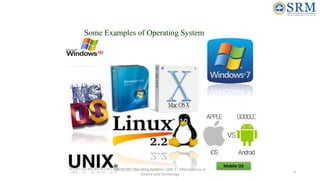
Some Examples of Operating System
Mobile OS
5
18CSC205J Operating Systems - Unit 1 - SRM Institute of
Science and Technology
Tasks performed by Operating System
1. It manages computer hardware
2. It controls and coordinates the computer H/W
3. It specifies, how various resources like hardware and
software can be used in an efficient manner.
6
18CSC205J Operating Systems - Unit 1 - SRM Institute of
Science and Technology
Courtesy : Operating systems : Internals and design principles, 7th
ed
William Stallings, PHI
Two view points of Operating System
1. Users want ease of use and good performance & highly convenience
• Don’t care about resource utilization
2. Users can share the terminals, connected to mainframe or minicomputer.
• Resources are shared, hence maximum resource utilization is possible.
3. Individual Users with dedicate systems such as workstations use shared
resources from servers or Printers.
4. In case of hand held devices, the operating system is designed for individual
usability. Example: OS on iPhone, or any Android phone.
User’s view
7
18CSC205J Operating Systems - Unit 1 - SRM Institute of
Science and Technology
Two view points of Operating System
1. The computer system, need to consider CPU time, memory, I/O
Devices.
Hence,
OS is a resource allocator
● Manages all resources
● Conflicting requests between resources are managed for efficient
use
◦ OS is a control program
● Controls execution of programs to prevent errors and improper use
of the computer
System view
8
18CSC205J Operating Systems - Unit 1 - SRM Institute of
Science and Technology
Objectives of Operating system
⚫ Convenience
⚫ Efficiency
⚫ Ability to evolve
⚫ It specifies how resources are convenient to use in an efficient manner.
Note:
⚫ The Operating system is like a government. It does not perform any useful
function by itself.
9
18CSC205J Operating Systems - Unit 1 - SRM Institute of
Science and Technology
Functions of Operating system
1. Program development.
Ex: Editors & Debuggers
1. Program Execution
2. Access I/O devices and controlling access to I/O devices
3. Error detection & response
4. Performance maintenance
OS as a service routine
10
18CSC205J Operating Systems - Unit 1 - SRM Institute of
Science and Technology
18CSC205J Operating Systems - Unit 1 - SRM Institute of
Science and Technology
11
Role of Operating System
Courtesy : Abraham Silberschatz, Peter
Baer Galvin, Greg Gagne, Operating
systems, 9th ed., John Wiley & Sons, 2013
•• Computer Hardware-Software Structure
• Layered organization
•• OS services to users
The OS as a
User/Computer
Interface
•• Functions in the same way as ordinary computer software
•• Program, or suite of programs, executed by the processor
•• Frequently relinquishes control and must depend on the
processor to allow it to regain control
Operating System as
Software
•• A computer is a set of resources for moving, storing, & processing
data
•• The OS is responsible for managing these resources
•• The OS exercises its control through software
The Operating System as a
Resource
Manager
The OS as a User/Computer Interface
•OS provides services in following
areas
• Program development
• Program execution
• Access to I/O devices
• Controlled Access to files
• System access
• Error detection and response
• Accounting
• Instruction set Architecture(ISA)
• Application Binary Interface (ABI)
• Application Programming
Interface(API)
18CSC205J Operating Systems - Unit 1 - SRM Institute of
Science and Technology
12
Courtesy : Operating systems : Internals and design principles, 7th
ed
William Stallings, PHI
Computer Hardware & Software
Structure
The Operating System as a Resource Manager
• OS is responsible for managing
resources for movement, storage,
processing and control.
• By managing OS is controller of these
resources
• OS has control mechanism which is
unusual in two aspects
• OS functions in same way as ordinary
computer software, i.e it’s a program or
s/w suit of programs executed by
processor
• The OS frequently relinquish the control
and depends on the processor to regain
the control
18CSC205J Operating Systems - Unit 1 - SRM Institute of
Science and Technology
13
Courtesy : Operating systems : Internals and design principles, 7th
ed
William Stallings, PHI
OS as Resource Manager
Figure shows main resources
managed by OS
•So, how OS differs form other computer programs ??
• It directs the processor in use of other system resources’
• It makes processor to coordinate and work with other resources
• If processor wants to do any other program it cease the execution of OS
program and do
• Then OS relinquish the control and prepare processor to do next useful
task
•The (Ref Figure) part of OS remains in main memory known as
Kernal/nucleus , which contains most frequently used programs.
•The user program and data are also available in mainmemory
•The memory management Hardware (in the processor) and OS
jointly controls the memory allocations
•The os decides when and I/O devices and files can be used by the
user programs and controls the access accordingly.
18CSC205J Operating Systems - Unit 1 - SRM Institute of
Science and Technology
14
Courtesy : Operating systems : Internals and design principles, 7th
ed William
Stallings, PHI
The Evolution of Operating System
18CSC205J Operating Systems - Unit 1 - SRM Institute of
Science and Technology
Serial Processing
Late 1940 to mid 1950
Simple Batch System
•Mid 1950, by General Motors to use
on IBM701
•Early 1960 IBMSYS an IBM Batch
Processing OS Influenced other os
•Memory is shared among different
subsystems, although only one can be
executed at a time.
Multiprogrammed
Batch System
Time-Sharing System
1961
Compatible Time Sharing
System (CTSS)-MIT
15
Serial Processing (Late 1940 and Mid 1950)
18CSC205J Operating Systems - Unit 1 - SRM Institute of
Science and Technology
• No Operating System
• Programmers interacted Straight away with hardware
• Lights, toggles, input devices and printers
• Inputs are given through input devices (card readers), errors are
intimated through lights and normal completion is done through
printers
• These systems had two problems
• Scheduling
• Used hard copy sign-off sheets for reserving computing time (multiples of 30 minutes)
• User block 2 slots and use only 45 min
• User block 2 slots and unable complete within it
• Setup time
• Single program (Job) need to load compiler and source program in to the memory
• Later save the compiled program and then loading and linking
• All these steps cards are to be mounted and unmounted in sequence
• Failing in any of these steps needs repetition of entire steps
• Later there were many System software developed to make this
process efficient however these process are done one after another
Under/Over utilization
16
Simple Batch Systems
• Executes jobs in batched controlled by Monitors
• User submits jobs to the operator, who make them it to batches loads the tape in to input.
• jobs branch back to monitor, which loads another batch of jobs
• Batch system can be seen in two views
18CSC205J Operating Systems - Unit 1 - SRM Institute of
Monitor Point of View Processor Point of View
• Controls sequence of events
• Partially Resides on main memory for execution
– Called Resident Monitor
• Rest is loaded as subroutine in user program
• It reads the jobs at once ( from card/tape)and
loaded in to user program area , control passed
to user job
• Once completed user program transfer the
control to monitor,
• Monitor starts to read next batch
• Results are sent to Output devices
• At a point in time Current batch programs
executed in main memory
• On completion (sent control to monitor) brings
next batch get loaded in another portion in user
area
• Once loaded, job gains control and execute the
instructions
• This continues util end of program or error
• Process gains control means- processor
executes the current program instructions.
17
• Monitor performs scheduling of batches & improves job setup time
• The programs instruction are given to the monitor using special language called Job Control
Language(JCL)
• Eg: Program is written in FORTRAN, the program & data is fed in a separate card, in addition
to this job is described using JCL
18CSC205J Operating Systems - Unit 1 - SRM Institute of
Science and Technology
JCL (Executed by Monitor)
••$JOB
••$FTN
••FORTRON Instruction
••$LOAD
••$RUN
••PROGRAM DATA
••$END
Monitor Reads $FTN and loads
appropriate language compiler
Compiler translates the
source/User program into object
code
Object code is stores in Memory /
Mass Storage
If stored in Mass storage Monitor
executes “Compile, Load, Go”
instructions, if on Memory $LOAD
instruction is required
• The Input instruction read a line of data and invoke input routine
which is part of OS
• The user programs makes sures that is does not call JCL inst
• At compilation time monitor scan input line until next JCL inst to
make ensure there is no too large / too low data lines
18
JCL Special type of programming language
used to provide instructions to the monitor
what compiler to use
what data to use
Simple Batch System..
18CSC205J Operating Systems - Unit 1 - SRM Institute of
Science and Technology
19
Interrupt Processing
Device drivers
Job Sequencing
Control language
Interpreter
User Program Area
Boundary
Mon
itor
Modes in Batch Processing
User Mode : Executes user
program
Kernel mode/Monitor Mode :
Executes Privileged Instruction
Simple Batch System..
• The hardware features by monitors (Apart from fetching inst, seize and relinquish control)
• Memory Protection :
• When user program in under execution the it must not attempt to access the other users memory area, if
so the processor Hardware detects is as error and transfers the control to the monitor. Monitor aborts
the job with an error message and takes up a next job
• Timer :
• To avoid job monopolising the processor, it sets timer at the beginning of job, if timer expires user job is
stopped and control transferred to the monitor
• Privileged Instructions:
• Few special/ Privileged instructions are executed under monitor mode, if such instructions are happened
to attempted by user, then control is transferred to monitor. All I/O instructions are Privileged
instructions, which prevents the user programs from reading the Job control instructions
• Interrupts
• This facilitates the OS in relinquish control and regaining control from user programs
• Limitations
• Thought it is advantageous than serial processing, it often requires same process done by the
programmer in batches.
18CSC205J Operating Systems - Unit 1 - SRM Institute of
Science and Technology
20
Simple Batch System..
Multiprogrammed Batch Systems
18CSC205J Operating Systems - Unit 1 - SRM Institute of
Science and Technology
• In batch processing system, memory holds resident monitor (OS) and one user
program
• Batch processing hold Processor on idle state when I/O operations are being done.
• If the memory is sufficiently large to hold more than one user program then, while
one program is getting I/O , processor can be switched to another program, this is
called as Multiprogramming/ Multitasking.
21
Courtesy : Operating systems : Internals and design principles, 7th
ed William
Stallings, PHI
22
18CSC205J Operating Systems - Unit 1 - SRM Institute of
Science and Technology
Courtesy : Operating systems : Internals and design principles, 7th
ed William
Stallings, PHI
Time-Sharing Systems
• In 1960 programs need dedicated computers, which wasn’t possible as it was too costly
in those days
• Application with more user interactions, needs dedicated computers
• Multiprogramming designed to handle multiple interactive jobs referred as time slicing
• Used to share processor among multiple user, an makes each user to feel that they have
dedicated system but interleaved among all of them.
• Hence if n user using the system, then each user see 1/n of effective computer capacity.
23
18CSC205J Operating Systems - Unit 1 - SRM Institute of
Science and Technology
Courtesy : Operating systems : Internals and design principles, 7th
ed William
Stallings, PHI
24
18CSC205J Operating Systems - Unit 1 - SRM Institute of
Science and Technology
Courtesy : Operating systems : Internals and design principles, 7th
ed William
Stallings, PHI
CTSS First Time sharing OS
Resident Monitor: 0-5000 words
User program : 5000- 32000
words timeslice : 0.2 sec
Example :
J1->Job 1: 15000
J2->Job 2: 20000
J3->Job3 : 5000
J4->Job 4: 10000
(a) Job 1 is loaded in the memory,
(b) Job2 is loaded since job2 and 1 can not
accommodate together job 1 is flushed out
(c) Job 3 is loaded in memory since job 2 & 3 can
accommodate in memory job 2 remains there
(d) Now processor takes job1, only portion of job2 is
accommodated in memory
(e) Now the timeslice of j1 is over processor takes J4
so portion of J1 and J2 remains in memory, Now
to activate J1 or J2 only partial data is to be
loaded.
(f) JOB2 is loaded for completion.
Compatible Time-Sharing Systems
CTSS
One of the first time-sharing operating
systems
Developed at MIT by a group known as
Project MAC
Ran on a computer with 32,000 36-bit
words of main memory, with the resident
monitor consuming 5000 of that
To simplify both the monitor and memory
management a program was always
loaded to start at the location of the
5000th
word
Time Slicing
System clock generates interrupts at a
rate of approximately one every 0.2
seconds
At each interrupt OS regained control and
could assign processor to another user
At regular time intervals the current user
would be preempted and another user
loaded in
Old user programs and data were written
out to disk
Old user program code and data were
restored in main memory when that
program was next given a turn
18CSC205J Operating Systems - Unit 1 - SRM Institute of
Science and Technology
25
Courtesy : Operating systems : Internals and design principles, 7th
ed William
Stallings, PHI
Operating Systems are among the most complex pieces of software ever developed.
Four major theoretical advances in the development of operating systems:
1) Process
2) Memory management
3) Information protection and security
4) Scheduling and resource management
MAJOR ACHIEVEMENTS
18CSC205J Operating Systems - Unit 1 - SRM Institute of
Science and Technology
26
• Central to the design of operating systems is the concept of process.
• Three major lines of computer system development created problems in timing and
synchronization that contributed to the development of concept of the process:
• Multiprogramming batch operation -
• Time sharing
• Real time transaction systems
• Four main course of error
• 1)Improper Synchronization
• 2) Failed mutual exclusion
• 3) Nondeterministic program operation
• 4) Deadlocks
Process consisting of three components:
1) An executable program
2) The associated data needed by the program
3) The execution context of the program
MAJOR ACHIEVEMENTS-The Process
18CSC205J Operating Systems - Unit 1 - SRM Institute of
Science and Technology
27
The Process…
• The execution context, or process state is the
internal data by which the OS is able to supervise
and control the process.
• This internal information is separated from the
process, because the OS has information not
permitted to the process
• Fig.1 indicates a way in which processes may be
managed. Two processes, a and B, exist in portions of
main memory.
• The process list contains one entry for each process,
which includes a pointer to the location of the block
of memory that contains the process.
• The entry may also include part or all of the
execution context of the process.
Courtesy :William Stallings, Operating Systems-Internals and Design
Principles, 7th ed., Prentice Hall, 2012
Fig.1 Typical process Implementation
18CSC205J Operating Systems - Unit 1 - SRM Institute of
Science and Technology
28
The Process…
• The remainder of the execution context is stored elsewhere, perhaps with the
process itself or frequently in a separate region of memory.
• The process index register contains the index into the process list of the process
currently controlling the processor.
• The program counter points to the next instruction in that process to be executed.
• The base and limit registers define the region in memory occupied by the process.
18CSC205J Operating Systems - Unit 1 - SRM Institute of
Science and Technology
29
• The needs of users can be met by a computing environment that supports modular programming
and the flexible use of data.
• System managers need efficient and orderly control of storage allocation.
• The OS, to satisfy these requirements, has five principal storage management responsibilities:
• Typically, operating system meet these requirements with virtual memory and file system facilities.
18CSC205J Operating Systems - Unit 1 - SRM Institute of
Science and Technology
30
MAJOR ACHIEVEMENTS - Memory Management
Memory
Management
Main Memory
Virtual Memory
process
isolation
automatic
allocation and
management
support of
modular
programming
protection
and access
control
long-term
storage
Main Memory
• Virtual memory is a facility that allows programs to address memory from a logical
point of view, without regard to the amount of main memory physically available.
• Paging systems were introduced, which allow Processes to be comprised of a number of
fixed size blocks, called pages.
• A program references a word by means of a virtual address consisting of a page number
and an offset within the page.
• The paging system provides for a dynamic mapping between the virtual address used in
the program and a real address, or physical address, in main memory. Fig 2. represents
virtual memory addressing.
18CSC205J Operating Systems - Unit 1 - SRM Institute of
Science and Technology
31
Virtual Memory
Memory Management…
18CSC205J Operating Systems - Unit 1 - SRM Institute of
Science and Technology
32
Courtesy : Operating systems : Internals and design principles, 7th
ed William
Stallings, PHI
Virtual memory addressing
Paging Concepts
• The growth in the use of time-sharing systems and, more recently, computer networks has brought
with it a growth in concern for the protection of information.
• Much of the work in security and protection as it relates to operating systems can be roughly
grouped into four categories:
• Availability
• Confidentiality
• Data Integrity
• Authenticity
18CSC205J Operating Systems - Unit 1 - SRM Institute of
Science and Technology
33
MAJOR ACHIEVEMENTS - Information Protection
and Security
• A key responsibility of the OS is to manage the
various resources available to it (main memory
space, I/O devices, processors) and to schedule their
use by the various active processes.
• Any resource allocation and scheduling policy must
consider three factors:
• Figure suggests the major elements of the OS
involved in the scheduling of processes and the
allocation of resources in a multiprogramming
environment.
18CSC205J Operating Systems -
Unit 1 - SRM Institute of
34
MAJOR ACHIEVEMENTS- Scheduling and Resource
Management
Key elements of an operating system for
multiprogramming
Courtesy : Operating systems : Internals and design principles, 7th
ed William
Stallings, PHI
fairness
differential
responsivene
ss
efficiency
Understanding the evolution of Operating systems from
early batch processing systems to modern complex systems
microkernel architecture
multithreading
symmetric multiprocessing
distributed operating systems
object-oriented design
18CSC205J Operating Systems - Unit 1 - SRM Institute of
Science and Technology
35
Different approaches and design elements have been tried:
Understanding the evolution of Operating systems from
early batch processing systems to modern complex systems
•Assigns only a few essential functions to the kernel:
•The approach:
18CSC205J Operating Systems - Unit 1 - SRM Institute of
Science and Technology
36
microkernel architecture
address
spaces
interprocess
communication
(IPC)
basic
scheduling
simplifies
implementation
provides
flexibility
is well suited to a
distributed
environment
Understanding the evolution of Operating systems from
early batch processing systems to modern complex systems
18CSC205J Operating Systems - Unit 1 - SRM Institute of
Science and Technology
37
multithreading
• Technique in which a process, executing an application, is divided into threads that
can run concurrently
Thread
• dispatchable unit of work
• includes a processor context and its own data area to enable subroutine branching
• executes sequentially and is interruptible
Process
• a collection of one or more threads and associated system resources
• programmer has greater control over the modularity of the application and the timing of
application related events
Understanding the evolution of Operating systems from
early batch processing systems to modern complex systems
18CSC205J Operating Systems - Unit 1 - SRM Institute of
Science and Technology
38
symmetric multiprocessing
•Term that refers to a computer hardware architecture and also to
the OS behavior that exploits that architecture
•Several processes can run in parallel
•Multiple processors are transparent to the user
• these processors share same main memory and I/O facilities
• all processors can perform the same functions
•The OS takes care of scheduling of threads or processes on
individual processors and of synchronization among processors
Understanding the evolution of Operating systems from
early batch processing systems to modern complex systems
18CSC205J Operating Systems - Unit 1 - SRM Institute of
Science and Technology
39
symmetric multiprocessing - Advantages
Performance
more than one process can be
running simultaneously, each on a
different processor
Availability
failure of a single process does not
halt the system
Incremental
Growth
performance of a system can be
enhanced by adding an
additional processor
Scaling
vendors can offer a range of products
based on the number of processors
configured in the system
Understanding the evolution of Operating systems from
early batch processing systems to modern complex systems
18CSC205J Operating Systems - Unit 1 - SRM Institute of
Science and Technology
40
Multiprogramming Vs Multiprocessing
Understanding the evolution of Operating systems from
early batch processing systems to modern complex systems
Distributed operating systems
• Provides the illusion of
• a single main memory space
• single secondary memory space
• unified access facilities
• State of the art for distributed
operating systems lags that of
uniprocessor and SMP operating
systems
Object-Oriented Design
• Used for adding modular extensions
to a small kernel
• Enables programmers to customize
an operating system without
disrupting system integrity
• Eases the development of
distributed tools and full-blown
distributed operating systems
18CSC205J Operating Systems - Unit 1 - SRM Institute of
Science and Technology
41
Distributed operating systems Vs Object-Oriented Design
Symmetric Multiprocessor OS Considerations
• A multiprocessor OS must provide all the functionality of a multiprogramming
system plus additional features to accommodate multiple processors
Key design issues:
OS Design considerations for Multiprocessor
and Multicore
Courtesy : Operating systems : Internals and design principles, 7th
ed William
Stallings, PHI
Multicore OS Considerations
Key design Issues:
• The design challenge for a many-core multicore
system is to efficiently harness the multicore
processing power and intelligently manage the
substantial on-chip resources efficiently
• Potential for parallelism exists at three levels:
hardware parallelism within
each core processor, known
as instruction level
parallelism
potential for
multiprogramming and
multithreaded execution
within each processor
potential for a single
application to execute in
concurrent processes or
threads across multiple cores
Courtesy : Operating systems : Internals and design principles, 7th
ed William
Stallings, PHI
Process
• Process Concept and States
• PCB
• Process Scheduling
• Operations on Processes
• Interprocess Communication
• Examples of IPC Systems
44
18CSC205J Operating Systems - Unit 1 - SRM Institute of
Science and Technology
Process Concept
• An operating system executes a variety of programs:
• Batch system – jobs
• Time-shared systems – user programs or tasks
• Textbook uses the terms job and process almost interchangeably
• Process – a program in execution; process execution must progress in sequential fashion
• Multiple parts
• The program code, also called text section
• Current activity including program counter, processor registers
• Stack containing temporary data
• Function parameters, return addresses, local variables
• Data section containing global variables
• Heap containing memory dynamically allocated during run time
• Program is passive entity stored on disk (executable file), process is active
• Program becomes process when executable file loaded into memory
• Execution of program started via GUI mouse clicks, command line entry of its name, etc
• One program can be several processes
• Consider multiple users executing the same program
45
18CSC205J Operating Systems - Unit 1 - SRM Institute of
Science and Technology
Courtesy : Abraham Silberschatz, Peter Baer Galvin, Greg Gagne, Operating
systems, 9th ed., John Wiley & Sons, 2013
Process in Memory
46
18CSC205J Operating Systems - Unit 1 - SRM Institute of
Science and Technology
Courtesy : Abraham Silberschatz, Peter Baer Galvin, Greg Gagne, Operating
systems, 9th ed., John Wiley & Sons, 2013
Process State
• As a process executes, it changes state
• new: The process is being created
• running: Instructions are being executed
• waiting: The process is waiting for some event to occur
• ready: The process is waiting to be assigned to a processor
• terminated: The process has finished execution
47
18CSC205J Operating Systems - Unit 1 - SRM Institute of
Science and Technology
Courtesy : Abraham Silberschatz, Peter Baer Galvin, Greg Gagne, Operating
systems, 9th ed., John Wiley & Sons, 2013
Process Control Block (PCB)
48
18CSC205J Operating Systems - Unit 1 - SRM Institute of
Science and Technology
Information associated with each process
(also called task control block)
● Process state – running, waiting, etc
● Program counter – location of instruction to next execute
● CPU registers – contents of all process-centric registers
● CPU scheduling information- priorities, scheduling queue pointers
● Memory-management information – memory allocated to the
process
● Accounting information – CPU used, clock time elapsed since start,
time limits
● I/O status information – I/O devices allocated to process, list of
open files
Courtesy : Abraham Silberschatz, Peter Baer Galvin, Greg Gagne, Operating
systems, 9th ed., John Wiley & Sons, 2013
CPU Switch From Process to Process
49
18CSC205J Operating Systems - Unit 1 - SRM Institute of
Science and Technology
Courtesy : Abraham Silberschatz, Peter Baer Galvin, Greg Gagne, Operating
systems, 9th ed., John Wiley & Sons, 2013
Threads
•So far, process has a single thread of execution
•Consider having multiple program counters per process
• Multiple locations can execute at once
• Multiple threads of control -> threads
•Must then have storage for thread details, multiple program
counters in PCB
Courtesy : Abraham Silberschatz, Peter Baer Galvin, Greg Gagne, Operating
systems, 9th ed., John Wiley & Sons, 2013
18CSC205J Operating Systems - Unit 1 - SRM Institute of
Science and Technology
50
Process Representation in Linux
Represented by the C structure task_struct
pid t_pid; /* process identifier */
long state; /* state of the process */
unsigned int time_slice /* scheduling information */
struct task_struct *parent; /* this process’s parent */
struct list_head children; /* this process’s children */
struct files_struct *files; /* list of open files */
struct mm_struct *mm; /* address space of this process */
Courtesy : Abraham Silberschatz, Peter Baer Galvin, Greg Gagne, Operating
systems, 9th ed., John Wiley & Sons, 2013
18CSC205J Operating Systems - Unit 1 - SRM Institute of
Science and Technology
51
Process Scheduling
•The aim is to assign processes to be executed by the processor
or processors over time, in a way that meets system objectives,
• Such as response time, throughput, and processor efficiency.
•In many systems, this scheduling activity is broken down into
three separate functions:
• long-, medium-, and short term scheduling
•The names suggest the relative time scales with which these
functions are performed.
18CSC205J Operating Systems - Unit 1 - SRM Institute of
Science and Technology
52
Process Scheduling
•Maximize CPU use, quickly switch processes onto CPU for time
sharing
•Process scheduler selects among available processes for next
execution on CPU
•Maintains scheduling queues of processes
• Job queue – set of all processes in the system
• Ready queue – set of all processes residing in main memory, ready and
waiting to execute
• Device queues – set of processes waiting for an I/O device
• Processes migrate among the various queues
Courtesy : Abraham Silberschatz, Peter Baer Galvin, Greg Gagne, Operating
systems, 9th ed., John Wiley & Sons, 2013
18CSC205J Operating Systems - Unit 1 - SRM Institute of
Science and Technology
53
Ready Queue And Various I/O Device Queues
Courtesy : Abraham Silberschatz, Peter Baer Galvin, Greg Gagne, Operating
systems, 9th ed., John Wiley & Sons, 2013
18CSC205J Operating Systems - Unit 1 - SRM Institute of
Science and Technology
54
Representation of Process Scheduling
● Queueing diagram represents queues, resources, flows
Courtesy : Abraham Silberschatz, Peter Baer Galvin, Greg Gagne, Operating
systems, 9th ed., John Wiley & Sons, 2013
18CSC205J Operating Systems - Unit 1 - SRM Institute of
Science and Technology
55
•A process migrates among the various scheduling queues
throughout its lifetime.
•The operating system must select, for scheduling purposes,
processes from these queues in some fashion.
•The selection process is carried out by the appropriate
scheduler.
Scheduler
18CSC205J Operating Systems - Unit 1 - SRM Institute of
Science and Technology
56
Schedulers
• Short-term scheduler (or CPU scheduler) – selects which process should be executed next
and allocates CPU
• Sometimes the only scheduler in a system
• Short-term scheduler is invoked frequently (milliseconds) ⇒ (must be fast)
• Long-term scheduler (or job scheduler) – selects which processes should be brought into
the ready queue
• Long-term scheduler is invoked infrequently (seconds, minutes) ⇒ (may be slow)
• The long-term scheduler controls the degree of multiprogramming
• Processes can be described as either:
• I/O-bound process – spends more time doing I/O than computations, many short CPU
bursts
• CPU-bound process – spends more time doing computations; few very long CPU bursts
• Long-term scheduler strives for good process mix
Courtesy : Abraham Silberschatz, Peter Baer Galvin, Greg Gagne, Operating
systems, 9th ed., John Wiley & Sons, 2013
18CSC205J Operating Systems - Unit 1 - SRM Institute of
Science and Technology
57
● Medium-term scheduler can be added if degree of multiple programming needs to decrease
● Remove process from memory, store on disk, bring back in from disk to continue
execution: swapping
● A part of the swapping function.
Courtesy : Abraham Silberschatz, Peter Baer Galvin, Greg Gagne, Operating
systems, 9th ed., John Wiley & Sons, 2013
18CSC205J Operating Systems - Unit 1 - SRM Institute of
Science and Technology
58
Context Switch
• When CPU switches to another process, the system must save the state of the old
process and load the saved state for the new process via a context switch
• Context of a process represented in the PCB
• Context-switch time is overhead; the system does no useful work while switching
• The more complex the OS and the PCB the longer the context switch
• Time dependent on hardware support
• Some hardware provides multiple sets of registers per CPU multiple contexts loaded at once
Courtesy : Abraham Silberschatz, Peter Baer Galvin, Greg Gagne, Operating
systems, 9th ed., John Wiley & Sons, 2013
18CSC205J Operating Systems - Unit 1 - SRM Institute of
Science and Technology
59
Courtesy:https://i.pinimg.com/originals/73/
9f/35/739f35177ddd7985ac7b8e7211f9f3d
4.png
Operations on Processes
•System must provide mechanisms for:
Courtesy : Abraham Silberschatz, Peter Baer Galvin, Greg Gagne, Operating
systems, 9th ed., John Wiley & Sons, 2013
18CSC205J Operating Systems - Unit 1 - SRM Institute of
Science and Technology
60
Process Creation
Process Termination
Process Creation
• Parent process create children processes, which, in turn create other processes,
forming a tree of processes
• Generally, process identified and managed via a process identifier (pid)
• Resource sharing options
• Parent and children share all resources
• Children share subset of parent’s resources
• Parent and child share no resources
• Execution options
• Parent and children execute concurrently
• Parent waits until children terminate
Process tree in Linux
18CSC205J Operating Systems - Unit 1 - SRM Institute of
Science and Technology
61
Process Creation
•Address space
• Child duplicate of parent
• Child has a program loaded into it
•UNIX examples
• fork() system call creates new process
• exec() system call used after a fork() to replace the process’ memory
space with a new program
62
18CSC205J Operating Systems - Unit 1 - SRM Institute of
Science and Technology
Courtesy : Abraham Silberschatz, Peter Baer Galvin, Greg Gagne, Operating
systems, 9th ed., John Wiley & Sons, 2013
Process Creation
Note:
execlp() – version of exec()
Parent waits for the child process
to complete
When child completes exit(),
resumes from wait().
A
B C
D E F G
A forks B and C
B forks D and E
C forks F and G
Process Creation
Process creation
• Steps involved in process creation :
• (i). When a new process is created, operating system assigns a unique Process Identifier (PID) to it and
inserts a new entry in primary process table.
• (ii). Then the required the required memory space for all the elements of process such as program, data and
stack is allocated including space for its Process Control Block (PCB).
• (iii). Next, the various values in PCB are initialized such as,
• Process identification part is filled with PID assigned to it in step (1) and also its parent’s PID.
• The processor register values are mostly filled with zeroes, except for the stack pointer and program
counter. Stack pointer is filled with the address of stack allocated to it in step (ii) and program counter is
filled with the address of its program entry point.
• The process state information would be set to ‘New’.
• Priority would be lowest by default, but user can specify any priority during creation.
• In the beginning, process is not allocated to any I/O devices or files. The user has to request them or if this is a
child process it may inherit some resources from its parent.
• (iv). Then the operating system will link this process to scheduling queue and the process state would be
changed from ‘New’ to ‘Ready’. Now process is competing for the CPU.
• (v). Additionally, operating system will create some other data structures such as log files or accounting files
to keep track of processes activity.
18CSC205J Operating Systems - Unit 1 - SRM Institute of
Science and Technology
63
Process Creation
[createprocess()]
•Process that create new process (via)
createprocess system call
Creating process Parent Process
The created process child
Parent
Parent or Children
Children
Note:
Each process is identified by Process Identifier (PID)
18CSC205J Operating Systems - Unit 1 - SRM Institute of
Science and Technology
64
Process Creation
• Resource Sharing(CPU time, Memory files, I/O devices)
• Parent and children share all resources
• Children share subset of parent resources
• Parent & child share no resources
• Execution
• Parent & children execute concurrently
• (Asynchronous Process creation)
• Parent waits until children terminate
• (Synchronous Process creation)
• Address Space
• Child process, copy the address space of the parent
• Child process occupy the separate address space
• Note:
• When one process creates a new process, the identity of the newly created
process is passed to the parent.
18CSC205J Operating Systems - Unit 1 - SRM Institute of
Science and Technology
65
Process Creation
Example
•Both Parent & Child continue creation of the new process with
fork().
•Return code of fork() 0 (Child Process)
•Return code of fork() Non Zero (Parent Process)
18CSC205J Operating Systems - Unit 1 - SRM Institute of
Science and Technology
66
Process Creation
Creating a Separate Process using fork()
#include <sys/types.h>
#include <studio.h>
#include <unistd.h>
int main()
{
processID pid;
/* create a process */
pid = fork();
if (pid < 0) /* error occurred */
fprintf(stderr, “ERROR");
else if (pid == 0) /* child process */
execlp("/bin/ls", "ls", NULL);
else /* parent process */
/* parent waits for the child to complete */
wait (NULL);
printf ("Child Complete");
}
Example 1 Example 2
Courtesy : Abraham Silberschatz, Peter Baer Galvin, Greg Gagne, Operating
systems, 9th ed., John Wiley & Sons, 2013
18CSC205J Operating Systems - Unit 1 - SRM Institute of
Science and Technology
67
• Processes are terminated by themselves when they finish’1 executing their
last statement, then operating system USES exit( ) system call to delete its
context.
• Then all the resources held by that process like physical and virtual memory,
10 buffers, open files etc., are taken back by the operating system. A process P
can be terminated either by operation system or by the parent process of P.
• A parent may terminate a process due to one of the following reasons,
• (i). When task given to the child is not required now.
• (ii). When child has taken more resources than its limit.
• (iii). The parent of the process is exiting, as a result all its children are
deleted. This is called as cascaded termination.
18CSC205J Operating Systems - Unit 1 - SRM Institute of
Science and Technology
68
Process Termination
Exit()
• Process terminates by itself (ie) when the process finish executing the final statement.
• System call: exit()
• Returns status data from child to parent (via wait())
• Process’ resources are deallocated by operating system
Abort()
• The parent process terminating the child process
• System call: Terminate Process()
• Parent may terminate the execution of children processes using the abort() system call. Some reasons for doing so:
• Child has exceeded allocated resources
• Task assigned to child is no longer required
• The parent is exiting and the operating systems does not allow a child to continue if its parent terminates
• Reasons for termination
• Child has exceeded allocated resources
• Task assigned to child is no longer required
• If parent is exiting, some OS doesn’t allow child to process
• Cascading termination (2 mark Question)
• If the process terminates (either normally or abnormally), then all its children must be terminated.
Kill()
• By system admin for administration purpose
18CSC205J Operating Systems - Unit 1 - SRM Institute of
Science and Technology
69
Process Termination
70
18CSC205J Operating Systems - Unit 1 - SRM Institute of
Science and Technology
Courtesy : Abraham Silberschatz, Peter Baer Galvin, Greg Gagne, Operating
systems, 9th ed., John Wiley & Sons, 2013
● Some operating systems do not allow child to exists if its parent has terminated. If a process terminates,
then all its children must also be terminated.
● cascading termination. All children, grandchildren, etc. are terminated.
● The termination is initiated by the operating system.
● The parent process may wait for termination of a child process by using the wait()system call. The call
returns status information and the pid of the terminated process
pid = wait(&status);
● If no parent waiting (did not invoke wait()) process is a zombie
● If parent terminated without invoking wait , process is an orphan
Process Termination
Interprocess Communication
• Processes within a system may be independent or cooperating
• Cooperating process can affect or be affected by other processes, including sharing data
• Reasons for cooperating processes:
–Information sharing
–Computation speedup
–Modularity
–Convenience
• Cooperating processes need interprocess communication (IPC)
• Two models of IPC
–Shared memory
–Message passing
18CSC205J Operating Systems - Unit 1 - SRM Institute of
Science and Technology
71
Communications Models (Modes of IPC)
(a) Message passing. (b) shared memory.
Courtesy : Abraham Silberschatz, Peter Baer Galvin, Greg Gagne, Operating
systems, 9th ed., John Wiley & Sons, 2013
18CSC205J Operating Systems - Unit 1 - SRM Institute of
Science and Technology
72
Cooperating Processes
• Independent process cannot affect or be affected by the execution of another
process
• Cooperating process can affect or be affected by the execution of another
process
• Advantages of process cooperation
–Information sharing
–Computation speed-up
–Modularity
–Convenience
Courtesy : Abraham Silberschatz, Peter Baer Galvin, Greg Gagne, Operating
systems, 9th ed., John Wiley & Sons, 2013
18CSC205J Operating Systems - Unit 1 - SRM Institute of
Science and Technology
73
IPC Example - Producer-Consumer Problem
• Paradigm for cooperating processes, producer process produces information
that is consumed by a consumer process
–unbounded-buffer places no practical limit on the size of the buffer
–bounded-buffer assumes that there is a fixed buffer size
Bounded-Buffer – Shared-Memory Solution
• Shared data
#define BUFFER_SIZE 10
typedef struct {
. . .
} item;
item buffer[BUFFER_SIZE];
int in = 0;
int out = 0;
• Solution is correct, but can only use BUFFER_SIZE-1
elements 18CSC205J Operating Systems - Unit 1 - SRM Institute of
Science and Technology
74
Bounded-Buffer –Producer
item next_produced;
while (true) {
/* produce an item in next produced */
while (((in + 1) % BUFFER_SIZE) == out)
; /* do nothing */
buffer[in] = next_produced;
in = (in + 1) % BUFFER_SIZE;
}
Bounded-Buffer – Consumer
item next_consumed;
while (true) {
while (in == out)
; /* do nothing */
next_consumed = buffer[out];
out = (out + 1) % BUFFER_SIZE;
/* consume the item in next consumed */
}
Courtesy : Abraham Silberschatz, Peter Baer Galvin, Greg Gagne, Operating
systems, 9th ed., John Wiley & Sons, 2013
18CSC205J Operating Systems - Unit 1 - SRM Institute of
Science and Technology
75
Interprocess Communication – Shared Memory
• An area of memory shared among the processes that wish to
communicate
• The communication is under the control of the users processes not the
operating system.
• Major issues is to provide mechanism that will allow the user
processes to synchronize their actions when they access shared
memory.
• Synchronization is discussed in great details in Chapter 5.
Courtesy : Abraham Silberschatz, Peter Baer Galvin, Greg Gagne, Operating
systems, 9th ed., John Wiley & Sons, 2013
18CSC205J Operating Systems - Unit 1 - SRM Institute of
Science and Technology
76
Interprocess Communication – Message Passing
• Mechanism for processes to communicate and to synchronize their
actions
• Message system – processes communicate with each other without
resorting to shared variables
• IPC facility provides two operations:
–send(message)
–receive(message)
• The message size is either fixed or variable
Courtesy : Abraham Silberschatz, Peter Baer Galvin, Greg Gagne, Operating
systems, 9th ed., John Wiley & Sons, 2013
18CSC205J Operating Systems - Unit 1 - SRM Institute of
Science and Technology
77
Message Passing (Cont.)
• If processes P and Q wish to communicate, they need to:
–Establish a communication link between them
–Exchange messages via send/receive
• Implementation issues:
–How are links established?
–Can a link be associated with more than two processes?
–How many links can there be between every pair of communicating
processes?
–What is the capacity of a link?
–Is the size of a message that the link can accommodate fixed or
variable?
–Is a link unidirectional or bi-directional?
Courtesy : Abraham Silberschatz, Peter Baer Galvin, Greg Gagne, Operating
systems, 9th ed., John Wiley & Sons, 2013
18CSC205J Operating Systems - Unit 1 - SRM Institute of
Science and Technology
78
Message Passing (Cont.)
• Implementation of communication link
– Physical:
• Shared memory
• Hardware bus
• Network
– Logical:
• Direct or indirect
• Synchronous or asynchronous
• Automatic or explicit buffering
Courtesy : Abraham Silberschatz, Peter Baer Galvin, Greg Gagne, Operating
systems, 9th ed., John Wiley & Sons, 2013
18CSC205J Operating Systems - Unit 1 - SRM Institute of
Science and Technology
79
Naming: Direct Communication
• Processes must name each other explicitly:
–send (P, message) – send a message to process P
–receive(Q, message) – receive a message from process Q
• Properties of communication link
–Links are established automatically
–A link is associated with exactly one pair of communicating processes
–Between each pair there exists exactly one link
–The link may be unidirectional, but is usually bi-directional
Courtesy : Abraham Silberschatz, Peter Baer Galvin, Greg Gagne, Operating
systems, 9th ed., John Wiley & Sons, 2013
18CSC205J Operating Systems - Unit 1 - SRM Institute of
Science and Technology
80
Naming: Indirect Communication
• Messages are directed and received from mailboxes (also referred to as ports)
–Each mailbox has a unique id
–Processes can communicate only if they share a mailbox
• Properties of communication link
–Link established only if processes share a common mailbox
–A link may be associated with many processes
–Each pair of processes may share several communication links
–Link may be unidirectional or bi-directional
• Operations
–create a new mailbox (port)
–send and receive messages through mailbox
–destroy a mailbox
• Primitives are defined as:
send(A, message) – send a message to mailbox A
receive(A, message) – receive a message from mailbox A
Courtesy : Abraham Silberschatz, Peter Baer Galvin, Greg Gagne, Operating
systems, 9th ed., John Wiley & Sons, 2013
18CSC205J Operating Systems - Unit 1 - SRM Institute of
Science and Technology
81
Naming: Indirect Communication
• Mailbox sharing
–P1
, P2
, and P3
share mailbox A
–P1
, sends; P2
and P3
receive
–Who gets the message?
• Solutions
–Allow a link to be associated with at most two processes
–Allow only one process at a time to execute a receive operation
–Allow the system to select arbitrarily the receiver. Sender is notified who
the receiver was.
Courtesy : Abraham Silberschatz, Peter Baer Galvin, Greg Gagne, Operating
systems, 9th ed., John Wiley & Sons, 2013
18CSC205J Operating Systems - Unit 1 - SRM Institute of
Science and Technology
82
Synchronization
• Message passing may be either blocking or non-blocking
• Blocking is considered synchronous
– Blocking send -- the sender is blocked until the message is received
– Blocking receive -- the receiver is blocked until a message is available
• Non-blocking is considered asynchronous
– Non-blocking send -- the sender sends the message and continue
– Non-blocking receive -- the receiver receives:
● A valid message, or
● Null message
• Different combinations possible
● If both send and receive are blocking, we have a rendezvous
Courtesy : Abraham Silberschatz, Peter Baer Galvin, Greg Gagne, Operating
systems, 9th ed., John Wiley & Sons, 2013
18CSC205J Operating Systems - Unit 1 - SRM Institute of
Science and Technology
83
Synchronization (Contd)
Producer-consumer becomes trivial
message next_produced;
while (true) {
/* produce an item in next produced */
send(next_produced);
}
message next_consumed;
while (true) {
receive(next_consumed);
/* consume the item in next consumed */
}
Courtesy : Abraham Silberschatz, Peter Baer Galvin, Greg Gagne, Operating
systems, 9th ed., John Wiley & Sons, 2013
18CSC205J Operating Systems - Unit 1 - SRM Institute of
Science and Technology
84
Buffering
• Queue of messages attached to the link.
Implemented in one of three ways
1. Zero capacity – no messages are queued on a link.
Sender must wait for receiver (rendezvous)
2. Bounded capacity – finite length of n messages
Sender must wait if link full
3. Unbounded capacity – infinite length
Sender never waits
18CSC205J Operating Systems - Unit 1 - SRM Institute of
Science and Technology
85
Pipes
• Act as a channel allowing two processes to communicate
• One of the first IPC mechanisms in early UNIX systems
• Typically provide one of the simpler ways for processes to communicate with
one another,
• Communication medium between two or more related or interrelated processes.
• Either within one process or a communication between the child and the parent processes.
• Communication can also be multi-level such as communication between
• The parent,
• The child and
• The grand-child, etc.
• Communication is achieved by one process writing into the pipe and other reading from the pipe.
Courtesy : Abraham Silberschatz, Peter Baer Galvin, Greg Gagne, Operating
systems, 9th ed., John Wiley & Sons, 2013
18CSC205J Operating Systems - Unit 1 - SRM Institute of
Science and Technology
86
• In implementing a pipe, four issues must be considered:
• Is communication unidirectional or bidirectional?
• In the case of two-way communication, is it half or full-duplex?
• Must there exist a relationship (i.e., parent-child) between the communicating
processes?
• Can the pipes be used over a network?
• Ordinary pipes – cannot be accessed from outside the process that created it.
Typically, a parent process creates a pipe and uses it to communicate with a
child process that it created.
• Named pipes – can be accessed without a parent-child relationship.
18CSC205J Operating Systems - Unit 1 - SRM Institute of
Science and Technology
87
Pipes
Ordinary Pipes
• Ordinary Pipes allow communication in standard producer-consumer style
• Producer writes to one end (the write-end of the pipe)
• Consumer reads from the other end (the read-end of the pipe)
• Ordinary pipes are therefore unidirectional
• Require parent-child relationship between communicating processes
• Windows calls these anonymous pipes
• See Unix and Windows code samples in textbook
Courtesy : Abraham Silberschatz, Peter Baer Galvin, Greg Gagne, Operating
systems, 9th ed., John Wiley & Sons, 2013
18CSC205J Operating Systems - Unit 1 - SRM Institute of
Science and Technology
88
• This system call would create a pipe for one-way communication
• It creates two descriptors,
• First one is connected to read from the pipe and
• Other one is connected to write into the pipe
• Descriptor pipedes[0] is for reading and pipedes[1] is for
writing.
• Whatever is written into pipedes[1] can be read from pipedes[0].
18CSC205J Operating Systems - Unit 1 - SRM Institute of
Science and Technology
89
Ordinary Pipes
This call would return zero on success and -1 in case of failure.
Cannot be accessed from outside the process that creates it.
A parent process creates a pipe and uses it to communicate
with a child process it creates via fork().
The child process inherits open files from its parent.
A pipe is a special type of file, the child inherits the pipe from
its parent process.
Courtesy : Abraham Silberschatz, Peter Baer Galvin, Greg Gagne, Operating
systems, 9th ed., John Wiley & Sons, 2013
Named Pipes
• Named Pipes are more powerful than ordinary pipes
• Communication is bidirectional
• No parent-child relationship is necessary between the communicating
processes
• Several processes can use the named pipe for communication
• Provided on both UNIX and Windows systems
Courtesy : Abraham Silberschatz, Peter Baer Galvin, Greg Gagne, Operating
systems, 9th ed., John Wiley & Sons, 2013
18CSC205J Operating Systems - Unit 1 - SRM Institute of
Science and Technology
90
Need for IPC
• Processes can execute concurrently
• May be interrupted at any time, partially completing execution
• Concurrent access to shared data may result in data inconsistency
• Maintaining data consistency requires mechanisms to ensure the orderly
execution of cooperating processes
• Illustration of the problem:
Suppose that we wanted to provide a solution to the consumer-producer
problem that fills all the buffers. We can do so by having an integer
counter that keeps track of the number of full buffers. Initially,
counter is set to 0. It is incremented by the producer after it produces a
new buffer and is decremented by the consumer after it consumes a
buffer.
18CSC205J Operating Systems - Unit 1 - SRM Institute of
Science and Technology
91
Process Synchronization
•Process Synchronization means sharing system resources by processes in a such a way that, Concurrent access to
shared data is handled thereby minimizing the chance of inconsistent data.
•Maintaining data consistency demands mechanisms to ensure synchronized execution of cooperating processes.
•Process Synchronization was introduced to handle problems that arose while multiple process executions
• Background
• Processes can execute concurrently
• May be interrupted at any time, partially completing execution
• Concurrent access to shared data may result in data inconsistency
• Maintaining data consistency requires mechanisms to ensure the orderly execution of cooperating processes
• Illustration of the problem:
Suppose that we wanted to provide a solution to the consumer-producer problem that fills all the buffers. We can
do so by having an integer counter that keeps track of the number of full buffers. Initially, counter is set to 0. It is
incremented by the producer after it produces a new buffer and is decremented by the consumer after it consumes
a buffer.
18CSC205J Operating Systems - Unit 1 - SRM Institute of
Science and Technology
92
Courtesy : Abraham Silberschatz, Peter Baer Galvin, Greg Gagne, Operating
systems, 9th ed., John Wiley & Sons, 2013
Need for Process Synchronization & Race
Condition
•Race condition: The situation where several processes access –
and manipulate shared data concurrently.
•The final value of the shared data depends upon which process
finishes last.
•To prevent race conditions, concurrent processes must be
synchronized.
18CSC205J Operating Systems - Unit 1 - SRM Institute of
Science and Technology
93
Producer
while (true) {
/* produce an item in next produced */
while (counter == BUFFER_SIZE) ;
/* do nothing */
buffer[in] = next_produced;
in = (in + 1) % BUFFER_SIZE;
counter++;
}
Consumer
while (true) {
while (counter == 0)
; /* do nothing */
next_consumed = buffer[out];
out = (out + 1) % BUFFER_SIZE;
counter--;
/* consume the item in next consumed */
}
18CSC205J Operating Systems - Unit 1 - SRM Institute of
Science and Technology
94
Courtesy : Abraham Silberschatz, Peter Baer Galvin, Greg Gagne, Operating
systems, 9th ed., John Wiley & Sons, 2013
Process Synchronization - Example
Race Condition
•counter++ could be implemented as
register1 = counter
register1 = register1 + 1
counter = register1
•counter-- could be implemented as
register2 = counter
register2 = register2 - 1
counter = register2
• Consider this execution interleaving with “count = 5” initially:
S0: producer execute register1 = counter {register1 = 5}
S1: producer execute register1 = register1 + 1 {register1 = 6}
S2: consumer execute register2 = counter {register2 = 5}
S3: consumer execute register2 = register2 – 1 {register2 = 4}
S4: producer execute counter = register1 {counter = 6 }
S5: consumer execute counter = register2 {counter = 4}
18CSC205J Operating Systems - Unit 1 - SRM Institute of
Science and Technology
95
Courtesy : Abraham Silberschatz, Peter Baer Galvin, Greg Gagne, Operating
systems, 9th ed., John Wiley & Sons, 2013
Critical Section Problem
• Consider system of n processes {p0
, p1
, … pn-1
}
• Each process has critical section segment of code
• Process may be changing common variables, updating table, writing file, etc
• When one process in critical section, no other may be in its critical section
• Critical section problem is to design protocol to solve this
• Each process must ask permission to enter critical section in entry
section, may follow critical section with exit section, then remainder
section
18CSC205J Operating Systems - Unit 1 - SRM Institute of
Science and Technology
96
Critical Section
•General structure of process Pi
18CSC205J Operating Systems - Unit 1 - SRM Institute of
Science and Technology
97
Algorithm for Process Pi
do {
while (turn == j);
critical section
turn = j;
remainder section
} while (true);
18CSC205J Operating Systems - Unit 1 - SRM Institute of
Science and Technology
98
Solution to Critical-Section Problem
1. Mutual Exclusion - If process Pi
is executing in its critical section, then no other
processes can be executing in their critical sections
2. Progress - If no process is executing in its critical section and there exist some
processes that wish to enter their critical section, then the selection of the
processes that will enter the critical section next cannot be postponed indefinitely
3. Bounded Waiting - A bound must exist on the number of times that other
processes are allowed to enter their critical sections after a process has made a
request to enter its critical section and before that request is granted
⚫ Assume that each process executes at a nonzero speed
⚫ No assumption concerning relative speed of the n processes
18CSC205J Operating Systems - Unit 1 - SRM Institute of
Science and Technology
99

os unit 1.pdf

  • 1.
    18CSC205J Operating Systems UNITI • Introduce the key role of an Operating System • Insist the Process Management functions of an Operating System Course Learning Rationale • Identify the need of an Operating system • Know the Process management functions of an Operating system Course Learning Outcomes Learning Resources •• Abraham Silberschatz, Peter Baer Galvin, Greg Gagne, Operating systems, 9th ed., John Wiley & Sons, 2013 •• William Stallings, Operating Systems-Internals and Design Principles, 7th ed., Prentice Hall, 2012 •• Andrew S.Tanenbaum, Herbert Bos, Modern Operating systems, 4th ed., Pearson, 2015 •• Bryant O‟Hallaxn, Computer systems- A Programmer ‟s Perspective, Pearson, 2015
  • 2.
    Contents ❑ Operating SystemObjectives and functions ❑ Gaining the role of Operating systems ❑ The evolution of operating system, Major achievement ❑ Understanding the evolution of Operating systems from early batch processing systems to modern complex systems ❑ OS Design considerations for Multiprocessor and Multicore ❑ Understanding the key design issues of Multiprocessor Operating systems and Multicore Operating systems ❑ PROCESS CONCEPT– Processes, PCB ❑ Understanding the Process concept and Maintenance of PCB by OS ❑ Threads – Overview and its Benefits ❑ Understanding the importance of threads ❑ Process Scheduling : Scheduling Queues, Schedulers, Context switch ❑ Understanding basics of Process scheduling ❑ Operations on Process – Process creation, Process termination ❑ Understanding the system calls – fork(),wait(),exit() ❑ Inter Process communication : Shared Memory, Message Passing ,Pipe() ❑ Understanding the need for IPC ❑ PROCESS SYNCHRONIZATION: Background, Critical section Problem ❑ Understanding the race conditions and the need for the Process synchronization 2 18CSC205J Operating Systems - Unit 1 - SRM Institute of Science and Technology
  • 3.
    What is operatingsystem? Definition: ⚫ The operating system acts as an Interface between the user and computer hardware ⚫ Without an operating system, a computer would be useless “OS is designed in such a way, that it is convenient to use in an efficient manner” Figure 1. Components of Computer system Courtesy : Abraham Silberschatz, Peter Baer Galvin, Greg Gagne, Operating systems, 9th ed., John Wiley & Sons, 2013 18CSC205J Operating Systems - Unit 1 - SRM Institute of Science and Technology 3
  • 4.
    - CPU Centralprocessing unit - Memory - I/O devices •Computer Hardware is the physical parts or components of a computer Software ⚫ Computer software or simply software is any set of instructions that directs a computer to perform specific operations. Hardware - Application Programs - Word Processors - Microsoft Office 4 18CSC205J Operating Systems - Unit 1 - SRM Institute of Science and Technology
  • 5.
    Some Examples ofOperating System Mobile OS 5 18CSC205J Operating Systems - Unit 1 - SRM Institute of Science and Technology
  • 6.
    Tasks performed byOperating System 1. It manages computer hardware 2. It controls and coordinates the computer H/W 3. It specifies, how various resources like hardware and software can be used in an efficient manner. 6 18CSC205J Operating Systems - Unit 1 - SRM Institute of Science and Technology Courtesy : Operating systems : Internals and design principles, 7th ed William Stallings, PHI
  • 7.
    Two view pointsof Operating System 1. Users want ease of use and good performance & highly convenience • Don’t care about resource utilization 2. Users can share the terminals, connected to mainframe or minicomputer. • Resources are shared, hence maximum resource utilization is possible. 3. Individual Users with dedicate systems such as workstations use shared resources from servers or Printers. 4. In case of hand held devices, the operating system is designed for individual usability. Example: OS on iPhone, or any Android phone. User’s view 7 18CSC205J Operating Systems - Unit 1 - SRM Institute of Science and Technology
  • 8.
    Two view pointsof Operating System 1. The computer system, need to consider CPU time, memory, I/O Devices. Hence, OS is a resource allocator ● Manages all resources ● Conflicting requests between resources are managed for efficient use ◦ OS is a control program ● Controls execution of programs to prevent errors and improper use of the computer System view 8 18CSC205J Operating Systems - Unit 1 - SRM Institute of Science and Technology
  • 9.
    Objectives of Operatingsystem ⚫ Convenience ⚫ Efficiency ⚫ Ability to evolve ⚫ It specifies how resources are convenient to use in an efficient manner. Note: ⚫ The Operating system is like a government. It does not perform any useful function by itself. 9 18CSC205J Operating Systems - Unit 1 - SRM Institute of Science and Technology
  • 10.
    Functions of Operatingsystem 1. Program development. Ex: Editors & Debuggers 1. Program Execution 2. Access I/O devices and controlling access to I/O devices 3. Error detection & response 4. Performance maintenance OS as a service routine 10 18CSC205J Operating Systems - Unit 1 - SRM Institute of Science and Technology
  • 11.
    18CSC205J Operating Systems- Unit 1 - SRM Institute of Science and Technology 11 Role of Operating System Courtesy : Abraham Silberschatz, Peter Baer Galvin, Greg Gagne, Operating systems, 9th ed., John Wiley & Sons, 2013 •• Computer Hardware-Software Structure • Layered organization •• OS services to users The OS as a User/Computer Interface •• Functions in the same way as ordinary computer software •• Program, or suite of programs, executed by the processor •• Frequently relinquishes control and must depend on the processor to allow it to regain control Operating System as Software •• A computer is a set of resources for moving, storing, & processing data •• The OS is responsible for managing these resources •• The OS exercises its control through software The Operating System as a Resource Manager
  • 12.
    The OS asa User/Computer Interface •OS provides services in following areas • Program development • Program execution • Access to I/O devices • Controlled Access to files • System access • Error detection and response • Accounting • Instruction set Architecture(ISA) • Application Binary Interface (ABI) • Application Programming Interface(API) 18CSC205J Operating Systems - Unit 1 - SRM Institute of Science and Technology 12 Courtesy : Operating systems : Internals and design principles, 7th ed William Stallings, PHI Computer Hardware & Software Structure
  • 13.
    The Operating Systemas a Resource Manager • OS is responsible for managing resources for movement, storage, processing and control. • By managing OS is controller of these resources • OS has control mechanism which is unusual in two aspects • OS functions in same way as ordinary computer software, i.e it’s a program or s/w suit of programs executed by processor • The OS frequently relinquish the control and depends on the processor to regain the control 18CSC205J Operating Systems - Unit 1 - SRM Institute of Science and Technology 13 Courtesy : Operating systems : Internals and design principles, 7th ed William Stallings, PHI OS as Resource Manager Figure shows main resources managed by OS
  • 14.
    •So, how OSdiffers form other computer programs ?? • It directs the processor in use of other system resources’ • It makes processor to coordinate and work with other resources • If processor wants to do any other program it cease the execution of OS program and do • Then OS relinquish the control and prepare processor to do next useful task •The (Ref Figure) part of OS remains in main memory known as Kernal/nucleus , which contains most frequently used programs. •The user program and data are also available in mainmemory •The memory management Hardware (in the processor) and OS jointly controls the memory allocations •The os decides when and I/O devices and files can be used by the user programs and controls the access accordingly. 18CSC205J Operating Systems - Unit 1 - SRM Institute of Science and Technology 14 Courtesy : Operating systems : Internals and design principles, 7th ed William Stallings, PHI
  • 15.
    The Evolution ofOperating System 18CSC205J Operating Systems - Unit 1 - SRM Institute of Science and Technology Serial Processing Late 1940 to mid 1950 Simple Batch System •Mid 1950, by General Motors to use on IBM701 •Early 1960 IBMSYS an IBM Batch Processing OS Influenced other os •Memory is shared among different subsystems, although only one can be executed at a time. Multiprogrammed Batch System Time-Sharing System 1961 Compatible Time Sharing System (CTSS)-MIT 15
  • 16.
    Serial Processing (Late1940 and Mid 1950) 18CSC205J Operating Systems - Unit 1 - SRM Institute of Science and Technology • No Operating System • Programmers interacted Straight away with hardware • Lights, toggles, input devices and printers • Inputs are given through input devices (card readers), errors are intimated through lights and normal completion is done through printers • These systems had two problems • Scheduling • Used hard copy sign-off sheets for reserving computing time (multiples of 30 minutes) • User block 2 slots and use only 45 min • User block 2 slots and unable complete within it • Setup time • Single program (Job) need to load compiler and source program in to the memory • Later save the compiled program and then loading and linking • All these steps cards are to be mounted and unmounted in sequence • Failing in any of these steps needs repetition of entire steps • Later there were many System software developed to make this process efficient however these process are done one after another Under/Over utilization 16
  • 17.
    Simple Batch Systems •Executes jobs in batched controlled by Monitors • User submits jobs to the operator, who make them it to batches loads the tape in to input. • jobs branch back to monitor, which loads another batch of jobs • Batch system can be seen in two views 18CSC205J Operating Systems - Unit 1 - SRM Institute of Monitor Point of View Processor Point of View • Controls sequence of events • Partially Resides on main memory for execution – Called Resident Monitor • Rest is loaded as subroutine in user program • It reads the jobs at once ( from card/tape)and loaded in to user program area , control passed to user job • Once completed user program transfer the control to monitor, • Monitor starts to read next batch • Results are sent to Output devices • At a point in time Current batch programs executed in main memory • On completion (sent control to monitor) brings next batch get loaded in another portion in user area • Once loaded, job gains control and execute the instructions • This continues util end of program or error • Process gains control means- processor executes the current program instructions. 17
  • 18.
    • Monitor performsscheduling of batches & improves job setup time • The programs instruction are given to the monitor using special language called Job Control Language(JCL) • Eg: Program is written in FORTRAN, the program & data is fed in a separate card, in addition to this job is described using JCL 18CSC205J Operating Systems - Unit 1 - SRM Institute of Science and Technology JCL (Executed by Monitor) ••$JOB ••$FTN ••FORTRON Instruction ••$LOAD ••$RUN ••PROGRAM DATA ••$END Monitor Reads $FTN and loads appropriate language compiler Compiler translates the source/User program into object code Object code is stores in Memory / Mass Storage If stored in Mass storage Monitor executes “Compile, Load, Go” instructions, if on Memory $LOAD instruction is required • The Input instruction read a line of data and invoke input routine which is part of OS • The user programs makes sures that is does not call JCL inst • At compilation time monitor scan input line until next JCL inst to make ensure there is no too large / too low data lines 18 JCL Special type of programming language used to provide instructions to the monitor what compiler to use what data to use Simple Batch System..
  • 19.
    18CSC205J Operating Systems- Unit 1 - SRM Institute of Science and Technology 19 Interrupt Processing Device drivers Job Sequencing Control language Interpreter User Program Area Boundary Mon itor Modes in Batch Processing User Mode : Executes user program Kernel mode/Monitor Mode : Executes Privileged Instruction Simple Batch System..
  • 20.
    • The hardwarefeatures by monitors (Apart from fetching inst, seize and relinquish control) • Memory Protection : • When user program in under execution the it must not attempt to access the other users memory area, if so the processor Hardware detects is as error and transfers the control to the monitor. Monitor aborts the job with an error message and takes up a next job • Timer : • To avoid job monopolising the processor, it sets timer at the beginning of job, if timer expires user job is stopped and control transferred to the monitor • Privileged Instructions: • Few special/ Privileged instructions are executed under monitor mode, if such instructions are happened to attempted by user, then control is transferred to monitor. All I/O instructions are Privileged instructions, which prevents the user programs from reading the Job control instructions • Interrupts • This facilitates the OS in relinquish control and regaining control from user programs • Limitations • Thought it is advantageous than serial processing, it often requires same process done by the programmer in batches. 18CSC205J Operating Systems - Unit 1 - SRM Institute of Science and Technology 20 Simple Batch System..
  • 21.
    Multiprogrammed Batch Systems 18CSC205JOperating Systems - Unit 1 - SRM Institute of Science and Technology • In batch processing system, memory holds resident monitor (OS) and one user program • Batch processing hold Processor on idle state when I/O operations are being done. • If the memory is sufficiently large to hold more than one user program then, while one program is getting I/O , processor can be switched to another program, this is called as Multiprogramming/ Multitasking. 21 Courtesy : Operating systems : Internals and design principles, 7th ed William Stallings, PHI
  • 22.
    22 18CSC205J Operating Systems- Unit 1 - SRM Institute of Science and Technology Courtesy : Operating systems : Internals and design principles, 7th ed William Stallings, PHI
  • 23.
    Time-Sharing Systems • In1960 programs need dedicated computers, which wasn’t possible as it was too costly in those days • Application with more user interactions, needs dedicated computers • Multiprogramming designed to handle multiple interactive jobs referred as time slicing • Used to share processor among multiple user, an makes each user to feel that they have dedicated system but interleaved among all of them. • Hence if n user using the system, then each user see 1/n of effective computer capacity. 23 18CSC205J Operating Systems - Unit 1 - SRM Institute of Science and Technology Courtesy : Operating systems : Internals and design principles, 7th ed William Stallings, PHI
  • 24.
    24 18CSC205J Operating Systems- Unit 1 - SRM Institute of Science and Technology Courtesy : Operating systems : Internals and design principles, 7th ed William Stallings, PHI CTSS First Time sharing OS Resident Monitor: 0-5000 words User program : 5000- 32000 words timeslice : 0.2 sec Example : J1->Job 1: 15000 J2->Job 2: 20000 J3->Job3 : 5000 J4->Job 4: 10000 (a) Job 1 is loaded in the memory, (b) Job2 is loaded since job2 and 1 can not accommodate together job 1 is flushed out (c) Job 3 is loaded in memory since job 2 & 3 can accommodate in memory job 2 remains there (d) Now processor takes job1, only portion of job2 is accommodated in memory (e) Now the timeslice of j1 is over processor takes J4 so portion of J1 and J2 remains in memory, Now to activate J1 or J2 only partial data is to be loaded. (f) JOB2 is loaded for completion.
  • 25.
    Compatible Time-Sharing Systems CTSS Oneof the first time-sharing operating systems Developed at MIT by a group known as Project MAC Ran on a computer with 32,000 36-bit words of main memory, with the resident monitor consuming 5000 of that To simplify both the monitor and memory management a program was always loaded to start at the location of the 5000th word Time Slicing System clock generates interrupts at a rate of approximately one every 0.2 seconds At each interrupt OS regained control and could assign processor to another user At regular time intervals the current user would be preempted and another user loaded in Old user programs and data were written out to disk Old user program code and data were restored in main memory when that program was next given a turn 18CSC205J Operating Systems - Unit 1 - SRM Institute of Science and Technology 25 Courtesy : Operating systems : Internals and design principles, 7th ed William Stallings, PHI
  • 26.
    Operating Systems areamong the most complex pieces of software ever developed. Four major theoretical advances in the development of operating systems: 1) Process 2) Memory management 3) Information protection and security 4) Scheduling and resource management MAJOR ACHIEVEMENTS 18CSC205J Operating Systems - Unit 1 - SRM Institute of Science and Technology 26
  • 27.
    • Central tothe design of operating systems is the concept of process. • Three major lines of computer system development created problems in timing and synchronization that contributed to the development of concept of the process: • Multiprogramming batch operation - • Time sharing • Real time transaction systems • Four main course of error • 1)Improper Synchronization • 2) Failed mutual exclusion • 3) Nondeterministic program operation • 4) Deadlocks Process consisting of three components: 1) An executable program 2) The associated data needed by the program 3) The execution context of the program MAJOR ACHIEVEMENTS-The Process 18CSC205J Operating Systems - Unit 1 - SRM Institute of Science and Technology 27
  • 28.
    The Process… • Theexecution context, or process state is the internal data by which the OS is able to supervise and control the process. • This internal information is separated from the process, because the OS has information not permitted to the process • Fig.1 indicates a way in which processes may be managed. Two processes, a and B, exist in portions of main memory. • The process list contains one entry for each process, which includes a pointer to the location of the block of memory that contains the process. • The entry may also include part or all of the execution context of the process. Courtesy :William Stallings, Operating Systems-Internals and Design Principles, 7th ed., Prentice Hall, 2012 Fig.1 Typical process Implementation 18CSC205J Operating Systems - Unit 1 - SRM Institute of Science and Technology 28
  • 29.
    The Process… • Theremainder of the execution context is stored elsewhere, perhaps with the process itself or frequently in a separate region of memory. • The process index register contains the index into the process list of the process currently controlling the processor. • The program counter points to the next instruction in that process to be executed. • The base and limit registers define the region in memory occupied by the process. 18CSC205J Operating Systems - Unit 1 - SRM Institute of Science and Technology 29
  • 30.
    • The needsof users can be met by a computing environment that supports modular programming and the flexible use of data. • System managers need efficient and orderly control of storage allocation. • The OS, to satisfy these requirements, has five principal storage management responsibilities: • Typically, operating system meet these requirements with virtual memory and file system facilities. 18CSC205J Operating Systems - Unit 1 - SRM Institute of Science and Technology 30 MAJOR ACHIEVEMENTS - Memory Management Memory Management Main Memory Virtual Memory process isolation automatic allocation and management support of modular programming protection and access control long-term storage Main Memory
  • 31.
    • Virtual memoryis a facility that allows programs to address memory from a logical point of view, without regard to the amount of main memory physically available. • Paging systems were introduced, which allow Processes to be comprised of a number of fixed size blocks, called pages. • A program references a word by means of a virtual address consisting of a page number and an offset within the page. • The paging system provides for a dynamic mapping between the virtual address used in the program and a real address, or physical address, in main memory. Fig 2. represents virtual memory addressing. 18CSC205J Operating Systems - Unit 1 - SRM Institute of Science and Technology 31 Virtual Memory
  • 32.
    Memory Management… 18CSC205J OperatingSystems - Unit 1 - SRM Institute of Science and Technology 32 Courtesy : Operating systems : Internals and design principles, 7th ed William Stallings, PHI Virtual memory addressing Paging Concepts
  • 33.
    • The growthin the use of time-sharing systems and, more recently, computer networks has brought with it a growth in concern for the protection of information. • Much of the work in security and protection as it relates to operating systems can be roughly grouped into four categories: • Availability • Confidentiality • Data Integrity • Authenticity 18CSC205J Operating Systems - Unit 1 - SRM Institute of Science and Technology 33 MAJOR ACHIEVEMENTS - Information Protection and Security
  • 34.
    • A keyresponsibility of the OS is to manage the various resources available to it (main memory space, I/O devices, processors) and to schedule their use by the various active processes. • Any resource allocation and scheduling policy must consider three factors: • Figure suggests the major elements of the OS involved in the scheduling of processes and the allocation of resources in a multiprogramming environment. 18CSC205J Operating Systems - Unit 1 - SRM Institute of 34 MAJOR ACHIEVEMENTS- Scheduling and Resource Management Key elements of an operating system for multiprogramming Courtesy : Operating systems : Internals and design principles, 7th ed William Stallings, PHI fairness differential responsivene ss efficiency
  • 35.
    Understanding the evolutionof Operating systems from early batch processing systems to modern complex systems microkernel architecture multithreading symmetric multiprocessing distributed operating systems object-oriented design 18CSC205J Operating Systems - Unit 1 - SRM Institute of Science and Technology 35 Different approaches and design elements have been tried:
  • 36.
    Understanding the evolutionof Operating systems from early batch processing systems to modern complex systems •Assigns only a few essential functions to the kernel: •The approach: 18CSC205J Operating Systems - Unit 1 - SRM Institute of Science and Technology 36 microkernel architecture address spaces interprocess communication (IPC) basic scheduling simplifies implementation provides flexibility is well suited to a distributed environment
  • 37.
    Understanding the evolutionof Operating systems from early batch processing systems to modern complex systems 18CSC205J Operating Systems - Unit 1 - SRM Institute of Science and Technology 37 multithreading • Technique in which a process, executing an application, is divided into threads that can run concurrently Thread • dispatchable unit of work • includes a processor context and its own data area to enable subroutine branching • executes sequentially and is interruptible Process • a collection of one or more threads and associated system resources • programmer has greater control over the modularity of the application and the timing of application related events
  • 38.
    Understanding the evolutionof Operating systems from early batch processing systems to modern complex systems 18CSC205J Operating Systems - Unit 1 - SRM Institute of Science and Technology 38 symmetric multiprocessing •Term that refers to a computer hardware architecture and also to the OS behavior that exploits that architecture •Several processes can run in parallel •Multiple processors are transparent to the user • these processors share same main memory and I/O facilities • all processors can perform the same functions •The OS takes care of scheduling of threads or processes on individual processors and of synchronization among processors
  • 39.
    Understanding the evolutionof Operating systems from early batch processing systems to modern complex systems 18CSC205J Operating Systems - Unit 1 - SRM Institute of Science and Technology 39 symmetric multiprocessing - Advantages Performance more than one process can be running simultaneously, each on a different processor Availability failure of a single process does not halt the system Incremental Growth performance of a system can be enhanced by adding an additional processor Scaling vendors can offer a range of products based on the number of processors configured in the system
  • 40.
    Understanding the evolutionof Operating systems from early batch processing systems to modern complex systems 18CSC205J Operating Systems - Unit 1 - SRM Institute of Science and Technology 40 Multiprogramming Vs Multiprocessing
  • 41.
    Understanding the evolutionof Operating systems from early batch processing systems to modern complex systems Distributed operating systems • Provides the illusion of • a single main memory space • single secondary memory space • unified access facilities • State of the art for distributed operating systems lags that of uniprocessor and SMP operating systems Object-Oriented Design • Used for adding modular extensions to a small kernel • Enables programmers to customize an operating system without disrupting system integrity • Eases the development of distributed tools and full-blown distributed operating systems 18CSC205J Operating Systems - Unit 1 - SRM Institute of Science and Technology 41 Distributed operating systems Vs Object-Oriented Design
  • 42.
    Symmetric Multiprocessor OSConsiderations • A multiprocessor OS must provide all the functionality of a multiprogramming system plus additional features to accommodate multiple processors Key design issues: OS Design considerations for Multiprocessor and Multicore Courtesy : Operating systems : Internals and design principles, 7th ed William Stallings, PHI
  • 43.
    Multicore OS Considerations Keydesign Issues: • The design challenge for a many-core multicore system is to efficiently harness the multicore processing power and intelligently manage the substantial on-chip resources efficiently • Potential for parallelism exists at three levels: hardware parallelism within each core processor, known as instruction level parallelism potential for multiprogramming and multithreaded execution within each processor potential for a single application to execute in concurrent processes or threads across multiple cores Courtesy : Operating systems : Internals and design principles, 7th ed William Stallings, PHI
  • 44.
    Process • Process Conceptand States • PCB • Process Scheduling • Operations on Processes • Interprocess Communication • Examples of IPC Systems 44 18CSC205J Operating Systems - Unit 1 - SRM Institute of Science and Technology
  • 45.
    Process Concept • Anoperating system executes a variety of programs: • Batch system – jobs • Time-shared systems – user programs or tasks • Textbook uses the terms job and process almost interchangeably • Process – a program in execution; process execution must progress in sequential fashion • Multiple parts • The program code, also called text section • Current activity including program counter, processor registers • Stack containing temporary data • Function parameters, return addresses, local variables • Data section containing global variables • Heap containing memory dynamically allocated during run time • Program is passive entity stored on disk (executable file), process is active • Program becomes process when executable file loaded into memory • Execution of program started via GUI mouse clicks, command line entry of its name, etc • One program can be several processes • Consider multiple users executing the same program 45 18CSC205J Operating Systems - Unit 1 - SRM Institute of Science and Technology Courtesy : Abraham Silberschatz, Peter Baer Galvin, Greg Gagne, Operating systems, 9th ed., John Wiley & Sons, 2013
  • 46.
    Process in Memory 46 18CSC205JOperating Systems - Unit 1 - SRM Institute of Science and Technology Courtesy : Abraham Silberschatz, Peter Baer Galvin, Greg Gagne, Operating systems, 9th ed., John Wiley & Sons, 2013
  • 47.
    Process State • Asa process executes, it changes state • new: The process is being created • running: Instructions are being executed • waiting: The process is waiting for some event to occur • ready: The process is waiting to be assigned to a processor • terminated: The process has finished execution 47 18CSC205J Operating Systems - Unit 1 - SRM Institute of Science and Technology Courtesy : Abraham Silberschatz, Peter Baer Galvin, Greg Gagne, Operating systems, 9th ed., John Wiley & Sons, 2013
  • 48.
    Process Control Block(PCB) 48 18CSC205J Operating Systems - Unit 1 - SRM Institute of Science and Technology Information associated with each process (also called task control block) ● Process state – running, waiting, etc ● Program counter – location of instruction to next execute ● CPU registers – contents of all process-centric registers ● CPU scheduling information- priorities, scheduling queue pointers ● Memory-management information – memory allocated to the process ● Accounting information – CPU used, clock time elapsed since start, time limits ● I/O status information – I/O devices allocated to process, list of open files Courtesy : Abraham Silberschatz, Peter Baer Galvin, Greg Gagne, Operating systems, 9th ed., John Wiley & Sons, 2013
  • 49.
    CPU Switch FromProcess to Process 49 18CSC205J Operating Systems - Unit 1 - SRM Institute of Science and Technology Courtesy : Abraham Silberschatz, Peter Baer Galvin, Greg Gagne, Operating systems, 9th ed., John Wiley & Sons, 2013
  • 50.
    Threads •So far, processhas a single thread of execution •Consider having multiple program counters per process • Multiple locations can execute at once • Multiple threads of control -> threads •Must then have storage for thread details, multiple program counters in PCB Courtesy : Abraham Silberschatz, Peter Baer Galvin, Greg Gagne, Operating systems, 9th ed., John Wiley & Sons, 2013 18CSC205J Operating Systems - Unit 1 - SRM Institute of Science and Technology 50
  • 51.
    Process Representation inLinux Represented by the C structure task_struct pid t_pid; /* process identifier */ long state; /* state of the process */ unsigned int time_slice /* scheduling information */ struct task_struct *parent; /* this process’s parent */ struct list_head children; /* this process’s children */ struct files_struct *files; /* list of open files */ struct mm_struct *mm; /* address space of this process */ Courtesy : Abraham Silberschatz, Peter Baer Galvin, Greg Gagne, Operating systems, 9th ed., John Wiley & Sons, 2013 18CSC205J Operating Systems - Unit 1 - SRM Institute of Science and Technology 51
  • 52.
    Process Scheduling •The aimis to assign processes to be executed by the processor or processors over time, in a way that meets system objectives, • Such as response time, throughput, and processor efficiency. •In many systems, this scheduling activity is broken down into three separate functions: • long-, medium-, and short term scheduling •The names suggest the relative time scales with which these functions are performed. 18CSC205J Operating Systems - Unit 1 - SRM Institute of Science and Technology 52
  • 53.
    Process Scheduling •Maximize CPUuse, quickly switch processes onto CPU for time sharing •Process scheduler selects among available processes for next execution on CPU •Maintains scheduling queues of processes • Job queue – set of all processes in the system • Ready queue – set of all processes residing in main memory, ready and waiting to execute • Device queues – set of processes waiting for an I/O device • Processes migrate among the various queues Courtesy : Abraham Silberschatz, Peter Baer Galvin, Greg Gagne, Operating systems, 9th ed., John Wiley & Sons, 2013 18CSC205J Operating Systems - Unit 1 - SRM Institute of Science and Technology 53
  • 54.
    Ready Queue AndVarious I/O Device Queues Courtesy : Abraham Silberschatz, Peter Baer Galvin, Greg Gagne, Operating systems, 9th ed., John Wiley & Sons, 2013 18CSC205J Operating Systems - Unit 1 - SRM Institute of Science and Technology 54
  • 55.
    Representation of ProcessScheduling ● Queueing diagram represents queues, resources, flows Courtesy : Abraham Silberschatz, Peter Baer Galvin, Greg Gagne, Operating systems, 9th ed., John Wiley & Sons, 2013 18CSC205J Operating Systems - Unit 1 - SRM Institute of Science and Technology 55
  • 56.
    •A process migratesamong the various scheduling queues throughout its lifetime. •The operating system must select, for scheduling purposes, processes from these queues in some fashion. •The selection process is carried out by the appropriate scheduler. Scheduler 18CSC205J Operating Systems - Unit 1 - SRM Institute of Science and Technology 56
  • 57.
    Schedulers • Short-term scheduler(or CPU scheduler) – selects which process should be executed next and allocates CPU • Sometimes the only scheduler in a system • Short-term scheduler is invoked frequently (milliseconds) ⇒ (must be fast) • Long-term scheduler (or job scheduler) – selects which processes should be brought into the ready queue • Long-term scheduler is invoked infrequently (seconds, minutes) ⇒ (may be slow) • The long-term scheduler controls the degree of multiprogramming • Processes can be described as either: • I/O-bound process – spends more time doing I/O than computations, many short CPU bursts • CPU-bound process – spends more time doing computations; few very long CPU bursts • Long-term scheduler strives for good process mix Courtesy : Abraham Silberschatz, Peter Baer Galvin, Greg Gagne, Operating systems, 9th ed., John Wiley & Sons, 2013 18CSC205J Operating Systems - Unit 1 - SRM Institute of Science and Technology 57
  • 58.
    ● Medium-term schedulercan be added if degree of multiple programming needs to decrease ● Remove process from memory, store on disk, bring back in from disk to continue execution: swapping ● A part of the swapping function. Courtesy : Abraham Silberschatz, Peter Baer Galvin, Greg Gagne, Operating systems, 9th ed., John Wiley & Sons, 2013 18CSC205J Operating Systems - Unit 1 - SRM Institute of Science and Technology 58
  • 59.
    Context Switch • WhenCPU switches to another process, the system must save the state of the old process and load the saved state for the new process via a context switch • Context of a process represented in the PCB • Context-switch time is overhead; the system does no useful work while switching • The more complex the OS and the PCB the longer the context switch • Time dependent on hardware support • Some hardware provides multiple sets of registers per CPU multiple contexts loaded at once Courtesy : Abraham Silberschatz, Peter Baer Galvin, Greg Gagne, Operating systems, 9th ed., John Wiley & Sons, 2013 18CSC205J Operating Systems - Unit 1 - SRM Institute of Science and Technology 59 Courtesy:https://i.pinimg.com/originals/73/ 9f/35/739f35177ddd7985ac7b8e7211f9f3d 4.png
  • 60.
    Operations on Processes •Systemmust provide mechanisms for: Courtesy : Abraham Silberschatz, Peter Baer Galvin, Greg Gagne, Operating systems, 9th ed., John Wiley & Sons, 2013 18CSC205J Operating Systems - Unit 1 - SRM Institute of Science and Technology 60 Process Creation Process Termination
  • 61.
    Process Creation • Parentprocess create children processes, which, in turn create other processes, forming a tree of processes • Generally, process identified and managed via a process identifier (pid) • Resource sharing options • Parent and children share all resources • Children share subset of parent’s resources • Parent and child share no resources • Execution options • Parent and children execute concurrently • Parent waits until children terminate Process tree in Linux 18CSC205J Operating Systems - Unit 1 - SRM Institute of Science and Technology 61 Process Creation
  • 62.
    •Address space • Childduplicate of parent • Child has a program loaded into it •UNIX examples • fork() system call creates new process • exec() system call used after a fork() to replace the process’ memory space with a new program 62 18CSC205J Operating Systems - Unit 1 - SRM Institute of Science and Technology Courtesy : Abraham Silberschatz, Peter Baer Galvin, Greg Gagne, Operating systems, 9th ed., John Wiley & Sons, 2013 Process Creation Note: execlp() – version of exec() Parent waits for the child process to complete When child completes exit(), resumes from wait(). A B C D E F G A forks B and C B forks D and E C forks F and G Process Creation
  • 63.
    Process creation • Stepsinvolved in process creation : • (i). When a new process is created, operating system assigns a unique Process Identifier (PID) to it and inserts a new entry in primary process table. • (ii). Then the required the required memory space for all the elements of process such as program, data and stack is allocated including space for its Process Control Block (PCB). • (iii). Next, the various values in PCB are initialized such as, • Process identification part is filled with PID assigned to it in step (1) and also its parent’s PID. • The processor register values are mostly filled with zeroes, except for the stack pointer and program counter. Stack pointer is filled with the address of stack allocated to it in step (ii) and program counter is filled with the address of its program entry point. • The process state information would be set to ‘New’. • Priority would be lowest by default, but user can specify any priority during creation. • In the beginning, process is not allocated to any I/O devices or files. The user has to request them or if this is a child process it may inherit some resources from its parent. • (iv). Then the operating system will link this process to scheduling queue and the process state would be changed from ‘New’ to ‘Ready’. Now process is competing for the CPU. • (v). Additionally, operating system will create some other data structures such as log files or accounting files to keep track of processes activity. 18CSC205J Operating Systems - Unit 1 - SRM Institute of Science and Technology 63 Process Creation
  • 64.
    [createprocess()] •Process that createnew process (via) createprocess system call Creating process Parent Process The created process child Parent Parent or Children Children Note: Each process is identified by Process Identifier (PID) 18CSC205J Operating Systems - Unit 1 - SRM Institute of Science and Technology 64 Process Creation
  • 65.
    • Resource Sharing(CPUtime, Memory files, I/O devices) • Parent and children share all resources • Children share subset of parent resources • Parent & child share no resources • Execution • Parent & children execute concurrently • (Asynchronous Process creation) • Parent waits until children terminate • (Synchronous Process creation) • Address Space • Child process, copy the address space of the parent • Child process occupy the separate address space • Note: • When one process creates a new process, the identity of the newly created process is passed to the parent. 18CSC205J Operating Systems - Unit 1 - SRM Institute of Science and Technology 65 Process Creation
  • 66.
    Example •Both Parent &Child continue creation of the new process with fork(). •Return code of fork() 0 (Child Process) •Return code of fork() Non Zero (Parent Process) 18CSC205J Operating Systems - Unit 1 - SRM Institute of Science and Technology 66 Process Creation
  • 67.
    Creating a SeparateProcess using fork() #include <sys/types.h> #include <studio.h> #include <unistd.h> int main() { processID pid; /* create a process */ pid = fork(); if (pid < 0) /* error occurred */ fprintf(stderr, “ERROR"); else if (pid == 0) /* child process */ execlp("/bin/ls", "ls", NULL); else /* parent process */ /* parent waits for the child to complete */ wait (NULL); printf ("Child Complete"); } Example 1 Example 2 Courtesy : Abraham Silberschatz, Peter Baer Galvin, Greg Gagne, Operating systems, 9th ed., John Wiley & Sons, 2013 18CSC205J Operating Systems - Unit 1 - SRM Institute of Science and Technology 67
  • 68.
    • Processes areterminated by themselves when they finish’1 executing their last statement, then operating system USES exit( ) system call to delete its context. • Then all the resources held by that process like physical and virtual memory, 10 buffers, open files etc., are taken back by the operating system. A process P can be terminated either by operation system or by the parent process of P. • A parent may terminate a process due to one of the following reasons, • (i). When task given to the child is not required now. • (ii). When child has taken more resources than its limit. • (iii). The parent of the process is exiting, as a result all its children are deleted. This is called as cascaded termination. 18CSC205J Operating Systems - Unit 1 - SRM Institute of Science and Technology 68 Process Termination
  • 69.
    Exit() • Process terminatesby itself (ie) when the process finish executing the final statement. • System call: exit() • Returns status data from child to parent (via wait()) • Process’ resources are deallocated by operating system Abort() • The parent process terminating the child process • System call: Terminate Process() • Parent may terminate the execution of children processes using the abort() system call. Some reasons for doing so: • Child has exceeded allocated resources • Task assigned to child is no longer required • The parent is exiting and the operating systems does not allow a child to continue if its parent terminates • Reasons for termination • Child has exceeded allocated resources • Task assigned to child is no longer required • If parent is exiting, some OS doesn’t allow child to process • Cascading termination (2 mark Question) • If the process terminates (either normally or abnormally), then all its children must be terminated. Kill() • By system admin for administration purpose 18CSC205J Operating Systems - Unit 1 - SRM Institute of Science and Technology 69 Process Termination
  • 70.
    70 18CSC205J Operating Systems- Unit 1 - SRM Institute of Science and Technology Courtesy : Abraham Silberschatz, Peter Baer Galvin, Greg Gagne, Operating systems, 9th ed., John Wiley & Sons, 2013 ● Some operating systems do not allow child to exists if its parent has terminated. If a process terminates, then all its children must also be terminated. ● cascading termination. All children, grandchildren, etc. are terminated. ● The termination is initiated by the operating system. ● The parent process may wait for termination of a child process by using the wait()system call. The call returns status information and the pid of the terminated process pid = wait(&status); ● If no parent waiting (did not invoke wait()) process is a zombie ● If parent terminated without invoking wait , process is an orphan Process Termination
  • 71.
    Interprocess Communication • Processeswithin a system may be independent or cooperating • Cooperating process can affect or be affected by other processes, including sharing data • Reasons for cooperating processes: –Information sharing –Computation speedup –Modularity –Convenience • Cooperating processes need interprocess communication (IPC) • Two models of IPC –Shared memory –Message passing 18CSC205J Operating Systems - Unit 1 - SRM Institute of Science and Technology 71
  • 72.
    Communications Models (Modesof IPC) (a) Message passing. (b) shared memory. Courtesy : Abraham Silberschatz, Peter Baer Galvin, Greg Gagne, Operating systems, 9th ed., John Wiley & Sons, 2013 18CSC205J Operating Systems - Unit 1 - SRM Institute of Science and Technology 72
  • 73.
    Cooperating Processes • Independentprocess cannot affect or be affected by the execution of another process • Cooperating process can affect or be affected by the execution of another process • Advantages of process cooperation –Information sharing –Computation speed-up –Modularity –Convenience Courtesy : Abraham Silberschatz, Peter Baer Galvin, Greg Gagne, Operating systems, 9th ed., John Wiley & Sons, 2013 18CSC205J Operating Systems - Unit 1 - SRM Institute of Science and Technology 73
  • 74.
    IPC Example -Producer-Consumer Problem • Paradigm for cooperating processes, producer process produces information that is consumed by a consumer process –unbounded-buffer places no practical limit on the size of the buffer –bounded-buffer assumes that there is a fixed buffer size Bounded-Buffer – Shared-Memory Solution • Shared data #define BUFFER_SIZE 10 typedef struct { . . . } item; item buffer[BUFFER_SIZE]; int in = 0; int out = 0; • Solution is correct, but can only use BUFFER_SIZE-1 elements 18CSC205J Operating Systems - Unit 1 - SRM Institute of Science and Technology 74
  • 75.
    Bounded-Buffer –Producer item next_produced; while(true) { /* produce an item in next produced */ while (((in + 1) % BUFFER_SIZE) == out) ; /* do nothing */ buffer[in] = next_produced; in = (in + 1) % BUFFER_SIZE; } Bounded-Buffer – Consumer item next_consumed; while (true) { while (in == out) ; /* do nothing */ next_consumed = buffer[out]; out = (out + 1) % BUFFER_SIZE; /* consume the item in next consumed */ } Courtesy : Abraham Silberschatz, Peter Baer Galvin, Greg Gagne, Operating systems, 9th ed., John Wiley & Sons, 2013 18CSC205J Operating Systems - Unit 1 - SRM Institute of Science and Technology 75
  • 76.
    Interprocess Communication –Shared Memory • An area of memory shared among the processes that wish to communicate • The communication is under the control of the users processes not the operating system. • Major issues is to provide mechanism that will allow the user processes to synchronize their actions when they access shared memory. • Synchronization is discussed in great details in Chapter 5. Courtesy : Abraham Silberschatz, Peter Baer Galvin, Greg Gagne, Operating systems, 9th ed., John Wiley & Sons, 2013 18CSC205J Operating Systems - Unit 1 - SRM Institute of Science and Technology 76
  • 77.
    Interprocess Communication –Message Passing • Mechanism for processes to communicate and to synchronize their actions • Message system – processes communicate with each other without resorting to shared variables • IPC facility provides two operations: –send(message) –receive(message) • The message size is either fixed or variable Courtesy : Abraham Silberschatz, Peter Baer Galvin, Greg Gagne, Operating systems, 9th ed., John Wiley & Sons, 2013 18CSC205J Operating Systems - Unit 1 - SRM Institute of Science and Technology 77
  • 78.
    Message Passing (Cont.) •If processes P and Q wish to communicate, they need to: –Establish a communication link between them –Exchange messages via send/receive • Implementation issues: –How are links established? –Can a link be associated with more than two processes? –How many links can there be between every pair of communicating processes? –What is the capacity of a link? –Is the size of a message that the link can accommodate fixed or variable? –Is a link unidirectional or bi-directional? Courtesy : Abraham Silberschatz, Peter Baer Galvin, Greg Gagne, Operating systems, 9th ed., John Wiley & Sons, 2013 18CSC205J Operating Systems - Unit 1 - SRM Institute of Science and Technology 78
  • 79.
    Message Passing (Cont.) •Implementation of communication link – Physical: • Shared memory • Hardware bus • Network – Logical: • Direct or indirect • Synchronous or asynchronous • Automatic or explicit buffering Courtesy : Abraham Silberschatz, Peter Baer Galvin, Greg Gagne, Operating systems, 9th ed., John Wiley & Sons, 2013 18CSC205J Operating Systems - Unit 1 - SRM Institute of Science and Technology 79
  • 80.
    Naming: Direct Communication •Processes must name each other explicitly: –send (P, message) – send a message to process P –receive(Q, message) – receive a message from process Q • Properties of communication link –Links are established automatically –A link is associated with exactly one pair of communicating processes –Between each pair there exists exactly one link –The link may be unidirectional, but is usually bi-directional Courtesy : Abraham Silberschatz, Peter Baer Galvin, Greg Gagne, Operating systems, 9th ed., John Wiley & Sons, 2013 18CSC205J Operating Systems - Unit 1 - SRM Institute of Science and Technology 80
  • 81.
    Naming: Indirect Communication •Messages are directed and received from mailboxes (also referred to as ports) –Each mailbox has a unique id –Processes can communicate only if they share a mailbox • Properties of communication link –Link established only if processes share a common mailbox –A link may be associated with many processes –Each pair of processes may share several communication links –Link may be unidirectional or bi-directional • Operations –create a new mailbox (port) –send and receive messages through mailbox –destroy a mailbox • Primitives are defined as: send(A, message) – send a message to mailbox A receive(A, message) – receive a message from mailbox A Courtesy : Abraham Silberschatz, Peter Baer Galvin, Greg Gagne, Operating systems, 9th ed., John Wiley & Sons, 2013 18CSC205J Operating Systems - Unit 1 - SRM Institute of Science and Technology 81
  • 82.
    Naming: Indirect Communication •Mailbox sharing –P1 , P2 , and P3 share mailbox A –P1 , sends; P2 and P3 receive –Who gets the message? • Solutions –Allow a link to be associated with at most two processes –Allow only one process at a time to execute a receive operation –Allow the system to select arbitrarily the receiver. Sender is notified who the receiver was. Courtesy : Abraham Silberschatz, Peter Baer Galvin, Greg Gagne, Operating systems, 9th ed., John Wiley & Sons, 2013 18CSC205J Operating Systems - Unit 1 - SRM Institute of Science and Technology 82
  • 83.
    Synchronization • Message passingmay be either blocking or non-blocking • Blocking is considered synchronous – Blocking send -- the sender is blocked until the message is received – Blocking receive -- the receiver is blocked until a message is available • Non-blocking is considered asynchronous – Non-blocking send -- the sender sends the message and continue – Non-blocking receive -- the receiver receives: ● A valid message, or ● Null message • Different combinations possible ● If both send and receive are blocking, we have a rendezvous Courtesy : Abraham Silberschatz, Peter Baer Galvin, Greg Gagne, Operating systems, 9th ed., John Wiley & Sons, 2013 18CSC205J Operating Systems - Unit 1 - SRM Institute of Science and Technology 83
  • 84.
    Synchronization (Contd) Producer-consumer becomestrivial message next_produced; while (true) { /* produce an item in next produced */ send(next_produced); } message next_consumed; while (true) { receive(next_consumed); /* consume the item in next consumed */ } Courtesy : Abraham Silberschatz, Peter Baer Galvin, Greg Gagne, Operating systems, 9th ed., John Wiley & Sons, 2013 18CSC205J Operating Systems - Unit 1 - SRM Institute of Science and Technology 84
  • 85.
    Buffering • Queue ofmessages attached to the link. Implemented in one of three ways 1. Zero capacity – no messages are queued on a link. Sender must wait for receiver (rendezvous) 2. Bounded capacity – finite length of n messages Sender must wait if link full 3. Unbounded capacity – infinite length Sender never waits 18CSC205J Operating Systems - Unit 1 - SRM Institute of Science and Technology 85
  • 86.
    Pipes • Act asa channel allowing two processes to communicate • One of the first IPC mechanisms in early UNIX systems • Typically provide one of the simpler ways for processes to communicate with one another, • Communication medium between two or more related or interrelated processes. • Either within one process or a communication between the child and the parent processes. • Communication can also be multi-level such as communication between • The parent, • The child and • The grand-child, etc. • Communication is achieved by one process writing into the pipe and other reading from the pipe. Courtesy : Abraham Silberschatz, Peter Baer Galvin, Greg Gagne, Operating systems, 9th ed., John Wiley & Sons, 2013 18CSC205J Operating Systems - Unit 1 - SRM Institute of Science and Technology 86
  • 87.
    • In implementinga pipe, four issues must be considered: • Is communication unidirectional or bidirectional? • In the case of two-way communication, is it half or full-duplex? • Must there exist a relationship (i.e., parent-child) between the communicating processes? • Can the pipes be used over a network? • Ordinary pipes – cannot be accessed from outside the process that created it. Typically, a parent process creates a pipe and uses it to communicate with a child process that it created. • Named pipes – can be accessed without a parent-child relationship. 18CSC205J Operating Systems - Unit 1 - SRM Institute of Science and Technology 87 Pipes
  • 88.
    Ordinary Pipes • OrdinaryPipes allow communication in standard producer-consumer style • Producer writes to one end (the write-end of the pipe) • Consumer reads from the other end (the read-end of the pipe) • Ordinary pipes are therefore unidirectional • Require parent-child relationship between communicating processes • Windows calls these anonymous pipes • See Unix and Windows code samples in textbook Courtesy : Abraham Silberschatz, Peter Baer Galvin, Greg Gagne, Operating systems, 9th ed., John Wiley & Sons, 2013 18CSC205J Operating Systems - Unit 1 - SRM Institute of Science and Technology 88
  • 89.
    • This systemcall would create a pipe for one-way communication • It creates two descriptors, • First one is connected to read from the pipe and • Other one is connected to write into the pipe • Descriptor pipedes[0] is for reading and pipedes[1] is for writing. • Whatever is written into pipedes[1] can be read from pipedes[0]. 18CSC205J Operating Systems - Unit 1 - SRM Institute of Science and Technology 89 Ordinary Pipes This call would return zero on success and -1 in case of failure. Cannot be accessed from outside the process that creates it. A parent process creates a pipe and uses it to communicate with a child process it creates via fork(). The child process inherits open files from its parent. A pipe is a special type of file, the child inherits the pipe from its parent process. Courtesy : Abraham Silberschatz, Peter Baer Galvin, Greg Gagne, Operating systems, 9th ed., John Wiley & Sons, 2013
  • 90.
    Named Pipes • NamedPipes are more powerful than ordinary pipes • Communication is bidirectional • No parent-child relationship is necessary between the communicating processes • Several processes can use the named pipe for communication • Provided on both UNIX and Windows systems Courtesy : Abraham Silberschatz, Peter Baer Galvin, Greg Gagne, Operating systems, 9th ed., John Wiley & Sons, 2013 18CSC205J Operating Systems - Unit 1 - SRM Institute of Science and Technology 90
  • 91.
    Need for IPC •Processes can execute concurrently • May be interrupted at any time, partially completing execution • Concurrent access to shared data may result in data inconsistency • Maintaining data consistency requires mechanisms to ensure the orderly execution of cooperating processes • Illustration of the problem: Suppose that we wanted to provide a solution to the consumer-producer problem that fills all the buffers. We can do so by having an integer counter that keeps track of the number of full buffers. Initially, counter is set to 0. It is incremented by the producer after it produces a new buffer and is decremented by the consumer after it consumes a buffer. 18CSC205J Operating Systems - Unit 1 - SRM Institute of Science and Technology 91
  • 92.
    Process Synchronization •Process Synchronizationmeans sharing system resources by processes in a such a way that, Concurrent access to shared data is handled thereby minimizing the chance of inconsistent data. •Maintaining data consistency demands mechanisms to ensure synchronized execution of cooperating processes. •Process Synchronization was introduced to handle problems that arose while multiple process executions • Background • Processes can execute concurrently • May be interrupted at any time, partially completing execution • Concurrent access to shared data may result in data inconsistency • Maintaining data consistency requires mechanisms to ensure the orderly execution of cooperating processes • Illustration of the problem: Suppose that we wanted to provide a solution to the consumer-producer problem that fills all the buffers. We can do so by having an integer counter that keeps track of the number of full buffers. Initially, counter is set to 0. It is incremented by the producer after it produces a new buffer and is decremented by the consumer after it consumes a buffer. 18CSC205J Operating Systems - Unit 1 - SRM Institute of Science and Technology 92 Courtesy : Abraham Silberschatz, Peter Baer Galvin, Greg Gagne, Operating systems, 9th ed., John Wiley & Sons, 2013
  • 93.
    Need for ProcessSynchronization & Race Condition •Race condition: The situation where several processes access – and manipulate shared data concurrently. •The final value of the shared data depends upon which process finishes last. •To prevent race conditions, concurrent processes must be synchronized. 18CSC205J Operating Systems - Unit 1 - SRM Institute of Science and Technology 93
  • 94.
    Producer while (true) { /*produce an item in next produced */ while (counter == BUFFER_SIZE) ; /* do nothing */ buffer[in] = next_produced; in = (in + 1) % BUFFER_SIZE; counter++; } Consumer while (true) { while (counter == 0) ; /* do nothing */ next_consumed = buffer[out]; out = (out + 1) % BUFFER_SIZE; counter--; /* consume the item in next consumed */ } 18CSC205J Operating Systems - Unit 1 - SRM Institute of Science and Technology 94 Courtesy : Abraham Silberschatz, Peter Baer Galvin, Greg Gagne, Operating systems, 9th ed., John Wiley & Sons, 2013 Process Synchronization - Example
  • 95.
    Race Condition •counter++ couldbe implemented as register1 = counter register1 = register1 + 1 counter = register1 •counter-- could be implemented as register2 = counter register2 = register2 - 1 counter = register2 • Consider this execution interleaving with “count = 5” initially: S0: producer execute register1 = counter {register1 = 5} S1: producer execute register1 = register1 + 1 {register1 = 6} S2: consumer execute register2 = counter {register2 = 5} S3: consumer execute register2 = register2 – 1 {register2 = 4} S4: producer execute counter = register1 {counter = 6 } S5: consumer execute counter = register2 {counter = 4} 18CSC205J Operating Systems - Unit 1 - SRM Institute of Science and Technology 95 Courtesy : Abraham Silberschatz, Peter Baer Galvin, Greg Gagne, Operating systems, 9th ed., John Wiley & Sons, 2013
  • 96.
    Critical Section Problem •Consider system of n processes {p0 , p1 , … pn-1 } • Each process has critical section segment of code • Process may be changing common variables, updating table, writing file, etc • When one process in critical section, no other may be in its critical section • Critical section problem is to design protocol to solve this • Each process must ask permission to enter critical section in entry section, may follow critical section with exit section, then remainder section 18CSC205J Operating Systems - Unit 1 - SRM Institute of Science and Technology 96
  • 97.
    Critical Section •General structureof process Pi 18CSC205J Operating Systems - Unit 1 - SRM Institute of Science and Technology 97
  • 98.
    Algorithm for ProcessPi do { while (turn == j); critical section turn = j; remainder section } while (true); 18CSC205J Operating Systems - Unit 1 - SRM Institute of Science and Technology 98
  • 99.
    Solution to Critical-SectionProblem 1. Mutual Exclusion - If process Pi is executing in its critical section, then no other processes can be executing in their critical sections 2. Progress - If no process is executing in its critical section and there exist some processes that wish to enter their critical section, then the selection of the processes that will enter the critical section next cannot be postponed indefinitely 3. Bounded Waiting - A bound must exist on the number of times that other processes are allowed to enter their critical sections after a process has made a request to enter its critical section and before that request is granted ⚫ Assume that each process executes at a nonzero speed ⚫ No assumption concerning relative speed of the n processes 18CSC205J Operating Systems - Unit 1 - SRM Institute of Science and Technology 99