1
Course Title – Operating Systems
Topic Title – Introduction to Operating Systems
Presenter’s Name – Dr R.Ramya Swetha
Department Name – Civil Engineering
Lecture Number - 01
2
Course Outcomes
CO1 Demonstrate different architectures used in the design of
modern operating systems.
CO2 Solve problems related to process scheduling, synchronization,
and deadlock handling in uniprocessor and multi-processing systems.
CO3 Implement memory allocation algorithms for effective utilization
of resources.
CO4 Select various page replacement algorithms applied for the
allocation of frames...
CO5 Analyze different file allocation methods and disk scheduling
algorithms applied for efficient utilization of storage.
CO6 Outline mechanisms used in the protection of resources in
real-time environment
3
Operating Systems
An Operating System(OS) is a software that manages and
handles hardware and software resources of a computing
device.
Responsible for managing and controlling all the activities
and sharing of computer resources among different
running applications.
4
•A low-level Software that includes all the basic
functions like processor management, memory
management, file management, etc.
•It mainly acts a government for your system that has
different departments to manage different resources.
•Examples are Linux, Unix, Windows 11, MS DOS,
Android, macOS and iOS.
5
6
Introduction to Operating System
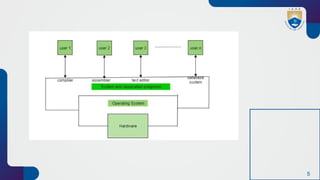
An operating system acts as an intermediary between the user
of a computer and computer hardware.
•The purpose of an operating system is to provide an
environment in which a user can execute programs conveniently
and efficiently.
•An operating system is software that manages computer
hardware and softwares. The hardware must provide
appropriate mechanisms to ensure the correct operation of the
computer system and to prevent user programs from interfering
with the proper operation of the system.
7
•Operating system is a program running at all times on the
computer (usually called the kernel), with all else being
application programs.
•Concerned with the assignment of resources among
programs e.g. memory, processors and input / output devices.
In short its an interface between computer hardware and user.
8
Characteristics of Operating Systems
Let us now discuss some of the important characteristic
features of operating systems:
•Device Management: The operating system keeps track
of all the devices. So, it is also called the Input/Output
controller that decides which process gets the device,
when, and for how much time.
•File Management: It allocates and de-allocates the
resources and also decides who gets the resource.
•Job Accounting: It keeps track of time and resources
used by various jobs or users.
9
•Error-detecting Aids: These contain methods that include
the production of dumps, traces, error messages, and other
debugging and error-detecting methods.
•Memory Management: It is responsible for managing the
primary memory of a computer, including what part of it are in
use by whom also check how much amount free or used and
allocate process
•Processor Management: It allocates the processor to a
process and then de-allocates the processor when it is no
longer required or the job is done.
•Control on System Performance: It records the delays
between the request for a service and the system.
10
•Security: It prevents unauthorized access to programs and
data using passwords or some kind of protection technique.
•Convenience: An OS makes a computer more convenient
to use.
•Efficiency: An OS allows the computer system resources
to be used efficiently.
•Ability to Evolve: An OS should be constructed in such a
way as to permit the effective development, testing, and
introduction of new system functions at the same time
without interfering with service.
•Throughput: An OS should be constructed so that It can
give maximum throughput (Number of tasks per unit time).
11
List of common Operating Systems
There are multiple types of operating systems each
having its own unique features:
Windows OS
•Developer : Microsoft
•Key Features : User-friendly interface, software
compatibility, hardware support, Strong gaming support.
•Advantages : Easy to use for most users, Broad support
from third-party applications ,Frequent updates and
support.
•Typical Use Cases : Personal computing, Business
environment, Gaming.
12
macOS
•Developer : Apple.
•Key Features : Sleek, intuitive user interface, Strong
integration with other Apple products, Robust security
features, High performance and stability.
•Advantages : Optimized for Apple hardware,
Seamless experience across Apple ecosystem,
Superior graphics and multimedia capabilities.
•Typical Use Cases : Creative industries (design,
video editing, music production), Personal computing,
Professional environments.
13
Linux
•Developer : Community-driven (various
distributions).
•Key Features : Open-source and highly
customizable, Robust security and stability,
Lightweight and can run on older hardware, Large
selection of distributions (e.g., Ubuntu, Fedora,
Debian).
•Advantages : Free to use and distribute, Strong
community support, Suitable for servers and
development environments.
•Typical Use Cases : Servers and data centers,
Development and programming, Personal
computing for tech enthusiasts.
14
Unix
•Developer: Originally AT&T Bell Labs, various
commercial and open-source versions available
•Key Features: Multiuser and multitasking capabilities,
Strong security and stability, Powerful command-line
interface, Portability across different hardware platforms
•Advantages: Reliable and robust performance, Suitable
for high-performance computing and servers, Extensive
support for networking
•Typical Use Cases: Servers and workstations,
Development environments, Research and academic
settings
15
Functionalities of Operating System
•Resource Management: When parallel accessing happens in
the OS means when multiple users are accessing the system the
OS works as Resource Manager, Its responsibility is to provide
hardware to the user. It decreases the load in the system.
•Process Management: It includes various tasks like scheduling
and termination of the process. It is done with the help of
CPU Scheduling algorithms .
•Storage Management: The file system mechanism used for
the management of the storage. NIFS , CIFS , CFS , NFS , etc.
are some file systems. All the data is stored in various tracks
of Hard disks that are all managed by the storage manager. It
included Hard Disk .
16
•Memory Management: Refers to the management of
primary memory. The operating system has to keep track of
how much memory has been used and by whom. It has to
decide which process needs memory space and how much.
OS also has to allocate and deallocate the memory space.
•Security/Privacy Management: Privacy is also provided
by the Operating system using passwords so that
unauthorized applications can’t access programs or data.
For example, Windows uses Kerberos authentication to
prevent unauthorized access to data.
17
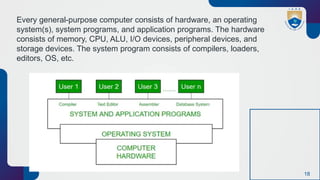
The process operating system as User Interface:
1.User
2.System and application programs
3.Operating system
4.Hardware
18
Every general-purpose computer consists of hardware, an operating
system(s), system programs, and application programs. The hardware
consists of memory, CPU, ALU, I/O devices, peripheral devices, and
storage devices. The system program consists of compilers, loaders,
editors, OS, etc.
19
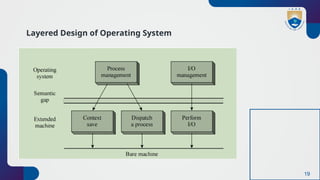
Layered Design of Operating System
20
The extended machine provides operations like context save,
dispatching, swapping, and I/O initiation.
The operating system layer is located on top of the extended
machine layer. This arrangement considerably simplifies the
coding and testing of OS modules by separating the algorithm
of a function from the implementation of its primitive operations.
It is now easier to test, debug, and modify an OS module than
in a monolithic OS.
21
Purposes and Tasks of Operating Systems
Purposes of an Operating System
•It controls the allocation and use of the computing System’s resources
among the various user and tasks.
•It provides an interface between the computer hardware and the
programmer that simplifies and makes it feasible for coding and
debugging of application programs.
22
Tasks of an Operating System
1.Provides the facilities to create and modify programs
and data files using an editor.
2.Access to the compiler for translating the user program
from high-level language to machine language.
3.Provide a loader program to move the compiled
program code to the computer’s memory for execution.
4.Provide routines that handle the details of I/O
programming.
23
I/O System Management
The module that keeps track of the status of devices
is called the I/O traffic controller. Each I/O device has
a device handler that resides in a separate process
associated with that device.
The I/O subsystem consists of
•A memory Management component that includes
buffering caching and spooling.
•A general device driver interface.
24
Drivers for Specific Hardware Devices
Below mentioned are the drivers which are required for a specific
Hardware Device. Here we discussed Assemblers, compilers, and
interpreters, loaders.
Assembler The input to an assembler is an assembly
language program. The output is an object program plus
information that enables the loader to prepare the object
program for execution. At one time, the computer
programmer had at his disposal a basic machine that
interpreted, through hardware, certain fundamental
instructions. He would program this computer by writing a
series of ones and Zeros (Machine language) and placing
them into the memory of the machine.
25
Compiler and Interpreter
The High-level languages – examples are C, C++, Java,
Python, etc (around 300+ famous high-level languages)
are processed by compilers and interpreters . A compiler
is a program that accepts a source program in a “high-
level language “and produces machine code in one go.
Some of the compiled languages are FORTRAN, COBOL,
C, C++, Rust, and Go. An interpreter is a program that
does the same thing but converts high-level code to
machine code line-by-line and not all at once. Examples
of interpreted languages are
•Python
•Perl
•Ruby
26
Loader
A Loader is a routine that loads an object program and
prepares it for execution. There are various loading
schemes: absolute, relocating, and direct-linking. In
general, the loader must load, relocate and link the
object program. The loader is a program that places
programs into memory and prepares them for
execution. In a simple loading scheme, the assembler
outputs the machine language translation of a
program on a secondary device and a loader places it
in the core. The loader places into memory the
machine language version of the user’s program and
transfers control to it. Since the loader program is
much smaller than the assembler, those make more
core available to the user’s program.
27
Components of an Operating Systems
There are two basic components of an Operating System.
•Shell
•Kernel
28
interaction with the user. The main task
of the Shell is the management of
interaction between the User and OS.
Shell provides better communication
with the user and the Operating System
Shell does it by giving proper input to
the user it also interprets input for the
OS and handles the output from the OS.
It works as a way of communication
between the User and the OS.
29
Kernel
The kernel is one of the components of the
Operating System which works as a core component.
The rest of the components depends on Kernel for
the supply of the important services that are
provided by the Operating System. The kernel is the
primary interface between the Operating system and
Hardware.
30
Functions of Kernel
The following functions are to be performed by the
Kernel.
•It helps in controlling the System Calls.
•It helps in I/O Management.
•It helps in the management of applications, memory,
etc.
Types of Kernel
There are four types of Kernel that are mentioned below.
•Monolithic Kernel
•Microkernel
•Hybrid Kernel
•Exokernel
32
Web References
 https://www.geeksforgeeks.org/introduction-of-operating-system-set-
1/
 https://archive.nptel.ac.in/courses/106/105/106105214/
 https://www.slideshare.net/slideshow/os-unit-1-
248137601/248137601
33
Thank You

OS- Introduction to opertaing systems.pptx

  • 1.
    1 Course Title –Operating Systems Topic Title – Introduction to Operating Systems Presenter’s Name – Dr R.Ramya Swetha Department Name – Civil Engineering Lecture Number - 01
  • 2.
    2 Course Outcomes CO1 Demonstratedifferent architectures used in the design of modern operating systems. CO2 Solve problems related to process scheduling, synchronization, and deadlock handling in uniprocessor and multi-processing systems. CO3 Implement memory allocation algorithms for effective utilization of resources. CO4 Select various page replacement algorithms applied for the allocation of frames... CO5 Analyze different file allocation methods and disk scheduling algorithms applied for efficient utilization of storage. CO6 Outline mechanisms used in the protection of resources in real-time environment
  • 3.
    3 Operating Systems An OperatingSystem(OS) is a software that manages and handles hardware and software resources of a computing device. Responsible for managing and controlling all the activities and sharing of computer resources among different running applications.
  • 4.
    4 •A low-level Softwarethat includes all the basic functions like processor management, memory management, file management, etc. •It mainly acts a government for your system that has different departments to manage different resources. •Examples are Linux, Unix, Windows 11, MS DOS, Android, macOS and iOS.
  • 5.
  • 6.
    6 Introduction to OperatingSystem An operating system acts as an intermediary between the user of a computer and computer hardware. •The purpose of an operating system is to provide an environment in which a user can execute programs conveniently and efficiently. •An operating system is software that manages computer hardware and softwares. The hardware must provide appropriate mechanisms to ensure the correct operation of the computer system and to prevent user programs from interfering with the proper operation of the system.
  • 7.
    7 •Operating system isa program running at all times on the computer (usually called the kernel), with all else being application programs. •Concerned with the assignment of resources among programs e.g. memory, processors and input / output devices. In short its an interface between computer hardware and user.
  • 8.
    8 Characteristics of OperatingSystems Let us now discuss some of the important characteristic features of operating systems: •Device Management: The operating system keeps track of all the devices. So, it is also called the Input/Output controller that decides which process gets the device, when, and for how much time. •File Management: It allocates and de-allocates the resources and also decides who gets the resource. •Job Accounting: It keeps track of time and resources used by various jobs or users.
  • 9.
    9 •Error-detecting Aids: Thesecontain methods that include the production of dumps, traces, error messages, and other debugging and error-detecting methods. •Memory Management: It is responsible for managing the primary memory of a computer, including what part of it are in use by whom also check how much amount free or used and allocate process •Processor Management: It allocates the processor to a process and then de-allocates the processor when it is no longer required or the job is done. •Control on System Performance: It records the delays between the request for a service and the system.
  • 10.
    10 •Security: It preventsunauthorized access to programs and data using passwords or some kind of protection technique. •Convenience: An OS makes a computer more convenient to use. •Efficiency: An OS allows the computer system resources to be used efficiently. •Ability to Evolve: An OS should be constructed in such a way as to permit the effective development, testing, and introduction of new system functions at the same time without interfering with service. •Throughput: An OS should be constructed so that It can give maximum throughput (Number of tasks per unit time).
  • 11.
    11 List of commonOperating Systems There are multiple types of operating systems each having its own unique features: Windows OS •Developer : Microsoft •Key Features : User-friendly interface, software compatibility, hardware support, Strong gaming support. •Advantages : Easy to use for most users, Broad support from third-party applications ,Frequent updates and support. •Typical Use Cases : Personal computing, Business environment, Gaming.
  • 12.
    12 macOS •Developer : Apple. •KeyFeatures : Sleek, intuitive user interface, Strong integration with other Apple products, Robust security features, High performance and stability. •Advantages : Optimized for Apple hardware, Seamless experience across Apple ecosystem, Superior graphics and multimedia capabilities. •Typical Use Cases : Creative industries (design, video editing, music production), Personal computing, Professional environments.
  • 13.
    13 Linux •Developer : Community-driven(various distributions). •Key Features : Open-source and highly customizable, Robust security and stability, Lightweight and can run on older hardware, Large selection of distributions (e.g., Ubuntu, Fedora, Debian). •Advantages : Free to use and distribute, Strong community support, Suitable for servers and development environments. •Typical Use Cases : Servers and data centers, Development and programming, Personal computing for tech enthusiasts.
  • 14.
    14 Unix •Developer: Originally AT&TBell Labs, various commercial and open-source versions available •Key Features: Multiuser and multitasking capabilities, Strong security and stability, Powerful command-line interface, Portability across different hardware platforms •Advantages: Reliable and robust performance, Suitable for high-performance computing and servers, Extensive support for networking •Typical Use Cases: Servers and workstations, Development environments, Research and academic settings
  • 15.
    15 Functionalities of OperatingSystem •Resource Management: When parallel accessing happens in the OS means when multiple users are accessing the system the OS works as Resource Manager, Its responsibility is to provide hardware to the user. It decreases the load in the system. •Process Management: It includes various tasks like scheduling and termination of the process. It is done with the help of CPU Scheduling algorithms . •Storage Management: The file system mechanism used for the management of the storage. NIFS , CIFS , CFS , NFS , etc. are some file systems. All the data is stored in various tracks of Hard disks that are all managed by the storage manager. It included Hard Disk .
  • 16.
    16 •Memory Management: Refersto the management of primary memory. The operating system has to keep track of how much memory has been used and by whom. It has to decide which process needs memory space and how much. OS also has to allocate and deallocate the memory space. •Security/Privacy Management: Privacy is also provided by the Operating system using passwords so that unauthorized applications can’t access programs or data. For example, Windows uses Kerberos authentication to prevent unauthorized access to data.
  • 17.
    17 The process operatingsystem as User Interface: 1.User 2.System and application programs 3.Operating system 4.Hardware
  • 18.
    18 Every general-purpose computerconsists of hardware, an operating system(s), system programs, and application programs. The hardware consists of memory, CPU, ALU, I/O devices, peripheral devices, and storage devices. The system program consists of compilers, loaders, editors, OS, etc.
  • 19.
    19 Layered Design ofOperating System
  • 20.
    20 The extended machineprovides operations like context save, dispatching, swapping, and I/O initiation. The operating system layer is located on top of the extended machine layer. This arrangement considerably simplifies the coding and testing of OS modules by separating the algorithm of a function from the implementation of its primitive operations. It is now easier to test, debug, and modify an OS module than in a monolithic OS.
  • 21.
    21 Purposes and Tasksof Operating Systems Purposes of an Operating System •It controls the allocation and use of the computing System’s resources among the various user and tasks. •It provides an interface between the computer hardware and the programmer that simplifies and makes it feasible for coding and debugging of application programs.
  • 22.
    22 Tasks of anOperating System 1.Provides the facilities to create and modify programs and data files using an editor. 2.Access to the compiler for translating the user program from high-level language to machine language. 3.Provide a loader program to move the compiled program code to the computer’s memory for execution. 4.Provide routines that handle the details of I/O programming.
  • 23.
    23 I/O System Management Themodule that keeps track of the status of devices is called the I/O traffic controller. Each I/O device has a device handler that resides in a separate process associated with that device. The I/O subsystem consists of •A memory Management component that includes buffering caching and spooling. •A general device driver interface.
  • 24.
    24 Drivers for SpecificHardware Devices Below mentioned are the drivers which are required for a specific Hardware Device. Here we discussed Assemblers, compilers, and interpreters, loaders. Assembler The input to an assembler is an assembly language program. The output is an object program plus information that enables the loader to prepare the object program for execution. At one time, the computer programmer had at his disposal a basic machine that interpreted, through hardware, certain fundamental instructions. He would program this computer by writing a series of ones and Zeros (Machine language) and placing them into the memory of the machine.
  • 25.
    25 Compiler and Interpreter TheHigh-level languages – examples are C, C++, Java, Python, etc (around 300+ famous high-level languages) are processed by compilers and interpreters . A compiler is a program that accepts a source program in a “high- level language “and produces machine code in one go. Some of the compiled languages are FORTRAN, COBOL, C, C++, Rust, and Go. An interpreter is a program that does the same thing but converts high-level code to machine code line-by-line and not all at once. Examples of interpreted languages are •Python •Perl •Ruby
  • 26.
    26 Loader A Loader isa routine that loads an object program and prepares it for execution. There are various loading schemes: absolute, relocating, and direct-linking. In general, the loader must load, relocate and link the object program. The loader is a program that places programs into memory and prepares them for execution. In a simple loading scheme, the assembler outputs the machine language translation of a program on a secondary device and a loader places it in the core. The loader places into memory the machine language version of the user’s program and transfers control to it. Since the loader program is much smaller than the assembler, those make more core available to the user’s program.
  • 27.
    27 Components of anOperating Systems There are two basic components of an Operating System. •Shell •Kernel
  • 28.
    28 interaction with theuser. The main task of the Shell is the management of interaction between the User and OS. Shell provides better communication with the user and the Operating System Shell does it by giving proper input to the user it also interprets input for the OS and handles the output from the OS. It works as a way of communication between the User and the OS.
  • 29.
    29 Kernel The kernel isone of the components of the Operating System which works as a core component. The rest of the components depends on Kernel for the supply of the important services that are provided by the Operating System. The kernel is the primary interface between the Operating system and Hardware.
  • 30.
    30 Functions of Kernel Thefollowing functions are to be performed by the Kernel. •It helps in controlling the System Calls. •It helps in I/O Management. •It helps in the management of applications, memory, etc.
  • 31.
    Types of Kernel Thereare four types of Kernel that are mentioned below. •Monolithic Kernel •Microkernel •Hybrid Kernel •Exokernel
  • 32.
    32 Web References  https://www.geeksforgeeks.org/introduction-of-operating-system-set- 1/ https://archive.nptel.ac.in/courses/106/105/106105214/  https://www.slideshare.net/slideshow/os-unit-1- 248137601/248137601
  • 33.