Operating System
By
Muhammad Tanveer
Operating System
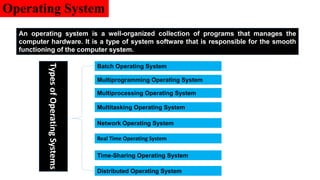
An operating system is a well-organized collection of programs that manages the
computer hardware. It is a type of system software that is responsible for the smooth
functioning of the computer system.
Distributed Operating System
Types
of
Operating
Systems
Real Time Operating System
Time-Sharing Operating System
Network Operating System
Multitasking Operating System
Multiprocessing Operating System
Multiprogramming Operating System
Batch Operating System
Operating System
An operating system is a well-organized collection of programs that manages the
computer hardware. It is a type of system software that is responsible for the smooth
functioning of the computer system.
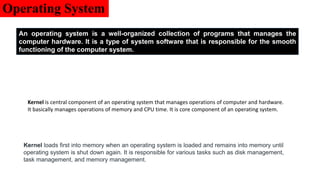
Kernel is central component of an operating system that manages operations of computer and hardware.
It basically manages operations of memory and CPU time. It is core component of an operating system.
Kernel loads first into memory when an operating system is loaded and remains into memory until
operating system is shut down again. It is responsible for various tasks such as disk management,
task management, and memory management.
Batch Operating System
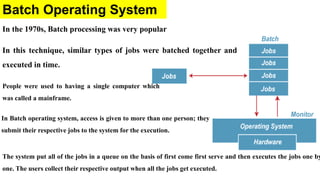
In the 1970s, Batch processing was very popular
In this technique, similar types of jobs were batched together and
executed in time.
The system put all of the jobs in a queue on the basis of first come first serve and then executes the jobs one by
one. The users collect their respective output when all the jobs get executed.
People were used to having a single computer which
was called a mainframe.
In Batch operating system, access is given to more than one person; they
submit their respective jobs to the system for the execution.
Batch Operating System
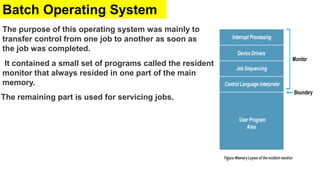
The purpose of this operating system was mainly to
transfer control from one job to another as soon as
the job was completed.
It contained a small set of programs called the resident
monitor that always resided in one part of the main
memory.
The remaining part is used for servicing jobs.
Advantages/ Disadvantages Batch OS
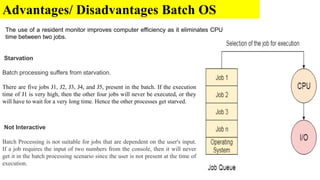
The use of a resident monitor improves computer efficiency as it eliminates CPU
time between two jobs.
Starvation
Batch processing suffers from starvation.
There are five jobs J1, J2, J3, J4, and J5, present in the batch. If the execution
time of J1 is very high, then the other four jobs will never be executed, or they
will have to wait for a very long time. Hence the other processes get starved.
Not Interactive
Batch Processing is not suitable for jobs that are dependent on the user's input.
If a job requires the input of two numbers from the console, then it will never
get it in the batch processing scenario since the user is not present at the time of
execution.
Multiprogramming Operating System
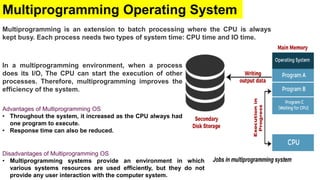
Multiprogramming is an extension to batch processing where the CPU is always
kept busy. Each process needs two types of system time: CPU time and IO time.
In a multiprogramming environment, when a process
does its I/O, The CPU can start the execution of other
processes. Therefore, multiprogramming improves the
efficiency of the system.
Disadvantages of Multiprogramming OS
• Multiprogramming systems provide an environment in which
various systems resources are used efficiently, but they do not
provide any user interaction with the computer system.
Advantages of Multiprogramming OS
• Throughout the system, it increased as the CPU always had
one program to execute.
• Response time can also be reduced.
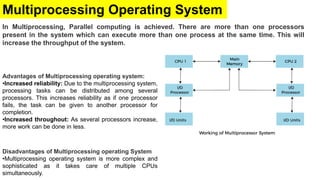
Multiprocessing Operating System
In Multiprocessing, Parallel computing is achieved. There are more than one processors
present in the system which can execute more than one process at the same time. This will
increase the throughput of the system.
Disadvantages of Multiprocessing operating System
•Multiprocessing operating system is more complex and
sophisticated as it takes care of multiple CPUs
simultaneously.
Advantages of Multiprocessing operating system:
•Increased reliability: Due to the multiprocessing system,
processing tasks can be distributed among several
processors. This increases reliability as if one processor
fails, the task can be given to another processor for
completion.
•Increased throughout: As several processors increase,
more work can be done in less.
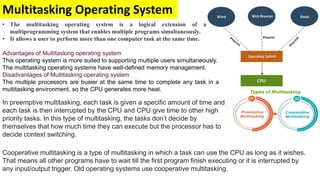
Multitasking Operating System
• The multitasking operating system is a logical extension of a
multiprogramming system that enables multiple programs simultaneously.
• It allows a user to perform more than one computer task at the same time.
Advantages of Multitasking operating system
This operating system is more suited to supporting multiple users simultaneously.
The multitasking operating systems have well-defined memory management.
Disadvantages of Multitasking operating system
The multiple processors are busier at the same time to complete any task in a
multitasking environment, so the CPU generates more heat.
In preemptive multitasking, each task is given a specific amount of time and
each task is then interrupted by the CPU and CPU give time to other high
priority tasks. In this type of multitasking, the tasks don’t decide by
themselves that how much time they can execute but the processor has to
decide context switching.
Cooperative multitasking is a type of multitasking in which a task can use the CPU as long as it wishes.
That means all other programs have to wait till the first program finish executing or it is interrupted by
any input/output trigger. Old operating systems use cooperative multitasking.
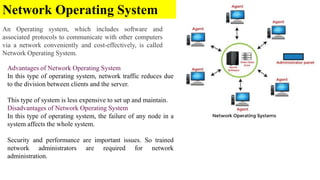
Network Operating System
An Operating system, which includes software and
associated protocols to communicate with other computers
via a network conveniently and cost-effectively, is called
Network Operating System.
Advantages of Network Operating System
In this type of operating system, network traffic reduces due
to the division between clients and the server.
This type of system is less expensive to set up and maintain.
Disadvantages of Network Operating System
In this type of operating system, the failure of any node in a
system affects the whole system.
Security and performance are important issues. So trained
network administrators are required for network
administration.
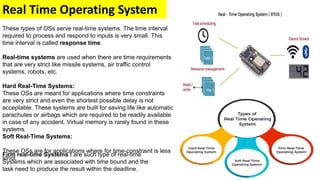
Real Time Operating System
These types of OSs serve real-time systems. The time interval
required to process and respond to inputs is very small. This
time interval is called response time.
Real-time systems are used when there are time requirements
that are very strict like missile systems, air traffic control
systems, robots, etc.
Hard Real-Time Systems:
These OSs are meant for applications where time constraints
are very strict and even the shortest possible delay is not
acceptable. These systems are built for saving life like automatic
parachutes or airbags which are required to be readily available
in case of any accident. Virtual memory is rarely found in these
systems.
Soft Real-Time Systems:
These OSs are for applications where for time-constraint is less
strict.
Firm real-time Systems t are such type of real-time
Systems which are associated with time bound and the
task need to produce the result within the deadline.
Time-Sharing Operating System
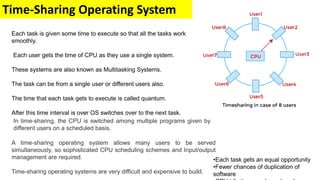
In time-sharing, the CPU is switched among multiple programs given by
different users on a scheduled basis.
A time-sharing operating system allows many users to be served
simultaneously, so sophisticated CPU scheduling schemes and Input/output
management are required.
Time-sharing operating systems are very difficult and expensive to build.
Each task is given some time to execute so that all the tasks work
smoothly.
Each user gets the time of CPU as they use a single system.
These systems are also known as Multitasking Systems.
The task can be from a single user or different users also.
The time that each task gets to execute is called quantum.
After this time interval is over OS switches over to the next task.
•Each task gets an equal opportunity
•Fewer chances of duplication of
software
Distributed Operating System
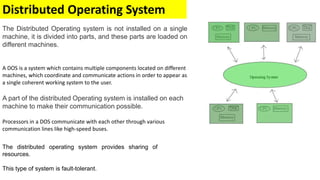
The Distributed Operating system is not installed on a single
machine, it is divided into parts, and these parts are loaded on
different machines.
A DOS is a system which contains multiple components located on different
machines, which coordinate and communicate actions in order to appear as
a single coherent working system to the user.
A part of the distributed Operating system is installed on each
machine to make their communication possible.
Processors in a DOS communicate with each other through various
communication lines like high-speed buses.
The distributed operating system provides sharing of
resources.
This type of system is fault-tolerant.
Multitasking
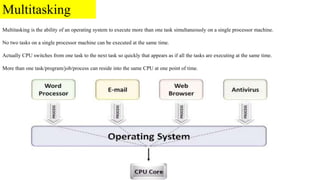
Multitasking is the ability of an operating system to execute more than one task simultaneously on a single processor machine.
No two tasks on a single processor machine can be executed at the same time.
Actually CPU switches from one task to the next task so quickly that appears as if all the tasks are executing at the same time.
More than one task/program/job/process can reside into the same CPU at one point of time.
Multiprocessing
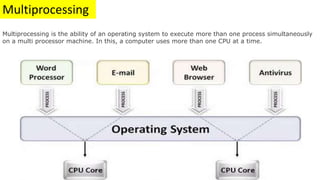
Multiprocessing is the ability of an operating system to execute more than one process simultaneously
on a multi processor machine. In this, a computer uses more than one CPU at a time.
Multiprocessing
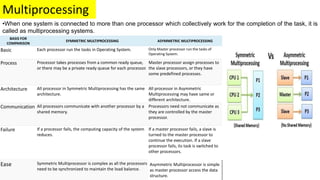
•When one system is connected to more than one processor which collectively work for the completion of the task, it is
called as multiprocessing systems.
BASIS FOR
COMPARISON
SYMMETRIC MULTIPROCESSING ASYMMETRIC MULTIPROCESSING
Basic Each processor run the tasks in Operating System. Only Master processor run the tasks of
Operating System.
Process Processor takes processes from a common ready queue,
or there may be a private ready queue for each processor.
Master processor assign processes to
the slave processors, or they have
some predefined processes.
Architecture All processor in Symmetric Multiprocessing has the same
architecture.
All processor in Asymmetric
Multiprocessing may have same or
different architecture.
Communication All processors communicate with another processor by a
shared memory.
Processors need not communicate as
they are controlled by the master
processor.
Failure If a processor fails, the computing capacity of the system
reduces.
If a master processor fails, a slave is
turned to the master processor to
continue the execution. If a slave
processor fails, its task is switched to
other processors.
Ease Symmetric Multiprocessor is complex as all the processors
need to be synchronized to maintain the load balance.
Asymmetric Multiprocessor is simple
as master processor access the data
structure.
Multi-programming
Process-1
Process-2
Process-3
Process-4
Process-5
Programs
Registers
CPU
RAM
Hard derive
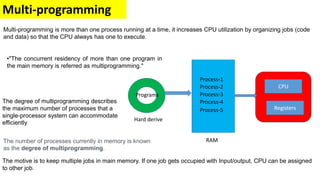
Multi-programming is more than one process running at a time, it increases CPU utilization by organizing jobs (code
and data) so that the CPU always has one to execute.
The motive is to keep multiple jobs in main memory. If one job gets occupied with Input/output, CPU can be assigned
to other job.
•"The concurrent residency of more than one program in
the main memory is referred as multiprogramming."
The degree of multiprogramming describes
the maximum number of processes that a
single-processor system can accommodate
efficiently
The number of processes currently in memory is known
as the degree of multiprogramming.
Process
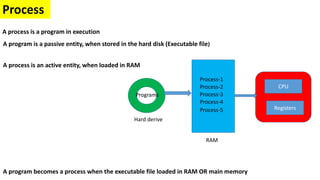
A process is a program in execution
A program is a passive entity, when stored in the hard disk (Executable file)
A program becomes a process when the executable file loaded in RAM OR main memory
Process-1
Process-2
Process-3
Process-4
Process-5
Programs
Registers
CPU
A process is an active entity, when loaded in RAM
RAM
Hard derive
Process States/Life Cycle
Process-1
Process-2
Process-3
Process-4
Process-5
Programs
Registers
CPU
RAM
Hard derive
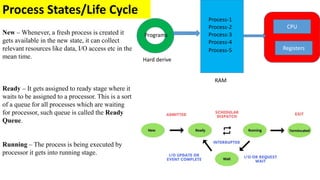
New – Whenever, a fresh process is created it
gets available in the new state, it can collect
relevant resources like data, I/O access etc in the
mean time.
Ready – It gets assigned to ready stage where it
waits to be assigned to a processor. This is a sort
of a queue for all processes which are waiting
for processor, such queue is called the Ready
Queue.
Running – The process is being executed by
processor it gets into running stage.
Process-1
Process-2
Process-3
Process-4
Process-5
Programs
Registers
CPU
RAM
Hard derive
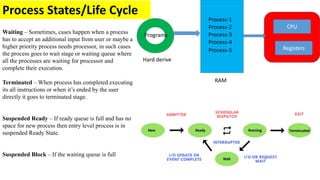
Waiting – Sometimes, cases happen when a process
has to accept an additional input from user or maybe a
higher priority process needs processor, in such cases
the process goes to wait stage or waiting queue where
all the processes are waiting for processor and
complete their execution.
Terminated – When process has completed executing
its all instructions or when it’s ended by the user
directly it goes to terminated stage.
Suspended Ready – If ready queue is full and has no
space for new process then entry level process is in
suspended Ready State.
Suspended Block – If the waiting queue is full
Process States/Life Cycle
Process-1
Process-2
Process-3
Process-4
Process-5
Programs
Registers
CPU
RAM
Hard derive
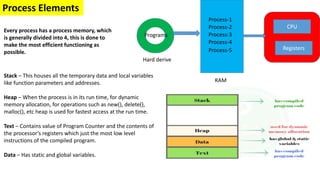
Process Elements
Every process has a process memory, which
is generally divided into 4, this is done to
make the most efficient functioning as
possible.
Stack – This houses all the temporary data and local variables
like function parameters and addresses.
Heap – When the process is in its run time, for dynamic
memory allocation, for operations such as new(), delete(),
malloc(), etc heap is used for fastest access at the run time.
Text – Contains value of Program Counter and the contents of
the processor’s registers which just the most low level
instructions of the compiled program.
Data – Has static and global variables.
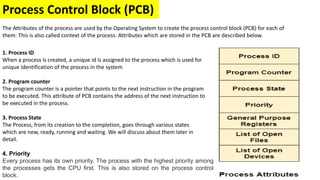
Process Control Block (PCB)
2. Program counter
The program counter is a pointer that points to the next instruction in the program
to be executed. This attribute of PCB contains the address of the next instruction to
be executed in the process.
The Attributes of the process are used by the Operating System to create the process control block (PCB) for each of
them. This is also called context of the process. Attributes which are stored in the PCB are described below.
1. Process ID
When a process is created, a unique id is assigned to the process which is used for
unique identification of the process in the system
3. Process State
The Process, from its creation to the completion, goes through various states
which are new, ready, running and waiting. We will discuss about them later in
detail.
4. Priority
Every process has its own priority. The process with the highest priority among
the processes gets the CPU first. This is also stored on the process control
block.
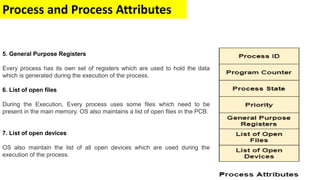
Process and Process Attributes
5. General Purpose Registers
Every process has its own set of registers which are used to hold the data
which is generated during the execution of the process.
6. List of open files
During the Execution, Every process uses some files which need to be
present in the main memory. OS also maintains a list of open files in the PCB.
7. List of open devices
OS also maintain the list of all open devices which are used during the
execution of the process.
Process and Process Attributes
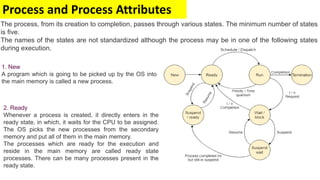
The process, from its creation to completion, passes through various states. The minimum number of states
is five.
The names of the states are not standardized although the process may be in one of the following states
during execution.
1. New
A program which is going to be picked up by the OS into
the main memory is called a new process.
2. Ready
Whenever a process is created, it directly enters in the
ready state, in which, it waits for the CPU to be assigned.
The OS picks the new processes from the secondary
memory and put all of them in the main memory.
The processes which are ready for the execution and
reside in the main memory are called ready state
processes. There can be many processes present in the
ready state.
Process and Process Attributes
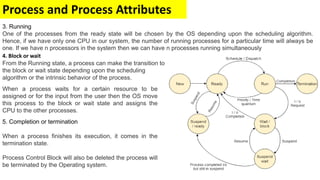
5. Completion or termination
When a process finishes its execution, it comes in the
termination state.
Process Control Block will also be deleted the process will
be terminated by the Operating system.
4. Block or wait
From the Running state, a process can make the transition to
the block or wait state depending upon the scheduling
algorithm or the intrinsic behavior of the process.
When a process waits for a certain resource to be
assigned or for the input from the user then the OS move
this process to the block or wait state and assigns the
CPU to the other processes.
3. Running
One of the processes from the ready state will be chosen by the OS depending upon the scheduling algorithm.
Hence, if we have only one CPU in our system, the number of running processes for a particular time will always be
one. If we have n processors in the system then we can have n processes running simultaneously
Process and Process Attributes
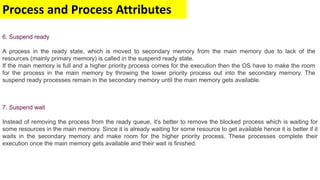
7. Suspend wait
Instead of removing the process from the ready queue, it's better to remove the blocked process which is waiting for
some resources in the main memory. Since it is already waiting for some resource to get available hence it is better if it
waits in the secondary memory and make room for the higher priority process. These processes complete their
execution once the main memory gets available and their wait is finished.
6. Suspend ready
A process in the ready state, which is moved to secondary memory from the main memory due to lack of the
resources (mainly primary memory) is called in the suspend ready state.
If the main memory is full and a higher priority process comes for the execution then the OS have to make the room
for the process in the main memory by throwing the lower priority process out into the secondary memory. The
suspend ready processes remain in the secondary memory until the main memory gets available.
Process Control Block (PCB) (Store)
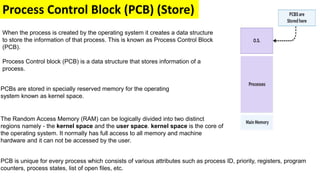
When the process is created by the operating system it creates a data structure
to store the information of that process. This is known as Process Control Block
(PCB).
Process Control block (PCB) is a data structure that stores information of a
process.
PCBs are stored in specially reserved memory for the operating
system known as kernel space.
PCB is unique for every process which consists of various attributes such as process ID, priority, registers, program
counters, process states, list of open files, etc.
The Random Access Memory (RAM) can be logically divided into two distinct
regions namely - the kernel space and the user space. kernel space is the core of
the operating system. It normally has full access to all memory and machine
hardware and it can not be accessed by the user.
Process Control Block (PCB) (Store)
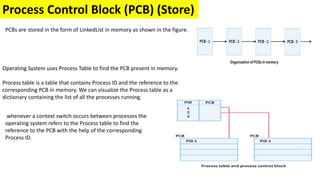
PCBs are stored in the form of LinkedList in memory as shown in the figure.
Operating System uses Process Table to find the PCB present in memory.
Process table is a table that contains Process ID and the reference to the
corresponding PCB in memory. We can visualize the Process table as a
dictionary containing the list of all the processes running.
whenever a context switch occurs between processes the
operating system refers to the Process table to find the
reference to the PCB with the help of the corresponding
Process ID.

4-Process control block.pptx

  • 1.
  • 2.
    Operating System An operatingsystem is a well-organized collection of programs that manages the computer hardware. It is a type of system software that is responsible for the smooth functioning of the computer system. Distributed Operating System Types of Operating Systems Real Time Operating System Time-Sharing Operating System Network Operating System Multitasking Operating System Multiprocessing Operating System Multiprogramming Operating System Batch Operating System
  • 3.
    Operating System An operatingsystem is a well-organized collection of programs that manages the computer hardware. It is a type of system software that is responsible for the smooth functioning of the computer system. Kernel is central component of an operating system that manages operations of computer and hardware. It basically manages operations of memory and CPU time. It is core component of an operating system. Kernel loads first into memory when an operating system is loaded and remains into memory until operating system is shut down again. It is responsible for various tasks such as disk management, task management, and memory management.
  • 4.
    Batch Operating System Inthe 1970s, Batch processing was very popular In this technique, similar types of jobs were batched together and executed in time. The system put all of the jobs in a queue on the basis of first come first serve and then executes the jobs one by one. The users collect their respective output when all the jobs get executed. People were used to having a single computer which was called a mainframe. In Batch operating system, access is given to more than one person; they submit their respective jobs to the system for the execution.
  • 5.
    Batch Operating System Thepurpose of this operating system was mainly to transfer control from one job to another as soon as the job was completed. It contained a small set of programs called the resident monitor that always resided in one part of the main memory. The remaining part is used for servicing jobs.
  • 6.
    Advantages/ Disadvantages BatchOS The use of a resident monitor improves computer efficiency as it eliminates CPU time between two jobs. Starvation Batch processing suffers from starvation. There are five jobs J1, J2, J3, J4, and J5, present in the batch. If the execution time of J1 is very high, then the other four jobs will never be executed, or they will have to wait for a very long time. Hence the other processes get starved. Not Interactive Batch Processing is not suitable for jobs that are dependent on the user's input. If a job requires the input of two numbers from the console, then it will never get it in the batch processing scenario since the user is not present at the time of execution.
  • 7.
    Multiprogramming Operating System Multiprogrammingis an extension to batch processing where the CPU is always kept busy. Each process needs two types of system time: CPU time and IO time. In a multiprogramming environment, when a process does its I/O, The CPU can start the execution of other processes. Therefore, multiprogramming improves the efficiency of the system. Disadvantages of Multiprogramming OS • Multiprogramming systems provide an environment in which various systems resources are used efficiently, but they do not provide any user interaction with the computer system. Advantages of Multiprogramming OS • Throughout the system, it increased as the CPU always had one program to execute. • Response time can also be reduced.
  • 8.
    Multiprocessing Operating System InMultiprocessing, Parallel computing is achieved. There are more than one processors present in the system which can execute more than one process at the same time. This will increase the throughput of the system. Disadvantages of Multiprocessing operating System •Multiprocessing operating system is more complex and sophisticated as it takes care of multiple CPUs simultaneously. Advantages of Multiprocessing operating system: •Increased reliability: Due to the multiprocessing system, processing tasks can be distributed among several processors. This increases reliability as if one processor fails, the task can be given to another processor for completion. •Increased throughout: As several processors increase, more work can be done in less.
  • 9.
    Multitasking Operating System •The multitasking operating system is a logical extension of a multiprogramming system that enables multiple programs simultaneously. • It allows a user to perform more than one computer task at the same time. Advantages of Multitasking operating system This operating system is more suited to supporting multiple users simultaneously. The multitasking operating systems have well-defined memory management. Disadvantages of Multitasking operating system The multiple processors are busier at the same time to complete any task in a multitasking environment, so the CPU generates more heat. In preemptive multitasking, each task is given a specific amount of time and each task is then interrupted by the CPU and CPU give time to other high priority tasks. In this type of multitasking, the tasks don’t decide by themselves that how much time they can execute but the processor has to decide context switching. Cooperative multitasking is a type of multitasking in which a task can use the CPU as long as it wishes. That means all other programs have to wait till the first program finish executing or it is interrupted by any input/output trigger. Old operating systems use cooperative multitasking.
  • 10.
    Network Operating System AnOperating system, which includes software and associated protocols to communicate with other computers via a network conveniently and cost-effectively, is called Network Operating System. Advantages of Network Operating System In this type of operating system, network traffic reduces due to the division between clients and the server. This type of system is less expensive to set up and maintain. Disadvantages of Network Operating System In this type of operating system, the failure of any node in a system affects the whole system. Security and performance are important issues. So trained network administrators are required for network administration.
  • 11.
    Real Time OperatingSystem These types of OSs serve real-time systems. The time interval required to process and respond to inputs is very small. This time interval is called response time. Real-time systems are used when there are time requirements that are very strict like missile systems, air traffic control systems, robots, etc. Hard Real-Time Systems: These OSs are meant for applications where time constraints are very strict and even the shortest possible delay is not acceptable. These systems are built for saving life like automatic parachutes or airbags which are required to be readily available in case of any accident. Virtual memory is rarely found in these systems. Soft Real-Time Systems: These OSs are for applications where for time-constraint is less strict. Firm real-time Systems t are such type of real-time Systems which are associated with time bound and the task need to produce the result within the deadline.
  • 12.
    Time-Sharing Operating System Intime-sharing, the CPU is switched among multiple programs given by different users on a scheduled basis. A time-sharing operating system allows many users to be served simultaneously, so sophisticated CPU scheduling schemes and Input/output management are required. Time-sharing operating systems are very difficult and expensive to build. Each task is given some time to execute so that all the tasks work smoothly. Each user gets the time of CPU as they use a single system. These systems are also known as Multitasking Systems. The task can be from a single user or different users also. The time that each task gets to execute is called quantum. After this time interval is over OS switches over to the next task. •Each task gets an equal opportunity •Fewer chances of duplication of software
  • 13.
    Distributed Operating System TheDistributed Operating system is not installed on a single machine, it is divided into parts, and these parts are loaded on different machines. A DOS is a system which contains multiple components located on different machines, which coordinate and communicate actions in order to appear as a single coherent working system to the user. A part of the distributed Operating system is installed on each machine to make their communication possible. Processors in a DOS communicate with each other through various communication lines like high-speed buses. The distributed operating system provides sharing of resources. This type of system is fault-tolerant.
  • 14.
    Multitasking Multitasking is theability of an operating system to execute more than one task simultaneously on a single processor machine. No two tasks on a single processor machine can be executed at the same time. Actually CPU switches from one task to the next task so quickly that appears as if all the tasks are executing at the same time. More than one task/program/job/process can reside into the same CPU at one point of time.
  • 15.
    Multiprocessing Multiprocessing is theability of an operating system to execute more than one process simultaneously on a multi processor machine. In this, a computer uses more than one CPU at a time.
  • 16.
    Multiprocessing •When one systemis connected to more than one processor which collectively work for the completion of the task, it is called as multiprocessing systems. BASIS FOR COMPARISON SYMMETRIC MULTIPROCESSING ASYMMETRIC MULTIPROCESSING Basic Each processor run the tasks in Operating System. Only Master processor run the tasks of Operating System. Process Processor takes processes from a common ready queue, or there may be a private ready queue for each processor. Master processor assign processes to the slave processors, or they have some predefined processes. Architecture All processor in Symmetric Multiprocessing has the same architecture. All processor in Asymmetric Multiprocessing may have same or different architecture. Communication All processors communicate with another processor by a shared memory. Processors need not communicate as they are controlled by the master processor. Failure If a processor fails, the computing capacity of the system reduces. If a master processor fails, a slave is turned to the master processor to continue the execution. If a slave processor fails, its task is switched to other processors. Ease Symmetric Multiprocessor is complex as all the processors need to be synchronized to maintain the load balance. Asymmetric Multiprocessor is simple as master processor access the data structure.
  • 17.
    Multi-programming Process-1 Process-2 Process-3 Process-4 Process-5 Programs Registers CPU RAM Hard derive Multi-programming ismore than one process running at a time, it increases CPU utilization by organizing jobs (code and data) so that the CPU always has one to execute. The motive is to keep multiple jobs in main memory. If one job gets occupied with Input/output, CPU can be assigned to other job. •"The concurrent residency of more than one program in the main memory is referred as multiprogramming." The degree of multiprogramming describes the maximum number of processes that a single-processor system can accommodate efficiently The number of processes currently in memory is known as the degree of multiprogramming.
  • 18.
    Process A process isa program in execution A program is a passive entity, when stored in the hard disk (Executable file) A program becomes a process when the executable file loaded in RAM OR main memory Process-1 Process-2 Process-3 Process-4 Process-5 Programs Registers CPU A process is an active entity, when loaded in RAM RAM Hard derive
  • 19.
    Process States/Life Cycle Process-1 Process-2 Process-3 Process-4 Process-5 Programs Registers CPU RAM Hardderive New – Whenever, a fresh process is created it gets available in the new state, it can collect relevant resources like data, I/O access etc in the mean time. Ready – It gets assigned to ready stage where it waits to be assigned to a processor. This is a sort of a queue for all processes which are waiting for processor, such queue is called the Ready Queue. Running – The process is being executed by processor it gets into running stage.
  • 20.
    Process-1 Process-2 Process-3 Process-4 Process-5 Programs Registers CPU RAM Hard derive Waiting –Sometimes, cases happen when a process has to accept an additional input from user or maybe a higher priority process needs processor, in such cases the process goes to wait stage or waiting queue where all the processes are waiting for processor and complete their execution. Terminated – When process has completed executing its all instructions or when it’s ended by the user directly it goes to terminated stage. Suspended Ready – If ready queue is full and has no space for new process then entry level process is in suspended Ready State. Suspended Block – If the waiting queue is full Process States/Life Cycle
  • 21.
    Process-1 Process-2 Process-3 Process-4 Process-5 Programs Registers CPU RAM Hard derive Process Elements Everyprocess has a process memory, which is generally divided into 4, this is done to make the most efficient functioning as possible. Stack – This houses all the temporary data and local variables like function parameters and addresses. Heap – When the process is in its run time, for dynamic memory allocation, for operations such as new(), delete(), malloc(), etc heap is used for fastest access at the run time. Text – Contains value of Program Counter and the contents of the processor’s registers which just the most low level instructions of the compiled program. Data – Has static and global variables.
  • 22.
    Process Control Block(PCB) 2. Program counter The program counter is a pointer that points to the next instruction in the program to be executed. This attribute of PCB contains the address of the next instruction to be executed in the process. The Attributes of the process are used by the Operating System to create the process control block (PCB) for each of them. This is also called context of the process. Attributes which are stored in the PCB are described below. 1. Process ID When a process is created, a unique id is assigned to the process which is used for unique identification of the process in the system 3. Process State The Process, from its creation to the completion, goes through various states which are new, ready, running and waiting. We will discuss about them later in detail. 4. Priority Every process has its own priority. The process with the highest priority among the processes gets the CPU first. This is also stored on the process control block.
  • 23.
    Process and ProcessAttributes 5. General Purpose Registers Every process has its own set of registers which are used to hold the data which is generated during the execution of the process. 6. List of open files During the Execution, Every process uses some files which need to be present in the main memory. OS also maintains a list of open files in the PCB. 7. List of open devices OS also maintain the list of all open devices which are used during the execution of the process.
  • 24.
    Process and ProcessAttributes The process, from its creation to completion, passes through various states. The minimum number of states is five. The names of the states are not standardized although the process may be in one of the following states during execution. 1. New A program which is going to be picked up by the OS into the main memory is called a new process. 2. Ready Whenever a process is created, it directly enters in the ready state, in which, it waits for the CPU to be assigned. The OS picks the new processes from the secondary memory and put all of them in the main memory. The processes which are ready for the execution and reside in the main memory are called ready state processes. There can be many processes present in the ready state.
  • 25.
    Process and ProcessAttributes 5. Completion or termination When a process finishes its execution, it comes in the termination state. Process Control Block will also be deleted the process will be terminated by the Operating system. 4. Block or wait From the Running state, a process can make the transition to the block or wait state depending upon the scheduling algorithm or the intrinsic behavior of the process. When a process waits for a certain resource to be assigned or for the input from the user then the OS move this process to the block or wait state and assigns the CPU to the other processes. 3. Running One of the processes from the ready state will be chosen by the OS depending upon the scheduling algorithm. Hence, if we have only one CPU in our system, the number of running processes for a particular time will always be one. If we have n processors in the system then we can have n processes running simultaneously
  • 26.
    Process and ProcessAttributes 7. Suspend wait Instead of removing the process from the ready queue, it's better to remove the blocked process which is waiting for some resources in the main memory. Since it is already waiting for some resource to get available hence it is better if it waits in the secondary memory and make room for the higher priority process. These processes complete their execution once the main memory gets available and their wait is finished. 6. Suspend ready A process in the ready state, which is moved to secondary memory from the main memory due to lack of the resources (mainly primary memory) is called in the suspend ready state. If the main memory is full and a higher priority process comes for the execution then the OS have to make the room for the process in the main memory by throwing the lower priority process out into the secondary memory. The suspend ready processes remain in the secondary memory until the main memory gets available.
  • 27.
    Process Control Block(PCB) (Store) When the process is created by the operating system it creates a data structure to store the information of that process. This is known as Process Control Block (PCB). Process Control block (PCB) is a data structure that stores information of a process. PCBs are stored in specially reserved memory for the operating system known as kernel space. PCB is unique for every process which consists of various attributes such as process ID, priority, registers, program counters, process states, list of open files, etc. The Random Access Memory (RAM) can be logically divided into two distinct regions namely - the kernel space and the user space. kernel space is the core of the operating system. It normally has full access to all memory and machine hardware and it can not be accessed by the user.
  • 28.
    Process Control Block(PCB) (Store) PCBs are stored in the form of LinkedList in memory as shown in the figure. Operating System uses Process Table to find the PCB present in memory. Process table is a table that contains Process ID and the reference to the corresponding PCB in memory. We can visualize the Process table as a dictionary containing the list of all the processes running. whenever a context switch occurs between processes the operating system refers to the Process table to find the reference to the PCB with the help of the corresponding Process ID.