Ontario Primary Health Care
Nurse Practitioner Program
NP Network Orientation Session
Academic Year 2014-2015
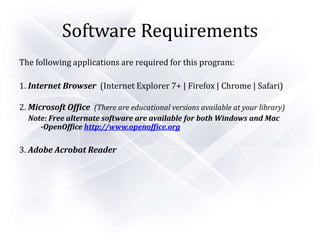
Software Requirements
The following applications are required for this program:
1. Internet Browser (Internet Explorer 7+ | Firefox | Chrome | Safari)
2. Microsoft Office (There are educational versions available at your library)
Note: Free alternate software are available for both Windows and Mac
-OpenOffice http://www.openoffice.org
3. Adobe Acrobat Reader
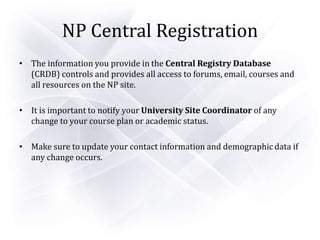
NP Central Registration
• The information you provide in the Central Registry Database
(CRDB) controls and provides all access to forums, email, courses and
all resources on the NP site.
• It is important to notify your University Site Coordinator of any
change to your course plan or academic status.
• Make sure to update your contact information and demographic data if
any change occurs.
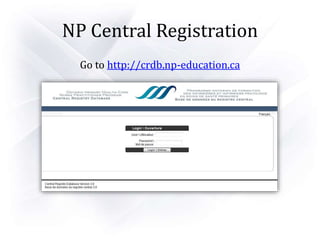
NP Central Registration
Go to http://crdb.np-education.ca
NP Central Registration
• Username:
– Your username will contain 8 characters or less.
• Temporary password: “npeducation
Note: Click “My Information” to reset your password
• Click on your University for usernames:
Ottawa Windsor Laurentian
McMaster Ryerson Queen’s
Western LakeHead York
NP Central Registration
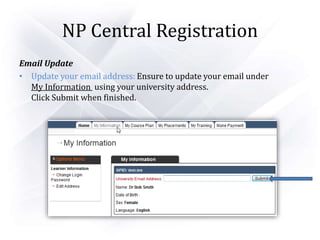
Email Update
• Update your email address: Ensure to update your email under
My Information using your university address.
Click Submit when finished.
NP Central Registration
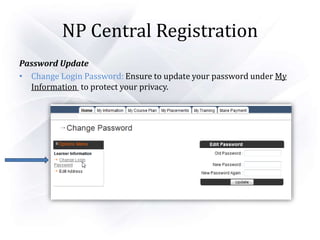
Password Update
• Change Login Password: Ensure to update your password under My
Information to protect your privacy.
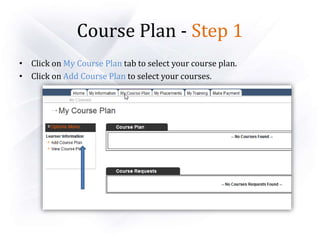
Course Plan - Step 1
• Click on My Course Plan tab to select your course plan.
• Click on Add Course Plan to select your courses.
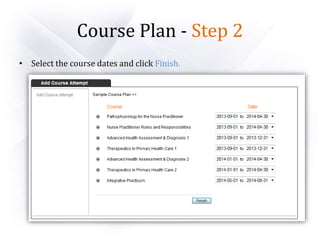
Course Plan - Step 2
• Select the course dates and click Finish.
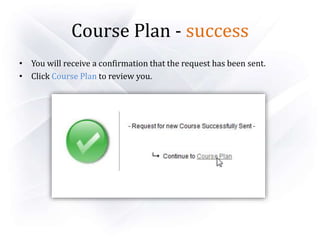
Course Plan - success
• You will receive a confirmation that the request has been sent.
• Click Course Plan to review you.
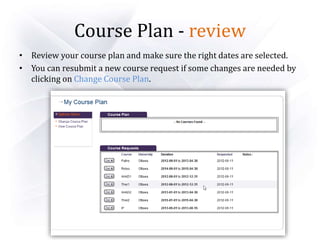
Course Plan - review
• Review your course plan and make sure the right dates are selected.
• You can resubmit a new course request if some changes are needed by
clicking on Change Course Plan.
Payment
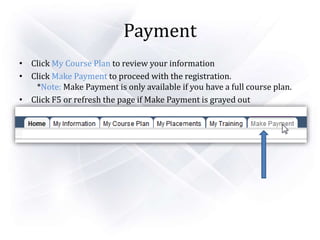
• Click My Course Plan to review your information
• Click Make Payment to proceed with the registration.
*Note: Make Payment is only available if you have a full course plan.
• Click F5 or refresh the page if Make Payment is grayed out
Payment -1 of 3
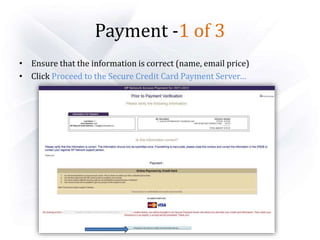
• Ensure that the information is correct (name, email price)
• Click Proceed to the Secure Credit Card Payment Server…
Payment -2 of 3
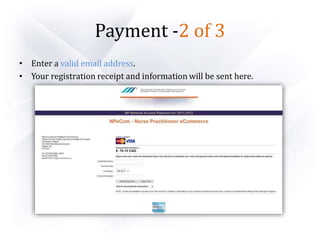
• Enter a valid email address.
• Your registration receipt and information will be sent here.
Payment -3 of 3
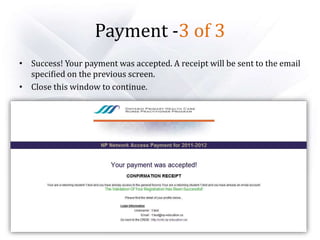
• Success! Your payment was accepted. A receipt will be sent to the email
specified on the previous screen.
• Close this window to continue.
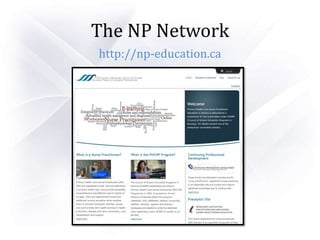
The NP Network
http://np-education.ca
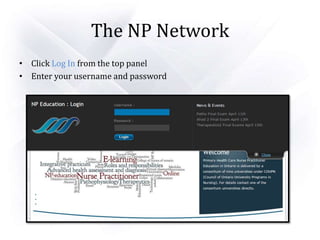
The NP Network
• Click Log In from the top panel
• Enter your username and password
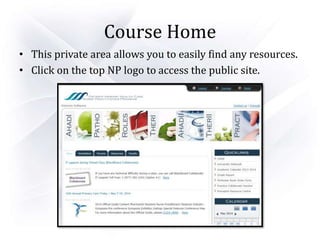
Course Home
• This private area allows you to easily find any resources.
• Click on the top NP logo to access the public site.
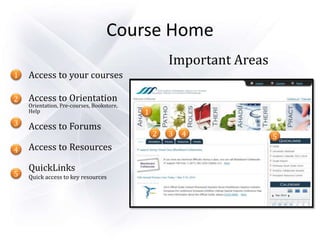
Important Areas
Access to your courses
Access to Orientation
Orientation, Pre-courses, Bookstore,
Help
Access to Forums
Access to Resources
QuickLinks
Quick access to key resources
Course Home
1
2
3
4
5
1
2 3 4 5
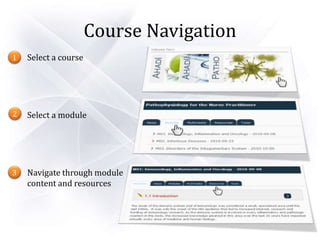
Course Navigation
Select a course
Select a module
Navigate through module
content and resources
1
2
3
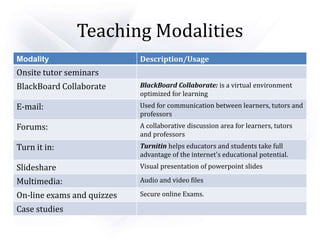
Teaching Modalities
Modality Description/Usage
Onsite tutor seminars
BlackBoard Collaborate BlackBoard Collaborate: is a virtual environment
optimized for learning
E-mail: Used for communication between learners, tutors and
professors
Forums: A collaborative discussion area for learners, tutors
and professors
Turn it in: Turnitin helps educators and students take full
advantage of the internet's educational potential.
Slideshare Visual presentation of powerpoint slides
Multimedia: Audio and video files
On-line exams and quizzes Secure online Exams.
Case studies
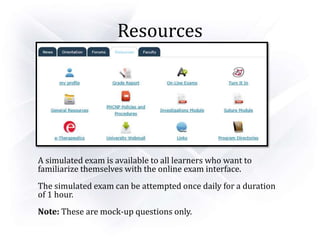
Resources
A simulated exam is available to all learners who want to
familiarize themselves with the online exam interface.
The simulated exam can be attempted once daily for a duration
of 1 hour.
Note: These are mock-up questions only.
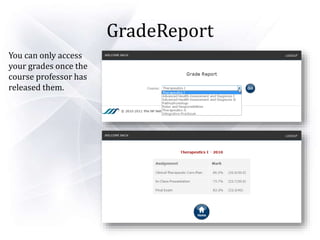
GradeReport
You can only access
your grades once the
course professor has
released them.
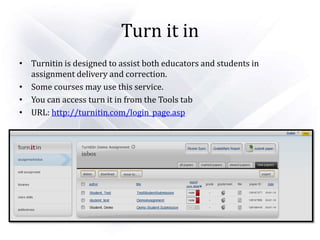
Turn it in
• Turnitin is designed to assist both educators and students in
assignment delivery and correction.
• Some courses may use this service.
• You can access turn it in from the Tools tab
• URL: http://turnitin.com/login_page.asp
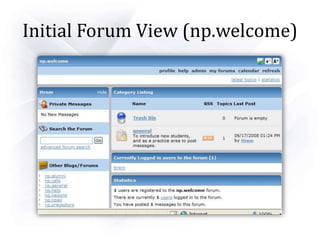
Initial Forum View (np.welcome)
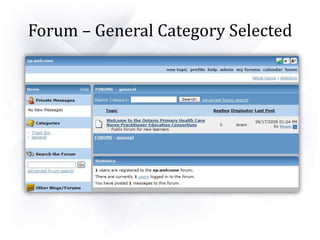
Forum – General Category Selected
Virtual Classroom
• Joining a Chat Room
• The Interface
• Blackboard Collaborate Chat Schedule
• Logitech Headset
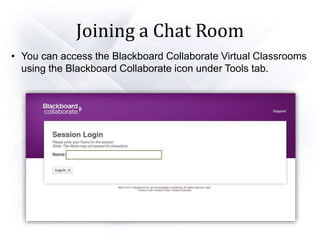
Joining a Chat Room
• You can access the Blackboard Collaborate Virtual Classrooms
using the Blackboard Collaborate icon under Tools tab.
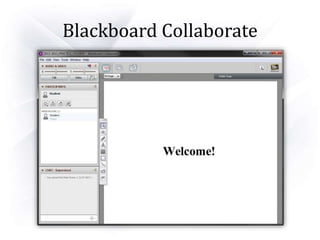
Blackboard Collaborate
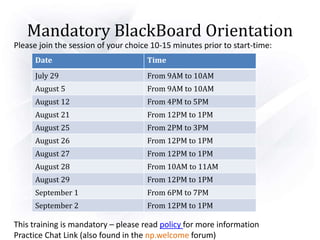
Mandatory BlackBoard Orientation
Please join the session of your choice 10-15 minutes prior to start-time:
This training is mandatory – please read policy for more information
Practice Chat Link (also found in the np.welcome forum)
Date Time
July 29 From 9AM to 10AM
August 5 From 9AM to 10AM
August 12 From 4PM to 5PM
August 21 From 12PM to 1PM
August 25 From 2PM to 3PM
August 26 From 12PM to 1PM
August 27 From 12PM to 1PM
August 28 From 10AM to 11AM
August 29 From 12PM to 1PM
September 1 From 6PM to 7PM
September 2 From 12PM to 1PM
NP Technical Support
University E-Mail Telephone
•Ottawa
•Laurentian
•Queens
•Lakehead
•Mcmaster
•Western
•Windsor
•Ryerson
•York
support@np-education.ca 1-877-676-8102
Thank You!
Please complete the online survey under
Orientations > Orientation Session
(bottom of page) on the NP website

Orientation Session 2014 2015

  • 1.
    Ontario Primary HealthCare Nurse Practitioner Program NP Network Orientation Session Academic Year 2014-2015
  • 2.
    Software Requirements The followingapplications are required for this program: 1. Internet Browser (Internet Explorer 7+ | Firefox | Chrome | Safari) 2. Microsoft Office (There are educational versions available at your library) Note: Free alternate software are available for both Windows and Mac -OpenOffice http://www.openoffice.org 3. Adobe Acrobat Reader
  • 3.
    NP Central Registration •The information you provide in the Central Registry Database (CRDB) controls and provides all access to forums, email, courses and all resources on the NP site. • It is important to notify your University Site Coordinator of any change to your course plan or academic status. • Make sure to update your contact information and demographic data if any change occurs.
  • 4.
    NP Central Registration Goto http://crdb.np-education.ca
  • 5.
    NP Central Registration •Username: – Your username will contain 8 characters or less. • Temporary password: “npeducation Note: Click “My Information” to reset your password • Click on your University for usernames: Ottawa Windsor Laurentian McMaster Ryerson Queen’s Western LakeHead York
  • 6.
    NP Central Registration EmailUpdate • Update your email address: Ensure to update your email under My Information using your university address. Click Submit when finished.
  • 7.
    NP Central Registration PasswordUpdate • Change Login Password: Ensure to update your password under My Information to protect your privacy.
  • 8.
    Course Plan -Step 1 • Click on My Course Plan tab to select your course plan. • Click on Add Course Plan to select your courses.
  • 9.
    Course Plan -Step 2 • Select the course dates and click Finish.
  • 10.
    Course Plan -success • You will receive a confirmation that the request has been sent. • Click Course Plan to review you.
  • 11.
    Course Plan -review • Review your course plan and make sure the right dates are selected. • You can resubmit a new course request if some changes are needed by clicking on Change Course Plan.
  • 12.
    Payment • Click MyCourse Plan to review your information • Click Make Payment to proceed with the registration. *Note: Make Payment is only available if you have a full course plan. • Click F5 or refresh the page if Make Payment is grayed out
  • 13.
    Payment -1 of3 • Ensure that the information is correct (name, email price) • Click Proceed to the Secure Credit Card Payment Server…
  • 14.
    Payment -2 of3 • Enter a valid email address. • Your registration receipt and information will be sent here.
  • 15.
    Payment -3 of3 • Success! Your payment was accepted. A receipt will be sent to the email specified on the previous screen. • Close this window to continue.
  • 16.
  • 17.
    The NP Network •Click Log In from the top panel • Enter your username and password
  • 18.
    Course Home • Thisprivate area allows you to easily find any resources. • Click on the top NP logo to access the public site.
  • 19.
    Important Areas Access toyour courses Access to Orientation Orientation, Pre-courses, Bookstore, Help Access to Forums Access to Resources QuickLinks Quick access to key resources Course Home 1 2 3 4 5 1 2 3 4 5
  • 20.
    Course Navigation Select acourse Select a module Navigate through module content and resources 1 2 3
  • 21.
    Teaching Modalities Modality Description/Usage Onsitetutor seminars BlackBoard Collaborate BlackBoard Collaborate: is a virtual environment optimized for learning E-mail: Used for communication between learners, tutors and professors Forums: A collaborative discussion area for learners, tutors and professors Turn it in: Turnitin helps educators and students take full advantage of the internet's educational potential. Slideshare Visual presentation of powerpoint slides Multimedia: Audio and video files On-line exams and quizzes Secure online Exams. Case studies
  • 22.
    Resources A simulated examis available to all learners who want to familiarize themselves with the online exam interface. The simulated exam can be attempted once daily for a duration of 1 hour. Note: These are mock-up questions only.
  • 23.
    GradeReport You can onlyaccess your grades once the course professor has released them.
  • 24.
    Turn it in •Turnitin is designed to assist both educators and students in assignment delivery and correction. • Some courses may use this service. • You can access turn it in from the Tools tab • URL: http://turnitin.com/login_page.asp
  • 25.
    Initial Forum View(np.welcome)
  • 26.
    Forum – GeneralCategory Selected
  • 27.
    Virtual Classroom • Joininga Chat Room • The Interface • Blackboard Collaborate Chat Schedule • Logitech Headset
  • 28.
    Joining a ChatRoom • You can access the Blackboard Collaborate Virtual Classrooms using the Blackboard Collaborate icon under Tools tab.
  • 29.
  • 30.
    Mandatory BlackBoard Orientation Pleasejoin the session of your choice 10-15 minutes prior to start-time: This training is mandatory – please read policy for more information Practice Chat Link (also found in the np.welcome forum) Date Time July 29 From 9AM to 10AM August 5 From 9AM to 10AM August 12 From 4PM to 5PM August 21 From 12PM to 1PM August 25 From 2PM to 3PM August 26 From 12PM to 1PM August 27 From 12PM to 1PM August 28 From 10AM to 11AM August 29 From 12PM to 1PM September 1 From 6PM to 7PM September 2 From 12PM to 1PM
  • 31.
    NP Technical Support UniversityE-Mail Telephone •Ottawa •Laurentian •Queens •Lakehead •Mcmaster •Western •Windsor •Ryerson •York support@np-education.ca 1-877-676-8102
  • 32.
    Thank You! Please completethe online survey under Orientations > Orientation Session (bottom of page) on the NP website