

PAGE1
Optimize your Database Import!
Dallas Oracle Users Group
Feb 22, 2018
Nabil Nawaz
PAGE2
PRESENTER
NABIL NAWAZ
PAGE2
• Oracle Certified Professional – Cloud IaaS, OCP and Exadata Certified Implementation Specialist
• Oracle Architect/DBA for 20 years, working with Oracle since version 7
• Technical Manager & Pre-Sales/Solutions Architect at BIAS Corporation
• Contributing Author for Book Oracle Exadata Expert’s Handbook
• Experience in Cloud, Virtualization, Exadata, Supercluster, ODS, RAC, Data guard, Performance
Tuning.
• Blog http://nnawaz.blogspot.com/ and on Twitter @Nabil_Nawaz
PRESENTER
NABIL NAWAZ
PAGE5
• Oracle Certified Professional – Cloud IaaS, OCP and Exadata Certified Implementation Specialist
• Oracle Architect/DBA for 20 years, working with Oracle since version 7
• Technical Manager & Pre-Sales/Solutions Architect at BIAS Corporation
• Contributing Author for Book Oracle Exadata Expert’s Handbook
• Experience in Cloud, Virtualization, Exadata, Supercluster, ODS, RAC, Data guard, Performance
Tuning.
• Blog http://nnawaz.blogspot.com/ and on Twitter @Nabil_Nawaz
PRESENTER
NABIL NAWAZ
PAGE5
• Oracle Certified Professional – OCP and Exadata Certified Implementation Specialist
• Oracle Architect/DBA for 20 years, working with Oracle since version 7
• Technical Manager & Pre-Sales/Solutions Architect at BIAS Corporation
• Contributing Author for Book Oracle Exadata Expert’s Handbook
• Experience in Cloud, Virtualization, Exadata, Supercluster, ODA, RAC, Data guard, Performance Tuning.
• Blog http://nnawaz.blogspot.com/ and on Twitter @Nabil_Nawaz
PRESENTER
NABIL NAWAZ
PAGE5
• Oracle Certified Professional – Oracle Cloud IaaS, OCP and Exadata Certified Implementation Specialist
• Oracle Architect/DBA for 20 years, working with Oracle since version 7
• Technical Manager & Pre-Sales/Solutions Architect at BIAS Corporation
• Contributing Author for Book Oracle Exadata Expert’s Handbook
• Experience in Cloud, Virtualization, Exadata, Supercluster, ODA, RAC, Data guard, Performance Tuning.
• Blog http://nnawaz.blogspot.com/ and on Twitter @Nabil_Nawaz
PAGE3
Agenda
• Data pump Overview
• 12c(12.1 & 12.2) New features
• Data guard & Data pump
• Customer case study – Optimizing import
PAGE4
Original Export/Import
• Export/Import Original tool for logical data transfer.
• The original Export utility (exp) writes data from an Oracle database into an operating system file in binary format.
• Dump files can be read into another Oracle database using the original Import utility(imp).
• Original Export is de-supported for general use as of Oracle Database 11g.
• The only supported use of original Export in Oracle Database 11g is backward migration of XMLType data to
Oracle Database 10g release 2 (10.2) or earlier.
PAGE5
What is Data pump?
• Oracle utility that enables data & metadata(DDL) transfer from a source database to a target database.
• Available starting in Oracle Database 10g onwards.
• Can be invoked via the command line as expdp and impdp also Oracle Enterprise Manager
• Data Pump infrastructure is also callable through the PL/SQL package DBMS_DATAPUMP
– How To Use The Data Pump API: DBMS_DATAPUMP (Doc ID 1985310.1)
• Foundation for Transportable tablespace migrations
PAGE6
Data pump Export modes
• A full database export is specified using the FULL parameter.
• A schema export is specified using the SCHEMAS parameter. This is the default export mode.
• A table mode export is specified using the TABLES parameter.
• A tablespace export is specified using the TABLESPACES parameter.
• A transportable tablespace export is specified using the TRANSPORT_TABLESPACES parameter.
PAGE7
Reasons to use Data pump
• Most popular used point-in-time migration tool in the industry for Oracle Databases!
• Platform independent (Solaris, Windows, Linux) – proprietary binary format
• Much faster than traditional exp/imp
• Easy to use similar look and feel to legacy exp/imp
• Compatible across oracle database versions
• Can filter object types and names using the INCLUDE and EXCLUDE clauses
PAGE8
More Reasons to use Data pump
• Plan for space usage of dump files, Estimates the total export dump file size
• Can use parallel on exports and imports*
• PL/SQL callable interface – DBMS_DATAPUMP
• Do not need export dump files can import via the NETWORK_LINK option
• Resumable can be interrupted and restarted
• Can remap schemas and tablespaces on import – REMAP_SCHEMA, REMAP_TABLESPACE
PAGE9
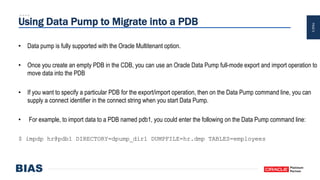
Using Data Pump to Migrate into a PDB
• Data pump is fully supported with the Oracle Multitenant option.
• Once you create an empty PDB in the CDB, you can use an Oracle Data Pump full-mode export and import operation to
move data into the PDB
• If you want to specify a particular PDB for the export/import operation, then on the Data Pump command line, you can
supply a connect identifier in the connect string when you start Data Pump.
• For example, to import data to a PDB named pdb1, you could enter the following on the Data Pump command line:
$ impdp hr@pdb1 DIRECTORY=dpump_dir1 DUMPFILE=hr.dmp TABLES=employees
PAGE10
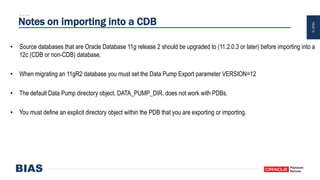
Notes on importing into a CDB
• Source databases that are Oracle Database 11g release 2 should be upgraded to (11.2.0.3 or later) before importing into a
12c (CDB or non-CDB) database.
• When migrating an 11gR2 database you must set the Data Pump Export parameter VERSION=12
• The default Data Pump directory object, DATA_PUMP_DIR, does not work with PDBs.
• You must define an explicit directory object within the PDB that you are exporting or importing.
PAGE11
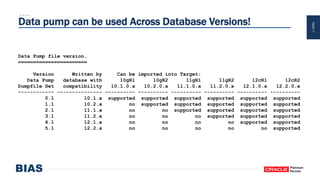
Data pump can be used Across Database Versions!
Data Pump file version.
=======================
Version Written by Can be imported into Target:
Data Pump database with 10gR1 10gR2 11gR1 11gR2 12cR1 12cR2
Dumpfile Set compatibility 10.1.0.x 10.2.0.x 11.1.0.x 11.2.0.x 12.1.0.x 12.2.0.x
------------ --------------- ---------- ---------- ---------- ---------- ---------- ----------
0.1 10.1.x supported supported supported supported supported supported
1.1 10.2.x no supported supported supported supported supported
2.1 11.1.x no no supported supported supported supported
3.1 11.2.x no no no supported supported supported
4.1 12.1.x no no no no supported supported
5.1 12.2.x no no no no no supported
PAGE12
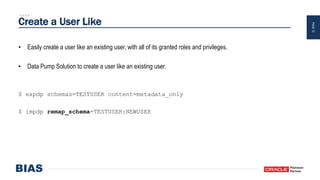
Create a User Like
• Easily create a user like an existing user, with all of its granted roles and privileges.
• Data Pump Solution to create a user like an existing user.
$ expdp schemas=TESTUSER content=metadata_only
$ impdp remap_schema=TESTUSER:NEWUSER
PAGE13
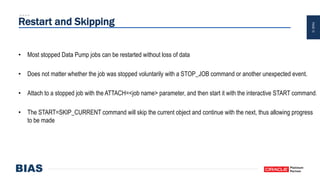
Restart and Skipping
• Most stopped Data Pump jobs can be restarted without loss of data
• Does not matter whether the job was stopped voluntarily with a STOP_JOB command or another unexpected event.
• Attach to a stopped job with the ATTACH=<job name> parameter, and then start it with the interactive START command.
• The START=SKIP_CURRENT command will skip the current object and continue with the next, thus allowing progress
to be made
PAGE14
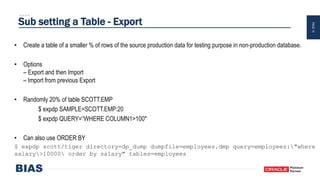
Sub setting a Table - Export
• Create a table of a smaller % of rows of the source production data for testing purpose in non-production database.
• Options
– Export and then Import
– Import from previous Export
• Randomly 20% of table SCOTT.EMP
$ expdp SAMPLE=SCOTT.EMP:20
$ expdp QUERY=“WHERE COLUMN1>100"
• Can also use ORDER BY
$ expdp scott/tiger directory=dp_dump dumpfile=employees.dmp query=employees:"where
salary>10000 order by salary" tables=employees
PAGE15
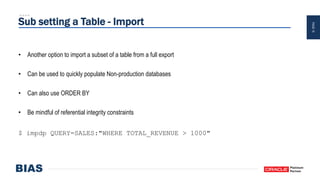
Sub setting a Table - Import
• Another option to import a subset of a table from a full export
• Can be used to quickly populate Non-production databases
• Can also use ORDER BY
• Be mindful of referential integrity constraints
$ impdp QUERY=SALES:"WHERE TOTAL_REVENUE > 1000"
PAGE16
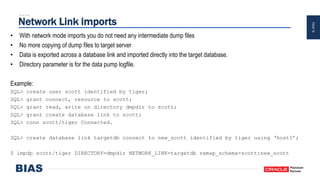
Network Link imports
• With network mode imports you do not need any intermediate dump files
• No more copying of dump files to target server
• Data is exported across a database link and imported directly into the target database.
• Directory parameter is for the data pump logfile.
Example:
SQL> create user scott identified by tiger;
SQL> grant connect, resource to scott;
SQL> grant read, write on directory dmpdir to scott;
SQL> grant create database link to scott;
SQL> conn scott/tiger Connected.
SQL> create database link targetdb connect to new_scott identified by tiger using ‘host1’;
$ impdp scott/tiger DIRECTORY=dmpdir NETWORK_LINK=targetdb remap_schema=scott:new_scott
PAGE17
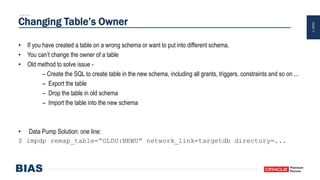
Changing Table’s Owner
• If you have created a table on a wrong schema or want to put into different schema.
• You can’t change the owner of a table
• Old method to solve issue -
– Create the SQL to create table in the new schema, including all grants, triggers, constraints and so on ...
– Export the table
– Drop the table in old schema
– Import the table into the new schema
• Data Pump Solution: one line:
$ impdp remap_table=“OLDU:NEWU” network_link=targetdb directory=...
PAGE18
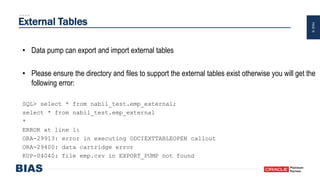
External Tables
• Data pump can export and import external tables
• Please ensure the directory and files to support the external tables exist otherwise you will get the
following error:
SQL> select * from nabil_test.emp_external;
select * from nabil_test.emp_external
*
ERROR at line 1:
ORA-29913: error in executing ODCIEXTTABLEOPEN callout
ORA-29400: data cartridge error
KUP-04040: file emp.csv in EXPORT_PUMP not found
PAGE19
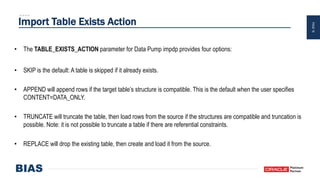
Import Table Exists Action
• The TABLE_EXISTS_ACTION parameter for Data Pump impdp provides four options:
• SKIP is the default: A table is skipped if it already exists.
• APPEND will append rows if the target table’s structure is compatible. This is the default when the user specifies
CONTENT=DATA_ONLY.
• TRUNCATE will truncate the table, then load rows from the source if the structures are compatible and truncation is
possible. Note: it is not possible to truncate a table if there are referential constraints.
• REPLACE will drop the existing table, then create and load it from the source.
PAGE20
Data Pump Views
• Options to monitor Data Pump jobs
• DBA_DATAPUMP_JOBS: This shows a summary of all active Data Pump jobs on the system.
• USER_DATAPUMP_JOBS: This shows a summary of the current user‟s active Data Pump jobs.
• DBA_DATAPUMP_SESSIONS: This shows all sessions currently attached to Data Pump jobs.
• V$SESSION_LONGOPS: A row is maintained in the view showing progress on each active Data Pump job. The
OPNAME column displays the Data Pump job name.
PAGE21
Create SQL for Object Structure
• Very useful feature to create DDL for object from export dump file(s)
• Can generate a SQL file instead of actually performing Import
• The SQL file is written to the directory object specified in the DIRECTORY parameter
• Note that passwords are not included in the SQL file
• Recommended to be used in conjunction with the INCLUDE clause and specify the object type such as table/index
• The SQLFILE parameter cannot be used in conjunction with the QUERY parameter.
PAGE22
Data Pump to the Oracle Cloud
How to Migrate an On-Premises Instance of Oracle Database to Oracle Cloud Using Data Pump
1. On the on-premises database host, invoke Data Pump Export (expdp) and export the on-premises database.
2. Create a new Oracle Database Cloud Service.
3. Connect to the Oracle Database Cloud Service compute node and then use a secure copy utility to transfer the dump
file to the Oracle Database Cloud Service compute node.
4. On the Oracle Database Cloud Service compute node, invoke Data Pump Import (impdp) and import the data into the
database.
5. After verifying that the data has been imported successfully, delete the dump file.
PAGE23PAGE23
Oracle 12c (12.1 & 12.2) New Features
PAGE24
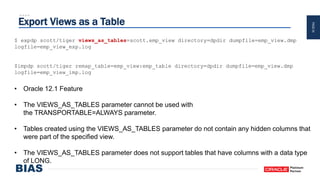
Export Views as a Table
$ expdp scott/tiger views_as_tables=scott.emp_view directory=dpdir dumpfile=emp_view.dmp
logfile=emp_view_exp.log
$impdp scott/tiger remap_table=emp_view:emp_table directory=dpdir dumpfile=emp_view.dmp
logfile=emp_view_imp.log
• Oracle 12.1 Feature
• The VIEWS_AS_TABLES parameter cannot be used with
the TRANSPORTABLE=ALWAYS parameter.
• Tables created using the VIEWS_AS_TABLES parameter do not contain any hidden columns that
were part of the specified view.
• The VIEWS_AS_TABLES parameter does not support tables that have columns with a data type
of LONG.
PAGE25
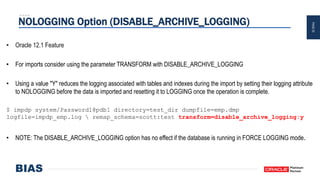
NOLOGGING Option (DISABLE_ARCHIVE_LOGGING)
• Oracle 12.1 Feature
• For imports consider using the parameter TRANSFORM with DISABLE_ARCHIVE_LOGGING
• Using a value "Y" reduces the logging associated with tables and indexes during the import by setting their logging attribute
to NOLOGGING before the data is imported and resetting it to LOGGING once the operation is complete.
$ impdp system/Password1@pdb1 directory=test_dir dumpfile=emp.dmp
logfile=impdp_emp.log  remap_schema=scott:test transform=disable_archive_logging:y
• NOTE: The DISABLE_ARCHIVE_LOGGING option has no effect if the database is running in FORCE LOGGING mode.
PAGE26
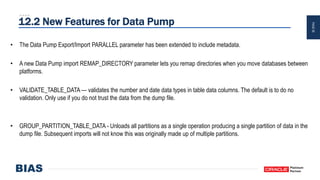
12.2 New Features for Data Pump
• The Data Pump Export/Import PARALLEL parameter has been extended to include metadata.
• A new Data Pump import REMAP_DIRECTORY parameter lets you remap directories when you move databases between
platforms.
• VALIDATE_TABLE_DATA — validates the number and date data types in table data columns. The default is to do no
validation. Only use if you do not trust the data from the dump file.
• GROUP_PARTITION_TABLE_DATA - Unloads all partitions as a single operation producing a single partition of data in the
dump file. Subsequent imports will not know this was originally made up of multiple partitions.
PAGE27
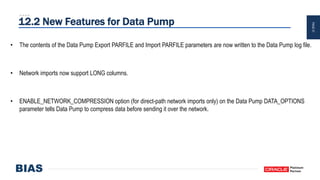
12.2 New Features for Data Pump
• The contents of the Data Pump Export PARFILE and Import PARFILE parameters are now written to the Data Pump log file.
• Network imports now support LONG columns.
• ENABLE_NETWORK_COMPRESSION option (for direct-path network imports only) on the Data Pump DATA_OPTIONS
parameter tells Data Pump to compress data before sending it over the network.
PAGE28
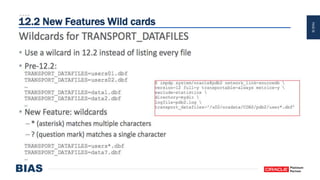
12.2 New Features Wild cards
PAGE29
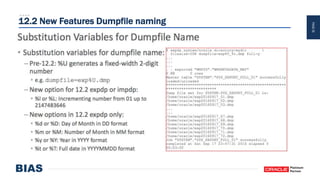
12.2 New Features Dumpfile naming
PAGE30
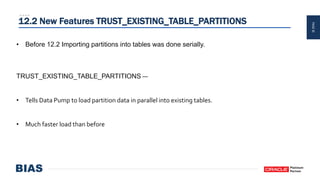
12.2 New Features TRUST_EXISTING_TABLE_PARTITIONS
• Before 12.2 Importing partitions into tables was done serially.
TRUST_EXISTING_TABLE_PARTITIONS —
• Tells Data Pump to load partition data in parallel into existing tables.
• Much faster load than before
PAGE31PAGE31
Data Pump and Data Guard
PAGE32
Data Pump and Data Guard a compatible match!
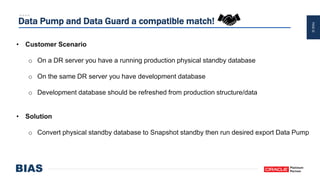
• Customer Scenario
o On a DR server you have a running production physical standby database
o On the same DR server you have development database
o Development database should be refreshed from production structure/data
• Solution
o Convert physical standby database to Snapshot standby then run desired export Data Pump
PAGE33
Physical Standby to Snapshot Standby Steps
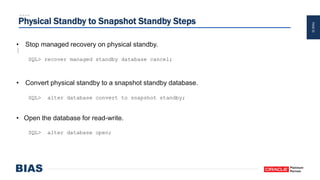
• Stop managed recovery on physical standby.
SQL> recover managed standby database cancel;
• Convert physical standby to a snapshot standby database.
SQL> alter database convert to snapshot standby;
• Open the database for read-write.
SQL> alter database open;
PAGE34
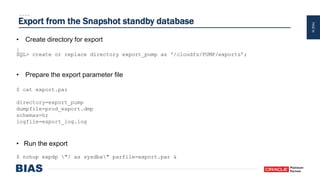
Export from the Snapshot standby database
• Create directory for export
SQL> create or replace directory export_pump as '/cloudfs/PUMP/exports’;
• Prepare the export parameter file
$ cat export.par
directory=export_pump
dumpfile=prod_export.dmp
schemas=hr
logfile=export_log.log
• Run the export
$ nohup expdp "/ as sysdba" parfile=export.par &
PAGE35
Convert back to Physical Standby
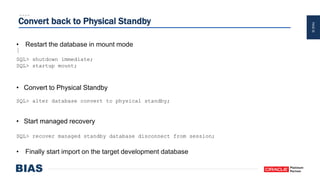
• Restart the database in mount mode
SQL> shutdown immediate;
SQL> startup mount;
• Convert to Physical Standby
SQL> alter database convert to physical standby;
• Start managed recovery
SQL> recover managed standby database disconnect from session;
• Finally start import on the target development database
PAGE36PAGE36
Optimizing Data Pump Case Study
PAGE37
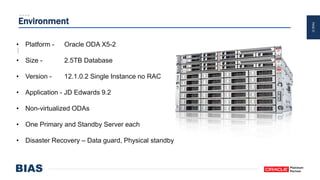
Environment
• Platform - Oracle ODA X5-2
• Size - 2.5TB Database
• Version - 12.1.0.2 Single Instance no RAC
• Application - JD Edwards 9.2
• Non-virtualized ODAs
• One Primary and Standby Server each
• Disaster Recovery – Data guard, Physical standby
PAGE38
Original timings
• Export Data pump – 30-35 minutes
o FLASHBACK_time=systimestamp
• Compressed dump file size 70GB
• Import Data pump took a whopping 32-36 hours!
• Wait almost 1.5 days just for an Import to run
PAGE39
Bottleneck and Problem
• Index build
• Constraint build
• Single threaded index/constraint creation
• Logged operations
PAGE40
Import Optimization Steps
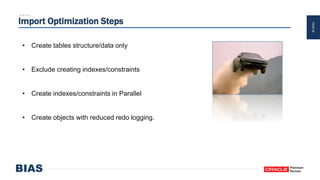
• Create tables structure/data only
• Exclude creating indexes/constraints
• Create indexes/constraints in Parallel
• Create objects with reduced redo logging.
PAGE41
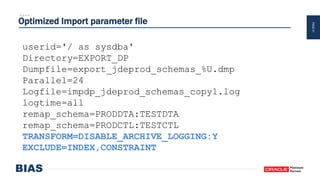
Optimized Import parameter file
userid='/ as sysdba'
Directory=EXPORT_DP
Dumpfile=export_jdeprod_schemas_%U.dmp
Parallel=24
Logfile=impdp_jdeprod_schemas_copy1.log
logtime=all
remap_schema=PRODDTA:TESTDTA
remap_schema=PRODCTL:TESTCTL
TRANSFORM=DISABLE_ARCHIVE_LOGGING:Y
EXCLUDE=INDEX,CONSTRAINT
PAGE42
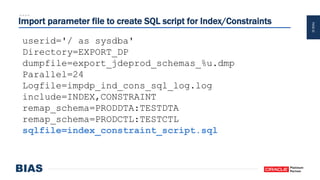
Import parameter file to create SQL script for Index/Constraints
userid='/ as sysdba'
Directory=EXPORT_DP
dumpfile=export_jdeprod_schemas_%u.dmp
Parallel=24
Logfile=impdp_ind_cons_sql_log.log
include=INDEX,CONSTRAINT
remap_schema=PRODDTA:TESTDTA
remap_schema=PRODCTL:TESTCTL
sqlfile=index_constraint_script.sql
PAGE43
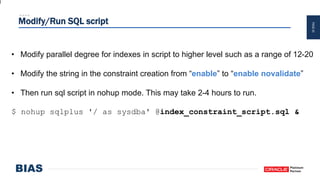
Modify/Run SQL script
• Modify parallel degree for indexes in script to higher level such as a range of 12-20
• Modify the string in the constraint creation from “enable” to “enable novalidate”
• Then run sql script in nohup mode. This may take 2-4 hours to run.
$ nohup sqlplus '/ as sysdba' @index_constraint_script.sql &
PAGE44
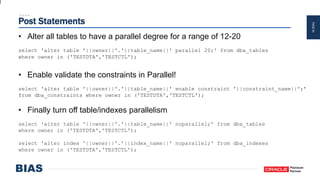
Post Statements
• Alter all tables to have a parallel degree for a range of 12-20
select 'alter table '||owner||'.'||table_name||' parallel 20;' from dba_tables
where owner in ('TESTDTA','TESTCTL');
• Enable validate the constraints in Parallel!
select 'alter table '||owner||'.'||table_name||' enable constraint '||constraint_name||';’
from dba_constraints where owner in ('TESTDTA','TESTCTL');
• Finally turn off table/indexes parallelism
select 'alter table '||owner||'.'||table_name||' noparallel;' from dba_tables
where owner in ('TESTDTA','TESTCTL');
select 'alter index '||owner||'.’||index_name||' noparallel;' from dba_indexes
where owner in ('TESTDTA','TESTCTL');
PAGE45
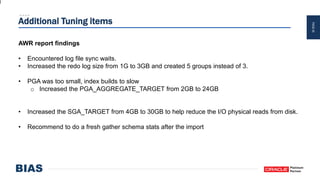
Additional Tuning items
AWR report findings
• Encountered log file sync waits.
• Increased the redo log size from 1G to 3GB and created 5 groups instead of 3.
• PGA was too small, index builds to slow
o Increased the PGA_AGGREGATE_TARGET from 2GB to 24GB
• Increased the SGA_TARGET from 4GB to 30GB to help reduce the I/O physical reads from disk.
• Recommend to do a fresh gather schema stats after the import
PAGE46
Solution for Parallel index/constraint creation
• Issue is resolved in 12.2
• Patch for bug 22273229
o Indexes are created in parallel
o Constraints are created in parallel
o Backport patch for 11.2.0.4 and 12.1.0.2 for import data pump
PAGE47
Nabil Nawaz
Technical Manager
Nabil.Nawaz@biascorp.com
PAGE48
About BIAS Corporation
• Founded in 2000
• Distinguished Oracle Leader
– Oracle Excellence Award – Big Data Analytics
– Technology Momentum Award
– Portal Blazer Award
– Titan Award – Red Stack + HW Momentum Awards
– Excellence in Innovation Award
• Management Team is Ex-Oracle
• Location(s): Headquartered in Atlanta; Regional offices in Reston, VA, Denver, CO and Charlotte,
NC; Offshore – Hyderabad and Bangalore, India
• ~300 employees with 10+ years of Oracle experience on average
• Inc.500|5000 Fastest Growing Private Company in the U.S. for the 8th Time
• Voted Best Place to work in Atlanta for 2nd year
• 35 Oracle Specializations spanning the entire stack
O V E R V I E W
PAGE49
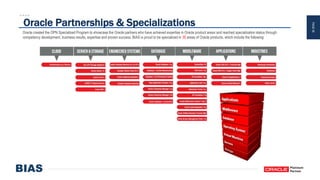
Oracle created the OPN Specialized Program to showcase the Oracle partners who have achieved expertise in Oracle product areas and reached specialization status through
competency development, business results, expertise and proven success. BIAS is proud to be specialized in 35 areas of Oracle products, which include the following:
Oracle Partnerships & Specializations
PAGE50
About BIAS Corporation Accolades
• Last weekend large JD Edwards implementation from 8.1 to 9.2 along with migration from
AS400/DB2 to the Oracle ODA platform.
• Leading migration project for one of the large Exadata Implementations in the world, over
5,000 databases!
• Leading large multi-phase Data guard implementation project for New Datacenter for large
fortune 500 company.
• We regularly speak at Oracle Open World and Collaborate and Oracle User Groups
O V E R V I E W
PAGE51
BIAS Receives Oracle
Partner Achievement
Award in PaaS/IaaS Cloud

Optimizing your Database Import!

  • 1.
    PAGE1 Optimize your DatabaseImport! Dallas Oracle Users Group Feb 22, 2018 Nabil Nawaz
  • 2.
    PAGE2 PRESENTER NABIL NAWAZ PAGE2 • OracleCertified Professional – Cloud IaaS, OCP and Exadata Certified Implementation Specialist • Oracle Architect/DBA for 20 years, working with Oracle since version 7 • Technical Manager & Pre-Sales/Solutions Architect at BIAS Corporation • Contributing Author for Book Oracle Exadata Expert’s Handbook • Experience in Cloud, Virtualization, Exadata, Supercluster, ODS, RAC, Data guard, Performance Tuning. • Blog http://nnawaz.blogspot.com/ and on Twitter @Nabil_Nawaz PRESENTER NABIL NAWAZ PAGE5 • Oracle Certified Professional – Cloud IaaS, OCP and Exadata Certified Implementation Specialist • Oracle Architect/DBA for 20 years, working with Oracle since version 7 • Technical Manager & Pre-Sales/Solutions Architect at BIAS Corporation • Contributing Author for Book Oracle Exadata Expert’s Handbook • Experience in Cloud, Virtualization, Exadata, Supercluster, ODS, RAC, Data guard, Performance Tuning. • Blog http://nnawaz.blogspot.com/ and on Twitter @Nabil_Nawaz PRESENTER NABIL NAWAZ PAGE5 • Oracle Certified Professional – OCP and Exadata Certified Implementation Specialist • Oracle Architect/DBA for 20 years, working with Oracle since version 7 • Technical Manager & Pre-Sales/Solutions Architect at BIAS Corporation • Contributing Author for Book Oracle Exadata Expert’s Handbook • Experience in Cloud, Virtualization, Exadata, Supercluster, ODA, RAC, Data guard, Performance Tuning. • Blog http://nnawaz.blogspot.com/ and on Twitter @Nabil_Nawaz PRESENTER NABIL NAWAZ PAGE5 • Oracle Certified Professional – Oracle Cloud IaaS, OCP and Exadata Certified Implementation Specialist • Oracle Architect/DBA for 20 years, working with Oracle since version 7 • Technical Manager & Pre-Sales/Solutions Architect at BIAS Corporation • Contributing Author for Book Oracle Exadata Expert’s Handbook • Experience in Cloud, Virtualization, Exadata, Supercluster, ODA, RAC, Data guard, Performance Tuning. • Blog http://nnawaz.blogspot.com/ and on Twitter @Nabil_Nawaz
  • 3.
    PAGE3 Agenda • Data pumpOverview • 12c(12.1 & 12.2) New features • Data guard & Data pump • Customer case study – Optimizing import
  • 4.
    PAGE4 Original Export/Import • Export/ImportOriginal tool for logical data transfer. • The original Export utility (exp) writes data from an Oracle database into an operating system file in binary format. • Dump files can be read into another Oracle database using the original Import utility(imp). • Original Export is de-supported for general use as of Oracle Database 11g. • The only supported use of original Export in Oracle Database 11g is backward migration of XMLType data to Oracle Database 10g release 2 (10.2) or earlier.
  • 5.
    PAGE5 What is Datapump? • Oracle utility that enables data & metadata(DDL) transfer from a source database to a target database. • Available starting in Oracle Database 10g onwards. • Can be invoked via the command line as expdp and impdp also Oracle Enterprise Manager • Data Pump infrastructure is also callable through the PL/SQL package DBMS_DATAPUMP – How To Use The Data Pump API: DBMS_DATAPUMP (Doc ID 1985310.1) • Foundation for Transportable tablespace migrations
  • 6.
    PAGE6 Data pump Exportmodes • A full database export is specified using the FULL parameter. • A schema export is specified using the SCHEMAS parameter. This is the default export mode. • A table mode export is specified using the TABLES parameter. • A tablespace export is specified using the TABLESPACES parameter. • A transportable tablespace export is specified using the TRANSPORT_TABLESPACES parameter.
  • 7.
    PAGE7 Reasons to useData pump • Most popular used point-in-time migration tool in the industry for Oracle Databases! • Platform independent (Solaris, Windows, Linux) – proprietary binary format • Much faster than traditional exp/imp • Easy to use similar look and feel to legacy exp/imp • Compatible across oracle database versions • Can filter object types and names using the INCLUDE and EXCLUDE clauses
  • 8.
    PAGE8 More Reasons touse Data pump • Plan for space usage of dump files, Estimates the total export dump file size • Can use parallel on exports and imports* • PL/SQL callable interface – DBMS_DATAPUMP • Do not need export dump files can import via the NETWORK_LINK option • Resumable can be interrupted and restarted • Can remap schemas and tablespaces on import – REMAP_SCHEMA, REMAP_TABLESPACE
  • 9.
    PAGE9 Using Data Pumpto Migrate into a PDB • Data pump is fully supported with the Oracle Multitenant option. • Once you create an empty PDB in the CDB, you can use an Oracle Data Pump full-mode export and import operation to move data into the PDB • If you want to specify a particular PDB for the export/import operation, then on the Data Pump command line, you can supply a connect identifier in the connect string when you start Data Pump. • For example, to import data to a PDB named pdb1, you could enter the following on the Data Pump command line: $ impdp hr@pdb1 DIRECTORY=dpump_dir1 DUMPFILE=hr.dmp TABLES=employees
  • 10.
    PAGE10 Notes on importinginto a CDB • Source databases that are Oracle Database 11g release 2 should be upgraded to (11.2.0.3 or later) before importing into a 12c (CDB or non-CDB) database. • When migrating an 11gR2 database you must set the Data Pump Export parameter VERSION=12 • The default Data Pump directory object, DATA_PUMP_DIR, does not work with PDBs. • You must define an explicit directory object within the PDB that you are exporting or importing.
  • 11.
    PAGE11 Data pump canbe used Across Database Versions! Data Pump file version. ======================= Version Written by Can be imported into Target: Data Pump database with 10gR1 10gR2 11gR1 11gR2 12cR1 12cR2 Dumpfile Set compatibility 10.1.0.x 10.2.0.x 11.1.0.x 11.2.0.x 12.1.0.x 12.2.0.x ------------ --------------- ---------- ---------- ---------- ---------- ---------- ---------- 0.1 10.1.x supported supported supported supported supported supported 1.1 10.2.x no supported supported supported supported supported 2.1 11.1.x no no supported supported supported supported 3.1 11.2.x no no no supported supported supported 4.1 12.1.x no no no no supported supported 5.1 12.2.x no no no no no supported
  • 12.
    PAGE12 Create a UserLike • Easily create a user like an existing user, with all of its granted roles and privileges. • Data Pump Solution to create a user like an existing user. $ expdp schemas=TESTUSER content=metadata_only $ impdp remap_schema=TESTUSER:NEWUSER
  • 13.
    PAGE13 Restart and Skipping •Most stopped Data Pump jobs can be restarted without loss of data • Does not matter whether the job was stopped voluntarily with a STOP_JOB command or another unexpected event. • Attach to a stopped job with the ATTACH=<job name> parameter, and then start it with the interactive START command. • The START=SKIP_CURRENT command will skip the current object and continue with the next, thus allowing progress to be made
  • 14.
    PAGE14 Sub setting aTable - Export • Create a table of a smaller % of rows of the source production data for testing purpose in non-production database. • Options – Export and then Import – Import from previous Export • Randomly 20% of table SCOTT.EMP $ expdp SAMPLE=SCOTT.EMP:20 $ expdp QUERY=“WHERE COLUMN1>100" • Can also use ORDER BY $ expdp scott/tiger directory=dp_dump dumpfile=employees.dmp query=employees:"where salary>10000 order by salary" tables=employees
  • 15.
    PAGE15 Sub setting aTable - Import • Another option to import a subset of a table from a full export • Can be used to quickly populate Non-production databases • Can also use ORDER BY • Be mindful of referential integrity constraints $ impdp QUERY=SALES:"WHERE TOTAL_REVENUE > 1000"
  • 16.
    PAGE16 Network Link imports •With network mode imports you do not need any intermediate dump files • No more copying of dump files to target server • Data is exported across a database link and imported directly into the target database. • Directory parameter is for the data pump logfile. Example: SQL> create user scott identified by tiger; SQL> grant connect, resource to scott; SQL> grant read, write on directory dmpdir to scott; SQL> grant create database link to scott; SQL> conn scott/tiger Connected. SQL> create database link targetdb connect to new_scott identified by tiger using ‘host1’; $ impdp scott/tiger DIRECTORY=dmpdir NETWORK_LINK=targetdb remap_schema=scott:new_scott
  • 17.
    PAGE17 Changing Table’s Owner •If you have created a table on a wrong schema or want to put into different schema. • You can’t change the owner of a table • Old method to solve issue - – Create the SQL to create table in the new schema, including all grants, triggers, constraints and so on ... – Export the table – Drop the table in old schema – Import the table into the new schema • Data Pump Solution: one line: $ impdp remap_table=“OLDU:NEWU” network_link=targetdb directory=...
  • 18.
    PAGE18 External Tables • Datapump can export and import external tables • Please ensure the directory and files to support the external tables exist otherwise you will get the following error: SQL> select * from nabil_test.emp_external; select * from nabil_test.emp_external * ERROR at line 1: ORA-29913: error in executing ODCIEXTTABLEOPEN callout ORA-29400: data cartridge error KUP-04040: file emp.csv in EXPORT_PUMP not found
  • 19.
    PAGE19 Import Table ExistsAction • The TABLE_EXISTS_ACTION parameter for Data Pump impdp provides four options: • SKIP is the default: A table is skipped if it already exists. • APPEND will append rows if the target table’s structure is compatible. This is the default when the user specifies CONTENT=DATA_ONLY. • TRUNCATE will truncate the table, then load rows from the source if the structures are compatible and truncation is possible. Note: it is not possible to truncate a table if there are referential constraints. • REPLACE will drop the existing table, then create and load it from the source.
  • 20.
    PAGE20 Data Pump Views •Options to monitor Data Pump jobs • DBA_DATAPUMP_JOBS: This shows a summary of all active Data Pump jobs on the system. • USER_DATAPUMP_JOBS: This shows a summary of the current user‟s active Data Pump jobs. • DBA_DATAPUMP_SESSIONS: This shows all sessions currently attached to Data Pump jobs. • V$SESSION_LONGOPS: A row is maintained in the view showing progress on each active Data Pump job. The OPNAME column displays the Data Pump job name.
  • 21.
    PAGE21 Create SQL forObject Structure • Very useful feature to create DDL for object from export dump file(s) • Can generate a SQL file instead of actually performing Import • The SQL file is written to the directory object specified in the DIRECTORY parameter • Note that passwords are not included in the SQL file • Recommended to be used in conjunction with the INCLUDE clause and specify the object type such as table/index • The SQLFILE parameter cannot be used in conjunction with the QUERY parameter.
  • 22.
    PAGE22 Data Pump tothe Oracle Cloud How to Migrate an On-Premises Instance of Oracle Database to Oracle Cloud Using Data Pump 1. On the on-premises database host, invoke Data Pump Export (expdp) and export the on-premises database. 2. Create a new Oracle Database Cloud Service. 3. Connect to the Oracle Database Cloud Service compute node and then use a secure copy utility to transfer the dump file to the Oracle Database Cloud Service compute node. 4. On the Oracle Database Cloud Service compute node, invoke Data Pump Import (impdp) and import the data into the database. 5. After verifying that the data has been imported successfully, delete the dump file.
  • 23.
    PAGE23PAGE23 Oracle 12c (12.1& 12.2) New Features
  • 24.
    PAGE24 Export Views asa Table $ expdp scott/tiger views_as_tables=scott.emp_view directory=dpdir dumpfile=emp_view.dmp logfile=emp_view_exp.log $impdp scott/tiger remap_table=emp_view:emp_table directory=dpdir dumpfile=emp_view.dmp logfile=emp_view_imp.log • Oracle 12.1 Feature • The VIEWS_AS_TABLES parameter cannot be used with the TRANSPORTABLE=ALWAYS parameter. • Tables created using the VIEWS_AS_TABLES parameter do not contain any hidden columns that were part of the specified view. • The VIEWS_AS_TABLES parameter does not support tables that have columns with a data type of LONG.
  • 25.
    PAGE25 NOLOGGING Option (DISABLE_ARCHIVE_LOGGING) •Oracle 12.1 Feature • For imports consider using the parameter TRANSFORM with DISABLE_ARCHIVE_LOGGING • Using a value "Y" reduces the logging associated with tables and indexes during the import by setting their logging attribute to NOLOGGING before the data is imported and resetting it to LOGGING once the operation is complete. $ impdp system/Password1@pdb1 directory=test_dir dumpfile=emp.dmp logfile=impdp_emp.log remap_schema=scott:test transform=disable_archive_logging:y • NOTE: The DISABLE_ARCHIVE_LOGGING option has no effect if the database is running in FORCE LOGGING mode.
  • 26.
    PAGE26 12.2 New Featuresfor Data Pump • The Data Pump Export/Import PARALLEL parameter has been extended to include metadata. • A new Data Pump import REMAP_DIRECTORY parameter lets you remap directories when you move databases between platforms. • VALIDATE_TABLE_DATA — validates the number and date data types in table data columns. The default is to do no validation. Only use if you do not trust the data from the dump file. • GROUP_PARTITION_TABLE_DATA - Unloads all partitions as a single operation producing a single partition of data in the dump file. Subsequent imports will not know this was originally made up of multiple partitions.
  • 27.
    PAGE27 12.2 New Featuresfor Data Pump • The contents of the Data Pump Export PARFILE and Import PARFILE parameters are now written to the Data Pump log file. • Network imports now support LONG columns. • ENABLE_NETWORK_COMPRESSION option (for direct-path network imports only) on the Data Pump DATA_OPTIONS parameter tells Data Pump to compress data before sending it over the network.
  • 28.
  • 29.
    PAGE29 12.2 New FeaturesDumpfile naming
  • 30.
    PAGE30 12.2 New FeaturesTRUST_EXISTING_TABLE_PARTITIONS • Before 12.2 Importing partitions into tables was done serially. TRUST_EXISTING_TABLE_PARTITIONS — • Tells Data Pump to load partition data in parallel into existing tables. • Much faster load than before
  • 31.
  • 32.
    PAGE32 Data Pump andData Guard a compatible match! • Customer Scenario o On a DR server you have a running production physical standby database o On the same DR server you have development database o Development database should be refreshed from production structure/data • Solution o Convert physical standby database to Snapshot standby then run desired export Data Pump
  • 33.
    PAGE33 Physical Standby toSnapshot Standby Steps • Stop managed recovery on physical standby. SQL> recover managed standby database cancel; • Convert physical standby to a snapshot standby database. SQL> alter database convert to snapshot standby; • Open the database for read-write. SQL> alter database open;
  • 34.
    PAGE34 Export from theSnapshot standby database • Create directory for export SQL> create or replace directory export_pump as '/cloudfs/PUMP/exports’; • Prepare the export parameter file $ cat export.par directory=export_pump dumpfile=prod_export.dmp schemas=hr logfile=export_log.log • Run the export $ nohup expdp "/ as sysdba" parfile=export.par &
  • 35.
    PAGE35 Convert back toPhysical Standby • Restart the database in mount mode SQL> shutdown immediate; SQL> startup mount; • Convert to Physical Standby SQL> alter database convert to physical standby; • Start managed recovery SQL> recover managed standby database disconnect from session; • Finally start import on the target development database
  • 36.
  • 37.
    PAGE37 Environment • Platform -Oracle ODA X5-2 • Size - 2.5TB Database • Version - 12.1.0.2 Single Instance no RAC • Application - JD Edwards 9.2 • Non-virtualized ODAs • One Primary and Standby Server each • Disaster Recovery – Data guard, Physical standby
  • 38.
    PAGE38 Original timings • ExportData pump – 30-35 minutes o FLASHBACK_time=systimestamp • Compressed dump file size 70GB • Import Data pump took a whopping 32-36 hours! • Wait almost 1.5 days just for an Import to run
  • 39.
    PAGE39 Bottleneck and Problem •Index build • Constraint build • Single threaded index/constraint creation • Logged operations
  • 40.
    PAGE40 Import Optimization Steps •Create tables structure/data only • Exclude creating indexes/constraints • Create indexes/constraints in Parallel • Create objects with reduced redo logging.
  • 41.
    PAGE41 Optimized Import parameterfile userid='/ as sysdba' Directory=EXPORT_DP Dumpfile=export_jdeprod_schemas_%U.dmp Parallel=24 Logfile=impdp_jdeprod_schemas_copy1.log logtime=all remap_schema=PRODDTA:TESTDTA remap_schema=PRODCTL:TESTCTL TRANSFORM=DISABLE_ARCHIVE_LOGGING:Y EXCLUDE=INDEX,CONSTRAINT
  • 42.
    PAGE42 Import parameter fileto create SQL script for Index/Constraints userid='/ as sysdba' Directory=EXPORT_DP dumpfile=export_jdeprod_schemas_%u.dmp Parallel=24 Logfile=impdp_ind_cons_sql_log.log include=INDEX,CONSTRAINT remap_schema=PRODDTA:TESTDTA remap_schema=PRODCTL:TESTCTL sqlfile=index_constraint_script.sql
  • 43.
    PAGE43 Modify/Run SQL script •Modify parallel degree for indexes in script to higher level such as a range of 12-20 • Modify the string in the constraint creation from “enable” to “enable novalidate” • Then run sql script in nohup mode. This may take 2-4 hours to run. $ nohup sqlplus '/ as sysdba' @index_constraint_script.sql &
  • 44.
    PAGE44 Post Statements • Alterall tables to have a parallel degree for a range of 12-20 select 'alter table '||owner||'.'||table_name||' parallel 20;' from dba_tables where owner in ('TESTDTA','TESTCTL'); • Enable validate the constraints in Parallel! select 'alter table '||owner||'.'||table_name||' enable constraint '||constraint_name||';’ from dba_constraints where owner in ('TESTDTA','TESTCTL'); • Finally turn off table/indexes parallelism select 'alter table '||owner||'.'||table_name||' noparallel;' from dba_tables where owner in ('TESTDTA','TESTCTL'); select 'alter index '||owner||'.’||index_name||' noparallel;' from dba_indexes where owner in ('TESTDTA','TESTCTL');
  • 45.
    PAGE45 Additional Tuning items AWRreport findings • Encountered log file sync waits. • Increased the redo log size from 1G to 3GB and created 5 groups instead of 3. • PGA was too small, index builds to slow o Increased the PGA_AGGREGATE_TARGET from 2GB to 24GB • Increased the SGA_TARGET from 4GB to 30GB to help reduce the I/O physical reads from disk. • Recommend to do a fresh gather schema stats after the import
  • 46.
    PAGE46 Solution for Parallelindex/constraint creation • Issue is resolved in 12.2 • Patch for bug 22273229 o Indexes are created in parallel o Constraints are created in parallel o Backport patch for 11.2.0.4 and 12.1.0.2 for import data pump
  • 47.
  • 48.
    PAGE48 About BIAS Corporation •Founded in 2000 • Distinguished Oracle Leader – Oracle Excellence Award – Big Data Analytics – Technology Momentum Award – Portal Blazer Award – Titan Award – Red Stack + HW Momentum Awards – Excellence in Innovation Award • Management Team is Ex-Oracle • Location(s): Headquartered in Atlanta; Regional offices in Reston, VA, Denver, CO and Charlotte, NC; Offshore – Hyderabad and Bangalore, India • ~300 employees with 10+ years of Oracle experience on average • Inc.500|5000 Fastest Growing Private Company in the U.S. for the 8th Time • Voted Best Place to work in Atlanta for 2nd year • 35 Oracle Specializations spanning the entire stack O V E R V I E W
  • 49.
    PAGE49 Oracle created theOPN Specialized Program to showcase the Oracle partners who have achieved expertise in Oracle product areas and reached specialization status through competency development, business results, expertise and proven success. BIAS is proud to be specialized in 35 areas of Oracle products, which include the following: Oracle Partnerships & Specializations
  • 50.
    PAGE50 About BIAS CorporationAccolades • Last weekend large JD Edwards implementation from 8.1 to 9.2 along with migration from AS400/DB2 to the Oracle ODA platform. • Leading migration project for one of the large Exadata Implementations in the world, over 5,000 databases! • Leading large multi-phase Data guard implementation project for New Datacenter for large fortune 500 company. • We regularly speak at Oracle Open World and Collaborate and Oracle User Groups O V E R V I E W
  • 51.
    PAGE51 BIAS Receives Oracle PartnerAchievement Award in PaaS/IaaS Cloud

Editor's Notes

  • #2 Good evening everyone thank you for coming tonight. Thank you Mary Elizabeth and the Dallas OUG for having me back once again. My topic today is Optimize you database import.
  • #17 Please note you should have a good network pipe otherwise this option will not be viable
  • #19 After import you may get error above.
  • #34 Snapshot standby available starting from 11g(11.1)
  • #39 Always use FLASHBACK_time=systimestamp for a point in time consistent export!
  • #42 Reduce redo logging for tables/indexes during the import Table load only no indexes or constraints are built
  • #44 Note enabling parallel DDL is not required is it enabled by default
  • #45 Note enabling parallel DDL is not required is it enabled by default
  • #47 For 11.2.0.4 special request will need to be made since it is not online
  • #49 Cloud Select Platinum Partner
  • #50 One of the Largest Exadata migration in the world nearly 6000 databases!
  • #51 Cloud Select Platinum Partner