Optimizing Application
Performance on
Kubernetes
Dinakar Guniguntala @dinogun
Runtimes Cloud Architect, IBM
@dinogun 2
“When you interact with IBM, this serves as your
authorization to Saltmarch Media India Pvt. Ltd. or its
vendor to provide your contact information to IBM in order
for IBM to follow up on your interaction.  IBM's use of your
contact information is governed by the IBM Privacy Policy. “
@dinogun 3
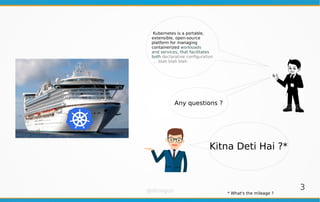
Kubernetes is a portable,
extensible, open-source
platform for managing
containerized workloads
and services, that facilitates
both declarative configuration
… blah blah blah
Kitna Deti Hai ?*
Any questions ?
* What's the mileage ?
@dinogun 4
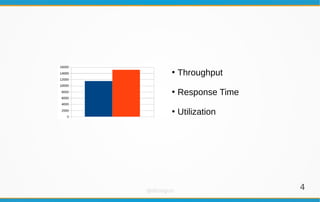
●
Throughput
●
Response Time
●
Utilization
@dinogun 5
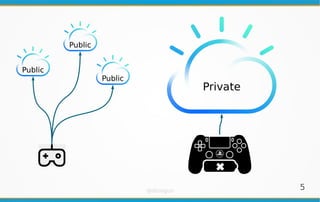
Public
Private
Public
Public
@dinogun 6
BIOS
●
CPU Power and Performance Policy: <Performance>
OS / Hypervisor
●
CPU Scaling governor: <Performance>
$ cat /sys/devices/system/cpu/cpu0/cpufreq/scaling_available_governors
performance powersave
$ cat /sys/devices/system/cpu/cpu0/cpufreq/scaling_governor
Performance
Hyperthreading
●
Do not count hyperthreading while capacity planning
Don’t forget the hardware !
@dinogun 7
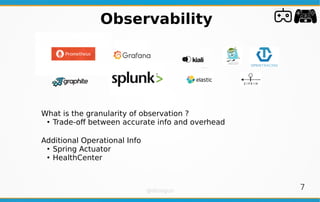
What is the granularity of observation ?
●
Trade-off between accurate info and overhead
Additional Operational Info
●
Spring Actuator
●
HealthCenter
Observability
@dinogun 8
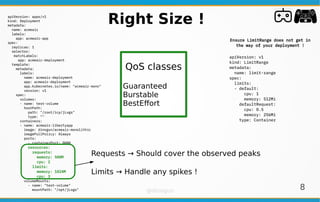
QoS classes
Guaranteed
Burstable
BestEffort
Right Size !apiVersion: apps/v1
kind: Deployment
metadata:
name: acmeair
labels:
app: acmeair-app
spec:
replicas: 1
selector:
matchLabels:
app: acmeair-deployment
template:
metadata:
labels:
name: acmeair-deployment
app: acmeair-deployment
app.kubernetes.io/name: "acmeair-mono"
version: v1
spec:
volumes:
- name: test-volume
hostPath:
path: "/root/icp/jLogs"
type: ""
containers:
- name: acmeair-libertyapp
image: dinogun/acmeair-monolithic
imagePullPolicy: Always
ports:
- containerPort: 8080
resources:
requests:
memory: 500M
cpu: 2
limits:
memory: 1024M
cpu: 3
volumeMounts:
- name: "test-volume"
mountPath: "/opt/jLogs"
Ensure LimitRange does not get in
the way of your deployment !
apiVersion: v1
kind: LimitRange
metadata:
name: limit-range
spec:
limits:
- default:
cpu: 1
memory: 512Mi
defaultRequest:
cpu: 0.5
memory: 256Mi
type: Container
Requests → Should cover the observed peaks
Limits → Handle any spikes !
@dinogun 9
HPA, VPA and CAapiVersion: autoscaling/v2beta2
kind: HorizontalPodAutoscaler
metadata:
name: php-apache
spec:
scaleTargetRef:
apiVersion: apps/v1
kind: Deployment
name: php-apache
minReplicas: 1
maxReplicas: 10
metrics:
- type: Resource
resource:
name: cpu
target:
type: Utilization
averageUtilization: 50
- type: Pods
pods:
metric:
name: packets-per-second
target:
type: AverageValue
averageValue: 1k
- type: Object
object:
metric:
name: requests-per-second
describedObject:
apiVersion: networking.k8s.io/v1beta1
kind: Ingress
name: main-route
target:
type: Value
value: 10k
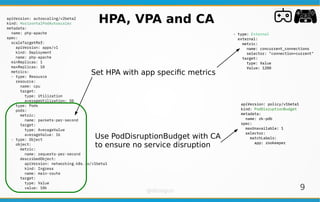
Set HPA with app specific metrics
- type: External
external:
metric:
name: concurrent_connections
selector: "connection=current"
target:
type: Value
Value: 1200
apiVersion: policy/v1beta1
kind: PodDisruptionBudget
metadata:
name: zk-pdb
spec:
maxUnavailable: 1
selector:
matchLabels:
app: zookeeper
Use PodDisruptionBudget with CA
to ensure no service disruption
@dinogun 10
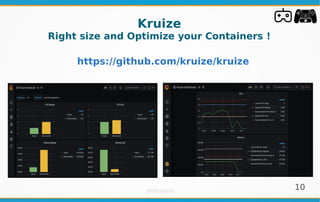
Kruize
Right size and Optimize your Containers !
https://github.com/kruize/kruize
@dinogun 11
Summary
●
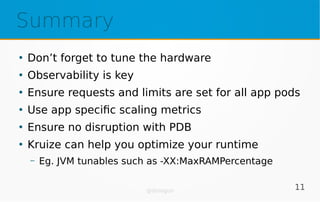
Don’t forget to tune the hardware
●
Observability is key
●
Ensure requests and limits are set for all app pods
●
Use app specific scaling metrics
●
Ensure no disruption with PDB
●
Kruize can help you optimize your runtime
– Eg. JVM tunables such as -XX:MaxRAMPercentage
@dinogun
12
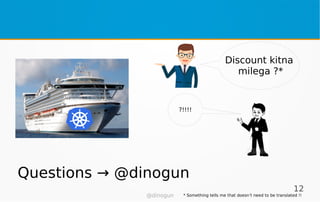
Discount kitna
milega ?*
?!!!!
Questions → @dinogun
* Something tells me that doesn’t need to be translated !!

Optimizing Application Performance on Kubernetes

  • 1.
    Optimizing Application Performance on Kubernetes DinakarGuniguntala @dinogun Runtimes Cloud Architect, IBM
  • 2.
    @dinogun 2 “When youinteract with IBM, this serves as your authorization to Saltmarch Media India Pvt. Ltd. or its vendor to provide your contact information to IBM in order for IBM to follow up on your interaction.  IBM's use of your contact information is governed by the IBM Privacy Policy. “
  • 3.
    @dinogun 3 Kubernetes isa portable, extensible, open-source platform for managing containerized workloads and services, that facilitates both declarative configuration … blah blah blah Kitna Deti Hai ?* Any questions ? * What's the mileage ?
  • 4.
  • 5.
  • 6.
    @dinogun 6 BIOS ● CPU Powerand Performance Policy: <Performance> OS / Hypervisor ● CPU Scaling governor: <Performance> $ cat /sys/devices/system/cpu/cpu0/cpufreq/scaling_available_governors performance powersave $ cat /sys/devices/system/cpu/cpu0/cpufreq/scaling_governor Performance Hyperthreading ● Do not count hyperthreading while capacity planning Don’t forget the hardware !
  • 7.
    @dinogun 7 What isthe granularity of observation ? ● Trade-off between accurate info and overhead Additional Operational Info ● Spring Actuator ● HealthCenter Observability
  • 8.
    @dinogun 8 QoS classes Guaranteed Burstable BestEffort RightSize !apiVersion: apps/v1 kind: Deployment metadata: name: acmeair labels: app: acmeair-app spec: replicas: 1 selector: matchLabels: app: acmeair-deployment template: metadata: labels: name: acmeair-deployment app: acmeair-deployment app.kubernetes.io/name: "acmeair-mono" version: v1 spec: volumes: - name: test-volume hostPath: path: "/root/icp/jLogs" type: "" containers: - name: acmeair-libertyapp image: dinogun/acmeair-monolithic imagePullPolicy: Always ports: - containerPort: 8080 resources: requests: memory: 500M cpu: 2 limits: memory: 1024M cpu: 3 volumeMounts: - name: "test-volume" mountPath: "/opt/jLogs" Ensure LimitRange does not get in the way of your deployment ! apiVersion: v1 kind: LimitRange metadata: name: limit-range spec: limits: - default: cpu: 1 memory: 512Mi defaultRequest: cpu: 0.5 memory: 256Mi type: Container Requests → Should cover the observed peaks Limits → Handle any spikes !
  • 9.
    @dinogun 9 HPA, VPAand CAapiVersion: autoscaling/v2beta2 kind: HorizontalPodAutoscaler metadata: name: php-apache spec: scaleTargetRef: apiVersion: apps/v1 kind: Deployment name: php-apache minReplicas: 1 maxReplicas: 10 metrics: - type: Resource resource: name: cpu target: type: Utilization averageUtilization: 50 - type: Pods pods: metric: name: packets-per-second target: type: AverageValue averageValue: 1k - type: Object object: metric: name: requests-per-second describedObject: apiVersion: networking.k8s.io/v1beta1 kind: Ingress name: main-route target: type: Value value: 10k Set HPA with app specific metrics - type: External external: metric: name: concurrent_connections selector: "connection=current" target: type: Value Value: 1200 apiVersion: policy/v1beta1 kind: PodDisruptionBudget metadata: name: zk-pdb spec: maxUnavailable: 1 selector: matchLabels: app: zookeeper Use PodDisruptionBudget with CA to ensure no service disruption
  • 10.
    @dinogun 10 Kruize Right sizeand Optimize your Containers ! https://github.com/kruize/kruize
  • 11.
    @dinogun 11 Summary ● Don’t forgetto tune the hardware ● Observability is key ● Ensure requests and limits are set for all app pods ● Use app specific scaling metrics ● Ensure no disruption with PDB ● Kruize can help you optimize your runtime – Eg. JVM tunables such as -XX:MaxRAMPercentage
  • 12.
    @dinogun 12 Discount kitna milega ?* ?!!!! Questions→ @dinogun * Something tells me that doesn’t need to be translated !!