

HIGH PERFORMANCE TENSORFLOW +
GPUS @ GPU TECH CONF, MAY 23, 2017
CHRIS FREGLY, RESEARCH ENGINEER
@ PIPELINE.IO
THANKS, HOTELS.COM / EXPEDIA / HOMEAWAY!
AND THANKS, LONDON TECH COMMUNITY!!
INTRODUCTIONS
INTRODUCTIONS: ME
§ Chris Fregly, Research Engineer @ San Francisco
§ Formerly Netflix and Databricks
§ Advanced Spark and TensorFlow Meetup -- London
Please Join Our 1,000+ Members!!
INTRODUCTIONS: YOU
§ Software Engineer or Data Scientist interested in optimizing
and deploying TensorFlow models to production
§ Assume you have a working knowledge of TensorFlow
NOTES ABOUT THIS MATERIAL
CONTENT BREAKDOWN
§ 50% Training Optimizations (TensorFlow, XLA, Tools)
§ 50% Deployment and Inference Optimizations (Serving)
§ Why Heavy Focus on Inference?
§ Training: boring batch, O(num_researchers)
§ Inference: exciting realtime, O(num_users_of_app)
§ We Use Simple Models to Highlight Optimizations
§
Warning: This is not introductory TensorFlow material!
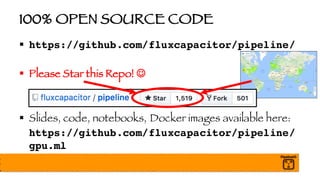
100% OPEN SOURCE CODE
§ https://github.com/fluxcapacitor/pipeline/
§ Please Star this Repo! J
§ Slides, code, notebooks, Docker images available here:
https://github.com/fluxcapacitor/pipeline/
gpu.ml
HANDS-ON EXERCISES
§ Combo of Jupyter Notebooks and Command Line
§ Command Line through Jupyter Terminal
§ Some Exercises Based on Experimental Features
In Other Words, Some Code May Be Wonky!
YOU WILL LEARN…
§ TensorFlow Best Practices
§ To Inspect and Debug Models
§ To Distribute Training Across a Cluster
§ To Optimize Training with Queue Feeders
§ To Optimize Training with XLA JIT Compiler
§ To Optimize Inference with AOT and Graph Transform Tool (GTT)
§ Key Components of TensorFlow Serving
§ To Deploy Models with TensorFlow Serving
§ To Optimize Inference by Tuning TensorFlow Serving
AGENDA
§ Setup Environment
§ Train and Debug TensorFlow Model
§ Train with Distributed TensorFlow Cluster
§ Optimize Model with XLA JIT Compiler
§ Optimize Model with XLA AOT and Graph Transforms
§ Deploy Model to TensorFlow Serving Runtime
§ Optimize TensorFlow Serving Runtime
§ Wrap-up and Q&A
EVERYBODY GETS A GPU!
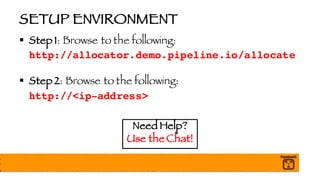
SETUP ENVIRONMENT
§ Step 1: Browse to the following:
http://allocator.demo.pipeline.io/allocate
§ Step 2: Browse to the following:
http://<ip-address>
Need Help?
Use the Chat!
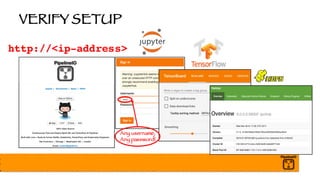
VERIFY SETUP
http://<ip-address>
Any username,
Any password!
HOUSEKEEPING
§ Navigate to the following notebook:
00_Housekeeping
§ https://github.com/fluxcapacitor/pipeline/gpu.ml/
notebooks/
PULSE CHECK
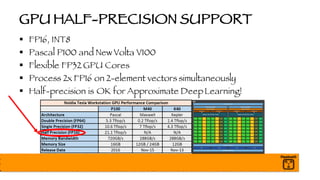
GPU HALF-PRECISION SUPPORT
§ FP16, INT8
§ Pascal P100 and New Volta V100
§ Flexible FP32 GPU Cores
§ Process 2x FP16 on 2-element vectors simultaneously
§ Half-precision is OK for Approximate DeepLearning!
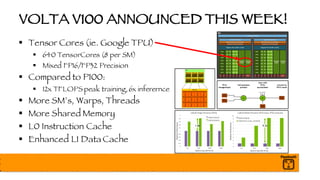
VOLTA V100 ANNOUNCED THIS WEEK!
§ Tensor Cores (ie. Google TPU)
§ 640 TensorCores (8 per SM)
§ Mixed FP16/FP32 Precision
§ Compared to P100:
§ 12x TFLOPS peak training, 6x inferernce
§ More SM’s, Warps, Threads
§ More Shared Memory
§ L0 Instruction Cache
§ Enhanced L1 Data Cache
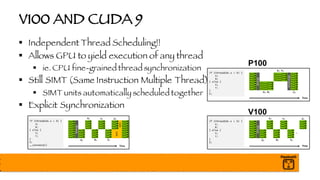
V100 AND CUDA 9
§ Independent Thread Scheduling!!
§ Allows GPU to yield execution of any thread
§ ie. CPU fine-grained thread synchronization
§ Still SIMT (Same Instruction Multiple Thread)
§ SIMT units automatically scheduled together
§ Explicit Synchronization
P100
V100
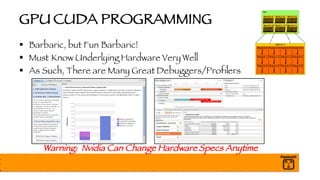
GPU CUDA PROGRAMMING
§ Barbaric, but Fun Barbaric!
§ Must Know Underlying Hardware Very Well
§ As Such, There are Many Great Debuggers/Profilers
Warning: Nvidia Can Change Hardware Specs Anytime
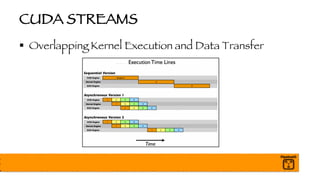
CUDA STREAMS
§ Overlapping Kernel Execution and Data Transfer
LET’S SEE WHAT THIS THING CAN DO!
§ Navigate to the following notebook:
01_Explore_GPU
§ https://github.com/fluxcapacitor/pipeline/gpu.ml/
notebooks/
PULSE CHECK
BREAK
§ https://github.com/fluxcapacitor/pipeline/
§ Slides, code, notebooks, Docker images available here:
https://github.com/fluxcapacitor/pipeline/
gpu.ml
Need Help?
Use the Chat!
AGENDA
§ Setup Environment
§ Train and Debug TensorFlow Model
§ Train with Distributed TensorFlow Cluster
§ Optimize Model with XLA JIT Compiler
§ Optimize Model with XLA AOT and Graph Transforms
§ Deploy Model to TensorFlow Serving Runtime
§ Optimize TensorFlow Serving Runtime
§ Wrap-up and Q&A
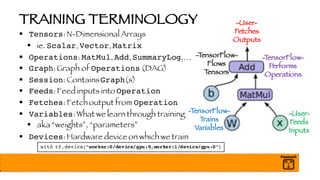
TRAINING TERMINOLOGY
§ Tensors: N-Dimensional Arrays
§ ie. Scalar, Vector, Matrix
§ Operations: MatMul, Add, SummaryLog,…
§ Graph: Graph of Operations (DAG)
§ Session: ContainsGraph(s)
§ Feeds: Feed inputs into Operation
§ Fetches: Fetch output from Operation
§ Variables: What we learn through training
§ aka “weights”, “parameters”
§ Devices: Hardware device on which we train
-TensorFlow-
Trains
Variables
-User-
Fetches
Outputs
-User-
Feeds
Inputs
-TensorFlow-
Performs
Operations
-TensorFlow-
Flows
Tensors
with tf.device(“worker:0/device/gpu:0,worker:1/device/gpu:0”)
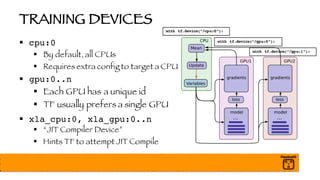
TRAINING DEVICES
§ cpu:0
§ By default, all CPUs
§ Requires extra config to target a CPU
§ gpu:0..n
§ Each GPU has a unique id
§ TF usually prefers a single GPU
§ xla_cpu:0, xla_gpu:0..n
§ “JIT Compiler Device”
§ Hints TF to attempt JIT Compile
with tf.device(“/cpu:0”):
with tf.device(“/gpu:0”):
with tf.device(“/gpu:1”):
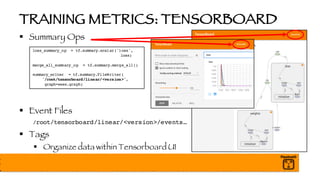
TRAINING METRICS: TENSORBOARD
§ Summary Ops
§ Event Files
/root/tensorboard/linear/<version>/events…
§ Tags
§ Organize data within Tensorboard UI
loss_summary_op = tf.summary.scalar('loss',
loss)
merge_all_summary_op = tf.summary.merge_all()
summary_writer = tf.summary.FileWriter(
'/root/tensorboard/linear/<version>',
graph=sess.graph)
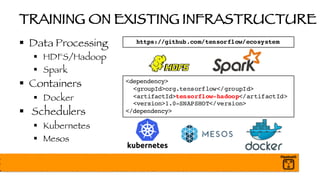
TRAINING ON EXISTING INFRASTRUCTURE
§ Data Processing
§ HDFS/Hadoop
§ Spark
§ Containers
§ Docker
§ Schedulers
§ Kubernetes
§ Mesos
<dependency>
<groupId>org.tensorflow</groupId>
<artifactId>tensorflow-hadoop</artifactId>
<version>1.0-SNAPSHOT</version>
</dependency>
https://github.com/tensorflow/ecosystem
FEED TRAINING DATA WITH QUEUES
§ Don’t Use feed_dict for Production Workloads!!
§ feed_dict Requires C++ <-> Python Serialization
§ Batch Retrieval is Single-threaded,Synchronous, SLOW!
§ Next batch can’t be retrieved until current batch is processed
§ CPUs and GPUs are Not Fully Utilized
§ Use Queues to Read and Pre-Process Data for GPUs!
§ Queues use CPUs for I/O, pre-processing, shuffling, …
§ GPUs stay saturated and focused on cool GPU stuff!!
DATA MOVEMENT WITH QUEUES
§ Queue Pulls Batch from Source (ie HDFS, Kafka)
§ Queue pre-processes and shuffles data
§ Queue should use only CPUs - no GPUs
§ Combine many small files into a few large TFRecord files
§ GPU Pulls Batch from Queue (CUDA Streams)
§ GPU pulls next batch while processing current batch
§ GPU Processes Next Batch Immediately
§ GPUs are fully utilized!
QUEUE CAPACITY PLANNING
§ batch_size
§ # of examples per batch (ie. 64 jpg)
§ Limited by GPU RAM
§ num_processing_threads
§ CPU threads pull and pre-process batches of data
§ Limited by CPU Cores
§ queue_capacity
§ Limited by CPU RAM (ie. 5 * batch_size)
Saturate those GPUs!
GPU Pulls Batches while
Processing Current Batch
AsyncMemory Transfer
with CUDA Streams
-- Thanks,Nvidia!! --
DETECT UNDERUTILIZED CPUS, GPUS
§ Instrument training code to generate “timelines”
§ Analyze with Google Web
Tracing Framework (WTF)
§ Monitor CPU with `top`, GPU with `nvidia-smi`
http://google.github.io/tracing-framework/
from tensorflow.python.client import timeline
trace =
timeline.Timeline(step_stats=run_metadata.step_stats)
with open('timeline.json', 'w') as trace_file:
trace_file.write(
trace.generate_chrome_trace_format(show_memory=True))
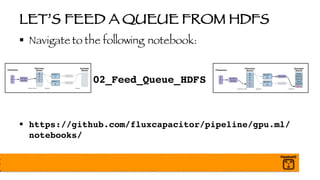
LET’S FEED A QUEUE FROM HDFS
§ Navigate to the following notebook:
02_Feed_Queue_HDFS
§ https://github.com/fluxcapacitor/pipeline/gpu.ml/
notebooks/
PULSE CHECK
BREAK
§ https://github.com/fluxcapacitor/pipeline/
§ Slides, code, notebooks, Docker images available here:
https://github.com/fluxcapacitor/pipeline/
gpu.ml
Need Help?
Use the Chat!
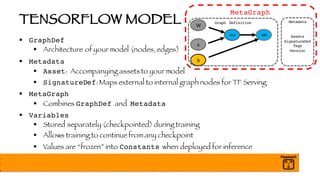
TENSORFLOW MODEL
§ GraphDef
§ Architecture of your model (nodes, edges)
§ Metadata
§ Asset: Accompanying assets to your model
§ SignatureDef: Maps external to internal graph nodes for TF Serving
§ MetaGraph
§ Combines GraphDef and Metadata
§ Variables
§ Stored separately (checkpointed) during training
§ Allows training to continue from any checkpoint
§ Values are “frozen” into Constants when deployed for inference
Graph Definition
x
W
mul add
b
MetaGraph
Metadata
Assets
SignatureDef
Tags
Version
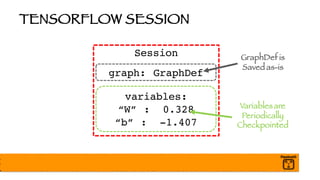
TENSORFLOW SESSION
Session
graph: GraphDef
variables:
“W” : 0.328
“b” : -1.407
Variablesare
Periodically
Checkpointed
GraphDef is
Saved as-is
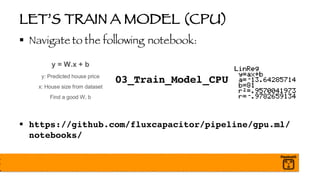
LET’S TRAIN A MODEL (CPU)
§ Navigate to the following notebook:
03_Train_Model_CPU
§ https://github.com/fluxcapacitor/pipeline/gpu.ml/
notebooks/
LET’S TRAIN A MODEL (GPU)
§ Navigate to the following notebook:
04_Train_Model_GPU
§ https://github.com/fluxcapacitor/pipeline/gpu.ml/
notebooks/
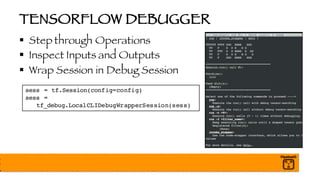
TENSORFLOW DEBUGGER
§ Step through Operations
§ Inspect Inputs and Outputs
§ Wrap Session in Debug Session
sess = tf.Session(config=config)
sess =
tf_debug.LocalCLIDebugWrapperSession(sess)
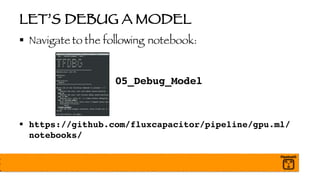
LET’S DEBUG A MODEL
§ Navigate to the following notebook:
05_Debug_Model
§ https://github.com/fluxcapacitor/pipeline/gpu.ml/
notebooks/
PULSE CHECK
BREAK
§ https://github.com/fluxcapacitor/pipeline/
§ Slides, code, notebooks, Docker images available here:
https://github.com/fluxcapacitor/pipeline/
gpu.ml
Need Help?
Use the Chat!
AGENDA
§ Setup Environment
§ Train and Debug TensorFlow Model
§ Train with Distributed TensorFlow Cluster
§ Optimize Model with XLA JIT Compiler
§ Optimize Model with XLA AOT and Graph Transforms
§ Deploy Model to TensorFlow Serving Runtime
§ Optimize TensorFlow Serving Runtime
§ Wrap-up and Q&A
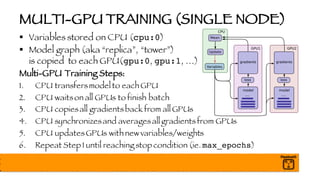
MULTI-GPU TRAINING (SINGLE NODE)
§ Variables stored on CPU (cpu:0)
§ Model graph (aka “replica”, “tower”)
is copied to each GPU(gpu:0, gpu:1, …)
Multi-GPU Training Steps:
1. CPU transfersmodel to each GPU
2. CPU waitson all GPUs to finish batch
3. CPU copiesall gradientsback from all GPUs
4. CPU synchronizesand averagesall gradientsfrom GPUs
5. CPU updatesGPUs with new variables/weights
6. Repeat Step 1 until reaching stop condition (ie. max_epochs)
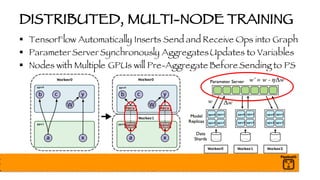
DISTRIBUTED, MULTI-NODE TRAINING
§ TensorFlow Automatically Inserts Send and Receive Ops into Graph
§ Parameter Server Synchronously AggregatesUpdates to Variables
§ Nodes with Multiple GPUs will Pre-Aggregate Before Sending to PS
Worker0 Worker0
Worker1
Worker0 Worker1 Worker2
gpu0 gpu1
gpu2 gpu3
gpu0 gpu1
gpu2 gpu3
gpu0 gpu1
gpu2 gpu3
gpu0
gpu1
gpu0
gpu0
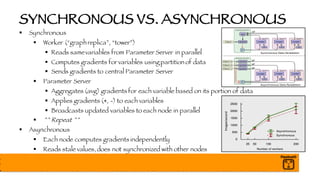
SYNCHRONOUS VS. ASYNCHRONOUS
§ Synchronous
§ Worker (“graphreplica”, “tower”)
§ Reads samevariables from Parameter Server in parallel
§ Computes gradients for variables using partition of data
§ Sends gradients to central Parameter Server
§ Parameter Server
§ Aggregates (avg) gradients for each variable based on its portion of data
§ Applies gradients (+, -) to each variables
§ Broadcasts updated variables to each node in parallel
§ ^^ Repeat ^^
§ Asynchronous
§ Each node computes gradients independently
§ Reads stale values,does not synchronized with other nodes
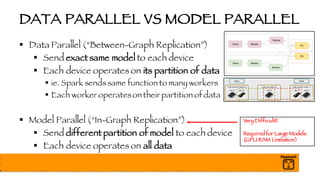
DATA PARALLEL VS MODEL PARALLEL
§ Data Parallel (“Between-Graph Replication”)
§ Send exact same model to each device
§ Each device operates on its partition of data
§ ie. Spark sends same function to many workers
§ Each worker operateson their partition of data
§ Model Parallel (“In-Graph Replication”)
§ Send different partition of model to each device
§ Each device operates on all data
Very Difficult!!
Requiredfor Large Models.
(GPU RAM Limitation)
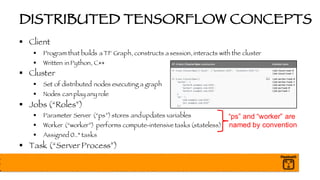
DISTRIBUTED TENSORFLOW CONCEPTS
§ Client
§ Program that builds a TF Graph, constructs a session,interacts with the cluster
§ Written in Python, C++
§ Cluster
§ Set of distributed nodes executing a graph
§ Nodes can play any role
§ Jobs (“Roles”)
§ Parameter Server (“ps”)stores andupdates variables
§ Worker (“worker”) performs compute-intensive tasks (stateless)
§ Assigned 0..* tasks
§ Task (“Server Process”)
“ps” and “worker” are
named by convention
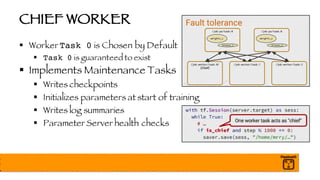
CHIEF WORKER
§ Worker Task 0 is Chosen by Default
§ Task 0 is guaranteed to exist
§ Implements Maintenance Tasks
§ Writes checkpoints
§ Initializes parameters at start of training
§ Writes log summaries
§ Parameter Server health checks
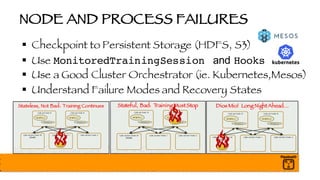
NODE AND PROCESS FAILURES
§ Checkpoint to Persistent Storage (HDFS, S3)
§ Use MonitoredTrainingSession and Hooks
§ Use a Good Cluster Orchestrator (ie. Kubernetes,Mesos)
§ Understand Failure Modes and Recovery States
Stateless, Not Bad: Training Continues Stateful, Bad: TrainingMustStop Dios Mio! Long NightAhead…
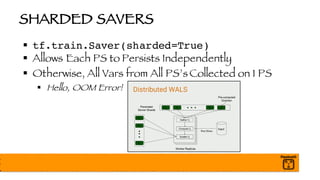
SHARDED SAVERS
§ tf.train.Saver(sharded=True)
§ Allows Each PS to Persists Independently
§ Otherwise, All Vars from All PS’s Collected on 1 PS
§ Hello, OOM Error!
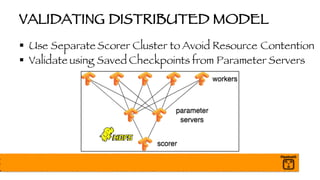
VALIDATING DISTRIBUTED MODEL
§ Use Separate Scorer Cluster to Avoid Resource Contention
§ Validate using Saved Checkpoints from Parameter Servers
EXPERIMENT AND ESTIMATOR API
§ Higher-Level APIs Simplify Distributed Training
§ Picks Up Configuration from Environment
§ Supports Custom Models (ie. Keras)
§ Used for Training, Validation, and Prediction
§ API is Changing, but Patterns Remain the Same
§ Works Well with Google Cloud ML (Surprised?!)
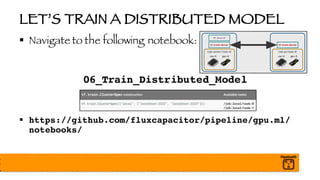
LET’S TRAIN A DISTRIBUTED MODEL
§ Navigate to the following notebook:
06_Train_Distributed_Model
§ https://github.com/fluxcapacitor/pipeline/gpu.ml/
notebooks/
AGENDA
§ Setup Environment
§ Train and Debug TensorFlow Model
§ Train with Distributed TensorFlow Cluster
§ Optimize Model with XLA JIT Compiler
§ Optimize Model with XLA AOT and Graph Transforms
§ Deploy Model to TensorFlow Serving Runtime
§ Optimize TensorFlow Serving Runtime
§ Wrap-up and Q&A
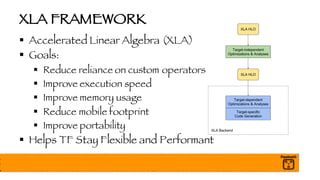
XLA FRAMEWORK
§ Accelerated Linear Algebra (XLA)
§ Goals:
§ Reduce reliance on custom operators
§ Improve execution speed
§ Improve memory usage
§ Reduce mobile footprint
§ Improve portability
§ Helps TF Stay Flexible and Performant
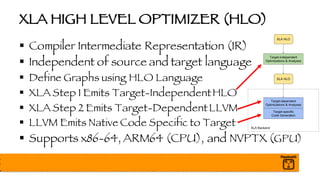
XLA HIGH LEVEL OPTIMIZER (HLO)
§ Compiler Intermediate Representation (IR)
§ Independent of source and target language
§ Define Graphs using HLO Language
§ XLA Step 1 Emits Target-IndependentHLO
§ XLA Step 2 Emits Target-DependentLLVM
§ LLVM Emits Native Code Specific to Target
§ Supports x86-64, ARM64 (CPU), and NVPTX (GPU)
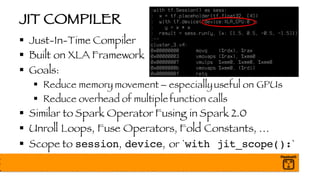
JIT COMPILER
§ Just-In-Time Compiler
§ Built on XLA Framework
§ Goals:
§ Reduce memory movement – especiallyuseful on GPUs
§ Reduce overhead of multiple function calls
§ Similar to Spark Operator Fusing in Spark 2.0
§ Unroll Loops, Fuse Operators, Fold Constants, …
§ Scope to session, device, or `with jit_scope():`
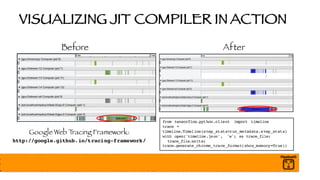
VISUALIZING JIT COMPILER IN ACTION
Before After
Google Web Tracing Framework:
http://google.github.io/tracing-framework/
from tensorflow.python.client import timeline
trace =
timeline.Timeline(step_stats=run_metadata.step_stats)
with open('timeline.json', 'w') as trace_file:
trace_file.write(
trace.generate_chrome_trace_format(show_memory=True))
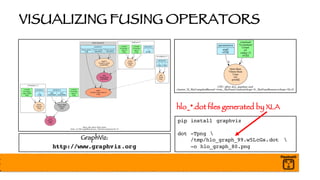
VISUALIZING FUSING OPERATORS
pip install graphviz
dot -Tpng 
/tmp/hlo_graph_99.w5LcGs.dot 
-o hlo_graph_80.png
GraphViz:
http://www.graphviz.org
hlo_*.dot files generated by XLA
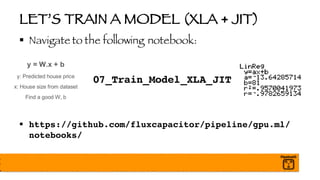
LET’S TRAIN A MODEL (XLA + JIT)
§ Navigate to the following notebook:
07_Train_Model_XLA_JIT
§ https://github.com/fluxcapacitor/pipeline/gpu.ml/
notebooks/
IT’S WORTH HIGHLIGHTING…
§ From now on, we will optimize models for inference only
§ In other words,
No More Training Optimizations!
PULSE CHECK
BREAK
§ https://github.com/fluxcapacitor/pipeline/
§ Slides, code, notebooks, Docker images available here:
https://github.com/fluxcapacitor/pipeline/
gpu.ml
Need Help?
Use the Chat!
AGENDA
§ Setup Environment
§ Train and Debug TensorFlow Model
§ Train with Distributed TensorFlow Cluster
§ Optimize Model with XLA JIT Compiler
§ Optimize Model with XLA AOT and Graph Transforms
§ Deploy Model to TensorFlow Serving Runtime
§ Optimize TensorFlow Serving Runtime
§ Wrap-up and Q&A
AOT COMPILER
§ Standalone, Ahead-Of-Time (AOT) Compiler
§ `tfcompile`
§ Built on XLA framework
§ Creates executable with minimal TensorFlow Runtime needed
§ Includes only dependencies neededby subgraph computation
§ Creates functions with feeds (inputs) and fetches (outputs)
§ Packaged ascc_libary header and object filesto link into your app
§ Commonly used for mobile device inference graph
§ Currently, only CPU x86-64 and ARM are supported - no GPU
GRAPH TRANSFORM TOOL (GTT)
§ Optimize Trained Models for Inference
§ Remove training-only Ops (checkpoint, drop out, logs)
§ Remove unreachable nodes between given feed -> fetch
§ Fuse adjacent operators to improve memory bandwidth
§ Fold final batch normalization mean, variance into weights
§ Round weights to improve compression effectiveness (70%)
§ Quantize weights and activations
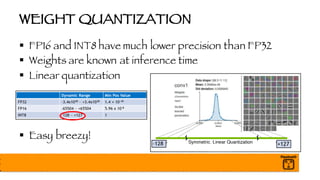
WEIGHT QUANTIZATION
§ FP16 and INT8 have much lower precision than FP32
§ Weights are known at inference time
§ Linear quantization
§ Easy breezy!
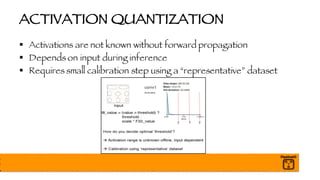
ACTIVATION QUANTIZATION
§ Activations are not known without forward propagation
§ Depends on input during inference
§ Requires small calibration step using a “representative” dataset
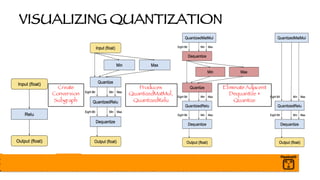
VISUALIZING QUANTIZATION
Create
Conversion
Subgraph
Produces
QuantizedMatMul,
QuantizedRelu
EliminateAdjacent
Dequantize +
Quantize
FUSED BATCH NORMALIZATION
§ What is Batch Normalization?
§ Each batch of data may have wildly different distributions
§ Normalize per batch (and layer)
§ Speeds up training dramatically
§ Weights are learned quicker
§ Final model is more accurate
Always Use Batch Normalization!
§ GTT Fuses Final Mean and Variance MatMul into Graph
z = tf.matmul(a_prev, W)
a = tf.nn.relu(z)
a_mean, a_var = tf.nn.moments(a, [0])
scale = tf.Variable(tf.ones([depth/channels]))
beta = tf.Variable(tf.zeros ([depth/channels]))
bn = tf.nn.batch_normalizaton(a, a_mean, a_var,
beta, scale, 0.001)
LET’S OPTIMIZE MODEL WITH GTT
§ Navigate to the following notebook:
08_Optimize_Model_CPU
§ https://github.com/fluxcapacitor/pipeline/gpu.ml/
notebooks/
LET’S OPTIMIZE MODEL WITH GTT
§ Navigate to the following notebook:
09_Optimize_Model_GPU
§ https://github.com/fluxcapacitor/pipeline/gpu.ml/
notebooks/
PULSE CHECK
BREAK
§ https://github.com/fluxcapacitor/pipeline/
§ Slides, code, notebooks, Docker images available here:
https://github.com/fluxcapacitor/pipeline/
gpu.ml
Need Help?
Use the Chat!
AGENDA
§ Setup Environment
§ Train and Debug TensorFlow Model
§ Train with Distributed TensorFlow Cluster
§ Optimize Model with XLA JIT Compiler
§ Optimize Model with XLA AOT and Graph Transforms
§ Deploy Model to TensorFlow Serving Runtime
§ Optimize TensorFlow Serving Runtime
§ Wrap-up and Q&A
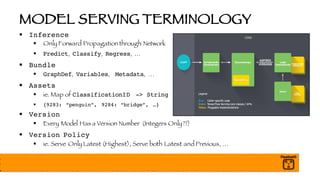
MODEL SERVING TERMINOLOGY
§ Inference
§ Only Forward Propagation through Network
§ Predict, Classify, Regress, …
§ Bundle
§ GraphDef, Variables, Metadata, …
§ Assets
§ ie. Map of ClassificationID -> String
§ {9283: “penguin”, 9284: “bridge”, …}
§ Version
§ Every Model Has a Version Number (Integers Only?!)
§ Version Policy
§ ie. Serve Only Latest (Highest), Serve both Latest and Previous, …
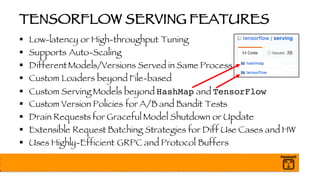
TENSORFLOW SERVING FEATURES
§ Low-latency or High-throughput Tuning
§ Supports Auto-Scaling
§ DifferentModels/Versions Served in Same Process
§ Custom Loaders beyond File-based
§ Custom Serving Models beyond HashMap and TensorFlow
§ Custom Version Policies for A/B and Bandit Tests
§ Drain Requests for Graceful Model Shutdown or Update
§ Extensible Request Batching Strategies for Diff Use Cases and HW
§ Uses Highly-Efficient GRPC and Protocol Buffers
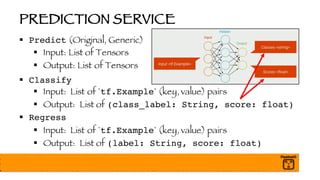
PREDICTION SERVICE
§ Predict (Original, Generic)
§ Input: List of Tensors
§ Output: List of Tensors
§ Classify
§ Input: List of `tf.Example` (key, value) pairs
§ Output: List of (class_label: String, score: float)
§ Regress
§ Input: List of `tf.Example` (key, value) pairs
§ Output: List of (label: String, score: float)
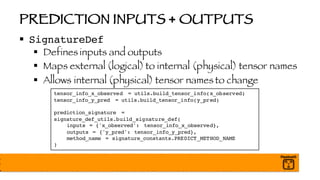
PREDICTION INPUTS + OUTPUTS
§ SignatureDef
§ Defines inputs and outputs
§ Maps external (logical) to internal (physical) tensor names
§ Allows internal (physical) tensor names to change
tensor_info_x_observed = utils.build_tensor_info(x_observed)
tensor_info_y_pred = utils.build_tensor_info(y_pred)
prediction_signature =
signature_def_utils.build_signature_def(
inputs = {'x_observed': tensor_info_x_observed},
outputs = {'y_pred': tensor_info_y_pred},
method_name = signature_constants.PREDICT_METHOD_NAME
)
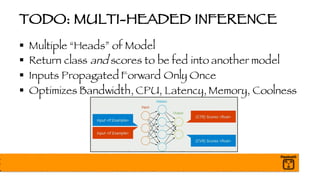
TODO: MULTI-HEADED INFERENCE
§ Multiple “Heads” of Model
§ Return class and scores to be fed into another model
§ Inputs Propagated Forward Only Once
§ Optimizes Bandwidth, CPU, Latency, Memory, Coolness
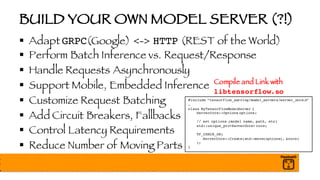
BUILD YOUR OWN MODEL SERVER (?!)
§ Adapt GRPC(Google) <-> HTTP (REST of the World)
§ Perform Batch Inference vs. Request/Response
§ Handle Requests Asynchronously
§ Support Mobile, Embedded Inference
§ Customize Request Batching
§ Add Circuit Breakers, Fallbacks
§ Control Latency Requirements
§ Reduce Number of Moving Parts
#include “tensorflow_serving/model_servers/server_core.h”
…
class MyTensorFlowModelServer {
ServerCore::Options options;
// set options (model name, path, etc)
std::unique_ptr<ServerCore> core;
TF_CHECK_OK(
ServerCore::Create(std::move(options), &core)
);
}
Compile and Link with
libtensorflow.so
LET’S DEPLOY AND SERVE A MODEL
§ Navigate to the following notebook:
10_Deploy_Model_Server
§ https://github.com/fluxcapacitor/pipeline/gpu.ml/
notebooks/
PULSE CHECK
BREAK
§ https://github.com/fluxcapacitor/pipeline/
§ Slides, code, notebooks, Docker images available here:
https://github.com/fluxcapacitor/pipeline/
gpu.ml
Need Help?
Use the Chat!
AGENDA
§ Setup Environment
§ Train and Debug TensorFlow Model
§ Train with Distributed TensorFlow Cluster
§ Optimize Model with XLA JIT Compiler
§ Optimize Model with XLA AOT and Graph Transforms
§ Deploy Model to TensorFlow Serving Runtime
§ Optimize TensorFlow Serving Runtime
§ Wrap-up and Q&A
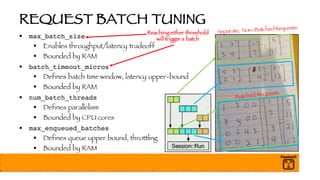
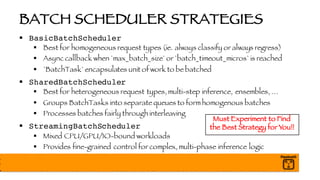
REQUEST BATCH TUNING
§ max_batch_size
§ Enables throughput/latency tradeoff
§ Bounded by RAM
§ batch_timeout_micros
§ Defines batch time window, latency upper-bound
§ Bounded by RAM
§ num_batch_threads
§ Defines parallelism
§ Bounded by CPU cores
§ max_enqueued_batches
§ Defines queue upper bound, throttling
§ Bounded by RAM
Reaching either threshold
will trigger a batch
BATCH SCHEDULER STRATEGIES
§ BasicBatchScheduler
§ Best for homogeneous request types (ie. always classify or always regress)
§ Async callback when `max_batch_size` or `batch_timeout_micros` is reached
§ `BatchTask` encapsulates unit of work to be batched
§ SharedBatchScheduler
§ Best for heterogeneous request types, multi-step inference, ensembles, …
§ Groups BatchTasks into separate queues to form homogenous batches
§ Processes batches fairly through interleaving
§ StreamingBatchScheduler
§ Mixed CPU/GPU/IO-bound workloads
§ Provides fine-grained control for complex, multi-phase inference logic
Must Experiment to Find
the Best Strategy for You!!
LET’S OPTIMIZE THE MODEL SERVER
§ Navigate to the following notebook:
11_Tune_Model_Server
§ https://github.com/fluxcapacitor/pipeline/gpu.ml/
notebooks/
PULSE CHECK
AGENDA
§ Setup Environment
§ Train and Debug TensorFlow Model
§ Train with Distributed TensorFlow Cluster
§ Optimize Model with XLA JIT Compiler
§ Optimize Model with XLA AOT and Graph Transforms
§ Deploy Model to TensorFlow Serving Runtime
§ Optimize TensorFlow Serving Runtime
§ Wrap-up and Q&A
YOU JUST LEARNED…
§ TensorFlow Best Practices
§ To Inspect and Debug Models
§ To Distribute Training Across a Cluster
§ To Optimize Training with Queue Feeders
§ To Optimize Training with XLA JIT Compiler
§ To Optimize Inference with AOT and Graph Transform Tool (GTT)
§ Key Components of TensorFlow Serving
§ To Deploy Models with TensorFlow Serving
§ To Optimize Inference by Tuning TensorFlow Serving
Q&A
§ Thank you!!
§ https://github.com/fluxcapacitor/pipeline/
§ Slides, code, notebooks, Docker images available here:
https://github.com/fluxcapacitor/pipeline/
gpu.ml
Contact Me @
Email: chris@pipeline.io
Twitter: @cfregly

Optimize + Deploy Distributed Tensorflow, Spark, and Scikit-Learn Models on GPUs - Advanced Spark and TensorFlow Meetup May 23 2017 @ Hotels.com London

  • 1.
    HIGH PERFORMANCE TENSORFLOW+ GPUS @ GPU TECH CONF, MAY 23, 2017 CHRIS FREGLY, RESEARCH ENGINEER @ PIPELINE.IO THANKS, HOTELS.COM / EXPEDIA / HOMEAWAY! AND THANKS, LONDON TECH COMMUNITY!!
  • 2.
  • 3.
    INTRODUCTIONS: ME § ChrisFregly, Research Engineer @ San Francisco § Formerly Netflix and Databricks § Advanced Spark and TensorFlow Meetup -- London Please Join Our 1,000+ Members!!
  • 4.
    INTRODUCTIONS: YOU § SoftwareEngineer or Data Scientist interested in optimizing and deploying TensorFlow models to production § Assume you have a working knowledge of TensorFlow
  • 5.
  • 6.
    CONTENT BREAKDOWN § 50%Training Optimizations (TensorFlow, XLA, Tools) § 50% Deployment and Inference Optimizations (Serving) § Why Heavy Focus on Inference? § Training: boring batch, O(num_researchers) § Inference: exciting realtime, O(num_users_of_app) § We Use Simple Models to Highlight Optimizations § Warning: This is not introductory TensorFlow material!
  • 7.
    100% OPEN SOURCECODE § https://github.com/fluxcapacitor/pipeline/ § Please Star this Repo! J § Slides, code, notebooks, Docker images available here: https://github.com/fluxcapacitor/pipeline/ gpu.ml
  • 8.
    HANDS-ON EXERCISES § Comboof Jupyter Notebooks and Command Line § Command Line through Jupyter Terminal § Some Exercises Based on Experimental Features In Other Words, Some Code May Be Wonky!
  • 9.
    YOU WILL LEARN… §TensorFlow Best Practices § To Inspect and Debug Models § To Distribute Training Across a Cluster § To Optimize Training with Queue Feeders § To Optimize Training with XLA JIT Compiler § To Optimize Inference with AOT and Graph Transform Tool (GTT) § Key Components of TensorFlow Serving § To Deploy Models with TensorFlow Serving § To Optimize Inference by Tuning TensorFlow Serving
  • 10.
    AGENDA § Setup Environment §Train and Debug TensorFlow Model § Train with Distributed TensorFlow Cluster § Optimize Model with XLA JIT Compiler § Optimize Model with XLA AOT and Graph Transforms § Deploy Model to TensorFlow Serving Runtime § Optimize TensorFlow Serving Runtime § Wrap-up and Q&A
  • 11.
  • 12.
    SETUP ENVIRONMENT § Step1: Browse to the following: http://allocator.demo.pipeline.io/allocate § Step 2: Browse to the following: http://<ip-address> Need Help? Use the Chat!
  • 13.
  • 14.
    HOUSEKEEPING § Navigate tothe following notebook: 00_Housekeeping § https://github.com/fluxcapacitor/pipeline/gpu.ml/ notebooks/
  • 15.
  • 16.
    GPU HALF-PRECISION SUPPORT §FP16, INT8 § Pascal P100 and New Volta V100 § Flexible FP32 GPU Cores § Process 2x FP16 on 2-element vectors simultaneously § Half-precision is OK for Approximate DeepLearning!
  • 17.
    VOLTA V100 ANNOUNCEDTHIS WEEK! § Tensor Cores (ie. Google TPU) § 640 TensorCores (8 per SM) § Mixed FP16/FP32 Precision § Compared to P100: § 12x TFLOPS peak training, 6x inferernce § More SM’s, Warps, Threads § More Shared Memory § L0 Instruction Cache § Enhanced L1 Data Cache
  • 18.
    V100 AND CUDA9 § Independent Thread Scheduling!! § Allows GPU to yield execution of any thread § ie. CPU fine-grained thread synchronization § Still SIMT (Same Instruction Multiple Thread) § SIMT units automatically scheduled together § Explicit Synchronization P100 V100
  • 19.
    GPU CUDA PROGRAMMING §Barbaric, but Fun Barbaric! § Must Know Underlying Hardware Very Well § As Such, There are Many Great Debuggers/Profilers Warning: Nvidia Can Change Hardware Specs Anytime
  • 20.
    CUDA STREAMS § OverlappingKernel Execution and Data Transfer
  • 21.
    LET’S SEE WHATTHIS THING CAN DO! § Navigate to the following notebook: 01_Explore_GPU § https://github.com/fluxcapacitor/pipeline/gpu.ml/ notebooks/
  • 22.
  • 23.
    BREAK § https://github.com/fluxcapacitor/pipeline/ § Slides,code, notebooks, Docker images available here: https://github.com/fluxcapacitor/pipeline/ gpu.ml Need Help? Use the Chat!
  • 24.
    AGENDA § Setup Environment §Train and Debug TensorFlow Model § Train with Distributed TensorFlow Cluster § Optimize Model with XLA JIT Compiler § Optimize Model with XLA AOT and Graph Transforms § Deploy Model to TensorFlow Serving Runtime § Optimize TensorFlow Serving Runtime § Wrap-up and Q&A
  • 25.
    TRAINING TERMINOLOGY § Tensors:N-Dimensional Arrays § ie. Scalar, Vector, Matrix § Operations: MatMul, Add, SummaryLog,… § Graph: Graph of Operations (DAG) § Session: ContainsGraph(s) § Feeds: Feed inputs into Operation § Fetches: Fetch output from Operation § Variables: What we learn through training § aka “weights”, “parameters” § Devices: Hardware device on which we train -TensorFlow- Trains Variables -User- Fetches Outputs -User- Feeds Inputs -TensorFlow- Performs Operations -TensorFlow- Flows Tensors with tf.device(“worker:0/device/gpu:0,worker:1/device/gpu:0”)
  • 26.
    TRAINING DEVICES § cpu:0 §By default, all CPUs § Requires extra config to target a CPU § gpu:0..n § Each GPU has a unique id § TF usually prefers a single GPU § xla_cpu:0, xla_gpu:0..n § “JIT Compiler Device” § Hints TF to attempt JIT Compile with tf.device(“/cpu:0”): with tf.device(“/gpu:0”): with tf.device(“/gpu:1”):
  • 27.
    TRAINING METRICS: TENSORBOARD §Summary Ops § Event Files /root/tensorboard/linear/<version>/events… § Tags § Organize data within Tensorboard UI loss_summary_op = tf.summary.scalar('loss', loss) merge_all_summary_op = tf.summary.merge_all() summary_writer = tf.summary.FileWriter( '/root/tensorboard/linear/<version>', graph=sess.graph)
  • 28.
    TRAINING ON EXISTINGINFRASTRUCTURE § Data Processing § HDFS/Hadoop § Spark § Containers § Docker § Schedulers § Kubernetes § Mesos <dependency> <groupId>org.tensorflow</groupId> <artifactId>tensorflow-hadoop</artifactId> <version>1.0-SNAPSHOT</version> </dependency> https://github.com/tensorflow/ecosystem
  • 29.
    FEED TRAINING DATAWITH QUEUES § Don’t Use feed_dict for Production Workloads!! § feed_dict Requires C++ <-> Python Serialization § Batch Retrieval is Single-threaded,Synchronous, SLOW! § Next batch can’t be retrieved until current batch is processed § CPUs and GPUs are Not Fully Utilized § Use Queues to Read and Pre-Process Data for GPUs! § Queues use CPUs for I/O, pre-processing, shuffling, … § GPUs stay saturated and focused on cool GPU stuff!!
  • 30.
    DATA MOVEMENT WITHQUEUES § Queue Pulls Batch from Source (ie HDFS, Kafka) § Queue pre-processes and shuffles data § Queue should use only CPUs - no GPUs § Combine many small files into a few large TFRecord files § GPU Pulls Batch from Queue (CUDA Streams) § GPU pulls next batch while processing current batch § GPU Processes Next Batch Immediately § GPUs are fully utilized!
  • 31.
    QUEUE CAPACITY PLANNING §batch_size § # of examples per batch (ie. 64 jpg) § Limited by GPU RAM § num_processing_threads § CPU threads pull and pre-process batches of data § Limited by CPU Cores § queue_capacity § Limited by CPU RAM (ie. 5 * batch_size) Saturate those GPUs! GPU Pulls Batches while Processing Current Batch AsyncMemory Transfer with CUDA Streams -- Thanks,Nvidia!! --
  • 32.
    DETECT UNDERUTILIZED CPUS,GPUS § Instrument training code to generate “timelines” § Analyze with Google Web Tracing Framework (WTF) § Monitor CPU with `top`, GPU with `nvidia-smi` http://google.github.io/tracing-framework/ from tensorflow.python.client import timeline trace = timeline.Timeline(step_stats=run_metadata.step_stats) with open('timeline.json', 'w') as trace_file: trace_file.write( trace.generate_chrome_trace_format(show_memory=True))
  • 33.
    LET’S FEED AQUEUE FROM HDFS § Navigate to the following notebook: 02_Feed_Queue_HDFS § https://github.com/fluxcapacitor/pipeline/gpu.ml/ notebooks/
  • 34.
  • 35.
    BREAK § https://github.com/fluxcapacitor/pipeline/ § Slides,code, notebooks, Docker images available here: https://github.com/fluxcapacitor/pipeline/ gpu.ml Need Help? Use the Chat!
  • 36.
    TENSORFLOW MODEL § GraphDef §Architecture of your model (nodes, edges) § Metadata § Asset: Accompanying assets to your model § SignatureDef: Maps external to internal graph nodes for TF Serving § MetaGraph § Combines GraphDef and Metadata § Variables § Stored separately (checkpointed) during training § Allows training to continue from any checkpoint § Values are “frozen” into Constants when deployed for inference Graph Definition x W mul add b MetaGraph Metadata Assets SignatureDef Tags Version
  • 37.
    TENSORFLOW SESSION Session graph: GraphDef variables: “W”: 0.328 “b” : -1.407 Variablesare Periodically Checkpointed GraphDef is Saved as-is
  • 38.
    LET’S TRAIN AMODEL (CPU) § Navigate to the following notebook: 03_Train_Model_CPU § https://github.com/fluxcapacitor/pipeline/gpu.ml/ notebooks/
  • 39.
    LET’S TRAIN AMODEL (GPU) § Navigate to the following notebook: 04_Train_Model_GPU § https://github.com/fluxcapacitor/pipeline/gpu.ml/ notebooks/
  • 40.
    TENSORFLOW DEBUGGER § Stepthrough Operations § Inspect Inputs and Outputs § Wrap Session in Debug Session sess = tf.Session(config=config) sess = tf_debug.LocalCLIDebugWrapperSession(sess)
  • 41.
    LET’S DEBUG AMODEL § Navigate to the following notebook: 05_Debug_Model § https://github.com/fluxcapacitor/pipeline/gpu.ml/ notebooks/
  • 42.
  • 43.
    BREAK § https://github.com/fluxcapacitor/pipeline/ § Slides,code, notebooks, Docker images available here: https://github.com/fluxcapacitor/pipeline/ gpu.ml Need Help? Use the Chat!
  • 44.
    AGENDA § Setup Environment §Train and Debug TensorFlow Model § Train with Distributed TensorFlow Cluster § Optimize Model with XLA JIT Compiler § Optimize Model with XLA AOT and Graph Transforms § Deploy Model to TensorFlow Serving Runtime § Optimize TensorFlow Serving Runtime § Wrap-up and Q&A
  • 45.
    MULTI-GPU TRAINING (SINGLENODE) § Variables stored on CPU (cpu:0) § Model graph (aka “replica”, “tower”) is copied to each GPU(gpu:0, gpu:1, …) Multi-GPU Training Steps: 1. CPU transfersmodel to each GPU 2. CPU waitson all GPUs to finish batch 3. CPU copiesall gradientsback from all GPUs 4. CPU synchronizesand averagesall gradientsfrom GPUs 5. CPU updatesGPUs with new variables/weights 6. Repeat Step 1 until reaching stop condition (ie. max_epochs)
  • 46.
    DISTRIBUTED, MULTI-NODE TRAINING §TensorFlow Automatically Inserts Send and Receive Ops into Graph § Parameter Server Synchronously AggregatesUpdates to Variables § Nodes with Multiple GPUs will Pre-Aggregate Before Sending to PS Worker0 Worker0 Worker1 Worker0 Worker1 Worker2 gpu0 gpu1 gpu2 gpu3 gpu0 gpu1 gpu2 gpu3 gpu0 gpu1 gpu2 gpu3 gpu0 gpu1 gpu0 gpu0
  • 47.
    SYNCHRONOUS VS. ASYNCHRONOUS §Synchronous § Worker (“graphreplica”, “tower”) § Reads samevariables from Parameter Server in parallel § Computes gradients for variables using partition of data § Sends gradients to central Parameter Server § Parameter Server § Aggregates (avg) gradients for each variable based on its portion of data § Applies gradients (+, -) to each variables § Broadcasts updated variables to each node in parallel § ^^ Repeat ^^ § Asynchronous § Each node computes gradients independently § Reads stale values,does not synchronized with other nodes
  • 48.
    DATA PARALLEL VSMODEL PARALLEL § Data Parallel (“Between-Graph Replication”) § Send exact same model to each device § Each device operates on its partition of data § ie. Spark sends same function to many workers § Each worker operateson their partition of data § Model Parallel (“In-Graph Replication”) § Send different partition of model to each device § Each device operates on all data Very Difficult!! Requiredfor Large Models. (GPU RAM Limitation)
  • 49.
    DISTRIBUTED TENSORFLOW CONCEPTS §Client § Program that builds a TF Graph, constructs a session,interacts with the cluster § Written in Python, C++ § Cluster § Set of distributed nodes executing a graph § Nodes can play any role § Jobs (“Roles”) § Parameter Server (“ps”)stores andupdates variables § Worker (“worker”) performs compute-intensive tasks (stateless) § Assigned 0..* tasks § Task (“Server Process”) “ps” and “worker” are named by convention
  • 50.
    CHIEF WORKER § WorkerTask 0 is Chosen by Default § Task 0 is guaranteed to exist § Implements Maintenance Tasks § Writes checkpoints § Initializes parameters at start of training § Writes log summaries § Parameter Server health checks
  • 51.
    NODE AND PROCESSFAILURES § Checkpoint to Persistent Storage (HDFS, S3) § Use MonitoredTrainingSession and Hooks § Use a Good Cluster Orchestrator (ie. Kubernetes,Mesos) § Understand Failure Modes and Recovery States Stateless, Not Bad: Training Continues Stateful, Bad: TrainingMustStop Dios Mio! Long NightAhead…
  • 52.
    SHARDED SAVERS § tf.train.Saver(sharded=True) §Allows Each PS to Persists Independently § Otherwise, All Vars from All PS’s Collected on 1 PS § Hello, OOM Error!
  • 53.
    VALIDATING DISTRIBUTED MODEL §Use Separate Scorer Cluster to Avoid Resource Contention § Validate using Saved Checkpoints from Parameter Servers
  • 54.
    EXPERIMENT AND ESTIMATORAPI § Higher-Level APIs Simplify Distributed Training § Picks Up Configuration from Environment § Supports Custom Models (ie. Keras) § Used for Training, Validation, and Prediction § API is Changing, but Patterns Remain the Same § Works Well with Google Cloud ML (Surprised?!)
  • 55.
    LET’S TRAIN ADISTRIBUTED MODEL § Navigate to the following notebook: 06_Train_Distributed_Model § https://github.com/fluxcapacitor/pipeline/gpu.ml/ notebooks/
  • 56.
    AGENDA § Setup Environment §Train and Debug TensorFlow Model § Train with Distributed TensorFlow Cluster § Optimize Model with XLA JIT Compiler § Optimize Model with XLA AOT and Graph Transforms § Deploy Model to TensorFlow Serving Runtime § Optimize TensorFlow Serving Runtime § Wrap-up and Q&A
  • 57.
    XLA FRAMEWORK § AcceleratedLinear Algebra (XLA) § Goals: § Reduce reliance on custom operators § Improve execution speed § Improve memory usage § Reduce mobile footprint § Improve portability § Helps TF Stay Flexible and Performant
  • 58.
    XLA HIGH LEVELOPTIMIZER (HLO) § Compiler Intermediate Representation (IR) § Independent of source and target language § Define Graphs using HLO Language § XLA Step 1 Emits Target-IndependentHLO § XLA Step 2 Emits Target-DependentLLVM § LLVM Emits Native Code Specific to Target § Supports x86-64, ARM64 (CPU), and NVPTX (GPU)
  • 59.
    JIT COMPILER § Just-In-TimeCompiler § Built on XLA Framework § Goals: § Reduce memory movement – especiallyuseful on GPUs § Reduce overhead of multiple function calls § Similar to Spark Operator Fusing in Spark 2.0 § Unroll Loops, Fuse Operators, Fold Constants, … § Scope to session, device, or `with jit_scope():`
  • 60.
    VISUALIZING JIT COMPILERIN ACTION Before After Google Web Tracing Framework: http://google.github.io/tracing-framework/ from tensorflow.python.client import timeline trace = timeline.Timeline(step_stats=run_metadata.step_stats) with open('timeline.json', 'w') as trace_file: trace_file.write( trace.generate_chrome_trace_format(show_memory=True))
  • 61.
    VISUALIZING FUSING OPERATORS pipinstall graphviz dot -Tpng /tmp/hlo_graph_99.w5LcGs.dot -o hlo_graph_80.png GraphViz: http://www.graphviz.org hlo_*.dot files generated by XLA
  • 62.
    LET’S TRAIN AMODEL (XLA + JIT) § Navigate to the following notebook: 07_Train_Model_XLA_JIT § https://github.com/fluxcapacitor/pipeline/gpu.ml/ notebooks/
  • 63.
    IT’S WORTH HIGHLIGHTING… §From now on, we will optimize models for inference only § In other words, No More Training Optimizations!
  • 64.
  • 65.
    BREAK § https://github.com/fluxcapacitor/pipeline/ § Slides,code, notebooks, Docker images available here: https://github.com/fluxcapacitor/pipeline/ gpu.ml Need Help? Use the Chat!
  • 66.
    AGENDA § Setup Environment §Train and Debug TensorFlow Model § Train with Distributed TensorFlow Cluster § Optimize Model with XLA JIT Compiler § Optimize Model with XLA AOT and Graph Transforms § Deploy Model to TensorFlow Serving Runtime § Optimize TensorFlow Serving Runtime § Wrap-up and Q&A
  • 67.
    AOT COMPILER § Standalone,Ahead-Of-Time (AOT) Compiler § `tfcompile` § Built on XLA framework § Creates executable with minimal TensorFlow Runtime needed § Includes only dependencies neededby subgraph computation § Creates functions with feeds (inputs) and fetches (outputs) § Packaged ascc_libary header and object filesto link into your app § Commonly used for mobile device inference graph § Currently, only CPU x86-64 and ARM are supported - no GPU
  • 68.
    GRAPH TRANSFORM TOOL(GTT) § Optimize Trained Models for Inference § Remove training-only Ops (checkpoint, drop out, logs) § Remove unreachable nodes between given feed -> fetch § Fuse adjacent operators to improve memory bandwidth § Fold final batch normalization mean, variance into weights § Round weights to improve compression effectiveness (70%) § Quantize weights and activations
  • 69.
    WEIGHT QUANTIZATION § FP16and INT8 have much lower precision than FP32 § Weights are known at inference time § Linear quantization § Easy breezy!
  • 70.
    ACTIVATION QUANTIZATION § Activationsare not known without forward propagation § Depends on input during inference § Requires small calibration step using a “representative” dataset
  • 71.
  • 72.
    FUSED BATCH NORMALIZATION §What is Batch Normalization? § Each batch of data may have wildly different distributions § Normalize per batch (and layer) § Speeds up training dramatically § Weights are learned quicker § Final model is more accurate Always Use Batch Normalization! § GTT Fuses Final Mean and Variance MatMul into Graph z = tf.matmul(a_prev, W) a = tf.nn.relu(z) a_mean, a_var = tf.nn.moments(a, [0]) scale = tf.Variable(tf.ones([depth/channels])) beta = tf.Variable(tf.zeros ([depth/channels])) bn = tf.nn.batch_normalizaton(a, a_mean, a_var, beta, scale, 0.001)
  • 73.
    LET’S OPTIMIZE MODELWITH GTT § Navigate to the following notebook: 08_Optimize_Model_CPU § https://github.com/fluxcapacitor/pipeline/gpu.ml/ notebooks/
  • 74.
    LET’S OPTIMIZE MODELWITH GTT § Navigate to the following notebook: 09_Optimize_Model_GPU § https://github.com/fluxcapacitor/pipeline/gpu.ml/ notebooks/
  • 75.
  • 76.
    BREAK § https://github.com/fluxcapacitor/pipeline/ § Slides,code, notebooks, Docker images available here: https://github.com/fluxcapacitor/pipeline/ gpu.ml Need Help? Use the Chat!
  • 77.
    AGENDA § Setup Environment §Train and Debug TensorFlow Model § Train with Distributed TensorFlow Cluster § Optimize Model with XLA JIT Compiler § Optimize Model with XLA AOT and Graph Transforms § Deploy Model to TensorFlow Serving Runtime § Optimize TensorFlow Serving Runtime § Wrap-up and Q&A
  • 78.
    MODEL SERVING TERMINOLOGY §Inference § Only Forward Propagation through Network § Predict, Classify, Regress, … § Bundle § GraphDef, Variables, Metadata, … § Assets § ie. Map of ClassificationID -> String § {9283: “penguin”, 9284: “bridge”, …} § Version § Every Model Has a Version Number (Integers Only?!) § Version Policy § ie. Serve Only Latest (Highest), Serve both Latest and Previous, …
  • 79.
    TENSORFLOW SERVING FEATURES §Low-latency or High-throughput Tuning § Supports Auto-Scaling § DifferentModels/Versions Served in Same Process § Custom Loaders beyond File-based § Custom Serving Models beyond HashMap and TensorFlow § Custom Version Policies for A/B and Bandit Tests § Drain Requests for Graceful Model Shutdown or Update § Extensible Request Batching Strategies for Diff Use Cases and HW § Uses Highly-Efficient GRPC and Protocol Buffers
  • 80.
    PREDICTION SERVICE § Predict(Original, Generic) § Input: List of Tensors § Output: List of Tensors § Classify § Input: List of `tf.Example` (key, value) pairs § Output: List of (class_label: String, score: float) § Regress § Input: List of `tf.Example` (key, value) pairs § Output: List of (label: String, score: float)
  • 81.
    PREDICTION INPUTS +OUTPUTS § SignatureDef § Defines inputs and outputs § Maps external (logical) to internal (physical) tensor names § Allows internal (physical) tensor names to change tensor_info_x_observed = utils.build_tensor_info(x_observed) tensor_info_y_pred = utils.build_tensor_info(y_pred) prediction_signature = signature_def_utils.build_signature_def( inputs = {'x_observed': tensor_info_x_observed}, outputs = {'y_pred': tensor_info_y_pred}, method_name = signature_constants.PREDICT_METHOD_NAME )
  • 82.
    TODO: MULTI-HEADED INFERENCE §Multiple “Heads” of Model § Return class and scores to be fed into another model § Inputs Propagated Forward Only Once § Optimizes Bandwidth, CPU, Latency, Memory, Coolness
  • 83.
    BUILD YOUR OWNMODEL SERVER (?!) § Adapt GRPC(Google) <-> HTTP (REST of the World) § Perform Batch Inference vs. Request/Response § Handle Requests Asynchronously § Support Mobile, Embedded Inference § Customize Request Batching § Add Circuit Breakers, Fallbacks § Control Latency Requirements § Reduce Number of Moving Parts #include “tensorflow_serving/model_servers/server_core.h” … class MyTensorFlowModelServer { ServerCore::Options options; // set options (model name, path, etc) std::unique_ptr<ServerCore> core; TF_CHECK_OK( ServerCore::Create(std::move(options), &core) ); } Compile and Link with libtensorflow.so
  • 84.
    LET’S DEPLOY ANDSERVE A MODEL § Navigate to the following notebook: 10_Deploy_Model_Server § https://github.com/fluxcapacitor/pipeline/gpu.ml/ notebooks/
  • 85.
  • 86.
    BREAK § https://github.com/fluxcapacitor/pipeline/ § Slides,code, notebooks, Docker images available here: https://github.com/fluxcapacitor/pipeline/ gpu.ml Need Help? Use the Chat!
  • 87.
    AGENDA § Setup Environment §Train and Debug TensorFlow Model § Train with Distributed TensorFlow Cluster § Optimize Model with XLA JIT Compiler § Optimize Model with XLA AOT and Graph Transforms § Deploy Model to TensorFlow Serving Runtime § Optimize TensorFlow Serving Runtime § Wrap-up and Q&A
  • 88.
    REQUEST BATCH TUNING §max_batch_size § Enables throughput/latency tradeoff § Bounded by RAM § batch_timeout_micros § Defines batch time window, latency upper-bound § Bounded by RAM § num_batch_threads § Defines parallelism § Bounded by CPU cores § max_enqueued_batches § Defines queue upper bound, throttling § Bounded by RAM Reaching either threshold will trigger a batch
  • 89.
    BATCH SCHEDULER STRATEGIES §BasicBatchScheduler § Best for homogeneous request types (ie. always classify or always regress) § Async callback when `max_batch_size` or `batch_timeout_micros` is reached § `BatchTask` encapsulates unit of work to be batched § SharedBatchScheduler § Best for heterogeneous request types, multi-step inference, ensembles, … § Groups BatchTasks into separate queues to form homogenous batches § Processes batches fairly through interleaving § StreamingBatchScheduler § Mixed CPU/GPU/IO-bound workloads § Provides fine-grained control for complex, multi-phase inference logic Must Experiment to Find the Best Strategy for You!!
  • 90.
    LET’S OPTIMIZE THEMODEL SERVER § Navigate to the following notebook: 11_Tune_Model_Server § https://github.com/fluxcapacitor/pipeline/gpu.ml/ notebooks/
  • 91.
  • 92.
    AGENDA § Setup Environment §Train and Debug TensorFlow Model § Train with Distributed TensorFlow Cluster § Optimize Model with XLA JIT Compiler § Optimize Model with XLA AOT and Graph Transforms § Deploy Model to TensorFlow Serving Runtime § Optimize TensorFlow Serving Runtime § Wrap-up and Q&A
  • 93.
    YOU JUST LEARNED… §TensorFlow Best Practices § To Inspect and Debug Models § To Distribute Training Across a Cluster § To Optimize Training with Queue Feeders § To Optimize Training with XLA JIT Compiler § To Optimize Inference with AOT and Graph Transform Tool (GTT) § Key Components of TensorFlow Serving § To Deploy Models with TensorFlow Serving § To Optimize Inference by Tuning TensorFlow Serving
  • 94.
    Q&A § Thank you!! §https://github.com/fluxcapacitor/pipeline/ § Slides, code, notebooks, Docker images available here: https://github.com/fluxcapacitor/pipeline/ gpu.ml Contact Me @ Email: chris@pipeline.io Twitter: @cfregly