1
Department of Computer Science and Engineering - AIML
Operating Systems – 21CS44
Course Coordinator:
Prof. Yogesh N
Assistant Professor
Dept. of CSD
ATMECE, Mysuru
2
Department of Computer Science and Design
Module 1 – Introduction to operating systems
System structures
Session 1
• Introduction
• What operating systems do
• Computer System organization
3
Department of Computer Science and Engineering - AIML
Introduction
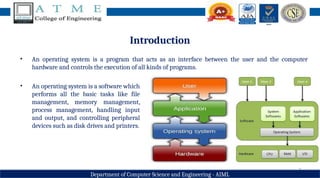
• An operating system is a program that acts as an interface between the user and the computer
hardware and controls the execution of all kinds of programs.
• An operating system is a software which
performs all the basic tasks like file
management, memory management,
process management, handling input
and output, and controlling peripheral
devices such as disk drives and printers.
4
Department of Computer Science and Engineering - AIML
What operating systems do
• Let us understand the operating system’s role in overall computer system.
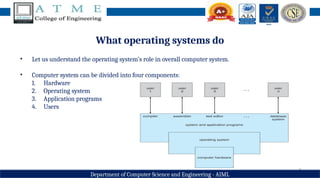
• Computer system can be divided into four components:
1. Hardware
2. Operating system
3. Application programs
4. Users
5
Department of Computer Science and Engineering - AIML
What operating systems do
• Hardware – provides basic computing resources (CPU, memory, I/O devices)
• Operating system - Controls and coordinates use of hardware among various applications and users
• Application programs – define the ways in which the system resources are used to solve the
computing problems of the users (Word processors, compilers, web browsers, database systems, video
games)
• Users - People, machines, other computers
6
Department of Computer Science and Engineering - AIML
What operating systems do
• The computer system can also be viewed as consisting of hardware, software and data.
• The operating system provides the means for proper use of these resources in the operation of the
computer systems.
• To understand the operating system’s role better, let us consider the operating system from two
viewpoints
1. User
2. System
7
Department of Computer Science and Engineering - AIML
Operating system: System View
• OS is a resource allocator
− Manages all resources
− Decides between conflicting requests for efficient and fair resource use
• OS is a control program
− Controls execution of programs to prevent errors and improper use of computer
8
Department of Computer Science and Engineering - AIML
Operating system: User View
• Users want convenience, ease of use – some attention paid to performance and none paid to
resource utilization.
• Performance – optimized for single user experience rather than the requirements of multiple users.
• Being considered as mainframes or minicomputers – resource utilization through shared resources.
• Users of dedicate systems such as workstations have dedicated resources but frequently use shared
resources from servers. (connecting to networks).
9
Department of Computer Science and Engineering - AIML
Operating system: User View
• Handheld computers such as mobiles and tablets are standalone units for individual users – OS is
designed for individual usability and battery life.
• Some computers have little or no user interface, such as embedded computers in home devices and
automobiles – OS is designed primarily to run without user intervention.
• With all these views – user and system, we can understand that the OS is designed for multiple
purposes and cannot define the OS for a specific task – No adequate definition for OS as the views
are different.
Department of Computer Science and Engineering - AIML
Computer System Organization
• Computer-system operation
• One or more CPUs, device controllers connect through common bus providing access to shared
memory (as shown in fig. below)
• Concurrent execution of CPUs and devices competing for memory cycles
Fig. A Modern Computer
System
Department of Computer Science and Engineering - AIML
Computer System Organization
• When the system is switched ON, Bootstrap program is executed. It is the initial program to run in the
system which is typically stored in ROM or EEPROM.
• It initializes all aspects of the system, from CPU registers to device controllers to memory contents. The
bootstrap program must know how to load the operating system & how to start executing the system.
To do this, the bootstrap program must locate the operating system kernel and load it into memory.
• The OS, then starts with the first process to be executed (i.e., init process) and then wait for the
interrupt from the user.
Department of Computer Science and Engineering - AIML
Computer System Organization
Switch on ‘Bootstrap’ program
• Initializes the registers, memory and I/O devices
• Locates & loads kernel into memory
• Starts with ‘init’ process
• Waits for interrupt from user.
Kernel is central component of an operating system that manages
operations of computer and hardware. It basically manages operations
of memory and CPU time. It is core component of an operating system.
Kernel acts as a bridge between applications and data processing
performed at hardware level using inter-process communication and
system calls.
13
Department of Computer Science and Engineering - AIML
Computer System Operation
• I/O devices and the CPU can execute concurrently
• Each device controller is in charge of a particular device type
• Each device controller has a local buffer
• Each device controller type has an operating system device driver to manage it
• CPU moves data from/to main memory to/from local buffers
• I/O is from the device to local buffer of controller
• Device controller informs CPU that it has finished its operation by causing an interrupt
14
Department of Computer Science and Engineering - AIML
Common Functions of Interrupts
• Interrupt transfers control to the interrupt service routine generally, through the interrupt vector,
which contains the addresses of all the service routines
• Interrupt architecture must save the address of the interrupted instruction
• A trap or exception is a software-generated interrupt caused either by an error or a user request
• An operating system is interrupt driven
15
Department of Computer Science and Engineering - AIML
Interrupt Timeline
16
Department of Computer Science and Engineering - AIML
Interrupt Handling
• The occurrence of an event is usually signaled by an interrupt. The interrupt can either be from the
hardware or the software. Hardware may trigger an interrupt at any time by sending a signal to the
CPU. Software triggers an interrupt by executing a special operation called a system call (also called a
monitor call).
• When the CPU is interrupted, it stops what it is doing and immediately transfers execution to a fixed
location. The fixed location (Interrupt Vector Table) contains the starting address where the service
routine for the interrupt is located. After the execution of interrupt service routine, the CPU resumes
the interrupted computation.
• Interrupts are an important part of computer architecture. Each computer design has its own
interrupt mechanism, but several functions are common. The interrupt must transfer control to the
appropriate interrupt service routine.
17
Department of Computer Science and Engineering - AIML
Interrupt-driven I/O Cycle
18
Department of Computer Science and Engineering - AIML
I/O Structure
• A large portion of operating system code is dedicated to managing I/O, both because of its importance
to the reliability and performance of a system and because of the varying nature of the devices.
• Every device has a device controller, maintains some local buffer and a set of special- purpose
registers. The device controller is responsible for moving the data between the peripheral devices. The
operating systems have a device driver for each device controller.
• Interrupt-driven I/O is well suited for moving small amounts of data but can produce high overhead
when used for bulk data movement such as disk I/O. To solve this problem, direct memory access
(DMA) is used.
19
Department of Computer Science and Engineering - AIML
I/O Structure
• After setting up buffers, pointers, and counters for the I/O device, the device controller transfers an
entire block of data directly to or from its own buffer storage to memory, with no intervention by the
CPU. Only one interrupt is generated per block, to tell the device driver that the operation has
completed.
Fig. How a Modern Computer
System Works
20
Department of Computer Science and Engineering - AIML
Storage Structure
• Computer programs must be in main memory (RAM) to be executed.
• Main memory – only large storage media that the CPU can access directly
• Random access
• Typically volatile
• Typically random-access memory in the form of Dynamic Random-access Memory (DRAM)
• All forms of memory provide an array of memory words. Each word has its own address. Interaction
is achieved through a sequence of load or store instructions to specific memory addresses.
• A typical instruction-execution cycle, as executed on a system with a Von Neumann architecture,
first fetches an instruction from memory and stores that instruction in the instruction register.
21
Department of Computer Science and Engineering - AIML
Storage Structure
• The instruction is then decoded and may cause operands to be fetched from memory and stored in
some internal register. After the instruction on the operands has been executed, the result may be
stored back in memory.
• Ideally, we want the programs and data to reside in main memory permanently. This arrangement
usually is not possible for the following two reasons:
1. Main memory is usually too small to store all needed programs and data permanently.
2. Main memory is a volatile storage device that loses its contents when power is turned off.
• Thus, most computer systems provide secondary storage as an extension of main memory. The main
requirement for secondary storage is that it will be able to hold large quantities of data permanently.
22
Department of Computer Science and Engineering - AIML
Storage Structure
• The instruction is then decoded and may cause operands to be fetched from memory and stored in
some internal register. After the instruction on the operands has been executed, the result may be
stored back in memory.
• Ideally, we want the programs and data to reside in main memory permanently. This arrangement
usually is not possible for the following two reasons:
1. Main memory is usually too small to store all needed programs and data permanently.
2. Main memory is a volatile storage device that loses its contents when power is turned off.
• Thus, most computer systems provide secondary storage as an extension of main memory. The main
requirement for secondary storage is that it will be able to hold large quantities of data permanently.
23
Department of Computer Science and Engineering - AIML
Storage Structure & Hierarchy
• The most common secondary-
storage device is a magnetic
disk, which provides storage for
both programs and data.
• The wide variety of storage
systems in a computer system
can be organized in a hierarchy
as shown in the figure,
according to speed, cost and
capacity.
24
Department of Computer Science and Engineering - AIML
Storage Hierarchy
• The higher levels are expensive, but they are fast.
• As we move down the hierarchy, the cost per bit generally decreases, whereas the access time and the
capacity of storage generally increases.
• In addition to differing in speed and cost, the various storage systems are either volatile or nonvolatile.
• Volatile storage loses its contents when the power to the device is removed.
• In the absence of expensive battery and generator backup systems, data must be written to nonvolatile
storage for safekeeping.
25
Department of Computer Science and Engineering - AIML
Summary
• In today’s session, you all have gone through the following topics
• Introduction
• What operating systems do
• Computer System organization
26
Department of Computer Science and Engineering - AIML
Discussion and Interaction
27
Department of Computer Science and Engineering - AIML
Topics for Next Session
Module 1: Introduction to operating systems, System structures
Session 2
• Computer System structures
• Operating Systems Structure
28
Department of Computer Science and Engineering - AIML

Operating Systems Module 1 Session 1.pptx

  • 1.
    1 Department of ComputerScience and Engineering - AIML Operating Systems – 21CS44 Course Coordinator: Prof. Yogesh N Assistant Professor Dept. of CSD ATMECE, Mysuru
  • 2.
    2 Department of ComputerScience and Design Module 1 – Introduction to operating systems System structures Session 1 • Introduction • What operating systems do • Computer System organization
  • 3.
    3 Department of ComputerScience and Engineering - AIML Introduction • An operating system is a program that acts as an interface between the user and the computer hardware and controls the execution of all kinds of programs. • An operating system is a software which performs all the basic tasks like file management, memory management, process management, handling input and output, and controlling peripheral devices such as disk drives and printers.
  • 4.
    4 Department of ComputerScience and Engineering - AIML What operating systems do • Let us understand the operating system’s role in overall computer system. • Computer system can be divided into four components: 1. Hardware 2. Operating system 3. Application programs 4. Users
  • 5.
    5 Department of ComputerScience and Engineering - AIML What operating systems do • Hardware – provides basic computing resources (CPU, memory, I/O devices) • Operating system - Controls and coordinates use of hardware among various applications and users • Application programs – define the ways in which the system resources are used to solve the computing problems of the users (Word processors, compilers, web browsers, database systems, video games) • Users - People, machines, other computers
  • 6.
    6 Department of ComputerScience and Engineering - AIML What operating systems do • The computer system can also be viewed as consisting of hardware, software and data. • The operating system provides the means for proper use of these resources in the operation of the computer systems. • To understand the operating system’s role better, let us consider the operating system from two viewpoints 1. User 2. System
  • 7.
    7 Department of ComputerScience and Engineering - AIML Operating system: System View • OS is a resource allocator − Manages all resources − Decides between conflicting requests for efficient and fair resource use • OS is a control program − Controls execution of programs to prevent errors and improper use of computer
  • 8.
    8 Department of ComputerScience and Engineering - AIML Operating system: User View • Users want convenience, ease of use – some attention paid to performance and none paid to resource utilization. • Performance – optimized for single user experience rather than the requirements of multiple users. • Being considered as mainframes or minicomputers – resource utilization through shared resources. • Users of dedicate systems such as workstations have dedicated resources but frequently use shared resources from servers. (connecting to networks).
  • 9.
    9 Department of ComputerScience and Engineering - AIML Operating system: User View • Handheld computers such as mobiles and tablets are standalone units for individual users – OS is designed for individual usability and battery life. • Some computers have little or no user interface, such as embedded computers in home devices and automobiles – OS is designed primarily to run without user intervention. • With all these views – user and system, we can understand that the OS is designed for multiple purposes and cannot define the OS for a specific task – No adequate definition for OS as the views are different.
  • 10.
    Department of ComputerScience and Engineering - AIML Computer System Organization • Computer-system operation • One or more CPUs, device controllers connect through common bus providing access to shared memory (as shown in fig. below) • Concurrent execution of CPUs and devices competing for memory cycles Fig. A Modern Computer System
  • 11.
    Department of ComputerScience and Engineering - AIML Computer System Organization • When the system is switched ON, Bootstrap program is executed. It is the initial program to run in the system which is typically stored in ROM or EEPROM. • It initializes all aspects of the system, from CPU registers to device controllers to memory contents. The bootstrap program must know how to load the operating system & how to start executing the system. To do this, the bootstrap program must locate the operating system kernel and load it into memory. • The OS, then starts with the first process to be executed (i.e., init process) and then wait for the interrupt from the user.
  • 12.
    Department of ComputerScience and Engineering - AIML Computer System Organization Switch on ‘Bootstrap’ program • Initializes the registers, memory and I/O devices • Locates & loads kernel into memory • Starts with ‘init’ process • Waits for interrupt from user. Kernel is central component of an operating system that manages operations of computer and hardware. It basically manages operations of memory and CPU time. It is core component of an operating system. Kernel acts as a bridge between applications and data processing performed at hardware level using inter-process communication and system calls.
  • 13.
    13 Department of ComputerScience and Engineering - AIML Computer System Operation • I/O devices and the CPU can execute concurrently • Each device controller is in charge of a particular device type • Each device controller has a local buffer • Each device controller type has an operating system device driver to manage it • CPU moves data from/to main memory to/from local buffers • I/O is from the device to local buffer of controller • Device controller informs CPU that it has finished its operation by causing an interrupt
  • 14.
    14 Department of ComputerScience and Engineering - AIML Common Functions of Interrupts • Interrupt transfers control to the interrupt service routine generally, through the interrupt vector, which contains the addresses of all the service routines • Interrupt architecture must save the address of the interrupted instruction • A trap or exception is a software-generated interrupt caused either by an error or a user request • An operating system is interrupt driven
  • 15.
    15 Department of ComputerScience and Engineering - AIML Interrupt Timeline
  • 16.
    16 Department of ComputerScience and Engineering - AIML Interrupt Handling • The occurrence of an event is usually signaled by an interrupt. The interrupt can either be from the hardware or the software. Hardware may trigger an interrupt at any time by sending a signal to the CPU. Software triggers an interrupt by executing a special operation called a system call (also called a monitor call). • When the CPU is interrupted, it stops what it is doing and immediately transfers execution to a fixed location. The fixed location (Interrupt Vector Table) contains the starting address where the service routine for the interrupt is located. After the execution of interrupt service routine, the CPU resumes the interrupted computation. • Interrupts are an important part of computer architecture. Each computer design has its own interrupt mechanism, but several functions are common. The interrupt must transfer control to the appropriate interrupt service routine.
  • 17.
    17 Department of ComputerScience and Engineering - AIML Interrupt-driven I/O Cycle
  • 18.
    18 Department of ComputerScience and Engineering - AIML I/O Structure • A large portion of operating system code is dedicated to managing I/O, both because of its importance to the reliability and performance of a system and because of the varying nature of the devices. • Every device has a device controller, maintains some local buffer and a set of special- purpose registers. The device controller is responsible for moving the data between the peripheral devices. The operating systems have a device driver for each device controller. • Interrupt-driven I/O is well suited for moving small amounts of data but can produce high overhead when used for bulk data movement such as disk I/O. To solve this problem, direct memory access (DMA) is used.
  • 19.
    19 Department of ComputerScience and Engineering - AIML I/O Structure • After setting up buffers, pointers, and counters for the I/O device, the device controller transfers an entire block of data directly to or from its own buffer storage to memory, with no intervention by the CPU. Only one interrupt is generated per block, to tell the device driver that the operation has completed. Fig. How a Modern Computer System Works
  • 20.
    20 Department of ComputerScience and Engineering - AIML Storage Structure • Computer programs must be in main memory (RAM) to be executed. • Main memory – only large storage media that the CPU can access directly • Random access • Typically volatile • Typically random-access memory in the form of Dynamic Random-access Memory (DRAM) • All forms of memory provide an array of memory words. Each word has its own address. Interaction is achieved through a sequence of load or store instructions to specific memory addresses. • A typical instruction-execution cycle, as executed on a system with a Von Neumann architecture, first fetches an instruction from memory and stores that instruction in the instruction register.
  • 21.
    21 Department of ComputerScience and Engineering - AIML Storage Structure • The instruction is then decoded and may cause operands to be fetched from memory and stored in some internal register. After the instruction on the operands has been executed, the result may be stored back in memory. • Ideally, we want the programs and data to reside in main memory permanently. This arrangement usually is not possible for the following two reasons: 1. Main memory is usually too small to store all needed programs and data permanently. 2. Main memory is a volatile storage device that loses its contents when power is turned off. • Thus, most computer systems provide secondary storage as an extension of main memory. The main requirement for secondary storage is that it will be able to hold large quantities of data permanently.
  • 22.
    22 Department of ComputerScience and Engineering - AIML Storage Structure • The instruction is then decoded and may cause operands to be fetched from memory and stored in some internal register. After the instruction on the operands has been executed, the result may be stored back in memory. • Ideally, we want the programs and data to reside in main memory permanently. This arrangement usually is not possible for the following two reasons: 1. Main memory is usually too small to store all needed programs and data permanently. 2. Main memory is a volatile storage device that loses its contents when power is turned off. • Thus, most computer systems provide secondary storage as an extension of main memory. The main requirement for secondary storage is that it will be able to hold large quantities of data permanently.
  • 23.
    23 Department of ComputerScience and Engineering - AIML Storage Structure & Hierarchy • The most common secondary- storage device is a magnetic disk, which provides storage for both programs and data. • The wide variety of storage systems in a computer system can be organized in a hierarchy as shown in the figure, according to speed, cost and capacity.
  • 24.
    24 Department of ComputerScience and Engineering - AIML Storage Hierarchy • The higher levels are expensive, but they are fast. • As we move down the hierarchy, the cost per bit generally decreases, whereas the access time and the capacity of storage generally increases. • In addition to differing in speed and cost, the various storage systems are either volatile or nonvolatile. • Volatile storage loses its contents when the power to the device is removed. • In the absence of expensive battery and generator backup systems, data must be written to nonvolatile storage for safekeeping.
  • 25.
    25 Department of ComputerScience and Engineering - AIML Summary • In today’s session, you all have gone through the following topics • Introduction • What operating systems do • Computer System organization
  • 26.
    26 Department of ComputerScience and Engineering - AIML Discussion and Interaction
  • 27.
    27 Department of ComputerScience and Engineering - AIML Topics for Next Session Module 1: Introduction to operating systems, System structures Session 2 • Computer System structures • Operating Systems Structure
  • 28.
    28 Department of ComputerScience and Engineering - AIML