4 Credits
Operating Systems
(IT2202)
Dr. NIRMAL KUMAR GUPTA
TEXTBOOKS
T1. A. Silberschatz, P. B. Galvin and G. Gagne, “Operating System Concepts”, 9th
Edition,Wiley, 2014.
REFERENCE BOOKS
R1.A.S.Tanenbaum,“Modern Operating Systems”, 3rd
Edition, Prentice Hall India.
R2.W. Stallings,“Operating Systems”, 7th
Edition, Pearson.
R3. W. R. Stevens and S. A. Rago, “Advanced Programming in the UNIX
Environment”, 3rd
Edition,Addison-Wesley, 2013.
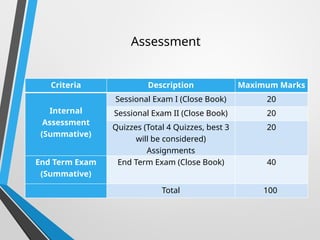
Criteria Description Maximum Marks
Internal
Assessment
(Summative)
Sessional Exam I (Close Book) 20
Sessional Exam II (Close Book) 20
Quizzes (Total 4 Quizzes, best 3
will be considered)
Assignments
20
End Term Exam
(Summative)
End Term Exam (Close Book) 40
Total 100
Assessment
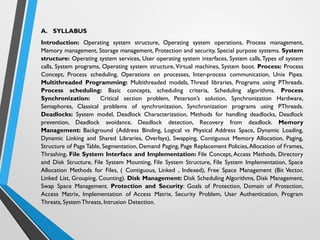
A. SYLLABUS
Introduction: Operating system structure, Operating system operations, Process management,
Memory management, Storage management, Protection and security, Special purpose systems. System
structure: Operating system services, User operating system interfaces, System calls,Types of system
calls, System programs, Operating system structure, Virtual machines, System boot. Process: Process
Concept, Process scheduling, Operations on processes, Inter-process communication, Unix Pipes.
Multithreaded Programming: Multithreaded models, Thread libraries, Programs using PThreads.
Process scheduling: Basic concepts, scheduling criteria, Scheduling algorithms. Process
Synchronization: Critical section problem, Peterson’s solution, Synchronization Hardware,
Semaphores, Classical problems of synchronization, Synchronization programs using PThreads.
Deadlocks: System model, Deadlock Characterization, Methods for handling deadlocks, Deadlock
prevention, Deadlock avoidance, Deadlock detection, Recovery from deadlock. Memory
Management: Background (Address Binding, Logical vs Physical Address Space, Dynamic Loading,
Dynamic Linking and Shared Libraries, Overlays), Swapping, Contiguous Memory Allocation, Paging,
Structure of Page Table, Segmentation, Demand Paging, Page Replacement Policies,Allocation of Frames,
Thrashing. File System Interface and Implementation: File Concept, Access Methods, Directory
and Disk Structure, File System Mounting, File System Structure, File System Implementation, Space
Allocation Methods for Files, ( Contiguous, Linked , Indexed), Free Space Management (Bit Vector,
Linked List, Grouping, Counting). Disk Management: Disk Scheduling Algorithms, Disk Management,
Swap Space Management. Protection and Security: Goals of Protection, Domain of Protection,
Access Matrix, Implementation of Access Matrix, Security Problem, User Authentication, Program
Threats, SystemThreats, Intrusion Detection.
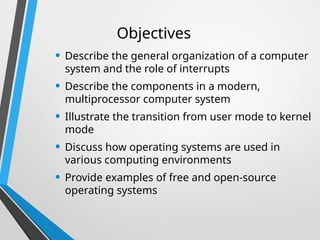
Objectives
• Describe the general organization of a computer
system and the role of interrupts
• Describe the components in a modern,
multiprocessor computer system
• Illustrate the transition from user mode to kernel
mode
• Discuss how operating systems are used in
various computing environments
• Provide examples of free and open-source
operating systems
What is an Operating System?
• A program that acts as an intermediary
between a user of a computer and the
computer hardware
• Operating system goals:
• Execute user programs and make solving user
problems easier
• Make the computer system convenient to use
• Use the computer hardware in an efficient manner
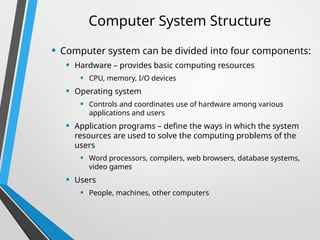
Computer System Structure
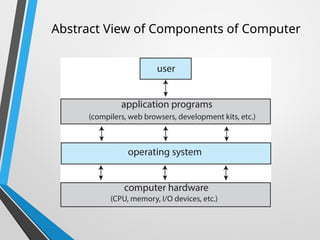
• Computer system can be divided into four components:
• Hardware – provides basic computing resources
• CPU, memory, I/O devices
• Operating system
• Controls and coordinates use of hardware among various
applications and users
• Application programs – define the ways in which the system
resources are used to solve the computing problems of the
users
• Word processors, compilers, web browsers, database systems,
video games
• Users
• People, machines, other computers
Abstract View of Components of Computer
What Operating Systems Do
• Depends on the point of view
• Users want convenience, ease of use and good performance
• Don’t care about resource utilization
• But shared computer such as mainframe or minicomputer must
keep all users happy
• Operating system is a resource allocator and control program making
efficient use of HW and managing execution of user programs
• Users of dedicate systems such as workstations have dedicated
resources but frequently use shared resources from servers
• Mobile devices like smartphones and tables are resource poor,
optimized for usability and battery life
• Mobile user interfaces such as touch screens, voice recognition
• Some computers have little or no user interface, such as embedded
computers in devices and automobiles
• Run primarily without user intervention
Defining Operating Systems
• Term OS covers many roles
• Because of myriad designs and uses of OSes
• Present in toasters through ships, spacecraft,
game machines, TVs and industrial control
systems
• Born when fixed use computers for military
became more general purpose and needed
resource management and program control
Operating System Definition
• No universally accepted definition
• “Everything a vendor ships when you order an operating system” is a
good approximation
• But varies wildly
• “The one program running at all times on the computer” is the
kernel, part of the operating system
• Everything else is either
• A system program (ships with the operating system, but not part of the kernel) ,
or
• An application program, all programs not associated with the operating system
• Today’s OSes for general purpose and mobile computing also include
middleware – a set of software frameworks that provide additional
services to application developers such as databases, multimedia,
graphics
Overview of Computer System
Structure
Computer System Organization
• Computer-system operation
• One or more CPUs, device controllers connect
through common bus providing access to shared
memory
• Concurrent execution of CPUs and devices competing
for memory cycles
Computer-System Operation
• I/O devices and the CPU can execute concurrently
• Each device controller is in charge of a particular device
type
• Each device controller has a local buffer
• Each device controller type has an operating system
device driver to manage it
• CPU moves data from/to main memory to/from local
buffers
• I/O is from the device to local buffer of controller
• Device controller informs CPU that it has finished its
operation by causing an interrupt
Common Functions of Interrupts
• Interrupt transfers control to the interrupt service
routine generally, through the interrupt vector,
which contains the addresses of all the service
routines
• Interrupt architecture must save the address of the
interrupted instruction
• A trap or exception is a software-generated
interrupt caused either by an error or a user
request
• An operating system is interrupt driven
Interrupt Timeline
Interrupt Handling
• The operating system preserves the state of
the CPU by storing the registers and the
program counter
• Determines which type of interrupt has
occurred:
• Separate segments of code determine what
action should be taken for each type of
interrupt
Interrupt-drive I/O Cycle
I/O Structure
• Two methods for handling I/O
• After I/O starts, control returns to user program only upon
I/O completion
• After I/O starts, control returns to user program without
waiting for I/O completion
I/O Structure (Cont.)
• After I/O starts, control returns to user program only
upon I/O completion
• Wait instruction idles the CPU until the next interrupt
• Wait loop (contention for memory access)
• At most one I/O request is outstanding at a time, no
simultaneous I/O processing
• After I/O starts, control returns to user program
without waiting for I/O completion
• System call – request to the OS to allow user to wait for I/O
completion
• Device-status table contains entry for each I/O device
indicating its type, address, and state
• OS indexes into I/O device table to determine device status
and to modify table entry to include interrupt
Storage Structure
Storage Structure
• Main memory – only large storage media that the CPU can
access directly
• Random access
• Typically volatile
• Typically random-access memory in the
form of Dynamic Random-access
Memory (DRAM)
• Secondary storage – extension of main memory that provides
large nonvolatile storage capacity
Storage Structure (Cont.)
• Hard Disk Drives (HDD) – rigid metal or glass platters
covered with magnetic recording material
• Disk surface is logically divided into tracks, which are
subdivided into sectors
• The disk controller determines the logical interaction
between the device and the computer
• Non-volatile memory (NVM) devices– faster than hard
disks, nonvolatile
• Various technologies
• Becoming more popular as capacity and performance increases,
price drops
Storage Definitions and Notation Review
The basic unit of computer storage is the bit. A bit can contain one of two
values, 0 and 1. All other storage in a computer is based on collections of bits.
Given enough bits, it is amazing how many things a computer can represent:
numbers, letters, images, movies, sounds, documents, and programs, to name
a few. A byte is 8 bits, and on most computers it is the smallest convenient
chunk of storage. For example, most computers don’t have an instruction to
move a bit but do have one to move a byte. A less common term is word,
which is a given computer architecture’s native unit of data. A word is made
up of one or more bytes. For example, a computer that has 64-bit registers and
64-bit memory addressing typically has 64-bit (8-byte) words. A computer
executes many operations in its native word size rather than a byte at a time.
Computer storage, along with most computer throughput, is generally
measured and manipulated in bytes and collections of bytes. A kilobyte, or
KB , is 1,024 bytes; a megabyte, or MB, is 1,0242
bytes; a gigabyte, or GB, is
1,0243
bytes; a terabyte, or TB, is 1,0244
bytes; and a petabyte, or PB, is 1,0245
bytes. Computer manufacturers often round off these numbers and say that
a megabyte is 1 million bytes and a gigabyte is 1 billion bytes. Networking
measurements are an exception to this general rule; they are given in bits
(because networks move data a bit at a time).
Storage Hierarchy
• Storage systems organized in hierarchy
• Speed
• Cost
• Volatility
• Caching – copying information into faster storage
system; main memory can be viewed as a cache for
secondary storage
• Device Driver for each device controller to
manage I/O
• Provides uniform interface between controller and kernel
Storage-Device Hierarchy
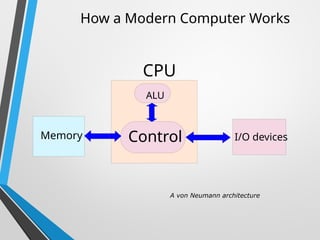
How a Modern Computer Works
A von Neumann architecture
CPU
Control
ALU
Memory I/O devices
Direct Memory Access Structure
• Used for high-speed I/O devices able to
transmit information at close to memory
speeds
• Device controller transfers blocks of data
from buffer storage directly to main
memory without CPU intervention
• Only one interrupt is generated per block,
rather than the one interrupt per byte
Bootstrapping
• Computers execute programs stored in main
memory, and initially the operating system is on
the hard disk.
• When the computer is turned on it does not have
an operating system loaded in memory and the
hardware alone cannot do the operations of an OS.
• To solve this problem a special program called
bootstrap loader is created.
Bootstrapping continued…
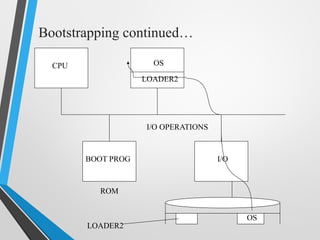
• This program does not have the full
functionality of an operating system, but it is
capable of loading into memory a more
elaborated software (i.e. loader2) which in its
turn will load the operating system.
• Once the OS has been loaded the loader
transfers the control of the system to the
Operating system.
Bootstrapping continued…
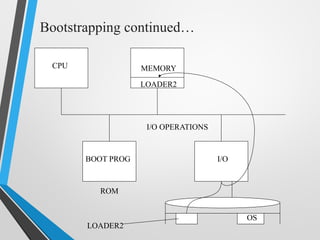
• In modern computers the bootstrapping
process begins with the CPU executing
software contained in ROM at a predefined
address whose elementary functionality is
to search for devices eligible to participate
in booting, and load a small program
(loader2).
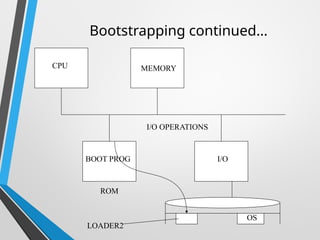
Bootstrapping continued…
BOOT PROG
ROM
I/O
LOADER2
OS
I/O OPERATIONS
CPU MEMORY
BOOT PROG
ROM
I/O
LOADER2
OS
I/O OPERATIONS
CPU MEMORY
LOADER2
Bootstrapping continued…
BOOT PROG
ROM
I/O
LOADER2
OS
I/O OPERATIONS
CPU OS
LOADER2
Bootstrapping continued…
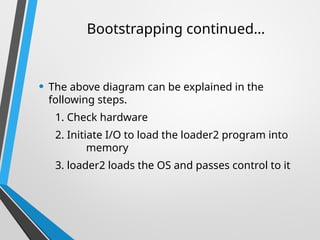
• The above diagram can be explained in the
following steps.
1. Check hardware
2. Initiate I/O to load the loader2 program into
memory
3. loader2 loads the OS and passes control to it
Bootstrapping continued…
• Once the OS has control over the system , it can
create an environment for programs to run.
• The operating system will load device drivers and
other programs that are needed for the normal
operation of the computer system.
Bootstrapping continued…
Multiprogramming
• Memory partitioned into
several pieces
• CPU Starts a job
• If the job is waiting for IO, the
CPU can switch to another
task
Multitasking (Time-sharing)
• Extension of Multiprogramming
• Need for user interactivity
• Instead of switching jobs when waiting for IO, a timer
causes jobs to switch
• User interacts with computer via monitor and keyboard
• Systems have to balance CPU utilization against
response time
• Better device management
• Need to provide user with an “interaction environment”
Virtual Memory
• Programs can be larger than memory
• Program loaded into memory as needed
• Active program and data “swapped” to a disk until
needed
• Memory space treated uniformly
Generations of Computer
• The computer has evolved from a large-sized simple
calculating machine to a smaller but much more
powerful machine.
• The evolution of computer to the current state is
defined in terms of the generations of computer.
• Each generation of computer is designed based on a
new technological development, resulting in better,
cheaper and smaller computers that are more
powerful, faster and efficient than their
predecessors.
41
Generations of Computer
• Currently, there are five generations of
computer. In the following subsections, we
will discuss the generations of computer in
terms of the technology used by them
(hardware and software), computing
characteristics (speed, i.e., number of
instructions executed per second), physical
appearance, and their applications.
42
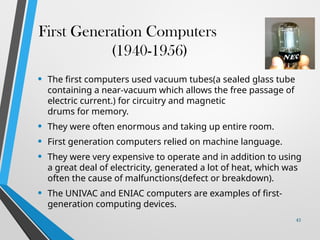
First Generation Computers
(1940-1956)
• The first computers used vacuum tubes(a sealed glass tube
containing a near-vacuum which allows the free passage of
electric current.) for circuitry and magnetic
drums for memory.
• They were often enormous and taking up entire room.
• First generation computers relied on machine language.
• They were very expensive to operate and in addition to using
a great deal of electricity, generated a lot of heat, which was
often the cause of malfunctions(defect or breakdown).
• The UNIVAC and ENIAC computers are examples of first-
generation computing devices.
43
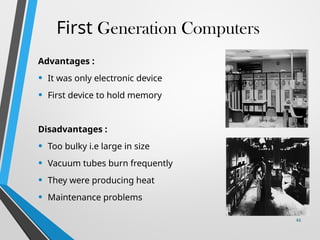
First Generation Computers
Advantages :
• It was only electronic device
• First device to hold memory
Disadvantages :
• Too bulky i.e large in size
• Vacuum tubes burn frequently
• They were producing heat
• Maintenance problems
44
Second Generation Computers
(1956-1963)
• Transistors replaced vacuum tubes and ushered in the
second generation of computers.
• Second-generation computers moved from
cryptic binary machine language to symbolic.
• High-level programming languages were also being
developed at this time, such as early versions of COBOL
and FORTRAN.
• These were also the first computers that stored their
instructions in their memory.
45
Second Generation Computers
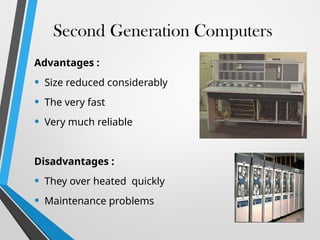
Advantages :
• Size reduced considerably
• The very fast
• Very much reliable
Disadvantages :
• They over heated quickly
• Maintenance problems
46
Third Generation Computers
(1964-1971)
• The development of the integrated circuit was the
hallmark of the third generation of computers.
• Transistors were miniaturized and placed on siliconchips,
called semiconductors.
• Instead of punched cards and printouts, users interacted
with third generation computers through keyboards
and monitors and interfaced with an operating system.
• Allowed the device to run many different applications at
one time.
47
Third generation computers
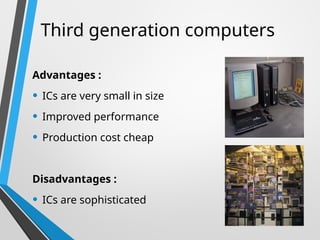
Advantages :
• ICs are very small in size
• Improved performance
• Production cost cheap
Disadvantages :
• ICs are sophisticated
48
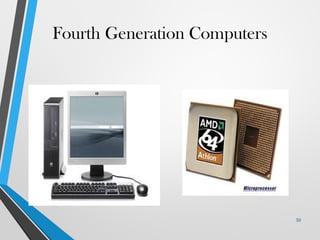
Fourth Generation Computers
(1971-present)
• The microprocessor brought the fourth generation of
computers, as thousands of integrated circuits were built
onto a single silicon chip.
• The Intel 4004 chip, developed in 1971, located all the
components of the computer.
• From the central processing unit and memory to
input/output controls—on a single chip.
• Fourth generation computers also saw the development
of GUIs, the mouse and handheld devices.
49
Fourth Generation Computers
50
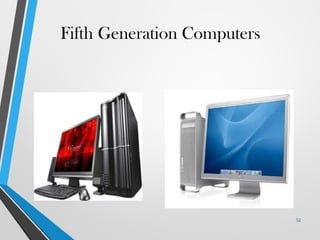
Fifth Generation Computers
(present and beyond)
• Fifth generation computing devices, based on artificial
intelligence.
• Are still in development, though there are some
applications, such as voice recognition.
• The use of parallel processing and superconductors is
helping to make artificial intelligence a reality.
• The goal of fifth-generation computing is to develop
devices that respond to natural language input and are
capable of learning and self-organization.
51
Fifth Generation Computers
52
Process Management
• A process is a program in execution. It is a unit of work
within the system. Program is a passive entity; process is
an active entity.
• Process needs resources to accomplish its task
• CPU, memory, I/O, files
• Initialization data
• Process termination requires reclaim of any reusable
resources
• Typically system has many processes, some user, some
operating system running concurrently on one or more
CPUs
• Concurrency by multiplexing the CPUs among the
processes / threads
Process Management Activities
• Creating and deleting both user and system
processes
• Suspending and resuming processes
• Providing mechanisms for process
synchronization
• Providing mechanisms for process
communication
• Providing mechanisms for deadlock handling
The operating system is responsible for the following activities in
connection with process management:
Memory Management
• To execute a program all (or part) of the instructions must be in
memory
• All (or part) of the data that is needed by the program must be
in memory
• Memory management determines what is in memory and when
• Optimizing CPU utilization and computer response to users
• Memory management activities
• Keeping track of which parts of memory are currently being used and by
whom
• Deciding which processes (or parts thereof) and data to move into and
out of memory
• Allocating and deallocating memory space as needed
File-system Management
• OS provides uniform, logical view of information storage
• Abstracts physical properties to logical storage unit - file
• Each medium is controlled by device (i.e., disk drive, tape drive)
• Varying properties include access speed, capacity, data-transfer rate,
access method (sequential or random)
• File-System management
• Files usually organized into directories
• Access control on most systems to determine who can access what
• OS activities include
• Creating and deleting files and directories
• Primitives to manipulate files and directories
• Mapping files onto secondary storage
• Backup files onto stable (non-volatile) storage media
Mass-Storage Management
• Usually disks used to store data that does not fit in main
memory or data that must be kept for a “long” period of time
• Proper management is of central importance
• Entire speed of computer operation hinges on disk
subsystem and its algorithms
• OS activities
• Mounting and unmounting
• Free-space management
• Storage allocation
• Disk scheduling
• Partitioning
• Protection
Caching
• Important principle, performed at many levels in a
computer (in hardware, operating system, software)
• Information in use copied from slower to faster
storage temporarily
• Faster storage (cache) checked first to determine if
information is there
• If it is, information used directly from the cache (fast)
• If not, data copied to cache and used there
• Cache smaller than storage being cached
• Cache management important design problem
• Cache size and replacement policy
Characteristics of Various Types of Storage
Movement between levels of storage hierarchy can be
explicit or implicit
Protection and Security
• Protection – any mechanism for controlling access of
processes or users to resources defined by the OS
• Security – defense of the system against internal and
external attacks
• Huge range, including denial-of-service, worms, viruses, identity
theft, theft of service
• Systems generally first distinguish among users, to
determine who can do what
• User identities (user IDs, security IDs) include name and associated
number, one per user
• User ID then associated with all files, processes of that user to
determine access control
• Group identifier (group ID) allows set of users to be defined and
controls managed, then also associated with each process, file
• Privilege escalation allows user to change to effective ID with more
rights
Thank You !!

Opearting System Introduction Course For colleges

  • 1.
  • 2.
    TEXTBOOKS T1. A. Silberschatz,P. B. Galvin and G. Gagne, “Operating System Concepts”, 9th Edition,Wiley, 2014. REFERENCE BOOKS R1.A.S.Tanenbaum,“Modern Operating Systems”, 3rd Edition, Prentice Hall India. R2.W. Stallings,“Operating Systems”, 7th Edition, Pearson. R3. W. R. Stevens and S. A. Rago, “Advanced Programming in the UNIX Environment”, 3rd Edition,Addison-Wesley, 2013.
  • 3.
    Criteria Description MaximumMarks Internal Assessment (Summative) Sessional Exam I (Close Book) 20 Sessional Exam II (Close Book) 20 Quizzes (Total 4 Quizzes, best 3 will be considered) Assignments 20 End Term Exam (Summative) End Term Exam (Close Book) 40 Total 100 Assessment
  • 4.
    A. SYLLABUS Introduction: Operatingsystem structure, Operating system operations, Process management, Memory management, Storage management, Protection and security, Special purpose systems. System structure: Operating system services, User operating system interfaces, System calls,Types of system calls, System programs, Operating system structure, Virtual machines, System boot. Process: Process Concept, Process scheduling, Operations on processes, Inter-process communication, Unix Pipes. Multithreaded Programming: Multithreaded models, Thread libraries, Programs using PThreads. Process scheduling: Basic concepts, scheduling criteria, Scheduling algorithms. Process Synchronization: Critical section problem, Peterson’s solution, Synchronization Hardware, Semaphores, Classical problems of synchronization, Synchronization programs using PThreads. Deadlocks: System model, Deadlock Characterization, Methods for handling deadlocks, Deadlock prevention, Deadlock avoidance, Deadlock detection, Recovery from deadlock. Memory Management: Background (Address Binding, Logical vs Physical Address Space, Dynamic Loading, Dynamic Linking and Shared Libraries, Overlays), Swapping, Contiguous Memory Allocation, Paging, Structure of Page Table, Segmentation, Demand Paging, Page Replacement Policies,Allocation of Frames, Thrashing. File System Interface and Implementation: File Concept, Access Methods, Directory and Disk Structure, File System Mounting, File System Structure, File System Implementation, Space Allocation Methods for Files, ( Contiguous, Linked , Indexed), Free Space Management (Bit Vector, Linked List, Grouping, Counting). Disk Management: Disk Scheduling Algorithms, Disk Management, Swap Space Management. Protection and Security: Goals of Protection, Domain of Protection, Access Matrix, Implementation of Access Matrix, Security Problem, User Authentication, Program Threats, SystemThreats, Intrusion Detection.
  • 5.
    Objectives • Describe thegeneral organization of a computer system and the role of interrupts • Describe the components in a modern, multiprocessor computer system • Illustrate the transition from user mode to kernel mode • Discuss how operating systems are used in various computing environments • Provide examples of free and open-source operating systems
  • 6.
    What is anOperating System? • A program that acts as an intermediary between a user of a computer and the computer hardware • Operating system goals: • Execute user programs and make solving user problems easier • Make the computer system convenient to use • Use the computer hardware in an efficient manner
  • 7.
    Computer System Structure •Computer system can be divided into four components: • Hardware – provides basic computing resources • CPU, memory, I/O devices • Operating system • Controls and coordinates use of hardware among various applications and users • Application programs – define the ways in which the system resources are used to solve the computing problems of the users • Word processors, compilers, web browsers, database systems, video games • Users • People, machines, other computers
  • 8.
    Abstract View ofComponents of Computer
  • 9.
    What Operating SystemsDo • Depends on the point of view • Users want convenience, ease of use and good performance • Don’t care about resource utilization • But shared computer such as mainframe or minicomputer must keep all users happy • Operating system is a resource allocator and control program making efficient use of HW and managing execution of user programs • Users of dedicate systems such as workstations have dedicated resources but frequently use shared resources from servers • Mobile devices like smartphones and tables are resource poor, optimized for usability and battery life • Mobile user interfaces such as touch screens, voice recognition • Some computers have little or no user interface, such as embedded computers in devices and automobiles • Run primarily without user intervention
  • 10.
    Defining Operating Systems •Term OS covers many roles • Because of myriad designs and uses of OSes • Present in toasters through ships, spacecraft, game machines, TVs and industrial control systems • Born when fixed use computers for military became more general purpose and needed resource management and program control
  • 11.
    Operating System Definition •No universally accepted definition • “Everything a vendor ships when you order an operating system” is a good approximation • But varies wildly • “The one program running at all times on the computer” is the kernel, part of the operating system • Everything else is either • A system program (ships with the operating system, but not part of the kernel) , or • An application program, all programs not associated with the operating system • Today’s OSes for general purpose and mobile computing also include middleware – a set of software frameworks that provide additional services to application developers such as databases, multimedia, graphics
  • 12.
    Overview of ComputerSystem Structure
  • 13.
    Computer System Organization •Computer-system operation • One or more CPUs, device controllers connect through common bus providing access to shared memory • Concurrent execution of CPUs and devices competing for memory cycles
  • 14.
    Computer-System Operation • I/Odevices and the CPU can execute concurrently • Each device controller is in charge of a particular device type • Each device controller has a local buffer • Each device controller type has an operating system device driver to manage it • CPU moves data from/to main memory to/from local buffers • I/O is from the device to local buffer of controller • Device controller informs CPU that it has finished its operation by causing an interrupt
  • 15.
    Common Functions ofInterrupts • Interrupt transfers control to the interrupt service routine generally, through the interrupt vector, which contains the addresses of all the service routines • Interrupt architecture must save the address of the interrupted instruction • A trap or exception is a software-generated interrupt caused either by an error or a user request • An operating system is interrupt driven
  • 16.
  • 17.
    Interrupt Handling • Theoperating system preserves the state of the CPU by storing the registers and the program counter • Determines which type of interrupt has occurred: • Separate segments of code determine what action should be taken for each type of interrupt
  • 18.
  • 19.
    I/O Structure • Twomethods for handling I/O • After I/O starts, control returns to user program only upon I/O completion • After I/O starts, control returns to user program without waiting for I/O completion
  • 20.
    I/O Structure (Cont.) •After I/O starts, control returns to user program only upon I/O completion • Wait instruction idles the CPU until the next interrupt • Wait loop (contention for memory access) • At most one I/O request is outstanding at a time, no simultaneous I/O processing • After I/O starts, control returns to user program without waiting for I/O completion • System call – request to the OS to allow user to wait for I/O completion • Device-status table contains entry for each I/O device indicating its type, address, and state • OS indexes into I/O device table to determine device status and to modify table entry to include interrupt
  • 21.
  • 22.
    Storage Structure • Mainmemory – only large storage media that the CPU can access directly • Random access • Typically volatile • Typically random-access memory in the form of Dynamic Random-access Memory (DRAM) • Secondary storage – extension of main memory that provides large nonvolatile storage capacity
  • 23.
    Storage Structure (Cont.) •Hard Disk Drives (HDD) – rigid metal or glass platters covered with magnetic recording material • Disk surface is logically divided into tracks, which are subdivided into sectors • The disk controller determines the logical interaction between the device and the computer • Non-volatile memory (NVM) devices– faster than hard disks, nonvolatile • Various technologies • Becoming more popular as capacity and performance increases, price drops
  • 24.
    Storage Definitions andNotation Review The basic unit of computer storage is the bit. A bit can contain one of two values, 0 and 1. All other storage in a computer is based on collections of bits. Given enough bits, it is amazing how many things a computer can represent: numbers, letters, images, movies, sounds, documents, and programs, to name a few. A byte is 8 bits, and on most computers it is the smallest convenient chunk of storage. For example, most computers don’t have an instruction to move a bit but do have one to move a byte. A less common term is word, which is a given computer architecture’s native unit of data. A word is made up of one or more bytes. For example, a computer that has 64-bit registers and 64-bit memory addressing typically has 64-bit (8-byte) words. A computer executes many operations in its native word size rather than a byte at a time. Computer storage, along with most computer throughput, is generally measured and manipulated in bytes and collections of bytes. A kilobyte, or KB , is 1,024 bytes; a megabyte, or MB, is 1,0242 bytes; a gigabyte, or GB, is 1,0243 bytes; a terabyte, or TB, is 1,0244 bytes; and a petabyte, or PB, is 1,0245 bytes. Computer manufacturers often round off these numbers and say that a megabyte is 1 million bytes and a gigabyte is 1 billion bytes. Networking measurements are an exception to this general rule; they are given in bits (because networks move data a bit at a time).
  • 25.
    Storage Hierarchy • Storagesystems organized in hierarchy • Speed • Cost • Volatility • Caching – copying information into faster storage system; main memory can be viewed as a cache for secondary storage • Device Driver for each device controller to manage I/O • Provides uniform interface between controller and kernel
  • 26.
  • 27.
    How a ModernComputer Works A von Neumann architecture CPU Control ALU Memory I/O devices
  • 28.
    Direct Memory AccessStructure • Used for high-speed I/O devices able to transmit information at close to memory speeds • Device controller transfers blocks of data from buffer storage directly to main memory without CPU intervention • Only one interrupt is generated per block, rather than the one interrupt per byte
  • 29.
    Bootstrapping • Computers executeprograms stored in main memory, and initially the operating system is on the hard disk. • When the computer is turned on it does not have an operating system loaded in memory and the hardware alone cannot do the operations of an OS. • To solve this problem a special program called bootstrap loader is created.
  • 30.
    Bootstrapping continued… • Thisprogram does not have the full functionality of an operating system, but it is capable of loading into memory a more elaborated software (i.e. loader2) which in its turn will load the operating system. • Once the OS has been loaded the loader transfers the control of the system to the Operating system.
  • 31.
    Bootstrapping continued… • Inmodern computers the bootstrapping process begins with the CPU executing software contained in ROM at a predefined address whose elementary functionality is to search for devices eligible to participate in booting, and load a small program (loader2).
  • 32.
  • 33.
    BOOT PROG ROM I/O LOADER2 OS I/O OPERATIONS CPUMEMORY LOADER2 Bootstrapping continued…
  • 34.
    BOOT PROG ROM I/O LOADER2 OS I/O OPERATIONS CPUOS LOADER2 Bootstrapping continued…
  • 35.
    • The abovediagram can be explained in the following steps. 1. Check hardware 2. Initiate I/O to load the loader2 program into memory 3. loader2 loads the OS and passes control to it Bootstrapping continued…
  • 36.
    • Once theOS has control over the system , it can create an environment for programs to run. • The operating system will load device drivers and other programs that are needed for the normal operation of the computer system. Bootstrapping continued…
  • 37.
    Multiprogramming • Memory partitionedinto several pieces • CPU Starts a job • If the job is waiting for IO, the CPU can switch to another task
  • 38.
    Multitasking (Time-sharing) • Extensionof Multiprogramming • Need for user interactivity • Instead of switching jobs when waiting for IO, a timer causes jobs to switch • User interacts with computer via monitor and keyboard • Systems have to balance CPU utilization against response time • Better device management • Need to provide user with an “interaction environment”
  • 39.
    Virtual Memory • Programscan be larger than memory • Program loaded into memory as needed • Active program and data “swapped” to a disk until needed • Memory space treated uniformly
  • 40.
    Generations of Computer •The computer has evolved from a large-sized simple calculating machine to a smaller but much more powerful machine. • The evolution of computer to the current state is defined in terms of the generations of computer. • Each generation of computer is designed based on a new technological development, resulting in better, cheaper and smaller computers that are more powerful, faster and efficient than their predecessors. 41
  • 41.
    Generations of Computer •Currently, there are five generations of computer. In the following subsections, we will discuss the generations of computer in terms of the technology used by them (hardware and software), computing characteristics (speed, i.e., number of instructions executed per second), physical appearance, and their applications. 42
  • 42.
    First Generation Computers (1940-1956) •The first computers used vacuum tubes(a sealed glass tube containing a near-vacuum which allows the free passage of electric current.) for circuitry and magnetic drums for memory. • They were often enormous and taking up entire room. • First generation computers relied on machine language. • They were very expensive to operate and in addition to using a great deal of electricity, generated a lot of heat, which was often the cause of malfunctions(defect or breakdown). • The UNIVAC and ENIAC computers are examples of first- generation computing devices. 43
  • 43.
    First Generation Computers Advantages: • It was only electronic device • First device to hold memory Disadvantages : • Too bulky i.e large in size • Vacuum tubes burn frequently • They were producing heat • Maintenance problems 44
  • 44.
    Second Generation Computers (1956-1963) •Transistors replaced vacuum tubes and ushered in the second generation of computers. • Second-generation computers moved from cryptic binary machine language to symbolic. • High-level programming languages were also being developed at this time, such as early versions of COBOL and FORTRAN. • These were also the first computers that stored their instructions in their memory. 45
  • 45.
    Second Generation Computers Advantages: • Size reduced considerably • The very fast • Very much reliable Disadvantages : • They over heated quickly • Maintenance problems 46
  • 46.
    Third Generation Computers (1964-1971) •The development of the integrated circuit was the hallmark of the third generation of computers. • Transistors were miniaturized and placed on siliconchips, called semiconductors. • Instead of punched cards and printouts, users interacted with third generation computers through keyboards and monitors and interfaced with an operating system. • Allowed the device to run many different applications at one time. 47
  • 47.
    Third generation computers Advantages: • ICs are very small in size • Improved performance • Production cost cheap Disadvantages : • ICs are sophisticated 48
  • 48.
    Fourth Generation Computers (1971-present) •The microprocessor brought the fourth generation of computers, as thousands of integrated circuits were built onto a single silicon chip. • The Intel 4004 chip, developed in 1971, located all the components of the computer. • From the central processing unit and memory to input/output controls—on a single chip. • Fourth generation computers also saw the development of GUIs, the mouse and handheld devices. 49
  • 49.
  • 50.
    Fifth Generation Computers (presentand beyond) • Fifth generation computing devices, based on artificial intelligence. • Are still in development, though there are some applications, such as voice recognition. • The use of parallel processing and superconductors is helping to make artificial intelligence a reality. • The goal of fifth-generation computing is to develop devices that respond to natural language input and are capable of learning and self-organization. 51
  • 51.
  • 52.
    Process Management • Aprocess is a program in execution. It is a unit of work within the system. Program is a passive entity; process is an active entity. • Process needs resources to accomplish its task • CPU, memory, I/O, files • Initialization data • Process termination requires reclaim of any reusable resources • Typically system has many processes, some user, some operating system running concurrently on one or more CPUs • Concurrency by multiplexing the CPUs among the processes / threads
  • 53.
    Process Management Activities •Creating and deleting both user and system processes • Suspending and resuming processes • Providing mechanisms for process synchronization • Providing mechanisms for process communication • Providing mechanisms for deadlock handling The operating system is responsible for the following activities in connection with process management:
  • 54.
    Memory Management • Toexecute a program all (or part) of the instructions must be in memory • All (or part) of the data that is needed by the program must be in memory • Memory management determines what is in memory and when • Optimizing CPU utilization and computer response to users • Memory management activities • Keeping track of which parts of memory are currently being used and by whom • Deciding which processes (or parts thereof) and data to move into and out of memory • Allocating and deallocating memory space as needed
  • 55.
    File-system Management • OSprovides uniform, logical view of information storage • Abstracts physical properties to logical storage unit - file • Each medium is controlled by device (i.e., disk drive, tape drive) • Varying properties include access speed, capacity, data-transfer rate, access method (sequential or random) • File-System management • Files usually organized into directories • Access control on most systems to determine who can access what • OS activities include • Creating and deleting files and directories • Primitives to manipulate files and directories • Mapping files onto secondary storage • Backup files onto stable (non-volatile) storage media
  • 56.
    Mass-Storage Management • Usuallydisks used to store data that does not fit in main memory or data that must be kept for a “long” period of time • Proper management is of central importance • Entire speed of computer operation hinges on disk subsystem and its algorithms • OS activities • Mounting and unmounting • Free-space management • Storage allocation • Disk scheduling • Partitioning • Protection
  • 57.
    Caching • Important principle,performed at many levels in a computer (in hardware, operating system, software) • Information in use copied from slower to faster storage temporarily • Faster storage (cache) checked first to determine if information is there • If it is, information used directly from the cache (fast) • If not, data copied to cache and used there • Cache smaller than storage being cached • Cache management important design problem • Cache size and replacement policy
  • 58.
    Characteristics of VariousTypes of Storage Movement between levels of storage hierarchy can be explicit or implicit
  • 59.
    Protection and Security •Protection – any mechanism for controlling access of processes or users to resources defined by the OS • Security – defense of the system against internal and external attacks • Huge range, including denial-of-service, worms, viruses, identity theft, theft of service • Systems generally first distinguish among users, to determine who can do what • User identities (user IDs, security IDs) include name and associated number, one per user • User ID then associated with all files, processes of that user to determine access control • Group identifier (group ID) allows set of users to be defined and controls managed, then also associated with each process, file • Privilege escalation allows user to change to effective ID with more rights
  • 60.