1
Department of Computer Science and Engineering - AIML
Operating Systems – 21CS44
Course Coordinator:
Prof. Yogesh N
Assistant Professor
Dept. of CSD
ATMECE, Mysuru
2
Department of Computer Science and Design
Module 1 – Introduction to operating systems
System structures
Session 7
• System Calls
• Types of System Calls
• System Programs
• OS Design and Implementation
3
Department of Computer Science and Engineering - AIML
System Calls
• System calls provides an interface to the services of the operating system.
• These are generally written in C or C++,
although some are written in assembly for
optimal performance.
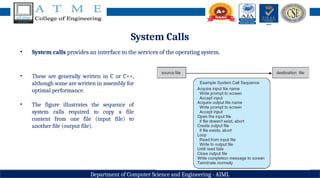
• The figure illustrates the sequence of
system calls required to copy a file
content from one file (input file) to
another file (output file).
4
Department of Computer Science and Engineering - AIML
System Calls
• An example to illustrate how system calls are used: writing a simple program to read data from one file and
copy them to another file
• There are number of system calls used to finish this task. The first system call is to write a message on the
screen (monitor). Then to accept the input filename. Then another system call to write message on the
screen, then to accept the output filename.
• When the program tries to open the input file, it may find that there is no file of that name or that the file
is protected against access. In these cases, the program should print a message on the console (another
system call) and then terminate abnormally (another system call) and create a new one (another system
call).
• Now that both the files are opened, we enter a loop that reads from the input file (another system call)
and writes to output file (another system call).
• Finally, after the entire file is copied, the program may close both files (another system call), write a
message to the console or window (system call), and finally terminate normally (final system call).
5
Department of Computer Science and Engineering - AIML
System Calls
• Most programmers do not use the low-level system calls directly, but instead use an "Application
Programming Interface", API.
• Instead of direct system calls, APIs provides for greater program portability between different systems. The
API then makes the appropriate system calls through the system call interface, using a system call table to
access specific numbered system calls.
• Each system call has a specific numbered system call. The system call table (consisting of system call number
and address of the particular service) invokes a particular service routine for a specific system call.
• The caller need know nothing about how the system call is implemented or what it does during execution.
Department of Computer Science and Engineering - AIML
System Calls
Fig. The handling of a user application invoking the open() system call
7
Department of Computer Science and Engineering - AIML
System Calls - Parameter Passing
• Three general methods used to pass parameters
to OS are –
1. To pass parameters in registers.
2. If parameters are large blocks, address of
block (where parameters are stored in
memory) is sent to OS in the register. (Linux
& Solaris).
3. Parameters can be pushed onto the stack by
program and popped off the stack by OS.
Fig. Passing of parameters as a table
8
Department of Computer Science and Engineering - AIML
Types of System Calls
• The system calls can be categorized into six major categories:
1. Process Control
2. File management
3. Device management
4. Information management
5. Communications
6. Protection
9
Department of Computer Science and Engineering - AIML
Types of System Calls
• Process Control
• Process control system calls include end, abort, load, execute, create process, terminate process, get/set
process attributes, wait for time or event, signal event, and allocate and free memory.
• Processes must be created, launched, monitored, paused, resumed, and eventually stopped.
• When one process pauses or stops, then another must be launched or resumed.
• Process attributes like process priority, max. allowable execution time etc. are set and retrieved by OS.
• After creating the new process, the parent process may have to wait (wait time), or wait for an event to
occur (wait event). The process sends back a signal when the event has occurred (signal event).
10
Department of Computer Science and Engineering - AIML
Types of System Calls
• File Management
• The file management functions of OS are –
• File management system calls include create file, delete file, open, close, read, write, reposition, get
file attributes, and set file attributes.
• After creating a file, the file is opened. Data is read or written to a file.
• The file pointer may need to be repositioned to a point.
• The file attributes like filename, file type, permissions, etc. are set and retrieved using system calls.
• These operations may also be supported for directories as well as ordinary files.
11
Department of Computer Science and Engineering - AIML
Types of System Calls
• Device Management
• Device management system calls include request device, release device, read, write, reposition, get/set
device attributes, and logically attach or detach devices.
• When a process needs a resource, a request for resource is done. Then the control is granted to the
process. If requested resource is already attached to some other process, the requesting process has to
wait.
• In multiprogramming systems, after a process uses the device, it has to be returned to OS, so that
another process can use the device.
• Devices may be physical (e.g. disk drives ), or virtual/abstract (e.g. files, partitions, and RAM disks ).
12
Department of Computer Science and Engineering - AIML
Types of System Calls
• Information Maintenance
• Information maintenance system calls include calls to get/set the time, date, system data, and process,
file, or device attributes.
• These system calls care used to transfer the information between user and the OS. Information like
current time & date, no. of current users, version no. of OS, amount of free memory, disk space etc. are
passed from OS to the user.
13
Department of Computer Science and Engineering - AIML
Types of System Calls
• Communication
• Communication system calls create/delete communication connection, send/receive
messages, transfer status information, and attach/detach remote devices.
• The message passing model must support calls to:
• Identify a remote process and/or host with which to communicate.
• Establish a connection between the two processes.
• Open and close the connection as needed.
• Transmit messages along the connection.
• Wait for incoming messages, in either a blocking or non-blocking state.
• Delete the connection when no longer needed.
14
Department of Computer Science and Engineering - AIML
Types of System Calls
• Communication
• The shared memory model must support calls to:
• Create and access memory that is shared amongst processes (and threads)
• Free up shared memory and/or dynamically allocate it as needed.
• Message passing is simpler and easier, (particularly for inter-computer communications), and is
generally appropriate for small amounts of data. It is easy to implement, but there are system calls for
each read and write process.
• Shared memory is faster, and is generally the better approach where large amounts of data are to be
shared. This model is difficult to implement, and it consists of only few system calls.
15
Department of Computer Science and Engineering - AIML
Types of System Calls
• Protection
• Protection provides mechanisms for controlling which users / processes have access to which system
resources.
• System calls allow the access mechanisms to be adjusted as needed, and for non- privileged users to be
granted elevated access permissions under carefully controlled temporary circumstances.
16
Department of Computer Science and Engineering - AIML
Types of System Calls
17
Department of Computer Science and Engineering - AIML
System Programs
• A collection of programs that provide a convenient environment for program development and execution
(other than OS) are called system programs or system utilities.
• System programs may be divided into following categories:
• File management - programs to create, delete, copy, rename, print, list, and generally manipulate files and
directories.
• Status information - Utilities to check on the date, time, number of users, processes running, data logging,
etc. System registries are used to store and recall configuration information for particular applications.
• Programming-language support - E.g. Compilers, linkers, debuggers, profilers, assemblers, library archive
management, interpreters for common languages, and support for make.
18
Department of Computer Science and Engineering - AIML
System Programs
• File modification - e.g. text editors and other tools which can change file contents.
• Program loading and execution - loaders, dynamic loaders, overlay loaders, etc., as well as interactive
debuggers.
• Communications - Programs for providing connectivity between processes and users, including mail, web
browsers, remote logins, file transfers, and remote command execution.
19
Department of Computer Science and Engineering - AIML
Operating-System Design and Implementation
• Design Goals
• The first problem in designing a system is to define goals and specifications. At the highest level, the design
of the system will be affected by the choice of hardware and the type of system: batch, time shared, single
user, multiuser, distributed, real time, or general purpose.
• Beyond this highest design level, the requirements may be much harder to specify. The requirements can,
however, be divided into two basic groups
1. User goals (User requirements)
2. System goals (System requirements)
• User requirements are the features that user care about and understand like system should be
convenient to use, easy to learn, reliable, safe and fast.
• System requirements are written for the developers, ie. People who design the OS. Their requirements are
like easy to design, implement and maintain, flexible, reliable, error free and efficient.
20
Department of Computer Science and Engineering - AIML
Operating-System Design and Implementation
• Mechanisms and Policies
• Policies determine what is to be done. Mechanisms determine how it is to be implemented.
• Example: in timer- counter and decrementing counter is the mechanism and deciding how long the time
has to be set is the policies.
• Policies change overtime. In the worst case, each change in policy would require a change in the underlying
mechanism.
• If properly separated and implemented, policy changes can be easily adjusted without re- writing the code,
just by adjusting parameters or possibly loading new data / configuration files.
21
Department of Computer Science and Engineering - AIML
Operating-System Design and Implementation
• Implementation
• Traditionally OS were written in assembly language. In recent years, OS are written in C, or C++. Critical
sections of code are still written in assembly language.
• The first OS that was not written in assembly language, it was the Master Control Program (MCP).
• The advantages of using a higher-level language for implementing operating systems are: The code can be
written faster, more compact, easy to port to other systems and is easier to understand and debug.
• The only disadvantages of implementing an operating system in a higher-level language are reduced speed
and increased storage requirements.
22
Department of Computer Science and Engineering - AIML
Summary
• In today’s session, you all have gone through the following topics
• System Calls
• Types of System Calls
• System Programs
• OS Design and Implementation
23
Department of Computer Science and Engineering - AIML
Discussion and Interaction
24
Department of Computer Science and Engineering - AIML
Topics for Next Session
Module 1: Introduction to operating systems, System structures
Session 8
• Operating-System Structure
• Virtual Machines
25
Department of Computer Science and Engineering - AIML

Operating System Module 1 Session 7.pptx

  • 1.
    1 Department of ComputerScience and Engineering - AIML Operating Systems – 21CS44 Course Coordinator: Prof. Yogesh N Assistant Professor Dept. of CSD ATMECE, Mysuru
  • 2.
    2 Department of ComputerScience and Design Module 1 – Introduction to operating systems System structures Session 7 • System Calls • Types of System Calls • System Programs • OS Design and Implementation
  • 3.
    3 Department of ComputerScience and Engineering - AIML System Calls • System calls provides an interface to the services of the operating system. • These are generally written in C or C++, although some are written in assembly for optimal performance. • The figure illustrates the sequence of system calls required to copy a file content from one file (input file) to another file (output file).
  • 4.
    4 Department of ComputerScience and Engineering - AIML System Calls • An example to illustrate how system calls are used: writing a simple program to read data from one file and copy them to another file • There are number of system calls used to finish this task. The first system call is to write a message on the screen (monitor). Then to accept the input filename. Then another system call to write message on the screen, then to accept the output filename. • When the program tries to open the input file, it may find that there is no file of that name or that the file is protected against access. In these cases, the program should print a message on the console (another system call) and then terminate abnormally (another system call) and create a new one (another system call). • Now that both the files are opened, we enter a loop that reads from the input file (another system call) and writes to output file (another system call). • Finally, after the entire file is copied, the program may close both files (another system call), write a message to the console or window (system call), and finally terminate normally (final system call).
  • 5.
    5 Department of ComputerScience and Engineering - AIML System Calls • Most programmers do not use the low-level system calls directly, but instead use an "Application Programming Interface", API. • Instead of direct system calls, APIs provides for greater program portability between different systems. The API then makes the appropriate system calls through the system call interface, using a system call table to access specific numbered system calls. • Each system call has a specific numbered system call. The system call table (consisting of system call number and address of the particular service) invokes a particular service routine for a specific system call. • The caller need know nothing about how the system call is implemented or what it does during execution.
  • 6.
    Department of ComputerScience and Engineering - AIML System Calls Fig. The handling of a user application invoking the open() system call
  • 7.
    7 Department of ComputerScience and Engineering - AIML System Calls - Parameter Passing • Three general methods used to pass parameters to OS are – 1. To pass parameters in registers. 2. If parameters are large blocks, address of block (where parameters are stored in memory) is sent to OS in the register. (Linux & Solaris). 3. Parameters can be pushed onto the stack by program and popped off the stack by OS. Fig. Passing of parameters as a table
  • 8.
    8 Department of ComputerScience and Engineering - AIML Types of System Calls • The system calls can be categorized into six major categories: 1. Process Control 2. File management 3. Device management 4. Information management 5. Communications 6. Protection
  • 9.
    9 Department of ComputerScience and Engineering - AIML Types of System Calls • Process Control • Process control system calls include end, abort, load, execute, create process, terminate process, get/set process attributes, wait for time or event, signal event, and allocate and free memory. • Processes must be created, launched, monitored, paused, resumed, and eventually stopped. • When one process pauses or stops, then another must be launched or resumed. • Process attributes like process priority, max. allowable execution time etc. are set and retrieved by OS. • After creating the new process, the parent process may have to wait (wait time), or wait for an event to occur (wait event). The process sends back a signal when the event has occurred (signal event).
  • 10.
    10 Department of ComputerScience and Engineering - AIML Types of System Calls • File Management • The file management functions of OS are – • File management system calls include create file, delete file, open, close, read, write, reposition, get file attributes, and set file attributes. • After creating a file, the file is opened. Data is read or written to a file. • The file pointer may need to be repositioned to a point. • The file attributes like filename, file type, permissions, etc. are set and retrieved using system calls. • These operations may also be supported for directories as well as ordinary files.
  • 11.
    11 Department of ComputerScience and Engineering - AIML Types of System Calls • Device Management • Device management system calls include request device, release device, read, write, reposition, get/set device attributes, and logically attach or detach devices. • When a process needs a resource, a request for resource is done. Then the control is granted to the process. If requested resource is already attached to some other process, the requesting process has to wait. • In multiprogramming systems, after a process uses the device, it has to be returned to OS, so that another process can use the device. • Devices may be physical (e.g. disk drives ), or virtual/abstract (e.g. files, partitions, and RAM disks ).
  • 12.
    12 Department of ComputerScience and Engineering - AIML Types of System Calls • Information Maintenance • Information maintenance system calls include calls to get/set the time, date, system data, and process, file, or device attributes. • These system calls care used to transfer the information between user and the OS. Information like current time & date, no. of current users, version no. of OS, amount of free memory, disk space etc. are passed from OS to the user.
  • 13.
    13 Department of ComputerScience and Engineering - AIML Types of System Calls • Communication • Communication system calls create/delete communication connection, send/receive messages, transfer status information, and attach/detach remote devices. • The message passing model must support calls to: • Identify a remote process and/or host with which to communicate. • Establish a connection between the two processes. • Open and close the connection as needed. • Transmit messages along the connection. • Wait for incoming messages, in either a blocking or non-blocking state. • Delete the connection when no longer needed.
  • 14.
    14 Department of ComputerScience and Engineering - AIML Types of System Calls • Communication • The shared memory model must support calls to: • Create and access memory that is shared amongst processes (and threads) • Free up shared memory and/or dynamically allocate it as needed. • Message passing is simpler and easier, (particularly for inter-computer communications), and is generally appropriate for small amounts of data. It is easy to implement, but there are system calls for each read and write process. • Shared memory is faster, and is generally the better approach where large amounts of data are to be shared. This model is difficult to implement, and it consists of only few system calls.
  • 15.
    15 Department of ComputerScience and Engineering - AIML Types of System Calls • Protection • Protection provides mechanisms for controlling which users / processes have access to which system resources. • System calls allow the access mechanisms to be adjusted as needed, and for non- privileged users to be granted elevated access permissions under carefully controlled temporary circumstances.
  • 16.
    16 Department of ComputerScience and Engineering - AIML Types of System Calls
  • 17.
    17 Department of ComputerScience and Engineering - AIML System Programs • A collection of programs that provide a convenient environment for program development and execution (other than OS) are called system programs or system utilities. • System programs may be divided into following categories: • File management - programs to create, delete, copy, rename, print, list, and generally manipulate files and directories. • Status information - Utilities to check on the date, time, number of users, processes running, data logging, etc. System registries are used to store and recall configuration information for particular applications. • Programming-language support - E.g. Compilers, linkers, debuggers, profilers, assemblers, library archive management, interpreters for common languages, and support for make.
  • 18.
    18 Department of ComputerScience and Engineering - AIML System Programs • File modification - e.g. text editors and other tools which can change file contents. • Program loading and execution - loaders, dynamic loaders, overlay loaders, etc., as well as interactive debuggers. • Communications - Programs for providing connectivity between processes and users, including mail, web browsers, remote logins, file transfers, and remote command execution.
  • 19.
    19 Department of ComputerScience and Engineering - AIML Operating-System Design and Implementation • Design Goals • The first problem in designing a system is to define goals and specifications. At the highest level, the design of the system will be affected by the choice of hardware and the type of system: batch, time shared, single user, multiuser, distributed, real time, or general purpose. • Beyond this highest design level, the requirements may be much harder to specify. The requirements can, however, be divided into two basic groups 1. User goals (User requirements) 2. System goals (System requirements) • User requirements are the features that user care about and understand like system should be convenient to use, easy to learn, reliable, safe and fast. • System requirements are written for the developers, ie. People who design the OS. Their requirements are like easy to design, implement and maintain, flexible, reliable, error free and efficient.
  • 20.
    20 Department of ComputerScience and Engineering - AIML Operating-System Design and Implementation • Mechanisms and Policies • Policies determine what is to be done. Mechanisms determine how it is to be implemented. • Example: in timer- counter and decrementing counter is the mechanism and deciding how long the time has to be set is the policies. • Policies change overtime. In the worst case, each change in policy would require a change in the underlying mechanism. • If properly separated and implemented, policy changes can be easily adjusted without re- writing the code, just by adjusting parameters or possibly loading new data / configuration files.
  • 21.
    21 Department of ComputerScience and Engineering - AIML Operating-System Design and Implementation • Implementation • Traditionally OS were written in assembly language. In recent years, OS are written in C, or C++. Critical sections of code are still written in assembly language. • The first OS that was not written in assembly language, it was the Master Control Program (MCP). • The advantages of using a higher-level language for implementing operating systems are: The code can be written faster, more compact, easy to port to other systems and is easier to understand and debug. • The only disadvantages of implementing an operating system in a higher-level language are reduced speed and increased storage requirements.
  • 22.
    22 Department of ComputerScience and Engineering - AIML Summary • In today’s session, you all have gone through the following topics • System Calls • Types of System Calls • System Programs • OS Design and Implementation
  • 23.
    23 Department of ComputerScience and Engineering - AIML Discussion and Interaction
  • 24.
    24 Department of ComputerScience and Engineering - AIML Topics for Next Session Module 1: Introduction to operating systems, System structures Session 8 • Operating-System Structure • Virtual Machines
  • 25.
    25 Department of ComputerScience and Engineering - AIML