Operating System 17
Process Management
Prof Neeraj Bhargava
Vaibhav Khanna
Department of Computer Science
School of Engineering and Systems Sciences
Maharshi Dayanand Saraswati University Ajmer
Multiprogramming and Multitasking
• Multiprogramming needed for efficiency
– Single user cannot keep CPU and I/O devices busy at all
times
– Multiprogramming organizes jobs (code and data) so
CPU always has one to execute
– A subset of total jobs in system is kept in memory
– One job selected and run via job scheduling
– When it has to wait (for I/O for example), OS switches
to another job
Multiprogramming and Multitasking
• Timesharing (multitasking) is logical extension in which
CPU switches jobs so frequently that users can interact
with each job while it is running, creating interactive
computing
– Response time should be < 1 second
– Each user has at least one program executing in
memory process
– If several jobs ready to run at the same time  CPU
scheduling
– If processes don’t fit in memory, swapping moves
them in and out to run
– Virtual memory allows execution of processes not
completely in memory
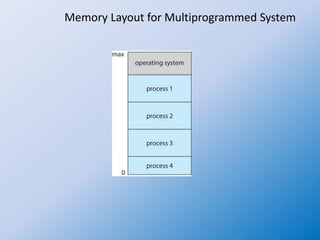
Memory Layout for Multiprogrammed System
Process Management
• A process is a program in execution. It is a unit of work within the
system. Program is a passive entity, process is an active entity.
• Process needs resources to accomplish its task
– CPU, memory, I/O, files
– Initialization data
• Process termination requires reclaim of any reusable resources
• Single-threaded process has one program counter specifying location
of next instruction to execute
– Process executes instructions sequentially, one at a time, until
completion
• Multi-threaded process has one program counter per thread
• Typically system has many processes, some user, some operating
system running concurrently on one or more CPUs
– Concurrency by multiplexing the CPUs among the processes /
threads
Process Management Activities
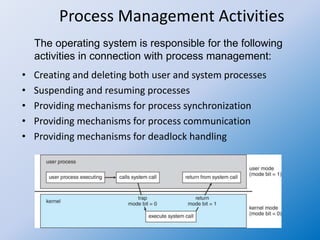
• Creating and deleting both user and system processes
• Suspending and resuming processes
• Providing mechanisms for process synchronization
• Providing mechanisms for process communication
• Providing mechanisms for deadlock handling
The operating system is responsible for the following
activities in connection with process management:
Process Concept
• An operating system executes a variety of programs:
– Batch system – jobs
– Time-shared systems – user programs or tasks
• Textbook uses the terms job and process almost
interchangeably
• Process – a program in execution; process execution must
progress in sequential fashion
• Multiple parts
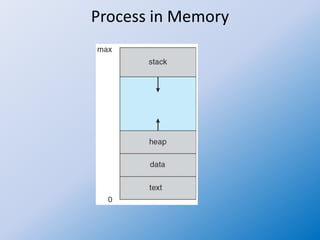
– The program code, also called text section
– Current activity including program counter, processor
registers
– Stack containing temporary data
• Function parameters, return addresses, local variables
– Data section containing global variables
– Heap containing memory dynamically allocated during run
time
Process Concept (Cont.)
• Program is passive entity stored on disk
(executable file), process is active
– Program becomes process when
executable file loaded into memory
• Execution of program started via GUI
mouse clicks, command line entry of its
name, etc
• One program can be several processes
– Consider multiple users executing the
same program
Process in Memory
Process State
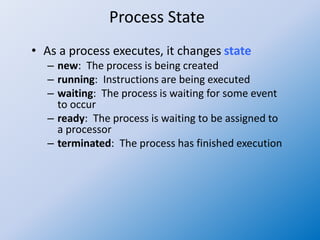
• As a process executes, it changes state
– new: The process is being created
– running: Instructions are being executed
– waiting: The process is waiting for some event
to occur
– ready: The process is waiting to be assigned to
a processor
– terminated: The process has finished execution
Diagram of Process State
Process Control Block (PCB)
Information associated with each process
(also called task control block)
• Process state – running, waiting, etc
• Program counter – location of
instruction to next execute
• CPU registers – contents of all process-
centric registers
• CPU scheduling information- priorities,
scheduling queue pointers
• Memory-management information –
memory allocated to the process
• Accounting information – CPU used,
clock time elapsed since start, time
limits
• I/O status information – I/O devices
allocated to process, list of open files
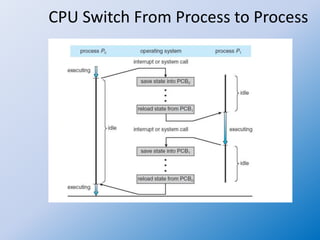
CPU Switch From Process to Process
Threads
• So far, process has a single thread of
execution
• Consider having multiple program
counters per process
– Multiple locations can execute at once
• Multiple threads of control -> threads
• Must then have storage for thread
details, multiple program counters in PCB
• See next chapter
Assignment
1. What is process concept? Explain Process Management in
OS
2. Draw and describe the process states

Operating system 17 process management

  • 1.
    Operating System 17 ProcessManagement Prof Neeraj Bhargava Vaibhav Khanna Department of Computer Science School of Engineering and Systems Sciences Maharshi Dayanand Saraswati University Ajmer
  • 2.
    Multiprogramming and Multitasking •Multiprogramming needed for efficiency – Single user cannot keep CPU and I/O devices busy at all times – Multiprogramming organizes jobs (code and data) so CPU always has one to execute – A subset of total jobs in system is kept in memory – One job selected and run via job scheduling – When it has to wait (for I/O for example), OS switches to another job
  • 3.
    Multiprogramming and Multitasking •Timesharing (multitasking) is logical extension in which CPU switches jobs so frequently that users can interact with each job while it is running, creating interactive computing – Response time should be < 1 second – Each user has at least one program executing in memory process – If several jobs ready to run at the same time  CPU scheduling – If processes don’t fit in memory, swapping moves them in and out to run – Virtual memory allows execution of processes not completely in memory
  • 4.
    Memory Layout forMultiprogrammed System
  • 5.
    Process Management • Aprocess is a program in execution. It is a unit of work within the system. Program is a passive entity, process is an active entity. • Process needs resources to accomplish its task – CPU, memory, I/O, files – Initialization data • Process termination requires reclaim of any reusable resources • Single-threaded process has one program counter specifying location of next instruction to execute – Process executes instructions sequentially, one at a time, until completion • Multi-threaded process has one program counter per thread • Typically system has many processes, some user, some operating system running concurrently on one or more CPUs – Concurrency by multiplexing the CPUs among the processes / threads
  • 6.
    Process Management Activities •Creating and deleting both user and system processes • Suspending and resuming processes • Providing mechanisms for process synchronization • Providing mechanisms for process communication • Providing mechanisms for deadlock handling The operating system is responsible for the following activities in connection with process management:
  • 7.
    Process Concept • Anoperating system executes a variety of programs: – Batch system – jobs – Time-shared systems – user programs or tasks • Textbook uses the terms job and process almost interchangeably • Process – a program in execution; process execution must progress in sequential fashion • Multiple parts – The program code, also called text section – Current activity including program counter, processor registers – Stack containing temporary data • Function parameters, return addresses, local variables – Data section containing global variables – Heap containing memory dynamically allocated during run time
  • 8.
    Process Concept (Cont.) •Program is passive entity stored on disk (executable file), process is active – Program becomes process when executable file loaded into memory • Execution of program started via GUI mouse clicks, command line entry of its name, etc • One program can be several processes – Consider multiple users executing the same program
  • 9.
  • 10.
    Process State • Asa process executes, it changes state – new: The process is being created – running: Instructions are being executed – waiting: The process is waiting for some event to occur – ready: The process is waiting to be assigned to a processor – terminated: The process has finished execution
  • 11.
  • 12.
    Process Control Block(PCB) Information associated with each process (also called task control block) • Process state – running, waiting, etc • Program counter – location of instruction to next execute • CPU registers – contents of all process- centric registers • CPU scheduling information- priorities, scheduling queue pointers • Memory-management information – memory allocated to the process • Accounting information – CPU used, clock time elapsed since start, time limits • I/O status information – I/O devices allocated to process, list of open files
  • 13.
    CPU Switch FromProcess to Process
  • 14.
    Threads • So far,process has a single thread of execution • Consider having multiple program counters per process – Multiple locations can execute at once • Multiple threads of control -> threads • Must then have storage for thread details, multiple program counters in PCB • See next chapter
  • 15.
    Assignment 1. What isprocess concept? Explain Process Management in OS 2. Draw and describe the process states