Openstack Keystone - Deep Dive
Indian OpenStack User Group - Meetup
Jaison Raju
Senior Technical Support Engineer
18/06/17
Agenda
● Introduction to Identity Service
● Openstack Keystone Concepts
● Configuration
● Demo 1
● Integration with IPA/ldap backend
● Demo 2
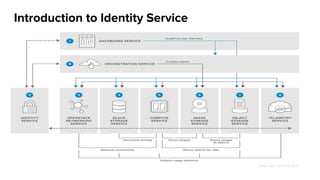
Introduction to Identity Service
Openstack Keystone Concepts
Introduction to Identity Service
Keystone Concepts
Actor (User and groups)
Credentials
Token
Roles - Unique within domain
Project - Unique within domain
Domain
Service
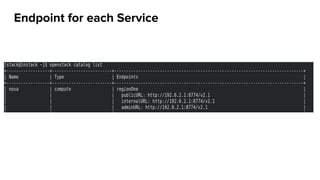
Endpoints
Region
Catalog
Assignment
Policy
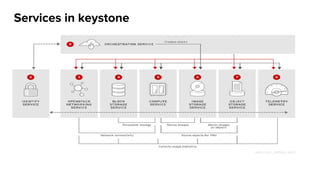
Services in keystone
Endpoint for each Service
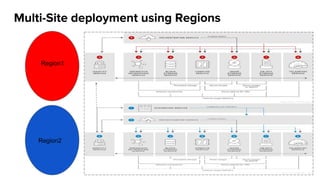
Multi-Site deployment using Regions
Region1
Region2
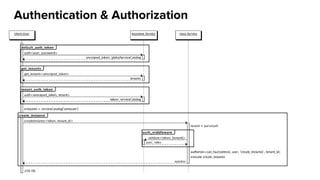
Authentication & Authorization
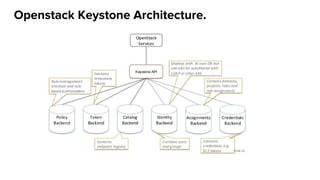
Openstack Keystone Architecture.
Configuration
Configuration file (keystone.conf)
/etc/keystone/keystone.conf
● [DEFAULT] - General configuration
● [assignment] - Assignment system driver configuration
● [auth] - Authentication plugin configuration
● [cache] - Caching layer configuration
● [catalog] - Service catalog driver configuration
● [credential] - Credential system driver configuration
● [domain_config] - Domain configuration
● [endpoint_filter] - Endpoint filtering configuration
● [endpoint_policy] - Endpoint policy configuration
● [federation] - Federation driver configuration
● [fernet_tokens] - Fernet token configuration
● [identity] - Identity system driver configuration
● [identity_mapping] - Identity mapping system driver configuration
● [ldap] - LDAP configuration options
Configuration file (keystone.conf)
/etc/keystone/keystone.conf
● [memcache] - Memcache configuration options
● [oauth1] - OAuth 1.0a system driver configuration
● [paste_deploy] - Pointer to the PasteDeploy configuration file
● [policy] - Policy system driver configuration for RBAC
● [resource] - Resource system driver configuration
● [revoke] - Revocation system driver configuration
● [role] - Role system driver configuration
● [saml] - SAML configuration options
● [security_compliance] - Security compliance configuration
● [shadow_users] - Shadow user configuration
● [signing] - Cryptographic signatures for PKI based tokens
● [token] - Token driver & token provider configuration
● [tokenless_auth] - Tokenless authentication configuration
● [trust] - Trust configuration
Demo 1
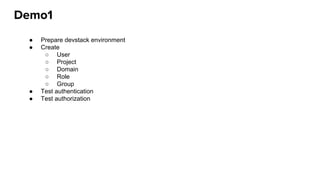
Demo1
● Prepare devstack environment
● Create
○ User
○ Project
○ Domain
○ Role
○ Group
● Test authentication
● Test authorization
Integration with IPA / ldap backend
LDAP Integration for Identity
● # setsebool -P authlogin_nsswitch_use_ldap on
● Configure keystone.conf for multiple backends:
● Define the destination LDAP server in the /etc/keystone/keystone.conf file:
[ldap]
url = ldaps://ipa.india-1.local
user = uid=svc-ldap,cn=users,cn=accounts,dc=india-1,dc=local
user_filter = (memberOf=cn=grp-openstack,cn=groups,cn=accounts,dc=india-1,dc=local)
password = <RedactedComplexPassword>
user_tree_dn = cn=users,cn=accounts,dc=india-1,dc=local
user_objectclass = inetUser
user_id_attribute = uid
user_name_attribute = uid
user_mail_attribute = mail
user_pass_attribute =
user_allow_create = False
user_allow_update = False
user_allow_delete = False
tls_cacertfile = /etc/ssl/certs/ca.crt
group_tree_dn = ou=Groups,dc=india-1,dc=local
group_objectclass = groupOfNames
[identity]
driver = keystone.identity.backends.ldap.Identity"
[identity]
domain_specific_drivers_enabled = True
domain_config_dir = /etc/keystone/domains
● Configure LDAP server in the /etc/keystone/domains/keystone.<domain>.conf
Demo 2
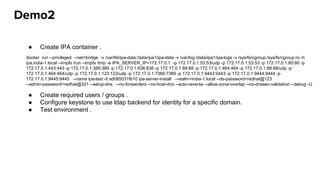
Demo2
● Create IPA container .
● Create required users / groups .
● Configure keystone to use ldap backend for identity for a specific domain.
● Test environment .
docker run --privileged --net=bridge -v /var/lib/ipa-data:/data/ipa1/ipa-data -v /var/log:/data/ipa1/ipa-logs -v /sys/fs/cgroup:/sys/fs/cgroup:ro -h
ipa.india-1.local --tmpfs /run --tmpfs /tmp -e IPA_SERVER_IP=172.17.0.1 -p 172.17.0.1:53:53/udp -p 172.17.0.1:53:53 -p 172.17.0.1:80:80 -p
172.17.0.1:443:443 -p 172.17.0.1:389:389 -p 172.17.0.1:636:636 -p 172.17.0.1:88:88 -p 172.17.0.1:464:464 -p 172.17.0.1:88:88/udp -p
172.17.0.1:464:464/udp -p 172.17.0.1:123:123/udp -p 172.17.0.1:7389:7389 -p 172.17.0.1:9443:9443 -p 172.17.0.1:9444:9444 -p
172.17.0.1:9445:9445 --name ipa-test -it ad085031fb10 ipa-server-install --realm=india-1.local --ds-password=redhat@123
--admin-password=redhat@321 --setup-dns --no-forwarders --no-host-dns --auto-reverse --allow-zone-overlap --no-dnssec-validation --debug -U
References
● Openstack developer page - https://docs.openstack.org/developer/keystone
● Openstack admin guide - https://docs.openstack.org/admin-guide/identity-management.html
● DevStack installation guide -
https://docs.openstack.org/developer/devstack/guides/single-machine.html
● DevStack configuration guide -
https://docs.openstack.org/developer/devstack/configuration.html
Getting involved
● IRC: Freenode@openstack-keystone
● Mailing list: openstack-dev@lists.openstack.org
● Keystone Project Page on Launchpad: https://launchpad.net/keystone
● Keystone Source Repository: https://git.openstack.org/cgit/openstack/keystone
THANK YOU
google.com/+jasonraju
https://www.linkedin.com/in/jaison-r
aju-8518a045/
youtube.com/user/RedHatVideos
@jsonr4
IRC jaison@Red hat, links@Freenode
jraju@redhat.com
THANK YOU
plus.google.com/+RedHat
linkedin.com/company/red-hat
youtube.com/user/RedHatVideos
facebook.com/redhatinc
twitter.com/RedHatNews

Keystone deep dive 1

  • 1.
    Openstack Keystone -Deep Dive Indian OpenStack User Group - Meetup Jaison Raju Senior Technical Support Engineer 18/06/17
  • 2.
    Agenda ● Introduction toIdentity Service ● Openstack Keystone Concepts ● Configuration ● Demo 1 ● Integration with IPA/ldap backend ● Demo 2
  • 3.
  • 4.
  • 5.
  • 6.
  • 7.
    Keystone Concepts Actor (Userand groups) Credentials Token Roles - Unique within domain Project - Unique within domain Domain Service Endpoints Region Catalog Assignment Policy
  • 8.
  • 9.
  • 10.
    Multi-Site deployment usingRegions Region1 Region2
  • 11.
  • 12.
  • 13.
  • 14.
    Configuration file (keystone.conf) /etc/keystone/keystone.conf ●[DEFAULT] - General configuration ● [assignment] - Assignment system driver configuration ● [auth] - Authentication plugin configuration ● [cache] - Caching layer configuration ● [catalog] - Service catalog driver configuration ● [credential] - Credential system driver configuration ● [domain_config] - Domain configuration ● [endpoint_filter] - Endpoint filtering configuration ● [endpoint_policy] - Endpoint policy configuration ● [federation] - Federation driver configuration ● [fernet_tokens] - Fernet token configuration ● [identity] - Identity system driver configuration ● [identity_mapping] - Identity mapping system driver configuration ● [ldap] - LDAP configuration options
  • 15.
    Configuration file (keystone.conf) /etc/keystone/keystone.conf ●[memcache] - Memcache configuration options ● [oauth1] - OAuth 1.0a system driver configuration ● [paste_deploy] - Pointer to the PasteDeploy configuration file ● [policy] - Policy system driver configuration for RBAC ● [resource] - Resource system driver configuration ● [revoke] - Revocation system driver configuration ● [role] - Role system driver configuration ● [saml] - SAML configuration options ● [security_compliance] - Security compliance configuration ● [shadow_users] - Shadow user configuration ● [signing] - Cryptographic signatures for PKI based tokens ● [token] - Token driver & token provider configuration ● [tokenless_auth] - Tokenless authentication configuration ● [trust] - Trust configuration
  • 16.
  • 17.
    Demo1 ● Prepare devstackenvironment ● Create ○ User ○ Project ○ Domain ○ Role ○ Group ● Test authentication ● Test authorization
  • 18.
    Integration with IPA/ ldap backend
  • 19.
    LDAP Integration forIdentity ● # setsebool -P authlogin_nsswitch_use_ldap on ● Configure keystone.conf for multiple backends: ● Define the destination LDAP server in the /etc/keystone/keystone.conf file: [ldap] url = ldaps://ipa.india-1.local user = uid=svc-ldap,cn=users,cn=accounts,dc=india-1,dc=local user_filter = (memberOf=cn=grp-openstack,cn=groups,cn=accounts,dc=india-1,dc=local) password = <RedactedComplexPassword> user_tree_dn = cn=users,cn=accounts,dc=india-1,dc=local user_objectclass = inetUser user_id_attribute = uid user_name_attribute = uid user_mail_attribute = mail user_pass_attribute = user_allow_create = False user_allow_update = False user_allow_delete = False tls_cacertfile = /etc/ssl/certs/ca.crt group_tree_dn = ou=Groups,dc=india-1,dc=local group_objectclass = groupOfNames [identity] driver = keystone.identity.backends.ldap.Identity" [identity] domain_specific_drivers_enabled = True domain_config_dir = /etc/keystone/domains ● Configure LDAP server in the /etc/keystone/domains/keystone.<domain>.conf
  • 20.
  • 21.
    Demo2 ● Create IPAcontainer . ● Create required users / groups . ● Configure keystone to use ldap backend for identity for a specific domain. ● Test environment . docker run --privileged --net=bridge -v /var/lib/ipa-data:/data/ipa1/ipa-data -v /var/log:/data/ipa1/ipa-logs -v /sys/fs/cgroup:/sys/fs/cgroup:ro -h ipa.india-1.local --tmpfs /run --tmpfs /tmp -e IPA_SERVER_IP=172.17.0.1 -p 172.17.0.1:53:53/udp -p 172.17.0.1:53:53 -p 172.17.0.1:80:80 -p 172.17.0.1:443:443 -p 172.17.0.1:389:389 -p 172.17.0.1:636:636 -p 172.17.0.1:88:88 -p 172.17.0.1:464:464 -p 172.17.0.1:88:88/udp -p 172.17.0.1:464:464/udp -p 172.17.0.1:123:123/udp -p 172.17.0.1:7389:7389 -p 172.17.0.1:9443:9443 -p 172.17.0.1:9444:9444 -p 172.17.0.1:9445:9445 --name ipa-test -it ad085031fb10 ipa-server-install --realm=india-1.local --ds-password=redhat@123 --admin-password=redhat@321 --setup-dns --no-forwarders --no-host-dns --auto-reverse --allow-zone-overlap --no-dnssec-validation --debug -U
  • 22.
    References ● Openstack developerpage - https://docs.openstack.org/developer/keystone ● Openstack admin guide - https://docs.openstack.org/admin-guide/identity-management.html ● DevStack installation guide - https://docs.openstack.org/developer/devstack/guides/single-machine.html ● DevStack configuration guide - https://docs.openstack.org/developer/devstack/configuration.html
  • 23.
    Getting involved ● IRC:Freenode@openstack-keystone ● Mailing list: openstack-dev@lists.openstack.org ● Keystone Project Page on Launchpad: https://launchpad.net/keystone ● Keystone Source Repository: https://git.openstack.org/cgit/openstack/keystone
  • 24.
  • 25.