openFrameworks
     graphics
Graphics
• The graphics part of OF lets you draw images,
  lines, circles, paths etc..

• Pixel operations like crop, resize and scale.
• Other types like paths, polylines, tesselator, true
  type fonts, bitmap fonts
Graphics
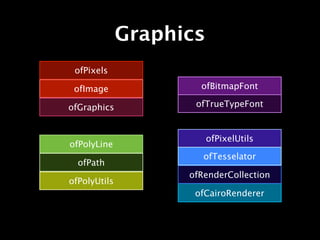
 ofPixels

 ofImage              ofBitmapFont

ofGraphics           ofTrueTypeFont


                         ofPixelUtils
ofPolyLine
                       ofTesselator
  ofPath
                    ofRenderCollection
ofPolyUtils
                     ofCairoRenderer
Render to PDF
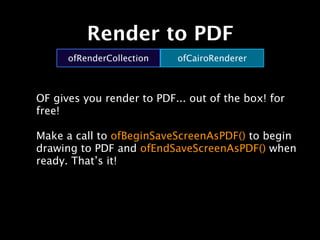
      ofRenderCollection   ofCairoRenderer


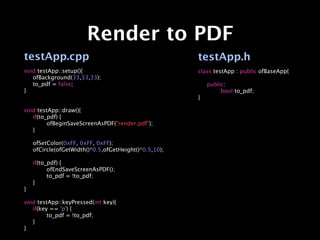
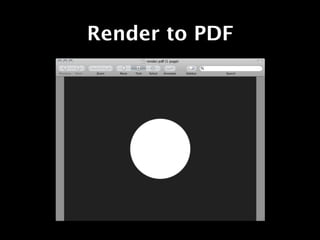
OF gives you render to PDF... out of the box! for
free!

Make a call to ofBeginSaveScreenAsPDF() to begin
drawing to PDF and ofEndSaveScreenAsPDF() when
ready. That’s it!
Render to PDF
testApp.cpp                                          testApp.h
void testApp::setup(){                               class testApp : public ofBaseApp{

 ofBackground(33,33,33);

 to_pdf = false;                                    
   public:
}                                                    
   
    bool to_pdf;
                                                     }

void testApp::draw(){

 if(to_pdf) {

 
      ofBeginSaveScreenAsPDF("render.pdf");

 }


 ofSetColor(0xFF, 0xFF, 0xFF);

 ofCircle(ofGetWidth()*0.5,ofGetHeight()*0.5,10);


 if(to_pdf) {

 
      ofEndSaveScreenAsPDF();

 
      to_pdf = !to_pdf;

 }
}

void testApp::keyPressed(int key){

 if(key == 'p') {

 
      to_pdf = !to_pdf;

 }
}
Render to PDF
Image loading
     ofPixels        ofImage        ofGraphics


Load images of a variety of types and draw them
on screen. Resize, crop, rotate, save to file, etc..

To draw an image on screen create a ofImage
member and call it’s
loadImage(string file) function. In your
testApp::draw(), call my_img.draw(0,0)
Image loading


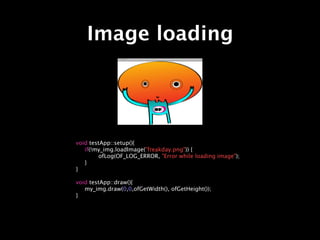
void testApp::setup(){

 if(!my_img.loadImage("freakday.png")) {

 
      ofLog(OF_LOG_ERROR, "Error while loading image");

 }
}

void testApp::draw(){

 my_img.draw(0,0,ofGetWidth(), ofGetHeight());
}
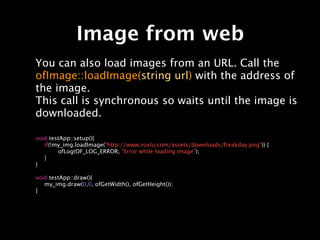
Image from web
You can also load images from an URL. Call the
ofImage::loadImage(string url) with the address of
the image.
This call is synchronous so waits until the image is
downloaded.

void testApp::setup(){

 if(!my_img.loadImage("http://www.roxlu.com/assets/downloads/freakday.png")) {

 
      ofLog(OF_LOG_ERROR, "Error while loading image");

 }
}

void testApp::draw(){

 my_img.draw(0,0, ofGetWidth(), ofGetHeight());
}
Altering pixels
ofImage and ofPixels have many functions to alter
the pixels. After manipulating the pixels with one
of the functions in the list below, never forget
calling update() to update the pixels so they
become visible.


You need to call update() after using:
setPixel()
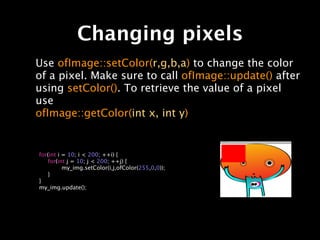
Changing pixels
Use ofImage::setColor(r,g,b,a) to change the color
of a pixel. Make sure to call ofImage::update() after
using setColor(). To retrieve the value of a pixel
use
ofImage::getColor(int x, int y)


for(int i = 10; i < 200; ++i) {

 for(int j = 10; j < 200; ++j) {

 
       my_img.setColor(i,j,ofColor(255,0,0));

 }
}
my_img.update();
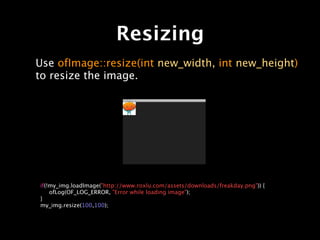
Resizing
Use ofImage::resize(int new_width, int new_height)
to resize the image.


if(!my_img.loadImage("http://www.roxlu.com/assets/downloads/freakday.png")) {

 ofLog(OF_LOG_ERROR, "Error while loading image");
}
my_img.resize(100,100);
Rotating
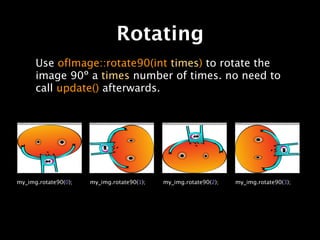
      Use ofImage::rotate90(int times) to rotate the
      image 90º a times number of times. no need to
      call update() afterwards.


my_img.rotate90(0);   my_img.rotate90(1);   my_img.rotate90(2);   my_img.rotate90(3);
Mirroring
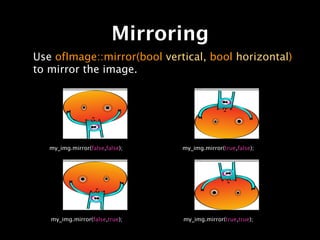
Use ofImage::mirror(bool vertical, bool horizontal)
to mirror the image.


   my_img.mirror(false,false);   my_img.mirror(true,false);


   my_img.mirror(false,true);    my_img.mirror(true,true);
Cropping
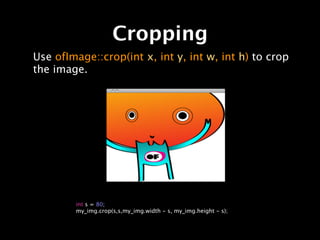
Use ofImage::crop(int x, int y, int w, int h) to crop
the image.


        int s = 80;
        my_img.crop(s,s,my_img.width - s, my_img.height - s);
Crop from other image
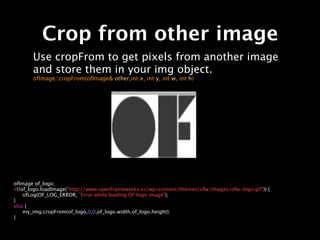
       Use cropFrom to get pixels from another image
       and store them in your img object.
       ofImage::cropFrom(ofImage& other,int x, int y, int w, int h)


ofImage of_logo;
if(!of_logo.loadImage("http://www.openframeworks.cc/wp-content/themes/ofw/images/ofw-logo.gif")) {

 ofLog(OF_LOG_ERROR, "Error while loading OF logo image");
}
else {

 my_img.cropFrom(of_logo,0,0,of_logo.width,of_logo.height);
}
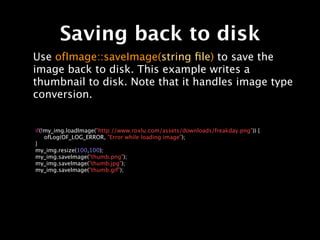
Saving back to disk
Use ofImage::saveImage(string file) to save the
image back to disk. This example writes a
thumbnail to disk. Note that it handles image type
conversion.


if(!my_img.loadImage("http://www.roxlu.com/assets/downloads/freakday.png")) {

 ofLog(OF_LOG_ERROR, "Error while loading image");
}
my_img.resize(100,100);
my_img.saveImage("thumb.png");
my_img.saveImage("thumb.jpg");
my_img.saveImage("thumb.gif");
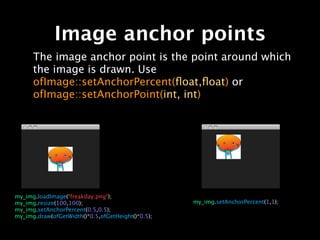
Image anchor points
          The image anchor point is the point around which
          the image is drawn. Use
          ofImage::setAnchorPercent(float,float) or
          ofImage::setAnchorPoint(int, int)


   my_img.loadImage("freakday.png");

   my_img.resize(100,100);                            my_img.setAnchorPercent(1,1);

   my_img.setAnchorPercent(0.5,0.5);

   my_img.draw(ofGetWidth()*0.5,ofGetHeight()*0.5);
ofImage recap
Constructors
ofImage(const string& filename)

ofImage(const ofPixels_<PixelType>& pix)

ofImage(const ofFile& file)


Texture related
void allocate(int w, int h, ofImageType type)

void clear()

void setUseTexture(bool use)

bool isUsingTexture()

ofTexture& getTextureReference()

void bind()

void unbind()
ofImage recap
Loading
bool loadImage(string filename)

bool loadImage(const ofBuffer& buffer)

bool loadImage(const ofFile& file)


Save
void saveImage(string filename, ofImageQualityType comp = OF_IMAGE_QUALITY_BEST)

void saveImage(ofBuffer& buffer, ofImageQualityType comp = OF_IMAGE_QUALITY_BEST)

void saveImage(const ofFile& file, ofImageQualityType comp = OF_IMAGE_QUALITY_BEST)
ofImage recap

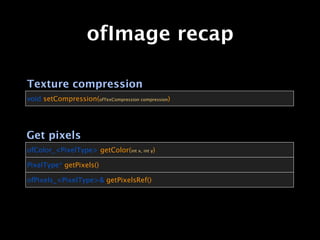
Texture compression
void setCompression(ofTexCompression compression)


Get pixels
ofColor_<PixelType> getColor(int x, int y)

PixelType* getPixels()

ofPixels_<PixelType>& getPixelsRef()
ofImage recap
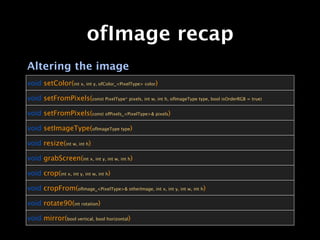
Altering the image
void setColor(int x, int y, ofColor_<PixelType> color)

void setFromPixels(const PixelType* pixels, int w, int h, ofImageType type, bool isOrderRGB = true)

void setFromPixels(const ofPixels_<PixelType>& pixels)

void setImageType(ofImageType type)

void resize(int w, int h)

void grabScreen(int x, int y, int w, int h)

void crop(int x, int y, int w, int h)

void cropFrom(ofImage_<PixelType>& otherImage, int x, int y, int w, int h)

void rotate90(int rotation)

void mirror(bool vertical, bool horizontal)
ofImage recap
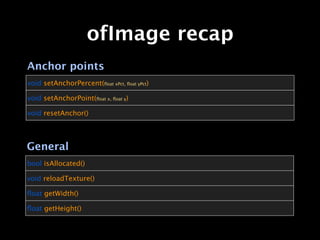
Anchor points
void setAnchorPercent(float xPct, float yPct)

void setAnchorPoint(float x, float y)

void resetAnchor()


General
bool isAllocated()

void reloadTexture()

float getWidth()

float getHeight()
ofImage recap
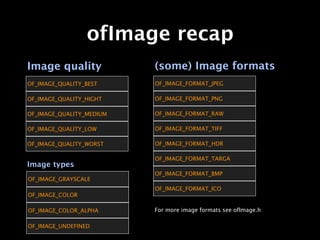
Image quality             (some) Image formats
OF_IMAGE_QUALITY_BEST     OF_IMAGE_FORMAT_JPEG

OF_IMAGE_QUALITY_HIGHT    OF_IMAGE_FORMAT_PNG

OF_IMAGE_QUALITY_MEDIUM   OF_IMAGE_FORMAT_RAW

OF_IMAGE_QUALITY_LOW      OF_IMAGE_FORMAT_TIFF

OF_IMAGE_QUALITY_WORST    OF_IMAGE_FORMAT_HDR

                          OF_IMAGE_FORMAT_TARGA
Image types
                          OF_IMAGE_FORMAT_BMP
OF_IMAGE_GRAYSCALE
                          OF_IMAGE_FORMAT_ICO
OF_IMAGE_COLOR

OF_IMAGE_COLOR_ALPHA      For more image formats see ofImage.h

OF_IMAGE_UNDEFINED
ofPixels
                     ofPixels


Similar to ofImage, but works directly with raw
pixels. Has functions like rotate, mirror, crop,
pastInto etc..

See ofPixels.h for a reference of the available
operations.
ofGraphics
                   ofGraphics


ofGraphics is the part of OF which mimics the
processing style of drawing functions. But besides
the regular drawing functions it contains lots of
general drawing related setter/getter functions.
ofGraphics
Drawing things
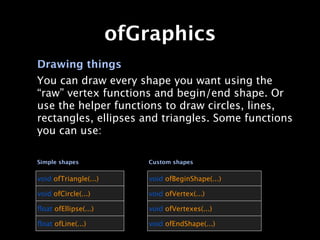
You can draw every shape you want using the
“raw” vertex functions and begin/end shape. Or
use the helper functions to draw circles, lines,
rectangles, ellipses and triangles. Some functions
you can use:

Simple shapes             Custom shapes


void ofTriangle(...)      void ofBeginShape(...)

void ofCircle(...)        void ofVertex(...)

float ofEllipse(...)       void ofVertexes(...)

float ofLine(...)          void ofEndShape(...)
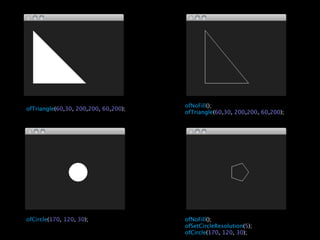
ofNoFill();
ofTriangle(60,30, 200,200, 60,200);
                                      ofTriangle(60,30, 200,200, 60,200);


ofCircle(170, 120, 30);               ofNoFill();
                                      ofSetCircleResolution(5);
                                      ofCircle(170, 120, 30);
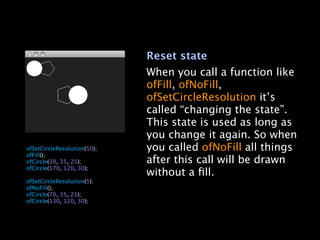
Reset state
                                 When you call a function like
                                 ofFill, ofNoFill,
                                 ofSetCircleResolution it’s
                                 called “changing the state”.
                                 This state is used as long as
                                 you change it again. So when

   ofSetCircleResolution(50);   you called ofNoFill all things

   ofFill();

   ofCircle(30, 35, 25);        after this call will be drawn

   ofCircle(170, 120, 30);

                                without a fill.

   ofSetCircleResolution(5);

   ofNoFill();

   ofCircle(70, 35, 25);

   ofCircle(130, 120, 30);
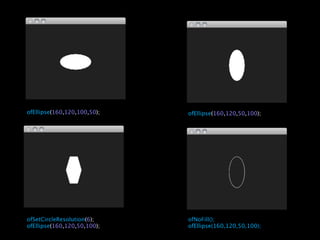
ofEllipse(160,120,100,50);   ofEllipse(160,120,50,100);


ofSetCircleResolution(6);    ofNoFill();
ofEllipse(160,120,50,100);   ofEllipse(160,120,50,100);
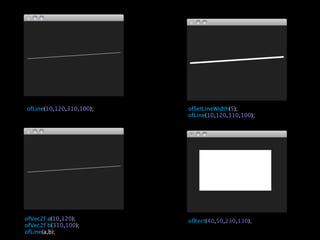
ofLine(10,120,310,100);   ofSetLineWidth(5);
                          ofLine(10,120,310,100);


ofVec2f a(10,120);        ofRect(40,50,230,130);
ofVec2f b(310,100);
ofLine(a,b);
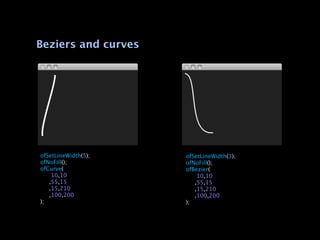
Beziers and curves


ofSetLineWidth(5);   ofSetLineWidth(3);
ofNoFill();          ofNoFill();
ofCurve(             ofBezier(

   10,10            
   10,10

 ,55,15             
 ,55,15

 ,15,210            
 ,15,210

 ,100,200           
 ,100,200
);                   );
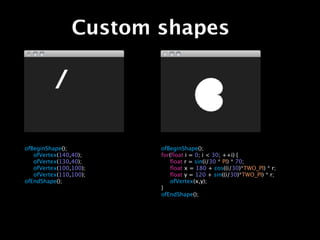
Custom shapes


ofBeginShape();        ofBeginShape();

 ofVertex(140,40);    for(float i = 0; i < 30; ++i) {

 ofVertex(130,40);    
 float r = sin(i/30 * PI) * 70;

 ofVertex(100,100);   
 float x = 180 + cos((i/30)*TWO_PI) * r;

 ofVertex(110,100);   
 float y = 120 + sin((i/30)*TWO_PI) * r;
ofEndShape();          
 ofVertex(x,y);
                       }
                       ofEndShape();
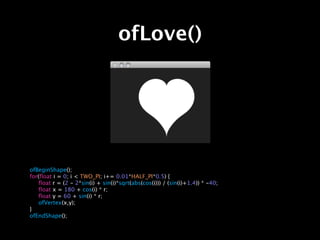
ofLove()


ofBeginShape();
for(float i = 0; i < TWO_PI; i+= 0.01*HALF_PI*0.5) {

 float r = (2 - 2*sin(i) + sin(i)*sqrt(abs(cos(i))) / (sin(i)+1.4)) * -40;

 float x = 180 + cos(i) * r;

 float y = 60 + sin(i) * r;

 ofVertex(x,y);
}
ofEndShape();
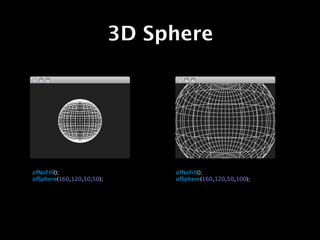
3D Sphere


ofNoFill();                     ofNoFill();
ofSphere(160,120,50,50);        ofSphere(160,120,50,100);
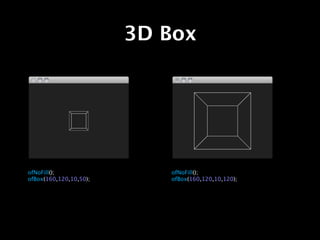
3D Box


ofNoFill();                ofNoFill();
ofBox(160,120,10,50);      ofBox(160,120,10,120);
roxlu
www.roxlu.com

openFrameworks 007 - graphics

  • 1.
  • 2.
    Graphics • The graphicspart of OF lets you draw images, lines, circles, paths etc.. • Pixel operations like crop, resize and scale. • Other types like paths, polylines, tesselator, true type fonts, bitmap fonts
  • 3.
    Graphics ofPixels ofImage ofBitmapFont ofGraphics ofTrueTypeFont ofPixelUtils ofPolyLine ofTesselator ofPath ofRenderCollection ofPolyUtils ofCairoRenderer
  • 4.
    Render to PDF ofRenderCollection ofCairoRenderer OF gives you render to PDF... out of the box! for free! Make a call to ofBeginSaveScreenAsPDF() to begin drawing to PDF and ofEndSaveScreenAsPDF() when ready. That’s it!
  • 5.
    Render to PDF testApp.cpp testApp.h void testApp::setup(){ class testApp : public ofBaseApp{ ofBackground(33,33,33); to_pdf = false; public: } bool to_pdf; } void testApp::draw(){ if(to_pdf) { ofBeginSaveScreenAsPDF("render.pdf"); } ofSetColor(0xFF, 0xFF, 0xFF); ofCircle(ofGetWidth()*0.5,ofGetHeight()*0.5,10); if(to_pdf) { ofEndSaveScreenAsPDF(); to_pdf = !to_pdf; } } void testApp::keyPressed(int key){ if(key == 'p') { to_pdf = !to_pdf; } }
  • 6.
  • 7.
    Image loading ofPixels ofImage ofGraphics Load images of a variety of types and draw them on screen. Resize, crop, rotate, save to file, etc.. To draw an image on screen create a ofImage member and call it’s loadImage(string file) function. In your testApp::draw(), call my_img.draw(0,0)
  • 8.
    Image loading void testApp::setup(){ if(!my_img.loadImage("freakday.png")) { ofLog(OF_LOG_ERROR, "Error while loading image"); } } void testApp::draw(){ my_img.draw(0,0,ofGetWidth(), ofGetHeight()); }
  • 9.
    Image from web Youcan also load images from an URL. Call the ofImage::loadImage(string url) with the address of the image. This call is synchronous so waits until the image is downloaded. void testApp::setup(){ if(!my_img.loadImage("http://www.roxlu.com/assets/downloads/freakday.png")) { ofLog(OF_LOG_ERROR, "Error while loading image"); } } void testApp::draw(){ my_img.draw(0,0, ofGetWidth(), ofGetHeight()); }
  • 10.
    Altering pixels ofImage andofPixels have many functions to alter the pixels. After manipulating the pixels with one of the functions in the list below, never forget calling update() to update the pixels so they become visible. You need to call update() after using: setPixel()
  • 11.
    Changing pixels Use ofImage::setColor(r,g,b,a)to change the color of a pixel. Make sure to call ofImage::update() after using setColor(). To retrieve the value of a pixel use ofImage::getColor(int x, int y) for(int i = 10; i < 200; ++i) { for(int j = 10; j < 200; ++j) { my_img.setColor(i,j,ofColor(255,0,0)); } } my_img.update();

  • 12.
    Resizing Use ofImage::resize(int new_width,int new_height) to resize the image. if(!my_img.loadImage("http://www.roxlu.com/assets/downloads/freakday.png")) { ofLog(OF_LOG_ERROR, "Error while loading image"); } my_img.resize(100,100);
  • 13.
    Rotating Use ofImage::rotate90(int times) to rotate the image 90º a times number of times. no need to call update() afterwards. my_img.rotate90(0); my_img.rotate90(1); my_img.rotate90(2); my_img.rotate90(3);
  • 14.
    Mirroring Use ofImage::mirror(bool vertical,bool horizontal) to mirror the image. my_img.mirror(false,false); my_img.mirror(true,false); my_img.mirror(false,true); my_img.mirror(true,true);
  • 15.
    Cropping Use ofImage::crop(int x,int y, int w, int h) to crop the image. int s = 80; my_img.crop(s,s,my_img.width - s, my_img.height - s);
  • 16.
    Crop from otherimage Use cropFrom to get pixels from another image and store them in your img object. ofImage::cropFrom(ofImage& other,int x, int y, int w, int h) ofImage of_logo; if(!of_logo.loadImage("http://www.openframeworks.cc/wp-content/themes/ofw/images/ofw-logo.gif")) { ofLog(OF_LOG_ERROR, "Error while loading OF logo image"); } else { my_img.cropFrom(of_logo,0,0,of_logo.width,of_logo.height); }
  • 17.
    Saving back todisk Use ofImage::saveImage(string file) to save the image back to disk. This example writes a thumbnail to disk. Note that it handles image type conversion. if(!my_img.loadImage("http://www.roxlu.com/assets/downloads/freakday.png")) { ofLog(OF_LOG_ERROR, "Error while loading image"); } my_img.resize(100,100); my_img.saveImage("thumb.png"); my_img.saveImage("thumb.jpg"); my_img.saveImage("thumb.gif");
  • 18.
    Image anchor points The image anchor point is the point around which the image is drawn. Use ofImage::setAnchorPercent(float,float) or ofImage::setAnchorPoint(int, int) my_img.loadImage("freakday.png"); my_img.resize(100,100); my_img.setAnchorPercent(1,1); my_img.setAnchorPercent(0.5,0.5); my_img.draw(ofGetWidth()*0.5,ofGetHeight()*0.5);
  • 19.
    ofImage recap Constructors ofImage(const string&filename) ofImage(const ofPixels_<PixelType>& pix) ofImage(const ofFile& file) Texture related void allocate(int w, int h, ofImageType type) void clear() void setUseTexture(bool use) bool isUsingTexture() ofTexture& getTextureReference() void bind() void unbind()
  • 20.
    ofImage recap Loading bool loadImage(stringfilename) bool loadImage(const ofBuffer& buffer) bool loadImage(const ofFile& file) Save void saveImage(string filename, ofImageQualityType comp = OF_IMAGE_QUALITY_BEST) void saveImage(ofBuffer& buffer, ofImageQualityType comp = OF_IMAGE_QUALITY_BEST) void saveImage(const ofFile& file, ofImageQualityType comp = OF_IMAGE_QUALITY_BEST)
  • 21.
    ofImage recap Texture compression voidsetCompression(ofTexCompression compression) Get pixels ofColor_<PixelType> getColor(int x, int y) PixelType* getPixels() ofPixels_<PixelType>& getPixelsRef()
  • 22.
    ofImage recap Altering theimage void setColor(int x, int y, ofColor_<PixelType> color) void setFromPixels(const PixelType* pixels, int w, int h, ofImageType type, bool isOrderRGB = true) void setFromPixels(const ofPixels_<PixelType>& pixels) void setImageType(ofImageType type) void resize(int w, int h) void grabScreen(int x, int y, int w, int h) void crop(int x, int y, int w, int h) void cropFrom(ofImage_<PixelType>& otherImage, int x, int y, int w, int h) void rotate90(int rotation) void mirror(bool vertical, bool horizontal)
  • 23.
    ofImage recap Anchor points voidsetAnchorPercent(float xPct, float yPct) void setAnchorPoint(float x, float y) void resetAnchor() General bool isAllocated() void reloadTexture() float getWidth() float getHeight()
  • 24.
    ofImage recap Image quality (some) Image formats OF_IMAGE_QUALITY_BEST OF_IMAGE_FORMAT_JPEG OF_IMAGE_QUALITY_HIGHT OF_IMAGE_FORMAT_PNG OF_IMAGE_QUALITY_MEDIUM OF_IMAGE_FORMAT_RAW OF_IMAGE_QUALITY_LOW OF_IMAGE_FORMAT_TIFF OF_IMAGE_QUALITY_WORST OF_IMAGE_FORMAT_HDR OF_IMAGE_FORMAT_TARGA Image types OF_IMAGE_FORMAT_BMP OF_IMAGE_GRAYSCALE OF_IMAGE_FORMAT_ICO OF_IMAGE_COLOR OF_IMAGE_COLOR_ALPHA For more image formats see ofImage.h OF_IMAGE_UNDEFINED
  • 25.
    ofPixels ofPixels Similar to ofImage, but works directly with raw pixels. Has functions like rotate, mirror, crop, pastInto etc.. See ofPixels.h for a reference of the available operations.
  • 26.
    ofGraphics ofGraphics ofGraphics is the part of OF which mimics the processing style of drawing functions. But besides the regular drawing functions it contains lots of general drawing related setter/getter functions.
  • 27.
    ofGraphics Drawing things You candraw every shape you want using the “raw” vertex functions and begin/end shape. Or use the helper functions to draw circles, lines, rectangles, ellipses and triangles. Some functions you can use: Simple shapes Custom shapes void ofTriangle(...) void ofBeginShape(...) void ofCircle(...) void ofVertex(...) float ofEllipse(...) void ofVertexes(...) float ofLine(...) void ofEndShape(...)
  • 28.
    ofNoFill(); ofTriangle(60,30, 200,200, 60,200); ofTriangle(60,30, 200,200, 60,200); ofCircle(170, 120, 30); ofNoFill(); ofSetCircleResolution(5); ofCircle(170, 120, 30);
  • 29.
    Reset state When you call a function like ofFill, ofNoFill, ofSetCircleResolution it’s called “changing the state”. This state is used as long as you change it again. So when ofSetCircleResolution(50); you called ofNoFill all things ofFill(); ofCircle(30, 35, 25); after this call will be drawn ofCircle(170, 120, 30); without a fill. ofSetCircleResolution(5); ofNoFill(); ofCircle(70, 35, 25); ofCircle(130, 120, 30);
  • 30.
    ofEllipse(160,120,100,50); ofEllipse(160,120,50,100); ofSetCircleResolution(6); ofNoFill(); ofEllipse(160,120,50,100); ofEllipse(160,120,50,100);
  • 31.
    ofLine(10,120,310,100); ofSetLineWidth(5); ofLine(10,120,310,100); ofVec2f a(10,120); ofRect(40,50,230,130); ofVec2f b(310,100); ofLine(a,b);
  • 32.
    Beziers and curves ofSetLineWidth(5); ofSetLineWidth(3); ofNoFill(); ofNoFill(); ofCurve( ofBezier( 10,10 10,10 ,55,15 ,55,15 ,15,210 ,15,210 ,100,200 ,100,200 ); );
  • 33.
    Custom shapes ofBeginShape(); ofBeginShape(); ofVertex(140,40); for(float i = 0; i < 30; ++i) { ofVertex(130,40); float r = sin(i/30 * PI) * 70; ofVertex(100,100); float x = 180 + cos((i/30)*TWO_PI) * r; ofVertex(110,100); float y = 120 + sin((i/30)*TWO_PI) * r; ofEndShape(); ofVertex(x,y); } ofEndShape();
  • 34.
    ofLove() ofBeginShape(); for(float i =0; i < TWO_PI; i+= 0.01*HALF_PI*0.5) { float r = (2 - 2*sin(i) + sin(i)*sqrt(abs(cos(i))) / (sin(i)+1.4)) * -40; float x = 180 + cos(i) * r; float y = 60 + sin(i) * r; ofVertex(x,y); } ofEndShape();
  • 35.
    3D Sphere ofNoFill(); ofNoFill(); ofSphere(160,120,50,50); ofSphere(160,120,50,100);
  • 36.
    3D Box ofNoFill(); ofNoFill(); ofBox(160,120,10,50); ofBox(160,120,10,120);
  • 37.