©Jumia–Proprietary
Jumia Nigeria
University
Out Of Stock
Training
©Jumia–Proprietary
OUT-OF-STOCK (OOS)
TRAINING
©Jumia–Proprietary
Objectives
● …....at the end of this training you should be able to …..
● Understand Jumia shipping Process
● Understand the meaning of OOS.
● Comprehend what causes OOS.
● Know impact of OOS on Jumia and on your business.
● Recognize ways to avoid OOS.
STRICTLY CONFIDENTIAL
©Jumia–Proprietary
Shipping Process
STRICTLY CONFIDENTIAL
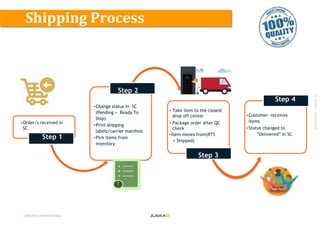
• Order/s received in
SC
Step 1
•Change status in SC
(Pending > Ready To
Ship)
•Print shipping
labels/carrier manifest
•Pick items from
inventory
Step 2
• Take item to the closest
drop off center
• Package order after QC
check
• Item moves from(RTS
> Shipped)
Step 4
•Customer receives
items
•Status changed to
“Delivered” in SC
Step 2
Step 3
©Jumia–Proprietary
Out of Stock or commonly known as OOS is the percentage of number of orders not
fulfilled divided by total number of orders in the period under review. For example10
orders in 5 days and 3 was not fulfilled. OOS would be calculated as 3/10.
Ready to Ship Timeline. The stipulated time for setting an order to ready to ship is 24
hours. For example an order drops on your page at 9:40am today, it must be moved
from pending to ready to ship at 9:39am latest the next day.
What is Out of Stock
©Jumia–Proprietary
Causes of OOS
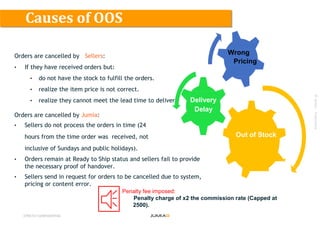
Orders are cancelled by Sellers:
• If they have received orders but:
• do not have the stock to fulfill the orders.
• realize the item price is not correct.
• realize they cannot meet the lead time to deliver.
Orders are cancelled by Jumia:
• Sellers do not process the orders in time (24
hours from the time order was received, not
inclusive of Sundays and public holidays).
• Orders remain at Ready to Ship status and sellers fail to provide
the necessary proof of handover.
• Sellers send in request for orders to be cancelled due to system,
pricing or content error.
STRICTLY CONFIDENTIAL
Delivery
Delay
Wrong
Pricing
Out of Stock
Penalty fee imposed:
Penalty charge of x2 the commission rate (Capped at
2500).
©Jumia–Proprietary
Effect of OOS on business
●
STRICTLY CONFIDENTIAL
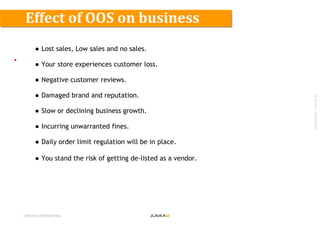
● Lost sales, Low sales and no sales.
● Your store experiences customer loss.
● Negative customer reviews.
● Damaged brand and reputation.
● Slow or declining business growth.
● Incurring unwarranted fines.
● Daily order limit regulation will be in place.
● You stand the risk of getting de-listed as a vendor.
©Jumia–Proprietary
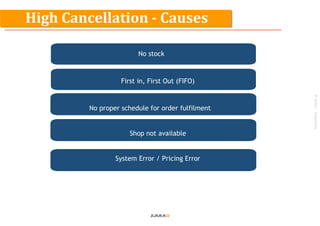
No stock
First in, First Out (FIFO)
No proper schedule for order fulfilment
Shop not available
System Error / Pricing Error
High Cancellation - Causes
©Jumia–Proprietary
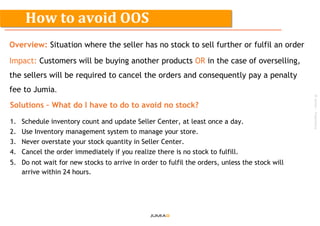
Overview: Situation where the seller has no stock to sell further or fulfil an order
Impact: Customers will be buying another products OR in the case of overselling,
the sellers will be required to cancel the orders and consequently pay a penalty
fee to Jumia.
Solutions – What do I have to do to avoid no stock?
1. Schedule inventory count and update Seller Center, at least once a day.
2. Use Inventory management system to manage your store.
3. Never overstate your stock quantity in Seller Center.
4. Cancel the order immediately if you realize there is no stock to fulfill.
5. Do not wait for new stocks to arrive in order to fulfil the orders, unless the stock will
arrive within 24 hours.
How to avoid OOS
©Jumia–Proprietary
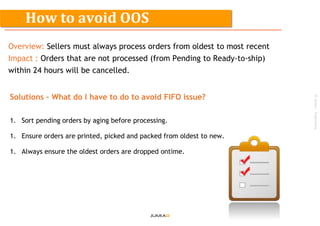
Overview: Sellers must always process orders from oldest to most recent
Impact : Orders that are not processed (from Pending to Ready-to-ship)
within 24 hours will be cancelled.
Solutions – What do I have to do to avoid FIFO issue?
1. Sort pending orders by aging before processing.
1. Ensure orders are printed, picked and packed from oldest to new.
1. Always ensure the oldest orders are dropped ontime.
How to avoid OOS
©Jumia–Proprietary
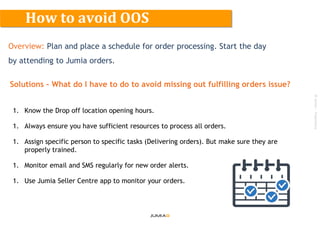
Overview: Plan and place a schedule for order processing. Start the day
by attending to Jumia orders.
Solutions – What do I have to do to avoid missing out fulfilling orders issue?
1. Know the Drop off location opening hours.
1. Always ensure you have sufficient resources to process all orders.
1. Assign specific person to specific tasks (Delivering orders). But make sure they are
properly trained.
1. Monitor email and SMS regularly for new order alerts.
1. Use Jumia Seller Centre app to monitor your orders.
How to avoid OOS
©Jumia–Proprietary
Overview: Sellers are to ensure that their online shop is closed if they
wont be available to fulfill orders at the specified delivery timeline.
Solutions – What do I have to do about my shop closure?
1. Always schedule holiday mode Two working days in advance from the shop closure
date.
1. Process all pending orders prior to shop closure.
How to avoid OOS
©Jumia–Proprietary
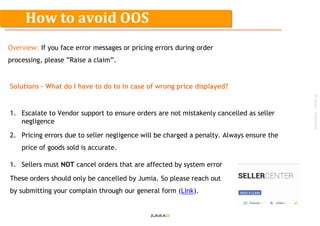
Overview: If you face error messages or pricing errors during order
processing, please ”Raise a claim”.
Solutions – What do I have to do to in case of wrong price displayed?
1. Escalate to Vendor support to ensure orders are not mistakenly cancelled as seller
negligence
2. Pricing errors due to seller negligence will be charged a penalty. Always ensure the
price of goods sold is accurate.
1. Sellers must NOT cancel orders that are affected by system error
These orders should only be cancelled by Jumia. So please reach out
by submitting your complain through our general form (Link).
How to avoid OOS
©Jumia–Proprietary
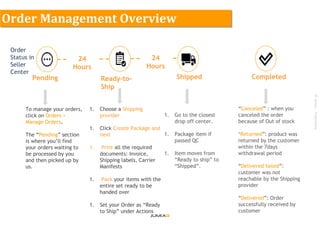
1. Choose a Shipping
provider
1. Click Create Package and
next
1. Print all the required
documents: Invoice,
Shipping labels, Carrier
Manifests
1. Pack your items with the
entire set ready to be
handed over
1. Set your Order as “Ready
to Ship” under Actions
Pending Ready-to-
Ship
Shipped Completed
To manage your orders,
click on Orders >
Manage Orders.
The “Pending” section
is where you’ll find
your orders waiting to
be processed by you
and then picked up by
us.
1. Go to the closest
drop off center.
1. Package item if
passed QC
1. Item moves from
“Ready to ship” to
“Shipped”.
“Canceled” : when you
canceled the order
because of Out of stock
‘Returned”: product was
returned by the customer
within the 7days
withdrawal period
“Delivered failed”:
customer was not
reachable by the Shipping
provider
“Delivered”: Order
successfully received by
customer
Order
Status in
Seller
Center
24
Hours
24
Hours
Order Management Overview
©Jumia–Proprietary
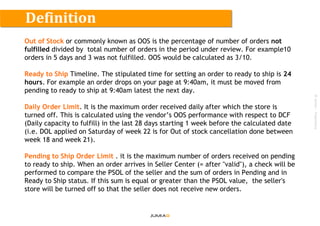
Out of Stock or commonly known as OOS is the percentage of number of orders not
fulfilled divided by total number of orders in the period under review. For example10
orders in 5 days and 3 was not fulfilled. OOS would be calculated as 3/10.
Ready to Ship Timeline. The stipulated time for setting an order to ready to ship is 24
hours. For example an order drops on your page at 9:40am, it must be moved from
pending to ready to ship at 9:40am latest the next day.
Daily Order Limit. It is the maximum order received daily after which the store is
turned off. This is calculated using the vendor’s OOS performance with respect to DCF
(Daily capacity to fulfill) in the last 28 days starting 1 week before the calculated date
(i.e. DOL applied on Saturday of week 22 is for Out of stock cancellation done between
week 18 and week 21).
Pending to Ship Order Limit . it is the maximum number of orders received on pending
to ready to ship. When an order arrives in Seller Center (= after "valid"), a check will be
performed to compare the PSOL of the seller and the sum of orders in Pending and in
Ready to Ship status. If this sum is equal or greater than the PSOL value, the seller's
store will be turned off so that the seller does not receive new orders.
Definition
©Jumia–Proprietary
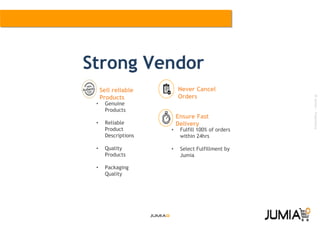
Sell reliable
Products
Ensure Fast
Delivery
• Genuine
Products
• Reliable
Product
Descriptions
• Quality
Products
• Packaging
Quality
• Fulfill 100% of orders
within 24hrs
• Select Fulfillment by
Jumia
Strong Vendor
Never Cancel
Orders
Oos training 2 (1)

Oos training 2 (1)

  • 1.
  • 2.
  • 3.
    ©Jumia–Proprietary Objectives ● …....at theend of this training you should be able to ….. ● Understand Jumia shipping Process ● Understand the meaning of OOS. ● Comprehend what causes OOS. ● Know impact of OOS on Jumia and on your business. ● Recognize ways to avoid OOS. STRICTLY CONFIDENTIAL
  • 4.
    ©Jumia–Proprietary Shipping Process STRICTLY CONFIDENTIAL •Order/s received in SC Step 1 •Change status in SC (Pending > Ready To Ship) •Print shipping labels/carrier manifest •Pick items from inventory Step 2 • Take item to the closest drop off center • Package order after QC check • Item moves from(RTS > Shipped) Step 4 •Customer receives items •Status changed to “Delivered” in SC Step 2 Step 3
  • 5.
    ©Jumia–Proprietary Out of Stockor commonly known as OOS is the percentage of number of orders not fulfilled divided by total number of orders in the period under review. For example10 orders in 5 days and 3 was not fulfilled. OOS would be calculated as 3/10. Ready to Ship Timeline. The stipulated time for setting an order to ready to ship is 24 hours. For example an order drops on your page at 9:40am today, it must be moved from pending to ready to ship at 9:39am latest the next day. What is Out of Stock
  • 6.
    ©Jumia–Proprietary Causes of OOS Ordersare cancelled by Sellers: • If they have received orders but: • do not have the stock to fulfill the orders. • realize the item price is not correct. • realize they cannot meet the lead time to deliver. Orders are cancelled by Jumia: • Sellers do not process the orders in time (24 hours from the time order was received, not inclusive of Sundays and public holidays). • Orders remain at Ready to Ship status and sellers fail to provide the necessary proof of handover. • Sellers send in request for orders to be cancelled due to system, pricing or content error. STRICTLY CONFIDENTIAL Delivery Delay Wrong Pricing Out of Stock Penalty fee imposed: Penalty charge of x2 the commission rate (Capped at 2500).
  • 7.
    ©Jumia–Proprietary Effect of OOSon business ● STRICTLY CONFIDENTIAL ● Lost sales, Low sales and no sales. ● Your store experiences customer loss. ● Negative customer reviews. ● Damaged brand and reputation. ● Slow or declining business growth. ● Incurring unwarranted fines. ● Daily order limit regulation will be in place. ● You stand the risk of getting de-listed as a vendor.
  • 8.
    ©Jumia–Proprietary No stock First in,First Out (FIFO) No proper schedule for order fulfilment Shop not available System Error / Pricing Error High Cancellation - Causes
  • 9.
    ©Jumia–Proprietary Overview: Situation wherethe seller has no stock to sell further or fulfil an order Impact: Customers will be buying another products OR in the case of overselling, the sellers will be required to cancel the orders and consequently pay a penalty fee to Jumia. Solutions – What do I have to do to avoid no stock? 1. Schedule inventory count and update Seller Center, at least once a day. 2. Use Inventory management system to manage your store. 3. Never overstate your stock quantity in Seller Center. 4. Cancel the order immediately if you realize there is no stock to fulfill. 5. Do not wait for new stocks to arrive in order to fulfil the orders, unless the stock will arrive within 24 hours. How to avoid OOS
  • 10.
    ©Jumia–Proprietary Overview: Sellers mustalways process orders from oldest to most recent Impact : Orders that are not processed (from Pending to Ready-to-ship) within 24 hours will be cancelled. Solutions – What do I have to do to avoid FIFO issue? 1. Sort pending orders by aging before processing. 1. Ensure orders are printed, picked and packed from oldest to new. 1. Always ensure the oldest orders are dropped ontime. How to avoid OOS
  • 11.
    ©Jumia–Proprietary Overview: Plan andplace a schedule for order processing. Start the day by attending to Jumia orders. Solutions – What do I have to do to avoid missing out fulfilling orders issue? 1. Know the Drop off location opening hours. 1. Always ensure you have sufficient resources to process all orders. 1. Assign specific person to specific tasks (Delivering orders). But make sure they are properly trained. 1. Monitor email and SMS regularly for new order alerts. 1. Use Jumia Seller Centre app to monitor your orders. How to avoid OOS
  • 12.
    ©Jumia–Proprietary Overview: Sellers areto ensure that their online shop is closed if they wont be available to fulfill orders at the specified delivery timeline. Solutions – What do I have to do about my shop closure? 1. Always schedule holiday mode Two working days in advance from the shop closure date. 1. Process all pending orders prior to shop closure. How to avoid OOS
  • 13.
    ©Jumia–Proprietary Overview: If youface error messages or pricing errors during order processing, please ”Raise a claim”. Solutions – What do I have to do to in case of wrong price displayed? 1. Escalate to Vendor support to ensure orders are not mistakenly cancelled as seller negligence 2. Pricing errors due to seller negligence will be charged a penalty. Always ensure the price of goods sold is accurate. 1. Sellers must NOT cancel orders that are affected by system error These orders should only be cancelled by Jumia. So please reach out by submitting your complain through our general form (Link). How to avoid OOS
  • 14.
    ©Jumia–Proprietary 1. Choose aShipping provider 1. Click Create Package and next 1. Print all the required documents: Invoice, Shipping labels, Carrier Manifests 1. Pack your items with the entire set ready to be handed over 1. Set your Order as “Ready to Ship” under Actions Pending Ready-to- Ship Shipped Completed To manage your orders, click on Orders > Manage Orders. The “Pending” section is where you’ll find your orders waiting to be processed by you and then picked up by us. 1. Go to the closest drop off center. 1. Package item if passed QC 1. Item moves from “Ready to ship” to “Shipped”. “Canceled” : when you canceled the order because of Out of stock ‘Returned”: product was returned by the customer within the 7days withdrawal period “Delivered failed”: customer was not reachable by the Shipping provider “Delivered”: Order successfully received by customer Order Status in Seller Center 24 Hours 24 Hours Order Management Overview
  • 15.
    ©Jumia–Proprietary Out of Stockor commonly known as OOS is the percentage of number of orders not fulfilled divided by total number of orders in the period under review. For example10 orders in 5 days and 3 was not fulfilled. OOS would be calculated as 3/10. Ready to Ship Timeline. The stipulated time for setting an order to ready to ship is 24 hours. For example an order drops on your page at 9:40am, it must be moved from pending to ready to ship at 9:40am latest the next day. Daily Order Limit. It is the maximum order received daily after which the store is turned off. This is calculated using the vendor’s OOS performance with respect to DCF (Daily capacity to fulfill) in the last 28 days starting 1 week before the calculated date (i.e. DOL applied on Saturday of week 22 is for Out of stock cancellation done between week 18 and week 21). Pending to Ship Order Limit . it is the maximum number of orders received on pending to ready to ship. When an order arrives in Seller Center (= after "valid"), a check will be performed to compare the PSOL of the seller and the sum of orders in Pending and in Ready to Ship status. If this sum is equal or greater than the PSOL value, the seller's store will be turned off so that the seller does not receive new orders. Definition
  • 16.
    ©Jumia–Proprietary Sell reliable Products Ensure Fast Delivery •Genuine Products • Reliable Product Descriptions • Quality Products • Packaging Quality • Fulfill 100% of orders within 24hrs • Select Fulfillment by Jumia Strong Vendor Never Cancel Orders