Ten tips to
become a better virtual presenter
1 Ten tips to become a better virtual presenter
Sensitivity: Internal
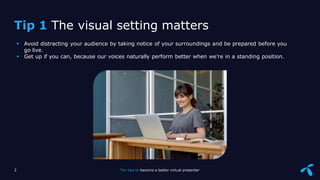
 Avoid distracting your audience by taking notice of your surroundings and be prepared before you
go live.
 Get up if you can, because our voices naturally perform better when we’re in a standing position.
2 Ten tips to become a better virtual presenter
Tip 1 The visual setting matters
Sensitivity: Internal
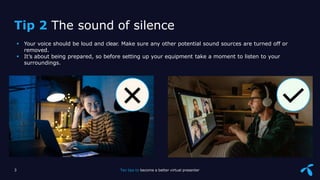
 Your voice should be loud and clear. Make sure any other potential sound sources are turned off or
removed.
 It’s about being prepared, so before setting up your equipment take a moment to listen to your
surroundings.
Tip 2 The sound of silence
3 Ten tips to become a better virtual presenter
Sensitivity: Internal
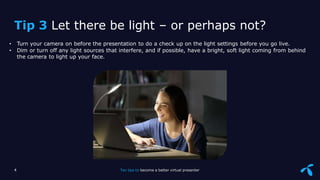
• Turn your camera on before the presentation to do a check up on the light settings before you go live.
• Dim or turn off any light sources that interfere, and if possible, have a bright, soft light coming from behind
the camera to light up your face.
4 Ten tips to become a better virtual presenter
Tip 3 Let there be light – or perhaps not?
Sensitivity: Internal
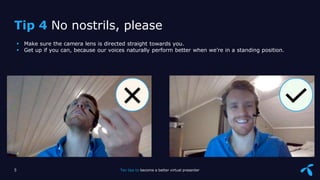
 Make sure the camera lens is directed straight towards you.
 Get up if you can, because our voices naturally perform better when we’re in a standing position.
Tip 4 No nostrils, please
5 Ten tips to become a better virtual presenter
Sensitivity: Internal
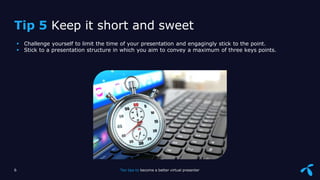
 Challenge yourself to limit the time of your presentation and engagingly stick to the point.
 Stick to a presentation structure in which you aim to convey a maximum of three keys points.
6 Ten tips to become a better virtual presenter
Tip 5 Keep it short and sweet
Sensitivity: Internal
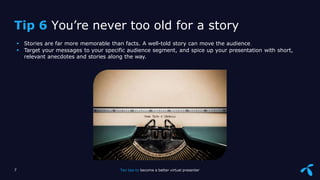
 Stories are far more memorable than facts. A well-told story can move the audience
 Target your messages to your specific audience segment, and spice up your presentation with short,
relevant anecdotes and stories along the way.
7 Ten tips to become a better virtual presenter
Tip 6 You’re never too old for a story
Sensitivity: Internal
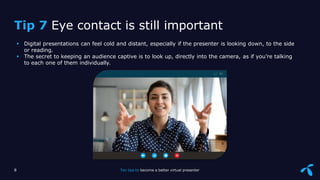
 Digital presentations can feel cold and distant, especially if the presenter is looking down, to the side
or reading.
 The secret to keeping an audience captive is to look up, directly into the camera, as if you’re talking
to each one of them individually.
8 Ten tips to become a better virtual presenter
Tip 7 Eye contact is still important
Sensitivity: Internal
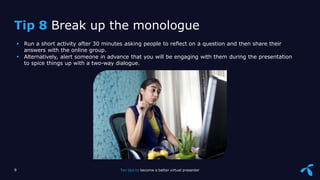
 Run a short activity after 30 minutes asking people to reflect on a question and then share their
answers with the online group.
 Alternatively, alert someone in advance that you will be engaging with them during the presentation
to spice things up with a two-way dialogue.
9 Ten tips to become a better virtual presenter
Tip 8 Break up the monologue
Sensitivity: Internal
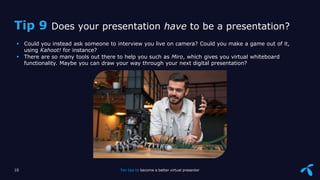
 Could you instead ask someone to interview you live on camera? Could you make a game out of it,
using Kahoot! for instance?
 There are so many tools out there to help you such as Miro, which gives you virtual whiteboard
functionality. Maybe you can draw your way through your next digital presentation?
10 Ten tips to become a better virtual presenter
Tip 9 Does your presentation have to be a presentation?
Sensitivity: Internal
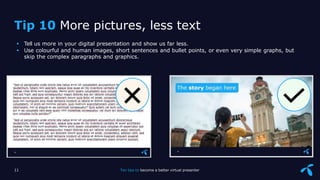
 Tell us more in your digital presentation and show us far less.
 Use colourful and human images, short sentences and bullet points, or even very simple graphs, but
skip the complex paragraphs and graphics.
Tip 10 More pictures, less text
11 Ten tips to become a better virtual presenter
Good luck with your next presentation!
12 Ten tips to become a better virtual presenter

10 Tips to be an Expert Virtual Presentor

  • 1.
    Ten tips to becomea better virtual presenter 1 Ten tips to become a better virtual presenter
  • 2.
    Sensitivity: Internal  Avoiddistracting your audience by taking notice of your surroundings and be prepared before you go live.  Get up if you can, because our voices naturally perform better when we’re in a standing position. 2 Ten tips to become a better virtual presenter Tip 1 The visual setting matters
  • 3.
    Sensitivity: Internal  Yourvoice should be loud and clear. Make sure any other potential sound sources are turned off or removed.  It’s about being prepared, so before setting up your equipment take a moment to listen to your surroundings. Tip 2 The sound of silence 3 Ten tips to become a better virtual presenter
  • 4.
    Sensitivity: Internal • Turnyour camera on before the presentation to do a check up on the light settings before you go live. • Dim or turn off any light sources that interfere, and if possible, have a bright, soft light coming from behind the camera to light up your face. 4 Ten tips to become a better virtual presenter Tip 3 Let there be light – or perhaps not?
  • 5.
    Sensitivity: Internal  Makesure the camera lens is directed straight towards you.  Get up if you can, because our voices naturally perform better when we’re in a standing position. Tip 4 No nostrils, please 5 Ten tips to become a better virtual presenter
  • 6.
    Sensitivity: Internal  Challengeyourself to limit the time of your presentation and engagingly stick to the point.  Stick to a presentation structure in which you aim to convey a maximum of three keys points. 6 Ten tips to become a better virtual presenter Tip 5 Keep it short and sweet
  • 7.
    Sensitivity: Internal  Storiesare far more memorable than facts. A well-told story can move the audience  Target your messages to your specific audience segment, and spice up your presentation with short, relevant anecdotes and stories along the way. 7 Ten tips to become a better virtual presenter Tip 6 You’re never too old for a story
  • 8.
    Sensitivity: Internal  Digitalpresentations can feel cold and distant, especially if the presenter is looking down, to the side or reading.  The secret to keeping an audience captive is to look up, directly into the camera, as if you’re talking to each one of them individually. 8 Ten tips to become a better virtual presenter Tip 7 Eye contact is still important
  • 9.
    Sensitivity: Internal  Runa short activity after 30 minutes asking people to reflect on a question and then share their answers with the online group.  Alternatively, alert someone in advance that you will be engaging with them during the presentation to spice things up with a two-way dialogue. 9 Ten tips to become a better virtual presenter Tip 8 Break up the monologue
  • 10.
    Sensitivity: Internal  Couldyou instead ask someone to interview you live on camera? Could you make a game out of it, using Kahoot! for instance?  There are so many tools out there to help you such as Miro, which gives you virtual whiteboard functionality. Maybe you can draw your way through your next digital presentation? 10 Ten tips to become a better virtual presenter Tip 9 Does your presentation have to be a presentation?
  • 11.
    Sensitivity: Internal  Tellus more in your digital presentation and show us far less.  Use colourful and human images, short sentences and bullet points, or even very simple graphs, but skip the complex paragraphs and graphics. Tip 10 More pictures, less text 11 Ten tips to become a better virtual presenter
  • 12.
    Good luck withyour next presentation! 12 Ten tips to become a better virtual presenter