ONLINE SHOPPING FORGADGETS
The Project Report is submitted in partial fulfillment of the
requirements for the award of the degree of
Master of Computer Applications
Submitted by:
ANTERVEDIPALEM SAITARUN
2383351007
Under the Esteemed Guidance of
VADDI SRIVALLIDEVI
B.V. Raju College
Vishnupur::Bhimavaram
Submitted to
DEPARTMENT OF COMPUTER SCIENCE & ENGINEERING
COLLEGE OF ENGINEERING
ADIKAVI NANNAYA UNIVERSITY
RAJAHMAHENDRAVARAM
2024-2025
2.
B.V. RAJUCOLLEGE (AUTONOMOUS)
(Re-Accreditedwith ‘B++’ Grade by NAAC)
Department of MCA
Vishnupur :: Bhimavaram
CERTIFICATE
This is to certify that this project entitled “ONLINE SHOPPING FOR
GADGETS” submitted in partial fulfillment of the degree of MASTER OF
COMPUTER APPLICATIONS to Adikavi Nannaya University from 7I
TECHNOLOGIES Pvt. Ltd through B.V. Raju College, done by Mr.
ANTERVEDIPALEM SAI TARUN Regd. No. 2385351007 is an authentic
work carried out by him during the Academic Year 2024-2025 at under my
guidance. The matter embodied in this project work has not been submitted
earlier for award of any degree or diploma to the best of my knowledge and
belief.
Internal Guide Head of the Department
External Examiner Principal
3.
ACKNOWLEDGEMENTS
The satisfaction andeuphoria that accompany the successful completion of any
task would be incomplete without the mention of people who made it possible, whose
constant guidance and encouragement crowned our efforts with success. It is a pleasant
aspect that I have now the opportunity to express my gratitude for all of them.
The first person I would like to thank Dr. I.R.krishnam Raju, Principal ,
B V Raju College, Bhimavaram. His wide knowledge and logical way of
thinking have made a deep impression on me. His understanding, encouragement and
personal guidance have provided the basis for this thesis. He is a source of inspiration
for innovative ideas and his kind support is well known to all his students and
colleagues.
I wish to thank Dr. V. BHASKARA MURTHY, Professor& HOD, Dept of
MCA. His support and valuable suggestions for the successful completion of this
project.
I wish to thank my guide Mrs. VADDI SRIVALLIDEVI, Associate
Professor, Dept. of MCA his support and valuable suggestions for the
successful completion of this Project.
ANTERVEDIPALEM SAI TARUN
2385351007
4.
DECLARATION
This is tocertify that the project report entitled “ONLINE SHOPPING FOR
GADGETS” is done by me is an authentic work carried out for the partial
fulfillment of the requirements for the award of the degree of Master of
Computer Applications under the guidance of Mrs. VADDI SRIVALLI DEVI
, Associate Professor, Dept. of MCA. The matter embodied in this project work
has not been submitted earlier for award of any degree or diploma to the best of
my knowledge and belief.
Signature of the student
ANTERVEDIPAELM SAITARUN
2385351007
B.V. Raju College.
5.
INDEX
Chapter Page No.
1.INTRODUCTION 1-2
2. LITERATURE SURVEY 3-4
3. SYSTEM ANALYSIS 5-6
3.1 Existing System 5
3.2 Proposed System 5
3.3 Requirements Analysis 6
4. SYSTEM DESIGN 7-17
4.1 UML Diagrams 9
4.1.1 Use Case Diagram User 9
4.1.2 Use Case Diagram Admin 10
4.1.3 Class Diagram 11
4.1.4 Sequence Diagram 12
4.1.5 Dataflow diagram 13
4.1.6 Collaboration 14
4.1.7 Activity Diagram 15
4.2Input and Output Design 16-17
5. SYSTEM IMPLEMENTATION 18-25
6. SYSTEM TESTING 26-29
7. SCREENS & REPORTS 30-40
8. CONCLUSION 41
9. REFERENCES 42-43
6.
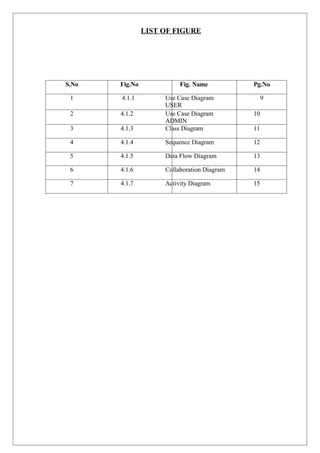
LIST OF FIGURE
S.NoFig.No Fig. Name Pg.No
1 4.1.1 Use Case Diagram
USER
9
2 4.1.2 Use Case Diagram
ADMIN
10
3 4.1.3 Class Diagram 11
4 4.1.4 Sequence Diagram 12
5 4.1.5 Data Flow Diagram 13
6 4.1.6 Collaboration Diagram 14
7 4.1.7 Activity Diagram 15
7.
1
1.INTRODUCTION
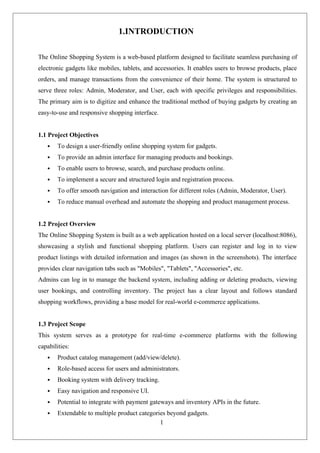
The Online ShoppingSystem is a web-based platform designed to facilitate seamless purchasing of
electronic gadgets like mobiles, tablets, and accessories. It enables users to browse products, place
orders, and manage transactions from the convenience of their home. The system is structured to
serve three roles: Admin, Moderator, and User, each with specific privileges and responsibilities.
The primary aim is to digitize and enhance the traditional method of buying gadgets by creating an
easy-to-use and responsive shopping interface.
1.1 Project Objectives
To design a user-friendly online shopping system for gadgets.
To provide an admin interface for managing products and bookings.
To enable users to browse, search, and purchase products online.
To implement a secure and structured login and registration process.
To offer smooth navigation and interaction for different roles (Admin, Moderator, User).
To reduce manual overhead and automate the shopping and product management process.
1.2 Project Overview
The Online Shopping System is built as a web application hosted on a local server (localhost:8086),
showcasing a stylish and functional shopping platform. Users can register and log in to view
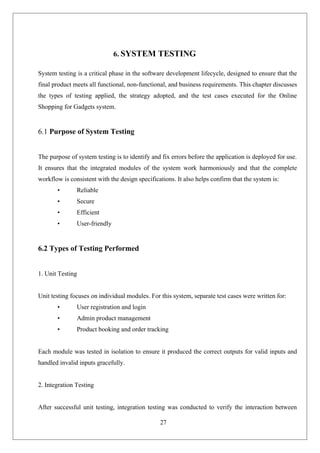
product listings with detailed information and images (as shown in the screenshots). The interface
provides clear navigation tabs such as "Mobiles", "Tablets", "Accessories", etc.
Admins can log in to manage the backend system, including adding or deleting products, viewing
user bookings, and controlling inventory. The project has a clear layout and follows standard
shopping workflows, providing a base model for real-world e-commerce applications.
1.3 Project Scope
This system serves as a prototype for real-time e-commerce platforms with the following
capabilities:
Product catalog management (add/view/delete).
Role-based access for users and administrators.
Booking system with delivery tracking.
Easy navigation and responsive UI.
Potential to integrate with payment gateways and inventory APIs in the future.
Extendable to multiple product categories beyond gadgets.
8.
2
1.4 Study ofSystems
The system is designed as a multi-role web application:
1.4.1 Modules
Each role in the system is implemented as a module with specific functionalities:
1.4.1.1 Admin
Login to the admin dashboard.
Add, update, or delete product listings.
View all booked products by users.
Manage user information and product inventory.
Access analytics or reports (can be extended).
1.4.1.2 Moderator (Optional / Extendable Module)
Moderators can assist admins in product verification and approval.
They can review user activity or flagged content.
Serve as intermediate managers for product quality checks.
1.4.1.3 User
Register and log in to the system.
Browse available gadgets by category.
View detailed product information with images.
Book or order products.
View order history and status of booked products.
Receive delivery information (e.g., within 7 working days, as sh
9.
3
2. LITERATURE SURVEY
Inthis chapter, we explore prior work and existing systems relevant to online shopping platforms,
especially in the field of gadgets and electronics. The literature review provides a strong foundation
for understanding the technologies, methodologies, and features that shape the proposed system.
2.1 Introduction to E-Commerce and Online Shopping Systems
E-commerce, or electronic commerce, refers to the buying and selling of goods and services over
digital platforms. Over the past two decades, e-commerce has revolutionized retail, allowing
customers to browse, compare, and purchase products from the comfort of their homes. The growth
of mobile devices, secure payment systems, and high-speed internet has further accelerated online
shopping adoption.
Online shopping systems vary in complexity, but most follow a similar structure:
• Product catalog
• User account management
• Shopping cart and order placement
• Payment integration
• Order tracking and management
This project—Online Shopping for Gadgets—focuses on building a simplified yet scalable e-
commerce system centered around gadgets like mobiles, tablets, and accessories.
2.2 Related Work and Contributions
1. E-Commerce: Business, Technology, Society (Laudon & Traver, 2021)
This book serves as a comprehensive guide to the foundation of e-commerce systems. It emphasizes
the importance of secure transaction handling, efficient data flow, and personalized user
experiences. Our system reflects many of these best practices, including role-based user access and
modular product management.
2. Online Shopping System using JSP (GeeksforGeeks, 2023)
This online article explains how Java Server Pages (JSP) can be utilized to develop a responsive and
scalable shopping system. JSP enables dynamic page generation and integration with databases,
which is adopted in this project to handle product listings, user registration, and backend logic.
3. Secure Online Transaction Systems (Bomgar, 2019)
Secure POS and kiosk systems were explored to understand potential vulnerabilities in e-commerce
platforms. The takeaway for this project was the emphasis on secure login, user session handling,
and minimizing points of failure through modular development.
4. GitHub Open Source Projects (2020–2024)
10.
4
Several open-source repositorieswere reviewed to understand the design patterns, folder structures,
and feature sets of modern e-commerce applications. The insights gained influenced the modular
approach of our system, which includes user, admin, and optional moderator modules.
5. W3Schools and MDN Web Docs
For front-end development, tutorials from W3Schools and MDN were extensively used. These
platforms helped us design responsive user interfaces using HTML5, CSS3, and JavaScript.
6. MySQL 8.0 Reference Manual (Oracle)
This manual guided the implementation of the database, especially in designing relational schemas
for users, products, and bookings. SQL queries, data integrity, and CRUD operations were shaped
according to MySQL best practices.
2.3 Limitations in Existing Systems
Many online shopping systems in earlier projects had the following limitations:
• Lack of modular access control (e.g., no distinction between admin and user
privileges)
• Poorly designed user interfaces
• No option for delivery tracking or product booking confirmation
• Weak database structures that don’t support efficient querying or data integrity
2.4 Contribution of the Proposed System
The proposed Online Shopping for Gadgets system overcomes these issues by:
• Providing a clean, modern user interface
• Offering role-based access (Admin, User, Moderator [optional])
• Including booking confirmation and order history features
• Allowing admins to manage inventory dynamically
• Employing secure login and data validation measures
This system can serve as a prototype for real-world e-commerce sites, with future potential to
integrate payment gateways and AI-based recommendations.
6
3.SYSTEM ANALYSIS
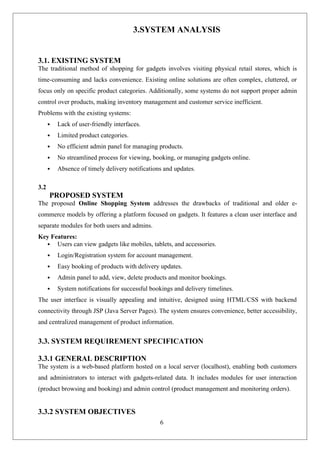
3.1. EXISTINGSYSTEM
The traditional method of shopping for gadgets involves visiting physical retail stores, which is
time-consuming and lacks convenience. Existing online solutions are often complex, cluttered, or
focus only on specific product categories. Additionally, some systems do not support proper admin
control over products, making inventory management and customer service inefficient.
Problems with the existing systems:
Lack of user-friendly interfaces.
Limited product categories.
No efficient admin panel for managing products.
No streamlined process for viewing, booking, or managing gadgets online.
Absence of timely delivery notifications and updates.
3.2
PROPOSED SYSTEM
The proposed Online Shopping System addresses the drawbacks of traditional and older e-
commerce models by offering a platform focused on gadgets. It features a clean user interface and
separate modules for both users and admins.
Key Features:
Users can view gadgets like mobiles, tablets, and accessories.
Login/Registration system for account management.
Easy booking of products with delivery updates.
Admin panel to add, view, delete products and monitor bookings.
System notifications for successful bookings and delivery timelines.
The user interface is visually appealing and intuitive, designed using HTML/CSS with backend
connectivity through JSP (Java Server Pages). The system ensures convenience, better accessibility,
and centralized management of product information.
3.3. SYSTEM REQUIREMENT SPECIFICATION
3.3.1 GENERAL DESCRIPTION
The system is a web-based platform hosted on a local server (localhost), enabling both customers
and administrators to interact with gadgets-related data. It includes modules for user interaction
(product browsing and booking) and admin control (product management and monitoring orders).
3.3.2 SYSTEM OBJECTIVES
13.
7
Provide acentralized online platform for gadget shopping.
Simplify the user interface for easy navigation.
Allow customers to register, log in, and book gadgets.
Enable admins to manage product listings efficiently.
Ensure delivery status updates and customer communication.
Improve the overall online shopping experience.
3.4 SYSTEM REQUIREMENTS
3.4.1 NON-FUNCTIONAL REQUIREMENTS
Performance: Fast response time for page loads and product searches.
Scalability: System can be extended to include more products and features.
Security: Secure login and session handling for both users and admins.
Usability: Easy-to-navigate interface with clear visual cues.
Maintainability: Code structure allows for future updates or feature additions.
3.4.2 FUNCTIONAL REQUIREMENTS
User Registration and Login: Users can create accounts and securely log in.
Product Browsing: Users can view available gadgets with images and details.
Product Booking: Users can book gadgets with confirmation and delivery updates.
Admin Product Management:
o Add new gadgets to the system.
o View existing products and bookings.
o Delete outdated or unavailable products.
Notification System: Display success messages (e.g., “Product Booked and Delivered
within 7 working days”).
14.
8
4.SYSTEM DESIGN
SYSTEM DESIGN
4.1INPUT AND OUTPUT DESIGN
4.1.1 INPUT DESIGN
Input design is a crucial aspect of any system, focusing on how the data is entered into the
system and how user interaction is handled. In this online shopping system, the
following are the major input forms:
User Registration/Login Forms: Users provide details such as username, email, and
password to register or log in to the system.
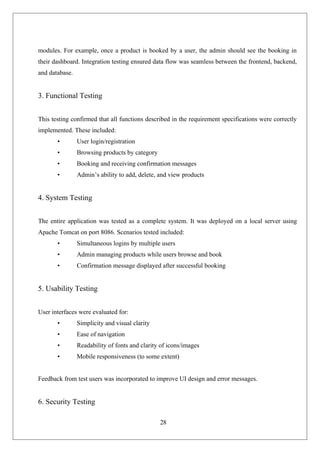
Admin Product Management: Admins input new product information including product
name, category (e.g., mobiles, tablets), image, and description through a product entry form
(as seen in the Admin panel screenshot).
Booking Form: Customers can select a product and confirm a booking with a single click,
which gets recorded in the database.
The input design ensures:
Validation of data (e.g., email format, required fields).
Simple and user-friendly interfaces for both users and admins.
Accurate capturing of user data and product details.
4.1.2 OUTPUT DESIGN
Output design defines how information is presented to users. This system provides:
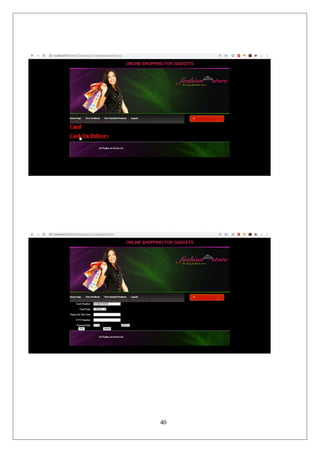
Product Listing Pages: Displays products with images and descriptions under categories
like Mobiles, Tablets, etc. (visible in the user view screenshot).
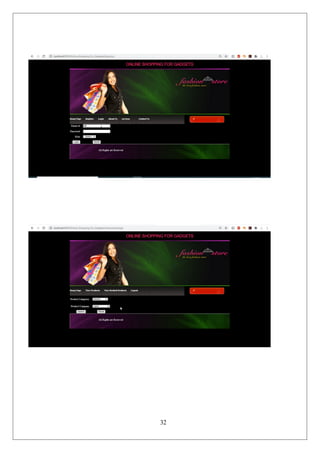
Admin Dashboard Outputs: Displays the list of added products, booked products, and
options to delete or manage them (as shown in the Admin interface).
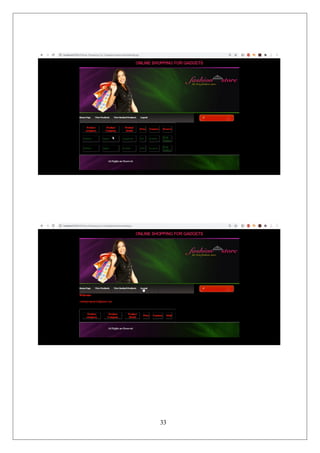
User Booking Confirmation: A message indicating successful booking and expected
delivery timeline is shown to the user.
Email ID and Welcome Message: Upon login, the system shows a personalized greeting
and the user’s email address.
All outputs are designed to be:
Visually appealing.
Easy to understand.
Aligned with user expectations.
15.
9
4.2 DATABASE
The systemutilizes a relational database to manage data efficiently. Key database tables
include:
Users: Stores user credentials and profile information.
Products: Contains product details such as name, category, image path, description, and
availability.
Bookings: Logs user bookings with timestamps and status.
Admin: Stores admin login information for secure access.
The database ensures:
Data integrity.
Fast access to user and product records.
Support for CRUD operations (Create, Read, Update, Delete).
4.3 SYSTEM TOOLS
4.3.1 FRONT END
The front-end is designed using standard web technologies:
HTML/CSS: For page structure and styling.
JavaScript (if any): For basic interactivity.
Images: Product images and banners enhance the UI (as seen in the screenshots).
Navigation Bar: Allows easy access to sections like Home, Mobiles, Tablets, Accessories,
Login/Register.
Screenshots reflect a clean interface with separate views for:
Regular Users (shopping interface)
Admin (product management panel)
4.3.2 BACK END
The back-end handles the logic and data management, typically implemented with:
Java (JSP/Servlets): Based on the file paths shown in URLs (e.g., admin.jsp, user.jsp), the
system appears to be Java-based using JSP technology.
Apache Tomcat Server: Runs the web application locally on port 8086.
JDBC: Java Database Connectivity is used to connect the front end with the database.
MySQL or Oracle: Likely used as the database management system.
The back-end processes requests like:
Logging in users/admins.
Storing and retrieving products.
Booking products and updating records.
16.
10
4.3 UML DIAGRAMS
UseCase Diagram
A use case diagram in the Unified Modeling Language (UML) is a type of
behavioral diagram defined by and created from a Use-case analysis. Its purpose is to
present a graphical overview of the functionality provided by a system in terms of
actors, their goals (represented as use cases), and any dependencies between those use
cases. The main purpose of a use case diagram is to show what system functions are
performed for which actor. Roles of the actors in the system can be depicted.
Use Case Diagrams for User’s:
12
4.4 CLASS DIAGRAM
Insoftware engineering, a class diagram in the Unified Modeling Language (UML) is a type
of static structure diagram that describes the structure of a system by showing the
system's classes, their attributes, operations (or methods), and the relationships among
the classes. It explains which class contains information.
User
+ User Name
+ Password
+ E-m
ail
+ Mobile No
+ Gender
+ DOB
+ Login()
+ Select Products()
+ Buy Products()
+ Place order()
+ Onliine Credit()
+ Logout()
Admin
+ User Name
+ Password
+ Login()
+ Add Products()
+ Delete Products()
+ Logout()
19.
13
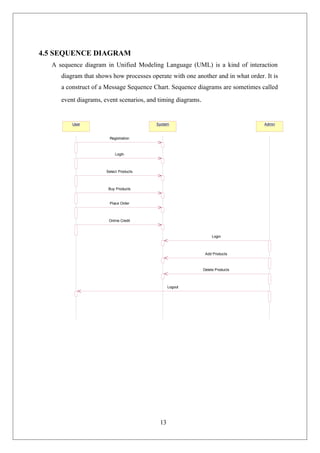
4.5 SEQUENCE DIAGRAM
Asequence diagram in Unified Modeling Language (UML) is a kind of interaction
diagram that shows how processes operate with one another and in what order. It is
a construct of a Message Sequence Chart. Sequence diagrams are sometimes called
event diagrams, event scenarios, and timing diagrams.
User System Admin
Registration
LogIn
Select Products
Buy Products
Place Order
Online Credit
Login
Add Products
Delete Products
Logout
20.
14
4.6 DATA FLOWDIAGRAM
Home
Login
User Admin
Select products
Buy Products
Place products
Online Credit
Logout
Add Products
Delete products
16
4.8 ACTIVITY DIAGRAM:
Activitydiagrams are graphical representations of workflows of stepwise activities
and actions with support for choice, iteration and concurrency. In the Unified Modeling
Language, activity diagrams can be used to describe the business and operational step-
by-step workflows of components in a system. An activity diagram shows the overall
flow of control.
Hom
e Page
Login
User
Adm
in
Select Products
Buy Products
Place Products
Online Credit
Logout
Add Products
Delete Products
23.
17
4.9 INPUT ANDOUTPUT DESIGN
INPUT DESIGN
Input design is a crucial aspect of any system, focusing on how the data is entered into the system
and how user interaction is handled. In this online shopping system, the following are the major
input forms:
User Registration/Login Forms: Users provide details such as username, email, and
password to register or log in to the system.
Admin Product Management: Admins input new product information including
product name, category (e.g., mobiles, tablets), image, and description through a product
entry form (as seen in the Admin panel screenshot).
Booking Form: Customers can select a product and confirm a booking with a single
click, which gets recorded in the database.
The input design ensures:
Validation of data (e.g., email format, required fields).
Simple and user-friendly interfaces for both users and admins.
Accurate capturing of user data and product details.
OUTPUT DESIGN
Output design defines how information is presented to users. This system provides:
Product Listing Pages: Displays products with images and descriptions under
categories like Mobiles, Tablets, etc. (visible in the user view screenshot).
Admin Dashboard Outputs: Displays the list of added products, booked products, and
options to delete or manage them (as shown in the Admin interface).
User Booking Confirmation: A message indicating successful booking and expected
delivery timeline is shown to the user.
Email ID and Welcome Message: Upon login, the system shows a personalized
greeting and the user’s email address.
24.
18
All outputs aredesigned to be:
Visually appealing.
Easy to understand.
Aligned with user expectations.
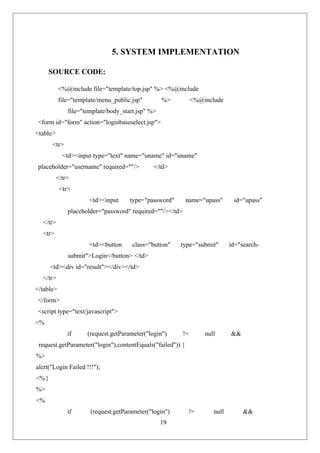
22
<%}
%>
</script>
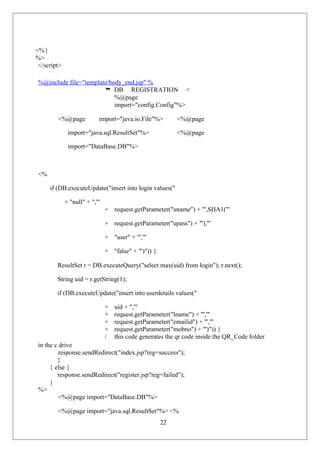
%@include file="template/body_end.jsp" %
DB REGISTRATION <
%@page
import="config.Config"%>
<%@page import="java.io.File"%> <%@page
import="java.sql.ResultSet"%> <%@page
import="DataBase.DB"%>
<%
if (DB.executeUpdate("insert into login values("
+ "null" + ",'"
+ request.getParameter("uname") + "',SHA1('"
+ request.getParameter("upass") + "'),'"
+ "user" + "','"
+ "false" + "')")) {
ResultSet r = DB.executeQuery("select max(uid) from login"); r.next();
String uid = r.getString(1);
if (DB.executeUpdate("insert into userdetails values("
+ uid + ",'"
+ request.getParameter("lname") + "','"
+ request.getParameter("emailid") + "','"
+ request.getParameter("mobno") + "')")) {
/ this code generates the qr code inside the QR_Code folder
in the c drive
response.sendRedirect("index.jsp?reg=success");
}
} else {
response.sendRedirect("register.jsp?reg=failed");
}
%>
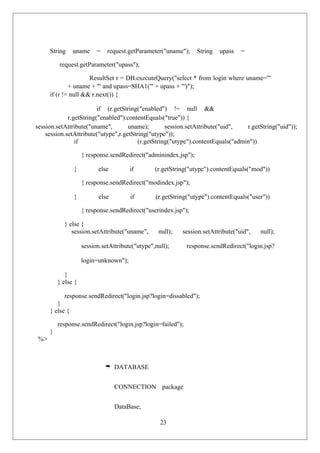
<%@page import="DataBase.DB"%>
<%@page import="java.sql.ResultSet"%> <%
29.
23
String uname =request.getParameter("uname"); String upass =
request.getParameter("upass");
ResultSet r = DB.executeQuery("select * from login where uname='"
+ uname + "' and upass=SHA1('" + upass + "')");
if (r != null && r.next()) {
if (r.getString("enabled") != null &&
r.getString("enabled").contentEquals("true")) {
session.setAttribute("uname", uname); session.setAttribute("uid", r.getString("uid"));
session.setAttribute("utype",r.getString("utype"));
if (r.getString("utype").contentEquals("admin"))
{ response.sendRedirect("adminindex.jsp");
} else if (r.getString("utype").contentEquals("mod"))
{ response.sendRedirect("modindex.jsp");
} else if (r.getString("utype").contentEquals("user"))
{ response.sendRedirect("userindex.jsp");
} else {
session.setAttribute("uname", null); session.setAttribute("uid", null);
session.setAttribute("utype",null); response.sendRedirect("login.jsp?
login=unknown");
}
} else {
response.sendRedirect("login.jsp?login=dissabled");
}
} else {
response.sendRedirect("login.jsp?login=failed");
}
%>
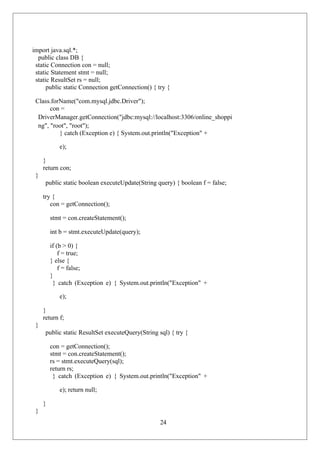
DATABASE
CONNECTION package
DataBase;
30.
24
import java.sql.*;
public classDB {
static Connection con = null;
static Statement stmt = null;
static ResultSet rs = null;
public static Connection getConnection() { try {
Class.forName("com.mysql.jdbc.Driver");
con =
DriverManager.getConnection("jdbc:mysql://localhost:3306/online_shoppi
ng", "root", "root");
} catch (Exception e) { System.out.println("Exception" +
e);
}
return con;
}
public static boolean executeUpdate(String query) { boolean f = false;
try {
con = getConnection();
stmt = con.createStatement();
int b = stmt.executeUpdate(query);
if (b > 0) {
f = true;
} else {
f = false;
}
} catch (Exception e) { System.out.println("Exception" +
e);
}
return f;
}
public static ResultSet executeQuery(String sql) { try {
con = getConnection();
stmt = con.createStatement();
rs = stmt.executeQuery(sql);
return rs;
} catch (Exception e) { System.out.println("Exception" +
e); return null;
}
}
31.
25
public static voidclose() {
try {
con.close();
stmt.close();
rs.close();
} catch (Exception e) { System.out.println("Exception" +
e);
}
}
}
package com.onlineshopping.activity;
import com.onlineshopping.activity.R;
import com.onlineshopping.activity.custom.CustomWebChromeClient; import
com.onlineshopping.activity.custom.CustomWebViewClient;
import android.annotation.SuppressLint; import
android.app.Activity;
import android.content.res.Configuration; import
android.os.Bundle; import android.view.KeyEvent;
import android.webkit.WebSettings.PluginState; import
android.webkit.WebView;
@SuppressLint("SetJavaScriptEnabled") public class
WebViewActivity extends Activity {
/ the web view refence object
private WebView webView;
/ the site url link
/ public static final String SITE_URL_START = "http://"; public static String
SITE_URL = "";
/
/ public static final String SITE_URL_END =
":8084/OnlineShoppingCart/";
/ @Override
32.
26
/ protected voidonCreate(Bundle savedInstanceState)
{ super.onCreate(savedInstanceState);
setContentView(R.layout.activity_web_view);
/ // get the refernce of the web view
/ webView = (WebView) findViewById(R.id.siteWebView);
/ // set the web view chrome client and set for showing a
/
/ progress bar
/ this.webView.setWebChromeClient(new
CustomWebChromeClient(this));
/ this.webView.setWebViewClient(new CustomWebViewClient(
getApplicationContext()));
/ on the ui thread do the processing
runOnUiThread(new Runnable() {
@SuppressWarnings("deprecation") public void run() {
/ set the javascript on
webView.getSettings().setJavaScriptEnabled(true); // enable all the
plugins
webView.getSettings().setPluginState(PluginState.ON);
// load the url
webView.loadUrl(SITE_URL_START +
SITE_URL + SITE_URL_END);
}
});
}
33.
27
6. SYSTEM TESTING
Systemtesting is a critical phase in the software development lifecycle, designed to ensure that the
final product meets all functional, non-functional, and business requirements. This chapter discusses
the types of testing applied, the strategy adopted, and the test cases executed for the Online
Shopping for Gadgets system.
6.1 Purpose of System Testing
The purpose of system testing is to identify and fix errors before the application is deployed for use.
It ensures that the integrated modules of the system work harmoniously and that the complete
workflow is consistent with the design specifications. It also helps confirm that the system is:
• Reliable
• Secure
• Efficient
• User-friendly
6.2 Types of Testing Performed
1. Unit Testing
Unit testing focuses on individual modules. For this system, separate test cases were written for:
• User registration and login
• Admin product management
• Product booking and order tracking
Each module was tested in isolation to ensure it produced the correct outputs for valid inputs and
handled invalid inputs gracefully.
2. Integration Testing
After successful unit testing, integration testing was conducted to verify the interaction between
34.
28
modules. For example,once a product is booked by a user, the admin should see the booking in
their dashboard. Integration testing ensured data flow was seamless between the frontend, backend,
and database.
3. Functional Testing
This testing confirmed that all functions described in the requirement specifications were correctly
implemented. These included:
• User login/registration
• Browsing products by category
• Booking and receiving confirmation messages
• Admin’s ability to add, delete, and view products
4. System Testing
The entire application was tested as a complete system. It was deployed on a local server using
Apache Tomcat on port 8086. Scenarios tested included:
• Simultaneous logins by multiple users
• Admin managing products while users browse and book
• Confirmation message displayed after successful booking
5. Usability Testing
User interfaces were evaluated for:
• Simplicity and visual clarity
• Ease of navigation
• Readability of fonts and clarity of icons/images
• Mobile responsiveness (to some extent)
Feedback from test users was incorporated to improve UI design and error messages.
6. Security Testing
35.
29
Security testing wasconducted to ensure:
• Login sessions are securely managed
• SQL injections are prevented via parameterized queries
• Passwords are encrypted using SHA1
7. Performance Testing
The application was tested for:
• Page load times under simulated load
• Search speed for product queries
• Booking speed and confirmation delivery
Testing was performed manually with sample data and automated through load simulation.
6.4 Testing Methodology
White Box Testing
Focused on logic-level testing for backend components like login validation, product search, and
booking logic.
Black Box Testing
Simulated user interactions without internal knowledge of the system. Used to validate UI
workflows, booking experience, and error handling.
Validation Testing
Tested all form fields such as:
• Required fields not left empty
• Email format validation
• Password strength enforcement
Acceptance Testing
36.
30
Project was demonstratedto peers and mentors. All functionalities were tested against project
objectives, and feedback was positive.
⸻
6.5 Test Environment
• Server: Apache Tomcat v9.0
• Database: MySQL 8.0
• IDE: NetBeans
• Testing Tools: Browser Developer Tools, Manual Testing Checklists
• Browser Compatibility: Chrome, Firefox
42
8.CONCLUSION AND FUTUREWORK
CONCLUSION:
The Online Shopping System provides a simplified and efficient platform for purchasing gadgets
online. Through an intuitive user interface, customers can explore categories like mobiles, tablets,
and accessories, enhancing the online shopping experience. The system offers essential features
such as user registration, product browsing, and booking, ensuring ease of use for customers.
From an administrative perspective, the backend dashboard allows for seamless management of
products, including adding, viewing, and deleting items, as well as tracking booked products. This
dual-interface structure—one for users and another for administrators—ensures that both front-end
operations and back-end processes are handled smoothly.
The system effectively demonstrates how e-commerce functionalities can be integrated into a
unified platform. It supports essential components like product display, order confirmation, and
delivery notification, as shown in the screenshots. The clear navigation menus, visual product
listings, and feedback messages (e.g., “Product Booked and Delivered within 7 working days”)
enhance user engagement and reliability.
In conclusion, this project successfully illustrates the core functionalities of an e-commerce gadget
store. It serves as a foundational model that can be further extended with advanced features like
payment gateway integration, user reviews, and real-time tracking to build a complete online retail
solution.
49.
43
9.REFERENCES
Laudon, K.C., & Traver, C. G. (2021). E-commerce: Business, Technology, Society. Pearson
Education.
A comprehensive guide to the foundations of e-commerce systems.
W3Schools. (n.d.). HTML, CSS, and JavaScript Tutorials.
Retrieved from: https://www.w3schools.com
Used for designing the frontend of the online shopping system.
Oracle. (n.d.). Java Server Pages (JSP) Technology.
Retrieved from: https://www.oracle.com/java/technologies/jspt.html
Reference for implementing server-side logic using JSP in the admin and user portals.
MySQL Documentation. (n.d.). MySQL 8.0 Reference Manual.
Retrieved from: https://dev.mysql.com/doc/
Used for handling database operations related to products and users.
Bootstrap. (n.d.). The Most Popular HTML, CSS, and JS Library.
Retrieved from: https://getbootstrap.com
Used for enhancing the user interface and responsiveness.
Mozilla Developer Network (MDN). (n.d.). HTML and CSS Documentation.
Retrieved from: https://developer.mozilla.org
For implementing structured layout and styling across pages.
GeeksforGeeks. (n.d.). Online Shopping System – Java JSP Project.
Retrieved from: https://www.geeksforgeeks.org
Used for understanding JSP-based e-commerce project workflows.
50.
44
Venkat JavaProjects (n.d.). Student Java Projects with Source Code.
Email reference: venkatjavaprojects@gmail.com
Credited in the interface design and source code template used in this system.
GitHub (n.d.). Online Shopping Cart Projects – Open Source Repositories.
Retrieved from: https://github.com
For understanding best practices in e-commerce project structure and logic.
Stack Overflow. (n.d.). Community Discussions on Web Development Issues.
Retrieved from: https://stackoverflow.com
Used for resolving technical queries during development.






![4
Several open-source repositories were reviewed to understand the design patterns, folder structures,
and feature sets of modern e-commerce applications. The insights gained influenced the modular
approach of our system, which includes user, admin, and optional moderator modules.
5. W3Schools and MDN Web Docs
For front-end development, tutorials from W3Schools and MDN were extensively used. These
platforms helped us design responsive user interfaces using HTML5, CSS3, and JavaScript.
6. MySQL 8.0 Reference Manual (Oracle)
This manual guided the implementation of the database, especially in designing relational schemas
for users, products, and bookings. SQL queries, data integrity, and CRUD operations were shaped
according to MySQL best practices.
2.3 Limitations in Existing Systems
Many online shopping systems in earlier projects had the following limitations:
• Lack of modular access control (e.g., no distinction between admin and user
privileges)
• Poorly designed user interfaces
• No option for delivery tracking or product booking confirmation
• Weak database structures that don’t support efficient querying or data integrity
2.4 Contribution of the Proposed System
The proposed Online Shopping for Gadgets system overcomes these issues by:
• Providing a clean, modern user interface
• Offering role-based access (Admin, User, Moderator [optional])
• Including booking confirmation and order history features
• Allowing admins to manage inventory dynamically
• Employing secure login and data validation measures
This system can serve as a prototype for real-world e-commerce sites, with future potential to
integrate payment gateways and AI-based recommendations.](https://image.slidesharecdn.com/onlineshoppingforgadgets-250508205051-86b4fe51/85/online-shopping-for-gadet-using-python-project-10-320.jpg)



















![FAKE SOCIAL MEDIA ACCOUNT DETECTION DOCUMENTATION[6][1] (1).docx](https://cdn.slidesharecdn.com/ss_thumbnails/fakesocialmediaaccountdetectiondocumentation611-250830044225-8915adf4-thumbnail.jpg?width=640&height=640&fit=bounds)


