ONE REPORT TO RULE THEM ALL
Consolidate Your Financial Tracking Using Quick Base
Tyler Brezler, Department of Chemistry
THE PROBLEM
Tracking and resolving issues like account overruns, expired accounts, outstanding
travel, etc., requires:
• Reports scattered across Cognos, not customized to your needs
• Too many Excel spreadsheets, can be difficult to share
• Too many emails
• Data can be hard to organize/analyze
• Easy to lose track of outstanding items
THE SOLUTION
Creating an app in Quick Base allows users to centralize, simplify, and expand
accessibility.
CENTRALIZATION:
ONE suite of Cognos reports, which are customized and fast
ONE Excel spreadsheet for formatting and uploading data
ONE Quick Base app for managing and resolving issues
SIMPLIFICATION:
Data is organized, filtered, and easy to analyze
Associated data is automatically linked
Action plans and comments are recorded and stored until each item is resolved
Notifications can be automated – no more emailing people with cut/paste from Excel
Issues can be prioritized to keep urgent items easily identified
PARTICIPATION:
Multiple users can access data when it’s convenient
Data is restricted by roles authorizations within Quick Base
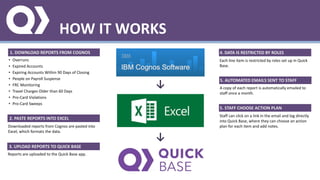
HOW IT WORKS
1. DOWNLOAD REPORTS FROM COGNOS
• Overruns
• Expired Accounts
• Expiring Accounts Within 90 Days of Closing
• People on Payroll Suspense
• FRC Monitoring
• Travel Charges Older than 60 Days
• Pro-Card Violations
• Pro-Card Sweeps
2. PASTE REPORTS INTO EXCEL
Downloaded reports from Cognos are pasted into
Excel, which formats the data.
3. UPLOAD REPORTS TO QUICK BASE
Reports are uploaded to the Quick Base app.
4. DATA IS RESTRICTED BY ROLES
Each line item is restricted by roles set up in Quick
Base.
5. AUTOMATED EMAILS SENT TO STAFF
A copy of each report is automatically emailed to
staff once a month.
5. STAFF CHOOSE ACTION PLAN
Staff can click on a link in the email and log directly
into Quick Base, where they can choose an action
plan for each item and add notes.
↓
↓
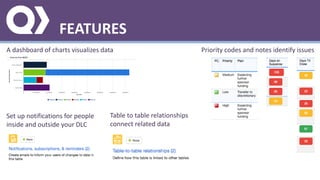
FEATURES
A dashboard of charts visualizes data Priority codes and notes identify issues
Set up notifications for people
inside and outside your DLC
Table to table relationships
connect related data
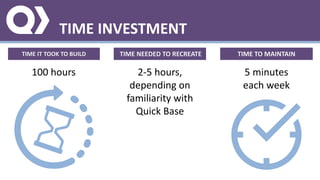
TIME INVESTMENT
TIME IT TOOK TO BUILD
100 hours
TIME NEEDED TO RECREATE
2-5 hours,
depending on
familiarity with
Quick Base
TIME TO MAINTAIN
5 minutes
each week
PROS AND CONS
PROS CONS
• Information is stored in a single location
• Information can be accessed by anyone granted authorization
• Information can be restricted based on Quick Base roles
• Quick Base is endlessly customizable
• Email notifications are easy to set up and can be automated
• Filtering data allows you to view items the way they make
sense to you
• Cognos reports are fast and include more information than
standard Cognos reports
• Quick Base is free for all MIT employees
• Data is not updated automatically – must download from the
Warehouse and upload manually
• Requires frequent user participation in order to be truly
successful (although can be a handy reference if only used by
the administrator)
• Troubleshooting will require time investment for administrator

One Report to Rule Them All

  • 1.
    ONE REPORT TORULE THEM ALL Consolidate Your Financial Tracking Using Quick Base Tyler Brezler, Department of Chemistry THE PROBLEM Tracking and resolving issues like account overruns, expired accounts, outstanding travel, etc., requires: • Reports scattered across Cognos, not customized to your needs • Too many Excel spreadsheets, can be difficult to share • Too many emails • Data can be hard to organize/analyze • Easy to lose track of outstanding items THE SOLUTION Creating an app in Quick Base allows users to centralize, simplify, and expand accessibility. CENTRALIZATION: ONE suite of Cognos reports, which are customized and fast ONE Excel spreadsheet for formatting and uploading data ONE Quick Base app for managing and resolving issues SIMPLIFICATION: Data is organized, filtered, and easy to analyze Associated data is automatically linked Action plans and comments are recorded and stored until each item is resolved Notifications can be automated – no more emailing people with cut/paste from Excel Issues can be prioritized to keep urgent items easily identified PARTICIPATION: Multiple users can access data when it’s convenient Data is restricted by roles authorizations within Quick Base
  • 2.
    HOW IT WORKS 1.DOWNLOAD REPORTS FROM COGNOS • Overruns • Expired Accounts • Expiring Accounts Within 90 Days of Closing • People on Payroll Suspense • FRC Monitoring • Travel Charges Older than 60 Days • Pro-Card Violations • Pro-Card Sweeps 2. PASTE REPORTS INTO EXCEL Downloaded reports from Cognos are pasted into Excel, which formats the data. 3. UPLOAD REPORTS TO QUICK BASE Reports are uploaded to the Quick Base app. 4. DATA IS RESTRICTED BY ROLES Each line item is restricted by roles set up in Quick Base. 5. AUTOMATED EMAILS SENT TO STAFF A copy of each report is automatically emailed to staff once a month. 5. STAFF CHOOSE ACTION PLAN Staff can click on a link in the email and log directly into Quick Base, where they can choose an action plan for each item and add notes. ↓ ↓
  • 3.
    FEATURES A dashboard ofcharts visualizes data Priority codes and notes identify issues Set up notifications for people inside and outside your DLC Table to table relationships connect related data
  • 4.
    TIME INVESTMENT TIME ITTOOK TO BUILD 100 hours TIME NEEDED TO RECREATE 2-5 hours, depending on familiarity with Quick Base TIME TO MAINTAIN 5 minutes each week
  • 5.
    PROS AND CONS PROSCONS • Information is stored in a single location • Information can be accessed by anyone granted authorization • Information can be restricted based on Quick Base roles • Quick Base is endlessly customizable • Email notifications are easy to set up and can be automated • Filtering data allows you to view items the way they make sense to you • Cognos reports are fast and include more information than standard Cognos reports • Quick Base is free for all MIT employees • Data is not updated automatically – must download from the Warehouse and upload manually • Requires frequent user participation in order to be truly successful (although can be a handy reference if only used by the administrator) • Troubleshooting will require time investment for administrator