

OMNITURE 101+

Watch out!!!
AGENDA
Agenda
» iP Background

» How analytics works?
» What’s Omniture?
» Tool Overview
» Under the hood!
» Questions

Driving Digital Performance

2
BACKGROUND & CURRENT POSITION
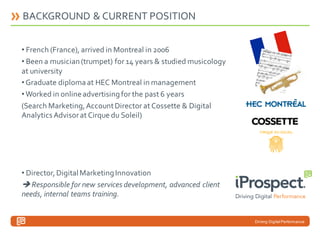
• French (France), arrived in Montreal in 2006
• Been a musician (trumpet) for 14 years & studied musicology
at university
• Graduate diploma at HEC Montreal in management
• Worked in online advertising for the past 6 years
(Search Marketing, Account Director at Cossette & Digital
Analytics Advisor at Cirque du Soleil)

• Director, Digital Marketing Innovation
 Responsible for new services development, advanced client
needs, internal teams training.

Driving Digital Performance
IP BACKGROUND IN WEB ANALYTICS
•

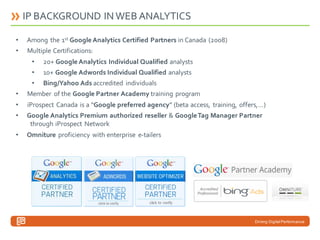
Among the 1st Google Analytics Certified Partners in Canada (2008)

•

Multiple Certifications:
•

20+ Google Analytics Individual Qualified analysts

•

10+ Google Adwords Individual Qualified analysts

•

Bing/Yahoo Ads accredited individuals

•

Member of the Google Partner Academy training program

•

iProspect Canada is a “Google preferred agency” (beta access, training, offers,…)

•

Google Analytics Premium authorized reseller & Google Tag Manager Partner
through iProspect Network

•

Omniture proficiency with enterprise e-tailers

Driving Digital Performance
How analytics works?
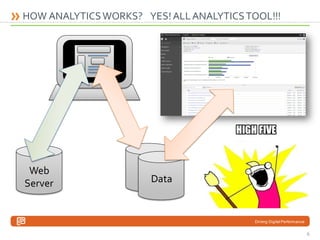
HOW ANALYTICS WORKS? YES! ALL ANALYTICS TOOL!!!

Web
Server

Data

Driving Digital Performance

6
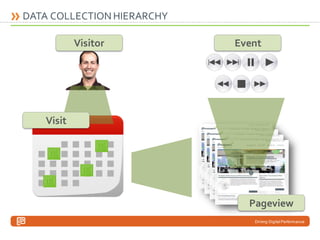
DATA COLLECTION HIERARCHY
Visitor

Event

Visit

Pageview
Driving Digital Performance
What’s Omniture?
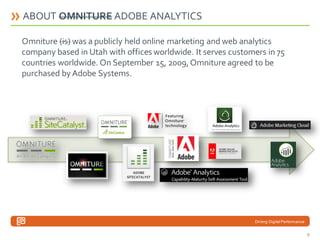
ABOUT OMNITURE ADOBE ANALYTICS
Omniture (is) was a publicly held online marketing and web analytics
company based in Utah with offices worldwide. It serves customers in 75
countries worldwide. On September 15, 2009, Omniture agreed to be
purchased by Adobe Systems.

Driving Digital Performance

9
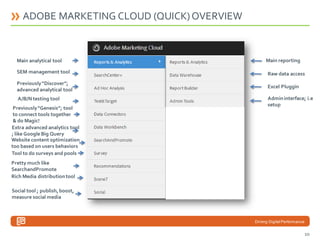
ADOBE MARKETING CLOUD (QUICK) OVERVIEW

Main analytical tool

Main reporting

SEM management tool

Raw data access

Previously “Discover”;
advanced analytical tool

Excel Pluggin

A/B/N testing tool
Previously “Genesis”; tool
to connect tools together
& do Magic!
Extra advanced analytics tool
; like Google Big Query
Website content optimization
too based on users behaviors
Tool to do surveys and pools

Admin interface; i.e
setup

Pretty much like
SearchandPromote
Rich Media distribution tool

Social tool ; publish, boost,
measure social media

Driving Digital Performance

10
Tool Overview
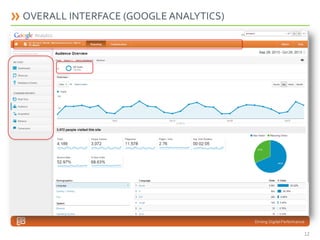
OVERALL INTERFACE (GOOGLE ANALYTICS)

Driving Digital Performance

12
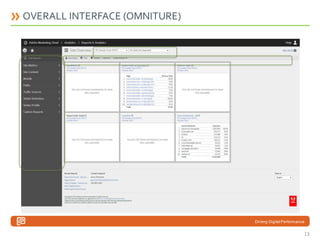
OVERALL INTERFACE (OMNITURE)

Driving Digital Performance

13
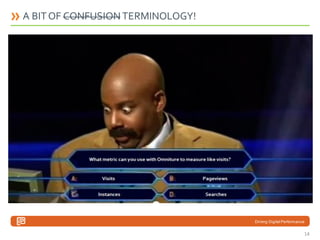
A BIT OF CONFUSION TERMINOLOGY!
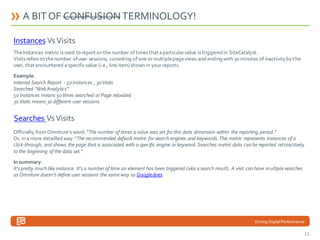
Instances Vs Visits
The Instances metric is used to report on the number of times that a particular value is triggered in SiteCatalyst.
Visits refers to the number of user sessions, consisting of one or multiple page views and ending with 30 minutes of inactivity by t he
user, that encountered a specific value (i.e., line item) shown in your reports.
Example:
Internal Search Report - 50 Instances , 30 Visits
Searched “Web Analytics”
50 Instances means 50 times searched or Page reloaded
30 Visits means 30 different user sessions

Searches Vs Visits
Officially, from Omniture’s word: “The number of times a value was set for this data dimension within the reporting period.”
Or, in a more detailled way: “The recommended default metric for search engines and keywords. This metric represents instances of a
click-through, and shows the page that is associated with a specific engine or keyword. Searches metric data can be reported retroactively
to the beginning of the data set.”
In summary:
It’s pretty much like instance. It’s a number of time an element has been triggered (aka a search result). A visit can have m ultiple searches
as Omniture doesn’t define user sessions the same way as Google does.

Driving Digital Performance

14
A BIT OF CONFUSION TERMINOLOGY!
Instances Vs Visits
The Instances metric is used to report on the number of times that a particular value is triggered in SiteCatalyst.
Visits refers to the number of user sessions, consisting of one or multiple page views and ending with 30 minutes of inactivity by t he
user, that encountered a specific value (i.e., line item) shown in your reports.
Example:
Internal Search Report - 50 Instances , 30 Visits
Searched “Web Analytics”
50 Instances means 50 times searched or Page reloaded
30 Visits means 30 different user sessions

Searches Vs Visits
Officially, from Omniture’s word: “The number of times a value was set for this data dimension within the reporting period.”
Or, in a more detailled way: “The recommended default metric for search engines and keywords. This metric represents instances of a
click-through, and shows the page that is associated with a specific engine or keyword. Searches metric data can be reported retroactively
to the beginning of the data set.”
In summary:
It’s pretty much like instance. It’s a number of time an element has been triggered (aka a search result). A visit can have m ultiple searches
as Omniture doesn’t define user sessions the same way as Google does.

Driving Digital Performance

15
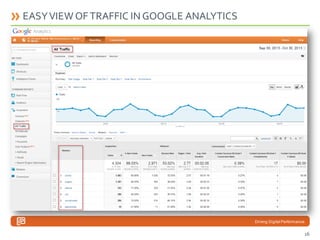
EASY VIEW OF TRAFFIC IN GOOGLE ANALYTICS

Driving Digital Performance

16
…SLOWLY GOING AWAY…

Driving Digital Performance

17
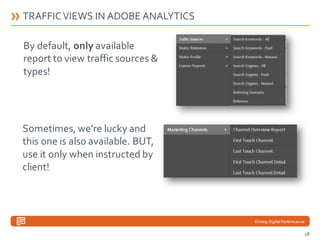
TRAFFIC VIEWS IN ADOBE ANALYTICS

By default, only available
report to view traffic sources &
types!

Sometimes, we’re lucky and
this one is also available. BUT,
use it only when instructed by
client!

Driving Digital Performance

18
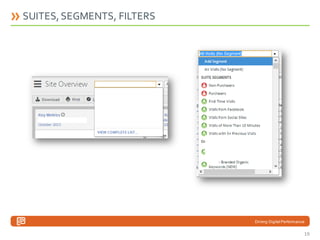
SUITES, SEGMENTS, FILTERS

Driving Digital Performance

19
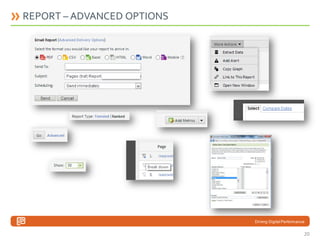
REPORT – ADVANCED OPTIONS

Driving Digital Performance

20
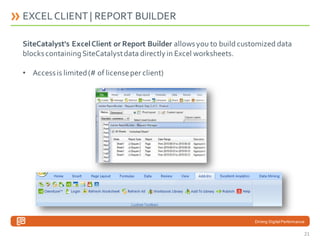
EXCEL CLIENT | REPORT BUILDER
SiteCatalyst's Excel Client or Report Builder allows you to build customized data
blocks containing SiteCatalyst data directly in Excel worksheets.
• Access is limited (# of license per client)

Driving Digital Performance

21
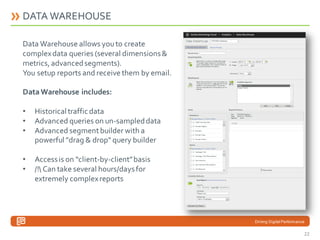
DATA WAREHOUSE
Data Warehouse allows you to create
complex data queries (several dimensions &
metrics, advanced segments).
You setup reports and receive them by email.
Data Warehouse includes:
•
•
•

Historical traffic data
Advanced queries on un-sampled data
Advanced segment builder with a
powerful "drag & drop" query builder

•
•

Access is on “client-by-client” basis
/! Can take several hours/days for
extremely complex reports

Driving Digital Performance

22
Under the hood!
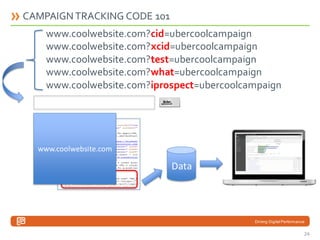
CAMPAIGN TRACKING CODE 101
www.coolwebsite.com?cid=ubercoolcampaign
www.coolwebsite.com?xcid=ubercoolcampaign
www.coolwebsite.com?test=ubercoolcampaign
www.coolwebsite.com?what=ubercoolcampaign
www.coolwebsite.com?iprospect=ubercoolcampaign

www.coolwebsite.com

Data

Driving Digital Performance

24
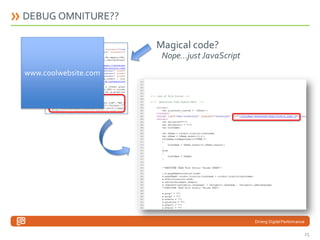
DEBUG OMNITURE??
Magical code?
Nope…just JavaScript
www.coolwebsite.com

Driving Digital Performance

25
JAVASCRIPT ???

• Want to know more?
http://en.wikipedia.org/wiki/JavaScript

• All Web Analytics tools are working with JavaScript
• JavaScript is part of what we consider front-end in the
DEV world
• JavaScript is executable and can use/find/work with
information from user’s browser and computer

Driving Digital Performance

26
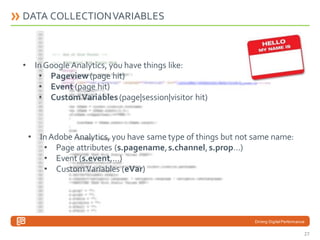
DATA COLLECTION VARIABLES

• In Google Analytics, you have things like:
• Pageview (page hit)
• Event (page hit)
• Custom Variables (page|session|visitor hit)

• In Adobe Analytics, you have same type of things but not same name:
• Page attributes (s.pagename, s.channel, s.prop…)
• Event (s.event,…)
• Custom Variables (eVar)

Driving Digital Performance

27
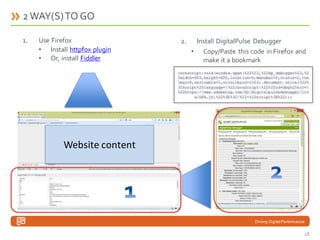
2 WAY(S) TO GO
1.

Use Firefox
• Install httpfox plugin
• Or, install Fiddler

2.

Install DigitalPulse Debugger
• Copy/Paste this code in Firefox and
make it a bookmark

javascript:void(window.open(%22%22,%22dp_debugger%22,%2
2width=600,height=600,location=0,menubar=0,status=1,too
lbar=0,resizable=1,scrollbars=1%22).document.write(%22%
3Cscript%20language=%22JavaScript%22%20id=dbg%20src=
%22https://www.adobetag.com/d1/digitalpulsedebugger/liv
e/DPD.js%22%3E%3C/%22+%22script%3E%22));

Website content

Driving Digital Performance

28
QUESTIONS

Driving Digital Performance

29

Omniture 101 - Digital Analytics - iProspect Canada

  • 1.
  • 2.
    AGENDA Agenda » iP Background »How analytics works? » What’s Omniture? » Tool Overview » Under the hood! » Questions Driving Digital Performance 2
  • 3.
    BACKGROUND & CURRENTPOSITION • French (France), arrived in Montreal in 2006 • Been a musician (trumpet) for 14 years & studied musicology at university • Graduate diploma at HEC Montreal in management • Worked in online advertising for the past 6 years (Search Marketing, Account Director at Cossette & Digital Analytics Advisor at Cirque du Soleil) • Director, Digital Marketing Innovation  Responsible for new services development, advanced client needs, internal teams training. Driving Digital Performance
  • 4.
    IP BACKGROUND INWEB ANALYTICS • Among the 1st Google Analytics Certified Partners in Canada (2008) • Multiple Certifications: • 20+ Google Analytics Individual Qualified analysts • 10+ Google Adwords Individual Qualified analysts • Bing/Yahoo Ads accredited individuals • Member of the Google Partner Academy training program • iProspect Canada is a “Google preferred agency” (beta access, training, offers,…) • Google Analytics Premium authorized reseller & Google Tag Manager Partner through iProspect Network • Omniture proficiency with enterprise e-tailers Driving Digital Performance
  • 5.
  • 6.
    HOW ANALYTICS WORKS?YES! ALL ANALYTICS TOOL!!! Web Server Data Driving Digital Performance 6
  • 7.
  • 8.
  • 9.
    ABOUT OMNITURE ADOBEANALYTICS Omniture (is) was a publicly held online marketing and web analytics company based in Utah with offices worldwide. It serves customers in 75 countries worldwide. On September 15, 2009, Omniture agreed to be purchased by Adobe Systems. Driving Digital Performance 9
  • 10.
    ADOBE MARKETING CLOUD(QUICK) OVERVIEW Main analytical tool Main reporting SEM management tool Raw data access Previously “Discover”; advanced analytical tool Excel Pluggin A/B/N testing tool Previously “Genesis”; tool to connect tools together & do Magic! Extra advanced analytics tool ; like Google Big Query Website content optimization too based on users behaviors Tool to do surveys and pools Admin interface; i.e setup Pretty much like SearchandPromote Rich Media distribution tool Social tool ; publish, boost, measure social media Driving Digital Performance 10
  • 11.
  • 12.
    OVERALL INTERFACE (GOOGLEANALYTICS) Driving Digital Performance 12
  • 13.
  • 14.
    A BIT OFCONFUSION TERMINOLOGY! Instances Vs Visits The Instances metric is used to report on the number of times that a particular value is triggered in SiteCatalyst. Visits refers to the number of user sessions, consisting of one or multiple page views and ending with 30 minutes of inactivity by t he user, that encountered a specific value (i.e., line item) shown in your reports. Example: Internal Search Report - 50 Instances , 30 Visits Searched “Web Analytics” 50 Instances means 50 times searched or Page reloaded 30 Visits means 30 different user sessions Searches Vs Visits Officially, from Omniture’s word: “The number of times a value was set for this data dimension within the reporting period.” Or, in a more detailled way: “The recommended default metric for search engines and keywords. This metric represents instances of a click-through, and shows the page that is associated with a specific engine or keyword. Searches metric data can be reported retroactively to the beginning of the data set.” In summary: It’s pretty much like instance. It’s a number of time an element has been triggered (aka a search result). A visit can have m ultiple searches as Omniture doesn’t define user sessions the same way as Google does. Driving Digital Performance 14
  • 15.
    A BIT OFCONFUSION TERMINOLOGY! Instances Vs Visits The Instances metric is used to report on the number of times that a particular value is triggered in SiteCatalyst. Visits refers to the number of user sessions, consisting of one or multiple page views and ending with 30 minutes of inactivity by t he user, that encountered a specific value (i.e., line item) shown in your reports. Example: Internal Search Report - 50 Instances , 30 Visits Searched “Web Analytics” 50 Instances means 50 times searched or Page reloaded 30 Visits means 30 different user sessions Searches Vs Visits Officially, from Omniture’s word: “The number of times a value was set for this data dimension within the reporting period.” Or, in a more detailled way: “The recommended default metric for search engines and keywords. This metric represents instances of a click-through, and shows the page that is associated with a specific engine or keyword. Searches metric data can be reported retroactively to the beginning of the data set.” In summary: It’s pretty much like instance. It’s a number of time an element has been triggered (aka a search result). A visit can have m ultiple searches as Omniture doesn’t define user sessions the same way as Google does. Driving Digital Performance 15
  • 16.
    EASY VIEW OFTRAFFIC IN GOOGLE ANALYTICS Driving Digital Performance 16
  • 17.
    …SLOWLY GOING AWAY… DrivingDigital Performance 17
  • 18.
    TRAFFIC VIEWS INADOBE ANALYTICS By default, only available report to view traffic sources & types! Sometimes, we’re lucky and this one is also available. BUT, use it only when instructed by client! Driving Digital Performance 18
  • 19.
    SUITES, SEGMENTS, FILTERS DrivingDigital Performance 19
  • 20.
    REPORT – ADVANCEDOPTIONS Driving Digital Performance 20
  • 21.
    EXCEL CLIENT |REPORT BUILDER SiteCatalyst's Excel Client or Report Builder allows you to build customized data blocks containing SiteCatalyst data directly in Excel worksheets. • Access is limited (# of license per client) Driving Digital Performance 21
  • 22.
    DATA WAREHOUSE Data Warehouseallows you to create complex data queries (several dimensions & metrics, advanced segments). You setup reports and receive them by email. Data Warehouse includes: • • • Historical traffic data Advanced queries on un-sampled data Advanced segment builder with a powerful "drag & drop" query builder • • Access is on “client-by-client” basis /! Can take several hours/days for extremely complex reports Driving Digital Performance 22
  • 23.
  • 24.
    CAMPAIGN TRACKING CODE101 www.coolwebsite.com?cid=ubercoolcampaign www.coolwebsite.com?xcid=ubercoolcampaign www.coolwebsite.com?test=ubercoolcampaign www.coolwebsite.com?what=ubercoolcampaign www.coolwebsite.com?iprospect=ubercoolcampaign www.coolwebsite.com Data Driving Digital Performance 24
  • 25.
    DEBUG OMNITURE?? Magical code? Nope…justJavaScript www.coolwebsite.com Driving Digital Performance 25
  • 26.
    JAVASCRIPT ??? • Wantto know more? http://en.wikipedia.org/wiki/JavaScript • All Web Analytics tools are working with JavaScript • JavaScript is part of what we consider front-end in the DEV world • JavaScript is executable and can use/find/work with information from user’s browser and computer Driving Digital Performance 26
  • 27.
    DATA COLLECTION VARIABLES •In Google Analytics, you have things like: • Pageview (page hit) • Event (page hit) • Custom Variables (page|session|visitor hit) • In Adobe Analytics, you have same type of things but not same name: • Page attributes (s.pagename, s.channel, s.prop…) • Event (s.event,…) • Custom Variables (eVar) Driving Digital Performance 27
  • 28.
    2 WAY(S) TOGO 1. Use Firefox • Install httpfox plugin • Or, install Fiddler 2. Install DigitalPulse Debugger • Copy/Paste this code in Firefox and make it a bookmark javascript:void(window.open(%22%22,%22dp_debugger%22,%2 2width=600,height=600,location=0,menubar=0,status=1,too lbar=0,resizable=1,scrollbars=1%22).document.write(%22% 3Cscript%20language=%22JavaScript%22%20id=dbg%20src= %22https://www.adobetag.com/d1/digitalpulsedebugger/liv e/DPD.js%22%3E%3C/%22+%22script%3E%22)); Website content Driving Digital Performance 28
  • 29.