Website Tracking

How to measure User behavior and
      Success on Websites
      By Chrilles Wybrandt
        Owner of www.misura.dk
About Chrilles Wybrandt
Specialized in web analytics and
certified in Google Analytics and SiteCatalyst from Omniture (Adobe)

• Webmaster and IT project manager at Copenhagen Business School
• Instructor in data analysis at ACNielsen AIM
• 2 years in Themilk and Guava
   (Online Communication Agencies)
• 1 ½ years as independent with Misura.dk

Clients:
• L'EASY, Stibo, Roskilde Festival,
   OK, DTU
• Sub contractor with other
   online agencies
Agenda
To draw a picture of the purpose, opportunities and
   challenges when tracking websites

• Examples of tracking systems - and their popularity
• Why Tracking is Important
• Measuring visitor success, content performance
  and online campaigns
• Getting started with web analytics
• Quick Wins on your website
What do you already know…?
• What is your knowledge of web analytics and
  website tracking today?
• How many of you have worked with Google
  Analytics, SiteCatalyst, Webstends?
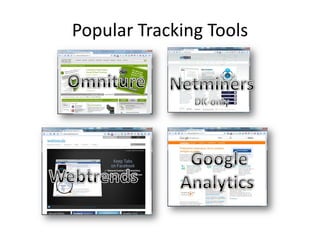
Popular Tracking Tools
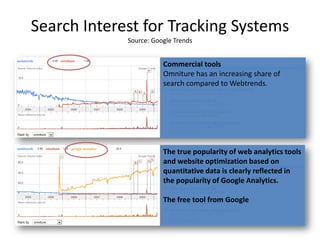
Search Interest for Tracking Systems
             Source: Google Trends


                        Commercial tools
                        Omniture has an increasing share of
                        search compared to Webtrends.


                        The true popularity of web analytics tools
                        and website optimization based on
                        quantitative data is clearly reflected in
                        the popularity of Google Analytics.

                        The free tool from Google
Why Tracking is Important?
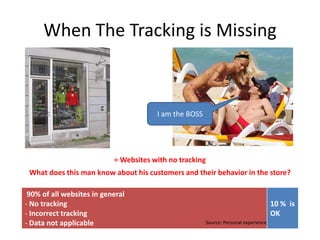
When The Tracking is Missing


                                       I am the BOSS


                           = Websites with no tracking
 What does this man know about his customers and their behavior in the store?

 90% of all websites in general
- No tracking                                                                        10 % is
- Incorrect tracking                                                                 OK
- Data not applicable                                  Source: Personal experience
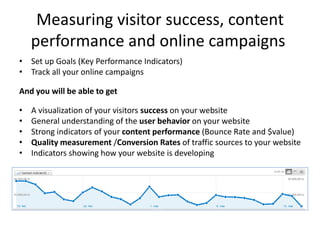
Measuring visitor success, content
    performance and online campaigns
• Set up Goals (Key Performance Indicators)
• Track all your online campaigns

And you will be able to get

•   A visualization of your visitors success on your website
•   General understanding of the user behavior on your website
•   Strong indicators of your content performance (Bounce Rate and $value)
•   Quality measurement /Conversion Rates of traffic sources to your website
•   Indicators showing how your website is developing
A Simplified Overview
Where Visitors are coming   What they do and if they are   Where they go next …
from                        successful (reach a goal)

Search Engines/Keywords
Online Campaigns
 - Newsletters
 - Banners
Facebook/Twitter
AdWords
                                                                Exits…
Partners
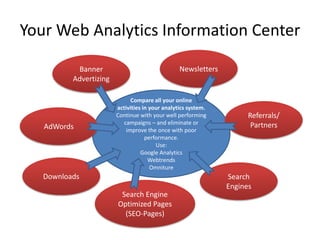
Your Web Analytics Information Center

           Banner                                Newsletters
          Advertizing

                              Compare all your online
                        activities in your analytics system.
                        Continue with your well performing           Referrals/
                           campaigns – and eliminate or               Partners
   AdWords                  improve the once with poor
                                    performance.
                                        Use:
                                  Google Analytics
                                     Webtrends
                                      Omniture
   Downloads                                                   Search
                                                               Engines
                         Search Engine
                        Optimized Pages
                          (SEO-Pages)
Getting Started With Web
           Analytics
You do not benefit from tracking before you
          have the correct setup

Smart decisions are only based on valid data

       A Practical Approach to Web Tracking
Getting Started – Step 1
• Ensuring correct data
  – Filtering your own traffic and tracking of all pages


• Setting Up KPIs (goals) ie. measurement of
  achieved successes on the website
  – Newsletters signups
  – Product sheets or white paper downloads
  – Product sales
  – RSS feeds subscriptions
Getting Started – Step 2
• Tracking internal search
  – A good source to the visitors mind. See what they
    expect to find on your website (or cannot find!)
• Proper integration with AdWords
  – Compare ad costs and revenue
• Tracking file downloads
  – Product sheets and white papers
• Tracking online campaigns - incl. Newsletters
  – Compare your campaigns. Continue with the good
    once and fix the poor once
Step 1 & 2 is never part of a basic
        implementation.
  That is what most companies have, and they
               usually don’t know.
Quick Wins for Your Website
Focus on the data you can act on – eg.
• Poor performing Landing pages
  – High Bounce Rates
• Poor performing campaigns
  – Banners, Adwords, E-mail marketing
• Poor performing keywords
• Goal optimization
  – Usability (eg. navigation, search, error-pages)
  – Call to Action
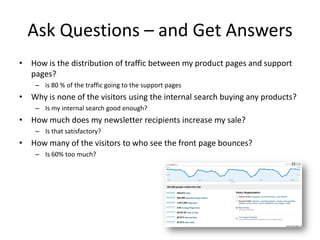
Ask Questions – and Get Answers
• How is the distribution of traffic between my product pages and support
  pages?
    – is 80 % of the traffic going to the support pages
• Why is none of the visitors using the internal search buying any products?
    – Is my internal search good enough?
• How much does my newsletter recipients increase my sale?
    – Is that satisfactory?
• How many of the visitors to who see the front page bounces?
    – Is 60% too much?
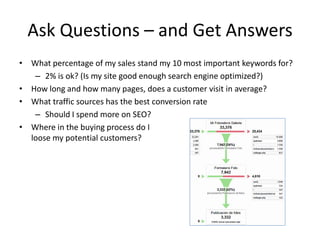
Ask Questions – and Get Answers
• What percentage of my sales stand my 10 most important keywords for?
   – 2% is ok? (Is my site good enough search engine optimized?)
• How long and how many pages, does a customer visit in average?
• What traffic sources has the best conversion rate
   – Should I spend more on SEO?
• Where in the buying process do I
  loose my potential customers?
Thank You
If you need help to
1. Get a valid tracking of your website
2. Track and compare your online campaigns
3. Get information on how successful you are with your
     website
4. Improve the user experience on your website

Contact:

Oeresund Business Club Web Analytics Presentation

  • 1.
    Website Tracking How tomeasure User behavior and Success on Websites By Chrilles Wybrandt Owner of www.misura.dk
  • 2.
    About Chrilles Wybrandt Specializedin web analytics and certified in Google Analytics and SiteCatalyst from Omniture (Adobe) • Webmaster and IT project manager at Copenhagen Business School • Instructor in data analysis at ACNielsen AIM • 2 years in Themilk and Guava (Online Communication Agencies) • 1 ½ years as independent with Misura.dk Clients: • L'EASY, Stibo, Roskilde Festival, OK, DTU • Sub contractor with other online agencies
  • 3.
    Agenda To draw apicture of the purpose, opportunities and challenges when tracking websites • Examples of tracking systems - and their popularity • Why Tracking is Important • Measuring visitor success, content performance and online campaigns • Getting started with web analytics • Quick Wins on your website
  • 4.
    What do youalready know…? • What is your knowledge of web analytics and website tracking today? • How many of you have worked with Google Analytics, SiteCatalyst, Webstends?
  • 5.
  • 6.
    Search Interest forTracking Systems Source: Google Trends Commercial tools Omniture has an increasing share of search compared to Webtrends. The true popularity of web analytics tools and website optimization based on quantitative data is clearly reflected in the popularity of Google Analytics. The free tool from Google
  • 7.
    Why Tracking isImportant?
  • 8.
    When The Trackingis Missing I am the BOSS = Websites with no tracking What does this man know about his customers and their behavior in the store? 90% of all websites in general - No tracking 10 % is - Incorrect tracking OK - Data not applicable Source: Personal experience
  • 9.
    Measuring visitor success,content performance and online campaigns • Set up Goals (Key Performance Indicators) • Track all your online campaigns And you will be able to get • A visualization of your visitors success on your website • General understanding of the user behavior on your website • Strong indicators of your content performance (Bounce Rate and $value) • Quality measurement /Conversion Rates of traffic sources to your website • Indicators showing how your website is developing
  • 10.
    A Simplified Overview WhereVisitors are coming What they do and if they are Where they go next … from successful (reach a goal) Search Engines/Keywords Online Campaigns - Newsletters - Banners Facebook/Twitter AdWords Exits… Partners
  • 11.
    Your Web AnalyticsInformation Center Banner Newsletters Advertizing Compare all your online activities in your analytics system. Continue with your well performing Referrals/ campaigns – and eliminate or Partners AdWords improve the once with poor performance. Use: Google Analytics Webtrends Omniture Downloads Search Engines Search Engine Optimized Pages (SEO-Pages)
  • 12.
    Getting Started WithWeb Analytics You do not benefit from tracking before you have the correct setup Smart decisions are only based on valid data A Practical Approach to Web Tracking
  • 13.
    Getting Started –Step 1 • Ensuring correct data – Filtering your own traffic and tracking of all pages • Setting Up KPIs (goals) ie. measurement of achieved successes on the website – Newsletters signups – Product sheets or white paper downloads – Product sales – RSS feeds subscriptions
  • 14.
    Getting Started –Step 2 • Tracking internal search – A good source to the visitors mind. See what they expect to find on your website (or cannot find!) • Proper integration with AdWords – Compare ad costs and revenue • Tracking file downloads – Product sheets and white papers • Tracking online campaigns - incl. Newsletters – Compare your campaigns. Continue with the good once and fix the poor once
  • 15.
    Step 1 &2 is never part of a basic implementation. That is what most companies have, and they usually don’t know.
  • 16.
    Quick Wins forYour Website Focus on the data you can act on – eg. • Poor performing Landing pages – High Bounce Rates • Poor performing campaigns – Banners, Adwords, E-mail marketing • Poor performing keywords • Goal optimization – Usability (eg. navigation, search, error-pages) – Call to Action
  • 18.
    Ask Questions –and Get Answers • How is the distribution of traffic between my product pages and support pages? – is 80 % of the traffic going to the support pages • Why is none of the visitors using the internal search buying any products? – Is my internal search good enough? • How much does my newsletter recipients increase my sale? – Is that satisfactory? • How many of the visitors to who see the front page bounces? – Is 60% too much?
  • 19.
    Ask Questions –and Get Answers • What percentage of my sales stand my 10 most important keywords for? – 2% is ok? (Is my site good enough search engine optimized?) • How long and how many pages, does a customer visit in average? • What traffic sources has the best conversion rate – Should I spend more on SEO? • Where in the buying process do I loose my potential customers?
  • 20.
    Thank You If youneed help to 1. Get a valid tracking of your website 2. Track and compare your online campaigns 3. Get information on how successful you are with your website 4. Improve the user experience on your website Contact: