DELL OpenManage Essentials (OME) Network
Connections for creating firewall rules
Version 0.4
Prepared by:
David Pasek, david_pasek@dell.com, Twitter: @david_pasek
Datacenter Infrastructure Architect, DELL Global Infrastructure Consulting Services
August 12, 2014
COMPONENTS
COMPONENT DESCRIPTION
OME Open Manage Essentials Management Station
DRM Dell Repository Manager
AMS Administrator Management Station (Administrator workstation)
FTP.DELL.COM DELL FTP Server
API.DELL.COM DELL API Web Services
CMC DELL Blade Chassis Management Controller
DRAC/LCC DELL Remote Access Card / Lifecycle Controller
OMSA DELL Open Manage Server Administrator (agent on Windows, Linux, ESXi)
SERVICES TCP/UDP PORTS
FTP tcp/21
HTTP tcp/80
HTTPS_REST_SSL tcp/443
SSH tcp/22
OME_WEB_GUI_HTTP tcp/1278
OME_PACKAGE_SRV_HTTP tcp/1278
OME_WEB_GUI_HTTPS tcp/2607
HTTPS_WSMAN tcp/443
SNMP udp/161
SNMP_TRAPS udp/162
RDP tcp/3389
HTTPS_OMSA tcp/1311
RPC_CIM tcp/135
SMTP tcp/25
DNS tcp/53, udp/53
SYSLOG udp/514
IPMI udp/623
VIRT_CONSOLE udp/5900-5901
VIRT_MEDIA udp/3668
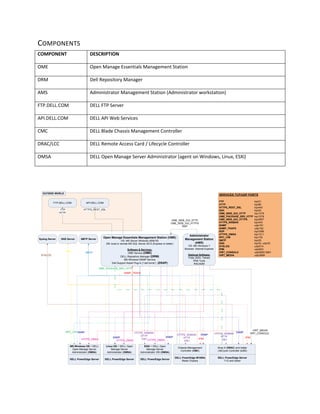
FTP.DELL.COM API.DELL.COM
Open Manage Essentials Management Station (OME)
OS: MS Server Windows 2008 R2
DB: local or remote MS SQL Server 2012 (Express or better)
Software & Services:
OME Service (OME)
DELL Repository Manager (DRM)
MS Windows SNMP Service
Dell Support Assist Plug-In (“call home”) (DSAP)
FTP
HTTP
HTTPS_REST_SSL
DELL PowerEdge M1000e
Blade Chassis
Chassis Management
Controller (CMC)
Administrator
Management Station
(AMS)
OS: MS Windows 7
Browser: Internet Explorer
Optional Software:
Putty (SSH, Telnet)
IPMI Tools
RACADM
DELL PowerEdge Server
MS Windows OS + DELL
Open Manage Server
Administrator (OMSA)
DELL PowerEdge Server
Linux OS + DELL Open
Manage Server
Administrator (OMSA)
OME_WEB_GUI_HTTP
OME_WEB_GUI_HTTPS
RDP
HTTPS_WSMAN
HTTP
SSH
SNMP_TRAPS
HTTPS_WSMAN
HTTP
SSH
DELL PowerEdge Server
ESXi + DELL Open
Manage Server
Administrator VIB (OMSA)
HTTPS_WSMAN
HTTP
SSH
RPC_CIM
SMTP ServerDNS ServerSyslog Server
SMTP
DNS
SYSLOG
OUTSIDE WORLD
HTTPS_OMSA HTTPS_OMSA HTTPS_OMSA
SNMP
SNMP
SNMP
IPMI IPMI
SNMP
SNMP
DELL PowerEdge Server
11G and better
iDrac 6 (DRAC) and better
LifeCycle Controller (LCC)
VIRT_MEDIA
VIRT_CONSOLE
OME_PACKAGE_SRV_HTTP
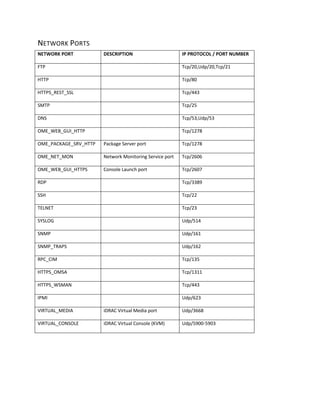
NETWORK PORTS
NETWORK PORT DESCRIPTION IP PROTOCOL / PORT NUMBER
FTP Tcp/20,Udp/20,Tcp/21
HTTP Tcp/80
HTTPS_REST_SSL Tcp/443
SMTP Tcp/25
DNS Tcp/53,Udp/53
OME_WEB_GUI_HTTP Tcp/1278
OME_PACKAGE_SRV_HTTP Package Server port Tcp/1278
OME_NET_MON Network Monitoring Service port Tcp/2606
OME_WEB_GUI_HTTPS Console Launch port Tcp/2607
RDP Tcp/3389
SSH Tcp/22
TELNET Tcp/23
SYSLOG Udp/514
SNMP Udp/161
SNMP_TRAPS Udp/162
RPC_CIM Tcp/135
HTTPS_OMSA Tcp/1311
HTTPS_WSMAN Tcp/443
IPMI Udp/623
VIRTUAL_MEDIA iDRAC Virtual Media port Udp/3668
VIRTUAL_CONSOLE iDRAC Virtual Console (KVM) Udp/5900-5903
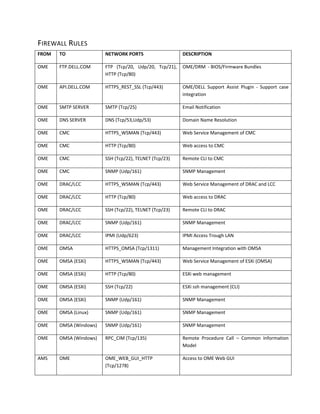
FIREWALL RULES
FROM TO NETWORK PORTS DESCRIPTION
OME FTP.DELL.COM FTP (Tcp/20, Udp/20, Tcp/21),
HTTP (Tcp/80)
OME/DRM - BIOS/Firmware Bundles
OME API.DELL.COM HTTPS_REST_SSL (Tcp/443) OME/DELL Support Assist Plugin - Support case
integration
OME SMTP SERVER SMTP (Tcp/25) Email Notification
OME DNS SERVER DNS (Tcp/53,Udp/53) Domain Name Resolution
OME CMC HTTPS_WSMAN (Tcp/443) Web Service Management of CMC
OME CMC HTTP (Tcp/80) Web access to CMC
OME CMC SSH (Tcp/22), TELNET (Tcp/23) Remote CLI to CMC
OME CMC SNMP (Udp/161) SNMP Management
OME DRAC/LCC HTTPS_WSMAN (Tcp/443) Web Service Management of DRAC and LCC
OME DRAC/LCC HTTP (Tcp/80) Web access to DRAC
OME DRAC/LCC SSH (Tcp/22), TELNET (Tcp/23) Remote CLI to DRAC
OME DRAC/LCC SNMP (Udp/161) SNMP Management
OME DRAC/LCC IPMI (Udp/623) IPMI Access Trough LAN
OME OMSA HTTPS_OMSA (Tcp/1311) Management Integration with OMSA
OME OMSA (ESXi) HTTPS_WSMAN (Tcp/443) Web Service Management of ESXi (OMSA)
OME OMSA (ESXi) HTTP (Tcp/80) ESXi web management
OME OMSA (ESXi) SSH (Tcp/22) ESXi ssh management (CLI)
OME OMSA (ESXi) SNMP (Udp/161) SNMP Management
OME OMSA (Linux) SNMP (Udp/161) SNMP Management
OME OMSA (Windows) SNMP (Udp/161) SNMP Management
OME OMSA (Windows) RPC_CIM (Tcp/135) Remote Procedure Call – Common Information
Model
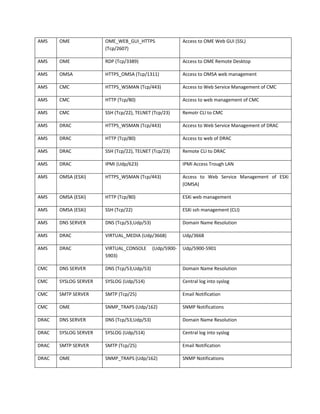
AMS OME OME_WEB_GUI_HTTP
(Tcp/1278)
Access to OME Web GUI
AMS OME OME_WEB_GUI_HTTPS
(Tcp/2607)
Access to OME Web GUI (SSL)
AMS OME RDP (Tcp/3389) Access to OME Remote Desktop
AMS OMSA HTTPS_OMSA (Tcp/1311) Access to OMSA web management
AMS CMC HTTPS_WSMAN (Tcp/443) Access to Web Service Management of CMC
AMS CMC HTTP (Tcp/80) Access to web management of CMC
AMS CMC SSH (Tcp/22), TELNET (Tcp/23) Remotr CLI to CMC
AMS DRAC HTTPS_WSMAN (Tcp/443) Access to Web Service Management of DRAC
AMS DRAC HTTP (Tcp/80) Access to web of DRAC
AMS DRAC SSH (Tcp/22), TELNET (Tcp/23) Remote CLI to DRAC
AMS DRAC IPMI (Udp/623) IPMI Access Trough LAN
AMS OMSA (ESXi) HTTPS_WSMAN (Tcp/443) Access to Web Service Management of ESXi
(OMSA)
AMS OMSA (ESXi) HTTP (Tcp/80) ESXi web management
AMS OMSA (ESXi) SSH (Tcp/22) ESXi ssh management (CLI)
AMS DNS SERVER DNS (Tcp/53,Udp/53) Domain Name Resolution
AMS DRAC VIRTUAL_MEDIA (Udp/3668) Udp/3668
AMS DRAC VIRTUAL_CONSOLE (Udp/5900-
5903)
Udp/5900-5901
CMC DNS SERVER DNS (Tcp/53,Udp/53) Domain Name Resolution
CMC SYSLOG SERVER SYSLOG (Udp/514) Central log into syslog
CMC SMTP SERVER SMTP (Tcp/25) Email Notification
CMC OME SNMP_TRAPS (Udp/162) SNMP Notifications
DRAC DNS SERVER DNS (Tcp/53,Udp/53) Domain Name Resolution
DRAC SYSLOG SERVER SYSLOG (Udp/514) Central log into syslog
DRAC SMTP SERVER SMTP (Tcp/25) Email Notification
DRAC OME SNMP_TRAPS (Udp/162) SNMP Notifications
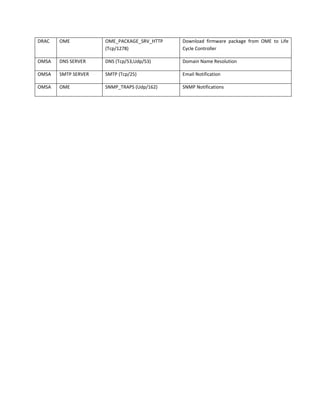
DRAC OME OME_PACKAGE_SRV_HTTP
(Tcp/1278)
Download firmware package from OME to Life
Cycle Controller
OMSA DNS SERVER DNS (Tcp/53,Udp/53) Domain Name Resolution
OMSA SMTP SERVER SMTP (Tcp/25) Email Notification
OMSA OME SNMP_TRAPS (Udp/162) SNMP Notifications
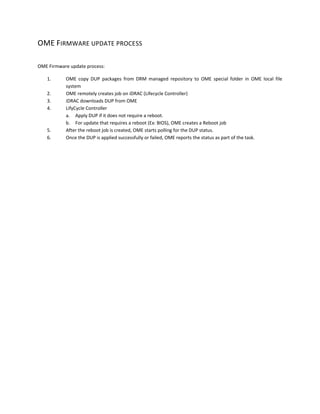
OME FIRMWARE UPDATE PROCESS
OME Firmware update process:
1. OME copy DUP packages from DRM managed repository to OME special folder in OME local file
system
2. OME remotely creates job on iDRAC (Lifecycle Controller)
3. iDRAC downloads DUP from OME
4. LifyCycle Controller
a. Apply DUP if it does not require a reboot.
b. For update that requires a reboot (Ex: BIOS), OME creates a Reboot job
5. After the reboot job is created, OME starts polling for the DUP status.
6. Once the DUP is applied successfully or failed, OME reports the status as part of the task.

DELL (OME) Open Manage Esentials network connections (TCP/UDP ports) and firewall rules v0.4

  • 1.
    DELL OpenManage Essentials(OME) Network Connections for creating firewall rules Version 0.4 Prepared by: David Pasek, david_pasek@dell.com, Twitter: @david_pasek Datacenter Infrastructure Architect, DELL Global Infrastructure Consulting Services August 12, 2014
  • 2.
    COMPONENTS COMPONENT DESCRIPTION OME OpenManage Essentials Management Station DRM Dell Repository Manager AMS Administrator Management Station (Administrator workstation) FTP.DELL.COM DELL FTP Server API.DELL.COM DELL API Web Services CMC DELL Blade Chassis Management Controller DRAC/LCC DELL Remote Access Card / Lifecycle Controller OMSA DELL Open Manage Server Administrator (agent on Windows, Linux, ESXi) SERVICES TCP/UDP PORTS FTP tcp/21 HTTP tcp/80 HTTPS_REST_SSL tcp/443 SSH tcp/22 OME_WEB_GUI_HTTP tcp/1278 OME_PACKAGE_SRV_HTTP tcp/1278 OME_WEB_GUI_HTTPS tcp/2607 HTTPS_WSMAN tcp/443 SNMP udp/161 SNMP_TRAPS udp/162 RDP tcp/3389 HTTPS_OMSA tcp/1311 RPC_CIM tcp/135 SMTP tcp/25 DNS tcp/53, udp/53 SYSLOG udp/514 IPMI udp/623 VIRT_CONSOLE udp/5900-5901 VIRT_MEDIA udp/3668 FTP.DELL.COM API.DELL.COM Open Manage Essentials Management Station (OME) OS: MS Server Windows 2008 R2 DB: local or remote MS SQL Server 2012 (Express or better) Software & Services: OME Service (OME) DELL Repository Manager (DRM) MS Windows SNMP Service Dell Support Assist Plug-In (“call home”) (DSAP) FTP HTTP HTTPS_REST_SSL DELL PowerEdge M1000e Blade Chassis Chassis Management Controller (CMC) Administrator Management Station (AMS) OS: MS Windows 7 Browser: Internet Explorer Optional Software: Putty (SSH, Telnet) IPMI Tools RACADM DELL PowerEdge Server MS Windows OS + DELL Open Manage Server Administrator (OMSA) DELL PowerEdge Server Linux OS + DELL Open Manage Server Administrator (OMSA) OME_WEB_GUI_HTTP OME_WEB_GUI_HTTPS RDP HTTPS_WSMAN HTTP SSH SNMP_TRAPS HTTPS_WSMAN HTTP SSH DELL PowerEdge Server ESXi + DELL Open Manage Server Administrator VIB (OMSA) HTTPS_WSMAN HTTP SSH RPC_CIM SMTP ServerDNS ServerSyslog Server SMTP DNS SYSLOG OUTSIDE WORLD HTTPS_OMSA HTTPS_OMSA HTTPS_OMSA SNMP SNMP SNMP IPMI IPMI SNMP SNMP DELL PowerEdge Server 11G and better iDrac 6 (DRAC) and better LifeCycle Controller (LCC) VIRT_MEDIA VIRT_CONSOLE OME_PACKAGE_SRV_HTTP
  • 3.
    NETWORK PORTS NETWORK PORTDESCRIPTION IP PROTOCOL / PORT NUMBER FTP Tcp/20,Udp/20,Tcp/21 HTTP Tcp/80 HTTPS_REST_SSL Tcp/443 SMTP Tcp/25 DNS Tcp/53,Udp/53 OME_WEB_GUI_HTTP Tcp/1278 OME_PACKAGE_SRV_HTTP Package Server port Tcp/1278 OME_NET_MON Network Monitoring Service port Tcp/2606 OME_WEB_GUI_HTTPS Console Launch port Tcp/2607 RDP Tcp/3389 SSH Tcp/22 TELNET Tcp/23 SYSLOG Udp/514 SNMP Udp/161 SNMP_TRAPS Udp/162 RPC_CIM Tcp/135 HTTPS_OMSA Tcp/1311 HTTPS_WSMAN Tcp/443 IPMI Udp/623 VIRTUAL_MEDIA iDRAC Virtual Media port Udp/3668 VIRTUAL_CONSOLE iDRAC Virtual Console (KVM) Udp/5900-5903
  • 4.
    FIREWALL RULES FROM TONETWORK PORTS DESCRIPTION OME FTP.DELL.COM FTP (Tcp/20, Udp/20, Tcp/21), HTTP (Tcp/80) OME/DRM - BIOS/Firmware Bundles OME API.DELL.COM HTTPS_REST_SSL (Tcp/443) OME/DELL Support Assist Plugin - Support case integration OME SMTP SERVER SMTP (Tcp/25) Email Notification OME DNS SERVER DNS (Tcp/53,Udp/53) Domain Name Resolution OME CMC HTTPS_WSMAN (Tcp/443) Web Service Management of CMC OME CMC HTTP (Tcp/80) Web access to CMC OME CMC SSH (Tcp/22), TELNET (Tcp/23) Remote CLI to CMC OME CMC SNMP (Udp/161) SNMP Management OME DRAC/LCC HTTPS_WSMAN (Tcp/443) Web Service Management of DRAC and LCC OME DRAC/LCC HTTP (Tcp/80) Web access to DRAC OME DRAC/LCC SSH (Tcp/22), TELNET (Tcp/23) Remote CLI to DRAC OME DRAC/LCC SNMP (Udp/161) SNMP Management OME DRAC/LCC IPMI (Udp/623) IPMI Access Trough LAN OME OMSA HTTPS_OMSA (Tcp/1311) Management Integration with OMSA OME OMSA (ESXi) HTTPS_WSMAN (Tcp/443) Web Service Management of ESXi (OMSA) OME OMSA (ESXi) HTTP (Tcp/80) ESXi web management OME OMSA (ESXi) SSH (Tcp/22) ESXi ssh management (CLI) OME OMSA (ESXi) SNMP (Udp/161) SNMP Management OME OMSA (Linux) SNMP (Udp/161) SNMP Management OME OMSA (Windows) SNMP (Udp/161) SNMP Management OME OMSA (Windows) RPC_CIM (Tcp/135) Remote Procedure Call – Common Information Model AMS OME OME_WEB_GUI_HTTP (Tcp/1278) Access to OME Web GUI
  • 5.
    AMS OME OME_WEB_GUI_HTTPS (Tcp/2607) Accessto OME Web GUI (SSL) AMS OME RDP (Tcp/3389) Access to OME Remote Desktop AMS OMSA HTTPS_OMSA (Tcp/1311) Access to OMSA web management AMS CMC HTTPS_WSMAN (Tcp/443) Access to Web Service Management of CMC AMS CMC HTTP (Tcp/80) Access to web management of CMC AMS CMC SSH (Tcp/22), TELNET (Tcp/23) Remotr CLI to CMC AMS DRAC HTTPS_WSMAN (Tcp/443) Access to Web Service Management of DRAC AMS DRAC HTTP (Tcp/80) Access to web of DRAC AMS DRAC SSH (Tcp/22), TELNET (Tcp/23) Remote CLI to DRAC AMS DRAC IPMI (Udp/623) IPMI Access Trough LAN AMS OMSA (ESXi) HTTPS_WSMAN (Tcp/443) Access to Web Service Management of ESXi (OMSA) AMS OMSA (ESXi) HTTP (Tcp/80) ESXi web management AMS OMSA (ESXi) SSH (Tcp/22) ESXi ssh management (CLI) AMS DNS SERVER DNS (Tcp/53,Udp/53) Domain Name Resolution AMS DRAC VIRTUAL_MEDIA (Udp/3668) Udp/3668 AMS DRAC VIRTUAL_CONSOLE (Udp/5900- 5903) Udp/5900-5901 CMC DNS SERVER DNS (Tcp/53,Udp/53) Domain Name Resolution CMC SYSLOG SERVER SYSLOG (Udp/514) Central log into syslog CMC SMTP SERVER SMTP (Tcp/25) Email Notification CMC OME SNMP_TRAPS (Udp/162) SNMP Notifications DRAC DNS SERVER DNS (Tcp/53,Udp/53) Domain Name Resolution DRAC SYSLOG SERVER SYSLOG (Udp/514) Central log into syslog DRAC SMTP SERVER SMTP (Tcp/25) Email Notification DRAC OME SNMP_TRAPS (Udp/162) SNMP Notifications
  • 6.
    DRAC OME OME_PACKAGE_SRV_HTTP (Tcp/1278) Downloadfirmware package from OME to Life Cycle Controller OMSA DNS SERVER DNS (Tcp/53,Udp/53) Domain Name Resolution OMSA SMTP SERVER SMTP (Tcp/25) Email Notification OMSA OME SNMP_TRAPS (Udp/162) SNMP Notifications
  • 7.
    OME FIRMWARE UPDATEPROCESS OME Firmware update process: 1. OME copy DUP packages from DRM managed repository to OME special folder in OME local file system 2. OME remotely creates job on iDRAC (Lifecycle Controller) 3. iDRAC downloads DUP from OME 4. LifyCycle Controller a. Apply DUP if it does not require a reboot. b. For update that requires a reboot (Ex: BIOS), OME creates a Reboot job 5. After the reboot job is created, OME starts polling for the DUP status. 6. Once the DUP is applied successfully or failed, OME reports the status as part of the task.