odt2braille: Generating Braille from OpenOffice.org Christophe Strobbe K.U.Leuven, Belgium [email_address]
Overview Motivation & Problem Area
Objectives
Methodology
Results
Conclusion & Outlook
(Time for demo?)
Motivation & Problem Area (1) Braille  faces competition from TTS and digital talking books
important for functional literacy
only reading method for deafblind persons
Motivation & Problem Area (2) Braille production: current methods: RoboBraille: e-mail based Braille translation agent
AutoBraille & NorBraille: multi-volume Braille books based on DAISY

ODT to Braille (AEGIS project)

  • 1.
    odt2braille: Generating Braillefrom OpenOffice.org Christophe Strobbe K.U.Leuven, Belgium [email_address]
  • 2.
  • 3.
  • 4.
  • 5.
  • 6.
  • 7.
  • 8.
    Motivation & ProblemArea (1) Braille faces competition from TTS and digital talking books
  • 9.
  • 10.
    only reading methodfor deafblind persons
  • 11.
    Motivation & ProblemArea (2) Braille production: current methods: RoboBraille: e-mail based Braille translation agent
  • 12.
    AutoBraille & NorBraille:multi-volume Braille books based on DAISY
  • 13.
    Dots: open-source Brailletranscriber for GNOME (relies on liblouisxml)
  • 14.
    Tiger Software Suite(TSS), Braille Maker, WinBraille: embossing from MS Word and other Microsoft applications
  • 15.
    Objectives Enable end-usersto produce Braille In a free, open-source and cross-platform office suite => OpenOffice.org as Braille authoring environment
  • 16.
    Reduce or eliminatethe need for editing Braille codes after export
  • 17.
    Emboss directly orjust export
  • 18.
  • 19.
    Reuse existing tools:liblouisxml: open-source library for Braille transcription of XML docs
  • 20.
  • 21.
    pef2text (DAISY Pipeline):converts Portable Embosser Format to generic or embosser-specific format
  • 22.
  • 23.
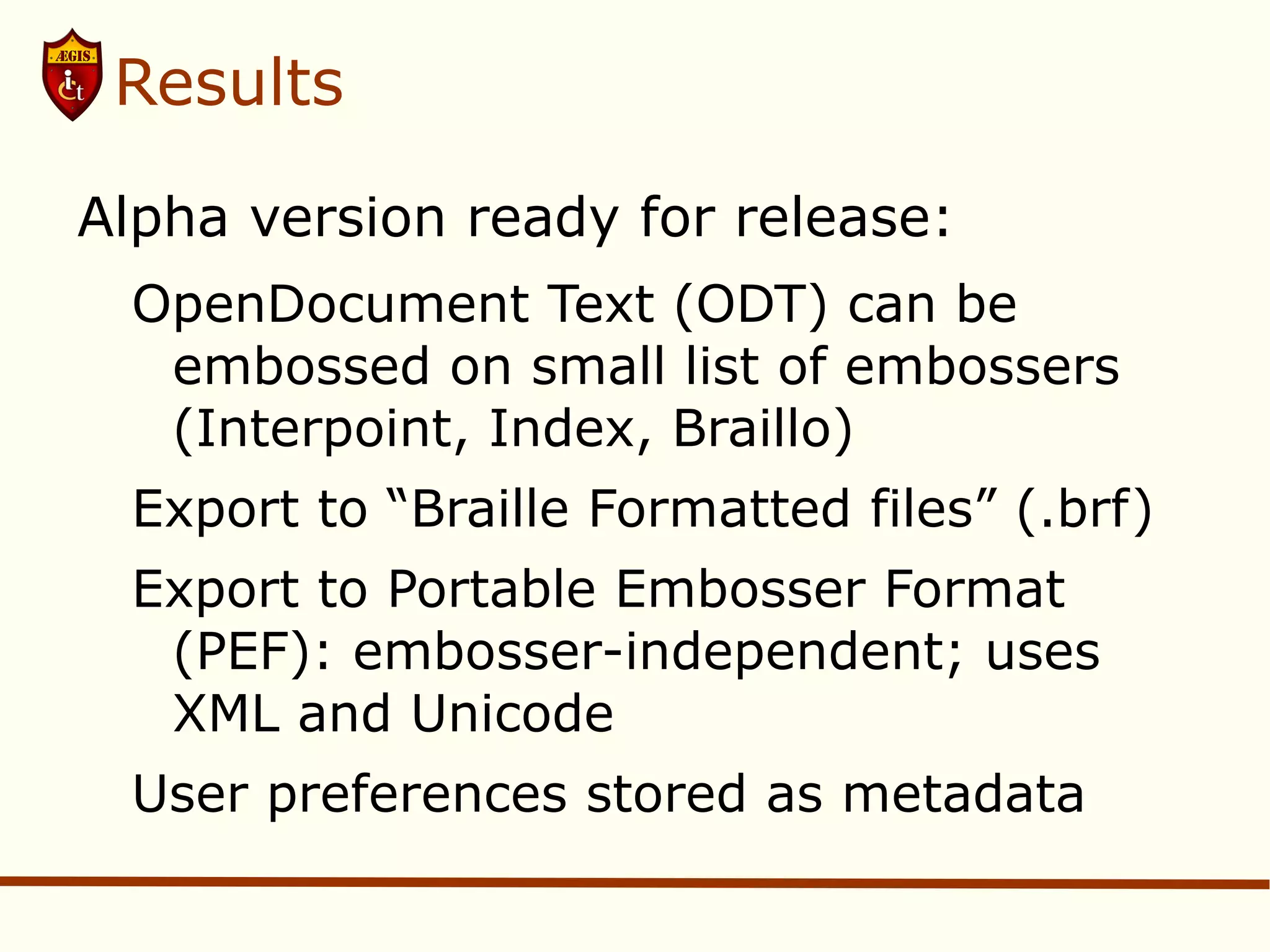
    odt2braille ComponentsArchitecture of odt2braille OpenOffice.org with odt2braille extension: uses UNO API and configuration information; configuration information is passed on to the XML transformation (which uses DOM and XSLT); output of XML transformation is fed to Braille transcription (which uses liblouisxml and liblouis); output of Braille transcription is fed to export or emboss process.
  • 24.
    Results Alpha versionready for release: OpenDocument Text (ODT) can be embossed on small list of embossers (Interpoint, Index, Braillo)
  • 25.
    Export to “BrailleFormatted files” (.brf)
  • 26.
    Export to PortableEmbosser Format (PEF): embosser-independent; uses XML and Unicode
  • 27.
  • 28.
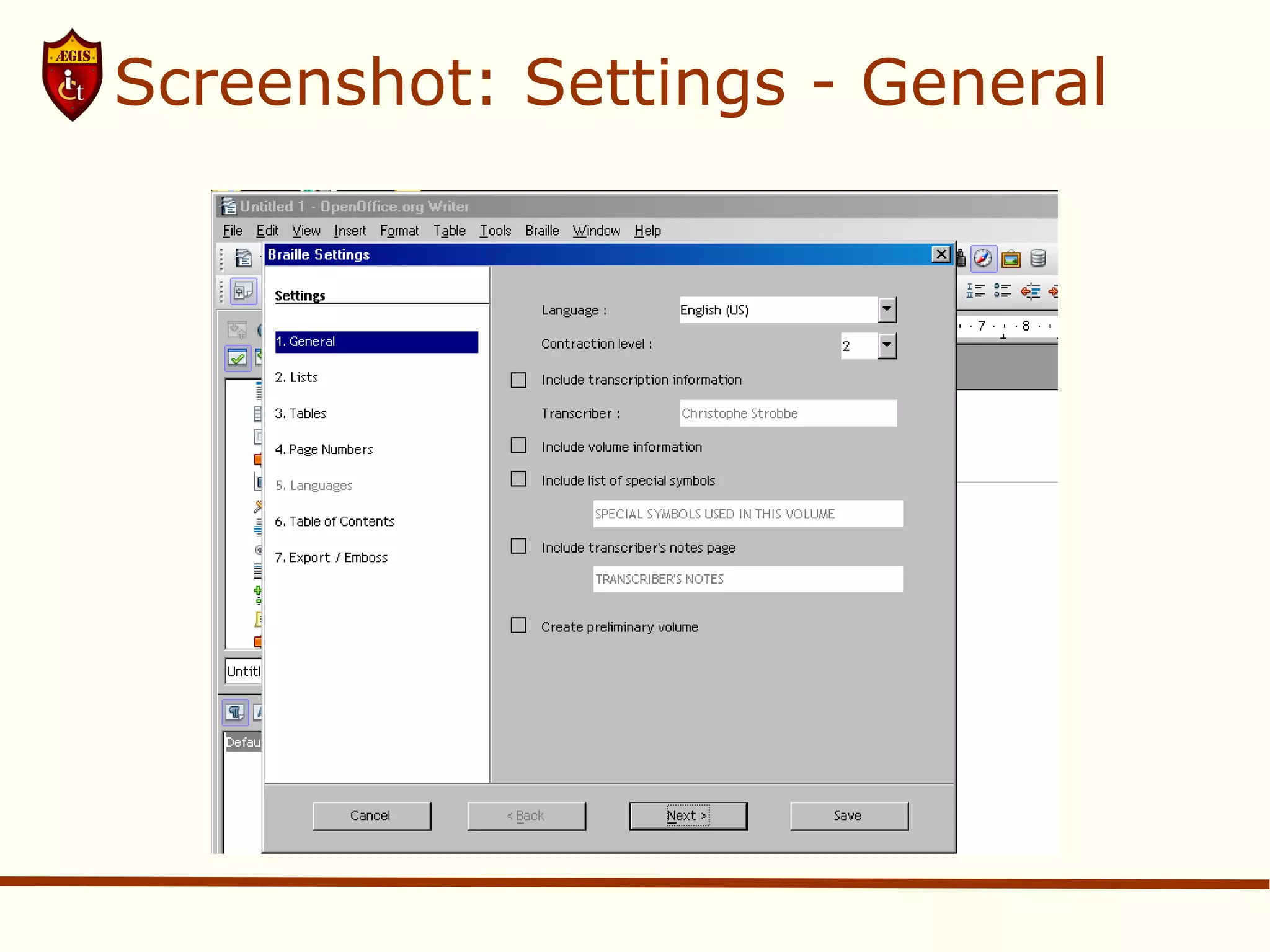
    Screenshot: Settings -General Screenshot of Settings dialogue Settings dialogue window with a list of steps on the left side and a form on the right side. The list of steps is: 1. General, 2. Lists, 3. Tables, 4. Page Numbers, 5. Languages, 6. Table of Contents, 7. Export/Emboss. The form on the left contains form fields for Language (currently showing English - US), Contraction level (currently level 2), Include transcription information (checkbox), Transcriber (name to be filled in), Include volume information (checkbox), Include list of special symbols (text field), Include transcriber'ts notes page (text field), Create preliminary volume. The bottom of the dialogue displays the buttons Cancel, Back, Next and Save.
  • 29.
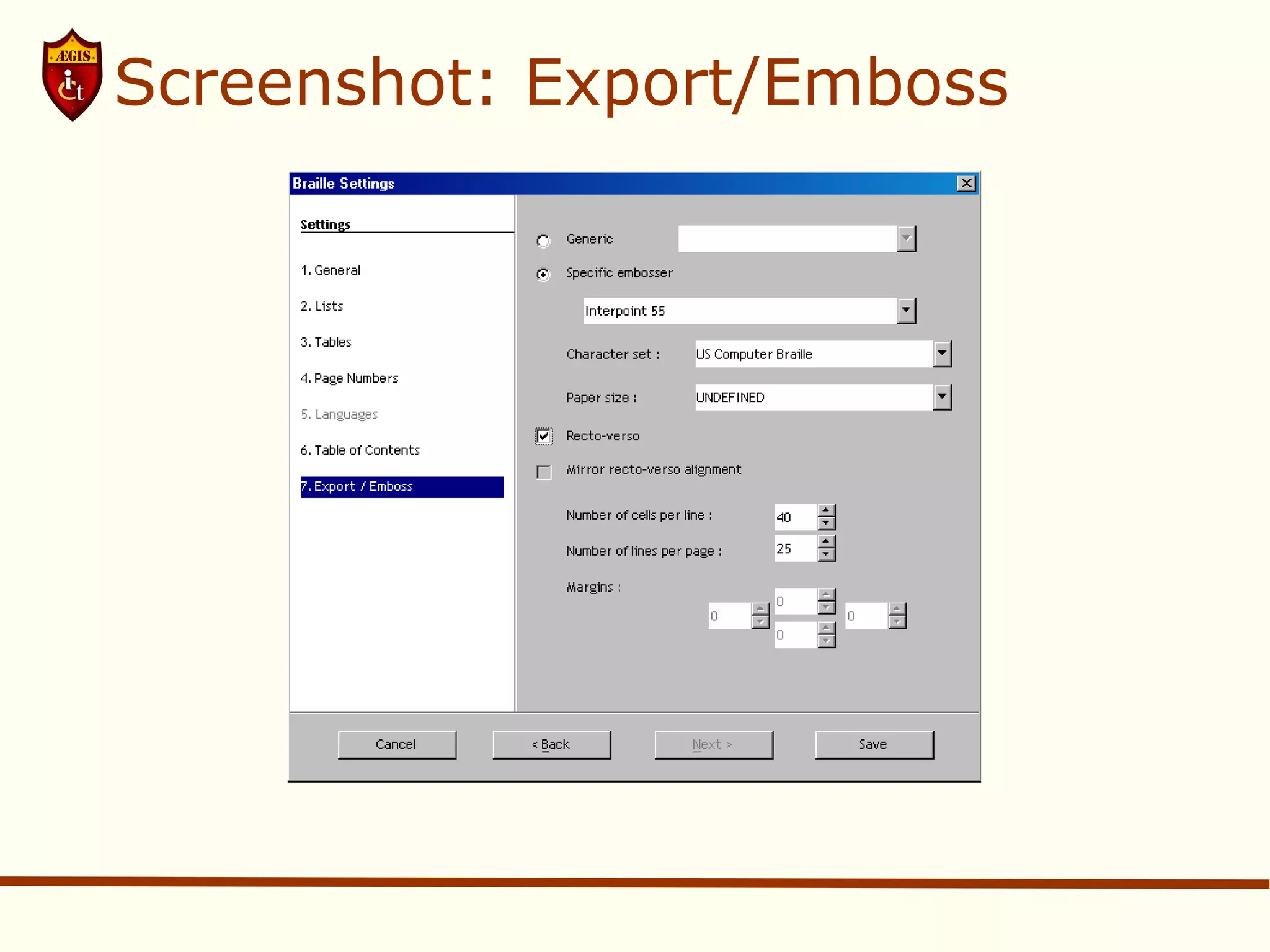
    Screenshot: Export/Emboss BrailleSettings dialogue: step 7: Export/Emboss Settings dialogue window with a list of steps on the left side and a form on the right side. The list of steps is: 1. General, 2. Lists, 3. Tables, 4. Page Numbers, 5. Languages, 6. Table of Contents, 7. Export/Emboss. The form on the left contains form fields for Generic (unchecked radio button), Specific embosser (checked radio button), a drop-down list with embossers with 'Interpoint 55' as the visible option, Character set (drop-down list with 'US Computer Braille' as the visible option), Paper size (drop-down list with UNDEFINED as the visible option), Recto-verso (checkbox checked), Mirror recto-verso alignment (checkbox unchecked), Number of cells per line (currently set to 40), Number of lines per page (currently set to 25), Margins (for fields, all set to ). The bottom of the dialogue displays the buttons Cancel, Back, Next and Save.
  • 30.
    Conclusion and OutlookIdeally not just Writer but also Calc (spreadsheets) and Impress (presentations)
  • 31.
    Support for largerset of embossers
  • 32.
  • 33.
    Possibly support forother formats such as Universal Tactile Document (UTD)
  • 34.
    Accessibility check tobe run before (Braille/DAISY/PDF) export?
  • 35.
    Contact Information odt2braille(LGPL 3): http://odt2braille.sf.net/ use it & contribute! http://www.AEGIS-project.eu/
  • 36.
  • 37.