Searching Techniques:
Binary Search
SCJ2013 Data Structure & Algorithms
Nor Bahiah Hj Ahmad & Dayang
Norhayati A. Jawawi
Objectives
At the end of the class, students are expected to be able
to do the following:
• Understand the searching technique concept and the
purpose of searching operation.
• Understand the implementation of basic searching
algorithm;
1. Sequential search.
• Sequential search on unsorted data.
• Sequential search on sorted data.
2. Binary Search.
• Able to analyze the efficiency of the searching
technique.
• Able to implement searching technique in problem
solving.
3.0 Binary Search
Binary Search
• The drawback of sequential search
algorithm is having to traverse the entire
list, O(n)
• Sorting the list does minimize the cost of
traversing the whole data set, but we
can improve the searching efficiency by
using the Binary Search algorithm
4
Binary Search
• Consider a list in ascending sorted order.
For a sequential search, searching is from
the beginning until an item is found or
the end is reached.
• Binary search improve the algorithm by
removing as much of the data set as
possible so that the item is found more
quickly.
• Search process is started at the middle
of the list, then the algorithm determine
which half the item is in (because the list
is sorted).
– It divides the working range in half with a
single test. By repeating the procedure, the
result is an efficient search algorithm-O(log2
n). 5
• starts by comparing the search key
with the element at the middle
– If the value matches, it will be return to the
calling function (index = MIDDLE)
– If the search key < the middle element,
search will be focused on the elements
between the first element to the element
before the middle element (MIDDLE -1)
– If the search key is not found, the element
at the middle of the first element and the
MIDDLE –1 element will be compared
with the search key.
– If the search key > the middle element,
search will only be focused on the
elements between the second MIDDLE
element to the first MIDDLE element.
– Search is repeated until the searched key is
found or the last element in the subset is
traversed (LEFT>RIGHT ).
6
Binary Search
array
5522 443311
[0] [1] [2] [3] [4] [5] [6]
7766
5522 443311
[0] [1] [2] [3] [4] [5] [6]
7766
MIDDLE
[0] [1] [2]
22 3311
MIDDLE
[2]
33
MIDDLE
LEFT>RIGHT
35search_key
Binary Search Function
7
int binary_search( int search_key, int array_size,
const int array [] )
{ bool found = false;
int index = -1 //-1 means record not found
int MIDDLE,
LEFT = 0,
RIGHT = array_size-1;
while (( LEFT<= RIGHT ) && (!found))
{ MIDDLE = (LEFT + RIGHT )/ 2; // Get middle index
if ( array[MIDDLE] == search_key)
{ index = MIDDLE;
found = true;
}
else if (array[MIDDLE] > search_key)
RIGHT= MIDDLE– 1; // search is focused
// on the left side of list
else
LEFT= MIDDLE+ 1 // search is focused
// on the right side of the list
} //end while
return index;
}//end function
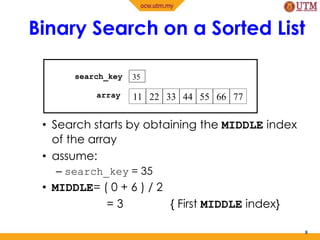
Binary Search on a Sorted List
• Search starts by obtaining the MIDDLE index
of the array
• assume:
– search_key = 35
• MIDDLE= ( 0 + 6 ) / 2
= 3 { First MIDDLE index}
8
35
11 22 33 44 55 66 77
search_key
array
• search_key 35 is compared with the element at the
fourth index in the array, which is array[3] with the value
44.
– search_key < MIDDLE value, therefore search will be
focused on the elements between the first index and
the third index only (index 1 to MIDDLE-1)
• Process to obtain MIDDLE index is repeated
MIDDLE = ( 0 + 2 ) / 2
= 1 { second MIDDLE index}
Search_key 35 is compared with the element at the second
index, which is array[1] with the value 22
– search_key > MIDDLE value, therefore search will be
focused only on the elements between the second
MIDDLE index to the first MIDDLE index.
MIDDLE = (2 + 2 ) / 2
= 2 { third MIDDLE index}
9
Binary Search on Sorted List
• Element at the third index, array[2] with the
value 33 is not equal to the value of the search
key.
• Search process has reached the last element of
the traversed subset, therefore search is
terminated and assumed fail.
• To search from the list sorted descending,
change operator “ > ” to operator “ < “ to the
following statement :
else if (array [ MIDDLE ] >
search_key)
RIGHT = MIDDLE – 1;
10
Binary Search on Sorted List
Step 1
Steps to Execute Binary Search
11
false
12 14 16 18 20 22 24 26 28 30
[0] [1] [2] [3] [4] [5] [6] [7] [8] [9]
LEFT MIDDLE RIGHT
LEFT
MIDDLE
RIGHT
4
9
0
-1
22
found
index
search_key
array
Assume: search_key = 22, array_size = 10
Step 2
12
12 14 16 18 20 22 24 26 28 30
[0] [1] [2] [3] [4] [5] [6] [7] [8] [9]
MIDDLE RIGHT
7
9
5
-1
22
falsefound
index
search_key
array
LEFT
LEFT
MIDDLE
RIGHT
Steps to Execute Binary Search
Step 3
13
12 14 16 18 20 22 24 26 28 30
[0] [1] [2] [3] [4] [5] [6] [7] [8] [9]
LEFT
MIDDLE
RIGHT
LEFT
MIDDLE
RIGHT
5
6
5
5
22
truestatus
index
search_key
array
Steps to Execute Binary Search
Binary Search Analysis
• Binary Search starts searching by comparing
element in the middle. Thus the searching
process start at n/2 for a list size = n.
• If the middle value does not matches with the
search key, then the searching area will be
reduced to the left or right sublist only. This will
reduce the searching area to ½ n.
• From half of the list, the second middle value will
be identified. Again, if the middle value does not
matches with the search key, the searching area
will be reduced to the left or right sub list only.
The searching area will reduce ½ ( ½ n).
14
Binary Search Analysis
• The process of looking for middle point and
reducing the searching area to the left or right
sublist will be repeated until the middle value is
equal to the middle value (search key is found)
or the last value in sublist has been traverse.
• If the repetition occur k times, then at iteration
k , the searching area is reduced to ( ½ )kn.
15
Binary Search Analysis
• figure above shows the reducing size for
binary search area.
• At iteration k for array size = n , searching
area will be reduced from n to ( ½ )kn.
16
k
n
n
(1/2) k
n
Binary Search Analysis
• Best case for binary search happen if the
search key is found in the middle array.
O(1).
• Worse case for binary search happen if the
search key is not in the list or the searching
size equal to 1.
• The searching time for worse case is
O(log2n).
17
Search Conclusion
• Searching is a process to allocate an element in a list and
return the index of the searched element.
• Basic searching techniques : sequential search and binary
search.
• Sequential search can be implemented on sorted and
unsorted list, while binary search can be implemented
only on sorted list.
• Sequential search on sorted data is more efficient than
sequential search on unsorted data.
• Binary search is more efficient than sequential search.
• Basic searching techniques explained in this class are
only suitable for small sets of data. Hashing and indexing
are suitable for searching large sets of data.
18

Ocw chp6 2searchbinary

  • 1.
    Searching Techniques: Binary Search SCJ2013Data Structure & Algorithms Nor Bahiah Hj Ahmad & Dayang Norhayati A. Jawawi
  • 2.
    Objectives At the endof the class, students are expected to be able to do the following: • Understand the searching technique concept and the purpose of searching operation. • Understand the implementation of basic searching algorithm; 1. Sequential search. • Sequential search on unsorted data. • Sequential search on sorted data. 2. Binary Search. • Able to analyze the efficiency of the searching technique. • Able to implement searching technique in problem solving.
  • 3.
  • 4.
    Binary Search • Thedrawback of sequential search algorithm is having to traverse the entire list, O(n) • Sorting the list does minimize the cost of traversing the whole data set, but we can improve the searching efficiency by using the Binary Search algorithm 4
  • 5.
    Binary Search • Considera list in ascending sorted order. For a sequential search, searching is from the beginning until an item is found or the end is reached. • Binary search improve the algorithm by removing as much of the data set as possible so that the item is found more quickly. • Search process is started at the middle of the list, then the algorithm determine which half the item is in (because the list is sorted). – It divides the working range in half with a single test. By repeating the procedure, the result is an efficient search algorithm-O(log2 n). 5
  • 6.
    • starts bycomparing the search key with the element at the middle – If the value matches, it will be return to the calling function (index = MIDDLE) – If the search key < the middle element, search will be focused on the elements between the first element to the element before the middle element (MIDDLE -1) – If the search key is not found, the element at the middle of the first element and the MIDDLE –1 element will be compared with the search key. – If the search key > the middle element, search will only be focused on the elements between the second MIDDLE element to the first MIDDLE element. – Search is repeated until the searched key is found or the last element in the subset is traversed (LEFT>RIGHT ). 6 Binary Search array 5522 443311 [0] [1] [2] [3] [4] [5] [6] 7766 5522 443311 [0] [1] [2] [3] [4] [5] [6] 7766 MIDDLE [0] [1] [2] 22 3311 MIDDLE [2] 33 MIDDLE LEFT>RIGHT 35search_key
  • 7.
    Binary Search Function 7 intbinary_search( int search_key, int array_size, const int array [] ) { bool found = false; int index = -1 //-1 means record not found int MIDDLE, LEFT = 0, RIGHT = array_size-1; while (( LEFT<= RIGHT ) && (!found)) { MIDDLE = (LEFT + RIGHT )/ 2; // Get middle index if ( array[MIDDLE] == search_key) { index = MIDDLE; found = true; } else if (array[MIDDLE] > search_key) RIGHT= MIDDLE– 1; // search is focused // on the left side of list else LEFT= MIDDLE+ 1 // search is focused // on the right side of the list } //end while return index; }//end function
  • 8.
    Binary Search ona Sorted List • Search starts by obtaining the MIDDLE index of the array • assume: – search_key = 35 • MIDDLE= ( 0 + 6 ) / 2 = 3 { First MIDDLE index} 8 35 11 22 33 44 55 66 77 search_key array
  • 9.
    • search_key 35is compared with the element at the fourth index in the array, which is array[3] with the value 44. – search_key < MIDDLE value, therefore search will be focused on the elements between the first index and the third index only (index 1 to MIDDLE-1) • Process to obtain MIDDLE index is repeated MIDDLE = ( 0 + 2 ) / 2 = 1 { second MIDDLE index} Search_key 35 is compared with the element at the second index, which is array[1] with the value 22 – search_key > MIDDLE value, therefore search will be focused only on the elements between the second MIDDLE index to the first MIDDLE index. MIDDLE = (2 + 2 ) / 2 = 2 { third MIDDLE index} 9 Binary Search on Sorted List
  • 10.
    • Element atthe third index, array[2] with the value 33 is not equal to the value of the search key. • Search process has reached the last element of the traversed subset, therefore search is terminated and assumed fail. • To search from the list sorted descending, change operator “ > ” to operator “ < “ to the following statement : else if (array [ MIDDLE ] > search_key) RIGHT = MIDDLE – 1; 10 Binary Search on Sorted List
  • 11.
    Step 1 Steps toExecute Binary Search 11 false 12 14 16 18 20 22 24 26 28 30 [0] [1] [2] [3] [4] [5] [6] [7] [8] [9] LEFT MIDDLE RIGHT LEFT MIDDLE RIGHT 4 9 0 -1 22 found index search_key array Assume: search_key = 22, array_size = 10
  • 12.
    Step 2 12 12 1416 18 20 22 24 26 28 30 [0] [1] [2] [3] [4] [5] [6] [7] [8] [9] MIDDLE RIGHT 7 9 5 -1 22 falsefound index search_key array LEFT LEFT MIDDLE RIGHT Steps to Execute Binary Search
  • 13.
    Step 3 13 12 1416 18 20 22 24 26 28 30 [0] [1] [2] [3] [4] [5] [6] [7] [8] [9] LEFT MIDDLE RIGHT LEFT MIDDLE RIGHT 5 6 5 5 22 truestatus index search_key array Steps to Execute Binary Search
  • 14.
    Binary Search Analysis •Binary Search starts searching by comparing element in the middle. Thus the searching process start at n/2 for a list size = n. • If the middle value does not matches with the search key, then the searching area will be reduced to the left or right sublist only. This will reduce the searching area to ½ n. • From half of the list, the second middle value will be identified. Again, if the middle value does not matches with the search key, the searching area will be reduced to the left or right sub list only. The searching area will reduce ½ ( ½ n). 14
  • 15.
    Binary Search Analysis •The process of looking for middle point and reducing the searching area to the left or right sublist will be repeated until the middle value is equal to the middle value (search key is found) or the last value in sublist has been traverse. • If the repetition occur k times, then at iteration k , the searching area is reduced to ( ½ )kn. 15
  • 16.
    Binary Search Analysis •figure above shows the reducing size for binary search area. • At iteration k for array size = n , searching area will be reduced from n to ( ½ )kn. 16 k n n (1/2) k n
  • 17.
    Binary Search Analysis •Best case for binary search happen if the search key is found in the middle array. O(1). • Worse case for binary search happen if the search key is not in the list or the searching size equal to 1. • The searching time for worse case is O(log2n). 17
  • 18.
    Search Conclusion • Searchingis a process to allocate an element in a list and return the index of the searched element. • Basic searching techniques : sequential search and binary search. • Sequential search can be implemented on sorted and unsorted list, while binary search can be implemented only on sorted list. • Sequential search on sorted data is more efficient than sequential search on unsorted data. • Binary search is more efficient than sequential search. • Basic searching techniques explained in this class are only suitable for small sets of data. Hashing and indexing are suitable for searching large sets of data. 18