











Troubleshooting Exchange ActiveSync
Devices
1
Troubleshooting Exchange ActiveSync Devices | Ingo Gegenwarth | 09:15 – 10:30 June 21, 2017
About me:
Ingo Gegenwarth
IT Principal Consultant @SAP
MCM Exchange 2010
Office Server and Services MVP
Blog:
https://ingogegenwarth.wordpress.com/
Twitter:
@IngoGegenwarth
E-mail:
ingo@thecluelessguy.de
Troubleshooting Exchange ActiveSync Devices | Ingo Gegenwarth | 09:15 – 10:30 June 21, 2017
Follow us:
#O365ENGAGE17
Agenda
• IIS logs
• EWS for calendar items
• Get-DatabaseEvent
• MessageTracking
• ActiveSyncDebugLogging & MailboxLogParser
• Q&A
Troubleshooting Exchange ActiveSync Devices | Ingo Gegenwarth | 09:15 – 10:30 June 21, 2017
Follow us:
#O365ENGAGE17
Why would you troubleshoot EAS devices?
Mobile devices are very in common and cloud services help
users to be productive.
But there is also a downside as these devices can cause a
variety of issues, which are frustrating for end-users as well as
for administrators:
• Account logouts
• Calendar issues (Cancelations, date/time modification….)
• Notifications sent-onbehalf of the organizer
• …
IIS logs
Troubleshooting Exchange ActiveSync Devices | Ingo Gegenwarth | 09:15 – 10:30 June 21, 2017
IIS logs
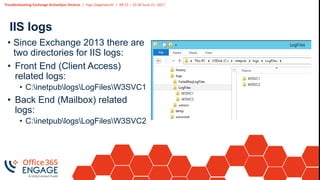
• Since Exchange 2013 there are
two directories for IIS logs:
• Front End (Client Access)
related logs:
• C:inetpublogsLogFilesW3SVC1
• Back End (Mailbox) related
logs:
• C:inetpublogsLogFilesW3SVC2
Troubleshooting Exchange ActiveSync Devices | Ingo Gegenwarth | 09:15 – 10:30 June 21, 2017
IIS logs
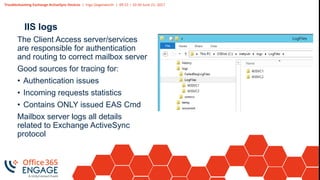
The Client Access server/services
are responsible for authentication
and routing to correct mailbox server
Good sources for tracing for:
• Authentication issues
• Incoming requests statistics
• Contains ONLY issued EAS Cmd
Mailbox server logs all details
related to Exchange ActiveSync
protocol
Troubleshooting Exchange ActiveSync Devices | Ingo Gegenwarth | 09:15 – 10:30 June 21, 2017
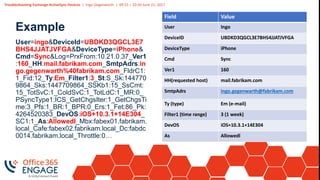
Example
User=ingo&DeviceId=UBDKD3QGCL3E7
BHS4JJATJVFGA&DeviceType=iPhone&
Cmd=Sync&Log=PrxFrom:10.21.0.37_Ver1
:160_HH:mail.fabrikam.com_SmtpAdrs:in
go.gegenwarth%40fabrikam.com_FldrC1:
1_Fid:12_Ty:Em_Filter1:3_St:S_Sk:144770
9864_Sks:1447709864_SSKb1:15_SsCmt:
15_TotSvC:1_ColdSvC:1_TotLdC:1_MR:0_
PSyncType1:ICS_GetChgsIter:1_GetChgsTi
me:3_Pfs:1_BR:1_BPR:0_Ers:1_Fet:86_Pk:
4264520383_DevOS:iOS+10.3.1+14E304_
SC1:1_As:AllowedI_Mbx:fabex01.fabrikam.
local_Cafe:fabex02.fabrikam.local_Dc:fabdc
0014.fabrikam.local_Throttle:0…
Field Value
User Ingo
DeviceID UBDKD3QGCL3E7BHS4JJATJVFGA
DeviceType iPhone
Cmd Sync
Ver1 160
HH(requested host) mail.fabrikam.com
SmtpAdrs ingo.gegenwarth@fabrikam.com
Ty (type) Em (e-mail)
Filter1 (time range) 3 (1 week)
DevOS iOS+10.3.1+14E304
As Allowedl
Troubleshooting Exchange ActiveSync Devices | Ingo Gegenwarth | 09:15 – 10:30 June 21, 2017
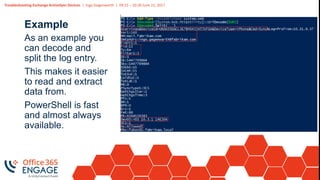
Example
As an example you
can decode and
split the log entry.
This makes it easier
to read and extract
data from.
PowerShell is fast
and almost always
available.
Troubleshooting Exchange ActiveSync Devices | Ingo Gegenwarth | 09:15 – 10:30 June 21, 2017
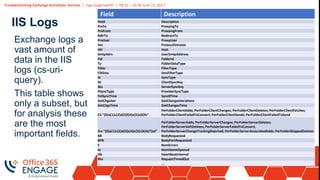
IIS Logs
Field Description
Field Description
PrxTo ProxyingTo
PrxFrom ProxyingFrom
RdirTo RedirectTo
PrxUser ProxyUser
Ver ProtocolVersion
HH Host
SmtpAdrs UserSmtpAddress
Fid FolderId
Ty FolderDataType
Filter FilterType
FiltSms SmsFilterType
St SyncType
Sk ClientSyncKey
Sks ServerSyncKey
PSyncType ProviderSyncType
FstSyncTime Sync0Time
GetChgsIter GetChangesIterations
GetChgsTime GetChangesTime
Cli "{0}a{1}c{2}d{3}f{4}e{5}s{6}fs"
PerFolderClientAdds; PerFolderClientChanges; PerFolderClientDeletes; PerFolderClientFetches;
PerFolderClientFailedToConvert; PerFolderClientSends; PerFolderClientFailedToSend
Srv "{0}a{1}c{2}d{3}s{4}e{5}r{6}A{7}sd"
PerFolderServerAdds; PerFolderServerChanges; PerFolderServerDeletes;
PerFolderServerSoftDeletes; PerFolderServerFailedToConvert;
PerFolderServerChangeTrackingRejected; PerFolderServerAssociatedAdds; PerFolderSkippedDeletes
BR BodyRequested
BPR BodyPartRequested
E NumErrors
Io NumItemsOpened
Hb HeartBeatInterval
Rto RequestTimedOut
… …
Exchange logs a
vast amount of
data in the IIS
logs (cs-uri-
query).
This table shows
only a subset, but
for analysis these
are the most
important fields.
DEMO
Exchange Web Services
(EWS)
Troubleshooting Exchange ActiveSync Devices | Ingo Gegenwarth | 09:15 – 10:30 June 21, 2017
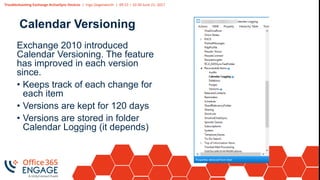
Calendar Versioning
Exchange 2010 introduced
Calendar Versioning. The feature
has improved in each version
since.
• Keeps track of each change for
each item
• Versions are kept for 120 days
• Versions are stored in folder
Calendar Logging (it depends)
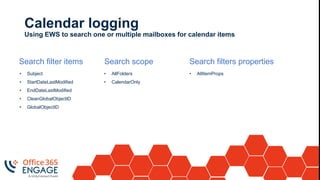
Calendar logging
Using EWS to search one or multiple mailboxes for calendar items
Search filter items
• Subject
• StartDateLastModified
• EndDateLastModified
• CleanGlobalObjectID
• GlobalObjectID
Search scope
• AllFolders
• CalendarOnly
Search filters properties
• AllItemProps
Troubleshooting Exchange ActiveSync Devices | Ingo Gegenwarth | 09:15 – 10:30 June 21, 2017
Follow us:
#O365ENGAGE17
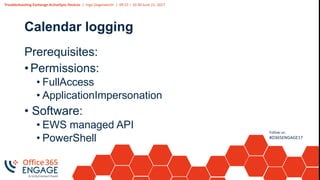
Calendar logging
Prerequisites:
• Permissions:
• FullAccess
• ApplicationImpersonation
• Software:
• EWS managed API
• PowerShell
Troubleshooting Exchange ActiveSync Devices | Ingo Gegenwarth | 09:15 – 10:30 June 21, 2017
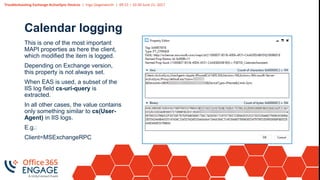
Calendar logging
This is one of the most important
MAPI properties as here the client,
which modified the item is logged.
Depending on Exchange version,
this property is not always set.
When EAS is used, a subset of the
IIS log field cs-uri-query is
extracted.
In all other cases, the value contains
only something similar to cs(User-
Agent) in IIS logs.
E.g.:
Client=MSExchangeRPC
Troubleshooting Exchange ActiveSync Devices | Ingo Gegenwarth | 09:15 – 10:30 June 21, 2017
Follow us:
#O365ENGAGE17
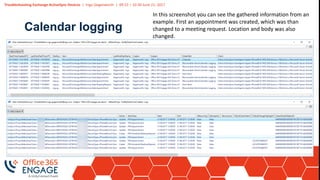
Calendar logging
In this screenshot you can see the gathered information from an
example. First an appointment was created, which was than
changed to a meeting request. Location and body was also
changed.
DEMO
Get-DatabaseEvent
Troubleshooting Exchange ActiveSync Devices | Ingo Gegenwarth | 09:15 – 10:30 June 21, 2017
Follow us:
#O365ENGAGE17
Get-DatabaseEvent
In Exchange 2007 a new table in each database was introduced.
It’s called EventHistory. Within this table Exchange tracks
modifications. The way to access and query this table was made
public in 2013, June.
Prerequisites:
• At least Exchange Administration Tools
• PSSnapin needs to be loaded manually
Troubleshooting Exchange ActiveSync Devices | Ingo Gegenwarth | 09:15 – 10:30 June 21, 2017
Follow us:
#O365ENGAGE17
Get-DatabaseEvent
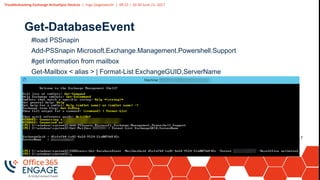
#load PSSnapin
Add-PSSnapin Microsoft.Exchange.Management.Powershell.Support
#get information from mailbox
Get-Mailbox < alias > | Format-List ExchangeGUID,ServerName
Troubleshooting Exchange ActiveSync Devices | Ingo Gegenwarth | 09:15 – 10:30 June 21, 2017
Get-
DatabaseEvent
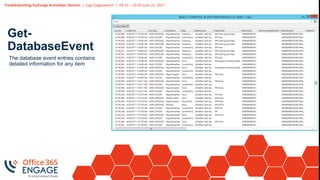
The database event entries contains
detailed information for any item
Troubleshooting Exchange ActiveSync Devices | Ingo Gegenwarth | 09:15 – 10:30 June 21, 2017
Get-
DatabaseEvent
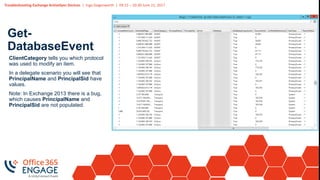
ClientCategory tells you which protocol
was used to modify an item.
In a delegate scenario you will see that
PrincipalName and PrincipalSid have
values.
Note: In Exchange 2013 there is a bug,
which causes PrincipalName and
PrincipalSid are not populated.
DEMO
MessageTracking
Troubleshooting Exchange ActiveSync Devices | Ingo Gegenwarth | 09:15 – 10:30 June 21, 2017
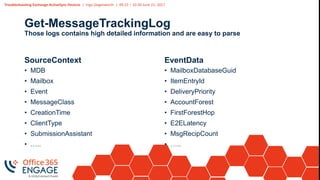
Get-MessageTrackingLog
Those logs contains high detailed information and are easy to parse
SourceContext
• MDB
• Mailbox
• Event
• MessageClass
• CreationTime
• ClientType
• SubmissionAssistant
• …..
EventData
• MailboxDatabaseGuid
• ItemEntryId
• DeliveryPriority
• AccountForest
• FirstForestHop
• E2ELatency
• MsgRecipCount
• …..
Troubleshooting Exchange ActiveSync Devices | Ingo Gegenwarth | 09:15 – 10:30 June 21, 2017
Follow us:
#O365ENGAGE17
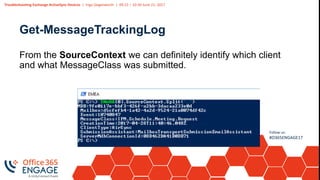
Get-MessageTrackingLog
From the SourceContext we can definitely identify which client
and what MessageClass was submitted.
DEMO
MailboxLogParser
Troubleshooting Exchange ActiveSync Devices | Ingo Gegenwarth | 09:15 – 10:30 June 21, 2017
Follow us:
#O365ENGAGE17
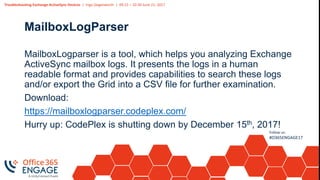
MailboxLogParser
MailboxLogparser is a tool, which helps you analyzing Exchange
ActiveSync mailbox logs. It presents the logs in a human
readable format and provides capabilities to search these logs
and/or export the Grid into a CSV file for further examination.
Download:
https://mailboxlogparser.codeplex.com/
Hurry up: CodePlex is shutting down by December 15th, 2017!
Troubleshooting Exchange ActiveSync Devices | Ingo Gegenwarth | 09:15 – 10:30 June 21, 2017
Follow us:
#O365ENGAGE17
MailboxLogParser
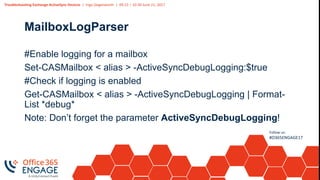
#Enable logging for a mailbox
Set-CASMailbox < alias > -ActiveSyncDebugLogging:$true
#Check if logging is enabled
Get-CASMailbox < alias > -ActiveSyncDebugLogging | Format-
List *debug*
Note: Don’t forget the parameter ActiveSyncDebugLogging!
Troubleshooting Exchange ActiveSync Devices | Ingo Gegenwarth | 09:15 – 10:30 June 21, 2017
Follow us:
#O365ENGAGE17
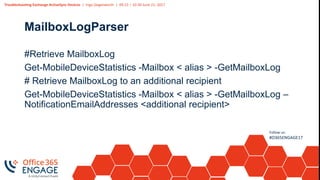
MailboxLogParser
#Retrieve MailboxLog
Get-MobileDeviceStatistics -Mailbox < alias > -GetMailboxLog
# Retrieve MailboxLog to an additional recipient
Get-MobileDeviceStatistics -Mailbox < alias > -GetMailboxLog –
NotificationEmailAddresses <additional recipient>
Troubleshooting Exchange ActiveSync Devices | Ingo Gegenwarth | 09:15 – 10:30 June 21, 2017
Follow us:
#O365ENGAGE17
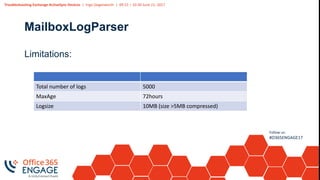
MailboxLogParser
Limitations:
Total number of logs 5000
MaxAge 72hours
Logsize 10MB (size >5MB compressed)
Troubleshooting Exchange ActiveSync Devices | Ingo Gegenwarth | 09:15 – 10:30 June 21, 2017
Follow us:
#O365ENGAGE17
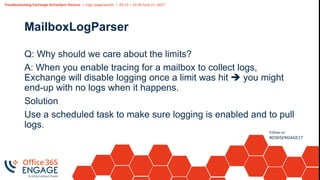
MailboxLogParser
Q: Why should we care about the limits?
A: When you enable tracing for a mailbox to collect logs,
Exchange will disable logging once a limit was hit  you might
end-up with no logs when it happens.
Solution
Use a scheduled task to make sure logging is enabled and to pull
logs.
DEMO
Troubleshooting Exchange ActiveSync Devices | Ingo Gegenwarth | 09:15 – 10:30 June 21, 2017
Follow us:
#O365ENGAGE17
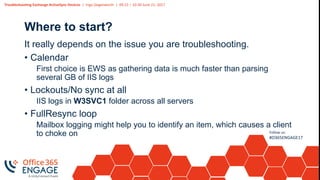
Where to start?
It really depends on the issue you are troubleshooting.
• Calendar
First choice is EWS as gathering data is much faster than parsing
several GB of IIS logs
• Lockouts/No sync at all
IIS logs in W3SVC1 folder across all servers
• FullResync loop
Mailbox logging might help you to identify an item, which causes a client
to choke on
Troubleshooting Exchange ActiveSync Devices | Ingo Gegenwarth | 09:15 – 10:30 June 21, 2017
Follow us:
#O365ENGAGE17
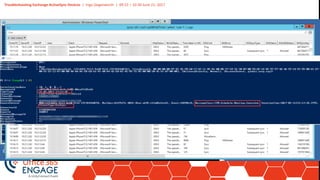
Combination
Sometimes you need to exam logs from multiple sources
to find the main conclusion.
In this example the MAPI property, which represents the
client was not populated.
The IIS logs shows an issues command SendMail.
As a sanity check MessageTracking was used to check
the value of SourceContext.
Troubleshooting Exchange ActiveSync Devices | Ingo Gegenwarth | 09:15 – 10:30 June 21, 2017
Combination
Troubleshooting Exchange ActiveSync Devices | Ingo Gegenwarth | 09:15 – 10:30 June 21, 2017
Follow us:
#O365ENGAGE17
Summary
• IIS logs
• Exchange Web Services and Calendar Logging
• Get-DatabaseEvent
• MessageTracking
• MailboxLogParser
• Combination of previous mentioned technics
Troubleshooting Exchange ActiveSync Devices | Ingo Gegenwarth | 09:15 – 10:30 June 21, 2017
Follow us:
#O365ENGAGE17
Related sessions
• After the Migration – Managing Your Office 365 Deployment
• Chris Goosen – 22 June, 14:45 – 16:00 Room A
• Mobile Device Management Options in Office 365 and Beyond
• Chris Goosen – 21 June, 14:45 – 16:00 Room B
Troubleshooting Exchange ActiveSync Devices | Ingo Gegenwarth | 09:15 – 10:30 June 21, 2017
Follow us:
#O365ENGAGE17
Questions? | Thank You!
Ingo Gegenwarth
ingo@thecluelessguy.de
We’d like to know what you think!
Please fill out the evaluation form you
received at the registration desk for this
session
Session recordings and materials:
Materials will be available on
Office365Engage.com soon

O365Engage17 - Troubleshooting Exchange Active Sync Devices

  • 1.
  • 2.
    Troubleshooting Exchange ActiveSyncDevices | Ingo Gegenwarth | 09:15 – 10:30 June 21, 2017 About me: Ingo Gegenwarth IT Principal Consultant @SAP MCM Exchange 2010 Office Server and Services MVP Blog: https://ingogegenwarth.wordpress.com/ Twitter: @IngoGegenwarth E-mail: ingo@thecluelessguy.de
  • 3.
    Troubleshooting Exchange ActiveSyncDevices | Ingo Gegenwarth | 09:15 – 10:30 June 21, 2017 Follow us: #O365ENGAGE17 Agenda • IIS logs • EWS for calendar items • Get-DatabaseEvent • MessageTracking • ActiveSyncDebugLogging & MailboxLogParser • Q&A
  • 4.
    Troubleshooting Exchange ActiveSyncDevices | Ingo Gegenwarth | 09:15 – 10:30 June 21, 2017 Follow us: #O365ENGAGE17 Why would you troubleshoot EAS devices? Mobile devices are very in common and cloud services help users to be productive. But there is also a downside as these devices can cause a variety of issues, which are frustrating for end-users as well as for administrators: • Account logouts • Calendar issues (Cancelations, date/time modification….) • Notifications sent-onbehalf of the organizer • …
  • 5.
  • 6.
    Troubleshooting Exchange ActiveSyncDevices | Ingo Gegenwarth | 09:15 – 10:30 June 21, 2017 IIS logs • Since Exchange 2013 there are two directories for IIS logs: • Front End (Client Access) related logs: • C:inetpublogsLogFilesW3SVC1 • Back End (Mailbox) related logs: • C:inetpublogsLogFilesW3SVC2
  • 7.
    Troubleshooting Exchange ActiveSyncDevices | Ingo Gegenwarth | 09:15 – 10:30 June 21, 2017 IIS logs The Client Access server/services are responsible for authentication and routing to correct mailbox server Good sources for tracing for: • Authentication issues • Incoming requests statistics • Contains ONLY issued EAS Cmd Mailbox server logs all details related to Exchange ActiveSync protocol
  • 8.
    Troubleshooting Exchange ActiveSyncDevices | Ingo Gegenwarth | 09:15 – 10:30 June 21, 2017 Example User=ingo&DeviceId=UBDKD3QGCL3E7 BHS4JJATJVFGA&DeviceType=iPhone& Cmd=Sync&Log=PrxFrom:10.21.0.37_Ver1 :160_HH:mail.fabrikam.com_SmtpAdrs:in go.gegenwarth%40fabrikam.com_FldrC1: 1_Fid:12_Ty:Em_Filter1:3_St:S_Sk:144770 9864_Sks:1447709864_SSKb1:15_SsCmt: 15_TotSvC:1_ColdSvC:1_TotLdC:1_MR:0_ PSyncType1:ICS_GetChgsIter:1_GetChgsTi me:3_Pfs:1_BR:1_BPR:0_Ers:1_Fet:86_Pk: 4264520383_DevOS:iOS+10.3.1+14E304_ SC1:1_As:AllowedI_Mbx:fabex01.fabrikam. local_Cafe:fabex02.fabrikam.local_Dc:fabdc 0014.fabrikam.local_Throttle:0… Field Value User Ingo DeviceID UBDKD3QGCL3E7BHS4JJATJVFGA DeviceType iPhone Cmd Sync Ver1 160 HH(requested host) mail.fabrikam.com SmtpAdrs ingo.gegenwarth@fabrikam.com Ty (type) Em (e-mail) Filter1 (time range) 3 (1 week) DevOS iOS+10.3.1+14E304 As Allowedl
  • 9.
    Troubleshooting Exchange ActiveSyncDevices | Ingo Gegenwarth | 09:15 – 10:30 June 21, 2017 Example As an example you can decode and split the log entry. This makes it easier to read and extract data from. PowerShell is fast and almost always available.
  • 10.
    Troubleshooting Exchange ActiveSyncDevices | Ingo Gegenwarth | 09:15 – 10:30 June 21, 2017 IIS Logs Field Description Field Description PrxTo ProxyingTo PrxFrom ProxyingFrom RdirTo RedirectTo PrxUser ProxyUser Ver ProtocolVersion HH Host SmtpAdrs UserSmtpAddress Fid FolderId Ty FolderDataType Filter FilterType FiltSms SmsFilterType St SyncType Sk ClientSyncKey Sks ServerSyncKey PSyncType ProviderSyncType FstSyncTime Sync0Time GetChgsIter GetChangesIterations GetChgsTime GetChangesTime Cli "{0}a{1}c{2}d{3}f{4}e{5}s{6}fs" PerFolderClientAdds; PerFolderClientChanges; PerFolderClientDeletes; PerFolderClientFetches; PerFolderClientFailedToConvert; PerFolderClientSends; PerFolderClientFailedToSend Srv "{0}a{1}c{2}d{3}s{4}e{5}r{6}A{7}sd" PerFolderServerAdds; PerFolderServerChanges; PerFolderServerDeletes; PerFolderServerSoftDeletes; PerFolderServerFailedToConvert; PerFolderServerChangeTrackingRejected; PerFolderServerAssociatedAdds; PerFolderSkippedDeletes BR BodyRequested BPR BodyPartRequested E NumErrors Io NumItemsOpened Hb HeartBeatInterval Rto RequestTimedOut … … Exchange logs a vast amount of data in the IIS logs (cs-uri- query). This table shows only a subset, but for analysis these are the most important fields.
  • 11.
  • 12.
  • 13.
    Troubleshooting Exchange ActiveSyncDevices | Ingo Gegenwarth | 09:15 – 10:30 June 21, 2017 Calendar Versioning Exchange 2010 introduced Calendar Versioning. The feature has improved in each version since. • Keeps track of each change for each item • Versions are kept for 120 days • Versions are stored in folder Calendar Logging (it depends)
  • 14.
    Calendar logging Using EWSto search one or multiple mailboxes for calendar items Search filter items • Subject • StartDateLastModified • EndDateLastModified • CleanGlobalObjectID • GlobalObjectID Search scope • AllFolders • CalendarOnly Search filters properties • AllItemProps
  • 15.
    Troubleshooting Exchange ActiveSyncDevices | Ingo Gegenwarth | 09:15 – 10:30 June 21, 2017 Follow us: #O365ENGAGE17 Calendar logging Prerequisites: • Permissions: • FullAccess • ApplicationImpersonation • Software: • EWS managed API • PowerShell
  • 16.
    Troubleshooting Exchange ActiveSyncDevices | Ingo Gegenwarth | 09:15 – 10:30 June 21, 2017 Calendar logging This is one of the most important MAPI properties as here the client, which modified the item is logged. Depending on Exchange version, this property is not always set. When EAS is used, a subset of the IIS log field cs-uri-query is extracted. In all other cases, the value contains only something similar to cs(User- Agent) in IIS logs. E.g.: Client=MSExchangeRPC
  • 17.
    Troubleshooting Exchange ActiveSyncDevices | Ingo Gegenwarth | 09:15 – 10:30 June 21, 2017 Follow us: #O365ENGAGE17 Calendar logging In this screenshot you can see the gathered information from an example. First an appointment was created, which was than changed to a meeting request. Location and body was also changed.
  • 18.
  • 19.
  • 20.
    Troubleshooting Exchange ActiveSyncDevices | Ingo Gegenwarth | 09:15 – 10:30 June 21, 2017 Follow us: #O365ENGAGE17 Get-DatabaseEvent In Exchange 2007 a new table in each database was introduced. It’s called EventHistory. Within this table Exchange tracks modifications. The way to access and query this table was made public in 2013, June. Prerequisites: • At least Exchange Administration Tools • PSSnapin needs to be loaded manually
  • 21.
    Troubleshooting Exchange ActiveSyncDevices | Ingo Gegenwarth | 09:15 – 10:30 June 21, 2017 Follow us: #O365ENGAGE17 Get-DatabaseEvent #load PSSnapin Add-PSSnapin Microsoft.Exchange.Management.Powershell.Support #get information from mailbox Get-Mailbox < alias > | Format-List ExchangeGUID,ServerName
  • 22.
    Troubleshooting Exchange ActiveSyncDevices | Ingo Gegenwarth | 09:15 – 10:30 June 21, 2017 Get- DatabaseEvent The database event entries contains detailed information for any item
  • 23.
    Troubleshooting Exchange ActiveSyncDevices | Ingo Gegenwarth | 09:15 – 10:30 June 21, 2017 Get- DatabaseEvent ClientCategory tells you which protocol was used to modify an item. In a delegate scenario you will see that PrincipalName and PrincipalSid have values. Note: In Exchange 2013 there is a bug, which causes PrincipalName and PrincipalSid are not populated.
  • 24.
  • 25.
  • 26.
    Troubleshooting Exchange ActiveSyncDevices | Ingo Gegenwarth | 09:15 – 10:30 June 21, 2017 Get-MessageTrackingLog Those logs contains high detailed information and are easy to parse SourceContext • MDB • Mailbox • Event • MessageClass • CreationTime • ClientType • SubmissionAssistant • ….. EventData • MailboxDatabaseGuid • ItemEntryId • DeliveryPriority • AccountForest • FirstForestHop • E2ELatency • MsgRecipCount • …..
  • 27.
    Troubleshooting Exchange ActiveSyncDevices | Ingo Gegenwarth | 09:15 – 10:30 June 21, 2017 Follow us: #O365ENGAGE17 Get-MessageTrackingLog From the SourceContext we can definitely identify which client and what MessageClass was submitted.
  • 28.
  • 29.
  • 30.
    Troubleshooting Exchange ActiveSyncDevices | Ingo Gegenwarth | 09:15 – 10:30 June 21, 2017 Follow us: #O365ENGAGE17 MailboxLogParser MailboxLogparser is a tool, which helps you analyzing Exchange ActiveSync mailbox logs. It presents the logs in a human readable format and provides capabilities to search these logs and/or export the Grid into a CSV file for further examination. Download: https://mailboxlogparser.codeplex.com/ Hurry up: CodePlex is shutting down by December 15th, 2017!
  • 31.
    Troubleshooting Exchange ActiveSyncDevices | Ingo Gegenwarth | 09:15 – 10:30 June 21, 2017 Follow us: #O365ENGAGE17 MailboxLogParser #Enable logging for a mailbox Set-CASMailbox < alias > -ActiveSyncDebugLogging:$true #Check if logging is enabled Get-CASMailbox < alias > -ActiveSyncDebugLogging | Format- List *debug* Note: Don’t forget the parameter ActiveSyncDebugLogging!
  • 32.
    Troubleshooting Exchange ActiveSyncDevices | Ingo Gegenwarth | 09:15 – 10:30 June 21, 2017 Follow us: #O365ENGAGE17 MailboxLogParser #Retrieve MailboxLog Get-MobileDeviceStatistics -Mailbox < alias > -GetMailboxLog # Retrieve MailboxLog to an additional recipient Get-MobileDeviceStatistics -Mailbox < alias > -GetMailboxLog – NotificationEmailAddresses <additional recipient>
  • 33.
    Troubleshooting Exchange ActiveSyncDevices | Ingo Gegenwarth | 09:15 – 10:30 June 21, 2017 Follow us: #O365ENGAGE17 MailboxLogParser Limitations: Total number of logs 5000 MaxAge 72hours Logsize 10MB (size >5MB compressed)
  • 34.
    Troubleshooting Exchange ActiveSyncDevices | Ingo Gegenwarth | 09:15 – 10:30 June 21, 2017 Follow us: #O365ENGAGE17 MailboxLogParser Q: Why should we care about the limits? A: When you enable tracing for a mailbox to collect logs, Exchange will disable logging once a limit was hit  you might end-up with no logs when it happens. Solution Use a scheduled task to make sure logging is enabled and to pull logs.
  • 35.
  • 36.
    Troubleshooting Exchange ActiveSyncDevices | Ingo Gegenwarth | 09:15 – 10:30 June 21, 2017 Follow us: #O365ENGAGE17 Where to start? It really depends on the issue you are troubleshooting. • Calendar First choice is EWS as gathering data is much faster than parsing several GB of IIS logs • Lockouts/No sync at all IIS logs in W3SVC1 folder across all servers • FullResync loop Mailbox logging might help you to identify an item, which causes a client to choke on
  • 37.
    Troubleshooting Exchange ActiveSyncDevices | Ingo Gegenwarth | 09:15 – 10:30 June 21, 2017 Follow us: #O365ENGAGE17 Combination Sometimes you need to exam logs from multiple sources to find the main conclusion. In this example the MAPI property, which represents the client was not populated. The IIS logs shows an issues command SendMail. As a sanity check MessageTracking was used to check the value of SourceContext.
  • 38.
    Troubleshooting Exchange ActiveSyncDevices | Ingo Gegenwarth | 09:15 – 10:30 June 21, 2017 Combination
  • 39.
    Troubleshooting Exchange ActiveSyncDevices | Ingo Gegenwarth | 09:15 – 10:30 June 21, 2017 Follow us: #O365ENGAGE17 Summary • IIS logs • Exchange Web Services and Calendar Logging • Get-DatabaseEvent • MessageTracking • MailboxLogParser • Combination of previous mentioned technics
  • 40.
    Troubleshooting Exchange ActiveSyncDevices | Ingo Gegenwarth | 09:15 – 10:30 June 21, 2017 Follow us: #O365ENGAGE17 Related sessions • After the Migration – Managing Your Office 365 Deployment • Chris Goosen – 22 June, 14:45 – 16:00 Room A • Mobile Device Management Options in Office 365 and Beyond • Chris Goosen – 21 June, 14:45 – 16:00 Room B
  • 41.
    Troubleshooting Exchange ActiveSyncDevices | Ingo Gegenwarth | 09:15 – 10:30 June 21, 2017 Follow us: #O365ENGAGE17 Questions? | Thank You! Ingo Gegenwarth ingo@thecluelessguy.de We’d like to know what you think! Please fill out the evaluation form you received at the registration desk for this session Session recordings and materials: Materials will be available on Office365Engage.com soon