Embedding ICT into teaching through e-learning
ICT Foundations for Discovery
What ICT’s do you use? Have a chat with your neighbour... What do you use?  What are ICT tools? How confident are you? Does using ICT improve outcomes for students?
What are ICT’s computers  laptop  PDA   digital cameras  digital  video cameras  creativity and communication software  Internet  web2  blogs  wikis   telephones  fax machines  mobiles  tape recorders  interactive stories  simulated environments  computer games programmable toys  videoconferencing  data projectors  interactive whiteboards   pen drives
E-learning and pedagogy Information and communication technology (ICT) has a major impact on the world in which young people live.  Similarly, e-learning  ( that is, learning supported by or facilitated by ICT )  has considerable potential to support the teaching approaches outlined in the above section.  Ministry of Education (2007)  The New Zealand Curriculum Years 1- 13  Effective pedagogy: Teacher actions promoting student learning (pg 36) Wellington, New Zealand
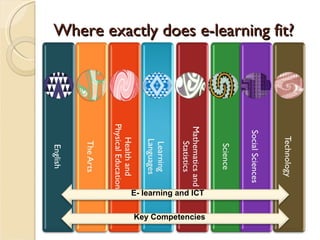
Where exactly does e-learning fit? E- learning and ICT Key Competencies
E-learning and pedagogy For instance, e-learning may:  assist the making of  connections  by enabling students to enter and explore new learning environments, overcoming barriers of distance and time facilitate  shared learning  by enabling students to join or create communities of learners that extend well beyond the classroom assist in the creation of  supportive learning environments  by offering resources that take account of individual, cultural, or developmental differences enhance  opportunities to learn  by offering students virtual experiences and tools that save them time, allowing them to take their learning further. Schools should explore not only how ICT can supplement traditional ways of teaching but also how it can open up new and different ways of learning.  Ministry of Education (2007)  The New Zealand Curriculum Years 1- 13  Effective pedagogy: Teacher actions promoting student learning (pg 36) Wellington, New Zealand
In Schools a snapshot Last term I worked in schools across all curriculum areas, with teachers and students that are... Animating – scenes from natural disasters – using claymation Videoing – information about their school and putting it on youtube and their wiki Using comic programmes for – posters, narrative writing and recount Using Interactive boards – from a new entrant class through to year 7 and 8. Used throughout the day for everything from news board to interactive music programmes (garageband and super dooper music looper) Podcasting – doing a weekly news programme and posting on their class blog Digital Learning Objects – used authentically within learning areas both as a whole class and collaboratively in groups ...and the list goes on
ICT Tools for Teachers Laptops Wireless internet Data projectors  Digital and Video cameras Interactive whiteboards Web 2.0 tools – collaborative tools Quality  online digital learning objects
Blooms Digital Taxonomy What does e-learning and ICT look like for students?  What could it look like...
 

NZC E L

  • 1.
    Embedding ICT intoteaching through e-learning
  • 2.
  • 3.
    What ICT’s doyou use? Have a chat with your neighbour... What do you use? What are ICT tools? How confident are you? Does using ICT improve outcomes for students?
  • 4.
    What are ICT’scomputers laptop PDA digital cameras digital video cameras creativity and communication software Internet web2 blogs wikis telephones fax machines mobiles tape recorders interactive stories simulated environments computer games programmable toys videoconferencing data projectors interactive whiteboards pen drives
  • 5.
    E-learning and pedagogyInformation and communication technology (ICT) has a major impact on the world in which young people live. Similarly, e-learning ( that is, learning supported by or facilitated by ICT ) has considerable potential to support the teaching approaches outlined in the above section. Ministry of Education (2007) The New Zealand Curriculum Years 1- 13 Effective pedagogy: Teacher actions promoting student learning (pg 36) Wellington, New Zealand
  • 6.
    Where exactly doese-learning fit? E- learning and ICT Key Competencies
  • 7.
    E-learning and pedagogyFor instance, e-learning may: assist the making of connections by enabling students to enter and explore new learning environments, overcoming barriers of distance and time facilitate shared learning by enabling students to join or create communities of learners that extend well beyond the classroom assist in the creation of supportive learning environments by offering resources that take account of individual, cultural, or developmental differences enhance opportunities to learn by offering students virtual experiences and tools that save them time, allowing them to take their learning further. Schools should explore not only how ICT can supplement traditional ways of teaching but also how it can open up new and different ways of learning. Ministry of Education (2007) The New Zealand Curriculum Years 1- 13 Effective pedagogy: Teacher actions promoting student learning (pg 36) Wellington, New Zealand
  • 8.
    In Schools asnapshot Last term I worked in schools across all curriculum areas, with teachers and students that are... Animating – scenes from natural disasters – using claymation Videoing – information about their school and putting it on youtube and their wiki Using comic programmes for – posters, narrative writing and recount Using Interactive boards – from a new entrant class through to year 7 and 8. Used throughout the day for everything from news board to interactive music programmes (garageband and super dooper music looper) Podcasting – doing a weekly news programme and posting on their class blog Digital Learning Objects – used authentically within learning areas both as a whole class and collaboratively in groups ...and the list goes on
  • 9.
    ICT Tools forTeachers Laptops Wireless internet Data projectors Digital and Video cameras Interactive whiteboards Web 2.0 tools – collaborative tools Quality online digital learning objects
  • 10.
    Blooms Digital TaxonomyWhat does e-learning and ICT look like for students? What could it look like...
  • 11.