NoodleTools 
Citing Sources from ABC-CLIO
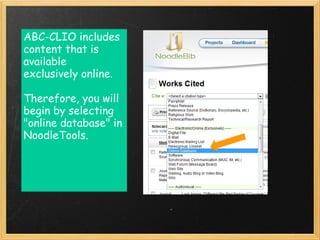
ABC-CLIO includes
content that is
available
exclusively online.

Therefore, you will
begin by selecting
"online database" in
NoodleTools.
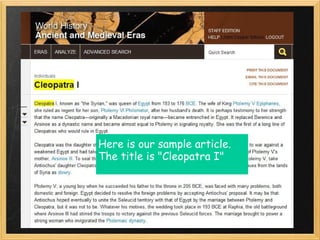
Here is our sample article.
The title is "Cleopatra I"
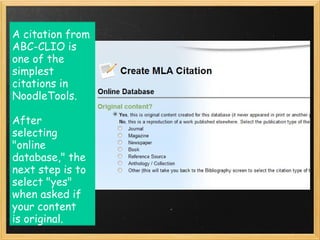
A citation from
ABC-CLIO is
one of the
simplest
citations in
NoodleTools. 

After
selecting 
"online
database," the
next step is to
select "yes"
when asked if
your content
is original. 
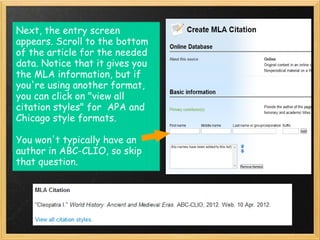
Next, the entry screen
appears. Scroll to the bottom
of the article for the needed
data. Notice that it gives you
the MLA information, but if
you're using another format,
you can click on "view all
citation styles" for  APA and
Chicago style formats.

You won't typically have an
author in ABC-CLIO, so skip
that question. 
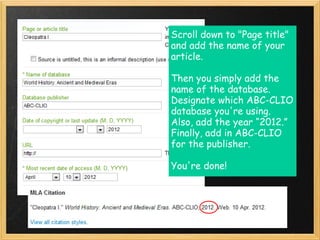
Scroll down to "Page title"
and add the name of your
article.

Then you simply add the
name of the database.
Designate which ABC-CLIO
database you're using. 
Also, add the year “2012.”
Finally, add in ABC-CLIO
for the publisher.

You're done!
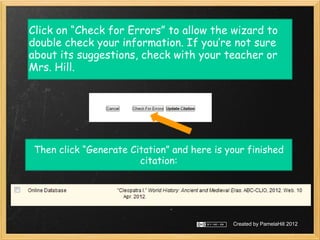
Click on “Check for Errors” to allow the wizard to
double check your information. If you’re not sure
about its suggestions, check with your teacher or
Mrs. Hill.


 Then click “Generate Citation” and here is your finished
                        citation:


                                             Created by PamelaHill 2012

Nt abc

  • 1.
  • 2.
    ABC-CLIO includes content thatis available exclusively online. Therefore, you will begin by selecting "online database" in NoodleTools.
  • 3.
    Here is oursample article. The title is "Cleopatra I"
  • 4.
    A citation from ABC-CLIOis one of the simplest citations in NoodleTools.  After selecting  "online database," the next step is to select "yes" when asked if your content is original. 
  • 5.
    Next, the entryscreen appears. Scroll to the bottom of the article for the needed data. Notice that it gives you the MLA information, but if you're using another format, you can click on "view all citation styles" for  APA and Chicago style formats. You won't typically have an author in ABC-CLIO, so skip that question. 
  • 6.
    Scroll down to"Page title" and add the name of your article. Then you simply add the name of the database. Designate which ABC-CLIO database you're using.  Also, add the year “2012.” Finally, add in ABC-CLIO for the publisher. You're done!
  • 7.
    Click on “Checkfor Errors” to allow the wizard to double check your information. If you’re not sure about its suggestions, check with your teacher or Mrs. Hill. Then click “Generate Citation” and here is your finished citation: Created by PamelaHill 2012