Citing
Sources
Tips and Tricks
to Make Life
Easier
Creating citations is easier than ever
before, since many databases
include options for citing. This
presentation will show you 3 easy
ways to cite: directly out of the
catalog, out of many databases, and
through a citation generator.
ECU Libraries
Catalog
To cite a book from the catalog, first locate the
book in the catalog.
Click the option on the lower left to Cite this Item. A new
window opens with options for citing in APA, MLA, and
more. The citation is ready to copy in to your paper.
Citing from a Database
ECU Libraries subscribe to over 400
databases, and not all databases work the
same. However, many of them have the
option to create a citation.
You can do this in one of two ways. If you
find the article and wish to simply see the
citation, many databases have a button that
simply says “Cite.”
The other way of doing this is to use a
Folder. First, find articles that you will use for
your paper. As you locate the articles, click
Add to Folder, which will add your chosen
articles to a temporary holding place—kind
of like a shopping cart on a web store. Look
for something like this:
Note: OneSearch on the library homepage
also functions in this way.
Send to Email
After you are done with your research in
the database, click in to the folder and
choose the option to Email. You will be
able to specify a citation style at this time.
The citation will come with the article in an
email.
But Wait!
What if I did not do this during my research?
Is there anything I can do?
Citation Generators
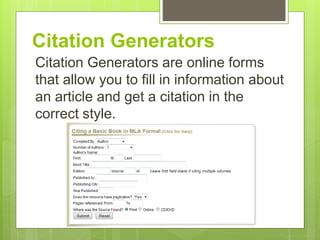
Citation Generators are online forms
that allow you to fill in information about
an article and get a citation in the
correct style.
Links
Some citation generators include
NCSU’s Citation Generator and
Knight Cite. Click these links to be
taken to a citation generator.
If you have questions, Ask a Librarian!

Library101 citation 2

  • 1.
  • 2.
    Creating citations iseasier than ever before, since many databases include options for citing. This presentation will show you 3 easy ways to cite: directly out of the catalog, out of many databases, and through a citation generator.
  • 3.
    ECU Libraries Catalog To citea book from the catalog, first locate the book in the catalog.
  • 4.
    Click the optionon the lower left to Cite this Item. A new window opens with options for citing in APA, MLA, and more. The citation is ready to copy in to your paper.
  • 5.
    Citing from aDatabase ECU Libraries subscribe to over 400 databases, and not all databases work the same. However, many of them have the option to create a citation.
  • 6.
    You can dothis in one of two ways. If you find the article and wish to simply see the citation, many databases have a button that simply says “Cite.”
  • 7.
    The other wayof doing this is to use a Folder. First, find articles that you will use for your paper. As you locate the articles, click Add to Folder, which will add your chosen articles to a temporary holding place—kind of like a shopping cart on a web store. Look for something like this: Note: OneSearch on the library homepage also functions in this way.
  • 8.
    Send to Email Afteryou are done with your research in the database, click in to the folder and choose the option to Email. You will be able to specify a citation style at this time. The citation will come with the article in an email.
  • 9.
    But Wait! What ifI did not do this during my research? Is there anything I can do?
  • 10.
    Citation Generators Citation Generatorsare online forms that allow you to fill in information about an article and get a citation in the correct style.
  • 11.
    Links Some citation generatorsinclude NCSU’s Citation Generator and Knight Cite. Click these links to be taken to a citation generator. If you have questions, Ask a Librarian!