A member of the ProQuest family of
companies
a ProQuest business
ebrary’s Download Feature
February 2012
a ProQuest business
Overview
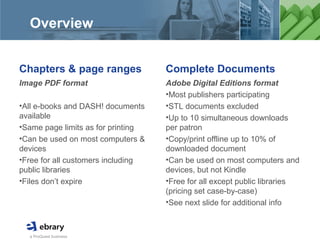
Chapters & page ranges
Image PDF format
•All e-books and DASH! documents
available
•Same page limits as for printing
•Can be used on most computers &
devices
•Free for all customers including
public libraries
•Files don’t expire
Complete Documents
Adobe Digital Editions format
•Most publishers participating
•STL documents excluded
•Up to 10 simultaneous downloads
per patron
•Copy/print offline up to 10% of
downloaded document
•Can be used on most computers and
devices, but not Kindle
•Free for all except public libraries
(pricing set case-by-case)
•See next slide for additional info
a ProQuest business
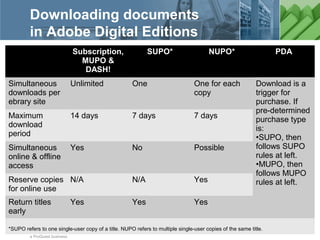
Downloading documents
in Adobe Digital Editions
Subscription,
MUPO &
DASH!
SUPO* NUPO* PDA
Simultaneous
downloads per
ebrary site
Unlimited One One for each
copy
Download is a
trigger for
purchase. If
pre-determined
purchase type
is:
•SUPO, then
follows SUPO
rules at left.
•MUPO, then
follows MUPO
rules at left.
Maximum
download
period
14 days 7 days 7 days
Simultaneous
online & offline
access
Yes No Possible
Reserve copies
for online use
N/A N/A Yes
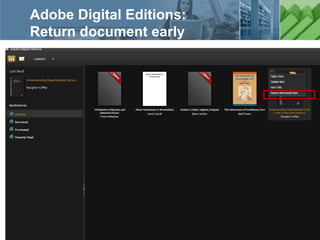
Return titles
early
Yes Yes Yes
*SUPO refers to one single-user copy of a title. NUPO refers to multiple single-user copies of the same title.
a ProQuest business
Settings for your ebrary site
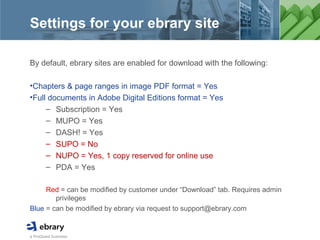
By default, ebrary sites are enabled for download with the following:
•Chapters & page ranges in image PDF format = Yes
•Full documents in Adobe Digital Editions format = Yes
– Subscription = Yes
– MUPO = Yes
– DASH! = Yes
– SUPO = No
– NUPO = Yes, 1 copy reserved for online use
– PDA = Yes
Red = can be modified by customer under “Download” tab. Requires admin
privileges
Blue = can be modified by ebrary via request to support@ebrary.com
a ProQuest business
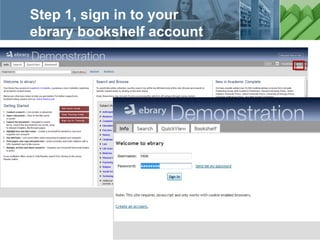
Step 1, sign in to your
ebrary bookshelf account
a ProQuest business
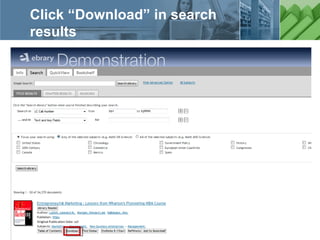
Click “Download” in search
results
a ProQuest business
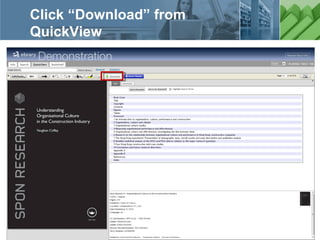
Click “Download” from
QuickView
a ProQuest business
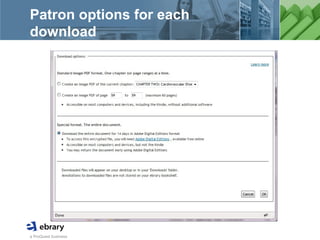
Patron options for each
download
a ProQuest business
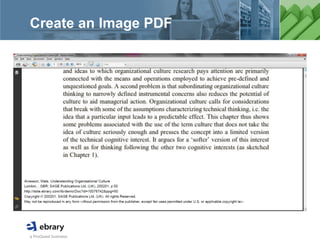
Create an Image PDF
a ProQuest business
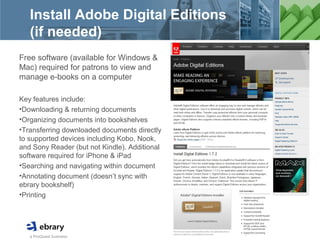
Install Adobe Digital Editions
(if needed)
Free software (available for Windows &
Mac) required for patrons to view and
manage e-books on a computer
Key features include:
•Downloading & returning documents
•Organizing documents into bookshelves
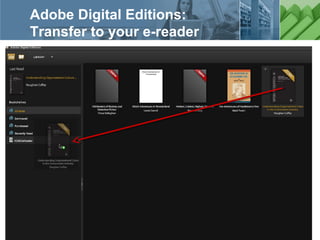
•Transferring downloaded documents directly
to supported devices including Kobo, Nook,
and Sony Reader (but not Kindle). Additional
software required for iPhone & iPad
•Searching and navigating within document
•Annotating document (doesn’t sync with
ebrary bookshelf)
•Printing
a ProQuest business
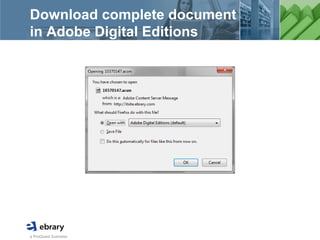
Download complete document
in Adobe Digital Editions
a ProQuest business
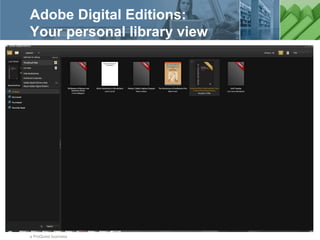
Adobe Digital Editions:
Your personal library view
a ProQuest business
Adobe Digital Editions:
Reading view
a ProQuest business
Adobe Digital Editions:
Transfer to your e-reader
a ProQuest business
Adobe Digital Editions:
Return document early
a ProQuest business
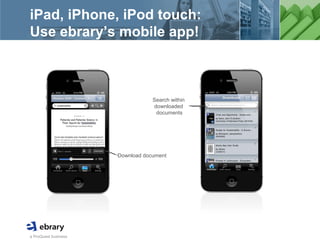
iPad, iPhone, iPod touch:
Use ebrary’s mobile app!
Download document
Search within
downloaded
documents
a ProQuest business
Settings for your ebrary site:
Administrator’s view
a ProQuest business
Getting started with
ebrary downloading
ebrary Patrons: Install Adobe Digital Editions
•Install the free software required to view and manage downloads of
complete documents on your computer (for Windows & Mac)
•Available at www.adobe.com/products/digitaleditions
Help & Support
•Training sign-ups at www.ebrary.com/corp/training.jsp
•Help Desk in product
•Knowledgebase at support.ebrary.com/category/english/download
Administrators for ebrary sites
•Please email support@ebrary.com for download admin settings

Ebrary downloading

  • 1.
    A member ofthe ProQuest family of companies a ProQuest business ebrary’s Download Feature February 2012
  • 2.
    a ProQuest business Overview Chapters& page ranges Image PDF format •All e-books and DASH! documents available •Same page limits as for printing •Can be used on most computers & devices •Free for all customers including public libraries •Files don’t expire Complete Documents Adobe Digital Editions format •Most publishers participating •STL documents excluded •Up to 10 simultaneous downloads per patron •Copy/print offline up to 10% of downloaded document •Can be used on most computers and devices, but not Kindle •Free for all except public libraries (pricing set case-by-case) •See next slide for additional info
  • 3.
    a ProQuest business Downloadingdocuments in Adobe Digital Editions Subscription, MUPO & DASH! SUPO* NUPO* PDA Simultaneous downloads per ebrary site Unlimited One One for each copy Download is a trigger for purchase. If pre-determined purchase type is: •SUPO, then follows SUPO rules at left. •MUPO, then follows MUPO rules at left. Maximum download period 14 days 7 days 7 days Simultaneous online & offline access Yes No Possible Reserve copies for online use N/A N/A Yes Return titles early Yes Yes Yes *SUPO refers to one single-user copy of a title. NUPO refers to multiple single-user copies of the same title.
  • 4.
    a ProQuest business Settingsfor your ebrary site By default, ebrary sites are enabled for download with the following: •Chapters & page ranges in image PDF format = Yes •Full documents in Adobe Digital Editions format = Yes – Subscription = Yes – MUPO = Yes – DASH! = Yes – SUPO = No – NUPO = Yes, 1 copy reserved for online use – PDA = Yes Red = can be modified by customer under “Download” tab. Requires admin privileges Blue = can be modified by ebrary via request to support@ebrary.com
  • 5.
    a ProQuest business Step1, sign in to your ebrary bookshelf account
  • 6.
    a ProQuest business Click“Download” in search results
  • 7.
    a ProQuest business Click“Download” from QuickView
  • 8.
    a ProQuest business Patronoptions for each download
  • 9.
  • 10.
    a ProQuest business InstallAdobe Digital Editions (if needed) Free software (available for Windows & Mac) required for patrons to view and manage e-books on a computer Key features include: •Downloading & returning documents •Organizing documents into bookshelves •Transferring downloaded documents directly to supported devices including Kobo, Nook, and Sony Reader (but not Kindle). Additional software required for iPhone & iPad •Searching and navigating within document •Annotating document (doesn’t sync with ebrary bookshelf) •Printing
  • 11.
    a ProQuest business Downloadcomplete document in Adobe Digital Editions
  • 12.
    a ProQuest business AdobeDigital Editions: Your personal library view
  • 13.
    a ProQuest business AdobeDigital Editions: Reading view
  • 14.
    a ProQuest business AdobeDigital Editions: Transfer to your e-reader
  • 15.
    a ProQuest business AdobeDigital Editions: Return document early
  • 16.
    a ProQuest business iPad,iPhone, iPod touch: Use ebrary’s mobile app! Download document Search within downloaded documents
  • 17.
    a ProQuest business Settingsfor your ebrary site: Administrator’s view
  • 18.
    a ProQuest business Gettingstarted with ebrary downloading ebrary Patrons: Install Adobe Digital Editions •Install the free software required to view and manage downloads of complete documents on your computer (for Windows & Mac) •Available at www.adobe.com/products/digitaleditions Help & Support •Training sign-ups at www.ebrary.com/corp/training.jsp •Help Desk in product •Knowledgebase at support.ebrary.com/category/english/download Administrators for ebrary sites •Please email support@ebrary.com for download admin settings