取扱説明書


           コンソールサーバ
                NS-2240


ご使用の前に、この取扱説明書をよくお読みの上、
正しくお取り扱いください。
また、お読みになった後も、必要なときにすぐに
見られるよう、大切に保管してください。
U00104360500   2006 年 10 月
                                  U00104360501   2007 年 3 月
                                  U00104360502   2008 年 11 月
                                  U00104360503   2009 年 8 月
                                  U00104360504   2010 年 2 月
                                  U00104360505   2010 年 8 月
                                  U00104360506   2010 年 11 月
                                  U00104360507   2011 年 5 月


                 ©エスアイアイ・ネットワーク・システムズ株式会社           2006-2011

                                             無断転載を禁じます。
                          本書の内容は、断りなく変更することがあります。

                           はセイコーインスツル株式会社の登録商標です。
                      イーサネットは富士ゼロックス株式会社の登録商標です。
               コンパクトフラッシュは米国 SanDisk Corporation の登録商標です。

                   本書および本書に記載された製品の使用によって発生した損害
               およびその回復に要する費用に対し、当社は一切責任を負いません。

本装置を廃棄する場合は、地方自治体の条例に従って処理するようお願いいたします。詳しくは各地
方自治体にお問い合わせください。

この装置は、情報処理装置等電波障害自主規制協議会(VCCI)の基準に基づくクラス A 情報技術装置で
す。この装置を家庭環境で使用すると電波妨害を引き起こすことがあります。この場合には使用者が
適切な対策を講ずるよう要求されることがあります。
はじめに
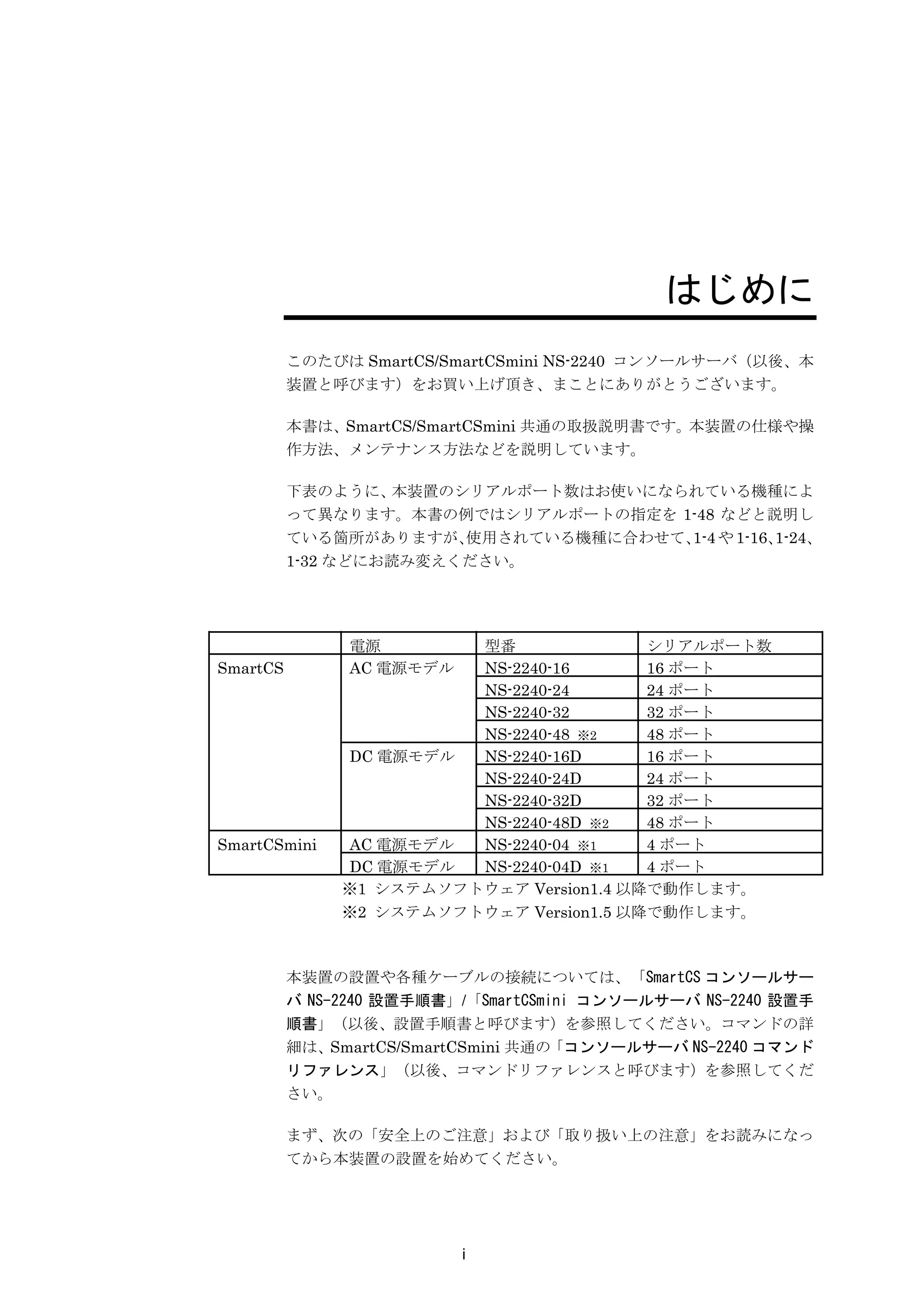
          このたびは SmartCS/SmartCSmini NS-2240 コンソールサーバ(以後、本
          装置と呼びます)をお買い上げ頂き、まことにありがとうございます。

          本書は、SmartCS/SmartCSmini 共通の取扱説明書です。本装置の仕様や操
          作方法、メンテナンス方法などを説明しています。

          下表のように、  本装置のシリアルポート数はお使いになられている機種によ
          って異なります。本書の例ではシリアルポートの指定を 1-48 などと説明し
          ている箇所がありますが、  使用されている機種に合わせて、 や 1-16、
                                       1-4     1-24、
          1-32 などにお読み変えください。


                電源       型番               シリアルポート数
SmartCS         AC 電源モデル NS-2240-16       16 ポート
                         NS-2240-24       24 ポート
                         NS-2240-32       32 ポート
                         NS-2240-48 ※2    48 ポート
               DC 電源モデル  NS-2240-16D      16 ポート
                         NS-2240-24D      24 ポート
                         NS-2240-32D      32 ポート
                         NS-2240-48D ※2   48 ポート
SmartCSmini    AC 電源モデル  NS-2240-04 ※1    4 ポート
               DC 電源モデル  NS-2240-04D ※1   4 ポート
               ※1 システムソフトウェア Version1.4 以降で動作します。
               ※2 システムソフトウェア Version1.5 以降で動作します。


          本装置の設置や各種ケーブルの接続については、「SmartCS コンソールサー
          バ NS-2240 設置手順書」/「SmartCSmini コンソールサーバ NS-2240 設置手
          順書」(以後、設置手順書と呼びます)を参照してください。コマンドの詳
          細は、SmartCS/SmartCSmini 共通の「コンソールサーバ NS-2240 コマンド
          リファレンス」(以後、コマンドリファレンスと呼びます)を参照してくだ
          さい。

          まず、次の「安全上のご注意」および「取り扱い上の注意」をお読みになっ
          てから本装置の設置を始めてください。


                           i
安全上のご注意

   ご使用の前に、この「安全上のご注意」をよくお読みの上、本装置を安全に正しくお
   使いください。

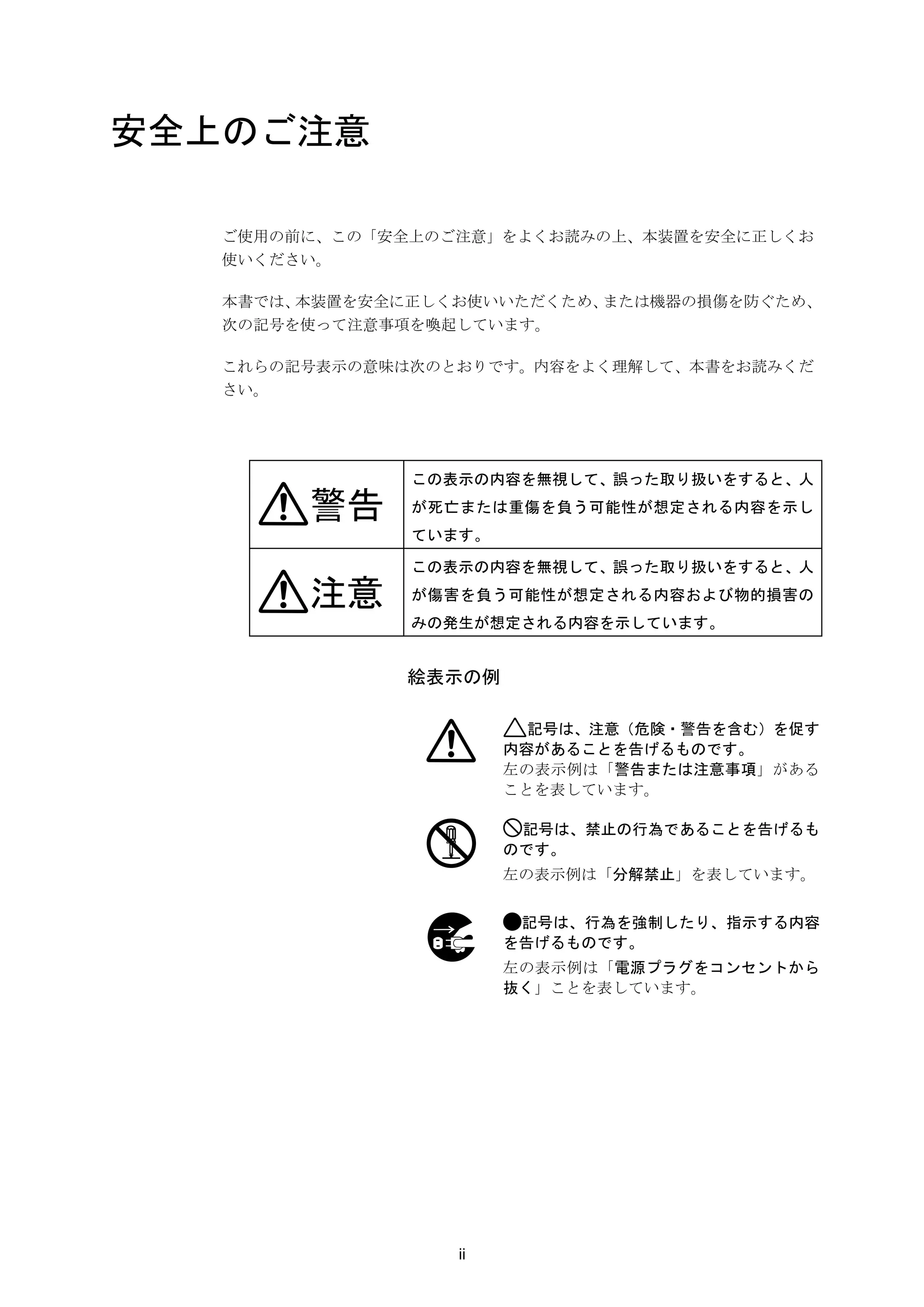
   本書では、本装置を安全に正しくお使いいただくため、または機器の損傷を防ぐため、
   次の記号を使って注意事項を喚起しています。

   これらの記号表示の意味は次のとおりです。内容をよく理解して、本書をお読みくだ
   さい。


               この表示の内容を無視して、誤った取り扱いをすると、人

        警告     が死亡または重傷を負う可能性が想定される内容を示し
               ています。

               この表示の内容を無視して、誤った取り扱いをすると、人

        注意     が傷害を負う可能性が想定される内容および物的損害の
               みの発生が想定される内容を示しています。


               絵表示の例

                         記号は、注意(危険・警告を含む)を促す
                       内容があることを告げるものです。
                       左の表示例は「警告または注意事項」がある
                       ことを表しています。

                        記号は、禁止の行為であることを告げるも
                       のです。
                       左の表示例は「分解禁止」を表しています。


                        記号は、行為を強制したり、指示する内容
                       を告げるものです。
                       左の表示例は「電源プラグをコンセントから
                       抜く」ことを表しています。


                  ii
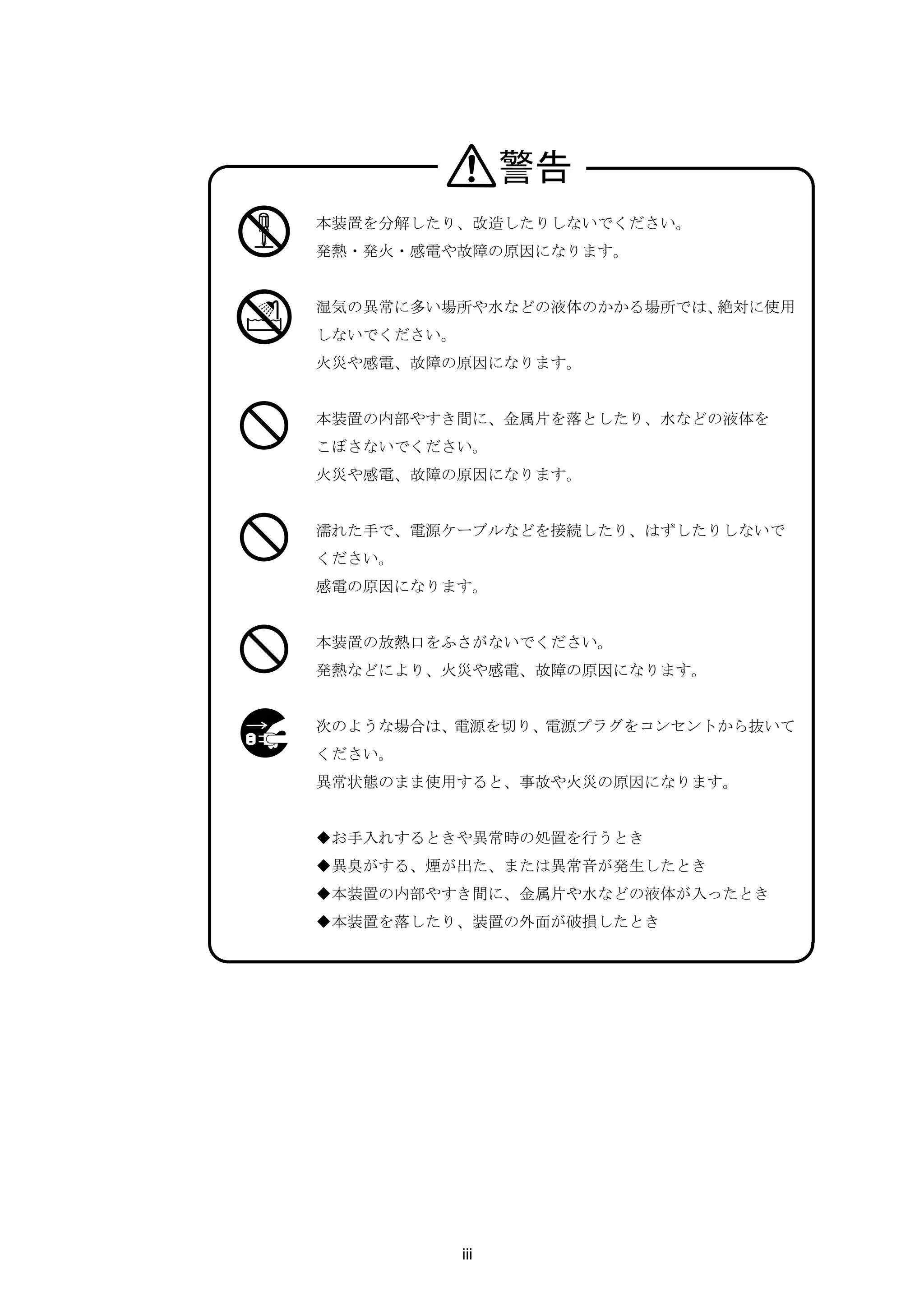
警告
本装置を分解したり、改造したりしないでください。
発熱・発火・感電や故障の原因になります。


湿気の異常に多い場所や水などの液体のかかる場所では、絶対に使用
しないでください。
火災や感電、故障の原因になります。


本装置の内部やすき間に、金属片を落としたり、水などの液体を
こぼさないでください。
火災や感電、故障の原因になります。


濡れた手で、電源ケーブルなどを接続したり、はずしたりしないで
ください。
感電の原因になります。


本装置の放熱口をふさがないでください。
発熱などにより、火災や感電、故障の原因になります。


次のような場合は、電源を切り、電源プラグをコンセントから抜いて
ください。
異常状態のまま使用すると、事故や火災の原因になります。


◆お手入れするときや異常時の処置を行うとき
◆異臭がする、煙が出た、または異常音が発生したとき
◆本装置の内部やすき間に、金属片や水などの液体が入ったとき
◆本装置を落したり、装置の外面が破損したとき


            iii
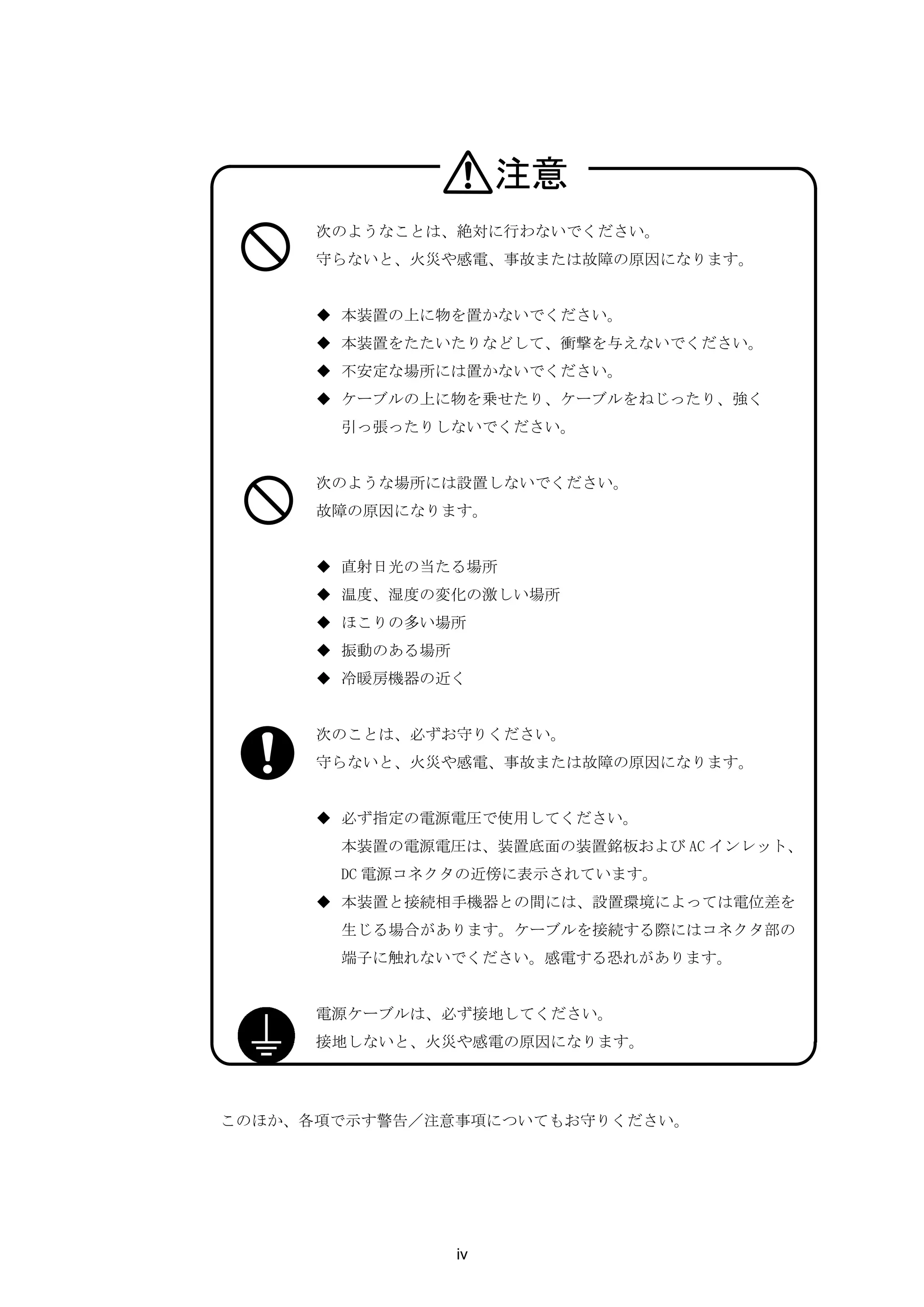
注意
      次のようなことは、絶対に行わないでください。
      守らないと、火災や感電、事故または故障の原因になります。


      ◆ 本装置の上に物を置かないでください。
      ◆ 本装置をたたいたりなどして、衝撃を与えないでください。
      ◆ 不安定な場所には置かないでください。
      ◆ ケーブルの上に物を乗せたり、ケーブルをねじったり、強く
       引っ張ったりしないでください。


      次のような場所には設置しないでください。
      故障の原因になります。


      ◆ 直射日光の当たる場所
      ◆ 温度、湿度の変化の激しい場所
      ◆ ほこりの多い場所
      ◆ 振動のある場所
      ◆ 冷暖房機器の近く


      次のことは、必ずお守りください。
      守らないと、火災や感電、事故または故障の原因になります。


      ◆ 必ず指定の電源電圧で使用してください。
       本装置の電源電圧は、装置底面の装置銘板および AC インレット、
       DC 電源コネクタの近傍に表示されています。
      ◆ 本装置と接続相手機器との間には、設置環境によっては電位差を
       生じる場合があります。ケーブルを接続する際にはコネクタ部の
       端子に触れないでください。感電する恐れがあります。


      電源ケーブルは、必ず接地してください。
      接地しないと、火災や感電の原因になります。


このほか、各項で示す警告/注意事項についてもお守りください。


                  iv
取り扱い上の注意
    ●   システムソフトウェア動作中は外部 CF カードを抜かないでください。動作
        中に外部 CF カードを抜いた場合は、本装置の動作の保証外となります。


    ●   次のようなことは、絶対に行わないでください。
        本装置や外部 CF カードの故障またはカードの内容が破壊される原因になり
        ます。
        ・ 正常に装置が動作しているときは、カードアクセスランプが点灯してい
         るときに、本装置の電源を OFF にしたり電源ケーブルを抜去する等して
         電源 OFF 状態にしたり、RESET スイッチを押したりしないでください。
         電源を OFF にする場合は、shutdown コマンドを実行してシステムソフ
         トウェアを終了させ、コンソールに MON>プロンプトが表示されるのを
         確認するか、または本装置前面の STATUS3 ランプが点灯するのを待っ
         てから、電源を OFF にしてください。
        ・ 外部 CF カードのコネクタ部に、手や金属で直接触れないでください。


    ●   外部 CF カードを抜くときは、イジェクトボタンを押して抜いてください。


    ●   RESET スイッチを押すときはボールペンの先など、先の細いもので押して
        ください。ただし、シャープペンシルは使用しないでください。シャープ
        ペンシルの芯が折れて中に入ると、故障の原因となります。


    ●   本装置の電源スイッチを OFF にしたり電源ケーブルを抜去する等して電源
        OFF 状態にした後、再度電源スイッチを ON にしたり電源ケーブルを挿入
        する等して電源 ON 状態にする場合には、10 秒以上経過してから電源 ON
        状態にしてください。あまりはやく電源 ON 状態にすると、正常に本装置が
        リセットされない場合があります。


    ●   放熱口は、約2ヶ月に1回は掃除機などで清掃してください。


    ●   本装置の外装が汚れたときは、水で薄めた中性洗剤に柔らかい布を浸し、
        よくしぼってから拭き取り、さらに乾いた布で拭いてください。


                    v
第三者ソフトウェアライセンス
  本装置のソフトウェアの一部には、下記のソフトウェアを利用しています。下記のソフ
  トウェアのライセンスの詳細は、「付録 A      第三者ソフトウェアライセンス」をご覧くだ
  さい。
  Compat-openldap   gzip                openssh-clients
  MAKEDEV           hal                 openssh-server
  SysVinit          hotplug             openssl
  Tzdata            httpd               openssl096b
  apr               httpd-suexec        pam
  apr-util          hwdata              pam_tacplus
  aspell            info                passwd
  aspell-en         initscripts         patch
  basesystem        iproute             pciutils
  bash              iputils             pcmcia-cs
  beecrypt          kernel              pcre
  busybox           krb5-libs           perl
  bzip2             kudzu               perl-Filter
  bzip2-libs        less                popt
  chkconfig         libacl              procps
  coreutils         libattr             psmisc
  cpio              libcap              python
  cracklib          libgcc              readline
  cracklib-dicts    libidn              rpm
  cyrus-sasl        libpcap             rpm-libs
  cyrus-sasl-md     libsepol            sed
  db4               libstdc++           shadow-utils
  dbus              libtermcap          slang
  dbus-glib         libtool-libs        sysklogd
  dev               libuser             tar
  device-mapper     linux               tcl
  dhclient          logrotate           tclx
  diffutils         lvm2                tcpdump
  e2fsprogs         mailcap             tcp_wrappers
  elfutils-libelf   mailx               telnet
  ethtool           mgetty              telnet-server
  expat             mingetty            termcap
  file              mkinitrd            tk
  findutils         mktemp              traceroute
  fontconfig        module-init-tools   udev
  freeradius        ncurses             usbutils
  freetype          net-snmp            util-linux
  ftp               net-snmp-libs       vim-common
  gawk              net-snmp-utils      vim-minimal
  gdbm              net-tools           vixie-cron
  glib              newt                vsftpd
  glib2             newt-perl           wget
  glibc             ntp                 xinetd
  gmp               openldap            zlib
  grep              openssh


                     vi
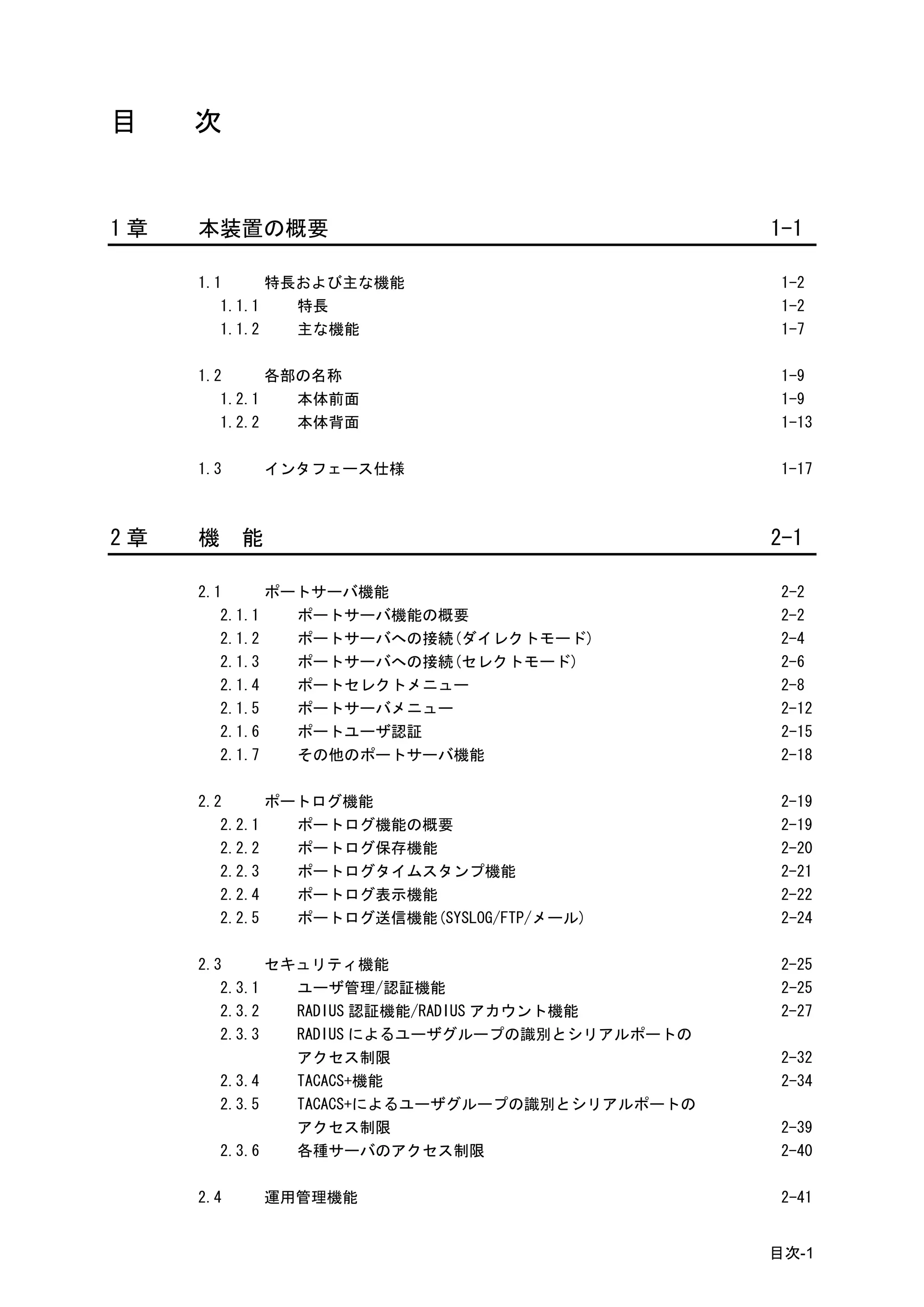
目    次


1章   本装置の概要                                     1-1

     1.1      特長および主な機能                          1-2
        1.1.1   特長                               1-2
        1.1.2   主な機能                             1-7

     1.2      各部の名称                              1-9
        1.2.1   本体前面                             1-9
        1.2.2   本体背面                             1-13

     1.3       インタフェース仕様                         1-17


2章   機     能                                    2-1

     2.1      ポートサーバ機能                           2-2
        2.1.1   ポートサーバ機能の概要                      2-2
        2.1.2   ポートサーバへの接続(ダイレクトモード)             2-4
        2.1.3   ポートサーバへの接続(セレクトモード)              2-6
        2.1.4   ポートセレクトメニュー                      2-8
        2.1.5   ポートサーバメニュー                       2-12
        2.1.6   ポートユーザ認証                         2-15
        2.1.7   その他のポートサーバ機能                     2-18

     2.2      ポートログ機能                            2-19
        2.2.1   ポートログ機能の概要                       2-19
        2.2.2   ポートログ保存機能                        2-20
        2.2.3   ポートログタイムスタンプ機能                   2-21
        2.2.4   ポートログ表示機能                        2-22
        2.2.5   ポートログ送信機能(SYSLOG/FTP/メール)        2-24

     2.3      セキュリティ機能                           2-25
        2.3.1   ユーザ管理/認証機能                       2-25
        2.3.2   RADIUS 認証機能/RADIUS アカウント機能       2-27
        2.3.3   RADIUS によるユーザグループの識別とシリアルポートの
                アクセス制限                           2-32
        2.3.4   TACACS+機能                        2-34
        2.3.5   TACACS+によるユーザグループの識別とシリアルポートの
                アクセス制限                           2-39
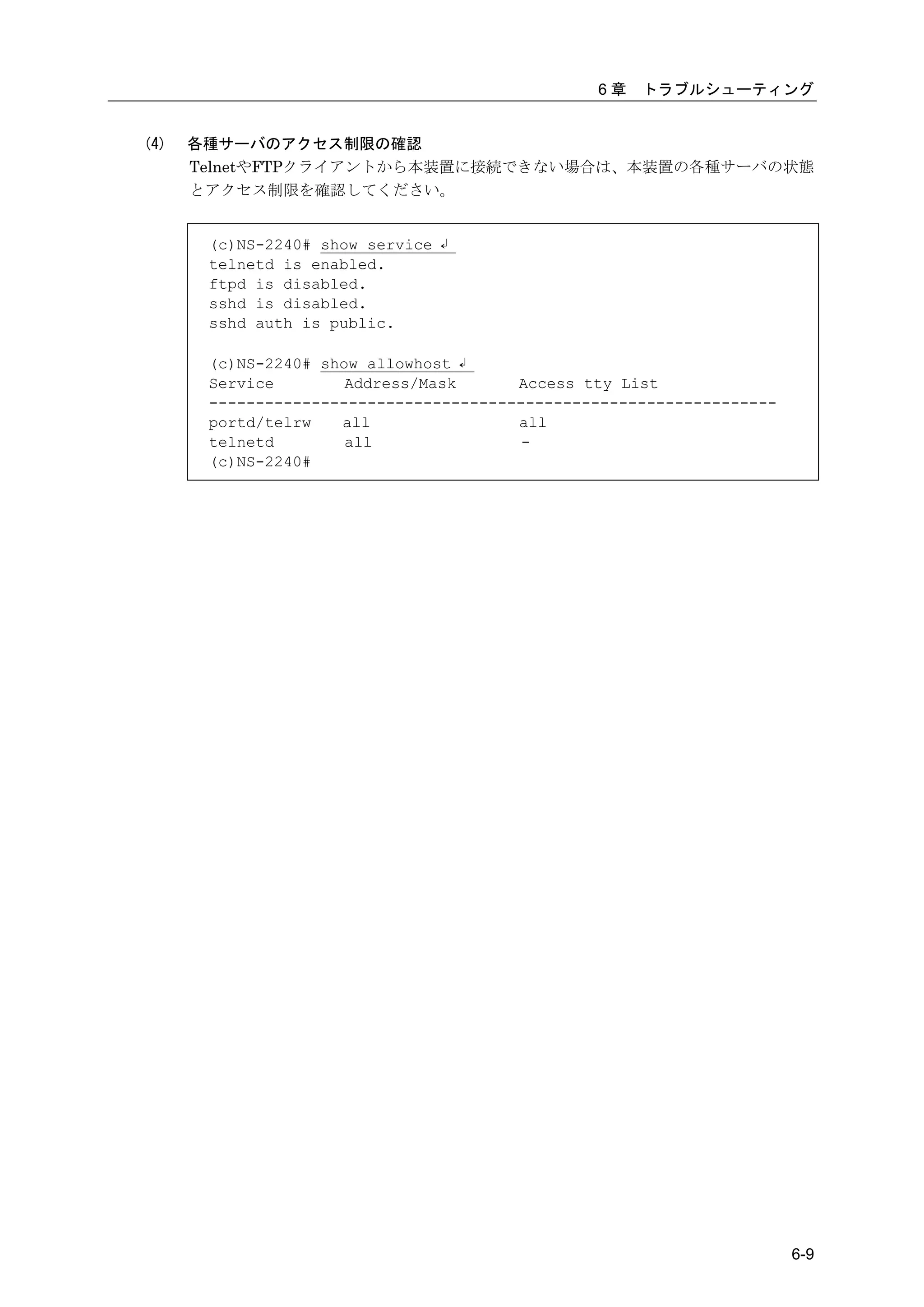
        2.3.6   各種サーバのアクセス制限                     2-40

     2.4       運用管理機能                            2-41


                                                目次-1
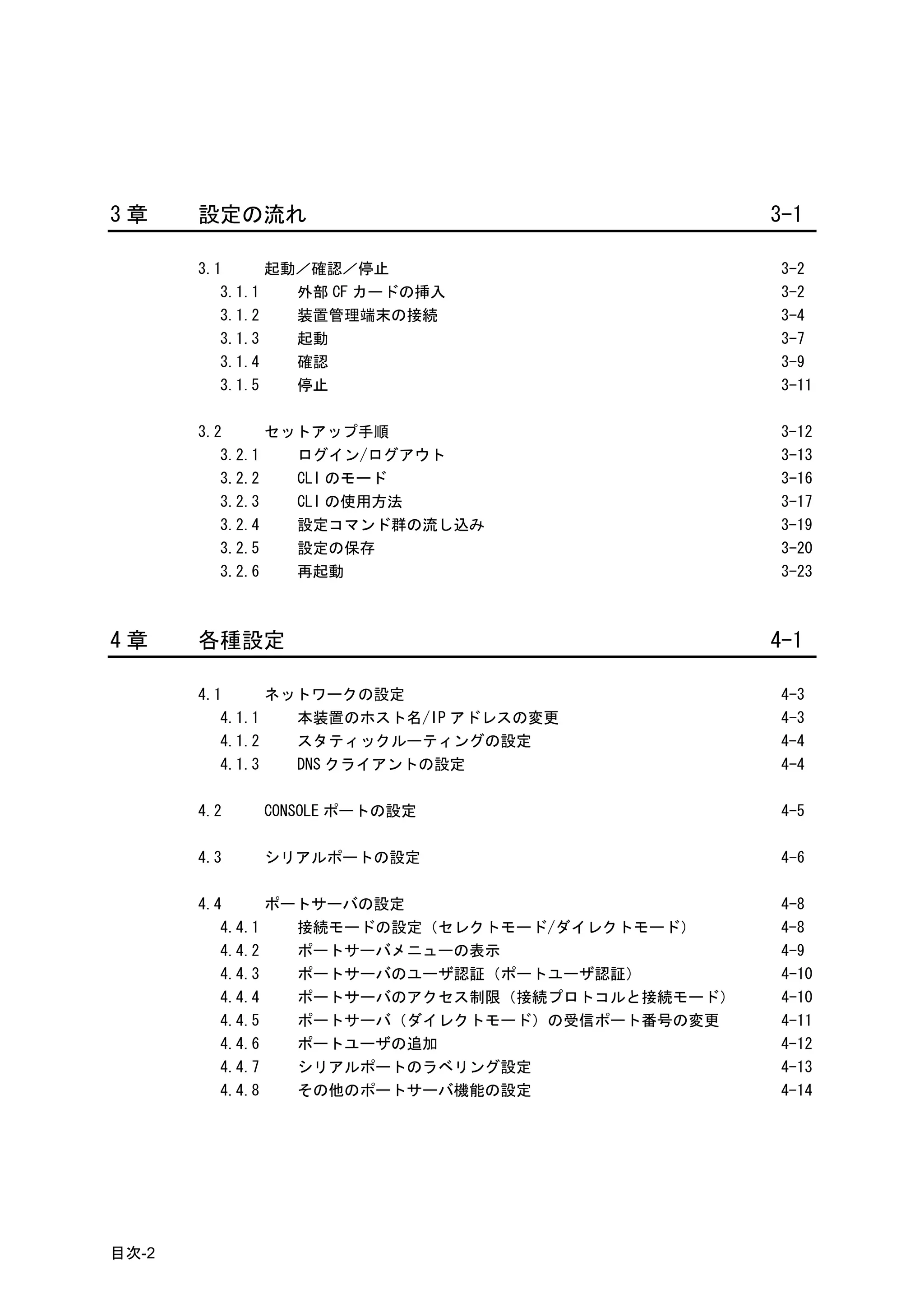
3章     設定の流れ                                     3-1

       3.1      起動/確認/停止                         3-2
          3.1.1   外部 CF カードの挿入                   3-2
          3.1.2   装置管理端末の接続                      3-4
          3.1.3   起動                             3-7
          3.1.4   確認                             3-9
          3.1.5   停止                             3-11

       3.2      セットアップ手順                         3-12
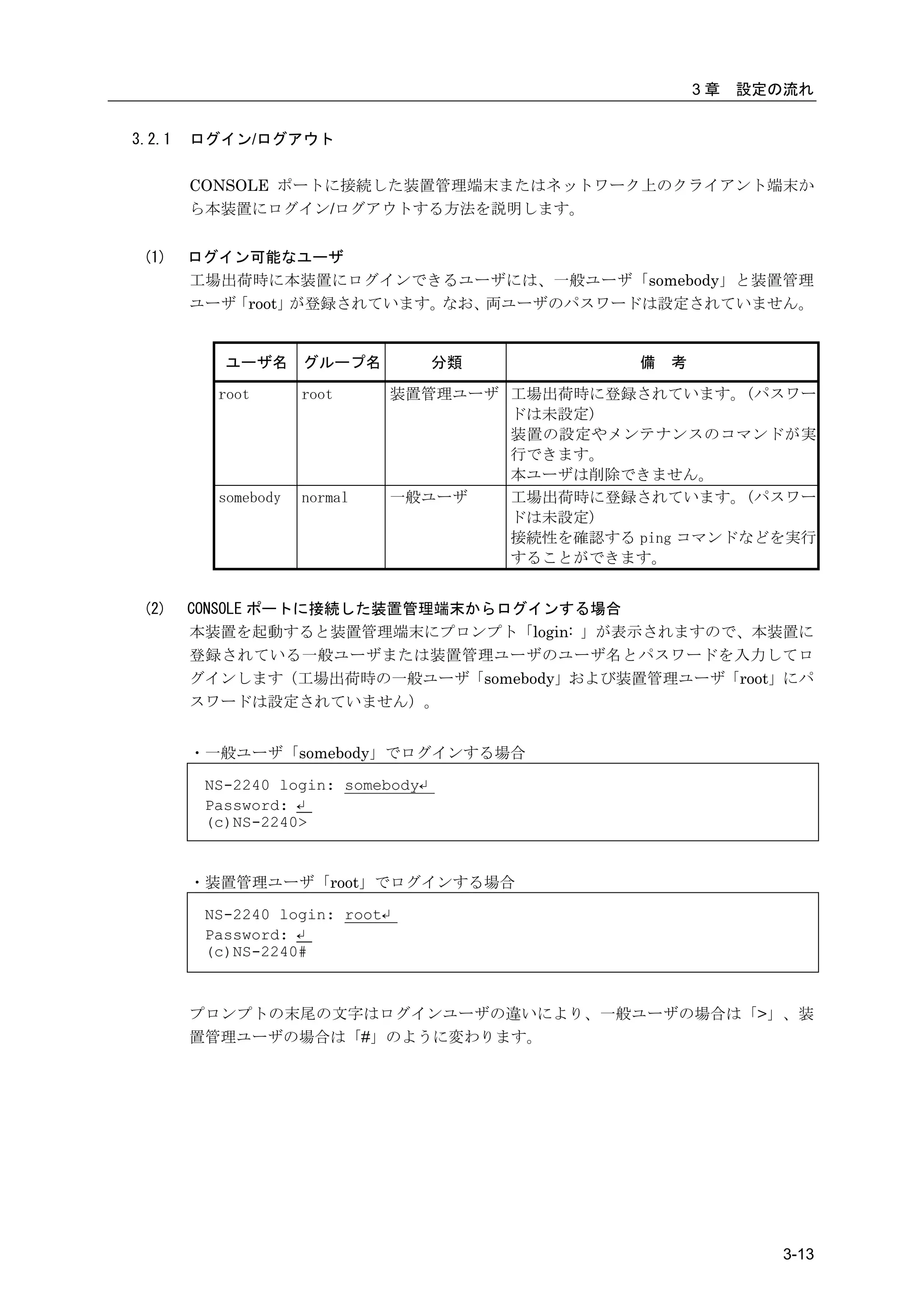
          3.2.1   ログイン/ログアウト                     3-13
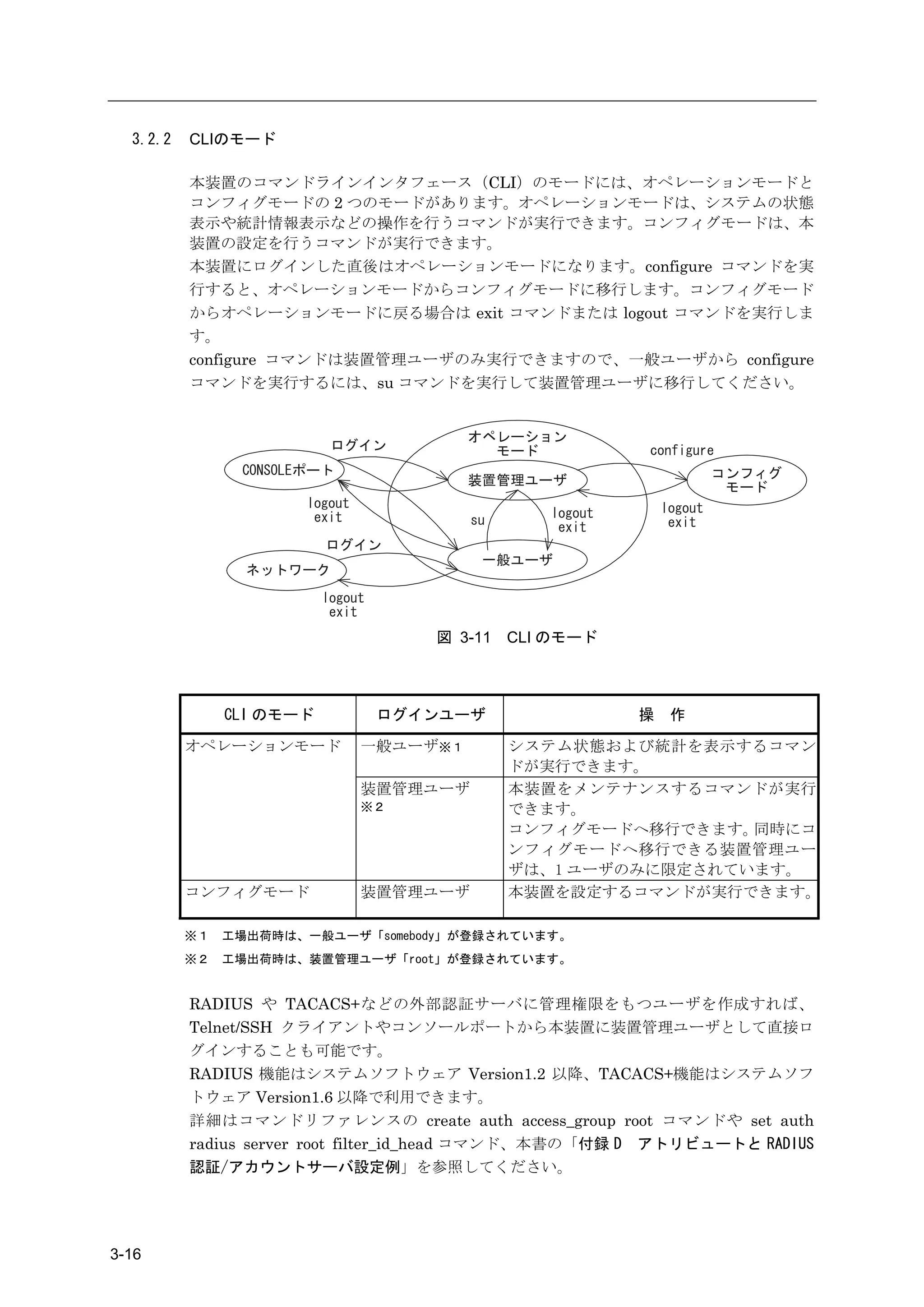
          3.2.2   CLI のモード                       3-16
          3.2.3   CLI の使用方法                      3-17
          3.2.4   設定コマンド群の流し込み                   3-19
          3.2.5   設定の保存                          3-20
          3.2.6   再起動                            3-23


4章     各種設定                                      4-1

       4.1      ネットワークの設定                        4-3
          4.1.1   本装置のホスト名/IP アドレスの変更            4-3
          4.1.2   スタティックルーティングの設定                4-4
          4.1.3   DNS クライアントの設定                  4-4

       4.2   CONSOLE ポートの設定                      4-5

       4.3   シリアルポートの設定                          4-6

       4.4      ポートサーバの設定                        4-8
          4.4.1   接続モードの設定(セレクトモード/ダイレクトモード)     4-8
          4.4.2   ポートサーバメニューの表示                  4-9
          4.4.3   ポートサーバのユーザ認証(ポートユーザ認証)         4-10
          4.4.4   ポートサーバのアクセス制限(接続プロトコルと接続モード)   4-10
          4.4.5   ポートサーバ(ダイレクトモード)の受信ポート番号の変更    4-11
          4.4.6   ポートユーザの追加                      4-12
          4.4.7   シリアルポートのラベリング設定                4-13
          4.4.8   その他のポートサーバ機能の設定                4-14


目次-2
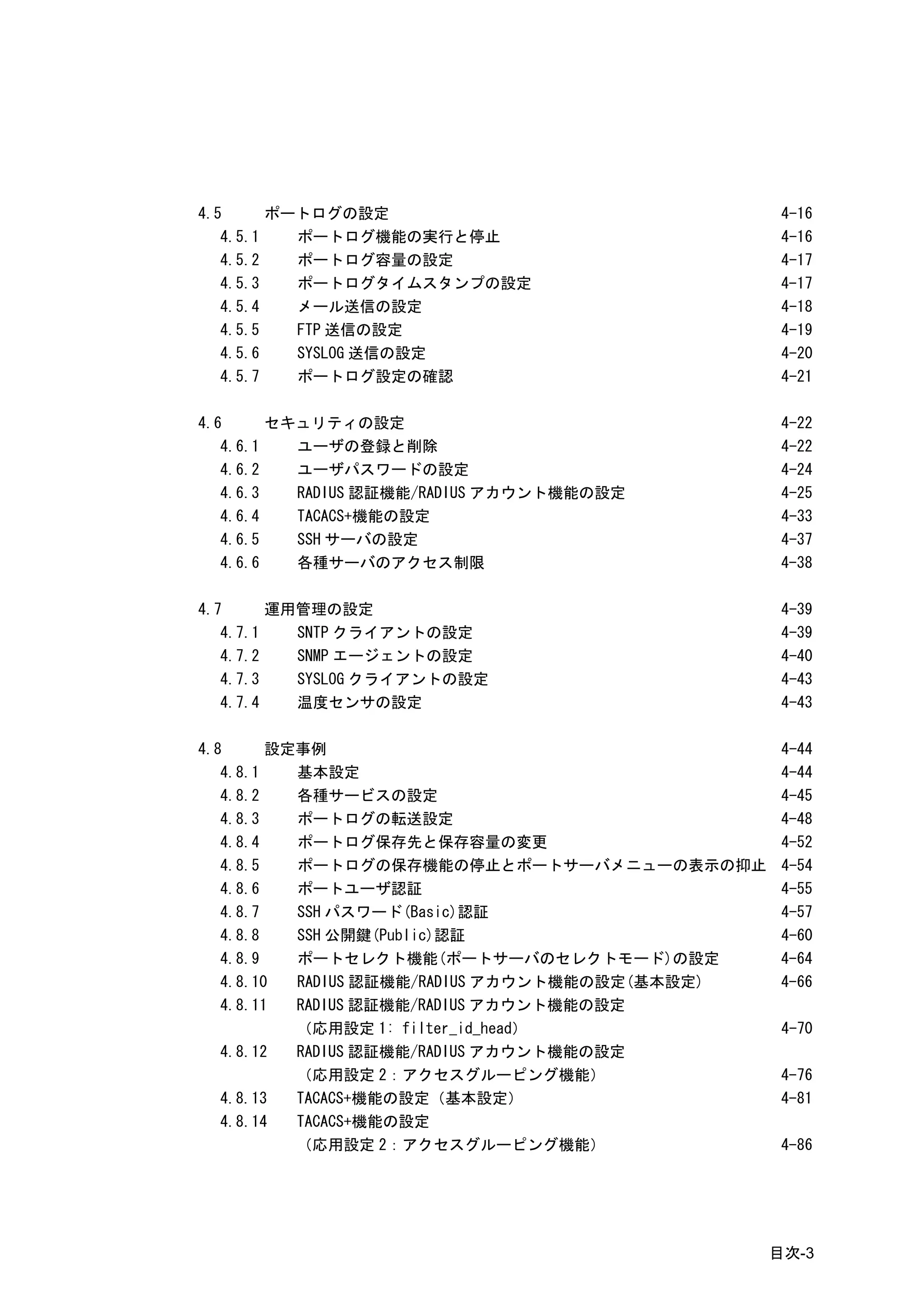
4.5      ポートログの設定                                 4-16
   4.5.1   ポートログ機能の実行と停止                          4-16
   4.5.2   ポートログ容量の設定                             4-17
   4.5.3   ポートログタイムスタンプの設定                        4-17
   4.5.4   メール送信の設定                               4-18
   4.5.5   FTP 送信の設定                              4-19
   4.5.6   SYSLOG 送信の設定                           4-20
   4.5.7   ポートログ設定の確認                             4-21

4.6      セキュリティの設定                                4-22
   4.6.1   ユーザの登録と削除                              4-22
   4.6.2   ユーザパスワードの設定                            4-24
   4.6.3   RADIUS 認証機能/RADIUS アカウント機能の設定          4-25
   4.6.4   TACACS+機能の設定                           4-33
   4.6.5   SSH サーバの設定                             4-37
   4.6.6   各種サーバのアクセス制限                           4-38

4.7      運用管理の設定                                  4-39
   4.7.1   SNTP クライアントの設定                         4-39
   4.7.2   SNMP エージェントの設定                         4-40
   4.7.3   SYSLOG クライアントの設定                       4-43
   4.7.4   温度センサの設定                               4-43

4.8      設定事例                                     4-44
   4.8.1   基本設定                                   4-44
   4.8.2   各種サービスの設定                              4-45
   4.8.3   ポートログの転送設定                             4-48
   4.8.4   ポートログ保存先と保存容量の変更                       4-52
   4.8.5   ポートログの保存機能の停止とポートサーバメニューの表示の抑止         4-54
   4.8.6   ポートユーザ認証                               4-55
   4.8.7   SSH パスワード(Basic)認証                     4-57
   4.8.8   SSH 公開鍵(Public)認証                      4-60
   4.8.9   ポートセレクト機能(ポートサーバのセレクトモード)の設定           4-64
   4.8.10  RADIUS 認証機能/RADIUS アカウント機能の設定(基本設定)    4-66
   4.8.11  RADIUS 認証機能/RADIUS アカウント機能の設定
           (応用設定 1: filter_id_head)               4-70
   4.8.12  RADIUS 認証機能/RADIUS アカウント機能の設定
           (応用設定 2:アクセスグルーピング機能)                  4-76
   4.8.13  TACACS+機能の設定(基本設定)                     4-81
   4.8.14  TACACS+機能の設定
           (応用設定 2:アクセスグルーピング機能)                  4-86


                                                 目次-3
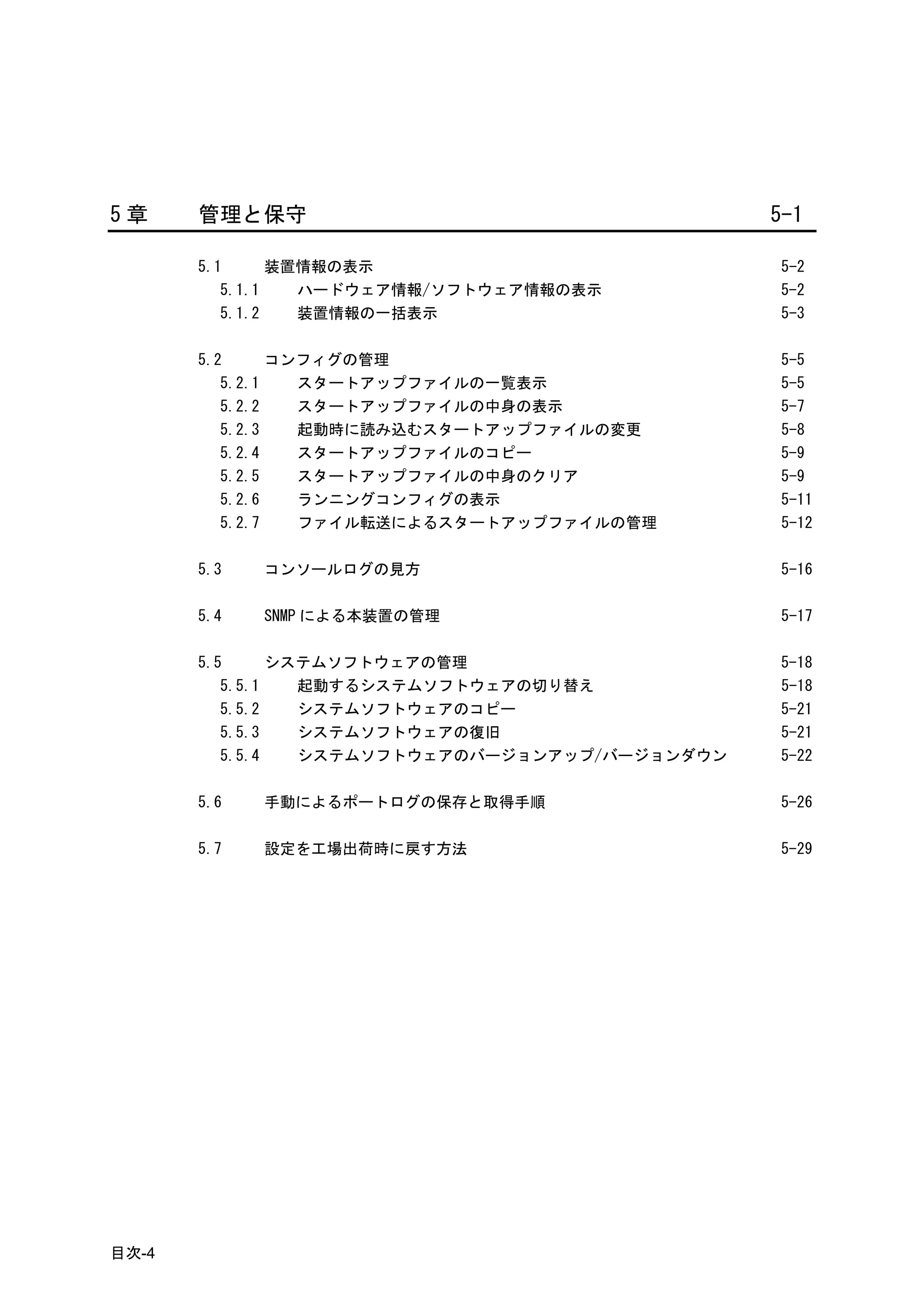
5章     管理と保守                                     5-1

       5.1      装置情報の表示                          5-2
          5.1.1   ハードウェア情報/ソフトウェア情報の表示           5-2
          5.1.2   装置情報の一括表示                      5-3

       5.2      コンフィグの管理                         5-5
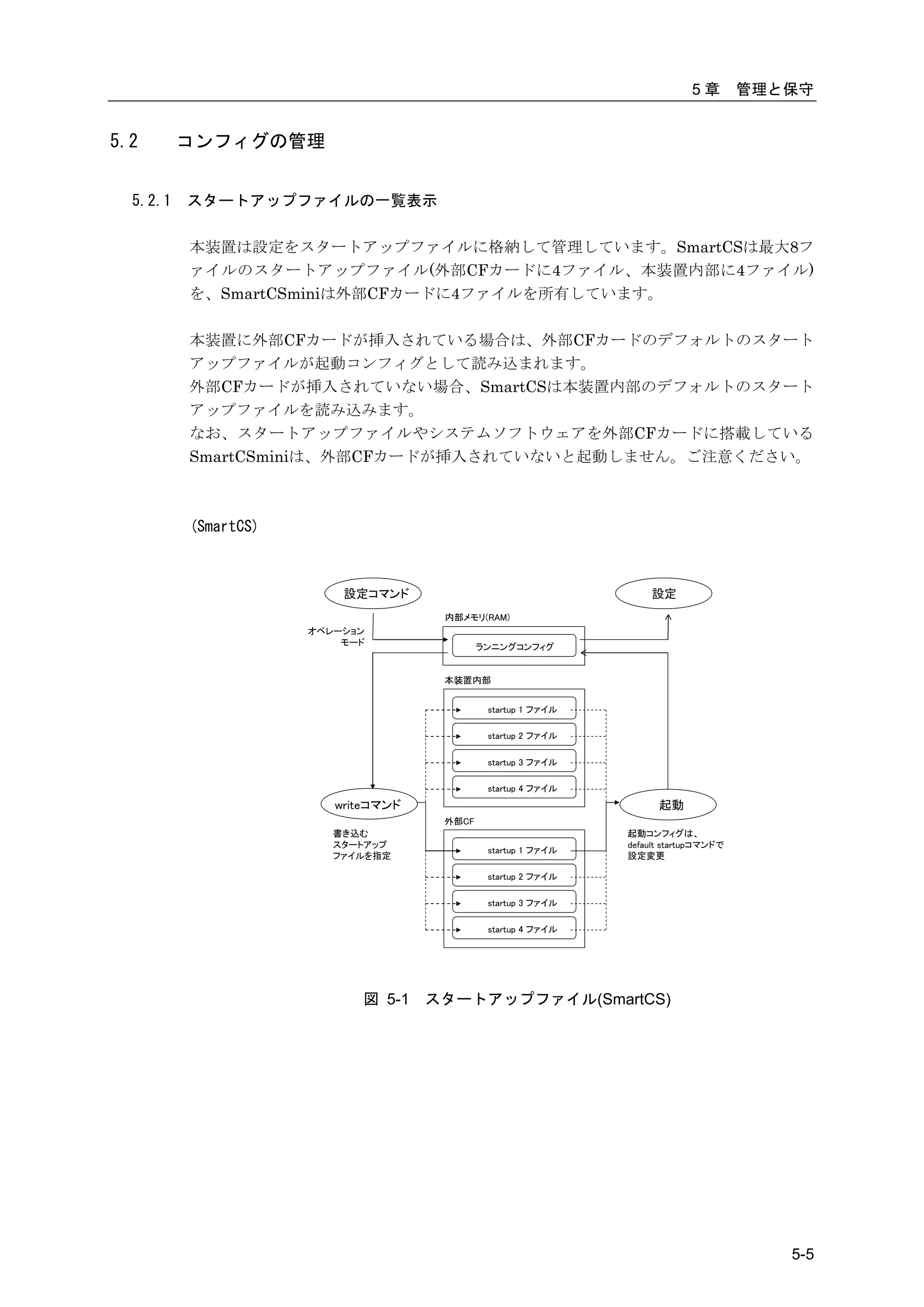
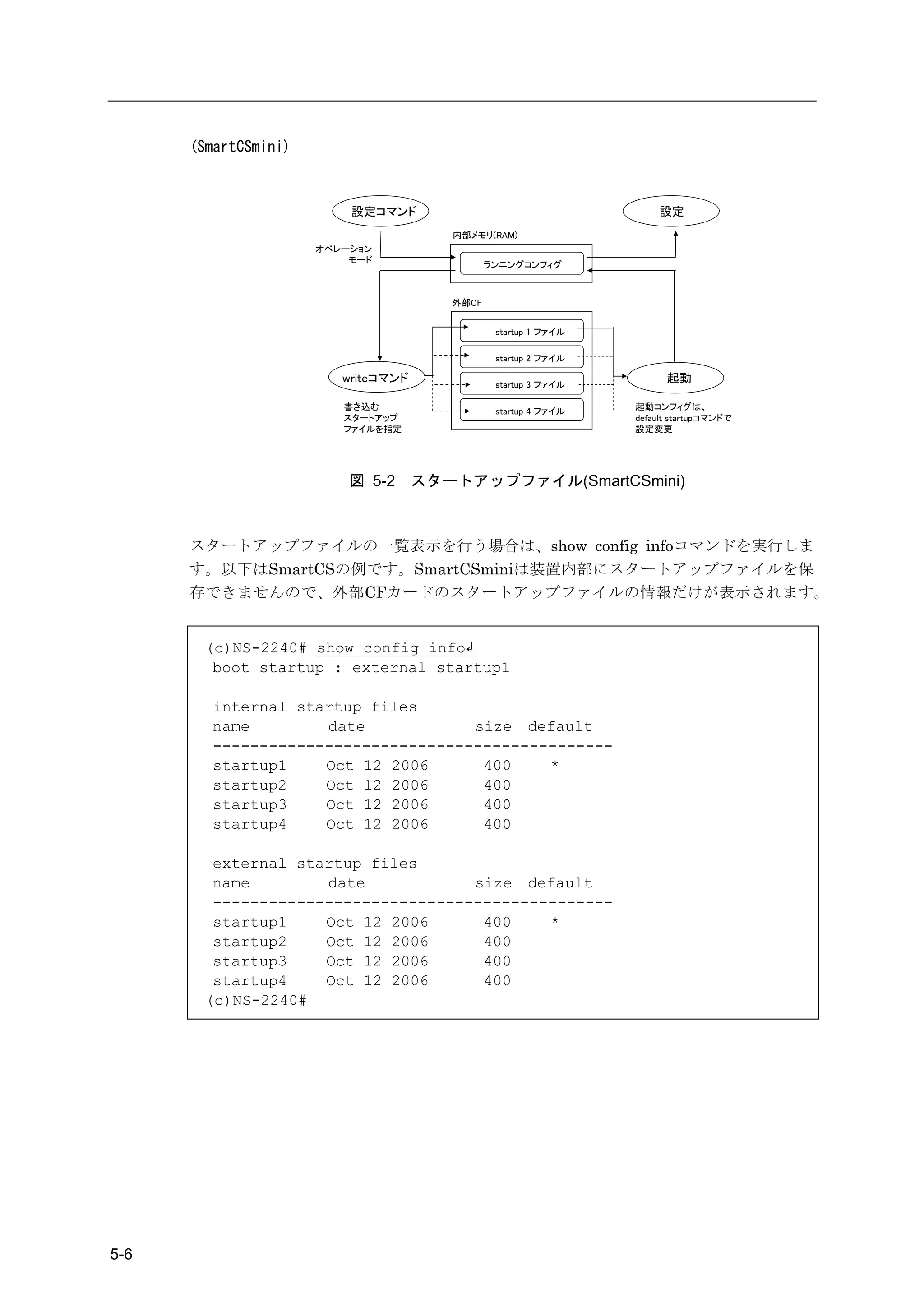
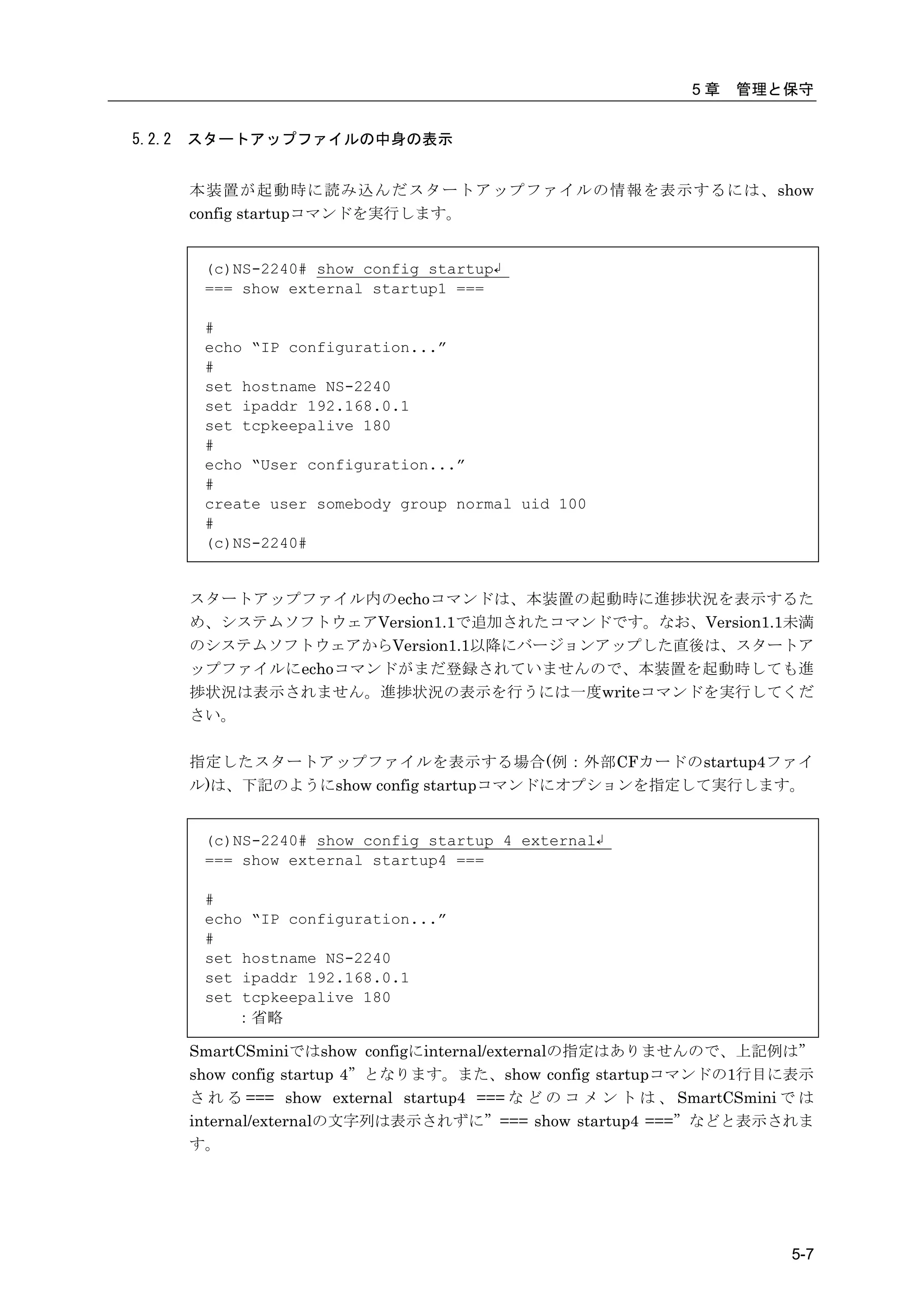
          5.2.1   スタートアップファイルの一覧表示               5-5
          5.2.2   スタートアップファイルの中身の表示              5-7
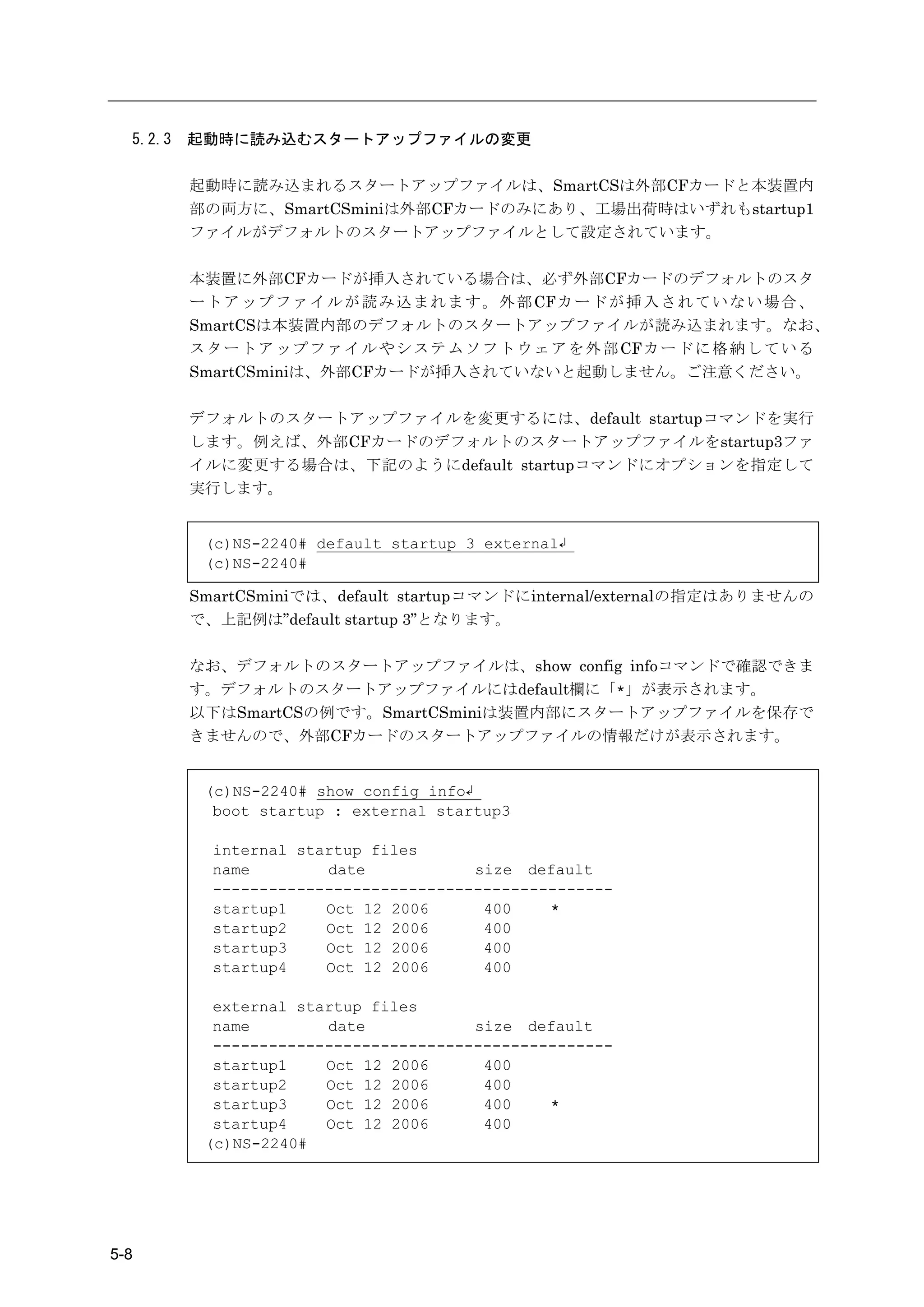
          5.2.3   起動時に読み込むスタートアップファイルの変更         5-8
          5.2.4   スタートアップファイルのコピー                5-9
          5.2.5   スタートアップファイルの中身のクリア             5-9
          5.2.6   ランニングコンフィグの表示                  5-11
          5.2.7   ファイル転送によるスタートアップファイルの管理        5-12

       5.3   コンソールログの見方                          5-16

       5.4   SNMP による本装置の管理                      5-17

       5.5      システムソフトウェアの管理                    5-18
          5.5.1   起動するシステムソフトウェアの切り替え            5-18
          5.5.2   システムソフトウェアのコピー                 5-21
          5.5.3   システムソフトウェアの復旧                  5-21
          5.5.4   システムソフトウェアのバージョンアップ/バージョンダウン   5-22

       5.6   手動によるポートログの保存と取得手順                  5-26

       5.7   設定を工場出荷時に戻す方法                       5-29


目次-4
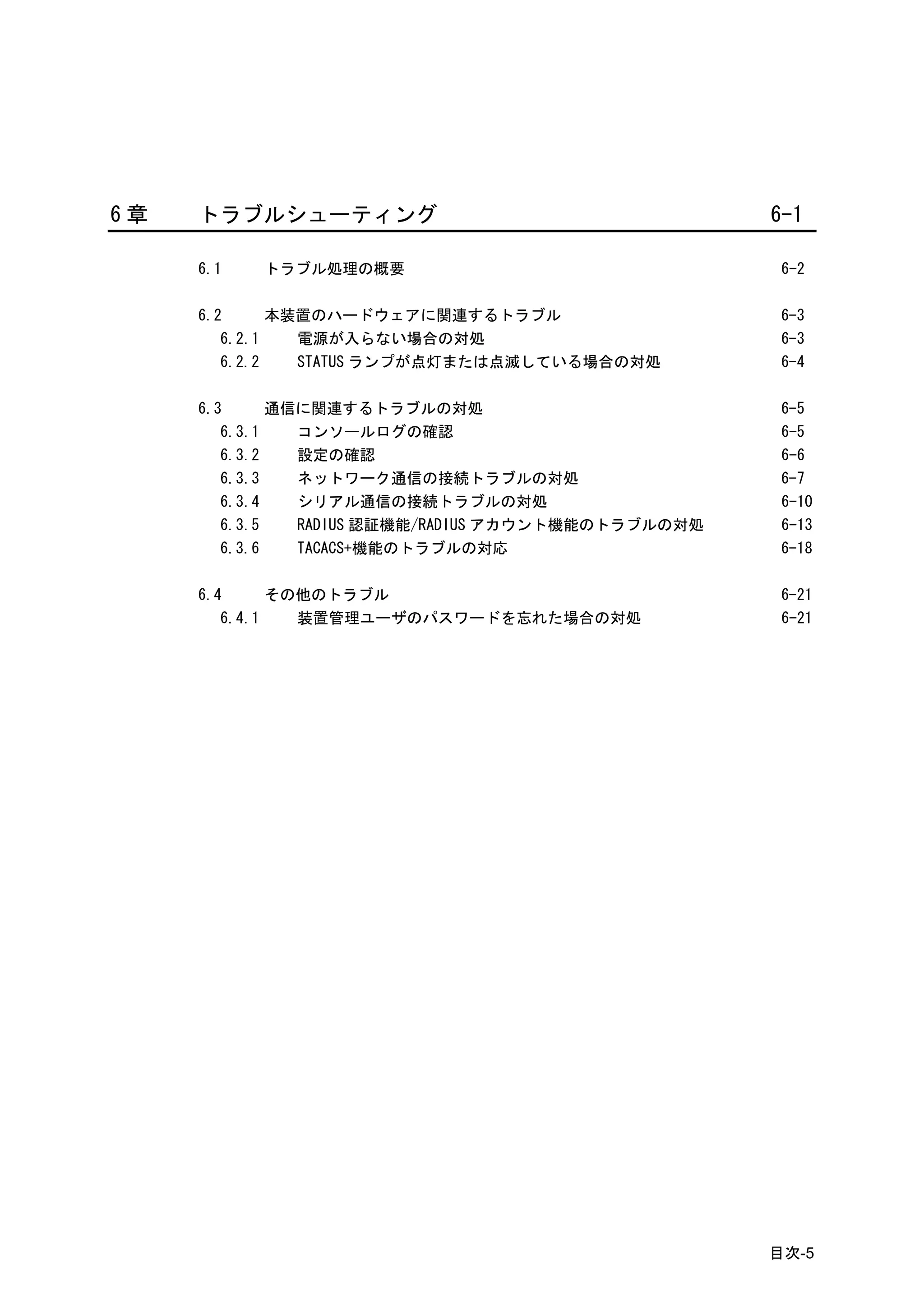
6章   トラブルシューティング                                     6-1

     6.1   トラブル処理の概要                                  6-2

     6.2      本装置のハードウェアに関連するトラブル                     6-3
        6.2.1   電源が入らない場合の対処                          6-3
        6.2.2   STATUS ランプが点灯または点滅している場合の対処           6-4

     6.3      通信に関連するトラブルの対処                          6-5
        6.3.1   コンソールログの確認                            6-5
        6.3.2   設定の確認                                 6-6
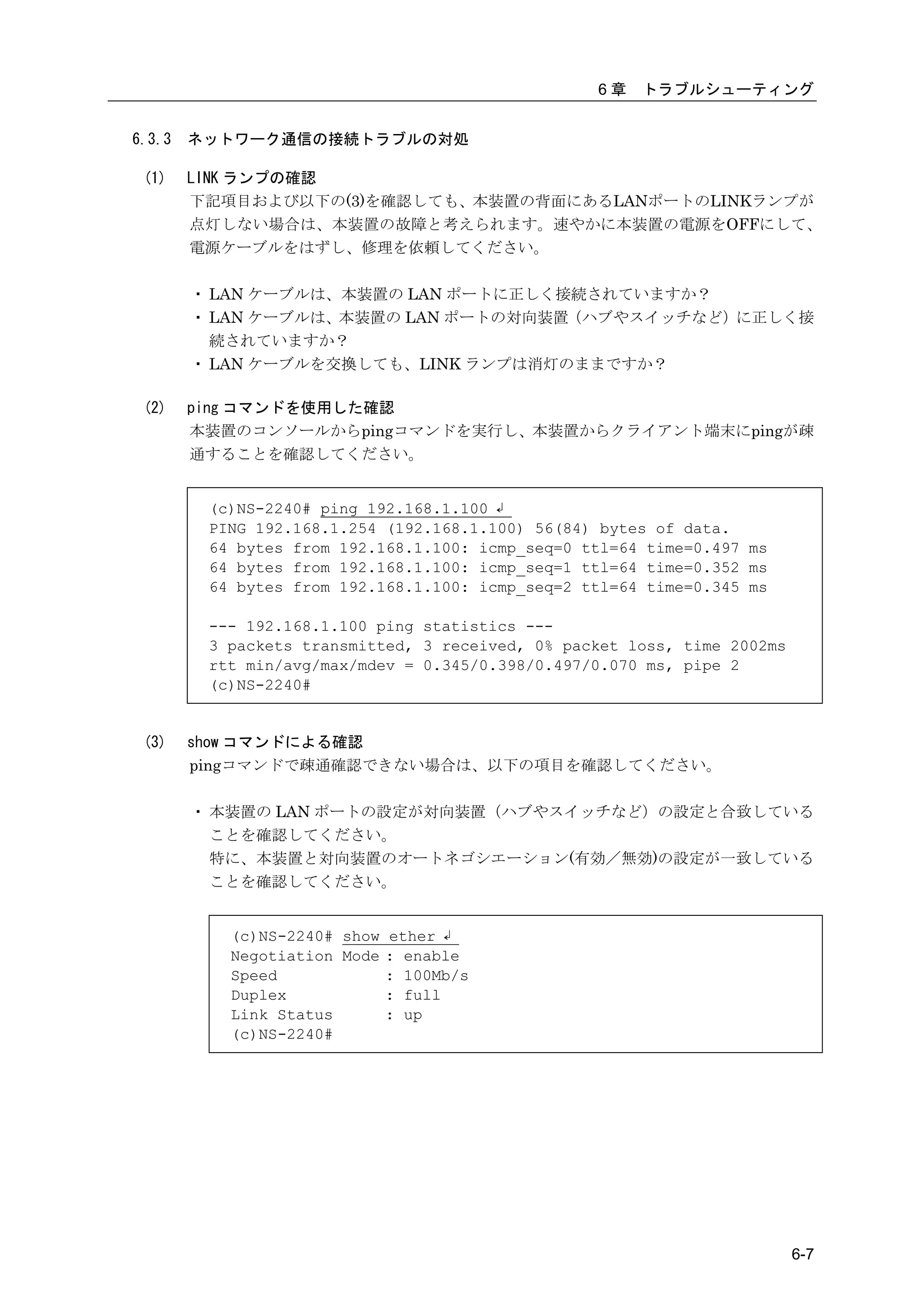
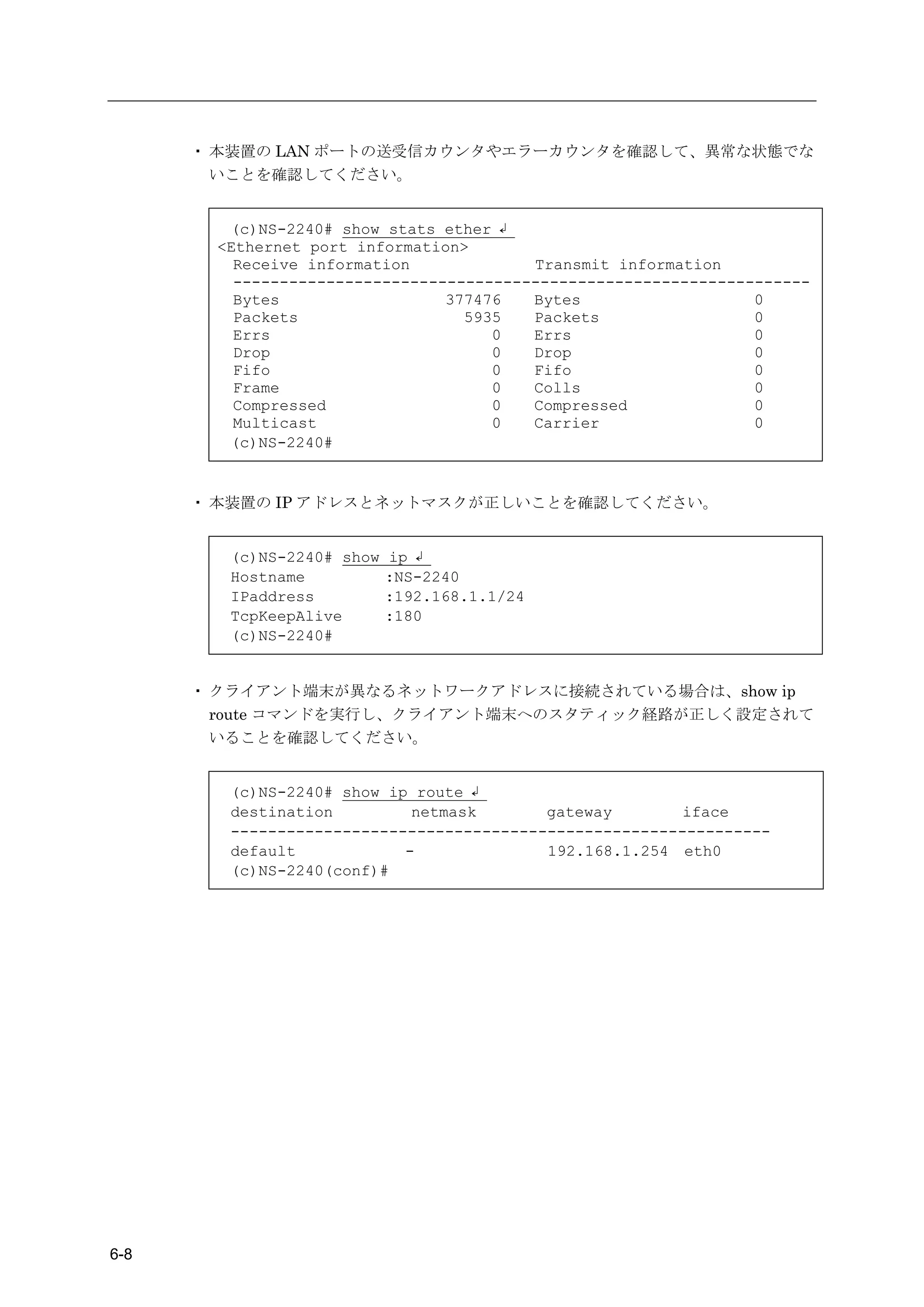
        6.3.3   ネットワーク通信の接続トラブルの対処                    6-7
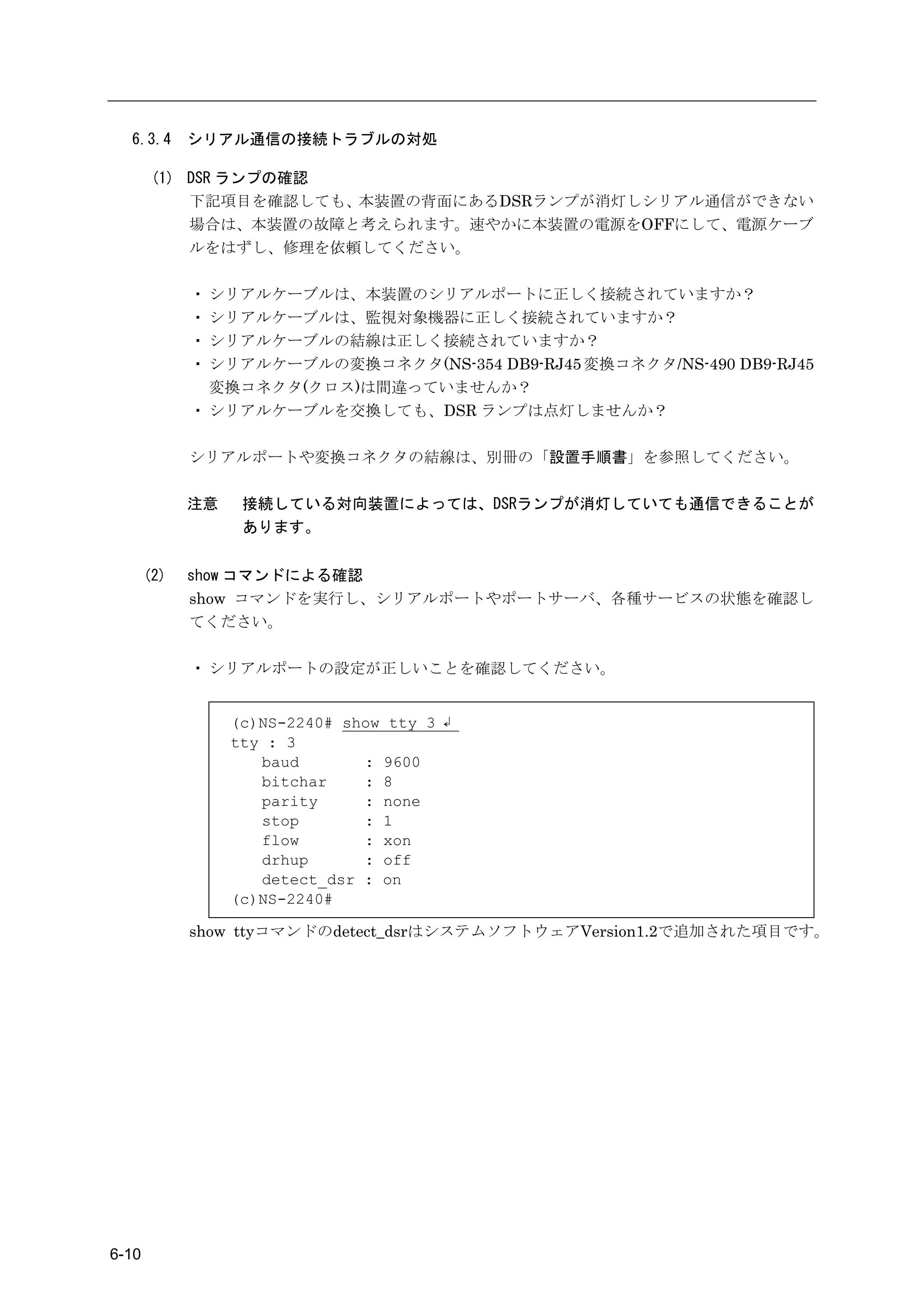
        6.3.4   シリアル通信の接続トラブルの対処                      6-10
        6.3.5   RADIUS 認証機能/RADIUS アカウント機能のトラブルの対処    6-13
        6.3.6   TACACS+機能のトラブルの対応                     6-18

     6.4      その他のトラブル                                6-21
        6.4.1   装置管理ユーザのパスワードを忘れた場合の対処                6-21


                                                     目次-5
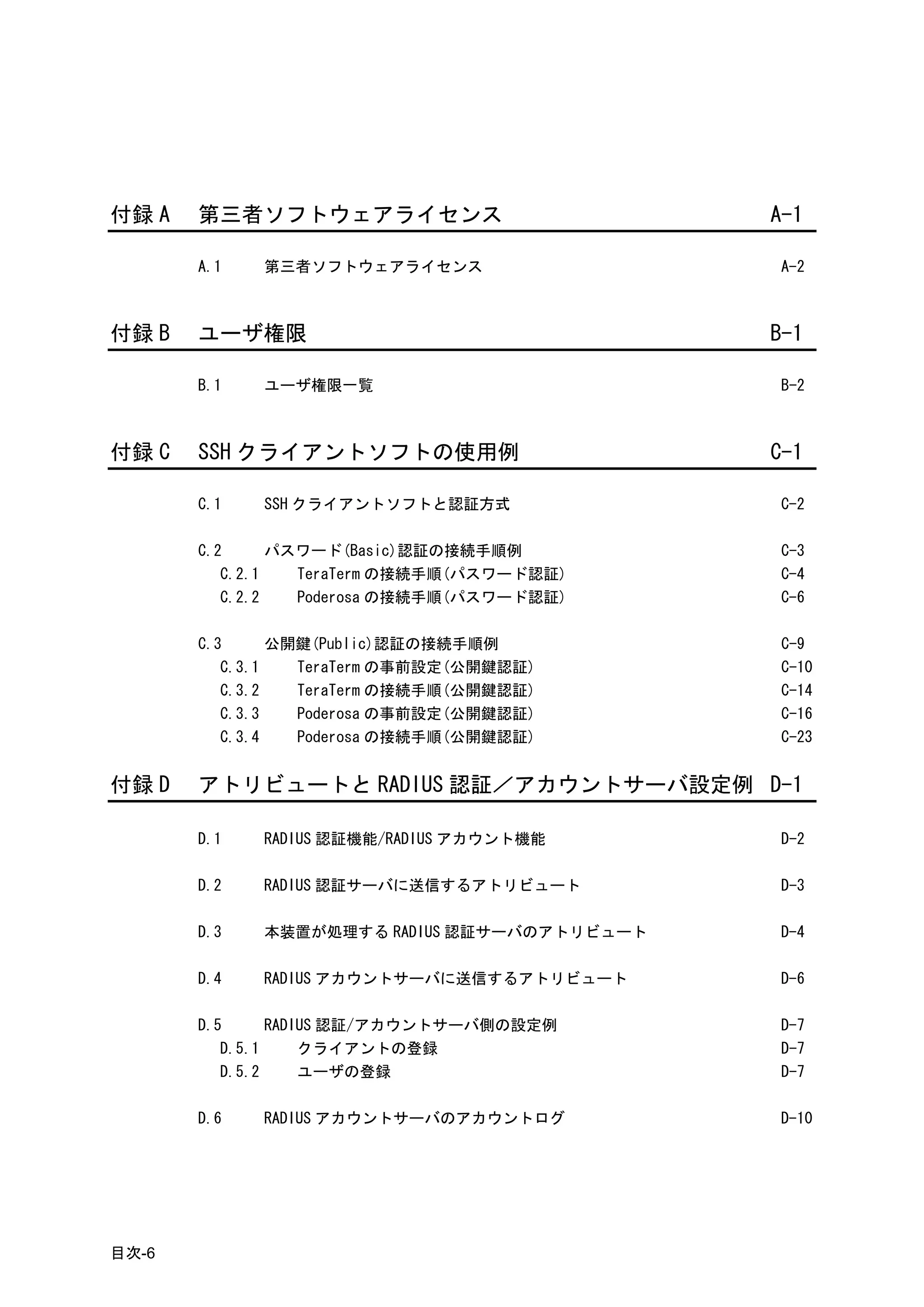
付録 A   第三者ソフトウェアライセンス                        A-1

       A.1   第三者ソフトウェアライセンス                  A-2


付録 B   ユーザ権限                                 B-1

       B.1   ユーザ権限一覧                         B-2


付録 C   SSH クライアントソフトの使用例                     C-1

       C.1   SSH クライアントソフトと認証方式              C-2

       C.2      パスワード(Basic)認証の接続手順例         C-3
          C.2.1   TeraTerm の接続手順(パスワード認証)    C-4
          C.2.2   Poderosa の接続手順(パスワード認証)    C-6

       C.3      公開鍵(Public)認証の接続手順例          C-9
          C.3.1   TeraTerm の事前設定(公開鍵認証)      C-10
          C.3.2   TeraTerm の接続手順(公開鍵認証)      C-14
          C.3.3   Poderosa の事前設定(公開鍵認証)      C-16
          C.3.4   Poderosa の接続手順(公開鍵認証)      C-23


付録 D   アトリビュートと RADIUS 認証/アカウントサーバ設定例 D-1

       D.1   RADIUS 認証機能/RADIUS アカウント機能      D-2

       D.2   RADIUS 認証サーバに送信するアトリビュート        D-3

       D.3   本装置が処理する RADIUS 認証サーバのアトリビュート   D-4

       D.4   RADIUS アカウントサーバに送信するアトリビュート     D-6

       D.5      RADIUS 認証/アカウントサーバ側の設定例      D-7
          D.5.1     クライアントの登録                D-7
          D.5.2     ユーザの登録                   D-7

       D.6   RADIUS アカウントサーバのアカウントログ         D-10


目次-6
付録 E   ROM モニタ         E-1

       E.1   ROM モニタ    E-2


                       目次-7
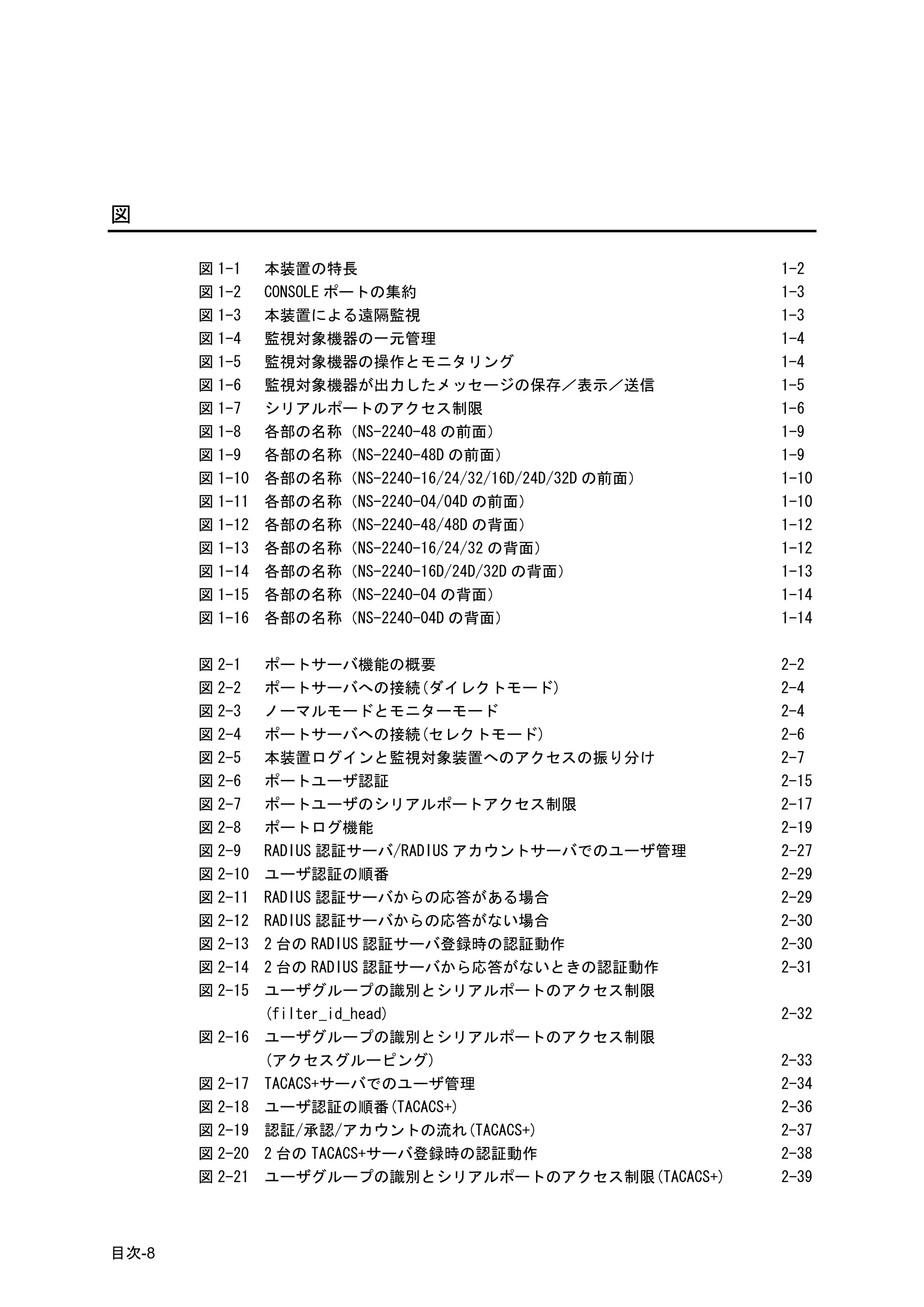
図

       図 1-1    本装置の特長                                    1-2
       図 1-2    CONSOLE ポートの集約                            1-3
       図 1-3    本装置による遠隔監視                                1-3
       図 1-4    監視対象機器の一元管理                               1-4
       図 1-5    監視対象機器の操作とモニタリング                          1-4
       図 1-6    監視対象機器が出力したメッセージの保存/表示/送信                 1-5
       図 1-7    シリアルポートのアクセス制限                            1-6
       図 1-8    各部の名称(NS-2240-48 の前面)                     1-9
       図 1-9    各部の名称(NS-2240-48D の前面)                    1-9
       図 1-10   各部の名称(NS-2240-16/24/32/16D/24D/32D の前面)   1-10
       図 1-11   各部の名称(NS-2240-04/04D の前面)                 1-10
       図 1-12   各部の名称(NS-2240-48/48D の背面)                 1-12
       図 1-13   各部の名称(NS-2240-16/24/32 の背面)               1-12
       図 1-14   各部の名称(NS-2240-16D/24D/32D の背面)            1-13
       図 1-15   各部の名称(NS-2240-04 の背面)                     1-14
       図 1-16   各部の名称(NS-2240-04D の背面)                    1-14

       図 2-1    ポートサーバ機能の概要                               2-2
       図 2-2    ポートサーバへの接続(ダイレクトモード)                      2-4
       図 2-3    ノーマルモードとモニターモード                           2-4
       図 2-4    ポートサーバへの接続(セレクトモード)                       2-6
       図 2-5    本装置ログインと監視対象装置へのアクセスの振り分け                 2-7
       図 2-6    ポートユーザ認証                                  2-15
       図 2-7    ポートユーザのシリアルポートアクセス制限                      2-17
       図 2-8    ポートログ機能                                   2-19
       図 2-9    RADIUS 認証サーバ/RADIUS アカウントサーバでのユーザ管理       2-27
       図 2-10   ユーザ認証の順番                                  2-29
       図 2-11   RADIUS 認証サーバからの応答がある場合                    2-29
       図 2-12   RADIUS 認証サーバからの応答がない場合                    2-30
       図 2-13   2 台の RADIUS 認証サーバ登録時の認証動作                 2-30
       図 2-14   2 台の RADIUS 認証サーバから応答がないときの認証動作           2-31
       図 2-15   ユーザグループの識別とシリアルポートのアクセス制限
                (filter_id_head)                          2-32
       図 2-16   ユーザグループの識別とシリアルポートのアクセス制限
                (アクセスグルーピング)                              2-33
       図 2-17   TACACS+サーバでのユーザ管理                         2-34
       図 2-18   ユーザ認証の順番(TACACS+)                         2-36
       図 2-19   認証/承認/アカウントの流れ(TACACS+)                   2-37
       図 2-20   2 台の TACACS+サーバ登録時の認証動作                   2-38
       図 2-21   ユーザグループの識別とシリアルポートのアクセス制限(TACACS+)        2-39


目次-8
図 3-1    外部 CF カードの挿入 (SmartCS)                        3-2
図 3-2    外部 CF カードの挿入 (SmartCSmini)                    3-2
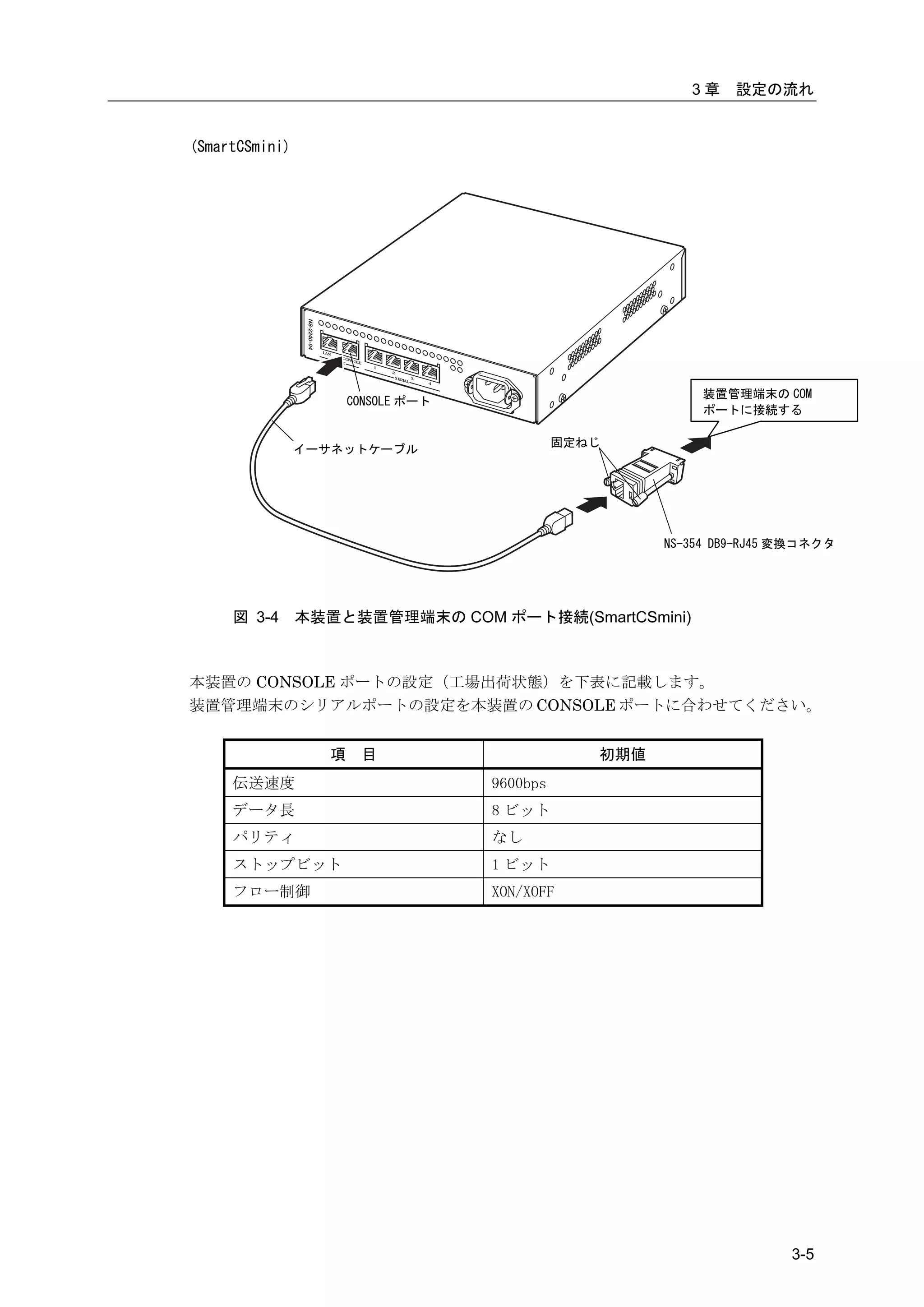
図 3-3    本装置と装置管理端末の CONSOLE ポート接続(SmartCS)            3-4
図 3-4    本装置と装置管理端末の CONSOLE ポート接続(SmartCSmini)        3-5
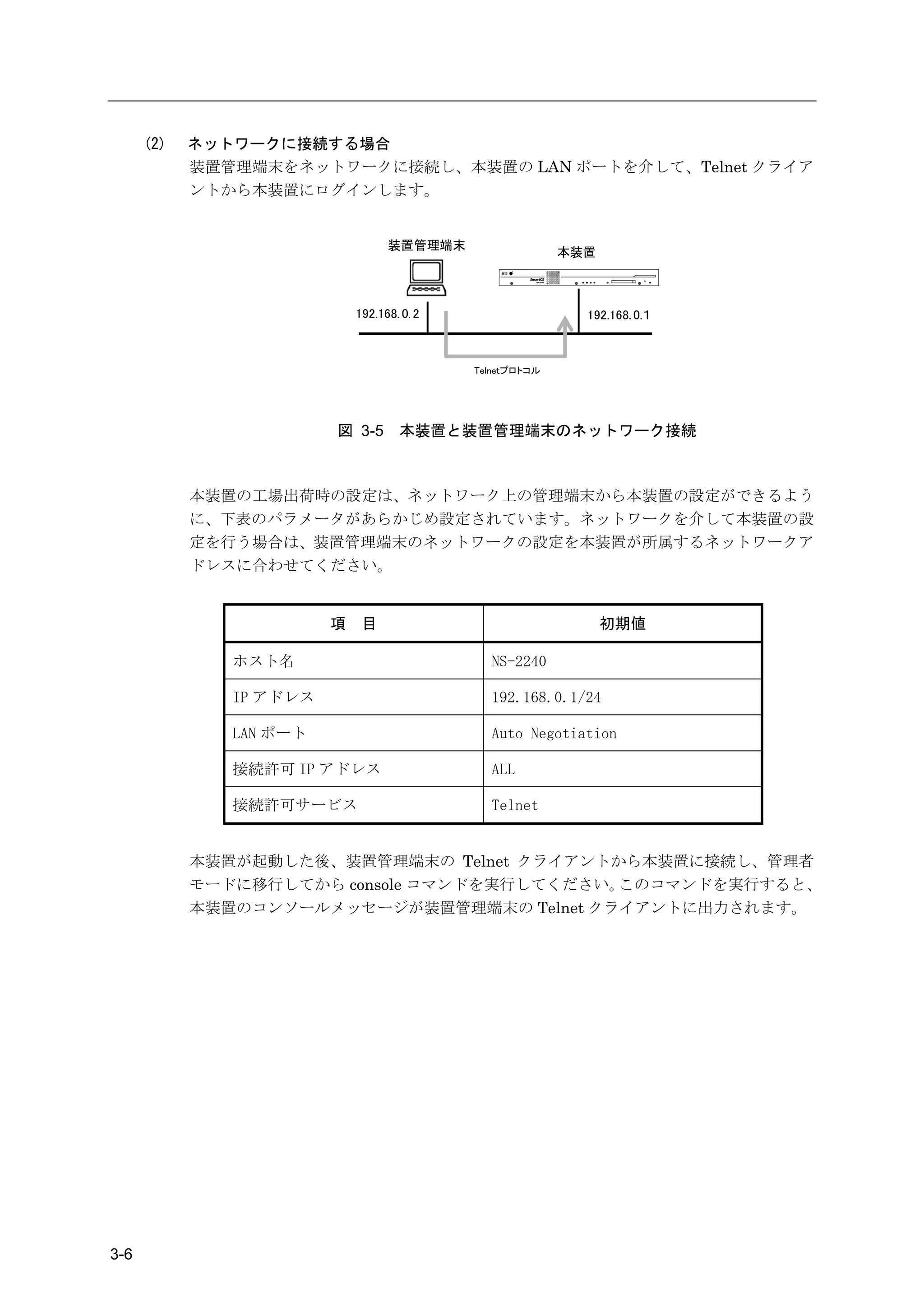
図 3-5    本装置と装置管理端末のネットワーク接続                           3-6
図 3-6    本装置の電源 ON(NS-2240-48)                         3-7
図 3-7    本装置の電源 ON(NS-2240-16/24/32)                   3-7
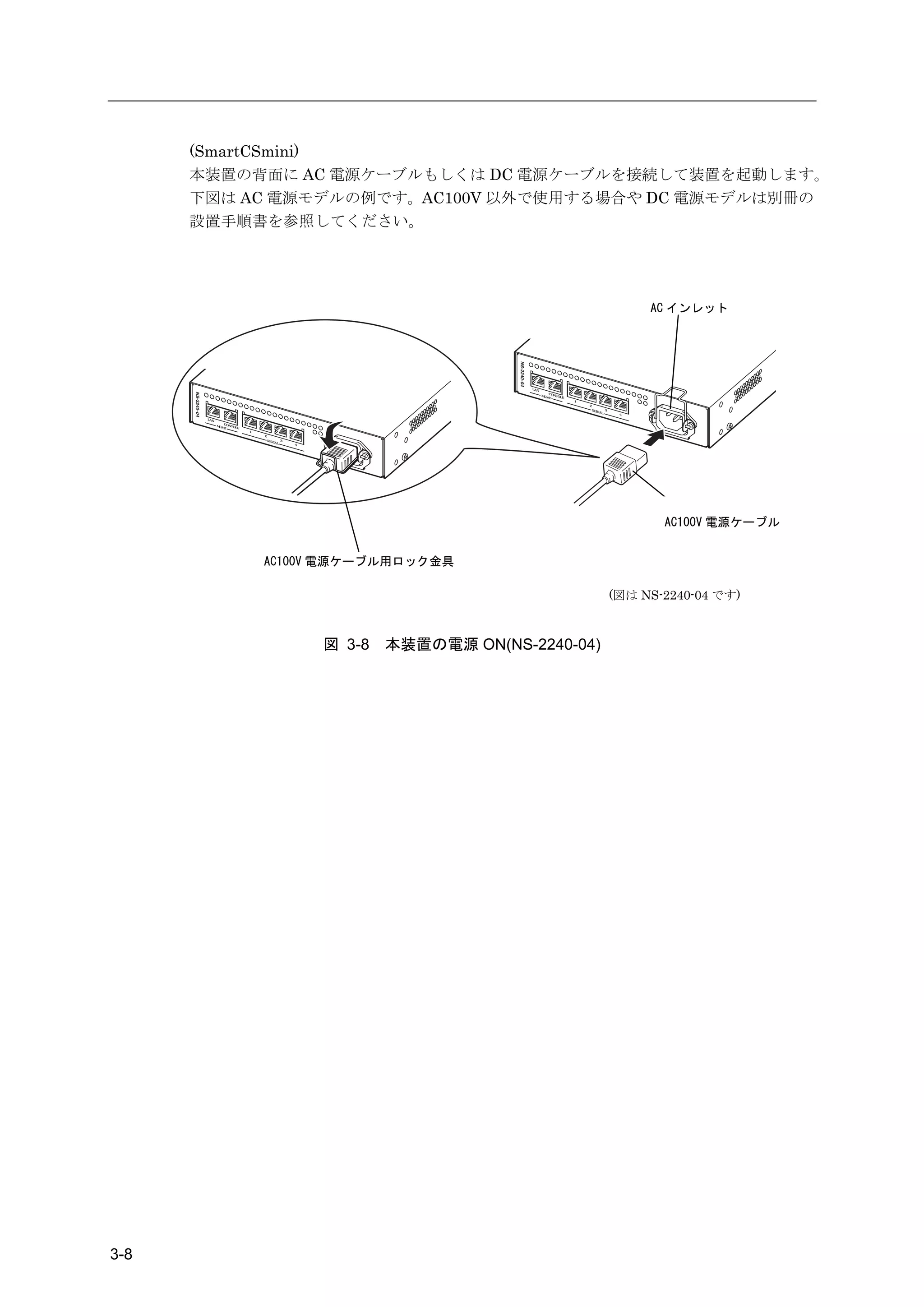
図 3-8    本装置の電源 ON(NS-2240-04)                         3-8
図 3-9    本装置の電源 OFF (SmartCS)                          3-11
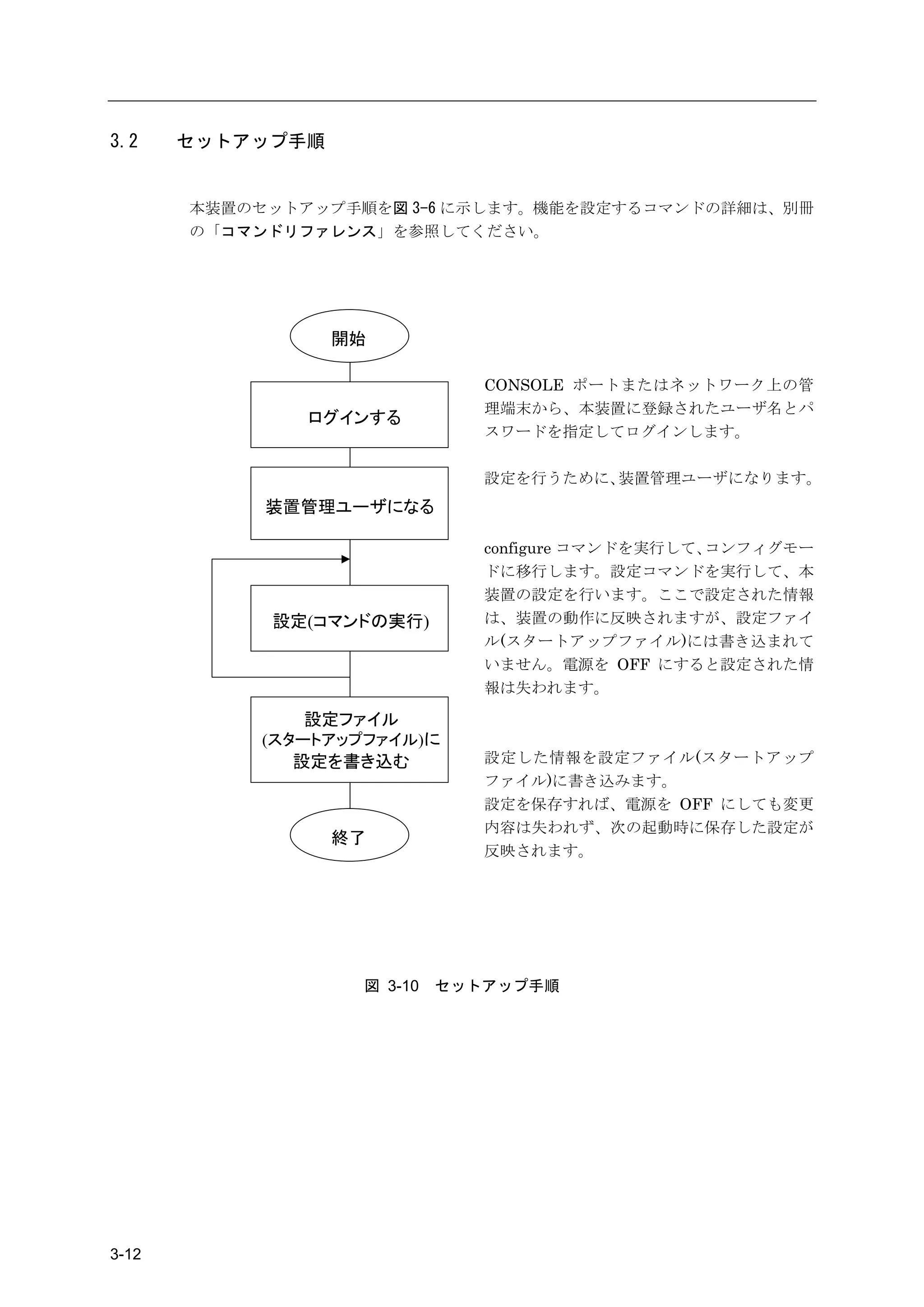
図 3-10   セットアップ手順                                      3-12
図 3-11   CLI のモード                                      3-16
図 3-12   設定の保存(SmartCS)                                3-20
図 3-13   設定の保存(SmartCSmini)                            3-21

図 4-1    ユーザグループの識別とシリアルポートのアクセス制限
         (filter_id_head)                              4-27
図 4-2    ユーザグループの識別とシリアルポートのアクセス制限
         (アクセスグルーピング)                                  4-29
図 4-3    ユーザグループの識別とシリアルポートのアクセス制限
         (TACACS+)                                     4-34
図 4-4    基本設定                                          4-44
図 4-5    各種サービスの設定                                     4-46
図 4-6    ポートログの転送設定                                    4-48
図 4-7    ポートログ保存先と保存容量の変更                              4-52
図 4-8    ポートログ保存機能の停止とポートサーバメニューの表示の抑止                 4-54
図 4-9    ポートユーザ認証                                      4-55
図 4-10   SSH パスワード(Basic)認証                            4-57
図 4-11   SSH 公開鍵(Public)認証                             4-60
図 4-12   ポートセレクト機能(ポートサーバのセレクトモード)                     4-64
図 4-13   RADIUS 認証機能/RADIUS アカウント機能(基本構成)              4-66
図 4-14   RADIUS 認証機能/RADIUS アカウント機能(filter_id_head)    4-70
図 4-15   RADIUS 認証機能/RADIUS アカウント機能(アクセスグルーピング)        4-76
図 4-16   TACACS+機能(基本構成)                               4-81
図 4-17   TACACS+機能(アクセスグルーピング)                         4-86

図 5-1    スタートアップファイル(SmartCS)                          5-5
図 5-2    スタートアップファイル(SmartCSmini)                      5-6
図 5-3    SNMP 機能                                       5-17
図 5-4    システムソフトウェアの構成                                 5-18


                                                      目次-9
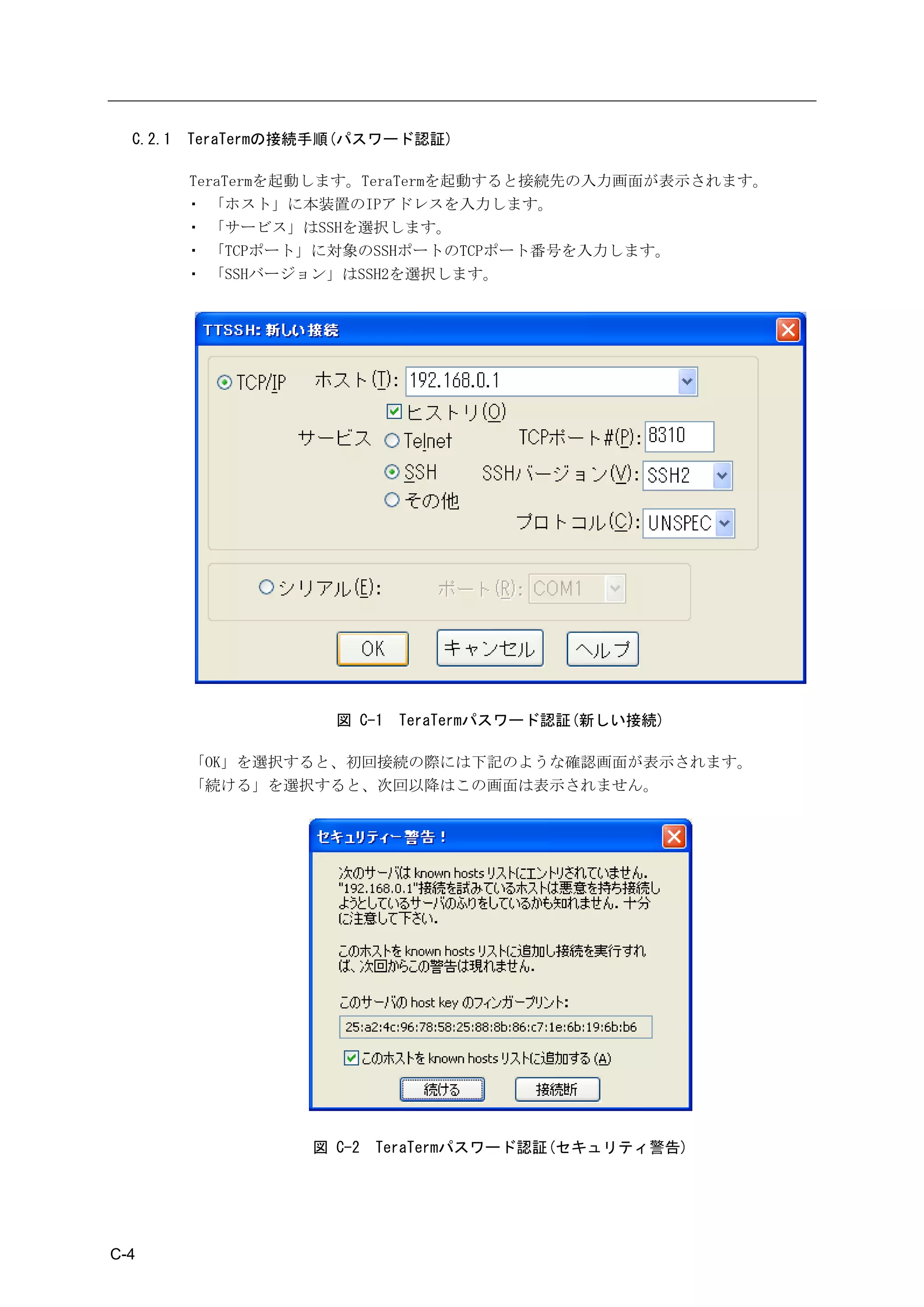
図 C-1    TeraTerm パスワード認証(新しい接続)              C-4
        図 C-2    TeraTerm パスワード認証(セキュリティ警告)           C-4
        図 C-3    TeraTerm パスワード認証(SSH 認証)             C-5
        図 C-4    TeraTerm パスワード認証(本装置のポートサーバメニュー画面)   C-5
        図 C-5    Poderosa パスワード認証(新規 Telnet/SSH 接続)   C-6
        図 C-6    Poderosa パスワード認証(新規接続)               C-7
        図 C-7    Poderosa パスワード認証(セキュリティ警告)           C-7
        図 C-8    Poderosa パスワード認証(本装置のポートサーバメニュー画面)   C-8
        図 C-9    TeraTerm 公開鍵認証(SSH Key の生成)          C-10
        図 C-10   TeraTerm 公開鍵認証(key の作成)              C-11
        図 C-11   TeraTerm 公開鍵認証(公開鍵の保存画面)             C-11
        図 C-12   TeraTerm 公開鍵認証(秘密鍵の保存画面)             C-12
        図 C-13   TeraTerm 公開鍵認証(公開鍵のコピー)              C-12
        図 C-14   TeraTerm 公開鍵認証(新しい接続)                C-14
        図 C-15   TeraTerm 公開鍵認証(SSH 認証)               C-15
        図 C-16   TeraTerm 公開鍵認証(本装置のポートサーバメニュー画面)     C-15
        図 C-17   Poderosa 公開鍵認証(SSH 鍵の事前登録)           C-16
        図 C-18   Poderosa 公開鍵認証(SSH 鍵作成ウィザード 1)       C-17
        図 C-19   Poderosa 公開鍵認証(SSH 鍵作成ウィザード 2)       C-17
        図 C-20   Poderosa 公開鍵認証(SSH 鍵作成ウィザード 3)       C-18
        図 C-21   Poderosa 公開鍵認証(SSH 鍵作成の完了)           C-18
        図 C-22   Poderosa 公開鍵認証(秘密鍵の保存)               C-19
        図 C-23   Poderosa 公開鍵認証(秘密鍵の保存場所の指定)          C-19
        図 C-24   Poderosa 公開鍵認証(公開鍵の保存)               C-20
        図 C-25   Poderosa 公開鍵認証(公開鍵の保存場所の指定)          C-20
        図 C-26   Poderosa 公開鍵認証(公開鍵のコピー)              C-21
        図 C-27   Poderosa 公開鍵認証(公開鍵のコメントの追加)          C-21
        図 C-28   Poderosa 公開鍵認証(新規接続)                 C-23
        図 C-29   Poderosa 公開鍵認証(本装置のポートサーバメニュー画面)     C-24


目次-10
表

    表 D-1   RADIUS 認証サーバに送信するアトリビュート            D-3
    表 D-2   本装置が処理する RADIUS 認証サーバのアトリビュート       D-4
    表 D-3   複数 Filter-Id アトリビュート登録時に適用されるユーザ    D-5
    表 D-4   RADIUS アカウントサーバに送信するアトリビュート         D-6


                                               目次-11
1章
                            本装置の概要
1章では、本装置の主な機能と各部の名称について説明しています。
作業を始める前に必ずお読みください。


         本章の内容

         1.1   特長および主な機能
               1.1.1 特長
               1.1.2 主な機能
         1.2   各部の名称
               1.2.1 本体前面
               1.2.2 本体背面
         1.3   インタフェース仕様


                                   1-1
1.1       特長および主な機能

          この章では、本装置の特長と主な機能の概要を説明します。各機能の詳細は「2 章 機能」
          を参照してください。


  1.1.1   特長

          本装置は、最大 48 ポートの RS232 準拠の RJ-45(8 芯のモジュラ式コネクタ) シリアルポ
          ートを搭載したコンソールサーバです。


                 装置名称             電源                  型番          シリアルポート数
               SmartCS       AC 電源モデル          NS-2240-16           16 ポート
                                               NS-2240-24           24 ポート
                                               NS-2240-32           32 ポート
                                               NS-2240-48   ※2      48 ポート
                             DC 電源モデル          NS-2240-16D          16 ポート
                                               NS-2240-24D          24 ポート
                                               NS-2240-32D          32 ポート
                                               NS-2240-48D   ※2     48 ポート
               SmartCSmini   AC 電源モデル          NS-2240-04   ※1      4 ポート
                             DC 電源モデル          NS-2240-04D   ※1     4 ポート
                             ※1 システムソフトウェア Version1.4 以降で動作します。
                             ※2 システムソフトウェア Version1.5 以降で動作します。

          コンソールサーバは、    ルータやスイッチなどのネットワーク機器やサーバ機器(以降、監視
          対象機器と呼びます)の CONSOLE ポート(各種設定やログ出力を行うシリアルポート)を
          集約し、一元的にメンテナンスできる環境を提供します。
          本装置は監視対象機器が出力したメッセージを自動的に保存し、    SYSLOG サーバに送信し
          たり、FTP サーバへファイル転送したり、メール送信することができます。
          本装置や本装置に接続された監視対象機器に安全にアクセスするために、本装置は
          SSHv2/SFTP の暗号化プロトコルと公開鍵認証を搭載しています。さらに、本装置に接続
          された監視対象機器を不正アクセスから守るために、シリアルポートにアクセスするユー
          ザのログイン認証機能と、ユーザがアクセスできるシリアルポートを制限する機能を所有
          しています。


                                    監視対象機器のCONSOLEポートを集約


                    本装置の特長        監視対象機器が出力したメッセージの保存と転送


                                        通信の暗号化/不正アクセスの防止


                                       図 1-1   本装置の特長


1-2
1章   本装置の概要


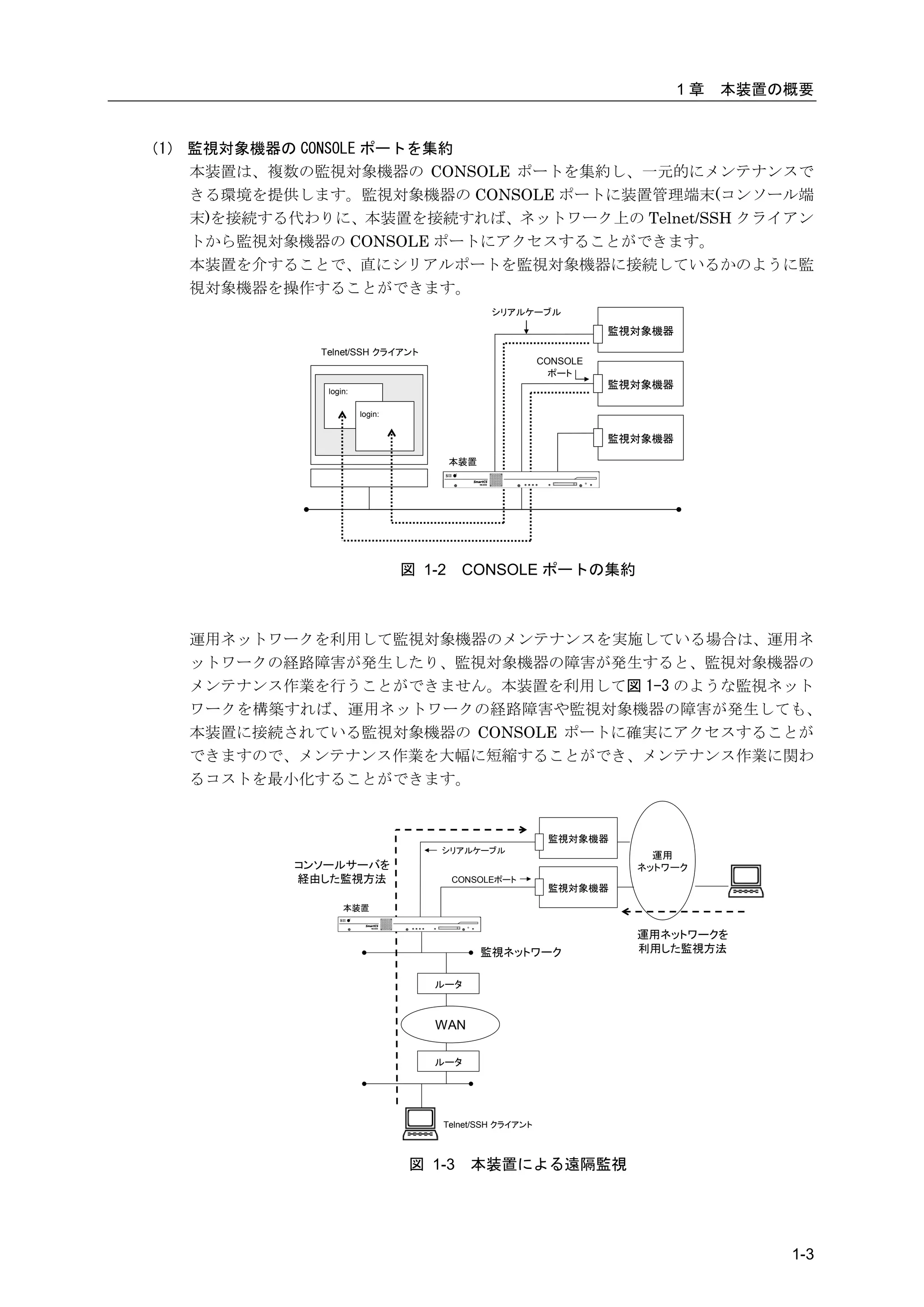
(1) 監視対象機器の CONSOLE ポートを集約
    本装置は、複数の監視対象機器の CONSOLE ポートを集約し、一元的にメンテナンスで
    きる環境を提供します。監視対象機器の CONSOLE ポートに装置管理端末(コンソール端
    末)を接続する代わりに、本装置を接続すれば、ネットワーク上の Telnet/SSH クライアン
    トから監視対象機器の CONSOLE ポートにアクセスすることができます。
    本装置を介することで、直にシリアルポートを監視対象機器に接続しているかのように監
    視対象機器を操作することができます。
                                               シリアルケーブル

                                                                  監視対象機器
             Telnet/SSH クライアント
                                                        CONSOLE
                                                          ポート
                                                                  監視対象機器
              login:

                       login:


                                                                  監視対象機器

                                        本装置


                                図 1-2    CONSOLE ポートの集約


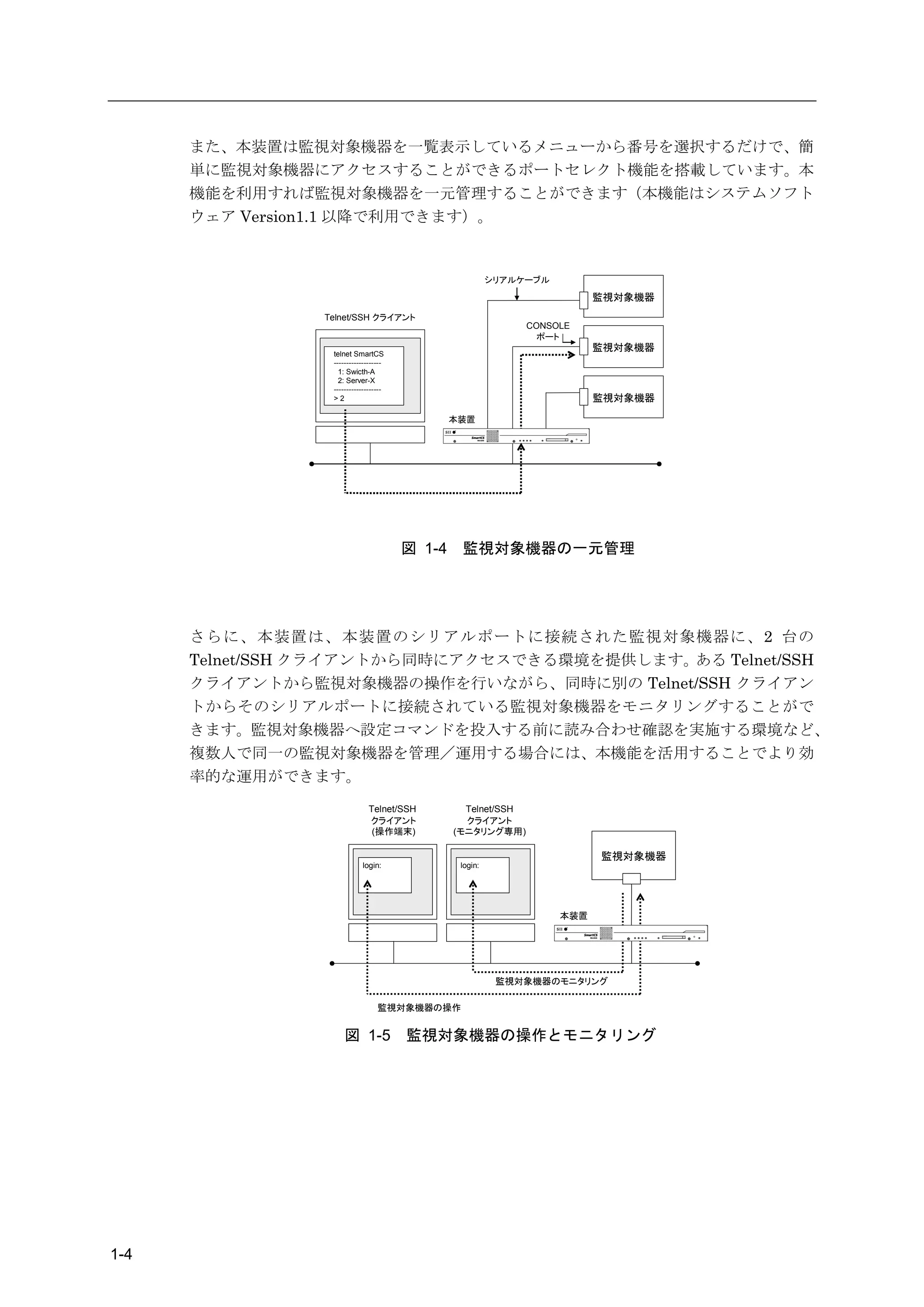
   運用ネットワークを利用して監視対象機器のメンテナンスを実施している場合は、運用ネ
   ットワークの経路障害が発生したり、監視対象機器の障害が発生すると、監視対象機器の
   メンテナンス作業を行うことができません。本装置を利用して図 1-3 のような監視ネット
   ワークを構築すれば、運用ネットワークの経路障害や監視対象機器の障害が発生しても、
   本装置に接続されている監視対象機器の CONSOLE ポートに確実にアクセスすることが
   できますので、メンテナンス作業を大幅に短縮することができ、メンテナンス作業に関わ
   るコストを最小化することができます。


                                                         監視対象機器
                                    シリアルケーブル
                                                                      運用
           コンソールサーバを                                                ネットワーク
           経由した監視方法                     CONSOLEポート
                                                         監視対象機器
                  本装置


                                                                    運用ネットワークを
                                              監視ネットワーク              利用した監視方法


                                   ルータ


                                   WAN

                                   ルータ


                                    Telnet/SSH クライアント


                                図 1-3     本装置による遠隔監視


                                                                                    1-3
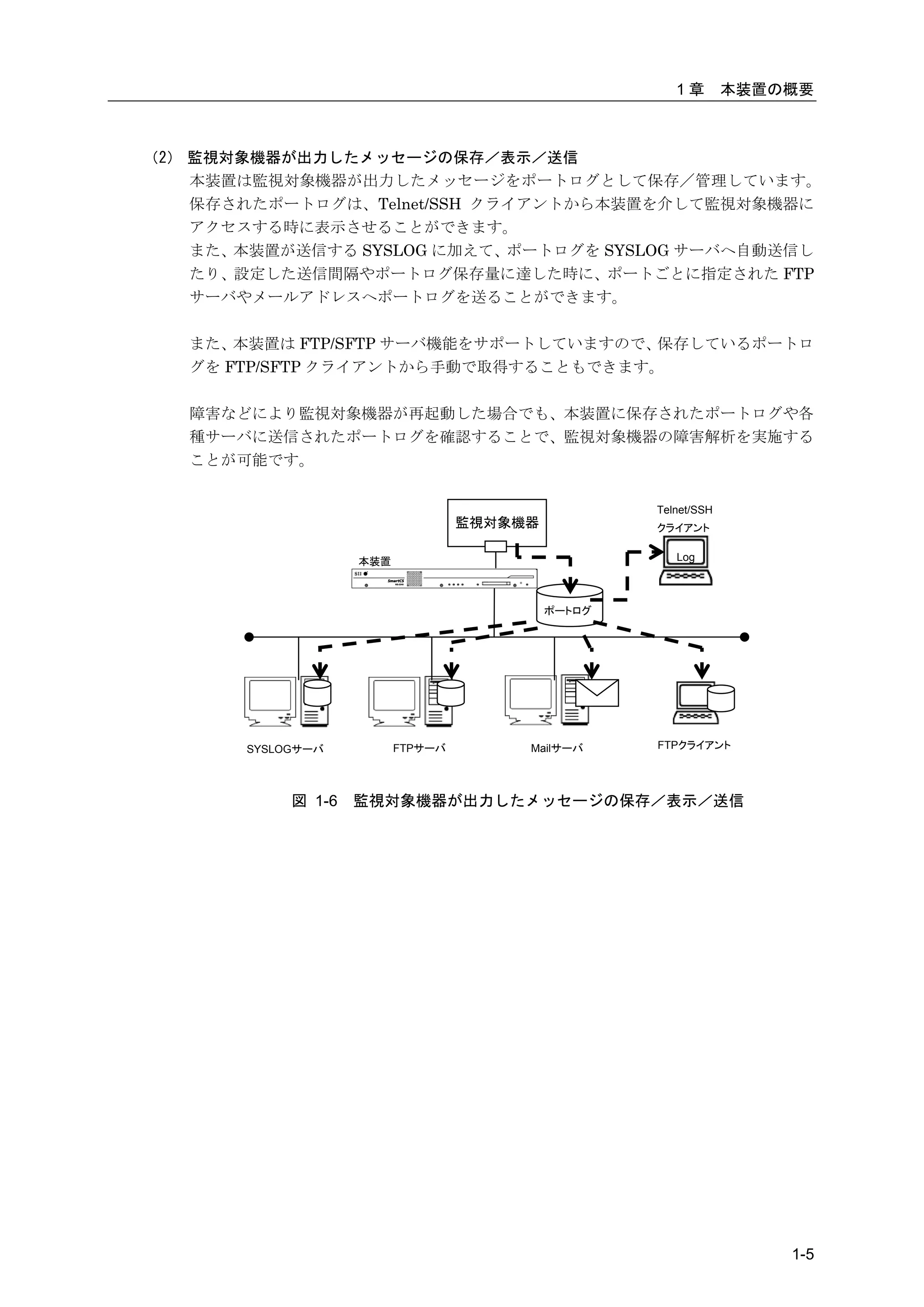
また、本装置は監視対象機器を一覧表示しているメニューから番号を選択するだけで、簡
      単に監視対象機器にアクセスすることができるポートセレクト機能を搭載しています。本
      機能を利用すれば監視対象機器を一元管理することができます(本機能はシステムソフト
      ウェア Version1.1 以降で利用できます)。


                                                         シリアルケーブル
                                                                          監視対象機器
                Telnet/SSH クライアント
                                                              CONSOLE
                                                                ポート
                                                                          監視対象機器
                 telnet SmartCS
                 -------------------
                   1: Swicth-A
                   2: Server-X
                 -------------------
                 >2                                                       監視対象機器

                                               本装置


                                       図 1-4    監視対象機器の一元管理


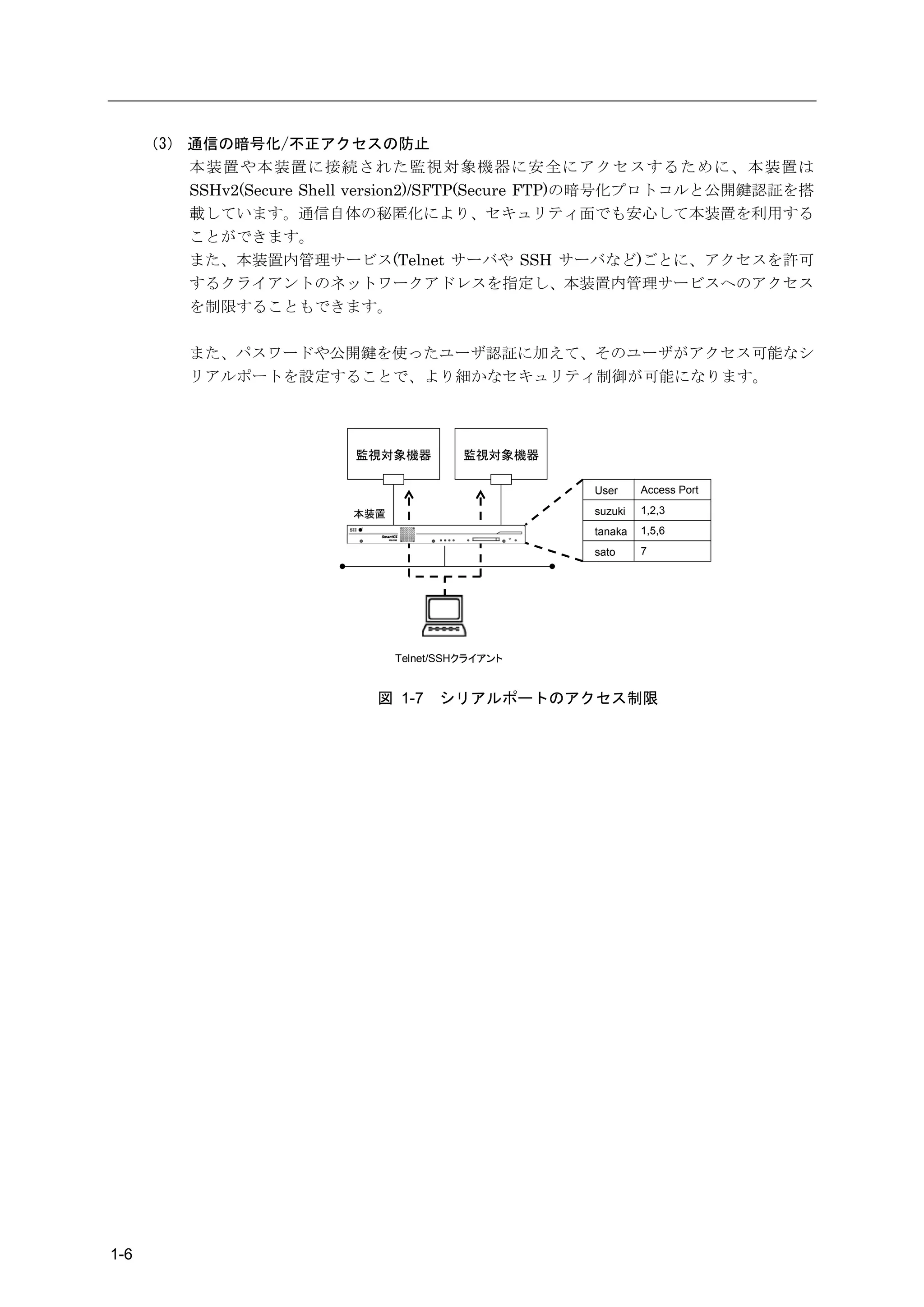
      さらに、本装置は、本装置のシリアルポートに接続された監視対象機器に、2 台の
      Telnet/SSH クライアントから同時にアクセスできる環境を提供します。ある Telnet/SSH
      クライアントから監視対象機器の操作を行いながら、同時に別の Telnet/SSH クライアン
      トからそのシリアルポートに接続されている監視対象機器をモニタリングすることがで
      きます。監視対象機器へ設定コマンドを投入する前に読み合わせ確認を実施する環境など、
      複数人で同一の監視対象機器を管理/運用する場合には、本機能を活用することでより効
      率的な運用ができます。
                              Telnet/SSH         Telnet/SSH
                              クライアント             クライアント
                               (操作端末)          (モニタリング専用)

                                                                          監視対象機器
                           login:               login:


                                                                    本装置


                                                          監視対象機器のモニタリング

                                 監視対象機器の操作


                     図 1-5             監視対象機器の操作とモニタリング


1-4
1章        本装置の概要


(2) 監視対象機器が出力したメッセージの保存/表示/送信
    本装置は監視対象機器が出力したメッセージをポートログとして保存/管理しています。
    保存されたポートログは、Telnet/SSH クライアントから本装置を介して監視対象機器に
    アクセスする時に表示させることができます。
    また、本装置が送信する SYSLOG に加えて、ポートログを SYSLOG サーバへ自動送信し
    たり、設定した送信間隔やポートログ保存量に達した時に、ポートごとに指定された FTP
    サーバやメールアドレスへポートログを送ることができます。

   また、 本装置は FTP/SFTP サーバ機能をサポートしていますので、保存しているポートロ
   グを FTP/SFTP クライアントから手動で取得することもできます。

   障害などにより監視対象機器が再起動した場合でも、本装置に保存されたポートログや各
   種サーバに送信されたポートログを確認することで、監視対象機器の障害解析を実施する
   ことが可能です。


                                                    Telnet/SSH
                                   監視対象機器           クライアント


                    本装置                                Log


                                            ポートログ


       SYSLOGサーバ          FTPサーバ        Mailサーバ     FTPクライアント


            図 1-6   監視対象機器が出力したメッセージの保存/表示/送信


                                                                     1-5
(3) 通信の暗号化/不正アクセスの防止
          本装置や本装置に接続された監視対象機器に安全にアクセスするために、本装置は
          SSHv2(Secure Shell version2)/SFTP(Secure FTP)の暗号化プロトコルと公開鍵認証を搭
          載しています。通信自体の秘匿化により、セキュリティ面でも安心して本装置を利用する
          ことができます。
          また、本装置内管理サービス(Telnet サーバや SSH サーバなど)ごとに、アクセスを許可
          するクライアントのネットワークアドレスを指定し、本装置内管理サービスへのアクセス
          を制限することもできます。

          また、パスワードや公開鍵を使ったユーザ認証に加えて、そのユーザがアクセス可能なシ
          リアルポートを設定することで、より細かなセキュリティ制御が可能になります。


                          監視対象機器          監視対象機器

                                                   User     Access Port

                          本装置                      suzuki   1,2,3
                                                   tanaka   1,5,6
                                                   sato     7


                                Telnet/SSHクライアント


                             図 1-7    シリアルポートのアクセス制限


1-6
1章   本装置の概要


1.1.2   主な機能

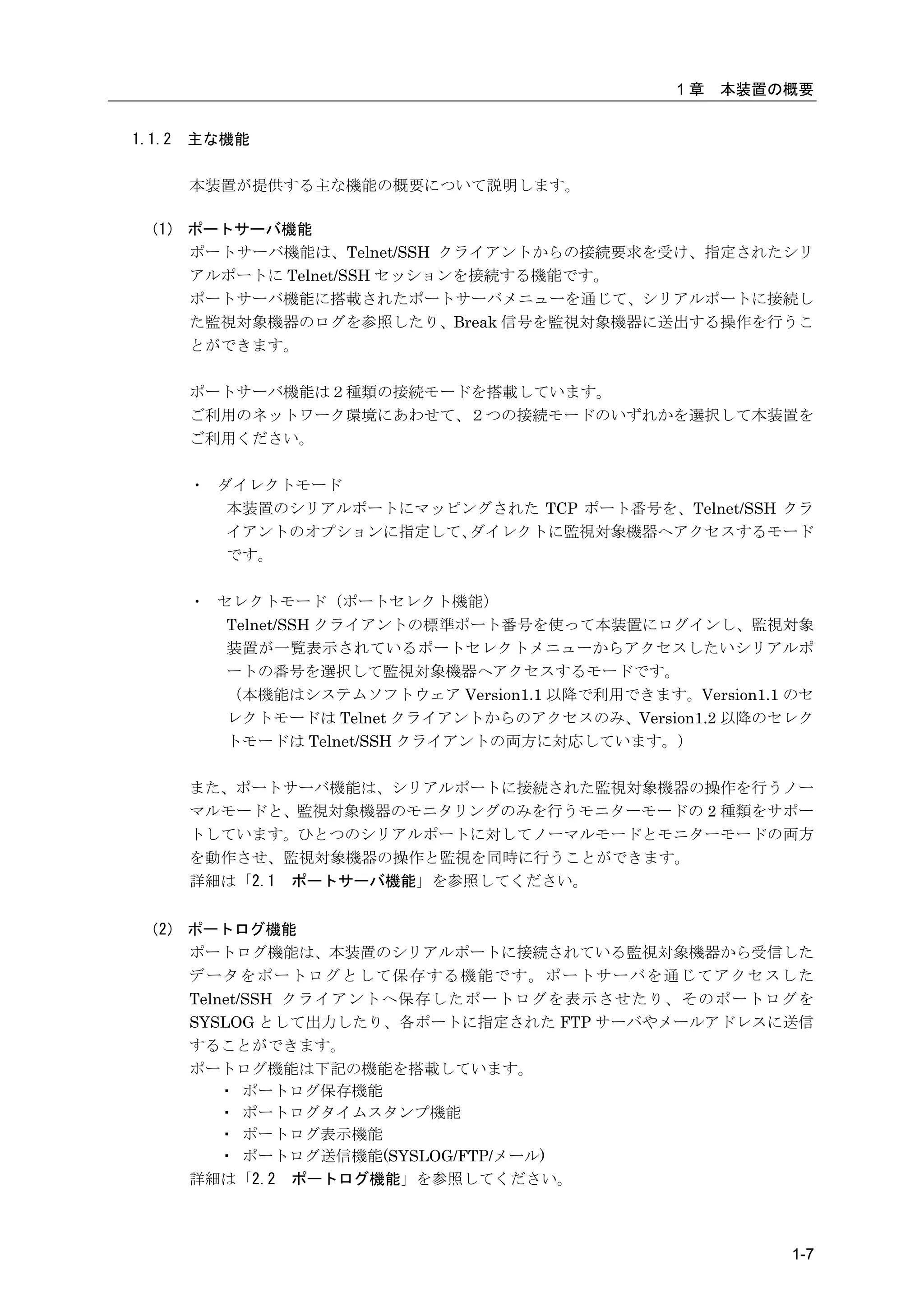
        本装置が提供する主な機能の概要について説明します。

 (1) ポートサーバ機能
     ポートサーバ機能は、Telnet/SSH クライアントからの接続要求を受け、指定されたシリ
     アルポートに Telnet/SSH セッションを接続する機能です。
     ポートサーバ機能に搭載されたポートサーバメニューを通じて、シリアルポートに接続し
     た監視対象機器のログを参照したり、Break 信号を監視対象機器に送出する操作を行うこ
     とができます。

        ポートサーバ機能は2種類の接続モードを搭載しています。
        ご利用のネットワーク環境にあわせて、2つの接続モードのいずれかを選択して本装置を
        ご利用ください。

        ・ ダイレクトモード
           本装置のシリアルポートにマッピングされた TCP ポート番号を、Telnet/SSH クラ
           イアントのオプションに指定して、ダイレクトに監視対象機器へアクセスするモード
           です。

        ・ セレクトモード(ポートセレクト機能)
           Telnet/SSH クライアントの標準ポート番号を使って本装置にログインし、監視対象
           装置が一覧表示されているポートセレクトメニューからアクセスしたいシリアルポ
           ートの番号を選択して監視対象機器へアクセスするモードです。
           (本機能はシステムソフトウェア Version1.1 以降で利用できます。Version1.1 のセ
           レクトモードは Telnet クライアントからのアクセスのみ、Version1.2 以降のセレク
           トモードは Telnet/SSH クライアントの両方に対応しています。)

        また、ポートサーバ機能は、シリアルポートに接続された監視対象機器の操作を行うノー
        マルモードと、監視対象機器のモニタリングのみを行うモニターモードの 2 種類をサポー
        トしています。ひとつのシリアルポートに対してノーマルモードとモニターモードの両方
        を動作させ、監視対象機器の操作と監視を同時に行うことができます。
        詳細は「2.1 ポートサーバ機能」を参照してください。


 (2) ポートログ機能
     ポートログ機能は、本装置のシリアルポートに接続されている監視対象機器から受信した
     データをポートログとして保存する機能です。ポートサーバを通じてアクセスした
     Telnet/SSH クライアントへ保存したポートログを表示させたり、そのポートログを
     SYSLOG として出力したり、各ポートに指定された FTP サーバやメールアドレスに送信
     することができます。
     ポートログ機能は下記の機能を搭載しています。
         ・ ポートログ保存機能
         ・ ポートログタイムスタンプ機能
         ・ ポートログ表示機能
         ・ ポートログ送信機能(SYSLOG/FTP/メール)
     詳細は「2.2 ポートログ機能」を参照してください。


                                                           1-7
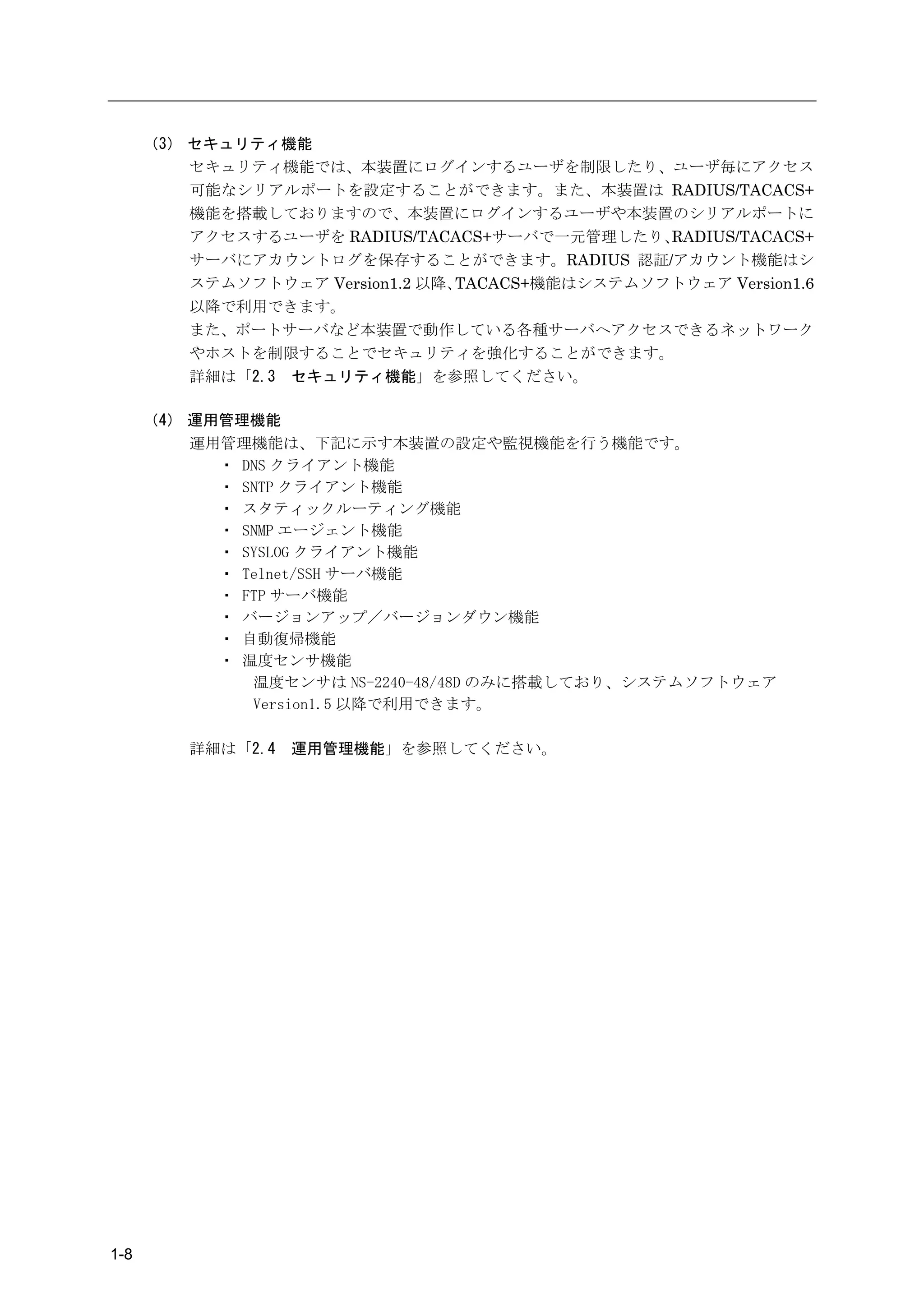
(3) セキュリティ機能
          セキュリティ機能では、本装置にログインするユーザを制限したり、ユーザ毎にアクセス
          可能なシリアルポートを設定することができます。また、本装置は RADIUS/TACACS+
          機能を搭載しておりますので、本装置にログインするユーザや本装置のシリアルポートに
          アクセスするユーザを RADIUS/TACACS+サーバで一元管理したり、   RADIUS/TACACS+
          サーバにアカウントログを保存することができます。RADIUS 認証/アカウント機能はシ
          ステムソフトウェア Version1.2 以降、TACACS+機能はシステムソフトウェア Version1.6
          以降で利用できます。
          また、ポートサーバなど本装置で動作している各種サーバへアクセスできるネットワーク
          やホストを制限することでセキュリティを強化することができます。
          詳細は「2.3 セキュリティ機能」を参照してください。

      (4) 運用管理機能
          運用管理機能は、下記に示す本装置の設定や監視機能を行う機能です。
            ・ DNS クライアント機能
            ・ SNTP クライアント機能
            ・ スタティックルーティング機能
            ・ SNMP エージェント機能
            ・ SYSLOG クライアント機能
            ・ Telnet/SSH サーバ機能
            ・ FTP サーバ機能
            ・ バージョンアップ/バージョンダウン機能
            ・ 自動復帰機能
            ・ 温度センサ機能
               温度センサは NS-2240-48/48D のみに搭載しており、システムソフトウェア
               Version1.5 以降で利用できます。

          詳細は「2.4   運用管理機能」を参照してください。


1-8
1章   本装置の概要


1.2       各部の名称

          本装置の各部の名称と機能について説明します。
          ハードウェアの仕様詳細やコネクタの結線などは「設置手順書」を参照してください。


  1.2.1   本体前面

          (SmartCS)
          AC 電源モデルの NS-2240-16/24/32/48 と DC 電源モデルの NS-2240-16D/24D/32D/48D
          を総称して SmartCS と呼びます。SmartCS の本体前面には以下が実装されています。

           [NS-2240-48]


           AC インレット
                           放熱口
                                                                        放熱口
                   STATUS1-4 ランプ

                      カードアクセスランプ

                           PCMCIA カードスロット                   POWER ランプ

                                     イジェクトボタン           RESET スイッチ


                                 図 1-8   各部の名称(NS-2240-48 の前面)

           [NS-2240-48D]


           DC インレット
                          放熱口
                                                                        放熱口
                  STATUS1-4 ランプ

                      カードアクセスランプ

                           PCMCIA カードスロット                   POWER ランプ

                                    イジェクトボタン            RESET スイッチ

                                 図 1-9   各部の名称(NS-2240-48D の前面)


                                                                              1-9
[NS-2240-16/24/32/16D/24D/32D]


                 放熱口
                                                                                                       放熱口

                  STATUS1-4 ランプ

                    カードアクセスランプ

                             PCMCIA カードスロット                                                POWER ランプ

                                  イジェクトボタン                                          RESET スイッチ


                  図 1-10     各部の名称(NS-2240-16/24/32/16D/24D/32D の前面)


       (SmartCSmini)
       AC 電源モデルの NS-2240-04 と DC 電源モデルの NS-2240-04D を総称して SmartCSmini
       と呼びます。SmartCSmini の本体前面には以下が実装されています。


              放熱口                    PO W
                                            ER


                                                 R ES
                                                        ET           CARD                        放熱口
                POWER ランプ                                    1
                                                                 2
                                                                            3
                                                                                4


                  RESET スイッチ

                  カードアクセスランプ
                         STATUS1-4 ランプ

                              CF カードスロット

                                     イジェクトボタン


                            図 1-11      各部の名称(NS-2240-04/04D の前面)


1-10
1章   本装置の概要


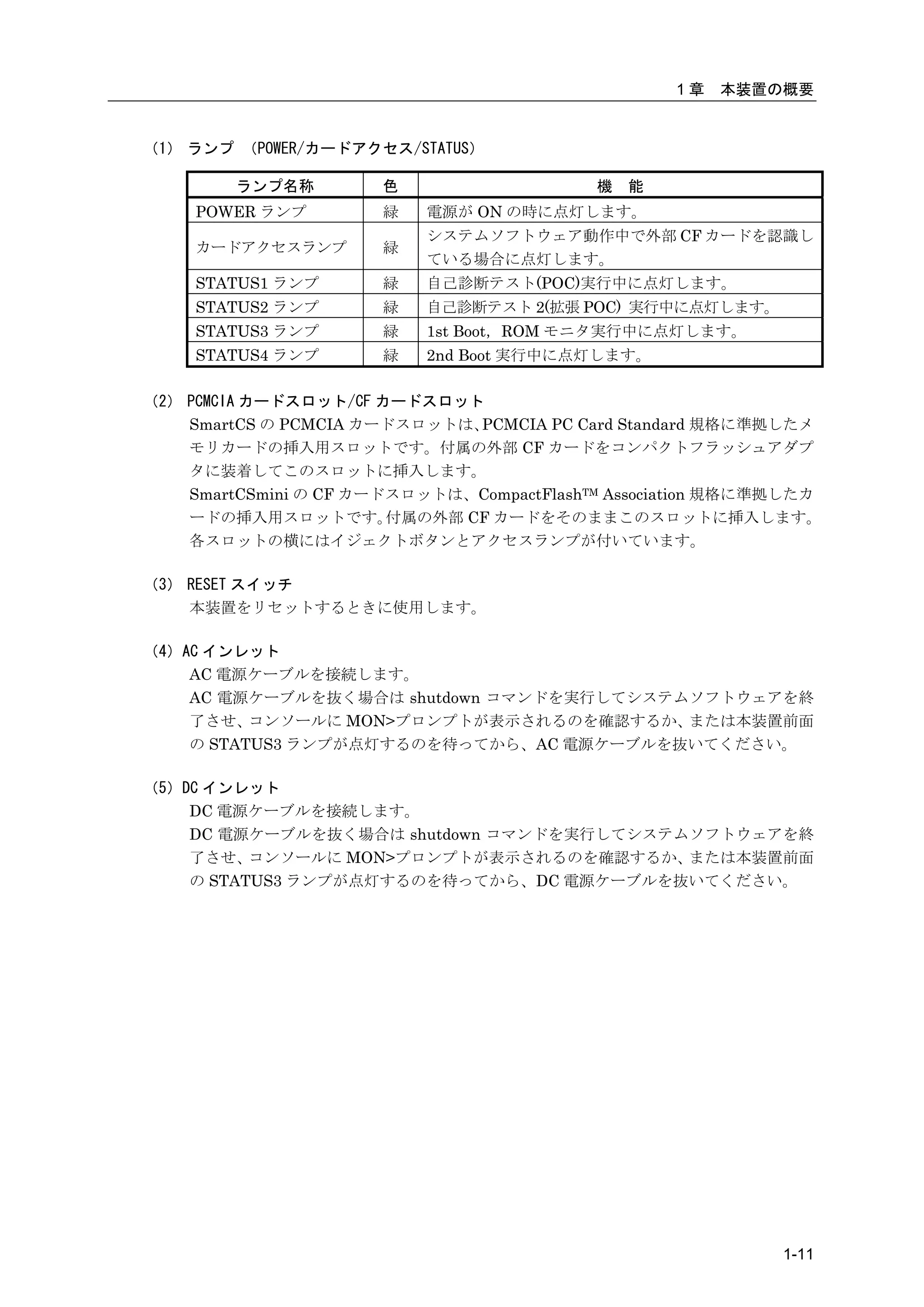
(1) ランプ (POWER/カードアクセス/STATUS)

        ランプ名称         色                    機   能
     POWER ランプ        緑    電源が ON の時に点灯します。
                           システムソフトウェア動作中で外部 CF カードを認識し
     カードアクセスランプ       緑
                           ている場合に点灯します。
     STATUS1 ランプ      緑    自己診断テスト(POC)実行中に点灯します。
     STATUS2 ランプ      緑    自己診断テスト 2(拡張 POC) 実行中に点灯します。
     STATUS3 ランプ      緑    1st Boot,ROM モニタ実行中に点灯します。
     STATUS4 ランプ      緑    2nd Boot 実行中に点灯します。

(2) PCMCIA カードスロット/CF カードスロット
    SmartCS の PCMCIA カードスロットは、 PCMCIA PC Card Standard 規格に準拠したメ
    モリカードの挿入用スロットです。付属の外部 CF カードをコンパクトフラッシュアダプ
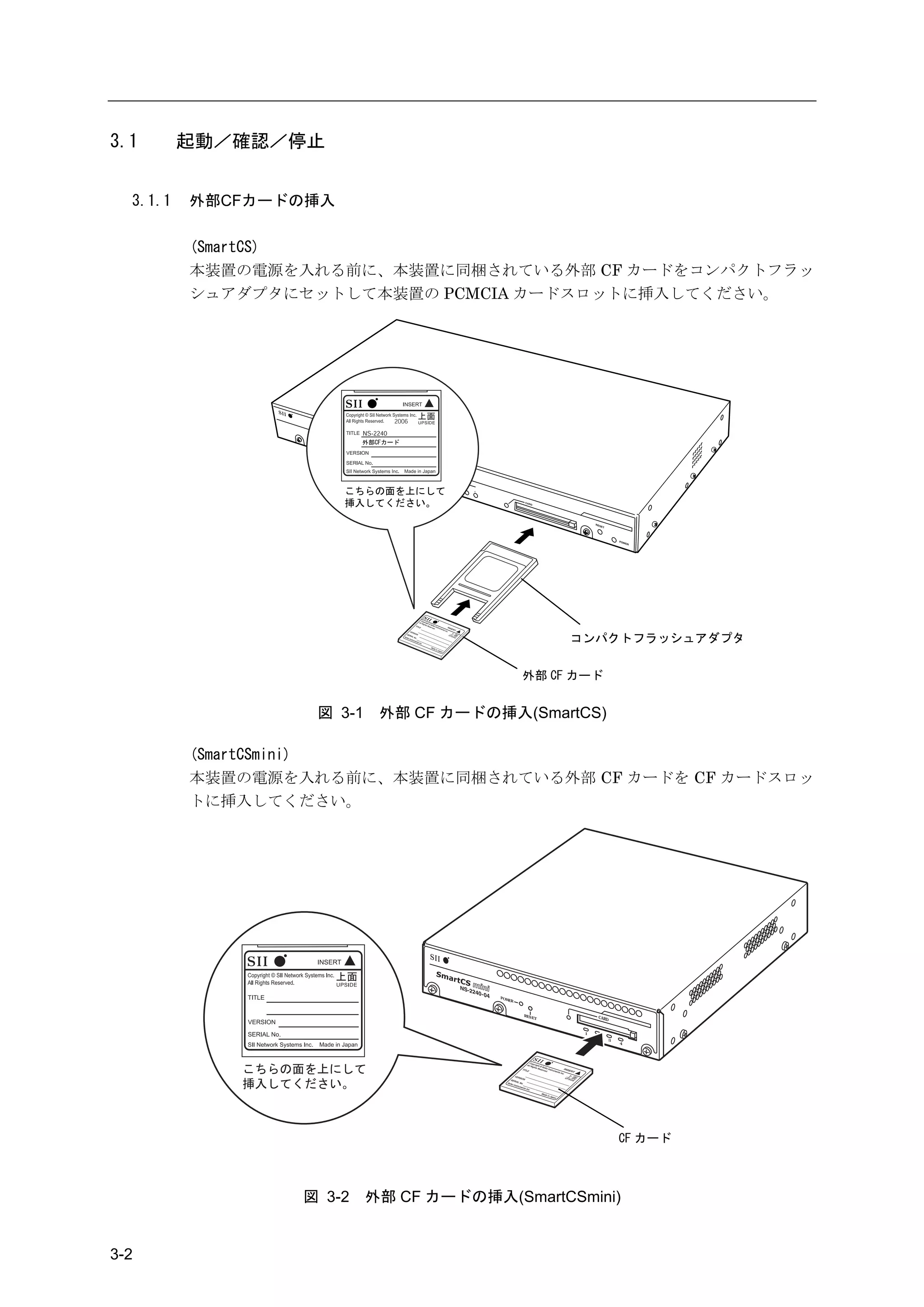
    タに装着してこのスロットに挿入します。
    SmartCSmini の CF カードスロットは、CompactFlashTM Association 規格に準拠したカ
    ードの挿入用スロットです。       付属の外部 CF カードをそのままこのスロットに挿入します。
    各スロットの横にはイジェクトボタンとアクセスランプが付いています。

(3) RESET スイッチ
    本装置をリセットするときに使用します。

(4)AC インレット
    AC 電源ケーブルを接続します。
    AC 電源ケーブルを抜く場合は shutdown コマンドを実行してシステムソフトウェアを終
    了させ、  コンソールに MON>プロンプトが表示されるのを確認するか、  または本装置前面
    の STATUS3 ランプが点灯するのを待ってから、AC 電源ケーブルを抜いてください。

(5)DC インレット
    DC 電源ケーブルを接続します。
    DC 電源ケーブルを抜く場合は shutdown コマンドを実行してシステムソフトウェアを終
    了させ、  コンソールに MON>プロンプトが表示されるのを確認するか、  または本装置前面
    の STATUS3 ランプが点灯するのを待ってから、DC 電源ケーブルを抜いてください。


                                                             1-11
1.2.2    本体背面

           (SmartCS)
           SmartCS の本体背面には以下が実装されています。


           [NS-2240-48/48D]

                                TX/RX ランプ
                     ACT ランプ

           LINK ランプ


       LAN ポート

       DSR ランプ

       CONSOLE ポート


               シリアルポート 1-48
                                            TX/RX ランプ
                                                                                      放熱口
                                          DSR ランプ


                                 図 1-12     各部の名称(NS-2240-48/48D の背面)

           [NS-2240-16/24/32]


                 TX/RX ランプ
               DSR ランプ

             ACT ランプ

          LINK ランプ


           LAN ポート

           CONSOLE ポート
          シリアルポート 1-32
                                     TX/RX ランプ                                        放熱口
                                    DSR ランプ


                                                        AC インレット

                                                                             電源スイッチ

                                                        (図は NS-2240-32 です)


                                図 1-13    各部の名称(NS-2240-16/24/32 の背面)


1-12
1章    本装置の概要

      [NS-2240-16D/24D/32D]


      TX/RX ランプ
   DSR ランプ

 ACT ランプ

LINK ランプ


 LAN ポート
 CONSOLE ポート

シリアルポート 1-32
                        TX/RX ランプ
                                                                        放熱口
                       DSR ランプ


                                        DC 電源コネクタ

                                                           電源スイッチ


                                            (図は NS-2240-32D です)


                    図 1-14    各部の名称(NS-2240-16D/24D/32D の背面)


                                                                      1-13
(SmartCSmini)
       SmartCSmini の本体背面には以下が実装されています。


       [NS-2240-04]

                                                 放熱口
                       TX/RX ランプ
                      DSR ランプ
                ACT ランプ

              LINK ランプ


                              LA N
                                          C
                                     M G M O NSO L
                                          T        E
                                                           1
                                                                   2
                                                                       SER          3
                                                                             IA L

               LAN ポート                                                                      4

                                                                                                                                          放熱口
                CONSOLE ポート

                 シリアルポート 1-4
                                                                                                  TX/RX ランプ                    AC インレット
                                                                                                DSR ランプ


                                                                                                                         (図は NS-2240-04 です)


                        図 1-15                       各部の名称(NS-2240-04 の背面)


       [NS-2240-04D]


                                            放熱口
                        TX/RX ランプ
                       DSR ランプ

                 ACT ランプ

               LINK ランプ


                            LA N
                                        C
                                   M G M O NSO L
                                        T        E
                                                       1
                                                               2                                      D C -4
                                                                                                               8V
                                                                   SER          3

              LAN ポート
                                                                         IA L

                                                                                                                                          放熱口
                                                                                        4


               CONSOLE ポート                                                                                          0V


                シリアルポート 1-4
                                                                                                  TX/RX ランプ
                                                                                                                                DC 電源コネクタ
                                                                                                DSR ランプ


                                             図 1-16                                     各部の名称(NS-2240-04D の背面)


1-14
1章   本装置の概要


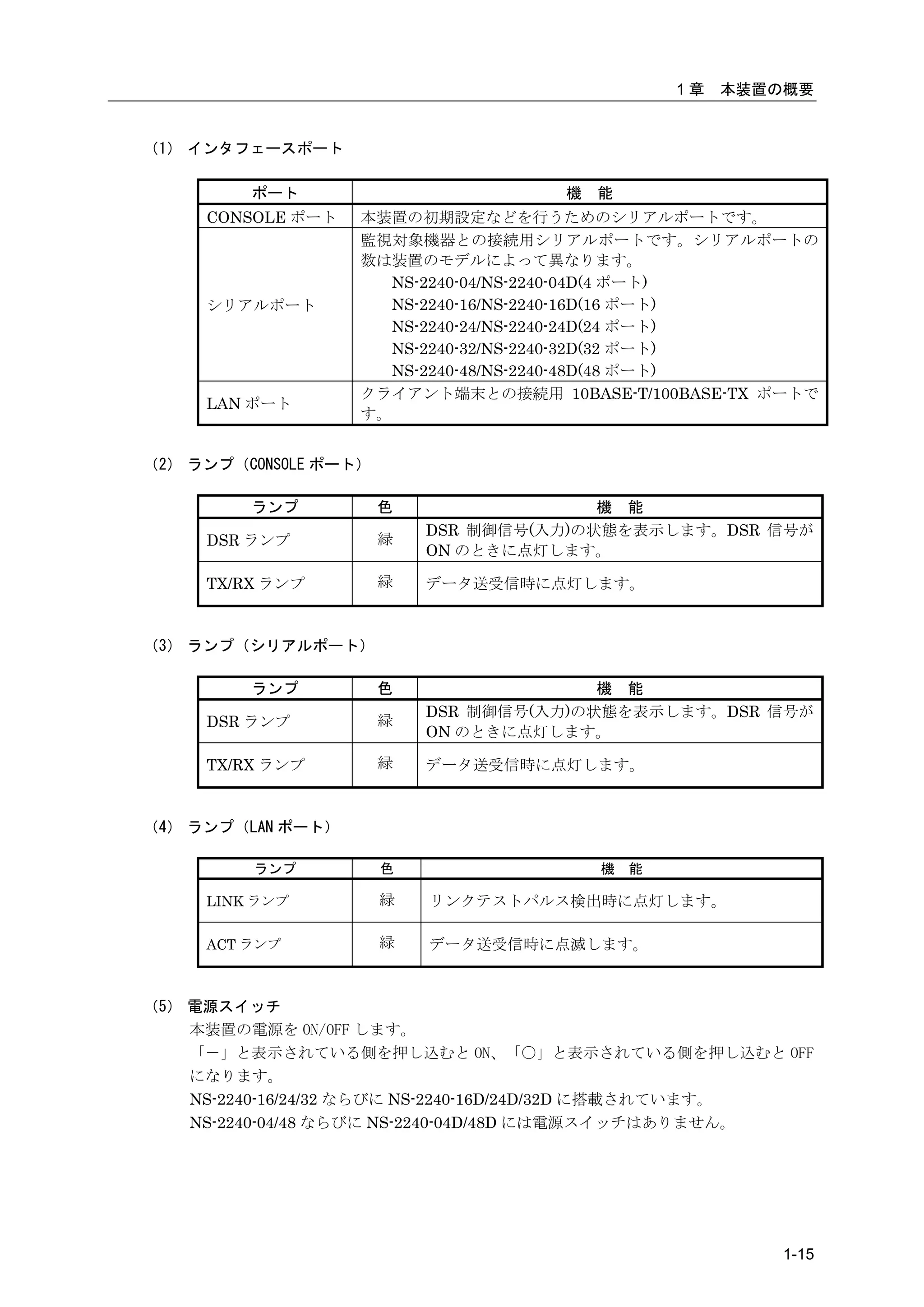
(1) インタフェースポート

         ポート                         機   能
     CONSOLE ポート   本装置の初期設定などを行うためのシリアルポートです。
                   監視対象機器との接続用シリアルポートです。シリアルポートの
                   数は装置のモデルによって異なります。
                     NS-2240-04/NS-2240-04D(4 ポート)
     シリアルポート         NS-2240-16/NS-2240-16D(16 ポート)
                     NS-2240-24/NS-2240-24D(24 ポート)
                     NS-2240-32/NS-2240-32D(32 ポート)
                     NS-2240-48/NS-2240-48D(48 ポート)
                   クライアント端末との接続用 10BASE-T/100BASE-TX ポートで
     LAN ポート
                   す。


(2) ランプ(CONSOLE ポート)

         ランプ           色                 機 能
                           DSR 制御信号(入力)の状態を表示します。DSR 信号が
     DSR ランプ           緑
                           ON のときに点灯します。

     TX/RX ランプ         緑   データ送受信時に点灯します。


(3) ランプ(シリアルポート)

         ランプ           色                 機 能
                           DSR 制御信号(入力)の状態を表示します。DSR 信号が
     DSR ランプ           緑
                           ON のときに点灯します。

     TX/RX ランプ         緑   データ送受信時に点灯します。


(4) ランプ(LAN ポート)

         ランプ           色                 機   能

     LINK ランプ          緑   リンクテストパルス検出時に点灯します。

     ACT ランプ           緑   データ送受信時に点滅します。


(5) 電源スイッチ
    本装置の電源を ON/OFF します。
    「-」と表示されている側を押し込むと ON、「〇」と表示されている側を押し込むと OFF
    になります。
    NS-2240-16/24/32 ならびに NS-2240-16D/24D/32D に搭載されています。
    NS-2240-04/48 ならびに NS-2240-04D/48D には電源スイッチはありません。


                                                          1-15
(6)AC インレット
           AC 電源ケーブルを接続します。
           AC 電源ケーブルを抜く場合は shutdown コマンドを実行してシステムソフトウェアを終
           了させ、  コンソールに MON>プロンプトが表示されるのを確認するか、  または本装置前面
           の STATUS3 ランプが点灯するのを待ってから、AC 電源ケーブルを抜いてください。

       (7)DC インレット
           DC 電源ケーブルを接続します。
           DC 電源ケーブルを抜く場合は shutdown コマンドを実行してシステムソフトウェアを終
           了させ、  コンソールに MON>プロンプトが表示されるのを確認するか、  または本装置前面
           の STATUS3 ランプが点灯するのを待ってから、DC 電源ケーブルを抜いてください。


1-16
1章   本装置の概要


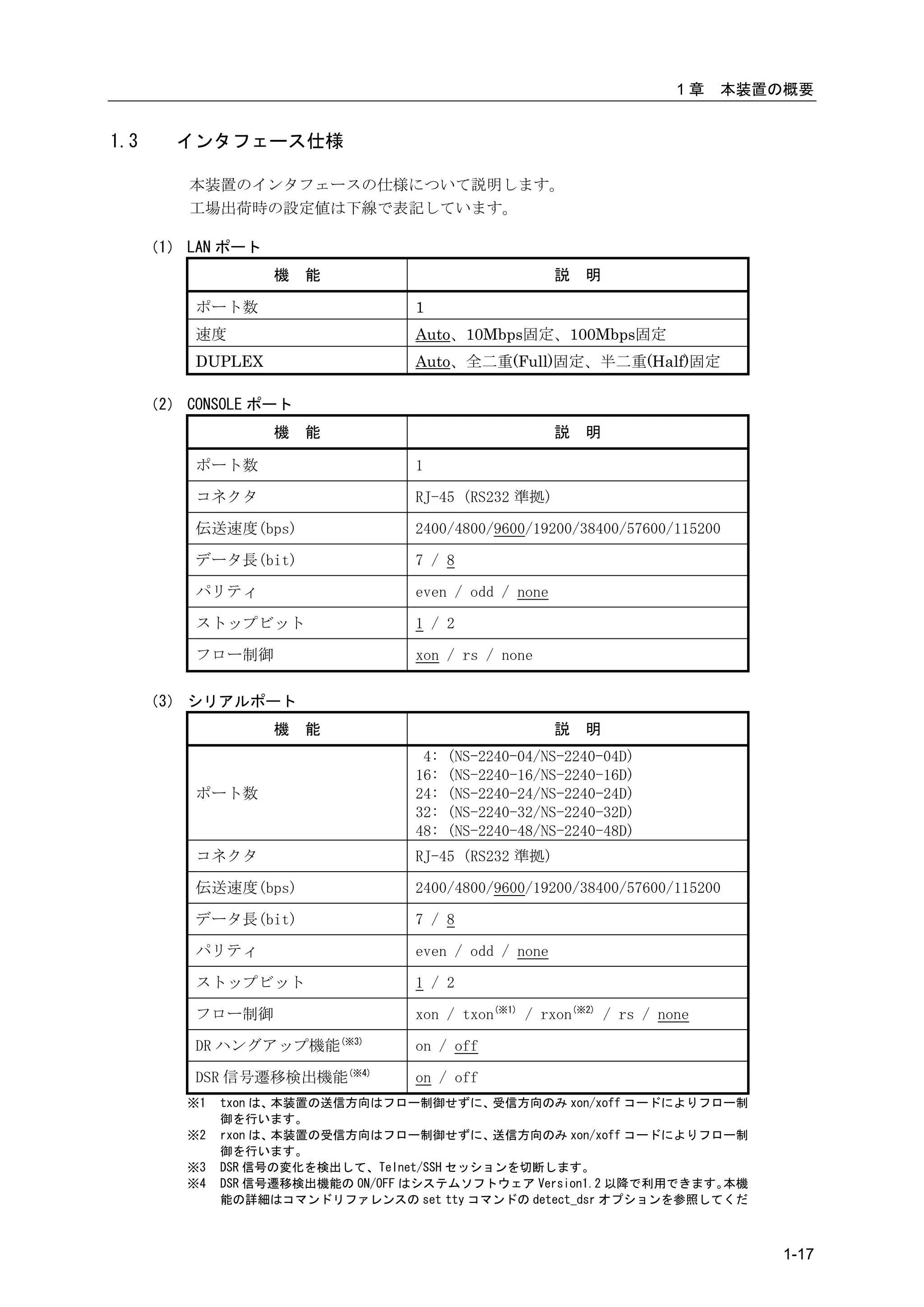
1.3      インタフェース仕様

          本装置のインタフェースの仕様について説明します。
          工場出荷時の設定値は下線で表記しています。

      (1) LAN ポート
                    機   能                              説   明

           ポート数                    1
           速度                      Auto、10Mbps固定、100Mbps固定
           DUPLEX                  Auto、全二重(Full)固定、半二重(Half)固定

      (2) CONSOLE ポート
                    機   能                              説   明

           ポート数                    1

           コネクタ                    RJ-45 (RS232 準拠)

           伝送速度(bps)               2400/4800/9600/19200/38400/57600/115200

           データ長(bit)               7 / 8

           パリティ                    even / odd / none

           ストップビット                 1 / 2

           フロー制御                   xon / rs / none

      (3) シリアルポート
                    機   能                              説   明
                                    4:   (NS-2240-04/NS-2240-04D)
                                   16:   (NS-2240-16/NS-2240-16D)
           ポート数                    24:   (NS-2240-24/NS-2240-24D)
                                   32:   (NS-2240-32/NS-2240-32D)
                                   48:   (NS-2240-48/NS-2240-48D)
           コネクタ                    RJ-45 (RS232 準拠)

           伝送速度(bps)               2400/4800/9600/19200/38400/57600/115200

           データ長(bit)               7 / 8

           パリティ                    even / odd / none

           ストップビット                 1 / 2

           フロー制御                   xon / txon(※1) / rxon(※2) / rs / none

           DR ハングアップ機能(※3)         on / off

           DSR 信号遷移検出機能(※4)        on / off
          ※1   txon は、本装置の送信方向はフロー制御せずに、     受信方向のみ xon/xoff コードによりフロー制
               御を行います。
          ※2   rxon は、本装置の受信方向はフロー制御せずに、     送信方向のみ xon/xoff コードによりフロー制
               御を行います。
          ※3   DSR 信号の変化を検出して、Telnet/SSH セッションを切断します。
          ※4   DSR 信号遷移検出機能の ON/OFF はシステムソフトウェア Version1.2 以降で利用できます。本機
               能の詳細はコマンドリファレンスの set tty コマンドの detect_dsr オプションを参照してくだ


                                                                               1-17
さい。


1-18
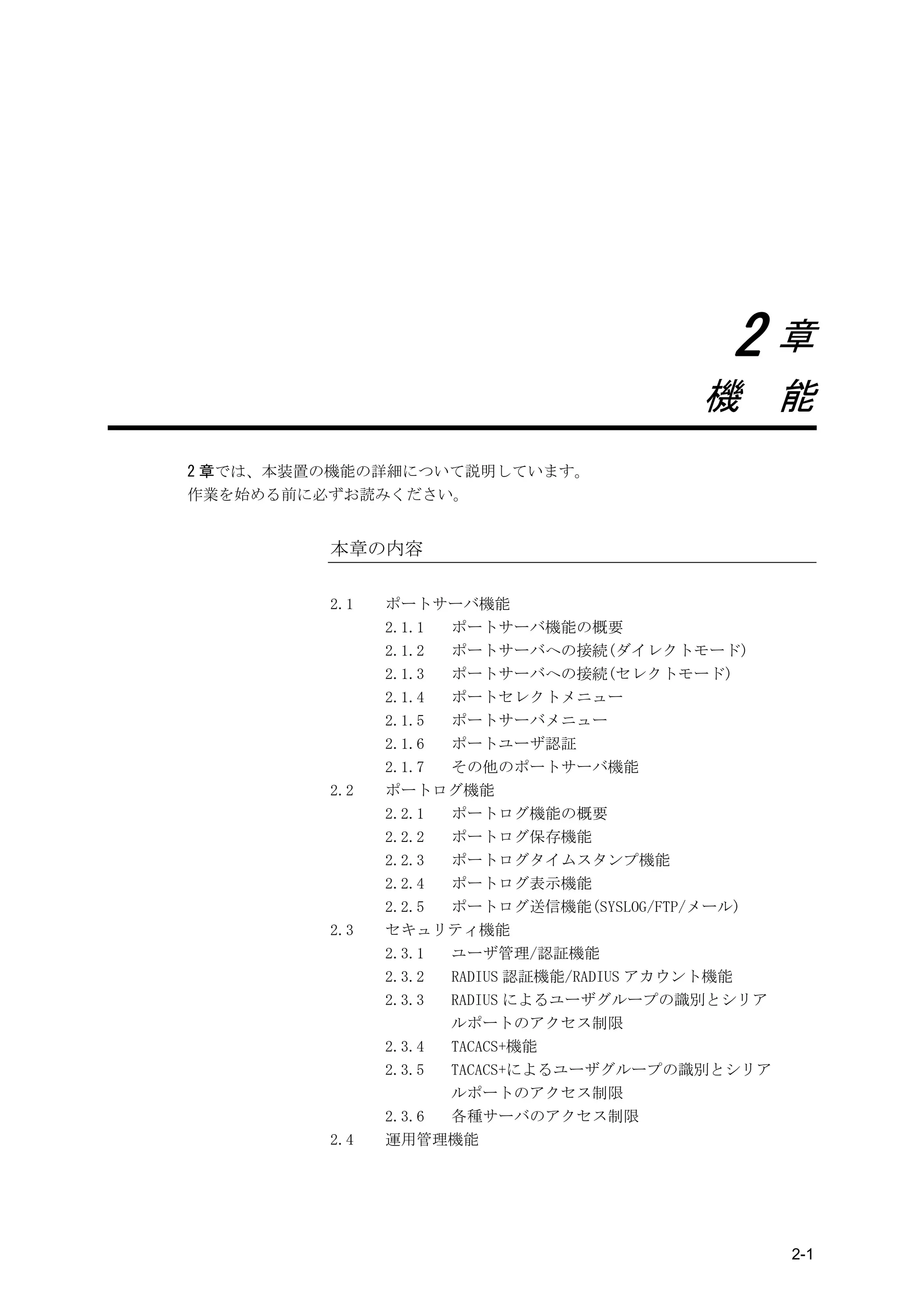
2章
                                         機 能
2 章では、本装置の機能の詳細について説明しています。
作業を始める前に必ずお読みください。


         本章の内容

         2.1   ポートサーバ機能
               2.1.1 ポートサーバ機能の概要
               2.1.2 ポートサーバへの接続(ダイレクトモード)
               2.1.3 ポートサーバへの接続(セレクトモード)
               2.1.4 ポートセレクトメニュー
               2.1.5 ポートサーバメニュー
               2.1.6 ポートユーザ認証
               2.1.7 その他のポートサーバ機能
         2.2   ポートログ機能
               2.2.1 ポートログ機能の概要
               2.2.2 ポートログ保存機能
               2.2.3 ポートログタイムスタンプ機能
               2.2.4 ポートログ表示機能
               2.2.5 ポートログ送信機能(SYSLOG/FTP/メール)
         2.3   セキュリティ機能
               2.3.1 ユーザ管理/認証機能
               2.3.2 RADIUS 認証機能/RADIUS アカウント機能
               2.3.3 RADIUS によるユーザグループの識別とシリア
                     ルポートのアクセス制限
               2.3.4 TACACS+機能
               2.3.5 TACACS+によるユーザグループの識別とシリア
                     ルポートのアクセス制限
               2.3.6 各種サーバのアクセス制限
         2.4   運用管理機能


                                                  2-1
2.1   ポートサーバ機能


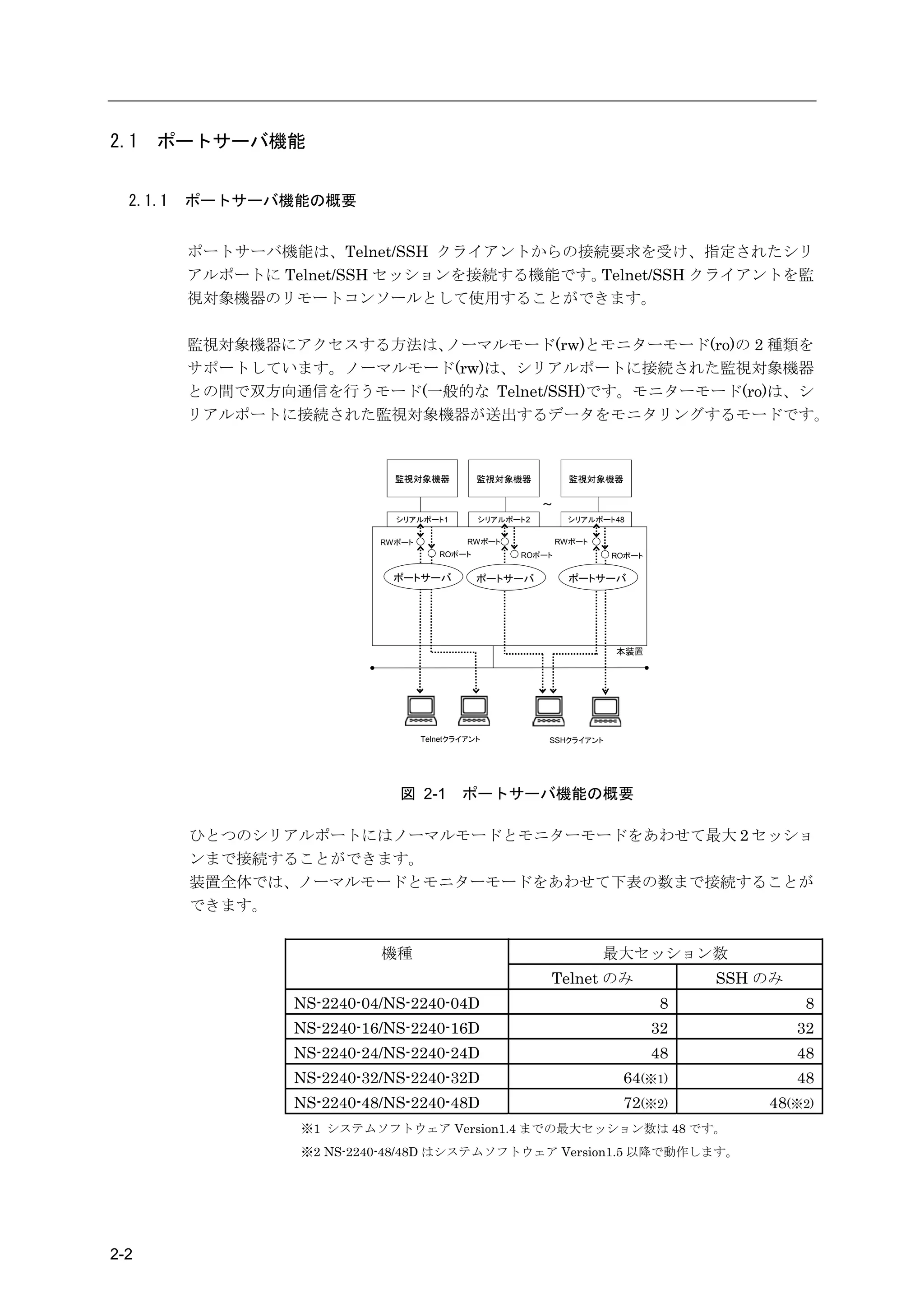
  2.1.1   ポートサーバ機能の概要


          ポートサーバ機能は、Telnet/SSH クライアントからの接続要求を受け、指定されたシリ
          アルポートに Telnet/SSH セッションを接続する機能です。Telnet/SSH クライアントを監
          視対象機器のリモートコンソールとして使用することができます。

          監視対象機器にアクセスする方法は、ノーマルモード(rw)とモニターモード(ro)の 2 種類を
          サポートしています。ノーマルモード(rw)は、シリアルポートに接続された監視対象機器
          との間で双方向通信を行うモード(一般的な Telnet/SSH)です。モニターモード(ro)は、シ
          リアルポートに接続された監視対象機器が送出するデータをモニタリングするモードです。


                              監視対象機器           監視対象機器           監視対象機器

                                                          ~
                              シリアルポート1         シリアルポート2         シリアルポート48

                            RWポート            RWポート            RWポート
                                       ROポート         ROポート            ROポート

                              ポートサーバ           ポートサーバ           ポートサーバ


                                                                       本装置


                                    Telnetクライアント          SSHクライアント


                              図 2-1         ポートサーバ機能の概要

          ひとつのシリアルポートにはノーマルモードとモニターモードをあわせて最大 2 セッショ
          ンまで接続することができます。
          装置全体では、ノーマルモードとモニターモードをあわせて下表の数まで接続することが
          できます。


                            機種                                        最大セッション数
                                                          Telnet のみ                SSH のみ
                  NS-2240-04/NS-2240-04D                                       8             8
                  NS-2240-16/NS-2240-16D                                      32            32
                  NS-2240-24/NS-2240-24D                                      48            48
                  NS-2240-32/NS-2240-32D                                64(※1)              48
                  NS-2240-48/NS-2240-48D                                72(※2)         48(※2)
                   ※1 システムソフトウェア Version1.4 までの最大セッション数は 48 です。
                   ※2 NS-2240-48/48D はシステムソフトウェア Version1.5 以降で動作します。


2-2
2章   機    能


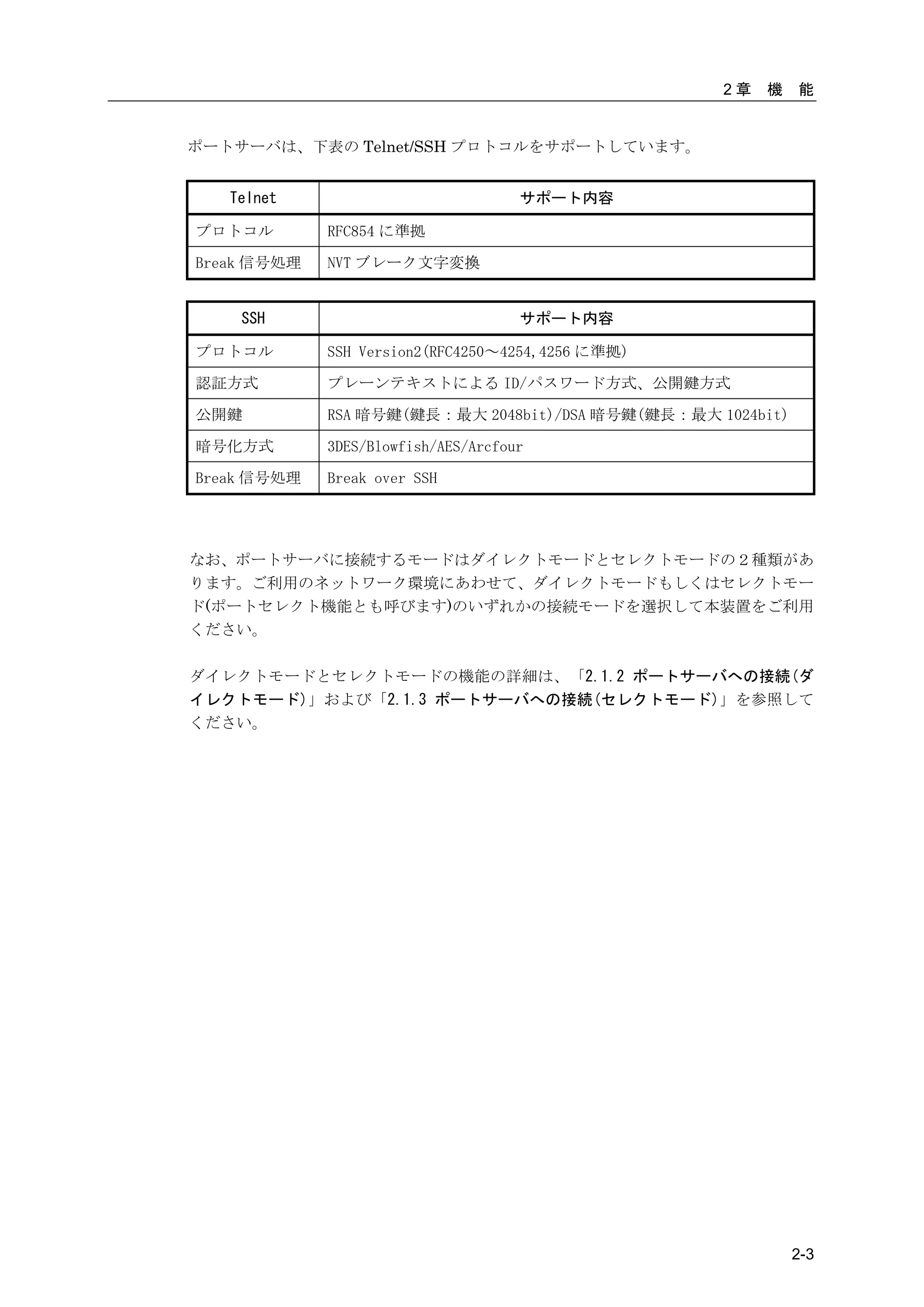
ポートサーバは、下表の Telnet/SSH プロトコルをサポートしています。


   Telnet                            サポート内容

プロトコル        RFC854 に準拠

Break 信号処理   NVT ブレーク文字変換


    SSH                              サポート内容

プロトコル        SSH Version2(RFC4250~4254,4256 に準拠)

認証方式         プレーンテキストによる ID/パスワード方式、公開鍵方式

公開鍵          RSA 暗号鍵(鍵長:最大 2048bit)/DSA 暗号鍵(鍵長:最大 1024bit)

暗号化方式        3DES/Blowfish/AES/Arcfour

Break 信号処理   Break over SSH


なお、ポートサーバに接続するモードはダイレクトモードとセレクトモードの2種類があ
ります。ご利用のネットワーク環境にあわせて、ダイレクトモードもしくはセレクトモー
ド(ポートセレクト機能とも呼びます)のいずれかの接続モードを選択して本装置をご利用
ください。

ダイレクトモードとセレクトモードの機能の詳細は、「2.1.2 ポートサーバへの接続(ダ
イレクトモード)」および「2.1.3 ポートサーバへの接続(セレクトモード)」を参照して
ください。


                                                             2-3
2.1.2   ポートサーバへの接続(ダイレクトモード)

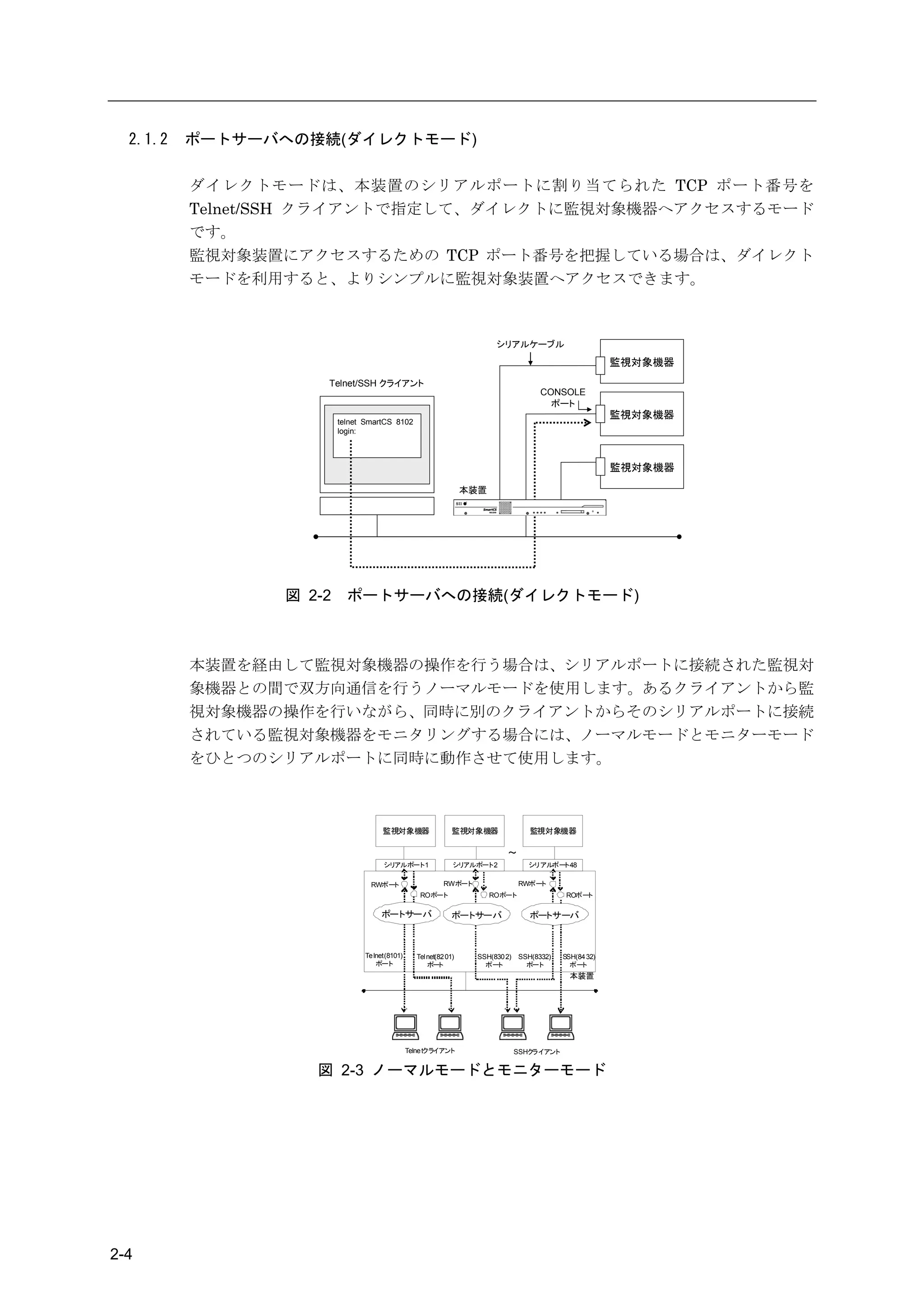
          ダイレクトモードは、本装置のシリアルポートに割り当てられた TCP ポート番号を
          Telnet/SSH クライアントで指定して、ダイレクトに監視対象機器へアクセスするモード
          です。
          監視対象装置にアクセスするための TCP ポート番号を把握している場合は、ダイレクト
          モードを利用すると、よりシンプルに監視対象装置へアクセスできます。


                                                                         シリアルケーブル
                                                                                                         監視対象機器
                    Telnet/SSH クライアント
                                                                                      CONSOLE
                                                                                        ポート
                                                                                                         監視対象機器
                        telnet SmartCS 8102
                        login:


                                                                                                         監視対象機器

                                                                  本装置


                図 2-2     ポートサーバへの接続(ダイレクトモード)


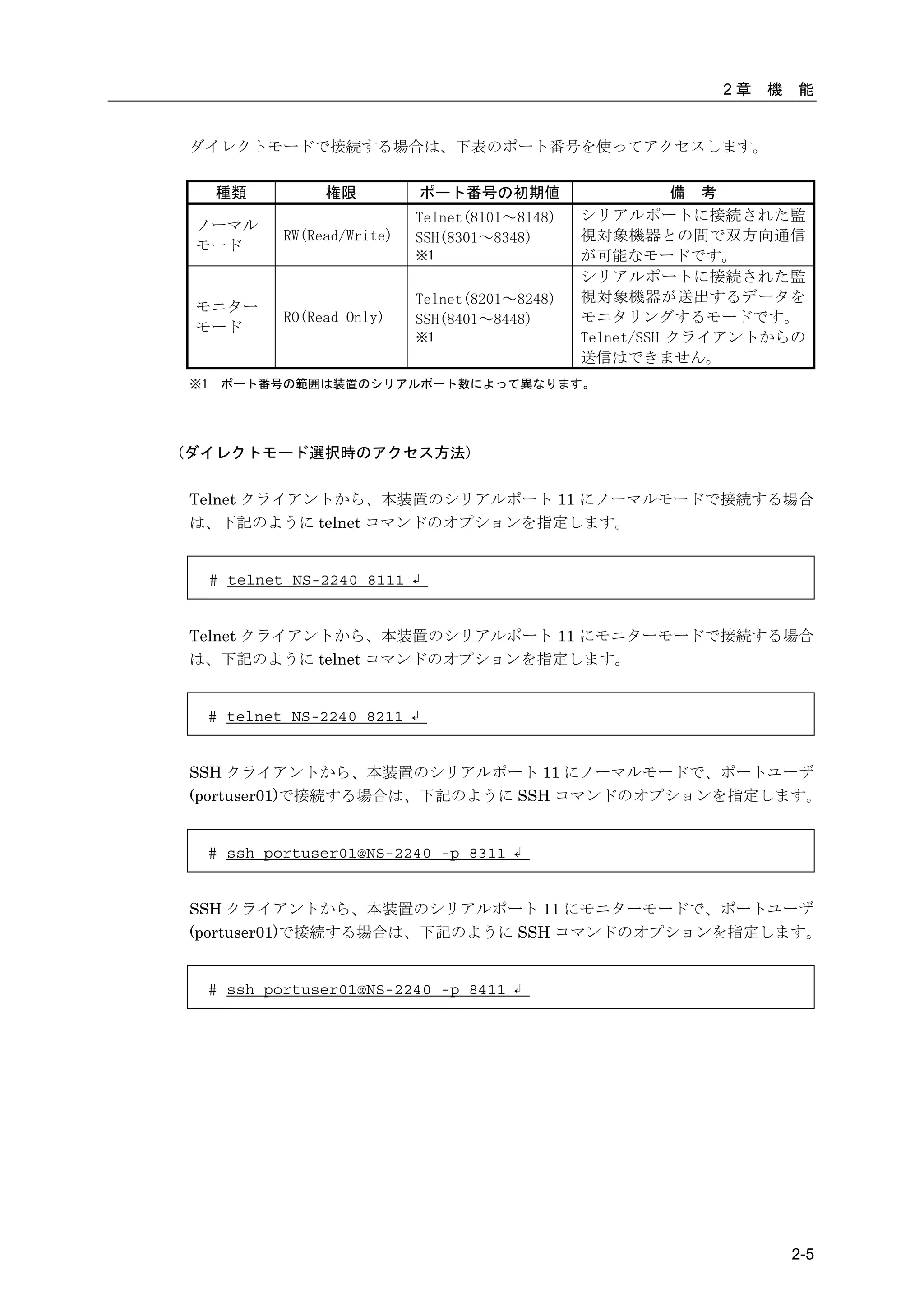
          本装置を経由して監視対象機器の操作を行う場合は、シリアルポートに接続された監視対
          象機器との間で双方向通信を行うノーマルモードを使用します。あるクライアントから監
          視対象機器の操作を行いながら、同時に別のクライアントからそのシリアルポートに接続
          されている監視対象機器をモニタリングする場合には、ノーマルモードとモニターモード
          をひとつのシリアルポートに同時に動作させて使用します。


                                    監視対象機器                    監視対象機器               監視対象機器

                                                                           ~
                                    シリアルポート1                  シリアルポート2            シリアルポート48

                                RWポート                      RWポート                RWポート
                                                  ROポート                 ROポート                ROポート

                                   ポートサーバ                     ポートサーバ               ポートサーバ


                              Te lnet(8101)      Tel net(82 01)    SSH(830 2)   SSH(8332)   SSH(84 32)
                                  ポート                ポート             ポート          ポート         ポート
                                                                                              本装置


                                              Telne tクライアント                     SSHクライアント


                   図 2-3 ノーマルモードとモニターモード


2-4
2章   機   能


ダイレクトモードで接続する場合は、下表のポート番号を使ってアクセスします。

     種類           権限          ポート番号の初期値                      備 考
                              Telnet(8101~8148)   シリアルポートに接続された監
 ノーマル
             RW(Read/Write)   SSH(8301~8348)      視対象機器との間で双方向通信
 モード
                              ※1                  が可能なモードです。
                                                  シリアルポートに接続された監
                              Telnet(8201~8248)   視対象機器が送出するデータを
 モニター
             RO(Read Only)    SSH(8401~8448)      モニタリングするモードです。
 モード
                              ※1                  Telnet/SSH クライアントからの
                                                  送信はできません。
※1    ポート番号の範囲は装置のシリアルポート数によって異なります。


(ダイレクトモード選択時のアクセス方法)

Telnet クライアントから、本装置のシリアルポート 11 にノーマルモードで接続する場合
は、下記のように telnet コマンドのオプションを指定します。


     # telnet NS-2240 8111 ↲


Telnet クライアントから、本装置のシリアルポート 11 にモニターモードで接続する場合
は、下記のように telnet コマンドのオプションを指定します。


  # telnet NS-2240 8211 ↲


SSH クライアントから、本装置のシリアルポート 11 にノーマルモードで、ポートユーザ
(portuser01)で接続する場合は、下記のように SSH コマンドのオプションを指定します。


  # ssh portuser01@NS-2240 -p 8311 ↲


SSH クライアントから、本装置のシリアルポート 11 にモニターモードで、ポートユーザ
(portuser01)で接続する場合は、下記のように SSH コマンドのオプションを指定します。


  # ssh portuser01@NS-2240 -p 8411 ↲


                                                                       2-5
2.1.3   ポートサーバへの接続(セレクトモード)

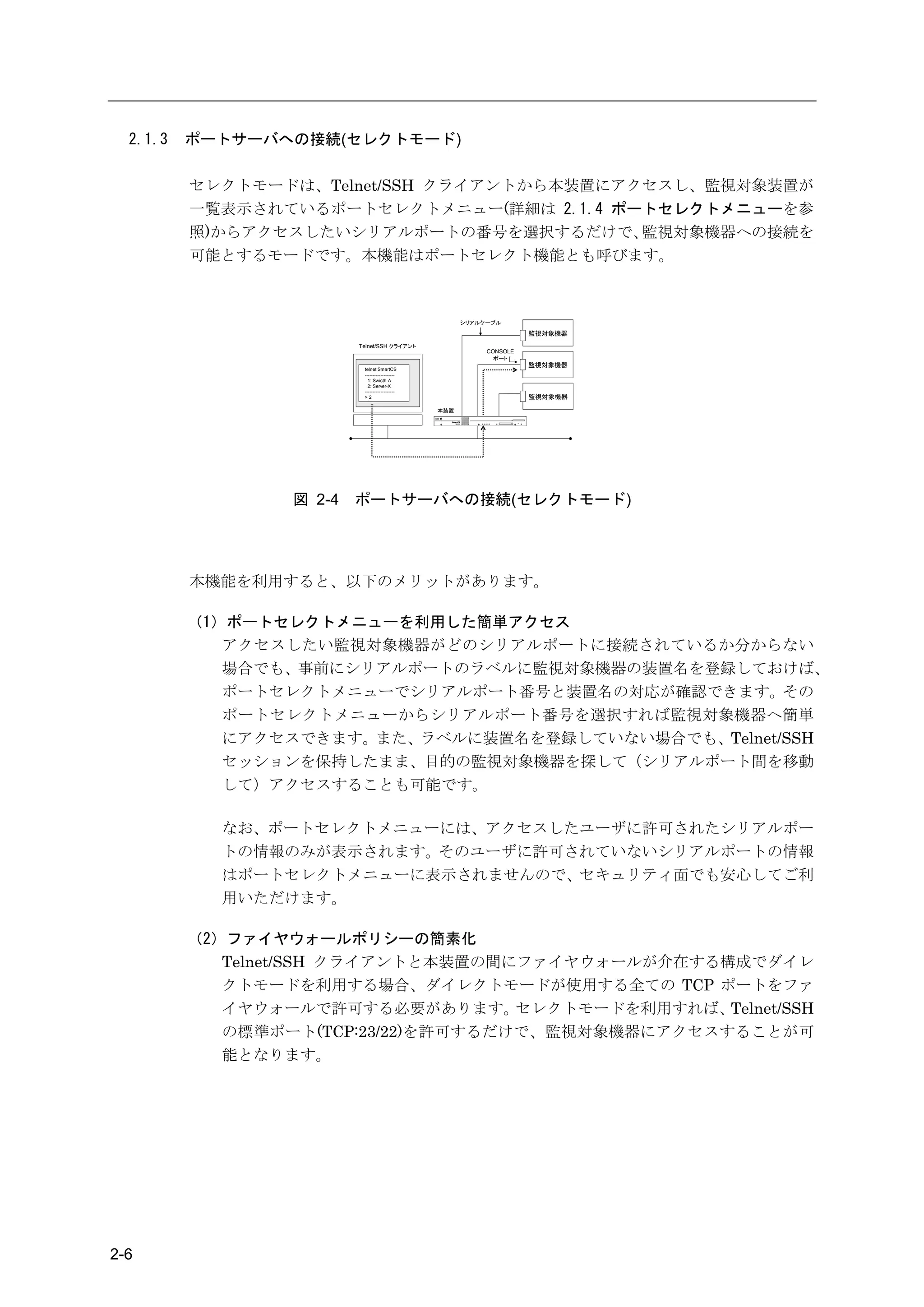
          セレクトモードは、Telnet/SSH クライアントから本装置にアクセスし、監視対象装置が
          一覧表示されているポートセレクトメニュー(詳細は 2.1.4 ポートセレクトメニューを参
          照)からアクセスしたいシリアルポートの番号を選択するだけで、    監視対象機器への接続を
          可能とするモードです。本機能はポートセレクト機能とも呼びます。


                                                       シリアルケーブル

                                                                      監視対象機器
                          Telnet/SSH クライアント
                                                            CONSOLE
                                                              ポート
                                                                      監視対象機器
                           telnet SmartCS
                           -------------------
                             1: Swicth-A
                             2: Server-X
                           -------------------
                           >2                                         監視対象機器

                                                 本装置


                  図 2-4   ポートサーバへの接続(セレクトモード)


          本機能を利用すると、以下のメリットがあります。

          (1)ポートセレクトメニューを利用した簡単アクセス
             アクセスしたい監視対象機器がどのシリアルポートに接続されているか分からない
             場合でも、事前にシリアルポートのラベルに監視対象機器の装置名を登録しておけば、
             ポートセレクトメニューでシリアルポート番号と装置名の対応が確認できます。その
             ポートセレクトメニューからシリアルポート番号を選択すれば監視対象機器へ簡単
             にアクセスできます。また、ラベルに装置名を登録していない場合でも、Telnet/SSH
             セッションを保持したまま、目的の監視対象機器を探して(シリアルポート間を移動
             して)アクセスすることも可能です。

            なお、ポートセレクトメニューには、アクセスしたユーザに許可されたシリアルポー
            トの情報のみが表示されます。そのユーザに許可されていないシリアルポートの情報
            はポートセレクトメニューに表示されませんので、セキュリティ面でも安心してご利
            用いただけます。

          (2)ファイヤウォールポリシーの簡素化
             Telnet/SSH クライアントと本装置の間にファイヤウォールが介在する構成でダイレ
             クトモードを利用する場合、ダイレクトモードが使用する全ての TCP ポートをファ
             イヤウォールで許可する必要があります。     セレクトモードを利用すれば、Telnet/SSH
             の標準ポート(TCP:23/22)を許可するだけで、監視対象機器にアクセスすることが可
             能となります。


2-6
2章   機   能


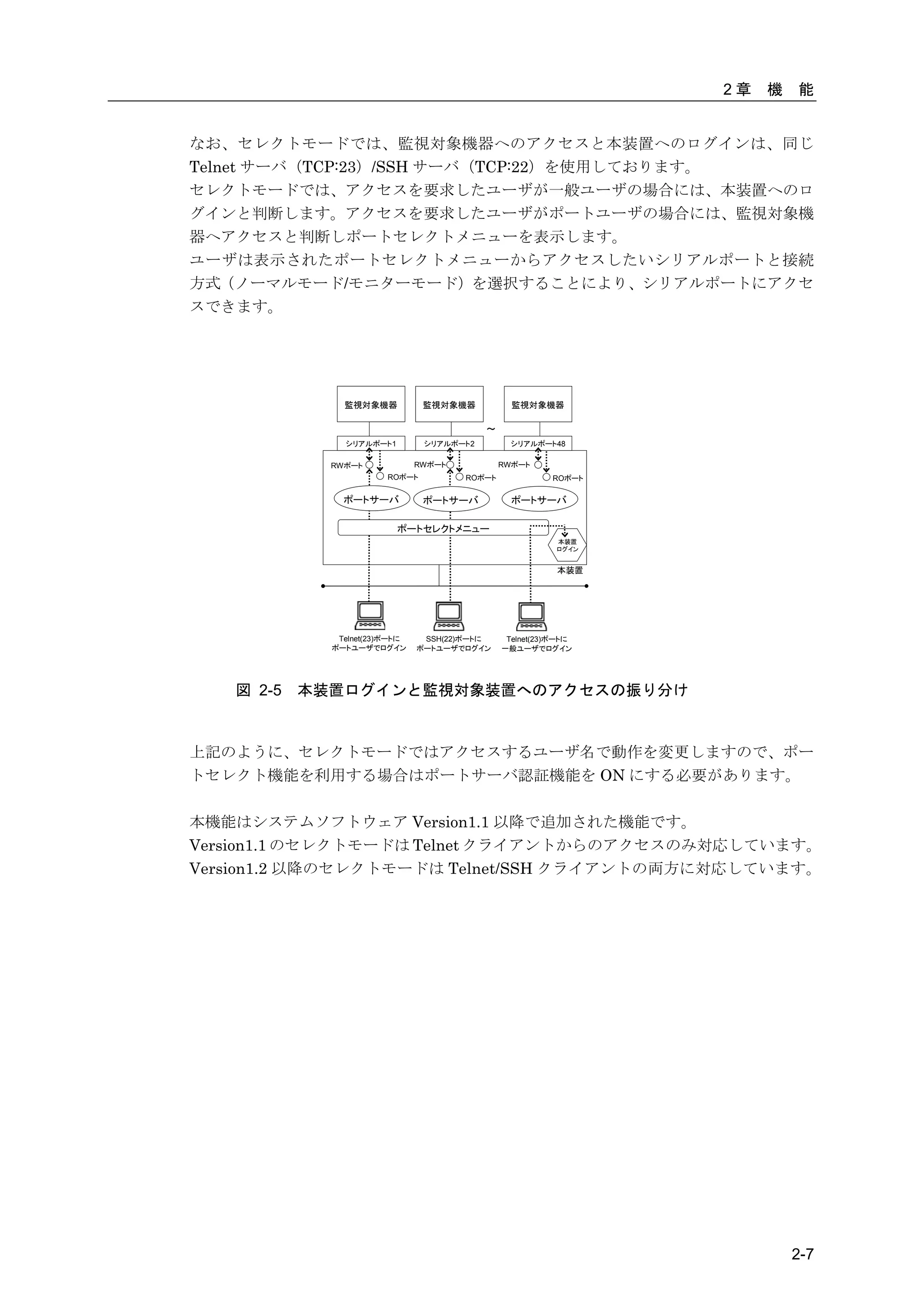
なお、セレクトモードでは、監視対象機器へのアクセスと本装置へのログインは、同じ
Telnet サーバ(TCP:23)/SSH サーバ(TCP:22)を使用しております。
セレクトモードでは、アクセスを要求したユーザが一般ユーザの場合には、本装置へのロ
グインと判断します。アクセスを要求したユーザがポートユーザの場合には、監視対象機
器へアクセスと判断しポートセレクトメニューを表示します。
ユーザは表示されたポートセレクトメニューからアクセスしたいシリアルポートと接続
方式(ノーマルモード/モニターモード)を選択することにより、シリアルポートにアクセ
スできます。


               監視対象機器           監視対象機器           監視対象機器

                                           ~
               シリアルポート1         シリアルポート2         シリアルポート48

             RWポート             RWポート           RWポート
                        ROポート          ROポート             ROポート

               ポートサーバ           ポートサーバ           ポートサーバ

                          ポートセレクトメニュー
                                                          本装置
                                                          ログイン


                                                          本装置


              Telnet(23)ポートに    SSH(22)ポートに     Telnet(23)ポートに
             ポートユーザでログイン       ポートユーザでログイン     一般ユーザでログイン


   図 2-5   本装置ログインと監視対象装置へのアクセスの振り分け


上記のように、セレクトモードではアクセスするユーザ名で動作を変更しますので、ポー
トセレクト機能を利用する場合はポートサーバ認証機能を ON にする必要があります。

本機能はシステムソフトウェア Version1.1 以降で追加された機能です。
Version1.1 のセレクトモードは Telnet クライアントからのアクセスのみ対応しています。
Version1.2 以降のセレクトモードは Telnet/SSH クライアントの両方に対応しています。


                                                                          2-7
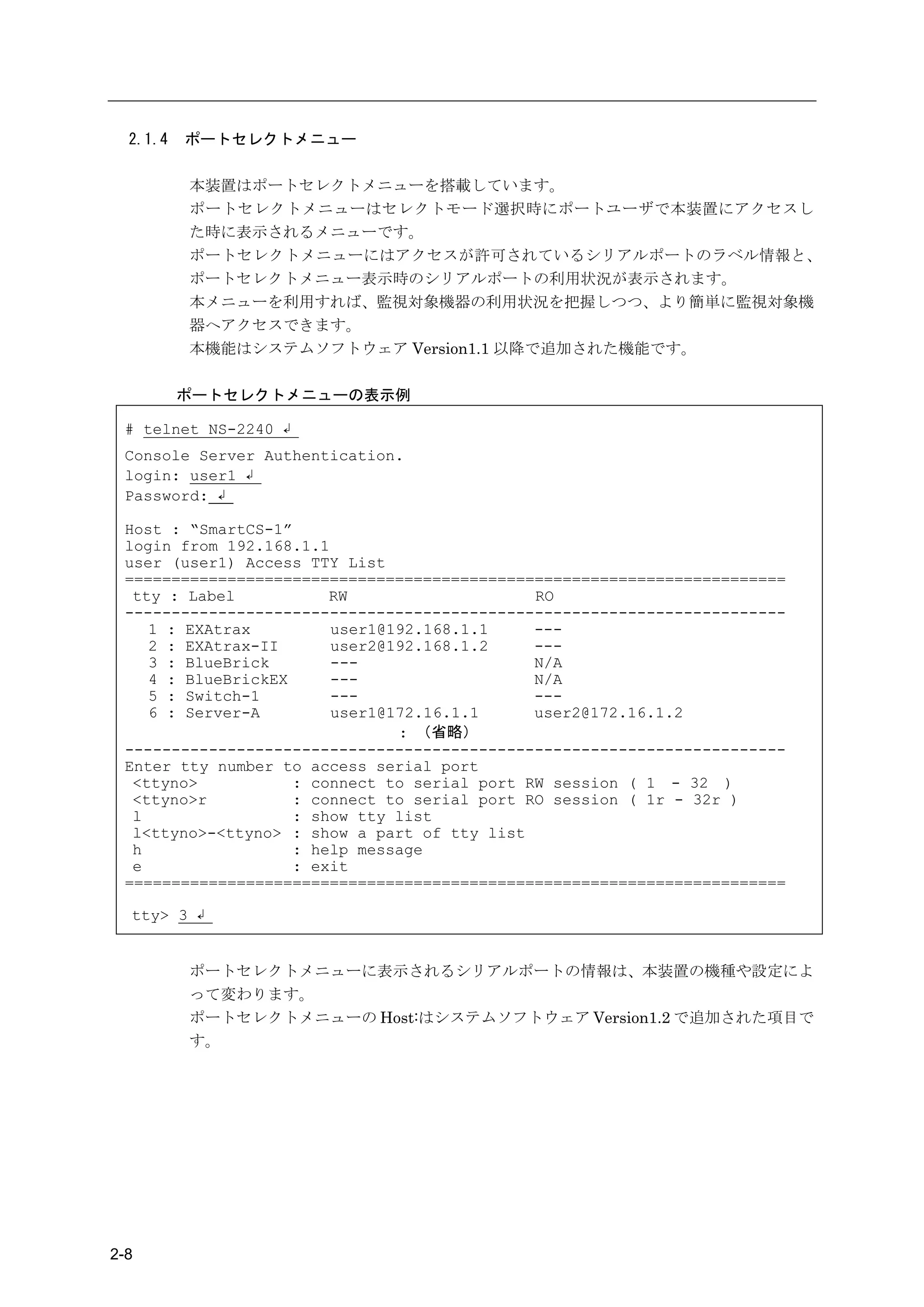
2.1.4   ポートセレクトメニュー

          本装置はポートセレクトメニューを搭載しています。
          ポートセレクトメニューはセレクトモード選択時にポートユーザで本装置にアクセスし
          た時に表示されるメニューです。
          ポートセレクトメニューにはアクセスが許可されているシリアルポートのラベル情報と、
          ポートセレクトメニュー表示時のシリアルポートの利用状況が表示されます。
          本メニューを利用すれば、監視対象機器の利用状況を把握しつつ、より簡単に監視対象機
          器へアクセスできます。
          本機能はシステムソフトウェア Version1.1 以降で追加された機能です。

          ポートセレクトメニューの表示例

 # telnet NS-2240 ↲
 Console Server Authentication.
 login: user1 ↲
 Password: ↲

 Host : “SmartCS-1”
 login from 192.168.1.1
 user (user1) Access TTY List
 =======================================================================
  tty : Label           RW                    RO
 -----------------------------------------------------------------------
    1 : EXAtrax         user1@192.168.1.1     ---
    2 : EXAtrax-II      user2@192.168.1.2     ---
    3 : BlueBrick       ---                   N/A
    4 : BlueBrickEX     ---                   N/A
    5 : Switch-1        ---                   ---
    6 : Server-A        user1@172.16.1.1      user2@172.16.1.2
                               : (省略)
 -----------------------------------------------------------------------
 Enter tty number to access serial port
  <ttyno>           : connect to serial port RW session ( 1 - 32 )
  <ttyno>r          : connect to serial port RO session ( 1r - 32r )
  l                 : show tty list
  l<ttyno>-<ttyno> : show a part of tty list
  h                 : help message
  e                 : exit
 =======================================================================

  tty> 3 ↲


          ポートセレクトメニューに表示されるシリアルポートの情報は、本装置の機種や設定によ
          って変わります。
          ポートセレクトメニューの Host:はシステムソフトウェア Version1.2 で追加された項目で
          す。


2-8
2章    機       能


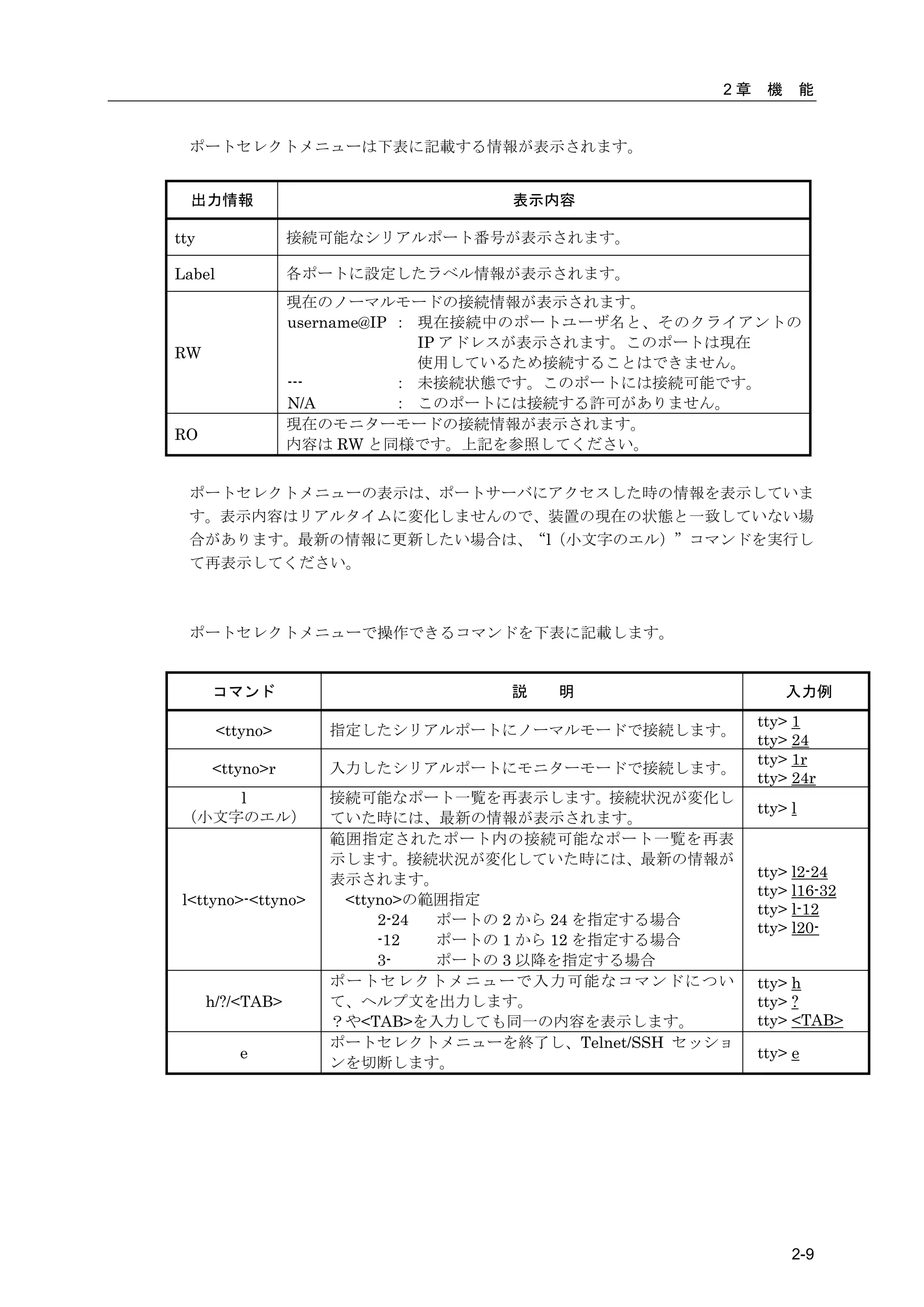
  ポートセレクトメニューは下表に記載する情報が表示されます。


  出力情報                             表示内容

tty               接続可能なシリアルポート番号が表示されます。

Label             各ポートに設定したラベル情報が表示されます。
                  現在のノーマルモードの接続情報が表示されます。
                  username@IP : 現在接続中のポートユーザ名と、そのクライアントの
                                IP アドレスが表示されます。このポートは現在
RW
                                使用しているため接続することはできません。
                  ---         : 未接続状態です。このポートには接続可能です。
                  N/A         : このポートには接続する許可がありません。
                  現在のモニターモードの接続情報が表示されます。
RO
                  内容は RW と同様です。上記を参照してください。


  ポートセレクトメニューの表示は、ポートサーバにアクセスした時の情報を表示していま
  す。表示内容はリアルタイムに変化しませんので、装置の現在の状態と一致していない場
  合があります。最新の情報に更新したい場合は、“l(小文字のエル)”コマンドを実行し
  て再表示してください。


  ポートセレクトメニューで操作できるコマンドを下表に記載します。


      コマンド                        説   明                      入力例
                                                        tty> 1
        <ttyno>      指定したシリアルポートにノーマルモードで接続します。
                                                        tty> 24
                                                        tty> 1r
      <ttyno>r       入力したシリアルポートにモニターモードで接続します。
                                                        tty> 24r
    l                接続可能なポート一覧を再表示します。接続状況が変化し
                                                        tty> l
(小文字のエル)             ていた時には、最新の情報が表示されます。
                     範囲指定されたポート内の接続可能なポート一覧を再表
                     示します。接続状況が変化していた時には、最新の情報が
                     表示されます。                            tty> l2-24
                                                        tty> l16-32
 l<ttyno>-<ttyno>     <ttyno>の範囲指定
                                                        tty> l-12
                          2-24 ポートの 2 から 24 を指定する場合
                                                        tty> l20-
                          -12  ポートの 1 から 12 を指定する場合
                          3-   ポートの 3 以降を指定する場合
                     ポートセレクトメニューで入力可能なコマンドについ           tty> h
      h/?/<TAB>      て、ヘルプ文を出力します。                      tty> ?
                     ?や<TAB>を入力しても同一の内容を表示します。          tty> <TAB>
                     ポートセレクトメニューを終了し、Telnet/SSH セッショ
           e                                            tty> e
                     ンを切断します。


                                                             2-9
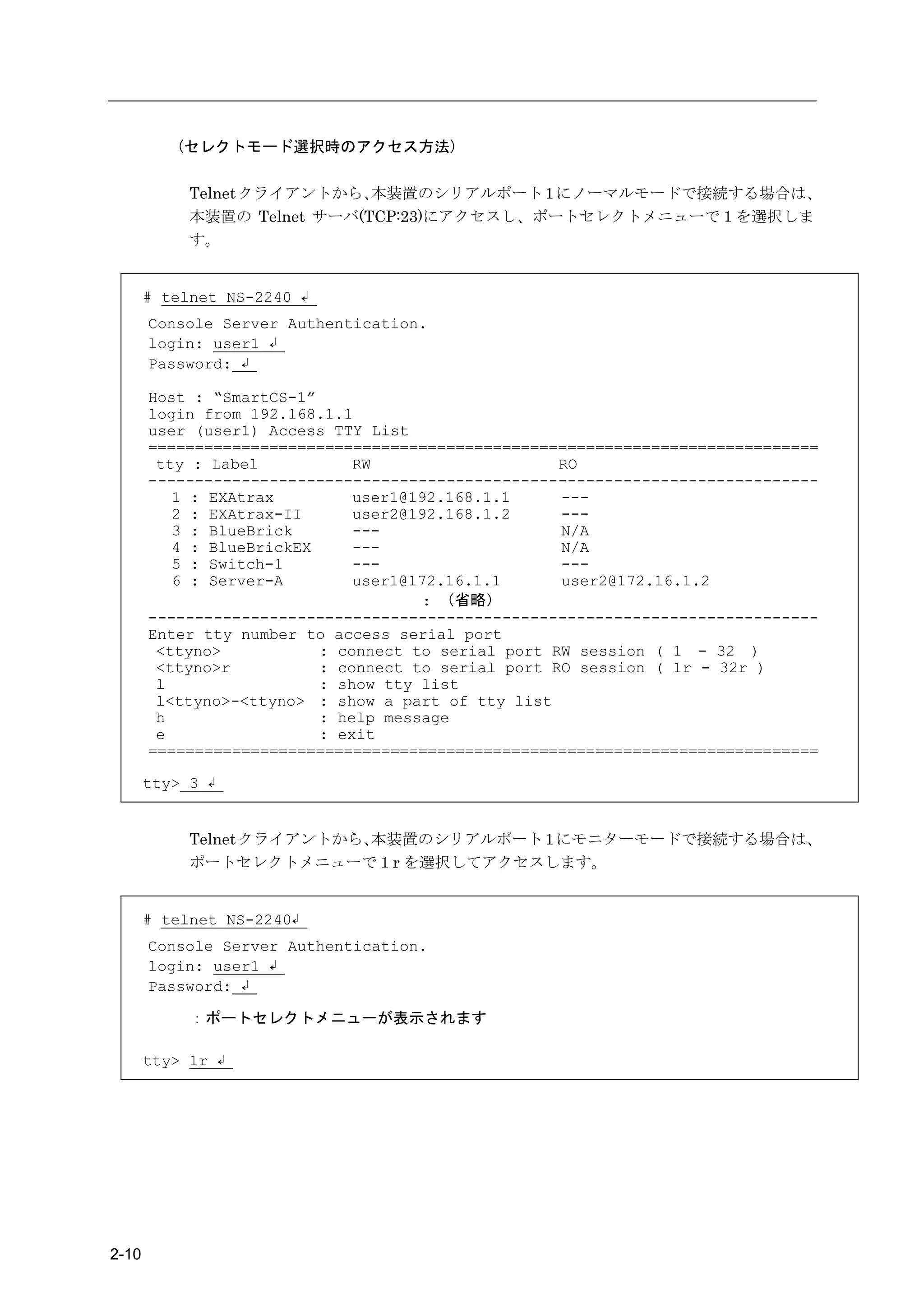
(セレクトモード選択時のアクセス方法)

            Telnet クライアントから、 本装置のシリアルポート 1 にノーマルモードで接続する場合は、
            本装置の Telnet サーバ(TCP:23)にアクセスし、ポートセレクトメニューで1を選択しま
            す。


       # telnet NS-2240 ↲
       Console Server Authentication.
       login: user1 ↲
       Password: ↲

       Host : “SmartCS-1”
       login from 192.168.1.1
       user (user1) Access TTY List
       ========================================================================
        tty : Label           RW                    RO
       ------------------------------------------------------------------------
          1 : EXAtrax         user1@192.168.1.1     ---
          2 : EXAtrax-II      user2@192.168.1.2     ---
          3 : BlueBrick       ---                   N/A
          4 : BlueBrickEX     ---                   N/A
          5 : Switch-1        ---                   ---
          6 : Server-A        user1@172.16.1.1      user2@172.16.1.2
                                     : (省略)
       ------------------------------------------------------------------------
       Enter tty number to access serial port
        <ttyno>           : connect to serial port RW session ( 1 - 32 )
        <ttyno>r          : connect to serial port RO session ( 1r - 32r )
        l                 : show tty list
        l<ttyno>-<ttyno> : show a part of tty list
        h                 : help message
        e                 : exit
       ========================================================================

       tty> 3 ↲


            Telnet クライアントから、本装置のシリアルポート 1 にモニターモードで接続する場合は、
            ポートセレクトメニューで1r を選択してアクセスします。


       # telnet NS-2240↲
       Console Server Authentication.
       login: user1 ↲
       Password: ↲

            :ポートセレクトメニューが表示されます

       tty> 1r ↲


2-10
2章   機    能


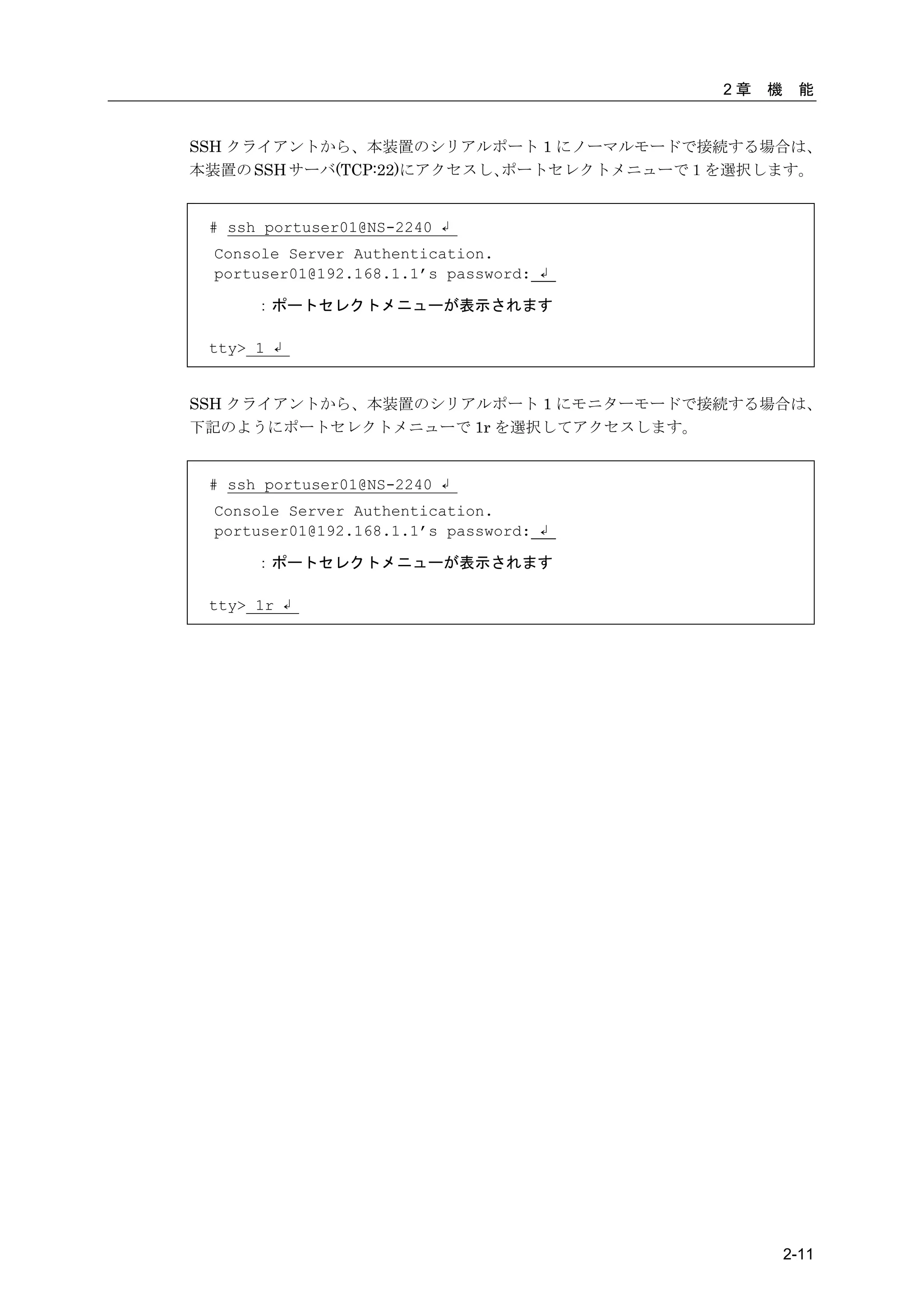
SSH クライアントから、本装置のシリアルポート 1 にノーマルモードで接続する場合は、
本装置の SSH サーバ(TCP:22)にアクセスし、ポートセレクトメニューで1を選択します。


 # ssh portuser01@NS-2240 ↲
 Console Server Authentication.
 portuser01@192.168.1.1’s password: ↲

      :ポートセレクトメニューが表示されます

 tty> 1 ↲


SSH クライアントから、本装置のシリアルポート 1 にモニターモードで接続する場合は、
下記のようにポートセレクトメニューで 1r を選択してアクセスします。


 # ssh portuser01@NS-2240 ↲
 Console Server Authentication.
 portuser01@192.168.1.1’s password: ↲

      :ポートセレクトメニューが表示されます

 tty> 1r ↲


                                                 2-11
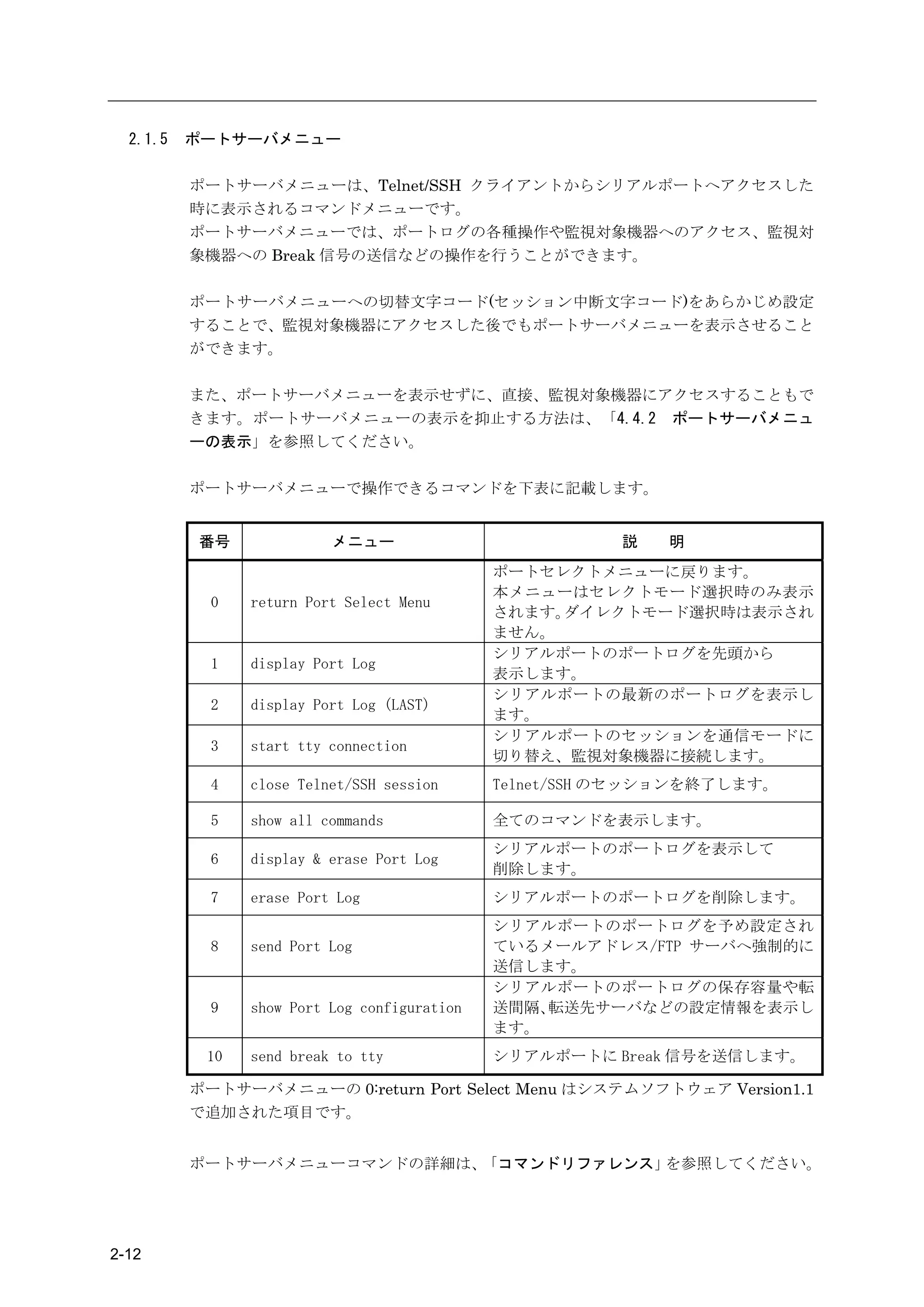
2.1.5   ポートサーバメニュー

          ポートサーバメニューは、Telnet/SSH クライアントからシリアルポートへアクセスした
          時に表示されるコマンドメニューです。
          ポートサーバメニューでは、ポートログの各種操作や監視対象機器へのアクセス、監視対
          象機器への Break 信号の送信などの操作を行うことができます。

          ポートサーバメニューへの切替文字コード(セッション中断文字コード)をあらかじめ設定
          することで、監視対象機器にアクセスした後でもポートサーバメニューを表示させること
          ができます。

          また、ポートサーバメニューを表示せずに、直接、監視対象機器にアクセスすることもで
          きます。ポートサーバメニューの表示を抑止する方法は、「4.4.2 ポートサーバメニュ
          ーの表示」を参照してください。

          ポートサーバメニューで操作できるコマンドを下表に記載します。


          番号              メニュー                          説   明
                                              ポートセレクトメニューに戻ります。
                                              本メニューはセレクトモード選択時のみ表示
            0   return Port Select Menu
                                              されます。ダイレクトモード選択時は表示され
                                              ません。
                                              シリアルポートのポートログを先頭から
            1   display Port Log
                                              表示します。
                                              シリアルポートの最新のポートログを表示し
            2   display Port Log (LAST)
                                              ます。
                                              シリアルポートのセッションを通信モードに
            3   start tty connection
                                              切り替え、監視対象機器に接続します。
            4   close Telnet/SSH session      Telnet/SSH のセッションを終了します。

            5   show all commands             全てのコマンドを表示します。
                                              シリアルポートのポートログを表示して
            6   display & erase Port Log
                                              削除します。
            7   erase Port Log                シリアルポートのポートログを削除します。
                                              シリアルポートのポートログを予め設定され
            8   send Port Log                 ているメールアドレス/FTP サーバへ強制的に
                                              送信します。
                                              シリアルポートのポートログの保存容量や転
            9   show Port Log configuration   送間隔、転送先サーバなどの設定情報を表示し
                                              ます。
           10   send break to tty             シリアルポートに Break 信号を送信します。

          ポートサーバメニューの 0:return Port Select Menu はシステムソフトウェア Version1.1
          で追加された項目です。


          ポートサーバメニューコマンドの詳細は、「コマンドリファレンス」を参照してください。


2-12
2章   機    能


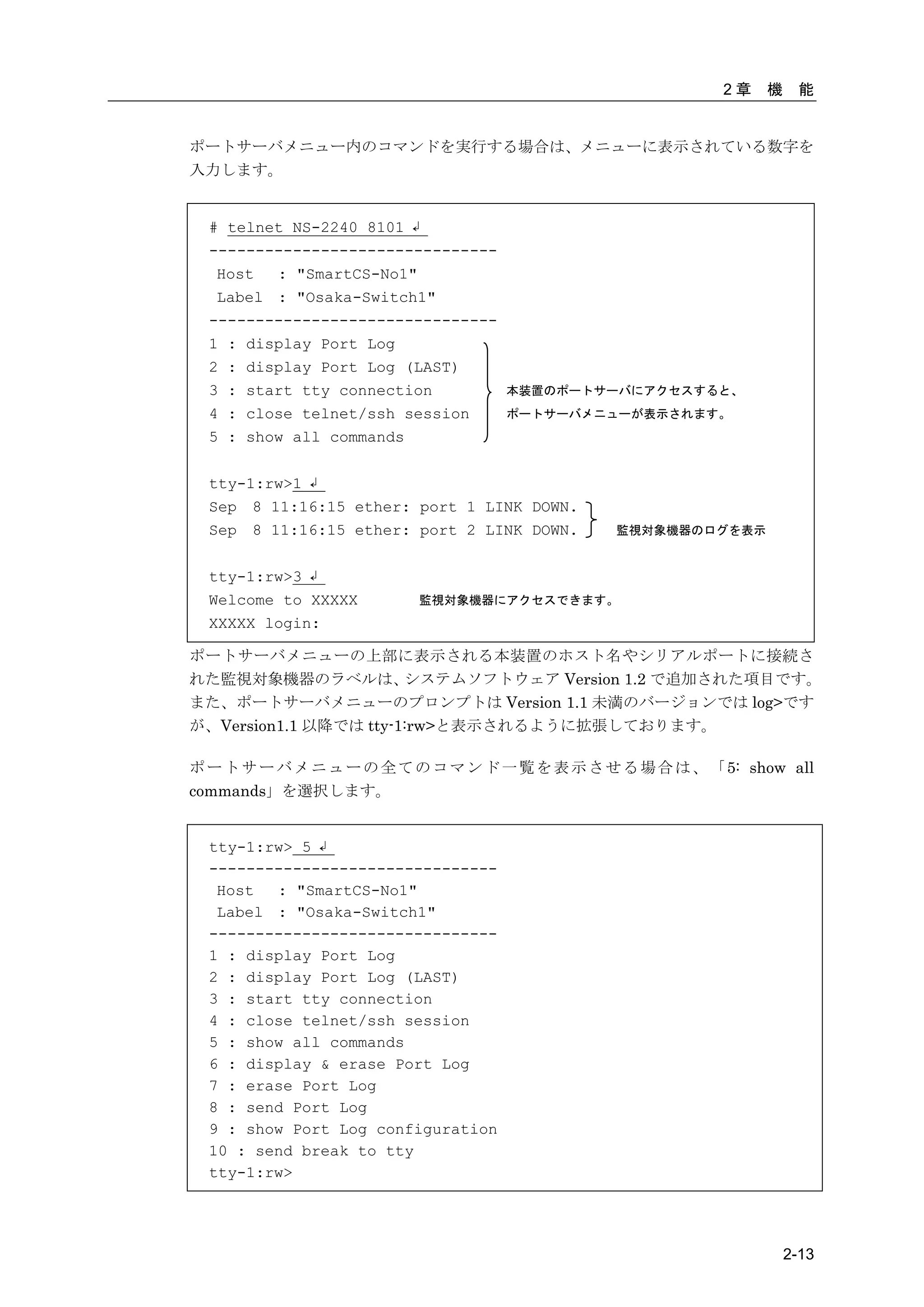
ポートサーバメニュー内のコマンドを実行する場合は、メニューに表示されている数字を
入力します。


  # telnet NS-2240 8101 ↲
  -------------------------------
   Host  : "SmartCS-No1"
   Label : "Osaka-Switch1"
  -------------------------------
  1 : display Port Log
  2 : display Port Log (LAST)
  3 : start tty connection           本装置のポートサーバにアクセスすると、
  4 : close telnet/ssh session       ポートサーバメニューが表示されます。
  5 : show all commands

  tty-1:rw>1 ↲
  Sep 8 11:16:15 ether: port 1 LINK DOWN.
  Sep 8 11:16:15 ether: port 2 LINK DOWN.        監視対象機器のログを表示


  tty-1:rw>3 ↲
  Welcome to XXXXX        監視対象機器にアクセスできます。
  XXXXX login:

ポートサーバメニューの上部に表示される本装置のホスト名やシリアルポートに接続さ
れた監視対象機器のラベルは、         システムソフトウェア Version 1.2 で追加された項目です。
また、ポートサーバメニューのプロンプトは Version 1.1 未満のバージョンでは log>です
が、Version1.1 以降では tty-1:rw>と表示されるように拡張しております。

ポ ー ト サ ー バ メ ニ ュ ー の 全 て の コ マ ン ド 一 覧 を 表 示 さ せ る 場 合 は 、 「 5: show all
commands」を選択します。


  tty-1:rw> 5 ↲
  -------------------------------
   Host  : "SmartCS-No1"
   Label : "Osaka-Switch1"
  -------------------------------
  1 : display Port Log
  2 : display Port Log (LAST)
  3 : start tty connection
  4 : close telnet/ssh session
  5 : show all commands
  6 : display & erase Port Log
  7 : erase Port Log
  8 : send Port Log
  9 : show Port Log configuration
  10 : send break to tty
  tty-1:rw>


                                                                       2-13
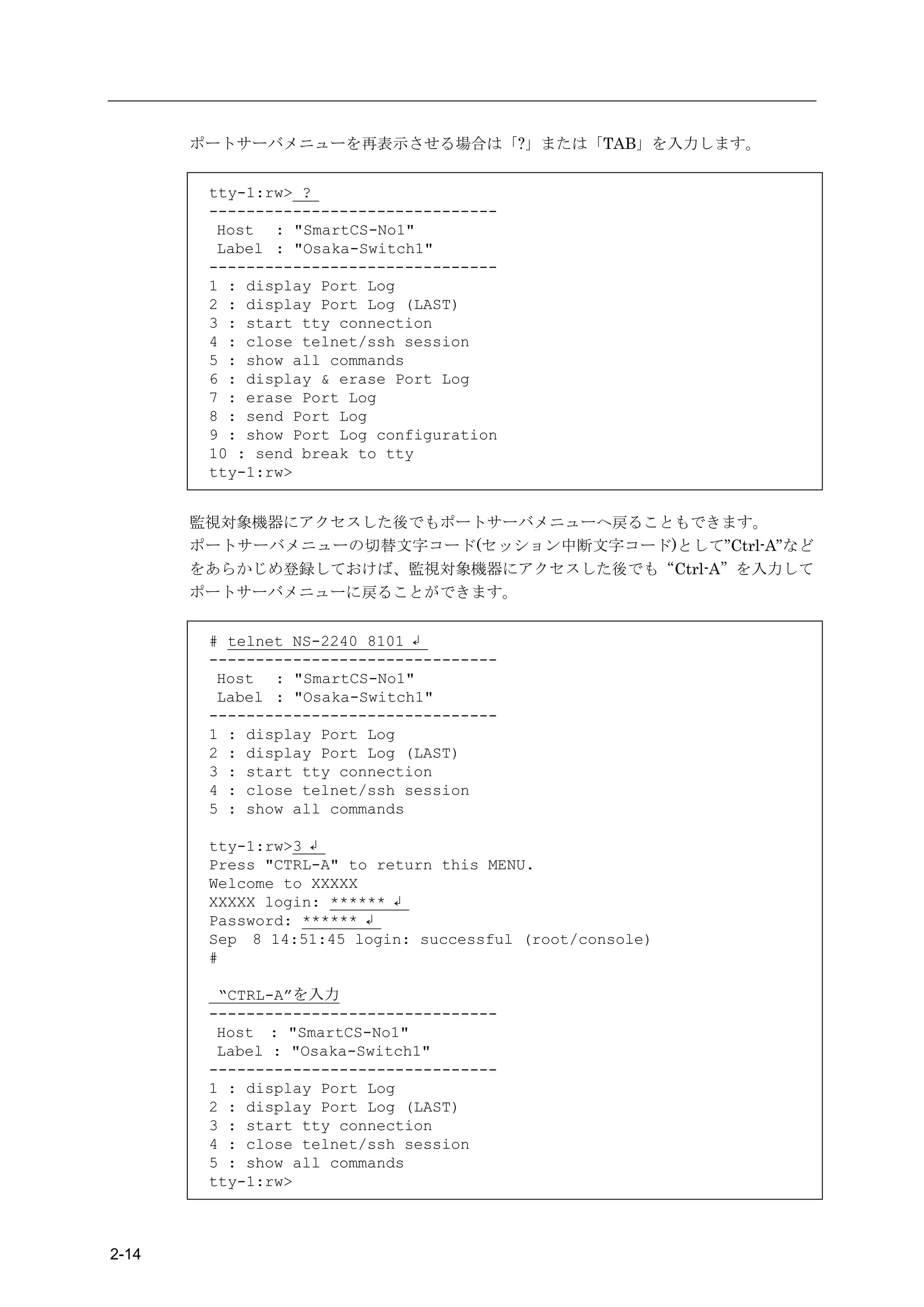
ポートサーバメニューを再表示させる場合は「?」または「TAB」を入力します。


        tty-1:rw> ?
        -------------------------------
         Host : "SmartCS-No1"
         Label : "Osaka-Switch1"
        -------------------------------
        1 : display Port Log
        2 : display Port Log (LAST)
        3 : start tty connection
        4 : close telnet/ssh session
        5 : show all commands
        6 : display & erase Port Log
        7 : erase Port Log
        8 : send Port Log
        9 : show Port Log configuration
        10 : send break to tty
        tty-1:rw>


       監視対象機器にアクセスした後でもポートサーバメニューへ戻ることもできます。
       ポートサーバメニューの切替文字コード(セッション中断文字コード)として”Ctrl-A”など
       をあらかじめ登録しておけば、監視対象機器にアクセスした後でも“Ctrl-A”を入力して
       ポートサーバメニューに戻ることができます。


        # telnet NS-2240 8101 ↲
        -------------------------------
         Host : "SmartCS-No1"
         Label : "Osaka-Switch1"
        -------------------------------
        1 : display Port Log
        2 : display Port Log (LAST)
        3 : start tty connection
        4 : close telnet/ssh session
        5 : show all commands

        tty-1:rw>3 ↲
        Press "CTRL-A" to return this MENU.
        Welcome to XXXXX
        XXXXX login: ****** ↲
        Password: ****** ↲
        Sep 8 14:51:45 login: successful (root/console)
        #

         “CTRL-A”を入力
        -------------------------------
         Host : "SmartCS-No1"
         Label : "Osaka-Switch1"
        -------------------------------
        1 : display Port Log
        2 : display Port Log (LAST)
        3 : start tty connection
        4 : close telnet/ssh session
        5 : show all commands
        tty-1:rw>


2-14
2章   機    能


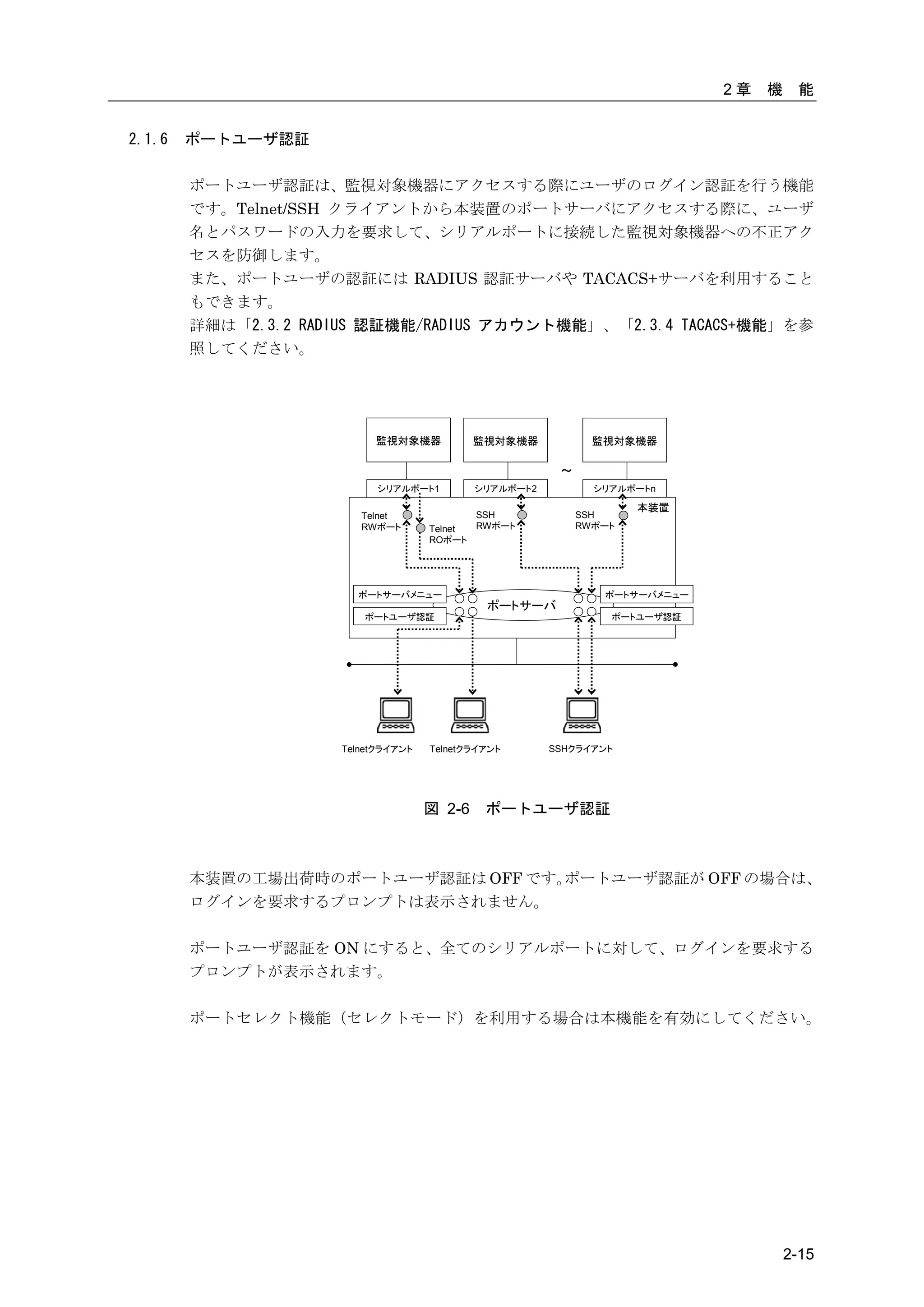
2.1.6   ポートユーザ認証

        ポートユーザ認証は、監視対象機器にアクセスする際にユーザのログイン認証を行う機能
        です。Telnet/SSH クライアントから本装置のポートサーバにアクセスする際に、ユーザ
        名とパスワードの入力を要求して、シリアルポートに接続した監視対象機器への不正アク
        セスを防御します。
        また、ポートユーザの認証には RADIUS 認証サーバや TACACS+サーバを利用すること
        もできます。
        詳細は「2.3.2 RADIUS 認証機能/RADIUS アカウント機能」、「2.3.4 TACACS+機能」を参
        照してください。


                          監視対象機器            監視対象機器            監視対象機器

                                                        ~
                           シリアルポート1         シリアルポート2          シリアルポートn

                                                                    本装置
                        Telnet             SSH              SSH
                        RWポート       Telnet RWポート            RWポート
                                    ROポート


                       ポートサーバメニュー                              ポートサーバメニュー
                                             ポートサーバ
                        ポートユーザ認証                                ポートユーザ認証


                     Telnetクライアント   Telnetクライアント       SSHクライアント


                                    図 2-6    ポートユーザ認証


        本装置の工場出荷時のポートユーザ認証は OFF です。ポートユーザ認証が OFF の場合は、
        ログインを要求するプロンプトは表示されません。

        ポートユーザ認証を ON にすると、全てのシリアルポートに対して、ログインを要求する
        プロンプトが表示されます。

        ポートセレクト機能(セレクトモード)を利用する場合は本機能を有効にしてください。


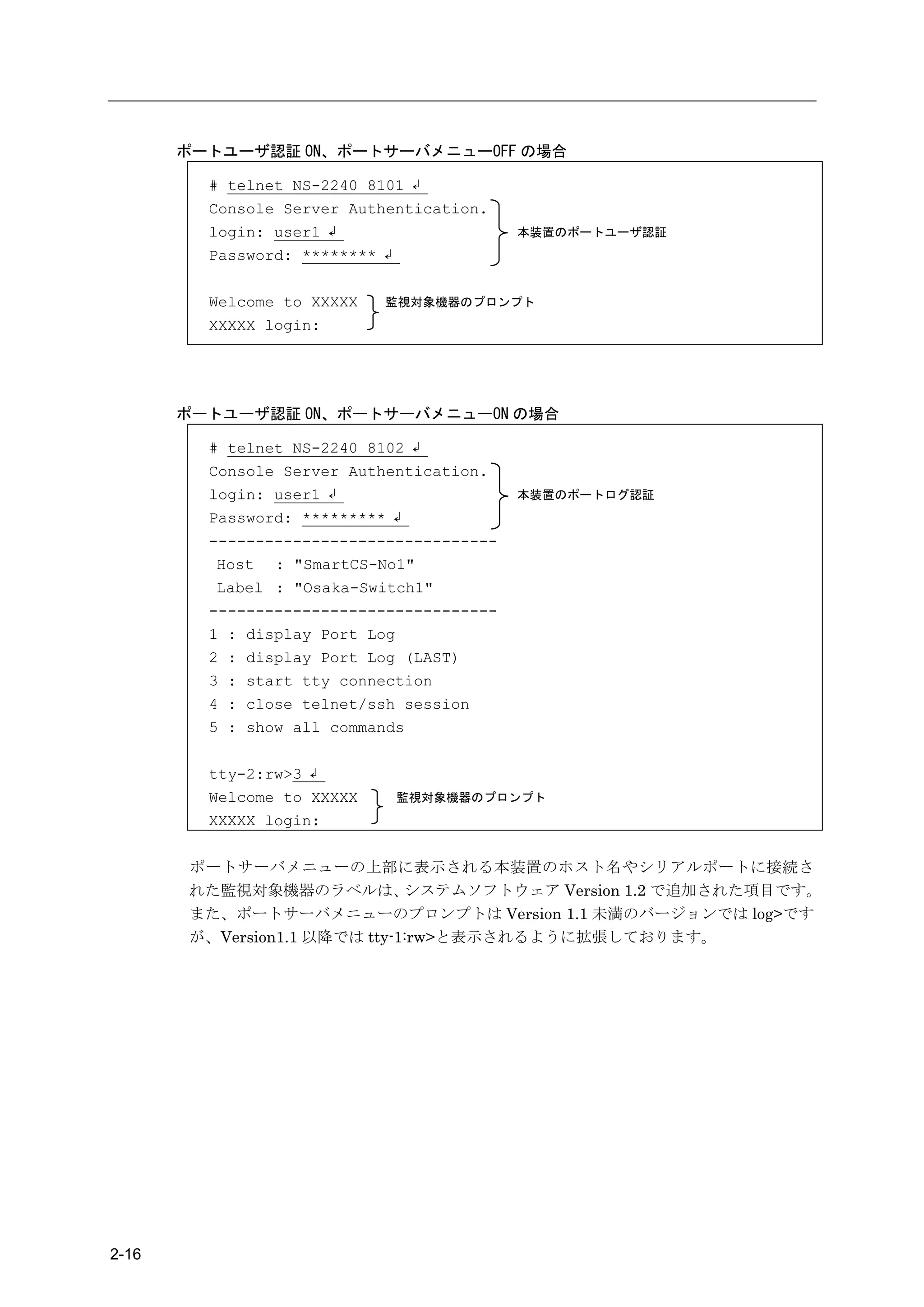
                                                                                     2-15
ポートユーザ認証 ON、ポートサーバメニューOFF の場合

         # telnet NS-2240 8101 ↲
         Console Server Authentication.
         login: user1 ↲                    本装置のポートユーザ認証
         Password: ******** ↲

         Welcome to XXXXX   監視対象機器のプロンプト
         XXXXX login:


       ポートユーザ認証 ON、ポートサーバメニューON の場合

         # telnet NS-2240 8102 ↲
         Console Server Authentication.
         login: user1 ↲                    本装置のポートログ認証
         Password: ********* ↲
         -------------------------------
          Host : "SmartCS-No1"
          Label : "Osaka-Switch1"
         -------------------------------
         1 : display Port Log
         2 : display Port Log (LAST)
         3 : start tty connection
         4 : close telnet/ssh session
         5 : show all commands

         tty-2:rw>3 ↲
         Welcome to XXXXX    監視対象機器のプロンプト
         XXXXX login:


       ポートサーバメニューの上部に表示される本装置のホスト名やシリアルポートに接続さ
       れた監視対象機器のラベルは、         システムソフトウェア Version 1.2 で追加された項目です。
       また、ポートサーバメニューのプロンプトは Version 1.1 未満のバージョンでは log>です
       が、Version1.1 以降では tty-1:rw>と表示されるように拡張しております。


2-16
2章   機    能


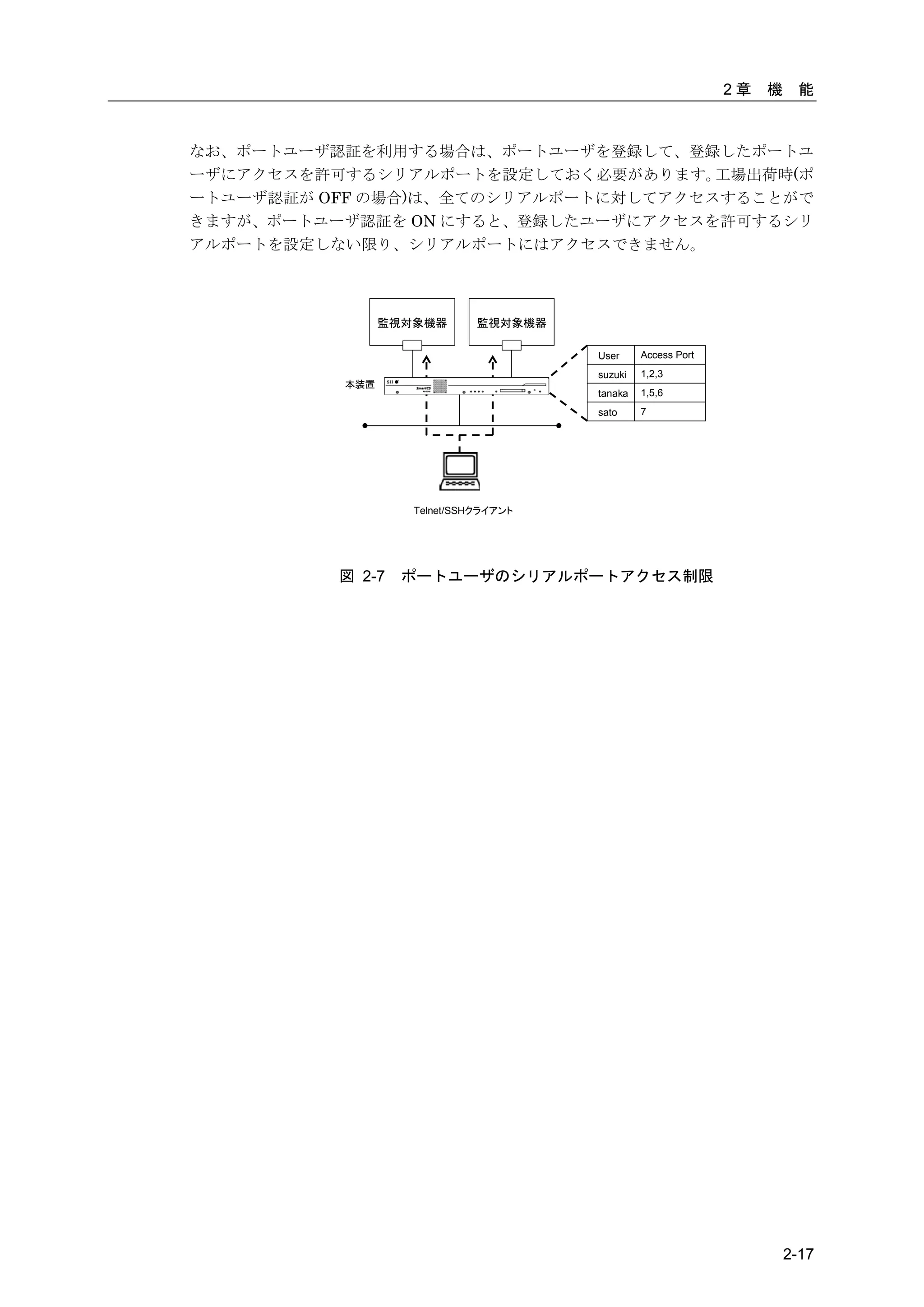
なお、ポートユーザ認証を利用する場合は、ポートユーザを登録して、登録したポートユ
ーザにアクセスを許可するシリアルポートを設定しておく必要があります。   工場出荷時(ポ
ートユーザ認証が OFF の場合)は、全てのシリアルポートに対してアクセスすることがで
きますが、ポートユーザ認証を ON にすると、登録したユーザにアクセスを許可するシリ
アルポートを設定しない限り、シリアルポートにはアクセスできません。


                監視対象機器       監視対象機器

                                      User     Access Port
                                      suzuki   1,2,3
          本装置
                                      tanaka   1,5,6
                                      sato     7


                   Telnet/SSHクライアント


          図 2-7   ポートユーザのシリアルポートアクセス制限


                                                                      2-17
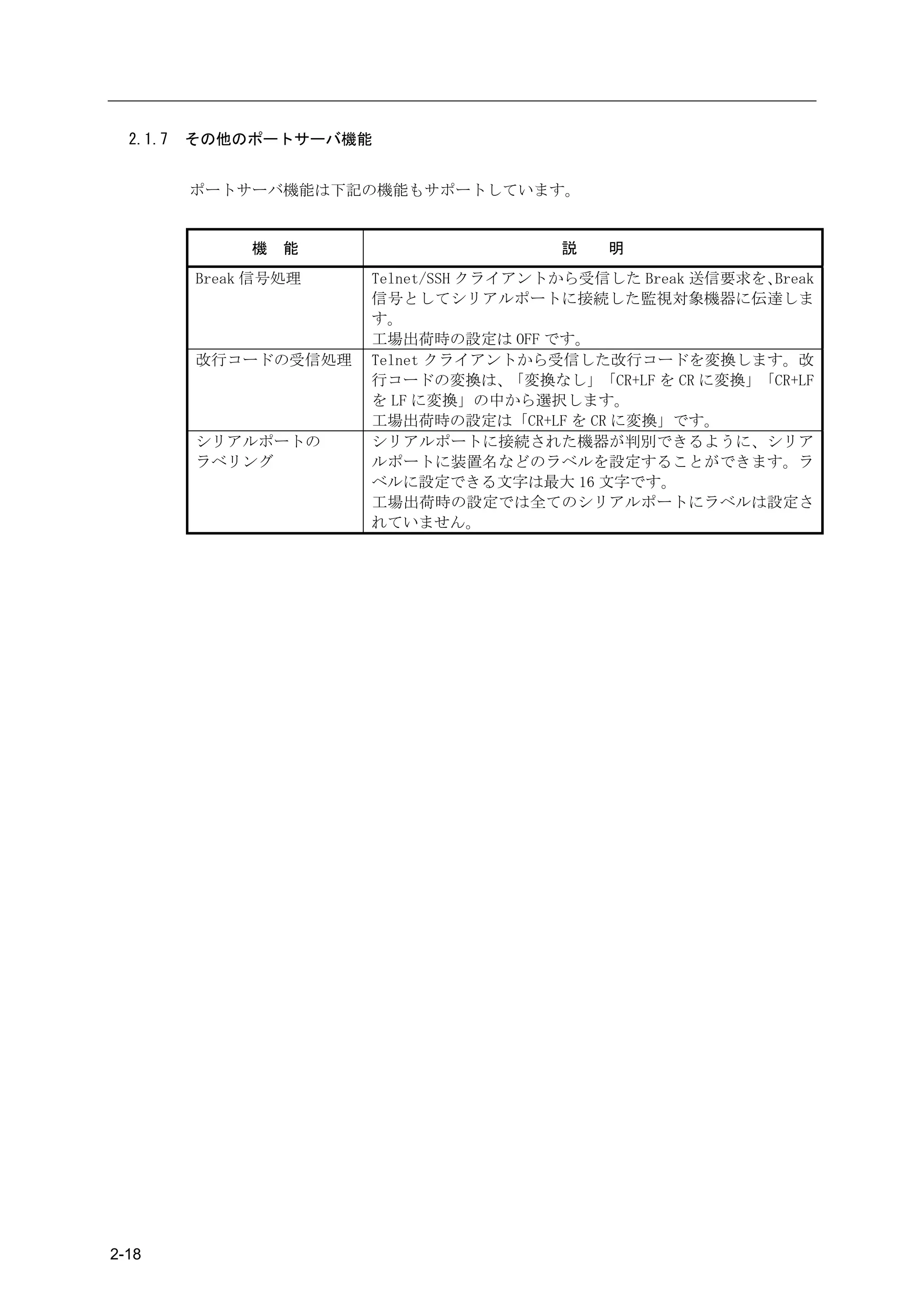
2.1.7   その他のポートサーバ機能


          ポートサーバ機能は下記の機能もサポートしています。


               機   能                     説   明
          Break 信号処理   Telnet/SSH クライアントから受信した Break 送信要求を、 Break
                       信号としてシリアルポートに接続した監視対象機器に伝達しま
                       す。
                       工場出荷時の設定は OFF です。
          改行コードの受信処理   Telnet クライアントから受信した改行コードを変換します。改
                       行コードの変換は、     「変換なし」「CR+LF を CR に変換」「CR+LF
                       を LF に変換」の中から選択します。
                       工場出荷時の設定は「CR+LF を CR に変換」です。
          シリアルポートの     シリアルポートに接続された機器が判別できるように、シリア
          ラベリング        ルポートに装置名などのラベルを設定することができます。ラ
                       ベルに設定できる文字は最大 16 文字です。
                       工場出荷時の設定では全てのシリアルポートにラベルは設定さ
                       れていません。


2-18
2章   機    能


2.2   ポートログ機能


  2.2.1   ポートログ機能の概要


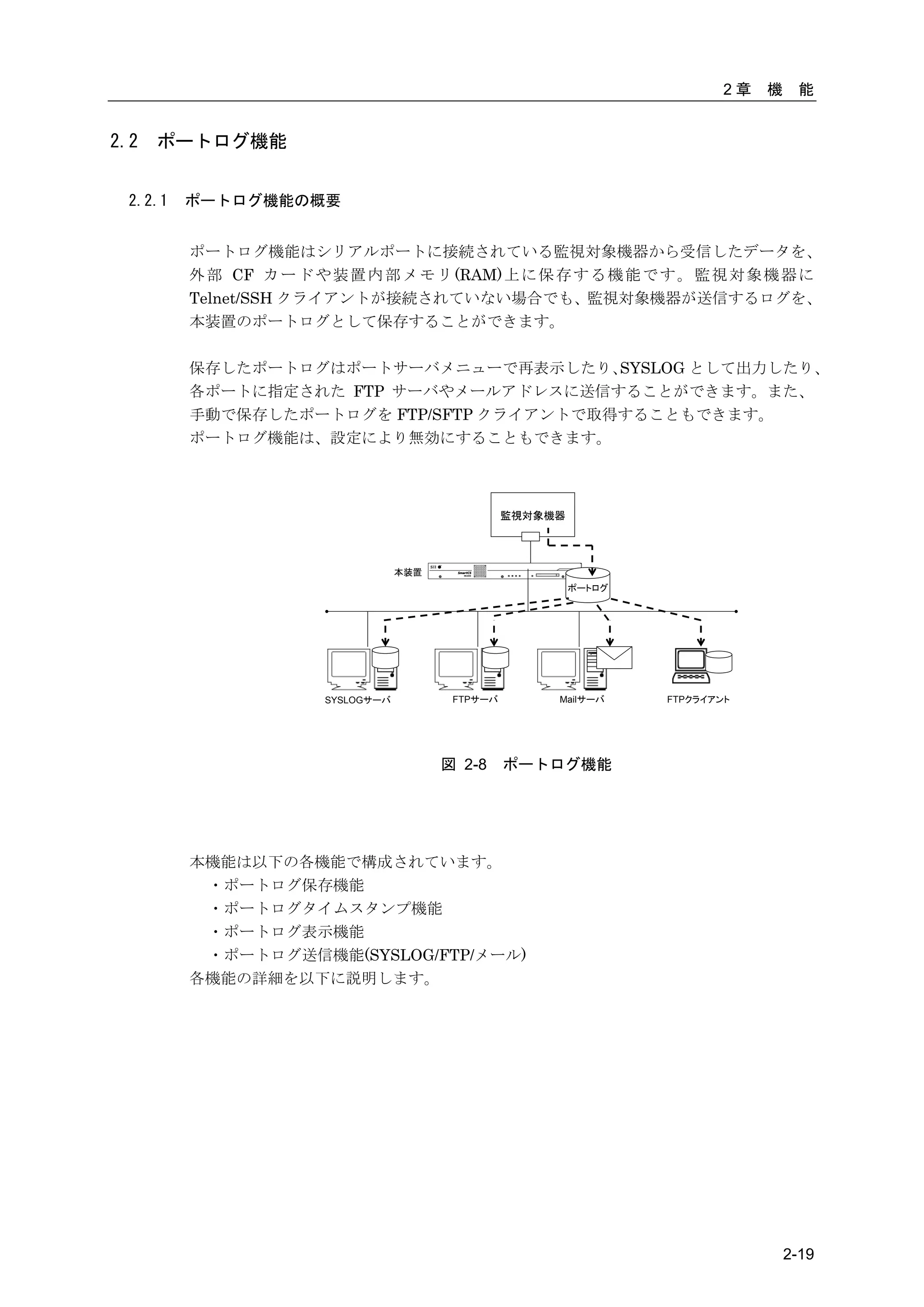
          ポートログ機能はシリアルポートに接続されている監視対象機器から受信したデータを、
          外 部 CF カ ー ド や 装 置 内 部 メ モ リ (RAM) 上 に 保 存 す る 機 能 で す 。 監 視 対 象 機 器 に
          Telnet/SSH クライアントが接続されていない場合でも、監視対象機器が送信するログを、
          本装置のポートログとして保存することができます。

          保存したポートログはポートサーバメニューで再表示したり、    SYSLOG として出力したり、
          各ポートに指定された FTP サーバやメールアドレスに送信することができます。また、
          手動で保存したポートログを FTP/SFTP クライアントで取得することもできます。
          ポートログ機能は、設定により無効にすることもできます。


                                                     監視対象機器


                                     本装置
                                                              ポートログ


                         SYSLOGサーバ          FTPサーバ        Mailサーバ     FTPクライアント


                                           図 2-8     ポートログ機能


          本機能は以下の各機能で構成されています。
           ・ポートログ保存機能
           ・ポートログタイムスタンプ機能
           ・ポートログ表示機能
           ・ポートログ送信機能(SYSLOG/FTP/メール)
          各機能の詳細を以下に説明します。


                                                                                       2-19
2.2.2   ポートログ保存機能

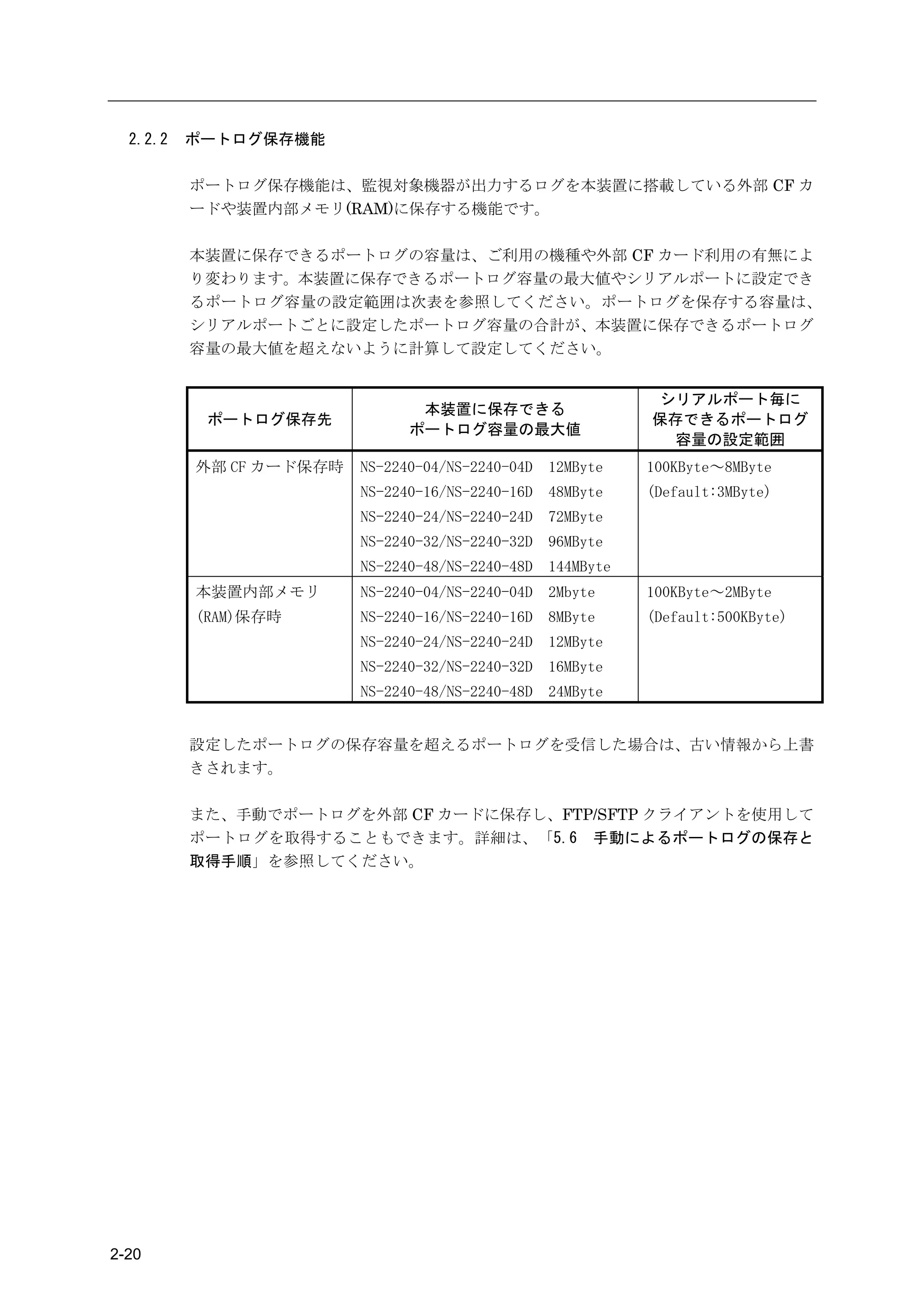
          ポートログ保存機能は、監視対象機器が出力するログを本装置に搭載している外部 CF カ
          ードや装置内部メモリ(RAM)に保存する機能です。

          本装置に保存できるポートログの容量は、ご利用の機種や外部 CF カード利用の有無によ
          り変わります。本装置に保存できるポートログ容量の最大値やシリアルポートに設定でき
          るポートログ容量の設定範囲は次表を参照してください。ポートログを保存する容量は、
          シリアルポートごとに設定したポートログ容量の合計が、本装置に保存できるポートログ
          容量の最大値を超えないように計算して設定してください。


                                                             シリアルポート毎に
                                本装置に保存できる
           ポートログ保存先                                          保存できるポートログ
                               ポートログ容量の最大値
                                                              容量の設定範囲
          外部 CF カード保存時   NS-2240-04/NS-2240-04D   12MByte    100KByte~8MByte
                         NS-2240-16/NS-2240-16D   48MByte    (Default:3MByte)
                         NS-2240-24/NS-2240-24D   72MByte
                         NS-2240-32/NS-2240-32D   96MByte
                         NS-2240-48/NS-2240-48D   144MByte
          本装置内部メモリ       NS-2240-04/NS-2240-04D   2Mbyte     100KByte~2MByte
          (RAM)保存時       NS-2240-16/NS-2240-16D   8MByte     (Default:500KByte)
                         NS-2240-24/NS-2240-24D   12MByte
                         NS-2240-32/NS-2240-32D   16MByte
                         NS-2240-48/NS-2240-48D   24MByte


          設定したポートログの保存容量を超えるポートログを受信した場合は、古い情報から上書
          きされます。

          また、手動でポートログを外部 CF カードに保存し、FTP/SFTP クライアントを使用して
          ポートログを取得することもできます。詳細は、「5.6 手動によるポートログの保存と
          取得手順」を参照してください。


2-20
2章     機    能


2.2.3   ポートログタイムスタンプ機能


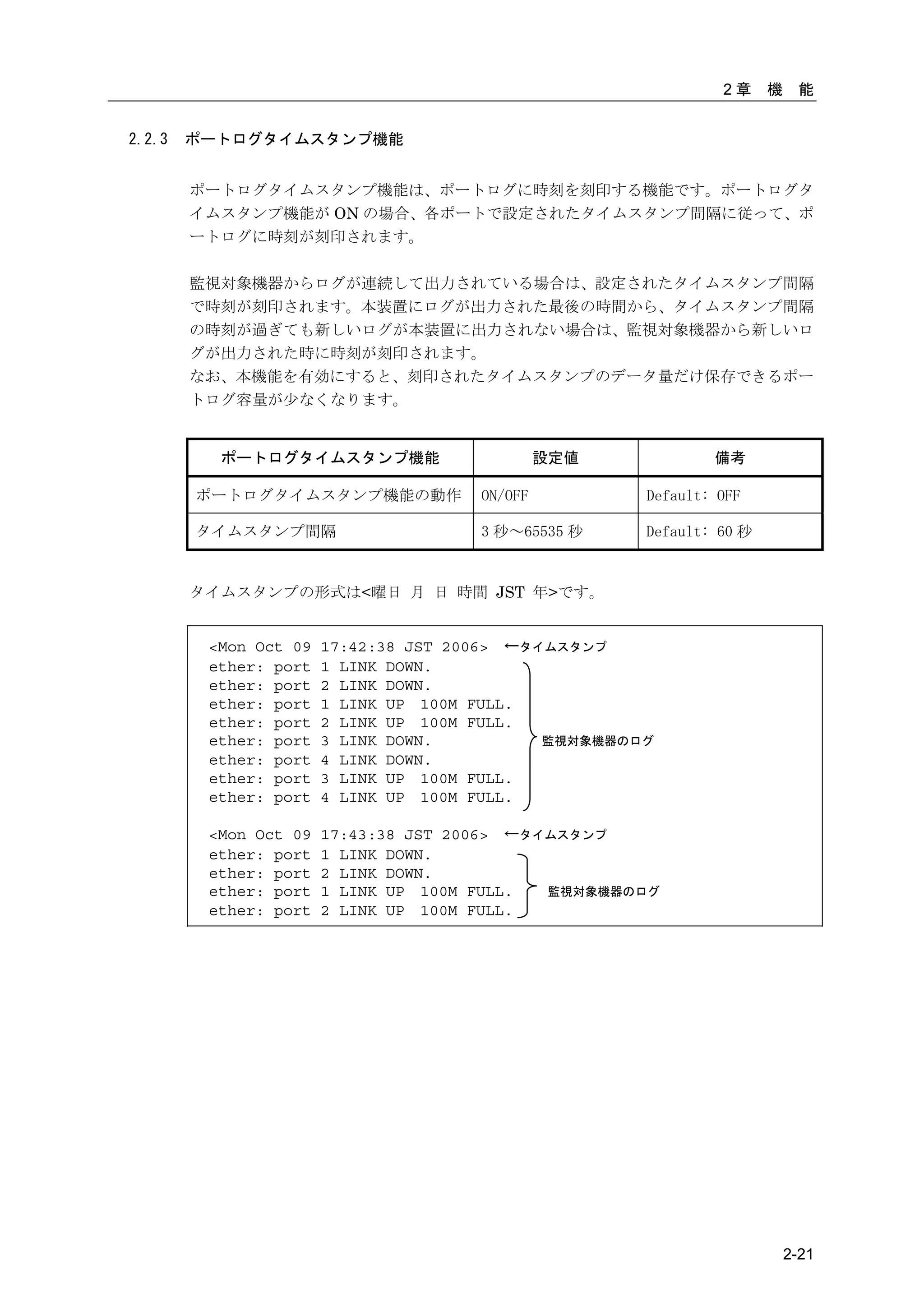
        ポートログタイムスタンプ機能は、ポートログに時刻を刻印する機能です。ポートログタ
        イムスタンプ機能が ON の場合、各ポートで設定されたタイムスタンプ間隔に従って、ポ
        ートログに時刻が刻印されます。

        監視対象機器からログが連続して出力されている場合は、設定されたタイムスタンプ間隔
        で時刻が刻印されます。本装置にログが出力された最後の時間から、タイムスタンプ間隔
        の時刻が過ぎても新しいログが本装置に出力されない場合は、監視対象機器から新しいロ
        グが出力された時に時刻が刻印されます。
        なお、本機能を有効にすると、刻印されたタイムスタンプのデータ量だけ保存できるポー
        トログ容量が少なくなります。


          ポートログタイムスタンプ機能                      設定値            備考

        ポートログタイムスタンプ機能の動作            ON/OFF          Default: OFF

        タイムスタンプ間隔                    3 秒~65535 秒     Default: 60 秒


        タイムスタンプの形式は<曜日 月 日 時間 JST 年>です。


         <Mon Oct 09   17:42:38 JST 2006> ←タイムスタンプ
         ether: port   1 LINK DOWN.
         ether: port   2 LINK DOWN.
         ether: port   1 LINK UP 100M FULL.
         ether: port   2 LINK UP 100M FULL.
         ether: port   3 LINK DOWN.          監視対象機器のログ
         ether: port   4 LINK DOWN.
         ether: port   3 LINK UP 100M FULL.
         ether: port   4 LINK UP 100M FULL.

         <Mon Oct 09   17:43:38 JST 2006> ←タイムスタンプ
         ether: port   1 LINK DOWN.
         ether: port   2 LINK DOWN.
         ether: port   1 LINK UP 100M FULL.  監視対象機器のログ
         ether: port   2 LINK UP 100M FULL.


                                                                         2-21
2.2.4   ポートログ表示機能

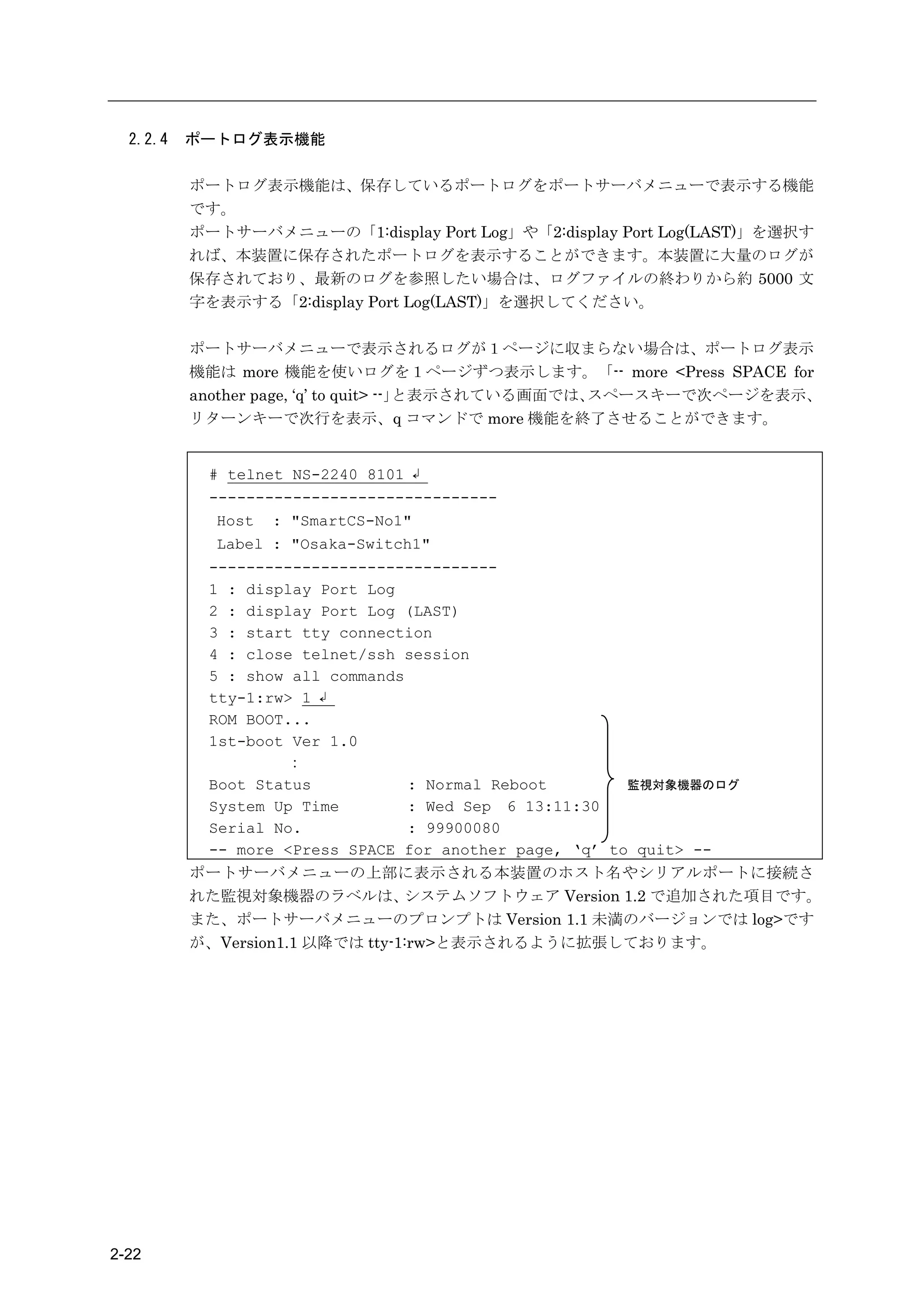
          ポートログ表示機能は、保存しているポートログをポートサーバメニューで表示する機能
          です。
          ポートサーバメニューの「1:display Port Log」や「2:display Port Log(LAST)」を選択す
          れば、本装置に保存されたポートログを表示することができます。本装置に大量のログが
          保存されており、最新のログを参照したい場合は、ログファイルの終わりから約 5000 文
          字を表示する「2:display Port Log(LAST)」を選択してください。

          ポートサーバメニューで表示されるログが1ページに収まらない場合は、ポートログ表示
          機能は more 機能を使いログを1ページずつ表示します。「-- more <Press SPACE for
          another page, ‘q’ to quit> --」と表示されている画面では、スペースキーで次ページを表示、
          リターンキーで次行を表示、q コマンドで more 機能を終了させることができます。


           # telnet NS-2240 8101 ↲
           -------------------------------
            Host : "SmartCS-No1"
            Label : "Osaka-Switch1"
           -------------------------------
           1 : display Port Log
           2 : display Port Log (LAST)
           3 : start tty connection
           4 : close telnet/ssh session
           5 : show all commands
           tty-1:rw> 1 ↲
           ROM BOOT...
           1st-boot Ver 1.0
                    :
           Boot Status           : Normal Reboot        監視対象機器のログ
           System Up Time        : Wed Sep 6 13:11:30
           Serial No.            : 99900080
           -- more <Press SPACE for another page, ‘q’ to quit> --
          ポートサーバメニューの上部に表示される本装置のホスト名やシリアルポートに接続さ
          れた監視対象機器のラベルは、         システムソフトウェア Version 1.2 で追加された項目です。
          また、ポートサーバメニューのプロンプトは Version 1.1 未満のバージョンでは log>です
          が、Version1.1 以降では tty-1:rw>と表示されるように拡張しております。


2-22
2章   機    能


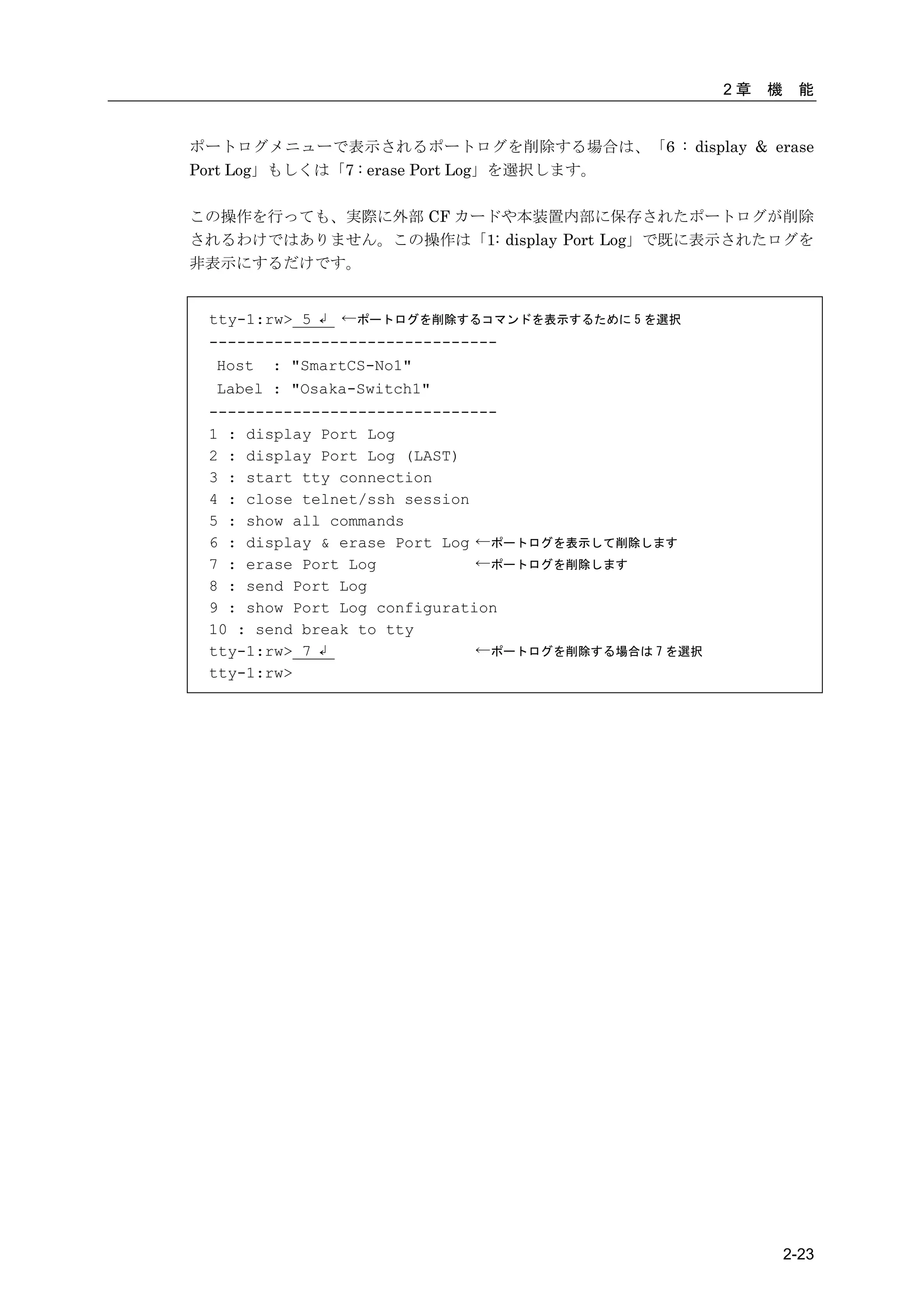
ポートログメニューで表示されるポートログを削除する場合は、「6 : display & erase
Port Log」もしくは「7 : erase Port Log」を選択します。

この操作を行っても、実際に外部 CF カードや本装置内部に保存されたポートログが削除
されるわけではありません。この操作は「1: display Port Log」で既に表示されたログを
非表示にするだけです。


 tty-1:rw> 5 ↲ ←ポートログを削除するコマンドを表示するために 5 を選択
 -------------------------------
  Host : "SmartCS-No1"
  Label : "Osaka-Switch1"
 -------------------------------
 1 : display Port Log
 2 : display Port Log (LAST)
 3 : start tty connection
 4 : close telnet/ssh session
 5 : show all commands
 6 : display & erase Port Log ←ポートログを表示して削除します
 7 : erase Port Log           ←ポートログを削除します
 8 : send Port Log
 9 : show Port Log configuration
 10 : send break to tty
 tty-1:rw> 7 ↲                ←ポートログを削除する場合は 7 を選択
 tty-1:rw>


                                                              2-23
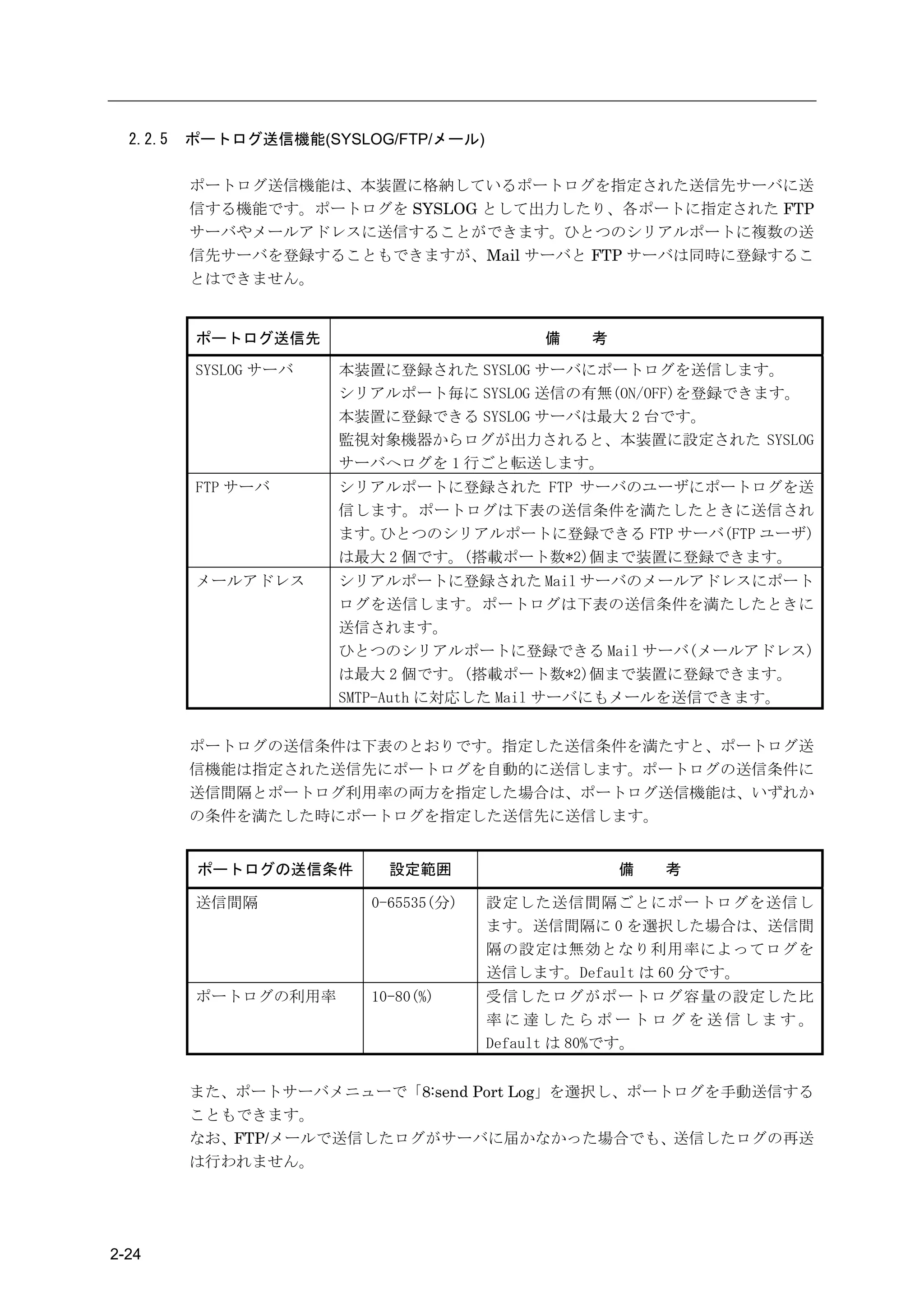
2.2.5   ポートログ送信機能(SYSLOG/FTP/メール)

          ポートログ送信機能は、本装置に格納しているポートログを指定された送信先サーバに送
          信する機能です。ポートログを SYSLOG として出力したり、各ポートに指定された FTP
          サーバやメールアドレスに送信することができます。ひとつのシリアルポートに複数の送
          信先サーバを登録することもできますが、Mail サーバと FTP サーバは同時に登録するこ
          とはできません。


          ポートログ送信先                        備   考

          SYSLOG サーバ   本装置に登録された SYSLOG サーバにポートログを送信します。
                       シリアルポート毎に SYSLOG 送信の有無(ON/OFF)を登録できます。
                       本装置に登録できる SYSLOG サーバは最大 2 台です。
                       監視対象機器からログが出力されると、本装置に設定された SYSLOG
                       サーバへログを 1 行ごと転送します。
          FTP サーバ      シリアルポートに登録された FTP サーバのユーザにポートログを送
                       信します。ポートログは下表の送信条件を満たしたときに送信され
                       ます。ひとつのシリアルポートに登録できる FTP サーバ(FTP ユーザ)
                       は最大 2 個です。(搭載ポート数*2)個まで装置に登録できます。
          メールアドレス      シリアルポートに登録された Mail サーバのメールアドレスにポート
                       ログを送信します。ポートログは下表の送信条件を満たしたときに
                       送信されます。
                       ひとつのシリアルポートに登録できる Mail サーバ(メールアドレス)
                       は最大 2 個です。(搭載ポート数*2)個まで装置に登録できます。
                       SMTP-Auth に対応した Mail サーバにもメールを送信できます。


          ポートログの送信条件は下表のとおりです。指定した送信条件を満たすと、ポートログ送
          信機能は指定された送信先にポートログを自動的に送信します。ポートログの送信条件に
          送信間隔とポートログ利用率の両方を指定した場合は、ポートログ送信機能は、いずれか
          の条件を満たした時にポートログを指定した送信先に送信します。


           ポートログの送信条件      設定範囲                   備   考

          送信間隔           0-65535(分)   設定した送信間隔ごとにポートログを送信し
                                      ます。送信間隔に 0 を選択した場合は、送信間
                                      隔の設定は無効となり利用率によってログを
                                      送信します。Default は 60 分です。
          ポートログの利用率      10-80(%)     受信したログがポートログ容量の設定した比
                                      率に達したらポートログを送信します。
                                      Default は 80%です。


          また、ポートサーバメニューで「8:send Port Log」を選択し、ポートログを手動送信する
          こともできます。
          なお、FTP/メールで送信したログがサーバに届かなかった場合でも、送信したログの再送
          は行われません。


2-24
2章   機    能


2.3   セキュリティ機能

           本装置は、セキュリティ機能として、ユーザ管理/認証機能と各種サーバのアクセス制限
           機能を搭載しています。


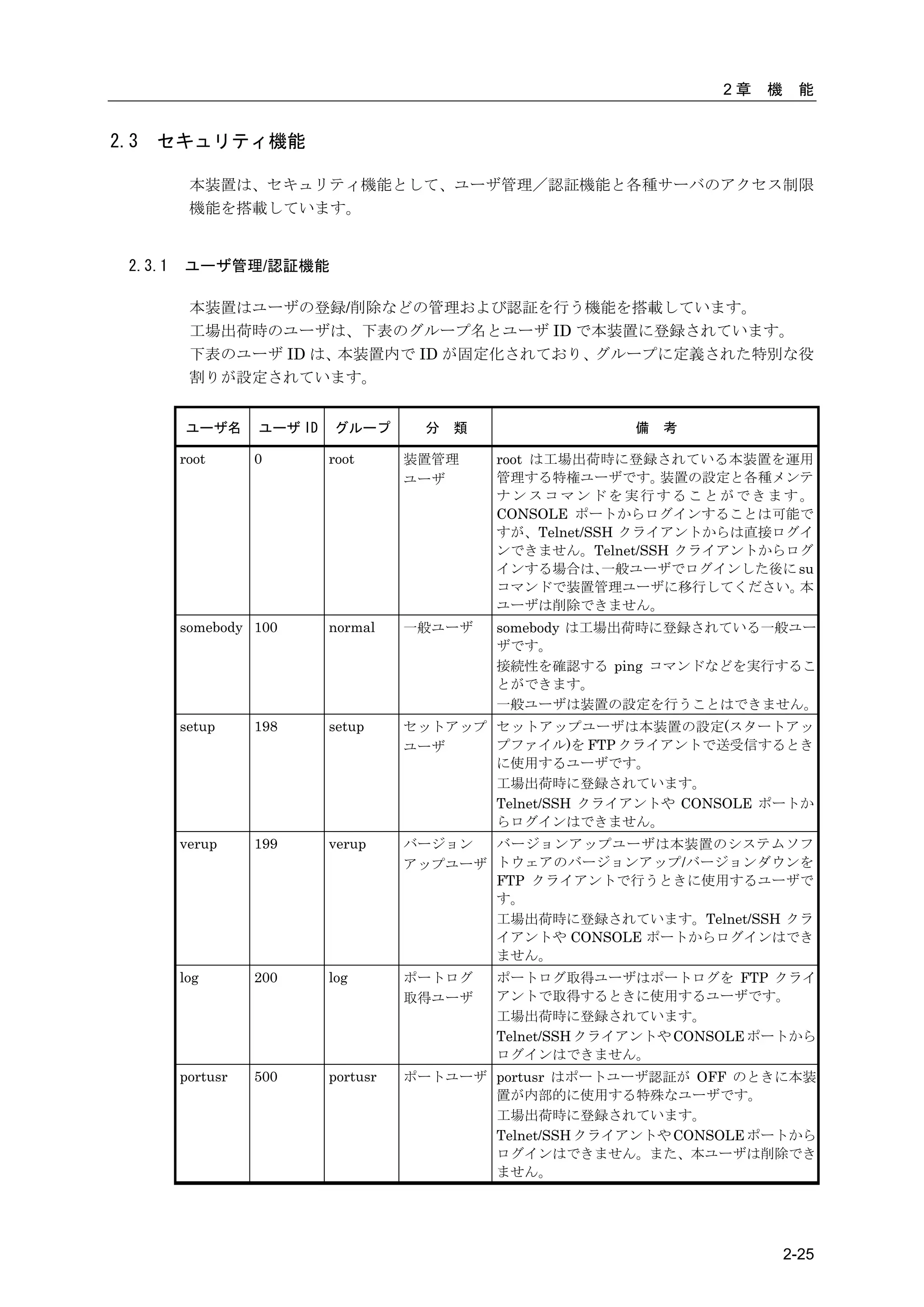
  2.3.1   ユーザ管理/認証機能

           本装置はユーザの登録/削除などの管理および認証を行う機能を搭載しています。
           工場出荷時のユーザは、下表のグループ名とユーザ ID で本装置に登録されています。
           下表のユーザ ID は、本装置内で ID が固定化されており、グループに定義された特別な役
           割りが設定されています。


          ユーザ名      ユーザ ID   グループ        分   類                備   考

          root      0        root      装置管理      root は工場出荷時に登録されている本装置を運用
                                       ユーザ       管理する特権ユーザです。     装置の設定と各種メンテ
                                                 ナンスコマンドを実行することができます。
                                                 CONSOLE ポートからログインすることは可能で
                                                 すが、Telnet/SSH クライアントからは直接ログイ
                                                 ンできません。Telnet/SSH クライアントからログ
                                                 インする場合は、    一般ユーザでログインした後に su
                                                 コマンドで装置管理ユーザに移行してください。     本
                                                 ユーザは削除できません。
          somebody 100       normal    一般ユーザ     somebody は工場出荷時に登録されている一般ユー
                                                 ザです。
                                                 接続性を確認する ping コマンドなどを実行するこ
                                                 とができます。
                                                 一般ユーザは装置の設定を行うことはできません。
          setup     198      setup     セットアップ セットアップユーザは本装置の設定(スタートアッ
                                       ユーザ    プファイル)を FTP クライアントで送受信するとき
                                              に使用するユーザです。
                                              工場出荷時に登録されています。
                                              Telnet/SSH クライアントや CONSOLE ポートか
                                              らログインはできません。
          verup     199      verup     バージョン  バージョンアップユーザは本装置のシステムソフ
                                       アップユーザ トウェアのバージョンアップ/バージョンダウンを
                                              FTP クライアントで行うときに使用するユーザで
                                              す。
                                              工場出荷時に登録されています。Telnet/SSH クラ
                                              イアントや CONSOLE ポートからログインはでき
                                              ません。
          log       200      log       ポートログ     ポートログ取得ユーザはポートログを FTP クライ
                                       取得ユーザ     アントで取得するときに使用するユーザです。
                                                 工場出荷時に登録されています。
                                                 Telnet/SSH クライアントや CONSOLE ポートから
                                                 ログインはできません。
          portusr   500      portusr   ポートユーザ portusr はポートユーザ認証が OFF のときに本装
                                              置が内部的に使用する特殊なユーザです。
                                              工場出荷時に登録されています。
                                              Telnet/SSH クライアントや CONSOLE ポートから
                                              ログインはできません。また、本ユーザは削除でき
                                              ません。


                                                                                2-25
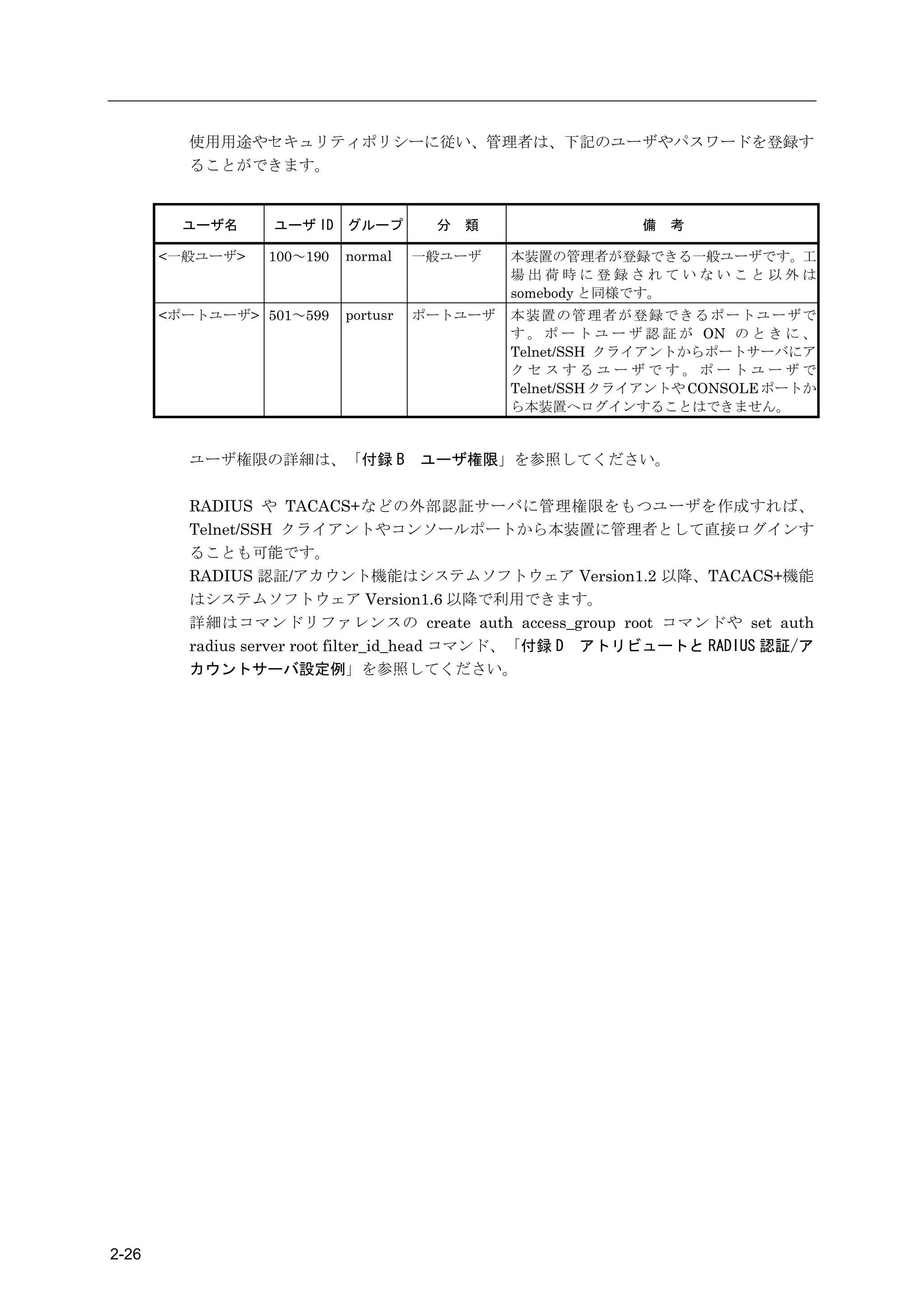
使用用途やセキュリティポリシーに従い、管理者は、下記のユーザやパスワードを登録す
         ることができます。


         ユーザ名    ユーザ ID グループ          分   類                 備   考

       <一般ユーザ>   100~190   normal    一般ユーザ    本装置の管理者が登録できる一般ユーザです。工
                                              場出荷時に登録されていないこと以外は
                                              somebody と同様です。
       <ポートユーザ> 501~599    portusr   ポートユーザ   本装置の管理者が登録できるポートユーザで
                                              す 。 ポ ー ト ユ ー ザ 認 証 が ON の と き に 、
                                              Telnet/SSH クライアントからポートサーバにア
                                              クセスするユーザです。ポートユーザで
                                              Telnet/SSH クライアントや CONSOLE ポートか
                                              ら本装置へログインすることはできません。


         ユーザ権限の詳細は、「付録 B             ユーザ権限」を参照してください。

         RADIUS や TACACS+などの外部認証サーバに管理権限をもつユーザを作成すれば、
         Telnet/SSH クライアントやコンソールポートから本装置に管理者として直接ログインす
         ることも可能です。
         RADIUS 認証/アカウント機能はシステムソフトウェア Version1.2 以降、TACACS+機能
         はシステムソフトウェア Version1.6 以降で利用できます。
         詳細はコマンドリファレンスの create auth access_group root コマンドや set auth
         radius server root filter_id_head コマンド、「付録 D アトリビュートと RADIUS 認証/ア
         カウントサーバ設定例」を参照してください。


2-26
2章   機    能


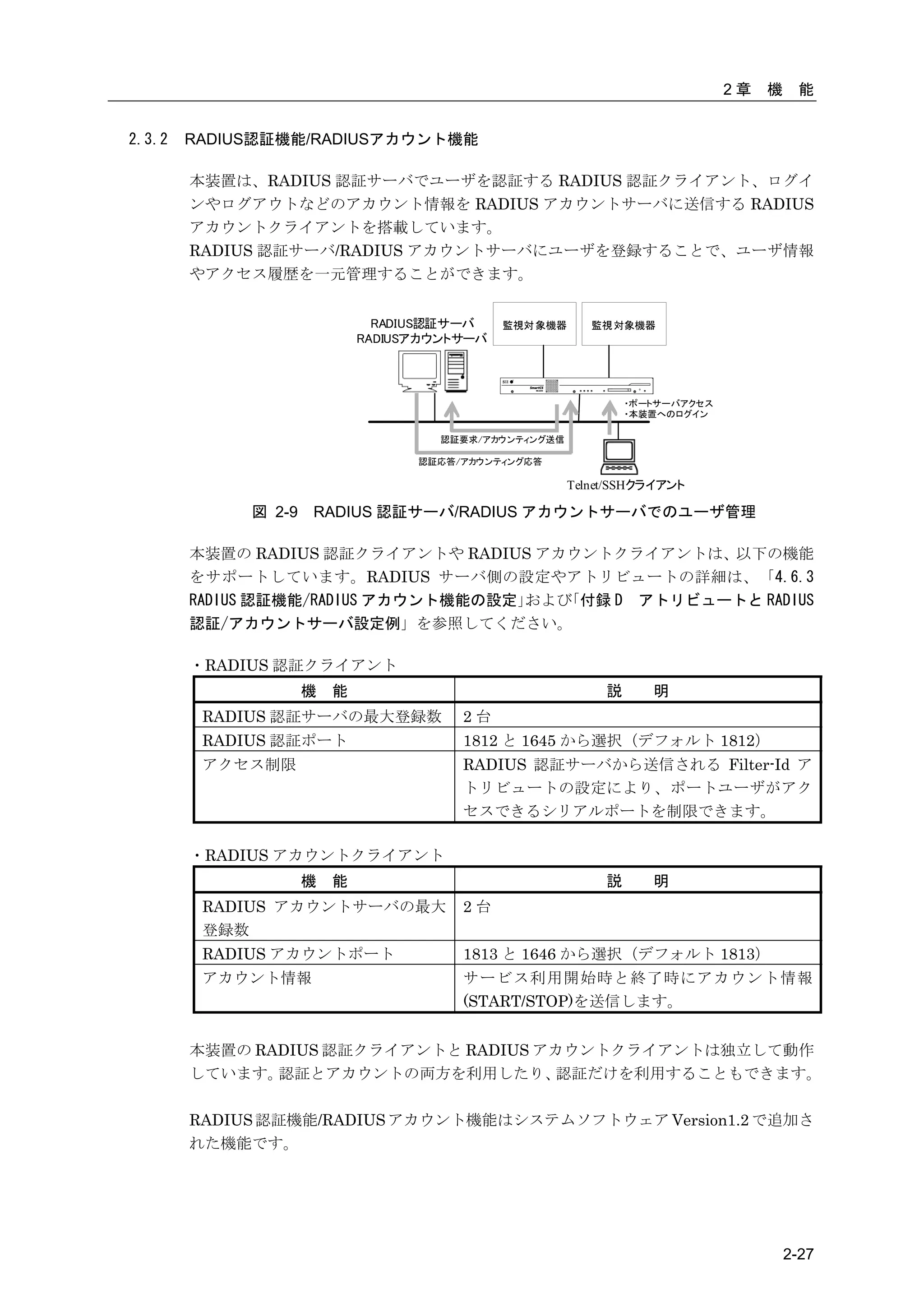
2.3.2   RADIUS認証機能/RADIUSアカウント機能

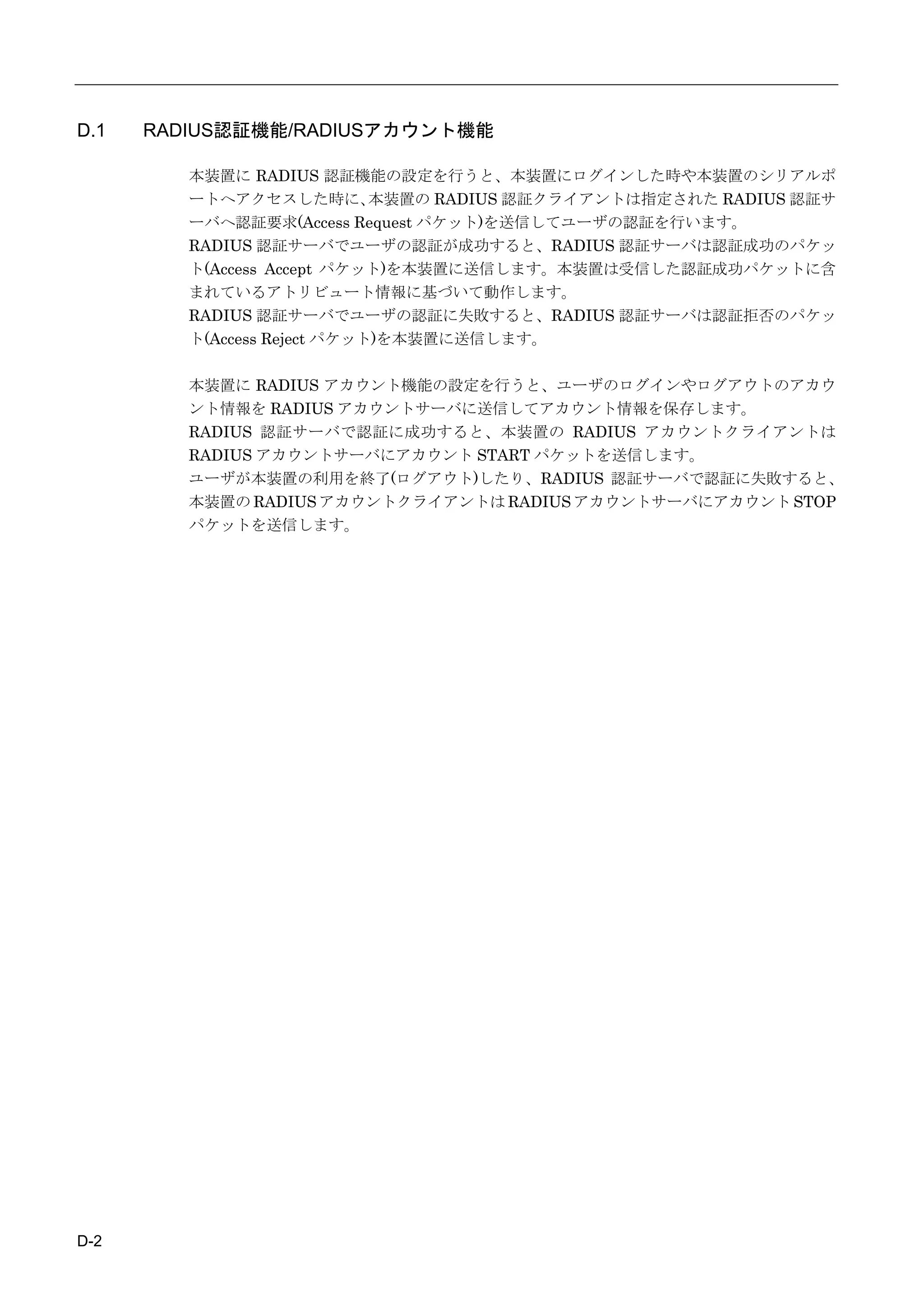
        本装置は、RADIUS 認証サーバでユーザを認証する RADIUS 認証クライアント、ログイ
        ンやログアウトなどのアカウント情報を RADIUS アカウントサーバに送信する RADIUS
        アカウントクライアントを搭載しています。
        RADIUS 認証サーバ/RADIUS アカウントサーバにユーザを登録することで、ユーザ情報
        やアクセス履歴を一元管理することができます。


                               RADIUS認証サーバ    監視対 象機器      監視 対象機器
                             RADIUSアカウントサーバ


                                                                 ・ポートサーバアクセス
                                                                 ・本装置へのログイン

                                      認証要求/アカウンティング送信

                                   認証応答/アカウンティング応答

                                                        Telnet/SSHクライアント

             図 2-9   RADIUS 認証サーバ/RADIUS アカウントサーバでのユーザ管理

        本装置の RADIUS 認証クライアントや RADIUS アカウントクライアントは、以下の機能
        をサポートしています。RADIUS サーバ側の設定やアトリビュートの詳細は、「4.6.3
        RADIUS 認証機能/RADIUS アカウント機能の設定」および「付録 D アトリビュートと RADIUS
        認証/アカウントサーバ設定例」を参照してください。

        ・RADIUS 認証クライアント
                     機   能                                   説      明
         RADIUS 認証サーバの最大登録数             2台
         RADIUS 認証ポート                   1812 と 1645 から選択(デフォルト 1812)
         アクセス制限                         RADIUS 認証サーバから送信される Filter-Id ア
                                        トリビュートの設定により、ポートユーザがアク
                                        セスできるシリアルポートを制限できます。

        ・RADIUS アカウントクライアント
                     機   能                                   説      明
         RADIUS アカウントサーバの最大             2台
         登録数
         RADIUS アカウントポート                1813 と 1646 から選択(デフォルト 1813)
         アカウント情報                        サービス利用開始時と終了時にアカウント情報
                                        (START/STOP)を送信します。


        本装置の RADIUS 認証クライアントと RADIUS アカウントクライアントは独立して動作
        しています。 認証とアカウントの両方を利用したり、     認証だけを利用することもできます。

        RADIUS 認証機能/RADIUS アカウント機能はシステムソフトウェア Version1.2 で追加さ
        れた機能です。


                                                                                        2-27
本機能を利用すると、コンソールからのログインや、Telnet/SSH クライアントから監視
              対象機器へアクセスした時に、      ユーザを RADIUS 認証サーバで認証することができます。
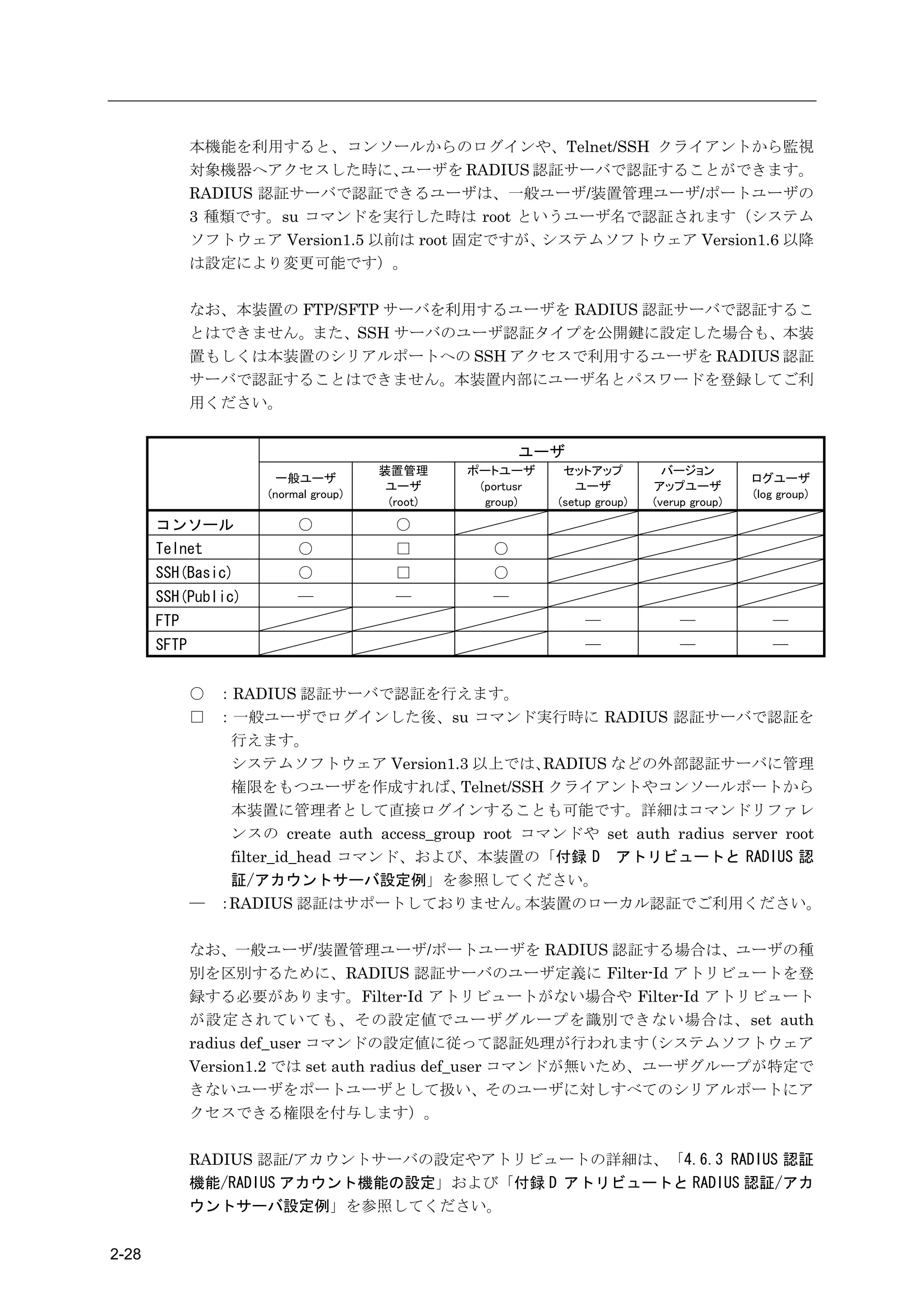
              RADIUS 認証サーバで認証できるユーザは、一般ユーザ/装置管理ユーザ/ポートユーザの
              3 種類です。su コマンドを実行した時は root というユーザ名で認証されます(システム
              ソフトウェア Version1.5 以前は root 固定ですが、システムソフトウェア Version1.6 以降
              は設定により変更可能です)。

              なお、本装置の FTP/SFTP サーバを利用するユーザを RADIUS 認証サーバで認証するこ
              とはできません。また、SSH サーバのユーザ認証タイプを公開鍵に設定した場合も、本装
              置もしくは本装置のシリアルポートへの SSH アクセスで利用するユーザを RADIUS 認証
              サーバで認証することはできません。本装置内部にユーザ名とパスワードを登録してご利
              用ください。


                                                        ユーザ
                                       装置管理      ポートユーザ       セットアップ           バージョン
                       一般ユーザ                                                                 ログユーザ
                                        ユーザ       (portusr      ユーザ          アップユーザ
                      (normal group)                                                         (log group)
                                        (root)     group)    (setup group)   (verup group)
       コンソール               ○             ○
       Telnet              ○             □          ○
       SSH(Basic)          ○             □          ○
       SSH(Public)         ―             ―          ―
       FTP                                                        ―               ―              ―
       SFTP                                                       ―               ―              ―


              ○ :RADIUS 認証サーバで認証を行えます。
              □ :一般ユーザでログインした後、su コマンド実行時に RADIUS 認証サーバで認証を
                 行えます。
                 システムソフトウェア Version1.3 以上では、         RADIUS などの外部認証サーバに管理
                 権限をもつユーザを作成すれば、           Telnet/SSH クライアントやコンソールポートから
                 本装置に管理者として直接ログインすることも可能です。詳細はコマンドリファレ
                 ンスの create auth access_group root コマンドや set auth radius server root
                 filter_id_head コマンド、および、本装置の「付録 D アトリビュートと RADIUS 認
                 証/アカウントサーバ設定例」を参照してください。
              ― :RADIUS 認証はサポートしておりません。            本装置のローカル認証でご利用ください。

              なお、一般ユーザ/装置管理ユーザ/ポートユーザを RADIUS 認証する場合は、ユーザの種
              別を区別するために、RADIUS 認証サーバのユーザ定義に Filter-Id アトリビュートを登
              録する必要があります。Filter-Id アトリビュートがない場合や Filter-Id アトリビュート
              が設定されていても、その設定値でユーザグループを識別できない場合は、set auth
              radius def_user コマンドの設定値に従って認証処理が行われます           (システムソフトウェア
              Version1.2 では set auth radius def_user コマンドが無いため、ユーザグループが特定で
              きないユーザをポートユーザとして扱い、そのユーザに対しすべてのシリアルポートにア
              クセスできる権限を付与します)。

              RADIUS 認証/アカウントサーバの設定やアトリビュートの詳細は、「4.6.3 RADIUS 認証
              機能/RADIUS アカウント機能の設定」および「付録 D アトリビュートと RADIUS 認証/アカ
              ウントサーバ設定例」を参照してください。


2-28
2章   機    能


(1) ユーザ認証の順序

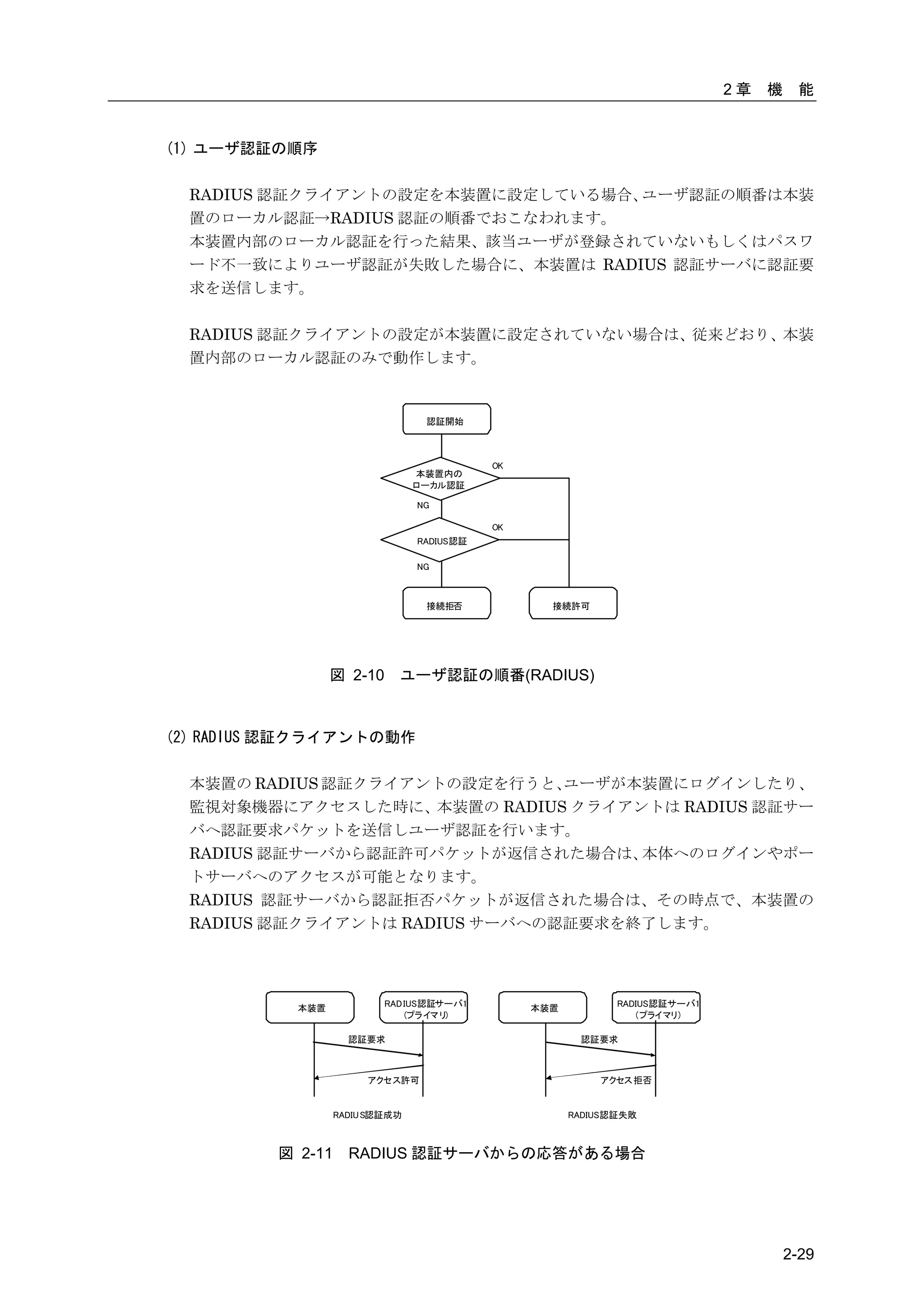
  RADIUS 認証クライアントの設定を本装置に設定している場合、ユーザ認証の順番は本装
  置のローカル認証→RADIUS 認証の順番でおこなわれます。
  本装置内部のローカル認証を行った結果、該当ユーザが登録されていないもしくはパスワ
  ード不一致によりユーザ認証が失敗した場合に、本装置は RADIUS 認証サーバに認証要
  求を送信します。

  RADIUS 認証クライアントの設定が本装置に設定されていない場合は、従来どおり、本装
  置内部のローカル認証のみで動作します。


                                 認証開始


                                           OK
                                本装置内の
                                ローカル認証

                                NG

                                           OK
                                RADIUS認証

                                NG


                                 接続拒否             接続許可


                 図 2-10     ユーザ認証の順番(RADIUS)


(2) RADIUS 認証クライアントの動作

  本装置の RADIUS 認証クライアントの設定を行うと、  ユーザが本装置にログインしたり、
  監視対象機器にアクセスした時に、本装置の RADIUS クライアントは RADIUS 認証サー
  バへ認証要求パケットを送信しユーザ認証を行います。
  RADIUS 認証サーバから認証許可パケットが返信された場合は、   本体へのログインやポー
  トサーバへのアクセスが可能となります。
  RADIUS 認証サーバから認証拒否パケットが返信された場合は、その時点で、本装置の
  RADIUS 認証クライアントは RADIUS サーバへの認証要求を終了します。


           本装置            RAD IUS認証サーバ1         本装置          RADIUS認証サーバ1
                              (プライマ リ)                           (プライマリ)

                    認証要求                               認証要求


                       アクセス許可                             アクセス 拒否


                  RADIU S認証成功                         RADIUS認証失敗


         図 2-11     RADIUS 認証サーバからの応答がある場合


                                                                                     2-29
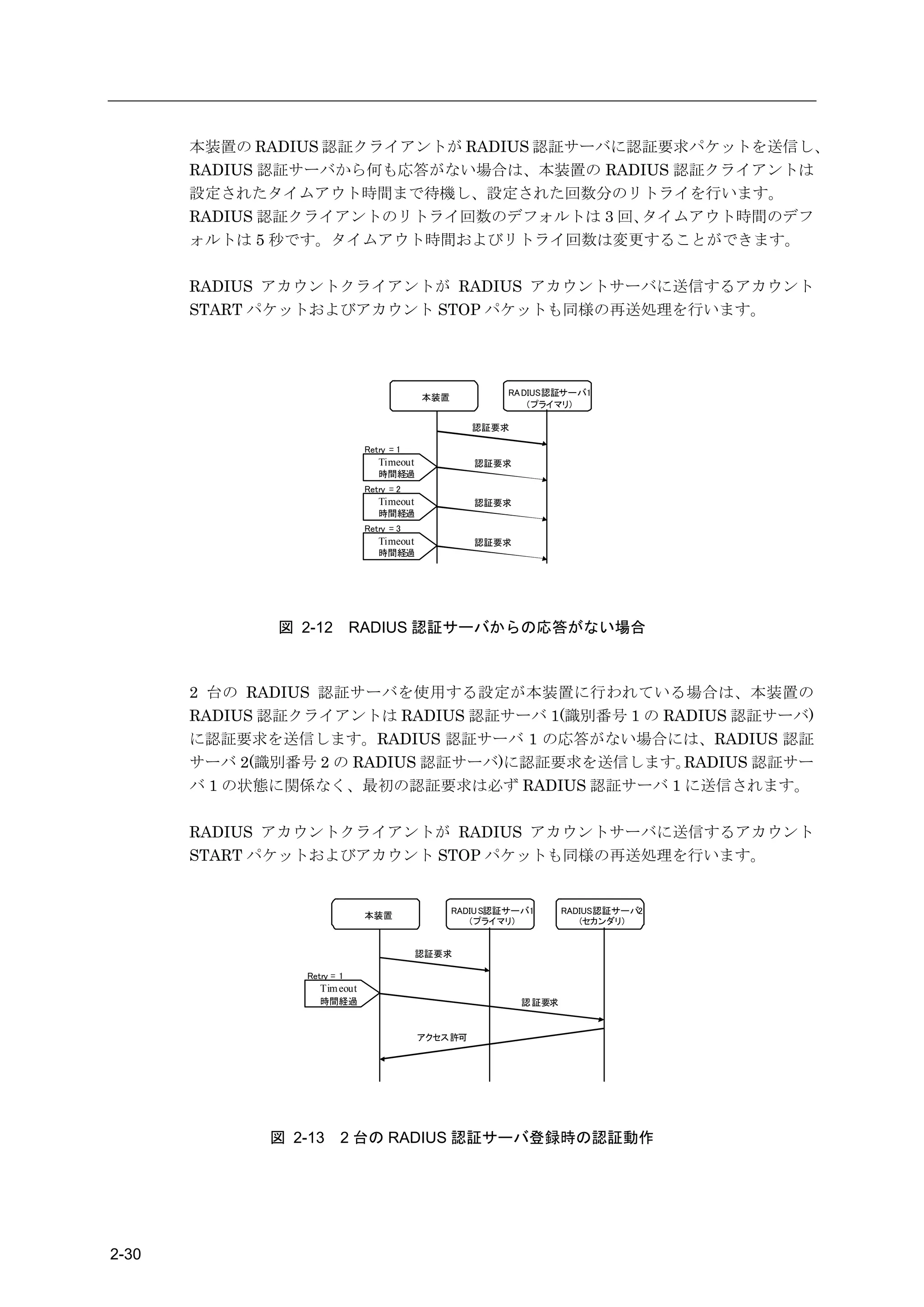
本装置の RADIUS 認証クライアントが RADIUS 認証サーバに認証要求パケットを送信し、
       RADIUS 認証サーバから何も応答がない場合は、本装置の RADIUS 認証クライアントは
       設定されたタイムアウト時間まで待機し、設定された回数分のリトライを行います。
       RADIUS 認証クライアントのリトライ回数のデフォルトは 3 回、  タイムアウト時間のデフ
       ォルトは 5 秒です。タイムアウト時間およびリトライ回数は変更することができます。

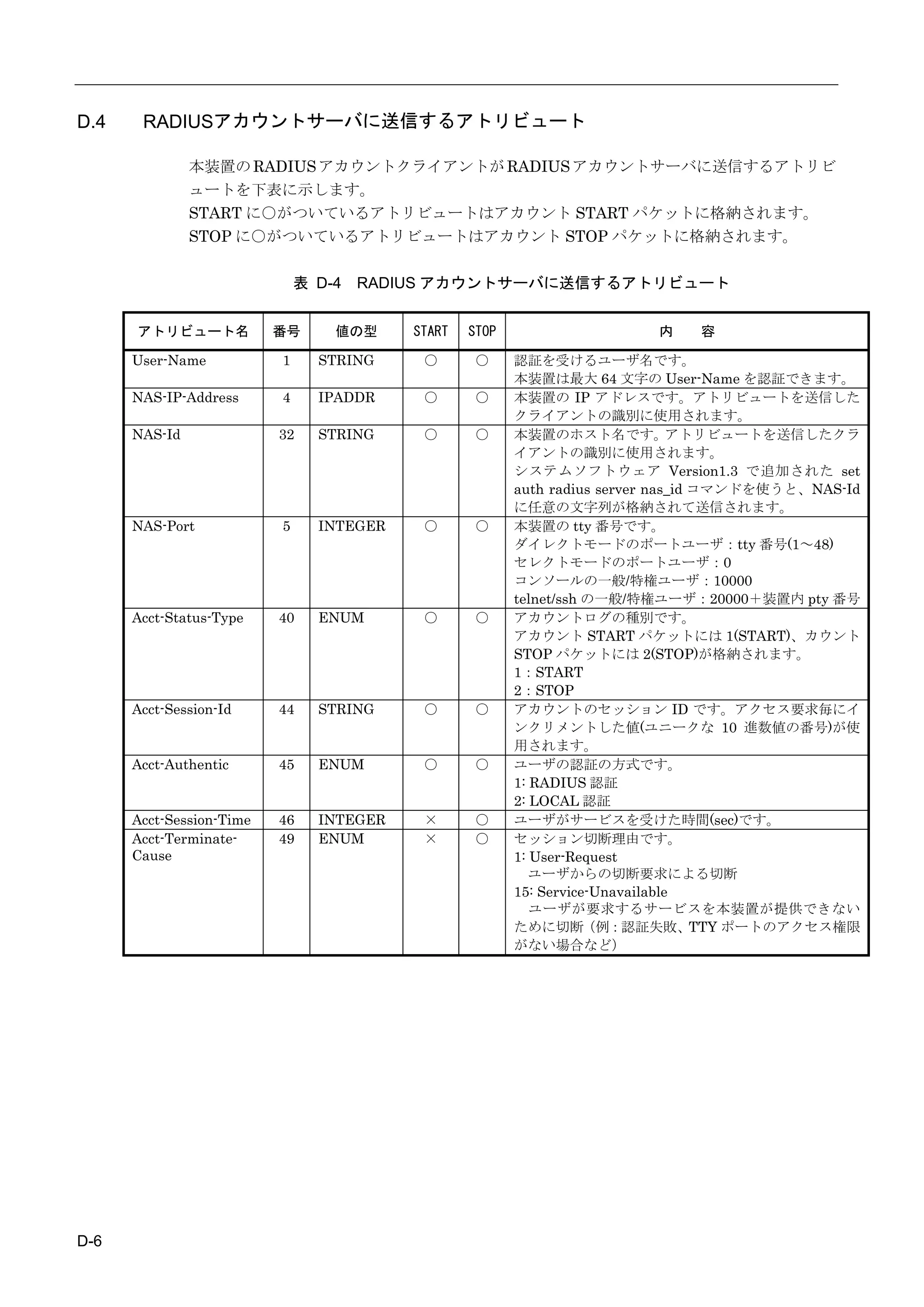
       RADIUS アカウントクライアントが RADIUS アカウントサーバに送信するアカウント
       START パケットおよびアカウント STOP パケットも同様の再送処理を行います。


                                                          RA DIUS認証サーバ1
                                            本装置
                                                              (プライマリ)

                                                     認証要求

                               Retry = 1
                                  Timeout            認証要求
                                  時間経過
                               Retry = 2
                                  Timeout            認証要求
                                  時間経過
                               Retry = 3
                                  Timeout            認証要求
                                  時間経過


              図 2-12         RADIUS 認証サーバからの応答がない場合


       2 台の RADIUS 認証サーバを使用する設定が本装置に行われている場合は、本装置の
       RADIUS 認証クライアントは RADIUS 認証サーバ 1(識別番号 1 の RADIUS 認証サーバ)
       に認証要求を送信します。RADIUS 認証サーバ 1 の応答がない場合には、RADIUS 認証
       サーバ 2(識別番号 2 の RADIUS 認証サーバ)に認証要求を送信します。   RADIUS 認証サー
       バ 1 の状態に関係なく、最初の認証要求は必ず RADIUS 認証サーバ 1 に送信されます。

       RADIUS アカウントクライアントが RADIUS アカウントサーバに送信するアカウント
       START パケットおよびアカウント STOP パケットも同様の再送処理を行います。


                                                  RADIU S認証サーバ1     RADIUS認証サーバ2
                               本装置
                                                     (プライマリ)           (セカンダリ)


                                            認証要求

                 Retry = 1
                    Tim eout
                    時間経過                                    認 証要求


                                            アクセス許可


             図 2-13      2 台の RADIUS 認証サーバ登録時の認証動作


2-30
2章   機    能


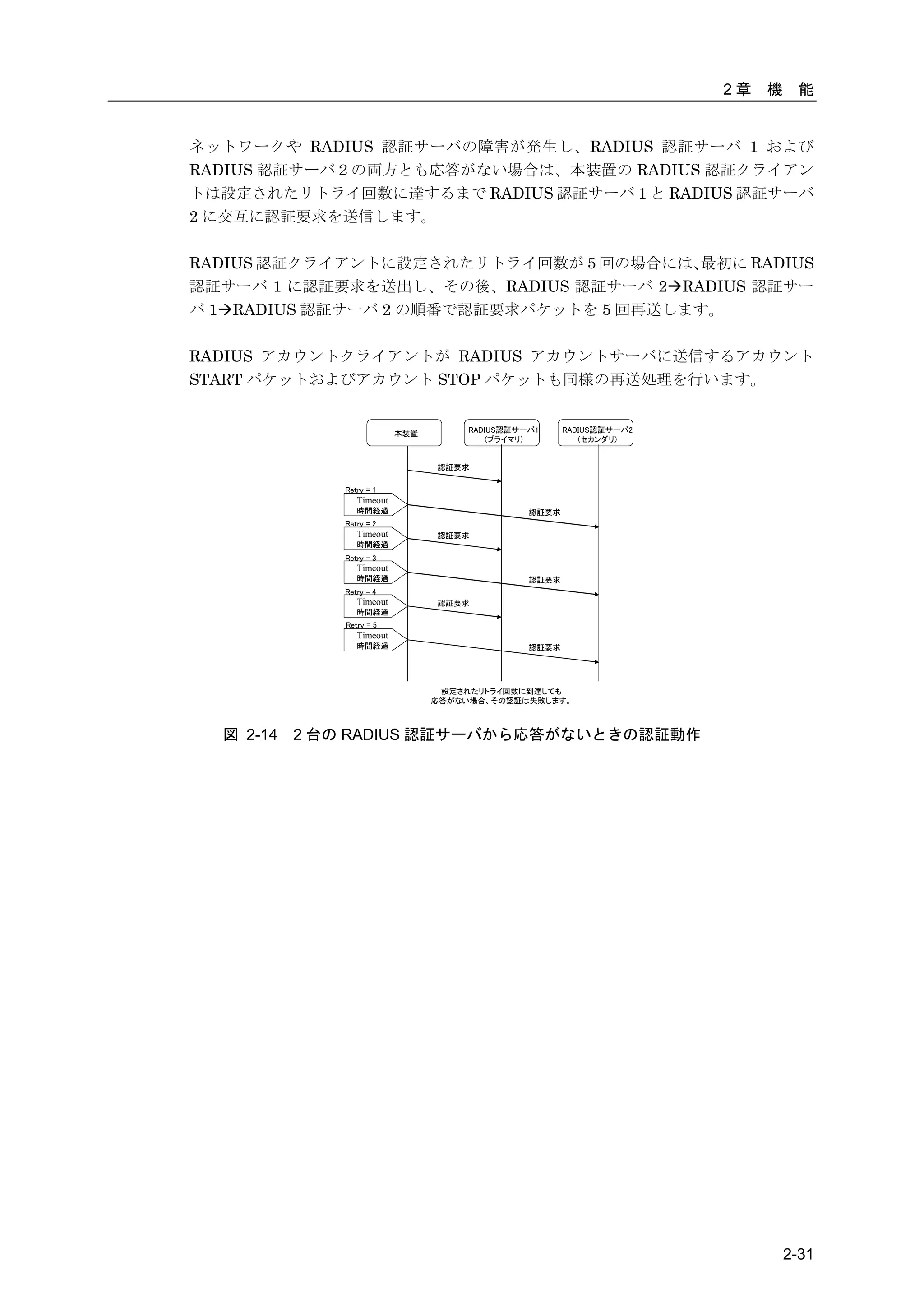
ネットワークや RADIUS 認証サーバの障害が発生し、RADIUS 認証サーバ 1 および
RADIUS 認証サーバ2の両方とも応答がない場合は、本装置の RADIUS 認証クライアン
トは設定されたリトライ回数に達するまで RADIUS 認証サーバ 1 と RADIUS 認証サーバ
2 に交互に認証要求を送信します。

RADIUS 認証クライアントに設定されたリトライ回数が 5 回の場合には、  最初に RADIUS
認証サーバ 1 に認証要求を送出し、その後、RADIUS 認証サーバ 2RADIUS 認証サー
バ 1RADIUS 認証サーバ 2 の順番で認証要求パケットを 5 回再送します。

RADIUS アカウントクライアントが RADIUS アカウントサーバに送信するアカウント
START パケットおよびアカウント STOP パケットも同様の再送処理を行います。


                           本装置        RADIUS認証サーバ1     RADIUS認証サーバ2
                                          (プライマリ)         (セカンダリ)


                                 認証要求

              Retry = 1
                 Timeout
                 時間経過                           認証要求
              Retry = 2
                 Timeout         認証要求
                 時間経過
              Retry = 3
                 Timeout
                 時間経過                           認証要求
              Retry = 4
                 Timeout         認証要求
                 時間経過
              Retry = 5
                 Timeout
                 時間経過                           認証要求


                                  設定されたリトライ回数に到達しても
                                 応答がない場合、その認証は失敗します。


  図 2-14   2 台の RADIUS 認証サーバから応答がないときの認証動作


                                                                               2-31
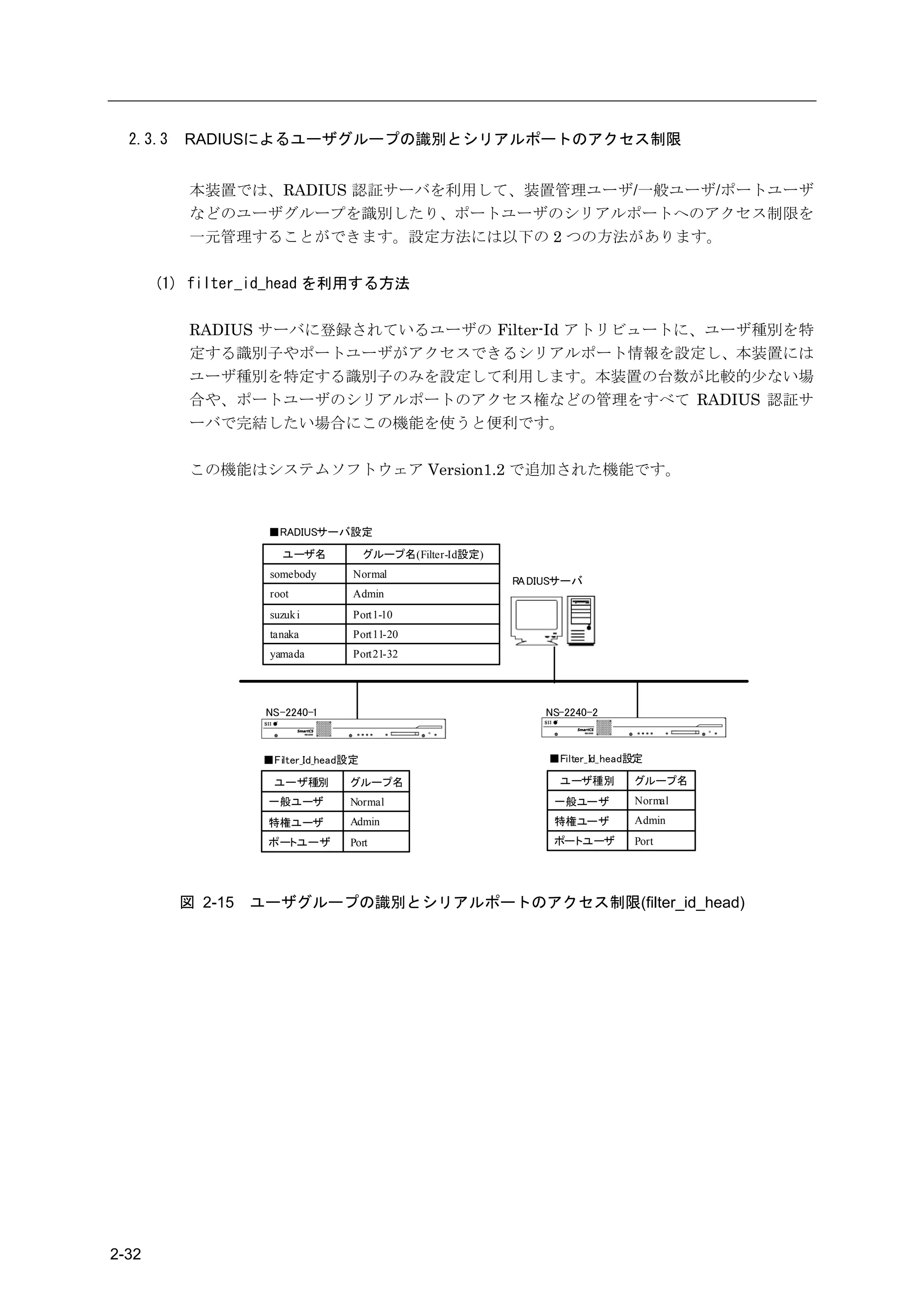
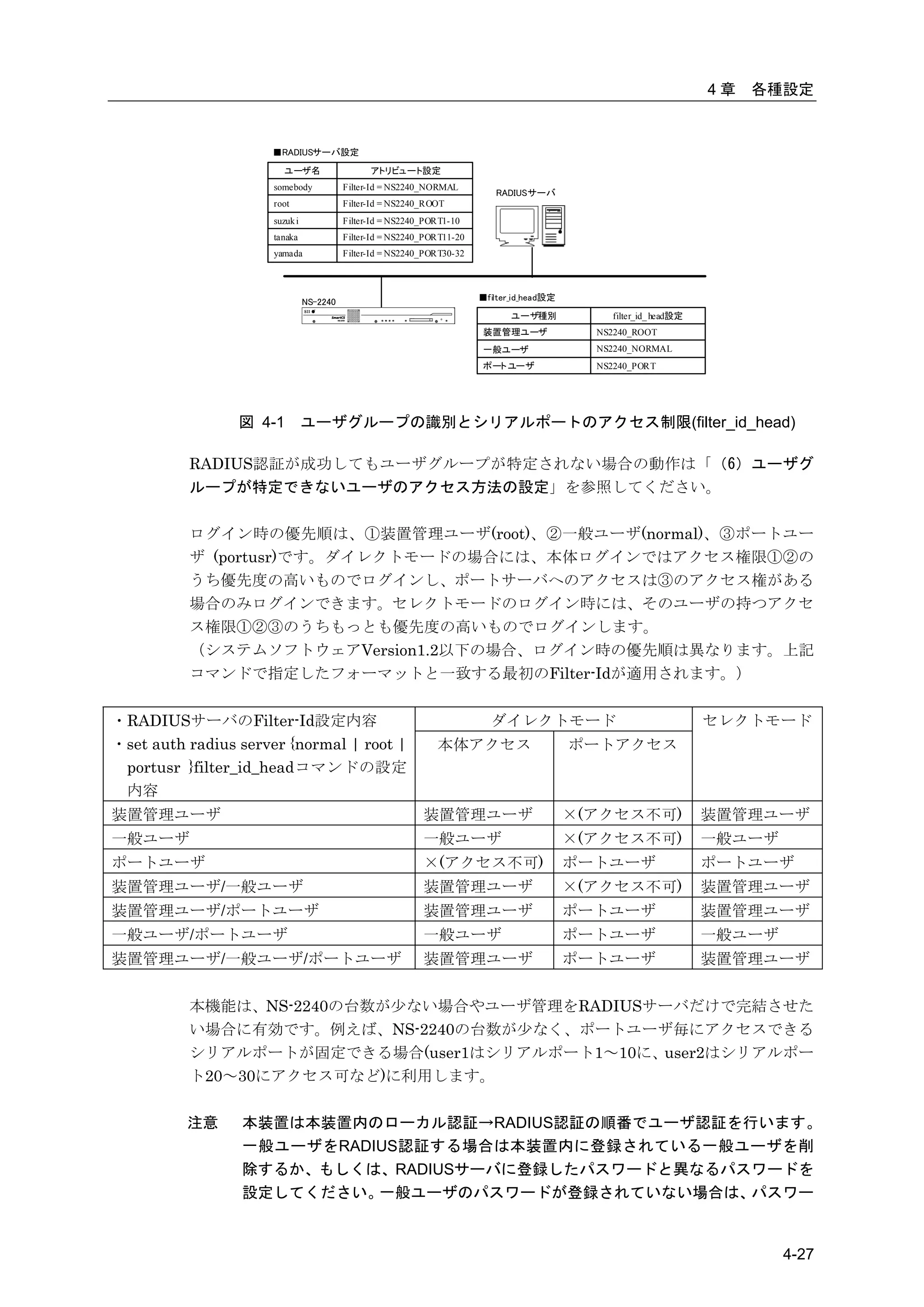
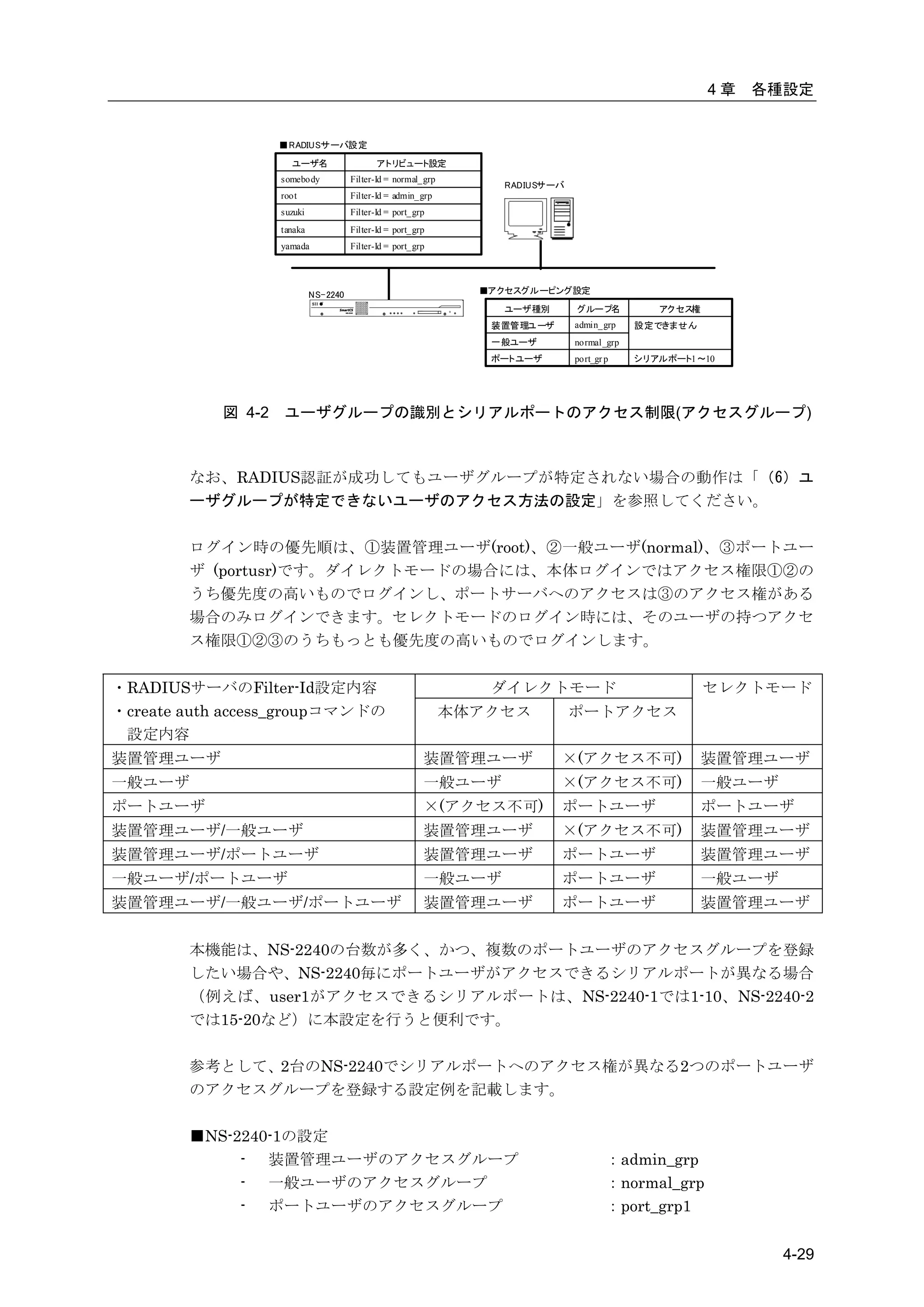
2.3.3   RADIUSによるユーザグループの識別とシリアルポートのアクセス制限


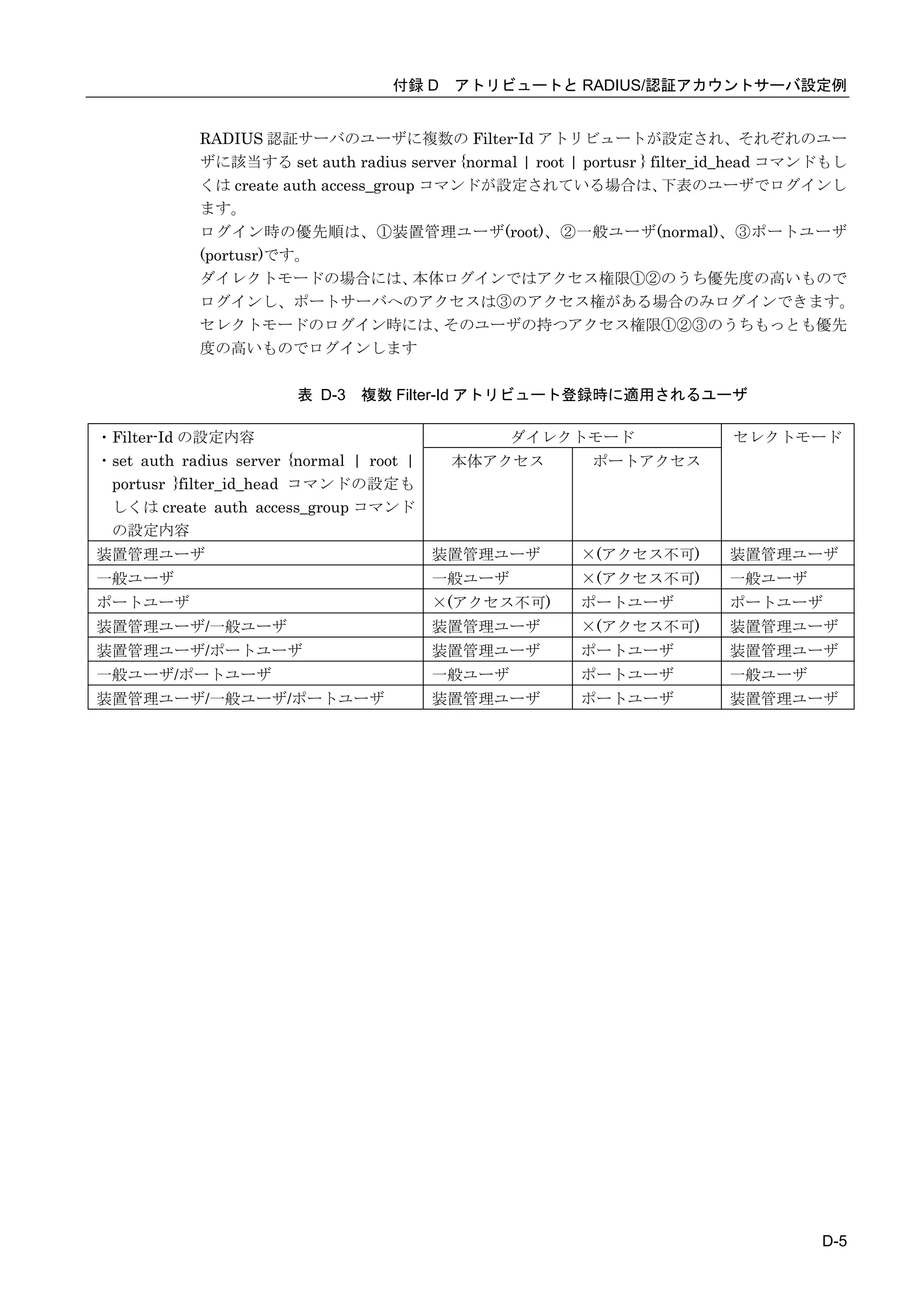
           本装置では、RADIUS 認証サーバを利用して、装置管理ユーザ/一般ユーザ/ポートユーザ
           などのユーザグループを識別したり、ポートユーザのシリアルポートへのアクセス制限を
           一元管理することができます。設定方法には以下の 2 つの方法があります。

       (1) filter_id_head を利用する方法

           RADIUS サーバに登録されているユーザの Filter-Id アトリビュートに、ユーザ種別を特
           定する識別子やポートユーザがアクセスできるシリアルポート情報を設定し、本装置には
           ユーザ種別を特定する識別子のみを設定して利用します。本装置の台数が比較的少ない場
           合や、ポートユーザのシリアルポートのアクセス権などの管理をすべて RADIUS 認証サ
           ーバで完結したい場合にこの機能を使うと便利です。

           この機能はシステムソフトウェア Version1.2 で追加された機能です。


                    ■RADIUSサーバ設定
                       ユーザ名             グループ名(Filter-Id設定)
                     somebody       Normal
                                                             RA DIUSサーバ
                     root           Admin
                     suzuk i        Port1-10
                     tanaka         Port11-20
                     yamada         Port21-32


                    NS-2240-1                                    NS-2240-2


                    ■Filter_Id_head設定                             ■Filter_Id_head設定

                      ユーザ種別        グループ名                            ユーザ種別        グループ名
                    一般ユーザ          Normal                          一般ユーザ         Normal
                    特権ユーザ          Admin                           特権ユーザ         Admin
                    ポートユーザ         Port                            ポートユーザ        Port


          図 2-15   ユーザグループの識別とシリアルポートのアクセス制限(filter_id_head)


2-32
2章   機    能


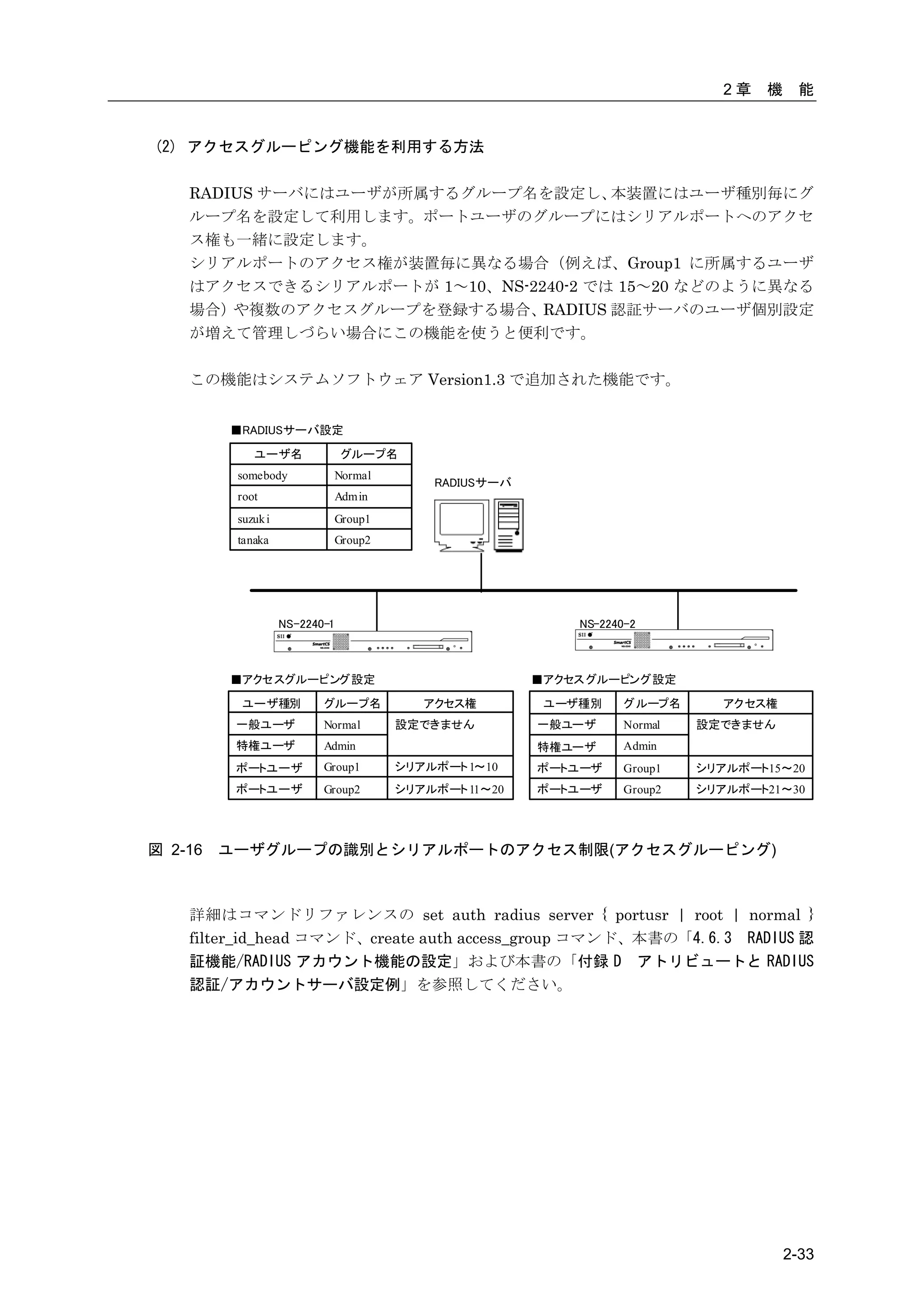
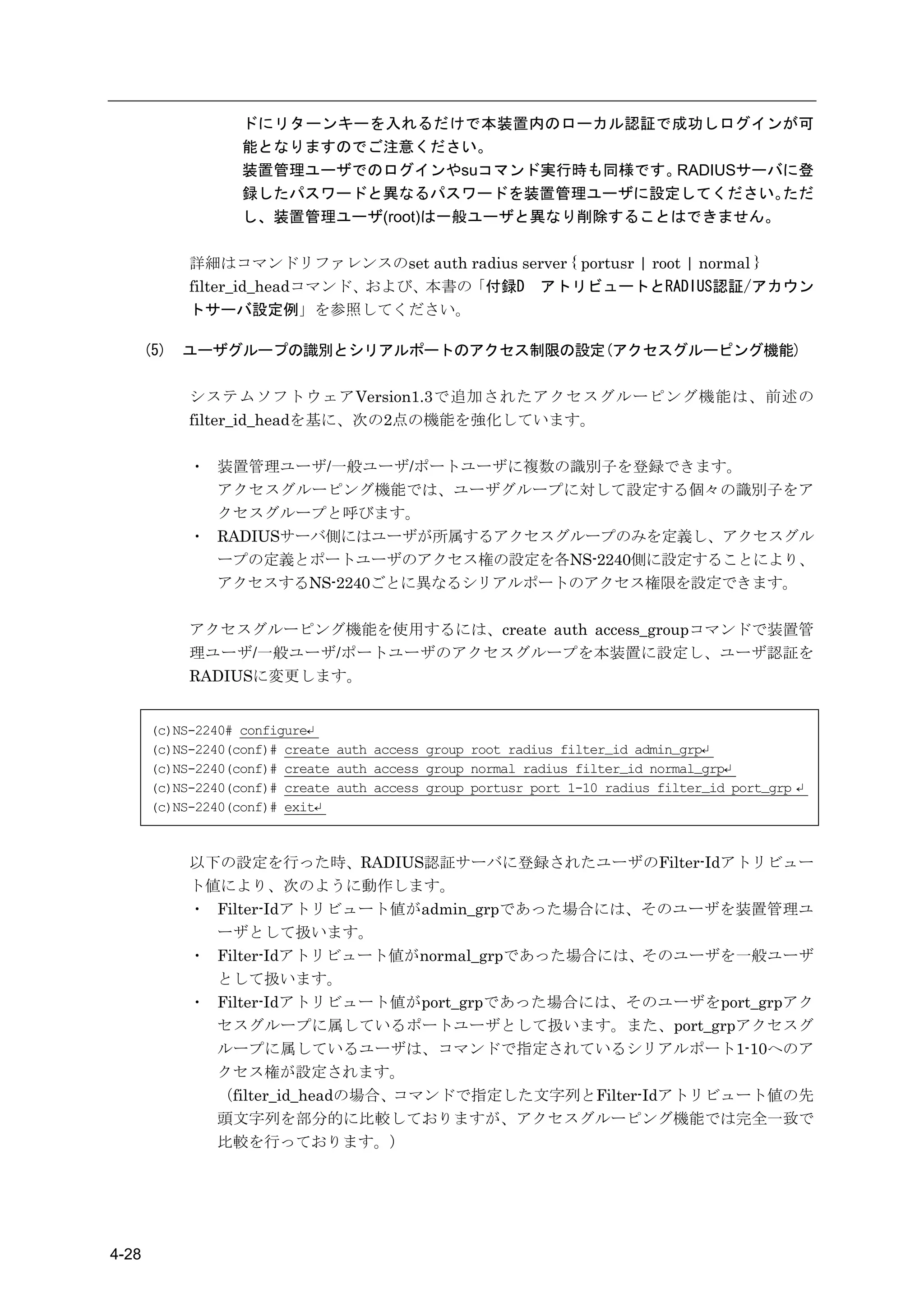
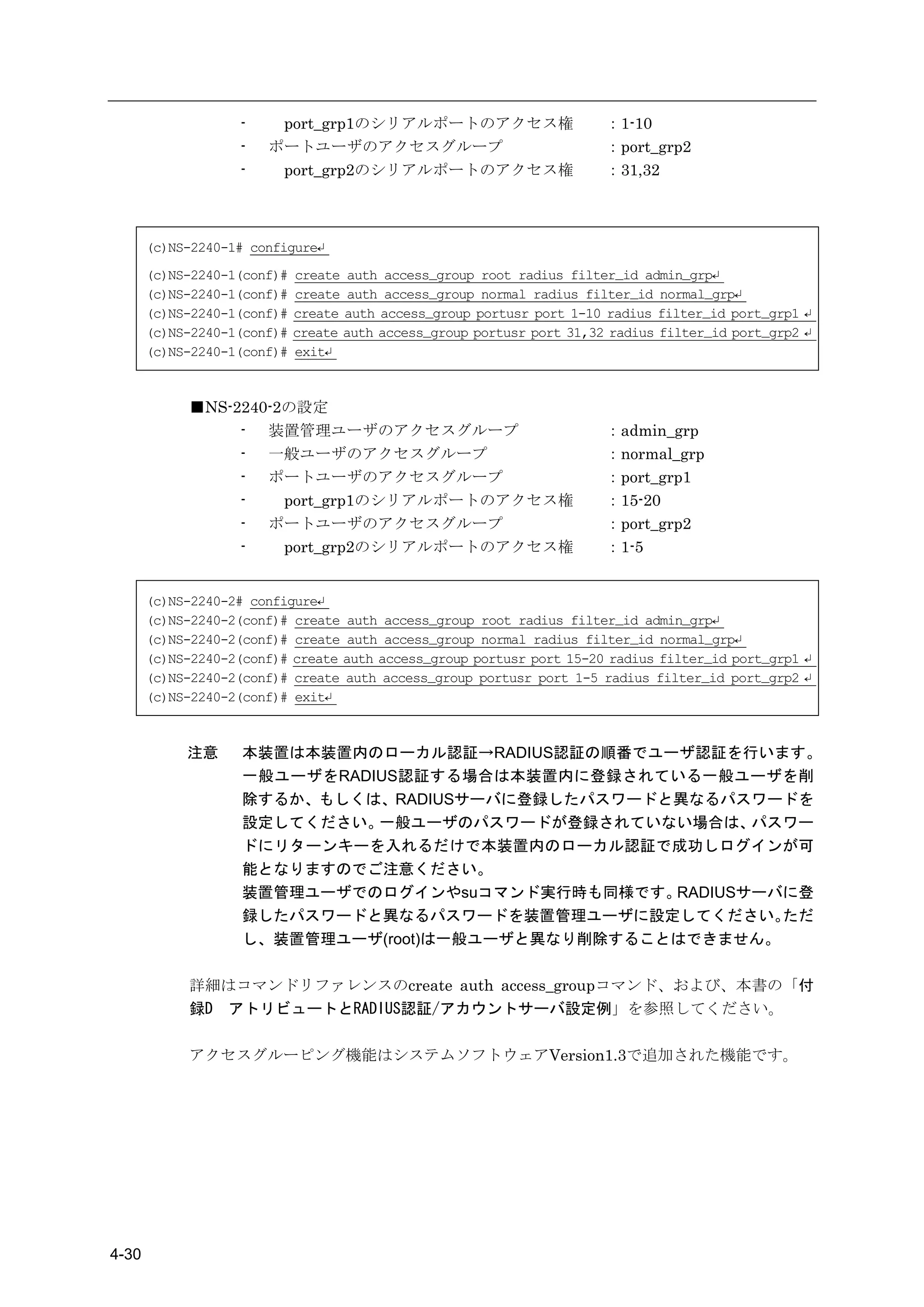
(2) アクセスグルーピング機能を利用する方法

    RADIUS サーバにはユーザが所属するグループ名を設定し、    本装置にはユーザ種別毎にグ
    ループ名を設定して利用します。ポートユーザのグループにはシリアルポートへのアクセ
    ス権も一緒に設定します。
    シリアルポートのアクセス権が装置毎に異なる場合(例えば、Group1 に所属するユーザ
    はアクセスできるシリアルポートが 1~10、NS-2240-2 では 15~20 などのように異なる
    場合)や複数のアクセスグループを登録する場合、RADIUS 認証サーバのユーザ個別設定
    が増えて管理しづらい場合にこの機能を使うと便利です。

    この機能はシステムソフトウェア Version1.3 で追加された機能です。


         ■RADIUSサーバ設定
             ユーザ名               グループ名
          somebody              Normal
                                             RADIUSサーバ
          root                  Admin
          suzuk i               Group1
          tanaka                Group2


                    NS-2240-1                                NS-2240-2


         ■アクセスグルーピング設定                                   ■アクセス グルーピング設定

          ユーザ種別            グループ名            アクセス権         ユーザ種別     グループ名       アクセス権
          一般ユーザ            Normal        設定できません         一般ユーザ      Normal   設定できません
          特権ユーザ            Admin                         特権ユーザ      Admin
          ポートユーザ           Group1        シリアルポート 1~10    ポートユーザ     Group1   シリアルポート15~20
          ポートユーザ           Group2        シリアルポート 11~20   ポートユーザ     Group2   シリアルポート21~30


図 2-16   ユーザグループの識別とシリアルポートのアクセス制限(アクセスグルーピング)


    詳細はコマンドリファレンスの set auth radius server { portusr | root | normal }
    filter_id_head コマンド、create auth access_group コマンド、本書の「4.6.3 RADIUS 認
    証機能/RADIUS アカウント機能の設定」および本書の「付録 D アトリビュートと RADIUS
    認証/アカウントサーバ設定例」を参照してください。


                                                                                        2-33
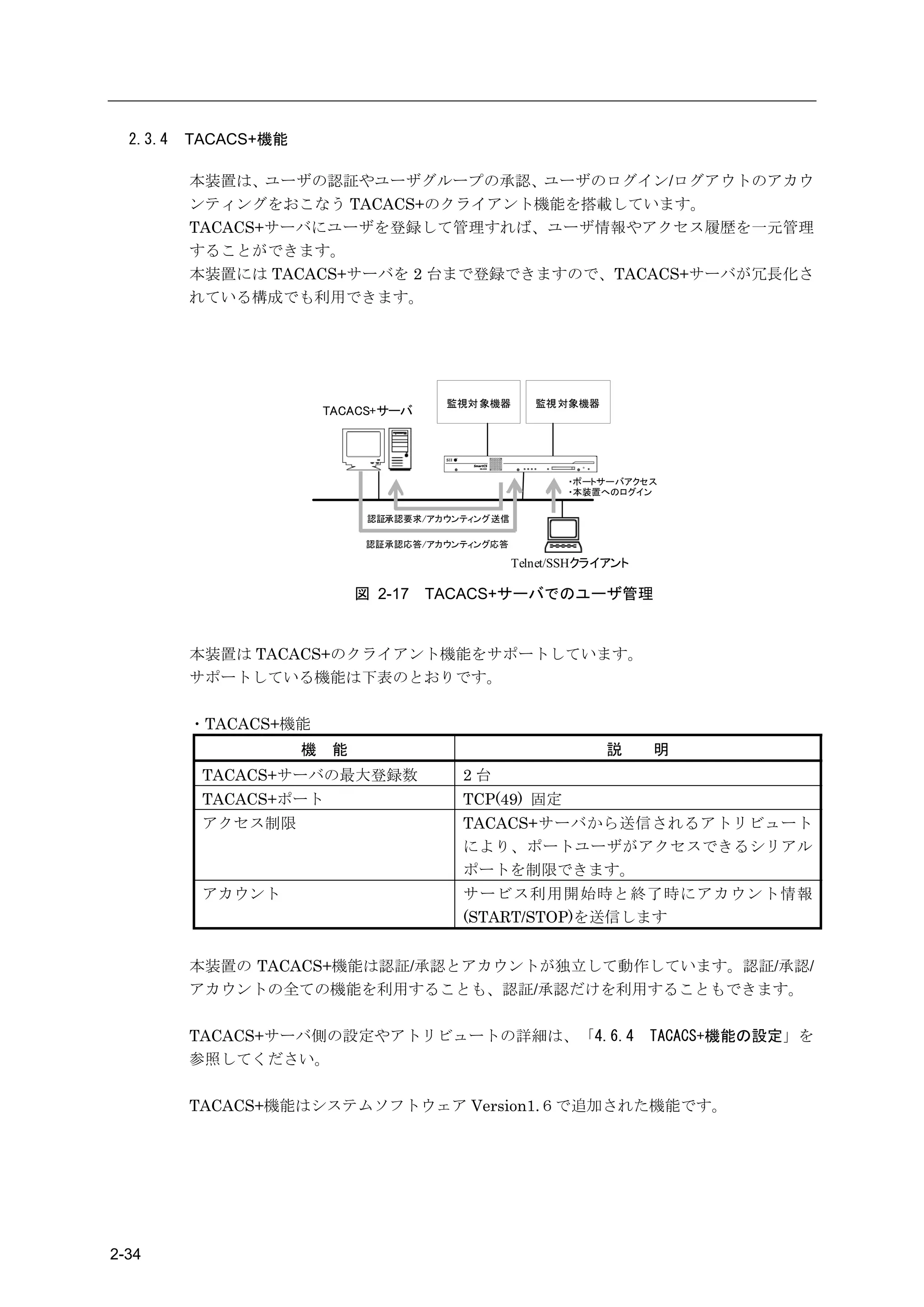
2.3.4   TACACS+機能

          本装置は、ユーザの認証やユーザグループの承認、ユーザのログイン/ログアウトのアカウ
          ンティングをおこなう TACACS+のクライアント機能を搭載しています。
          TACACS+サーバにユーザを登録して管理すれば、ユーザ情報やアクセス履歴を一元管理
          することができます。
          本装置には TACACS+サーバを 2 台まで登録できますので、TACACS+サーバが冗長化さ
          れている構成でも利用できます。


                                         監視対 象機器       監視 対象機器
                          TACACS+サーバ


                                                           ・ポートサーバアクセス
                                                           ・本装置へのログイン

                                認証承認要求/アカウンティング送信

                                認証承認応答/アカウンティング応答

                                                    Telnet/SSHクライアント

                               図 2-17   TACACS+サーバでのユーザ管理


          本装置は TACACS+のクライアント機能をサポートしています。
          サポートしている機能は下表のとおりです。

          ・TACACS+機能
                      機    能                                     説     明
           TACACS+サーバの最大登録数                2台
           TACACS+ポート                      TCP(49) 固定
           アクセス制限                          TACACS+サーバから送信されるアトリビュート
                                           により、ポートユーザがアクセスできるシリアル
                                           ポートを制限できます。
           アカウント                           サービス利用開始時と終了時にアカウント情報
                                           (START/STOP)を送信します


          本装置の TACACS+機能は認証/承認とアカウントが独立して動作しています。認証/承認/
          アカウントの全ての機能を利用することも、認証/承認だけを利用することもできます。

          TACACS+サーバ側の設定やアトリビュートの詳細は、「4.6.4                            TACACS+機能の設定」を
          参照してください。

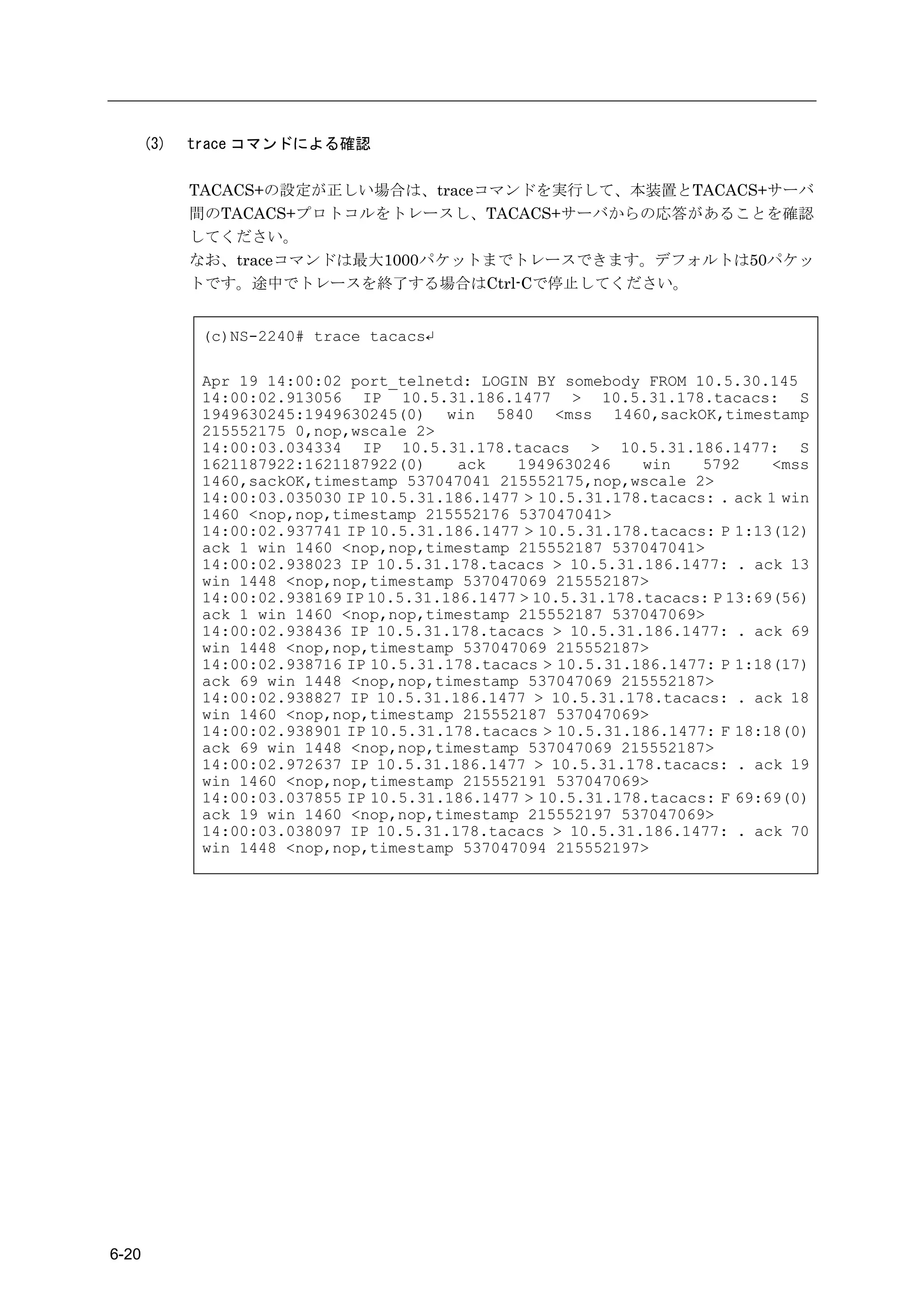
          TACACS+機能はシステムソフトウェア Version1.6で追加された機能です。


2-34
2章     機     能


       本機能を利用すると、コンソールからのログインや、Telnet/SSH クライアントから監視
       対象機器へアクセスした時に、ユーザを TACACS+サーバで認証することができます。
       TACACS+サーバで認証できるユーザは、一般ユーザ/装置管理ユーザ/ポートユーザの 3
       種類です。su コマンドを実行した時は root というユーザ名で認証されます。このユーザ
       名は設定により変更可能です。

       なお、本装置の FTP/SFTP サーバを利用するユーザを TACACS+サーバで認証することは
       できません。また、SSH サーバのユーザ認証タイプを公開鍵に設定した場合も、本装置も
       しくは本装置のシリアルポートへの SSH アクセスで利用するユーザを TACACS+サーバ
       で認証することはできません。本装置内部にユーザ名とパスワードを登録してご利用くだ
       さい。


                                                ユーザ
                               装置管理      ポートユーザ       セットアップ           バージョン
               一般ユーザ                                                                      ログユーザ
                                ユーザ       (portusr      ユーザ          アップユーザ
              (normal group)                                                              (log group)
                                (root)     group)    (setup group)   (verup group)
コンソール              ○             ○
Telnet             ○             □          ○
SSH(Basic)         ○             □          ○
SSH(Public)        ―             ―          ―
FTP                                                       ―               ―                   ―
SFTP                                                      ―               ―                   ―


       ○ :TACACS+サーバで認証を行えます。
       □ :一般ユーザでログインした後、su コマンド実行時に TACACS+サーバで認証を行え
          ます。
          TACACS+サーバに管理権限をもつユーザを作成すれば、Telnet/SSH クライアント
          やコンソールポートから本装置に管理者として直接ログインすることも可能です。
          詳細はコマンドリファレンスの create auth access_group root コマンドを参照して
          ください。
       ― :TACACS+サーバで認証は行えません。本装置のローカル認証でご利用ください。

       なお、一般ユーザ/装置管理ユーザ/ポートユーザを TACACS+認証する場合は、TACACS+
       サーバのユーザ定義に、一般ユーザ/装置管理ユーザ/ポートユーザなどのユーザ種別を区
       別するためのアトリビュートと値のペアを登録する必要があります。このアトリビュート
       の名前と値のペアは装置管理者が任意に決めることができます。ユーザ種別を区別するた
       めのアトリビュートが存在しない場合や、その設定値でユーザグループを識別できない場
       合は、set auth tacacs def_user コマンドの設定値に従って認証処理が行われます。

       TACACS+サーバの設定やアトリビュートの詳細は、「4.6.4 TACACS+機能の設定」を参照
       してください。


                                                                                                2-35
(3) ユーザ認証の順序

        TACACS+ が 設 定 さ れ て い る 場 合 、 ユ ー ザ 認 証 の 順 番 は 本 装 置 の ロ ー カ ル 認 証 →
        TACACS+認証の順番でおこなわれます。
        本装置内部のローカル認証を行った結果、該当ユーザが登録されていないもしくはパスワ
        ード不一致によりユーザ認証が失敗した場合に、本装置は TACACS+サーバに認証要求を
        送信します。

        TACACS+が設定されていない場合は、従来どおり、本装置内部のローカル認証のみで動
        作します。


                                 認証開始


                                           OK
                               本装置内の
                               ローカル認証

                               NG

                                           OK
                               TACACS+認証

                               NG


                                接続拒否            接続許可


                      図 2-18   ユーザ認証の順番(TACACS+)


2-36
2章   機    能


(4) TACACS+の動作

  TACACS+は認証/承認/アカウントで構成されています。


            機能                                                    内容
       認証               ユーザ ID とパスワードによりユーザを認証します。
       承認               本装置が送信する service アトリビュートを承認します。
                        service アトリビュートが smartcs であることを確認し、認証した
                        ユーザに設定されたユーザ種別(一般ユーザ/装置管理ユーザ/ポー
                        トユーザ)を応答します。
       アカウント            ユーザのログイン/ログアウトをアカウンティングします。


  TACACS+によるユーザ認証は下記の手順で行われます。
  ユーザ認証は少なくとも認証と承認に成功しなければいけません。認証もしくは承認に失
  敗した場合、そのセッションは終了します。


                                                              T ACACS+サーバ


                 ログイン
                          START(接続要求:ユーザID)

                                                 REPLY( パスワード問い合わせ)

                          CONTINUE(パスワード回答)
                                                                            認証
                                                           REPLY(成功)        authentication


                          REQUEST (ser vice=smartcs)
                                                                            承認
                                    RE SPONSE(成功:ユーザ種別[ポートユーザ])
                                                                            authorization


                          RE QUEST(サービス開始:START)

                                                        RE SPONSE(成功)


                 ログアウト                                                      アカウント
                          RE QUEST(サービス終了:STOP)                             accounting
                                                        RE SPONSE(成功)


             図 2-19      認証/承認/アカウントの流れ(TACACS+)


                                                                                                      2-37
本装置に TACACS+サーバを 1 台登録している場合、タイムアウト時間内に TACACS+サ
       ーバの応答が無ければその接続要求は失敗します。

       TACACS+サーバを 2 台登録している場合、TACACS+サーバ 1(識別番号 1 の TACACS+
       サーバ)に認証要求を送信します。
       TACACS+サーバ 1 の応答がない場合には、TACACS+サーバ 2(識別番号 2 の TACACS+
       サーバ)に認証要求を送信します。
       最初の認証要求は、必ず TACACS+サーバ 1 に送信されます。

       承認は認証が成功したサーバに REQUEST パケットを送信します。
       タイムアウト時間内にサーバから応答がない場合、承認は終了します。
       アカウントは認証と同様の動作を行います。


                    本装置                           TACACS+サーバ1               TACACS+サーバ2
                                                    (プライマ リ)                  (セカンダリ)

                      START(接続要求:ユーザID)

           タイムアウト
             時間                          応答なし ×

                      START(接続要求:ユーザID)

                                                                REPLY(パスワード問い合わせ)
                                                                                          認証
                                                                                          authentication
                      CONTINUE(パスワード回答)

                                                                          REPLY(成功)


                      REQUEST (service=smartcs)

                                                        RE SPONSE(成功:ユーザ種別[ポートユーザ])
                                                                                          承認
                                                                                          authorization

                      REQUEST (サービス開始:ST ART)

           タイムアウト
             時間                          応答なし ×

                      REQUEST (サービス開始:ST ART)                                             アカウント
                                                                                          accounting
                                                                       RESPONSE(成功)

                               (省略)


               図 2-20         2 台の TACACS+サーバ登録時の認証動作


2-38
2章   機    能


2.3.5   TACACS+によるユーザグループの識別とシリアルポートのアクセス制限


        TACACS+サーバと本装置のアクセスグルーピング機能を利用して、装置管理ユーザ/一般
        ユーザ/ポートユーザなどのユーザグループを識別したり、 ポートユーザのシリアルポート
        へのアクセス制限を一元管理することができます。

        この機能を利用する場合、TACACS+サーバにはユーザが所属するグループ名を設定し、
        本装置にはユーザ種別毎のグループ名を設定します。ポートユーザのグループにはシリア
        ルポートへのアクセス権も一緒に設定します。
        シリアルポートのアクセス権が装置毎に異なる場合(例えば、Group1 に所属するユーザ
        はアクセスできるシリアルポートが NS-2240-1 では 1~10、NS-2240-2 では 15~20 など
        のように異なる場合)や複数のアクセスグループを登録する場合、TACACS+サーバのユ
        ーザ個別設定が増えて管理しづらい場合にこの機能を使うと便利です。


                  ■TACACS+サーバ設定

                      ユーザ名               グループ名
                   somebody              Normal
                                                      TA CACS+サーバ
                   root                  Admin
                   suzuk i               Group1
                   tanaka                Group2


                             NS-2240-1                                  NS-2240-2


                  ■アクセスグルーピング設定                                     ■アクセス グルーピング設定
                    ユーザ種別           グループ名            アクセス権           ユーザ種別     グループ名       アクセス権
                   一般ユーザ            Normal        設定できません           一般ユーザ      Normal   設定できません
                   特権ユーザ            Admin                           特権ユーザ      Admin
                   ポートユーザ           Group1        シリアルポート 1~10      ポートユーザ     Group1   シリアルポート15~20
                   ポートユーザ           Group2        シリアルポート 11~20     ポートユーザ     Group2   シリアルポート21~30


        図 2-21   ユーザグループの識別とシリアルポートのアクセス制限(TACACS+)


        詳細はコマンドリファレンスの create auth access_group コマンド、本書の「4.6.4
        TACACS+機能の設定」を参照してください。


                                                                                                            2-39
2.3.6   各種サーバのアクセス制限


          本装置のサーバごとに、接続を許可するネットワークアドレスとマスクを登録することが
          できます。
          アクセスを制限することができる本装置のサーバは下表のとおりです。


                サーバ                            説   明
                              本装置の Telnet サーバにアクセスするクライアントを
          Telnet サーバのアクセス制限
                              制限します。
                              本装置の SSH サーバにアクセスするクライアントを制限
          SSH サーバのアクセス制限
                              します。
                              本装置の FTP サーバ(バージョンアップやセットアップ
          FTP サーバのアクセス制限      ファイル、ポートログの操作で使用しています)にアク
                              セスするクライアントを制限します。
                              ポートサーバにアクセスするクライアントを制限しま
          ポートサーバのアクセス制限       す。通信方式(Telnet/SSH)や接続モード(ノーマルモー
                              ド/モニターモード)ごとに設定することができます。


          工場出荷時の本装置の設定は、本装置にアクセスできるクライアント端末が下記の条件に
          制限されています。


                制限項目                           設定値

          接続を許可するネットワーク       ALL
          接続を許可するサービス         Telnet/ポートサーバ
          シリアルポートの接続制限        Telnet ノーマルモード


2-40
2章   機    能


2.4     運用管理機能

            本装置は運用管理機能として、下記の機能をサポートしています。

      (1)   DNS クライアント機能
            本装置上で ping や telnet コマンドを実行するときに、DNS サーバに問い合わせして名前
            解決を行うクライアント機能です。本装置に登録できる DNS サーバは 2 台です。

      (2)   SNTP クライアント機能
            本装置は SNTP クライアント機能をサポートしています。
            SNTP クライアント機能は、本装置の時刻を NTP サーバの時刻に合わせる機能です。NTP
            サーバに問い合わせる間隔は 60~1800 秒の範囲で指定することができます。工場出荷時
            の問い合わせ間隔は 600 秒です。
            本装置に登録できる NTP サーバは 1 台です。

      (3)   スタティックルーティング機能
            ネットワーク経路情報をスタティックルーティングで管理します。本装置には最大 99 個
            のスタティックルーティングとデフォルトルートの計 100 ルートが登録できます。

      (4)   SNMP エージェント機能
            SNMP エージェント機能を使用し、外部から本装置の死活監視を行うことができます。本
            装置は SNMP Version1/Version2c をサポートしています。
            SNMP エージェント機能を有効にすれば、          外部の SNMP サーバからの MIB アクセスに応
            答します。SNMP サーバから Version1 形式の Get 要求を受信した場合は Version1 で、
            Version2c 形式の Get 要求を受信した場合は Version2c で応答します。
            本装置に登録できる SNMP サーバは最大 4 台です。
            また、トラップも Version1/Version2 の両方に対応しており、最大 4 つのトラップ送信先
            を本装置に登録できます。サポートしているトラップは下表のとおりです。


                トラップ                              説   明
                              本装置が起動したときに送出するトラップです。
            Coldstart Trap
                              本装置の工場出荷時は Coldstart Trap が ON に設定されています。
                              LAN ポートが Link Up した時に送出するトラップです。LAN ポート
            Link Trap         が Link Up すると Link Up トラップを送出します。
                              本装置の工場出荷時は Link Trap が ON に設定されています。
                              認証違反が発生したとき(許可していない SNMP サーバや不正なコ
            Authentication    ミュニティから SNMP 要求を受けた場合)に送出するトラップです。
            Failure Trap      本装置の工場出荷時は Authentication Failure Trap が ON に設定
                              されています。
                              シリアルポートの DSR 信号が Up/Down した時に送出するトラップで
                              す。シリアルポートの DSR 信号の ON を本装置が検出すると DSR On
                              トラップを、DSR 信号の OFF を本装置が検出すると DSR Off トラッ
            Serial DSR Trap
                              プを送出します。
                              本装置の工場出荷時はすべてのシリアルポートに Serial DSR Trap
                              が ON に設定されています。
            以前は SNMP Version1 ならびに Version1 形式のトラップのみの対応でしたが、システ
            ムソフトウェア Version1.4 より SNMP Version2c ならびに Version2 形式のトラップに対
            応しました。


                                                                            2-41
(5)   SYSLOG クライアント機能
             SYSLOG メッセージを外部 SYSLOG サーバに送信することができます。
             本装置は、本装置が出力する SYSLOG とポートログを、SYSLOG サーバに送信すること
             ができます。
             本装置が出力する SYSLOG とポートログは、同じ SYSLOG サーバに送信されます。
             本装置に登録できる SYSLOG サーバの最大数は 2 台です。


                    SYSLOG 機能                 説   明
                                ファシリティは Local0~Local7 をサポートしています。
                SYSLOG ファシリティ
                                デフォルトは Local1 です。
                                ファシリティは Local0~Local7 をサポートしています。
                ポートログファシリティ
                                デフォルトは Local0 です。

       (6)   Telnet/SSH サーバ機能
             Telnet/SSH サーバは、 Telnet や SSH クライアントの要求を受けるサーバです。リモート
             ネットワークから本装置のメンテナンスを行うことができます。
             本装置の Telnet/SSH サーバにアクセスできる最大セッション数は Telnet/SSH をあわせ
             て 4 セッションです。

       (7)   FTP/SFTP サーバ機能
             FTP サーバは、本装置のシステムソフトウェアファイルやスタートアップファイル、ポー
             トログを、ネットワーク上の FTP クライアントから送受信するためのサーバです。
             また FTP 同様に SFTP を使った暗号化ファイル転送も可能です。
             本装置の FTP サーバにアクセスできる最大セッション数は 2 セッションです。
             本装置の SFTP サーバにアクセスできる最大セッション数は 2 セッションです。

       (8)   バージョンアップ/バージョンダウン機能
             本装置は、FTP クライアントを使ってシステムソフトウェアファイルを本装置に送付する
             ことにより、システムソフトウェアのバージョンアップやバージョンダウンを行うことが
             できます。
             本装置のバージョンアップ/バージョンダウンの方法は、「5章 管理と保守」を参照してく
             ださい。
             バージョンダウン機能はシステムソフトウェア Version1.2 で追加された機能です。

       (9)   DSR 信号遷移検出機能
             DSR 信号の ON→OFF/OFF→ON の遷移を検出する機能です。本機能を利用することで
             監視対象機器の障害を素早く検出したり、シリアルケーブルの抜挿を検出することができ
             ます。

       (10) 自動復帰機能
            万一、本装置内部に障害が発生した場合でも、ウォッチドッグタイマによりこれらの障害
            を監視し、自動的にリブートする機能です。

       (11) 温度センサ機能
            温度センサで温度を計測する機能です。温度センサは NS-2240-48/48D のみに搭載してお
            り、システムソフトウェア Version1.5 以降で動作します。


2-42
3章
                                    設定の流れ
3章では、起動方法や停止方法、セットアップ手順などの操作に関する概要を説明してい
ます。
作業を始める前に必ずお読みください。


         本章の内容

         3.1   起動/確認/停止
               3.1.1 外部 CF カードの挿入
               3.1.2 装置管理端末の接続
               3.1.3 起動
               3.1.4 確認
               3.1.5 停止
         3.2   セットアップ手順
               3.2.1 ログイン/ログアウト
               3.2.2 CLI のモード
               3.2.3 CLI の使用方法
               3.2.4 設定コマンド群の流し込み
               3.2.5 設定の保存
               3.2.6 再起動


                                        3-1
3.1       起動/確認/停止


  3.1.1   外部CFカードの挿入

          (SmartCS)
          本装置の電源を入れる前に、本装置に同梱されている外部 CF カードをコンパクトフラッ
          シュアダプタにセットして本装置の PCMCIA カードスロットに挿入してください。


                                                                コンパクトフラッシュアダプタ


                                                    外部 CF カード


                   図 3-1    外部 CF カードの挿入(SmartCS)

          (SmartCSmini)
          本装置の電源を入れる前に、本装置に同梱されている外部 CF カードを CF カードスロッ
          トに挿入してください。


                                        PO W
                                               ER


                                                    R ES
                                                           ET            CARD


                                                                 1
                                                                     2
                                                                                3
                                                                                    4


                                                                                    CF カード


                  図 3-2    外部 CF カードの挿入(SmartCSmini)


3-2
3章   設定の流れ


SmartCS は装置内部にシステムソフトウェアを格納しておりますので、   外部 CF カードの
有無に関係なくシステムソフトウェアは起動します。
SmartCSmini は外部 CF カードにシステムソフトウェアを格納しておりますので、外部
CF カードは必ず挿入してください。外部 CF カードを挿入せずに装置を起動するとシス
テムソフトウェアは起動しません。

なお、SmartCS で外部 CF カードを挿入せずに本装置を起動した場合、設定の読み込み先
や保存先は装置内部に切り替わります。

SmartCS は外部 CF カードの有無に関係なく利用できますが、装置が故障した場合に交換
作業が迅速に行えるように、極力、外部 CF カードを挿入してご利用されることをお勧め
します。
本装置の据付と設置については、別冊の「設置手順書」を参照してください。


注意   SmartCS の外部 CF カードは、コンパクトフラッシュアダプタの奥まで確実に押
     し込んでください。コンパクトフラッシュアダプタは PCMCIA カードスロットの
     溝からはずれたままの状態で無理に押し込まないでください。無理に押し込むと、
     PCMCIA カードスロットのピンが損傷し故障の原因となります。

注意   SmartCSmini の外部 CF カードは、CF カードスロットの溝からはずれたままの状
     態で無理に押し込まないでください。無理に押し込むと、CF カードスロットのピ
     ンが損傷し故障の原因となります。

注意   いずれの機種もシステムソフトウェアが動作中に外部 CF カードを挿入したり、外
     部 CF カードを抜いたりした場合は、システムソフトウェアの動作は保障できませ
     ん。外部 CF カードを利用される場合は、本装置の電源を入れる前に本装置のカー
     ドスロットに外部 CF カードを挿入してご利用ください。

注意   外部 CF カードは本装置専用です。本装置以外には使用しないでください。PC など
     の他の装置に挿入した場合、本装置で正常に認識できなくなるなど故障の原因とな
     ります。

注意   NS-2240-04/04D と NS-2240-48/48D はそれぞれモデル専用の外部 CF カードを使用
     しています。NS-2240-04/04D、NS-2240-16/24/32/16D/24D/32D、NS-2240-48/48D
     の外部 CF カードを入れ替えて使用することはできません。


                                                                  3-3
3.1.2     装置管理端末の接続

            装置を運用するには、事前に本装置の機能を設定する必要があります。本装置の機能の設
            定は、装置管理端末から行いますので、本装置の電源を入れる前に、装置管理端末を接続
            してください。
            装置管理端末は、本装置の CONSOLE ポートに接続する方法と、本装置の LAN ポートに
            ネットワークを介して接続する方法があります。
            装置管理端末を CONSOLE ポートに接続する場合は、本装置のブート中のメッセージが
            装置管理端末に表示されますが、ネットワークを介して接続する場合は表示されません。

      (1)   CONSOLE ポートに接続する場合
            本装置の CONSOLE ポート(RJ-45 8pin コネクタ)と装置管理端末の COM ポート(D-sub
            9pin コネクタ)を付属の NS-354 DB9-RJ45 変換コネクタを介してイーサネットケーブ
            ル(カテゴリ 5 UTP ケーブル、ストレート)を使って接続してください。

            (SmartCS)


                           7


                                 11
                                      13
                                           15


                  CONSOLE ポートに
                  取り付ける


             イーサネットケーブル                         固定ねじ


                                                               装置管理端末の COM ポート
                                                               に取り付ける

                                                       NS-354 DB9-RJ45 変換コネクタ


                   図 3-3   本装置と装置管理端末の COM ポート接続(SmartCS)


3-4
3章    設定の流れ


(SmartCSmini)


                  LA N
                              C
                         M G M O NSO L
                              T        E
                                           1
                                               2
                                                   SER          3
                                                         IA L
                                                                    4


                                                                                               装置管理端末の COM
                                CONSOLE ポート
                                                                                               ポートに接続する

                                                                                  固定ねじ
                イーサネットケーブル


                                                                                           NS-354 DB9-RJ45 変換コネクタ


     図 3-4      本装置と装置管理端末の COM ポート接続(SmartCSmini)


本装置の CONSOLE ポートの設定(工場出荷状態)を下表に記載します。
装置管理端末のシリアルポートの設定を本装置の CONSOLE ポートに合わせてください。


                         項                 目                                         初期値
     伝送速度                                                               9600bps
     データ長                                                               8 ビット
     パリティ                                                               なし
     ストップビット                                                            1 ビット
     フロー制御                                                              XON/XOFF


                                                                                                           3-5
(2)   ネットワークに接続する場合
            装置管理端末をネットワークに接続し、本装置の LAN ポートを介して、Telnet クライア
            ントから本装置にログインします。


                                   装置管理端末
                                                           本装置


                             192.168. 0. 2                   192.168. 0.1


                                             Telnetプロトコル


                         図 3-5       本装置と装置管理端末のネットワーク接続


            本装置の工場出荷時の設定は、ネットワーク上の管理端末から本装置の設定ができるよう
            に、下表のパラメータがあらかじめ設定されています。ネットワークを介して本装置の設
            定を行う場合は、装置管理端末のネットワークの設定を本装置が所属するネットワークア
            ドレスに合わせてください。


                         項    目                                  初期値

               ホスト名                            NS-2240

               IP アドレス                         192.168.0.1/24

               LAN ポート                         Auto Negotiation

               接続許可 IP アドレス                    ALL

               接続許可サービス                        Telnet


            本装置が起動した後、装置管理端末の Telnet クライアントから本装置に接続し、管理者
            モードに移行してから console コマンドを実行してください。このコマンドを実行すると、
            本装置のコンソールメッセージが装置管理端末の Telnet クライアントに出力されます。


3-6
3章    設定の流れ


3.1.3   起動

        (SmartCS)
        NS-2240-48/48D は AC 電源ケーブルもしくは DC 電源ケーブルを接続して装置を起動し
        ます。
        NS-2240-16/24/32/16D/24D/32D は AC 電源ケーブルもしくは DC 電源ケーブルを接続し、
        本装置の背面にある電源スイッチの「-」側を押し込み電源を ON にして装置を起動しま
        す(「〇」側が OFF です)。
        下図は AC 電源モデルの例です。AC100V 以外で使用する場合や DC 電源モデルは別冊の
        設置手順書を参照してください。


          [NS-2240-48]


                                         AC インレット


                                                 AC100V 電源ケーブル
             AC100V 電源ケーブル用ロック金具


                                                         (図は NS-2240-48 です)


                         図 3-6   本装置の電源 ON(NS-2240-48)


          [NS-2240-16/24/32]


                                                                  電源 ON の状態
                                         電源スイッチ
                                                         (図は NS-2240-32 です)


                    図 3-7      本装置の電源 ON(NS-2240-16/24/32)


                                                                              3-7
(SmartCSmini)
      本装置の背面に AC 電源ケーブルもしくは DC 電源ケーブルを接続して装置を起動します。
      下図は AC 電源モデルの例です。AC100V 以外で使用する場合や DC 電源モデルは別冊の
      設置手順書を参照してください。


                                                                                                                                          AC インレット


                                                                                   LA N
                                                                                               C
                                                                                          M G M O NSO L
                                                                                               T        E
                                                                                                            1
                                                                                                                2
                                                                                                                    SER          3
                                                                                                                          IA L
                                                                                                                                      4
       LA N
                   C
              M G M O NSO L
                   T        E
                                1
                                    2
                                        SER          3
                                              IA L
                                                         4


                                                                                                                                            AC100V 電源ケーブル


                                    AC100V 電源ケーブル用ロック金具

                                                                                                                                     (図は NS-2240-04 です)


                                                             図 3-8   本装置の電源 ON(NS-2240-04)


3-8
3章   設定の流れ


3.1.4   確認

        本装置の電源を ON にするとブートが始まります。本装置の背面にある 4 つの STATUS
        ランプでブートが正常に進行していることを確認してください。装置のブート中は、下記
        の順番で STATUS ランプが点灯します。エラーが発生すると STATUS ランプが点滅し、
        ブートが正常に終了すると 4 つの STATUS ランプは全て消灯します。


                 STATUS ランプ※1
                                                   ブートの進行状態
             1      2   3       4

             ●      ●   ●   ●       ハードウエア初期化完了

             ●      ○   ○   ○       自己診断テスト(POC) 実行中

             ○      ●   ○   ○       自己診断テスト 2(拡張 POC) 実行中

             ○      ○   ●   ○       ROM モニタ実行中

             ○      ○   ○   ●       1st Boot/2nd Boot 実行中

             ●      ○   ○   ●       システムソフトウェア起動中(設定読み込み前)

             ○      ●   ○   ●       システムソフトウェア起動中(設定読み込み中)

             ○      ○   ○   ○       システムソフトウェア起動完了

             ※1:STATUS ランプの記号は、「○:消灯」,「●:点灯」を示します。


        注意   STATUS ランプ 1~4 が点滅または点灯したままのときは、本装置の故障と考えら
             れます。「6 章 トラブルシューティング」に従って対処してください。


        電源を ON にすると、自己診断テストが実行された後にシステムソフトウェアが起動しま
        す。システムソフトウェアが起動すると、装置管理端末に起動メッセージとプロンプト
        「NS-2240 login: 」が表示されます。起動メッセージ中にエラーメッセージが表示されて
        いないことを確認してください。


                                                                      3-9
BootRom Ver=1.X.X
        BOOT_FACTOR: POWERONRESET
        Primary POC START
        Extend POC START

        Hit [Enter] key to Enter Rom-Monitor...
        ROM Boot

        1st-Boot Ver 1.X.X
        2nd-Boot Ver 1.X.X

        System               :   System Software Ver 1.X.X (Build 200X-XX-XX)
        Boot Status          :   Power on
        System Up Time       :   2006/09/01/ 10:41:54
        Local MAC Address    :   xx:xx:xx:xx:xx:xx
        Model                :   NS-2240-32 (32 port)
        Serial No.           :   xxxxxxxx
        BootROM              :   Ver x.x.x
        Main Board CPU       :   SH7751R (240.00MHz)
        Main Memory          :   127496 KBytes
        Boot System          :   main
        Boot Config          :   default media default startup


        Welcome to NS-2240 Console Server
        NS-2240 login:


       起動メッセージ内の BootROM はシステムソフトウェア Version1.1 から追加された項目
       です。Model は Version1.2 から追加された項目です。


3-10
3章   設定の流れ


3.1.5   停止

        本装置を停止するには、本装置の設定をスタートアップファイルに保存してから、下記の
        手順で shutdown コマンドを実行して、MON>プロンプトが表示されるか、または、本装
        置前面の STATUS3 ランプが点灯するのを待ってから、電源スイッチを OFF にするか電
        源ケーブルを抜いてください。

                       警告

                   濡れた手で電源スイッチを操作しないでください。
                   感電の原因になります。

             ①   本装置にログインして装置管理ユーザに移行します。   ログインやログアウトの詳
                 細は、「3.2 セットアップの手順」を参照してください。
             ②   write コマンドを実行して、ランニングコンフィグをスタートアップファイルに
                 保存します。
             ③   shutdown コマンドを実行します。

                 (c)NS-2240> su↵
                 Password: ↵

                 (c)NS-2240# write↵
                 Do you really want to write external startup1 [y/n] ? y↵

                 (c)NS-2240# shutdown↵
                 Do you really want to shutdown [y/n] ? y↵
                             :
                 MON>


             ④   システムソフトウェアが停止すると、              本装置の背面にある STATUS3 ランプが点
                 灯し、システムコンソールに ROM モニタのプロンプト「MON> 」が表示され
                 ます。
             ⑤   システムソフトウェアが停止していることを確認した後、装置の電源を OFF に
                 してください。
                 NS-2240-16/24/32/16D/24D/32D は本体前面にある電源スイッチの「〇」側を押
                 し込んで電源を OFF にします。NS-2240-04/04D および NS-2240-48/48D は本
                 体に接続されている電源ケーブルを抜いてください。


                                        電源スイッチ
                                                              電源 OFF の状態

                               図 3-9   本装置の電源 OFF (SmartCS)


                                                                            3-11
3.2    セットアップ手順


       本装置のセットアップ手順を図 3-6 に示します。機能を設定するコマンドの詳細は、別冊
       の「コマンドリファレンス」を参照してください。


                  開始

                                CONSOLE ポートまたはネットワーク上の管
                                理端末から、本装置に登録されたユーザ名とパ
               ログインする
                                スワードを指定してログインします。

                                設定を行うために、装置管理ユーザになります。
            装置管理ユーザになる

                                configure コマンドを実行して、コンフィグモー
                                ドに移行します。設定コマンドを実行して、本
                                装置の設定を行います。ここで設定された情報
            設定(コマンドの実行)         は、装置の動作に反映されますが、設定ファイ
                                ル(スタートアップファイル)には書き込まれて
                                いません。電源を OFF にすると設定された情
                                報は失われます。

               設定ファイル
            (スタートアップファイル)に
              設定を書き込む           設定した情報を設定ファイル(スタートアップ
                                ファイル)に書き込みます。
                                設定を保存すれば、電源を OFF にしても変更
                                内容は失われず、次の起動時に保存した設定が
                  終了
                                反映されます。


                    図 3-10   セットアップ手順


3-12
3章   設定の流れ


3.2.1   ログイン/ログアウト

        CONSOLE ポートに接続した装置管理端末またはネットワーク上のクライアント端末か
        ら本装置にログイン/ログアウトする方法を説明します。


 (1)    ログイン可能なユーザ
        工場出荷時に本装置にログインできるユーザには、一般ユーザ「somebody」と装置管理
        ユーザ「root」が登録されています。なお、両ユーザのパスワードは設定されていません。


           ユーザ名 グループ名               分類            備   考

          root       root       装置管理ユーザ 工場出荷時に登録されています。(パスワー
                                        ドは未設定)
                                        装置の設定やメンテナンスのコマンドが実
                                        行できます。
                                        本ユーザは削除できません。
          somebody   normal     一般ユーザ   工場出荷時に登録されています。(パスワー
                                        ドは未設定)
                                        接続性を確認する ping コマンドなどを実行
                                        することができます。


 (2)    CONSOLE ポートに接続した装置管理端末からログインする場合
        本装置を起動すると装置管理端末にプロンプト「login: 」が表示されますので、本装置に
        登録されている一般ユーザまたは装置管理ユーザのユーザ名とパスワードを入力してロ
        グインします(工場出荷時の一般ユーザ「somebody」および装置管理ユーザ「root」にパ
        スワードは設定されていません)。


        ・一般ユーザ「somebody」でログインする場合

         NS-2240 login: somebody↵
         Password: ↵
         (c)NS-2240>


        ・装置管理ユーザ「root」でログインする場合

         NS-2240 login: root↵
         Password: ↵
         (c)NS-2240#


        プロンプトの末尾の文字はログインユーザの違いにより、一般ユーザの場合は「>」、装
        置管理ユーザの場合は「#」のように変わります。


                                                                  3-13
(3)   ネットワーク上のクライアント端末からログインする場合
             ネ ッ ト ワ ー ク 上 の ク ラ イ ア ン ト 端 末 か ら 本 装 置 ( 工 場 出 荷 時 の IP ア ド レ ス
             「192.168.0.1」)に Telnet 接続すると、プロンプト「login: 」が表示されますので、本
             装置に登録されている一般ユーザのユーザ名とパスワードを入力してログインします。
             装置管理ユーザはネットワーク上の Telnet クライアントから直接ログインできません。
             一般ユーザでログインした後、装置管理ユーザに移行してください。


              $ telnet 192.168.0.1↵
              login: somebody↵
              Password: ↵
              (0)NS-2240>


             プロンプトの先頭の文字は接続ポートの違いにより、    CONSOLE ポートの装置管理端末か
             らログインした場合は「(c)」、ネットワーク上の Telnet クライアントからログインした
             場合は「(0)」のように変わります。
             ネットワーク上の Telnet クライアントからログインした場合のプロンプトの番号は、接
             続の度に 0 から順に空いている番号が割り付けられます。

       (4)   一般ユーザから装置管理ユーザに移行する場合
             一般ユーザから装置管理ユーザに移行するには、su コマンドを実行し、装置管理ユーザの
             パスワードを入力します(工場出荷時の装置管理ユーザ「root」にパスワードは設定され
             ていません)。


              (c)NS-2240> su↵
              Password: ↵
              (c)NS-2240#


       (5)   ログアウトの方法
             ログアウトするには、logout コマンドまたは exit コマンドを実行します。また、su コマ
             ンドで移行した装置管理ユーザから一般ユーザに戻る場合も、logout コマンドまたは exit
             コマンドを実行します。
             CONSOLE ポートの端末からログアウトすると、プロンプト「NS-2240 login: 」が表示
             されてログイン待ちになります。ネットワーク上の Telnet クライアントからログアウト
             すると、クライアント端末のプロンプトに戻ります。

             CONSOLE ポートの端末からログアウトした場合

              (c)NS-2240> logout↵     (exitコマンドも同様)
              NS-2240 login:


             ネットワーク上の Telnet クライアントからログアウトした場合

              (0)NS-2240> logout↵     (または、exitコマンド)
              $                       (プロンプトは、クライアント端末によって異なります)


3-14
3章   設定の流れ


(6)   その他
      ユーザの追加/削除やパスワードの変更は、装置管理ユーザのみ行うことができます。
      ユーザの追加/削除は create user/delete user コマンドを使用します。パスワードの変更は
      set user password コマンドを使用します。各コマンドの詳細は、「コマンドリファレン
      ス」を参照してください。


                                                          3-15
3.2.2   CLIのモード

          本装置のコマンドラインインタフェース(CLI)のモードには、オペレーションモードと
          コンフィグモードの 2 つのモードがあります。オペレーションモードは、システムの状態
          表示や統計情報表示などの操作を行うコマンドが実行できます。コンフィグモードは、本
          装置の設定を行うコマンドが実行できます。
          本装置にログインした直後はオペレーションモードになります。configure コマンドを実
          行すると、オペレーションモードからコンフィグモードに移行します。コンフィグモード
          からオペレーションモードに戻る場合は exit コマンドまたは logout コマンドを実行しま
          す。
          configure コマンドは装置管理ユーザのみ実行できますので、一般ユーザから configure
          コマンドを実行するには、su コマンドを実行して装置管理ユーザに移行してください。


                                  図 3-11   CLI のモード


               CLI のモード      ログインユーザ                   操   作

          オペレーションモード       一般ユーザ※1         システム状態および統計を表示するコマン
                                           ドが実行できます。
                           装置管理ユーザ         本装置をメンテナンスするコマンドが実行
                           ※2              できます。
                                           コンフィグモードへ移行できます。 同時にコ
                                           ンフィグモードへ移行できる装置管理ユー
                                           ザは、1 ユーザのみに限定されています。
          コンフィグモード         装置管理ユーザ         本装置を設定するコマンドが実行できます。

          ※1   工場出荷時は、一般ユーザ「somebody」が登録されています。
          ※2   工場出荷時は、装置管理ユーザ「root」が登録されています。


          RADIUS や TACACS+などの外部認証サーバに管理権限をもつユーザを作成すれば、
          Telnet/SSH クライアントやコンソールポートから本装置に装置管理ユーザとして直接ロ
          グインすることも可能です。
          RADIUS 機能はシステムソフトウェア Version1.2 以降、TACACS+機能はシステムソフ
          トウェア Version1.6 以降で利用できます。
          詳細はコマンドリファレンスの create auth access_group root コマンドや set auth
          radius server root filter_id_head コマンド、本書の「付録 D アトリビュートと RADIUS
          認証/アカウントサーバ設定例」を参照してください。


3-16
3章   設定の流れ


3.2.3   CLIの使用方法

        本装置の CLI の使用方法を以下に示します。


 (1)    コマンドライン編集機能
        CLI のコマンドライン編集機能を下表に記載します。


                編集キー                  動   作

        [Backspace]
                       カーソルの直前の 1 文字を消去します。
        [Ctrl]+[H]
        [Delete]
                       カーソルの場所の文字を消去します。
        [Ctrl]+[D]
        [←] (左矢印)
                       カーソルを 1 文字左に移動します。
        [Ctrl]+[B]
        [→] (右矢印)
                       カーソルを 1 文字右に移動します。
        [Ctrl]+[F]
        [Ctrl]+[A]     カーソルをコマンドラインの先頭に移動します。

        [Ctrl]+[E]     カーソルをコマンドラインの最後に移動します。

        [Ctrl]+[U]     全ての文字を消去します。

        [Ctrl]+[K]     カーソル以降の文字列を消去します。

        [Ctrl]+[R]     全ての文字を再表示します。

         [Ctrl]+[K]はシステムソフトウェア Ver1.1 で追加された機能です。


 (2)    ヒストリ機能
        CLI のヒストリ機能を下表に記載します。


                編集キー                  動   作

        [↑] (上矢印)      記録されている前のコマンドを表示します。
        [Ctrl]+[P]
        [↓] (下矢印)      記録されている後のコマンドを表示します。
        [Ctrl]+[N]


 (3)    構文ヘルプ機能/補完機能
        CLI の構文ヘルプ機能/補完機能を下表に記載します。


                編集キー                  動   作

        [Tab]          入力可能なコマンドの候補を表示します(解説なし)

        [?]            入力可能なコマンドの候補を表示します(解説あり)

        [Ctrl]+[I]     入力可能なコマンドの候補を表示します(解説なし)


                                                            3-17
(4)   コマンド省略機能
             入力した一部の文字からコマンドやキーワードの候補が 1 つに定まる場合は、それ以降の
             文字を省略することができます。
             例えば、コンソールログを表示する show log console コマンドは、「sh log con」と省略
             することができます。


              (c)NS-2240# show log console↵
              Oct 6 12:37:12 port_logd: <TTY1>     started
              Oct 6 12:37:12 port_logd: <TTY2>     started
              Oct 6 12:37:14 port_logd: <TTY3>     started
              Oct 6 12:37:14 port_logd: <TTY4>     started
              Oct 6 12:37:14 port_logd: <TTY5>     started

              (c)NS-2240# sh log con↵
              Oct 6 12:37:12 port_logd:   <TTY1>   started
              Oct 6 12:37:12 port_logd:   <TTY2>   started
              Oct 6 12:37:14 port_logd:   <TTY3>   started
              Oct 6 12:37:14 port_logd:   <TTY4>   started
              Oct 6 12:37:14 port_logd:   <TTY5>   started


3-18
3章   設定の流れ


3.2.4   設定コマンド群の流し込み

        本装置では、予めテキストファイル等で作成した設定コマンド群をコピー&ペースト(設
        定コマンド群の流し込み)し、本装置の設定を行うことも可能です。本機能を利用するこ
        とにより、コマンドの入力ミスを最小限に抑えることができ、本装置の設定作業が効率的
        に行えます。
        本機能を利用する場合は、設定コマンド群を流し込む前に terminal editing disable コマ
        ンドを実行して、行編集を無効に設定してください。流し込みが完了したら、terminal
        editing enable コマンドを実行して、行編集を有効に設定してください。行編集が無効に
        設定されている間は、コマンドライン上でカーソルキーの移動や文字の挿入が行えません
        ので、注意してください。


         create ip host term01 192.168.0.101
         create ip host term02 192.168.0.102    流し込むコマンド群


         (c)NS-2240# show ip host↵
         IPaddress      Hostname
         ------------------------------------

         (c)NS-2240# configure↵
         (c)NS-2240(conf)# terminal editing disable↵

          (↓コマンド群の流し込み)
         (c)NS-2240(conf)# create ip host term01 192.168.0.101
         (c)NS-2240(conf)# create ip host term09 192.168.0.109

         (c)NS-2240(conf)# terminal editing enable↵
         (c)NS-2240(conf)# exit↵
         (c)NS-2240#
         (c)NS-2240# show ip host↵
         IPaddress      Hostname
         ------------------------------------
         term01        192.168.0.101
         term02        192.168.0.102


        設定ファイルを FTP でファイル転送する方法も本装置はサポートしています。詳細は「5
        章 管理と保守」を参照してください。


        注意   CONSOLE ポートの端末に設定コマンド群の流し込みを行う場合は、ターミナルソフ
             トの送信ディレイを 1 行あたり 1 秒程度に設定してください。

        注意   Telnet クライアントは、送信ディレイが設定できません。このため、ネットワー
             ク上のクライアント端末の Telnet クライアントに設定コマンド群の流し込みを行
             うと、設定が失敗する場合があります。Telnet クライアントに設定コマンド群の
             流し込みを行う場合は、   Telnet クライアントにて、 行送信後に本装置からの文字
                                           1
             列の受信を待つマクロなどを用意してください。


                                                                     3-19
3.2.5   設定の保存


          本装置の設定を変更した場合、ランニングコンフィグに設定が反映されます。ランニング
          コンフィグは内部メモリ(RAM)のファイルですので、本装置を停止/再起動すると変更
          した設定が消去されてしまいます。変更した設定を保存するには、write コマンドを実行
          してランニングコンフィグをスタートアップファイルに保存してください。

          SmartCS のスタートアップファイルは外部 CF カードと装置内部に各 4 ファイル、
          SmartCSmini のスタートアップファイルは外部 CF カードのみに 4 ファイルあります。
          本装置が起動するときにスタートアップファイルの内容がランニングコンフィグとして
          読み込まれます。ランニングコンフィグは内部メモリに 1 つ存在し、本装置の設定として
          扱われます。

          SmartCS の場合、本装置の PCMCIA カードスロットに外部 CF カードが挿入されている
          場合は、起動時に外部 CF カードのデフォルトのスタートアップファイルがランニングコ
          ンフィグとして読み込まれます。外部の CF カードが挿入されていない場合は、本装置内
          部に保存されているデフォルトのスタートアップファイルがランニングコンフィグとし
          て読み込まれます。
          外部 CF カードを必ず必要とする SmartCSmini では、外部 CF カードのデフォルトのス
          タートアップファイルがランニングコンフィグとして読み込まれます。外部 CF カードが
          挿入されていない場合はシステムソフトウェアが起動しませんのでご注意ください。

          工場出荷時のデフォルトのスタートアップファイルは、startup1 ファイルです。
          起動時に読み込まれるスタートアップファイルは、default startup コマンドを実行して変
          更することができます。

          (SmartCS)


                          設定コマンド                             設定
                                      内部メモリ(RAM)
                      オペレーション
                          モード
                                          ランニングコンフィグ


                                      装置内部


                                          startup1ファイル

                                          startup2ファイル

                                          startup3ファイル

                                          startup4ファイル
                         writeコマンド                            起動
                                      外部CFカード
                         書き込む                            起動コンフィグは、
                         スタートアップ                         default startupコマンドで
                                          startup1ファイル
                         ファイルを指定                         設定変更

                                          startup2ファイル

                                          startup3ファイル

                                          startup4ファイル


                             図 3-12   設定の保存(SmartCS)


3-20
3章    設定の流れ


   (SmartCSmini)


                       設定コマンド                                    設定
                                   内部メモリ(RAM)
                   オペレーション
                       モード                ランニングコンフィグ


                                   外部CF


                                           startup 1 ファイル

                                           startup 2 ファイル

                      writeコマンド            startup 3 ファイル
                                                                  起動

                      書き込む                 startup 4 ファイル   起動コンフィグは、
                      スタートアップ                               default startupコマンドで
                      ファイルを指定                               設定変更


                        図 3-13    設定の保存(SmartCSmini)


(1) 通常の設定保存(設定の保存先を指定しない場合)
    write コマンドをオプション無しで実行します。オプションを指定せずに write コマンド
    を実行すると、起動時に読み込まれたスタートアップファイルに設定が保存されます。
    工場出荷の状態で外部 CF カードを挿入し本装置を起動した場合は、外部 CF カードの
    startup1 ファイルが読み込まれます。

   (SmartCS)
     (c)NS-2240# write↵
     Do you really want to write external startup1 [y/n] ? y↵
     ................writing
     (c)NS-2240#


   (SmartCSmini)
     (c)NS-2240# write↵
     Do you really want to write startup1 [y/n] ? y↵
     ................writing
     (c)NS-2240#


(2) 外部 CF カードの startup2 ファイルに設定を保存する場合
    SmartCS では write コマンドのパラメータに「startup 2 external」を指定して実行しま
    す。
    SmartCSmini では write コマンドのパラメータに「startup 2」を指定して実行します。

   (SmartCS)
     (c)NS-2240# write startup 2 external↵
     Do you really want to write external startup2 [y/n] ? y↵
     ................writing
     (c)NS-2240#


                                                                                      3-21
(SmartCSmini)
              (c)NS-2240# write startup 2↵
              Do you really want to write startup2 [y/n] ? y↵
              ................writing
              (c)NS-2240#


       (3)   装置内部の startup2 ファイルに設定を保存する場合
             SmartCS では write コマンドのパラメータに「startup 2 internal」を指定して実行しま
             す。
             SmartCSmini は外部 CF カードにのみスタートアップファイルがありますので、装置内
             部には保存できません。

             (SmartCS)
              (c)NS-2240# write startup 2 internal↵
              Do you really want to write internal startup2 [y/n] ? y↵
              ................writing
              (c)NS-2240#


             write コマンドの進捗状況を表す「...」はシステムソフトウェア Version1.1 で追加され
             た機能です。


3-22
3章   設定の流れ


 3.2.6   再起動

         本装置を再起動するには、reboot コマンドを実行します。

  (1)    通常の再起動(特にオプションを指定しない場合)
         reboot コマンドをオプション無しで実行すると、デフォルトのスタートアップファイルを
         読み込んで本装置が再起動します。


(c)NS-2240# reboot↵
Do you really want to reboot with main system and default startup [y/n] y↵


  (2)    外部 CF カードの startup2 ファイルの設定を読み込んで本装置を再起動する場合
         SmartCS は reboot コマンドのパラメータに 「startup 2 external」を指定して実行します。
         SmartCSmini は reboot コマンドのパラメータに「startup 2」を指定します。

         (SmartCS)

(c)NS-2240# reboot startup 2 external↵
Do you really want to reboot with main system and external startup2 [y/n] y↵


         (SmartCSmini)

(c)NS-2240# reboot startup 2↵
Do you really want to reboot with main system and startup2 [y/n] y↵


  (3)    本装置内部の startup2 ファイルの設定を読み込んで本装置を再起動する場合
         SmartCS は reboot コマンドのパラメータに「startup 2 internal」を指定して実行します。
         本装置内部の startup2 ファイルに保存されている設定内容で本装置を再起動します。
         SmartCSmini のスタートアップファイルは外部 CF カードにあります。装置内部にスタ
         ートアップファイルはありませんので、装置内部のスタートアップファイルを指定して再
         起動できません。

         (SmartCS)

(c)NS-2240# reboot startup 2 internal↵
Do you really want to reboot with main system and internal startup2 [y/n] y↵


                                                                         3-23
4章
                                                各種設定
4章では、本装置の機能の設定について説明しています。
作業を始める前に必ずお読みください。

本章の内容
  4.1      ネットワークの設定
        4.1.1   本装置のホスト名/IP アドレスの変更
        4.1.2   スタティックルーティングの設定
        4.1.3   DNS クライアントの設定
  4.2      CONSOLE ポートの設定
  4.3      シリアルポートの設定
  4.4      ポートサーバの設定
        4.4.1   接続モードの設定(セレクトモード/ダイレクトモード)
        4.4.2   ポートサーバメニューの表示
        4.4.3   ポートサーバのユーザ認証(ポートユーザ認証)
        4.4.4   ポートサーバのアクセス制限(接続プロトコルと接続モード)
        4.4.5   ポートサーバ(ダイレクトモード)の受信ポート番号の変更
        4.4.6   ポートユーザの追加
        4.4.7   シリアルポートのラベリング設定
        4.4.8   その他のポートサーバ機能の設定
  4.5      ポートログの設定
        4.5.1   ポートログ機能の実行と停止
        4.5.2   ポートログ容量の設定
        4.5.3   ポートログタイムスタンプの設定
        4.5.4   メール送信の設定
        4.5.5   FTP 送信の設定
        4.5.6   SYSLOG 送信の設定
        4.5.7   ポートログ設定の確認
  4.6      セキュリティの設定
        4.6.1   ユーザの登録と削除
        4.6.2   ユーザパスワードの設定
        4.6.3   RADIUS 認証機能/RADIUS アカウント機能の設定
        4.6.4   TACACS+機能の設定
        4.6.5   SSH サーバの設定
        4.6.6   各種サーバのアクセス制限
  4.7      運用管理の設定
        4.7.1   SNTP クライアントの設定
        4.7.2   SNMP エージェントの設定
        4.7.3   SYSLOG クライアントの設定
        4.7.4   温度センサの設定
  4.8      設定事例
        4.8.1   基本設定


                                                   4-1
4.8.2    各種サービスの設定
      4.8.3    ポートログの転送設定
      4.8.4    ポートログ保存先と保存容量の変更
      4.8.5    ポートログの保存機能の停止とポートサーバメニューの表示の抑止
      4.8.6    ポートユーザ認証
      4.8.7    SSH パスワード(Basic)認証
      4.8.8    SSH 公開鍵(Public)認証
      4.8.9    ポートセレクト機能(ポートサーバのセレクトモード)の設定
      4.8.10   RADIUS 認証機能/RADIUS アカウント機能の設定(基本設定)
      4.8.11   RADIUS 認証機能/RADIUS アカウント機能の設定(応用設定 1:
               filter_id_head)
      4.8.12   RADIUS 認証機能/RADIUS アカウント機能の設定(応用設定 2:
               アクセスグルーピング機能)
      4.8.13   TACACS+機能の設定(基本設定)
      4.8.14   TACACS+機能の設定(応用設定:アクセスグルーピング機能)


4-2
4章   各種設定


4.1       ネットワークの設定

  4.1.1   本装置のホスト名/IPアドレスの変更

          工場出荷時の本装置のホスト名は「NS-2240」です。
          ホスト名を変更するには、set hostnameコマンドを実行します。
          ホスト名に指定できる文字は、半角の英数字と“_”(アンダーバー)、“-”(ハイフン)、お
          よび“. ”(ドット)が使用できます。ただし、文字列の最初の文字と最後の文字は英数字
          でなければいけません。また、ドットの前後にはハイフン、ドット、アンダーバーは使用
          できません。ホスト名の最大文字数は64文字です。


           (c)NS-2240# configure↵
           (c)NS-2240(conf)# set hostname SmartCS↵
           (c)SmartCS(conf)# exit↵


          工場出荷時の本装置のIPアドレスは     「192.168.0.1/24」です。IPアドレスを変更するには、
          set ipaddrコマンドを実行します。


           (c)NS-2240# configure↵
           (c)NS-2240(conf)# set ipaddr 192.168.0.100/24↵
           (c)NS-2240(conf)# exit↵


          本装置のホスト名やIPアドレスなどの情報は、show ipコマンドで確認できます。


           (c)SmartCS# show ip↵
           Hostname     :SmartCS
           IPaddress    :192.168.0.100/24
           TcpKeepAlive :180
           (c)SmartCS#


                                                                   4-3
4.1.2   スタティックルーティングの設定

          スタティックルートやデフォルトルーティングを設定するには、create ip routeコマンド
          を実行します。


      (c)NS-2240# configure↵
      (c)NS-2240(conf)# create ip route 172.16.1.0/24 gateway 192.168.0.2↵
      (c)NS-2240(conf)# create ip route default gateway 192.168.0.254↵
      (c)NS-2240(conf)# exit↵


          ルーティングテーブルの情報は、show ip routeコマンドで確認できます。


      (c)NS-2240# show ip route↵
      destination         netmask        gateway       iface
      ----------------------------------------------------------
      default            -               192.168.0.254 eth0
      172.16.1.0        255.255.255.0    192.168.0.2   eth0
      (c)NS-2240#


  4.1.3   DNSクライアントの設定

          DNSクライアントを設定するには、set dnsコマンド、set dns localdomainコマンドを実
          行します。


      (c)NS-2240# configure↵
      (c)NS-2240(conf)# set dns 1 192.168.0.21↵
      (c)NS-2240(conf)# set dns localdomain example.co.jp↵
      (c)NS-2240(conf)# exit↵


          DNSクライアントの情報は、show dnsコマンドで確認することができます。


      (c)NS-2240# show dns↵
      Local Domain:example.co.jp

      No. DNS Server
      --------------------
      1   192.168.0.21
      2   -
      (c)NS-2240#


          注意    DNSクライアントの設定を行うと、DNSサーバの状態によってはパフォーマンス
                が低下することがあります。         ポートログ転送が頻繁に行われる環境では、  各種サー
                バ(Mail/FTP/Syslog)の名前をDNSサーバで解決させずに、IPアドレスを指定して設
                定されることを推奨いたします。


4-4
4章   各種設定


4.2   CONSOLE ポートの設定
      工場出荷時の本装置のCONSOLEポートは、下表の値が設定されています。


                        項   目                  初期値

               伝送速度                  9600bps

               データ長                  8bit

               パリティ                  なし

               ストップビット               1 ビット

               フロー制御                 XON/XOFF


      CONSOLEポートの設定を変更するには、set consoleコマンドを実行します。


       (c)NS-2240# configure↵
       (c)NS-2240(conf)# set console   baud 115200↵
       (c)NS-2240(conf)# set console   bitchar 7↵
       (c)NS-2240(conf)# set console   parity even↵
       (c)NS-2240(conf)# set console   stop 2↵
       (c)NS-2240(conf)# set console   flow none↵
       (c)NS-2240(conf)# exit↵


      本装置のCONSOLEポートの設定を変更すると、装置管理端末のシリアルポートの設定と
      不一致になるため、プロンプト「(c)NS-2240(conf)# 」が正しく表示されなくなる場合が
      あります。装置管理端末のシリアルポートの設定を本装置のCONSOLEポートの設定に合
      わせてから[Enter]キーを入力し、プロンプトが正しく表示されることを確認してください。

      CONSOLEポートの情報は、show consoleコマンドで確認できます。


       (c)NS-2240#   show console↵
       Baud      :   115200
       BitChar   :   7
       Parity    :   even
       Stop      :   2
       Flow      :   none
       Syslog    :   on
       (c)NS-2240#


                                                             4-5
4.3   シリアルポートの設定
      工場出荷時の本装置の全てのシリアルポートは、下表の値が設定されています。


                     項     目                           初期値

          伝送速度                               9600bps

          データ長                               8bit

          パリティ                               なし

          ストップビット                            1 ビット

          フロー制御                              NONE

          DR 信号自動ハングアップ                      OFF

          DSR 信号検出機能                         ON


      シリアルポートの設定を変更するには、set ttyコマンドを実行します。

       (c)NS-2240# configure↵
       (c)NS-2240(conf)# set tty     1-16   baud 9600↵
       (c)NS-2240(conf)# set tty     1-16   bitchar 8↵
       (c)NS-2240(conf)# set tty     1-16   parity none↵
       (c)NS-2240(conf)# set tty     1-16   stop 1↵
       (c)NS-2240(conf)# set tty     1-16   flow none↵
       (c)NS-2240(conf)# set tty     1-16   drhup off↵
       (c)NS-2240(conf)# set tty     1-16   detect_dsr on↵

       (c)NS-2240(conf)#   set tty   32   baud 115200↵
       (c)NS-2240(conf)#   set tty   32   bitchar 7↵
       (c)NS-2240(conf)#   set tty   32   parity even↵
       (c)NS-2240(conf)#   set tty   32   stop 2↵
       (c)NS-2240(conf)#   set tty   32   flow xon↵
       (c)NS-2240(conf)#   set tty   32   drhup on↵
       (c)NS-2240(conf)#   set tty   32   detect_dsr off↵
       (c)NS-2240(conf)#   exit↵

      シリアルポートの範囲を指定するTTYリストはシステムソフトウェアVersion1.1で追加
      された機能です。
      DSR信号遷移検出機能をOFFにする設定はシステムソフトウェアVersion1.2で追加され
      た機能です。


4-6
4章   各種設定


シリアルポートの情報は、show ttyコマンドで確認できます。

 (c)NS-2240# show   tty 1↵
 tty : 1
    baud        :   9600
    bitchar     :   8
    parity      :   none
    stop        :   1
    flow        :   none
    drhup       :   off
    detect_dsr :    on
 (c)NS-2240#

show ttyコマンドのdetect_dsrはシステムソフトウェアVersion1.2で追加された項目です。


                                                   4-7
4.4       ポートサーバの設定

  4.4.1   接続モードの設定(セレクトモード/ダイレクトモード)

          ポートサーバの接続モードは、工場出荷時ではダイレクトモードに設定されています。ポ
          ートセレクトメニューを使って監視対象装置を一元管理したい場合は、set portd connect
          selectコマンドを設定します。


           (c)NS-2240# configure↵
           (c)NS-2240(conf)# set portd connect select↵
           (c)NS-2240(conf)# exit↵


          ポートサーバのダイレクトモードを利用する場合は、set portd connect directコマンドを
          設定します。工場出荷時の設定はダイレクトモードですので、下記のコマンドはセレクト
          モードからダイレクトモードに接続モードを変更する場合に実行します。


           (c)NS-2240# configure↵
           (c)NS-2240(conf)# set portd connect direct↵
           (c)NS-2240(conf)# exit↵

          set portd connectコマンドはシステムソフトウェアVersion1.1で追加されたコマンドです。

          [補足]
          セレクトモードを利用する場合は、ポートユーザ認証機能をONにして、ポートユーザを
          登録する必要があります。また、セレクトモードではシリアルポートのラベリングとポー
          トサーバメニューの切替文字コード(セッション中断文字コード)を設定した方が使い勝手
          が良くなります。セレクトモードを利用する場合は、set portd auth basicコマンド、set
          portd tty labelコマンドならびにset portd tty cmdcharコマンドを設定して利用してくだ
          さい。


           (c)NS-2240# configure↵
           (c)NS-2240(conf)# set portd auth basic↵
           (c)NS-2240(conf)# set portd tty 1 cmdchar 01↵
           (c)NS-2240(conf)# set portd tty 1 label Osaka-L3SW-1↵
           (c)NS-2240(conf)# create user port01usr group portusr password↵
           New password: ↵
           Retype new password: ↵
           (c)NS-2240(conf)# set user port01usr port 1-32↵
           (c)NS-2240(conf)# exit↵


4-8
4章   各種設定


4.4.2    ポートサーバメニューの表示

         ポートサーバメニューの表示設定はset portd menuコマンドで行います。
         ポートサーバメニューの表示については、自動判別/常に表示/常に非表示の3つの設定が可
         能であり、その動作はポートログ設定でポートログを保存するかどうかの設定に依存しま
         す。下表はその関係を表したものです。

                                                        ポートサーバメニュー設定
        装置全体のポートログ           TTYポートのポートログ
                                                            (set portd menu)
              保存設定                 保存設定
                                                      Auto
         (set logd output)    (set logd tty log)                   on         off
                                                   (default)
                                 on(default)        ○(表示)        ○(表示)      ×(非表示)
          cf/ram(default)
                                     off           ×(非表示)        ○(表示)      ×(非表示)
                off                  off           ×(非表示)        ○(表示)      ×(非表示)


         上表のとおり、本装置の工場出荷状態のポートサーバメニューの表示方法は自動判別
         (auto)に設定されています。また、TTYポートのポートログは保存する設定(on)になって
         いますので、工場出荷時の設定を利用している場合は、ポートサーバメニューが自動的に
         表示されます。

         ポートログ保存の有無に関係なくポートサーバメニューを表示させる場合は、set portd
         menu onを設定します。


           (c)NS-2240# configure↵
           (c)NS-2240(conf)# set portd menu on↵
           (c)NS-2240(conf)# exit↵


         ポートログ保存の有無に関係なくポートサーバメニューを表示しないようにするには、set
         portd menu offコマンドを設定します。


           (c)NS-2240# configure↵
           (c)NS-2240(conf)# set portd menu off↵
           (c)NS-2240(conf)# exit↵


         ポートサーバメニューの表示を自動判別させるには、set portd menu autoを実行します。


           (c)NS-2240# configure↵
           (c)NS-2240(conf)# set portd menu auto↵
           (c)NS-2240(conf)# exit↵


         set portd menuコマンドはシステムソフトウェアVersion1.1で追加されたコマンドです。
         なお、Version1.1ではtelnetアクセス時のみ有効となります。
         Version1.2以降のシステムではtelnet/sshの両方のクライアントで有効となります。


                                                                               4-9
4.4.3   ポートサーバのユーザ認証(ポートユーザ認証)

          Telnetクライアントから本装置のポートサーバにアクセスした際に動作するポートユー
          ザ認証は、工場出荷時では「認証無し」に設定されています。ポートユーザ認証を「認証
          あり」に変更するには、set portd authコマンドを実行します。
          ポートユーザ認証を「認証あり」に設定すると、本装置の全てのシリアルポートでポート
          ユーザ認証機能が動作します。


           (c)NS-2240# configure↵
           (c)NS-2240(conf)# set portd auth basic↵
           (c)NS-2240(conf)# exit↵


          SSHクライアントを利用する場合は、「4.6.4           SSHサーバの設定」を参照してください。


  4.4.4   ポートサーバのアクセス制限(接続プロトコルと接続モード)

          工場出荷時のポートサーバのアクセス制限(接続プロトコルと接続モード)には
          Telnet/SSHのノーマルモード(読み書き許可)のみが許可されています。
          Telnet/SSHのノーマルモードとモニターモードの両方を利用できるようにポートサーバ
          のアクセス制限を変更する場合は下記のコマンドを実行します。


           (c)NS-2240# configure↵
           (c)NS-2240(conf)# set portd tty 1-32 session telnet both↵
           (c)NS-2240(conf)# set portd tty 1-32 session ssh both↵
           もしくは、
           (c)NS-2240(conf)# set portd tty 1-32 session both both↵
           (c)NS-2240(conf)# exit↵

          シリアルポートの範囲を指定するTTYリストは、システムソフトウェアVersion1.1で追加
          された機能です。


4-10
4章   各種設定


4.4.5   ポートサーバ(ダイレクトモード)の受信ポート番号の変更

        各シリアルポートで動作しているTelnet/SSHのノーマルモードとモニターモードのサー
        ビスポート番号は、set portd telrw/telro/sshrw/sshroコマンドで変更することができます。
        Telnet/SSHのノーマルモードとモニターモードのサービスポート番号を変更する場合は、
        1025~65000の範囲で利用していないポート番号を設定してください。


         (c)NS-2240# configure↵
         (c)NS-2240(conf)# set portd   telrw   10001↵
         (c)NS-2240(conf)# set portd   telro   11001↵
         (c)NS-2240(conf)# set portd   sshrw   12001↵
         (c)NS-2240(conf)# set portd   sshro   13001↵
         (c)NS-2240(conf)# exit↵


        ポートサーバの受信ポート番号は、show portdコマンドで確認できます。


         (c)NS-2240# show portd↵
         portd status   : enable
         auth status    : none
         connect status : direct
         base port number
            telnet    rw : 8101 ro : 8201
            ssh       rw : 8301 ro : 8401
         menu status    : auto
         ------------------------------------------------------
         tty Label       telnet(rw) telnet(ro) ssh(rw) ssh(ro)
         ------------------------------------------------------
           1 L3SW-1            8101         -    8301        -
           2 L3SW-2            8102         -    8302        -
           3 Server-1          8103         -    8303        -
           4 -                 8104         -    8304        -
           5 -                 8105         -    8305        -
                        :
          28 -                 8128         -    8328        -
          29 -                 8129         -    8329        -
          30 -                 8130         -    8330        -
          31 -                 8131         -    8331        -
          32 -                 8132         -    8332        -
         (c)NS-2240#

        show portdコマンドのConnect status/Menu status/Labelの表示はシステムソフトウェア
        Version1.1、base port numberはシステムソフトウェアVersion1.3で追加された項目です。


                                                                     4-11
4.4.6   ポートユーザの追加

          ポートユーザを追加するには、create userコマンドを実行します。
          ポートユーザにはアクセスを許可するシリアルポートを設定する必要がありますので、
          create userコマンドのportオプション、もしくはset user portコマンドを実行してアクセ
          スを許可するシリアルポートを設定してください。

          以下の例は、ポートユーザport01usrを作成し、シリアルポート1~8と17の計9ポートにア
          クセスを許可する場合を表しています。


           (c)NS-2240# configure↵
           (c)NS-2240(conf)# create user port01usr group portusr port 1-8,17
           Password ↵
           New password: ↵
           Retype new password: ↵


          下記のコマンドでも同様の設定ができます。


           (c)NS-2240# configure↵
           (c)NS-2240(conf)# create user port01usr group portusr password↵
           New password: ↵
           Retype new password: ↵
           (c)NS-2240(conf)# set user port01usr port 1-8,17↵

          create userコマンドのportオプションは、システムソフトウェアVersion1.2で追加された
          オプションです。
          シリアルポートの範囲を指定するTTYリストは、システムソフトウェアVersion1.1で追加
          された機能です。

          ポートユーザの一覧や属性は、show userコマンドで確認できます。


           (c)NS-2240# show user↵
           User-Name         Category(Uid)    Public-Key  Port-Access-List
           ----------------------------------------------------------------
           root              root(0)
           setup             setup(198)
           verup             verup(199)
           log               log(200)
           somebody          normal(100)
           portusr           portusr(500)                  1-32
           port01usr         portusr(501)                  1-8,17
           (c)NS-2240#

          show userコマンド実行時に表示されるPort-Access-ListのTTYリスト形式は、           システムソ
          フトウェアVersion1.1で追加された機能です。システムソフトウェアVersion1.3でユーザ
          の表示順序をroot/setup/verup/log/normal/portusrとし、normalとportusrは名前でソート
          するように変更しました。


4-12
4章   各種設定


 4.4.7   シリアルポートのラベリング設定

         シリアルポートに接続された監視対象機器が判別できるように、シリアルポートには装置
         名などのラベルを設定することができます。ラベルに設定できる文字列は最大16文字です。
         ラベルに指定できる文字は半角の英数字と“_”(アンダーバー)、 “-”(ハイフン)、およ
         び“.”(ドット)が使用できます。ただし、文字列の最初の文字と最後の文字は英数字でな
         ければいけません。また、ドットの前後にはハイフン、ドット、アンダーバーは使用でき
         ません。


          (c)NS-2240# configure↵
          (c)NS-2240(conf)# set portd tty 1 label DB-server↵
          (c)NS-2240(conf)# set portd tty 2 label L3SW↵
          (c)NS-2240(conf)# exit↵


         シリアルポートに設定したラベルは、ポートサーバのセレクトモード(ポートセレクト機
         能)やshow portコマンド、show portd sessionコマンドなどで表示されます。


(c)NS-2240# show portd session↵
telnet rw : 2   ro : 0
ssh      rw : 0   ro : 0
available session (telnet only : 62 / ssh only : 46)
--------------------------------------------------------------------------
tty Label         Port telnet/ssh ro/rw Status IP-address     login
--------------------------------------------------------------------------
  1 DB-server     8101 telnet     rw    accept 192.168.30.145 port01usr
  2 L3SW          8102 telnet     rw    accept 192.168.30.200 port02usr
(c)NS-2240#

         show portd sessionコマンド実行時に表示される先頭3行(Telnet/ssh、available session)
         は、システムソフトウェアVersion1.5で追加された機能です。


                                                                       4-13
4.4.8      その他のポートサーバ機能の設定

       (1)   Break 信号の処理方法の変更
             本装置はTelnet/SSHクライアントから受信したBreak送信要求をBreak信号として、シリ
             アルポートに接続した監視対象機器に伝達させることができます。工場出荷時の本機能は
             OFFです。設定がbrk_char noneの場合は、ターミナルからBreak信号を送信したり、ポ
             ートメニューから“10:send break to tty”を実行しても、シリアルポートにBreak信号は
             送信されません。
             本機能をシリアルポート1~16と32に設定するには、下記のコマンドを実行します。


              (c)NS-2240# configure↵
              (c)NS-2240(conf)# set portd tty 1-16 brk_char brk↵
              (c)NS-2240(conf)# set portd tty 32 brk_char brk↵
              (c)NS-2240(conf)# exit↵

             シリアルポートの範囲を指定するTTYリストは、システムソフトウェアVersion1.1で追加
             された機能です。


       (2)   改行コードの変更
             本装置はtelnetクライアントから受信した改行コードを変換してシリアルポートへ送信す
             ることができます。   改行コードの変換は、「変換なし」 「CR+LFをCRに変換」 「CR+LF
                                         、             、
             をLFに変換」の中から選択します。工場出荷時の設定は、「CR+LFをCRに変換」が設定
             されています。
             改行コード(CR+LF)をLFに変換するには、下記のコマンドを実行します。


              (c)NS-2240# configure↵
              (c)NS-2240(conf)# set portd tty 1-16 nl lf↵
              (c)NS-2240(conf)# exit↵

             シリアルポートの範囲を指定するTTYリストは、システムソフトウェアVersion1.1で追加
             された機能です。


4-14
4章   各種設定


(3)   ポートサーバメニューの切替文字コード(セッション中断文字コード)の変更
      監視対象機器にアクセスした後でポートサーバメニューを表示するには、ポートサーバ
      メニューの切替文字コード(セッション中断文字コード)を設定します。
      登録できる切替文字コードは下表のとおりです。ご利用のターミナルソフトによっては
      コードに割り当てられている切替文字が下表と異なる場合があります。


                コード       切替文字           コード       切替文字
                00        [Ctrl-@]       10        [Ctrl-P]
                01        [Ctrl-A]       11        [Ctrl-Q]
                02        [Ctrl-B]       12        [Ctrl-R]
                03        [Ctrl-C]       13        [Ctrl-S]
                04        [Ctrl-D]       14        [Ctrl-T]
                05        [Ctrl-E]       15        [Ctrl-U]
                06        [Ctrl-F]       16        [Ctrl-V]
                07        [Ctrl-G]       17        [Ctrl-W]
                08        [Ctrl-H]       18        [Ctrl-X]
                09        [Ctrl-I]       19        [Ctrl-Y]
                0a        [Ctrl-J]       1a        [Ctrl-Z]
                0b        [Ctrl-K]       1b        [Ctrl-[]
                0c        [Ctrl-L]       1c        [Ctrl-¥]
                0d        [Ctrl-M]       1d        [Ctrl-]]
                0e        [Ctrl-N]       1e        [Ctrl-^]
                0f        [Ctrl-O]       1f        [Ctrl-_]


      ポートサーバメニューの切替文字コードは、set portd tty cmdcharコマンドで設定できま
      す。ポートサーバメニューの切替文字コードに0x01(Ctrl+A)を設定するには、下記のコマ
      ンドを実行します。


       (c)NS-2240# configure↵
       (c)NS-2240(conf)# set portd tty 1-16 cmdchar 01↵
       (c)NS-2240(conf)# set portd tty 32 cmdchar 01↵
       (c)NS-2240(conf)# exit↵

      シリアルポートの範囲を指定するTTYリストは、システムソフトウェアVersion1.1で追加
      された機能です。

      ポートサーバの設定情報は、show portd ttyコマンドで確認できます。

       (c)NS-2240# show portd tty↵
       tty label     brk_char   nl cmdchar
       ------------------------------------
         1 L3SW-1         brk lf         1
         2 L3SW-2         brk lf         1
               :
        32 -              brk cr         1
       (c)NS-2240#

      show portd ttyコマンドのlabelは、システムソフトウェアVersion1.1で追加された項目で
      す。


                                                                     4-15
4.5          ポートログの設定

  4.5.1      ポートログ機能の実行と停止

       (1)   ポートログ機能の実行
             工場出荷時のポートログ機能は、下記の設定で動作しています。
             ・ポートログ保存先           :RAM(RAM/CF/OFFが選択可能)
             ・シリアルポートのポートログ設定    :全シリアルポートON
             ・シリアルポートのポートログ保存容量  :500KByte(RAM設定時のデフォルト値)

             ポートログの保存先にRAMもしくは外部CFカードを選択し、シリアルポート毎にログを
             保存する設定が行われていると、本装置のポートログ機能が自動的に動作します。ポート
             ログ機能の工場出荷時は、下記のコマンドを実行した状態と同じです。


              (c)NS-2240# configure↵
              (c)NS-2240(conf)# set logd output ram↵
              (c)NS-2240(conf)# set logd tty 1-32 log on size 500↵
              (c)NS-2240(conf)# exit↵

             シリアルポートの範囲を指定するTTYリストは、システムソフトウェアVersion1.1で追加
             された機能です。

             なお、SmartCSに外部CFカードを挿入している場合およびSmartCSminiでは、ポートロ
             グの保存先をRAMから外部CFカードに変更することができます。ポートログの保存先を
             外部CFカードに変更すると、RAMに比べ大量のポートログを保存することができます。
             ポートログ容量および変更方法は、「2.2.2 ポートログ保存機能」と「4.5.2 ポートロ
             グ容量の設定」を参照してください。


              (c)NS-2240# configure↵
              (c)NS-2240(conf)# set logd output cf↵
              (c)NS-2240(conf)# exit↵


       (2)   ポートログ機能の停止
             ポートログ機能を停止する方法は、 装置全体でOFFにする方法とシリアルポート毎にOFF
             にする方法の2通りがあります。なお、ポートログ機能をOFFにすると、 portd menu on
                                               set
             にしない限り、ポートサーバメニューの表示は抑止されます。詳細は「4.4.2 ポートサ
             ーバメニューの表示」を参照してください。

             ポートログ機能を装置全体でOFFにするには下記のコマンドを実行します。本コマンドを
             実行すると、シリアルポート毎にポートログ機能がONに設定されていても、全てのシリ
             アルポートの設定がOFFに切り替わります。


              (c)NS-2240# configure↵
              (c)NS-2240(conf)# set logd output off↵
              (c)NS-2240(conf)# exit↵


4-16
4章   各種設定


        ポートログ機能をシリアルポート毎にOFFにするには、set logd tty logコマンドを実行し
        ます。


         (c)NS-2240# configure↵
         (c)NS-2240(conf)# set logd tty 1-32 log off↵
         (c)NS-2240(conf)# exit↵

        シリアルポートの範囲を指定するTTYリストは、システムソフトウェアVersion1.1で追加
        された機能です。

        注意   ポートログ機能を装置全体でOFFにした状態からONに変更すると、シリアルポート
             ごとのポートログ機能が全てONに切り替わり、ランニングコンフィグに反映されま
             す。


4.5.2   ポートログ容量の設定

        ポートログ容量を変更するには、set logd tty logコマンドを実行します。
        本装置に保存できるポートログ容量の最大値やシリアルポートごとに保存できるポート
        ログ容量の設定範囲、工場出荷時の設定値は、「2.2 ポートログ機能」を参照してくだ
        さい。
        シリアルポート1~8のポートログ容量を1MByte、シリアルポート32のポートログ容量を
        2MByteに変更するには、下記のコマンドを実行します。


         (c)NS-2240# configure↵
         (c)NS-2240(conf)# set logd tty 1-8 log on size 1000↵
         (c)NS-2240(conf)# set logd tty 32 log on size 2000↵
         (c)NS-2240(conf)# exit↵

        シリアルポートの範囲を指定するTTYリストは、システムソフトウェアVersion1.1で追加
        された機能です。


4.5.3   ポートログタイムスタンプの設定

        ポートログタイムスタンプ機能をONにするには、 logd tstampコマンドを実行します。
                                 set
        タイムスタンプ間隔は3秒から65535秒の範囲で設定できます。なお、工場出荷時のポート
        ログタイムスタンプ機能はOFF、タイムスタンプをONにした場合のタイムスタンプ間隔
        のデフォルトは60秒です。
        タイムスタンプ間隔を300秒に変更するには、下記のコマンドを実行します。


         (c)NS-2240# configure↵
         (c)NS-2240(conf)# set logd tstamp on interval 300↵
         (c)NS-2240(conf)# exit↵


                                                                       4-17
4.5.4   メール送信の設定

          工場出荷状態のポートログ送信機能はOFFに設定されています。
          定期的にポートログをメール送信するには、add logd tty mailコマンド,set logd tty
          sendlog コ マ ン ド を 実 行 し ま す 。 シ リ ア ル ポ ー ト 1 の ポ ー ト ロ グ を 、 Mail サ ー バ
          (192.168.1.1)のmgr@example.co.jpへ、60分間隔もしくはポートログが80%に達した場合
          にメール送信するには、下記のコマンドを実行します。


   (c)NS-2240# configure↵
   (c)NS-2240(conf)# add logd tty 1 mail 1 mgr@example.co.jp 192.168.1.1↵
   (c)NS-2240(conf)# set logd tty 1 sendlog mail ratio 80↵
   (c)NS-2240(conf)# set logd tty 1 sendlog mail interval 60↵
   (c)NS-2240(conf)# exit↵


          送信されるメールの工場出荷時の設定は、以下のとおりです。
          ・ サブジェクト       :portlog TTY_番号
          ・ 送信者メールアドレス   :portuser@”本装置のホスト名”.”ローカルドメイン”
          ・ ポートログ        :添付ファイル形式
          ・ SMTP-Auth 機能 :OFF

          送信するメールのサブジェクトを「Data-Center L3SW」、送信者メールアドレスを
          「smartcs@example.co.jp」、ポートログをメールの本文に格納して送信するには、下記
          のコマンドを実行します。


   (c)NS-2240# configure↵
   (c)NS-2240(conf)# add logd tty 1 mail 1 subject "Data-Center L3SW"↵
   (c)NS-2240(conf)# set logd tty 1 mail 1 sender smartcs@example.co.jp↵
   (c)NS-2240(conf)# set logd tty 1 mail 1 type body↵
   (c)NS-2240(conf)# exit↵

          ポートログを添付ファイルに格納する設定をおこなった場合(set logd tty mail type
          attachment 設 定 時 ) 、 ポ ー ト ロ グ は シ リ ア ル ポ ー ト 番 号 と 日 付 情 報 が 入 っ た
          「NS2240TTY01_ 20090807152011.log」などのファイル名で添付されます。

          また、SMTP-Auth機能が必要なMailサーバにメールを送信する場合は、下記のコマンド
          でユーザ名(以下の例ではmailuser)とパスワードを設定します。


   (c)NS-2240# configure↵
   (c)NS-2240(conf)# set logd tty 1 mail 1 auth mailuser password↵
   SMTP-Auth password   ↵
   Retype SMTP-Auth password ↵
   (c)NS-2240(conf)# exit↵


          注意    ポートログ転送が頻繁に行われる環境では、Mailサーバの名前をDNSサーバで解決
                させずに、直接IPアドレスを指定して設定されることを推奨いたします。


4-18
4章   各種設定


4.5.5   FTP送信の設定

        工場出荷状態のポートログ送信機能はOFFに設定されています。
        定期的にポートログをFTP送信するには、add logd tty ftpコマンド,set logd tty sendlog
        コマンドを実行します。シリアルポート5のポートログを、FTPサーバ(192.168.1.1)の
        loguser2へ、60分間隔もしくはポートログが80%に達した場合にFTP送信するには、下記
        のコマンドを実行します。


  (c)NS-2240# configure↵
  (c)NS-2240(conf)# add logd tty 5 ftp 1 loguser2 192.168.1.1 password↵
  FTP password ↵
  Retype FTP password ↵
  (c)NS-2240(conf)# set logd tty 5 sendlog ftp ratio 80↵
  (c)NS-2240(conf)# set logd tty 5 sendlog ftp interval 60↵
  (c)NS-2240(conf)# exit↵


        ポートログは、指定されたFTPサーバのユーザのホームディレクトリに、シリアルポート
        番号と日付情報が入った「NS2240TTY02_20090807175530.log」などのファイル名で保
        存されます。

        注意   ポートログ転送が頻繁に行われる環境では、 FTPサーバの名前をDNSサーバで解決さ
             せずに、直接IPアドレスを指定して設定されることを推奨いたします。


                                                                      4-19
4.5.6   SYSLOG送信の設定

          工場出荷状態のポートログ送信機能はOFFに設定されています。
          ポートログをSYSLOG送信するには、set logd tty syslogコマンドを実行します。
          SYSLOG送信は送付すべきポートログが届くと、すぐにSYSLOGサーバに送信されます。
          シリアルポート1~16とシリアルポート32のポートログをSYSLOGサーバに送信する場
          合は、下記のコマンドを実行します。


           (c)NS-2240# configure↵
           (c)NS-2240(conf)# set logd tty 1-16 syslog on↵
           (c)NS-2240(conf)# set logd tty 32 syslog on↵
           (c)NS-2240(conf)# set syslog host 1 10.1.1.1 portlog_facility local0
           syslog_facility local1 ↵
           (c)NS-2240(conf)# enable syslog↵
           (c)NS-2240(conf)# exit↵

          シリアルポートの範囲を指定するTTYリストは、システムソフトウェアVersion1.1で追加
          された機能です。

          SYSLOGサーバを指定する方法は、「4.7.3           SYSLOGクライアントの設定」を参照してく
          ださい。

          注意   ポートログ転送が頻繁に行われる環境では、SYSLOGサーバの名前をDNSサーバで解
               決させずに、直接IPアドレスを指定して設定されることを推奨いたします。


4-20
4章     各種設定


4.5.7   ポートログ設定の確認

        ポートログの設定情報は、show logdコマンドで確認できます。


         (c)NS-2240# show logd↵
         Log stored in : CF
         Total Log Size : 14000 KB (Free 82000 KB / Total 96000 KB)
         Timestamp      : off, Interval Time : 60 sec
         -----------------------------------------------
         tty : 1
            Log : on, size : 1000 KB
            Syslog output    : on
            Trigger : Interval : 60 min
                       Ratio     : 80 %
            SendLog : mail
            FTP server(1)    : -
                Auth account : -
            FTP server(2)    : -
                Auth account : -
            SMTP server(1) : 192.168.1.1
                Auth account : -
                Mail addr    : user1@example.co.jp
                From addr    : portuser@NS-2240 (default)
                Subject      : "portlog tty_1" (default)
                Type         : attachment
            SMTP server(2) : 192.168.1.1
                Auth account : user2
                Mail addr    : user2@example.co.jp
                From addr    : portuser@NS-2240 (default)
                Subject      : "portlog tty_1" (default)
                Type         : attachment
         tty : 2
            Log : on, size : 2000 KB
            Syslog output    : on
            Trigger : Interval : 60 min
                       Ratio     : 80 %
            SendLog : mail

         (c)NS-2240#


                                                                        4-21
4.6       セキュリティの設定

  4.6.1    ユーザの登録と削除

           本装置では目的にあわせてユーザを追加したり、削除することができます。
           本装置に一般ユーザ(user1)とポートユーザ(port1)を登録するには、create user コマンド
           を実行します。create userコマンドの詳細は「コマンドリファレンス」を参照してくださ
           い。


       (c)NS-2240# configure↵

       (c)NS-2240(conf)# create user user1 group normal password↵
       New password: ↵
       Retype new password: ↵

       (c)NS-2240(conf)# create user port1 group portusr port 1-16 password↵
       New password: ↵
       Retype new password: ↵

       (c)NS-2240(conf)# exit↵

           create userのportオプションはシステムソフトウェアVersion1.2で追加されたオプション
           です。

           本装置の一般ユーザ(user1)とポートユーザ(port1)を削除するには、delete user コマンド
           を実行します。


       (c)NS-2240# configure↵
       (c)NS-2240(conf)# delete user user1↵
       (c)NS-2240(conf)# delete user port1↵
       (c)NS-2240(conf)# exit↵


4-22
4章   各種設定


本装置に登録されているユーザ一覧は、show userコマンドで確認することができます。


 (c)NS-2240# show user↵
  User-Name        Category(Uid)   Public-Key  Port-Access-List
  ---------------------------------------------------------------
  root            root(0)
  setup           setup(198)
  verup           verup(199)
  log             log(200)
  somebody        normal(100)
  portusr         portusr(500)                  1-32
  port01usr       portusr(501)                  1-32
  (c)NS-2240#


show userコマンドで表示されるPort-Access-ListのTTYリスト表示は、システムソフトウ
ェアVersion1.1で追加された項目です。

システムソフトウェアVersion1.3でユーザの表示順序をroot/setup/verup/log/normal
/portusrとし、normalとportusrは名前でソートするように変更しました。

ユーザ情報(機能/ユーザID/グループ名)の詳細は、「2.3.1            ユーザ管理/認証機能」を参照
してください。


                                                               4-23
4.6.2   ユーザパスワードの設定

          工場出荷時に登録されているユーザにはいずれもパスワードが設定されていません。ユー
          ザにパスワードを設定するには、下記のようにset user passwordコマンドを実行します。
          パスワードを変更する場合も、同じコマンドを使用します。


           (c)NS-2240# configure↵
           (c)NS-2240(conf)# set user root password↵
           New password: ↵
           Retype new password: ↵

           (c)NS-2240(conf)# set user somebody password↵
           New password: ↵
           Retype new password: ↵

           (c)NS-2240(conf)# set user log password↵
           New password: ↵
           Retype new password: ↵

           (c)NS-2240(conf)# set user verup password↵
           New password: ↵
           Retype new password: ↵

           (c)NS-2240(conf)# exit↵


          装置管理ユーザは、全てのユーザのパスワードを変更することができます。
          ユーザの権限一覧は、「付録B ユーザ権限」を参照してください。


4-24
4章   各種設定


4.6.3   RADIUS認証機能/RADIUSアカウント機能の設定

        RADIUS認証サーバでユーザを認証したり、RADIUSアカウントサーバにアカウントログ
        を保存するには下記のコマンドを実行します。     RADIUS認証機能/RADIUSアカウント機能
        はシステムソフトウェアVersion1.2で追加された機能です。

 (1)    RADIUS 認証クライアントの設定

        認証方式をRADIUSに変更して、  RADIUS認証サーバ1に172.31.1.1、RADIUS認証ポート
        に1645、シークレットキー(abcdef)を登録する場合は以下のコマンドを実行します。下記
        設定ではRADIUS認証されるユーザはすべてポートユーザとして処理されます。一般ユー
        ザと装置管理ユーザは本装置の内部認証(ローカル認証)で行われます。RADIUS認証ポ
        ートの工場出荷時の設定は1812です。


   (c)NS-2240# configure↵
   (c)NS-2240(conf)# set auth   mode radius↵
   (c)NS-2240(conf)# set auth   radius server 1 addr 172.31.1.1↵
   (c)NS-2240(conf)# set auth   radius server 1 port 1645↵
   (c)NS-2240(conf)# set auth   radius server 1 key password↵
   [シークレットキー(abcdef)入力]
   (c)NS-2240(conf)# exit↵


        一般ユーザや装置管理ユーザをRADIUS認証サーバで認証させる場合は、後述の「(4)
        ユーザグループの識別とシリアルポートのアクセス制限の設定(filter_id_head)」と
        「(5)ユーザグループの識別とシリアルポートのアクセス制限の設定(アクセスグルー
        ピング機能)」を参照してください。

 (2)    RADIUS アカウントクライアントの設定

        ア カ ウ ン ト 方 式 を RADIUSに 変 更 し て 、 RADIUSア カ ウ ン ト サ ー バ 1に 172.31.1.1、
        RADIUSアカウントポートに1646、シークレットキー(abcdef)を登録する場合は以下のコ
        マンドを実行します。RADIUSアカウントポートの工場出荷の設定は1813です。


   (c)NS-2240# configure↵
   (c)NS-2240(conf)# set acct   mode radius↵
   (c)NS-2240(conf)# set acct   radius server 1 addr 172.31.1.1↵
   (c)NS-2240(conf)# set acct   radius server 1 port 1646↵
   (c)NS-2240(conf)# set acct   radius server 1 key password↵
   [シークレットキー(abcdef)入力]
   (c)NS-2240(conf)# exit↵


                                                                          4-25
(3)   RADIUS 認証/アカウント要求パケットのリトライ/タイムアウト値の設定

             RADIUS認証/アカウント要求パケットのリトライ回数、認証/アカウント応答パケットの
             タイムアウト時間を設定する場合は以下のコマンドを実行します。
             工場出荷時ではリトライ回数が3回、タイムアウト値は5秒で設定されています。


       (c)NS-2240# configure↵
       (c)NS-2240(conf)# set auth   radius   retry 5↵
       (c)NS-2240(conf)# set auth   radius   server 1 timeout 10↵
       (c)NS-2240(conf)# set acct   radius   retry 5↵
       (c)NS-2240(conf)# set acct   radius   server 1 timeout 10↵
       (c)NS-2240(conf)# exit↵


       (4)   ユーザグループの識別とシリアルポートのアクセス制限の設定(flter_id_head)

             RADIUS認証でユーザグループの識別とシリアルポートのアクセス制限を行う場合は、                             set
             auth server {normal | root | portusr } filter_id_headコマンドで、認証時にRADIUS認証
             サーバから送られてくるFilter-Idの先頭文字列を識別子として用いて、ユーザグループの
             識別を行うように設定します。それぞれのユーザグループに設定できる識別子は1つずつ
             です。

             以下の設定を行った時、RADIUS認証サーバに登録されたユーザのFilter-Idアトリビュー
             ト値により、次のように動作します。


       (c)NS-2240# configure↵
       (c)NS-2240(conf)# set auth radius server 1 root filter_id_head NS2240_ROOT↵
       (c)NS-2240(conf)# set auth radius server 1 normal filter_id_head NS2240_NORMAL↵
       (c)NS-2240(conf)# set auth radius server 1 portusr filter_id_head NS2240_PORT↵
       (c)NS-2240(conf)# exit↵


             ・ Filter-Idアトリビュート値がNS2240_ROOTから始まる文字列であった場合には、そ
               のユーザを装置管理ユーザとして扱います。
             ・ Filter-Idアトリビュート値がNS2240_NORMALから始まる文字列であった場合には、
               そのユーザを一般ユーザとして扱います。
             ・ Filter-Idアトリビュート値がNS2240_PORTから始まる文字列であった場合には、そ
               のユーザをポートユーザとして扱います。また、”NS2240_PORT1-10”のように、
               NS2240_PORTの後にポート番号を示す文字列が続いている場合、記述されているポ
               ートへのアクセス権が設定されます。


4-26
4章   各種設定


                     ■RADIUSサーバ設定

                        ユーザ名                    アトリビュート設定
                      somebody            Filter-Id = NS2240_NORMAL
                                                                            RADIUSサーバ
                      root                Filter-Id = NS2240_ROOT
                      suzuk i             Filter-Id = NS2240_PORT1-10
                      tanaka              Filter-Id = NS2240_PORT11-20
                      yamada              Filter-Id = NS2240_PORT30-32


                                                                         ■filter_id_head設定
                                NS-2240
                                                                                ユーザ種別             filter_id_ head設定
                                                                          装置管理ユーザ              NS2240_ROOT
                                                                          一般ユーザ                NS2240_NORMAL
                                                                          ポート ユーザ              NS2240_PORT


                 図 4-1          ユーザグループの識別とシリアルポートのアクセス制限(filter_id_head)

          RADIUS認証が成功してもユーザグループが特定されない場合の動作は「(6)ユーザグ
          ループが特定できないユーザのアクセス方法の設定」を参照してください。

          ログイン時の優先順は、①装置管理ユーザ(root)、②一般ユーザ(normal)、③ポートユー
          ザ (portusr)です。ダイレクトモードの場合には、本体ログインではアクセス権限①②の
          うち優先度の高いものでログインし、ポートサーバへのアクセスは③のアクセス権がある
          場合のみログインできます。セレクトモードのログイン時には、そのユーザの持つアクセ
          ス権限①②③のうちもっとも優先度の高いものでログインします。
          (システムソフトウェアVersion1.2以下の場合、ログイン時の優先順は異なります。上記
          コマンドで指定したフォーマットと一致する最初のFilter-Idが適用されます。)


・RADIUSサーバのFilter-Id設定内容                                                   ダイレクトモード                                   セレクトモード
・set auth radius server {normal | root |                       本体アクセス                        ポートアクセス
 portusr }filter_id_headコマンドの設定
 内容
装置管理ユーザ                                                     装置管理ユーザ                          ×(アクセス不可)                装置管理ユーザ
一般ユーザ                                                       一般ユーザ                            ×(アクセス不可)                一般ユーザ
ポートユーザ                                                      ×(アクセス不可)                        ポートユーザ                   ポートユーザ
装置管理ユーザ/一般ユーザ                                               装置管理ユーザ                          ×(アクセス不可)                装置管理ユーザ
装置管理ユーザ/ポートユーザ                                              装置管理ユーザ                          ポートユーザ                   装置管理ユーザ
一般ユーザ/ポートユーザ                                                一般ユーザ                            ポートユーザ                   一般ユーザ
装置管理ユーザ/一般ユーザ/ポートユーザ                                        装置管理ユーザ                          ポートユーザ                   装置管理ユーザ


          本機能は、NS-2240の台数が少ない場合やユーザ管理をRADIUSサーバだけで完結させた
          い場合に有効です。例えば、NS-2240の台数が少なく、ポートユーザ毎にアクセスできる
          シリアルポートが固定できる場合(user1はシリアルポート1~10に、user2はシリアルポー
          ト20~30にアクセス可など)に利用します。


          注意     本装置は本装置内のローカル認証→RADIUS認証の順番でユーザ認証を行います。
                 一般ユーザをRADIUS認証する場合は本装置内に登録されている一般ユーザを削
                 除するか、もしくは、RADIUSサーバに登録したパスワードと異なるパスワードを
                 設定してください。 一般ユーザのパスワードが登録されていない場合は、 パスワー


                                                                                                                              4-27
ドにリターンキーを入れるだけで本装置内のローカル認証で成功しログインが可
                   能となりますのでご注意ください。
                   装置管理ユーザでのログインやsuコマンド実行時も同様です。  RADIUSサーバに登
                   録したパスワードと異なるパスワードを装置管理ユーザに設定してください。     ただ
                   し、装置管理ユーザ(root)は一般ユーザと異なり削除することはできません。

             詳細はコマンドリファレンスのset auth radius server { portusr | root | normal }
             filter_id_headコマンド、および、本書の「付録D アトリビュートとRADIUS認証/アカウン
             トサーバ設定例」を参照してください。

       (5)   ユーザグループの識別とシリアルポートのアクセス制限の設定(アクセスグルーピング機能)

             システムソフトウェアVersion1.3で追加されたアクセスグルーピング機能は、前述の
             filter_id_headを基に、次の2点の機能を強化しています。

             ・ 装置管理ユーザ/一般ユーザ/ポートユーザに複数の識別子を登録できます。
               アクセスグルーピング機能では、ユーザグループに対して設定する個々の識別子をア
               クセスグループと呼びます。
             ・ RADIUSサーバ側にはユーザが所属するアクセスグループのみを定義し、アクセスグル
               ープの定義とポートユーザのアクセス権の設定を各NS-2240側に設定することにより、
               アクセスするNS-2240ごとに異なるシリアルポートのアクセス権限を設定できます。

             アクセスグルーピング機能を使用するには、create auth access_groupコマンドで装置管
             理ユーザ/一般ユーザ/ポートユーザのアクセスグループを本装置に設定し、ユーザ認証を
             RADIUSに変更します。


       (c)NS-2240# configure↵
       (c)NS-2240(conf)# create auth access_group root radius filter_id admin_grp↵
       (c)NS-2240(conf)# create auth access_group normal radius filter_id normal_grp↵
       (c)NS-2240(conf)# create auth access_group portusr port 1-10 radius filter_id port_grp ↵
       (c)NS-2240(conf)# exit↵


             以下の設定を行った時、RADIUS認証サーバに登録されたユーザのFilter-Idアトリビュー
             ト値により、次のように動作します。
             ・ Filter-Idアトリビュート値がadmin_grpであった場合には、そのユーザを装置管理ユ
               ーザとして扱います。
             ・ Filter-Idアトリビュート値がnormal_grpであった場合には、そのユーザを一般ユーザ
               として扱います。
             ・ Filter-Idアトリビュート値がport_grpであった場合には、そのユーザをport_grpアク
               セスグループに属しているポートユーザとして扱います。また、port_grpアクセスグ
               ループに属しているユーザは、コマンドで指定されているシリアルポート1-10へのア
               クセス権が設定されます。
               (filter_id_headの場合、コマンドで指定した文字列とFilter-Idアトリビュート値の先
               頭文字列を部分的に比較しておりますが、アクセスグルーピング機能では完全一致で
               比較を行っております。)


4-28
4章   各種設定


                    ■RADIUSサーバ設定
                      ユーザ名                    アトリビュート設定
                    somebody           Filter-Id = normal_ grp
                                                                     RADIUSサーバ
                    root               Filter-Id = admin_grp
                    suzuki             Filter-Id = port_grp
                    tanaka             Filter-Id = port_grp
                    yamada             Filter-Id = port_grp


                             NS-2240                               ■アクセスグルーピング設定
                                                                     ユーザ種別       グルー プ名          アク セス権
                                                                    装置管理ユ ーザ     admin_grp    設定できません
                                                                    一般ユーザ        normal_grp
                                                                    ポートユーザ       port_gr p    シリアルポート1 ~10


            図 4-2   ユーザグループの識別とシリアルポートのアクセス制限(アクセスグループ)


        なお、RADIUS認証が成功してもユーザグループが特定されない場合の動作は「(6)ユ
        ーザグループが特定できないユーザのアクセス方法の設定」を参照してください。

        ログイン時の優先順は、①装置管理ユーザ(root)、②一般ユーザ(normal)、③ポートユー
        ザ (portusr)です。ダイレクトモードの場合には、本体ログインではアクセス権限①②の
        うち優先度の高いものでログインし、ポートサーバへのアクセスは③のアクセス権がある
        場合のみログインできます。セレクトモードのログイン時には、そのユーザの持つアクセ
        ス権限①②③のうちもっとも優先度の高いものでログインします。


・RADIUSサーバのFilter-Id設定内容                                            ダイレクトモード                              セレクトモード
・create auth access_groupコマンドの                                   本体アクセス          ポートアクセス
 設定内容
装置管理ユーザ                                                   装置管理ユーザ              ×(アクセス不可)                装置管理ユーザ
一般ユーザ                                                     一般ユーザ                ×(アクセス不可)                一般ユーザ
ポートユーザ                                                    ×(アクセス不可)            ポートユーザ                   ポートユーザ
装置管理ユーザ/一般ユーザ                                             装置管理ユーザ              ×(アクセス不可)                装置管理ユーザ
装置管理ユーザ/ポートユーザ                                            装置管理ユーザ              ポートユーザ                   装置管理ユーザ
一般ユーザ/ポートユーザ                                              一般ユーザ                ポートユーザ                   一般ユーザ
装置管理ユーザ/一般ユーザ/ポートユーザ                                      装置管理ユーザ              ポートユーザ                   装置管理ユーザ


        本機能は、NS-2240の台数が多く、かつ、複数のポートユーザのアクセスグループを登録
        したい場合や、NS-2240毎にポートユーザがアクセスできるシリアルポートが異なる場合
        (例えば、user1がアクセスできるシリアルポートは、NS-2240-1では1-10、NS-2240-2
        では15-20など)に本設定を行うと便利です。

        参考として、2台のNS-2240でシリアルポートへのアクセス権が異なる2つのポートユーザ
        のアクセスグループを登録する設定例を記載します。

        ■NS-2240-1の設定
             - 装置管理ユーザのアクセスグループ                                                          :admin_grp
             - 一般ユーザのアクセスグループ                                                            :normal_grp
             - ポートユーザのアクセスグループ                                                           :port_grp1


                                                                                                                 4-29
-    port_grp1のシリアルポートのアクセス権                        :1-10
                    -   ポートユーザのアクセスグループ                                 :port_grp2
                    -    port_grp2のシリアルポートのアクセス権                        :31,32


       (c)NS-2240-1# configure↵
       (c)NS-2240-1(conf)#   create auth access_group root radius filter_id admin_grp↵
       (c)NS-2240-1(conf)#   create auth access_group normal radius filter_id normal_grp↵
       (c)NS-2240-1(conf)#   create auth access_group portusr port 1-10 radius filter_id port_grp1 ↵
       (c)NS-2240-1(conf)#   create auth access_group portusr port 31,32 radius filter_id port_grp2 ↵
       (c)NS-2240-1(conf)#   exit↵


             ■NS-2240-2の設定
                  - 装置管理ユーザのアクセスグループ                                    :admin_grp
                  - 一般ユーザのアクセスグループ                                      :normal_grp
                  - ポートユーザのアクセスグループ                                     :port_grp1
                  -    port_grp1のシリアルポートのアクセス権                          :15-20
                  - ポートユーザのアクセスグループ                                     :port_grp2
                  -    port_grp2のシリアルポートのアクセス権                          :1-5


       (c)NS-2240-2# configure↵
       (c)NS-2240-2(conf)# create auth access_group root radius filter_id admin_grp↵
       (c)NS-2240-2(conf)# create auth access_group normal radius filter_id normal_grp↵
       (c)NS-2240-2(conf)# create auth access_group portusr port 15-20 radius filter_id port_grp1 ↵
       (c)NS-2240-2(conf)# create auth access_group portusr port 1-5 radius filter_id port_grp2 ↵
       (c)NS-2240-2(conf)# exit↵


            注意      本装置は本装置内のローカル認証→RADIUS認証の順番でユーザ認証を行います。
                    一般ユーザをRADIUS認証する場合は本装置内に登録されている一般ユーザを削
                    除するか、もしくは、RADIUSサーバに登録したパスワードと異なるパスワードを
                    設定してください。 一般ユーザのパスワードが登録されていない場合は、    パスワー
                    ドにリターンキーを入れるだけで本装置内のローカル認証で成功しログインが可
                    能となりますのでご注意ください。
                    装置管理ユーザでのログインやsuコマンド実行時も同様です。  RADIUSサーバに登
                    録したパスワードと異なるパスワードを装置管理ユーザに設定してください。     ただ
                    し、装置管理ユーザ(root)は一般ユーザと異なり削除することはできません。

             詳細はコマンドリファレンスのcreate auth access_groupコマンド、および、本書の「付
             録D アトリビュートとRADIUS認証/アカウントサーバ設定例」を参照してください。

             アクセスグルーピング機能はシステムソフトウェアVersion1.3で追加された機能です。


4-30
4章   各種設定


(6)   ユーザグループが特定できないユーザのアクセス方法の設定

      RADIUS認証が成功してもユーザグループが特定できないユーザ(RADIUS認証サーバか
      らFilter-Idアトリビュート値が送られてこなかった場合や、Filter-Idアトリビュート値が
      create auth aceess groupコマンドおよびset auth radius server {normal | root |
      portusr } filter_id_headコマンドで指定したいずれの文字列とも一致しない場合)のアク
      セス方法は、set auth radius def_userコマンドの設定により決まります。
      このコマンドが設定されていない場合は、ユーザグループが特定できないユーザをポート
      ユーザとして扱い、全てのシリアルポートにアクセスできる権限を付与します。

      ユーザグループが特定できないユーザのアクセスを拒否するには、以下のコマンドを実行
      します。


  (c)NS-2240# configure↵
  (c)NS-2240(conf)# set auth radius def_user none↵
  (c)NS-2240(conf)# exit↵


      上記のコマンドはシステムソフトウェアVersion1.3で追加された機能です。
      システムソフトウェアVersion1.2では、ユーザグループが特定できないユーザはポートユ
      ーザとして扱い、全てのシリアルポートにアクセスできる権限を付与します。

(7)   NAS-Id アトリビュート値の変更

      RADIUS認証サーバやアカウントサーバにクライアントがNS-2240であることを識別さ
      せるために、NAS-Idのアトリビュートの値を設定するには以下のコマンドを実行します。
      このコマンドが設定されていない場合、NAS-Idには本装置の名前が設定され通知されま
      す。


  (c)NS-2240# configure↵
  (c)NS-2240(conf)# set auth radius server 1 nas_id SmartCS↵
  (c)NS-2240(conf)# set acct radius server 1 nas_id SmartCS↵
  (c)NS-2240(conf)# exit↵


      上記のコマンドはシステムソフトウェアVersion1.3で追加された機能です。


                                                                        4-31
(8)   su コマンド実行時の認証ユーザ名の変更

             一般ユーザでログインした後にsuコマンドを実行すると装置管理ユーザになることがで
             きます。このsuコマンドを実行した時にRADIUS認証に使われるユーザ名はrootです。
             認証するユーザ名を変更する場合は以下のコマンドを実行します。


         (c)NS-2240# configure↵
         (c)NS-2240(conf)# set auth su_cmd username csadmin↵
         (c)NS-2240(conf)# exit↵


             上記のコマンドはシステムソフトウェアVersion1.6で追加された機能です。
             Version1.5までのシステムソフトウェアはroot固定で変更することはできません。


       (9)   ユーザ認証失敗時のアカウント STOP パケットの送出方法の設定

             ユ ー ザ 認 証 失 敗 時 の ア カ ウ ン ト STOP パ ケ ッ ト の 送 出 方 法 は set acct radius
             auth_deny_stopコマンドで設定します。下記のようにoffを設定すると、認証に失敗して
             もアカウントSTOPパケットの送出は行いません。工場出荷時の設定はremote(RADIUS
             認証失敗時にのみアカウントSTOPパケットを送出する)です。


         (c)NS-2240# configure↵
         (c)NS-2240(conf)# set acct radius auth_deny_stop off↵
         (c)NS-2240(conf)# exit↵


             上記のコマンドはシステムソフトウェアVersion1.2で追加された機能です。


4-32
4章   各種設定


4.6.4   TACACS+機能の設定

        TACACS+サーバでユーザを認証/承認したり、アカウントログを保存するには下記のコマ
        ンドを実行します。
        TACACS+機能はシステムソフトウェアVersion1.6で追加された機能です。

 (1)    TACACS+機能の設定

        ユーザ認証とアカウントをTACACS+に変更して、TACACS+サーバのIPアドレスに
        172.31.1.1、シークレットキーにabcdefを設定する場合は以下のコマンドを実行します。
        下記設定ではTACACS+認証されるユーザはすべてポートユーザとして処理されます。一
        般ユーザと装置管理ユーザは本装置の内部認証(ローカル認証)で行われます。
        本装置ではTACACS+サーバ側のポート番号をTCP(49)固定にしています。


   (c)NS-2240# configure↵
   (c)NS-2240(conf)# set auth    mode tacacs↵
   (c)NS-2240(conf)# set auth    tacacs server 1 addr 172.31.1.1↵
   (c)NS-2240(conf)# set auth    tacacs server 1 key password↵
   [シークレットキー(abcdef)入力]
   (c)NS-2240(conf)# set acct    mode tacacs↵
   (c)NS-2240(conf)# set acct    tacacs server 1 addr 172.31.1.1↵
   (c)NS-2240(conf)# set acct    tacacs server 1 key password↵
   [シークレットキー(abcdef)入力]
   (c)NS-2240(conf)# exit↵


        一般ユーザや装置管理ユーザをTACACS+サーバで認証させる場合は、後述の「(3)アク
        セスグルーピング機能によるユーザグループの識別とシリアルポートのアクセス制限の
        設定」を参照してください。

 (2)    タイムアウト値の設定

        TACACS+の認証/承認/アカウントのタイムアウト時間を設定する場合は以下のコマンド
        を実行します。
        タイムアウトの工場出荷値は5秒で設定されています。


  (c)NS-2240# configure↵
  (c)NS-2240(conf)# set auth tacacs server 1 timeout 10↵
  (c)NS-2240(conf)# set acct tacacs server 1 timeout 10↵
  (c)NS-2240(conf)# exit↵


                                                                           4-33
(3)   ユーザグループの識別とシリアルポートのアクセス制限の設定(アクセスグルーピング)

             アクセスグルーピング機能は、create auth access_groupコマンドで装置管理ユーザ/一般
             ユーザ/ポートユーザを識別するためのアトリビュートと値のペアを本装置に登録して使
             用します。ポートユーザにはアクセスを許可するシリアルポートのリストも一緒に設定し
             ます。
             このアトリビュートの名前(この例ではgrp)と値(この例ではgrp=admin_grpなど)のペア
             は装置管理者が任意に決めることができます。TACACS+サーバのユーザ定義にも、この
             コマンドで設定したアトリビュートと値のペアを設定してください。


                        ■TACACS+サーバ設定

                           ユーザ名               アトリビュートと値のペア
                        somebody          grp = normal_grp
                                                                    TACACS+サーバ
                        root              grp = admin_grp
                        suzuk i           grp = port_grp1
                        tanaka            grp = port_grp2


                                  NS-2240-1                                      NS-2240-2


                 ■アクセスグルーピング設定                                            ■アクセスグルーピング設定
                     ユーザ種別              アトリビュートと            シリアルポート          ユーザ種別            アトリビュートと          シリアルポートのア
                                          値のペア              のア クセス権                             値のペア               クセス権
                  装置管理ユーザ              grp = admin_grp      設定不可           装置管理ユーザ           grp = admin_grp    設定不可
                  一般ユーザ                grp = normal_grp                    一般ユーザ             grp = normal_grp
                  ポートユーザ               grp = port_grp1      1~10           ポートユーザ            grp = port_grp1    15~20
                                       grp = port_grp2      11~20                            grp = port_grp2    20~30


                図 4-3   ユーザグループの識別とシリアルポートのアクセス制限の設定(TACACS+)


             本装置に以下の設定を行った時、TACACS+サーバに登録されたユーザのアトリビュート
             により、次のようにユーザ種別が決定されます。


   (c)NS-2240# configure↵
   (c)NS-2240(conf)# create auth access_group root tacacs attr grp val admin_grp↵
   (c)NS-2240(conf)# create auth access_group normal tacacs attr grp val normal_grp↵
   (c)NS-2240(conf)# create auth access_group portusr port 1-10 tacacs attr grp val port_grp1 ↵
   (c)NS-2240(conf)# create auth access_group portusr port 11-20 tacacs attr grp val port_grp2 ↵
   (c)NS-2240(conf)# exit↵


             ・ grpアトリビュート値がadmin_grpであった場合には、     そのユーザを装置管理ユーザと
               して扱います。
             ・ grpアトリビュート値がnormal_grpであった場合には、そのユーザを一般ユーザとし
               て扱います
             ・ grpアトリビュート値がport_grp1もしくはport_grp2であった場合には、そのユーザを
               portアクセスグループに属しているポートユーザとして扱います。また、portアクセ
               スグループに属しているユーザにはコマンドで指定されているシリアルポートへのア
               クセス権を設定します。

             TACACS+の認証/承認が成功してもユーザグループが特定されない場合の動作は「(6)


4-34
4章   各種設定

          ユーザグループが特定できないユーザのアクセス方法の設定」を参照してください。

          ユーザに複数グループが設定されている場合のログイン時の優先順は、①装置管理ユーザ
          (root)、②一般ユーザ(normal)、③ポートユーザ (portusr)です。ダイレクトモードの場合
          には、本体ログインではアクセス権限①②のうち優先度の高いものでログインし、ポート
          サーバへのアクセスは③のアクセス権がある場合のみログインできます。セレクトモード
          のログイン時には、そのユーザの持つアクセス権限①②③のうちもっとも優先度の高いも
          のでログインします。


create auth access_groupコマンドの設定          ダイレクトモード           セレクトモード
                                   本体アクセス        ポートアクセス
装置管理ユーザ                           装置管理ユーザ       ×(アクセス不可)   装置管理ユーザ
一般ユーザ                             一般ユーザ         ×(アクセス不可)   一般ユーザ
ポートユーザ                            ×(アクセス不可)     ポートユーザ      ポートユーザ
装置管理ユーザ/一般ユーザ                     装置管理ユーザ       ×(アクセス不可)   装置管理ユーザ
装置管理ユーザ/ポートユーザ                    装置管理ユーザ       ポートユーザ      装置管理ユーザ
一般ユーザ/ポートユーザ                      一般ユーザ         ポートユーザ      一般ユーザ
装置管理ユーザ/一般ユーザ/ポートユーザ              装置管理ユーザ       ポートユーザ      装置管理ユーザ


          アクセスグルーピング機能は、本装置の台数が多い場合、複数のポートユーザのアクセス
          グループを登録したい場合、装置毎にポートユーザがアクセスできるシリアルポートが異
          なる場合(例えば、user1がアクセスできるシリアルポートは、NS-2240-1では1-10、
          NS-2240-2では15-20など)に利用すると便利です。


    (4)   ユーザグループが特定できないユーザのアクセス方法の設定

          TACACS+認証/承認が成功してもユーザグループが特定できないユーザ(TACACS+サー
          バからユーザ種別を識別するアトリビュートが送られてこなかった場合や、アトリビュー
          トと値のペアがcreate auth aceess groupコマンドで指定したいずれの文字列とも一致し
          ない場合)  のアクセス方法は、 auth tacacs def_userコマンドの設定により決まります。
                              set
          このコマンドが設定されていない場合は、ユーザグループが特定できないユーザをポート
          ユーザとして扱い、全てのシリアルポートにアクセスできる権限を付与します。

          ユーザグループが特定できないユーザのアクセスを拒否するには、以下のコマンドを実行
          します。


      (c)NS-2240# configure↵
      (c)NS-2240(conf)# set auth tacacs def_user none↵
      (c)NS-2240(conf)# exit↵


                                                                    4-35
(5)   su コマンド実行時の認証ユーザ名の変更

              一般ユーザでログインした後にsuコマンドを実行すると装置管理ユーザになることがで
              きます。このsuコマンドを実行した時にTACACS+認証に使われるユーザ名はrootです。
              認証するユーザ名を変更する場合は以下のコマンドを実行します。


         (c)NS-2240# configure↵
         (c)NS-2240(conf)# set auth su_cmd username csadmin↵
         (c)NS-2240(conf)# exit↵


       (6)    ユーザ認証失敗時のアカウント STOP パケットの送出方法の設定

              ユ ー ザ 認 証 失 敗 時 の ア カ ウ ン ト STOP パ ケ ッ ト の 送 出 方 法 は set acct_tacacs
              auth_deny_stopコマンドで設定します。下記のようにoffを設定すると、認証に失敗して
              もアカウントSTOPパケットの送出は行いません。工場出荷時の設定はremote(TACACS+
              認証失敗時にのみアカウントSTOPパケットを送出する)です。


         (c)NS-2240# configure↵
         (c)NS-2240(conf)# set acct tacacs auth_deny_stop off↵
         (c)NS-2240(conf)# exit↵


4-36
4章   各種設定


4.6.5   SSHサーバの設定

        SSHクライアントから本装置やポートサーバにアクセスするには、    本装置にSSHサーバの
        設定が必要です。
        本装置のSSHサーバは、   ユーザIDとパスワードを使用するパスワード(Basic)認証と、公開
        鍵を使用する公開鍵(Public)認証の2通りをサポートしています。セキュリティを重視する
        場合は、公開鍵(Public)認証を選択してください。
        工場出荷時のSSHの認証方式は公開鍵(Public)認証です。

        SSHサーバの設定を行う場合は、「4.4.3 ポートサーバのユーザ認証」及び「4.6.5                    各
        種サーバのアクセス制限」も参照してください。


 (1)    SSH のパスワード(Basic)認証を行う場合


         (c)NS-2240# configure↵
         (c)NS-2240(conf)# set sshd auth basic↵
         (c)NS-2240(conf)# enable sshd↵
         (c)NS-2240(conf)# exit↵


 (2)    SSH の公開鍵(Public)認証を行う場合


         (c)NS-2240# configure↵
         (c)NS-2240(conf)# set sshd auth public↵
         (c)NS-2240(conf)# set user user1 sshkey public ssh-rsa
         AAAAB3NzaC1yc2EAAAABIwAAAIEAztMPnE3aPKRbkn5/48ah6MmucLZbY8dzqT+p
         dgmbJIZqOUqVXlffWtD9+8X8Wn0vZ6TK0E2vLNGDSlsQT+zZ7darBKiIugcuZAOh
         IAEpPeUbaYqwaRXPCkcAnTCS9GTIN2lo9DB1P04bamJG//V3TYxH/rCaGE5TTjH4
         kFADUrM= test↵
         (SSH クライアント端末で生成した公開鍵を指定します。上記の行は 1 行です。)
         (c)NS-2240(conf)# enable sshd↵
         (c)NS-2240(conf)# exit↵


        SSHクライアント端末で公開鍵を生成する方法は、「付録C                 SSHクライアントソフトの使
        用例」を参照してください。

        SSHサーバの状態は、show serviceコマンドで確認できます。


         (c)NS-2240# show service↵
         telnetd is enabled.
         ftpd is disabled.
         sshd is enabled.
         sshd auth is basic.
         (c)NS-2240#


                                                                       4-37
4.6.6   各種サーバのアクセス制限


          本装置は下表に示すサーバのアクセスを制限することができます。本装置で動作している
          サーバごとに、接続を許可するクライアント端末のネットワークアドレスを指定すること
          で、クライアント端末からのアクセスを制限することができます。

                   アクセス制限が                 工場出荷時の         工場出荷時に接続を許可して
                  設定できるサーバ                 アクセス制限          いるネットワークアドレス
          Telnet サーバ                       許可            ALL
          SSH サーバ                          拒否            -
          FTP サーバ                          拒否            -
          ポートサーバ(Telnet ノーマルモード)           許可            ALL
          ポートサーバ(Telnet モニターモード)           拒否            -
          ポートサーバ(SSH ノーマルモード)              拒否            -
          ポートサーバ(SSH モニターモード)              拒否            -


          本装置の工場出荷時のスタートアップファイルには、下記のコマンドが設定されています。
          (工場出荷時のallowhost設定)
           create allowhost all service telnetd
           create allowhost all service portd telrw all


          本装置のTelnetサーバにアクセスできるネットワークに192.168.1.0/24を、装置のシリア
          ル ポ ー ト (1-8 と 17) に Telnet の ノ ー マ ル モ ー ド 接 続 を 許 可 す る ネ ッ ト ワ ー ク と し て
          192.168.1.0/24を追加するには、下記のようにcreate allowhostコマンドを実行します。


       (c)NS-2240# configure↵
       (c)NS-2240(conf)# create allowhost 192.168.1.0/24 service telnetd↵
       (c)NS-2240(conf)# create allowhost 192.168.1.0/24 service portd telrw
       1-8,17↵
       (c)NS-2240(conf)# exit↵


          各サーバが許可しているアクセス一覧は、show allowhostコマンドで確認できます。


          (c)NS-2240# show allowhost↵
          Service        Address/Mask      Access tty List
          ---------------------------------------------------------------
          portd/telrw    192.168.1.0/24     1-8,17
          telnetd        192.168.1.0/24     -
          (c)NS-2240#

          show allowhostコマンドで表示されるAccess tty ListのTTYリスト表示はシステムソフト
          ウェアVersion1.1で追加された機能です。

          注意    create allowhostコマンドは、上の行から順番に評価されます。例えば、下記の2
                行が登録されている場合は、             2行目は評価されません。          不要な行はdelete allowhost
                コマンドで削除してください。
                      create allowhost all service telnetd
                      create allowhost 192.168.1.0/24 service telnetd


4-38
4章   各種設定


4.7       運用管理の設定

  4.7.1   SNTPクライアントの設定

          SNTPクライアントを設定するには、下記のようにset sntp serverコマンド,set sntp
          polltimeコマンドを実行します。SNTPサーバ(172.16.1.1)にポーリングタイマ900秒で本
          装置の時刻を同期させる場合は、下記のコマンドを実行します。


           (c)NS-2240# configure↵
           (c)NS-2240(conf)# set sntp server 172.16.1.1↵
           (c)NS-2240(conf)# set sntp polltime 900↵
           (c)NS-2240(conf)# enable sntp↵
           (c)NS-2240(conf)# exit↵


          SNTPクライアントの状態は、show sntpコマンドで確認することができます。


           (c)NS-2240# show   sntp↵
           Status             : enable
           SNTP Server        : 172.16.1.1
           Polling Interval   : 900
           Last Access Time   : 2006/09/21 20:07:44 (Result: ok)
           (c)NS-2240#


                                                                          4-39
4.7.2      SNMPエージェントの設定

             SNMPエージェントを設定するには、SNMPサーバやSNMPトラップ等の設定を行った後、
             SNMPエージェントを有効にします。

       (1)   SNMP サーバとコミュニティの設定
             SNMPサーバを設定するには、set communityコマンドを実行します。
             172.16.1.1のSNMPサーバからコミュニティpublicで、読み込み(ro)のアクセスを許可する
             設定を行うには、下記のコマンドを実行します。


 (c)NS-2240# configure↵
 (c)NS-2240(conf)# set community 1 name public view ro manager 172.16.1.1↵
 (c)NS-2240(conf)# set community 2 name public view ro manager 172.16.1.2↵
 (c)NS-2240(conf)#


             以前はSNMP Version1のみの対応でしたが、システムソフトウェアVersion1.4よりSNMP
             Version2cに対応しました。上記コマンドを設定して「(4) SNMPエージェントを実行」を
             有効にすると、SNMPサーバからのVersion1/Version2cのいずれのGet要求にも応答しま
             す。

       (2)   SNMP トラップの送信先の設定
             SNMPトラップの送信先を設定するには、set trap managerコマンドを実行します。
             SNMPトラップの送信先に172.16.1.1、トラップのコミュニティにpublicを設定するには、
             下記のコマンドを実行します。


   (c)NS-2240# configure↵
   (c)NS-2240(conf)# set trap 1 manager 172.16.1.1 name public↵
   (c)NS-2240(conf)# set trap 2 manager 172.16.1.2 name public version v2↵
   (c)NS-2240(conf)#


             以前はSNMP Version1形式のトラップのみの対応でしたが、システムソフトウェア
             Version1.4よりSNMP Version2形式のトラップに対応し、本装置が送信するトラップのバ
             ージョン形式を指定できます。          バージョン形式を指定しない場合はSNMP Version1形式の
             トラップが送信されます。

       (3)   SNMP の管理情報の設定
             SNMPの管理情報(設置場所,連絡先)を設定するには、set snmp locationコマンド,set
             snmp contactコマンドを実行します。設置場所に“Server Room in TOKYO”、連絡先に
             “Administrator 03-1234-7777”を設定するには、下記のコマンドを実行します。


              (c)NS-2240# configure↵
              (c)NS-2240(conf)# set snmp location “Server Room in TOKYO” ↵
              (c)NS-2240(conf)# set snmp contact “Administrator 03-1234-7777” ↵
              (c)NS-2240(conf)#


4-40
4章   各種設定
(4)   SNMP エージェントの有効
      SNMPエージェントを有効にするには、enable snmpコマンドを実行します。


       (c)NS-2240# configure↵
       (c)NS-2240(conf)# enable snmp↵
       (c)NS-2240(conf)#


(5)   監視するトラップの変更
      工場出荷時のSNMPエージェントが監視するトラップは、下表の値が設定されています。

                     トラップ                               設定値
      Coldstart Trap                       ON
      Authentication Failure Trap          ON
      Serial DSR Trap                      ON (全てのシリアルポートを監視)
      Link Trap                            ON


      監視するトラップを変更するには、下記のように各トラップに対応したコマンドを実行し
      ます。


       (c)NS-2240(conf)#    configure↲
       (c)NS-2240(conf)#    set snmp coldstarttrap off↲
       (c)NS-2240(conf)#    set snmp authentrap on↲
       (c)NS-2240(conf)#    set snmp linktrap on↲
       (c)NS-2240(conf)#    set snmp tty 1-32 dsrtrap on↲
       (c)NS-2240(conf)#    set snmp tty 11 dsrtrap off↲
       (c)NS-2240(conf)#    set snmp tty 12 dsrtrap off↲
       (c)NS-2240(conf)#    enable snmp↲
       (c)NS-2240(conf)#    exit↲

         シリアルポートの範囲を指定するTTYリストは、システムソフトウェアVersion1.1
         で追加された機能です。


                                                                     4-41
SNMPエージェントの状態は、show snmpコマンドで確認できます。


        (c)NS-2240# show snmp↲
          status             : enable
          location           : "Server Room in TOKYO"
          contact            : "Administrator 03-1234-5678"
          linktrap           : on
          authentrap         : on
          coldstarttrap      : off
          dsrtrap(tty1-8)    : on on on on on on on on
          dsrtrap(tty9-16)   : on on off off on on on on
          dsrtrap(tty17-24) : on on on on on on on on
          dsrtrap(tty25-32) : on on on on on on on on
          --- trap configurations (1 entry) ---
          <trap 1>
            manager address : 172.16.1.1
            community        : public
            version          : v1
          <trap 2>
            manager address : 172.16.1.2
            community        : public
            version          : v2
          --- community configurations (1 entry) ---
          <community 1>
            community        : public
            view             : ro
            manager address : 172.16.1.1
          <community 2>
            community        : public
            view             : ro
            manager address : 172.16.1.2

        (c)NS-2240#


       show snmpコマンドに含まれるトラップのVersionは、システムソフトウェアVersion1.4
       で追加された項目です。


4-42
4章   各種設定


4.7.3   SYSLOGクライアントの設定

        SYSLOGクライアントを設定するには、set syslog hostコマンドを実行します。
        SYSLOGサーバ(172.16.1.1)に、本装置のSYSLOGをファシリティlocal1、ポートログをフ
        ァシリティlocal0としてSYSLOGを転送する場合は、下記のコマンドを実行します。


         (c)NS-2240# configure↲
         (c)NS-2240(conf)# set syslog host 1 172.16.1.1 syslog_facility
         local1 portlog_facility local0↲
         (c)NS-2240(conf)# enable syslog↲
         (c)NS-2240(conf)# exit↲


        SYSLOGクライアントの情報は、show syslogコマンドで確認できます。


         (c)NS-2240# show syslog↲
         Syslog Status:enable
         No. Syslog Host        Portlog-Facility Syslog-Facility
         -------------------------------------------------------
         1   172.16.1.1         local0           local1
         (c)NS-2240#


4.7.4   温度センサの設定

        温度センサはNS-2240-48/48Dにのみ搭載されています。工場出荷状態から温度センサは
        動作しており、特に設定をしなくても温度は取得できます。
        お お よ そ の 外 気 温 を 測 定 す る 目 的 で 温 度 セ ン サ に 補 正 値 を 設 定 す る 場 合 は 、 set
        temperature adjustコマンドに減算する補正値を指定します。
        補正値は0~20の範囲で指定でき、工場出荷値は0です。
        以下の例は補正値に-10℃を設定する場合の例です。


         (c)NS-2240# configure↲
         (c)NS-2240(conf)# set temperature adjust 10↲
         (c)NS-2240(conf)# exit↲


        温度センサの温度や補正値の設定は、show temperatureコマンドで確認できます。


         (c)NS-2240# show temperature↲
         <temperature information>
          Current temp : 24c
          (Sensor : 34c / Adjust : -10 )
         (c)NS-2240#


        本機能はNS-2240-48/48Dにのみ搭載しており、システムソフトウェアVersion1.5以降で
        利用できます。


                                                                           4-43
4.8       設定事例
          ここでは、以下の設定事例について説明します。
          ・基本設定
          ・各種サービスの設定
          ・ポートログの転送設定
          ・ポートログ保存先と保存容量の変更
          ・ポートログの保存機能の停止とポートサーバメニューの表示の抑止
          ・ポートユーザ認証
          ・SSHパスワード(Basic)認証
          ・SSH公開鍵(Public)認証
          ・ポートセレクト機能(ポートサーバのセレクトモード)の設定
          ・RADIUS認証機能/RADIUSアカウント機能の設定(基本設定)
          ・RADIUS認証機能/RADIUSアカウント機能の設定(応用設定1:filter_id_head)
          ・RADIUS認証機能/RADIUSアカウント機能の設定(応用設定2:アクセスグルーピング機
          能)
          ・TACACS+機能の設定(基本設定)
          ・TACACS+機能の設定(応用設定:アクセスグルーピング機能)


  4.8.1   基本設定

          本装置を経由して、Telnetクライアントから監視対象機器にアクセスする基本的な設定に
          ついて説明します。
          ・ ポートサーバ設定        : ダイレクトモード(default)
          ・ 監視対象機器への接続方法 : Telnet ノーマルモード(default)
          ・ ポートユーザ認証        : なし(default)
          ・ ポートログ保存先        : RAM(default)
          ・ ポートログ転送機能       : OFF(default)
          ・ シリアルポート         : シリアルポート 1~8 の伝送速度(19200bps)

          [構成図]

                                        監視対象機器       監視対象機器

                   Telnetクライアント
                      192.168. 2. 1
                                                               本装置
                    login:
                                                       192.168.1. 100
                             login:


                                                       192.168. 1. 254
                                               ルータ
                                                       192.168. 2. 254


                                      図 4-4   基本設定


4-44
4章   各種設定


[本装置の設定]
  set hostname SmartCS
  set ipaddr 192.168.1.100/24
  create ip route default gateway 192.168.1.254
  set tty 1-8 baud 19200


[設定の解説]
 1. 本 装 置 の 名 前 に SmartCS 、 IP ア ド レ ス に 192.168.1.100 、 デ フ ォ ル ト ル ー ト に
    192.168.1.254を設定します。
          set hostname SmartCS
          set ipaddr 192.168.1.100/24
          create ip route default gateway 192.168.1.254

 2. シリアルポート1~8の伝送速度を19200bpsに設定します。
       set tty 1-8 baud 19200

[補足]
本装置には予め工場出荷時の設定がスタートアップファイルに保存されています。
工場出荷時の設定には、ホスト名にNS-2240、IPアドレスに192.168.0.1/24が設定されて
います。本装置のTelnetサーバおよびポートサーバのTelnetノーマルモードは、全てのネ
ットワークからアクセスできるように設定されています。

(工場出荷時の設定)
  (c)NS-2240# show config running
  # IP Configuration
  set hostname NS-2240
  set ipaddr 192.168.0.1/24
  set tcpkeepalive 180
  #
  # User configuration
  create user somebody group normal uid 100
  create user setup group setup uid 198
  create user verup group verup uid 199
  create user log group log uid 200
  #
  # Network Service Configuration
  create allowhost all service telnetd
  create allowhost all service portd telrw all
  (c)NS-2240#


                                                                      4-45
4.8.2   各種サービスの設定

          本装置を経由して、Telnetクライアントから監視対象機器にアクセスする基本的な設定と、
          本装置を管理するための各種サービス(SNMPエージェント/SNTPクライアント/SYSLOG
          クライアント/FTPサーバのアクセス制限)の設定について説明します。

          ・   ポートサーバ設定                 :ダイレクトモード(default)
          ・   監視対象機器への接続方法             :Telnet ノーマルモード(default)
          ・   ポートユーザ認証                 :なし(default)
          ・   ポートログ保存先                 :RAM(default)
          ・   ポートログ転送機能                :OFF(default)
          ・   各種設定                     :SNMP エージェント
                                        SNTP クライアント
                                        SYSLOG クライアント
                                        FTP サーバのアクセス制限
          [構成図]

                                                                           SNMP       NTP/SYSLOG
                                            監視対象機器          監視対象機器
                                                                           サーバ           サーバ
                                                                        192.168.1. 253 192.168.1. 252
                  Telnet/FTPクライアント
                     192.168.2.1

                    login:            本装置

                             login:
                                            192.168.1.100

                                                              192.168.1. 254
                                                      ルータ
                                                              192.168. 2. 254


                                       図 4-5      各種サービスの設定

          [本装置の設定]
  set hostname SmartCS
  set ipaddr 192.168.1.100/24
  create ip route default gateway 192.168.1.254

  set snmp location "Server Room in Tokyo"
  set snmp contact "Administrator 03-1234-5678"
  set trap 1 manager 192.168.1.253 name public
  set community 1 name public view ro manager 192.168.1.253
  enable snmp

  set syslog host 1 192.168.1.252 portlog_facility local0 syslog_facility local1
  enable syslog

  set sntp server 192.168.1.252
  set sntp polltime 1200
  enable sntp

  create allowhost 192.168.2.0/24 service ftpd


4-46
4章     各種設定


[設定の解説]
 1. 本 装 置 の 名 前 に SmartCS 、 IP ア ド レ ス に 192.168.1.100 、 デ フ ォ ル ト ル ー ト に
    192.168.1.254を設定します。
          set hostname SmartCS
          set ipaddr 192.168.1.100/24
          create ip route default gateway 192.168.1.254

 2. 本装置のSNMPエージェントを設定します。
    本装置のSNMPエージェントに、設置場所として「Server Room in Tokyo」、連絡先
    に「Administrator 03-1234-5678」を設定します。
    本 装 置 の SNMP エ ー ジ ェ ン ト に ア ク セ ス で き る SNMP サ ー バ を 、 IP ア ド レ ス
    192.168.1.253、コミュニティpublic、アクセス権をRead Onlyに限定します。
    本装置から送信するSNMPトラップは、コミュニティをpublicとして、SNMPサーバ
    (192.168.1.253)に送信します。
    SNMPエージェントの設定を実施した後で、enable snmpコマンドでSNMPエージェ
    ントを有効にします。
          set snmp location "Server Room in Tokyo"
          set snmp contact "Administrator 03-1234-5678"
          set community 1 name public view ro manager 192.168.1.253
          set trap 1 manager 192.168.1.253 name public
          enable snmp

 3. 本装置のSYSLOGクライアントを設定します。
    ポートログファシリティはlocal0、本装置が出力するSYSLOGのファシリティを
    local1で、SYSLOGサーバ(192.168.1.253)に送信します。
    SYSLOGクライアントの設定を実施した後で、                           enable syslogコマンドでSYSLOGクラ
    イアントを有効にします。
          set syslog host 1 192.168.1.252 portlog_facility local0 syslog_facility local1
          enable syslog

 4. 本装置のSNTPクライアント機能を設定します。
    NTPサーバ(192.168.1.252)に、1200秒毎に時刻を同期させます。
    SNTPクライアントの設定を実施した後で、enable sntpコマンドでSNTP機能を有効
    にします。
        set sntp server 192.168.1.252
        set sntp polltime 1200
        enable sntp

 5. 本装置のFTPサーバを有効にしてアクセス制限を設定します。
    192.168.2.0/24のネットワークからのみ、本装置のFTPサーバにアクセスを許可しま
    す。
          enable ftpd
          create allowhost 192.168.2.0/24 service ftpd


                                                                                   4-47
4.8.3   ポートログの転送設定

          ポートログをSYSLOGとして出力する設定や、シリアルポートごとに指定されたFTPサー
          バおよびメールアドレスに送信する設定、ポートログにタイムスタンプを刻印する設定に
          ついて説明します。

          ・   ポートサーバ設定                      :ダイレクトモード(default)
          ・   監視対象機器への接続方法                  :Telnet ノーマルモード(default)
          ・   ポートユーザ認証                      :なし(default)
          ・   ポートログ保存先                      :RAM(default)
          ・   ポートログ転送機能                     :ON(SYSLOG/FTP/メール)
          ・   タイムスタンプ機能                     :ON

          [構成図]
                                                                             Mail      FTP/SYSLOG
                                            監視対象機器          監視対象機器
                                                                           サーバ            サーバ
                                                                        192.168.1. 251 192.168.1. 252
                  Telnet/FTPクライアント
                     192.168.2.1
                                      本装置
                    login:                                    ポートログ
                             login:
                                            192.168.1.100

                                                              192.168.1. 254
                                                      ルータ
                                                              192.168.2. 254


                                       図 4-6   ポートログの転送設定


4-48
4章    各種設定


        [本装置の設定]
set hostname SmartCS
set ipaddr 192.168.1.100/24
create ip route default gateway 192.168.1.254

set syslog host 1 192.168.1.252 portlog_facility local0 syslog_facility local1
enable syslog

set logd tstamp on interval 60

set logd tty 1 syslog on
set logd tty 1 sendlog mail interval 180 ratio 70
add logd tty 1 mail 1 mgr@example.co.jp 192.168.1.251

set   logd   tty   2   syslog on
set   logd   tty   2   sendlog mail interval 180 ratio 70
add   logd   tty   2   mail 1 user1@example.co.jp 192.168.1.251
set   logd   tty   2   mail 1 type body
set   logd   tty   2   mail 1 subject "Server Status"
set   logd   tty   2   mail 1 sender smartcs@example.co.jp

add   logd   tty   2   mail   2   user2@example.co.jp 192.168.1.251
set   logd   tty   2   mail   2   type body
set   logd   tty   2   mail   2   subject "Data-Center Server"
set   logd   tty   2   mail   2   sender smartcs@example.co.jp

set logd tty 3 syslog on
set logd tty 3 sendlog ftp interval 180 ratio 70
add logd tty 3 ftp 1 loguser1 192.168.1.252 password
[password 入力]

set logd tty 4         syslog on
set logd tty 4         sendlog ftp interval 180 ratio 70
add logd tty 4         ftp 1 loguser1 192.168.1.252 password
[password 入力]
add logd tty 4         ftp 2 loguser2 192.168.1.252 password
[password 入力]


        [設定の解説]
        1. 本装置の名前にSmartCS、IPアドレスに192.168.1.100、デフォルトルートに
           192.168.1.254を設定します。
                  set hostname SmartCS
                  set ipaddr 192.168.1.100/24
                  create ip route default gateway 192.168.1.254

        2. 本装置のSYSLOGクライアントを設定します。
           ポートログファシリティはlocal0、本装置が出力するSYSLOGのファシリティをlocal1
           で、SYSLOGサーバ(192.168.1.252)に送信します。
           SYSLOGの設定を実施した後で、enable syslogコマンドでSYSLOGクライアントを有
           効にします。
           set syslog host 1 192.168.1.252 portlog_facility local0 syslog_facility local1
           enable syslog


                                                                                     4-49
3.タイムスタンプ機能をONにし、ポートログにタイムスタンプを60秒間隔で刻印します。
             set logd tstamp on interval 60

       4. シリアルポート1のSYSLOG出力をONに設定し、監視対象機器のメッセージが出力さ
          れる度にSYSLOGサーバに送信されるように設定します。さらに、ポートログを定期
          的にメール送信する設定を行います。
          下記の設定では、180分間隔もしくはポートログサイズの70%に達した場合に、Mailサ
          ーバ(192.168.1.251)を経由してポートログをmgr@example.co.jpに送信します。
          送信されるメールのサブジェクトや送信者メールアドレス、ポートログの送信方法は、
          工場出荷時の設定が反映されます。                 メールのサブジェクトにはportlog TTY_番号、送信
          者メールアドレスにはportusr@“本装置のホスト名”.“ローカルドメイン”、ポート
          ログはメールの添付ファイルとして送信されます。
               set logd tty 1 syslog on
               set logd tty 1 sendlog mail interval 180 ratio 70
               add logd tty 1 mail 1 mgr@example.co.jp 192.168.1.251

       5. シリアルポート2のSYSLOG出力をONに設定し、監視対象機器のメッセージが出力さ
          れる度にSYSLOGサーバに送信されるように設定します。さらに、ポートログを定期
          的にメール送信する設定を行います。
          下記の設定では、180分間隔もしくはポートログサイズの70%に達した場合に、Mailサ
          ーバ(192.168.1.251)を経由してポートログをuser1@example.co.jpと
          user2@example.co.jpに送信します。
          user1@example.co.jpに送信するメールは、サブジェクトを“Server Status”、メール
          送信者をsmartcs@example.co.jpとします。
          user2@example.co.jpに送信するメールは、サブジェクトを“Data-Center Server”、
          メール送信者をsmartcs@example.co.jpとします。
          ポートログはメールの本文に格納して送信します。
                set logd tty 2 syslog on
                set logd tty 2 sendlog mail interval 180 ratio 70
                add logd tty 2 mail 1 user1@example.co.jp 192.168.1.251
                set logd tty 2 mail 1 type body
                set logd tty 2 mail 1 subject "Server Status"
                set logd tty 2 mail 1 sender smartcs@example.co.jp
                add logd tty 2 mail 2 user2@example.co.jp 192.168.1.251
                set logd tty 2 mail 2 type body
                set logd tty 2 mail 2 subject "Data-Center Server"
                set logd tty 2 mail 2 sender smartcs@example.co.jp


4-50
4章   各種設定


6. シリアルポート3のSYSLOG出力をONに設定し、監視対象機器のメッセージが出力さ
   れる度にSYSLOGサーバに送信されるように設定します。さらに、ポートログを定期
   的にFTP送信する設定を行います。
   下記の設定では、180分間隔もしくはポートログサイズの70%に達した場合に、FTPサ
   ーバ(192.168.1.252)のloguser1にFTP送信します。
        set logd tty 3 syslog on
        set logd tty 3 sendlog ftp interval 180 ratio 70
        add logd tty 3 ftp 1 loguser1 192.168.1.252 password
        [password入力]

7. シリアルポート4のSYSLOG出力をONに設定し、監視対象機器のメッセージが出力さ
   れる度にSYSLOGサーバに送信されるように設定します。さらに、ポートログを定期
   的にFTP送信する設定を行います。
   下記の設定では、180分間隔もしくはポートログサイズの70%に達した場合に、FTPサ
   ーバ(192.168.1.252)のloguser1とloguser2にFTP送信します。
        set logd tty 4 syslog on
        set logd tty 4 sendlog ftp interval 180 ratio 70
        add logd tty 4 ftp 1 loguser1 192.168.1.252 password
        [password入力]
        add logd tty 4 ftp 2 loguser2 192.168.1.252 password
        [password入力]


                                                         4-51
4.8.4   ポートログ保存先と保存容量の変更

          ポートログの保存先と保存容量を変更する設定について説明します。

          ・   ポートサーバ設定                             :ダイレクトモード(default)
          ・   監視対象機器への接続方法                         :Telnet ノーマルモード(default)
          ・   ポートユーザ認証                             :なし(default)
          ・   ポートログ保存先                             :CF(シリアルポート毎にポートログの保存容量を変更)
          ・   ポートログ転送機能                            :OFF(default)

          [構成図]


                                                           監視対象機器     監視対象機器

                               Telnetクライアント
                                  192.168. 2. 1                 本装置
                                                        ポートログ              ポートログ
                                                         (CF)               (CF)
                                 login:
                                                                        192.168.1. 100
                                          login:


                                                                        192.168.1. 254
                                                                ルータ
                                                                        192.168. 2. 254


                               図 4-7         ポートログ保存先と保存容量の変更

          [本装置の設定]
              set hostname SmartCS
              set ipaddr 192.168.1.100/24
              create ip route default gateway 192.168.1.254

              set   logd   output cf
              set   logd   tty 1-4 log on size 500
              set   logd   tty 5-8 log on size 1000
              set   logd   tty 9-12 log on size 1500
              set   logd   tty 13-16 log on size 2000
              set   logd   tty 17-20 log on size 2500
              set   logd   tty 21-24 log on size 3000
              set   logd   tty 25-28 log on size 4000
              set   logd   tty 29-32 log on size 8000


4-52
4章   各種設定


[設定の解説]
1. 本装置の名前にSmartCS、IPアドレスに192.168.1.100、デフォルトルートに
   192.168.1.254を設定します。
          set hostname SmartCS
          set ipaddr 192.168.1.100/24
          create ip route default gateway 192.168.1.254

2. ポートログの保存先をRAMからCFに変更します。
      set logd output cf

3. シリアルポート毎のポートログの保存容量を下記のように設定します。
      シリアルポート1~4のポートログの保存容量   :500Kbyte
      シリアルポート5~8のポートログの保存容量   :1MByte
      シリアルポート9~12のポートログの保存容量  :1.5MByte
      シリアルポート13~16のポートログの保存容量 :2MByte
      シリアルポート17~20のポートログの保存容量 :2.5MByte
      シリアルポート21~24のポートログの保存容量 :3MByte
      シリアルポート25~28のポートログの保存容量 :4MByte
      シリアルポート29~32のポートログの保存容量 :8MByte

      set logd tty 1-4 log on size 500
      set logd tty 5-8 log on size 1000
      set logd tty 9-12 log on size 1500
      set logd tty 13-16 log on size 2000
      set logd tty 17-20 log on size 2500
      set logd tty 21-24 log on size 3000
      set logd tty 25-28 log on size 4000
      set logd tty 29-32 log on size 8000


                                                          4-53
4.8.5   ポートログの保存機能の停止とポートサーバメニューの表示の抑止

          ポートログの保存機能を停止とポートサーバメニューの表示を抑止する設定について説
          明します。

          ・    ポートサーバ設定                         :ダイレクトモード(default)
          ・    監視対象機器への接続方法                     :Telnet ノーマルモード(default)
          ・    ポートサーバメニュー                       :OFF
          ・    ポートユーザ認証                         :なし(default)
          ・    ポートログ保存先                         :なし
          ・    ポートログ転送機能                        :OFF(default)

          [構成図]

                                                         監視対象機器     監視対象機器

                            Telnetクライアント
                               192.168. 2. 1
                                                   本装置
                              login:
                                                                      192.168.1. 100
                                       login:


                                                                      192.168.1. 254
                                                              ルータ
                                                                      192.168. 2. 254


                   図 4-8   ポートログ保存機能の停止とポートサーバメニューの表示の抑止


          [本装置の設定]
              set hostname SmartCS
              set ipaddr 192.168.1.100/24
              create ip route default gateway 192.168.1.254
              set portd menu off
              set logd output off


          [設定の解説]
          1. 本装置の名前にSmartCS、IPアドレスに192.168.1.100、デフォルトルートに
             192.168.1.254を設定します。
                    set hostname SmartCS
                    set ipaddr 192.168.1.100/24
                    create ip route default gateway 192.168.1.254

          2. ポートサーバメニューの表示を抑止します。
                set portd menu off

          3. ポートログ機能をOFFにします。
                set logd output off


4-54
4章       各種設定


4.8.6   ポートユーザ認証


        ポートユーザ機能をONにして、ポートユーザ毎にアクセスできるシリアルポートを限定
        することにより、シリアルポートのセキュリティを高める設定について説明します。
        ・ ポートサーバ設定      :ダイレクトモード(default)
        ・ 監視対象機器への接続方法  :Telnet ノーマルモード(default)
        ・ ポートユーザ認証      :あり
        ・ ポートログ保存先      :RAM(default)
        ・ ポートログ転送機能     :OFF(default)

        [構成図]

                                         監視対象機器     監視対象機器

                Telnetクライアント
                   192.168.2.1                                          User     Access Port
                                                                        user01   1-12
                                   本装置
                 login:
                                                                        user02   13-24
                          login:                     192.168.1.100               25,27,29,31
                                                                        user03

                                                       192.168.1. 254
                                              ルータ
                                                       192.168.2. 254


                                    図 4-9   ポートユーザ認証


        [本装置の設定]
         set hostname SmartCS
         set ipaddr 192.168.1.100/24
         create ip route default gateway 192.168.1.254

         set portd auth basic

         create user user01 group portusr password
         [password 入力]
         create user user02 group portusr password
         [password 入力]
         create user user03 group portusr password
         [password 入力]


         set user user01 port 1-12
         set user user02 port 13-24
         set user user03 port 25,27,29,31


                                                                                               4-55
[設定の解説]
       1. 本装置の名前にSmartCS、IPアドレスに192.168.1.100、デフォルトルートに
          192.168.1.254を設定します。
                 set hostname SmartCS
                 set ipaddr 192.168.1.100/24
                 create ip route default gateway 192.168.1.254

       2. ポートユーザ認証をONにします。
             set portd auth basic

       3. ポートユーザ認証で使用するポートユーザ(user01~user03)を作成します。
             create user user01 group portusr password
             [password入力]
             create user user02 group portusr password
             [password入力]
             create user user03 group portusr password
             [password入力]

       4. ポートユーザがアクセスできるシリアルポートを設定します。
          user01はシリアルポートの1-12、user02はシリアルポートの13-24、user03はシリアル
          ポートの25,27,29,31にアクセスできる権限を設定します。
                set user user01 port 1-12
                set user user02 port 13-24
                set user user03 port 25,27,29,31

       create userコマンドでportオプションを指定すると、ユーザの作成とシリアルポート制限
       が1つのコマンドで行えます。
       create userコマンドのportオプションは、システムソフトウェアVersion1.2で追加された
       機能です。


4-56
4章   各種設定


4.8.7   SSHパスワード(Basic)認証

        本装置を経由して、  SSHクライアントからパスワード(Basic)認証で監視対象機器にアクセ
        スする基本的な設定について説明します。設定例はTelnetクライアントも対象にしていま
        す。
        ・ ポートサーバ設定         :ダイレクトモード(default)
        ・ 監視対象機器への接続方法     :Telnet/SSH ノーマルモード
        ・ SSH サーバ認証        :パスワード(Basic)認証
        ・ ポートユーザ認証         :あり
        ・ ポートログ保存先         :RAM(default)
        ・ ポートログ転送機能        :OFF(default)
        ・ 本装置の SSH サーバ     :有効

        [構成図]

                                                 監視対象機器         監視対象機器
                    Telnet/SSHクライアント
                        192.168.2.1

                       login:
                                           本装置
                                                                  192.168.1.100
                                login:


                                                                  192.168.1. 254
                                                          ルータ
                                                                  192.168.2. 254


                                         パスワード(Basic)認証


                    図 4-10        SSH パスワード(Basic)認証


                                                                                          4-57
[本装置の設定]
         set hostname SmartCS
         set ipaddr 192.168.1.100/24
         create ip route default gateway 192.168.1.254

         set sshd auth basic
         create allowhost all service portd sshrw all

         set portd auth basic
         create user user01 group portusr password
         [password 入力]
         create user user02 group portusr password
         [password 入力]
         create user user03 group portusr password
         [password 入力]

         set user user01 port 1-32
         set user user02 port 1-32
         set user user03 port 1-32

         enable sshd
         create allowhost all service sshd
         set user somebody password
         [password 入力]


       [設定の解説]
       1. 本装置の名前にSmartCS、IPアドレスに192.168.1.100、デフォルトルートに
          192.168.1.254を設定します。
                 set hostname SmartCS
                 set ipaddr 192.168.1.100/24
                 create ip route default gateway 192.168.1.254


       2. SSHの認証方式をパスワード(Basic)認証に設定し、全てのシリアルポートのSSHノー
          マルモードに、全てのネットワークアドレスからアクセスできるように設定します。
              set sshd auth basic
              create allowhost all service portd sshrw all


       3. ポートユーザ認証をONにします。
             set portd auth basic


       4. ポートユーザ認証で使用するポートユーザ(user01~user03)を作成します。
             create user user01 group portusr password
             [password入力]
             create user user02 group portusr password
             [password入力]
             create user user03 group portusr password
             [password入力]


4-58
4章   各種設定


5. ポートユーザがアクセスできるシリアルポートを設定します。
   user01~user03は、シリアルポート1~32にアクセスできるように権限を設定します。
         set user user01 port 1-32
         set user user02 port 1-32
         set user user03 port 1-32

6. SSHクライアントから本装置にログインできるように、本装置のSSHサーバの設定を
   行います。  本装置のSSHサーバを有効にし、               全てのネットワークアドレスから本装置の
   SSHサーバにアクセスできるように設定します。                 最後に、本装置に登録されているログ
   インユーザのパスワードを設定してください。
       enable sshd
       create allowhost all service sshd
       set user somebody password
       [password入力]

[補足]
本装置の工場出荷時の設定は、本装置のTelnetサーバとポートサーバに全てのネットワー
クからアクセスできるように設定されています。セキュリティを高めるために、Telnetア
クセスを削除する場合には、下記のコマンドを実行してください。
     delete allowhost all service telnetd
     delete allowhost all service portd telrw all
     disable telnetd


                                                         4-59
4.8.8   SSH公開鍵(Public)認証

          本装置を経由して、SSHクライアントから公開鍵(Public)認証で監視対象機器にアクセス
          する基本的な設定について説明します。設定例はTelnetクライアントも対象にしています。
          ・ ポートサーバ設定       :ダイレクトモード(default)
          ・ 監視対象機器への接続方法   :Telnet/SSH ノーマルモード
          ・ SSH サーバ認証      :公開鍵(Public)認証
          ・ ポートユーザ認証       :あり
          ・ ポートログ保存先       :RAM(default)
          ・ ポートログ転送機能      :OFF(default)
          ・ 本装置の SSH サーバ   :有効

          [構成図]


                                                     監視対象機器        監視対象機器

                      Telnet/SSHクライアント
                            192.168.2.1

                         login:
                                               本装置
                                                                     192.168.1.100
                                  login:


                                                                     192.168.1. 254
                                                             ルータ
                                                                     192.168.2. 254


                                             公開鍵(Public)認証


                         図 4-11            SSH 公開鍵(Public)認証


4-60
4章   各種設定


     [本装置の設定]
set hostname SmartCS
set ipaddr 192.168.1.100/24
create ip route default gateway 192.168.1.254

set sshd auth public
create allowhost all service portd sshrw all

set portd auth basic
create user user01 group portusr password
[password 入力]
create user user02 group portusr password
[password 入力]
create user user03 group portusr password
[password 入力]

set user user01 port 1-32
set user user02 port 1-32
set user user03 port 1-32

set user user01 sshkey public ssh-rsa AAAAB3NzaC1yc2EAAAABIwAAAIEAv5Ic
URdW4mvc+FIAKxWxhv8mFaCM/Ro0Q4eVH+7uRV2hVuFpSndWivuCI0Gth7RHbVhUbkpdaz
OR9wtN265tPnmoDTHa3CHRzP17/6V4lmbHh0VNJjnDw730HKp0gnSZj0Udq1JrHXbPrKwd
pqcj7okZtlTxWHxPb2xmC8lu0= abcdef@test

set user user02 sshkey public ssh-rsa AAAAB3NzaC1yc2EAAAABIwAAAIEAv5Ic
URdW4mvc+FIAKxWxhv8mFaCM/Ro0Q4eVH+7uRV2hVuFpSndWivuCI0Gth7RHbVhUbkpdaz
OR9wtN265tPnmoDTHa3CHRzP17/6V4lmbHh0VNJjnDw730HKp0gnSZj0Udq1JrHXbPrKwd
pqcj7okZtlTxWHxPb2xmC8lu0= abcdef@test

set user user03 sshkey public ssh-rsa AAAAB3NzaC1yc2EAAAABIwAAAIEAv5Ic
URdW4mvc+FIAKxWxhv8mFaCM/Ro0Q4eVH+7uRV2hVuFpSndWivuCI0Gth7RHbVhUbkpdaz
OR9wtN265tPnmoDTHa3CHRzP17/6V4lmbHh0VNJjnDw730HKp0gnSZj0Udq1JrHXbPrKwd
pqcj7okZtlTxWHxPb2xmC8lu0= abcdef@test

enable sshd
create allowhost all service sshd
set user somebody password
[password 入力]

set user somebody sshkey public ssh-rsa AAAAB3NzaC1yc2EAAAABIwAAAIEAv5
IcURdW4mvc+FIAKxWxhv8mFaCM/Ro0Q4eVH+7uRV2hVuFpSndWivuCI0Gth7RHbVhUbkpd
azOR9wtN265tPnmoDTHa3CHRzP17/6V4lmbHh0VNJjnDw730HKp0gnSZj0Udq1JrHXbPrK
wdpqcj7okZtlTxWHxPb2xmC8lu0= abcdef@test


     [設定の解説]
     1. 本装置の名前にSmartCS、IPアドレスに192.168.1.100、デフォルトルートに
        192.168.1.254を設定します。
               set hostname SmartCS
               set ipaddr 192.168.1.100/24
               create ip route default gateway 192.168.1.254

     2. SSHの認証方式を公開鍵(Public)認証に設定し、全てのシリアルポートのSSHノーマル
        モードに全てのネットワークアドレスからアクセスできるように設定します。
            set sshd auth public
            create allowhost all service portd sshrw all


                                                                     4-61
3. ポートユーザ認証をONにします。
             set portd auth basic


       4. ポートユーザ認証で使用するポートユーザ(user01~user03)を作成します。
             create user user01 group portusr password
             [password入力]
             create user user02 group portusr password
             [password入力]
             create user user03 group portusr password
             [password入力]

       5. ポートユーザがアクセスできるシリアルポートを設定します。
          user01~user03は、シリアルポート1~32にアクセスできるように権限を設定します。
                set user user01 port 1-32
                set user user02 port 1-32
                set user user03 port 1-32

       6. ポートユーザ毎にSSHクライアントで作成した公開鍵を登録します。
             set user user01 sshkey public ssh-rsa AAAAB3NzaC1yc2EAAAABIwAAAIEAv5Ic
             URdW4mvc+FIAKxWxhv8mFaCM/Ro0Q4eVH+7uRV2hVuFpSndWivuCI0Gth7RHbVhUbkpdaz
             OR9wtN265tPnmoDTHa3CHRzP17/6V4lmbHh0VNJjnDw730HKp0gnSZj0Udq1JrHXbPrKwd
             pqcj7okZtlTxWHxPb2xmC8lu0= abcdef@test

               set user user02 sshkey public ssh-rsa AAAAB3NzaC1yc2EAAAABIwAAAIEAv5Ic
               URdW4mvc+FIAKxWxhv8mFaCM/Ro0Q4eVH+7uRV2hVuFpSndWivuCI0Gth7RHbVhUbkpdaz
               OR9wtN265tPnmoDTHa3CHRzP17/6V4lmbHh0VNJjnDw730HKp0gnSZj0Udq1JrHXbPrKwd
               pqcj7okZtlTxWHxPb2xmC8lu0= abcdef@test

               set user user03 sshkey public ssh-rsa AAAAB3NzaC1yc2EAAAABIwAAAIEAv5Ic
               URdW4mvc+FIAKxWxhv8mFaCM/Ro0Q4eVH+7uRV2hVuFpSndWivuCI0Gth7RHbVhUbkpdaz
               OR9wtN265tPnmoDTHa3CHRzP17/6V4lmbHh0VNJjnDw730HKp0gnSZj0Udq1JrHXbPrKwd
               pqcj7okZtlTxWHxPb2xmC8lu0= abcdef@test

       7. SSHクライアントから本装置にログインできるように、本装置のSSHサーバの設定を
          行います。本装置のSSHサーバを有効にし、本装置のSSHサーバに全てのネットワー
          クアドレスからアクセスできるように設定します。最後に、本装置に登録されているロ
          グインユーザのパスワードを設定してください。
              enable sshd
              create allowhost all service sshd
              set user somebody password
              [password入力]


4-62
4章   各種設定


8. 本装置のユーザ(somebody)にSSHクライアントで作成した公開鍵を登録します。
      set user somebody sshkey public ssh-rsa
      AAAAB3NzaC1yc2EAAAABIwAAAIEAv5Ic
      URdW4mvc+FIAKxWxhv8mFaCM/Ro0Q4eVH+7uRV2hVuFpSndWivuCI0G
      th7RHbVhUbkpdaz
      OR9wtN265tPnmoDTHa3CHRzP17/6V4lmbHh0VNJjnDw730HKp0gnSZj0U
      dq1JrHXbPrKwd
      pqcj7okZtlTxWHxPb2xmC8lu0= abcdef@test

[補足]
本装置の工場出荷時の設定は、本装置のTelnetサーバとポートサーバに全てのネットワー
クアドレスからアクセスできるように設定されています。セキュリティを高めるために、
Telnetアクセスを削除する場合には、下記のコマンドを実行してください。
        delete allowhost all service telnetd
        delete allowhost all service portd telrw all
        disable telnetd

SSHクライアント端末で公開鍵を生成する方法は、「付録C               SSHクライアントソフトの使
用例」を参照してください。


                                                           4-63
4.8.9   ポートセレクト機能(ポートサーバのセレクトモード)の設定

          ポートセレクト機能(ポートサーバのセレクトモード)の設定について説明します。

          ・    ポートサーバ設定                          :セレクトモード
          ・    監視対象機器への接続方法                      :Telnet ノーマルモード(default)
          ・    ポートユーザ認証                          :あり
          ・    ポートログ保存先                          :RAM(default)
          ・    ポートログ転送機能                         :OFF(default)

          [構成図]

                                                     監視対象機器         監視対象機器

                             Telnetクライアント
                                192.168. 2. 1
                                                                              本装置
                              login:
                                                                      192.168.1. 100
                                        login:


                                                                      192.168. 1. 254
                                                              ルータ
                                                                      192.168. 2. 254


                    図 4-12    ポートセレクト機能(ポートサーバのセレクトモード)


          [本装置の設定]
              set hostname SmartCS
              set ipaddr 192.168.1.100/24
              create ip route default gateway 192.168.1.254

              set portd connect select

              set portd auth basic
              create user user01 group portusr port 1-32 password
              [password 入力]
              create user user01 group portusr port 1-32 password
              [password 入力]

              set   portd    tty       1-32 cmdchar 01
              set   portd    tty       1 label Tokyo-L3SW-1
              set   portd    tty       2 label Tokyo-L3SW-2
              set   portd    tty       3 label Tokyo-L3SW-3
              set   portd    tty       4 label Tokyo-L3SW-4
              set   portd    tty       5 label Tokyo-SV-1
              set   portd    tty       6 label Tokyo-SV-2
              set   portd    tty       7 label Tokyo-SV-3
              set   portd    tty       8 label Tokyo-SV-4


4-64
4章   各種設定


[設定の解説]
 1. 本 装 置 の 名 前 に SmartCS 、 IP ア ド レ ス に 192.168.1.100 、 デ フ ォ ル ト ル ー ト に
    192.168.1.254を設定します。
          set hostname SmartCS
          set ipaddr 192.168.1.100/24
          create ip route default gateway 192.168.1.254

 2. ポートセレクト機能を有効にします。ポートサーバの接続モードをselectに変更しま
    す。
       set portd connect select

 3. ポートユーザ認証をONにします。
       set portd auth basic

 4. ポートユーザ認証で使用するポートユーザ(user01とuser02)を作成します。
    ポートユーザにはシリアルポート1~32のアクセス権を設定します。
       create user user01 group portusr port 1-32 password
       [password入力]
       create user user02 group portusr port 1-32 password
       [password入力]

 5. シリアルポート1~32にポートサーバメニューの切替文字コード(セッション中断文
    字コード)として0x01[Ctrl-A]を登録します。
       set portd tty 1-32 cmdchar 01

 6. 各シリアルポートにラベルを登録します。
       set portd tty 1 label Tokyo-L3SW-1
       set portd tty 2 label Tokyo-L3SW-2
       set portd tty 3 label Tokyo-L3SW-3
       set portd tty 4 label Tokyo-L3SW-4
       set portd tty 5 label Tokyo-SV-1
       set portd tty 6 label Tokyo-SV-2
       set portd tty 7 label Tokyo-SV-3
       set portd tty 8 label Tokyo-SV-4


                                                                      4-65
4.8.10 RADIUS認証機能/RADIUSアカウント機能の設定(基本設定)

       本装置のシリアルポートにアクセスするポートユーザをRADIUS認証サーバ/RADIUSア
       カウントサーバで一元管理する基本的な設定について説明します。

       ・   ポートサーバ設定                             :ダイレクトモード(default)
       ・   監視対象機器への接続方法                         :Telnet ノーマルモード(default)
       ・   ポートユーザ認証                             :あり
       ・   ポートログ保存先                             :RAM(default)
       ・   ポートログ転送機能                            :OFF(default)
       ・   認証/アカウントプロトコル                        :RADIUS
                                                 ポートユーザのみ RADIUS 認証します。
                                                 (一般ユーザと装置管理ユーザはローカル認証)

       [構成図]
                                                                        RADIUS         RADIUS
                                      監視対象機器              監視対象機器
                                                                        サーバ1           サーバ2
                                                                     192.168.1.252   192.168.1.253
           Telnet/SSHクライアント
              192.168.2.1
                                    本装置
             login:

                      login:
                                          192.168.1.100

                                                            192.168.1.254
                                                    ルータ
                                                            192.168.2.254


             図 4-13            RADIUS 認証機能/RADIUS アカウント機能(基本構成)


4-66
4章   各種設定


[本装置の設定]
 set hostname SmartCS
 set ipaddr 192.168.1.100/24
 create ip route default gateway 192.168.1.254

 set user root password
 [password 入力]
 set user somebody password
 [password 入力]

 set portd auth basic
 set auth mode radius
 set auth radius server   1 addr 192.168.1.252
 set auth radius server   1 key password
 [シークレットキー入力]
 set auth radius server   2 addr 192.168.1.253
 set auth radius server   2 key password
 [シークレットキー入力]

 set acct mode radius
 set acct radius server   1 addr 192.168.1.252
 set acct radius server   1 key password
 [シークレットキー入力]
 set acct radius server   2 addr 192.168.1.253
 set acct radius server   2 key password
 [シークレットキー入力]


                                                        4-67
[設定の解説]
        1. 本 装 置 の 名 前 に SmartCS 、 IP ア ド レ ス に 192.168.1.100 、 デ フ ォ ル ト ル ー ト に
           192.168.1.254を設定します。
                 set hostname SmartCS
                 set ipaddr 192.168.1.100/24
                 create ip route default gateway 192.168.1.254

        2. 一般ユーザと装置管理ユーザはローカルで認証します。
           一般ユーザのsomebodyと装置管理ユーザのrootにパスワードを設定します。
              set user somebody password
             [password 入力]
             set user root password
             [password 入力]

        3. ポートユーザ認証を有効にします。
              set portd auth basic

        4. 認証方式とRADIUS認証クライアントの設定をおこないます。
           RADIUSサーバ1に192.168.1.252、RADIUSサーバ2に192.168.1.253を登録します。
           認証ポートはデフォルトの1812番を利用します。
              set auth mode radius
              set auth radius server 1 addr 192.168.1.252
              set auth radius server 2 addr 192.168.1.253

        5. RADIUS認証クライアントが利用するシークレットキーを登録します。
           RADIUS認証サーバに登録したシークレットキーを設定してください。
               set auth radius server 1 key password
               [シークレットキー入力]
               set auth radius server 2 key password
               [シークレットキー入力]

        6. アカウント方式とRADIUSアカウントクライアントの設定を行います。
           RADIUSサーバ1に192.168.1.252、RADIUSサーバ2に192.168.1.253を登録します。
           アカウントポートはデフォルトの1813番を利用します。
              set acct mode radius
              set acct radius server 1 addr 192.168.1.252
              set acct radius server 2 addr 192.168.1.253

        7. RADIUSアカウントクライアントが利用するシークレットキーを登録します。
           RADIUSアカウントサーバに登録したシークレットキーを設定してください。
               set acct radius server 1 key password
               [シークレットキー入力]
               set acct radius server 2 key password
               [シークレットキー入力]


4-68
4章   各種設定


[RADIUSサーバ側の設定]

RADIUSサーバのユーザ定義ファイルに設定するアトリビュート例を記載します。
本装置が認証できるRADIUSユーザ名の最大文字長は64文字です。

# ポートユーザ(user01)
user01 Password = "user01",

# ポートユーザ(user02)
user02 Password = "user02",


なお、本装置は受信したアトリビュートのうちUser-NameとFilter-Idのみを解釈します。
したがって、以下のようなアトリビュートでも接続することができます。

# ポートユーザ(user01)
user01 Password = "user01",
       Service-Type = Framed-User,
       Framed-Protocol = PPP,
       Idle-Timeout = 600

# ポートユーザ(user02)
user02 Password = "user02",
       Service-Type = Login,
       Login-Service = Telnet,


アトリビュートの詳細は「付録D          アトリビュートとRADIUS認証/アカウントサーバ設定
例」を参照してください。


ユーザグループを識別させるcreate auth access_groupコマンドおよびset auth radius
server {root | normal | portusr } filter_id_headコマンドを本装置に設定していない場合
は、システムソフトウェアVersion1.3で追加されたset auth radius def_userコマンドの設
定値に従ってユーザの認証処理が行われます。set auth radius def_user コマンドが設定
されていない場合は、RADIUS認証サーバで認証されたユーザのうち、ユーザグループを
特定できないユーザはポートユーザとして扱い、全てのシリアルポートにアクセスできる
権限を付与します。set auth radius def_user noneと設定されている場合は、該当ユーザ
のアクセスは拒否されます。
システムソフトウェアVersion1.2はset auth radius def_userコマンドを搭載しておりま
せんので、本コマンドが設定されていない時と同じ動作を行います。

一般ユーザ/装置管理ユーザをRADIUS認証サーバで認証する場合や、         ポートユーザにアク
セスを許可するシリアルポートを設定する場合は、次ページ以降の「4.8.11 RADIUS認証
機能/RADIUSアカウント機能の設定(応用設定1:filter_id_head)」と「4.8.12 RADIUS認
証機能/RADIUSアカウント機能の設定(応用設定2:アクセスグルーピング機能)」を参照し
てください。


                                                              4-69
4.8.11 RADIUS認証機能/RADIUSアカウント機能の設定(応用設定 1: filter_id_head)

       本装置にアクセスするユーザを、RADIUS認証サーバ/RADIUSアカウントサーバで一元管
       理する設定について説明します。

       この例ではRADIUS認証サーバでユーザ認証を行い、認証サーバから送信されてくる
       Filter-Idアトリビュート値によって該当ユーザが装置管理ユーザ/一般ユーザ/ポートユー
       ザのいずれかであるかを決定する設定について記載します。ポートユーザ毎にアクセスで
       きるシリアルポートが固定できる場合(例えば、user1はシリアルポート1~10に、user2は
       シリアルポート20~30にアクセス可など)に本設定を行うと便利です。個々のポートユー
       ザのシリアルポートのアクセス権はRADIUS認証サーバ側でFilter-Idアトリビュート値
       として設定します。

       ・   ポートサーバ設定                           :ダイレクトモード(default)
       ・   監視対象機器への接続方法                       :Telnet ノーマルモード(default)
       ・   ポートユーザ認証                           :あり
       ・   ポートログ保存先                           :RAM(default)
       ・   ポートログ転送機能                          :OFF(default)
       ・   認証/アカウントプロトコル                      :RADIUS
                                               すべてのユーザを RADIUS 認証します。
                                               シリアルポートのアクセス権は RADIUS 認証サー
                                               バで設定します。
                                               ユーザグループが特定できないユーザはアクセス
                                               を拒否します。


       [構成図]
                                                                      RADIUS         RADIUS
                                     監視対象機器             監視対象機器
                                                                      サーバ1           サーバ2
                                                                   192.168.1.252   192.168.1.253
           Telnet/SSHクライアント
              192.168.2.1
                                  本装置
             login:

                      login:
                                        192.168.1.100

                                                          192.168.1.254
                                                  ルータ
                                                          192.168.2.254


           図 4-14         RADIUS 認証機能/RADIUS アカウント機能(filter_id_head)


4-70
4章   各種設定


[本装置の設定]
 set hostname SmartCS
 set ipaddr 192.168.1.100/24
 create ip route default gateway 192.168.1.254

 set portd auth basic

 set auth mode radius
 set auth radius retry 5

 set auth radius server   1   addr 192.168.1.252
 set auth radius server   1   port 1645
 set auth radius server   1   timeout 10
 set auth radius server   1   key password
 [シークレットキー入力]
 set auth radius server   1 portusr filter_id_head NS2240_PORT
 set auth radius server   1 normal filter_id_head NS2240_NORMAL
 set auth radius server   1 root filter_id_head NS2240_ROOT

 set auth radius server 2     addr 192.168.1.253
 set auth radius server 2     port 1645
 set auth radius server 2     timeout 10
 set auth radius server 2     key password
 [シークレットキー入力]
 set auth radius server 2     portusr filter_id_head NS2240_PORT
 set auth radius server 2     normal filter_id_head NS2240_NORMAL
 set auth radius server 2     root filter_id_head NS2240_ROOT
 set auth radius def_user     none

 set acct mode radius
 set acct radius retry 5

 set acct radius server   1   addr 192.168.1.252
 set acct radius server   1   port 1646
 set acct radius server   1   timeout 10
 set acct radius server   1   key password
 [シークレットキー入力]

 set acct radius server   2   addr 192.168.1.253
 set acct radius server   2   port 1646
 set acct radius server   2   timeout 10
 set acct radius server   2   key password
 [シークレットキー入力]


                                                                    4-71
[設定の解説]
        1. 本 装 置 の 名 前 に SmartCS 、 IP ア ド レ ス に 192.168.1.100 、 デ フ ォ ル ト ル ー ト に
           192.168.1.254を設定します。
                 set hostname SmartCS
                 set ipaddr 192.168.1.100/24
                 create ip route default gateway 192.168.1.254

        2. ポートユーザ認証を有効にします。
              set portd auth basic

        3. 認証方式とRADIUS認証クライアントの設定を行います。
           RADIUSサーバ1に192.168.1.252、RADIUSサーバ2に192.168.1.253を登録します。
           認証ポートには1645番を設定します。
               set auth mode radius
               set auth radius server 1 addr 192.168.1.252
               set auth radius server 2 addr 192.168.1.253
               set auth radius server 1 port 1645
               set auth radius server 2 port 1645

        4. RADIUS認証クライアントで利用するシークレットキーを登録します。
           RADIUS認証サーバに登録したシークレットキーを設定してください。
               set auth radius server 1 key password
               [シークレットキー入力]
               set auth radius server 2 key password
               [シークレットキー入力]

        5. RADIUS認証クライアントのリトライ回数やタイムアウト値を設定します。
           リトライ回数を5回、タイムアウト値を10秒に設定します。
               set auth radius retry 5
               set auth radius server 1 timeout 10
               set auth radius server 2 timeout 10

        6. 一般ユーザ/装置管理ユーザを識別するためのユーザ識別子を登録します。RADIUS
           認 証 サ ー バ か ら 通 知 さ れ る Filter-ID ア ト リ ビ ュ ー ト の 先 頭 文 字 列 が
           NS2240_NORMALならば一般ユーザ、NS2240_ROOTならば装置管理ユーザと識別
           するようにset auth radius normal/set auth radius rootコマンドを設定します 。
               set auth radius server 1 normal filter_id_head NS2240_NORMAL
               set auth radius server 1 root filter_id_head NS2240_ROOT
               set auth radius server 2 normal filter_id_head NS2240_NORMAL
               set auth radius server 2 root filter_id_head NS2240_ROOT


4-72
4章   各種設定


7. ポートユーザを識別するためのユーザ識別子を登録します。RADIUS認証サーバから
   通知されるFilter-IDアトリビュートの先頭文字列がNS2240_PORTならばポートユ
   ーザと識別するようにset auth radius server portusrコマンドを設定します。
     set auth radius server 1 portusr filter_id_head NS2240_PORT
     set auth radius server 2 portusr filter_id_head NS2240_PORT

   アクセスを許可するシリアルポート(1-16,24)をポートユーザに設定する場合は、
   RADIUS認証サーバ側のFilter-IDアトリビュート値に”NS2240_PORT1-16,24”と設
   定します。NS2240_PORTのように番号の記載がない場合、本装置はすべてのシリ
   アルポートにアクセスできる権限を付与します。

8. ユーザグループが特定できないユーザのアクセス方法を設定します。
   ユーザグループが特定できない場合(Filter-IDアトリビュートがRADIUS認証サーバ
   から通知されない場合や、Filter-IDアトリビュート値が本装置で認識できないフォー
   マットの場合)に、そのユーザのアクセスが拒否されるように、set auth radius
   def_userコマンドを実行します。
        set auth radius def_user none

  本コマンドはシステムソフトウェアVersion1.3で追加されたコマンドです。
  システムソフトウェアVersion1.2では、ユーザグループが特定できないユーザをポー
  トユーザとして扱い、すべてのシリアルポートにアクセスできる権限を付与します。

8. アカウント方式とRADIUSアカウントクライアントの設定を行います。
   RADIUSサーバ1に192.168.1.252、RADIUSサーバ2に192.168.1.253を登録します。
   アカウントポートには1646番を設定します。
       set acct mode radius
       set acct radius server 1 addr 192.168.1.252
       set acct radius server 2 addr 192.168.1.253
       set acct radius server 1 port 1646
       set acct radius server 2 port 1646

9. RADIUSアカウントクライアントで利用するシークレットキーを登録します。
   RADIUSアカウントサーバに登録したシークレットキーを設定してください。
       set acct radius server 1 key password
       [シークレットキー入力]
       set acct radius server 2 key password
       [シークレットキー入力]

[補足]
本装置は本装置内のローカル認証→RADIUS認証の順番でユーザ認証を行います。
一般ユーザをRADIUS認証する場合は、本装置内に登録されている一般ユーザを削除する
か、もしくは、RADIUSサーバに登録したパスワードと異なるパスワードを設定してくだ
さい。一般ユーザのパスワードが登録されていない場合は、パスワードにリターンキーを
入れるだけで本装置のローカル認証で成功しログインが可能となりますのでご注意くだ
さい。
装置管理ユーザでのログインやsuコマンド実行時も同様です。RADIUSサーバに登録した
パスワードと異なるパスワードを装置管理ユーザに設定してください。ただし、装置管理
ユーザ(root)は一般ユーザと異なり削除することはできません。


                                                            4-73
[RADIUSサーバ側の設定]

       RADIUS認証サーバのユーザ定義ファイルに設定するアトリビュート例を記載します。
       本装置が認証できるRADIUSユーザ名の最大文字長は64文字です。


       # ポートユーザの登録

       portuser01 Password = "portuser01",
              Filter-Id = “NS2240_PORT1-16”,
              # ↑シリアルポート(1-16)にアクセス可能

       portuser02 Password = "portuser02",
              Filter-Id = “NS2240_PORT5-9,20,24”,
              # ↑シリアルポート(5-9,20,24)にアクセス可能

       portuser03 Password = "portuser03",
              # ↑この場合、本装置の設定が set auth radius def_user none であり、かつ、
              # ユーザ種別が特定できないので、このユーザのアクセスは拒否されます。


       # 一般ユーザの登録

       somebody Password = "network",
              Filter-Id = “NS2240_NORMAL”,

       abc01 Password = "abcdef",
              Filter-Id = “NS2240_NORMAL”,

       # 装置管理ユーザの登録

       root Password = "admin",
              Filter-Id = “NS2240_ROOT”,


4-74
4章   各種設定


なお、本装置は受信したアトリビュートのうち、UsernameやFilter-Idのみを解釈します。
したがって、以下のようなアトリビュートでも接続することができます。


# ポートユーザの登録

portuser01 Password = "portuser01",
       Service-Type = Framed-User,
       Framed-Protocol = PPP,
       Idle-Timeout = 600,
       Filter-Id = “NS2240_PORT1-16”
       # ↑シリアルポート(1-16)にアクセス可能

portuser02 Password = "portuser02",
       Service-Type = Framed-User,
       Framed-Protocol = PPP,
       Idle-Timeout = 600,
       Filter-Id = “NS2240_PORT5-9,20,24”
       Filter-Id = “access.include.filter-A”
       # ↑シリアルポート(5-9,20,24)にアクセス可能

portuser03 Password = "portuser03",
       Idle-Timeout = 600
       # ↑この場合、本装置の設定が set auth radius def_user none であり、かつ、
       # ユーザ種別が特定できないので、このユーザのアクセスは拒否されます。


# 一般ユーザの登録

somebody Password = "network",
       Service-Type = Login,
       Login-Service = Telnet,
       Filter-Id = “NS2240_NORMAL”

abc01 Password = "abcdef",
       Service-Type = Login,
       Login-Service = Telnet,
       Filter-Id = “NS2240_NORMAL”


# 装置管理ユーザの登録

root Password = "admin",
       Filter-Id = “NS2240_ROOT”,
       Idle-Timeout = 600


アトリビュートの詳細は「付録D          アトリビュートとRADIUS認証/アカウントサーバ設定
例」を参照してください。


                                                        4-75
4.8.12 RADIUS認証機能/RADIUSアカウント機能の設定(応用設定 2:アクセスグルーピング機能)

       本装置にアクセスするユーザをRADIUS認証サーバ/RADIUSアカウントサーバで一元管
       理する設定について説明します。

       この例ではRADIUS認証サーバでユーザ認証を行い、認証サーバから送られてくる
       Filter-Idアトリビュート値によって、該当ユーザが所属するアクセスグループ、および、
       装置管理ユーザ/一般ユーザ/ポートユーザのいずれを決定する設定について記載します。
       ポートユーザがアクセスできるシリアルポートがSmartCS毎に異なる場合(例えば、user1
       がアクセスできるシリアルポートは、SmartCS1では1~10、SmartCS2では15~20など)
       に本設定を行うと便利です。この方法ではポートユーザのアクセスグループごとのシリア
       ルポートのアクセス権は本装置に設定します。

       ・   ポートサーバ設定                         :ダイレクトモード(default)
       ・   監視対象機器への接続方法                     :Telnet ノーマルモード(default)
       ・   ポートユーザ認証                         :あり
       ・   ポートログ保存先                         :RAM(default)
       ・   ポートログ転送機能                        :OFF(default)
       ・   認証/アカウントプロトコル                    :RADIUS
                                             すべてのユーザを RADIUS 認証します。
                                             ポートユーザのアクセスグループごとのシリアル
                                             ポートのアクセス権は本装置に設定します。
                                             ユーザグループが特定できないユーザはアクセス
                                             を拒否します。

       [構成図]
                                                                    RADIUS         RADIUS
                                  監視対象機器              監視対象機器
                                                                    サーバ1           サーバ2
                                                                 192.168.1.252   192.168.1.253
           Telnet/SSHクライアント
                192.168.2.1
                                本装置
             login:

                       login:
                                      192.168.1.100

                                                        192.168.1.254
                                                ルータ
                                                        192.168.2.254


       図 4-15         RADIUS 認証機能/RADIUS アカウント機能(アクセスグルーピング)


4-76
4章   各種設定


[本装置の設定]
 set hostname SmartCS
 set ipaddr 192.168.1.100/24
 create ip route default gateway 192.168.1.254

 set portd auth basic

 set auth mode radius
 set auth radius retry 5

 set auth radius server   1   addr 192.168.1.252
 set auth radius server   1   port 1645
 set auth radius server   1   timeout 10
 set auth radius server   1   key password
 [シークレットキー入力]

 set auth radius server   2   addr 192.168.1.253
 set auth radius server   2   port 1645
 set auth radius server   2   timeout 10
 set auth radius server   2   key password
 [シークレットキー入力]

 create auth access_group root radius filter_id admin_grp
 create auth access_group normal radius filter_id normal_grp
 create auth access_group portusr port 1-16,24 radius filter_id grp1
 create auth access_group portusr port 20-32 radius filter_id grp2
 set auth radius def_user none

 set acct mode radius
 set acct radius retry 5

 set acct radius server   1   addr 192.168.1.252
 set acct radius server   1   port 1646
 set acct radius server   1   timeout 10
 set acct radius server   1   key password
 [シークレットキー入力]

 set acct radius server   2   addr 192.168.1.253
 set acct radius server   2   port 1646
 set acct radius server   2   timeout 10
 set acct radius server   2   key password
 [シークレットキー入力]


                                                                4-77
[設定の解説]
        1. 本 装 置 の 名 前 に SmartCS 、 IP ア ド レ ス に 192.168.1.100 、 デ フ ォ ル ト ル ー ト に
           192.168.1.254を設定します。
                set hostname SmartCS
                set ipaddr 192.168.1.100/24
                create ip route default gateway 192.168.1.254

        2. ポートユーザ認証を有効にします。
             set portd auth basic

        3. 認証方式とRADIUS認証クライアントの設定を行います。
           RADIUSサーバ1に192.168.1.252、RADIUSサーバ2に192.168.1.253を登録します。
           認証ポートには1645番を設定します。
              set auth mode radius
              set auth radius server 1 addr 192.168.1.252
              set auth radius server 2 addr 192.168.1.253
              set auth radius server 1 port 1645
              set auth radius server 2 port 1645

        4. RADIUS認証クライアントで利用するシークレットキーを登録します。
           RADIUS認証サーバに登録したシークレットキーを設定してください。
               set auth radius server 1 key password
               [シークレットキー入力]
               set auth radius server 2 key password
               [シークレットキー入力]

        5. RADIUS認証クライアントのリトライ回数やタイムアウト値を設定します。
           リトライ回数を5回、タイムアウト値を10秒に設定します。
               set auth radius retry 5
               set auth radius server 1 timeout 10
               set auth radius server 2 timeout 10

        6. 一般ユーザ/装置管理ユーザを識別するためのアクセスグループを登録します。create
           auth access_groupコマンドで、RADIUS認証サーバから通知されるFilter-IDアトリ
           ビュート値がnormal_grpならば一般ユーザ、               admin_grpならば装置管理ユーザと識別
           するよう設定します 。
                create auth access_group normal radius filter_id normal_grp
                create auth access_group root radius filter_id admin_grp

        7. ポートユーザを識別するためのアクセスグループを登録します。
           create auth access_groupコマンドで、RADIUS認証サーバから通知されるFilter-ID
           アトリビュート値がgrp1ならばポートユーザと識別し、シリアルポート(1-16,24)への
          アクセスを許可するように設定します。同様に、アクセスグループgrp2ならば、シリ
          アルポート(20-32)へのアクセスを許可するように設定します。
            create auth access_group portusr port 1-16,24 radius filter_id grp1
            create auth access_group portusr port 20-32 radius filter_id grp2


4-78
4章   各種設定


8. アクセスグループが特定できないユーザの認証処理を設定します。
   アクセスグループが特定できない場合                  (Filter-IDアトリビュートがRADIUS認証サー
   バから通知されない場合や、             Filter-IDアトリビュートの文字列とSmartCSに登録され
   たアクセスグループが一致しない場合)にそのユーザのアクセスが拒否されるように、
   set auth radius def_userコマンドを実行します。
         set auth radius def_user none

  本コマンドはシステムソフトウェアVersion1.3で追加されたコマンドです。
  本コマンドが設定されていない場合は、アクセスグループが特定できないユーザをポ
  ートユーザとして扱い、すべてのシリアルポートにアクセスできる権限を付与します。

9. アカウント方式とRADIUSアカウントクライアントの設定を行います。
   RADIUSサーバ1に192.168.1.252、RADIUSサーバ2に192.168.1.253を登録します。
   アカウントポートには1646番を設定します。
       set acct mode radius
       set acct radius server 1 addr 192.168.1.252
       set acct radius server 2 addr 192.168.1.253
       set acct radius server 1 port 1646
       set acct radius server 2 port 1646

10.RADIUSアカウントクライアントで利用するシークレットキーを登録します。
   RADIUSアカウントサーバに登録したシークレットキーを設定してください。
       set acct radius server 1 key password
       [シークレットキー入力]
       set acct radius server 2 key password
       [シークレットキー入力]

[補足]
本装置は本装置内のローカル認証→RADIUS認証の順番でユーザ認証を行います。
一般ユーザをRADIUS認証する場合は、本装置内に登録されている一般ユーザを削除する
か、もしくは、RADIUSサーバに登録したパスワードと異なるパスワードを設定してくだ
さい。一般ユーザのパスワードが登録されていない場合は、パスワードにリターンキーを
入れるだけで本装置のローカル認証で成功しログインが可能となりますのでご注意くだ
さい。
装置管理ユーザでのログインやsuコマンド実行時も同様です。RADIUSサーバに登録した
パスワードと異なるパスワードを装置管理ユーザに設定してください。ただし、装置管理
ユーザ(root)は一般ユーザと異なり削除することはできません。


                                                             4-79
[RADIUSサーバ側の設定]
       RADIUS認証サーバのユーザ定義ファイルに設定するアトリビュート例を記載します。
       本装置が認証できるRADIUSユーザ名の最大文字長は64文字です。


       # ポートユーザの登録

       portuser01 Password = "portuser01",
              Filter-Id = “grp1”,
              # ↑シリアルポート(1-16,24)にアクセス可能

       portuser02 Password = "portuser02",
              Filter-Id = “grp2”,
              # ↑シリアルポート(20-32)にアクセス可能

       portuser03 Password = "portuser03",
              # ↑この場合、本装置の設定が set auth radius def_user none であり、かつ、
              # ユーザ種別が特定できないので、このユーザのアクセスは拒否されます。


       # 一般ユーザの登録

       somebody Password = "network",
              Filter-Id = “normal_grp”,

       abc01 Password = "abcdef",
              Filter-Id = “normal_grp”,

       # 装置管理ユーザの登録

       root Password = "root",
              Filter-Id = “admin_grp”,

       manager1 Password = "manager1",
              Filter-Id = “admin_grp”,

       suzuki Password = "suzuki",
              Filter-Id = “admin_grp”,


       アトリビュートの詳細は「付録D          アトリビュートとRADIUS認証/アカウントサーバ設定
       例」を参照してください。


4-80
4章     各種設定


4.8.13 TACACS+機能の設定(基本設定)

     本装置のシリアルポートにアクセスするポートユーザをTACACS+サーバで一元管理する
     基本的な設定について説明します。

     ・   ポートサーバ設定                            :ダイレクトモード(default)
     ・   監視対象機器への接続方法                        :Telnet ノーマルモード(default)
     ・   ポートユーザ認証                            :あり
     ・   ポートログ保存先                            :RAM(default)
     ・   ポートログ転送機能                           :OFF(default)
     ・   認証/アカウントプロトコル                       :TACACS+
                                              ポートユーザのみ TACACS+認証します。
                                              (一般ユーザと装置管理ユーザはローカル認証)

     [構成図]
                                                                     TACACS+        TACACS+
                                      監視対象機器           監視対象機器
                                                                     サーバ1            サーバ2
                                                                  192.168.1.252   192.168.1.253
         Telnet/SSHクライアント
             192.168.2.1
                                 本装置
           login:

                    login:
                                       192.168.1.100

                                                         192.168.1.254
                                                 ルータ
                                                         192.168.2.254


                             図 4-16    TACACS+機能(基本構成)


                                                                                                    4-81
[本装置の設定]
        set hostname SmartCS
        set ipaddr 192.168.1.100/24
        create ip route default gateway 192.168.1.254

        set user root password
        [password 入力]
        set user somebody password
        [password 入力]

        set portd auth basic

        set auth mode tacacs
        set auth tacacs server   1 addr 192.168.1.252
        set auth tacacs server   1 key password
        [シークレットキー入力]
        set auth tacacs server   2 addr 192.168.1.253
        set auth tacacs server   2 key password
        [シークレットキー入力]

        set acct mode tacacs
        set acct tacacs server   1 addr 192.168.1.252
        set acct tacacs server   1 key password
        [シークレットキー入力]
        set acct tacacs server   2 addr 192.168.1.253
        set acct tacacs server   2 key password
        [シークレットキー入力]


4-82
4章   各種設定


[設定の解説]
 1. 本 装 置 の 名 前 に SmartCS 、 IP ア ド レ ス に 192.168.1.100 、 デ フ ォ ル ト ル ー ト に
    192.168.1.254を設定します。
          set hostname SmartCS
          set ipaddr 192.168.1.100/24
          create ip route default gateway 192.168.1.254

 2. 一般ユーザと装置管理ユーザはローカルで認証します。
    一般ユーザのsomebodyと装置管理ユーザのrootにパスワードを設定します。
       set user somebody password
      [password 入力]
      set user root password
      [password 入力]

 3. ポートユーザ認証を有効にします。
       set portd auth basic

 4. TACACS+の認証/承認を設定します。
    以下はTACACSサーバ1に192.168.1.252、TACACS+サーバ2に192.168.1.253を登録
    する場合の例です。
    シークレットキーはTACACS+サーバに登録したキーを設定してください。
        set auth mode tacacs
        set auth tacacs server 1 addr 192.168.1.252
        set auth tacacs server 1 key password
        [シークレットキー入力]
        set auth tacacs server 2 addr 192.168.1.253
        set auth tacacs server 2 key password
        [シークレットキー入力]

 5. TACACS+のアカウントを設定します。
    以下はTACACS+サーバ1に192.168.1.252、         TACACS+サーバ2に192.168.1.253を登録
    する場合の例です。
    シークレットキーはTACACS+サーバに登録したキーを設定してください。
        set acct mode tacacs
        set acct tacacs server 1 addr 192.168.1.252
        set acct tacacs server 1 key password
        [シークレットキー入力]
        set acct tacacs server 2 addr 192.168.1.253
        set acct tacacs server 2 key password
        [シークレットキー入力]


                                                                      4-83
[TACACS+サーバ側の設定]

       以下はSHRUBERRY networks, inc.のFree TACACS+サーバの設定例(ユーザ定義ファイ
       ルに設定するアトリビュート例)を記載します。

       本装置は、TACACS+のユーザ認証が成功した後に、service=smartcsというアトリビュー
       トをTACACS+サーバに送信して承認を行います。以下の設定は、TACACS+サーバ側で
       はserviceアトリビュートをチェックせずに、 IDとパスワードさえ合致していれば、             アクセ
       スを許可する設定です。この設定例はTACACS+サーバにユーザ種別を設定しておりませ
       んので、本装置のデフォルトの設定(set auth tacacs def_user portuser)により、認証した
       ユーザはポートユーザとして扱われます。
       本装置が認証できるTACACS+ユーザ名の最大文字長は64文字です。

       accounting file = /var/log/tac_plus.acct

       # ポートユーザ(user01)
       user = user01
             default service = permit
             login = cleartext “user01”

       # ポートユーザ(user02)
       user = user02
             default service = permit
             login = cleartext “user02”


       serviceアトリビュート毎に装置に返信するアトリビュートと値のペアを設定すれば、 様々
       な装置を使用していても、ひとつのユーザ定義で管理することができます。
       本装置に返すアトリビュート(この例ではgrp=port)はあらかじめ本装置に設定されている
       必要があります。登録されていないアトリビュートを本装置が受信した場合、受信したア
       トリビュートは無視されます。

       # ポートユーザ(user01)
       user = user01
             login = cleartext “user01”
             service = smartcs {
                grp = port
             }
             service = PPP {
                grp = abc
             }


       TACACS+サーバ側では複数のアトリビュートを装置に返すことも可能です。
       ただし、 SHRUBERRY networks, inc.のFree TACACS+サーバは、複数の同一アトリビュ
       ート名を返すことはできませんのでご注意ください。複数のアトリビュートを返す場合は、
       下記の例のように左辺のアトリビュート(grp/attr1/attr2等)を変更して利用してください。


4-84
4章   各種設定


# ポートユーザ(user02)
    login = cleartext “user02”
    service = smartcs {
       grp = port
       attr1 = def
       attr2 = xyz
    }


ユーザグループを識別させるcreate auth access_groupコマンドを本装置に設定していな
い場合は、set auth tacacs def_userコマンドの設定値に従ってユーザの認証処理が行われ
ます。set auth tacacs def_userコマンドが設定されていない場合は、TACACS+サーバで
認証されたユーザのうち、ユーザグループを特定できないユーザをポートユーザとして扱
い、全てのシリアルポートにアクセスできる権限を付与します。この設定がnormalの場合
にはユーザグループが特定できないユーザを一般ユーザとして扱い、             noneの場合には該当
ユーザのアクセスを拒否します。

一般ユーザ/装置管理ユーザをTACACS+サーバで認証する場合や、ポートユーザにアクセ
スを許可するシリアルポートを設定する場合は、次ページ以降の「4.8.14 TACACS+機能
の設定」を参照してください。


                                                    4-85
4.8.14 TACACS+機能の設定(応用設定:アクセスグルーピング機能)

       本装置にアクセスするユーザをTACACS+サーバで一元管理する設定について説明します。

       この例ではTACACS+サーバでユーザ認証を行い、TACACS+サーバから送られてくるア
       トリビュートと値のペアによって、  該当ユーザが所属するアクセスグループ(装置管理ユー
       ザ/一般ユーザ/ポートユーザ)およびポートユーザのシリアルポートへのアクセス権を決定
       する設定について記載します。
       ポートユーザがアクセスできるシリアルポートがSmartCS毎に異なる場合(例えば、user1
       がアクセスできるシリアルポートは、SmartCS1では1~10、SmartCS2では15~20など)
       に本設定を行うと便利です。この方法ではポートユーザのアクセスグループごとのシリア
       ルポートのアクセス権は本装置に設定します。

       ・   ポートサーバ設定                          :ダイレクトモード(default)
       ・   監視対象機器への接続方法                      :Telnet ノーマルモード(default)
       ・   ポートユーザ認証                          :あり
       ・   ポートログ保存先                          :RAM(default)
       ・   ポートログ転送機能                         :OFF(default)
       ・   認証/アカウントプロトコル                     :TACACS+
                                              すべてのユーザを TACACS+認証します。
                                              ポートユーザのアクセスグループごとのシリアル
                                              ポートのアクセス権は本装置に設定します。
                                              ユーザグループが特定できないユーザはアクセス
                                              を拒否します。

       [構成図]
                                                                     TACACS+        TACACS+
                                   監視対象機器              監視対象機器
                                                                     サーバ1            サーバ2
                                                                  192.168.1.252   192.168.1.253
           Telnet/SSHクライアント
               192.168.2.1
                                 本装置
             login:

                      login:
                                       192.168.1.100

                                                         192.168.1.254
                                                 ルータ
                                                         192.168.2.254


                       図 4-17   TACACS+機能(アクセスグルーピング)


4-86
4章   各種設定


[本装置の設定]
set hostname SmartCS
set ipaddr 192.168.1.100/24
create ip route default gateway 192.168.1.254

set portd auth basic

set auth mode tacacs
set auth su_cmd username   admin
set auth tacacs server 1   addr 192.168.1.252
set auth tacacs server 1   timeout 10
set auth tacacs server 1   key password
[シークレットキー入力]
set auth tacacs server 2   addr 192.168.1.253
set auth tacacs server 2   timeout 10
set auth tacacs server 2   key password
[シークレットキー入力]

set acct mode tacacs
set acct tacacs server   1 addr 192.168.1.252
set acct tacacs server   1 timeout 10
set acct tacacs server   1 key password
[シークレットキー入力]
set acct tacacs server   2 addr 192.168.1.253
set acct tacacs server   2 timeout 10
set acct tacacs server   2 key password
[シークレットキー入力]

create auth access_group root tacacs attr grp val admin_grp
create auth access_group normal tacacs attr grp val normal_grp
create auth access_group portusr port 1-16,24 tacacs attr grp val grp1
create auth access_group portusr port 20-32 tacacs attr grp val grp2
set auth tacacs def_user none


                                                                  4-87
[設定の解説]
        1. 本 装 置 の 名 前 に SmartCS 、 IP ア ド レ ス に 192.168.1.100 、 デ フ ォ ル ト ル ー ト に
           192.168.1.254を設定します。
                set hostname SmartCS
                set ipaddr 192.168.1.100/24
                create ip route default gateway 192.168.1.254

        2. ポートユーザ認証を有効にします。
             set portd auth basic

        3. TACACS+の認証/承認を設定します。
           以下はTACACS+サーバ1に192.168.1.252、         TACACS+サーバ2に192.168.1.253を登録
           する場合の例です。タイムアウトは10秒に設定します。
           シークレットキーはTACACS+サーバに登録したキーを設定してください。
           装置管理ユーザに遷移するsuコマンド実行時は、rootではなくadminでTACACS+サ
           ーバに認証します。
               set auth mode tacacs
               set auth tacacs server 1 addr 192.168.1.252
               set auth tacacs server 1 timeout 10
               set auth tacacs server 1 key password
               [シークレットキー入力]
               set auth tacacs server 2 addr 192.168.1.253
               set auth tacacs server 2 timeout 10
               set auth tacacs server 2 key password
               [シークレットキー入力]
               set auth su_cmd username admin

        4. TACACS+ の ア カ ウ ン ト を 設 定 し ま す 。 TACACS+ サ ー バ 1 に 192.168.1.252 、
           TACACS+サーバ2に192.168.1.253を登録します。            タイムアウトは10秒に設定します。
           シークレットキーはTACACS+サーバに登録したキーを設定してください。
               set acct mode tacacs
               set acct tacacs server 1 addr 192.168.1.252
               set acct tacacs server 1 timeout 10
               set acct tacacs server 1 key password
               [シークレットキー入力]
               set acct tacacs server 2 addr 192.168.1.253
               set acct tacacs server 2 timeout 10
               set acct tacacs server 2 key password
               [シークレットキー入力]

        5. 一般ユーザ/装置管理ユーザを識別するためのアクセスグループを登録します。
           create auth access_groupコマンドで、     TACACS+サーバから通知されるアトリビュー
           ト(この例ではgrp)の値がnormal_grpならば一般ユーザ、admin_grpならば装置管理
           ユーザと識別するよう設定します。                attrに指定するアトリビュートならびにvalに指定
           する値のペアは装置管理者が任意に決めることができます。
                create auth access_group normal tacacs attr grp val normal_grp
                create auth access_group root tacacs attr grp val admin_grp


4-88
4章    各種設定


6. ポートユーザを識別するためのアクセスグループを登録します。
   create auth access_groupコマンドで、    TACACS+サーバから通知されるアトリビュー
   ト(この例ではgrp)の値がgrp1ならばポートユーザと識別し、                      シリアルポート(1-16,24)
   へのアクセスを許可するように設定します。同様に、grp2ならば、シリアルポート
   (20-32)へのアクセスを許可するように設定します。attrに指定するアトリビュートの
   名前ならびにvalに指定する値のペアは装置管理者が任意に決めることができます。
        create auth access_group portusr port 1-16,24 tacacs attr grp val grp1
        create auth access_group portusr port 20-32 tacacs attr grp val grp2


7. アクセスグループが特定できないユーザの認証処理を設定します。
   アクセスグループが特定できない場合(この設定例ではgrpアトリビュートが通知さ
   れない場合や、grpアトリビュートの値がcreate auth access_groupコマンドで設定し
   た値と一致しない場合)にそのユーザのアクセスを拒否します。
     set auth tacacs def_user none


[補足]
本装置は本装置内のローカル認証→TACACS+認証の順番でユーザ認証を行います。
一般ユーザをTACACS+認証する場合は、本装置内に登録されている一般ユーザを削除す
るか、TACACS+サーバに登録したパスワードと異なるパスワードを設定してください。
一般ユーザのパスワードが登録されていない場合は、パスワードにリターンキーを入れる
だけで本装置のローカル認証で成功しログインが可能となりますのでご注意ください。
装置管理ユーザでのログインやsuコマンド実行時も同様です。TACACS+サーバに登録し
たパスワードと異なるパスワードを装置管理ユーザに設定してください。ただし、装置管
理ユーザ(root)は一般ユーザと異なり削除することはできません。


                                                                          4-89
[TACACS+サーバ側の設定]
       TACACS+サーバのユーザ定義ファイルに設定するアトリビュート例を記載します。
       本装置が認証できるTACACS+ユーザ名の最大文字長は64文字です。

       accounting file = /var/log/tac_plus.acct

       # 一般ユーザの登録

       user = somebody
             login = cleartext “network”
             service = smartcs {
                grp = normal_grp
             }

       user = abc01
             login = cleartext “abcdef”
             service = smartcs {
                grp = normal_grp
             }

       # 装置管理ユーザの登録

       user = admin
             login = cleartext “network”
             service = smartcs {
                grp = admin_grp
             }

       user = manager1
             login = cleartext “manager1”
             service = smartcs {
                grp = admin_grp
             }

       # ポートユーザの登録

       user = portuser01
             login = cleartext “portuser01”
             service = smartcs {
                grp = grp1
             }
             # ↑シリアルポート(1-16,24)にアクセス可能

       user = portuser02
             login = cleartext “portuser02”
             service = smartcs {
                grp = grp2
             }
              # ↑シリアルポート(20-32)にアクセス可能

       user = portuser03
             login = cleartext “portuser03”
             default service = permit
              # ↑この場合、本装置の設定が set auth tacacs def_user none であり、かつ、
              # ユーザ種別が特定できないので、このユーザのアクセスは拒否されます。


4-90
4章   各種設定


 ひとつのユーザに対して複数の権限(例えば、装置管理ユーザとポートユーザの権限)を設
 定することもできます。ただし、複数の同一アトリビュートをクライアントに返すことが
 できないSHRUBERRY networks, inc.のようなTACACS+サーバを利用されている場合
 は、ユーザグループ毎にアトリビュートを登録していただく必要があります。

accounting file = /var/log/tac_plus.acct

user = portuser01
      login = cleartext “portuser01”
      service = smartcs {
         admin = admin_grp
         port = grp1
      }
      # ↑シリアルポート(1-16,24)にアクセス可能

user = portuser02
      login = cleartext “portuser02”
      service = smartcs {
         admin = admin_grp
         port = grp2
      }
      # ↑シリアルポート(1-16,24)にアクセス可能


 この場合、装置の設定は以下となります。


 create auth access_group root tacacs attr admin val admin_grp
 create auth access_group portusr port 1-16,24 tacacs attr port val grp1
 create auth access_group portusr port 20-32 tacacs attr port val grp2
 set auth tacacs def_user none


                                                                    4-91
5章
                                管理と保守
5章では、本装置の管理と保守ついて説明しています。


         本章の内容

         5.1   装置情報の表示
               5.1.1 ハードウェア情報/ソフトウェア情報の表示
               5.1.2 装置情報の一括表示
         5.2   コンフィグの管理
               5.2.1 スタートアップファイルの一覧表示
               5.2.2 スタートアップファイルの中身の表示
               5.2.3 起動時に読み込むスタートアップファイルの変更
               5.2.4 スタートアップファイルのコピー
               5.2.5 スタートアップファイルの中身のクリア
               5.2.6 ランニングコンフィグの表示
               5.2.7 ファイル転送によるスタートアップファイルの管理
         5.3   コンソールログの見方
         5.4   SNMPによる本装置の管理
         5.5   システムソフトウェアの管理
               5.5.1 起動するシステムソフトウェアの切り替え
               5.5.2 システムソフトウェアのコピー
               5.5.3 システムソフトウェアの復旧
               5.5.4 システムソフトウェアの
                     バージョンアップ/バージョンダウン
         5.6   手動によるポートログの保存と取得手順
         5.7   設定を工場出荷時に戻す方法


                                           5-1
5.1       装置情報の表示


  5.1.1   ハードウェア情報/ソフトウェア情報の表示

          本 装 置 の ハ ー ド ウ ェ ア 構 成 や シ ス テ ム ソ フ ト ウ ェ ア の 情 報 を 表 示 す る に は 、 show
          versionコマンドを実行します。本コマンドは、システムソフトウェアのバージョンや起
          動理由、システム起動時間、シリアル番号などを表示します。


           (c)NS-2240# show version↲
           System           : System Software Ver 1.X.X (Build 200X-XX-XX)
           Boot Status      : Power on
           System Up Time   : 2006/09/22/ 21:18:38
           Local MAC Address: XX:XX:XX:XX:XX:XX
           Model            : NS-2240-32 (32 port)
           Serial No.       : XXXXXXXX
           BootROM          : Ver x.x.x
           Main Board CPU   : SH7751R (240.00MHz)
           Main Memory      : 127496 KBytes
           Boot System      : main
           Boot Config      : external startup1
           Main System      : Ver x.x
           Backup System    : Ver x.x

           (c)NS-2240#

          show versionコ マ ン ドで表示されるBootROMはシステムソフトウェアVersion1.1、
          Model/Main System/Backup SystemはシステムソフトウェアVersion1.2で追加された項
          目です。
          Boot Configで表示される項目は、SmartCSminiの場合、internal/externalが表示され
          ず、”startup1~4”と表示されます。


5-2
5章    管理と保守


5.1.2   装置情報の一括表示

        本装置の設定や統計情報、ログなどの装置情報を一括して表示するには、show support
        コマンドを実行します。
        show supportコマンドが出力する装置情報を下表に記載します。


                                       show support 情報

          Version information                   TTY information

          Host information                      TTY stats information

          CF-card slot information              Logd information

          CPU information                       Logd stats information

          Memory information                    Console information

          Process information                   Console stats information

          Ether port information                Service information

          Ether port statistics information     Allowhost information

          IP host information                   Startup config information

          IP route information                  Running configuration

          IP statistics information             system information

          DNS information                       Network information

          ARP/TCP/UDP information               Radius information

          User information                      TACACS+ information

          Login User information                command log

          SNMP information                      console log

          SNTP information                      boot log

          Syslog information                    system log

          Portd information                     system profile

          Portd session information


        本コマンドは、起動時に表示されたメッセージや統計情報などの大量のログを表示しま
        すので、低速な伝送速度に設定されているCONSOLEポート上で実行するより、ネット
        ワークを経由したTelnet/SSHクライアントから実行するほうが適しています。
        なお、show supportコマンドで表示される各種ログの表示行数は最大500行です。すべて
        のログを表示する場合は、show support detailコマンドを実行してください。

        このコマンドの出力内容は、弊社サポート時に使用するもので内容に関してはお答えで
        きません。


                                                                               5-3
下記はshow supportコマンドの実行例です。


       (c)NS-2240# show support↲
       ===== start of show support =====

       ===== Version information
       System            : System Software Ver 1.X.X (Build 200X-XX-XX)
       Boot Status       : Power on
       System Up Time    : 2006/09/22/ 21:18:38
       Model             : NS-2240-32 (32 port)
       Local MAC Address : XX:XX:XX:XX:XX:XX
       BootROM           : Ver X.X.X
       Serial No.        : XXXXXXXX
       Main Board CPU    : SH7751R (240.00MHz)
       Main Memory       : 127496 Kbytes
       Boot System       : main
       Boot Config       : external startup1
       Main System       : Ver x.x
       Backup System     : Ver x.x


       ===== Host information
       Hostname    :NS-2240
       IPaddrress   :192.168.0.1/24
       TcpKeepAlive :180

       ===== CF-card slot information      各項目の詳細が表示されます
       ===== CPU information               各項目の詳細が表示されます
       ===== Memory information            各項目の詳細が表示されます
                 :
       ===== console log                   各項目の詳細が表示されます
                 :
       ===== end of show support ====
       (c)NS-2240#


5-4
5章        管理と保守


5.2       コンフィグの管理


  5.2.1   スタートアップファイルの一覧表示

          本装置は設定をスタートアップファイルに格納して管理しています。SmartCSは最大8フ
          ァイルのスタートアップファイル(外部CFカードに4ファイル、本装置内部に4ファイル)
          を、SmartCSminiは外部CFカードに4ファイルを所有しています。

          本装置に外部CFカードが挿入されている場合は、外部CFカードのデフォルトのスタート
          アップファイルが起動コンフィグとして読み込まれます。
          外部CFカードが挿入されていない場合、SmartCSは本装置内部のデフォルトのスタート
          アップファイルを読み込みます。
          なお、スタートアップファイルやシステムソフトウェアを外部CFカードに搭載している
          SmartCSminiは、外部CFカードが挿入されていないと起動しません。ご注意ください。


          (SmartCS)


                          設定コマンド                                    設定
                                      内部メモリ(RAM)
                      オペレーション
                          モード                ランニングコンフィグ


                                      本装置内部


                                              startup 1 ファイル

                                              startup 2 ファイル

                                              startup 3 ファイル

                                              startup 4 ファイル
                         writeコマンド                                   起動
                                      外部CF
                         書き込む                                  起動コンフィグは、
                         スタートアップ                               default startupコマンドで
                                              startup 1 ファイル
                         ファイルを指定                               設定変更

                                              startup 2 ファイル

                                              startup 3 ファイル

                                              startup 4 ファイル


                            図 5-1    スタートアップファイル(SmartCS)


                                                                                         5-5
(SmartCSmini)


                          設定コマンド                                      設定
                                        内部メモリ(RAM)
                      オペレーション
                          モード                  ランニングコンフィグ


                                        外部CF


                                                startup 1 ファイル

                                                startup 2 ファイル

                         writeコマンド              startup 3 ファイル
                                                                       起動

                         書き込む                   startup 4 ファイル   起動コンフィグは、
                         スタートアップ                                 default startupコマンドで
                         ファイルを指定                                 設定変更


                          図 5-2      スタートアップファイル(SmartCSmini)


      スタートアップファイルの一覧表示を行う場合は、show config infoコマンドを実行しま
      す。以下はSmartCSの例です。SmartCSminiは装置内部にスタートアップファイルを保
      存できませんので、外部CFカードのスタートアップファイルの情報だけが表示されます。


       (c)NS-2240# show config info↲
        boot startup : external startup1

        internal startup files
        name        date            size default
        -------------------------------------------
        startup1    Oct 12 2006      400    *
        startup2    Oct 12 2006      400
        startup3    Oct 12 2006      400
        startup4    Oct 12 2006      400

        external startup files
        name        date            size default
        -------------------------------------------
        startup1    Oct 12 2006      400    *
        startup2    Oct 12 2006      400
        startup3    Oct 12 2006      400
        startup4    Oct 12 2006      400
       (c)NS-2240#


5-6
5章   管理と保守


5.2.2   スタートアップファイルの中身の表示


        本装置が起動時に読み込んだスタートアップファイルの情報を表示するには、show
        config startupコマンドを実行します。


         (c)NS-2240# show config startup↲
         === show external startup1 ===

         #
         echo “IP configuration...”
         #
         set hostname NS-2240
         set ipaddr 192.168.0.1
         set tcpkeepalive 180
         #
         echo “User configuration...”
         #
         create user somebody group normal uid 100
         #
         (c)NS-2240#


        スタートアップファイル内のechoコマンドは、本装置の起動時に進捗状況を表示するた
        め、システムソフトウェアVersion1.1で追加されたコマンドです。なお、Version1.1未満
        のシステムソフトウェアからVersion1.1以降にバージョンアップした直後は、スタートア
        ップファイルにechoコマンドがまだ登録されていませんので、本装置を起動時しても進
        捗状況は表示されません。進捗状況の表示を行うには一度writeコマンドを実行してくだ
        さい。

        指定したスタートアップファイルを表示する場合(例:外部CFカードのstartup4ファイ
        ル)は、下記のようにshow config startupコマンドにオプションを指定して実行します。


         (c)NS-2240# show config startup 4 external↲
         === show external startup4 ===

         #
         echo “IP configuration...”
         #
         set hostname NS-2240
         set ipaddr 192.168.0.1
         set tcpkeepalive 180
            :省略

        SmartCSminiではshow configにinternal/externalの指定はありませんので、上記例は”
        show config startup 4”となります。また、show config startupコマンドの1行目に表示
        さ れ る === show external startup4 === な ど の コ メ ン ト は 、 SmartCSmini で は
        internal/externalの文字列は表示されずに”=== show startup4 ===”などと表示されま
        す。


                                                                           5-7
5.2.3   起動時に読み込むスタートアップファイルの変更

          起動時に読み込まれるスタートアップファイルは、SmartCSは外部CFカードと本装置内
          部の両方に、SmartCSminiは外部CFカードのみにあり、工場出荷時はいずれもstartup1
          ファイルがデフォルトのスタートアップファイルとして設定されています。

          本装置に外部CFカードが挿入されている場合は、必ず外部CFカードのデフォルトのスタ
          ー ト ア ッ プ フ ァ イ ル が 読 み 込 ま れ ま す 。 外 部 CFカ ー ド が 挿 入 さ れ て い な い 場 合 、
          SmartCSは本装置内部のデフォルトのスタートアップファイルが読み込まれます。なお、
          ス タ ー ト ア ッ プ フ ァ イ ル や シ ス テ ム ソ フ ト ウ ェ ア を 外 部 CFカ ー ド に 格 納 し て い る
          SmartCSminiは、外部CFカードが挿入されていないと起動しません。ご注意ください。

          デフォルトのスタートアップファイルを変更するには、default startupコマンドを実行
          します。例えば、外部CFカードのデフォルトのスタートアップファイルをstartup3ファ
          イルに変更する場合は、下記のようにdefault startupコマンドにオプションを指定して
          実行します。


           (c)NS-2240# default startup 3 external↲
           (c)NS-2240#

          SmartCSminiでは、default startupコマンドにinternal/externalの指定はありませんの
          で、上記例は”default startup 3”となります。

          なお、デフォルトのスタートアップファイルは、show config infoコマンドで確認できま
          す。デフォルトのスタートアップファイルにはdefault欄に「*」が表示されます。
          以下はSmartCSの例です。SmartCSminiは装置内部にスタートアップファイルを保存で
          きませんので、外部CFカードのスタートアップファイルの情報だけが表示されます。


           (c)NS-2240# show config info↲
            boot startup : external startup3

            internal startup files
            name        date            size default
            -------------------------------------------
            startup1    Oct 12 2006      400    *
            startup2    Oct 12 2006      400
            startup3    Oct 12 2006      400
            startup4    Oct 12 2006      400

            external startup files
            name        date            size default
            -------------------------------------------
            startup1    Oct 12 2006      400
            startup2    Oct 12 2006      400
            startup3    Oct 12 2006      400    *
            startup4    Oct 12 2006      400
           (c)NS-2240#


5-8
5章   管理と保守


5.2.4   スタートアップファイルのコピー

        スタートアップファイルをコピーするには、copy startupコマンドを実行します。例えば、
        外部CFカードのstartup1ファイルを外部CFカードのstartup2ファイルにコピーする場合
        は、下記のようにcopy startupコマンドにオプションを指定して実行します。

        (SmartCS)

   (c)NS-2240# copy startup 1 external to startup 2 external↲
   Do you really want to copy external startup1 to external startup2 [y/n] ? y↲
   (c)NS-2240#


        (SmartCSmini)

   (c)NS-2240# copy startup 1 to startup 2 ↲
   Do you really want to copy startup1 to startup2 [y/n] ? y↲
   (c)NS-2240#


5.2.5   スタートアップファイルの中身のクリア

        スタートアップファイルの中身をクリアする(工場出荷時に戻す)には、clear startupコマ
        ンドを実行します。例えば、外部CFカードのstartup1ファイルの中身をクリアする場合
        は、下記のようにclear startupコマンドにオプションを指定して実行します。

        (SmartCS)

   (c)NS-2240# clear startup 1 external↲
   Do you really want to clear external startup1 [y/n] ? y↲
   (c)NS-2240#


        (SmartCSmini)

   (c)NS-2240# clear startup 1↲
   Do you really want to clear startup1 [y/n] ? y↲
   (c)NS-2240#


                                                                              5-9
すべてのスタートアップファイルをクリアする場合は下記のallオプションを指定して実
          行します。

          (SmartCS)

       (c)NS-2240# clear startup all↲
       Do you really want to clear internal & external startup1-startup4 [y/n] ? y↲
       (c)NS-2240#


          (SmartCSmini)

       (c)NS-2240# clear startup all↲
       Do you really want to clear startup1-startup4 [y/n] ? y↲
       (c)NS-2240#


          clear startupコマンドのallオプションはシステムソフトウェアVersion1.1で追加された
          オプションです。


5-10
5章   管理と保守


5.2.6   ランニングコンフィグの表示

        本装置は、起動時に読み込んだスタートアップファイルに格納されている設定コマンド
        や、装置が起動した後で装置管理者が実行した設定コマンドを、本装置の内部メモリ上
        にランニングコンフィグとして管理しています。

        本装置のランニングコンフィグを表示するには、show config runningコマンドを実行し
        ます。


         (c)NS-2240# show config running↵
         ................
         #
         echo “IP configuration...”
         #
         set hostname NS-2240
         set ipaddr 192.168.1.1/24
         set tcpkeepalive 180
         #
         #
         echo “User configuration...”
         #
         create user setup group setup uid 198
         create user verup group verup uid 199
         create user log group log uid 200
         create user somebody group normal uid 100
         #
         #
         echo “IP ROUTE configuration...”
         #
         create ip route default gateway 192.168.1.254
         #
         #
         echo “Network service configuration...”
         #
         create allowhost all service telnetd
         create allowhost all service portd telrw all
         #

        show config runningコマンドで表示されるechoコマンドは、システムソフトウェア
        Version1.1で追加されたコマンドです。


                                                                 5-11
5.2.7      ファイル転送によるスタートアップファイルの管理

             FTPクライアントから本装置にアクセスして、本装置のスタートアップファイルをFTP
             クライアントに保存したり、FTPクライアントで管理されているスタートアップファイ
             ルを本装置に保存することができます。
             ファイル転送によるスタートアップファイルの管理手順は、本装置のIPアドレスが
             「192.168.1.100」、FTPクライアントのIPアドレスが「192.168.1.1」と仮定し説明しま
             す。


       (1)   事前設定
             スタートアップファイルの操作を行う前に、本装置の設定を行います。
             enable ftpコマンドでFTPサーバを起動し、本装置のFTPサーバにFTPクライアントがア
             クセスできるようにcreate allowhostコマンドを実行します。また、本操作で利用する
             setupユーザにパスワードを設定します。
             SSHプロトコルを利用しているSFTPクライアントを使用する場合は、「4.6.4 SSHサー
             バの設定」と「4.6.5 各種サーバのアクセス制限」を参照し、本装置のSSHサーバを設
             定してください。


              (c)NS-2240# configure↵
              (c)NS-2240(conf)# enable ftpd↵
              (c)NS-2240(conf)# create allowhost all service ftpd↵
              (c)NS-2240(conf)# set user setup password↵
              Changing password for user setup.
              New password: ↵
              Retype new password: ↵
              passwd: all authentication tokens updated successfully.
              (c)NS-2240(conf)# exit↵


       (2)   本装置のスタートアップファイルを FTP クライアントに保存する場合
             本装置のスタートアップファイルをFTPクライアントに保存するには、FTPクライアン
             トで下記の操作を行います。ここでは、外部CFカードのstartup1ファイルをFTPクライ
             アントに保存する手順について説明します。

             FTPクライアントでftpコマンドを実行して、setupユーザでログインします。

              $ ftp 192.168.1.100↵
              Connected to 192.168.1.100 (192.168.1.100).
              220 Welcome to FTP Service.
              Name (192.168.1.100:setup): setup↵
              331 Please specify the password.
              Password: ↵
              230 Login successful.
              ftp>


5-12
5章   管理と保守


FTPで本装置にログインしたら、lsコマンドを実行してスタートアップファイルを確認し
ます。SmartCSの場合、本装置内部のスタートアップファイル(startup1~4ファイル)は
internalfilesディレクトリに、外部CFカードのスタートアップファイル(startup1~4ファ
イル)はexternalfilesディレクトリの下に保管されています。
SmartCSminiの場合、スタートアップファイルは外部CFカードのみに保存されており
setupfilesディレクトリの下に保管されています。

外部CFカードのstartup1ファイルをFTPクライアントに保存するために、cdコマンドで
externalfilesもしくはsetupfilesディレクトリに移動し、再度、lsコマンドでスタートア
ップファイルを確認します。(他のディレクトリやファイルの操作は行わないでくださ
い。)以下はSmartCSの例です。


ftp> ls ↵
227 Entering Passive Mode (192.168.1.100,83,33)
150 Here comes the directory listing.
lrwxrwxrwx   1 0       0            10 Oct 06 07:51 externalfiles
lrwxrwxrwx   1 0       0            10 Oct 06 07:51 internalfiles
226 Directory send OK.

ftp> cd externalfiles ↵
250 Directory successfully changed.

ftp> ls ↵
227 Entering Passive Mode (192.168.1.100,43,110)
150 Here comes the directory listing.
-rw-rw-r--   1 0       198         720 Oct 08 12:52    startup1
-rw-rw-r--   1 0       198         534 Oct 06 10:33    startup2
-rw-rw-r--   1 0       198         534 Oct 06 10:34    startup3
-rw-rw-r--   1 0       198         534 Oct 06 10:34    startup4
-rw-rw-r--   1 0       198            2 Jun 25 10:21   startup_number
226 Directory send OK.
ftp>


外部CFカードのstartup1ファイルをFTPクライアントに保存して、FTPを終了します。


ftp> get startup1 ↵
local: startup1 remote: startup1
227 Entering Passive Mode (192.168.1.100,191,54)
150 Opening ASCII mode data connection for startup1 (720 bytes).
226 File send OK.
720 bytes received in 0.00026 secs (2.7e+03 Kbytes/sec)

ftp> quit ↵
221 Goodbye.
$


                                                                   5-13
(3)   FTP クライアントで管理しているスタートアップファイルを本装置に保存する場合
             FTPクライアントで管理しているスタートアップファイルを本装置に保存するには、
             FTPクライアントで下記の操作を行います。ここでは、FTPクライアントで管理してい
             るスタートアップファイルを外部CFカードのstartup1ファイルに保存する手順について
             説明します。
             FTPクライアントでftpコマンドを実行して、setupユーザでログインします。


             $ ftp 192.168.1.100↵
             Connected to 192.168.1.100 (192.168.1.100).
             220 Welcome to FTP service.
             Name (192.168.1.100:setup): setup↵
             331 Please specify the password.
             Password: ↵
             230 Login successful.
             ftp>


             FTPで本装置にログインしたら、lsコマンドを実行してスタートアップファイルを確認し
             ます。
             SmartCS の 場 合 、 本 装 置 内 部 の ス タ ー ト ア ッ プ フ ァ イ ル (startup1 ~ 4 フ ァ イ ル ) は
             internalfilesディレクトリに、外部CFカードのスタートアップファイル(startup1~4ファ
             イル)はexternalfilesディレクトリの下に保管されています。
             SmartCSminiの場合、スタートアップファイルは外部CFカードのみに保存されており
             setupfilesディレクトリの下に保管されています。
             FTPクライアントで管理しているスタートアップファイルを、外部CFカードのstartup1
             ファイルに保存するために、cdコマンドでexternalfilesもしくはsetupfilesディレクトリ
             に移動し、再度、lsコマンドでスタートアップファイルを確認します。(他のディレクト
             リやファイルの操作は行わないでください)。以下はSmartCSの例です。


             ftp> ls ↵
             227 Entering Passive Mode (192.168.1.100,83,33)
             150 Here comes the directory listing.
             lrwxrwxrwx   1 0       0            10 Oct 06 07:51 externalfiles
             lrwxrwxrwx   1 0       0            10 Oct 06 07:51 internalfiles
             226 Directory send OK.

             ftp> cd externalfiles ↵
             250 Directory successfully changed.

             ftp> ls ↵
             227 Entering Passive Mode (192.168.1.100,43,110)
             150 Here comes the directory listing.
             -rw-rw-r--   1 0       198         720 Oct 08 12:52      startup1
             -rw-rw-r--   1 0       198         534 Oct 06 10:33      startup2
             -rw-rw-r--   1 0       198         534 Oct 06 10:34      startup3
             -rw-rw-r--   1 0       198         534 Oct 06 10:34      startup4
             -rw-rw-r--   1 0       198            2 Jun 25 10:21     startup_number
             226 Directory send OK.
             ftp>


5-14
5章   管理と保守


FTPクライアントで管理しているスタートアップファイルを、外部CFカードのstartup1
ファイルに保存し、FTPを終了します。


 ftp> put startup1 ↵
 local: startup1 remote: startup1
 227 Entering Passive Mode (192.168.1.100,191,54)
 150 Opening ASCII mode data connection for startup1 (720 bytes).
 226 File send OK.
 720 bytes received in 0.00026 secs (2.7e+03 Kbytes/sec)

 ftp> quit ↵
 221 Goodbye.
 $


FTPクライアントで管理しているスタートアップファイルを、外部CFカードのstartup1
ファイルに保存しても、startup1ファイルの設定はランニングコンフィグには反映され
ません。
ランニングコンフィグにstartup1ファイルの設定を反映させる場合は、本装置を再起動
してください。


 (c)NS-2240# reboot↵
 Do you really want to reboot with main system and default startup
 [y/n] y↵


                                                               5-15
5.3    コンソールログの見方

       本装置のコンソールメッセージは、CONSOLEポートに接続した装置管理端末に表示さ
       れます。また、表示されたコンソールメッセージは、コンソールログとして本装置内に
       も保存されます。

       本装置のコンソールログ(最新の20行)を表示するには、下記のようにshow log consoleコ
       マンドに表示させる行数を指定して実行します。


        (c)NS-2240# show log console 20↲

        Sep   23   15:24:03   port_logd:   <TTY22>   started
        Sep   23   15:24:03   port_logd:   <TTY23>   started
        Sep   23   15:24:04   port_logd:   <TTY24>   started
        Sep   23   15:24:04   port_logd:   <TTY25>   started
        Sep   23   15:24:04   port_logd:   <TTY26>   started
        Sep   23   15:24:04   port_logd:   <TTY27>   started
        Sep   23   15:24:05   port_logd:   <TTY28>   started
        Sep   23   15:24:05   port_logd:   <TTY29>   started
        Sep   23   15:24:05   port_logd:   <TTY30>   started
        Sep   23   15:24:05   port_logd:   <TTY31>   started
        Sep   23   15:24:05   port_logd:   <TTY32>   started
                               :

        (c)NS-2240#


       本装置に保存している全てのコンソールログを再表示するには、show log consoleコマン
       ドをオプションなしで実行します。


        (c)NS-2240# show log console↲
                           :
        (c)NS-2240#


       コンソールメッセージをCONSOLEポートに接続した装置管理端末に表示しながら、同
       時にネットワーク上のTelnet/SSHクライアント端末にコンソールメッセージを表示させ
       るには、Telnet/SSHクライアントからconsoleコマンドを実行します。
       コマンド実行後に、出力されるコンソールメッセージがTelnet/SSHクライアントの画面
       上に表示されます。
       コンソールメッセージの表示を停止するときはconsole offコマンドを実行します。


        (0)NS-2240# console↲                          コンソールメッセージ表示
        (0)NS-2240# console off↲                      コンソールメッセージ非表示
        (0)NS-2240#


       コンソールログは、SYSLOGサーバに送信して保存することもできます。SYSLOGサー
       バの指定方法は、「4.7.3 SYSLOGクライアントの設定」を参照してください。


5-16
5章   管理と保守


5.4   SNMPによる本装置の管理

      本装置はSNMP Version1/Version2cをサポートしています。SNMPサーバが送信する
      MIBの要求を本装置が受信すると、その要求に応じたバージョン形式のMIB値をSNMP
      サーバに返します。
      また、本装置はSNMPトラップ送信機能を所有しているので、何らかの原因で本装置が
      再起動したり、本装置に接続している監視対象機器がダウンした時に、SNMPトラップ
      を SNMP サ ー バ に 送 信 し て 障 害 を 知 ら せ る こ と が 可 能 で す 。 ト ラ ッ プ は
      Version1/Version2形式のいずれかで送信するかを指定することができます。

      以前はSNMP Version1ならびにVersion1形式のトラップのみ対応していましたが、シス
      テムソフトウェアVersion1.4よりSNMP Version2cならびにVersion2形式のトラップに対
      応しました。


                                            監視対象機器       監視対象機器
                             SNMPサーバ


                                                                  本装置


                                    SNMP トラップ
                   SNMP MIBアクセス        Serial DSR Trap
                       装置情報            Coldstart Trap
                       I/Fの統計情報        その他
                       その他


                                  図 5-3     SNMP 機能


      本装置のSNMP機能を利用するには、下記の手順で本装置とSNMPサーバを設定します。

      ① 本装置のSNMPエージェント機能を設定します。
        本装置のSNMPエージェント機能は「2.4 運用管理機能」を参照してください。
        本装置のSNMPエージェント機能の設定は「4.7.2 SNMPエージェントの設定」を参照
        してください。
      ② 本装置を管理するための情報(本装置のIPアドレス/コミュニティ/アクセス権)をSNMP
        サーバに設定します。
      ③ 必要に応じて、SNMPサーバに本装置のMIBファイルをインポートします。
        本装置のMIBファイルは、弊社ホームページ(http://www.sii.co.jp/ns/)からダウンロ
        ードしてください。


                                                                           5-17
5.5          システムソフトウェアの管理

             本装置のシステムソフトウェアの構成について説明します。

             SmartCSは本体内部に、SmartCSminiは外部CFカードにシステムソフトウェアを保管
             しています。いずれの機種も通常時に利用するシステムソフトウェア(main)と、システ
             ムソフトウェア(main)が利用できない場合に使用するシステムソフトウェア(backup)の2
             つのシステムソフトウェアを搭載しています。

             この2つのシステムソフトウェアは手動で切り替えることができます。


                                     システムソフトウェア
                                       (main)


                                     システムソフトウェア
                                       (backup)


                           図 5-4   システムソフトウェアの構成


  5.5.1      起動するシステムソフトウェアの切り替え

             起動するシステムソフトウェアを切り替える方法は、rebootコマンドで指定する方法と
             ROMモニタで指定する方法の2種類があります。

       (1)   reboot コマンドによる起動システムソフトウェアの切り替え
             再起動時に読み込むシステムソフトウェアをrebootコマンドで指定することができます。
             再起動時にシステムソフトウェア(backup)を読み込む場合は、下記のコマンドを実行し
             ます。


              (c)NS-2240# reboot backup↵
              Do you really want to reboot with backup system and default
              startup [y/n] ? y↵


5-18
5章    管理と保守


(2)   ROM モニタによる起動システムソフトウェアの切り替え
      装置の電源ON時もしくはshutdownコマンド実行後に読み込むシステムソフトウェアを
      ROMモニタで指定することができます。
      システムソフトウェア(main)が何らかの理由により起動できない場合は、ROMモニタで、
      boot –bコマンドを実行して、システムソフトウェア(backup)で起動してください。

      ROMモニタによる起動システムソフトウェアの切り替え手順を以下に説明します。

      ① 本装置のCONSOLEポートに装置管理端末を接続します。

      ② 本 装 置 の 電 源 を ON に し て 、 装 置 管 理 端 末 に “ Hit [Enter] key to Enter Rom-
        Monitor...”が表示されたら、すぐにリターンキーを押下し、ROMモニタのMON>プ
        ロンプトを表示させます。


          Hit [Enter] key to Enter Rom-Monitor...
          MON>


      ③ bootコマンドに-bオプションを指定して、システムソフトウェア(backup)を起動しま
        す。

          MON> boot –b ↵
          ROM Boot
                      :


      ROMモニタの詳細は「付録E           ROMモニタ」を参照してください。


                                                                          5-19
(3)   システムソフトウェアの確認
             システムソフトウェア(backup)が起動すると、下記のようにプロンプトが変化します(プ
             ロンプトの前に「*」が表示されます)。


              NS-2240 login: root↵
              Password: ↵
              *(c)NS-2240#


             指定したシステムソフトウェアで起動したことを確認するために、show versionコマン
             ドを実行して、起動したシステムソフトウェアとバージョンを確認します。


              *(c)NS-2240# show   version↵
              System              : System Software Ver 1.X.X (Build 200X-XX-XX)
              Boot Status         : Shutdown
              System Up Time      : 2006/10/08 15:04:44
              Local MAC Address   : xx:xx:xx:xx:xx:xx
              Model               : NS-2240-32 (32 port)
              Serial No.          : xxxxxxxx
              BootROM             : Ver x.x.x
              Main Board CPU      : SH7751R (240.00MHz)
              Main Memory         : 127496 KBytes
              Boot System         : backup
              Boot Config         : external startup1
              Main System         : Ver x.x.x
              Backup System       : Ver x.x.x

              *(c)NS-2240#

             show versionコマンドで表示されるBootROMはシステムソフトウェアVersion1.1で、
             Model/Main System/Backup SystemはシステムソフトウェアVersion1.2で追加された項
             目 で す 。 Boot Config は 、 SmartCSmini の 場 合 、 internal/external が 表 示 さ れ ず
             に”startup1~4”と表示されます。


5-20
5章   管理と保守


5.5.2   システムソフトウェアのコピー

        本装置のシステムソフトウェアは、現在起動しているシステムソフトウェアを起動して
        いないシステムソフトウェアにコピーすることができます。
        システムソフトウェア(main)をシステムソフトウェア(backup)にコピーするには、下記
        のようにcopy systemコマンドを実行します。


         (c)NS-2240# copy system main to backup↲
         Do you copy main system to backup system [y/n] ? y↲
         Please wait a few minutes...done.
         copy successful
         (c)NS-2240# exit↲


        注意   現在起動しているシステムソフトウェアをコピー先には指定できません。


5.5.3   システムソフトウェアの復旧

        万が一、システムソフトウェア(main)が壊れて起動できない状態に陥っても、システム
        ソフトウェアのコピー機能を利用すれば、システムソフトウェア(backup)をシステムソ
        フトウェア(main)にコピーして、システムソフトウェア(main)を復旧することが可能で
        す。
        システムソフトウェア(backup)をシステムソフトウェア(main)にコピーする場合は、シ
        ステムソフトウェア(backup)で起動した後で、下記のようにcopy systemコマンドを実行
        します。


         MON> boot -b↲
         ROM Boot
                   :

         NS-2240 login: root↲
         Password: ↲
         *(c)NS-2240# copy system backup to main↲
         Do you copy backup system to main system [y/n] ? y↲
         Please wait a few minutes...done.
         copy successful
         *(c)NS-2240# exit↲


        ROMモニタの詳細は「付録E        ROMモニタ」を参照してください。


                                                                       5-21
5.5.4      システムソフトウェアのバージョンアップ/バージョンダウン

             本装置のシステムソフトウェアをバージョンアップ/バージョンダウンする手順を説明し
             ます。本装置はFTPクライアントを使用してバージョンアップ/バージョンダウンを行い
             ます。バージョンアップ/バージョンダウンは、本装置に送信するシステムソフトウェア
             のファイルが異なるだけで操作や手順は同じです。
             (バージョンダウン機能はシステムソフトウェアVersion1.2で追加された機能です)

             本 装 置 の IP ア ド レ ス が 「 192.168.1.100 」 、 ク ラ イ ア ン ト 端 末 の IP ア ド レ ス が
             「192.168.1.101」と仮定し、本装置をバージョンアップ/バージョンダウンする方法を下
             記に説明します。

       (1)   クライアント端末の準備
             FTPクライアントが動作するクライアント端末を準備します。FTPクライアントは、後
             記「(4) システムソフトウェアのFTP送信」で、バージョンアップ/バージョンダウンフ
             ァイルを本装置にFTP送信するために使用します。

       (2)   バージョンアップ/バージョンダウンファイルの入手
             バージョンアップ/バージョンダウンファイル「(例)system.2240.Verxxx」を入手して、
             クライアント端末に保存します。
             バージョンアップ/バージョンダウンファイルの入手方法は、購入代理店もしくは弊社サ
             ポート窓口までお問合せください。

       (3)   FTP サーバの有効
             enable ftpdコマンドを実行し、本装置のFTPサーバを有効にします。次に、create
             allowhostコマンドを実行して、クライアント端末からのFTP接続を許可します。
             バージョンアップユーザ(verup)にパスワードを設定します。
             SSHプロトコルを利用しているSFTPクライアントを使用する場合は、「4.6.4 SSHサー
             バの設定」と「4.6.5 各種サーバのアクセス制限」を参照し、本装置のSSHサーバを設
             定してください。


              (c)NS-2240# configure↲
              (c)NS-2240(conf)# enable ftpd↲
              (c)NS-2240(conf)# create allowhost 192.168.1.0/24 service ftpd↲
              (c)NS-2240(conf)# set user verup password↵
              Changing password for user verup.
              New password: ↵
              Retype new password: ↵
              Password for verup changed
              (c)NS-2240(conf)# exit↲


5-22
5章   管理と保守


(4)   バージョンアップ/バージョンダウンファイル領域のクリア
      バージョンアップ/バージョンダウンファイルを転送する前に、念のためバージョンアッ
      プ/バージョンダウンで使用する領域をクリアします。


       (c)NS-2240# verup cleanup↲
       clean up successful
       (c)NS-2240#


(5)   システムソフトウェアの FTP 送信
      クライアント端末からftpコマンドを実行し、本装置にバージョンアップユーザ(verup)で
      ログインします。FTPのputコマンドを実行し、バージョンアップ/バージョンダウンファ
      イル「(例)system.2240.Verxxx」をファイル名「system」として送信します。FTP送信
      が失敗した場合は、再度、FTP送信を実行してください。システムソフトウェアは必ず
      バイナリモード送信してください。(他のディレクトリやファイルの操作は行わないで
      ください。)


       # ftp 192.168.1.100↲
       Connected to 192.168.1.100
       220 Welcome to FTP service.
       User (192.168.1.100:(none)): verup↲
       331 Please specify the password.
       Password: ↲
       230 Login successful.

       ftp> ls↲
       227 Entering Passive Mode (192.168.1.100,222,247)
       150 Here comes the directory listing.
       drwxr-xr-x   4 199     199        1024 Oct 13 03:43 verupfiles
       226 Directory send OK.

       ftp> cd verupfiles↲
       250 Directory successfully changed.

       ftp> binary↲
       200 Switching to Binary mode.

       ftp> hash↲
       Hash mark printing On ftp: (2048 bytes/hash mark).

       ftp> put system.2240.Verxxx system↲
       200 PORT command ok.
       150 Binary data connection for system.
       #########################################################
       ###################
       226 Binary Transfer complete.
       ftp: 2817379 bytes sent in 0.24Seconds for 11690.37Kbytes/sec.

       ftp> quit↲
       221 Goodbye.
       #


                                                                        5-23
(6)   バージョンアップ/バージョンダウンの実行
             verup executeコマンドを実行して、バージョンアップ/バージョンダウンを行います。バ
             ージョンアップが終了すると再起動の確認メッセージが表示されますので、「y」を入力
             します。「y」を入力すると、本装置の再起動が始まります。

              (c)NS-2240# verup execute↲
              Stop port service and reboot system are necessary for this version up.
              May I stop port service and reboot in version up process [y/n] ? y↲
              Version up file is extracting.
              Please wait a few minutes...

             注意   verup executeコマンドは、FTP送信したシステムソフトウェアが適切か否かを確
                  認します。verup executeコマンドを実行した後に、エラーメッセージが表示され
                  たら、再度システムソフトウェアを本装置に送信して、verup executeコマンドを
                  実行してください。

             注意        verup executeコマンドとバージョンアップ/バージョンダウン実行後の
                  再起動には、多くの時間を要することがあります。本装置が起動するまでは、電
                  源をOFFにしたり、RESETスイッチを押さないでください。システムソフトウェ
                  アが立ち上がらなくなります。

       (7)   バージョンアップ/バージョンダウン結果の確認
             本装置が再起動したら、show versionコマンドを実行して、システムソフトウェアのバ
             ージョンを確認してください。また、本装置の機能が正常に動作していることを確認し
             てください。

               (c)NS-2240> show version↲
               System              : System Software Ver 1.X.X (Build 200X-XX-XX)
               Boot Status         : Reboot
               System Up Time      : 2006/09/25 23:16:12
               Model               : NS-2240-32 (32 port)
               Local MAC Address : XX:XX:XX:XX:XX:XX
               Serial No.          : XXXXXXXX
               BootROM             : Ver x.x.x
               Main Board CPU      : SH7751R (240.00MHz)
               Main Memory         : 127496 KBytes
               Boot System         : backup
               Boot Config         : external startup1
               Main System         : Ver x.x.x
               Backup System       : Ver x.x.x
             show versionコマンドで表示されるBootROMはシステムソフトウェアVersion1.1で、
             Model/Main System/Backup SystemはシステムソフトウェアVersion1.2で追加された項
             目です。

             Boot Configは、SmartCSminiの場合、internal/externalが表示されずに”startup1~4”と
             表示されます。


5-24
5章   管理と保守


(8)   システムソフトウェアのコピー

      必要であれば、システムソフトウェア(backup)もシステムソフトウェア(main)と同じバー
      ジ ョ ン に あ わ せ て く だ さ い 。 シ ス テ ム ソ フ ト ウ ェ ア (main)をシステムソフトウェア
      (backup)にコピーする場合はcopy systemコマンドを実行します。


        (c)NS-2240# copy system main to backup↲
        Do you copy main system to backup system [y/n] ? y↲
        Please wait a few minutes...done.
        copy successful
        (c)NS-2240# exit↲


      注意    現在起動しているシステムソフトウェアをコピー先には指定できません。


(9)   FTP サーバの停止
      delete allowhostコマンドを実行して、クライアント端末からのFTP接続を禁止します。
      次に、disable ftpdコマンドを実行して、本装置のFTPサーバを停止します。

        (c)NS-2240# configure↲
        (c)NS-2240(conf)# delete allowhost 192.168.1.0/24 service ftpd↲
        (c)NS-2240(conf)# disable ftpd↲
        (c)NS-2240(conf)# exit↲


                                                                          5-25
5.6          手動によるポートログの保存と取得手順

             本装置のポートログを外部CFカードに保存し、FTPクライアントからポートログを取得
             する手順について説明します。

       (1)   手動によるポートログの保存
             シリアルポート1のポートログを外部CFカードに保存するには、下記のようにlogsaveコ
             マンドを使用します。シリアルポートを指定してlogsaveコマンドを実行すると、外部CF
             カードに指定したシリアルポートのポートログが、
             「tty番号_YYMMDDHHMM.log」というファイル名で保存されます。


              (c)NS-2240# logsave tty 1↲
              (c)NS-2240#


             保存されたポートログファイルの一覧は、loginfoコマンドで確認することができます。


              (c)NS-2240# loginfo↲
              Total(1K-blocks)   Used Available Use%
              ---------------------------------------------
                        120467 98440       15807  87%

              Size       SaveTime     Name
              ---------------------------------------------
                  118902 Oct 11 14:41 tty01_0610111441.log
                 3072016 Oct 12 10:21 tty01_0610121021.log
                  102420 Oct 11 14:47 tty02_0610111447.log
                 3072016 Oct 12 10:21 tty02_0610121021.log
                 3072016 Oct 12 10:22 tty03_0610121022.log
                 3072016 Oct 12 10:22 tty04_0610121022.log
                 3072016 Oct 12 10:22 tty05_0610121022.log
                 3072016 Oct 12 10:22 tty06_0610121022.log
                 3072016 Oct 12 10:22 tty07_0610121022.log
                 3072016 Oct 12 10:22 tty08_0610121022.log
                 3072016 Oct 12 10:23 tty09_0610121023.log
                  118902 Oct 11 14:55 tty10_0610111455.log
                                :

              (c)NS-2240#


5-26
5章   管理と保守


  (2)   外部 CF カードに保存したポートログの取得
        FTPクライアントからポートログを取得する前に、FTPクライアントから本装置にログ
        取得ユーザ(log)でアクセスできるように設定します。
        SSHプロトコルを利用しているSFTPクライアントを使用する場合は、「4.6.4 SSHサー
        バの設定」と「4.6.5 各種サーバのアクセス制限」 を参照し、本装置のSSHサーバを
        設定してください。


(c)NS-2240# configure↲
(c)NS-2240(conf)# enable ftp↲
(c)NS-2240(conf)# create allowhost all service ftpd↲
(c)NS-2240(conf)# set user log password↲
Changing password for user log.
New password: ↲
Retype new password: ↲
Password for log changed
(c)NS-2240(conf)# exit↲


        FTPクライアントから本装置にログ取得ユーザ(log)でログインし、保存したポートログ
        があることを確認します。(他のディレクトリやファイルの操作は行わないでくださ
        い。)


$ ftp 192.168.1.100↲
Connected to 192.168.1.100
220 (Welcome to FTP service.)
530 Please login with USER and PASS.
Name (192.168.1.100:log): log↲
331 Please specify the password.
Password: ↲
230 Login successful.

ftp> ls↲
227 Entering Passive Mode (192.168.1.100,222,247)
150 Here comes the directory listing.
drwxr-xr-x   3 200     0        1024 Oct 16 12:02 logfiles
226 Directory send OK.

ftp> cd logfiles↲
250 Directory successfully changed.

ftp> ls↲
227 Entering Passive Mode (192.168.1.100,222,247)
150 Here comes the directory listing.
-rw-rw-rw-   1 200   200      118902 Oct 11 05:41   tty01_0610111141.log
-rw-rw-rw-   1 200   200     3072016 Oct 12 01:21   tty01_0610121021.log
-rw-rw-rw-   1 200   200      102420 Oct 11 05:47   tty02_0610111447.log
-rw-rw-rw-   1 200   200     3072016 Oct 11 01:22   tty03_0610121022.log
-rw-rw-rw-   1 200   200     3072016 Oct 11 01:22   tty04_0610121022.log
-rw-rw-rw-   1 200   200     3072016 Oct 11 01:22   tty05_0610121022.log
226 Directory send OK.
ftp>


                                                                           5-27
保存したポートログファイルをFTPクライアントに保存します。


        ftp> get tty01_0610111441.log↲
        local: tty01_0610111441.log remote: tty01_0610111441.log
        227 Entering Passive Mode (192.168.1.100,200,242)
        150 Opening ASCII mode data connection for tty01_0610111441.log
        (28 bytes).
        #
        226 File send OK.
        28 bytes received in 0.0013 seconds (22 Kbytes/s)
        ftp>


       最後にポートログファイルを削除し、FTPクライアントを終了します。


        ftp> delete tty01_0610111441.log↲
        250 Delete operation successful.
        ftp> quit↲
        $


5-28
5章   管理と保守


5.7   設定を工場出荷時に戻す方法

      本装置の設定を工場出荷時に戻すには、clear startupコマンドを実行します。
      特定のスタートアップァイルのみを初期化したり、allオプションを指定して全てのスタ
      ートアップファイル(外部CFと本装置内部のスタートアップ1~4ファイル)を初期化する
      ことができます。
      同時に各種ログファイルも初期化する場合は、shutdown logclearコマンドを実行してく
      ださい。MON>プロンプトが表示されたら本装置の電源をOFFにします。

      (SmartCS)

       (c)NS-2240#    clear   startup   1   external↲
       (c)NS-2240#    clear   startup   2   external↲
       (c)NS-2240#    clear   startup   3   external↲
       (c)NS-2240#    clear   startup   4   external↲
       (c)NS-2240#    clear   startup   1   internal↲
       (c)NS-2240#    clear   startup   2   internal↲
       (c)NS-2240#    clear   startup   3   internal↲
       (c)NS-2240#    clear   startup   4   internal↲

       もしくは、

       (c)NS-2240# clear startup all↲


      (SmartCSmini)
        (c)NS-2240#   clear   startup   1↲
        (c)NS-2240#   clear   startup   2↲
        (c)NS-2240#   clear   startup   3↲
        (c)NS-2240#   clear   startup   4↲

         もしくは、

        (c)NS-2240# clear startup all↲


      clear startupコマンドのallオプションはシステムソフトウェアVersion1.1で追加された
      オプションです。

      注意    writeコマンドは実行しないでください。writeコマンドを実行すると、現在のラン
            ニングコンフィグがデフォルトのスタートアップファイルに上書きされてしまい
            ます。

      各種ログファイルも初期化する場合は、shutdown logclearコマンドを実行してください。
      MON>プロンプトが表示されたら本装置の電源をOFFにします。

        (c)NS-2240# shutdown logclear↲
        Do you really want to shutdown and clear log files [y/n] ? y↲
            :
        MON>


                                                                        5-29
6章
                 トラブルシューティング
6章では、本装置のトラブルシューティングについて説明しています。


         本章の内容

         6.1   トラブル処理の概要
         6.2   本装置のハードウェアに関連するトラブル
               6.2.1 電源が入らない場合の対処
               6.2.2 STATUSランプが点灯または点滅している場合の対処
         6.3   通信に関連するトラブルの対処
               6.3.1 コンソールログの確認
               6.3.2 設定の確認
               6.3.3 ネットワーク通信の接続トラブルの対処
               6.3.4 シリアル通信の接続トラブルの対処
               6.3.5 RADIUS認証機能/RADIUSアカウント機能のトラブルの対処
               6.3.6 TACACS+機能のトラブル対処
         6.4   その他のトラブル
               6.4.1 装置管理ユーザのパスワードを忘れた場合の対処


                                                   6-1
6.1   トラブル処理の概要

      本装置のトラブルは、本装置のハードウェア異常、ネットワーク通信の接続トラブル、シ
      リアル通信の接続トラブルなどに切り分けられます。
      本装置に何らかのトラブルが発生した場合は、その症状あるいは現象を把握し、本章を参
      照して対処してください。
      また、弊社ホームページの「技術情報」には、本装置のFAQや技術情報などが掲載されて
      いますので、以下のURLも参照してください。

        http://www.sii.co.jp/ns/


6-2
6章   トラブルシューティング


6.2       本装置のハードウェアに関連するトラブル

          ここでは本装置のハードウェアに関連するトラブルの対処方法について説明します。


  6.2.1   電源が入らない場合の対処

          下記の確認をしても本装置の電源が入らない(POWERランプが点灯しない)場合は、本装
          置の故障と考えられます。速やかに本装置の電源をOFFにして、電源ケーブルをはずし、
          修理を依頼してください。

          ・ 電源ケーブルは、接続されていますか?
          ・ 電源スイッチは、ON になっていますか?(NS-2240-16/24/32/16D/24D/32D)
          ・ コンセントに電源が供給されていますか?


                                                                 6-3
6.2.2   STATUSランプが点灯または点滅している場合の対処

          本装置の電源をONにすると、POWERランプとカードアクセスランプ (外部CFカードが
          挿入されている場合)が点灯し起動を開始します。 STATUSランプは以下の順番で点灯しま
          す。正常に本装置が起動した場合は、全てのSTATUSランプが消灯します。
          本装置の電源をONにしても、STATUSランプが点灯したままの状態が続いたり、点滅し
          ている場合は下表を参照して対処してください。

            STATUS ランプ※1
                                             状態/対処方法
            1   2   3   4
                          ハードウェアの初期化が完了しました。
                          電源を ON にした直後は、一瞬この状態になります。電源を ON にした後で、
           ●    ●   ●   ●
                          このままの状態が続く場合は、本装置の故障と考えられます。修理が必要で
                          す。
                            自己診断テスト(POC)を実行しています(約 30 秒間)。
           ●    ○   ○   ○
                            この状態が続く場合は、本装置の故障と考えられます。修理が必要です。
                            自己診断テスト 2(拡張 POC)を実行しています(約 20 秒間)。
           ○    ●   ○   ○
                            この状態が続く場合は、本装置の故障と考えられます。修理が必要です。
                            ROM モニタを実行しています (約 10 秒間)。
           ○    ○   ●   ○
                            この状態が続く場合は、本装置の故障と考えられます。修理が必要です。
                          1st Boot/2nd Boot を実行しています (約 10 秒間)。
           ○    ○   ○   ●
                          この状態が続く場合は、本装置の故障と考えられます。修理が必要です。
                          システムソフトウェアを起動中(設定読み込み前)です(約 60 秒間)。
           ●    ○   ○   ● この状態が続く場合は、システムソフトウェアに問題がある可能性がありま
                          す。本装置を購入した販売代理店にお問い合わせください。
                          システムソフトウェアを起動中(設定読み込み中)です。設定によっては多く
                          の時間がかかります。この状態が 30 分以上続く場合は、システムソフトウェ
           ○    ●   ○   ●
                          アに問題がある可能性があります。本装置を購入した販売代理店にお問い合
                          わせください。
                            ハードウェアのエラーを検出しました。
           ◎    ◎   ◎   ◎
                            本装置の故障と考えられます。修理が必要です。
                            自己診断テスト(POC)を実行中にエラーを検出しました。
           ◎    ○   ○   ○
                            本装置の故障と考えられます。修理が必要です。
                            自己診断テスト 2(拡張 POC)を実行中にエラーを検出しました。     修理が必要で
                            す。 [Enter]キーを押すと、エラーメッセージが表示されます。
                            さらに、MON>プロンプトで err コマンドを実行すると、詳細なエラーメッセ
                            ージが表示されます。上記のエラーメッセージを記録して、修理を依頼して
           ○    ◎   ○   ○
                            ください。
                            外部 CF カードを挿入せずに SmartCSmini を起動するとこの状態となります。
                            SmartCSmini は外部 CF カードが必ず必要ですので、再度、外部 CF カードを
                            挿入して電源を ON にしてください。
                          ROM モニタを実行中にエラーを検出しました。修理が必要です。
                          [Enter]キーを押すと、エラーメッセージが表示されます。
           ○    ○   ◎   ○ さらに、MON>プロンプトで err コマンドを実行すると、詳細なエラーメッセ
                          ージが表示されることがあります。上記のエラーメッセージを記録して、修
                          理を依頼してください。
                          1st Boot/2nd Boot を実行中に、エラーを検出しました。修理が必要です。
                          [Enter]キーを押すと、エラーメッセージが表示されます。
           ○    ○   ○   ◎ さらに、MON>プロンプトで err コマンドを実行すると、詳細なエラーメッセ
                          ージが表示されます。上記のエラーメッセージを記録して、修理を依頼して
                          ください。
           ○    ○   ○   ○ システムソフトウェアの起動が完了しました。正常です。
           ※1:STATUS ランプの記号は、「○:消灯」,「●:点灯」,「◎:点滅」を示します。


6-4
6章   トラブルシューティング


6.3       通信に関連するトラブルの対処

          通信に関するトラブルは、下記の方法で切り分けることができます。

          ・ コンソールログに保存されているエラーメッセージの確認
            本装置の起動時あるいは通信中にエラーメッセージが表示されると、そのエラーメッセ
            ージはコンソールログに保存されます。トラブルが発生した場合は、コンソールログに
            保存されているエラーメッセージを確認することで対処することができます。
          ・ 設定の確認
            本装置が意図したとおりに動作しない場合は、設定を確認することで対処できる場合が
            あります。
          ・ 本装置のランプの状態によるケーブル接続/通信状態の確認
            ケーブルが正しく接続されているかどうか、あるいは物理的な障害が発生しているかど
            うかの基本的な確認が行えます。
          ・ コマンドによる通信状態の確認
          ・ 本装置の通信状態あるいは統計情報を確認することができます。

          トラブルに対処するために使用するコマンドの詳細は、次項以降または別冊の「コマンド
          リファレンス」を参照してください。


  6.3.1   コンソールログの確認

          本装置が表示するメッセージ(コンソールメッセージ)は、CONSOLEポートに出力される
          と同時に、コンソールログにも保存されます。障害が発生した場合は、コンソールログを
          参照してエラーの有無を確認してください。

          本装置のコンソールメッセージをリアルタイムに確認したい場合は、本装置のCONSOLE
          ポートに装置管理端末   (ターミナルソフトを搭載したパソコンなど) を接続してください。
          Telnetクライアントを使用してネットワーク上の端末から本装置にログインしている場
          合は、suコマンドで装置管理ユーザに移行した後、consoleコマンドを実行して、コンソー
          ルメッセージをTelnetクライアントにも表示されるようにしてください。
          なお、suコマンドで装置管理ユーザになった後に、show logコマンドを実行すると、コン
          ソールログを再表示することができます。

          全てのコンソールログを表示する場合
           (c)NS-2240# show log console↲


          最新の20行のコンソールログを表示する場合
           (c)NS-2240# show log console 20↲


                                                            6-5
6.3.2   設定の確認

          本装置が意図したとおりに動作しない場合は、本装置の設定を確認してください。
          本装置の設定は、ランニングコンフィグを表示することにより確認できます。


           (c)NS-2240# show config running ↲
           ...............
           #
           echo “IP configuration...”
           #
           set hostname NS-2240
           set ipaddr 192.168.1.1/24
           set tcpkeepalive 180
           #
           echo “User configuration...”
           #
           create user setup group setup uid 198
           create user verup group verup uid 199
           create user log group log uid 200
           create user somebody group normal uid 100
           create user port02usr group portusr uid 501 encrypt
           $1$g6Zk1eRm$60Tw3/CeqfvLjVLnjn5Mh/
           set user port02usr port 1,2,3,4,5,6,7,8,9,10
           #
           echo “IP ROUTE configuration...”
           #
           create ip route default gateway 192.168.1.254
           #
                             :
           (c)NS-2240#

          スタートアップファイル内のechoコマンドは、本装置起動時の進捗状況を表示するために
          システムソフトウェアVersion1.1で追加されたコマンドです。なお、Version1.1未満のシ
          ステムソフトウェアからVersion1.1以降にバージョンアップした直後および工場出荷状態
          は、スタートアップファイルにechoコマンドがまだ登録されていませんので、本装置を起
          動時しても進捗状況は表示されません。     進捗状況の表示を行うには一度writeコマンドを実
          行してください。


6-6
6章   トラブルシューティング


6.3.3   ネットワーク通信の接続トラブルの対処

 (1)    LINK ランプの確認
        下記項目および以下の(3)を確認しても、本装置の背面にあるLANポートのLINKランプが
        点灯しない場合は、本装置の故障と考えられます。速やかに本装置の電源をOFFにして、
        電源ケーブルをはずし、修理を依頼してください。

        ・ LAN ケーブルは、本装置の LAN ポートに正しく接続されていますか?
        ・ LAN ケーブルは、本装置の LAN ポートの対向装置(ハブやスイッチなど)に正しく接
          続されていますか?
        ・ LAN ケーブルを交換しても、LINK ランプは消灯のままですか?

 (2)    ping コマンドを使用した確認
        本装置のコンソールからpingコマンドを実行し、本装置からクライアント端末にpingが疎
        通することを確認してください。


         (c)NS-2240# ping 192.168.1.100 ↲
         PING 192.168.1.254 (192.168.1.100) 56(84) bytes of data.
         64 bytes from 192.168.1.100: icmp_seq=0 ttl=64 time=0.497 ms
         64 bytes from 192.168.1.100: icmp_seq=1 ttl=64 time=0.352 ms
         64 bytes from 192.168.1.100: icmp_seq=2 ttl=64 time=0.345 ms

         --- 192.168.1.100 ping statistics ---
         3 packets transmitted, 3 received, 0% packet loss, time 2002ms
         rtt min/avg/max/mdev = 0.345/0.398/0.497/0.070 ms, pipe 2
         (c)NS-2240#


 (3)    show コマンドによる確認
        pingコマンドで疎通確認できない場合は、以下の項目を確認してください。

        ・ 本装置の LAN ポートの設定が対向装置(ハブやスイッチなど)の設定と合致している
          ことを確認してください。
          特に、本装置と対向装置のオートネゴシエーション(有効/無効)の設定が一致している
          ことを確認してください。


           (c)NS-2240# show ether ↲
           Negotiation Mode : enable
           Speed            : 100Mb/s
           Duplex           : full
           Link Status      : up
           (c)NS-2240#


                                                                          6-7
・ 本装置の LAN ポートの送受信カウンタやエラーカウンタを確認して、異常な状態でな
        いことを確認してください。


        (c)NS-2240# show stats ether ↲
       <Ethernet port information>
         Receive information             Transmit information
         --------------------------------------------------------------
         Bytes                  377476   Bytes                   0
         Packets                  5935   Packets                 0
         Errs                        0   Errs                    0
         Drop                        0   Drop                    0
         Fifo                        0   Fifo                    0
         Frame                       0   Colls                   0
         Compressed                  0   Compressed              0
         Multicast                   0   Carrier                 0
        (c)NS-2240#


      ・ 本装置の IP アドレスとネットマスクが正しいことを確認してください。


        (c)NS-2240# show   ip ↲
        Hostname           :NS-2240
        IPaddress          :192.168.1.1/24
        TcpKeepAlive       :180
        (c)NS-2240#


      ・ クライアント端末が異なるネットワークアドレスに接続されている場合は、show ip
        route コマンドを実行し、クライアント端末へのスタティック経路が正しく設定されて
        いることを確認してください。


        (c)NS-2240# show ip route ↲
        destination         netmask       gateway        iface
        ----------------------------------------------------------
        default            -              192.168.1.254 eth0
        (c)NS-2240(conf)#


6-8
6章   トラブルシューティング


(4)   各種サーバのアクセス制限の確認
      TelnetやFTPクライアントから本装置に接続できない場合は、本装置の各種サーバの状態
      とアクセス制限を確認してください。


       (c)NS-2240# show service ↲
       telnetd is enabled.
       ftpd is disabled.
       sshd is disabled.
       sshd auth is public.

       (c)NS-2240# show allowhost ↲
       Service        Address/Mask      Access tty List
       -------------------------------------------------------------
       portd/telrw   all                all
       telnetd        all                -
       (c)NS-2240#


                                                                       6-9
6.3.4      シリアル通信の接続トラブルの対処

        (1) DSR ランプの確認
            下記項目を確認しても、本装置の背面にあるDSRランプが消灯しシリアル通信ができない
            場合は、本装置の故障と考えられます。速やかに本装置の電源をOFFにして、電源ケーブ
            ルをはずし、修理を依頼してください。

             ・ シリアルケーブルは、本装置のシリアルポートに正しく接続されていますか?
             ・ シリアルケーブルは、監視対象機器に正しく接続されていますか?
             ・ シリアルケーブルの結線は正しく接続されていますか?
             ・ シリアルケーブルの変換コネクタ(NS-354 DB9-RJ45 変換コネクタ/NS-490 DB9-RJ45
               変換コネクタ(クロス)は間違っていませんか?
             ・ シリアルケーブルを交換しても、DSR ランプは点灯しませんか?

             シリアルポートや変換コネクタの結線は、別冊の「設置手順書」を参照してください。

             注意    接続している対向装置によっては、DSRランプが消灯していても通信できることが
                   あります。


       (2)   show コマンドによる確認
             show コマンドを実行し、シリアルポートやポートサーバ、各種サービスの状態を確認し
             てください。

             ・ シリアルポートの設定が正しいことを確認してください。


                  (c)NS-2240# show tty 3 ↲
                  tty : 3
                     baud       : 9600
                     bitchar    : 8
                     parity     : none
                     stop       : 1
                     flow       : xon
                     drhup      : off
                     detect_dsr : on
                  (c)NS-2240#

             show ttyコマンドのdetect_dsrはシステムソフトウェアVersion1.2で追加された項目です。


6-10
6章   トラブルシューティング


・ ポートサーバの状態とポート番号が正しいことを確認してください。
 (c)NS-2240# show portd ↲
 portd status    : enable
 auth status     : none
 connect status : direct
 base port number
    telnet       rw : 8101 ro : 8201
    ssh          rw : 8301 ro : 8401
 -------------------------------------------------------
 menu status     : auto
 tty Label       telnet(rw) telnet(ro) ssh(rw) ssh(ro)
 -------------------------------------------------------
   1 L3SW-1       8101         -        8301      -
   2 L3SW-2       8102         -        8302      -
                :
 (c)NS-2240#

show portdで表示されるconnect status/menu status/Labelはシステムソフトウェア
Version1.1で、base port numberはVersion1.3で追加された項目です。

・ ポートユーザ認証機能を利用している場合は、指定したポートユーザに目的のシリアル
  ポートが登録されていることを確認してください。


  (c)NS-2240# show user ↲
  User-Name           Category(Uid)    Public-Key Port-Access-List
   -------------------------------------------------------
   root               root(0)
   setup              setup(198)
   verup              verup(199)
   log                log(200)
   somebody           normal(100)
   portusr            portusr(500)                 1-32
   port02usr          portusr(501)                 1-10,13
  (c)NS-2240#

show userのPort-Access-ListのTTYリスト表示はシステムソフトウェアVersion1.1で追
加 さ れ た 項 目 で す 。 ユ ー ザ の 表 示 順 序 は シ ス テ ム ソ フ ト ウ ェ ア Version1.3 で
root/setup/verup/log/normal/portusrとし、normalとportusrは名前でソートするように変
更されました。

・ SSH サーバ機能を利用している場合は、SSH サーバの認証方式が正しいことを確認し
  てください。


  (c)NS-2240# show service ↲
  telnetd is enabled.
  ftpd is disabled.
  sshd is disabled.
  sshd auth is public.
  (c)NS-2240#


                                                                6-11
・ ポートサーバのアクセス制限で該当のシリアルポートが許可されていることを確認し
           てください。


           (c)NS-2240# show allowhost ↲
           Service       Address/Mask       Access tty List
           --------------------------------------------------------
           portd/sshrw   all                all
           portd/telrw   all                all
           telnetd       all                -
           (c)NS-2240#


         ・ シリアルポートの送受信カウンタやエラーカウンタを確認して、異常な状態でないこと
           を確認してください。


           (c)NS-2240# show stats tty 3 ↲
           tty : 3
              TX Octets     : 9
              RX Octets     : 178
              Error Parity : 0
              Error Framing : 0
              Error Overrun : 0
              Break Count : 0
              Status        : DSR :on, CTS :on, DTR :on, RTS :on, CD :on
           (c)NS-2240#


       (3) hangup コマンドによる確認
           showコマンドによる確認を実施しても、シリアルポートに接続した監視対象機器と通信で
           きない場合は、シリアルポートをリセットするhangupコマンドを実行して、通信が復旧
           するかどうかを確認してください。


           (c)NS-2240# hangup tty   1 ↲
           (c)NS-2240#


6-12
6章   トラブルシューティング


6.3.5   RADIUS認証機能/RADIUSアカウント機能のトラブルの対処

        本装置のRADIUS認証機能/RADIUSアカウント機能が正しく動作しない場合は、     以下の切
        り分けを実施してください。     RADIUS認証機能/RADIUSアカウント機能は、システムソフ
        トウェアVersion1.2で追加された機能です。


  (1) RADIUS 認証サーバ/RADIUS アカウントサーバの確認
      RADIUS認証サーバ/RADIUSアカウントサーバが起動していること、および、RADIUS
      認証サーバ/RADIUSアカウントサーバが正しく設定されていることを確認してください。

        ・ 本装置から RADIUS 認証サーバ/RADIUS アカウントサーバに Ping は届きますか?
        ・ RADIUS 認証サーバ/RADIUS アカウントサーバで RADIUS サーバプログラムが起動
          していますか?
        ・ RADIUS 認証サーバの認証ポート、RADIUS アカウントサーバのアカウントポートは
          本装置の設定とあっていますか?
        ・ RADIUS 認証サーバ/RADIUS アカウントサーバと本装置のシークレットキーは一致し
          ていますか?
        ・ RADIUS 認証サーバにユーザは正しく登録されていますか?


                                                         6-13
(2)   show コマンドによる RADIUS 認証機能/RADIUS アカウント機能の確認
             下記のshowコマンドを実行し、認証/アカウント方式と、本装置のRADIUS認証クライア
             ント/RADIUSアカウントクライアントの設定、         アクセスグループ設定が正しいことを確認
             してください。


             ・認証方式とRADIUS認証クライアント設定の確認
             (show auth/show auth radius/show auth access_groupコマンド)
              (c)NS-2240# show auth ↲
              <auth information>
              Mode               : radius
              su_cmd username : root

               (c)NS-2240# show auth radius ↲
               <auth radius information>
               Retry         : 3
               Default User   : none

               <radius server 1>
               IP address             :   192.168.1.1
               Port number            :   1812
               Password               :   stored
               Timeout                :   3
               NAS_ID                 :   SmartCS
               Attribute of portusr   :   ---
               Attribute of normal    :   ---
               Attribute of root      :   ---

               <radius server 2>
               IP address             :   192.168.1.2
               Port number            :   1812
               Password               :   stored
               Timeout                :   3
               NAS_ID                 :   SmartCS
               Attribute of portusr   :   ---
               Attribute of normal    :   ---
               Attribute of root      :   ---


               (c)NS-2240# show auth access_group ↲
               Protocol : Radius
               Attribute : Filter-ID
               -------------------------------------------------------
               <root>
                  attr : admin_grp
               -------------------------------------------------------
               <normal>
                  attr : normal_grp
               -------------------------------------------------------
               <portusr>
                  attr : port_grp
                         port : 1-32
             show auth/show auth radiusコマンドはシステムソフトウェアVersion1.2、show auth
             access_groupコマンドはシステムソフトウェアVersion1.3で追加されたコマンドです。
             show auth radius コ マ ン ド の DefaultUser お よ び NAS_ID は シ ス テ ム ソ フ ト ウ ェ ア
             Version1.3、show authコマンドのsu_cmd usernameはシステムソフトウェアVersion1.6
             で追加された項目です。


6-14
6章   トラブルシューティング


     ・ アカウント方式と RADIUS アカウントクライアント設定の確認(show acct/show acct
       radius コマンド)

 (c)NS-2240# show acct ↲
 <acct information>
 Mode   : radius

 (c)NS-2240# show acct radius ↲
 <acct radius information>
 Retry               : 3
 Auth_deny_stop      : remote
 Session-id          : 1815249

 <radius server 1>
 IP address          :   192.168.1.1
 Port number         :   1813
 Password            :   stored
 Timeout             :   3
 NAS_ID              :   SmartCS

 <radius server 2>
 IP address          :   192.168.1.2
 Port number         :   1813
 Password            :   stored
 Timeout             :   3
 NAS_ID              :   SmartCS


    show acct/show acct radiusコマンドはシステムソフトウェアVersion1.2で追加されたコ
    マンドです。NAS_IDはシステムソフトウェアVersion1.3で追加された項目です。


    ・RADIUS認証クライアントの統計情報の確認(show stats auth radius)

(c)NS-2240# show stats auth radius ↲
<auth radius statistics>
Id IP address     Send Rcv_Allow      Rcv_Deny   Rcv_Error Timeout
-------------------------------------------------------------------
1 192.168.1.1      121        110            8           0        3
2 192.168.1.2        3          0            0           0        3


    show stats auth radiusコマンドはシステムソフトウェアVersion1.2で追加されたコマン
    ドです。


    ・RADIUSアカウントクライアントの統計情報の確認(show stats acct radius)

(c)NS-2240# show stats acct radius ↲
<acct radius statistics>
Id IP address   Send_Start   Send_Stop   Rcv_Resp Rcv_Error    Timeout
--------------------------------------------------------------------
1 192.168.1.1          121         110          8          0         3
2 192.168.1.2            3           0          0          0         3

    show stats acct radiusコマンドはシステムソフトウェアVersion1.2で追加されたコマン
    ドです。


                                                                      6-15
(3)   trace コマンドによる確認

             RADIUS認証クライアント/RADIUSアカウントクライアントの設定が正しい場合は、
             traceコマンドを実行して、本装置とRADIUS認証サーバ/RADIUSアカウントサーバ間の
             RADIUSプロトコルをトレースしてください。そのtraceコマンドの結果を解析して、
             RADIUS認証サーバやRADIUSアカウントサーバから本装置に応答やアトリビュートが
             正しく戻っていることを確認してください。
             traceコマンドはレベル1(概要)/レベル2(詳細)/レベル3(詳細+Hexダンプ)の3段階をサポ
             ートしております。目的にあわせてトレースレベルを指定してください。
             なお、traceコマンドは最大1000パケットまでトレースできます。デフォルトは50パケッ
             トです。途中でトレースを終了する場合はCtrl-Cで停止してください。

             ・ レベル1(概要)
              (c)NS-2240# trace radius level 1 ↵

              13:49:00.626823 IP 10.1.1.1.16494 >10.1.1.2.radius: RADIUS, Access
              Request (1), id: 0xaa length: 70
              13:49:00.627522 IP 10.1.1.2.radius > 10.1.1.1.16494: RADIUS, Access
              Accept (2), id: 0xaa length: 33
              13:49:00.663995 IP 10.1.1.1.16604 > 10.1.1.2.radius-acct: RADIUS,
              Accounting Request (4), id: 0xf6 length: 70
              13:49:00.670326 IP 10.1.1.2.radius-acct > 10.1.1.1.16604: RADIUS,
              Accounting Response (5), id: 0xf6 length: 20
              13:49:11.646968 IP 10.1.1.1.16714 > 10.1.1.2.radius-acct: RADIUS,
              Accounting Request (4), id: 0x8b length: 82
              13:49:11.648192 IP 10.1.1.2.radius-acct > 10.1.1.1.16714: RADIUS,
              Accounting Response (5), id: 0x8b length: 20


             traceコマンドはシステムソフトウェアVersion1.2で追加されたコマンドです。


6-16
6章    トラブルシューティング


        ・ レベル 2(詳細)
(c)NS-2240# trace radius level 2 ↵


13:49:42.287299 IP (tos 0x0, ttl 64, id 0, offset 0, flags [DF], proto 17, length:
98) 10.1.1.1.16510 > 10.1.1.2.radius: RADIUS, length: 70
    Access Request (1), id: 0x36, Authenticator: db690ce1ef1d774451fec2bcfa651857
      Username Attribute (1), length: 6, Value: root
      Password Attribute (2), length: 18, Value:
      NAS IP Address Attribute (4), length: 6, Value: 10.1.1.1
      NAS ID Attribute (32), length: 9, Value: NS-2240
      Accounting Session ID Attribute (44), length: 11, Value: 234661181

13:49:42.287431 IP (tos 0x0, ttl 64, id 0, offset 0, flags [DF], proto 17, length:
61) 10.1.1.2.radius > 10.1.1.1.16510: RADIUS, length: 33
    Access Accept (2), id: 0x36, Authenticator: faa3a7d57a244bbb74f581a62b970364
      Filter ID Attribute (11), length: 13, Value: NS2240_ROOT

13:49:42.325874 IP (tos 0x0, ttl 64, id 0, offset 0, flags [DF], proto 17, length:
98) 10.1.1.1.16636 > 10.1.1.2.radius-acct: RADIUS, length: 70
    Accounting Request (4), id: 0xb6, Authenticator: 55059f3f0ce697bdb606325686a447f0
      Username Attribute (1), length: 6, Value: root
      NAS IP Address Attribute (4), length: 6, Value: 10.1.1.1
      NAS ID Attribute (32), length: 9, Value: NS-2240
      Accounting Status Attribute (40), length: 6, Value: Start
      Accounting Session ID Attribute (44), length: 11, Value: 234661181
      NAS Port Attribute (5), length: 6, Value: 20000
      Accounting Authentication Attribute (45), length: 6, Value: RADIUS

13:49:42.326965 IP (tos 0x0, ttl 64, id 0, offset 0, flags [DF], proto 17, length:
48) 10.1.1.2.radius-acct > 10.1.1.1.16636: RADIUS, length: 20
    Accounting Response (5), id: 0xb6, Authenticator: 54f30340feaf432ec3126f66dcdd4d8a

13:49:46.318409 IP (tos 0x0, ttl 64, id 0, offset 0, flags [DF], proto 17, length:
110) 10.1.1.1.16762 > 10.1.1.2.radius-acct: RADIUS, length: 82
    Accounting Request (4), id: 0x5c, Authenticator: 6d5bd82dfe5913f294ad2128ede30780
      Username Attribute (1), length: 6, Value: root
      NAS IP Address Attribute (4), length: 6, Value: 10.1.1.1
      NAS ID Attribute (32), length: 9, Value: NS-2240
      Accounting Status Attribute (40), length: 6, Value: Stop
      Accounting Session ID Attribute (44), length: 11, Value: 234661181
      NAS Port Attribute (5), length: 6, Value: 20000
      Accounting Authentication Attribute (45), length: 6, Value: RADIUS
      Accounting Termination Cause Attribute (49), length: 6, Value: User Request
      Accounting Session Time Attribute (46), length: 6, Value: 04 secs

13:49:46.319471 IP (tos 0x0, ttl 64, id 0, offset 0, flags [DF], proto 17, length:
48) 10.1.1.2.radius-acct > 10.1.1.1.16762: RADIUS, length: 20
    Accounting Response (5), id: 0x5c, Authenticator: 9881fcdab1b0fd70b436429f9cbdd84c


                                                                                  6-17
6.3.6      TACACS+機能のトラブルの対処

             本装置のTACACS+機能が正しく動作しない場合は、    以下の切り分けを実施してください。
             TACACS+機能は、システムソフトウェアVersion1.6で追加された機能です。


       (1)   TACACS+サーバの確認
             TACACS+サーバが起動していること、および、TACACS+サーバが正しく設定されてい
             ることを確認してください。
             ・ 本装置から TACACS+サーバに Ping は届きますか?
             ・ TACACS+サーバで TACACS+サーバプログラムが起動していますか?
             ・ TACACS+サーバのポート番号は TCP(49)ですか?
             ・ TACACS+サーバと本装置のシークレットキーは一致していますか?
             ・ TACACS+サーバにユーザは正しく登録されていますか?

       (2)   show コマンドによる TACACS+機能の確認
             下記のshowコマンドを実行し、     認証/承認/アカウント方式と、本装置のTACACS+の設定、
             アクセスグループ設定が正しいことを確認してください。


            ・TACACS+認証/承認の設定確認
            (show auth/show auth tacacs/show auth access_groupコマンド)
       (c)NS-2240# show auth ↲
       <auth information>
       Mode              : tacacs
       su_cmd username : root

       (c)NS-2240# show auth tacacs ↲
       <auth tacacs+ information>
       Default User   : none
       Service Name   : smartcs

       <tacacs+ server 1>
       IP address            :   192.168.1.1
       Port number           :   49
       Password              :   stored
       Timeout               :   5

       <tacacs+ server 2>
       IP address            :   192.168.1.2
       Port number           :   49
       Password              :   stored
       Timeout               :   5

       (c)NS-2240# show auth access_group ↲
       Protocol : Tacacs+
       Attribute : UserSpecific (Attribute Value Pair)
       -------------------------------------------------------
       <root>
          attr_val : grp=admin_grp
       -------------------------------------------------------
       <normal>
          attr_val : grp=normal_grp
       -------------------------------------------------------
       <portusr>
          attr_val : grp=port_grp
                 port : 1-32


6-18
6章   トラブルシューティング


     ・ TACACS+アカウントの設定確認(show acct/show acct tacacs コマンド)

 (c)NS-2240# show acct ↲
 <acct information>
 Mode   : tacacs

 (c)NS-2240# show acct tacacs ↲
 <acct tacacs+ information>
 Auth_deny_stop      : remote
 Task-id             : 31

 <tacacs+ server 1>
 IP address           :   192.168.1.1
 Port number          :   49
 Password             :   stored
 Timeout              :   5

 <tacacs+ server 2>
 IP address           :   192.168.1.2
 Port number          :   49
 Password             :   stored
 Timeout              :   5


    ・TACACS+認証/承認の統計情報の確認(show stats auth tacacs)

(c)NS-2240# show stats auth tacacs ↲
<authentication tacacs+ statistics>
Id IP address     Send Rcv_Allow      Rcv_Deny   Rcv_Error Timeout
-------------------------------------------------------------------
1 192.168.1.1      121        110            8           0        3
2 192.168.1.2        3          0            0           0        3
<authorization tacacs+ statistics>
Id IP address     Send Rcv_Allow      Rcv_Deny   Rcv_Error Timeout
-------------------------------------------------------------------
1 192.168.1.1      121        110            8           0        3
2 192.168.1.2        3          0            0           0        3


    ・TACACS+アカウントの統計情報の確認(show stats acct tacacs)

(c)NS-2240# show stats acct tacacs ↲
<acct tacacs+ statistics>
Id IP address   Send_Start   Send_Stop   Rcv_Resp Rcv_Error    Timeout
--------------------------------------------------------------------
1 192.168.1.1          121         110          8          0         3
2 192.168.1.2            3           0          0          0         3


                                                                      6-19
(3)   trace コマンドによる確認

             TACACS+の設定が正しい場合は、traceコマンドを実行して、本装置とTACACS+サーバ
             間のTACACS+プロトコルをトレースし、TACACS+サーバからの応答があることを確認
             してください。
             なお、traceコマンドは最大1000パケットまでトレースできます。デフォルトは50パケッ
             トです。途中でトレースを終了する場合はCtrl-Cで停止してください。


              (c)NS-2240# trace tacacs↵

              Apr 19 14:00:02 port_telnetd: LOGIN BY somebody FROM 10.5.30.145
              14:00:02.913056 IP 10.5.31.186.1477 > 10.5.31.178.tacacs: S
              1949630245:1949630245(0) win 5840 <mss 1460,sackOK,timestamp
              215552175 0,nop,wscale 2>
              14:00:03.034334 IP 10.5.31.178.tacacs > 10.5.31.186.1477: S
              1621187922:1621187922(0)     ack   1949630246     win   5792     <mss
              1460,sackOK,timestamp 537047041 215552175,nop,wscale 2>
              14:00:03.035030 IP 10.5.31.186.1477 > 10.5.31.178.tacacs: . ack 1 win
              1460 <nop,nop,timestamp 215552176 537047041>
              14:00:02.937741 IP 10.5.31.186.1477 > 10.5.31.178.tacacs: P 1:13(12)
              ack 1 win 1460 <nop,nop,timestamp 215552187 537047041>
              14:00:02.938023 IP 10.5.31.178.tacacs > 10.5.31.186.1477: . ack 13
              win 1448 <nop,nop,timestamp 537047069 215552187>
              14:00:02.938169 IP 10.5.31.186.1477 > 10.5.31.178.tacacs: P 13:69(56)
              ack 1 win 1460 <nop,nop,timestamp 215552187 537047069>
              14:00:02.938436 IP 10.5.31.178.tacacs > 10.5.31.186.1477: . ack 69
              win 1448 <nop,nop,timestamp 537047069 215552187>
              14:00:02.938716 IP 10.5.31.178.tacacs > 10.5.31.186.1477: P 1:18(17)
              ack 69 win 1448 <nop,nop,timestamp 537047069 215552187>
              14:00:02.938827 IP 10.5.31.186.1477 > 10.5.31.178.tacacs: . ack 18
              win 1460 <nop,nop,timestamp 215552187 537047069>
              14:00:02.938901 IP 10.5.31.178.tacacs > 10.5.31.186.1477: F 18:18(0)
              ack 69 win 1448 <nop,nop,timestamp 537047069 215552187>
              14:00:02.972637 IP 10.5.31.186.1477 > 10.5.31.178.tacacs: . ack 19
              win 1460 <nop,nop,timestamp 215552191 537047069>
              14:00:03.037855 IP 10.5.31.186.1477 > 10.5.31.178.tacacs: F 69:69(0)
              ack 19 win 1460 <nop,nop,timestamp 215552197 537047069>
              14:00:03.038097 IP 10.5.31.178.tacacs > 10.5.31.186.1477: . ack 70
              win 1448 <nop,nop,timestamp 537047094 215552197>


6-20
6章   トラブルシューティング


6.4       その他のトラブル

          その他のトラブルを対処する方法について説明します。


  6.4.1   装置管理ユーザのパスワードを忘れた場合の対処

          装置管理ユーザのパスワードを忘れた場合は、本装置のシリアルポートに管理端末を接続
          して、ROMモニタを起動します。次に設定していないスタートアップファイルを読み込ん
          で、システムソフトウェアを起動し設定を初期化します。
          装置管理ユーザのパスワードだけを初期化することはできません。スタートアップファイ
          ルの全てを初期化することでパスワードを初期化します。
          初期化の手順は下記を参照してください。

          ① 本装置の電源をONにして、“Hit [Enter] key to Enter Rom-Monitor...”が表示された
            ら、リターンキーを押下し、MON>プロンプトを表示させます。


              Hit [Enter] key to Enter Rom-Monitor...
              MON>


          ② bootコマンドのfilenoオプションを指定して、設定を保存していないもしくは、管理者
            パスワードの判明しているスタートアップファイルを読み込みます。下記の例は、起動
            時に参照される外部CFカードのstartup4ファイルを読み込んでいます。


              MON> boot fileno=4 ↲
              ROM Boot
              1st-Boot Ver 1.0.0
              2nd-Boot Ver 1.0.0
                      :              起動メッセージが表示されます
              NS-2240 login:


          ③ 本装置にログインして起動時に読み込まれるスタートアップファイルを表示し、ファイ
            ルにペーストし保管します。

           (SmartCS)
              (c)NS-2240# show config startup 1 external ↲
                                :


           (SmartCSmini)
              (c)NS-2240# show config startup 1 ↲
                                :


                                                                      6-21
④ 起動時に読み込まれるスタートアップファイル(例:外部CFカードのstartup1ファイ
         ル)を初期化します。

        (SmartCS)
          (c)NS-2240# clear startup 1 external ↲
                            :


        (SmartCSmini)
          (c)NS-2240# clear startup 1↲
                            :


       ⑤ 本装置を再起動します。


          (c)NS-2240# reboot ↲
          Do you really want to reboot with main system and default startup [y/n] ?
          y↲


6-22
付録A
    第三者ソフトウェアライセンス
付録Aでは、本装置で利用している第三者ソフトウェアライセンスについて説明して
います。


      本章の内容

      A.1   第三者ソフトウェアライセンス


                                    A-1
A.1        第三者ソフトウェアライセンス

           bash/beecrypt/chkconfig/coreutils/dev/e2fsprogs/elfutils/ethtool/findutils/
               gawk/gdbm/glibc/grep/gzip/info/initscripts/kernel/less/libattr/libgcc/
             libstdc/libsepol/logrotate/mgetty/module-init-tools/ncurses/net-tools/
                 patch/popt/procps/psmisc/rpm/rpm-libs/sed/sysklogd/SysVinit/
             tar/util-linux/vim-minimal/vim-common/cpio/dbus-glib/device-mapper/
       libidn/libtool-libs/linux-kernel/mingetty/readline/dbus/freeradius/gmp/hal/hotplug
          /hwdata/kudzu//MAKEDEV/ntp/pcmcia-cs/udev/usbutils/vsftpd/pam_tacplus
            diffutils/freetype/iproute/iputils/mkinitrd/pciutls/lvm2/tk/wget/syslog-ng
                                             のライセンス


                                       GNU GENERAL PUBLIC LICENCE
                                            Version2, June 1991

Copyright (C) 1989, 1991 Free Software Foundation, Inc.
51 Franklin Street, Fifth Floor, Boston, MA 02110-1301, USA

Everyone is permitted to copy and distribute verbatim copies of this license document, but changing it is not
allowed.


Preamble
The licenses for most software are designed to take away your freedom to share and change it. By contrast,
the GNU General Public License is intended to guarantee your freedom to share and change free
software--to make sure the software is free for all its users. This General Public License applies to most of
the Free Software Foundation's software and to any other program whose authors commit to using it. (Some
other Free Software Foundation software is covered by the GNU Library General Public License instead.)
You can apply it to your programs, too.

When we speak of free software, we are referring to freedom, not price. Our General Public Licenses are
designed to make sure that you have the freedom to distribute copies of free software (and charge for this
service if you wish), that you receive source code or can get it if you want it, that you can change the
software or use pieces of it in new free programs; and that you know you can do these things.

To protect your rights, we need to make restrictions that forbid anyone to deny you these rights or to ask
you to surrender the rights. These restrictions translate to certain responsibilities for you if you distribute
copies of the software, or if you modify it.

For example, if you distribute copies of such a program, whether gratis or for a fee, you must give the
recipients all the rights that you have. You must make sure that they, too, receive or can get the source
code. And you must show them these terms so they know their rights.

We protect your rights with two steps: (1) copyright the software, and (2) offer you this license which gives
you legal permission to copy, distribute and/or modify the software.

Also, for each author's protection and ours, we want to make certain that everyone understands that there
is no warranty for this free software. If the software is modified by someone else and passed on, we want its
recipients to know that what they have is not the original, so that any problems introduced by others will
not reflect on the original authors' reputations.

A-2
付録 A 第三者ソフトウェアライセンス


Finally, any free program is threatened constantly by software patents. We wish to avoid the danger that
redistributors of a free program will individually obtain patent licenses, in effect making the program
proprietary. To prevent this, we have made it clear that any patent must be licensed for everyone's free use
or not licensed at all.

The precise terms and conditions for copying, distribution and modification follow.

TERMS AND CONDITIONS FOR COPYING, DISTRIBUTION AND MODIFICATION
0. This License applies to any program or other work which contains a notice placed by the copyright
   holder saying it may be distributed under the terms of this General Public License. The "Program",
   below, refers to any such program or work, and a "work based on the Program" means either the
   Program or any derivative work under copyright law: that is to say, a work containing the Program or a
   portion of it, either verbatim or with modifications and/or translated into another language. (Hereinafter,
   translation is included without limitation in the term "modification".) Each licensee is addressed as
   "you".

   Activities other than copying, distribution and modification are not covered by this License; they are
   outside its scope. The act of running the Program is not restricted, and the output from the Program is
   covered only if its contents constitute a work based on the Program (independent of having been made
   by running the Program). Whether that is true depends on what the Program does.

1. You may copy and distribute verbatim copies of the Program's source code as you receive it, in any
   medium, provided that you conspicuously and appropriately publish on each copy an appropriate
   copyright notice and disclaimer of warranty; keep intact all the notices that refer to this License and to
   the absence of any warranty; and give any other recipients of the Program a copy of this License along
   with the Program.

   You may charge a fee for the physical act of transferring a copy, and you may at your option offer
   warranty protection in exchange for a fee.

2. You may modify your copy or copies of the Program or any portion of it, thus forming a work based on
   the Program, and copy and distribute such modifications or work under the terms of Section 1 above,
   provided that you also meet all of these conditions:

       a) You must cause the modified files to carry prominent notices stating that you changed the files
        and the date of any change.

       b) You must cause any work that you distribute or publish, that in whole or in part contains or is
        derived from the Program or any part thereof, to be licensed as a whole at no charge to all third
        parties under the terms of this License.

       c) If the modified program normally reads commands interactively when run, you must cause it,
        when started running for such interactive use in the most ordinary way, to print or display an
        announcement including an appropriate copyright notice and a notice that there is no warranty (or
        else, saying that you provide a warranty) and that users may redistribute the program under these
        conditions, and telling the user how to view a copy of this License. (Exception: if the Program itself
        is interactive but does not normally print such an announcement, your work based on the Program
        is not required to print an announcement.)
   These requirements apply to the modified work as a whole. If identifiable sections of that work are not
   derived from the Program, and can be reasonably considered independent and separate works in
   themselves, then this License, and its terms, do not apply to those sections when you distribute them as
   separate works. But when you distribute the same sections as part of a whole which is a work based on
   the Program, the distribution of the whole must be on the terms of this License, whose permissions for
   other licensees extend to the entire whole, and thus to each and every part regardless of who wrote it.

                                                                                                             A-3
Thus, it is not the intent of this section to claim rights or contest your rights to work written entirely by
   you; rather, the intent is to exercise the right to control the distribution of derivative or collective works
   based on the Program.

   In addition, mere aggregation of another work not based on the Program with the Program (or with a
   work based on the Program) on a volume of a storage or distribution medium does not bring the other
   work under the scope of this License.

3. You may copy and distribute the Program (or a work based on it, under Section 2) in object code or
   executable form under the terms of Sections 1 and 2 above provided that you also do one of the
   following:

         a) Accompany it with the complete corresponding machine-readable source code, which must be
          distributed under the terms of Sections 1 and 2 above on a medium customarily used for software
          interchange; or,

         b) Accompany it with a written offer, valid for at least three years, to give any third party, for a
          charge no more than your cost of physically performing source distribution, a complete
          machine-readable copy of the corresponding source code, to be distributed under the terms of
          Sections 1 and 2 above on a medium customarily used for software interchange; or,

         c) Accompany it with the information you received as to the offer to distribute corresponding
          source code. (This alternative is allowed only for noncommercial distribution and only if you
          received the program in object code or executable form with such an offer, in accord with
          Subsection b above.)
   The source code for a work means the preferred form of the work for making modifications to it. For an
   executable work, complete source code means all the source code for all modules it contains, plus any
   associated interface definition files, plus the scripts used to control compilation and installation of the
   executable. However, as a special exception, the source code distributed need not include anything that
   is normally distributed (in either source or binary form) with the major components (compiler, kernel, and
   so on) of the operating system on which the executable runs, unless that component itself accompanies
   the executable.
   If distribution of executable or object code is made by offering access to copy from a designated place,
   then offering equivalent access to copy the source code from the same place counts as distribution of
   the source code, even though third parties are not compelled to copy the source along with the object
   code.

4. You may not copy, modify, sublicense, or distribute the Program except as expressly provided under this
   License. Any attempt otherwise to copy, modify, sublicense or distribute the Program is void, and will
   automatically terminate your rights under this License. However, parties who have received copies, or
   rights, from you under this License will not have their licenses terminated so long as such parties remain
   in full compliance.

5. You are not required to accept this License, since you have not signed it. However, nothing else grants
   you permission to modify or distribute the Program or its derivative works. These actions are prohibited
   by law if you do not accept this License. Therefore, by modifying or distributing the Program (or any
   work based on the Program), you indicate your acceptance of this License to do so, and all its terms and
   conditions for copying, distributing or modifying the Program or works based on it.

6. Each time you redistribute the Program (or any work based on the Program), the recipient automatically
   receives a license from the original licensor to copy, distribute or modify the Program subject to these
   terms and conditions. You may not impose any further restrictions on the recipients' exercise of the
   rights granted herein. You are not responsible for enforcing compliance by third parties to this License.


A-4
付録 A 第三者ソフトウェアライセンス


7. If, as a consequence of a court judgment or allegation of patent infringement or for any other reason (not
   limited to patent issues), conditions are imposed on you (whether by court order, agreement or
   otherwise) that contradict the conditions of this License, they do not excuse you from the conditions of
   this License. If you cannot distribute so as to satisfy simultaneously your obligations under this License
   and any other pertinent obligations, then as a consequence you may not distribute the Program at all.
   For example, if a patent license would not permit royalty-free redistribution of the Program by all those
   who receive copies directly or indirectly through you, then the only way you could satisfy both it and this
   License would be to refrain entirely from distribution of the Program.

   If any portion of this section is held invalid or unenforceable under any particular circumstance, the
   balance of the section is intended to apply and the section as a whole is intended to apply in other
   circumstances.

   It is not the purpose of this section to induce you to infringe any patents or other property right claims
   or to contest validity of any such claims; this section has the sole purpose of protecting the integrity of
   the free software distribution system, which is implemented by public license practices. Many people
   have made generous contributions to the wide range of software distributed through that system in
   reliance on consistent application of that system; it is up to the author/donor to decide if he or she is
   willing to distribute software through any other system and a licensee cannot impose that choice.

   This section is intended to make thoroughly clear what is believed to be a consequence of the rest of
   this License.

8. If the distribution and/or use of the Program is restricted in certain countries either by patents or by
   copyrighted interfaces, the original copyright holder who places the Program under this License may add
   an explicit geographical distribution limitation excluding those countries, so that distribution is permitted
   only in or among countries not thus excluded. In such case, this License incorporates the limitation as if
   written in the body of this License.

9. The Free Software Foundation may publish revised and/or new versions of the General Public License
   from time to time. Such new versions will be similar in spirit to the present version, but may differ in
   detail to address new problems or concerns.

   Each version is given a distinguishing version number. If the Program specifies a version number of this
   License which applies to it and "any later version", you have the option of following the terms and
   conditions either of that version or of any later version published by the Free Software Foundation. If the
   Program does not specify a version number of this License, you may choose any version ever published
   by the Free Software Foundation.

10. If you wish to incorporate parts of the Program into other free programs whose distribution conditions
    are different, write to the author to ask for permission. For software which is copyrighted by the Free
    Software Foundation, write to the Free Software Foundation; we sometimes make exceptions for this.
    Our decision will be guided by the two goals of preserving the free status of all derivatives of our free
    software and of promoting the sharing and reuse of software generally.

NO WARRANTY

11. BECAUSE THE PROGRAM IS LICENSED FREE OF CHARGE, THERE IS NO WARRANTY FOR THE
    PROGRAM, TO THE EXTENT PERMITTED BY APPLICABLE LAW. EXCEPT WHEN OTHERWISE
    STATED IN WRITING THE COPYRIGHT HOLDERS AND/OR OTHER PARTIES PROVIDE THE
    PROGRAM "AS IS" WITHOUT WARRANTY OF ANY KIND, EITHER EXPRESSED OR IMPLIED,
    INCLUDING, BUT NOT LIMITED TO, THE IMPLIED WARRANTIES OF MERCHANTABILITY AND
    FITNESS FOR A PARTICULAR PURPOSE. THE ENTIRE RISK AS TO THE QUALITY AND
    PERFORMANCE OF THE PROGRAM IS WITH YOU. SHOULD THE PROGRAM PROVE DEFECTIVE,
    YOU ASSUME THE COST OF ALL NECESSARY SERVICING, REPAIR OR CORRECTION.

                                                                                                             A-5
12. IN NO EVENT UNLESS REQUIRED BY APPLICABLE LAW OR AGREED TO IN WRITING WILL ANY
    COPYRIGHT HOLDER, OR ANY OTHER PARTY WHO MAY MODIFY AND/OR REDISTRIBUTE THE
    PROGRAM AS PERMITTED ABOVE, BE LIABLE TO YOU FOR DAMAGES, INCLUDING ANY GENERAL,
    SPECIAL, INCIDENTAL OR CONSEQUENTIAL DAMAGES ARISING OUT OF THE USE OR INABILITY
    TO USE THE PROGRAM (INCLUDING BUT NOT LIMITED TO LOSS OF DATA OR DATA BEING
    RENDERED INACCURATE OR LOSSES SUSTAINED BY YOU OR THIRD PARTIES OR A FAILURE OF
    THE PROGRAM TO OPERATE WITH ANY OTHER PROGRAMS), EVEN IF SUCH HOLDER OR OTHER
    PARTY HAS BEEN ADVISED OF THE POSSIBILITY OF SUCH DAMAGES.


A-6
付録 A 第三者ソフトウェアライセンス


                                     glib/libacl/Tzdata/libidn/aspell
                                               のライセンス

                             GNU LESSER GENERAL PUBLIC LICENSE
                                   Version 2.1, February 1999

Copyright (C) 1991, 1999 Free Software Foundation, Inc.
51 Franklin St, Fifth Floor, Boston, MA 02110-1301 USA
Everyone is permitted to copy and distribute verbatim copies of this license document, but changing it is not
allowed. [This is the first released version of the Lesser GPL. It also counts as the successor of the GNU
Library Public License, version 2, hence the version number 2.1.]

Preamble

The licenses for most software are designed to take away your freedom to share and change it. By contrast,
the GNU General Public Licenses are intended to guarantee your freedom to share and change free
software--to make sure the software is free for all its users.
This license, the Lesser General Public License, applies to some specially designated software
packages--typically libraries--of the Free Software Foundation and other authors who decide to use it. You
can use it too, but we suggest you first think carefully about whether this license or the ordinary General
Public License is the better strategy to use in any particular case, based on the explanations below.

When we speak of free software, we are referring to freedom of use, not price. Our General Public Licenses
are designed to make sure that you have the freedom to distribute copies of free software (and charge for
this service if you wish); that you receive source code or can get it if you want it; that you can change the
software and use pieces of it in new free programs; and that you are informed that you can do these things.

To protect your rights, we need to make restrictions that forbid distributors to deny you these rights or to
ask you to surrender these rights. These restrictions translate to certain responsibilities for you if you
distribute copies of the library or if you modify it.

For example, if you distribute copies of the library, whether gratis or for a fee, you must give the recipients
all the rights that we gave you. You must make sure that they, too, receive or can get the source code. If
you link other code with the library, you must provide complete object files to the recipients, so that they
can relink them with the library after making changes to the library and recompiling it. And you must show
them these terms so they know their rights.

We protect your rights with a two-step method: (1) we copyright the library, and (2) we offer you this
license, which gives you legal permission to copy, distribute and/or modify the library.

To protect each distributor, we want to make it very clear that there is no warranty for the free library. Also,
if the library is modified by someone else and passed on, the recipients should know that what they have is
not the original version, so that the original author's reputation will not be affected by problems that might
be introduced by others.

Finally, software patents pose a constant threat to the existence of any free program. We wish to make sure
that a company cannot effectively restrict the users of a free program by obtaining a restrictive license
from a patent holder. Therefore, we insist that any patent license obtained for a version of the library must
be consistent with the full freedom of use specified in this license.

Most GNU software, including some libraries, is covered by the ordinary GNU General Public License. This
license, the GNU Lesser General Public License, applies to certain designated libraries, and is quite different
from the ordinary General Public License. We use this license for certain libraries in order to permit linking
those libraries into non-free programs.


                                                                                                            A-7
When a program is linked with a library, whether statically or using a shared library, the combination of the
two is legally speaking a combined work, a derivative of the original library. The ordinary General Public
License therefore permits such linking only if the entire combination fits its criteria of freedom. The Lesser
General Public License permits more lax criteria for linking other code with the library.

We call this license the "Lesser" General Public License because it does Less to protect the user's
freedom than the ordinary General Public License. It also provides other free software developers Less of
an advantage over competing non-free programs. These disadvantages are the reason we use the ordinary
General Public License for many libraries. However, the Lesser license provides advantages in certain
special circumstances.

For example, on rare occasions, there may be a special need to encourage the widest possible use of a
certain library, so that it becomes a de-facto standard. To achieve this, non-free programs must be allowed
to use the library. A more frequent case is that a free library does the same job as widely used non-free
libraries. In this case, there is little to gain by limiting the free library to free software only, so we use the
Lesser General Public License.

In other cases, permission to use a particular library in non-free programs enables a greater number of
people to use a large body of free software. For example, permission to use the GNU C Library in non-free
programs enables many more people to use the whole GNU operating system, as well as its variant, the
GNU/Linux operating system.

Although the Lesser General Public License is Less protective of the users' freedom, it does ensure that
the user of a program that is linked with the Library has the freedom and the wherewithal to run that
program using a modified version of the Library.


The precise terms and conditions for copying, distribution and modification follow. Pay close attention to the
difference between a "work based on the library" and a "work that uses the library". The former contains
code derived from the library, whereas the latter must be combined with the library in order to run.

TERMS AND CONDITIONS FOR COPYING, DISTRIBUTION AND MODIFICATION

0. This License Agreement applies to any software library or other program which contains a notice placed
   by the copyright holder or other authorized party saying it may be distributed under the terms of this
   Lesser General Public License (also called "this License"). Each licensee is addressed as "you".

   A "library" means a collection of software functions and/or data prepared so as to be conveniently
   linked with application programs (which use some of those functions and data) to form executables.

   The "Library", below, refers to any such software library or work which has been distributed under these
   terms. A "work based on the Library" means either the Library or any derivative work under copyright
   law: that is to say, a work containing the Library or a portion of it, either verbatim or with modifications
   and/or translated straightforwardly into another language. (Hereinafter, translation is included without
   limitation in the term "modification".)

   "Source code" for a work means the preferred form of the work for making modifications to it. For a
   library, complete source code means all the source code for all modules it contains, plus any associated
   interface definition files, plus the scripts used to control compilation and installation of the library.

   Activities other than copying, distribution and modification are not covered by this License; they are
   outside its scope. The act of running a program using the Library is not restricted, and output from such
   a program is covered only if its contents constitute a work based on the Library (independent of the use
   of the Library in a tool for writing it). Whether that is true depends on what the Library does and what
   the program that uses the Library does.

1. You may copy and distribute verbatim copies of the Library's complete source code as you receive it, in
   any medium, provided that you conspicuously and appropriately publish on each copy an appropriate
   copyright notice and disclaimer of warranty; keep intact all the notices that refer to this License and to
   the absence of any warranty; and distribute a copy of this License along with the Library.

   You may charge a fee for the physical act of transferring a copy, and you may at your option offer
   warranty protection in exchange for a fee.

A-8
付録 A 第三者ソフトウェアライセンス


2. You may modify your copy or copies of the Library or any portion of it, thus forming a work based on the
   Library, and copy and distribute such modifications or work under the terms of Section 1 above, provided
   that you also meet all of these conditions:

      * a) The modified work must itself be a software library.

      * b) You must cause the files modified to carry prominent notices stating that you changed the files
           and the date of any change.

      * c) You must cause the whole of the work to be licensed at no charge to all third parties under the
           terms of this License.

      * d) If a facility in the modified Library refers to a function or a table of data to be supplied by an
           application program that uses the facility, other than as an argument passed when the facility is
           invoked, then you must make a good faith effort to ensure that, in the event an application does
           not supply such function or table, the facility still operates, and performs whatever part of its
           purpose remains meaningful.

   (For example, a function in a library to compute square roots has a purpose that is entirely well-defined
   independent of the application. Therefore, Subsection 2d requires that any application-supplied function
   or table used by this function must be optional: if the application does not supply it, the square root
   function must still compute square roots.)

   These requirements apply to the modified work as a whole. If identifiable sections of that work are not
   derived from the Library, and can be reasonably considered independent and separate works in
   themselves, then this License, and its terms, do not apply to those sections when you distribute them as
   separate works. But when you distribute the same sections as part of a whole which is a work based on
   the Library, the distribution of the whole must be on the terms of this License, whose permissions for
   other licensees extend to the entire whole, and thus to each and every part regardless of who wrote it.

   Thus, it is not the intent of this section to claim rights or contest your rights to work written entirely by
   you; rather, the intent is to exercise the right to control the distribution of derivative or collective works
   based on the Library.

   In addition, mere aggregation of another work not based on the Library with the Library (or with a work
   based on the Library) on a volume of a storage or distribution medium does not bring the other work
   under the scope of this License.

3. You may opt to apply the terms of the ordinary GNU General Public License instead of this License to a
   given copy of the Library. To do this, you must alter all the notices that refer to this License, so that
   they refer to the ordinary GNU General Public License, version 2, instead of to this License. (If a newer
   version than version 2 of the ordinary GNU General Public License has appeared, then you can specify
   that version instead if you wish.) Do not make any other change in these notices.

   Once this change is made in a given copy, it is irreversible for that copy, so the ordinary GNU General
   Public License applies to all subsequent copies and derivative works made from that copy.

   This option is useful when you wish to copy part of the code of the Library into a program that is not a
   library.

4. You may copy and distribute the Library (or a portion or derivative of it, under Section 2) in object code
   or executable form under the terms of Sections 1 and 2 above provided that you accompany it with the
   complete corresponding machine-readable source code, which must be distributed under the terms of
   Sections 1 and 2 above on a medium customarily used for software interchange.

   If distribution of object code is made by offering access to copy from a designated place, then offering
   equivalent access to copy the source code from the same place satisfies the requirement to distribute
   the source code, even though third parties are not compelled to copy the source along with the object
   code.


                                                                                                              A-9
5. A program that contains no derivative of any portion of the Library, but is designed to work with the
   Library by being compiled or linked with it, is called a "work that uses the Library". Such a work, in
   isolation, is not a derivative work of the Library, and therefore falls outside the scope of this License.

   However, linking a "work that uses the Library" with the Library creates an executable that is a
   derivative of the Library (because it contains portions of the Library), rather than a "work that uses the
   library". The executable is therefore covered by this License. Section 6 states terms for distribution of
   such executables.

   When a "work that uses the Library" uses material from a header file that is part of the Library, the
   object code for the work may be a derivative work of the Library even though the source code is not.
   Whether this is true is especially significant if the work can be linked without the Library, or if the work is
   itself a library. The threshold for this to be true is not precisely defined by law.

   If such an object file uses only numerical parameters, data structure layouts and accessors, and small
   macros and small inline functions (ten lines or less in length), then the use of the object file is
   unrestricted, regardless of whether it is legally a derivative work. (Executables containing this object
   code plus portions of the Library will still fall under Section 6.)

   Otherwise, if the work is a derivative of the Library, you may distribute the object code for the work
   under the terms of Section 6. Any executables containing that work also fall under Section 6, whether or
   not they are linked directly with the Library itself.

6. As an exception to the Sections above, you may also combine or link a "work that uses the Library" with
   the Library to produce a work containing portions of the Library, and distribute that work under terms of
   your choice, provided that the terms permit modification of the work for the customer's own use and
   reverse engineering for debugging such modifications.

   You must give prominent notice with each copy of the work that the Library is used in it and that the
   Library and its use are covered by this License. You must supply a copy of this License. If the work
   during execution displays copyright notices, you must include the copyright notice for the Library among
   them, as well as a reference directing the user to the copy of this License. Also, you must do one of
   these things:

       * a) Accompany the work with the complete corresponding machine-readable source code for the
            Library including whatever changes were used in the work (which must be distributed under
            Sections 1 and 2 above); and, if the work is an executable linked with the Library, with the
            complete machine-readable "work that uses the Library", as object code and/or source code,
            so that the user can modify the Library and then relink to produce a modified executable
            containing the modified Library. (It is understood that the user who changes the contents of
            definitions files in the Library will not necessarily be able to recompile the application to use the
            modified definitions.)

       * b) Use a suitable shared library mechanism for linking with the Library. A suitable mechanism is one
            that (1) uses at run time a copy of the library already present on the user's computer system,
            rather than copying library functions into the executable, and (2) will operate properly with a
            modified version of the library, if the user installs one, as long as the modified version is
            interface-compatible with the version that the work was made with.

       * c) Accompany the work with a written offer, valid for at least three years, to give the same user
            the materials specified in Subsection 6a, above, for a charge no more than the cost of
            performing this distribution.

       * d) If distribution of the work is made by offering access to copy from a designated place, offer
            equivalent access to copy the above specified materials from the same place.

       * e) Verify that the user has already received a copy of these materials or that you have already
            sent this user a copy.


A-10
付録 A 第三者ソフトウェアライセンス


   For an executable, the required form of the "work that uses the Library" must include any data and
   utility programs needed for reproducing the executable from it. However, as a special exception, the
   materials to be distributed need not include anything that is normally distributed (in either source or
   binary form) with the major components (compiler, kernel, and so on) of the operating system on which
   the executable runs, unless that component itself accompanies the executable.

   It may happen that this requirement contradicts the license restrictions of other proprietary libraries
   that do not normally accompany the operating system. Such a contradiction means you cannot use both
   them and the Library together in an executable that you distribute.

7. You may place library facilities that are a work based on the Library side-by-side in a single library
   together with other library facilities not covered by this License, and distribute such a combined library,
   provided that the separate distribution of the work based on the Library and of the other library facilities
   is otherwise permitted, and provided that you do these two things:

       * a) Accompany the combined library with a copy of the same work based on the Library,
            uncombined with any other library facilities. This must be distributed under the terms of the
            Sections above.

       * b) Give prominent notice with the combined library of the fact that part of it is a work based on the
            Library, and explaining where to find the accompanying uncombined form of the same work.

8. You may not copy, modify, sublicense, link with, or distribute the Library except as expressly provided
   under this License. Any attempt otherwise to copy, modify, sublicense, link with, or distribute the Library
   is void, and will automatically terminate your rights under this License. However, parties who have
   received copies, or rights, from you under this License will not have their licenses terminated so long as
   such parties remain in full compliance.

9. You are not required to accept this License, since you have not signed it. However, nothing else grants
   you permission to modify or distribute the Library or its derivative works. These actions are prohibited
   by law if you do not accept this License. Therefore, by modifying or distributing the Library (or any work
   based on the Library), you indicate your acceptance of this License to do so, and all its terms and
   conditions for copying, distributing or modifying the Library or works based on it.

10. Each time you redistribute the Library (or any work based on the Library), the recipient automatically
    receives a license from the original licensor to copy, distribute, link with or modify the Library subject to
    these terms and conditions. You may not impose any further restrictions on the recipients' exercise of
    the rights granted herein. You are not responsible for enforcing compliance by third parties with this
    License.

11. If, as a consequence of a court judgment or allegation of patent infringement or for any other reason (not
    limited to patent issues), conditions are imposed on you (whether by court order, agreement or
    otherwise) that contradict the conditions of this License, they do not excuse you from the conditions of
    this License. If you cannot distribute so as to satisfy simultaneously your obligations under this License
    and any other pertinent obligations, then as a consequence you may not distribute the Library at all. For
    example, if a patent license would not permit royalty-free redistribution of the Library by all those who
    receive copies directly or indirectly through you, then the only way you could satisfy both it and this
    License would be to refrain entirely from distribution of the Library.

   If any portion of this section is held invalid or unenforceable under any particular circumstance, the
   balance of the section is intended to apply, and the section as a whole is intended to apply in other
   circumstances.

   It is not the purpose of this section to induce you to infringe any patents or other property right claims
   or to contest validity of any such claims; this section has the sole purpose of protecting the integrity of
   the free software distribution system which is implemented by public license practices. Many people
   have made generous contributions to the wide range of software distributed through that system in
   reliance on consistent application of that system; it is up to the author/donor to decide if he or she is
   willing to distribute software through any other system and a licensee cannot impose that choice.

   This section is intended to make thoroughly clear what is believed to be a consequence of the rest of
   this License.


                                                                                                            A-11
12. If the distribution and/or use of the Library is restricted in certain countries either by patents or by
    copyrighted interfaces, the original copyright holder who places the Library under this License may add
    an explicit geographical distribution limitation excluding those countries, so that distribution is permitted
    only in or among countries not thus excluded. In such case, this License incorporates the limitation as if
    written in the body of this License.

13. The Free Software Foundation may publish revised and/or new versions of the Lesser General Public
    License from time to time. Such new versions will be similar in spirit to the present version, but may
    differ in detail to address new problems or concerns.

   Each version is given a distinguishing version number. If the Library specifies a version number of this
   License which applies to it and "any later version", you have the option of following the terms and
   conditions either of that version or of any later version published by the Free Software Foundation. If the
   Library does not specify a license version number, you may choose any version ever published by the
   Free Software Foundation.

14. If you wish to incorporate parts of the Library into other free programs whose distribution conditions are
    incompatible with these, write to the author to ask for permission. For software which is copyrighted by
    the Free Software Foundation, write to the Free Software Foundation; we sometimes make exceptions
    for this. Our decision will be guided by the two goals of preserving the free status of all derivatives of
    our free software and of promoting the sharing and reuse of software generally.


NO WARRANTY

15. BECAUSE THE LIBRARY IS LICENSED FREE OF CHARGE, THERE IS NO WARRANTY FOR THE
    LIBRARY, TO THE EXTENT PERMITTED BY APPLICABLE LAW. EXCEPT WHEN OTHERWISE STATED
    IN WRITING THE COPYRIGHT HOLDERS AND/OR OTHER PARTIES PROVIDE THE LIBRARY "AS IS"
    WITHOUT WARRANTY OF ANY KIND, EITHER EXPRESSED OR IMPLIED, INCLUDING, BUT NOT
    LIMITED TO, THE IMPLIED WARRANTIES OF MERCHANTABILITY AND FITNESS FOR A PARTICULAR
    PURPOSE. THE ENTIRE RISK AS TO THE QUALITY AND PERFORMANCE OF THE LIBRARY IS WITH
    YOU. SHOULD THE LIBRARY PROVE DEFECTIVE, YOU ASSUME THE COST OF ALL NECESSARY
    SERVICING, REPAIR OR CORRECTION.

16. IN NO EVENT UNLESS REQUIRED BY APPLICABLE LAW OR AGREED TO IN WRITING WILL ANY
    COPYRIGHT HOLDER, OR ANY OTHER PARTY WHO MAY MODIFY AND/OR REDISTRIBUTE THE
    LIBRARY AS PERMITTED ABOVE, BE LIABLE TO YOU FOR DAMAGES, INCLUDING ANY GENERAL,
    SPECIAL, INCIDENTAL OR CONSEQUENTIAL DAMAGES ARISING OUT OF THE USE OR INABILITY
    TO USE THE LIBRARY (INCLUDING BUT NOT LIMITED TO LOSS OF DATA OR DATA BEING
    RENDERED INACCURATE OR LOSSES SUSTAINED BY YOU OR THIRD PARTIES OR A FAILURE OF
    THE LIBRARY TO OPERATE WITH ANY OTHER SOFTWARE), EVEN IF SUCH HOLDER OR OTHER
    PARTY HAS BEEN ADVISED OF THE POSSIBILITY OF SUCH DAMAGES.


A-12
付録 A 第三者ソフトウェアライセンス


                                             perl のライセンス

                                        GNU GENERAL PUBLIC LICENSE
                                           Version 1, February 1989

Copyright (C) 1989 Free Software Foundation, Inc.
59 Temple Place, Suite 330, Boston, MA 02111-1307, USA
Everyone is permitted to copy and distribute verbatim copies of this license document, but changing it is not
allowed.


Preamble

The license agreements of most software companies try to keep users at the mercy of those companies.
By contrast, our General Public License is intended to guarantee your freedom to share and change free
software--to make sure the software is free for all its users. The General Public License applies to the
Free Software Foundation's software and to any other program whose authors commit to using it. You can
use it for your programs, too.

When we speak of free software, we are referring to freedom, not price. Specifically, the General Public
License is designed to make sure that you have the freedom to give away or sell copies of free software,
that you receive source code or can get it if you want it, that you can change the software or use pieces of
it in new free programs; and that you know you can do these things.

To protect your rights, we need to make restrictions that forbid anyone to deny you these rights or to ask
you to surrender the rights. These restrictions translate to certain responsibilities for you if you distribute
copies of the software, or if you modify it.

For example, if you distribute copies of a such a program, whether gratis or for a fee, you must give the
recipients all the rights that you have. You must make sure that they, too, receive or can get the source
code. And you must tell them their rights.

We protect your rights with two steps: (1) copyright the software, and (2) offer you this license which gives
you legal permission to copy, distribute and/or modify the software.

Also, for each author's protection and ours, we want to make certain that everyone understands that there
is no warranty for this free software. If the software is modified by someone else and passed on, we want
its recipients to know that what they have is not the original, so that any problems introduced by others will
not reflect on the original authors' reputations.

The precise terms and conditions for copying, distribution and modification follow.


TERMS AND CONDITIONS FOR COPYING, DISTRIBUTION AND MODIFICATION

0. This License Agreement applies to any program or other work which contains a notice placed by the
   copyright holder saying it may be distributed under the terms of this General Public License. The
   "Program", below, refers to any such program or work, and a "work based on the Program" means either
   the Program or any work containing the Program or a portion of it, either verbatim or with modifications.
   Each licensee is addressed as "you".


                                                                                                           A-13
1. You may copy and distribute verbatim copies of the Program's source code as you receive it, in any
    medium, provided that you conspicuously and appropriately publish on each copy an appropriate
    copyright notice and disclaimer of warranty; keep intact all the notices that refer to this General Public
    License and to the absence of any warranty; and give any other recipients of the Program a copy of this
    General Public License along with the Program. You may charge a fee for the physical act of
    transferring a copy.

2. You may modify your copy or copies of the Program or any portion of it, and copy and distribute such
   modifications under the terms of Paragraph 1 above, provided that you also do the following:

       a)   cause the modified files to carry prominent notices stating that you changed the files and the
            date of any change; and

       b)   cause the whole of any work that you distribute or publish, that in whole or in part contains the
            Program or any part thereof, either with or without modifications, to be licensed at no charge to
            all third parties under the terms of this General Public License (except that you may choose to
            grant warranty protection to some or all third parties, at your option).

       c)   If the modified program normally reads commands interactively when run, you must cause it,
            when started running for such interactive use in the simplest and most usual way, to print or
            display an announcement including an appropriate copyright notice and a notice that there is no
            warranty (or else, saying that you provide a warranty) and that users may redistribute the
            program under these conditions, and telling the user how to view a copy of this General Public
            License.

       d)   You may charge a fee for the physical act of transferring a copy, and you may at your option
            offer warranty protection in exchange for a fee.

   Mere aggregation of another independent work with the Program (or its derivative) on a volume of a
   storage or distribution medium does not bring the other work under the scope of these terms.

3. You may copy and distribute the Program (or a portion or derivative of it, under Paragraph 2) in object
   code or executable form under the terms of Paragraphs 1 and 2 above provided that you also do one of
   the following:

       a)   accompany it with the complete corresponding machine-readable source code, which must be
            distributed under the terms of Paragraphs 1 and 2 above; or,

       b)   accompany it with a written offer, valid for at least three years, to give any third party free
            (except for a nominal charge for the cost of distribution) a complete machine-readable copy of
            the corresponding source code, to be distributed under the terms of Paragraphs 1 and 2 above;
            or,

       c)   accompany it with the information you received as to where the corresponding source code may
            be obtained. (This alternative is allowed only for noncommercial distribution and only if you
            received the program in object code or executable form alone.)

   Source code for a work means the preferred form of the work for making modifications to it. For an
   executable file, complete source code means all the source code for all modules it contains; but, as a
   special exception, it need not include source code for modules which are standard libraries that
   accompany the operating system on which the executable file runs, or for standard header files or
   definitions files that accompany that operating system.

4. You may not copy, modify, sublicense, distribute or transfer the Program except as expressly provided
   under this General Public License. Any attempt otherwise to copy, modify, sublicense, distribute or
   transfer the Program is void, and will automatically terminate your rights to use the Program under this
   License. However, parties who have received copies, or rights to use copies, from you under this
   General Public License will not have their licenses terminated so long as such parties remain in full
   compliance.


A-14
付録 A 第三者ソフトウェアライセンス


5. By copying, distributing or modifying the Program (or any work based on the Program) you indicate your
   acceptance of this license to do so, and all its terms and conditions.

6. Each time you redistribute the Program (or any work based on the Program), the recipient automatically
   receives a license from the original licensor to copy, distribute or modify the Program subject to these
   terms and conditions. You may not impose any further restrictions on the recipients' exercise of the
   rights granted herein.

7. The Free Software Foundation may publish revised and/or new versions of the General Public License
   from time to time. Such new versions will be similar in spirit to the present version, but may differ in
   detail to address new problems or concerns.

   Each version is given a distinguishing version number. If the Program specifies a version number of the
   license which applies to it and "any later version", you have the option of following the terms and
   conditions either of that version or of any later version published by the Free Software Foundation. If
   the Program does not specify a version number of the license, you may choose any version ever
   published by the Free Software Foundation.

8. If you wish to incorporate parts of the Program into other free programs whose distribution conditions
   are different, write to the author to ask for permission. For software which is copyrighted by the Free
   Software Foundation, write to the Free Software Foundation; we sometimes make exceptions for this.
   Our decision will be guided by the two goals of preserving the free status of all derivatives of our free
   software and of promoting the sharing and reuse of software generally.


NO WARRANTY


9. BECAUSE THE PROGRAM IS LICENSED FREE OF CHARGE, THERE IS NO WARRANTY FOR THE
   PROGRAM, TO THE EXTENT PERMITTED BY APPLICABLE LAW. EXCEPT WHEN OTHERWISE
   STATED IN WRITING THE COPYRIGHT HOLDERS AND/OR OTHER PARTIES PROVIDE THE
   PROGRAM "AS IS" WITHOUT WARRANTY OF ANY KIND, EITHER EXPRESSED OR IMPLIED,
   INCLUDING, BUT NOT LIMITED TO, THE IMPLIED WARRANTIES OF MERCHANTABILITY AND
   FITNESS FOR A PARTICULAR PURPOSE. THE ENTIRE RISK AS TO THE QUALITY AND
   PERFORMANCE OF THE PROGRAM IS WITH YOU. SHOULD THE PROGRAM PROVE DEFECTIVE,
   YOU ASSUME THE COST OF ALL NECESSARY SERVICING, REPAIR OR CORRECTION.


10. IN NO EVENT UNLESS REQUIRED BY APPLICABLE LAW OR AGREED TO IN WRITING WILL ANY
    COPYRIGHT HOLDER, OR ANY OTHER PARTY WHO MAY MODIFY AND/OR REDISTRIBUTE THE
    PROGRAM AS PERMITTED ABOVE, BE LIABLE TO YOU FOR DAMAGES, INCLUDING ANY GENERAL,
    SPECIAL, INCIDENTAL OR CONSEQUENTIAL DAMAGES ARISING OUT OF THE USE OR INABILITY
    TO USE THE PROGRAM (INCLUDING BUT NOT LIMITED TO LOSS OF DATA OR DATA BEING
    RENDERED INACCURATE OR LOSSES SUSTAINED BY YOU OR THIRD PARTIES OR A FAILURE OF
    THE PROGRAM TO OPERATE WITH ANY OTHER PROGRAMS), EVEN IF SUCH HOLDER OR OTHER
    PARTY HAS BEEN ADVISED OF THE POSSIBILITY OF SUCH DAMAGES.


                                                                                                         A-15
glib/glib2/libtermcap/libuser/termcap/newt/newt-perl
                                           のライセンス


                            GNU LIBRARY GENERAL PUBLIC LICENSE
                                     Version 2, June 1991

Copyright (C) 1991 Free Software Foundation, Inc.
59 Temple Place - Suite 330, Boston, MA 02111-1307, USA
Everyone is permitted to copy and distribute verbatim copies of this license document, but changing it is not
allowed.
 [This is the first released version of the library GPL. It is numbered 2 because it goes with version 2 of the
ordinary GPL.]


Preamble


The licenses for most software are designed to take away your freedom to share and change it. By
contrast, the GNU General Public Licenses are intended to guarantee your freedom to share and change
free software--to make sure the software is free for all its users.

This license, the Library General Public License, applies to some specially designated Free Software
Foundation software, and to any other libraries whose authors decide to use it. You can use it for your
libraries, too.

When we speak of free software, we are referring to freedom, not price. Our General Public Licenses are
designed to make sure that you have the freedom to distribute copies of free software (and charge for this
service if you wish), that you receive source code or can get it if you want it, that you can change the
software or use pieces of it in new free programs; and that you know you can do these things.

To protect your rights, we need to make restrictions that forbid anyone to deny you these rights or to ask
you to surrender the rights. These restrictions translate to certain responsibilities for you if you distribute
copies of the library, or if you modify it.

For example, if you distribute copies of the library, whether gratis or for a fee, you must give the recipients
all the rights that we gave you. You must make sure that they, too, receive or can get the source code. If
you link a program with the library, you must provide complete object files to the recipients so that they can
relink them with the library, after making changes to the library and recompiling it. And you must show
them these terms so they know their rights.

Our method of protecting your rights has two steps: (1) copyright the library, and (2) offer you this license
which gives you legal permission to copy, distribute and/or modify the library.

Also, for each distributor's protection, we want to make certain that everyone understands that there is no
warranty for this free library. If the library is modified by someone else and passed on, we want its
recipients to know that what they have is not the original version, so that any problems introduced by
others will not reflect on the original authors' reputations.

Finally, any free program is threatened constantly by software patents. We wish to avoid the danger that
companies distributing free software will individually obtain patent licenses, thus in effect transforming the
program into proprietary software. To prevent this, we have made it clear that any patent must be licensed
for everyone's free use or not licensed at all.


A-16
付録 A 第三者ソフトウェアライセンス


Most GNU software, including some libraries, is covered by the ordinary GNU General Public License, which
was designed for utility programs. This license, the GNU Library General Public License, applies to certain
designated libraries. This license is quite different from the ordinary one; be sure to read it in full, and
don't assume that anything in it is the same as in the ordinary license.

The reason we have a separate public license for some libraries is that they blur the distinction we usually
make between modifying or adding to a program and simply using it. Linking a program with a library,
without changing the library, is in some sense simply using the library, and is analogous to running a utility
program or application program. However, in a textual and legal sense, the linked executable is a combined
work, a derivative of the original library, and the ordinary General Public License treats it as such.

Because of this blurred distinction, using the ordinary General Public License for libraries did not effectively
promote software sharing, because most developers did not use the libraries. We concluded that weaker
conditions might promote sharing better.

However, unrestricted linking of non-free programs would deprive the users of those programs of all benefit
from the free status of the libraries themselves. This Library General Public License is intended to permit
developers of non-free programs to use free libraries, while preserving your freedom as a user of such
programs to change the free libraries that are incorporated in them. (We have not seen how to achieve
this as regards changes in header files, but we have achieved it as regards changes in the actual functions
of the Library.) The hope is that this will lead to faster development of free libraries.

The precise terms and conditions for copying, distribution and modification follow. Pay close attention to
the difference between a "work based on the library" and a "work that uses the library". The former
contains code derived from the library, while the latter only works together with the library.

Note that it is possible for a library to be covered by the ordinary General Public License rather than by this
special one.


GNU LIBRARY GENERAL PUBLIC LICENSE
TERMS AND CONDITIONS FOR COPYING, DISTRIBUTION AND MODIFICATION

0. This License Agreement applies to any software library which contains a notice placed by the copyright
   holder or other authorized party saying it may be distributed under the terms of this Library General
   Public License (also called "this License"). Each licensee is addressed as "you".

   A "library" means a collection of software functions and/or data prepared so as to be conveniently
   linked with application programs (which use some of those functions and data) to form executables.

   The "Library", below, refers to any such software library or work which has been distributed under these
   terms. A "work based on the Library" means either the Library or any derivative work under copyright
   law: that is to say, a work containing the Library or a portion of it, either verbatim or with modifications
   and/or translated straightforwardly into another language. (Hereinafter, translation is included without
   limitation in the term "modification".)

   "Source code" for a work means the preferred form of the work for making modifications to it. For a
   library, complete source code means all the source code for all modules it contains, plus any associated
   interface definition files, plus the scripts used to control compilation and installation of the library.

   Activities other than copying, distribution and modification are not covered by this License; they are
   outside its scope. The act of running a program using the Library is not restricted, and output from
   such a program is covered only if its contents constitute a work based on the Library (independent of
   the use of the Library in a tool for writing it). Whether that is true depends on what the Library does
   and what the program that uses the Library does.


                                                                                                           A-17
1. You may copy and distribute verbatim copies of the Library's complete source code as you receive it, in
   any medium, provided that you conspicuously and appropriately publish on each copy an appropriate
   copyright notice and disclaimer of warranty; keep intact all the notices that refer to this License and to
   the absence of any warranty; and distribute a copy of this License along with the Library.

   You may charge a fee for the physical act of transferring a copy, and you may at your option offer
   warranty protection in exchange for a fee.

2. You may modify your copy or copies of the Library or any portion of it, thus forming a work based on the
   Library, and copy and distribute such modifications or work under the terms of Section 1 above, provided
   that you also meet all of these conditions:

       a)   The modified work must itself be a software library.

       b)   You must cause the files modified to carry prominent notices stating that you changed the files
            and the date of any change.

       c)   You must cause the whole of the work to be licensed at no charge to all third parties under the
            terms of this License.

       d)   If a facility in the modified Library refers to a function or a table of data to be supplied by an
            application program that uses the facility, other than as an argument passed when the facility is
            invoked, then you must make a good faith effort to ensure that, in the event an application does
            not supply such function or table, the facility still operates, and performs whatever part of its
            purpose remains meaningful.

   (For example, a function in a library to compute square roots has a purpose that is entirely well-defined
   independent of the application. Therefore, Subsection 2d requires that any application-supplied
   function or table used by this function must be optional: if the application does not supply it, the square
   root function must still compute square roots.)

   These requirements apply to the modified work as a whole. If identifiable sections of that work are not
   derived from the Library, and can be reasonably considered independent and separate works in
   themselves, then this License, and its terms, do not apply to those sections when you distribute them as
   separate works. But when you distribute the same sections as part of a whole which is a work based
   on the Library, the distribution of the whole must be on the terms of this License, whose permissions for
   other licensees extend to the entire whole, and thus to each and every part regardless of who wrote it.

   Thus, it is not the intent of this section to claim rights or contest your rights to work written entirely by
   you; rather, the intent is to exercise the right to control the distribution of derivative or collective works
   based on the Library.

   In addition, mere aggregation of another work not based on the Library with the Library (or with a work
   based on the Library) on a volume of a storage or distribution medium does not bring the other work
   under the scope of this License.

3. You may opt to apply the terms of the ordinary GNU General Public License instead of this License to a
   given copy of the Library. To do this, you must alter all the notices that refer to this License, so that
   they refer to the ordinary GNU General Public License, version 2, instead of to this License. (If a newer
   version than version 2 of the ordinary GNU General Public License has appeared, then you can specify
   that version instead if you wish.) Do not make any other change in these notices.

   Once this change is made in a given copy, it is irreversible for that copy, so the ordinary GNU General
   Public License applies to all subsequent copies and derivative works made from that copy.

   This option is useful when you wish to copy part of the code of the Library into a program that is not a
   library.


A-18
付録 A 第三者ソフトウェアライセンス


4. You may copy and distribute the Library (or a portion or derivative of it, under Section 2) in object code
   or executable form under the terms of Sections 1 and 2 above provided that you accompany it with the
   complete corresponding machine-readable source code, which must be distributed under the terms of
   Sections 1 and 2 above on a medium customarily used for software interchange.

   If distribution of object code is made by offering access to copy from a designated place, then offering
   equivalent access to copy the source code from the same place satisfies the requirement to distribute
   the source code, even though third parties are not compelled to copy the source along with the object
   code.

5. A program that contains no derivative of any portion of the Library, but is designed to work with the
   Library by being compiled or linked with it, is called a "work that uses the Library". Such a work, in
   isolation, is not a derivative work of the Library, and therefore falls outside the scope of this License.

     However, linking a "work that uses the Library" with the Library creates an executable that is a
   derivative of the Library (because it contains portions of the Library), rather than a "work that uses the
   library". The executable is therefore covered by this License. Section 6 states terms for distribution of
   such executables.

   When a "work that uses the Library" uses material from a header file that is part of the Library, the
   object code for the work may be a derivative work of the Library even though the source code is not.
   Whether this is true is especially significant if the work can be linked without the Library, or if the work is
   itself a library. The threshold for this to be true is not precisely defined by law.

   If such an object file uses only numerical parameters, data structure layouts and accessors, and small
   macros and small inline functions (ten lines or less in length), then the use of the object file is
   unrestricted, regardless of whether it is legally a derivative work. (Executables containing this object
   code plus portions of the Library will still fall under Section 6.)

   Otherwise, if the work is a derivative of the Library, you may distribute the object code for the work
   under the terms of Section 6. Any executables containing that work also fall under Section 6, whether or
   not they are linked directly with the Library itself.

6. As an exception to the Sections above, you may also compile or link a "work that uses the Library" with
   the Library to produce a work containing portions of the Library, and distribute that work under terms of
   your choice, provided that the terms permit modification of the work for the customer's own use and
   reverse engineering for debugging such modifications.

   You must give prominent notice with each copy of the work that the Library is used in it and that the
   Library and its use are covered by this License. You must supply a copy of this License. If the work
   during execution displays copyright notices, you must include the copyright notice for the Library among
   them, as well as a reference directing the user to the copy of this License. Also, you must do one of
   these things:

       a)   Accompany the work with the complete corresponding machine-readable source code for the
            Library including whatever changes were used in the work (which must be distributed under
            Sections 1 and 2 above); and, if the work is an executable linked with the Library, with the
            complete machine-readable "work that uses the Library", as object code and/or source code,
            so that the user can modify the Library and then relink to produce a modified executable
            containing the modified Library. (It is understood that the user who changes the contents of
            definitions files in the Library will not necessarily be able to recompile the application to use the
            modified definitions.)

       b)   Accompany the work with a written offer, valid for at least three years, to give the same user
            the materials specified in Subsection 6a, above, for a charge no more than the cost of
            performing this distribution.

       c)   If distribution of the work is made by offering access to copy from a designated place, offer
            equivalent access to copy the above specified materials from the same place.

       d)   Verify that the user has already received a copy of these materials or that you have already
            sent this user a copy.


                                                                                                            A-19
For an executable, the required form of the "work that uses the Library" must include any data and
   utility programs needed for reproducing the executable from it. However, as a special exception, the
   source code distributed need not include anything that is normally distributed (in either source or binary
   form) with the major components (compiler, kernel, and so on) of the operating system on which the
   executable runs, unless that component itself accompanies the executable.

   It may happen that this requirement contradicts the license restrictions of other proprietary libraries
   that do not normally accompany the operating system. Such a contradiction means you cannot use
   both them and the Library together in an executable that you distribute.

7. You may place library facilities that are a work based on the Library side-by-side in a single library
   together with other library facilities not covered by this License, and distribute such a combined library,
   provided that the separate distribution of the work based on the Library and of the other library facilities
   is otherwise permitted, and provided that you do these two things:

       a)   Accompany the combined library with a copy of the same work based on the Library,
            uncombined with any other library facilities. This must be distributed under the terms of the
            Sections above.

       b)   Give prominent notice with the combined library of the fact that part of it is a work based on the
            Library, and explaining where to find the accompanying uncombined form of the same work.

8. You may not copy, modify, sublicense, link with, or distribute the Library except as expressly provided
   under this License. Any attempt otherwise to copy, modify, sublicense, link with, or distribute the
   Library is void, and will automatically terminate your rights under this License. However, parties who
   have received copies, or rights, from you under this License will not have their licenses terminated so
   long as such parties remain in full compliance.

9. You are not required to accept this License, since you have not signed it. However, nothing else grants
   you permission to modify or distribute the Library or its derivative works. These actions are prohibited
   by law if you do not accept this License. Therefore, by modifying or distributing the Library (or any
   work based on the Library), you indicate your acceptance of this License to do so, and all its terms and
   conditions for copying, distributing or modifying the Library or works based on it.

10. Each time you redistribute the Library (or any work based on the Library), the recipient automatically
    receives a license from the original licensor to copy, distribute, link with or modify the Library subject to
    these terms and conditions. You may not impose any further restrictions on the recipients' exercise of
    the rights granted herein.
    You are not responsible for enforcing compliance by third parties to this License.

11. If, as a consequence of a court judgment or allegation of patent infringement or for any other reason (not
    limited to patent issues), conditions are imposed on you (whether by court order, agreement or
    otherwise) that contradict the conditions of this License, they do not excuse you from the conditions of
    this License. If you cannot distribute so as to satisfy simultaneously your obligations under this License
    and any other pertinent obligations, then as a consequence you may not distribute the Library at all.
    For example, if a patent license would not permit royalty-free redistribution of the Library by all those
    who receive copies directly or indirectly through you, then the only way you could satisfy both it and this
    License would be to refrain entirely from distribution of the Library.

   If any portion of this section is held invalid or unenforceable under any particular circumstance, the
   balance of the section is intended to apply, and the section as a whole is intended to apply in other
   circumstances.

   It is not the purpose of this section to induce you to infringe any patents or other property right claims
   or to contest validity of any such claims; this section has the sole purpose of protecting the integrity of
   the free software distribution system which is implemented by public license practices. Many people
   have made generous contributions to the wide range of software distributed through that system in
   reliance on consistent application of that system; it is up to the author/donor to decide if he or she is
   willing to distribute software through any other system and a licensee cannot impose that choice.


A-20
付録 A 第三者ソフトウェアライセンス


   This section is intended to make thoroughly clear what is believed to be a consequence of the rest of
   this License.

12. If the distribution and/or use of the Library is restricted in certain countries either by patents or by
    copyrighted interfaces, the original copyright holder who places the Library under this License may add
    an explicit geographical distribution limitation excluding those countries, so that distribution is permitted
    only in or among countries not thus excluded. In such case, this License incorporates the limitation as
    if written in the body of this License.

13. The Free Software Foundation may publish revised and/or new versions of the Library General Public
    License from time to time. Such new versions will be similar in spirit to the present version, but may
    differ in detail to address new problems or concerns.

   Each version is given a distinguishing version number. If the Library specifies a version number of this
   License which applies to it and "any later version", you have the option of following the terms and
   conditions either of that version or of any later version published by the Free Software Foundation. If
   the Library does not specify a license version number, you may choose any version ever published by
   the Free Software Foundation.

14. If you wish to incorporate parts of the Library into other free programs whose distribution conditions are
    incompatible with these, write to the author to ask for permission. For software which is copyrighted by
    the Free Software Foundation, write to the Free Software Foundation; we sometimes make exceptions
    for this. Our decision will be guided by the two goals of preserving the free status of all derivatives of
    our free software and of promoting the sharing and reuse of software generally.


NO WARRANTY

15. BECAUSE THE LIBRARY IS LICENSED FREE OF CHARGE, THERE IS NO WARRANTY FOR THE
    LIBRARY, TO THE EXTENT PERMITTED BY APPLICABLE LAW. EXCEPT WHEN OTHERWISE STATED
    IN WRITING THE COPYRIGHT HOLDERS AND/OR OTHER PARTIES PROVIDE THE LIBRARY "AS IS"
    WITHOUT WARRANTY OF ANY KIND, EITHER EXPRESSED OR IMPLIED, INCLUDING, BUT NOT
    LIMITED TO, THE IMPLIED WARRANTIES OF MERCHANTABILITY AND FITNESS FOR A PARTICULAR
    PURPOSE. THE ENTIRE RISK AS TO THE QUALITY AND PERFORMANCE OF THE LIBRARY IS WITH
    YOU. SHOULD THE LIBRARY PROVE DEFECTIVE, YOU ASSUME THE COST OF ALL NECESSARY
    SERVICING, REPAIR OR CORRECTION.

16. IN NO EVENT UNLESS REQUIRED BY APPLICABLE LAW OR AGREED TO IN WRITING WILL ANY
    COPYRIGHT HOLDER, OR ANY OTHER PARTY WHO MAY MODIFY AND/OR REDISTRIBUTE THE
    LIBRARY AS PERMITTED ABOVE, BE LIABLE TO YOU FOR DAMAGES, INCLUDING ANY GENERAL,
    SPECIAL, INCIDENTAL OR CONSEQUENTIAL DAMAGES ARISING OUT OF THE USE OR INABILITY
    TO USE THE LIBRARY (INCLUDING BUT NOT LIMITED TO LOSS OF DATA OR DATA BEING
    RENDERED INACCURATE OR LOSSES SUSTAINED BY YOU OR THIRD PARTIES OR A FAILURE OF
    THE LIBRARY TO OPERATE WITH ANY OTHER SOFTWARE), EVEN IF SUCH HOLDER OR OTHER
    PARTY HAS BEEN ADVISED OF THE POSSIBILITY OF SUCH DAMAGES.


                                                                                                             A-21
libpcap/mktemp/util-linux/ftp/mailx/telnet/telnet-server/tcpdump/traceroute/iputils
                                     のライセンス

                                       Berkeley-based copyrights:

Redistribution and use in source and binary forms, with or without modification, are permitted provided that
the following conditions are met:

1. Redistributions of source code must retain the above copyright notice, this list of conditions and the
   following disclaimer.

2. Redistributions in binary form must reproduce the above copyright notice, this list of conditions and the
   following disclaimer in the documentation and/or other materials provided with the distribution.

3. The name of the author may not be used to endorse or promote products derived from this software
   without specific prior written permission.

THIS SOFTWARE IS PROVIDED BY THE AUTHOR ``AS IS'' AND ANY EXPRESS OR IMPLIED
WARRANTIES, INCLUDING, BUT NOT LIMITED TO, THE IMPLIED WARRANTIES OF MERCHANTABILITY
AND FITNESS FOR A PARTICULAR PURPOSE ARE DISCLAIMED. IN NO EVENT SHALL THE AUTHOR BE
LIABLE FOR ANY DIRECT, INDIRECT, INCIDENTAL, SPECIAL, EXEMPLARY, OR CONSEQUENTIAL
DAMAGES (INCLUDING, BUT NOT LIMITED TO, PROCUREMENT OF SUBSTITUTE GOODS OR
SERVICES; LOSS OF USE, DATA, OR PROFITS; OR BUSINESS INTERRUPTION) HOWEVER CAUSED AND
ON ANY THEORY OF LIABILITY, WHETHER IN CONTRACT, STRICT LIABILITY, OR TORT (INCLUDING
NEGLIGENCE OR OTHERWISE) ARISING IN ANY WAY OUT OF THE USE OF THIS SOFTWARE, EVEN IF
ADVISED OF THE POSSIBILITY OF SUCH DAMAGE.


                        fontconfig/popt/rpm/rpm-libs/expat のライセンス

                                             The MIT License

Copyright (c) <year> <copyright holders>

Permission is hereby granted, free of charge, to any person obtaining a copy of this software and associated
documentation files (the "Software"), to deal in the Software without restriction, including without limitation
the rights to use, copy, modify, merge, publish, distribute, sublicense, and/or sell copies of the Software, and
to permit persons to whom the Software is furnished to do so, subject to the following conditions:

The above copyright notice and this permission notice shall be included in all copies or substantial portions
of the Software.

THE SOFTWARE IS PROVIDED "AS IS", WITHOUT WARRANTY OF ANY KIND, EXPRESS OR IMPLIED,
INCLUDING BUT NOT LIMITED TO THE WARRANTIES OF MERCHANTABILITY, FITNESS FOR A
PARTICULAR PURPOSE AND NONINFRINGEMENT. IN NO EVENT SHALL THE AUTHORS OR
COPYRIGHT HOLDERS BE LIABLE FOR ANY CLAIM, DAMAGES OR OTHER LIABILITY, WHETHER IN AN
ACTION OF CONTRACT, TORT OR OTHERWISE, ARISING FROM, OUT OF OR IN CONNECTION WITH
THE SOFTWARE OR THE USE OR OTHER DEALINGS IN THE SOFTWARE.


A-22
付録 A 第三者ソフトウェアライセンス


                                      dbus-glib/dbus のライセンス

                                         The Academic Free License
                                                  v. 2.1

This Academic Free License (the "License") applies to any original work of authorship (the "Original Work")
whose owner (the "Licensor") has placed the following notice immediately following the copyright notice for
the Original Work:

Licensed under the Academic Free License version 2.1

1) Grant of Copyright License. Licensor hereby grants You a world-wide, royalty-free, non-exclusive,
   perpetual, sublicenseable license to do the following:

      a)    to reproduce the Original Work in copies;

      b)    to prepare derivative works ("Derivative Works") based upon the Original Work;

      c)    to distribute copies of the Original Work and Derivative Works to the public;

      d)    to perform the Original Work publicly; and

      e)    to display the Original Work publicly.

2) Grant of Patent License. Licensor hereby grants You a world-wide, royalty-free, non-exclusive,
   perpetual, sublicenseable license, under patent claims owned or controlled by the Licensor that are
   embodied in the Original Work as furnished by the Licensor, to make, use, sell and offer for sale the
   Original Work and Derivative Works.

3) Grant of Source Code License. The term "Source Code" means the preferred form of the Original Work
   for making modifications to it and all available documentation describing how to modify the Original Work.
   Licensor hereby agrees to provide a machine-readable copy of the Source Code of the Original Work
   along with each copy of the Original Work that Licensor distributes. Licensor reserves the right to satisfy
   this obligation by placing a machine-readable copy of the Source Code in an information repository
   reasonably calculated to permit inexpensive and convenient access by You for as long as Licensor
   continues to distribute the Original Work, and by publishing the address of that information repository in
   a notice immediately following the copyright notice that applies to the Original Work.

4) Exclusions From License Grant. Neither the names of Licensor, nor the names of any contributors to the
   Original Work, nor any of their trademarks or service marks, may be used to endorse or promote
   products derived from this Original Work without express prior written permission of the Licensor.
   Nothing in this License shall be deemed to grant any rights to trademarks, copyrights, patents, trade
   secrets or any other intellectual property of Licensor except as expressly stated herein. No patent
   license is granted to make, use, sell or offer to sell embodiments of any patent claims other than the
   licensed claims defined in Section 2. No right is granted to the trademarks of Licensor even if such
   marks are included in the Original Work. Nothing in this License shall be interpreted to prohibit Licensor
   from licensing under different terms from this License any Original Work that Licensor otherwise would
   have a right to license.

5) This section intentionally omitted.

6) Attribution Rights. You must retain, in the Source Code of any Derivative Works that You create, all
   copyright, patent or trademark notices from the Source Code of the Original Work, as well as any notices
   of licensing and any descriptive text identified therein as an "Attribution Notice." You must cause the
   Source Code for any Derivative Works that You create to carry a prominent Attribution Notice
   reasonably calculated to inform recipients that You have modified the Original Work.


                                                                                                           A-23
7) Warranty of Provenance and Disclaimer of Warranty. Licensor warrants that the copyright in and to the
   Original Work and the patent rights granted herein by Licensor are owned by the Licensor or are
   sublicensed to You under the terms of this License with the permission of the contributor(s) of those
   copyrights and patent rights. Except as expressly stated in the immediately proceeding sentence, the
   Original Work is provided under this License on an "AS IS" BASIS and WITHOUT WARRANTY, either
   express or implied, including, without limitation, the warranties of NON-INFRINGEMENT,
   MERCHANTABILITY or FITNESS FOR A PARTICULAR PURPOSE. THE ENTIRE RISK AS TO THE
   QUALITY OF THE ORIGINAL WORK IS WITH YOU. This DISCLAIMER OF WARRANTY constitutes an
   essential part of this License. No license to Original Work is granted hereunder except under this
   disclaimer.

8) Limitation of Liability. Under no circumstances and under no legal theory, whether in tort (including
   negligence), contract, or otherwise, shall the Licensor be liable to any person for any direct, indirect,
   special, incidental, or consequential damages of any character arising as a result of this License or the
   use of the Original Work including, without limitation, damages for loss of goodwill, work stoppage,
   computer failure or malfunction, or any and all other commercial damages or losses. This limitation of
   liability shall not apply to liability for death or personal injury resulting from Licensor's negligence to the
   extent applicable law prohibits such limitation. Some jurisdictions do not allow the exclusion or limitation
   of incidental or consequential damages, so this exclusion and limitation may not apply to You.

9) Acceptance and Termination. If You distribute copies of the Original Work or a Derivative Work, You
   must make a reasonable effort under the circumstances to obtain the express assent of recipients to
   the terms of this License. Nothing else but this License (or another written agreement between Licensor
   and You) grants You permission to create Derivative Works based upon the Original Work or to exercise
   any of the rights granted in Section 1 herein, and any attempt to do so except under the terms of this
   License (or another written agreement between Licensor and You) is expressly prohibited by U.S.
   copyright law, the equivalent laws of other countries, and by international treaty. Therefore, by exercising
   any of the rights granted to You in Section 1 herein, You indicate Your acceptance of this License and
   all of its terms and conditions.

10) Termination for Patent Action. This License shall terminate automatically and You may no longer
    exercise any of the rights granted to You by this License as of the date You commence an action,
    including a cross-claim or counterclaim, against Licensor or any licensee alleging that the Original Work
    infringes a patent. This termination provision shall not apply for an action alleging patent infringement by
    combinations of the Original Work with other software or hardware.

11) Jurisdiction, Venue and Governing Law. Any action or suit relating to this License may be brought only in
    the courts of a jurisdiction wherein the Licensor resides or in which Licensor conducts its primary
    business, and under the laws of that jurisdiction excluding its conflict-of-law provisions. The application
    of the United Nations Convention on Contracts for the International Sale of Goods is expressly excluded.
    Any use of the Original Work outside the scope of this License or after its termination shall be subject to
    the requirements and penalties of the U.S. Copyright Act, 17 U.S.C. 101 et seq., the equivalent laws of
    other countries, and international treaty. This section shall survive the termination of this License.

12) Attorneys Fees. In any action to enforce the terms of this License or seeking damages relating thereto,
    the prevailing party shall be entitled to recover its costs and expenses, including, without limitation,
    reasonable attorneys' fees and costs incurred in connection with such action, including any appeal of
    such action. This section shall survive the termination of this License.

13) Miscellaneous. This License represents the complete agreement concerning the subject matter hereof. If
    any provision of this License is held to be unenforceable, such provision shall be reformed only to the
    extent necessary to make it enforceable.

14) Definition of "You" in This License. "You" throughout this License, whether in upper or lower case,
    means an individual or a legal entity exercising rights under, and complying with all of the terms of, this
    License. For legal entities, "You" includes any entity that controls, is controlled by, or is under common
    control with you. For purposes of this definition, "control" means (i) the power, direct or indirect, to
    cause the direction or management of such entity, whether by contract or otherwise, or (ii) ownership of
    fifty percent (50%) or more of the outstanding shares, or (iii) beneficial ownership of such entity.


A-24
付録 A 第三者ソフトウェアライセンス


15) Right to Use. You may use the Original Work in all ways not otherwise restricted or conditioned by this
    License or by law, and Licensor promises not to interfere with or be responsible for such uses by You.

This license is Copyright (C) 2003-2004 Lawrence E. Rosen. All rights reserved. Permission is hereby
granted to copy and distribute this license without modification. This license may not be modified without
the express written permission of its copyright owner.


                                      dbus-glib/dbus のライセンス

                                         The Academic Free License
                                                  v. 2.0

This Academic Free License (the "License") applies to any original work of authorship (the "Original Work")
whose owner (the "Licensor") has placed the following notice immediately following the copyright notice for
the Original Work:
Licensed under the Academic Free License version 2.0

1) Grant of Copyright License. Licensor hereby grants You a world-wide, royalty-free, non-exclusive,
   perpetual, sublicenseable license to do the following:

      a)    to reproduce the Original Work in copies;

      b)    to prepare derivative works ("Derivative Works") based upon the Original Work;

      c)    to distribute copies of the Original Work and Derivative Works to the public;

      d)    to perform the Original Work publicly; and

      e)    to display the Original Work publicly.

2) Grant of Patent License. Licensor hereby grants You a world-wide, royalty-free, non-exclusive,
   perpetual, sublicenseable license, under patent claims owned or controlled by the Licensor that are
   embodied in the Original Work as furnished by the Licensor, to make, use, sell and offer for sale the
   Original Work and Derivative Works.

3) Grant of Source Code License. The term "Source Code" means the preferred form of the Original Work
   for making modifications to it and all available documentation describing how to modify the Original Work.
   Licensor hereby agrees to provide a machine-readable copy of the Source Code of the Original Work
   along with each copy of the Original Work that Licensor distributes. Licensor reserves the right to
   satisfy this obligation by placing a machine-readable copy of the Source Code in an information
   repository reasonably calculated to permit inexpensive and convenient access by You for as long as
   Licensor continues to distribute the Original Work, and by publishing the address of that information
   repository in a notice immediately following the copyright notice that applies to the Original Work.

4) Exclusions From License Grant. Neither the names of Licensor, nor the names of any contributors to the
   Original Work, nor any of their trademarks or service marks, may be used to endorse or promote
   products derived from this Original Work without express prior written permission of the Licensor.
   Nothing in this License shall be deemed to grant any rights to trademarks, copyrights, patents, trade
   secrets or any other intellectual property of Licensor except as expressly stated herein. No patent
   license is granted to make, use, sell or offer to sell embodiments of any patent claims other than the
   licensed claims defined in Section 2. No right is granted to the trademarks of Licensor even if such
   marks are included in the Original Work. Nothing in this License shall be interpreted to prohibit Licensor
   from licensing under different terms from this License any Original Work that Licensor otherwise would
   have a right to license.

5) This section intentionally omitted.


                                                                                                           A-25
6) Attribution Rights. You must retain, in the Source Code of any Derivative Works that You create, all
   copyright, patent or trademark notices from the Source Code of the Original Work, as well as any notices
   of licensing and any descriptive text identified therein as an "Attribution Notice." You must cause the
   Source Code for any Derivative Works that You create to carry a prominent Attribution Notice
   reasonably calculated to inform recipients that You have modified the Original Work.

7) Warranty of Provenance and Disclaimer of Warranty. Licensor warrants that the copyright in and to the
   Original Work and the patent rights granted herein by Licensor are owned by the Licensor or are
   sublicensed to You under the terms of this License with the permission of the contributor(s) of those
   copyrights and patent rights. Except as expressly stated in the immediately proceeding sentence, the
   Original Work is provided under this License on an "AS IS" BASIS and WITHOUT WARRANTY, either
   express or implied, including, without limitation, the warranties of NON-INFRINGEMENT,
   MERCHANTABILITY or FITNESS FOR A PARTICULAR PURPOSE. THE ENTIRE RISK AS TO THE
   QUALITY OF THE ORIGINAL WORK IS WITH YOU. This DISCLAIMER OF WARRANTY constitutes an
   essential part of this License. No license to Original Work is granted hereunder except under this
   disclaimer.

8) Limitation of Liability. Under no circumstances and under no legal theory, whether in tort (including
   negligence), contract, or otherwise, shall the Licensor be liable to any person for any direct, indirect,
   special, incidental, or consequential damages of any character arising as a result of this License or the
   use of the Original Work including, without limitation, damages for loss of goodwill, work stoppage,
   computer failure or malfunction, or any and all other commercial damages or losses. This limitation of
   liability shall not apply to liability for death or personal injury resulting from Licensor's negligence to the
   extent applicable law prohibits such limitation. Some jurisdictions do not allow the exclusion or
   limitation of incidental or consequential damages, so this exclusion and limitation may not apply to You.

9) Acceptance and Termination. If You distribute copies of the Original Work or a Derivative Work, You
   must make a reasonable effort under the circumstances to obtain the express assent of recipients to
   the terms of this License. Nothing else but this License (or another written agreement between
   Licensor and You) grants You permission to create Derivative Works based upon the Original Work or to
   exercise any of the rights granted in Section 1 herein, and any attempt to do so except under the terms
   of this License (or another written agreement between Licensor and You) is expressly prohibited by U.S.
   copyright law, the equivalent laws of other countries, and by international treaty. Therefore, by
   exercising any of the rights granted to You in Section 1 herein, You indicate Your acceptance of this
   License and all of its terms and conditions.

10) Termination for Patent Action. This License shall terminate automatically and You may no longer
    exercise any of the rights granted to You by this License as of the date You commence an action,
    including a cross-claim or counterclaim, for patent infringement (i) against Licensor with respect to a
    patent applicable to software or (ii) against any entity with respect to a patent applicable to the Original
    Work (but excluding combinations of the Original Work with other software or hardware).

11) Jurisdiction, Venue and Governing Law. Any action or suit relating to this License may be brought only in
    the courts of a jurisdiction wherein the Licensor resides or in which Licensor conducts its primary
    business, and under the laws of that jurisdiction excluding its conflict-of-law provisions. The
    application of the United Nations Convention on Contracts for the International Sale of Goods is
    expressly excluded. Any use of the Original Work outside the scope of this License or after its
    termination shall be subject to the requirements and penalties of the U.S. Copyright Act, 17 U.S.C. 101
    et seq., the equivalent laws of other countries, and international treaty. This section shall survive the
    termination of this License.

12) Attorneys Fees. In any action to enforce the terms of this License or seeking damages relating thereto,
    the prevailing party shall be entitled to recover its costs and expenses, including, without limitation,
    reasonable attorneys' fees and costs incurred in connection with such action, including any appeal of
    such action. This section shall survive the termination of this License.

13) Miscellaneous. This License represents the complete agreement concerning the subject matter hereof.
    If any provision of this License is held to be unenforceable, such provision shall be reformed only to the
    extent necessary to make it enforceable.


A-26
付録 A 第三者ソフトウェアライセンス

14) Definition of "You" in This License. "You" throughout this License, whether in upper or lower case,
    means an individual or a legal entity exercising rights under, and complying with all of the terms of, this
    License. For legal entities, "You" includes any entity that controls, is controlled by, or is under
    common control with you. For purposes of this definition, "control" means (i) the power, direct or
    indirect, to cause the direction or management of such entity, whether by contract or otherwise, or (ii)
    ownership of fifty percent (50%) or more of the outstanding shares, or (iii) beneficial ownership of such
    entity.

15) Right to Use. You may use the Original Work in all ways not otherwise restricted or conditioned by this
    License or by law, and Licensor promises not to interfere with or be responsible for such uses by You.

This license is Copyright (C) 2003 Lawrence E. Rosen. All rights reserved. Permission is hereby granted
to copy and distribute this license without modification. This license may not be modified without the
express written permission of its copyright owner.


                                   httpd/httpd-suexec のライセンス
                                             Apache License
                                        Version 2.0, January 2004
                                    http://www.apache.org/licenses/
TERMS AND CONDITIONS FOR USE, REPRODUCTION, AND DISTRIBUTION

1. Definitions.

   "License" shall mean the terms and conditions for use, reproduction, and distribution as defined by
   Sections 1 through 9 of this document.

   "Licensor" shall mean the copyright owner or entity authorized by the copyright owner that is granting
   the License.

   "Legal Entity" shall mean the union of the acting entity and all other entities that control, are controlled
   by, or are under common control with that entity. For the purposes of this definition, "control" means (i)
   the power, direct or indirect, to cause the direction or management of such entity, whether by contract
   or otherwise, or (ii) ownership of fifty percent (50%) or more of the outstanding shares, or (iii) beneficial
   ownership of such entity.

   "You" (or "Your") shall mean an individual or Legal Entity exercising permissions granted by this
   License.

   "Source" form shall mean the preferred form for making modifications, including but not limited to
   software source code, documentation source, and configuration files.

   "Object" form shall mean any form resulting from mechanical transformation or translation of a Source
   form, including but not limited to compiled object code, generated documentation, and conversions to
   other media types.

   "Work" shall mean the work of authorship, whether in Source or Object form, made available under the
   License, as indicated by a copyright notice that is included in or attached to the work (an example is
   provided in the Appendix below).

   "Derivative Works" shall mean any work, whether in Source or Object form, that is based on (or derived
   from) the Work and for which the editorial revisions, annotations, elaborations, or other modifications
   represent, as a whole, an original work of authorship. For the purposes of this License, Derivative Works
   shall not include works that remain separable from, or merely link (or bind by name) to the interfaces of,
   the Work and Derivative Works thereof.


                                                                                                            A-27
"Contribution" shall mean any work of authorship, including the original version of the Work and any
   modifications or additions to that Work or Derivative Works thereof, that is intentionally submitted to
   Licensor for inclusion in the Work by the copyright owner or by an individual or Legal Entity authorized to
   submit on behalf of the copyright owner. For the purposes of this definition, "submitted" means any form
   of electronic, verbal, or written communication sent to the Licensor or its representatives, including but
   not limited to communication on electronic mailing lists, source code control systems, and issue tracking
   systems that are managed by, or on behalf of, the Licensor for the purpose of discussing and improving
   the Work, but excluding communication that is conspicuously marked or otherwise designated in writing
   by the copyright owner as "Not a Contribution."

   "Contributor" shall mean Licensor and any individual or Legal Entity on behalf of whom a Contribution
   has been received by Licensor and subsequently incorporated within the Work.

2. Grant of Copyright License.

   Subject to the terms and conditions of this License, each Contributor hereby grants to You a perpetual,
   worldwide, non-exclusive, no-charge, royalty-free, irrevocable copyright license to reproduce, prepare
   Derivative Works of, publicly display, publicly perform, sublicense, and distribute the Work and such
   Derivative Works in Source or Object form.

3. Grant of Patent License.

   Subject to the terms and conditions of this License, each Contributor hereby grants to You a perpetual,
   worldwide, non-exclusive, no-charge, royalty-free, irrevocable (except as stated in this section) patent
   license to make, have made, use, offer to sell, sell, import, and otherwise transfer the Work, where such
   license applies only to those patent claims licensable by such Contributor that are necessarily infringed
   by their Contribution(s) alone or by combination of their Contribution(s) with the Work to which such
   Contribution(s) was submitted. If You institute patent litigation against any entity (including a cross-claim
   or counterclaim in a lawsuit) alleging that the Work or a Contribution incorporated within the Work
   constitutes direct or contributory patent infringement, then any patent licenses granted to You under
   this License for that Work shall terminate as of the date such litigation is filed.

4. Redistribution.

   You may reproduce and distribute copies of the Work or Derivative Works thereof in any medium, with or
   without modifications, and in Source or Object form, provided that You meet the following conditions:

    1.   You must give any other recipients of the Work or Derivative Works a copy of this License; and

    2.   You must cause any modified files to carry prominent notices stating that You changed the files;
         and

    3.   You must retain, in the Source form of any Derivative Works that You distribute, all copyright,
         patent, trademark, and attribution notices from the Source form of the Work, excluding those
         notices that do not pertain to any part of the Derivative Works; and

    4.   If the Work includes a "NOTICE" text file as part of its distribution, then any Derivative Works that
         You distribute must include a readable copy of the attribution notices contained within such
         NOTICE file, excluding those notices that do not pertain to any part of the Derivative Works, in at
         least one of the following places: within a NOTICE text file distributed as part of the Derivative
         Works; within the Source form or documentation, if provided along with the Derivative Works; or,
         within a display generated by the Derivative Works, if and wherever such third-party notices
         normally appear. The contents of the NOTICE file are for informational purposes only and do not
         modify the License. You may add Your own attribution notices within Derivative Works that You
         distribute, alongside or as an addendum to the NOTICE text from the Work, provided that such
         additional attribution notices cannot be construed as modifying the License.


A-28
付録 A 第三者ソフトウェアライセンス


   You may add Your own copyright statement to Your modifications and may provide additional or different
   license terms and conditions for use, reproduction, or distribution of Your modifications, or for any such
   Derivative Works as a whole, provided Your use, reproduction, and distribution of the Work otherwise
   complies with the conditions stated in this License.

5. Submission of Contributions.

   Unless You explicitly state otherwise, any Contribution intentionally submitted for inclusion in the Work
   by You to the Licensor shall be under the terms and conditions of this License, without any additional
   terms or conditions. Notwithstanding the above, nothing herein shall supersede or modify the terms of
   any separate license agreement you may have executed with Licensor regarding such Contributions.

6. Trademarks.

   This License does not grant permission to use the trade names, trademarks, service marks, or product
   names of the Licensor, except as required for reasonable and customary use in describing the origin of
   the Work and reproducing the content of the NOTICE file.

7. Disclaimer of Warranty.

   Unless required by applicable law or agreed to in writing, Licensor provides the Work (and each
   Contributor provides its Contributions) on an "AS IS" BASIS, WITHOUT WARRANTIES OR
   CONDITIONS OF ANY KIND, either express or implied, including, without limitation, any warranties or
   conditions of TITLE, NON-INFRINGEMENT, MERCHANTABILITY, or FITNESS FOR A PARTICULAR
   PURPOSE. You are solely responsible for determining the appropriateness of using or redistributing the
   Work and assume any risks associated with Your exercise of permissions under this License.

8. Limitation of Liability.

   In no event and under no legal theory, whether in tort (including negligence), contract, or otherwise,
   unless required by applicable law (such as deliberate and grossly negligent acts) or agreed to in writing,
   shall any Contributor be liable to You for damages, including any direct, indirect, special, incidental, or
   consequential damages of any character arising as a result of this License or out of the use or inability
   to use the Work (including but not limited to damages for loss of goodwill, work stoppage, computer
   failure or malfunction, or any and all other commercial damages or losses), even if such Contributor has
   been advised of the possibility of such damages.

9. Accepting Warranty or Additional Liability.

   While redistributing the Work or Derivative Works thereof, You may choose to offer, and charge a fee for,
   acceptance of support, warranty, indemnity, or other liability obligations and/or rights consistent with
   this License. However, in accepting such obligations, You may act only on Your own behalf and on Your
   sole responsibility, not on behalf of any other Contributor, and only if You agree to indemnify, defend, and
   hold each Contributor harmless for any liability incurred by, or claims asserted against, such Contributor
   by reason of your accepting any such warranty or additional liability.


                                                                                                          A-29
apr/apr-util のライセンス

                                       Apache Software License
                                             Version 1.1

Copyright (c) 2000 The Apache Software Foundation. All rights reserved.

Redistribution and use in source and binary forms, with or without modification, are permitted provided that
the following conditions are met:

1. Redistributions of source code must retain the above copyright notice, this list of conditions and the
   following disclaimer.

2. Redistributions in binary form must reproduce the above copyright notice, this list of conditions and the
   following disclaimer in the documentation and/or other materials provided with the distribution.

3. The end-user documentation included with the redistribution, if any, must include the following
   acknowledgment:

   "This product includes software developed by the Apache Software Foundation
   (http://www.apache.org/)."

   Alternately, this acknowledgment may appear in the software itself, if and wherever such third-party
   acknowledgments normally appear.

4. The names "Apache" and "Apache Software Foundation" must not be used to endorse or promote
   products derived from this software without prior written permission. For written permission, please
   contact apache@apache.org.

5. Products derived from this software may not be called "Apache", nor may "Apache" appear in their
   name, without prior written permission of the Apache Software Foundation.

   THIS SOFTWARE IS PROVIDED "AS IS" AND ANY EXPRESSED OR IMPLIED WARRANTIES,
   INCLUDING, BUT NOT LIMITED TO, THE IMPLIED WARRANTIES OF MERCHANTABILITY AND
   FITNESS FOR A PARTICULAR PURPOSE ARE DISCLAIMED. IN NO EVENT SHALL THE APACHE
   SOFTWARE FOUNDATION OR ITS CONTRIBUTORS BE LIABLE FOR ANY DIRECT, INDIRECT,
   INCIDENTAL, SPECIAL, EXEMPLARY, OR CONSEQUENTIAL DAMAGES (INCLUDING, BUT NOT
   LIMITED TO, PROCUREMENT OF SUBSTITUTE GOODS OR SERVICES; LOSS OF USE, DATA, OR
   PROFITS; OR BUSINESS INTERRUPTION) HOWEVER CAUSED AND ON ANY THEORY OF LIABILITY,
   WHETHER IN CONTRACT, STRICT LIABILITY, OR TORT (INCLUDING NEGLIGENCE OR OTHERWISE)
   ARISING IN ANY WAY OUT OF THE USE OF THIS SOFTWARE, EVEN IF ADVISED OF THE
   POSSIBILITY OF SUCH DAMAGE.

   This software consists of voluntary contributions made by many individuals on behalf of the Apache
   Software Foundation. For more information on the Apache Software Foundation, please see
   <http://www.apache.org/>.

   Portions of this software are based upon public domain software originally written at the National Center
   for Supercomputing Applications, University of Illinois, Urbana-Champaign.


A-30
付録 A 第三者ソフトウェアライセンス


                                          elfutils のライセンス

                                      The Open Software License
                                                v. 1.0

This Open Software License (the "License") applies to any original work of authorship (the "Original Work")
whose owner (the "Licensor") has placed the following notice immediately following the copyright
notice for the Original Work: "Licensed under the Open Software License version 1.0"


License Terms

1) Grant of Copyright License. Licensor hereby grants You a world-wide, royalty-free, non-exclusive,
   perpetual, non-sublicenseable license to do the following:

      a)   to reproduce the Original Work in copies;

      b)   to prepare derivative works ("Derivative Works") based upon the Original Work;

      c)   to distribute copies of the Original Work and Derivative Works to the public, with the proviso
           that copies of Original Work or Derivative Works that You distribute shall be licensed under the
           Open Software License;

      d)   to perform the Original Work publicly; and

      e)   to display the Original Work publicly.

2) Grant of Patent License. Licensor hereby grants You a world-wide, royalty-free, non-exclusive,
   perpetual, non-sublicenseable license, under patent claims owned or controlled by the Licensor that are
   embodied in the Original Work as furnished by the Licensor ("Licensed Claims") to make, use, sell and
   offer for sale the Original Work.
   Licensor hereby grants You a world-wide, royalty-free, non-exclusive, perpetual, non-sublicenseable
   license under the Licensed Claims to make, use, sell and offer for sale Derivative Works.

3) Grant of Source Code License. The term "Source Code" means the preferred form of the Original Work
   for making modifications to it and all available documentation describing how to access and modify the
   Original Work. Licensor hereby agrees to provide a machine-readable copy of the Source Code of the
   Original Work along with each copy of the Original Work that Licensor distributes. Licensor reserves the
   right to satisfy this obligation by placing a machine-readable copy of the Source Code in an information
   repository reasonably calculated to permit inexpensive and convenient access by You for as long as
   Licensor continues to distribute the Original Work, and by publishing the address of that information
   repository in a notice immediately following the copyright notice that applies to the Original Work.

4) Exclusions From License Grant. Nothing in this License shall be deemed to grant any rights to
   trademarks, copyrights, patents, trade secrets or any other intellectual property of Licensor except as
   expressly stated herein. No patent license is granted to make, use, sell or offer to sell embodiments of
   any patent claims other than the Licensed Claims defined in Section 2. No right is granted to the
   trademarks of Licensor even if such marks are included in the Original Work. Nothing in this License shall
   be interpreted to prohibit Licensor from licensing under different terms from this License any Original
   Work that Licensor otherwise would have a right to license.

5) External Deployment. The term "External Deployment" means the use or distribution of the Original
   Work or Derivative Works in any way such that the Original Work or Derivative Works may be accessed
   or used by anyone other than You, whether the Original Work or Derivative Works are distributed to
   those persons, made available as an application intended for use over a computer network, or used to
   provide services or otherwise deliver content to anyone other than You. As an express condition for the
   grants of license hereunder, You agree that any External Deployment by You shall be deemed a
   distribution and shall be licensed to all under the terms of this License, as prescribed in section 1(c)
   herein.


                                                                                                        A-31
6) Warranty and Disclaimer of Warranty. LICENSOR WARRANTS THAT THE COPYRIGHT IN AND TO THE
   ORIGINAL WORK IS OWNED BY THE LICENSOR OR THAT THE ORIGINAL WORK IS DISTRIBUTED BY
   LICENSOR UNDER A VALID CURRENT LICENSE FROM THE COPYRIGHT OWNER. EXCEPT AS
   EXPRESSLY STATED IN THE IMMEDIATELY PRECEEDING SENTENCE, THE ORIGINAL WORK IS
   PROVIDED UNDER THIS LICENSE ON AN "AS IS" BASIS, WITHOUT WARRANTY, EITHER EXPRESS
   OR IMPLIED, INCLUDING, WITHOUT LIMITATION, THE WARRANTY OF NON-INFRINGEMENT AND
   WARRANTIES THAT THE ORIGINAL WORK IS MERCHANTABLE OR FIT FOR A PARTICULAR
   PURPOSE. THE ENTIRE RISK AS TO THE QUALITY OF THE ORIGINAL WORK IS WITH YOU. THIS
   DISCLAIMER OF WARRANTY CONSTITUTES AN ESSENTIAL PART OF THIS LICENSE. NO LICENSE
   TO ORIGINAL WORK IS GRANTED HEREUNDER EXCEPT UNDER THIS DISCLAIMER.

7) Limitation of Liability. UNDER NO CIRCUMSTANCES AND UNDER NO LEGAL THEORY, WHETHER
   TORT (INCLUDING NEGLIGENCE), CONTRACT, OR OTHERWISE, SHALL THE LICENSOR BE LIABLE
   TO ANY PERSON FOR ANY DIRECT, INDIRECT, SPECIAL, INCIDENTAL, OR CONSEQUENTIAL
   DAMAGES OF ANY CHARACTER ARISING AS A RESULT OF THIS LICENSE OR THE USE OF THE
   ORIGINAL WORK INCLUDING, WITHOUT LIMITATION, DAMAGES FOR LOSS OF GOODWILL, WORK
   STOPPAGE, COMPUTER FAILURE OR MALFUNCTION, OR ANY AND ALL OTHER COMMERCIAL
   DAMAGES OR LOSSES, EVEN IF SUCH PERSON SHALL HAVE BEEN INFORMED OF THE
   POSSIBILITY OF SUCH DAMAGES. THIS LIMITATION OF LIABILITY SHALL NOT APPLY TO
   LIABILITY FOR DEATH OR PERSONAL INJURY RESULTING FROM SUCH PARTY'S NEGLIGENCE TO
   THE EXTENT APPLICABLE LAW PROHIBITS SUCH LIMITATION. SOME JURISDICTIONS DO NOT
   ALLOW THE EXCLUSION OR LIMITATION OF INCIDENTAL OR CONSEQUENTIAL DAMAGES, SO THIS
   EXCLUSION AND LIMITATION MAY NOT APPLY TO YOU.

8) Acceptance and Termination. Nothing else but this License (or another written agreement between
   Licensor and You) grants You permission to create Derivative Works based upon the Original Work,
   and any attempt to do so except under the terms of this License (or another written agreement between
   Licensor and You) is expressly prohibited by U.S. copyright law, the equivalent laws of other countries,
   and by international treaty. Therefore, by exercising any of the rights granted to You in Sections 1 and 2
   herein, You indicate Your acceptance of this License and all of its terms and conditions.
   This license shall terminate immediately and you may no longer exercise any of the rights granted to You
   by this License upon Your failure to honor the proviso in Section 1(c) herein.

9) Mutual Termination for Patent Action. This License shall terminate automatically and You may no longer
   exercise any of the rights granted to You by this License if You file a lawsuit in any court alleging that
   any OSI Certified open source software that is licensed under any license containing this "Mutual
   Termination for Patent Action" clause infringes any patent claims that are essential to use that
   software.

10) Jurisdiction, Venue and Governing Law. You agree that any lawsuit arising under or relating to this
    License shall be maintained in the courts of the jurisdiction wherein the Licensor resides or in which
    Licensor conducts its primary business, and under the laws of that jurisdiction excluding its
    conflict-of-law provisions. The application of the United Nations Convention on Contracts for the
    International Sale of Goods is expressly excluded. Any use of the Original Work outside the scope of this
    License or after its termination shall be subject to the requirements and penalties of the U.S. Copyright
    Act, 17 U.S.C. 101 et seq., the equivalent laws of other countries, and international treaty. This section
    shall survive the termination of this License.

11) Attorneys Fees. In any action to enforce the terms of this License or seeking damages relating thereto,
    the prevailing party shall be entitled to recover its costs and expenses, including, without limitation,
    reasonable attorneys' fees and costs incurred in connection with such action, including any appeal of
    such action. This section shall survive the termination of this License.

12) Miscellaneous. This License represents the complete agreement concerning the subject matter hereof. If
    any provision of this License is held to be unenforceable, such provision shall be reformed only to the
    extent necessary to make it enforceable.


A-32
付録 A 第三者ソフトウェアライセンス


13) Definition of "You" in This License. "You" throughout this License, whether in upper or lower case,
    means an individual or a legal entity exercising rights under, and complying with all of the terms of, this
    License. For legal entities, "You" includes any entity that controls, is controlled by, or is under common
    control with you.
    For purposes of this definition, "control" means (i) the power, direct or indirect, to cause the direction or
    management of such entity, whether by contract or otherwise, or (ii) ownership of fifty percent (50%) or
    more of the outstanding shares, or (iii) beneficial ownership of such entity.

   This license is Copyright (C) 2002 Lawrence E. Rosen. All rights reserved. Permission is hereby granted
   to copy and distribute this license without modification. This license may not be modified without the
   express written permission of its copyright owner.


                                          aspell-en のライセンス

                                                 SCOWL License


The SCOWL copyright follows:

The collective work is Copyright 2000-2003 by Kevin Atkinson as well as any of the copyrights mentioned
below:

Copyright 2000-2003 by Kevin Atkinson

Permission to use, copy, modify, distribute and sell these word lists, the associated scripts, the output
created from the scripts, and its documentation for any purpose is hereby granted without fee, provided that
the above copyright notice appears in all copies and that both that copyright notice and this permission
notice appear in supporting documentation. Kevin Atkinson makes no representations about the suitability of
this array for any purpose. It is provided "as is" without express or implied warranty.

Alan Beale <biljir@pobox.com> also deserves special credit as he has, in addition to providing the 12Dicts
package and being a major contributor to the ENABLE word list, given me an incredible amount of feedback
and created a number of special lists (those found in the Supplement) in order to help improve the overall
quality of SCOWL.

The 10 level includes the 1000 most common English words (according to the Moby (TM) Words II [MWords]
package), a subset of the 1000 most common words on the Internet (again, according to Moby Words II), and
frequently class 16 from Brian Kelk's "UK English Wordlist with Frequency Classification".

The MWords package was explicitly placed in the public domain:

   The Moby lexicon project is complete and has been place into the public domain. Use, sell, rework,
   excerpt and use in any way on any platform.

   Placing this material on internal or public servers is also encouraged. The compiler is not aware of any
   export restrictions so freely distribute world-wide.

   You can verify the public domain status by contacting
   Grady Ward
   3449 Martha Ct.
   Arcata, CA 95521-4884

   grady@netcom.com
   grady@northcoast.com


                                                                                                           A-33
The "UK English Wordlist With Frequency Classification" is also in the Public Domain:

   Date: Sat, 08 Jul 2000 20:27:21 +0100
   From: Brian Kelk <Brian.Kelk@cl.cam.ac.uk>

   > I was wondering what the copyright status of your "UK English
   > Wordlist With Frequency Classification" word list as it seems to
   > be lacking any copyright notice.

There were many many sources in total, but any text marked "copyright" was avoided. Locally-written
documentation was one source. An earlier version of the list resided in a filespace called PUBLIC on the
University mainframe, because it was considered public domain.

   Date: Tue, 11 Jul 2000 19:31:34 +0100
   > So are you saying your word list is also in the public domain?
   That is the intention.

The 20 level includes frequency classes 7-15 from Brian's word list.

The 35 level includes frequency classes 2-6 and words appearing in at least 11 of 12 dictionaries as
indicated in the 12Dicts package. All words from the 12Dicts package have had likely inflections added via
my inflection database.

The 12Dicts package and Supplement is in the Public Domain.

The WordNet database, which was used in the creation of the Inflections database, is under the following
copyright:

This software and database is being provided to you, the LICENSEE, by Princeton University under the
following license. By obtaining, using and/or copying this software and database, you agree that you have
read, understood, and will comply with these terms and conditions.:

Permission to use, copy, modify and distribute this software and database and its documentation for any
purpose and without fee or royalty is hereby granted, provided that you agree to comply with the following
copyright notice and statements, including the disclaimer, and that the same appear on ALL copies of the
software, database and documentation, including modifications that you make for internal use or for
distribution.

       WordNet 1.6 Copyright 1997 by Princeton University. All rights reserved.

THIS SOFTWARE AND DATABASE IS PROVIDED "AS IS" AND PRINCETON UNIVERSITY MAKES NO
REPRESENTATIONS OR WARRANTIES, EXPRESS OR IMPLIED. BY WAY OF EXAMPLE, BUT NOT
LIMITATION, PRINCETON UNIVERSITY MAKES NO REPRESENTATIONS OR WARRANTIES OF
MERCHANT-ABILITY OR FITNESS FOR ANY PARTICULAR PURPOSE OR THAT THE USE OF THE
LICENSED SOFTWARE, DATABASE OR DOCUMENTATION WILL NOT INFRINGE ANY THIRD PARTY
PATENTS, COPYRIGHTS, TRADEMARKS OR OTHER RIGHTS.

The name of Princeton University or Princeton may not be used in advertising or publicity pertaining to
distribution of the software and/or database. Title to copyright in this software, database and any
associated documentation shall at all times remain with Princeton University and LICENSEE agrees to
preserve same.

The 50 level includes Brian's frequency class 1, words words appearing in at least 5 of 12 of the dictionaries
as indicated in the 12Dicts package, and uppercase words in at least 4 of the previous 12 dictionaries. A
decent number of proper names is also included: The top 1000 male, female, and Last names from the 1990
Census report; a list of names sent to me by Alan Beale; and a few names that I added myself. Finally a
small list of abbreviations not commonly found in
other word lists is included.

The name files form the Census report is a government document which I don't think can be copyrighted.


A-34
付録 A 第三者ソフトウェアライセンス


The file special-jargon.50 uses common.lst and word.lst from the "Unofficial Jargon File Word Lists" which
is derived from "The Jargon File". All of which is in the Public Domain. This file also contain a few extra
UNIX terms which are found in the file "unix-terms" in the special/ directory.

The 60 level includes Brian's frequency class 0 and all words appearing in at least 2 of the 12 dictionaries as
indicated by the 12Dicts package. A large number of names are also included: The 4,946 female names and
the 3,897 male names from the MWords package.

The 65 level includes words found in the Ispell "medium" word list. The Ispell word lists are under the same
copyright of Ispell itself which is:

   Copyright 1993, Geoff Kuenning, Granada Hills, CA
   All rights reserved.

Redistribution and use in source and binary forms, with or without modification, are permitted provided that
the following conditions are met:

1. Redistributions of source code must retain the above copyright notice, this list of conditions and the
   following disclaimer.

2. Redistributions in binary form must reproduce the above copyright notice, this list of conditions and the
   following disclaimer in the documentation and/or other materials provided with the distribution.

3. All modifications to the source code must be clearly marked as such. Binary redistributions based on
   modified source code must be clearly marked as modified versions in the documentation and/or other
   materials provided with the distribution.

4. All advertising materials mentioning features or use of this software must display the following
   acknowledgment:

   This product includes software developed by Geoff Kuenning and other unpaid contributors.

5. The name of Geoff Kuenning may not be used to endorse or promote products derived from this
   software without specific prior written permission.

   THIS SOFTWARE IS PROVIDED BY GEOFF KUENNING AND CONTRIBUTORS ``AS IS'' AND ANY
   EXPRESS OR IMPLIED WARRANTIES, INCLUDING, BUT NOT LIMITED TO, THE IMPLIED WARRANTIES
   OF MERCHANTABILITY AND FITNESS FOR A PARTICULAR PURPOSE ARE DISCLAIMED. IN NO
   EVENT SHALL GEOFF KUENNING OR CONTRIBUTORS BE LIABLE FOR ANY DIRECT, INDIRECT,
   INCIDENTAL, SPECIAL, EXEMPLARY, OR CONSEQUENTIAL DAMAGES (INCLUDING, BUT NOT
   LIMITED TO, PROCUREMENT OF SUBSTITUTE GOODS OR SERVICES; LOSS OF USE, DATA, OR
   PROFITS; OR BUSINESS INTERRUPTION) HOWEVER CAUSED AND ON ANY THEORY OF LIABILITY,
   WHETHER IN CONTRACT, STRICT LIABILITY, OR TORT (INCLUDING NEGLIGENCE OR OTHERWISE)
   ARISING IN ANY WAY OUT OF THE USE OF THIS SOFTWARE, EVEN IF ADVISED OF THE
   POSSIBILITY OF SUCH DAMAGE.


                                                                                                          A-35
bzip2/bzip2-libs のライセンス


This program, "bzip2" and associated library "libbzip2", are copyright (C) 1996-2002 Julian R Seward. All
rights reserved.

Redistribution and use in source and binary forms, with or without modification, are permitted provided that
the following conditions are met:

1. Redistributions of source code must retain the above copyright notice, this list of conditions and the
   following disclaimer.

2. The origin of this software must not be misrepresented; you must not claim that you wrote the original
   software. If you use this software in a product, an acknowledgment in the product documentation would
   be appreciated but is not required.

3. Altered source versions must be plainly marked as such, and must not be misrepresented as being the
   original software.

4. The name of the author may not be used to endorse or promote products derived from this software
   without specific prior written permission.

   THIS SOFTWARE IS PROVIDED BY THE AUTHOR ``AS IS'' AND ANY EXPRESS OR IMPLIED
   WARRANTIES, INCLUDING, BUT NOT LIMITED TO, THE IMPLIED WARRANTIES OF
   MERCHANTABILITY AND FITNESS FOR A PARTICULAR PURPOSE ARE DISCLAIMED. IN NO EVENT
   SHALL THE AUTHOR BE LIABLE FOR ANY DIRECT, INDIRECT, INCIDENTAL, SPECIAL, EXEMPLARY,
   OR CONSEQUENTIAL DAMAGES (INCLUDING, BUT NOT LIMITED TO, PROCUREMENT OF
   SUBSTITUTE GOODS OR SERVICES; LOSS OF USE, DATA, OR PROFITS; OR BUSINESS
   INTERRUPTION) HOWEVER CAUSED AND ON ANY THEORY OF LIABILITY, WHETHER IN CONTRACT,
   STRICT LIABILITY, OR TORT (INCLUDING NEGLIGENCE OR OTHERWISE) ARISING IN ANY WAY OUT
   OF THE USE OF THIS SOFTWARE, EVEN IF ADVISED OF THE POSSIBILITY OF SUCH DAMAGE.


                                           cracklib のライセンス
(*
This document is freely plagiarised from the 'Artistic Licence', distributed as part of the Perl v4.0 kit by
Larry Wall, which is available from most major archive sites
*)

This documents purpose is to state the conditions under which these Packages (See definition below) viz:
"Crack", the Unix Password Cracker, and "CrackLib", the Unix Password Checking library, which are held in
copyright by Alec David Edward Muffett, may be copied, such that the copyright holder maintains some
semblance of artistic control over the development of the packages, while giving the users of the package
the right to use and distribute the Package in a more-or-less customary fashion, plus the right to make
reasonable modifications.

So there.


A-36
付録 A 第三者ソフトウェアライセンス


                             cyrus-sasl/cyrus-sasl-md5 のライセンス


CMU libsasl
Tim Martin
Rob Earhart
Rob Siemborski

Copyright (c) 1998-2003 Carnegie Mellon University. All rights reserved.

Redistribution and use in source and binary forms, with or without modification, are permitted provided that
the following conditions are met:

1. Redistributions of source code must retain the above copyright notice, this list of conditions and the
   following disclaimer.

2. Redistributions in binary form must reproduce the above copyright notice, this list of conditions and the
   following disclaimer in the documentation and/or other materials provided with the distribution.

3. The name "Carnegie Mellon University" must not be used to endorse or promote products derived from
   this software without prior written permission. For permission or any other legal details, please contact

      Office of Technology Transfer
      Carnegie Mellon University
      5000 Forbes Avenue
      Pittsburgh, PA 15213-3890
      (412) 268-4387, fax: (412) 268-7395
      tech-transfer@andrew.cmu.edu
4. Redistributions of any form whatsoever must retain the following acknowledgment:
   "This product includes software developed by Computing Services at Carnegie Mellon University
   (http://www.cmu.edu/computing/)."

   CARNEGIE MELLON UNIVERSITY DISCLAIMS ALL WARRANTIES WITH REGARD TO THIS SOFTWARE,
   INCLUDING ALL IMPLIED WARRANTIES OF MERCHANTABILITY AND FITNESS, IN NO EVENT SHALL
   CARNEGIE MELLON UNIVERSITY BE LIABLE
   FOR ANY SPECIAL, INDIRECT OR CONSEQUENTIAL DAMAGES OR ANY DAMAGES WHATSOEVER
   RESULTING FROM LOSS OF USE, DATA OR PROFITS, WHETHER IN AN ACTION OF CONTRACT,
   NEGLIGENCE OR OTHER TORTIOUS ACTION, ARISING
   OUT OF OR IN CONNECTION WITH THE USE OR PERFORMANCE OF THIS SOFTWARE.


                                                                                                        A-37
db4 のライセンス

                                Sleepycat Software Product License
The following is the license that applies to this copy of the Berkeley DB software. For a license to use the
Berkeley DB software under conditions other than those described here, or to purchase support for this
software, please contact Sleepycat Software.

/*
  * Copyright (c) 1990-2003
  *         Sleepycat Software. All rights reserved.
  *
  * Redistribution and use in source and binary forms, with or without
  * modification, are permitted provided that the following conditions
  * are met:
  * 1. Redistributions of source code must retain the above copyright
  *     notice, this list of conditions and the following disclaimer.
  * 2. Redistributions in binary form must reproduce the above copyright
  *     notice, this list of conditions and the following disclaimer in the
  *     documentation and/or other materials provided with the distribution.
  * 3. Redistributions in any form must be accompanied by information on
  *     how to obtain complete source code for the DB software and any
  *     accompanying software that uses the DB software. The source code
  *     must either be included in the distribution or be available for no
  *     more than the cost of distribution plus a nominal fee, and must be
  *     freely redistributable under reasonable conditions. For an
  *     executable file, complete source code means the source code for all
  *     modules it contains. It does not include source code for modules or
  *     files that typically accompany the major components of the operating
  *     system on which the executable file runs.
  *
  * THIS SOFTWARE IS PROVIDED BY SLEEPYCAT SOFTWARE ``AS IS'' AND ANY EXPRESS
  * OR IMPLIED WARRANTIES, INCLUDING, BUT NOT LIMITED TO, THE IMPLIED
  * WARRANTIES OF MERCHANTABILITY, FITNESS FOR A PARTICULAR PURPOSE, OR
  * NON-INFRINGEMENT, ARE DISCLAIMED. IN NO EVENT SHALL SLEEPYCAT SOFTWARE
  * BE LIABLE FOR ANY DIRECT, INDIRECT, INCIDENTAL, SPECIAL, EXEMPLARY, OR
  * CONSEQUENTIAL DAMAGES (INCLUDING, BUT NOT LIMITED TO, PROCUREMENT OF
  * SUBSTITUTE GOODS OR SERVICES; LOSS OF USE, DATA, OR PROFITS; OR BUSINESS
  * INTERRUPTION) HOWEVER CAUSED AND ON ANY THEORY OF LIABILITY, WHETHER IN
  * CONTRACT, STRICT LIABILITY, OR TORT (INCLUDING NEGLIGENCE OR OTHERWISE)
  * ARISING IN ANY WAY OUT OF THE USE OF THIS SOFTWARE, EVEN IF ADVISED OF
  * THE POSSIBILITY OF SUCH DAMAGE.
/*
  * Copyright (c) 1990, 1993, 1994, 1995
  *         The Regents of the University of California. All rights reserved
.
  *
  * Redistribution and use in source and binary forms, with or without
  * modification, are permitted provided that the following conditions
  * are met:
  * 1. Redistributions of source code must retain the above copyright
  *     notice, this list of conditions and the following disclaimer.
  * 2. Redistributions in binary form must reproduce the above copyright
  *     notice, this list of conditions and the following disclaimer in the
  *     documentation and/or other materials provided with the distribution.
  * 3. Neither the name of the University nor the names of its contributors
  *     may be used to endorse or promote products derived from this software
  *     without specific prior written permission.
  *


A-38
付録 A 第三者ソフトウェアライセンス


 * THIS SOFTWARE IS PROVIDED BY THE REGENTS AND CONTRIBUTORS ``AS IS'' AND
 * ANY EXPRESS OR IMPLIED WARRANTIES, INCLUDING, BUT NOT LIMITED TO, THE
 * IMPLIED WARRANTIES OF MERCHANTABILITY AND FITNESS FOR A PARTICULAR PURPOSE
 * ARE DISCLAIMED. IN NO EVENT SHALL THE REGENTS OR CONTRIBUTORS BE LIABLE
 * FOR ANY DIRECT, INDIRECT, INCIDENTAL, SPECIAL, EXEMPLARY, OR CONSEQUENTIAL
 * DAMAGES (INCLUDING, BUT NOT LIMITED TO, PROCUREMENT OF SUBSTITUTE GOODS
 * OR SERVICES; LOSS OF USE, DATA, OR PROFITS; OR BUSINESS INTERRUPTION)
 * HOWEVER CAUSED AND ON ANY THEORY OF LIABILITY, WHETHER IN CONTRACT, STRICT
 * LIABILITY, OR TORT (INCLUDING NEGLIGENCE OR OTHERWISE) ARISING IN ANY WAY
 * OUT OF THE USE OF THIS SOFTWARE, EVEN IF ADVISED OF THE POSSIBILITY OF
 * SUCH DAMAGE.
 */
/*
 * Copyright (c) 1995, 1996
 *        The President and Fellows of Harvard University. All rights reserved.
 *
 * Redistribution and use in source and binary forms, with or without
 * modification, are permitted provided that the following conditions
 * are met:
 * 1. Redistributions of source code must retain the above copyright
 *     notice, this list of conditions and the following disclaimer.
 * 2. Redistributions in binary form must reproduce the above copyright
 *     notice, this list of conditions and the following disclaimer in the
 *     documentation and/or other materials provided with the distribution.
 * 3. Neither the name of the University nor the names of its contributors
 *     may be used to endorse or promote products derived from this software
 *     without specific prior written permission.
 *
 * THIS SOFTWARE IS PROVIDED BY HARVARD AND ITS CONTRIBUTORS ``AS IS'' AND
 * ANY EXPRESS OR IMPLIED WARRANTIES, INCLUDING, BUT NOT LIMITED TO, THE
 * IMPLIED WARRANTIES OF MERCHANTABILITY AND FITNESS FOR A PARTICULAR PURPOSE
 * ARE DISCLAIMED. IN NO EVENT SHALL HARVARD OR ITS CONTRIBUTORS BE LIABLE
 * FOR ANY DIRECT, INDIRECT, INCIDENTAL, SPECIAL, EXEMPLARY, OR CONSEQUENTIAL
 * DAMAGES (INCLUDING, BUT NOT LIMITED TO, PROCUREMENT OF SUBSTITUTE GOODS
 * OR SERVICES; LOSS OF USE, DATA, OR PROFITS; OR BUSINESS INTERRUPTION)
 * HOWEVER CAUSED AND ON ANY THEORY OF LIABILITY, WHETHER IN CONTRACT, STRICT
 * LIABILITY, OR TORT (INCLUDING NEGLIGENCE OR OTHERWISE) ARISING IN ANY WAY
 * OUT OF THE USE OF THIS SOFTWARE, EVEN IF ADVISED OF THE POSSIBILITY OF
 * SUCH DAMAGE.
 */


                                                                                  A-39
dhclient のライセンス

Copyright (c) 2004 by Internet Systems Consortium, Inc. ("ISC")
Copyright (c) 1995-2003 by Internet Software Consortium

Permission to use, copy, modify, and distribute this software for any purpose with or without fee is hereby
granted, provided that the above copyright notice and this permission notice appear in all copies.

THE SOFTWARE IS PROVIDED "AS IS" AND ISC DISCLAIMS ALL WARRANTIES WITH REGARD TO THIS
SOFTWARE INCLUDING ALL IMPLIED WARRANTIES OF MERCHANTABILITY AND FITNESS. IN NO
EVENT SHALL ISC BE LIABLE FOR ANY SPECIAL, DIRECT, INDIRECT, OR CONSEQUENTIAL DAMAGES
OR ANY DAMAGES WHATSOEVER RESULTING FROM LOSS OF USE, DATA OR PROFITS, WHETHER IN
AN ACTION OF CONTRACT, NEGLIGENCE OR OTHER TORTIOUS ACTION, ARISING OUT OF OR IN
CONNECTION WITH THE USE OR PERFORMANCE OF THIS SOFTWARE.


                                            file のライセンス

Copyright (c) Ian F. Darwin 1986, 1987, 1989, 1990, 1991, 1992, 1994, 1995.
Software written by Ian F. Darwin and others; maintained 1994-2003 Christos Zoulas.

This software is not subject to any export provision of the United States Department of Commerce, and
may be exported to any country or planet.

Redistribution and use in source and binary forms, with or without modification, are permitted provided that
the following conditions are met:

1. Redistributions of source code must retain the above copyright notice immediately at the beginning of
   the file, without modification, this list of conditions, and the following disclaimer.
2. Redistributions in binary form must reproduce the above copyright notice, this list of conditions and the
   following disclaimer in the documentation and/or other materials provided with the distribution.
3. All advertising materials mentioning features or use of this software must display the following
   acknowledgement: This product includes software developed by Ian F. Darwin and others.
4. The name of the author may not be used to endorse or promote products derived from this software
   without specific prior written permission.

THIS SOFTWARE IS PROVIDED BY THE AUTHOR AND CONTRIBUTORS ``AS IS'' AND ANY EXPRESS
OR IMPLIED WARRANTIES, INCLUDING, BUT NOT LIMITED TO, THE IMPLIED WARRANTIES OF
MERCHANTABILITY AND FITNESS FOR A PARTICULAR PURPOSE ARE DISCLAIMED. IN NO EVENT
SHALL THE AUTHOR OR CONTRIBUTORS BE LIABLE FOR ANY DIRECT, INDIRECT, INCIDENTAL,
SPECIAL, EXEMPLARY, OR CONSEQUENTIAL DAMAGES (INCLUDING, BUT NOT LIMITED TO,
PROCUREMENT OF SUBSTITUTE GOODS OR SERVICES; LOSS OF USE, DATA, OR PROFITS; OR
BUSINESS INTERRUPTION) HOWEVER CAUSED AND ON ANY THEORY OF LIABILITY, WHETHER IN
CONTRACT, STRICT LIABILITY, OR TORT (INCLUDING NEGLIGENCE OR OTHERWISE) ARISING IN ANY
WAY OUT OF THE USE OF THIS SOFTWARE, EVEN IF ADVISED OF THE POSSIBILITY OF SUCH
DAMAGE.


A-40
付録 A 第三者ソフトウェアライセンス


                                         fontconfig のライセンス

$Id: COPYING,v 1.3 2003/04/04 20:17:40 keithp Exp $

Copyright ・2001,2003 Keith Packard

Permission to use, copy, modify, distribute, and sell this software and its documentation for any purpose is
hereby granted without fee, provided that the above copyright notice appear in all copies and that both that
copyright notice and this permission notice appear in supporting documentation, and that the name of Keith
Packard not be used in advertising or publicity pertaining to distribution of the software without specific,
written prior permission. Keith Packard makes no representations about the suitability of this software for
any purpose. It is provided "as is" without express or implied warranty.

KEITH PACKARD DISCLAIMS ALL WARRANTIES WITH REGARD TO THIS SOFTWARE, INCLUDING ALL
IMPLIED WARRANTIES OF MERCHANTABILITY AND FITNESS, IN NO EVENT SHALL KEITH PACKARD
BE LIABLE FOR ANY SPECIAL, INDIRECT OR CONSEQUENTIAL DAMAGES OR ANY DAMAGES
WHATSOEVER RESULTING FROM LOSS OF USE, DATA OR PROFITS, WHETHER IN AN ACTION OF
CONTRACT, NEGLIGENCE OR OTHER TORTIOUS ACTION, ARISING OUT OF OR IN CONNECTION WITH
THE USE OR PERFORMANCE OF THIS SOFTWARE.


                                            glibc のライセンス

This file contains the copying permission notices for various files in the GNU C Library distribution that have
copyright owners other than the Free Software Foundation. These notices all require that a copy of the
notice be included in the accompanying documentation and be distributed with binary distributions of the
code, so be sure to include this file along
with any binary distributions derived from the GNU C Library.

All code incorporated from 4.4 BSD is distributed under the following license:

Copyright (C) 1991 Regents of the University of California. All rights reserved.

Redistribution and use in source and binary forms, with or without modification, are permitted provided that
the following conditions are met:

1. Redistributions of source code must retain the above copyright notice, this list of conditions and the
   following disclaimer.

2. Redistributions in binary form must reproduce the above copyright notice, this list of conditions and the
   following disclaimer in the documentation and/or other materials provided with the distribution.
3. [This condition was removed.]

4. Neither the name of the University nor the names of its contributors may be used to endorse or promote
   products derived from this software without specific prior written permission.

THIS SOFTWARE IS PROVIDED BY THE REGENTS AND CONTRIBUTORS ``AS IS'' AND ANY EXPRESS
OR IMPLIED WARRANTIES, INCLUDING, BUT NOT LIMITED TO, THE IMPLIED WARRANTIES OF
MERCHANTABILITY AND FITNESS FOR A PARTICULAR PURPOSE ARE DISCLAIMED. IN NO EVENT
SHALL THE REGENTS OR CONTRIBUTORS BE LIABLE FOR ANY DIRECT, INDIRECT, INCIDENTAL,
SPECIAL, EXEMPLARY, OR CONSEQUENTIAL DAMAGES (INCLUDING, BUT NOT LIMITED TO,
PROCUREMENT OF SUBSTITUTE GOODS
OR SERVICES; LOSS OF USE, DATA, OR PROFITS; OR BUSINESS INTERRUPTION)
HOWEVER CAUSED AND ON ANY THEORY OF LIABILITY, WHETHER IN CONTRACT, STRICT LIABILITY,
OR TORT (INCLUDING NEGLIGENCE OR OTHERWISE) ARISING IN ANY WAY OUT OF THE USE OF THIS
SOFTWARE, EVEN IF ADVISED OF THE POSSIBILITY OF SUCH DAMAGE.


                                                                                                         A-41
The DNS resolver code, taken from BIND 4.9.5, is copyrighted both by UC Berkeley and by Digital
Equipment Corporation. The DEC portions are under the following license:

Portions Copyright (C) 1993 by Digital Equipment Corporation.

Permission to use, copy, modify, and distribute this software for any purpose with or without fee is hereby
granted, provided that the above copyright notice and this permission notice appear in all copies, and that
the name of Digital Equipment Corporation not be used in advertising or publicity pertaining to distribution of
the document or software without specific, written prior permission.

THE SOFTWARE IS PROVIDED ``AS IS'' AND DIGITAL EQUIPMENT CORP. DISCLAIMS ALL
WARRANTIES WITH REGARD TO THIS SOFTWARE, INCLUDING ALL IMPLIED WARRANTIES OF
MERCHANTABILITY AND FITNESS. IN NO EVENT SHALL DIGITAL EQUIPMENT CORPORATION BE
LIABLE FOR ANY SPECIAL, DIRECT, INDIRECT, OR CONSEQUENTIAL DAMAGES OR ANY DAMAGES
WHATSOEVER RESULTING FROM LOSS OF USE, DATA OR PROFITS, WHETHER IN AN ACTION OF
CONTRACT, NEGLIGENCE OR OTHER TORTIOUS ACTION, ARISING OUT OF OR IN CONNECTION WITH
THE USE OR PERFORMANCE OF THIS SOFTWARE.

The Sun RPC support (from rpcsrc-4.0) is covered by the following license:

Copyright (C) 1984, Sun Microsystems, Inc.

Sun RPC is a product of Sun Microsystems, Inc. and is provided for unrestricted use provided that this
legend is included on all tape media and as a part of the software program in whole or part. Users may
copy or modify Sun RPC without charge, but are not authorized to license or distribute it to anyone else
except as part of a product or program
developed by the user.

SUN RPC IS PROVIDED AS IS WITH NO WARRANTIES OF ANY KIND INCLUDING THE WARRANTIES OF
DESIGN, MERCHANTIBILITY AND FITNESS FOR A PARTICULAR PURPOSE, OR ARISING FROM A
COURSE OF DEALING, USAGE OR TRADE PRACTICE.

Sun RPC is provided with no support and without any obligation on the part of Sun Microsystems, Inc. to
assist in its use, correction, modification or enhancement.

SUN MICROSYSTEMS, INC. SHALL HAVE NO LIABILITY WITH RESPECT TO THE INFRINGEMENT OF
COPYRIGHTS, TRADE SECRETS OR ANY PATENTS BY SUN RPC OR ANY PART THEREOF.

In no event will Sun Microsystems, Inc. be liable for any lost revenue or profits or other special, indirect and
consequential damages, even if Sun has been advised of the possibility of such damages.
The following CMU license covers some of the support code for Mach, derived from Mach 3.0:

Mach Operating System
Copyright (C) 1991,1990,1989 Carnegie Mellon University All Rights Reserved.

Permission to use, copy, modify and distribute this software and its documentation is hereby granted,
provided that both the copyright notice and this permission notice appear in all copies of the software,
derivative works or modified versions, and any portions thereof, and that both notices appear in supporting
documentation.

CARNEGIE MELLON ALLOWS FREE USE OF THIS SOFTWARE IN ITS ``AS IS'' CONDITION. CARNEGIE
MELLON DISCLAIMS ANY LIABILITY OF ANY KIND FOR ANY DAMAGES WHATSOEVER RESULTING
FROM THE USE OF THIS SOFTWARE.

Carnegie Mellon requests users of this software to return to

 Software Distribution Coordinator
 School of Computer Science
 Carnegie Mellon University
 Pittsburgh PA 15213-3890


A-42
付録 A 第三者ソフトウェアライセンス


or Software.Distribution@CS.CMU.EDU any improvements or extensions that they make and grant Carnegie
Mellon the rights to redistribute these changes.

The file if_ppp.h is under the following CMU license:

Redistribution and use in source and binary forms, with or without modification, are permitted provided that
the following conditions are met:
1. Redistributions of source code must retain the above copyright notice, this list of conditions and the
   following disclaimer.
2. Redistributions in binary form must reproduce the above copyright notice, this list of conditions and the
   following disclaimer in the documentation and/or other materials provided with the distribution.
3. Neither the name of the University nor the names of its contributors may be used to endorse or promote
   products derived from this software without specific prior written permission.

THIS SOFTWARE IS PROVIDED BY CARNEGIE MELLON UNIVERSITY AND CONTRIBUTORS ``AS IS''
AND ANY EXPRESS OR IMPLIED WARRANTIES, INCLUDING, BUT NOT LIMITED TO, THE IMPLIED
WARRANTIES OF MERCHANTABILITY AND FITNESS FOR A PARTICULAR PURPOSE ARE DISCLAIMED.
IN NO EVENT SHALL THE UNIVERSITY OR CONTRIBUTORS BE LIABLE FOR ANY DIRECT, INDIRECT,
INCIDENTAL, SPECIAL, EXEMPLARY, OR CONSEQUENTIAL DAMAGES (INCLUDING, BUT NOT LIMITED
TO, PROCUREMENT OF SUBSTITUTE GOODS OR SERVICES; LOSS OF USE, DATA, OR PROFITS; OR
BUSINESS INTERRUPTION) HOWEVER CAUSED AND ON ANY THEORY OF LIABILITY, WHETHER IN
CONTRACT, STRICT LIABILITY, OR TORT (INCLUDING NEGLIGENCE OR OTHERWISE) ARISING IN ANY
WAY OUT OF THE USE OF THIS SOFTWARE, EVEN IF ADVISED OF THE POSSIBILITY OF SUCH
DAMAGE.

The following license covers the files from Intel's "Highly Optimized Mathematical Functions for Itanium"
collection:

Intel License Agreement

Copyright (c) 2000, Intel Corporation

All rights reserved.

Redistribution and use in source and binary forms, with or without modification, are permitted provided that
the following conditions are met:

* Redistributions of source code must retain the above copyright notice, this list of conditions and the
following disclaimer.

* Redistributions in binary form must reproduce the above copyright notice, this list of conditions and the
following disclaimer in the documentation and/or other materials provided with the distribution.

* The name of Intel Corporation may not be used to endorse or promote products derived from this
software without specific prior written permission.

THIS SOFTWARE IS PROVIDED BY THE COPYRIGHT HOLDERS AND CONTRIBUTORS "AS IS" AND
ANY EXPRESS OR IMPLIED WARRANTIES, INCLUDING, BUT NOT LIMITED TO, THE IMPLIED
WARRANTIES OF MERCHANTABILITY AND FITNESS FOR A PARTICULAR PURPOSE ARE DISCLAIMED.
IN NO EVENT SHALL INTEL OR CONTRIBUTORS BE LIABLE FOR ANY DIRECT, INDIRECT, INCIDENTAL,
SPECIAL, EXEMPLARY, OR CONSEQUENTIAL DAMAGES (INCLUDING, BUT NOT LIMITED TO,
PROCUREMENT OF SUBSTITUTE GOODS OR SERVICES; LOSS OF USE, DATA, OR PROFITS; OR
BUSINESS INTERRUPTION) HOWEVER CAUSED AND ON ANY THEORY OF LIABILITY, WHETHER IN
CONTRACT, STRICT LIABILITY, OR TORT (INCLUDING NEGLIGENCE OR OTHERWISE) ARISING IN ANY
WAY OUT OF THE USE OF THIS SOFTWARE, EVEN IF ADVISED OF THE POSSIBILITY OF SUCH
DAMAGE.

The files inet/getnameinfo.c and sysdeps/posix/getaddrinfo.c are copyright
(C) by Craig Metz and are distributed under the following license:

/* The Inner Net License, Version 2.00


                                                                                                           A-43
The author(s) grant permission for redistribution and use in source and binary forms, with or without
modification, of the software and documentation provided that the following conditions are met:

0. If you receive a version of the software that is specifically labeled as not being for redistribution (check
   the version message and/or README), you are not permitted to redistribute that version of the software
   in any way or form.

1. All terms of the all other applicable copyrights and licenses must be followed
.
2. Redistributions of source code must retain the authors' copyright notice(s), this list of conditions, and
   the following disclaimer.
3. Redistributions in binary form must reproduce the authors' copyright notice(s), this list of conditions, and
   the following disclaimer in the documentation and/or other materials provided with the distribution.
4. [The copyright holder has authorized the removal of this clause.]
5. Neither the name(s) of the author(s) nor the names of its contributors may be used to endorse or
   promote products derived from this software without specific prior written permission.
THIS SOFTWARE IS PROVIDED BY ITS AUTHORS AND CONTRIBUTORS ``AS IS'' AND ANY EXPRESS
OR IMPLIED WARRANTIES, INCLUDING, BUT NOT LIMITED TO, THE IMPLIED WARRANTIES OF
MERCHANTABILITY AND FITNESS FOR A PARTICULAR PURPOSE ARE DISCLAIMED. IN NO EVENT
SHALL THE AUTHORS OR CONTRIBUTORS BE LIABLE FOR ANY DIRECT, INDIRECT, INCIDENTAL,
SPECIAL, EXEMPLARY, OR CONSEQUENTIAL DAMAGES (INCLUDING, BUT NOT LIMITED TO,
PROCUREMENT OF SUBSTITUTE GOODS OR SERVICES; LOSS OF USE, DATA, OR PROFITS; OR
BUSINESS INTERRUPTION) HOWEVER CAUSED AND ON ANY THEORY OF LIABILITY, WHETHER IN
CONTRACT, STRICT LIABILITY, OR TORT (INCLUDING NEGLIGENCE OR OTHERWISE) ARISING IN ANY
WAY OUT OF THE USE OF THIS SOFTWARE, EVEN IF ADVISED OF THE POSSIBILITY OF SUCH
DAMAGE.

If these license terms cause you a real problem, contact the author.


A-44
付録 A 第三者ソフトウェアライセンス


                                           hwdata のライセンス

                                     XFree86 License (version 1.1)
Copyright (C) 1994-2006 The XFree86 Project, Inc. All rights reserved.

Permission is hereby granted, free of charge, to any person obtaining a copy of this software and associate
documentation files (the "Software"), to deal in the Software without restriction, including without limitation
the rights to use, copy, modify, merge, publish, distribute, sublicense, and/or sell copies of the Software, and
to permit persons to whom the Software is furnished to do so, subject to the following conditions:

1. Redistributions of source code must retain the above copyright notice, this list of conditions, and the
   following disclaimer.

2. Redistributions in binary form must reproduce the above copyright notice, this list of conditions and the
   following disclaimer in the documentation and/or other materials provided with the distribution, and in
   the same place and form as other copyright, license and disclaimer information.

3. The end-user documentation included with the redistribution, if any, must include the following
   acknowledgment: "This product includes software developed by The XFree86 Project, Inc
   (http://www.xfree86.org/) and its contributors", in the same place and form as other third-party
   acknowledgments. Alternately, this acknowledgment may appear in the software itself, in the same form
   and location as other such third-party acknowledgments.

4. Except as contained in this notice, the name of The XFree86 Project, Inc shall not be used in advertising
   or otherwise to promote the sale, use or other dealings in this Software without prior written
   authorization from The XFree86 Project, Inc.

THIS SOFTWARE IS PROVIDED ``AS IS'' AND ANY EXPRESSED OR IMPLIED WARRANTIES, INCLUDING,
BUT NOT LIMITED TO, THE IMPLIED WARRANTIES OF MERCHANTABILITY AND FITNESS FOR A
PARTICULAR PURPOSE ARE DISCLAIMED. IN NO EVENT SHALL THE XFREE86 PROJECT, INC OR ITS
CONTRIBUTORS BE LIABLE FOR ANY DIRECT, INDIRECT, INCIDENTAL, SPECIAL, EXEMPLARY, OR
CONSEQUENTIAL DAMAGES (INCLUDING, BUT NOT LIMITED TO, PROCUREMENT OF SUBSTITUTE
GOODS OR SERVICES; LOSS OF USE, DATA, OR PROFITS; OR BUSINESS INTERRUPTION) HOWEVER
CAUSED AND ON ANY THEORY OF LIABILITY, WHETHER IN CONTRACT, STRICT LIABILITY, OR TORT
(INCLUDING NEGLIGENCE OR OTHERWISE) ARISING IN ANY WAY OUT OF THE USE OF THIS
SOFTWARE, EVEN IF ADVISED OF THE POSSIBILITY OF SUCH DAMAGE.


                                                                                                           A-45
krb5 のライセンス

Copyright (C) 1985-2004 by the Massachusetts Institute of Technology.

All rights reserved.

Export of this software from the United States of America may require a specific license from the United
States Government. It is the responsibility of any person or organization contemplating export to obtain
such a license before exporting.

WITHIN THAT CONSTRAINT, permission to use, copy, modify, and distribute this software and its
documentation for any purpose and without fee is hereby granted, provided that the above copyright notice
appear in all copies and that both that copyright notice and this permission notice appear in supporting
documentation, and that the name of M.I.T. not be used in advertising or publicity pertaining to distribution
of the software without specific, written prior permission. Furthermore if you modify this software you
must label your software as modified software and not distribute it in such a fashion that it might be
confused with the original MIT software.
M.I.T. makes no representations about the suitability of this software for any purpose. It is provided "as is"
without express or implied warranty.

THIS SOFTWARE IS PROVIDED ``AS IS'' AND WITHOUT ANY EXPRESS OR IMPLIED WARRANTIES,
INCLUDING, WITHOUT LIMITATION, THE IMPLIED WARRANTIES OF MERCHANTIBILITY AND FITNESS
FOR A PARTICULAR PURPOSE.

Individual source code files are copyright MIT, Cygnus Support, OpenVision, Oracle, Sun Soft, FundsXpress,
and others.

Project Athena, Athena, Athena MUSE, Discuss, Hesiod, Kerberos, Moira, and Zephyr are trademarks of the
Massachusetts Institute of Technology (MIT). No commercial use of these trademarks may be made
without prior written permission of MIT.

"Commercial use" means use of a name in a product or other for-profit manner. It does NOT prevent a
commercial firm from referring to the MIT trademarks in order to convey information (although in doing so,
recognition of their trademark status should be given).

----

The following copyright and permission notice applies to the OpenVision Kerberos Administration system
located in kadmin/create, kadmin/dbutil, kadmin/passwd, kadmin/server, lib/kadm5, and portions of lib/rpc:

   Copyright, OpenVision Technologies, Inc., 1996, All Rights Reserved

   WARNING: Retrieving the OpenVision Kerberos Administration system source code, as described below,
   indicates your acceptance of the following terms. If you do not agree to the following terms, do not
   retrieve the OpenVision Kerberos administration system.

   You may freely use and distribute the Source Code and Object Code compiled from it, with or without
   modification, but this Source Code is provided to you "AS IS" EXCLUSIVE OF ANY WARRANTY,
   INCLUDING, WITHOUT LIMITATION, ANY WARRANTIES OF MERCHANTABILITY OR FITNESS FOR A
   PARTICULAR PURPOSE, OR ANY OTHER WARRANTY, WHETHER EXPRESS OR IMPLIED. IN NO
   EVENT WILL OPENVISION HAVE ANY LIABILITY FOR ANY LOST PROFITS, LOSS OF DATA OR
   COSTS OF PROCUREMENT OF SUBSTITUTE GOODS OR SERVICES, OR FOR ANY SPECIAL,
   INDIRECT, OR CONSEQUENTIAL DAMAGES ARISING OUT OF THIS AGREEMENT, INCLUDING,
   WITHOUT LIMITATION, THOSE RESULTING FROM THE USE OF THE SOURCE CODE, OR THE
   FAILURE OF THE SOURCE CODE TO PERFORM, OR FOR ANY OTHER REASON.

   OpenVision retains all copyrights in the donated Source Code. OpenVision also retains copyright to
   derivative works of the Source Code, whether created by OpenVision or by a third party. The
   OpenVision copyright notice must be preserved if derivative works are made based on the donated
   Source Code.

A-46
付録 A 第三者ソフトウェアライセンス


   OpenVision Technologies, Inc. has donated this Kerberos Administration system to MIT for inclusion in
   the standard
   Kerberos 5 distribution. This donation underscores our commitment to continuing Kerberos technology
   development and our gratitude for the valuable work which has been performed by MIT and the Kerberos
   community.

----

   Portions contributed by Matt Crawford <crawdad@fnal.gov> were work performed at Fermi National
   Accelerator Laboratory, which is operated by Universities Research Association, Inc., under contract
   DE-AC02-76CHO3000 with the U.S. Department of Energy.

----
The implementation of the Yarrow pseudo-random number generator in src/lib/crypto/yarrow has the
following copyright:

Copyright 2000 by Zero-Knowledge Systems, Inc.

Permission to use, copy, modify, distribute, and sell this software and its documentation for any purpose is
hereby granted without fee, provided that the above copyright notice appear in all copies and that both that
copyright notice and this permission notice appear in supporting documentation, and that the name of
Zero-Knowledge Systems, Inc. not be used in advertising or publicity pertaining to distribution of the
software without specific, written prior permission. Zero-Knowledge Systems, Inc. makes no representation
about the suitability of this software for any purpose. It is provided "as is" without express or implied
warranty.

ZERO-KNOWLEDGE SYSTEMS, INC. DISCLAIMS ALL WARRANTIES WITH REGARD TO THIS SOFTWARE,
INCLUDING ALL IMPLIED WARRANTIES OF MERCHANTABILITY AND FITNESS, IN NO EVENT SHALL
ZERO-KNOWLEDGE SYSTEMS, INC. BE LIABLE FOR ANY SPECIAL, INDIRECT OR CONSEQUENTIAL
DAMAGES OR ANY DAMAGES WHATSOEVER RESULTING FROM LOSS OF USE, DATA OR PROFITS,
WHETHER IN AN ACTION OF CONTRACT, NEGLIGENCE OR OTHER TORTUOUS ACTION, ARISING OUT
OF OR IN CONNECTION WITH THE USE OR PERFORMANCE OF THIS SOFTWARE.

---- The implementation of the AES encryption algorithm in src/lib/crypto/aes has the following copyright:

Copyright (c) 2001, Dr Brian Gladman <brg@gladman.uk.net>, Worcester, UK. All rights reserved.

LICENSE TERMS

The free distribution and use of this software in both source and binary form is allowed (with or without
changes) provided that:

1. distributions of this source code include the above copyright notice, this list of conditions and the
   following disclaimer;

2. distributions in binary form include the above copyright notice, this list of conditions and the following
   disclaimer in the documentation and/or other associated materials;

3. the copyright holder's name is not used to endorse products built using this software without specific
   written permission.


DISCLAIMER

This software is provided 'as is' with no explcit or implied warranties in respect of any properties, including,
but not limited to, correctness and fitness for purpose.


                                                                                                            A-47
less のライセンス

Copyright (C) 1984-2002 Mark Nudelman

Redistribution and use in source and binary forms, with or without modification, are permitted provided that
the following conditions are met:

1. Redistributions of source code must retain the above copyright notice, this list of conditions and the
   following disclaimer.

2. Redistributions in binary form must reproduce the above copyright notice in the documentation and/or
   other materials provided with the distribution.

THIS SOFTWARE IS PROVIDED BY THE AUTHOR ``AS IS'' AND ANY EXPRESS OR IMPLIED
WARRANTIES, INCLUDING, BUT NOT LIMITED TO, THE IMPLIED WARRANTIES OF MERCHANTABILITY
AND FITNESS FOR A PARTICULAR PURPOSE ARE DISCLAIMED. IN NO EVENT SHALL THE AUTHOR
BE LIABLE
FOR ANY DIRECT, INDIRECT, INCIDENTAL, SPECIAL, EXEMPLARY, OR CONSEQUENTIAL DAMAGES
(INCLUDING, BUT NOT LIMITED TO, PROCUREMENT OF SUBSTITUTE GOODS OR SERVICES; LOSS OF
USE, DATA, OR PROFITS; OR BUSINESS INTERRUPTION) HOWEVER CAUSED AND ON ANY THEORY
OF LIABILITY, WHETHER IN CONTRACT, STRICT LIABILITY, OR TORT (INCLUDING NEGLIGENCE OR
OTHERWISE) ARISING IN ANY WAY OUT OF THE USE OF THIS SOFTWARE, EVEN IF ADVISED OF THE
POSSIBILITY OF SUCH DAMAGE.


                                           libcap のライセンス

Redistribution and use in source and binary forms of libcap, with or without modification, are permitted
provided that the following conditions are met:

1. Redistributions of source code must retain any existing copyright notice, and this entire permission
   notice in its entirety, including the disclaimer of warranties.

2. Redistributions in binary form must reproduce all prior and current copyright notices, this list of
   conditions, and the following disclaimer in the documentation and/or other materials provided with the
   distribution.

3. The name of any author may not be used to endorse or promote products derived from this software
   without their specific prior written permission.

ALTERNATIVELY, this product may be distributed under the terms of the GNU General Public License, in
which case the provisions of the GNU GPL are required INSTEAD OF the above restrictions. (This clause
is necessary due to a potential conflict between the GNU GPL and the restrictions contained in a
BSD-style copyright.)

THIS SOFTWARE IS PROVIDED ``AS IS'' AND ANY EXPRESS OR IMPLIED WARRANTIES, INCLUDING,
BUT NOT LIMITED TO, THE IMPLIED WARRANTIES OF MERCHANTABILITY AND FITNESS FOR A
PARTICULAR PURPOSE ARE DISCLAIMED. IN NO EVENT SHALL THE AUTHOR(S) BE LIABLE FOR ANY
DIRECT, INDIRECT, INCIDENTAL, SPECIAL, EXEMPLARY, OR CONSEQUENTIAL DAMAGES (INCLUDING,
BUT NOT LIMITED TO, PROCUREMENT OF SUBSTITUTE GOODS OR SERVICES; LOSS OF USE, DATA,
OR PROFITS; OR BUSINESS INTERRUPTION) HOWEVER CAUSED AND ON ANY THEORY OF LIABILITY,
WHETHER IN CONTRACT, STRICT LIABILITY, OR TORT (INCLUDING NEGLIGENCE OR OTHERWISE)
ARISING IN ANY WAY OUT OF THE USE OF THIS SOFTWARE, EVEN IF ADVISED OF THE POSSIBILITY
OF SUCH DAMAGE.


A-48
付録 A 第三者ソフトウェアライセンス


                     net-snmp/net-snmp-utils/net-snmp-libs のライセンス

---- Part 1: CMU/UCD copyright notice: (BSD like) -----

Copyright 1989, 1991, 1992 by Carnegie Mellon University

Derivative Work - 1996, 1998-2000
Copyright 1996, 1998-2000 The Regents of the University of California

                                            All Rights Reserved

Permission to use, copy, modify and distribute this software and its documentation for any purpose and
without fee is hereby granted, provided that the above copyright notice appears in all copies and that both
that copyright notice and this permission notice appear in supporting documentation, and that the name of
CMU and The Regents of the University of California not be used in advertising or publicity pertaining to
distribution of the software without specific written permission.

CMU AND THE REGENTS OF THE UNIVERSITY OF CALIFORNIA DISCLAIM ALL WARRANTIES WITH
REGARD TO THIS SOFTWARE, INCLUDING ALL IMPLIED WARRANTIES OF MERCHANTABILITY AND
FITNESS. IN NO EVENT SHALL CMU OR THE REGENTS OF THE UNIVERSITY OF CALIFORNIA BE
LIABLE FOR ANY SPECIAL, INDIRECT OR CONSEQUENTIAL DAMAGES OR ANY DAMAGES
WHATSOEVER RESULTING FROM THE LOSS OF USE, DATA OR PROFITS, WHETHER IN AN ACTION OF
CONTRACT, NEGLIGENCE OR OTHER TORTIOUS ACTION, ARISING OUT OF OR IN CONNECTION WITH
THE USE OR PERFORMANCE OF THIS SOFTWARE.

---- Part 2: Networks Associates Technology, Inc copyright notice (BSD) -----

Copyright (c) 2001-2003, Networks Associates Technology, Inc
All rights reserved.

Redistribution and use in source and binary forms, with or without modification, are permitted provided that
the following conditions are met:

* Redistributions of source code must retain the above copyright notice, this list of conditions and the
  following disclaimer.
* Redistributions in binary form must reproduce the above copyright notice, this list of conditions and the
  following disclaimer in the documentation and/or other materials provided with the distribution.
* Neither the name of the Networks Associates Technology, Inc nor the names of its contributors may be
  used to endorse or promote products derived from this software without specific prior written
  permission.

THIS SOFTWARE IS PROVIDED BY THE COPYRIGHT HOLDERS AND CONTRIBUTORS ``AS IS'' AND
ANY EXPRESS OR IMPLIED WARRANTIES, INCLUDING, BUT NOT LIMITED TO, THE IMPLIED
WARRANTIES OF MERCHANTABILITY AND FITNESS FOR A PARTICULAR PURPOSE ARE DISCLAIMED.
IN NO EVENT SHALL THE COPYRIGHT HOLDERS OR CONTRIBUTORS BE LIABLE FOR ANY DIRECT,
INDIRECT, INCIDENTAL, SPECIAL, EXEMPLARY, OR CONSEQUENTIAL DAMAGES (INCLUDING, BUT
NOT LIMITED TO, PROCUREMENT OF SUBSTITUTE GOODS OR SERVICES; LOSS OF USE, DATA, OR
PROFITS; OR BUSINESS INTERRUPTION) HOWEVER CAUSED AND ON ANY THEORY OF LIABILITY;
WHETHER IN CONTRACT, STRICT LIABILITY, OR TORT (INCLUDING NEGLIGENCE OR OTHERWISE)
ARISING IN ANY WAY OUT OF THE USE OF THIS SOFTWARE, EVEN IF ADVISED OF THE POSSIBILITY
OF SUCH DAMAGE.


                                                                                                        A-49
---- Part 3: Cambridge Broadband Ltd. copyright notice (BSD) -----

Portions of this code are copyright (c) 2001-2003, Cambridge Broadband Ltd.
All rights reserved.

Redistribution and use in source and binary forms, with or without modification, are permitted provided that
the following conditions are met:

* Redistributions of source code must retain the above copyright notice, this list of conditions and the
  following disclaimer.
* Redistributions in binary form must reproduce the above copyright notice, this list of conditions and the
  following disclaimer in the documentation and/or other materials provided with the distribution.
* The name of Cambridge Broadband Ltd. may not be used to endorse or promote products derived from
  this software without specific prior written permission.

THIS SOFTWARE IS PROVIDED BY THE COPYRIGHT HOLDER ``AS IS'' AND ANY EXPRESS OR IMPLIED
WARRANTIES, INCLUDING, BUT NOT LIMITED TO, THE IMPLIED WARRANTIES OF MERCHANTABILITY
AND FITNESS FOR A PARTICULAR PURPOSE ARE DISCLAIMED. IN NO EVENT SHALL THE
COPYRIGHT HOLDER BE
LIABLE FOR ANY DIRECT, INDIRECT, INCIDENTAL, SPECIAL, EXEMPLARY, OR CONSEQUENTIAL
DAMAGES (INCLUDING, BUT NOT LIMITED TO, PROCUREMENT OF SUBSTITUTE GOODS OR
SERVICES; LOSS OF USE, DATA, OR PROFITS; OR BUSINESS INTERRUPTION) HOWEVER CAUSED AND
ON ANY THEORY OF LIABILITY, WHETHER IN CONTRACT, STRICT LIABILITY, OR TORT (INCLUDING
NEGLIGENCE OR OTHERWISE) ARISING IN ANY WAY OUT OF THE USE OF THIS SOFTWARE, EVEN IF
ADVISED OF THE POSSIBILITY OF SUCH DAMAGE.

---- Part 4: Sun Microsystems, Inc. copyright notice (BSD) -----

Copyright (c) 2003 Sun Microsystems, Inc., 4150 Network Circle, Santa Clara,
California 95054, U.S.A. All rights reserved.

Use is subject to license terms below.

This distribution may include materials developed by third parties.

Sun, Sun Microsystems, the Sun logo and Solaris are trademarks or registered trademarks of Sun
Microsystems, Inc. in the U.S. and other countries.

Redistribution and use in source and binary forms, with or without modification, are permitted provided that
the following conditions are met:

* Redistributions of source code must retain the above copyright notice, this list of conditions and the
  following disclaimer.
* Redistributions in binary form must reproduce the above copyright notice, this list of conditions and the
  following disclaimer in the documentation and/or other materials provided with the distribution.
* Neither the name of the Sun Microsystems, Inc. nor the names of its contributors may be used to
  endorse or promote products derived from this software without specific prior written permission.

THIS SOFTWARE IS PROVIDED BY THE COPYRIGHT HOLDERS AND CONTRIBUTORS ``AS IS'' AND
ANY EXPRESS OR IMPLIED WARRANTIES, INCLUDING, BUT NOT LIMITED TO, THE IMPLIED
WARRANTIES OF MERCHANTABILITY AND FITNESS FOR A PARTICULAR PURPOSE ARE DISCLAIMED.
IN NO EVENT SHALL THE COPYRIGHT HOLDERS OR CONTRIBUTORS BE LIABLE FOR ANY DIRECT,
INDIRECT, INCIDENTAL, SPECIAL, EXEMPLARY, OR CONSEQUENTIAL DAMAGES (INCLUDING, BUT
NOT LIMITED TO, PROCUREMENT OF SUBSTITUTE GOODS OR SERVICES; LOSS OF USE, DATA, OR
PROFITS; OR BUSINESS INTERRUPTION) HOWEVER CAUSED AND ON ANY THEORY OF LIABILITY,
WHETHER IN CONTRACT, STRICT LIABILITY, OR TORT (INCLUDING NEGLIGENCE OR OTHERWISE)
ARISING IN ANY WAY OUT OF THE USE OF THIS SOFTWARE, EVEN IF ADVISED OF THE POSSIBILITY
OF SUCH DAMAGE.


A-50
付録 A 第三者ソフトウェアライセンス

---- Part 5: Sparta, Inc copyright notice (BSD) -----

Copyright (c) 2003-2004, Sparta, Inc
All rights reserved.

Redistribution and use in source and binary forms, with or without modification, are permitted provided that
the following conditions are met:

* Redistributions of source code must retain the above copyright notice, this list of conditions and the
  following disclaimer.
* Redistributions in binary form must reproduce the above copyright notice, this list of conditions and the
  following disclaimer in the documentation and/or other materials provided with the distribution.
* Neither the name of Sparta, Inc nor the names of its contributors may be used to endorse or promote
  products derived from this software without specific prior written permission.

THIS SOFTWARE IS PROVIDED BY THE COPYRIGHT HOLDERS AND CONTRIBUTORS ``AS IS'' AND
ANY EXPRESS OR IMPLIED WARRANTIES, INCLUDING, BUT NOT LIMITED TO, THE IMPLIED
WARRANTIES OF MERCHANTABILITY AND FITNESS FOR A PARTICULAR PURPOSE ARE DISCLAIMED.
IN NO EVENT SHALL THE COPYRIGHT HOLDERS OR CONTRIBUTORS BE LIABLE FOR ANY DIRECT,
INDIRECT, INCIDENTAL, SPECIAL, EXEMPLARY, OR CONSEQUENTIAL DAMAGES (INCLUDING, BUT
NOT LIMITED TO, PROCUREMENT OF SUBSTITUTE GOODS OR SERVICES; LOSS OF USE, DATA, OR
PROFITS; OR BUSINESS INTERRUPTION) HOWEVER CAUSED AND ON ANY THEORY OF LIABILITY,
WHETHER IN CONTRACT, STRICT LIABILITY, OR TORT (INCLUDING NEGLIGENCE OR OTHERWISE)
ARISING IN ANY WAY OUT OF THE USE OF THIS SOFTWARE, EVEN IF ADVISED OF THE POSSIBILITY
OF SUCH DAMAGE.


                                            ntp のライセンス

Copyright (c) David L. Mills 1992-2003

Permission to use, copy, modify, and distribute this software and its documentation for any purpose and
without fee is hereby granted, provided that the above copyright notice appears in all copies and that both
the copyright notice and this permission notice appear in supporting documentation, and that the name
University of Delaware not be used in advertising or publicity pertaining to distribution of the software
without specific, written prior permission. The University of Delaware makes no representations about the
suitability this software for any purpose. It is provided "as is" without express or implied warranty.


                                                                                                        A-51
openldap/Compat-openldap のライセンス

                                    The OpenLDAP Public License
                                     Version 2.8, 17 August 2003
Redistribution and use of this software and associated documentation ("Software"), with or without
modification, are permitted provided that the following conditions are met:

1. Redistributions in source form must retain copyright statements and notices,

2. Redistributions in binary form must reproduce applicable copyright statements and notices, this list of
   conditions, and the following disclaimer in the documentation and/or other materials provided with the
   distribution, and

3. Redistributions must contain a verbatim copy of this document.

The OpenLDAP Foundation may revise this license from time to time. Each revision is distinguished by a
version number. You may use this Software under terms of this license revision or under the terms of any
subsequent revision of the license.

THIS SOFTWARE IS PROVIDED BY THE OPENLDAP FOUNDATION AND ITS CONTRIBUTORS ``AS IS''
AND ANY EXPRESSED OR IMPLIED WARRANTIES, INCLUDING, BUT NOT LIMITED TO, THE IMPLIED
WARRANTIES OF MERCHANTABILITY AND FITNESS FOR A PARTICULAR PURPOSE ARE DISCLAIMED.
IN NO EVENT
SHALL THE OPENLDAP FOUNDATION, ITS CONTRIBUTORS, OR THE AUTHOR(S) OR OWNER(S) OF
THE SOFTWARE BE LIABLE FOR ANY DIRECT, INDIRECT, INCIDENTAL, SPECIAL, EXEMPLARY, OR
CONSEQUENTIAL DAMAGES (INCLUDING, BUT NOT LIMITED TO, PROCUREMENT OF SUBSTITUTE
GOODS OR SERVICES;
LOSS OF USE, DATA, OR PROFITS; OR BUSINESS INTERRUPTION) HOWEVER CAUSED AND ON ANY
THEORY OF LIABILITY, WHETHER IN CONTRACT, STRICT LIABILITY, OR TORT (INCLUDING
NEGLIGENCE OR OTHERWISE) ARISING IN ANY WAY OUT OF THE USE OF THIS SOFTWARE, EVEN IF
ADVISED OF THE POSSIBILITY OF SUCH DAMAGE.

The names of the authors and copyright holders must not be used in advertising or otherwise to promote
the sale, use or other dealing in this Software without specific, written prior permission. Title to copyright
in this Software shall at all times remain with copyright holders.

OpenLDAP is a registered trademark of the OpenLDAP Foundation.

Copyright 1999-2003 The OpenLDAP Foundation, Redwood City, California, USA. All Rights Reserved.
Permission to copy and distribute verbatim copies of this document is granted.


A-52
付録 A 第三者ソフトウェアライセンス


                               openssh/openssh-server/openssh-clients
                                            のライセンス

1)
      *   Copyright (c) 1995 Tatu Ylonen <ylo@cs.hut.fi>, Espoo, Finland
      *                         All rights reserved
      *
      *   As far as I am concerned, the code I have written for this software
      *   can be used freely for any purpose. Any derived versions of this
      *   software must be clearly marked as such, and if the derived work is
      *   incompatible with the protocol description in the RFC file, it must be
      *   called by a name other than "ssh" or "Secure Shell".

     [Tatu continues]
      * However, I am not implying to give any licenses to any patents or
      * copyrights held by third parties, and the software includes parts that
      * are not under my direct control. As far as I know, all included
      * source code is used in accordance with the relevant license agreements
      * and can be used freely for any purpose (the GNU license being the most
      * restrictive); see below for details.

     [However, none of that term is relevant at this point in time. All of these restrictively licenced
     software components which he talks about have been removed from OpenSSH, i.e.,

      - RSA is no longer included, found in the OpenSSL library
      - IDEA is no longer included, its use is deprecated
      - DES is now external, in the OpenSSL library
      - GMP is no longer used, and instead we call BN code from OpenSSL
      - Zlib is now external, in a library
      - The make-ssh-known-hosts script is no longer included
      - TSS has been removed
      - MD5 is now external, in the OpenSSL library
      - RC4 support has been replaced with ARC4 support from OpenSSL
      - Blowfish is now external, in the OpenSSL library

[The licence continues]

Note that any information and cryptographic algorithms used in this software are publicly available on the
Internet and at any major bookstore, scientific library, and patent office worldwide. More information can
be found e.g. at "http://www.cs.hut.fi/crypto".

The legal status of this program is some combination of all these permissions and restrictions. Use only at
your own responsibility. You will be responsible for any legal consequences yourself; I am not making any
claims whether possessing or using this is legal or not in your country, and I am not taking any responsibility
on your behalf.


                                                                                                          A-53
NO WARRANTY
BECAUSE THE PROGRAM IS LICENSED FREE OF CHARGE, THERE IS NO WARRANTY FOR THE
PROGRAM, TO THE EXTENT PERMITTED BY APPLICABLE LAW. EXCEPT WHEN OTHERWISE STATED
IN WRITING THE COPYRIGHT HOLDERS AND/OR OTHER PARTIES PROVIDE THE PROGRAM "AS IS"
WITHOUT WARRANTY OF ANY KIND, EITHER EXPRESSED OR IMPLIED, INCLUDING, BUT NOT LIMITED
TO, THE IMPLIED WARRANTIES OF MERCHANTABILITY AND FITNESS FOR A PARTICULAR PURPOSE.
THE ENTIRE RISK AS TO THE QUALITY AND PERFORMANCE OF THE PROGRAM IS WITH YOU.
SHOULD THE PROGRAM PROVE DEFECTIVE, YOU ASSUME THE COST OF ALL NECESSARY
SERVICING, REPAIR OR CORRECTION.

IN NO EVENT UNLESS REQUIRED BY APPLICABLE LAW OR AGREED TO IN WRITING WILL ANY
COPYRIGHT HOLDER, OR ANY OTHER PARTY WHO MAY MODIFY AND/OR REDISTRIBUTE THE
PROGRAM AS PERMITTED ABOVE, BE LIABLE TO YOU FOR DAMAGES, INCLUDING ANY GENERAL,
SPECIAL, INCIDENTAL OR CONSEQUENTIAL DAMAGES ARISING OUT OF THE USE OR INABILITY TO
USE THE PROGRAM (INCLUDING BUT NOT LIMITED TO LOSS OF DATA OR DATA BEING RENDERED
INACCURATE OR LOSSES SUSTAINED BY YOU OR THIRD PARTIES OR A FAILURE OF THE PROGRAM
TO OPERATE WITH ANY OTHER PROGRAMS), EVEN IF SUCH HOLDER OR OTHER PARTY HAS BEEN
ADVISED OF THE POSSIBILITY OF SUCH DAMAGES.

2)
     The 32-bit CRC compensation attack detector in deattack.c was contributed by CORE SDI S.A. under a
     BSD-style license.

       * Cryptographic attack detector for ssh - source code
       *
       * Copyright (c) 1998 CORE SDI S.A., Buenos Aires, Argentina.
       *
       * All rights reserved. Redistribution and use in source and binary
       * forms, with or without modification, are permitted provided that
       * this copyright notice is retained.
       *
       * THIS SOFTWARE IS PROVIDED ``AS IS'' AND ANY EXPRESS OR IMPLIED
       * WARRANTIES ARE DISCLAIMED. IN NO EVENT SHALL CORE SDI S.A. BE
       * LIABLE FOR ANY DIRECT, INDIRECT, INCIDENTAL, SPECIAL, EXEMPLARY OR
       * CONSEQUENTIAL DAMAGES RESULTING FROM THE USE OR MISUSE OF THIS
       * SOFTWARE.
       *
       * Ariel Futoransky <futo@core-sdi.com>
       * <http://www.core-sdi.com>

3)
     ssh-keygen was contributed by David Mazieres under a BSD-style license.

       *   Copyright 1995, 1996 by David Mazieres <dm@lcs.mit.edu>.
       *
       *   Modification and redistribution in source and binary forms is
       *   permitted provided that due credit is given to the author and the
       *   OpenBSD project by leaving this copyright notice intact.


A-54
付録 A 第三者ソフトウェアライセンス

4)
     The Rijndael implementation by Vincent Rijmen, Antoon Bosselaers and Paulo Barreto is in the public
     domain and distributed with the following license:

       * @version 3.0 (December 2000)
       *
       * Optimised ANSI C code for the Rijndael cipher (now AES)
       *
       * @author Vincent Rijmen <vincent.rijmen@esat.kuleuven.ac.be>
       * @author Antoon Bosselaers <antoon.bosselaers@esat.kuleuven.ac.be>
       * @author Paulo Barreto <paulo.barreto@terra.com.br>
       *
       * This code is hereby placed in the public domain.
       *
       * THIS SOFTWARE IS PROVIDED BY THE AUTHORS ''AS IS'' AND ANY EXPRESS
       * OR IMPLIED WARRANTIES, INCLUDING, BUT NOT LIMITED TO, THE IMPLIED
       * WARRANTIES OF MERCHANTABILITY AND FITNESS FOR A PARTICULAR PURPOSE
       * ARE DISCLAIMED. IN NO EVENT SHALL THE AUTHORS OR CONTRIBUTORS BE
       * LIABLE FOR ANY DIRECT, INDIRECT, INCIDENTAL, SPECIAL, EXEMPLARY, OR
       * CONSEQUENTIAL DAMAGES (INCLUDING, BUT NOT LIMITED TO, PROCUREMENT
       * OF SUBSTITUTE GOODS OR SERVICES; LOSS OF USE, DATA, OR PROFITS; OR
       * BUSINESS INTERRUPTION) HOWEVER CAUSED AND ON ANY THEORY OF
       * LIABILITY, WHETHER IN CONTRACT, STRICT LIABILITY, OR TORT (INCLUDING
       * NEGLIGENCE OR OTHERWISE) ARISING IN ANY WAY OUT OF THE USE OF THIS
       * SOFTWARE, EVEN IF ADVISED OF THE POSSIBILITY OF SUCH DAMAGE.

5)
     One component of the ssh source code is under a 3-clause BSD license, held by the University of
     California, since we pulled these parts from original Berkeley code.

       * Copyright (c) 1983, 1990, 1992, 1993, 1995
       *        The Regents of the University of California. All rights reserved.
       *
       * Redistribution and use in source and binary forms, with or without
       * modification, are permitted provided that the following conditions
       * are met:
       * 1. Redistributions of source code must retain the above copyright
       * notice, this list of conditions and the following disclaimer.
       * 2. Redistributions in binary form must reproduce the above copyright
       * notice, this list of conditions and the following disclaimer in the
       * documentation and/or other materials provided with the distribution.
       * 3. Neither the name of the University nor the names of its contributors
       * may be used to endorse or promote products derived from this software
       * without specific prior written permission.
       *
       * THIS SOFTWARE IS PROVIDED BY THE REGENTS AND CONTRIBUTORS ``AS IS'' AND
       * ANY EXPRESS OR IMPLIED WARRANTIES, INCLUDING, BUT NOT LIMITED TO, THE
       * IMPLIED WARRANTIES OF MERCHANTABILITY AND FITNESS FOR A PARTICULAR PURPOSE
       * ARE DISCLAIMED. IN NO EVENT SHALL THE REGENTS OR CONTRIBUTORS BE LIABLE
       * FOR ANY DIRECT, INDIRECT, INCIDENTAL, SPECIAL, EXEMPLARY, OR CONSEQUENTIAL
       * DAMAGES (INCLUDING, BUT NOT LIMITED TO, PROCUREMENT OF SUBSTITUTE GOODS
       * OR SERVICES; LOSS OF USE, DATA, OR PROFITS; OR BUSINESS INTERRUPTION)
       * HOWEVER CAUSED AND ON ANY THEORY OF LIABILITY, WHETHER IN CONTRACT, STRICT
       * LIABILITY, OR TORT (INCLUDING NEGLIGENCE OR OTHERWISE) ARISING IN ANY WAY
       * OUT OF THE USE OF THIS SOFTWARE, EVEN IF ADVISED OF THE POSSIBILITY OF
       * SUCH DAMAGE.


                                                                                                       A-55
6)
     Remaining components of the software are provided under a standard 2-term BSD licence with the
     following names as copyright holders:

           Markus Friedl
           Theo de Raadt
           Niels Provos
           Dug Song
           Aaron Campbell
           Damien Miller
           Kevin Steves
           Daniel Kouril
           Wesley Griffin
           Per Allansson
           Nils Nordman
           Simon Wilkinson

7)
      Portable OpenSSH additionally includes code from the following copyright
      holders, also under the 2-term BSD license:

           Ben Lindstrom
           Tim Rice
           Andre Lucas
           Chris Adams
           Corinna Vinschen
           Cray Inc.
           Denis Parker
           Gert Doering
           Jakob Schlyter
           Jason Downs
           Juha Yrj
           Michael Stone
           Networks Associates Technology, Inc.
           Solar Designer
           Todd C. Miller
           Wayne Schroeder
           William Jones
           Darren Tucker

       * Redistribution and use in source and binary forms, with or without
       * modification, are permitted provided that the following conditions
       * are met:
       * 1. Redistributions of source code must retain the above copyright
       * notice, this list of conditions and the following disclaimer.
       * 2. Redistributions in binary form must reproduce the above copyright
       * notice, this list of conditions and the following disclaimer in the
       * documentation and/or other materials provided with the distribution.
       *
       * THIS SOFTWARE IS PROVIDED BY THE AUTHOR ``AS IS'' AND ANY EXPRESS OR
       * IMPLIED WARRANTIES, INCLUDING, BUT NOT LIMITED TO, THE IMPLIED WARRANTIES
       * OF MERCHANTABILITY AND FITNESS FOR A PARTICULAR PURPOSE ARE DISCLAIMED.
       * IN NO EVENT SHALL THE AUTHOR BE LIABLE FOR ANY DIRECT, INDIRECT,
       * INCIDENTAL, SPECIAL, EXEMPLARY, OR CONSEQUENTIAL DAMAGES (INCLUDING, BUT
       * NOT LIMITED TO, PROCUREMENT OF SUBSTITUTE GOODS OR SERVICES; LOSS OF USE,
       * DATA, OR PROFITS; OR BUSINESS INTERRUPTION) HOWEVER CAUSED AND ON ANY
       * THEORY OF LIABILITY, WHETHER IN CONTRACT, STRICT LIABILITY, OR TORT
       * (INCLUDING NEGLIGENCE OR OTHERWISE) ARISING IN ANY WAY OUT OF THE USE OF
       * THIS SOFTWARE, EVEN IF ADVISED OF THE POSSIBILITY OF SUCH DAMAGE.


A-56
付録 A 第三者ソフトウェアライセンス

8) Portable OpenSSH contains the following additional licenses:

    a) md5crypt.c, md5crypt.h

          * "THE BEER-WARE LICENSE" (Revision 42):
          * <phk@login.dknet.dk> wrote this file. As long as you retain this
          * notice you can do whatever you want with this stuff. If we meet
          * some day, and you think this stuff is worth it, you can buy me a
          * beer in return.  Poul-Henning Kamp

    b) snprintf replacement

      *   Copyright Patrick Powell 1995
      *   This code is based on code written by Patrick Powell
      *   (papowell@astart.com) It may be used for any purpose as long as this
      *   notice remains intact on all source code distributions

    c) Compatibility code (openbsd-compat)

          Apart from the previously mentioned licenses, various pieces of code
          in the openbsd-compat/ subdirectory are licensed as follows:

          Some code is licensed under a 3-term BSD license, to the following
          copyright holders:

      Todd C. Miller
      Theo de Raadt
      Damien Miller
      Eric P. Allman
      The Regents of the University of California

      *   Redistribution and use in source and binary forms, with or without
      *   modification, are permitted provided that the following conditions
      *   are met:
      *   1. Redistributions of source code must retain the above copyright
      *      notice, this list of conditions and the following disclaimer.
      *   2. Redistributions in binary form must reproduce the above copyright
      *      notice, this list of conditions and the following disclaimer in the
      *       documentation and/or other materials provided with the distribution.
      *   3. Neither the name of the University nor the names of its contributors
      *      may be used to endorse or promote products derived from this software
      *      without specific prior written permission.
      *
      *   THIS SOFTWARE IS PROVIDED BY THE REGENTS AND CONTRIBUTORS ``AS IS'' AND
      *   ANY EXPRESS OR IMPLIED WARRANTIES, INCLUDING, BUT NOT LIMITED TO, THE
      *   IMPLIED WARRANTIES OF MERCHANTABILITY AND FITNESS FOR A PARTICULAR PURPOSE
      *   ARE DISCLAIMED. IN NO EVENT SHALL THE REGENTS OR CONTRIBUTORS BE LIABLE
      *   FOR ANY DIRECT, INDIRECT, INCIDENTAL, SPECIAL, EXEMPLARY, OR CONSEQUENTIAL
      *   DAMAGES (INCLUDING, BUT NOT LIMITED TO, PROCUREMENT OF SUBSTITUTE GOODS
      *   OR SERVICES; LOSS OF USE, DATA, OR PROFITS; OR BUSINESS INTERRUPTION)
      *   HOWEVER CAUSED AND ON ANY THEORY OF LIABILITY, WHETHER IN CONTRACT, STRICT
      *   LIABILITY, OR TORT (INCLUDING NEGLIGENCE OR OTHERWISE) ARISING IN ANY WAY
      *   OUT OF THE USE OF THIS SOFTWARE, EVEN IF ADVISED OF THE POSSIBILITY OF
      *   SUCH DAMAGE.


                                                                                         A-57
Some code is licensed under an ISC-style license, to the following copyright holders:

       Internet Software Consortium.
       Todd C. Miller

       *   Permission to use, copy, modify, and distribute this software for any
       *   purpose with or without fee is hereby granted, provided that the above
       *   copyright notice and this permission notice appear in all copies.
       *
       *   THE SOFTWARE IS PROVIDED "AS IS" AND TODD C. MILLER DISCLAIMS ALL
       *   WARRANTIES WITH REGARD TO THIS SOFTWARE INCLUDING ALL IMPLIED WARRANTIES
       *   OF MERCHANTABILITY AND FITNESS. IN NO EVENT SHALL TODD C. MILLER BE LIABLE
       *   FOR ANY SPECIAL, DIRECT, INDIRECT, OR CONSEQUENTIAL DAMAGES OR ANY DAMAGES
       *   WHATSOEVER RESULTING FROM LOSS OF USE, DATA OR PROFITS, WHETHER IN AN ACTION
       *   OF CONTRACT, NEGLIGENCE OR OTHER TORTIOUS ACTION, ARISING OUT OF OR IN
       *   CONNECTION WITH THE USE OR PERFORMANCE OF THIS SOFTWARE.

           Some code is licensed under a MIT-style license to the following
           copyright holders:

       Free Software Foundation, Inc.

       * Permission is hereby granted, free of charge, to any person obtaining a *
       * copy of this software and associated documentation files (the                 *
       * "Software"), to deal in the Software without restriction, including      *
       * without limitation the rights to use, copy, modify, merge, publish,    *
       * distribute, distribute with modifications, sublicense, and/or sell     *
       * copies of the Software, and to permit persons to whom the Software is         *
       * furnished to do so, subject to the following conditions:                    *
       *                                                                                   *
       * The above copyright notice and this permission notice shall be included *
       * in all copies or substantial portions of the Software.                      *
       *                                                                                   *
       * THE SOFTWARE IS PROVIDED "AS IS", WITHOUT WARRANTY OF ANY KIND, EXPRESS *
       * OR IMPLIED, INCLUDING BUT NOT LIMITED TO THE WARRANTIES OF                          *
       * MERCHANTABILITY, FITNESS FOR A PARTICULAR PURPOSE AND NONINFRINGEMENT. *
       * IN NO EVENT SHALL THE ABOVE COPYRIGHT HOLDERS BE LIABLE FOR ANY CLAIM, *
       * DAMAGES OR OTHER LIABILITY, WHETHER IN AN ACTION OF CONTRACT, TORT OR                 *
       * OTHERWISE, ARISING FROM, OUT OF OR IN CONNECTION WITH THE SOFTWARE OR                 *
       * THE USE OR OTHER DEALINGS IN THE SOFTWARE.                                          *
       *                                                                                   *
       * Except as contained in this notice, the name(s) of the above copyright *
       * holders shall not be used in advertising or otherwise to promote the       *
       * sale, use or other dealings in this Software without prior written       *
       * authorization.                                                                  *


A-58
付録 A 第三者ソフトウェアライセンス


                           openssl/openssl096b のライセンス

                                    OpenSSL License
/* ====================================================================
 * Copyright (c) 1998-2002 The OpenSSL Project. All rights reserved.
 *
 * Redistribution and use in source and binary forms, with or without
 * modification, are permitted provided that the following conditions
 * are met:
 *
 * 1. Redistributions of source code must retain the above copyright
 *     notice, this list of conditions and the following disclaimer.
 *
 * 2. Redistributions in binary form must reproduce the above copyright
 *     notice, this list of conditions and the following disclaimer in
 *     the documentation and/or other materials provided with the
 *     distribution.
 *
 * 3. All advertising materials mentioning features or use of this
 *     software must display the following acknowledgment:
 *     "This product includes software developed by the OpenSSL Project
 *     for use in the OpenSSL Toolkit. (http://www.openssl.org/)"
 *
 * 4. The names "OpenSSL Toolkit" and "OpenSSL Project" must not be used to
 *     endorse or promote products derived from this software without
 *     prior written permission. For written permission, please contact
 *     openssl-core@openssl.org.
 *
 * 5. Products derived from this software may not be called "OpenSSL"
 *     nor may "OpenSSL" appear in their names without prior written
 *     permission of the OpenSSL Project.
 *
 * 6. Redistributions of any form whatsoever must retain the following
 *     acknowledgment:
 *     "This product includes software developed by the OpenSSL Project
 *     for use in the OpenSSL Toolkit (http://www.openssl.org/)"
 *
 * THIS SOFTWARE IS PROVIDED BY THE OpenSSL PROJECT ``AS IS'' AND ANY
 * EXPRESSED OR IMPLIED WARRANTIES, INCLUDING, BUT NOT LIMITED TO, THE
 * IMPLIED WARRANTIES OF MERCHANTABILITY AND FITNESS FOR A PARTICULAR
 * PURPOSE ARE DISCLAIMED. IN NO EVENT SHALL THE OpenSSL PROJECT OR
 * ITS CONTRIBUTORS BE LIABLE FOR ANY DIRECT, INDIRECT, INCIDENTAL,
 * SPECIAL, EXEMPLARY, OR CONSEQUENTIAL DAMAGES (INCLUDING, BUT
 * NOT LIMITED TO, PROCUREMENT OF SUBSTITUTE GOODS OR SERVICES;
 * LOSS OF USE, DATA, OR PROFITS; OR BUSINESS INTERRUPTION)
 * HOWEVER CAUSED AND ON ANY THEORY OF LIABILITY, WHETHER IN CONTRACT,
 * STRICT LIABILITY, OR TORT (INCLUDING NEGLIGENCE OR OTHERWISE)
 * ARISING IN ANY WAY OUT OF THE USE OF THIS SOFTWARE, EVEN IF ADVISED
 * OF THE POSSIBILITY OF SUCH DAMAGE.
 * ====================================================================
 *
 * This product includes cryptographic software written by Eric Young
 * (eay@cryptsoft.com). This product includes software written by Tim
 * Hudson (tjh@cryptsoft.com).
 */


                                                                              A-59
Original SSLeay License
                                -----------------------
/* Copyright (C) 1995-1998 Eric Young (eay@cryptsoft.com)
 * All rights reserved.
 *
 * This package is an SSL implementation written
 * by Eric Young (eay@cryptsoft.com).
 * The implementation was written so as to conform with Netscapes SSL.
 *
 * This library is free for commercial and non-commercial use as long as
 * the following conditions are aheared to. The following conditions
 * apply to all code found in this distribution, be it the RC4, RSA,
 * lhash, DES, etc., code; not just the SSL code. The SSL documentation
 * included with this distribution is covered by the same copyright terms
 * except that the holder is Tim Hudson (tjh@cryptsoft.com).
 *
 * Copyright remains Eric Young's, and as such any Copyright notices in
 * the code are not to be removed.
 * If this package is used in a product, Eric Young should be given attribution
 * as the author of the parts of the library used.
 * This can be in the form of a textual message at program startup or
 * in documentation (online or textual) provided with the package.
 *
 * Redistribution and use in source and binary forms, with or without
 * modification, are permitted provided that the following conditions
 * are met:
 * 1. Redistributions of source code must retain the copyright
 *      notice, this list of conditions and the following disclaimer.
 * 2. Redistributions in binary form must reproduce the above copyright
 *      notice, this list of conditions and the following disclaimer in the
 *      documentation and/or other materials provided with the distribution.
 * 3. All advertising materials mentioning features or use of this software
 *      must display the following acknowledgement:
 *      "This product includes cryptographic software written by
 *      Eric Young (eay@cryptsoft.com)"
 *      The word 'cryptographic' can be left out if the rouines from the library
 *      being used are not cryptographic related :-).
 * 4. If you include any Windows specific code (or a derivative thereof) from
 *      the apps directory (application code) you must include an acknowledgement:
 *      "This product includes software written by Tim Hudson (tjh@cryptsoft.com)"
 *
 * THIS SOFTWARE IS PROVIDED BY ERIC YOUNG ``AS IS'' AND ANY EXPRESS OR
* IMPLIED WARRANTIES, INCLUDING, BUT NOT LIMITED TO, THE IMPLIED WARRANTIES
* OF MERCHANTABILITY AND FITNESS FOR A PARTICULAR PURPOSE ARE DISCLAIMED.
* IN NO EVENT SHALL THE AUTHOR OR CONTRIBUTORS BE LIABLE FOR ANY DIRECT,
* INDIRECT, INCIDENTAL, SPECIAL, EXEMPLARY, OR CONSEQUENTIAL DAMAGES
* (INCLUDING, BUT NOT LIMITED TO, PROCUREMENT OF SUBSTITUTE GOODS OR
* SERVICES; LOSS OF USE, DATA, OR PROFITS; OR BUSINESS INTERRUPTION)
* HOWEVER CAUSED AND ON ANY THEORY OF LIABILITY, WHETHER IN CONTRACT,
* STRICT LIABILITY, OR TORT (INCLUDING NEGLIGENCE OR OTHERWISE) ARISING IN
* ANY WAY OUT OF THE USE OF THIS SOFTWARE, EVEN IF ADVISED OF THE
* POSSIBILITY OF SUCH DAMAGE.
 *
 * The licence and distribution terms for any publically available version or
 * derivative of this code cannot be changed. i.e. this code cannot simply be
 * copied and put under another distribution licence
 * [including the GNU Public Licence.]
 */


A-60
付録 A 第三者ソフトウェアライセンス


                                             pcre のライセンス

                                              PCRE LICENCE
PCRE is a library of functions to support regular expressions whose syntax and semantics are as close as
possible to those of the Perl 5 language.

Release 6 of PCRE is distributed under the terms of the "BSD" licence, as specified below. The
documentation for PCRE, supplied in the "doc" directory, is distributed under the same terms as the
software itself.

The basic library functions are written in C and are freestanding. Also included in the distribution is a set of
C++ wrapper functions.

THE BASIC LIBRARY FUNCTIONS
---------------------------

Written by:         Philip Hazel
Email local part: ph10
Email domain:       cam.ac.uk

University of Cambridge Computing Service,
Cambridge, England. Phone: +44 1223 334714.

Copyright (c) 1997-2005 University of Cambridge
All rights reserved.

THE C++ WRAPPER FUNCTIONS
-------------------------

Contributed by:    Google Inc.

Copyright (c) 2005, Google Inc.
All rights reserved.

THE "BSD" LICENCE
-----------------

Redistribution and use in source and binary forms, with or without modification, are permitted provided that
the following conditions are met:

   * Redistributions of source code must retain the above copyright notice, this list of conditions and the
     following disclaimer.

   * Redistributions in binary form must reproduce the above copyright notice, this list of conditions and
     the following disclaimer in the documentation and/or other materials provided with the distribution.

   * Neither the name of the University of Cambridge nor the name of Google Inc. nor the names of their
     contributors may be used to endorse or promote products derived from this software without specific
     prior written permission.

THIS SOFTWARE IS PROVIDED BY THE COPYRIGHT HOLDERS AND CONTRIBUTORS "AS IS" AND
ANY EXPRESS OR IMPLIED WARRANTIES, INCLUDING, BUT NOT LIMITED TO, THE IMPLIED
WARRANTIES OF MERCHANTABILITY AND FITNESS FOR A PARTICULAR PURPOSE ARE DISCLAIMED.
IN NO EVENT SHALL THE COPYRIGHT OWNER OR CONTRIBUTORS BE LIABLE FOR ANY DIRECT,
INDIRECT, INCIDENTAL, SPECIAL, EXEMPLARY, OR CONSEQUENTIAL DAMAGES (INCLUDING, BUT
NOT LIMITED TO, PROCUREMENT OF SUBSTITUTE GOODS OR SERVICES; LOSS OF USE, DATA, OR
PROFITS; OR BUSINESS INTERRUPTION) HOWEVER CAUSED AND ON ANY THEORY OF LIABILITY,
WHETHER IN CONTRACT, STRICT LIABILITY, OR TORT (INCLUDING NEGLIGENCE OR OTHERWISE)
ARISING IN ANY WAY OUT OF THE USE OF THIS SOFTWARE, EVEN IF ADVISED OF THE POSSIBILITY
OF SUCH DAMAGE.
End

                                                                                                           A-61
perl のライセンス

                                       The "Artistic License"

Preamble

The intent of this document is to state the conditions under which a Package may be copied, such that the
Copyright Holder maintains some semblance of artistic control over the development of the package, while
giving the users of the package the right to use and distribute the Package in a more-or-less customary
fashion, plus the right to make reasonable modifications.

Definitions:

"Package" refers to the collection of files distributed by the Copyright Holder, and derivatives of that
collection of files created through textual modification.

"Standard Version" refers to such a Package if it has not been modified, or has been modified in
accordance with the wishes of the Copyright Holder as specified below.

"Copyright Holder" is whoever is named in the copyright or copyrights for the package.

"You" is you, if you're thinking about copying or distributing this Package.

"Reasonable copying fee" is whatever you can justify on the basis of media cost, duplication charges, time
of people involved, and so on. (You will not be required to justify it to the    Copyright Holder, but only
to the computing community at large as a market that must bear the fee.)

"Freely Available" means that no fee is charged for the item itself, though there may be fees involved in
handling the item. It also means that recipients of the item may redistribute it under the same conditions
they received it.

1. You may make and give away verbatim copies of the source form of the Standard Version of this
   Package without restriction, provided that you duplicate all of the original copyright notices and
   associated disclaimers.

2. You may apply bug fixes, portability fixes and other modifications derived from the Public Domain or from
   the Copyright Holder. A Package modified in such a way shall still be considered the Standard Version.

3. You may otherwise modify your copy of this Package in any way, provided that you insert a prominent
   notice in each changed file stating how and when you changed that file, and provided that you do at least
   ONE of the following:

   a) place your modifications in the Public Domain or otherwise make them Freely Available, such as by
      posting said modifications to Usenet or an equivalent medium, or placing the modifications on a major
      archive site such as uunet.uu.net, or by allowing the Copyright Holder to include your modifications in
      the Standard Version of the Package.

   b) use the modified Package only within your corporation or organization.

   c) rename any non-standard executables so the names do not conflict with standard executables, which
      must also be provided, and provide a separate manual page for each non-standard executable that
      clearly documents how it differs from the Standard Version.

   d) make other distribution arrangements with the Copyright Holder.

4. You may distribute the programs of this Package in object code or executable form, provided that you do
   at least ONE of the following:

   a) distribute a Standard Version of the executables and library files, together with instructions (in the
      manual page or equivalent) on where to get the Standard Version.

A-62
付録 A 第三者ソフトウェアライセンス

   b) accompany the distribution with the machine-readable source of the Package with your modifications.

   c) give non-standard executables non-standard names, and clearly document the differences in manual
      pages (or equivalent), together with instructions on where to get the Standard Version.

   d) make other distribution arrangements with the Copyright Holder.

5. You may charge a reasonable copying fee for any distribution of this Package. You may charge any fee
   you choose for support of this Package. You may not charge a fee for this Package itself. However,
   you may distribute this Package in aggregate with other (possibly commercial) programs as part of a
   larger (possibly commercial) software distribution provided that you do not advertise this Package as a
   product of your own. You may embed this Package's interpreter within an executable of yours (by
   linking); this shall be construed as a mere form of aggregation, provided that the complete Standard
   Version of the interpreter is so embedded.

6. The scripts and library files supplied as input to or produced as output from the programs of this
   Package do not automatically fall under the copyright of this Package, but belong to whoever generated
   them, and may be sold commercially, and may be aggregated with this Package. If such scripts or
   library files are aggregated with this Package via the so-called "undump" or "unexec" methods of
   producing a binary executable image, then distribution of such an image shall neither be construed as a
   distribution of this Package nor shall it fall under the restrictions of Paragraphs 3 and 4, provided that
   you do not represent such an executable image as a Standard Version of this Package.

7. C subroutines (or comparably compiled subroutines in other languages) supplied by you and linked into
   this Package in order to emulate subroutines and variables of the language defined by this Package shall
   not be considered part of this Package, but are the equivalent of input as in Paragraph 6, provided these
   subroutines do not change the language in any way that would cause it to fail the regression tests for
   the language.

8. Aggregation of this Package with a commercial distribution is always permitted provided that the use of
   this Package is embedded; that is, when no overt attempt is made to make this Package's interfaces
   visible to the end user of the commercial distribution. Such use shall not be construed as a distribution
   of this Package.

9. The name of the Copyright Holder may not be used to endorse or promote products derived from this
   software without specific prior written permission.

10. THIS PACKAGE IS PROVIDED "AS IS" AND WITHOUT ANY EXPRESS OR IMPLIED WARRANTIES,
    INCLUDING, WITHOUT LIMITATION, THE IMPLIED WARRANTIES OF MERCHANTIBILITY AND FITNESS
    FOR A PARTICULAR PURPOSE.

   The End


                                                                                                         A-63
popt のライセンス

Copyright (c) 1998   Red Hat Software

Permission is hereby granted, free of charge, to any person obtaining a copy of this software and associated
documentation files (the "Software"), to deal in the Software without restriction, including without limitation
the rights to use, copy, modify, merge, publish, distribute, sublicense, and/or sell copies of the Software, and
to permit persons to whom the Software is furnished to do so, subject to the following conditions:

The above copyright notice and this permission notice shall be included in all copies or substantial portions
of the Software.

THE SOFTWARE IS PROVIDED "AS IS", WITHOUT WARRANTY OF ANY KIND, EXPRESS OR
IMPLIED, INCLUDING BUT NOT LIMITED TO THE WARRANTIES OF MERCHANTABILITY, FITNESS FOR A
PARTICULAR PURPOSE AND NONINFRINGEMENT. IN NO EVENT SHALL THE X CONSORTIUM BE
LIABLE FOR ANY CLAIM, DAMAGES OR OTHER LIABILITY, WHETHER IN AN ACTION OF CONTRACT,
TORT OR OTHERWISE, ARISING FROM, OUT OF OR IN CONNECTION WITH THE SOFTWARE OR THE
USE OR OTHER DEALINGS IN THE SOFTWARE.

Except as contained in this notice, the name of the X Consortium shall not be used in advertising or
otherwise to promote the sale, use or other dealings in this Software without prior written authorization
from the X Consortium.


                                           python のライセンス

PSF LICENSE AGREEMENT FOR PYTHON 2.3
------------------------------------
1. This LICENSE AGREEMENT is between the Python Software Foundation ("PSF"), and the Individual or
   Organization ("Licensee") accessing and otherwise using Python 2.3 software in source or binary form
   and its associated documentation.

2. Subject to the terms and conditions of this License Agreement, PSF hereby grants Licensee a
   nonexclusive, royalty-free, world-wide license to reproduce, analyze, test, perform and/or display
   publicly, prepare derivative works, distribute, and otherwise use Python 2.3 alone or in any derivative
   version, provided, however, that PSF's License Agreement and PSF's notice of copyright, i.e., "Copyright
   (c) 2001, 2002, 2003, 2004 Python Software Foundation; All Rights Reserved" are retained in Python 2.3
   alone or in any derivative version prepared by Licensee.

3. In the event Licensee prepares a derivative work that is based on or incorporates Python 2.3 or any part
   thereof, and wants to make the derivative work available to others as provided herein, then Licensee
   hereby agrees to include in any such work a brief summary of the changes made to Python 2.3.

4. PSF is making Python 2.3 available to Licensee on an "AS IS" basis. PSF MAKES NO
   REPRESENTATIONS OR WARRANTIES, EXPRESS OR IMPLIED. BY WAY OF EXAMPLE, BUT NOT
   LIMITATION, PSF MAKES NO AND DISCLAIMS ANY REPRESENTATION OR WARRANTY OF
   MERCHANTABILITY OR FITNESS FOR ANY PARTICULAR PURPOSE OR THAT THE USE OF PYTHON
   2.3 WILL NOT INFRINGE ANY THIRD PARTY RIGHTS.

5. PSF SHALL NOT BE LIABLE TO LICENSEE OR ANY OTHER USERS OF PYTHON 2.3 FOR ANY
   INCIDENTAL, SPECIAL, OR CONSEQUENTIAL DAMAGES OR LOSS AS A RESULT OF MODIFYING,
   DISTRIBUTING, OR OTHERWISE USING PYTHON 2.3, OR ANY DERIVATIVE THEREOF, EVEN IF
   ADVISED OF THE POSSIBILITY THEREOF.

6. This License Agreement will automatically terminate upon a material breach of its terms and conditions.


A-64
付録 A 第三者ソフトウェアライセンス

7. Nothing in this License Agreement shall be deemed to create any relationship of agency, partnership, or
   joint venture between PSF and Licensee. This License Agreement does not grant permission to use
   PSF trademarks or trade name in a trademark sense to endorse or promote products or services of
   Licensee, or any third party.

8. By copying, installing or otherwise using Python 2.3, Licensee agrees to be bound by the terms and
   conditions of this License Agreement.

BEOPEN.COM LICENSE AGREEMENT FOR PYTHON 2.0
-------------------------------------------
BEOPEN PYTHON OPEN SOURCE LICENSE AGREEMENT VERSION 1

1. This LICENSE AGREEMENT is between BeOpen.com ("BeOpen"), having an office at 160 Saratoga
   Avenue, Santa Clara, CA 95051, and the Individual or Organization ("Licensee") accessing and otherwise
   using this software in source or binary form and its associated documentation ("the Software").

2. Subject to the terms and conditions of this BeOpen Python License Agreement, BeOpen hereby grants
   Licensee a non-exclusive, royalty-free, world-wide license to reproduce, analyze, test, perform and/or
   display publicly, prepare derivative works, distribute, and otherwise use the Software alone or in any
   derivative version, provided, however, that the BeOpen Python License is retained in the Software, alone
   or in any derivative version prepared by Licensee.

3. BeOpen is making the Software available to Licensee on an "AS IS" basis. BEOPEN MAKES NO
   REPRESENTATIONS OR WARRANTIES, EXPRESS OR IMPLIED. BY WAY OF EXAMPLE, BUT NOT
   LIMITATION, BEOPEN MAKES NO AND DISCLAIMS ANY REPRESENTATION OR WARRANTY OF
   MERCHANTABILITY OR FITNESS FOR ANY PARTICULAR PURPOSE OR THAT THE USE OF THE
   SOFTWARE WILL NOT INFRINGE ANY THIRD PARTY RIGHTS.

4. BEOPEN SHALL NOT BE LIABLE TO LICENSEE OR ANY OTHER USERS OF THE SOFTWARE FOR
   ANY INCIDENTAL, SPECIAL, OR CONSEQUENTIAL DAMAGES OR LOSS AS A RESULT OF USING,
   MODIFYING OR DISTRIBUTING THE SOFTWARE, OR ANY DERIVATIVE THEREOF, EVEN IF ADVISED
   OF THE POSSIBILITY THEREOF.

5. This License Agreement will automatically terminate upon a material breach of its terms and conditions.

6. This License Agreement shall be governed by and interpreted in all respects by the law of the State of
   California, excluding conflict of law provisions. Nothing in this License Agreement shall be deemed to
   create any relationship of agency, partnership, or joint venture between BeOpen and Licensee. This
   License Agreement does not grant permission to use BeOpen trademarks or trade names in a trademark
   sense to endorse or promote products or services of Licensee, or any third party. As an exception, the
   "BeOpen Python" logos available at http://www.pythonlabs.com/logos.html may be used according to
   the permissions granted on that web page.

7. By copying, installing or otherwise using the software, Licensee agrees to be bound by the terms and
   conditions of this License Agreement.


                                                                                                        A-65
CNRI LICENSE AGREEMENT FOR PYTHON 1.6.1
---------------------------------------
1. This LICENSE AGREEMENT is between the Corporation for National Research Initiatives, having an
   office at 1895 Preston White Drive, Reston, VA 20191 ("CNRI"), and the Individual or Organization
   ("Licensee") accessing and otherwise using Python 1.6.1 software in source or binary form and its
   associated documentation.

2. Subject to the terms and conditions of this License Agreement, CNRI hereby grants Licensee a
   nonexclusive, royalty-free, world-wide license to reproduce, analyze, test, perform and/or display
   publicly, prepare derivative works, distribute, and otherwise use Python 1.6.1 alone or in any derivative
   version, provided, however, that CNRI's License Agreement and CNRI's notice of copyright, i.e.,
   "Copyright (c) 1995-2001 Corporation for National Research Initiatives; All Rights Reserved" are
   retained in Python 1.6.1 alone or in any derivative version prepared by Licensee. Alternately, in lieu of
   CNRI's License Agreement, Licensee may substitute the following text (omitting the quotes): "Python
   1.6.1 is made available subject to the terms and conditions in CNRI's License Agreement. This
   Agreement together with Python 1.6.1 may be located on the Internet using the following unique,
   persistent identifier (known as a handle): 1895.22/1013. This Agreement may also be obtained from a
   proxy server on the Internet using the following URL: http://hdl.handle.net/1895.22/1013".

3. In the event Licensee prepares a derivative work that is based on or incorporates Python 1.6.1 or any
   part thereof, and wants to make the derivative work available to others as provided herein, then
   Licensee hereby agrees to include in any such work a brief summary of the changes made to Python
   1.6.1.

4. CNRI is making Python 1.6.1 available to Licensee on an "AS IS" basis. CNRI MAKES NO
   REPRESENTATIONS OR WARRANTIES, EXPRESS OR IMPLIED. BY WAY OF EXAMPLE, BUT NOT
   LIMITATION, CNRI MAKES NO AND DISCLAIMS ANY REPRESENTATION OR WARRANTY OF
   MERCHANTABILITY OR FITNESS FOR ANY PARTICULAR PURPOSE OR THAT THE USE OF PYTHON
   1.6.1 WILL NOT INFRINGE ANY THIRD PARTY RIGHTS.

5. CNRI SHALL NOT BE LIABLE TO LICENSEE OR ANY OTHER USERS OF PYTHON 1.6.1 FOR ANY
   INCIDENTAL, SPECIAL, OR CONSEQUENTIAL DAMAGES OR LOSS AS A RESULT OF MODIFYING,
   DISTRIBUTING, OR OTHERWISE USING PYTHON 1.6.1, OR ANY DERIVATIVE THEREOF, EVEN IF
   ADVISED OF THE POSSIBILITY THEREOF.

6. This License Agreement will automatically terminate upon a material breach of its terms and conditions.

7. This License Agreement shall be governed by the federal intellectual property law of the United States,
   including without limitation the federal copyright law, and, to the extent such U.S. federal law does not
   apply, by the law of the Commonwealth of Virginia, excluding Virginia's conflict of law provisions.
   Notwithstanding the foregoing, with regard to derivative works based on Python 1.6.1 that incorporate
   non-separable material that was previously distributed under the GNU General Public License (GPL), the
   law of the Commonwealth of Virginia shall govern this License Agreement only as to issues arising under
   or with respect to Paragraphs 4, 5, and 7 of this License Agreement. Nothing in this License Agreement
   shall be deemed to create any relationship of agency, partnership, or joint venture between CNRI and
   Licensee. This License Agreement does not grant permission to use CNRI trademarks or trade name in
   a trademark sense to endorse or promote products or services of Licensee, or any third party.

8. By clicking on the "ACCEPT" button where indicated, or by copying, installing or otherwise using Python
   1.6.1, Licensee agrees to be bound by the terms and conditions of this License Agreement.


A-66
付録 A 第三者ソフトウェアライセンス

ACCEPT

CWI LICENSE AGREEMENT FOR PYTHON 0.9.0 THROUGH 1.2
--------------------------------------------------
Copyright (c) 1991 - 1995, Stichting Mathematisch Centrum Amsterdam, The Netherlands. All rights
reserved.

Permission to use, copy, modify, and distribute this software and its documentation for any purpose and
without fee is hereby granted, provided that the above copyright notice appear in all copies and that both
that copyright notice and this permission notice appear in supporting documentation, and that the name of
Stichting Mathematisch Centrum or CWI not be used in advertising or publicity pertaining to distribution of
the software without specific, written prior
permission.

STICHTING MATHEMATISCH CENTRUM DISCLAIMS ALL WARRANTIES WITH REGARD TO THIS
SOFTWARE, INCLUDING ALL IMPLIED WARRANTIES OF MERCHANTABILITY AND FITNESS, IN NO
EVENT SHALL STICHTING MATHEMATISCH CENTRUM BE LIABLE FOR ANY SPECIAL, INDIRECT OR
CONSEQUENTIAL DAMAGES OR ANY DAMAGES WHATSOEVER RESULTING FROM LOSS OF USE,
DATA OR PROFITS, WHETHER IN AN ACTION OF CONTRACT, NEGLIGENCE OR OTHER TORTIOUS
ACTION, ARISING OUT OF OR IN CONNECTION WITH THE USE OR PERFORMANCE OF THIS
SOFTWARE.


                                        shadow-utils のライセンス

(*
This document is freely plagiarised from the 'Artistic Licence', distributed as part of the Perl v4.0 kit by
Larry Wall, which is available from most major archive sites. I stole it from CrackLib.

$Id: LICENSE,v 1.2 1997/05/01 23:14:30 marekm Exp $
*)

This documents purpose is to state the conditions under which this Package (See definition below) viz:
"Shadow", the Shadow Password Suite which is held by Julianne Frances Haugh, may be copied, such that
the copyright holder maintains some semblance of artistic control over the development of the package,
while giving the users of the package the right to use and distribute the Package in a more-or-less
customary fashion, plus the right to make reasonable modifications.
So there.

***************************************************************************

Definitions:

A "Package" refers to the collection of files distributed by the Copyright Holder, and derivatives of that
collection of files created through textual modification, or segments thereof.

"Standard Version" refers to such a Package if it has not been modified, or has been modified in
accordance with the wishes of the Copyright Holder.

"Copyright Holder" is whoever is named in the copyright or copyrights for the package.

"You" is you, if you're thinking about copying or distributing this Package.

"Reasonable copying fee" is whatever you can justify on the basis of media cost, duplication charges, time
of people involved, and so on. (You will not be required to justify it to the Copyright Holder, but only to the
computing community at large as a market that must bear the fee.)

"Freely Available" means that no fee is charged for the item itself, though there may be fees involved in
handling the item. It also means that recipients of the item may redistribute it under the same conditions
they received it.


                                                                                                               A-67
1. You may make and give away verbatim copies of the source form of the Standard Version of this
   Package without restriction, provided that you duplicate all of the original copyright notices and
   associated disclaimers.

2. You may apply bug fixes, portability fixes and other modifications derived from the Public Domain or from
   the Copyright Holder. A Package modified in such a way shall still be considered the Standard Version.

3. You may otherwise modify your copy of this Package in any way, provided that you insert a prominent
   notice in each changed file stating how and when AND WHY you changed that file, and provided that you
   do at least ONE of the following:

   a) place your modifications in the Public Domain or otherwise make them Freely Available, such as by
      posting said modifications to Usenet or an equivalent medium, or placing the modifications on a major
      archive site such as uunet.uu.net, or by allowing the Copyright Holder to include your modifications in
      the Standard Version of the Package.
   b) use the modified Package only within your corporation or organization.
   c) rename any non-standard executables so the names do not conflict with standard executables, which
      must also be provided, and provide separate documentation for each non-standard executable that
      clearly documents how it differs from the Standard Version.
   d) make other distribution arrangements with the Copyright Holder.

4. You may distribute the programs of this Package in object code or executable form, provided that you do
   at least ONE of the following:

   a) distribute a Standard Version of the executables and library files, together with instructions (in the
      manual page or equivalent) on where to get the Standard Version.
   b) accompany the distribution with the machine-readable source of the Package with your modifications.
   c) accompany any non-standard executables with their corresponding Standard Version executables,
      giving the non-standard executables non-standard names, and clearly documenting the differences in
      manual pages (or equivalent), together with instructions on where to get the Standard Version.
   d) make other distribution arrangements with the Copyright Holder.

5. You may charge a reasonable copying fee for any distribution of this Package. You may charge any fee
   you choose for support of this Package. YOU MAY NOT CHARGE A FEE FOR THIS PACKAGE ITSELF.
   However, you may distribute this Package in aggregate with other (possibly commercial) programs as
   part of a larger (possibly commercial) software distribution provided that YOU DO NOT ADVERTISE this
   package as a product of your own.

6. The name of the Copyright Holder may not be used to endorse or promote products derived from this
   software without specific prior written permission.

7. THIS PACKAGE IS PROVIDED "AS IS" AND WITHOUT ANY EXPRESS OR IMPLIED WARRANTIES,
   INCLUDING, WITHOUT LIMITATION, THE IMPLIED WARRANTIES OF MERCHANTIBILITY AND FITNESS
   FOR A PARTICULAR PURPOSE.


A-68
付録 A 第三者ソフトウェアライセンス


                                              tcl のライセンス

This software is copyrighted by the Regents of the University of California, Sun Microsystems, Inc., Scriptics
Corporation, ActiveState Corporation and other parties. The following terms apply to all files
associated with the software unless explicitly disclaimed in individual files.

The authors hereby grant permission to use, copy, modify, distribute, and license this software and its
documentation for any purpose, provided that existing copyright notices are retained in all copies and that
this notice is included verbatim in any distributions. No written agreement, license, or royalty fee is required
for any of the authorized uses.
Modifications to this software may be copyrighted by their authors and need not follow the licensing terms
described here, provided that the new terms are clearly indicated on the first page of each file where they
apply.

IN NO EVENT SHALL THE AUTHORS OR DISTRIBUTORS BE LIABLE TO ANY PARTY FOR DIRECT,
INDIRECT, SPECIAL, INCIDENTAL, OR CONSEQUENTIAL DAMAGES ARISING OUT OF THE USE OF THIS
SOFTWARE, ITS DOCUMENTATION, OR ANY
DERIVATIVES THEREOF, EVEN IF THE AUTHORS HAVE BEEN ADVISED OF THE POSSIBILITY OF SUCH
DAMAGE.

THE AUTHORS AND DISTRIBUTORS SPECIFICALLY DISCLAIM ANY WARRANTIES, INCLUDING, BUT
NOT LIMITED TO, THE IMPLIED WARRANTIES OF MERCHANTABILITY, FITNESS FOR A PARTICULAR
PURPOSE, AND NON-INFRINGEMENT. THIS SOFTWARE IS PROVIDED ON AN "AS IS" BASIS, AND
THE AUTHORS AND DISTRIBUTORS HAVE NO OBLIGATION TO PROVIDE MAINTENANCE, SUPPORT,
UPDATES, ENHANCEMENTS, OR MODIFICATIONS.

GOVERNMENT USE: If you are acquiring this software on behalf of the U.S. government, the Government
shall have only "Restricted Rights" in the software and related documentation as defined in the Federal
Acquisition Regulations (FARs) in Clause 52.227.19 (c) (2). If you are acquiring the software on behalf of
the Department of Defense, the software shall be classified as "Commercial Computer Software" and the
Government shall have only "Restricted Rights" as defined in Clause 252.227-7013 (c) (1) of DFARs.
Notwithstanding the foregoing, the authors grant the U.S. Government and others acting in its behalf
permission to use and distribute the software in accordance with the terms specified in this license.


                                             tclx のライセンス

Copyright 1992-1999 Karl Lehenbauer and Mark Diekhans.

Permission to use, copy, modify, and distribute this software and its documentation for any purpose and
without fee is hereby granted, provided that the above copyright notice appear in all copies. Karl
Lehenbauer and Mark Diekhans make no representations about the suitability of this software for any
purpose. It is provided "as is" without express or implied warranty.


                                       tcp_wrappers のライセンス

Copyright 1995 by Wietse Venema. All rights reserved.       Some individual files may be covered by other
copyrights.

This material was originally written and compiled by Wietse Venema at Eindhoven University of Technology,
The Netherlands, in 1990, 1991, 1992, 1993, 1994 and 1995.

Redistribution and use in source and binary forms are permitted provided that this entire copyright notice is
duplicated in all such copies.

This software is provided "as is" and without any expressed or implied warranties, including, without
limitation, the implied warranties of merchantibility and fitness for any particular purpose.


                                                                                                           A-69
vixie-cron のライセンス

Copyright (c) 2004 by Internet Systems Consortium, Inc. ("ISC")
Copyright (c) 1997,2000 by Internet Software Consortium, Inc.

Permission to use, copy, modify, and distribute this software for any purpose with or without fee is hereby
granted, provided that the above copyright notice and this permission notice appear in all copies.

THE SOFTWARE IS PROVIDED "AS IS" AND ISC DISCLAIMS ALL WARRANTIES WITH REGARD TO THIS
SOFTWARE INCLUDING ALL IMPLIED WARRANTIES OF MERCHANTABILITY AND FITNESS. IN NO
EVENT SHALL ISC BE LIABLE FOR
ANY SPECIAL, DIRECT, INDIRECT, OR CONSEQUENTIAL DAMAGES OR ANY DAMAGES WHATSOEVER
RESULTING FROM LOSS OF USE, DATA OR PROFITS, WHETHER IN AN ACTION OF CONTRACT,
NEGLIGENCE OR OTHER TORTIOUS ACTION, ARISING OUT OF OR IN CONNECTION WITH THE USE OR
PERFORMANCE OF THIS SOFTWARE.


                                            xinetd のライセンス

ORIGINAL LICENSE:
This software is

(c) Copyright 1992 by Panagiotis Tsirigotis

The author (Panagiotis Tsirigotis) grants permission to use, copy, and distribute this software and its
documentation for any purpose and without fee, provided that the above copyright notice extant in files in
this distribution is not removed from files included in any redistribution and that this copyright notice is also
included in any redistribution.

Modifications to this software may be distributed, either by distributing the modified software or by
distributing patches to the original software, under the following additional terms:

1. The version number will be modified as follows:
   a. The first 3 components of the version number (i.e <number>.<number>.<number>) will remain
      unchanged.
   b. A new component will be appended to the version number to indicate the modification level. The form
      of this component is up to the author of the modifications.

2. The author of the modifications will include his/her name by appending it along with the new version
   number to this file and will be responsible for any wrong behavior of the modified software.

The author makes no representations about the suitability of this software for any purpose. It is provided
"as is" without any express or implied warranty.

Modifications:
Version: 2.1.8.7-current
Copyright 1998-2001 by Rob Braun

Sensor Addition
Version: 2.1.8.9pre14a
Copyright 2001 by Steve Grubb

This is an exerpt from an email I recieved from the original author, allowing xinetd as maintained by me, to
use the higher version numbers:

I appreciate your maintaining the version string guidelines as specified in the copyright. But I did not mean
them to last as long as they did.

So, if you want, you may use any 2.N.* (N >= 3) version string for future xinetd versions that you release.
Note that I am excluding the 2.2.* line; using that would only create confusion. Naming the next release 2.3.0
would put to rest the confusion about 2.2.1 and 2.1.8.*.


A-70
付録B
                           ユーザ権限
付録Bでは、ユーザの権限について説明しています。


       本章の内容

       B.1   ユーザ権限一覧


                               B-1
B.1       ユーザ権限一覧

                本装置に登録されている各ユーザには、所属しているグループに対して下記の権限が付与され
                ています。

                <一般ユーザ>は、装置管理者が作成したnormalグループのユーザです。<ポートユーザ>は、
                装置管理者が作成したportusrグループのユーザです。その他のユーザは、本装置の工場出荷
                時にあらかじめ登録されているユーザです。用途やセキュリティポリシーにあわせて、ユーザ
                を追加/削除してください。

                ユーザ情報の詳細は、「2.3 セキュリティ機能」を参照してください。
                なお、ユーザの権限は変更することはできません。


                                                                権限

        ユーザ名        グループ名                                                              ポートサーバ
                                                   本装置への        本装置への        CONSOLE
                               装置の     パスワードの                                          へのアクセス
                                                   Telnet/SSH    FTP/SFTP   ポートから
                                設定      設定/変更                                          (管理対象機器
                                                    ログイン         ログイン       のログイン
                                                                                        のアクセス)

  root※1           root          ○         ○           ×             ×         ○          ×

  <装置管理
                   root          ○         ○           ○             ×         ○          ×
  ユーザ>※5

  somebody※2       normal        ×         ×           ○             ×         ○          ×

  <一般ユーザ>※2 normal               ×         ×           ○             ×         ○          ×

  setup            setup         ×         ×           ×             ○         ×          ×

  verup            verup         ×         ×           ×             ○         ×          ×

  log              log           ×         ×           ×             ○         ×          ×

  portusr※1        portusr       ×         ×           ×             ×         ×         ○※3

  <ポートユーザ>         portusr       ×         ×           ×             ×         ×         ○※4

  ※1      ユーザ root および portusr は削除できません。また、名前も変更することはできません。
  ※2      somebody と<一般ユーザ>は、su コマンドを実行することで装置管理ユーザに移行することができます。
  ※3      portusr は、ポートユーザ認証機能が Off の場合に、本装置が内部的に利用するユーザです。
          利用者は本ユーザを使ってポートサーバにアクセスすることはできません。
  ※4      <ポートユーザ>がシリアルポートにアクセスするには、シリアルポートへのアクセス権を設定する必要があります。
  ※5      RADIUS/TACACS+などの外部認証サーバに管理者権限をもつユーザを作成すれば、Telnet/SSH クライアントやコンソールポート
          から本装置に管理者として直接ログインすることも可能です。
          RADIUS 認証/アカウント機能はシステムソフトウェア Version1.2 以降、TACACS+機能はシステムソフトウェア Version1.6 以降
          で利用できます。
          詳細はコマンドリファレンスの create auth access_group root コマンドや set auth radius server root コマンド、および、
          「付録 D アトリビュートと RADIUS 認証/アカウントサーバ設定例」を参照してください。


B-2
付録 C   SSH クライアントソフトの使用例


                                       付録C
    SSHクライアントソフトの使用例
付録Cでは、本装置にアクセスする代表的なSSHクライアントソフトの使用例について説明
しています。


         本章の内容

         C.1   SSHクライアントソフトと認証方式
         C.2   パスワード(Basic)認証の接続手順例
               C.2.1 TeraTermの接続手順(パスワード認証)
               C.2.2 Poderosaの接続手順(パスワード認証)
         C-3   公開鍵(Public)認証の接続手順例
               C.3.1 TeraTermの事前設定(公開鍵認証)
               C.3.2 TeraTermの接続手順(公開鍵認証)
               C.3.3 Poderosaの事前設定(公開鍵認証)
               C.3.4 Poderosaの接続手順(公開鍵認証)


                                                C-1
C.1   SSHクライアントソフトと認証方式

      セキュリティ機能を強化している本装置は、Telnetサーバに加えて、SSHv2 (Secure Shell
      Version 2)サーバを搭載しています。通信内容が暗号化されているSSHプロトコルは、
      Telnetプロトコルよりも安全な通信を行うことができますので、セキュリティを考慮して
      いるネットワークでよく利用されています。

      本章では、本装置のSSHサーバ機能を利用する下記のSSHクライアントソフトの使用方法に
      ついて説明します。

       ・UTF-8 TeraTerm Pro with TTSSH2
          UTF-8 TeraTerm Pro with TTSSH2
                                       (以下「TeraTerm」と呼びます) TeraTerm Project
                                                          は、
          により修正BSDライセンスの下で配布されているフリーソフトウェアです。
          詳しくは下記のホームページをご参照ください。

                     http://sourceforge.jp/projects/ttssh2/

       ・Poderosa
          PoderosaはPoderosaプロジェクトにより、Apacheライセンスの下で配布されている
          フリーソフトウェアです。
          詳しくは下記のホームページをご参照ください。

                     http://ja.poderosa.org/

      また、本装置のSSHサーバは2種類の認証方式をサポートしています。

       ・パスワード(Basic)認証
       ・公開鍵(Public)認証

      それぞれの認証方式で接続するためのSSHクライアントソフトの接続手順を、ソフトウェ
      ア毎に次項で紹介します。


C-2
付録 C   SSH クライアントソフトの使用例


C.2   パスワード(Basic)認証の接続手順例

      ここでは、本装置のSSHサーバの認証方式がパスワード(Basic)認証で設定されている場合
      のSSHクライアントソフトの接続手順例について説明します。

      SSHクライアントソフトから接続する前に、「4.8 設定事例」を参照して、下記の本装置
      のSSHサーバ設定が完了していることを確認してください。

      ・   SSHサーバの認証設定が「basic」に設定されていること
      ・   ポートユーザ認証の設定が「basic」に設定されていること
      ・   対象のシリアルポートに対して、SSHクライアントがSSH接続を許可されていること
      ・   本装置のSSHサーバに対して、SSHクライアントがSSH接続を許可されていること
      ・   接続ユーザ名およびパスワードが登録されていること
      ・   接続ユーザが対象のシリアルポートに対して、アクセスを許可されていること

      ここでは下記の環境を想定します。

      ・   本装置          :   192.168.0.1/24
      ・   ポートユーザ名      :   port
      ・   パスワード        :   port
      ・   接続先シリアルポート   :   tty10
      ・   TCPポート番号     :   8310(初期設定)
      ・   SSH通信モード     :   パスワード認証


                                                                  C-3
C.2.1   TeraTermの接続手順(パスワード認証)

          TeraTermを起動します。TeraTermを起動すると接続先の入力画面が表示されます。
          ・ 「ホスト」に本装置のIPアドレスを入力します。
          ・ 「サービス」はSSHを選択します。
          ・ 「TCPポート」に対象のSSHポートのTCPポート番号を入力します。
          ・ 「SSHバージョン」はSSH2を選択します。


                      図 C-1   TeraTermパスワード認証(新しい接続)

          「OK」を選択すると、初回接続の際には下記のような確認画面が表示されます。
          「続ける」を選択すると、次回以降はこの画面は表示されません。


                    図 C-2   TeraTermパスワード認証(セキュリティ警告)


C-4
付録 C   SSH クライアントソフトの使用例


SSH認証の画面が表示されますので、下記の項目を指定してください。
・ 「ユーザ名」にポートユーザ名を入力します。
・ 「パスフレーズ」にポートユーザのパスワードを入力します。
・ 「プレーンテキストを使用」を選択します。
以上を入力、確認したら「OK」を選択して次に進みます。


              図 C-3   TeraTermパスワード認証(SSH認証)

TeraTermと本装置の間でSSHv2の通信が確立します。本装置でポートログを保存する設定
をしていれば、本装置のポートサーバメニュー画面が表示されます。ポートログを保存し
ない設定であれば、そのままシリアルポートにつながれた監視対象機器に接続されます。


    図 C-4   TeraTermパスワード認証(本装置のポートサーバメニュー画面)


                                                     C-5
C.2.2   Poderosaの接続手順(パスワード認証)

          Poderosaを起動し、「ファイル」→「新規Telnet/SSH接続」を選択します。


                   図 C-5   Poderosaパスワード認証(新規Telnet/SSH接続)


C-6
付録 C   SSH クライアントソフトの使用例


新規接続画面が表示されますので、下記の項目を入力します。
・ 「ホスト」に本装置のIPアドレスを入力します。
・ 「プロトコル」はSSH2を選択します。
・ 「ポート」に対象SSHポートのTCPポート番号を入力します。
・ 「アカウント」にポートユーザ名を入力します。
・ 「認証方法」はパスワードを選択します。

設定したら「OK」を選択して次へ進みます。


            図 C-6   Poderosaパスワード認証(新規接続)


初回接続は下記のメッセージ画面が表示されます。「はい」を選択して次へ進みます。


         図 C-7   Poderosaパスワード認証(セキュリティ警告)


                                                  C-7
Poderosaと本装置の間でSSHv2の通信が確立します。本装置でポートログを保存する設定
      をしていれば、本装置のポートサーバメニュー画面が表示されます。ポートログを保存し
      ない設定であれば、そのままシリアルポートにつながれた監視対象機器に接続されます。


          図 C-8   Poderosaパスワード認証(本装置のポートサーバメニュー画面)


C-8
付録 C   SSH クライアントソフトの使用例


C.3   公開鍵(Public)認証の接続手順例

      ここでは、本装置のSSHサーバの認証方式が公開鍵(Public)認証で設定されている場合の
      SSHクライアントソフトの接続手順例について説明します。

      SSHクライアントソフトから接続する前に、「4.8 設定事例」を参照して、下記の本装置
      のSSHサーバ設定が完了していることを確認してください。

      ・   SSHサーバの認証設定が「public」に設定されていること
      ・   ポートユーザ認証設定が「basic」に設定されていること
      ・   対象のシリアルポートに対して、SSHクライアントがSSH接続を許可されていること
      ・   本装置のSSHサーバに対して、SSHクライアントがSSH接続を許可されていること
      ・   接続ユーザ名およびパスワードが登録されていること
      ・   接続ユーザが対象のシリアルポートに対して、アクセスを許可されていること

      ここでは下記の環境を想定します。
      ・ 本装置        : 192.168.0.1 / 24
      ・ ポートユーザ名    : port
      ・ 接続先シリアルポート : tty10
      ・ TCP ポート番号  : 8310 (初期設定)
      ・ SSH 通信モード  : 公開鍵認証

      公開鍵認証はパスワード認証と異なり、SSHクライアント側で公開鍵/秘密鍵を作成し、本
      装置側に公開鍵を登録する手順が必要です。
      本装置がサポートする公開鍵は下記の方式です。
      ・ 公開鍵形式: OpenSSHフォーマット
      ・ 暗号化方式: RSA方式(最大2,048bit)/ DSA方式(最大1,024bit)

      【鍵のコメントの取り扱いについて】
       本装置ではコメントを含めた鍵の登録が必須です。
       一部のソフトウェアでは鍵の最後にコメントが入らないものやスペースが設定できな
       いものがあります。その場合は、本装置のset user sshkeyの入力時に、適当なコメン
       トを入力してください。途中に改行を入れないことに注意してください。


           (c)NS-2240# configure↲
           (c)NS-2240(conf)# set user port sshkey ssh-rsa
           AAAAB3NzaC1yc2EAAAABIQAAAQEAlEYxIQCnuxXarOJ5xzvsqqRvhuretRi+HM
           L5I3I7V6neqJBJU7NiwHhcTqMfsk0HeMT9fLmr/gubJ7LhEyuw2t7TeP0f+Htf
           Hyq6EvoY1AUGJZV6pBKTJXusYCz56gkFlYOGiANkIqoFvLZPzTPjnCGyS8HCJt
           +oF57Ev1ZeA/sw8UkKK/trzbe4Ag71FWZwjBDSI/L1NzKGFMdCcSYvb0oEZI+A
           My1DnSUWcpJMOEzw6mvO6z5eYqGX+QiIR5nz78qwr07NXmq2p+Z/AK/Hj93+dy
           Ti7vQMJG89MYMVOWkdzEUiIRnS1WRH2CH3zZeYqCa567y6LJwqGdnqkce/Hw==
           test↲
           (c)NS-2240(conf)# exit↲
           (c)NS-2240# write↲
          ※ この例ではコマンド行の最後に「(半角スペース) と test」をコメントとして追加しています。


                                                                      C-9
C.3.1   TeraTermの事前設定(公開鍵認証)

          本装置にSSH接続する前に、TeraTermで公開鍵/秘密鍵を作成します。
          TeraTermを起動して、「設定」→「SSH Keyの生成」を選択します。


                       図 C-9   TeraTerm公開鍵認証(SSH Keyの生成)


C-10
付録 C   SSH クライアントソフトの使用例


鍵を作成する画面が表示されたら、RSAもしくはDSAの暗号化方式を選択し、「生成」を押
下します。鍵が生成された後に、パスフレーズの設定ができるようになりますので、パス
フレーズを入力します。

・ パスフレーズ : 秘密鍵を暗号化するためのパスワードです(本装置のパスワードとは
           関係ありません)。SSH 接続の際に必要になりますので忘れないよう
           にしてください。


           図 C-10   TeraTerm公開鍵認証(keyの作成)


公開鍵をファイルに保存します。


         図 C-11   TeraTerm公開鍵認証(公開鍵の保存画面)


                                                 C-11
次に秘密鍵をファイルに保存します。


                図 C-12   TeraTerm公開鍵認証(秘密鍵の保存画面)


       鍵の保存が終了したらKeyの生成画面はキャンセルで閉じてください。

       公開鍵と秘密鍵をファイルに保存したら、公開鍵を本装置に登録します。保存した公開鍵
       をテキストエディタで開いてください。下記は暗号化方式にRSAを選択した場合に作成さ
       れた公開鍵の例です。


                図 C-13   TeraTerm公開鍵認証(公開鍵のコピー)


C-12
付録 C   SSH クライアントソフトの使用例


本装置にログインして、set user sshkeyコマンドでコピーした公開鍵を登録します。
途中に改行を入れないことに注意してください。


 (c)NS-2240# configure↲
 (c)NS-2240(conf)# set user port sshkey public ssh-rsa
 AAAAB3NzaC1yc2EaaaBlwAAAIEAt8s+CGFz2sq7q00Ap/eFu8gtcOkDbF/y0eeuM
 RPRyQqtWRjjUFJrMQ8ZFR33Y4POQrT7sBUtrunch8swQipie01t1GoJGTzobs7Vg
 7Njf+0lm9v8M6eX+gKJX5tDzub3/hq5hcgVeUAkqD1N3wvk7YotXCyEPADRdUv85
 hJKdF8= temp@siins↲
 (c)NS-2240(conf)# exit↲
 (c)NS-2240# write↲


                                                              C-13
C.3.2   TeraTermの接続手順(公開鍵認証)

          公開鍵を本装置に登録したら、TeraTermから本装置のポートサーバに接続を行います。
          TeraTermを起動すると、接続先の入力画面が表示されます。
          ・ 「ホスト」に本装置のIPアドレスを入力します。
          ・ 「サービス」はSSHを選択します。
          ・ 「TCPポート」に対象ポートのTCPポート番号を入力します。
          ・ 「SSHバージョン」はSSH2になっていることを確認します。
          以上を入力、選択したら「OK」を選択して次に進みます。


                       図 C-14   TeraTerm公開鍵認証(新しい接続)


C-14
付録 C   SSH クライアントソフトの使用例


SSH認証画面が表示されますので、下記の項目を設定します。
・ 「ユーザ名」にポートユーザ名を入力します。
・ 「パスフレーズ」に鍵作成時に使用したパスフレーズを入力します。
・ 「RSA/DSA keyを使用」を選択し、秘密鍵のファイル名を指定します。
上記が設定されたら「OK」を選択し、接続を開始します。


                図 C-15   TeraTerm公開鍵認証(SSH認証)

認証に成功すると、TeraTermと本装置の間でSSHv2の通信が確立します。本装置でポート
ログを保存する設定をしていれば、本装置のポートサーバメニュー画面が表示されます。
ポートログを保存しない設定であれば、そのままシリアルポートにつながれた監視対象機
器に接続されます。


     図 C-16   TeraTerm公開鍵認証(本装置のポートサーバメニュー画面)


                                                     C-15
C.3.3   Poderosaの事前設定(公開鍵認証)

          本装置にSSH接続する前に、Poderosaで公開鍵/秘密鍵を作成します。
          Poderosaを起動して、「ツール」→「SSH鍵作成ウィザード」を選択します。


                      図 C-17   Poderosa公開鍵認証(SSH鍵の事前登録)


C-16
付録 C   SSH クライアントソフトの使用例


SSH鍵の作成ウィザード画面が表示されますので、下記の項目を設定します。
・ アルゴリズム : 鍵の暗号化方式です。DSAまたはRSAを選択します。
・ ビット数   : 暗号化方式に応じて値(RSAは2048、DSAは1024)を選択します。
・ パスフレーズ : 秘密鍵を暗号化するためのパスワードです(本装置のパスワードとは
           関係ありません)。SSH接続の際に必要になりますので忘れないよう
           にしてください。

上記を設定したら「次へ」を選択します。


         図 C-18   Poderosa公開鍵認証(SSH鍵作成ウィザード1)

鍵の作成が始まります。乱数を生成するためにマウスをメッセージ画面内で適当に動かし
ます。緑のバーが右まで移動したら画面が切り替わります。


         図 C-19   Poderosa公開鍵認証(SSH鍵作成ウィザード2)


                                                  C-17
鍵が生成されるまで待ちます。


              図 C-20   Poderosa公開鍵認証(SSH鍵作成ウィザード3)

       「生成が完了しました」の画面がでたら「次へ」を選択します


                図 C-21   Poderosa公開鍵認証(SSH鍵作成の完了)


C-18
付録 C   SSH クライアントソフトの使用例


作成された鍵をファイルに保存します。最初に「秘密鍵を名前を付けて保存」を選択し、
秘密鍵をファイルに保存します。鍵の名前は任意ですが接続時に使用しますので分かるよ
うに保存してください。


           図 C-22   Poderosa公開鍵認証(秘密鍵の保存)

秘密鍵を保存する場所を選択してファイルに保存します。


       図 C-23   Poderosa公開鍵認証(秘密鍵の保存場所の指定)


                                                 C-19
同様に公開鍵も保存します。「OpenSSH形式で公開鍵を名前を付けて保存」を選択して同
       様に保存してください。


                  図 C-24   Poderosa公開鍵認証(公開鍵の保存)

       公開鍵を保存する場所を選択してファイルに保存します。


              図 C-25   Poderosa公開鍵認証(公開鍵の保存場所の指定)


C-20
付録 C   SSH クライアントソフトの使用例


公開鍵と秘密鍵をファイルに保存したら、公開鍵を本装置に登録します。保存した公開鍵
をテキストエディタで開いてください。下記は暗号化方式にRSAを選択した場合に作成さ
れた公開鍵の例です。


          図 C-26   Poderosa公開鍵認証(公開鍵のコピー)

Poderosaで作成した公開鍵はコメントが含まれていません。このままでは本装置で設定す
ることができませんので、鍵の最後にコメントを追加します。鍵の最後に半角スペース+
適当な英数字コメントを入れてください。
以下はコメントで「SIINS」を追加した場合です。


       図 C-27   Poderosa公開鍵認証(公開鍵のコメントの追加)


                                                 C-21
本装置にログインして、set user sshkeyコマンドでコピーした公開鍵を登録します。
       途中に改行を入れないことに注意してください。


        (c)NS-2240# configure↲
        (c)NS-2240(conf)# set user port sshkey public ssh-rsa
        AAAAB3NzaC1yc2EAAAABIAAAQEAvo+K3ArM1ISLYGDIGHSYVAVt+nYjmMUaDw4BM
        JEDLICP6w/9AhUHBK+J9NxG/Ns5tj694KiAT1Wk+UBHYRYOm+A870kUfOAF38AgF
        eBO05GmTNqcC5c1VoXM6ID8g49WUE7PO0CJSgxwzDnY1o5gHjfi2RIIqjutahD1n
        RI+5Ds4EVY4WYqie8vzBX0mrOuzbFwsf88IgQTfRV2jwgPaOSzmYNEiowCmy/Eze
        +1TFpS9VxJ2WRa44FGiESPNFefnVrB1Hs5KsWdhd3xtEiRD6kRsZpb0FzNmMgdrP
        iosBivcgTM1ZUje4gqDfwnYVf6UGOq5r5hVbXgHtMqSf3V2ew== SIINS↲
        (c)NS-2240(conf)# exit↲
        (c)NS-2240# write↲


C-22
付録 C   SSH クライアントソフトの使用例


C.3.4   Poderosaの接続手順(公開鍵認証)

        公開鍵を本装置に登録したら、Poderosaから本装置のポートサーバに接続を行います。
        Poderosaを起動すると、新規接続画面が表示されます。

        ・ 「ホスト」に本装置のIPアドレスを入力します。
        ・ 「プロトコル」はSSH2を選択します。
        ・ 「ポート」に対象SSHポートのTCPポート番号を入力します。
        ・ 「アカウント」にポートユーザ名を入力します。
        ・ 「認証方法」は公開鍵を選択します。
        ・ 「パスフレーズ」は鍵作成時に使用したパスフレーズを入力します。
        ・ 「鍵ファイル」は作成した秘密鍵ファイルを選択します。
        以上を入力、選択したら「OK」を選択して次に進みます。


                      図 C-28   Poderosa公開鍵認証(新規接続)


                                                           C-23
認証に成功すると、Poderosaと本装置の間でSSHv2の通信が確立します。本装置でポート
       ログを保存する設定をしていれば、本装置のポートサーバメニュー画面が表示されます。
       ポートログを保存しない設定であれば、そのままシリアルポートにつながれた監視対象機
       器に接続されます。


            図 C-29   Poderosa公開鍵認証(本装置のポートサーバメニュー画面)


C-24
付録D
                           アトリビュートと
RADIUS認証/アカウントサーバ設定例
付録 D では、アトリビュートと RADIUS 認証/アカウントサーバ設定例について説明してい
ます。


       本章の内容

       D.1   RADIUS 認証機能/RADIUS アカウント機能
       D.2   RADIUS 認証サーバに送信するアトリビュート
       D.3   本装置が処理する RADIUS 認証サーバのアトリビュート
       D.4   RADIUS アカウントサーバに送信するアトリビュート
       D.5   RADIUS 認証/アカウントサーバ側の設定例
             D.5.1  クライアントの登録
             D.5.2  ユーザの登録
       D.6   RADIUS アカウントサーバのアカウントログ


                                             D-1
D.1   RADIUS認証機能/RADIUSアカウント機能

         本装置に RADIUS 認証機能の設定を行うと、本装置にログインした時や本装置のシリアルポ
         ートへアクセスした時に、        本装置の RADIUS 認証クライアントは指定された RADIUS 認証サ
         ーバへ認証要求(Access Request パケット)を送信してユーザの認証を行います。
         RADIUS 認証サーバでユーザの認証が成功すると、RADIUS 認証サーバは認証成功のパケッ
         ト(Access Accept パケット)を本装置に送信します。本装置は受信した認証成功パケットに含
         まれているアトリビュート情報に基づいて動作します。
         RADIUS 認証サーバでユーザの認証に失敗すると、RADIUS 認証サーバは認証拒否のパケッ
         ト(Access Reject パケット)を本装置に送信します。

         本装置に RADIUS アカウント機能の設定を行うと、ユーザのログインやログアウトのアカウ
         ント情報を RADIUS アカウントサーバに送信してアカウント情報を保存します。
         RADIUS 認証サーバで認証に成功すると、本装置の RADIUS アカウントクライアントは
         RADIUS アカウントサーバにアカウント START パケットを送信します。
         ユーザが本装置の利用を終了(ログアウト)したり、RADIUS 認証サーバで認証に失敗すると、
         本装置の RADIUS アカウントクライアントは RADIUS アカウントサーバにアカウント STOP
         パケットを送信します。


D-2
付録 D アトリビュートと RADIUS/認証アカウントサーバ設定例


D.2   RADIUS認証サーバに送信するアトリビュート

        本装置の RADIUS 認証クライアントが RADIUS 認証サーバに送信するアトリビュートを下表
        に示します。

                           表 D-1 RADIUS 認証サーバに送信するアトリビュート


         アトリビュート名          番号    値の型                       内   容

                                          認証を受けるユーザ名です。
         User-Name          1    STRING
                                          本装置は最大 64 文字までの User-Name を認証できます。
                                          認証を受けるユーザのパスワードです。パスワードは秘密
         User-Password      2    STRING
                                          鍵と乱数でハッシュされています。
                                          本装置の IP アドレスです。        アトリビュートを送信したクラ
         NAS-IP-Address     4    IPADDR
                                          イアントの識別に使用されます。
                                          本装置のホスト名です。アトリビュートを送信したクライ
                                          アントの識別に使用されます。
         NAS-Id             32   STRING   システムソフトウェア Version1.3 で追加された set auth
                                          radius server nas_id コマンドを使うと、NAS-Id に任意の
                                          文字列が格納されて送信されます。
                                          セッションを識別する ID です。装置内でユニークな十進
                                          数値を使った番号を使います。セッション ID はアクセス
         Acct-Session-Id    44   STRING   要求毎にインクリメントした値が使用されます。認証要求
                                          パケットで使用されたセッション ID は、アカウント
                                          START/STOP パケットにも同じ番号が使われます。


                                                                                  D-3
D.3   本装置が処理するRADIUS認証サーバのアトリビュート

        本装置が処理する RADIUS 認証サーバのアトリビュートを下表に示します。
        下表以外のアトリビュートを受信した場合、本装置はそのアトリビュートを無視します。

                     表 D-2 本装置が処理する RADIUS 認証サーバのアトリビュート

         アトリビュート名       番号    値の型                             内      容

         Filter-Id      11   STRING   ユーザに設定するフィルタ名です。ユーザの種別やポー
                                      トユーザがアクセス可能なシリアルポートを指定しま
                                      す。

                                      ■一般ユーザ
                                      以下の場合に一般ユーザとみなします。
                                      本装置に set auth radius server normal filter_id_head
                                      NS2240_NORMAL が 設 定 さ れ て い る 場 合 に 、
                                      “NS2240_NORMAL” から始まる Filter-Id を本装置が受
                                      信した場合。
                                      本 装 置 に create auth access_group normal radius
                                      filter_id normal_grp が 設 定 さ れ て い る 場 合
                                      に、”normal_grp”と設定された Filter-Id を本装置が受信
                                      した場合。

                                      ■装置管理ユーザ
                                      以下の場合に装置管理ユーザとみなします。
                                      本装置に set auth radius server root filter_id_head
                                      NS2240_ROOT が 設 定 さ れ て い る 場 合 に 、
                                      “NS2240_ROOT” から始まる Filter-Id を本装置が受信
                                      した場合。
                                      本装置に create auth access_group root radius filter_id
                                        admin_grp が設定されている場合に、”admin_grp”と
                                        設定された Filter-Id を本装置が受信した場合。

                                      ■ポートユーザ
                                      以下の場合にポートユーザとみなします。
                                      本装置に set auth radius server portusr filter_id_head
                                      NS2240_PORT が 設 定 さ れ て い る 場 合 に 、
                                      “NS2240_PORT” から始まる Filter-Id を本装置が受信し
                                      た場合。なお、“NS2240_PORT1-16,24”と設定されてい
                                      る場合には、そのポートユーザはシリアルポート 1~
                                      16,24 にアクセスすることができます。
                                      本装置に create auth access_group portusr port 1-16,24
                                      radius filter_id port_grp が 設 定 さ れ て い る 場 合
                                      に、”port_grp”と設定された Filter-Id を本装置が受信し
                                      た場合。なお、そのポートユーザはシリアルポート 1~
                                      16,24 にアクセスすることができます。

                                      また、   Filter-Idが登録されていない場合やFilter-Idの値が
                                      set auth radius server {normal|root|portusr} filter_id_head
                                      コマンド、および、create auth access_group {normal |
                                      root | portusr } radius filter_idコマンドで指定したいず
                                      れ の 文 字 列 と も 一 致 し な い 場 合 は 、 set auth radius
                                      def_userコマンドの設置値に従って認証処理が行われま
                                      す (システムソフトウェアVersion1.2では、                  ユーザグルー
                                      プが特定できないユーザをポートユーザとして扱い、全
                                      てのシリアルポートにアクセスできる権限を付与しま
                                      す)。


D-4
付録 D アトリビュートと RADIUS/認証アカウントサーバ設定例


            RADIUS 認証サーバのユーザに複数の Filter-Id アトリビュートが設定され、それぞれのユー
            ザに該当する set auth radius server {normal | root | portusr } filter_id_head コマンドもし
            くは create auth access_group コマンドが設定されている場合は、               下表のユーザでログインし
            ます。
            ログイン時の優先順は、①装置管理ユーザ(root)、②一般ユーザ(normal)、③ポートユーザ
            (portusr)です。
            ダイレクトモードの場合には、             本体ログインではアクセス権限①②のうち優先度の高いもので
            ログインし、ポートサーバへのアクセスは③のアクセス権がある場合のみログインできます。
            セレクトモードのログイン時には、              そのユーザの持つアクセス権限①②③のうちもっとも優先
            度の高いものでログインします

                         表 D-3 複数 Filter-Id アトリビュート登録時に適用されるユーザ

・Filter-Id の設定内容                                   ダイレクトモード                セレクトモード
・set auth radius server {normal | root |    本体アクセス        ポートアクセス
 portusr }filter_id_head コマンドの設定も
 しくは create auth access_group コマンド
 の設定内容
装置管理ユーザ                                    装置管理ユーザ       ×(アクセス不可)         装置管理ユーザ
一般ユーザ                                      一般ユーザ         ×(アクセス不可)         一般ユーザ
ポートユーザ                                     ×(アクセス不可)     ポートユーザ            ポートユーザ
装置管理ユーザ/一般ユーザ                              装置管理ユーザ       ×(アクセス不可)         装置管理ユーザ
装置管理ユーザ/ポートユーザ                             装置管理ユーザ       ポートユーザ            装置管理ユーザ
一般ユーザ/ポートユーザ                               一般ユーザ         ポートユーザ            一般ユーザ
装置管理ユーザ/一般ユーザ/ポートユーザ                       装置管理ユーザ       ポートユーザ            装置管理ユーザ


                                                                                      D-5
D.4    RADIUSアカウントサーバに送信するアトリビュート

               本装置の RADIUS アカウントクライアントが RADIUS アカウントサーバに送信するアトリビ
               ュートを下表に示します。
               START に○がついているアトリビュートはアカウント START パケットに格納されます。
               STOP に○がついているアトリビュートはアカウント STOP パケットに格納されます。

                              表 D-4 RADIUS アカウントサーバに送信するアトリビュート


      アトリビュート名            番号     値の型     START   STOP                    内    容

      User-Name           1    STRING     ○       ○     認証を受けるユーザ名です。
                                                        本装置は最大 64 文字の User-Name を認証できます。
      NAS-IP-Address      4    IPADDR     ○       ○     本装置の IP アドレスです。アトリビュートを送信した
                                                        クライアントの識別に使用されます。
      NAS-Id              32   STRING     ○       ○     本装置のホスト名です。            アトリビュートを送信したクラ
                                                        イアントの識別に使用されます。
                                                        システムソフトウェア Version1.3 で追加された set
                                                        auth radius server nas_id コマンドを使うと、NAS-Id
                                                        に任意の文字列が格納されて送信されます。
      NAS-Port            5    INTEGER    ○       ○     本装置の tty 番号です。
                                                        ダイレクトモードのポートユーザ:tty 番号(1~48)
                                                        セレクトモードのポートユーザ:0
                                                        コンソールの一般/特権ユーザ:10000
                                                        telnet/ssh の一般/特権ユーザ:20000+装置内 pty 番号
      Acct-Status-Type    40   ENUM       ○       ○     アカウントログの種別です。
                                                        アカウント START パケットには 1(START)、カウント
                                                        STOP パケットには 2(STOP)が格納されます。
                                                        1:START
                                                        2:STOP
      Acct-Session-Id     44   STRING     ○       ○     アカウントのセッション ID です。アクセス要求毎にイ
                                                        ンクリメントした値(ユニークな 10 進数値の番号)が使
                                                        用されます。
      Acct-Authentic      45   ENUM       ○       ○     ユーザの認証の方式です。
                                                        1: RADIUS 認証
                                                        2: LOCAL 認証
      Acct-Session-Time   46   INTEGER    ×       ○     ユーザがサービスを受けた時間(sec)です。
      Acct-Terminate-     49   ENUM       ×       ○     セッション切断理由です。
      Cause                                             1: User-Request
                                                           ユーザからの切断要求による切断
                                                        15: Service-Unavailable
                                                           ユーザが要求するサービスを本装置が提供できない
                                                        ために切断(例:認証失敗、TTY ポートのアクセス権限
                                                        がない場合など)


D-6
付録 D アトリビュートと RADIUS/認証アカウントサーバ設定例


D.5       RADIUS認証/アカウントサーバ側の設定例

            ここでは Livingston 系の RADIUS サーバの設定例を説明します。
            RADIUS サーバによって設定ファイル名やアトリビュートが異なりますので、必ず、ご利用
            の RADIUS 認証/アカウントサーバのマニュアルを確認してください。


  D.5.1    クライアントの登録

            RADIUS 認証/アカウントサーバに RADIUS 認証/アカウントサーバを利用するクライアント
            (本装置)を登録します。
            Livingston 系の RADIUS 認証/アカウントサーバでは、本装置の IP アドレスやホスト名なら
            びにシークレットキー(例:test123)を clients ファイルに登録します。
            シークレットキーは本装置と RADIUS 認証/アカウントサーバで同じものを登録します。

            RADIUS 認証/アカウントサーバの clients ファイルの設定例
             #client Name       Key
             SmartCS          test123


            RADIUS 認証/アカウントサーバの clients ファイルに本装置のホスト名を登録した場合は、
            RADIUS 認証/アカウントサーバの hosts ファイルに本装置の IP アドレスを登録します。

            RADIUS 認証/アカウントサーバの hosts ファイルの設定例
             192.168.1.100      SmartCS


  D.5.2    ユーザの登録

            RADIUS 認証サーバにユーザを登録します。
            Livingston 系の RADIUS 認証サーバでは、ユーザ情報を users ファイルに登録します。
            本装置で認証できる RADIUS ユーザ名の最大文字長は 64 文字です。

            ポートユーザのみを RADIUS 認証サーバに登録する場合は、下記のように、ユーザ名とパス
            ワードを登録します。

            users ファイル設定例1
             #ポートユーザ(User01)の設定
             User01 Password = “pass1111”

             #ポートユーザ(User02)の設定
             User02 Password = “pass2222”

             #ポートユーザ(User03)の設定
             User03 Password = “pass3333”


                                                                    D-7
既に他のサービスで利用している RADIUS 認証サーバを使う場合、RADIUS 認証サーバの
      users ファイルには本装置がサポートしていないアトリビュートが設定されていることがあり
      ます。
      そのような場合でも、本装置は Filter-ID アトリビュートのみを評価しますので、特に問題な
      く認証が行えます。
      例えば、下記のようなアトリビュートが設定されていたとしても認証できます。

      users ファイル設定例 2
      #ポートユーザ(User01)の設定
      User01     Password = “pass1111”
         Service-Type = Framed-User,
         Framed-protocol = PPP,
         Framed-IP-Address = 255.255.255.254,
         Idle-Timeout = 3600

      #ポートユーザ(User02)の設定
      User02     Password = “pass2222”
         Service-Type = Callback-Framed-User,
         Framed-protocol = PPP,
         Framed-IP-Address = 255.255.255.254,
         Idle-Timeout = 1800

      #ポートユーザ(User03)の設定
      User03 Password = “pass3333”
         Service-Type = Login-User,


      [補足]
      システムソフトウェア Version1.3 で追加された set auth radius def_user none コマンドが設
      定されている場合、上記の設定ではユーザのアクセスは拒否されてしまいます。
      ポートユーザとしてアクセスを許可する場合は、 auth radius def_user portusr を設定して
                                  set
      ください。

      装置管理ユーザ/一般ユーザ/ポートユーザなどのユーザグループを識別したい場合は、次ペー
      ジの Filter-Id アトリビュートを利用した設定例を参照して設定してください。


D-8
付録 D アトリビュートと RADIUS/認証アカウントサーバ設定例


ポートユーザだけではなく、一般ユーザ/装置管理ユーザも RADIUS 認証する場合は、次のい
ずれかのコマンドでユーザグループを識別するためのユーザ識別子を本装置に設定します。

・filter_id_head を使用する場合
 set auth radius server normal filter_id_head NS2240_NORMAL    【一般ユーザ】
 set auth radius server root filter_id_head NS2240_ROOT        【装置管理ユーザ】
 set auth radius server portusr filter_id_head NS2240_PORT     【ポートユーザ】


・アクセスグルーピング機能を使用する場合
 create auth access_group normal radius filter_id normal_grp    【一般ユーザ】
 create auth access_group root radius filter_id admin_grp       【装置管理ユーザ】
 create auth access_group portusr port 1-16 radius filter_id port_grp 【ポートユーザ】


RADIUS 認証サーバには、以下のように Filter-ID アトリビュートを設定してください。

users ファイル設定例 3(filter_id_head を使用する場合)
 # 一般ユーザの設定
 somebody      Password = “abc”
     Filter-Id = “NS2240_NORMAL”,

# 装置管理ユーザの設定
root     Password = “def”
   Filter-Id = “NS2240_ROOT”,

# ポートユーザの設定(ポートを指定しない場合、全てのシリアルポートにアクセス可能)
port01 Password = “port01”
   Filter-Id = “NS2240_PORT”,

# ポートユーザの設定(アクセスできるシリアルポートを制限:1-16,24)
port02 Password = “port02”
   Filter-Id = “NS2240_PORT1-16,24”,

# ポートユーザの設定(アクセスできるシリアルポートを制限:20-24)
port03 Password = “port03”
   Filter-Id = “NS2240_PORT20-24”,


users ファイル設定例 3(アクセスグルーピング機能を使用する場合)
 # 一般ユーザの設定
 somebody      Password = “abc”
     Filter-Id = “normal_grp”,

# 装置管理ユーザの設定
root     Password = “def”
   Filter-Id = “admin_grp”,

# ポートユーザの設定(シリアルポートのアクセス権は create auth access_group で指定)
portZZ Password = “portZZ”
   Filter-Id = “port_grp”,


                                                                                 D-9
D.6    RADIUSアカウントサーバのアカウントログ

         RADIUS アカウントサーバに格納されるアカウントログの例を記載します。
         Livingston 系の RADIUS アカウントサーバは detail ファイルにアカウントログを格納します。
         アカウントログの出力は RADIUS アカウントサーバによって異なります。アカウントログの
         詳細については、ご利用の RADIUS アカウントサーバのマニュアルを参照してください。

          Tue Sep 23 13:51:12 2008
          Acct-Status-Type = Start
          NAS-IP-Address = 192.168.1.100
          NAS-Port = 32
          User-Name = “portuser1”
          Acct-Session-Id = “25008291”
          Acct-Authentic = RADIUS

          Tue Sep 23 13:51:58 2008
          Acct-Status-Type = Stop
          NAS-IP-Address = 192.168.1.100
          Acct-Terminate-Cause = User-Request
          Acct-Session-Time = 46
          NAS-Port = 32
          User-Name = “portuser1”
          Acct-Session-Id = “25008291”
          Acct-Authentic = RADIUS

          Tue Sep 23 14:20:00 2008
          Acct-Status-Type = Start
          NAS-IP-Address = 192.168.1.100
          NAS-Port = 16
          User-Name = “portuser2”
          Acct-Session-Id = “25001234”
          Acct-Authentic = RADIUS

          Tue Sep 23 14:30:58 2008
          Acct-Status-Type = Stop
          NAS-IP-Address = 192.168.1.100
          Acct-Terminate-Cause = User-Request
          Acct-Session-Time = 658
          NAS-Port = 16
          User-Name = “portuser2”
          Acct-Session-Id = “25001234”
          Acct-Authentic = RADIUS

          Tue Sep 23 15:01:11 2008
          Acct-Status-Type = Start
          NAS-IP-Address = 192.168.1.100
          NAS-Port = 10000
          User-Name = “somebody”
          Acct-Session-Id = “25002251”
          Acct-Authentic = LOCAL


D-10
付録 D アトリビュートと RADIUS/認証アカウントサーバ設定例


Tue Sep 23 15:02:13 2008
Acct-Status-Type = Start
NAS-IP-Address = 192.168.1.100
NAS-Port = 10000
User-Name = “root”
Acct-Session-Id = “25002654”
Acct-Authentic = LOCAL

Tue Sep 23 15:04:15 2008
Acct-Status-Type = Stop
NAS-IP-Address = 192.168.1.100
Acct-Terminate-Cause = User-Request
Acct-Session-Time = 122
NAS-Port = 10000
User-Name = “root”
Acct-Session-Id = “25002654”
Acct-Authentic = LOCAL

Tue Sep 23 15:04:14 2008
Acct-Status-Type = Stop
NAS-IP-Address = 192.168.1.100
Acct-Terminate-Cause = User-Request
Acct-Session-Time = 183
NAS-Port = 10000
User-Name = “somebody”
Acct-Session-Id = “25002251”
Acct-Authentic = LOCAL


                                                 D-11
付録E
                                   ROMモニタ
付録 E では、本装置の ROM モニタについて説明しています。


        本章の内容

        E.1   ROM モニタ


                                        E-1
E.1   ROMモニタ

        本装置で以下の操作を行うと ROM モニタに移行します。

        ・ 本装置を shutdown コマンドでシャットダウンした場合
        ・ 本装置を起動して「Hit [Enter] key to Enter Rom-Monitor...」が表示されたときにコ
          ンソールからリターンキーを押下した場合
        ・ 本装置のシステムソフトウェアが何らかの理由でダウンした場合

        ROM モニタに移行すると、MON>プロンプトが表示されます。

        ROM モニタでは以下の操作を行うことができます。


           コマンド                         機能/説明
         err          エラーメッセージを表示します。
                      システムソフトウェアが何らかの理由でダウンした場合、本コマンドを実行
                      するとダウンした理由が表示されます。

                       (例)shutdown コマンドでシャットダウンさせた場合
                        MON> err
                        No Error
         boot         起動オプションを指定してシステムソフトウェアを起動します。
          [{-m|-b}]
          [{-i|-e}]   -m: システムソフトウェア(main)で起動します
          [fileno=]   -b: システムソフトウェア(backup)で起動します
                      -i: 装置内部のスタートアップファイルを読み込んで起動します。
                      -e: 外部 CF カードのスタートアップファイルを読み込んで起動します。
                      fileno=: 指定された番号のスタートアップファイルを読み込んで起動しま
                      す。指定できる番号は 1~4 です。

                       (例)
                        MON> boot –b

                      なお、オプションなしで boot コマンドを実行した場合は、以下で起動しま
                      す。
                       ・システムソフトウェアは main で起動します。
                       ・ 外部 CF カードが挿入されていれば外部 CF カードのスタートアップフ
                         ァイル、挿入されていなければ本装置内部のスタートアップファイル
                         を読み込みます。
                       ・ システム設定の default startup コマンドで指定されている番号のス
                         タートアップファイルを読み込みます。


E-2
索引


 索引-1
【A】                                        【R】
AC インレット ................. 1-11,1-16       RADIUS アカウントクライアント
                                             ......... 2-27, 4-25, 4-68, 6-15, D-2
                                           RADIUS 認証クライアント
                【B】
                                             ... 2-27, 2-29, 4-25, 4-68, 6-14, D-2
Break 信号 ................... 2-18, 4-14    RESET スイッチ ..................... 1-11
                                           ROM モニタ .......................... E-2

                【C】
                                                           【S】
CF カードスロット .................. 1-11
CLI.......................... 3-15, 3-16   SNMP エージェント ............ 2-41, 4-40
CONSOLE ポート ................ 1-15, 4-5     SNTP クライアント ............ 2-41, 4-39
                                           SSH クライアントソフト .............. C-2
                                           SSH サーバ ........ 2-3, 4-37, 4-57, 4-60
                【D】
                                           STATUS ランプ .................. 3-9, 6-4
DNS クライアント .............. 2-41, 4-4        SYSLOG クライアント .......... 2-35, 4-43
DSR 信号遷移検出機能 .......... 2-42, 4-6          SYSLOG 送信 ........................ 4-19


                                                           【T】
                【F】
                                           Telnet サーバ ....................... 2-3
FTP サーバ ......................... 2-42     TACACS+ ......... 2-34, 4-33, 4-81, 4-86
FTP 送信 ........................... 4-19

                                                           【あ】
                【L】
                                           アクセスグルーピング
LAN ポート ......................... 1-15     .......... 2-33, 4-28, 4,34, 4-76, 4-86
                                           アクセス制限 ................ 2-40, 4-38

                【P】
                                                           【い】
PCMCIA カードスロット .............. 1-11
                                           インタフェースポート............... 1-15


索引-2
索引


              【う】                                     【す】
運用管理機能 ........................ 1-8    スタートアップファイル
                                            ... 3-20, 5-5, 5-7, 5-8, 5-9, 5-12
                                       スタティックルーティング...... 2-41, 4-4
              【お】
オペレーションモード ............... 3-16
                                                      【せ】
温度センサ................... 2-42, 4-43
                                       セキュリティ機能 ................... 1-8
                                       セッション中断文字コード..... 2-14, 4-15
              【か】
                                       セレクトモード ..... 1-7, 2-6, 4-8, 4-64
改行コード................... 2-18, 4-14

                                                      【た】
              【き】
                                       ダイレクトモード ......... 1-7, 2-4, 4-8
切替文字コード ............... 2-14, 4-15     第三者ソフトウェアライセンス.... ⅵ, A-1


              【こ】                                     【て】
コンソールサーバ .................... 1-2      電源スイッチ ...................... 1-15
コンソールログ ................ 5-16, 6-5
コンフィグモード ................... 3-16
                                                      【と】
公開鍵(Public)認証 ...... 4-30, 4-53, C-9
工場出荷時の設定 .................... 3-6      トラップ .................... 2-41, 4-40


              【さ】                                     【の】
サービスポート番号 ................. 4-11       ノーマルモード .......... 2-2, 2-4, 4-10


              【し】                                     【は】
システムソフトウェア ... 5-18, 5-21, 5-22        バージョンアップ ............ 2-42, 5-22
シリアルポート ................ 1-15, 4-6     バージョンダウン ............ 2-42, 5-22
自動復帰機能 ....................... 2-42    パスワード .................. 4-24, 6-21
                                       パスワード(Basic)認証... 4-37, 4-57, C-3


                                                                        索引-3
ランプ(POWER/カードアクセス/STATUS)
                【ほ】
                                               ............................. 1-11
ポートサーバメニュー ......... 2-12, 4-54            ランプ(シリアルポート)........... 1-15
ポートサーバ機能 ............... 1-7, 2-2
ポートセレクトメニュー .............. 2-8
ポートセレクト機能 ....... 2-6, 4-8, 4-64
ポートユーザ認証 ....... 2-15, 4-10, 4-55
ポートログ.............................
........... 4-16, 4-48, 4-52, 4-54, 5-26
ポートログタイムスタンプ ..... 2-21, 4-17
ポートログ機能 .......... 1-7, 2-19, 4-16
ポートログ送信機能 ................. 2-24
ポートログ表示機能 ................. 2-22
ポートログ保存機能 ................. 2-20
ポートログ容量 ............... 2-20, 4-17


                【め】
メール送信......................... 4-18


                【も】
モニターモード ........... 2-2, 2-4, 4-11


                【ゆ】
ユーザ................. 2-25, 3-13, 4-22
ユーザパスワード ............. 4-23, 6-21
ユーザ権限.......................... B-2


                【ら】
ラベリング................... 2-18, 4-13
ランニングコンフィグ .... 3-20, 5-11, 6-6
ランプ(CONSOLE ポート) ........... 1-15
ランプ(LAN ポート) ............... 1-15


索引-4

Ns2240series users manual_07

  • 1.
    取扱説明書 コンソールサーバ NS-2240 ご使用の前に、この取扱説明書をよくお読みの上、 正しくお取り扱いください。 また、お読みになった後も、必要なときにすぐに 見られるよう、大切に保管してください。
  • 2.
    U00104360500 2006 年 10 月 U00104360501 2007 年 3 月 U00104360502 2008 年 11 月 U00104360503 2009 年 8 月 U00104360504 2010 年 2 月 U00104360505 2010 年 8 月 U00104360506 2010 年 11 月 U00104360507 2011 年 5 月 ©エスアイアイ・ネットワーク・システムズ株式会社 2006-2011 無断転載を禁じます。 本書の内容は、断りなく変更することがあります。 はセイコーインスツル株式会社の登録商標です。 イーサネットは富士ゼロックス株式会社の登録商標です。 コンパクトフラッシュは米国 SanDisk Corporation の登録商標です。 本書および本書に記載された製品の使用によって発生した損害 およびその回復に要する費用に対し、当社は一切責任を負いません。 本装置を廃棄する場合は、地方自治体の条例に従って処理するようお願いいたします。詳しくは各地 方自治体にお問い合わせください。 この装置は、情報処理装置等電波障害自主規制協議会(VCCI)の基準に基づくクラス A 情報技術装置で す。この装置を家庭環境で使用すると電波妨害を引き起こすことがあります。この場合には使用者が 適切な対策を講ずるよう要求されることがあります。
  • 3.
    はじめに このたびは SmartCS/SmartCSmini NS-2240 コンソールサーバ(以後、本 装置と呼びます)をお買い上げ頂き、まことにありがとうございます。 本書は、SmartCS/SmartCSmini 共通の取扱説明書です。本装置の仕様や操 作方法、メンテナンス方法などを説明しています。 下表のように、 本装置のシリアルポート数はお使いになられている機種によ って異なります。本書の例ではシリアルポートの指定を 1-48 などと説明し ている箇所がありますが、 使用されている機種に合わせて、 や 1-16、 1-4 1-24、 1-32 などにお読み変えください。 電源 型番 シリアルポート数 SmartCS AC 電源モデル NS-2240-16 16 ポート NS-2240-24 24 ポート NS-2240-32 32 ポート NS-2240-48 ※2 48 ポート DC 電源モデル NS-2240-16D 16 ポート NS-2240-24D 24 ポート NS-2240-32D 32 ポート NS-2240-48D ※2 48 ポート SmartCSmini AC 電源モデル NS-2240-04 ※1 4 ポート DC 電源モデル NS-2240-04D ※1 4 ポート ※1 システムソフトウェア Version1.4 以降で動作します。 ※2 システムソフトウェア Version1.5 以降で動作します。 本装置の設置や各種ケーブルの接続については、「SmartCS コンソールサー バ NS-2240 設置手順書」/「SmartCSmini コンソールサーバ NS-2240 設置手 順書」(以後、設置手順書と呼びます)を参照してください。コマンドの詳 細は、SmartCS/SmartCSmini 共通の「コンソールサーバ NS-2240 コマンド リファレンス」(以後、コマンドリファレンスと呼びます)を参照してくだ さい。 まず、次の「安全上のご注意」および「取り扱い上の注意」をお読みになっ てから本装置の設置を始めてください。 i
  • 4.
    安全上のご注意 ご使用の前に、この「安全上のご注意」をよくお読みの上、本装置を安全に正しくお 使いください。 本書では、本装置を安全に正しくお使いいただくため、または機器の損傷を防ぐため、 次の記号を使って注意事項を喚起しています。 これらの記号表示の意味は次のとおりです。内容をよく理解して、本書をお読みくだ さい。 この表示の内容を無視して、誤った取り扱いをすると、人 警告 が死亡または重傷を負う可能性が想定される内容を示し ています。 この表示の内容を無視して、誤った取り扱いをすると、人 注意 が傷害を負う可能性が想定される内容および物的損害の みの発生が想定される内容を示しています。 絵表示の例 記号は、注意(危険・警告を含む)を促す 内容があることを告げるものです。 左の表示例は「警告または注意事項」がある ことを表しています。 記号は、禁止の行為であることを告げるも のです。 左の表示例は「分解禁止」を表しています。 記号は、行為を強制したり、指示する内容 を告げるものです。 左の表示例は「電源プラグをコンセントから 抜く」ことを表しています。 ii
  • 5.
    警告 本装置を分解したり、改造したりしないでください。 発熱・発火・感電や故障の原因になります。 湿気の異常に多い場所や水などの液体のかかる場所では、絶対に使用 しないでください。 火災や感電、故障の原因になります。 本装置の内部やすき間に、金属片を落としたり、水などの液体を こぼさないでください。 火災や感電、故障の原因になります。 濡れた手で、電源ケーブルなどを接続したり、はずしたりしないで ください。 感電の原因になります。 本装置の放熱口をふさがないでください。 発熱などにより、火災や感電、故障の原因になります。 次のような場合は、電源を切り、電源プラグをコンセントから抜いて ください。 異常状態のまま使用すると、事故や火災の原因になります。 ◆お手入れするときや異常時の処置を行うとき ◆異臭がする、煙が出た、または異常音が発生したとき ◆本装置の内部やすき間に、金属片や水などの液体が入ったとき ◆本装置を落したり、装置の外面が破損したとき iii
  • 6.
    注意 次のようなことは、絶対に行わないでください。 守らないと、火災や感電、事故または故障の原因になります。 ◆ 本装置の上に物を置かないでください。 ◆ 本装置をたたいたりなどして、衝撃を与えないでください。 ◆ 不安定な場所には置かないでください。 ◆ ケーブルの上に物を乗せたり、ケーブルをねじったり、強く 引っ張ったりしないでください。 次のような場所には設置しないでください。 故障の原因になります。 ◆ 直射日光の当たる場所 ◆ 温度、湿度の変化の激しい場所 ◆ ほこりの多い場所 ◆ 振動のある場所 ◆ 冷暖房機器の近く 次のことは、必ずお守りください。 守らないと、火災や感電、事故または故障の原因になります。 ◆ 必ず指定の電源電圧で使用してください。 本装置の電源電圧は、装置底面の装置銘板および AC インレット、 DC 電源コネクタの近傍に表示されています。 ◆ 本装置と接続相手機器との間には、設置環境によっては電位差を 生じる場合があります。ケーブルを接続する際にはコネクタ部の 端子に触れないでください。感電する恐れがあります。 電源ケーブルは、必ず接地してください。 接地しないと、火災や感電の原因になります。 このほか、各項で示す警告/注意事項についてもお守りください。 iv
  • 7.
    取り扱い上の注意 ● システムソフトウェア動作中は外部 CF カードを抜かないでください。動作 中に外部 CF カードを抜いた場合は、本装置の動作の保証外となります。 ● 次のようなことは、絶対に行わないでください。 本装置や外部 CF カードの故障またはカードの内容が破壊される原因になり ます。 ・ 正常に装置が動作しているときは、カードアクセスランプが点灯してい るときに、本装置の電源を OFF にしたり電源ケーブルを抜去する等して 電源 OFF 状態にしたり、RESET スイッチを押したりしないでください。 電源を OFF にする場合は、shutdown コマンドを実行してシステムソフ トウェアを終了させ、コンソールに MON>プロンプトが表示されるのを 確認するか、または本装置前面の STATUS3 ランプが点灯するのを待っ てから、電源を OFF にしてください。 ・ 外部 CF カードのコネクタ部に、手や金属で直接触れないでください。 ● 外部 CF カードを抜くときは、イジェクトボタンを押して抜いてください。 ● RESET スイッチを押すときはボールペンの先など、先の細いもので押して ください。ただし、シャープペンシルは使用しないでください。シャープ ペンシルの芯が折れて中に入ると、故障の原因となります。 ● 本装置の電源スイッチを OFF にしたり電源ケーブルを抜去する等して電源 OFF 状態にした後、再度電源スイッチを ON にしたり電源ケーブルを挿入 する等して電源 ON 状態にする場合には、10 秒以上経過してから電源 ON 状態にしてください。あまりはやく電源 ON 状態にすると、正常に本装置が リセットされない場合があります。 ● 放熱口は、約2ヶ月に1回は掃除機などで清掃してください。 ● 本装置の外装が汚れたときは、水で薄めた中性洗剤に柔らかい布を浸し、 よくしぼってから拭き取り、さらに乾いた布で拭いてください。 v
  • 8.
    第三者ソフトウェアライセンス 本装置のソフトウェアの一部には、下記のソフトウェアを利用しています。下記のソフ トウェアのライセンスの詳細は、「付録 A 第三者ソフトウェアライセンス」をご覧くだ さい。 Compat-openldap gzip openssh-clients MAKEDEV hal openssh-server SysVinit hotplug openssl Tzdata httpd openssl096b apr httpd-suexec pam apr-util hwdata pam_tacplus aspell info passwd aspell-en initscripts patch basesystem iproute pciutils bash iputils pcmcia-cs beecrypt kernel pcre busybox krb5-libs perl bzip2 kudzu perl-Filter bzip2-libs less popt chkconfig libacl procps coreutils libattr psmisc cpio libcap python cracklib libgcc readline cracklib-dicts libidn rpm cyrus-sasl libpcap rpm-libs cyrus-sasl-md libsepol sed db4 libstdc++ shadow-utils dbus libtermcap slang dbus-glib libtool-libs sysklogd dev libuser tar device-mapper linux tcl dhclient logrotate tclx diffutils lvm2 tcpdump e2fsprogs mailcap tcp_wrappers elfutils-libelf mailx telnet ethtool mgetty telnet-server expat mingetty termcap file mkinitrd tk findutils mktemp traceroute fontconfig module-init-tools udev freeradius ncurses usbutils freetype net-snmp util-linux ftp net-snmp-libs vim-common gawk net-snmp-utils vim-minimal gdbm net-tools vixie-cron glib newt vsftpd glib2 newt-perl wget glibc ntp xinetd gmp openldap zlib grep openssh vi
  • 9.
    次 1章 本装置の概要 1-1 1.1 特長および主な機能 1-2 1.1.1 特長 1-2 1.1.2 主な機能 1-7 1.2 各部の名称 1-9 1.2.1 本体前面 1-9 1.2.2 本体背面 1-13 1.3 インタフェース仕様 1-17 2章 機 能 2-1 2.1 ポートサーバ機能 2-2 2.1.1 ポートサーバ機能の概要 2-2 2.1.2 ポートサーバへの接続(ダイレクトモード) 2-4 2.1.3 ポートサーバへの接続(セレクトモード) 2-6 2.1.4 ポートセレクトメニュー 2-8 2.1.5 ポートサーバメニュー 2-12 2.1.6 ポートユーザ認証 2-15 2.1.7 その他のポートサーバ機能 2-18 2.2 ポートログ機能 2-19 2.2.1 ポートログ機能の概要 2-19 2.2.2 ポートログ保存機能 2-20 2.2.3 ポートログタイムスタンプ機能 2-21 2.2.4 ポートログ表示機能 2-22 2.2.5 ポートログ送信機能(SYSLOG/FTP/メール) 2-24 2.3 セキュリティ機能 2-25 2.3.1 ユーザ管理/認証機能 2-25 2.3.2 RADIUS 認証機能/RADIUS アカウント機能 2-27 2.3.3 RADIUS によるユーザグループの識別とシリアルポートの アクセス制限 2-32 2.3.4 TACACS+機能 2-34 2.3.5 TACACS+によるユーザグループの識別とシリアルポートの アクセス制限 2-39 2.3.6 各種サーバのアクセス制限 2-40 2.4 運用管理機能 2-41 目次-1
  • 10.
    3章 設定の流れ 3-1 3.1 起動/確認/停止 3-2 3.1.1 外部 CF カードの挿入 3-2 3.1.2 装置管理端末の接続 3-4 3.1.3 起動 3-7 3.1.4 確認 3-9 3.1.5 停止 3-11 3.2 セットアップ手順 3-12 3.2.1 ログイン/ログアウト 3-13 3.2.2 CLI のモード 3-16 3.2.3 CLI の使用方法 3-17 3.2.4 設定コマンド群の流し込み 3-19 3.2.5 設定の保存 3-20 3.2.6 再起動 3-23 4章 各種設定 4-1 4.1 ネットワークの設定 4-3 4.1.1 本装置のホスト名/IP アドレスの変更 4-3 4.1.2 スタティックルーティングの設定 4-4 4.1.3 DNS クライアントの設定 4-4 4.2 CONSOLE ポートの設定 4-5 4.3 シリアルポートの設定 4-6 4.4 ポートサーバの設定 4-8 4.4.1 接続モードの設定(セレクトモード/ダイレクトモード) 4-8 4.4.2 ポートサーバメニューの表示 4-9 4.4.3 ポートサーバのユーザ認証(ポートユーザ認証) 4-10 4.4.4 ポートサーバのアクセス制限(接続プロトコルと接続モード) 4-10 4.4.5 ポートサーバ(ダイレクトモード)の受信ポート番号の変更 4-11 4.4.6 ポートユーザの追加 4-12 4.4.7 シリアルポートのラベリング設定 4-13 4.4.8 その他のポートサーバ機能の設定 4-14 目次-2
  • 11.
    4.5 ポートログの設定 4-16 4.5.1 ポートログ機能の実行と停止 4-16 4.5.2 ポートログ容量の設定 4-17 4.5.3 ポートログタイムスタンプの設定 4-17 4.5.4 メール送信の設定 4-18 4.5.5 FTP 送信の設定 4-19 4.5.6 SYSLOG 送信の設定 4-20 4.5.7 ポートログ設定の確認 4-21 4.6 セキュリティの設定 4-22 4.6.1 ユーザの登録と削除 4-22 4.6.2 ユーザパスワードの設定 4-24 4.6.3 RADIUS 認証機能/RADIUS アカウント機能の設定 4-25 4.6.4 TACACS+機能の設定 4-33 4.6.5 SSH サーバの設定 4-37 4.6.6 各種サーバのアクセス制限 4-38 4.7 運用管理の設定 4-39 4.7.1 SNTP クライアントの設定 4-39 4.7.2 SNMP エージェントの設定 4-40 4.7.3 SYSLOG クライアントの設定 4-43 4.7.4 温度センサの設定 4-43 4.8 設定事例 4-44 4.8.1 基本設定 4-44 4.8.2 各種サービスの設定 4-45 4.8.3 ポートログの転送設定 4-48 4.8.4 ポートログ保存先と保存容量の変更 4-52 4.8.5 ポートログの保存機能の停止とポートサーバメニューの表示の抑止 4-54 4.8.6 ポートユーザ認証 4-55 4.8.7 SSH パスワード(Basic)認証 4-57 4.8.8 SSH 公開鍵(Public)認証 4-60 4.8.9 ポートセレクト機能(ポートサーバのセレクトモード)の設定 4-64 4.8.10 RADIUS 認証機能/RADIUS アカウント機能の設定(基本設定) 4-66 4.8.11 RADIUS 認証機能/RADIUS アカウント機能の設定 (応用設定 1: filter_id_head) 4-70 4.8.12 RADIUS 認証機能/RADIUS アカウント機能の設定 (応用設定 2:アクセスグルーピング機能) 4-76 4.8.13 TACACS+機能の設定(基本設定) 4-81 4.8.14 TACACS+機能の設定 (応用設定 2:アクセスグルーピング機能) 4-86 目次-3
  • 12.
    5章 管理と保守 5-1 5.1 装置情報の表示 5-2 5.1.1 ハードウェア情報/ソフトウェア情報の表示 5-2 5.1.2 装置情報の一括表示 5-3 5.2 コンフィグの管理 5-5 5.2.1 スタートアップファイルの一覧表示 5-5 5.2.2 スタートアップファイルの中身の表示 5-7 5.2.3 起動時に読み込むスタートアップファイルの変更 5-8 5.2.4 スタートアップファイルのコピー 5-9 5.2.5 スタートアップファイルの中身のクリア 5-9 5.2.6 ランニングコンフィグの表示 5-11 5.2.7 ファイル転送によるスタートアップファイルの管理 5-12 5.3 コンソールログの見方 5-16 5.4 SNMP による本装置の管理 5-17 5.5 システムソフトウェアの管理 5-18 5.5.1 起動するシステムソフトウェアの切り替え 5-18 5.5.2 システムソフトウェアのコピー 5-21 5.5.3 システムソフトウェアの復旧 5-21 5.5.4 システムソフトウェアのバージョンアップ/バージョンダウン 5-22 5.6 手動によるポートログの保存と取得手順 5-26 5.7 設定を工場出荷時に戻す方法 5-29 目次-4
  • 13.
    6章 トラブルシューティング 6-1 6.1 トラブル処理の概要 6-2 6.2 本装置のハードウェアに関連するトラブル 6-3 6.2.1 電源が入らない場合の対処 6-3 6.2.2 STATUS ランプが点灯または点滅している場合の対処 6-4 6.3 通信に関連するトラブルの対処 6-5 6.3.1 コンソールログの確認 6-5 6.3.2 設定の確認 6-6 6.3.3 ネットワーク通信の接続トラブルの対処 6-7 6.3.4 シリアル通信の接続トラブルの対処 6-10 6.3.5 RADIUS 認証機能/RADIUS アカウント機能のトラブルの対処 6-13 6.3.6 TACACS+機能のトラブルの対応 6-18 6.4 その他のトラブル 6-21 6.4.1 装置管理ユーザのパスワードを忘れた場合の対処 6-21 目次-5
  • 14.
    付録 A 第三者ソフトウェアライセンス A-1 A.1 第三者ソフトウェアライセンス A-2 付録 B ユーザ権限 B-1 B.1 ユーザ権限一覧 B-2 付録 C SSH クライアントソフトの使用例 C-1 C.1 SSH クライアントソフトと認証方式 C-2 C.2 パスワード(Basic)認証の接続手順例 C-3 C.2.1 TeraTerm の接続手順(パスワード認証) C-4 C.2.2 Poderosa の接続手順(パスワード認証) C-6 C.3 公開鍵(Public)認証の接続手順例 C-9 C.3.1 TeraTerm の事前設定(公開鍵認証) C-10 C.3.2 TeraTerm の接続手順(公開鍵認証) C-14 C.3.3 Poderosa の事前設定(公開鍵認証) C-16 C.3.4 Poderosa の接続手順(公開鍵認証) C-23 付録 D アトリビュートと RADIUS 認証/アカウントサーバ設定例 D-1 D.1 RADIUS 認証機能/RADIUS アカウント機能 D-2 D.2 RADIUS 認証サーバに送信するアトリビュート D-3 D.3 本装置が処理する RADIUS 認証サーバのアトリビュート D-4 D.4 RADIUS アカウントサーバに送信するアトリビュート D-6 D.5 RADIUS 認証/アカウントサーバ側の設定例 D-7 D.5.1 クライアントの登録 D-7 D.5.2 ユーザの登録 D-7 D.6 RADIUS アカウントサーバのアカウントログ D-10 目次-6
  • 15.
    付録 E ROM モニタ E-1 E.1 ROM モニタ E-2 目次-7
  • 16.
    図 1-1 本装置の特長 1-2 図 1-2 CONSOLE ポートの集約 1-3 図 1-3 本装置による遠隔監視 1-3 図 1-4 監視対象機器の一元管理 1-4 図 1-5 監視対象機器の操作とモニタリング 1-4 図 1-6 監視対象機器が出力したメッセージの保存/表示/送信 1-5 図 1-7 シリアルポートのアクセス制限 1-6 図 1-8 各部の名称(NS-2240-48 の前面) 1-9 図 1-9 各部の名称(NS-2240-48D の前面) 1-9 図 1-10 各部の名称(NS-2240-16/24/32/16D/24D/32D の前面) 1-10 図 1-11 各部の名称(NS-2240-04/04D の前面) 1-10 図 1-12 各部の名称(NS-2240-48/48D の背面) 1-12 図 1-13 各部の名称(NS-2240-16/24/32 の背面) 1-12 図 1-14 各部の名称(NS-2240-16D/24D/32D の背面) 1-13 図 1-15 各部の名称(NS-2240-04 の背面) 1-14 図 1-16 各部の名称(NS-2240-04D の背面) 1-14 図 2-1 ポートサーバ機能の概要 2-2 図 2-2 ポートサーバへの接続(ダイレクトモード) 2-4 図 2-3 ノーマルモードとモニターモード 2-4 図 2-4 ポートサーバへの接続(セレクトモード) 2-6 図 2-5 本装置ログインと監視対象装置へのアクセスの振り分け 2-7 図 2-6 ポートユーザ認証 2-15 図 2-7 ポートユーザのシリアルポートアクセス制限 2-17 図 2-8 ポートログ機能 2-19 図 2-9 RADIUS 認証サーバ/RADIUS アカウントサーバでのユーザ管理 2-27 図 2-10 ユーザ認証の順番 2-29 図 2-11 RADIUS 認証サーバからの応答がある場合 2-29 図 2-12 RADIUS 認証サーバからの応答がない場合 2-30 図 2-13 2 台の RADIUS 認証サーバ登録時の認証動作 2-30 図 2-14 2 台の RADIUS 認証サーバから応答がないときの認証動作 2-31 図 2-15 ユーザグループの識別とシリアルポートのアクセス制限 (filter_id_head) 2-32 図 2-16 ユーザグループの識別とシリアルポートのアクセス制限 (アクセスグルーピング) 2-33 図 2-17 TACACS+サーバでのユーザ管理 2-34 図 2-18 ユーザ認証の順番(TACACS+) 2-36 図 2-19 認証/承認/アカウントの流れ(TACACS+) 2-37 図 2-20 2 台の TACACS+サーバ登録時の認証動作 2-38 図 2-21 ユーザグループの識別とシリアルポートのアクセス制限(TACACS+) 2-39 目次-8
  • 17.
    図 3-1 外部 CF カードの挿入 (SmartCS) 3-2 図 3-2 外部 CF カードの挿入 (SmartCSmini) 3-2 図 3-3 本装置と装置管理端末の CONSOLE ポート接続(SmartCS) 3-4 図 3-4 本装置と装置管理端末の CONSOLE ポート接続(SmartCSmini) 3-5 図 3-5 本装置と装置管理端末のネットワーク接続 3-6 図 3-6 本装置の電源 ON(NS-2240-48) 3-7 図 3-7 本装置の電源 ON(NS-2240-16/24/32) 3-7 図 3-8 本装置の電源 ON(NS-2240-04) 3-8 図 3-9 本装置の電源 OFF (SmartCS) 3-11 図 3-10 セットアップ手順 3-12 図 3-11 CLI のモード 3-16 図 3-12 設定の保存(SmartCS) 3-20 図 3-13 設定の保存(SmartCSmini) 3-21 図 4-1 ユーザグループの識別とシリアルポートのアクセス制限 (filter_id_head) 4-27 図 4-2 ユーザグループの識別とシリアルポートのアクセス制限 (アクセスグルーピング) 4-29 図 4-3 ユーザグループの識別とシリアルポートのアクセス制限 (TACACS+) 4-34 図 4-4 基本設定 4-44 図 4-5 各種サービスの設定 4-46 図 4-6 ポートログの転送設定 4-48 図 4-7 ポートログ保存先と保存容量の変更 4-52 図 4-8 ポートログ保存機能の停止とポートサーバメニューの表示の抑止 4-54 図 4-9 ポートユーザ認証 4-55 図 4-10 SSH パスワード(Basic)認証 4-57 図 4-11 SSH 公開鍵(Public)認証 4-60 図 4-12 ポートセレクト機能(ポートサーバのセレクトモード) 4-64 図 4-13 RADIUS 認証機能/RADIUS アカウント機能(基本構成) 4-66 図 4-14 RADIUS 認証機能/RADIUS アカウント機能(filter_id_head) 4-70 図 4-15 RADIUS 認証機能/RADIUS アカウント機能(アクセスグルーピング) 4-76 図 4-16 TACACS+機能(基本構成) 4-81 図 4-17 TACACS+機能(アクセスグルーピング) 4-86 図 5-1 スタートアップファイル(SmartCS) 5-5 図 5-2 スタートアップファイル(SmartCSmini) 5-6 図 5-3 SNMP 機能 5-17 図 5-4 システムソフトウェアの構成 5-18 目次-9
  • 18.
    図 C-1 TeraTerm パスワード認証(新しい接続) C-4 図 C-2 TeraTerm パスワード認証(セキュリティ警告) C-4 図 C-3 TeraTerm パスワード認証(SSH 認証) C-5 図 C-4 TeraTerm パスワード認証(本装置のポートサーバメニュー画面) C-5 図 C-5 Poderosa パスワード認証(新規 Telnet/SSH 接続) C-6 図 C-6 Poderosa パスワード認証(新規接続) C-7 図 C-7 Poderosa パスワード認証(セキュリティ警告) C-7 図 C-8 Poderosa パスワード認証(本装置のポートサーバメニュー画面) C-8 図 C-9 TeraTerm 公開鍵認証(SSH Key の生成) C-10 図 C-10 TeraTerm 公開鍵認証(key の作成) C-11 図 C-11 TeraTerm 公開鍵認証(公開鍵の保存画面) C-11 図 C-12 TeraTerm 公開鍵認証(秘密鍵の保存画面) C-12 図 C-13 TeraTerm 公開鍵認証(公開鍵のコピー) C-12 図 C-14 TeraTerm 公開鍵認証(新しい接続) C-14 図 C-15 TeraTerm 公開鍵認証(SSH 認証) C-15 図 C-16 TeraTerm 公開鍵認証(本装置のポートサーバメニュー画面) C-15 図 C-17 Poderosa 公開鍵認証(SSH 鍵の事前登録) C-16 図 C-18 Poderosa 公開鍵認証(SSH 鍵作成ウィザード 1) C-17 図 C-19 Poderosa 公開鍵認証(SSH 鍵作成ウィザード 2) C-17 図 C-20 Poderosa 公開鍵認証(SSH 鍵作成ウィザード 3) C-18 図 C-21 Poderosa 公開鍵認証(SSH 鍵作成の完了) C-18 図 C-22 Poderosa 公開鍵認証(秘密鍵の保存) C-19 図 C-23 Poderosa 公開鍵認証(秘密鍵の保存場所の指定) C-19 図 C-24 Poderosa 公開鍵認証(公開鍵の保存) C-20 図 C-25 Poderosa 公開鍵認証(公開鍵の保存場所の指定) C-20 図 C-26 Poderosa 公開鍵認証(公開鍵のコピー) C-21 図 C-27 Poderosa 公開鍵認証(公開鍵のコメントの追加) C-21 図 C-28 Poderosa 公開鍵認証(新規接続) C-23 図 C-29 Poderosa 公開鍵認証(本装置のポートサーバメニュー画面) C-24 目次-10
  • 19.
    表 D-1 RADIUS 認証サーバに送信するアトリビュート D-3 表 D-2 本装置が処理する RADIUS 認証サーバのアトリビュート D-4 表 D-3 複数 Filter-Id アトリビュート登録時に適用されるユーザ D-5 表 D-4 RADIUS アカウントサーバに送信するアトリビュート D-6 目次-11
  • 20.
    1章 本装置の概要 1章では、本装置の主な機能と各部の名称について説明しています。 作業を始める前に必ずお読みください。 本章の内容 1.1 特長および主な機能 1.1.1 特長 1.1.2 主な機能 1.2 各部の名称 1.2.1 本体前面 1.2.2 本体背面 1.3 インタフェース仕様 1-1
  • 21.
    1.1 特長および主な機能 この章では、本装置の特長と主な機能の概要を説明します。各機能の詳細は「2 章 機能」 を参照してください。 1.1.1 特長 本装置は、最大 48 ポートの RS232 準拠の RJ-45(8 芯のモジュラ式コネクタ) シリアルポ ートを搭載したコンソールサーバです。 装置名称 電源 型番 シリアルポート数 SmartCS AC 電源モデル NS-2240-16 16 ポート NS-2240-24 24 ポート NS-2240-32 32 ポート NS-2240-48 ※2 48 ポート DC 電源モデル NS-2240-16D 16 ポート NS-2240-24D 24 ポート NS-2240-32D 32 ポート NS-2240-48D ※2 48 ポート SmartCSmini AC 電源モデル NS-2240-04 ※1 4 ポート DC 電源モデル NS-2240-04D ※1 4 ポート ※1 システムソフトウェア Version1.4 以降で動作します。 ※2 システムソフトウェア Version1.5 以降で動作します。 コンソールサーバは、 ルータやスイッチなどのネットワーク機器やサーバ機器(以降、監視 対象機器と呼びます)の CONSOLE ポート(各種設定やログ出力を行うシリアルポート)を 集約し、一元的にメンテナンスできる環境を提供します。 本装置は監視対象機器が出力したメッセージを自動的に保存し、 SYSLOG サーバに送信し たり、FTP サーバへファイル転送したり、メール送信することができます。 本装置や本装置に接続された監視対象機器に安全にアクセスするために、本装置は SSHv2/SFTP の暗号化プロトコルと公開鍵認証を搭載しています。さらに、本装置に接続 された監視対象機器を不正アクセスから守るために、シリアルポートにアクセスするユー ザのログイン認証機能と、ユーザがアクセスできるシリアルポートを制限する機能を所有 しています。 監視対象機器のCONSOLEポートを集約 本装置の特長 監視対象機器が出力したメッセージの保存と転送 通信の暗号化/不正アクセスの防止 図 1-1 本装置の特長 1-2
  • 22.
    1章 本装置の概要 (1) 監視対象機器の CONSOLE ポートを集約 本装置は、複数の監視対象機器の CONSOLE ポートを集約し、一元的にメンテナンスで きる環境を提供します。監視対象機器の CONSOLE ポートに装置管理端末(コンソール端 末)を接続する代わりに、本装置を接続すれば、ネットワーク上の Telnet/SSH クライアン トから監視対象機器の CONSOLE ポートにアクセスすることができます。 本装置を介することで、直にシリアルポートを監視対象機器に接続しているかのように監 視対象機器を操作することができます。 シリアルケーブル 監視対象機器 Telnet/SSH クライアント CONSOLE ポート 監視対象機器 login: login: 監視対象機器 本装置 図 1-2 CONSOLE ポートの集約 運用ネットワークを利用して監視対象機器のメンテナンスを実施している場合は、運用ネ ットワークの経路障害が発生したり、監視対象機器の障害が発生すると、監視対象機器の メンテナンス作業を行うことができません。本装置を利用して図 1-3 のような監視ネット ワークを構築すれば、運用ネットワークの経路障害や監視対象機器の障害が発生しても、 本装置に接続されている監視対象機器の CONSOLE ポートに確実にアクセスすることが できますので、メンテナンス作業を大幅に短縮することができ、メンテナンス作業に関わ るコストを最小化することができます。 監視対象機器 シリアルケーブル 運用 コンソールサーバを ネットワーク 経由した監視方法 CONSOLEポート 監視対象機器 本装置 運用ネットワークを 監視ネットワーク 利用した監視方法 ルータ WAN ルータ Telnet/SSH クライアント 図 1-3 本装置による遠隔監視 1-3
  • 23.
    また、本装置は監視対象機器を一覧表示しているメニューから番号を選択するだけで、簡 単に監視対象機器にアクセスすることができるポートセレクト機能を搭載しています。本 機能を利用すれば監視対象機器を一元管理することができます(本機能はシステムソフト ウェア Version1.1 以降で利用できます)。 シリアルケーブル 監視対象機器 Telnet/SSH クライアント CONSOLE ポート 監視対象機器 telnet SmartCS ------------------- 1: Swicth-A 2: Server-X ------------------- >2 監視対象機器 本装置 図 1-4 監視対象機器の一元管理 さらに、本装置は、本装置のシリアルポートに接続された監視対象機器に、2 台の Telnet/SSH クライアントから同時にアクセスできる環境を提供します。ある Telnet/SSH クライアントから監視対象機器の操作を行いながら、同時に別の Telnet/SSH クライアン トからそのシリアルポートに接続されている監視対象機器をモニタリングすることがで きます。監視対象機器へ設定コマンドを投入する前に読み合わせ確認を実施する環境など、 複数人で同一の監視対象機器を管理/運用する場合には、本機能を活用することでより効 率的な運用ができます。 Telnet/SSH Telnet/SSH クライアント クライアント (操作端末) (モニタリング専用) 監視対象機器 login: login: 本装置 監視対象機器のモニタリング 監視対象機器の操作 図 1-5 監視対象機器の操作とモニタリング 1-4
  • 24.
    1章 本装置の概要 (2) 監視対象機器が出力したメッセージの保存/表示/送信 本装置は監視対象機器が出力したメッセージをポートログとして保存/管理しています。 保存されたポートログは、Telnet/SSH クライアントから本装置を介して監視対象機器に アクセスする時に表示させることができます。 また、本装置が送信する SYSLOG に加えて、ポートログを SYSLOG サーバへ自動送信し たり、設定した送信間隔やポートログ保存量に達した時に、ポートごとに指定された FTP サーバやメールアドレスへポートログを送ることができます。 また、 本装置は FTP/SFTP サーバ機能をサポートしていますので、保存しているポートロ グを FTP/SFTP クライアントから手動で取得することもできます。 障害などにより監視対象機器が再起動した場合でも、本装置に保存されたポートログや各 種サーバに送信されたポートログを確認することで、監視対象機器の障害解析を実施する ことが可能です。 Telnet/SSH 監視対象機器 クライアント 本装置 Log ポートログ SYSLOGサーバ FTPサーバ Mailサーバ FTPクライアント 図 1-6 監視対象機器が出力したメッセージの保存/表示/送信 1-5
  • 25.
    (3) 通信の暗号化/不正アクセスの防止 本装置や本装置に接続された監視対象機器に安全にアクセスするために、本装置は SSHv2(Secure Shell version2)/SFTP(Secure FTP)の暗号化プロトコルと公開鍵認証を搭 載しています。通信自体の秘匿化により、セキュリティ面でも安心して本装置を利用する ことができます。 また、本装置内管理サービス(Telnet サーバや SSH サーバなど)ごとに、アクセスを許可 するクライアントのネットワークアドレスを指定し、本装置内管理サービスへのアクセス を制限することもできます。 また、パスワードや公開鍵を使ったユーザ認証に加えて、そのユーザがアクセス可能なシ リアルポートを設定することで、より細かなセキュリティ制御が可能になります。 監視対象機器 監視対象機器 User Access Port 本装置 suzuki 1,2,3 tanaka 1,5,6 sato 7 Telnet/SSHクライアント 図 1-7 シリアルポートのアクセス制限 1-6
  • 26.
    1章 本装置の概要 1.1.2 主な機能 本装置が提供する主な機能の概要について説明します。 (1) ポートサーバ機能 ポートサーバ機能は、Telnet/SSH クライアントからの接続要求を受け、指定されたシリ アルポートに Telnet/SSH セッションを接続する機能です。 ポートサーバ機能に搭載されたポートサーバメニューを通じて、シリアルポートに接続し た監視対象機器のログを参照したり、Break 信号を監視対象機器に送出する操作を行うこ とができます。 ポートサーバ機能は2種類の接続モードを搭載しています。 ご利用のネットワーク環境にあわせて、2つの接続モードのいずれかを選択して本装置を ご利用ください。 ・ ダイレクトモード 本装置のシリアルポートにマッピングされた TCP ポート番号を、Telnet/SSH クラ イアントのオプションに指定して、ダイレクトに監視対象機器へアクセスするモード です。 ・ セレクトモード(ポートセレクト機能) Telnet/SSH クライアントの標準ポート番号を使って本装置にログインし、監視対象 装置が一覧表示されているポートセレクトメニューからアクセスしたいシリアルポ ートの番号を選択して監視対象機器へアクセスするモードです。 (本機能はシステムソフトウェア Version1.1 以降で利用できます。Version1.1 のセ レクトモードは Telnet クライアントからのアクセスのみ、Version1.2 以降のセレク トモードは Telnet/SSH クライアントの両方に対応しています。) また、ポートサーバ機能は、シリアルポートに接続された監視対象機器の操作を行うノー マルモードと、監視対象機器のモニタリングのみを行うモニターモードの 2 種類をサポー トしています。ひとつのシリアルポートに対してノーマルモードとモニターモードの両方 を動作させ、監視対象機器の操作と監視を同時に行うことができます。 詳細は「2.1 ポートサーバ機能」を参照してください。 (2) ポートログ機能 ポートログ機能は、本装置のシリアルポートに接続されている監視対象機器から受信した データをポートログとして保存する機能です。ポートサーバを通じてアクセスした Telnet/SSH クライアントへ保存したポートログを表示させたり、そのポートログを SYSLOG として出力したり、各ポートに指定された FTP サーバやメールアドレスに送信 することができます。 ポートログ機能は下記の機能を搭載しています。 ・ ポートログ保存機能 ・ ポートログタイムスタンプ機能 ・ ポートログ表示機能 ・ ポートログ送信機能(SYSLOG/FTP/メール) 詳細は「2.2 ポートログ機能」を参照してください。 1-7
  • 27.
    (3) セキュリティ機能 セキュリティ機能では、本装置にログインするユーザを制限したり、ユーザ毎にアクセス 可能なシリアルポートを設定することができます。また、本装置は RADIUS/TACACS+ 機能を搭載しておりますので、本装置にログインするユーザや本装置のシリアルポートに アクセスするユーザを RADIUS/TACACS+サーバで一元管理したり、 RADIUS/TACACS+ サーバにアカウントログを保存することができます。RADIUS 認証/アカウント機能はシ ステムソフトウェア Version1.2 以降、TACACS+機能はシステムソフトウェア Version1.6 以降で利用できます。 また、ポートサーバなど本装置で動作している各種サーバへアクセスできるネットワーク やホストを制限することでセキュリティを強化することができます。 詳細は「2.3 セキュリティ機能」を参照してください。 (4) 運用管理機能 運用管理機能は、下記に示す本装置の設定や監視機能を行う機能です。 ・ DNS クライアント機能 ・ SNTP クライアント機能 ・ スタティックルーティング機能 ・ SNMP エージェント機能 ・ SYSLOG クライアント機能 ・ Telnet/SSH サーバ機能 ・ FTP サーバ機能 ・ バージョンアップ/バージョンダウン機能 ・ 自動復帰機能 ・ 温度センサ機能 温度センサは NS-2240-48/48D のみに搭載しており、システムソフトウェア Version1.5 以降で利用できます。 詳細は「2.4 運用管理機能」を参照してください。 1-8
  • 28.
    1章 本装置の概要 1.2 各部の名称 本装置の各部の名称と機能について説明します。 ハードウェアの仕様詳細やコネクタの結線などは「設置手順書」を参照してください。 1.2.1 本体前面 (SmartCS) AC 電源モデルの NS-2240-16/24/32/48 と DC 電源モデルの NS-2240-16D/24D/32D/48D を総称して SmartCS と呼びます。SmartCS の本体前面には以下が実装されています。 [NS-2240-48] AC インレット 放熱口 放熱口 STATUS1-4 ランプ カードアクセスランプ PCMCIA カードスロット POWER ランプ イジェクトボタン RESET スイッチ 図 1-8 各部の名称(NS-2240-48 の前面) [NS-2240-48D] DC インレット 放熱口 放熱口 STATUS1-4 ランプ カードアクセスランプ PCMCIA カードスロット POWER ランプ イジェクトボタン RESET スイッチ 図 1-9 各部の名称(NS-2240-48D の前面) 1-9
  • 29.
    [NS-2240-16/24/32/16D/24D/32D] 放熱口 放熱口 STATUS1-4 ランプ カードアクセスランプ PCMCIA カードスロット POWER ランプ イジェクトボタン RESET スイッチ 図 1-10 各部の名称(NS-2240-16/24/32/16D/24D/32D の前面) (SmartCSmini) AC 電源モデルの NS-2240-04 と DC 電源モデルの NS-2240-04D を総称して SmartCSmini と呼びます。SmartCSmini の本体前面には以下が実装されています。 放熱口 PO W ER R ES ET CARD 放熱口 POWER ランプ 1 2 3 4 RESET スイッチ カードアクセスランプ STATUS1-4 ランプ CF カードスロット イジェクトボタン 図 1-11 各部の名称(NS-2240-04/04D の前面) 1-10
  • 30.
    1章 本装置の概要 (1) ランプ (POWER/カードアクセス/STATUS) ランプ名称 色 機 能 POWER ランプ 緑 電源が ON の時に点灯します。 システムソフトウェア動作中で外部 CF カードを認識し カードアクセスランプ 緑 ている場合に点灯します。 STATUS1 ランプ 緑 自己診断テスト(POC)実行中に点灯します。 STATUS2 ランプ 緑 自己診断テスト 2(拡張 POC) 実行中に点灯します。 STATUS3 ランプ 緑 1st Boot,ROM モニタ実行中に点灯します。 STATUS4 ランプ 緑 2nd Boot 実行中に点灯します。 (2) PCMCIA カードスロット/CF カードスロット SmartCS の PCMCIA カードスロットは、 PCMCIA PC Card Standard 規格に準拠したメ モリカードの挿入用スロットです。付属の外部 CF カードをコンパクトフラッシュアダプ タに装着してこのスロットに挿入します。 SmartCSmini の CF カードスロットは、CompactFlashTM Association 規格に準拠したカ ードの挿入用スロットです。 付属の外部 CF カードをそのままこのスロットに挿入します。 各スロットの横にはイジェクトボタンとアクセスランプが付いています。 (3) RESET スイッチ 本装置をリセットするときに使用します。 (4)AC インレット AC 電源ケーブルを接続します。 AC 電源ケーブルを抜く場合は shutdown コマンドを実行してシステムソフトウェアを終 了させ、 コンソールに MON>プロンプトが表示されるのを確認するか、 または本装置前面 の STATUS3 ランプが点灯するのを待ってから、AC 電源ケーブルを抜いてください。 (5)DC インレット DC 電源ケーブルを接続します。 DC 電源ケーブルを抜く場合は shutdown コマンドを実行してシステムソフトウェアを終 了させ、 コンソールに MON>プロンプトが表示されるのを確認するか、 または本装置前面 の STATUS3 ランプが点灯するのを待ってから、DC 電源ケーブルを抜いてください。 1-11
  • 31.
    1.2.2 本体背面 (SmartCS) SmartCS の本体背面には以下が実装されています。 [NS-2240-48/48D] TX/RX ランプ ACT ランプ LINK ランプ LAN ポート DSR ランプ CONSOLE ポート シリアルポート 1-48 TX/RX ランプ 放熱口 DSR ランプ 図 1-12 各部の名称(NS-2240-48/48D の背面) [NS-2240-16/24/32] TX/RX ランプ DSR ランプ ACT ランプ LINK ランプ LAN ポート CONSOLE ポート シリアルポート 1-32 TX/RX ランプ 放熱口 DSR ランプ AC インレット 電源スイッチ (図は NS-2240-32 です) 図 1-13 各部の名称(NS-2240-16/24/32 の背面) 1-12
  • 32.
    1章 本装置の概要 [NS-2240-16D/24D/32D] TX/RX ランプ DSR ランプ ACT ランプ LINK ランプ LAN ポート CONSOLE ポート シリアルポート 1-32 TX/RX ランプ 放熱口 DSR ランプ DC 電源コネクタ 電源スイッチ (図は NS-2240-32D です) 図 1-14 各部の名称(NS-2240-16D/24D/32D の背面) 1-13
  • 33.
    (SmartCSmini) SmartCSmini の本体背面には以下が実装されています。 [NS-2240-04] 放熱口 TX/RX ランプ DSR ランプ ACT ランプ LINK ランプ LA N C M G M O NSO L T E 1 2 SER 3 IA L LAN ポート 4 放熱口 CONSOLE ポート シリアルポート 1-4 TX/RX ランプ AC インレット DSR ランプ (図は NS-2240-04 です) 図 1-15 各部の名称(NS-2240-04 の背面) [NS-2240-04D] 放熱口 TX/RX ランプ DSR ランプ ACT ランプ LINK ランプ LA N C M G M O NSO L T E 1 2 D C -4 8V SER 3 LAN ポート IA L 放熱口 4 CONSOLE ポート 0V シリアルポート 1-4 TX/RX ランプ DC 電源コネクタ DSR ランプ 図 1-16 各部の名称(NS-2240-04D の背面) 1-14
  • 34.
    1章 本装置の概要 (1) インタフェースポート ポート 機 能 CONSOLE ポート 本装置の初期設定などを行うためのシリアルポートです。 監視対象機器との接続用シリアルポートです。シリアルポートの 数は装置のモデルによって異なります。 NS-2240-04/NS-2240-04D(4 ポート) シリアルポート NS-2240-16/NS-2240-16D(16 ポート) NS-2240-24/NS-2240-24D(24 ポート) NS-2240-32/NS-2240-32D(32 ポート) NS-2240-48/NS-2240-48D(48 ポート) クライアント端末との接続用 10BASE-T/100BASE-TX ポートで LAN ポート す。 (2) ランプ(CONSOLE ポート) ランプ 色 機 能 DSR 制御信号(入力)の状態を表示します。DSR 信号が DSR ランプ 緑 ON のときに点灯します。 TX/RX ランプ 緑 データ送受信時に点灯します。 (3) ランプ(シリアルポート) ランプ 色 機 能 DSR 制御信号(入力)の状態を表示します。DSR 信号が DSR ランプ 緑 ON のときに点灯します。 TX/RX ランプ 緑 データ送受信時に点灯します。 (4) ランプ(LAN ポート) ランプ 色 機 能 LINK ランプ 緑 リンクテストパルス検出時に点灯します。 ACT ランプ 緑 データ送受信時に点滅します。 (5) 電源スイッチ 本装置の電源を ON/OFF します。 「-」と表示されている側を押し込むと ON、「〇」と表示されている側を押し込むと OFF になります。 NS-2240-16/24/32 ならびに NS-2240-16D/24D/32D に搭載されています。 NS-2240-04/48 ならびに NS-2240-04D/48D には電源スイッチはありません。 1-15
  • 35.
    (6)AC インレット AC 電源ケーブルを接続します。 AC 電源ケーブルを抜く場合は shutdown コマンドを実行してシステムソフトウェアを終 了させ、 コンソールに MON>プロンプトが表示されるのを確認するか、 または本装置前面 の STATUS3 ランプが点灯するのを待ってから、AC 電源ケーブルを抜いてください。 (7)DC インレット DC 電源ケーブルを接続します。 DC 電源ケーブルを抜く場合は shutdown コマンドを実行してシステムソフトウェアを終 了させ、 コンソールに MON>プロンプトが表示されるのを確認するか、 または本装置前面 の STATUS3 ランプが点灯するのを待ってから、DC 電源ケーブルを抜いてください。 1-16
  • 36.
    1章 本装置の概要 1.3 インタフェース仕様 本装置のインタフェースの仕様について説明します。 工場出荷時の設定値は下線で表記しています。 (1) LAN ポート 機 能 説 明 ポート数 1 速度 Auto、10Mbps固定、100Mbps固定 DUPLEX Auto、全二重(Full)固定、半二重(Half)固定 (2) CONSOLE ポート 機 能 説 明 ポート数 1 コネクタ RJ-45 (RS232 準拠) 伝送速度(bps) 2400/4800/9600/19200/38400/57600/115200 データ長(bit) 7 / 8 パリティ even / odd / none ストップビット 1 / 2 フロー制御 xon / rs / none (3) シリアルポート 機 能 説 明 4: (NS-2240-04/NS-2240-04D) 16: (NS-2240-16/NS-2240-16D) ポート数 24: (NS-2240-24/NS-2240-24D) 32: (NS-2240-32/NS-2240-32D) 48: (NS-2240-48/NS-2240-48D) コネクタ RJ-45 (RS232 準拠) 伝送速度(bps) 2400/4800/9600/19200/38400/57600/115200 データ長(bit) 7 / 8 パリティ even / odd / none ストップビット 1 / 2 フロー制御 xon / txon(※1) / rxon(※2) / rs / none DR ハングアップ機能(※3) on / off DSR 信号遷移検出機能(※4) on / off ※1 txon は、本装置の送信方向はフロー制御せずに、 受信方向のみ xon/xoff コードによりフロー制 御を行います。 ※2 rxon は、本装置の受信方向はフロー制御せずに、 送信方向のみ xon/xoff コードによりフロー制 御を行います。 ※3 DSR 信号の変化を検出して、Telnet/SSH セッションを切断します。 ※4 DSR 信号遷移検出機能の ON/OFF はシステムソフトウェア Version1.2 以降で利用できます。本機 能の詳細はコマンドリファレンスの set tty コマンドの detect_dsr オプションを参照してくだ 1-17
  • 37.
  • 38.
    2章 機 能 2 章では、本装置の機能の詳細について説明しています。 作業を始める前に必ずお読みください。 本章の内容 2.1 ポートサーバ機能 2.1.1 ポートサーバ機能の概要 2.1.2 ポートサーバへの接続(ダイレクトモード) 2.1.3 ポートサーバへの接続(セレクトモード) 2.1.4 ポートセレクトメニュー 2.1.5 ポートサーバメニュー 2.1.6 ポートユーザ認証 2.1.7 その他のポートサーバ機能 2.2 ポートログ機能 2.2.1 ポートログ機能の概要 2.2.2 ポートログ保存機能 2.2.3 ポートログタイムスタンプ機能 2.2.4 ポートログ表示機能 2.2.5 ポートログ送信機能(SYSLOG/FTP/メール) 2.3 セキュリティ機能 2.3.1 ユーザ管理/認証機能 2.3.2 RADIUS 認証機能/RADIUS アカウント機能 2.3.3 RADIUS によるユーザグループの識別とシリア ルポートのアクセス制限 2.3.4 TACACS+機能 2.3.5 TACACS+によるユーザグループの識別とシリア ルポートのアクセス制限 2.3.6 各種サーバのアクセス制限 2.4 運用管理機能 2-1
  • 39.
    2.1 ポートサーバ機能 2.1.1 ポートサーバ機能の概要 ポートサーバ機能は、Telnet/SSH クライアントからの接続要求を受け、指定されたシリ アルポートに Telnet/SSH セッションを接続する機能です。Telnet/SSH クライアントを監 視対象機器のリモートコンソールとして使用することができます。 監視対象機器にアクセスする方法は、ノーマルモード(rw)とモニターモード(ro)の 2 種類を サポートしています。ノーマルモード(rw)は、シリアルポートに接続された監視対象機器 との間で双方向通信を行うモード(一般的な Telnet/SSH)です。モニターモード(ro)は、シ リアルポートに接続された監視対象機器が送出するデータをモニタリングするモードです。 監視対象機器 監視対象機器 監視対象機器 ~ シリアルポート1 シリアルポート2 シリアルポート48 RWポート RWポート RWポート ROポート ROポート ROポート ポートサーバ ポートサーバ ポートサーバ 本装置 Telnetクライアント SSHクライアント 図 2-1 ポートサーバ機能の概要 ひとつのシリアルポートにはノーマルモードとモニターモードをあわせて最大 2 セッショ ンまで接続することができます。 装置全体では、ノーマルモードとモニターモードをあわせて下表の数まで接続することが できます。 機種 最大セッション数 Telnet のみ SSH のみ NS-2240-04/NS-2240-04D 8 8 NS-2240-16/NS-2240-16D 32 32 NS-2240-24/NS-2240-24D 48 48 NS-2240-32/NS-2240-32D 64(※1) 48 NS-2240-48/NS-2240-48D 72(※2) 48(※2) ※1 システムソフトウェア Version1.4 までの最大セッション数は 48 です。 ※2 NS-2240-48/48D はシステムソフトウェア Version1.5 以降で動作します。 2-2
  • 40.
    2章 機 能 ポートサーバは、下表の Telnet/SSH プロトコルをサポートしています。 Telnet サポート内容 プロトコル RFC854 に準拠 Break 信号処理 NVT ブレーク文字変換 SSH サポート内容 プロトコル SSH Version2(RFC4250~4254,4256 に準拠) 認証方式 プレーンテキストによる ID/パスワード方式、公開鍵方式 公開鍵 RSA 暗号鍵(鍵長:最大 2048bit)/DSA 暗号鍵(鍵長:最大 1024bit) 暗号化方式 3DES/Blowfish/AES/Arcfour Break 信号処理 Break over SSH なお、ポートサーバに接続するモードはダイレクトモードとセレクトモードの2種類があ ります。ご利用のネットワーク環境にあわせて、ダイレクトモードもしくはセレクトモー ド(ポートセレクト機能とも呼びます)のいずれかの接続モードを選択して本装置をご利用 ください。 ダイレクトモードとセレクトモードの機能の詳細は、「2.1.2 ポートサーバへの接続(ダ イレクトモード)」および「2.1.3 ポートサーバへの接続(セレクトモード)」を参照して ください。 2-3
  • 41.
    2.1.2 ポートサーバへの接続(ダイレクトモード) ダイレクトモードは、本装置のシリアルポートに割り当てられた TCP ポート番号を Telnet/SSH クライアントで指定して、ダイレクトに監視対象機器へアクセスするモード です。 監視対象装置にアクセスするための TCP ポート番号を把握している場合は、ダイレクト モードを利用すると、よりシンプルに監視対象装置へアクセスできます。 シリアルケーブル 監視対象機器 Telnet/SSH クライアント CONSOLE ポート 監視対象機器 telnet SmartCS 8102 login: 監視対象機器 本装置 図 2-2 ポートサーバへの接続(ダイレクトモード) 本装置を経由して監視対象機器の操作を行う場合は、シリアルポートに接続された監視対 象機器との間で双方向通信を行うノーマルモードを使用します。あるクライアントから監 視対象機器の操作を行いながら、同時に別のクライアントからそのシリアルポートに接続 されている監視対象機器をモニタリングする場合には、ノーマルモードとモニターモード をひとつのシリアルポートに同時に動作させて使用します。 監視対象機器 監視対象機器 監視対象機器 ~ シリアルポート1 シリアルポート2 シリアルポート48 RWポート RWポート RWポート ROポート ROポート ROポート ポートサーバ ポートサーバ ポートサーバ Te lnet(8101) Tel net(82 01) SSH(830 2) SSH(8332) SSH(84 32) ポート ポート ポート ポート ポート 本装置 Telne tクライアント SSHクライアント 図 2-3 ノーマルモードとモニターモード 2-4
  • 42.
    2章 機 能 ダイレクトモードで接続する場合は、下表のポート番号を使ってアクセスします。 種類 権限 ポート番号の初期値 備 考 Telnet(8101~8148) シリアルポートに接続された監 ノーマル RW(Read/Write) SSH(8301~8348) 視対象機器との間で双方向通信 モード ※1 が可能なモードです。 シリアルポートに接続された監 Telnet(8201~8248) 視対象機器が送出するデータを モニター RO(Read Only) SSH(8401~8448) モニタリングするモードです。 モード ※1 Telnet/SSH クライアントからの 送信はできません。 ※1 ポート番号の範囲は装置のシリアルポート数によって異なります。 (ダイレクトモード選択時のアクセス方法) Telnet クライアントから、本装置のシリアルポート 11 にノーマルモードで接続する場合 は、下記のように telnet コマンドのオプションを指定します。 # telnet NS-2240 8111 ↲ Telnet クライアントから、本装置のシリアルポート 11 にモニターモードで接続する場合 は、下記のように telnet コマンドのオプションを指定します。 # telnet NS-2240 8211 ↲ SSH クライアントから、本装置のシリアルポート 11 にノーマルモードで、ポートユーザ (portuser01)で接続する場合は、下記のように SSH コマンドのオプションを指定します。 # ssh portuser01@NS-2240 -p 8311 ↲ SSH クライアントから、本装置のシリアルポート 11 にモニターモードで、ポートユーザ (portuser01)で接続する場合は、下記のように SSH コマンドのオプションを指定します。 # ssh portuser01@NS-2240 -p 8411 ↲ 2-5
  • 43.
    2.1.3 ポートサーバへの接続(セレクトモード) セレクトモードは、Telnet/SSH クライアントから本装置にアクセスし、監視対象装置が 一覧表示されているポートセレクトメニュー(詳細は 2.1.4 ポートセレクトメニューを参 照)からアクセスしたいシリアルポートの番号を選択するだけで、 監視対象機器への接続を 可能とするモードです。本機能はポートセレクト機能とも呼びます。 シリアルケーブル 監視対象機器 Telnet/SSH クライアント CONSOLE ポート 監視対象機器 telnet SmartCS ------------------- 1: Swicth-A 2: Server-X ------------------- >2 監視対象機器 本装置 図 2-4 ポートサーバへの接続(セレクトモード) 本機能を利用すると、以下のメリットがあります。 (1)ポートセレクトメニューを利用した簡単アクセス アクセスしたい監視対象機器がどのシリアルポートに接続されているか分からない 場合でも、事前にシリアルポートのラベルに監視対象機器の装置名を登録しておけば、 ポートセレクトメニューでシリアルポート番号と装置名の対応が確認できます。その ポートセレクトメニューからシリアルポート番号を選択すれば監視対象機器へ簡単 にアクセスできます。また、ラベルに装置名を登録していない場合でも、Telnet/SSH セッションを保持したまま、目的の監視対象機器を探して(シリアルポート間を移動 して)アクセスすることも可能です。 なお、ポートセレクトメニューには、アクセスしたユーザに許可されたシリアルポー トの情報のみが表示されます。そのユーザに許可されていないシリアルポートの情報 はポートセレクトメニューに表示されませんので、セキュリティ面でも安心してご利 用いただけます。 (2)ファイヤウォールポリシーの簡素化 Telnet/SSH クライアントと本装置の間にファイヤウォールが介在する構成でダイレ クトモードを利用する場合、ダイレクトモードが使用する全ての TCP ポートをファ イヤウォールで許可する必要があります。 セレクトモードを利用すれば、Telnet/SSH の標準ポート(TCP:23/22)を許可するだけで、監視対象機器にアクセスすることが可 能となります。 2-6
  • 44.
    2章 機 能 なお、セレクトモードでは、監視対象機器へのアクセスと本装置へのログインは、同じ Telnet サーバ(TCP:23)/SSH サーバ(TCP:22)を使用しております。 セレクトモードでは、アクセスを要求したユーザが一般ユーザの場合には、本装置へのロ グインと判断します。アクセスを要求したユーザがポートユーザの場合には、監視対象機 器へアクセスと判断しポートセレクトメニューを表示します。 ユーザは表示されたポートセレクトメニューからアクセスしたいシリアルポートと接続 方式(ノーマルモード/モニターモード)を選択することにより、シリアルポートにアクセ スできます。 監視対象機器 監視対象機器 監視対象機器 ~ シリアルポート1 シリアルポート2 シリアルポート48 RWポート RWポート RWポート ROポート ROポート ROポート ポートサーバ ポートサーバ ポートサーバ ポートセレクトメニュー 本装置 ログイン 本装置 Telnet(23)ポートに SSH(22)ポートに Telnet(23)ポートに ポートユーザでログイン ポートユーザでログイン 一般ユーザでログイン 図 2-5 本装置ログインと監視対象装置へのアクセスの振り分け 上記のように、セレクトモードではアクセスするユーザ名で動作を変更しますので、ポー トセレクト機能を利用する場合はポートサーバ認証機能を ON にする必要があります。 本機能はシステムソフトウェア Version1.1 以降で追加された機能です。 Version1.1 のセレクトモードは Telnet クライアントからのアクセスのみ対応しています。 Version1.2 以降のセレクトモードは Telnet/SSH クライアントの両方に対応しています。 2-7
  • 45.
    2.1.4 ポートセレクトメニュー 本装置はポートセレクトメニューを搭載しています。 ポートセレクトメニューはセレクトモード選択時にポートユーザで本装置にアクセスし た時に表示されるメニューです。 ポートセレクトメニューにはアクセスが許可されているシリアルポートのラベル情報と、 ポートセレクトメニュー表示時のシリアルポートの利用状況が表示されます。 本メニューを利用すれば、監視対象機器の利用状況を把握しつつ、より簡単に監視対象機 器へアクセスできます。 本機能はシステムソフトウェア Version1.1 以降で追加された機能です。 ポートセレクトメニューの表示例 # telnet NS-2240 ↲ Console Server Authentication. login: user1 ↲ Password: ↲ Host : “SmartCS-1” login from 192.168.1.1 user (user1) Access TTY List ======================================================================= tty : Label RW RO ----------------------------------------------------------------------- 1 : EXAtrax user1@192.168.1.1 --- 2 : EXAtrax-II user2@192.168.1.2 --- 3 : BlueBrick --- N/A 4 : BlueBrickEX --- N/A 5 : Switch-1 --- --- 6 : Server-A user1@172.16.1.1 user2@172.16.1.2 : (省略) ----------------------------------------------------------------------- Enter tty number to access serial port <ttyno> : connect to serial port RW session ( 1 - 32 ) <ttyno>r : connect to serial port RO session ( 1r - 32r ) l : show tty list l<ttyno>-<ttyno> : show a part of tty list h : help message e : exit ======================================================================= tty> 3 ↲ ポートセレクトメニューに表示されるシリアルポートの情報は、本装置の機種や設定によ って変わります。 ポートセレクトメニューの Host:はシステムソフトウェア Version1.2 で追加された項目で す。 2-8
  • 46.
    2章 機 能 ポートセレクトメニューは下表に記載する情報が表示されます。 出力情報 表示内容 tty 接続可能なシリアルポート番号が表示されます。 Label 各ポートに設定したラベル情報が表示されます。 現在のノーマルモードの接続情報が表示されます。 username@IP : 現在接続中のポートユーザ名と、そのクライアントの IP アドレスが表示されます。このポートは現在 RW 使用しているため接続することはできません。 --- : 未接続状態です。このポートには接続可能です。 N/A : このポートには接続する許可がありません。 現在のモニターモードの接続情報が表示されます。 RO 内容は RW と同様です。上記を参照してください。 ポートセレクトメニューの表示は、ポートサーバにアクセスした時の情報を表示していま す。表示内容はリアルタイムに変化しませんので、装置の現在の状態と一致していない場 合があります。最新の情報に更新したい場合は、“l(小文字のエル)”コマンドを実行し て再表示してください。 ポートセレクトメニューで操作できるコマンドを下表に記載します。 コマンド 説 明 入力例 tty> 1 <ttyno> 指定したシリアルポートにノーマルモードで接続します。 tty> 24 tty> 1r <ttyno>r 入力したシリアルポートにモニターモードで接続します。 tty> 24r l 接続可能なポート一覧を再表示します。接続状況が変化し tty> l (小文字のエル) ていた時には、最新の情報が表示されます。 範囲指定されたポート内の接続可能なポート一覧を再表 示します。接続状況が変化していた時には、最新の情報が 表示されます。 tty> l2-24 tty> l16-32 l<ttyno>-<ttyno> <ttyno>の範囲指定 tty> l-12 2-24 ポートの 2 から 24 を指定する場合 tty> l20- -12 ポートの 1 から 12 を指定する場合 3- ポートの 3 以降を指定する場合 ポートセレクトメニューで入力可能なコマンドについ tty> h h/?/<TAB> て、ヘルプ文を出力します。 tty> ? ?や<TAB>を入力しても同一の内容を表示します。 tty> <TAB> ポートセレクトメニューを終了し、Telnet/SSH セッショ e tty> e ンを切断します。 2-9
  • 47.
    (セレクトモード選択時のアクセス方法) Telnet クライアントから、 本装置のシリアルポート 1 にノーマルモードで接続する場合は、 本装置の Telnet サーバ(TCP:23)にアクセスし、ポートセレクトメニューで1を選択しま す。 # telnet NS-2240 ↲ Console Server Authentication. login: user1 ↲ Password: ↲ Host : “SmartCS-1” login from 192.168.1.1 user (user1) Access TTY List ======================================================================== tty : Label RW RO ------------------------------------------------------------------------ 1 : EXAtrax user1@192.168.1.1 --- 2 : EXAtrax-II user2@192.168.1.2 --- 3 : BlueBrick --- N/A 4 : BlueBrickEX --- N/A 5 : Switch-1 --- --- 6 : Server-A user1@172.16.1.1 user2@172.16.1.2 : (省略) ------------------------------------------------------------------------ Enter tty number to access serial port <ttyno> : connect to serial port RW session ( 1 - 32 ) <ttyno>r : connect to serial port RO session ( 1r - 32r ) l : show tty list l<ttyno>-<ttyno> : show a part of tty list h : help message e : exit ======================================================================== tty> 3 ↲ Telnet クライアントから、本装置のシリアルポート 1 にモニターモードで接続する場合は、 ポートセレクトメニューで1r を選択してアクセスします。 # telnet NS-2240↲ Console Server Authentication. login: user1 ↲ Password: ↲ :ポートセレクトメニューが表示されます tty> 1r ↲ 2-10
  • 48.
    2章 機 能 SSH クライアントから、本装置のシリアルポート 1 にノーマルモードで接続する場合は、 本装置の SSH サーバ(TCP:22)にアクセスし、ポートセレクトメニューで1を選択します。 # ssh portuser01@NS-2240 ↲ Console Server Authentication. portuser01@192.168.1.1’s password: ↲ :ポートセレクトメニューが表示されます tty> 1 ↲ SSH クライアントから、本装置のシリアルポート 1 にモニターモードで接続する場合は、 下記のようにポートセレクトメニューで 1r を選択してアクセスします。 # ssh portuser01@NS-2240 ↲ Console Server Authentication. portuser01@192.168.1.1’s password: ↲ :ポートセレクトメニューが表示されます tty> 1r ↲ 2-11
  • 49.
    2.1.5 ポートサーバメニュー ポートサーバメニューは、Telnet/SSH クライアントからシリアルポートへアクセスした 時に表示されるコマンドメニューです。 ポートサーバメニューでは、ポートログの各種操作や監視対象機器へのアクセス、監視対 象機器への Break 信号の送信などの操作を行うことができます。 ポートサーバメニューへの切替文字コード(セッション中断文字コード)をあらかじめ設定 することで、監視対象機器にアクセスした後でもポートサーバメニューを表示させること ができます。 また、ポートサーバメニューを表示せずに、直接、監視対象機器にアクセスすることもで きます。ポートサーバメニューの表示を抑止する方法は、「4.4.2 ポートサーバメニュ ーの表示」を参照してください。 ポートサーバメニューで操作できるコマンドを下表に記載します。 番号 メニュー 説 明 ポートセレクトメニューに戻ります。 本メニューはセレクトモード選択時のみ表示 0 return Port Select Menu されます。ダイレクトモード選択時は表示され ません。 シリアルポートのポートログを先頭から 1 display Port Log 表示します。 シリアルポートの最新のポートログを表示し 2 display Port Log (LAST) ます。 シリアルポートのセッションを通信モードに 3 start tty connection 切り替え、監視対象機器に接続します。 4 close Telnet/SSH session Telnet/SSH のセッションを終了します。 5 show all commands 全てのコマンドを表示します。 シリアルポートのポートログを表示して 6 display & erase Port Log 削除します。 7 erase Port Log シリアルポートのポートログを削除します。 シリアルポートのポートログを予め設定され 8 send Port Log ているメールアドレス/FTP サーバへ強制的に 送信します。 シリアルポートのポートログの保存容量や転 9 show Port Log configuration 送間隔、転送先サーバなどの設定情報を表示し ます。 10 send break to tty シリアルポートに Break 信号を送信します。 ポートサーバメニューの 0:return Port Select Menu はシステムソフトウェア Version1.1 で追加された項目です。 ポートサーバメニューコマンドの詳細は、「コマンドリファレンス」を参照してください。 2-12
  • 50.
    2章 機 能 ポートサーバメニュー内のコマンドを実行する場合は、メニューに表示されている数字を 入力します。 # telnet NS-2240 8101 ↲ ------------------------------- Host : "SmartCS-No1" Label : "Osaka-Switch1" ------------------------------- 1 : display Port Log 2 : display Port Log (LAST) 3 : start tty connection 本装置のポートサーバにアクセスすると、 4 : close telnet/ssh session ポートサーバメニューが表示されます。 5 : show all commands tty-1:rw>1 ↲ Sep 8 11:16:15 ether: port 1 LINK DOWN. Sep 8 11:16:15 ether: port 2 LINK DOWN. 監視対象機器のログを表示 tty-1:rw>3 ↲ Welcome to XXXXX 監視対象機器にアクセスできます。 XXXXX login: ポートサーバメニューの上部に表示される本装置のホスト名やシリアルポートに接続さ れた監視対象機器のラベルは、 システムソフトウェア Version 1.2 で追加された項目です。 また、ポートサーバメニューのプロンプトは Version 1.1 未満のバージョンでは log>です が、Version1.1 以降では tty-1:rw>と表示されるように拡張しております。 ポ ー ト サ ー バ メ ニ ュ ー の 全 て の コ マ ン ド 一 覧 を 表 示 さ せ る 場 合 は 、 「 5: show all commands」を選択します。 tty-1:rw> 5 ↲ ------------------------------- Host : "SmartCS-No1" Label : "Osaka-Switch1" ------------------------------- 1 : display Port Log 2 : display Port Log (LAST) 3 : start tty connection 4 : close telnet/ssh session 5 : show all commands 6 : display & erase Port Log 7 : erase Port Log 8 : send Port Log 9 : show Port Log configuration 10 : send break to tty tty-1:rw> 2-13
  • 51.
    ポートサーバメニューを再表示させる場合は「?」または「TAB」を入力します。 tty-1:rw> ? ------------------------------- Host : "SmartCS-No1" Label : "Osaka-Switch1" ------------------------------- 1 : display Port Log 2 : display Port Log (LAST) 3 : start tty connection 4 : close telnet/ssh session 5 : show all commands 6 : display & erase Port Log 7 : erase Port Log 8 : send Port Log 9 : show Port Log configuration 10 : send break to tty tty-1:rw> 監視対象機器にアクセスした後でもポートサーバメニューへ戻ることもできます。 ポートサーバメニューの切替文字コード(セッション中断文字コード)として”Ctrl-A”など をあらかじめ登録しておけば、監視対象機器にアクセスした後でも“Ctrl-A”を入力して ポートサーバメニューに戻ることができます。 # telnet NS-2240 8101 ↲ ------------------------------- Host : "SmartCS-No1" Label : "Osaka-Switch1" ------------------------------- 1 : display Port Log 2 : display Port Log (LAST) 3 : start tty connection 4 : close telnet/ssh session 5 : show all commands tty-1:rw>3 ↲ Press "CTRL-A" to return this MENU. Welcome to XXXXX XXXXX login: ****** ↲ Password: ****** ↲ Sep 8 14:51:45 login: successful (root/console) # “CTRL-A”を入力 ------------------------------- Host : "SmartCS-No1" Label : "Osaka-Switch1" ------------------------------- 1 : display Port Log 2 : display Port Log (LAST) 3 : start tty connection 4 : close telnet/ssh session 5 : show all commands tty-1:rw> 2-14
  • 52.
    2章 機 能 2.1.6 ポートユーザ認証 ポートユーザ認証は、監視対象機器にアクセスする際にユーザのログイン認証を行う機能 です。Telnet/SSH クライアントから本装置のポートサーバにアクセスする際に、ユーザ 名とパスワードの入力を要求して、シリアルポートに接続した監視対象機器への不正アク セスを防御します。 また、ポートユーザの認証には RADIUS 認証サーバや TACACS+サーバを利用すること もできます。 詳細は「2.3.2 RADIUS 認証機能/RADIUS アカウント機能」、「2.3.4 TACACS+機能」を参 照してください。 監視対象機器 監視対象機器 監視対象機器 ~ シリアルポート1 シリアルポート2 シリアルポートn 本装置 Telnet SSH SSH RWポート Telnet RWポート RWポート ROポート ポートサーバメニュー ポートサーバメニュー ポートサーバ ポートユーザ認証 ポートユーザ認証 Telnetクライアント Telnetクライアント SSHクライアント 図 2-6 ポートユーザ認証 本装置の工場出荷時のポートユーザ認証は OFF です。ポートユーザ認証が OFF の場合は、 ログインを要求するプロンプトは表示されません。 ポートユーザ認証を ON にすると、全てのシリアルポートに対して、ログインを要求する プロンプトが表示されます。 ポートセレクト機能(セレクトモード)を利用する場合は本機能を有効にしてください。 2-15
  • 53.
    ポートユーザ認証 ON、ポートサーバメニューOFF の場合 # telnet NS-2240 8101 ↲ Console Server Authentication. login: user1 ↲ 本装置のポートユーザ認証 Password: ******** ↲ Welcome to XXXXX 監視対象機器のプロンプト XXXXX login: ポートユーザ認証 ON、ポートサーバメニューON の場合 # telnet NS-2240 8102 ↲ Console Server Authentication. login: user1 ↲ 本装置のポートログ認証 Password: ********* ↲ ------------------------------- Host : "SmartCS-No1" Label : "Osaka-Switch1" ------------------------------- 1 : display Port Log 2 : display Port Log (LAST) 3 : start tty connection 4 : close telnet/ssh session 5 : show all commands tty-2:rw>3 ↲ Welcome to XXXXX 監視対象機器のプロンプト XXXXX login: ポートサーバメニューの上部に表示される本装置のホスト名やシリアルポートに接続さ れた監視対象機器のラベルは、 システムソフトウェア Version 1.2 で追加された項目です。 また、ポートサーバメニューのプロンプトは Version 1.1 未満のバージョンでは log>です が、Version1.1 以降では tty-1:rw>と表示されるように拡張しております。 2-16
  • 54.
    2章 機 能 なお、ポートユーザ認証を利用する場合は、ポートユーザを登録して、登録したポートユ ーザにアクセスを許可するシリアルポートを設定しておく必要があります。 工場出荷時(ポ ートユーザ認証が OFF の場合)は、全てのシリアルポートに対してアクセスすることがで きますが、ポートユーザ認証を ON にすると、登録したユーザにアクセスを許可するシリ アルポートを設定しない限り、シリアルポートにはアクセスできません。 監視対象機器 監視対象機器 User Access Port suzuki 1,2,3 本装置 tanaka 1,5,6 sato 7 Telnet/SSHクライアント 図 2-7 ポートユーザのシリアルポートアクセス制限 2-17
  • 55.
    2.1.7 その他のポートサーバ機能 ポートサーバ機能は下記の機能もサポートしています。 機 能 説 明 Break 信号処理 Telnet/SSH クライアントから受信した Break 送信要求を、 Break 信号としてシリアルポートに接続した監視対象機器に伝達しま す。 工場出荷時の設定は OFF です。 改行コードの受信処理 Telnet クライアントから受信した改行コードを変換します。改 行コードの変換は、 「変換なし」「CR+LF を CR に変換」「CR+LF を LF に変換」の中から選択します。 工場出荷時の設定は「CR+LF を CR に変換」です。 シリアルポートの シリアルポートに接続された機器が判別できるように、シリア ラベリング ルポートに装置名などのラベルを設定することができます。ラ ベルに設定できる文字は最大 16 文字です。 工場出荷時の設定では全てのシリアルポートにラベルは設定さ れていません。 2-18
  • 56.
    2章 機 能 2.2 ポートログ機能 2.2.1 ポートログ機能の概要 ポートログ機能はシリアルポートに接続されている監視対象機器から受信したデータを、 外 部 CF カ ー ド や 装 置 内 部 メ モ リ (RAM) 上 に 保 存 す る 機 能 で す 。 監 視 対 象 機 器 に Telnet/SSH クライアントが接続されていない場合でも、監視対象機器が送信するログを、 本装置のポートログとして保存することができます。 保存したポートログはポートサーバメニューで再表示したり、 SYSLOG として出力したり、 各ポートに指定された FTP サーバやメールアドレスに送信することができます。また、 手動で保存したポートログを FTP/SFTP クライアントで取得することもできます。 ポートログ機能は、設定により無効にすることもできます。 監視対象機器 本装置 ポートログ SYSLOGサーバ FTPサーバ Mailサーバ FTPクライアント 図 2-8 ポートログ機能 本機能は以下の各機能で構成されています。 ・ポートログ保存機能 ・ポートログタイムスタンプ機能 ・ポートログ表示機能 ・ポートログ送信機能(SYSLOG/FTP/メール) 各機能の詳細を以下に説明します。 2-19
  • 57.
    2.2.2 ポートログ保存機能 ポートログ保存機能は、監視対象機器が出力するログを本装置に搭載している外部 CF カ ードや装置内部メモリ(RAM)に保存する機能です。 本装置に保存できるポートログの容量は、ご利用の機種や外部 CF カード利用の有無によ り変わります。本装置に保存できるポートログ容量の最大値やシリアルポートに設定でき るポートログ容量の設定範囲は次表を参照してください。ポートログを保存する容量は、 シリアルポートごとに設定したポートログ容量の合計が、本装置に保存できるポートログ 容量の最大値を超えないように計算して設定してください。 シリアルポート毎に 本装置に保存できる ポートログ保存先 保存できるポートログ ポートログ容量の最大値 容量の設定範囲 外部 CF カード保存時 NS-2240-04/NS-2240-04D 12MByte 100KByte~8MByte NS-2240-16/NS-2240-16D 48MByte (Default:3MByte) NS-2240-24/NS-2240-24D 72MByte NS-2240-32/NS-2240-32D 96MByte NS-2240-48/NS-2240-48D 144MByte 本装置内部メモリ NS-2240-04/NS-2240-04D 2Mbyte 100KByte~2MByte (RAM)保存時 NS-2240-16/NS-2240-16D 8MByte (Default:500KByte) NS-2240-24/NS-2240-24D 12MByte NS-2240-32/NS-2240-32D 16MByte NS-2240-48/NS-2240-48D 24MByte 設定したポートログの保存容量を超えるポートログを受信した場合は、古い情報から上書 きされます。 また、手動でポートログを外部 CF カードに保存し、FTP/SFTP クライアントを使用して ポートログを取得することもできます。詳細は、「5.6 手動によるポートログの保存と 取得手順」を参照してください。 2-20
  • 58.
    2章 機 能 2.2.3 ポートログタイムスタンプ機能 ポートログタイムスタンプ機能は、ポートログに時刻を刻印する機能です。ポートログタ イムスタンプ機能が ON の場合、各ポートで設定されたタイムスタンプ間隔に従って、ポ ートログに時刻が刻印されます。 監視対象機器からログが連続して出力されている場合は、設定されたタイムスタンプ間隔 で時刻が刻印されます。本装置にログが出力された最後の時間から、タイムスタンプ間隔 の時刻が過ぎても新しいログが本装置に出力されない場合は、監視対象機器から新しいロ グが出力された時に時刻が刻印されます。 なお、本機能を有効にすると、刻印されたタイムスタンプのデータ量だけ保存できるポー トログ容量が少なくなります。 ポートログタイムスタンプ機能 設定値 備考 ポートログタイムスタンプ機能の動作 ON/OFF Default: OFF タイムスタンプ間隔 3 秒~65535 秒 Default: 60 秒 タイムスタンプの形式は<曜日 月 日 時間 JST 年>です。 <Mon Oct 09 17:42:38 JST 2006> ←タイムスタンプ ether: port 1 LINK DOWN. ether: port 2 LINK DOWN. ether: port 1 LINK UP 100M FULL. ether: port 2 LINK UP 100M FULL. ether: port 3 LINK DOWN. 監視対象機器のログ ether: port 4 LINK DOWN. ether: port 3 LINK UP 100M FULL. ether: port 4 LINK UP 100M FULL. <Mon Oct 09 17:43:38 JST 2006> ←タイムスタンプ ether: port 1 LINK DOWN. ether: port 2 LINK DOWN. ether: port 1 LINK UP 100M FULL. 監視対象機器のログ ether: port 2 LINK UP 100M FULL. 2-21
  • 59.
    2.2.4 ポートログ表示機能 ポートログ表示機能は、保存しているポートログをポートサーバメニューで表示する機能 です。 ポートサーバメニューの「1:display Port Log」や「2:display Port Log(LAST)」を選択す れば、本装置に保存されたポートログを表示することができます。本装置に大量のログが 保存されており、最新のログを参照したい場合は、ログファイルの終わりから約 5000 文 字を表示する「2:display Port Log(LAST)」を選択してください。 ポートサーバメニューで表示されるログが1ページに収まらない場合は、ポートログ表示 機能は more 機能を使いログを1ページずつ表示します。「-- more <Press SPACE for another page, ‘q’ to quit> --」と表示されている画面では、スペースキーで次ページを表示、 リターンキーで次行を表示、q コマンドで more 機能を終了させることができます。 # telnet NS-2240 8101 ↲ ------------------------------- Host : "SmartCS-No1" Label : "Osaka-Switch1" ------------------------------- 1 : display Port Log 2 : display Port Log (LAST) 3 : start tty connection 4 : close telnet/ssh session 5 : show all commands tty-1:rw> 1 ↲ ROM BOOT... 1st-boot Ver 1.0 : Boot Status : Normal Reboot 監視対象機器のログ System Up Time : Wed Sep 6 13:11:30 Serial No. : 99900080 -- more <Press SPACE for another page, ‘q’ to quit> -- ポートサーバメニューの上部に表示される本装置のホスト名やシリアルポートに接続さ れた監視対象機器のラベルは、 システムソフトウェア Version 1.2 で追加された項目です。 また、ポートサーバメニューのプロンプトは Version 1.1 未満のバージョンでは log>です が、Version1.1 以降では tty-1:rw>と表示されるように拡張しております。 2-22
  • 60.
    2章 機 能 ポートログメニューで表示されるポートログを削除する場合は、「6 : display & erase Port Log」もしくは「7 : erase Port Log」を選択します。 この操作を行っても、実際に外部 CF カードや本装置内部に保存されたポートログが削除 されるわけではありません。この操作は「1: display Port Log」で既に表示されたログを 非表示にするだけです。 tty-1:rw> 5 ↲ ←ポートログを削除するコマンドを表示するために 5 を選択 ------------------------------- Host : "SmartCS-No1" Label : "Osaka-Switch1" ------------------------------- 1 : display Port Log 2 : display Port Log (LAST) 3 : start tty connection 4 : close telnet/ssh session 5 : show all commands 6 : display & erase Port Log ←ポートログを表示して削除します 7 : erase Port Log ←ポートログを削除します 8 : send Port Log 9 : show Port Log configuration 10 : send break to tty tty-1:rw> 7 ↲ ←ポートログを削除する場合は 7 を選択 tty-1:rw> 2-23
  • 61.
    2.2.5 ポートログ送信機能(SYSLOG/FTP/メール) ポートログ送信機能は、本装置に格納しているポートログを指定された送信先サーバに送 信する機能です。ポートログを SYSLOG として出力したり、各ポートに指定された FTP サーバやメールアドレスに送信することができます。ひとつのシリアルポートに複数の送 信先サーバを登録することもできますが、Mail サーバと FTP サーバは同時に登録するこ とはできません。 ポートログ送信先 備 考 SYSLOG サーバ 本装置に登録された SYSLOG サーバにポートログを送信します。 シリアルポート毎に SYSLOG 送信の有無(ON/OFF)を登録できます。 本装置に登録できる SYSLOG サーバは最大 2 台です。 監視対象機器からログが出力されると、本装置に設定された SYSLOG サーバへログを 1 行ごと転送します。 FTP サーバ シリアルポートに登録された FTP サーバのユーザにポートログを送 信します。ポートログは下表の送信条件を満たしたときに送信され ます。ひとつのシリアルポートに登録できる FTP サーバ(FTP ユーザ) は最大 2 個です。(搭載ポート数*2)個まで装置に登録できます。 メールアドレス シリアルポートに登録された Mail サーバのメールアドレスにポート ログを送信します。ポートログは下表の送信条件を満たしたときに 送信されます。 ひとつのシリアルポートに登録できる Mail サーバ(メールアドレス) は最大 2 個です。(搭載ポート数*2)個まで装置に登録できます。 SMTP-Auth に対応した Mail サーバにもメールを送信できます。 ポートログの送信条件は下表のとおりです。指定した送信条件を満たすと、ポートログ送 信機能は指定された送信先にポートログを自動的に送信します。ポートログの送信条件に 送信間隔とポートログ利用率の両方を指定した場合は、ポートログ送信機能は、いずれか の条件を満たした時にポートログを指定した送信先に送信します。 ポートログの送信条件 設定範囲 備 考 送信間隔 0-65535(分) 設定した送信間隔ごとにポートログを送信し ます。送信間隔に 0 を選択した場合は、送信間 隔の設定は無効となり利用率によってログを 送信します。Default は 60 分です。 ポートログの利用率 10-80(%) 受信したログがポートログ容量の設定した比 率に達したらポートログを送信します。 Default は 80%です。 また、ポートサーバメニューで「8:send Port Log」を選択し、ポートログを手動送信する こともできます。 なお、FTP/メールで送信したログがサーバに届かなかった場合でも、送信したログの再送 は行われません。 2-24
  • 62.
    2章 機 能 2.3 セキュリティ機能 本装置は、セキュリティ機能として、ユーザ管理/認証機能と各種サーバのアクセス制限 機能を搭載しています。 2.3.1 ユーザ管理/認証機能 本装置はユーザの登録/削除などの管理および認証を行う機能を搭載しています。 工場出荷時のユーザは、下表のグループ名とユーザ ID で本装置に登録されています。 下表のユーザ ID は、本装置内で ID が固定化されており、グループに定義された特別な役 割りが設定されています。 ユーザ名 ユーザ ID グループ 分 類 備 考 root 0 root 装置管理 root は工場出荷時に登録されている本装置を運用 ユーザ 管理する特権ユーザです。 装置の設定と各種メンテ ナンスコマンドを実行することができます。 CONSOLE ポートからログインすることは可能で すが、Telnet/SSH クライアントからは直接ログイ ンできません。Telnet/SSH クライアントからログ インする場合は、 一般ユーザでログインした後に su コマンドで装置管理ユーザに移行してください。 本 ユーザは削除できません。 somebody 100 normal 一般ユーザ somebody は工場出荷時に登録されている一般ユー ザです。 接続性を確認する ping コマンドなどを実行するこ とができます。 一般ユーザは装置の設定を行うことはできません。 setup 198 setup セットアップ セットアップユーザは本装置の設定(スタートアッ ユーザ プファイル)を FTP クライアントで送受信するとき に使用するユーザです。 工場出荷時に登録されています。 Telnet/SSH クライアントや CONSOLE ポートか らログインはできません。 verup 199 verup バージョン バージョンアップユーザは本装置のシステムソフ アップユーザ トウェアのバージョンアップ/バージョンダウンを FTP クライアントで行うときに使用するユーザで す。 工場出荷時に登録されています。Telnet/SSH クラ イアントや CONSOLE ポートからログインはでき ません。 log 200 log ポートログ ポートログ取得ユーザはポートログを FTP クライ 取得ユーザ アントで取得するときに使用するユーザです。 工場出荷時に登録されています。 Telnet/SSH クライアントや CONSOLE ポートから ログインはできません。 portusr 500 portusr ポートユーザ portusr はポートユーザ認証が OFF のときに本装 置が内部的に使用する特殊なユーザです。 工場出荷時に登録されています。 Telnet/SSH クライアントや CONSOLE ポートから ログインはできません。また、本ユーザは削除でき ません。 2-25
  • 63.
    使用用途やセキュリティポリシーに従い、管理者は、下記のユーザやパスワードを登録す ることができます。 ユーザ名 ユーザ ID グループ 分 類 備 考 <一般ユーザ> 100~190 normal 一般ユーザ 本装置の管理者が登録できる一般ユーザです。工 場出荷時に登録されていないこと以外は somebody と同様です。 <ポートユーザ> 501~599 portusr ポートユーザ 本装置の管理者が登録できるポートユーザで す 。 ポ ー ト ユ ー ザ 認 証 が ON の と き に 、 Telnet/SSH クライアントからポートサーバにア クセスするユーザです。ポートユーザで Telnet/SSH クライアントや CONSOLE ポートか ら本装置へログインすることはできません。 ユーザ権限の詳細は、「付録 B ユーザ権限」を参照してください。 RADIUS や TACACS+などの外部認証サーバに管理権限をもつユーザを作成すれば、 Telnet/SSH クライアントやコンソールポートから本装置に管理者として直接ログインす ることも可能です。 RADIUS 認証/アカウント機能はシステムソフトウェア Version1.2 以降、TACACS+機能 はシステムソフトウェア Version1.6 以降で利用できます。 詳細はコマンドリファレンスの create auth access_group root コマンドや set auth radius server root filter_id_head コマンド、「付録 D アトリビュートと RADIUS 認証/ア カウントサーバ設定例」を参照してください。 2-26
  • 64.
    2章 機 能 2.3.2 RADIUS認証機能/RADIUSアカウント機能 本装置は、RADIUS 認証サーバでユーザを認証する RADIUS 認証クライアント、ログイ ンやログアウトなどのアカウント情報を RADIUS アカウントサーバに送信する RADIUS アカウントクライアントを搭載しています。 RADIUS 認証サーバ/RADIUS アカウントサーバにユーザを登録することで、ユーザ情報 やアクセス履歴を一元管理することができます。 RADIUS認証サーバ 監視対 象機器 監視 対象機器 RADIUSアカウントサーバ ・ポートサーバアクセス ・本装置へのログイン 認証要求/アカウンティング送信 認証応答/アカウンティング応答 Telnet/SSHクライアント 図 2-9 RADIUS 認証サーバ/RADIUS アカウントサーバでのユーザ管理 本装置の RADIUS 認証クライアントや RADIUS アカウントクライアントは、以下の機能 をサポートしています。RADIUS サーバ側の設定やアトリビュートの詳細は、「4.6.3 RADIUS 認証機能/RADIUS アカウント機能の設定」および「付録 D アトリビュートと RADIUS 認証/アカウントサーバ設定例」を参照してください。 ・RADIUS 認証クライアント 機 能 説 明 RADIUS 認証サーバの最大登録数 2台 RADIUS 認証ポート 1812 と 1645 から選択(デフォルト 1812) アクセス制限 RADIUS 認証サーバから送信される Filter-Id ア トリビュートの設定により、ポートユーザがアク セスできるシリアルポートを制限できます。 ・RADIUS アカウントクライアント 機 能 説 明 RADIUS アカウントサーバの最大 2台 登録数 RADIUS アカウントポート 1813 と 1646 から選択(デフォルト 1813) アカウント情報 サービス利用開始時と終了時にアカウント情報 (START/STOP)を送信します。 本装置の RADIUS 認証クライアントと RADIUS アカウントクライアントは独立して動作 しています。 認証とアカウントの両方を利用したり、 認証だけを利用することもできます。 RADIUS 認証機能/RADIUS アカウント機能はシステムソフトウェア Version1.2 で追加さ れた機能です。 2-27
  • 65.
    本機能を利用すると、コンソールからのログインや、Telnet/SSH クライアントから監視 対象機器へアクセスした時に、 ユーザを RADIUS 認証サーバで認証することができます。 RADIUS 認証サーバで認証できるユーザは、一般ユーザ/装置管理ユーザ/ポートユーザの 3 種類です。su コマンドを実行した時は root というユーザ名で認証されます(システム ソフトウェア Version1.5 以前は root 固定ですが、システムソフトウェア Version1.6 以降 は設定により変更可能です)。 なお、本装置の FTP/SFTP サーバを利用するユーザを RADIUS 認証サーバで認証するこ とはできません。また、SSH サーバのユーザ認証タイプを公開鍵に設定した場合も、本装 置もしくは本装置のシリアルポートへの SSH アクセスで利用するユーザを RADIUS 認証 サーバで認証することはできません。本装置内部にユーザ名とパスワードを登録してご利 用ください。 ユーザ 装置管理 ポートユーザ セットアップ バージョン 一般ユーザ ログユーザ ユーザ (portusr ユーザ アップユーザ (normal group) (log group) (root) group) (setup group) (verup group) コンソール ○ ○ Telnet ○ □ ○ SSH(Basic) ○ □ ○ SSH(Public) ― ― ― FTP ― ― ― SFTP ― ― ― ○ :RADIUS 認証サーバで認証を行えます。 □ :一般ユーザでログインした後、su コマンド実行時に RADIUS 認証サーバで認証を 行えます。 システムソフトウェア Version1.3 以上では、 RADIUS などの外部認証サーバに管理 権限をもつユーザを作成すれば、 Telnet/SSH クライアントやコンソールポートから 本装置に管理者として直接ログインすることも可能です。詳細はコマンドリファレ ンスの create auth access_group root コマンドや set auth radius server root filter_id_head コマンド、および、本装置の「付録 D アトリビュートと RADIUS 認 証/アカウントサーバ設定例」を参照してください。 ― :RADIUS 認証はサポートしておりません。 本装置のローカル認証でご利用ください。 なお、一般ユーザ/装置管理ユーザ/ポートユーザを RADIUS 認証する場合は、ユーザの種 別を区別するために、RADIUS 認証サーバのユーザ定義に Filter-Id アトリビュートを登 録する必要があります。Filter-Id アトリビュートがない場合や Filter-Id アトリビュート が設定されていても、その設定値でユーザグループを識別できない場合は、set auth radius def_user コマンドの設定値に従って認証処理が行われます (システムソフトウェア Version1.2 では set auth radius def_user コマンドが無いため、ユーザグループが特定で きないユーザをポートユーザとして扱い、そのユーザに対しすべてのシリアルポートにア クセスできる権限を付与します)。 RADIUS 認証/アカウントサーバの設定やアトリビュートの詳細は、「4.6.3 RADIUS 認証 機能/RADIUS アカウント機能の設定」および「付録 D アトリビュートと RADIUS 認証/アカ ウントサーバ設定例」を参照してください。 2-28
  • 66.
    2章 機 能 (1) ユーザ認証の順序 RADIUS 認証クライアントの設定を本装置に設定している場合、ユーザ認証の順番は本装 置のローカル認証→RADIUS 認証の順番でおこなわれます。 本装置内部のローカル認証を行った結果、該当ユーザが登録されていないもしくはパスワ ード不一致によりユーザ認証が失敗した場合に、本装置は RADIUS 認証サーバに認証要 求を送信します。 RADIUS 認証クライアントの設定が本装置に設定されていない場合は、従来どおり、本装 置内部のローカル認証のみで動作します。 認証開始 OK 本装置内の ローカル認証 NG OK RADIUS認証 NG 接続拒否 接続許可 図 2-10 ユーザ認証の順番(RADIUS) (2) RADIUS 認証クライアントの動作 本装置の RADIUS 認証クライアントの設定を行うと、 ユーザが本装置にログインしたり、 監視対象機器にアクセスした時に、本装置の RADIUS クライアントは RADIUS 認証サー バへ認証要求パケットを送信しユーザ認証を行います。 RADIUS 認証サーバから認証許可パケットが返信された場合は、 本体へのログインやポー トサーバへのアクセスが可能となります。 RADIUS 認証サーバから認証拒否パケットが返信された場合は、その時点で、本装置の RADIUS 認証クライアントは RADIUS サーバへの認証要求を終了します。 本装置 RAD IUS認証サーバ1 本装置 RADIUS認証サーバ1 (プライマ リ) (プライマリ) 認証要求 認証要求 アクセス許可 アクセス 拒否 RADIU S認証成功 RADIUS認証失敗 図 2-11 RADIUS 認証サーバからの応答がある場合 2-29
  • 67.
    本装置の RADIUS 認証クライアントがRADIUS 認証サーバに認証要求パケットを送信し、 RADIUS 認証サーバから何も応答がない場合は、本装置の RADIUS 認証クライアントは 設定されたタイムアウト時間まで待機し、設定された回数分のリトライを行います。 RADIUS 認証クライアントのリトライ回数のデフォルトは 3 回、 タイムアウト時間のデフ ォルトは 5 秒です。タイムアウト時間およびリトライ回数は変更することができます。 RADIUS アカウントクライアントが RADIUS アカウントサーバに送信するアカウント START パケットおよびアカウント STOP パケットも同様の再送処理を行います。 RA DIUS認証サーバ1 本装置 (プライマリ) 認証要求 Retry = 1 Timeout 認証要求 時間経過 Retry = 2 Timeout 認証要求 時間経過 Retry = 3 Timeout 認証要求 時間経過 図 2-12 RADIUS 認証サーバからの応答がない場合 2 台の RADIUS 認証サーバを使用する設定が本装置に行われている場合は、本装置の RADIUS 認証クライアントは RADIUS 認証サーバ 1(識別番号 1 の RADIUS 認証サーバ) に認証要求を送信します。RADIUS 認証サーバ 1 の応答がない場合には、RADIUS 認証 サーバ 2(識別番号 2 の RADIUS 認証サーバ)に認証要求を送信します。 RADIUS 認証サー バ 1 の状態に関係なく、最初の認証要求は必ず RADIUS 認証サーバ 1 に送信されます。 RADIUS アカウントクライアントが RADIUS アカウントサーバに送信するアカウント START パケットおよびアカウント STOP パケットも同様の再送処理を行います。 RADIU S認証サーバ1 RADIUS認証サーバ2 本装置 (プライマリ) (セカンダリ) 認証要求 Retry = 1 Tim eout 時間経過 認 証要求 アクセス許可 図 2-13 2 台の RADIUS 認証サーバ登録時の認証動作 2-30
  • 68.
    2章 機 能 ネットワークや RADIUS 認証サーバの障害が発生し、RADIUS 認証サーバ 1 および RADIUS 認証サーバ2の両方とも応答がない場合は、本装置の RADIUS 認証クライアン トは設定されたリトライ回数に達するまで RADIUS 認証サーバ 1 と RADIUS 認証サーバ 2 に交互に認証要求を送信します。 RADIUS 認証クライアントに設定されたリトライ回数が 5 回の場合には、 最初に RADIUS 認証サーバ 1 に認証要求を送出し、その後、RADIUS 認証サーバ 2RADIUS 認証サー バ 1RADIUS 認証サーバ 2 の順番で認証要求パケットを 5 回再送します。 RADIUS アカウントクライアントが RADIUS アカウントサーバに送信するアカウント START パケットおよびアカウント STOP パケットも同様の再送処理を行います。 本装置 RADIUS認証サーバ1 RADIUS認証サーバ2 (プライマリ) (セカンダリ) 認証要求 Retry = 1 Timeout 時間経過 認証要求 Retry = 2 Timeout 認証要求 時間経過 Retry = 3 Timeout 時間経過 認証要求 Retry = 4 Timeout 認証要求 時間経過 Retry = 5 Timeout 時間経過 認証要求 設定されたリトライ回数に到達しても 応答がない場合、その認証は失敗します。 図 2-14 2 台の RADIUS 認証サーバから応答がないときの認証動作 2-31
  • 69.
    2.3.3 RADIUSによるユーザグループの識別とシリアルポートのアクセス制限 本装置では、RADIUS 認証サーバを利用して、装置管理ユーザ/一般ユーザ/ポートユーザ などのユーザグループを識別したり、ポートユーザのシリアルポートへのアクセス制限を 一元管理することができます。設定方法には以下の 2 つの方法があります。 (1) filter_id_head を利用する方法 RADIUS サーバに登録されているユーザの Filter-Id アトリビュートに、ユーザ種別を特 定する識別子やポートユーザがアクセスできるシリアルポート情報を設定し、本装置には ユーザ種別を特定する識別子のみを設定して利用します。本装置の台数が比較的少ない場 合や、ポートユーザのシリアルポートのアクセス権などの管理をすべて RADIUS 認証サ ーバで完結したい場合にこの機能を使うと便利です。 この機能はシステムソフトウェア Version1.2 で追加された機能です。 ■RADIUSサーバ設定 ユーザ名 グループ名(Filter-Id設定) somebody Normal RA DIUSサーバ root Admin suzuk i Port1-10 tanaka Port11-20 yamada Port21-32 NS-2240-1 NS-2240-2 ■Filter_Id_head設定 ■Filter_Id_head設定 ユーザ種別 グループ名 ユーザ種別 グループ名 一般ユーザ Normal 一般ユーザ Normal 特権ユーザ Admin 特権ユーザ Admin ポートユーザ Port ポートユーザ Port 図 2-15 ユーザグループの識別とシリアルポートのアクセス制限(filter_id_head) 2-32
  • 70.
    2章 機 能 (2) アクセスグルーピング機能を利用する方法 RADIUS サーバにはユーザが所属するグループ名を設定し、 本装置にはユーザ種別毎にグ ループ名を設定して利用します。ポートユーザのグループにはシリアルポートへのアクセ ス権も一緒に設定します。 シリアルポートのアクセス権が装置毎に異なる場合(例えば、Group1 に所属するユーザ はアクセスできるシリアルポートが 1~10、NS-2240-2 では 15~20 などのように異なる 場合)や複数のアクセスグループを登録する場合、RADIUS 認証サーバのユーザ個別設定 が増えて管理しづらい場合にこの機能を使うと便利です。 この機能はシステムソフトウェア Version1.3 で追加された機能です。 ■RADIUSサーバ設定 ユーザ名 グループ名 somebody Normal RADIUSサーバ root Admin suzuk i Group1 tanaka Group2 NS-2240-1 NS-2240-2 ■アクセスグルーピング設定 ■アクセス グルーピング設定 ユーザ種別 グループ名 アクセス権 ユーザ種別 グループ名 アクセス権 一般ユーザ Normal 設定できません 一般ユーザ Normal 設定できません 特権ユーザ Admin 特権ユーザ Admin ポートユーザ Group1 シリアルポート 1~10 ポートユーザ Group1 シリアルポート15~20 ポートユーザ Group2 シリアルポート 11~20 ポートユーザ Group2 シリアルポート21~30 図 2-16 ユーザグループの識別とシリアルポートのアクセス制限(アクセスグルーピング) 詳細はコマンドリファレンスの set auth radius server { portusr | root | normal } filter_id_head コマンド、create auth access_group コマンド、本書の「4.6.3 RADIUS 認 証機能/RADIUS アカウント機能の設定」および本書の「付録 D アトリビュートと RADIUS 認証/アカウントサーバ設定例」を参照してください。 2-33
  • 71.
    2.3.4 TACACS+機能 本装置は、ユーザの認証やユーザグループの承認、ユーザのログイン/ログアウトのアカウ ンティングをおこなう TACACS+のクライアント機能を搭載しています。 TACACS+サーバにユーザを登録して管理すれば、ユーザ情報やアクセス履歴を一元管理 することができます。 本装置には TACACS+サーバを 2 台まで登録できますので、TACACS+サーバが冗長化さ れている構成でも利用できます。 監視対 象機器 監視 対象機器 TACACS+サーバ ・ポートサーバアクセス ・本装置へのログイン 認証承認要求/アカウンティング送信 認証承認応答/アカウンティング応答 Telnet/SSHクライアント 図 2-17 TACACS+サーバでのユーザ管理 本装置は TACACS+のクライアント機能をサポートしています。 サポートしている機能は下表のとおりです。 ・TACACS+機能 機 能 説 明 TACACS+サーバの最大登録数 2台 TACACS+ポート TCP(49) 固定 アクセス制限 TACACS+サーバから送信されるアトリビュート により、ポートユーザがアクセスできるシリアル ポートを制限できます。 アカウント サービス利用開始時と終了時にアカウント情報 (START/STOP)を送信します 本装置の TACACS+機能は認証/承認とアカウントが独立して動作しています。認証/承認/ アカウントの全ての機能を利用することも、認証/承認だけを利用することもできます。 TACACS+サーバ側の設定やアトリビュートの詳細は、「4.6.4 TACACS+機能の設定」を 参照してください。 TACACS+機能はシステムソフトウェア Version1.6で追加された機能です。 2-34
  • 72.
    2章 機 能 本機能を利用すると、コンソールからのログインや、Telnet/SSH クライアントから監視 対象機器へアクセスした時に、ユーザを TACACS+サーバで認証することができます。 TACACS+サーバで認証できるユーザは、一般ユーザ/装置管理ユーザ/ポートユーザの 3 種類です。su コマンドを実行した時は root というユーザ名で認証されます。このユーザ 名は設定により変更可能です。 なお、本装置の FTP/SFTP サーバを利用するユーザを TACACS+サーバで認証することは できません。また、SSH サーバのユーザ認証タイプを公開鍵に設定した場合も、本装置も しくは本装置のシリアルポートへの SSH アクセスで利用するユーザを TACACS+サーバ で認証することはできません。本装置内部にユーザ名とパスワードを登録してご利用くだ さい。 ユーザ 装置管理 ポートユーザ セットアップ バージョン 一般ユーザ ログユーザ ユーザ (portusr ユーザ アップユーザ (normal group) (log group) (root) group) (setup group) (verup group) コンソール ○ ○ Telnet ○ □ ○ SSH(Basic) ○ □ ○ SSH(Public) ― ― ― FTP ― ― ― SFTP ― ― ― ○ :TACACS+サーバで認証を行えます。 □ :一般ユーザでログインした後、su コマンド実行時に TACACS+サーバで認証を行え ます。 TACACS+サーバに管理権限をもつユーザを作成すれば、Telnet/SSH クライアント やコンソールポートから本装置に管理者として直接ログインすることも可能です。 詳細はコマンドリファレンスの create auth access_group root コマンドを参照して ください。 ― :TACACS+サーバで認証は行えません。本装置のローカル認証でご利用ください。 なお、一般ユーザ/装置管理ユーザ/ポートユーザを TACACS+認証する場合は、TACACS+ サーバのユーザ定義に、一般ユーザ/装置管理ユーザ/ポートユーザなどのユーザ種別を区 別するためのアトリビュートと値のペアを登録する必要があります。このアトリビュート の名前と値のペアは装置管理者が任意に決めることができます。ユーザ種別を区別するた めのアトリビュートが存在しない場合や、その設定値でユーザグループを識別できない場 合は、set auth tacacs def_user コマンドの設定値に従って認証処理が行われます。 TACACS+サーバの設定やアトリビュートの詳細は、「4.6.4 TACACS+機能の設定」を参照 してください。 2-35
  • 73.
    (3) ユーザ認証の順序 TACACS+ が 設 定 さ れ て い る 場 合 、 ユ ー ザ 認 証 の 順 番 は 本 装 置 の ロ ー カ ル 認 証 → TACACS+認証の順番でおこなわれます。 本装置内部のローカル認証を行った結果、該当ユーザが登録されていないもしくはパスワ ード不一致によりユーザ認証が失敗した場合に、本装置は TACACS+サーバに認証要求を 送信します。 TACACS+が設定されていない場合は、従来どおり、本装置内部のローカル認証のみで動 作します。 認証開始 OK 本装置内の ローカル認証 NG OK TACACS+認証 NG 接続拒否 接続許可 図 2-18 ユーザ認証の順番(TACACS+) 2-36
  • 74.
    2章 機 能 (4) TACACS+の動作 TACACS+は認証/承認/アカウントで構成されています。 機能 内容 認証 ユーザ ID とパスワードによりユーザを認証します。 承認 本装置が送信する service アトリビュートを承認します。 service アトリビュートが smartcs であることを確認し、認証した ユーザに設定されたユーザ種別(一般ユーザ/装置管理ユーザ/ポー トユーザ)を応答します。 アカウント ユーザのログイン/ログアウトをアカウンティングします。 TACACS+によるユーザ認証は下記の手順で行われます。 ユーザ認証は少なくとも認証と承認に成功しなければいけません。認証もしくは承認に失 敗した場合、そのセッションは終了します。 T ACACS+サーバ ログイン START(接続要求:ユーザID) REPLY( パスワード問い合わせ) CONTINUE(パスワード回答) 認証 REPLY(成功) authentication REQUEST (ser vice=smartcs) 承認 RE SPONSE(成功:ユーザ種別[ポートユーザ]) authorization RE QUEST(サービス開始:START) RE SPONSE(成功) ログアウト アカウント RE QUEST(サービス終了:STOP) accounting RE SPONSE(成功) 図 2-19 認証/承認/アカウントの流れ(TACACS+) 2-37
  • 75.
    本装置に TACACS+サーバを 1台登録している場合、タイムアウト時間内に TACACS+サ ーバの応答が無ければその接続要求は失敗します。 TACACS+サーバを 2 台登録している場合、TACACS+サーバ 1(識別番号 1 の TACACS+ サーバ)に認証要求を送信します。 TACACS+サーバ 1 の応答がない場合には、TACACS+サーバ 2(識別番号 2 の TACACS+ サーバ)に認証要求を送信します。 最初の認証要求は、必ず TACACS+サーバ 1 に送信されます。 承認は認証が成功したサーバに REQUEST パケットを送信します。 タイムアウト時間内にサーバから応答がない場合、承認は終了します。 アカウントは認証と同様の動作を行います。 本装置 TACACS+サーバ1 TACACS+サーバ2 (プライマ リ) (セカンダリ) START(接続要求:ユーザID) タイムアウト 時間 応答なし × START(接続要求:ユーザID) REPLY(パスワード問い合わせ) 認証 authentication CONTINUE(パスワード回答) REPLY(成功) REQUEST (service=smartcs) RE SPONSE(成功:ユーザ種別[ポートユーザ]) 承認 authorization REQUEST (サービス開始:ST ART) タイムアウト 時間 応答なし × REQUEST (サービス開始:ST ART) アカウント accounting RESPONSE(成功) (省略) 図 2-20 2 台の TACACS+サーバ登録時の認証動作 2-38
  • 76.
    2章 機 能 2.3.5 TACACS+によるユーザグループの識別とシリアルポートのアクセス制限 TACACS+サーバと本装置のアクセスグルーピング機能を利用して、装置管理ユーザ/一般 ユーザ/ポートユーザなどのユーザグループを識別したり、 ポートユーザのシリアルポート へのアクセス制限を一元管理することができます。 この機能を利用する場合、TACACS+サーバにはユーザが所属するグループ名を設定し、 本装置にはユーザ種別毎のグループ名を設定します。ポートユーザのグループにはシリア ルポートへのアクセス権も一緒に設定します。 シリアルポートのアクセス権が装置毎に異なる場合(例えば、Group1 に所属するユーザ はアクセスできるシリアルポートが NS-2240-1 では 1~10、NS-2240-2 では 15~20 など のように異なる場合)や複数のアクセスグループを登録する場合、TACACS+サーバのユ ーザ個別設定が増えて管理しづらい場合にこの機能を使うと便利です。 ■TACACS+サーバ設定 ユーザ名 グループ名 somebody Normal TA CACS+サーバ root Admin suzuk i Group1 tanaka Group2 NS-2240-1 NS-2240-2 ■アクセスグルーピング設定 ■アクセス グルーピング設定 ユーザ種別 グループ名 アクセス権 ユーザ種別 グループ名 アクセス権 一般ユーザ Normal 設定できません 一般ユーザ Normal 設定できません 特権ユーザ Admin 特権ユーザ Admin ポートユーザ Group1 シリアルポート 1~10 ポートユーザ Group1 シリアルポート15~20 ポートユーザ Group2 シリアルポート 11~20 ポートユーザ Group2 シリアルポート21~30 図 2-21 ユーザグループの識別とシリアルポートのアクセス制限(TACACS+) 詳細はコマンドリファレンスの create auth access_group コマンド、本書の「4.6.4 TACACS+機能の設定」を参照してください。 2-39
  • 77.
    2.3.6 各種サーバのアクセス制限 本装置のサーバごとに、接続を許可するネットワークアドレスとマスクを登録することが できます。 アクセスを制限することができる本装置のサーバは下表のとおりです。 サーバ 説 明 本装置の Telnet サーバにアクセスするクライアントを Telnet サーバのアクセス制限 制限します。 本装置の SSH サーバにアクセスするクライアントを制限 SSH サーバのアクセス制限 します。 本装置の FTP サーバ(バージョンアップやセットアップ FTP サーバのアクセス制限 ファイル、ポートログの操作で使用しています)にアク セスするクライアントを制限します。 ポートサーバにアクセスするクライアントを制限しま ポートサーバのアクセス制限 す。通信方式(Telnet/SSH)や接続モード(ノーマルモー ド/モニターモード)ごとに設定することができます。 工場出荷時の本装置の設定は、本装置にアクセスできるクライアント端末が下記の条件に 制限されています。 制限項目 設定値 接続を許可するネットワーク ALL 接続を許可するサービス Telnet/ポートサーバ シリアルポートの接続制限 Telnet ノーマルモード 2-40
  • 78.
    2章 機 能 2.4 運用管理機能 本装置は運用管理機能として、下記の機能をサポートしています。 (1) DNS クライアント機能 本装置上で ping や telnet コマンドを実行するときに、DNS サーバに問い合わせして名前 解決を行うクライアント機能です。本装置に登録できる DNS サーバは 2 台です。 (2) SNTP クライアント機能 本装置は SNTP クライアント機能をサポートしています。 SNTP クライアント機能は、本装置の時刻を NTP サーバの時刻に合わせる機能です。NTP サーバに問い合わせる間隔は 60~1800 秒の範囲で指定することができます。工場出荷時 の問い合わせ間隔は 600 秒です。 本装置に登録できる NTP サーバは 1 台です。 (3) スタティックルーティング機能 ネットワーク経路情報をスタティックルーティングで管理します。本装置には最大 99 個 のスタティックルーティングとデフォルトルートの計 100 ルートが登録できます。 (4) SNMP エージェント機能 SNMP エージェント機能を使用し、外部から本装置の死活監視を行うことができます。本 装置は SNMP Version1/Version2c をサポートしています。 SNMP エージェント機能を有効にすれば、 外部の SNMP サーバからの MIB アクセスに応 答します。SNMP サーバから Version1 形式の Get 要求を受信した場合は Version1 で、 Version2c 形式の Get 要求を受信した場合は Version2c で応答します。 本装置に登録できる SNMP サーバは最大 4 台です。 また、トラップも Version1/Version2 の両方に対応しており、最大 4 つのトラップ送信先 を本装置に登録できます。サポートしているトラップは下表のとおりです。 トラップ 説 明 本装置が起動したときに送出するトラップです。 Coldstart Trap 本装置の工場出荷時は Coldstart Trap が ON に設定されています。 LAN ポートが Link Up した時に送出するトラップです。LAN ポート Link Trap が Link Up すると Link Up トラップを送出します。 本装置の工場出荷時は Link Trap が ON に設定されています。 認証違反が発生したとき(許可していない SNMP サーバや不正なコ Authentication ミュニティから SNMP 要求を受けた場合)に送出するトラップです。 Failure Trap 本装置の工場出荷時は Authentication Failure Trap が ON に設定 されています。 シリアルポートの DSR 信号が Up/Down した時に送出するトラップで す。シリアルポートの DSR 信号の ON を本装置が検出すると DSR On トラップを、DSR 信号の OFF を本装置が検出すると DSR Off トラッ Serial DSR Trap プを送出します。 本装置の工場出荷時はすべてのシリアルポートに Serial DSR Trap が ON に設定されています。 以前は SNMP Version1 ならびに Version1 形式のトラップのみの対応でしたが、システ ムソフトウェア Version1.4 より SNMP Version2c ならびに Version2 形式のトラップに対 応しました。 2-41
  • 79.
    (5) SYSLOG クライアント機能 SYSLOG メッセージを外部 SYSLOG サーバに送信することができます。 本装置は、本装置が出力する SYSLOG とポートログを、SYSLOG サーバに送信すること ができます。 本装置が出力する SYSLOG とポートログは、同じ SYSLOG サーバに送信されます。 本装置に登録できる SYSLOG サーバの最大数は 2 台です。 SYSLOG 機能 説 明 ファシリティは Local0~Local7 をサポートしています。 SYSLOG ファシリティ デフォルトは Local1 です。 ファシリティは Local0~Local7 をサポートしています。 ポートログファシリティ デフォルトは Local0 です。 (6) Telnet/SSH サーバ機能 Telnet/SSH サーバは、 Telnet や SSH クライアントの要求を受けるサーバです。リモート ネットワークから本装置のメンテナンスを行うことができます。 本装置の Telnet/SSH サーバにアクセスできる最大セッション数は Telnet/SSH をあわせ て 4 セッションです。 (7) FTP/SFTP サーバ機能 FTP サーバは、本装置のシステムソフトウェアファイルやスタートアップファイル、ポー トログを、ネットワーク上の FTP クライアントから送受信するためのサーバです。 また FTP 同様に SFTP を使った暗号化ファイル転送も可能です。 本装置の FTP サーバにアクセスできる最大セッション数は 2 セッションです。 本装置の SFTP サーバにアクセスできる最大セッション数は 2 セッションです。 (8) バージョンアップ/バージョンダウン機能 本装置は、FTP クライアントを使ってシステムソフトウェアファイルを本装置に送付する ことにより、システムソフトウェアのバージョンアップやバージョンダウンを行うことが できます。 本装置のバージョンアップ/バージョンダウンの方法は、「5章 管理と保守」を参照してく ださい。 バージョンダウン機能はシステムソフトウェア Version1.2 で追加された機能です。 (9) DSR 信号遷移検出機能 DSR 信号の ON→OFF/OFF→ON の遷移を検出する機能です。本機能を利用することで 監視対象機器の障害を素早く検出したり、シリアルケーブルの抜挿を検出することができ ます。 (10) 自動復帰機能 万一、本装置内部に障害が発生した場合でも、ウォッチドッグタイマによりこれらの障害 を監視し、自動的にリブートする機能です。 (11) 温度センサ機能 温度センサで温度を計測する機能です。温度センサは NS-2240-48/48D のみに搭載してお り、システムソフトウェア Version1.5 以降で動作します。 2-42
  • 80.
    3章 設定の流れ 3章では、起動方法や停止方法、セットアップ手順などの操作に関する概要を説明してい ます。 作業を始める前に必ずお読みください。 本章の内容 3.1 起動/確認/停止 3.1.1 外部 CF カードの挿入 3.1.2 装置管理端末の接続 3.1.3 起動 3.1.4 確認 3.1.5 停止 3.2 セットアップ手順 3.2.1 ログイン/ログアウト 3.2.2 CLI のモード 3.2.3 CLI の使用方法 3.2.4 設定コマンド群の流し込み 3.2.5 設定の保存 3.2.6 再起動 3-1
  • 81.
    3.1 起動/確認/停止 3.1.1 外部CFカードの挿入 (SmartCS) 本装置の電源を入れる前に、本装置に同梱されている外部 CF カードをコンパクトフラッ シュアダプタにセットして本装置の PCMCIA カードスロットに挿入してください。 コンパクトフラッシュアダプタ 外部 CF カード 図 3-1 外部 CF カードの挿入(SmartCS) (SmartCSmini) 本装置の電源を入れる前に、本装置に同梱されている外部 CF カードを CF カードスロッ トに挿入してください。 PO W ER R ES ET CARD 1 2 3 4 CF カード 図 3-2 外部 CF カードの挿入(SmartCSmini) 3-2
  • 82.
    3章 設定の流れ SmartCS は装置内部にシステムソフトウェアを格納しておりますので、 外部 CF カードの 有無に関係なくシステムソフトウェアは起動します。 SmartCSmini は外部 CF カードにシステムソフトウェアを格納しておりますので、外部 CF カードは必ず挿入してください。外部 CF カードを挿入せずに装置を起動するとシス テムソフトウェアは起動しません。 なお、SmartCS で外部 CF カードを挿入せずに本装置を起動した場合、設定の読み込み先 や保存先は装置内部に切り替わります。 SmartCS は外部 CF カードの有無に関係なく利用できますが、装置が故障した場合に交換 作業が迅速に行えるように、極力、外部 CF カードを挿入してご利用されることをお勧め します。 本装置の据付と設置については、別冊の「設置手順書」を参照してください。 注意 SmartCS の外部 CF カードは、コンパクトフラッシュアダプタの奥まで確実に押 し込んでください。コンパクトフラッシュアダプタは PCMCIA カードスロットの 溝からはずれたままの状態で無理に押し込まないでください。無理に押し込むと、 PCMCIA カードスロットのピンが損傷し故障の原因となります。 注意 SmartCSmini の外部 CF カードは、CF カードスロットの溝からはずれたままの状 態で無理に押し込まないでください。無理に押し込むと、CF カードスロットのピ ンが損傷し故障の原因となります。 注意 いずれの機種もシステムソフトウェアが動作中に外部 CF カードを挿入したり、外 部 CF カードを抜いたりした場合は、システムソフトウェアの動作は保障できませ ん。外部 CF カードを利用される場合は、本装置の電源を入れる前に本装置のカー ドスロットに外部 CF カードを挿入してご利用ください。 注意 外部 CF カードは本装置専用です。本装置以外には使用しないでください。PC など の他の装置に挿入した場合、本装置で正常に認識できなくなるなど故障の原因とな ります。 注意 NS-2240-04/04D と NS-2240-48/48D はそれぞれモデル専用の外部 CF カードを使用 しています。NS-2240-04/04D、NS-2240-16/24/32/16D/24D/32D、NS-2240-48/48D の外部 CF カードを入れ替えて使用することはできません。 3-3
  • 83.
    3.1.2 装置管理端末の接続 装置を運用するには、事前に本装置の機能を設定する必要があります。本装置の機能の設 定は、装置管理端末から行いますので、本装置の電源を入れる前に、装置管理端末を接続 してください。 装置管理端末は、本装置の CONSOLE ポートに接続する方法と、本装置の LAN ポートに ネットワークを介して接続する方法があります。 装置管理端末を CONSOLE ポートに接続する場合は、本装置のブート中のメッセージが 装置管理端末に表示されますが、ネットワークを介して接続する場合は表示されません。 (1) CONSOLE ポートに接続する場合 本装置の CONSOLE ポート(RJ-45 8pin コネクタ)と装置管理端末の COM ポート(D-sub 9pin コネクタ)を付属の NS-354 DB9-RJ45 変換コネクタを介してイーサネットケーブ ル(カテゴリ 5 UTP ケーブル、ストレート)を使って接続してください。 (SmartCS) 7 11 13 15 CONSOLE ポートに 取り付ける イーサネットケーブル 固定ねじ 装置管理端末の COM ポート に取り付ける NS-354 DB9-RJ45 変換コネクタ 図 3-3 本装置と装置管理端末の COM ポート接続(SmartCS) 3-4
  • 84.
    3章 設定の流れ (SmartCSmini) LA N C M G M O NSO L T E 1 2 SER 3 IA L 4 装置管理端末の COM CONSOLE ポート ポートに接続する 固定ねじ イーサネットケーブル NS-354 DB9-RJ45 変換コネクタ 図 3-4 本装置と装置管理端末の COM ポート接続(SmartCSmini) 本装置の CONSOLE ポートの設定(工場出荷状態)を下表に記載します。 装置管理端末のシリアルポートの設定を本装置の CONSOLE ポートに合わせてください。 項 目 初期値 伝送速度 9600bps データ長 8 ビット パリティ なし ストップビット 1 ビット フロー制御 XON/XOFF 3-5
  • 85.
    (2) ネットワークに接続する場合 装置管理端末をネットワークに接続し、本装置の LAN ポートを介して、Telnet クライア ントから本装置にログインします。 装置管理端末 本装置 192.168. 0. 2 192.168. 0.1 Telnetプロトコル 図 3-5 本装置と装置管理端末のネットワーク接続 本装置の工場出荷時の設定は、ネットワーク上の管理端末から本装置の設定ができるよう に、下表のパラメータがあらかじめ設定されています。ネットワークを介して本装置の設 定を行う場合は、装置管理端末のネットワークの設定を本装置が所属するネットワークア ドレスに合わせてください。 項 目 初期値 ホスト名 NS-2240 IP アドレス 192.168.0.1/24 LAN ポート Auto Negotiation 接続許可 IP アドレス ALL 接続許可サービス Telnet 本装置が起動した後、装置管理端末の Telnet クライアントから本装置に接続し、管理者 モードに移行してから console コマンドを実行してください。このコマンドを実行すると、 本装置のコンソールメッセージが装置管理端末の Telnet クライアントに出力されます。 3-6
  • 86.
    3章 設定の流れ 3.1.3 起動 (SmartCS) NS-2240-48/48D は AC 電源ケーブルもしくは DC 電源ケーブルを接続して装置を起動し ます。 NS-2240-16/24/32/16D/24D/32D は AC 電源ケーブルもしくは DC 電源ケーブルを接続し、 本装置の背面にある電源スイッチの「-」側を押し込み電源を ON にして装置を起動しま す(「〇」側が OFF です)。 下図は AC 電源モデルの例です。AC100V 以外で使用する場合や DC 電源モデルは別冊の 設置手順書を参照してください。 [NS-2240-48] AC インレット AC100V 電源ケーブル AC100V 電源ケーブル用ロック金具 (図は NS-2240-48 です) 図 3-6 本装置の電源 ON(NS-2240-48) [NS-2240-16/24/32] 電源 ON の状態 電源スイッチ (図は NS-2240-32 です) 図 3-7 本装置の電源 ON(NS-2240-16/24/32) 3-7
  • 87.
    (SmartCSmini) 本装置の背面に AC 電源ケーブルもしくは DC 電源ケーブルを接続して装置を起動します。 下図は AC 電源モデルの例です。AC100V 以外で使用する場合や DC 電源モデルは別冊の 設置手順書を参照してください。 AC インレット LA N C M G M O NSO L T E 1 2 SER 3 IA L 4 LA N C M G M O NSO L T E 1 2 SER 3 IA L 4 AC100V 電源ケーブル AC100V 電源ケーブル用ロック金具 (図は NS-2240-04 です) 図 3-8 本装置の電源 ON(NS-2240-04) 3-8
  • 88.
    3章 設定の流れ 3.1.4 確認 本装置の電源を ON にするとブートが始まります。本装置の背面にある 4 つの STATUS ランプでブートが正常に進行していることを確認してください。装置のブート中は、下記 の順番で STATUS ランプが点灯します。エラーが発生すると STATUS ランプが点滅し、 ブートが正常に終了すると 4 つの STATUS ランプは全て消灯します。 STATUS ランプ※1 ブートの進行状態 1 2 3 4 ● ● ● ● ハードウエア初期化完了 ● ○ ○ ○ 自己診断テスト(POC) 実行中 ○ ● ○ ○ 自己診断テスト 2(拡張 POC) 実行中 ○ ○ ● ○ ROM モニタ実行中 ○ ○ ○ ● 1st Boot/2nd Boot 実行中 ● ○ ○ ● システムソフトウェア起動中(設定読み込み前) ○ ● ○ ● システムソフトウェア起動中(設定読み込み中) ○ ○ ○ ○ システムソフトウェア起動完了 ※1:STATUS ランプの記号は、「○:消灯」,「●:点灯」を示します。 注意 STATUS ランプ 1~4 が点滅または点灯したままのときは、本装置の故障と考えら れます。「6 章 トラブルシューティング」に従って対処してください。 電源を ON にすると、自己診断テストが実行された後にシステムソフトウェアが起動しま す。システムソフトウェアが起動すると、装置管理端末に起動メッセージとプロンプト 「NS-2240 login: 」が表示されます。起動メッセージ中にエラーメッセージが表示されて いないことを確認してください。 3-9
  • 89.
    BootRom Ver=1.X.X BOOT_FACTOR: POWERONRESET Primary POC START Extend POC START Hit [Enter] key to Enter Rom-Monitor... ROM Boot 1st-Boot Ver 1.X.X 2nd-Boot Ver 1.X.X System : System Software Ver 1.X.X (Build 200X-XX-XX) Boot Status : Power on System Up Time : 2006/09/01/ 10:41:54 Local MAC Address : xx:xx:xx:xx:xx:xx Model : NS-2240-32 (32 port) Serial No. : xxxxxxxx BootROM : Ver x.x.x Main Board CPU : SH7751R (240.00MHz) Main Memory : 127496 KBytes Boot System : main Boot Config : default media default startup Welcome to NS-2240 Console Server NS-2240 login: 起動メッセージ内の BootROM はシステムソフトウェア Version1.1 から追加された項目 です。Model は Version1.2 から追加された項目です。 3-10
  • 90.
    3章 設定の流れ 3.1.5 停止 本装置を停止するには、本装置の設定をスタートアップファイルに保存してから、下記の 手順で shutdown コマンドを実行して、MON>プロンプトが表示されるか、または、本装 置前面の STATUS3 ランプが点灯するのを待ってから、電源スイッチを OFF にするか電 源ケーブルを抜いてください。 警告 濡れた手で電源スイッチを操作しないでください。 感電の原因になります。 ① 本装置にログインして装置管理ユーザに移行します。 ログインやログアウトの詳 細は、「3.2 セットアップの手順」を参照してください。 ② write コマンドを実行して、ランニングコンフィグをスタートアップファイルに 保存します。 ③ shutdown コマンドを実行します。 (c)NS-2240> su↵ Password: ↵ (c)NS-2240# write↵ Do you really want to write external startup1 [y/n] ? y↵ (c)NS-2240# shutdown↵ Do you really want to shutdown [y/n] ? y↵ : MON> ④ システムソフトウェアが停止すると、 本装置の背面にある STATUS3 ランプが点 灯し、システムコンソールに ROM モニタのプロンプト「MON> 」が表示され ます。 ⑤ システムソフトウェアが停止していることを確認した後、装置の電源を OFF に してください。 NS-2240-16/24/32/16D/24D/32D は本体前面にある電源スイッチの「〇」側を押 し込んで電源を OFF にします。NS-2240-04/04D および NS-2240-48/48D は本 体に接続されている電源ケーブルを抜いてください。 電源スイッチ 電源 OFF の状態 図 3-9 本装置の電源 OFF (SmartCS) 3-11
  • 91.
    3.2 セットアップ手順 本装置のセットアップ手順を図 3-6 に示します。機能を設定するコマンドの詳細は、別冊 の「コマンドリファレンス」を参照してください。 開始 CONSOLE ポートまたはネットワーク上の管 理端末から、本装置に登録されたユーザ名とパ ログインする スワードを指定してログインします。 設定を行うために、装置管理ユーザになります。 装置管理ユーザになる configure コマンドを実行して、コンフィグモー ドに移行します。設定コマンドを実行して、本 装置の設定を行います。ここで設定された情報 設定(コマンドの実行) は、装置の動作に反映されますが、設定ファイ ル(スタートアップファイル)には書き込まれて いません。電源を OFF にすると設定された情 報は失われます。 設定ファイル (スタートアップファイル)に 設定を書き込む 設定した情報を設定ファイル(スタートアップ ファイル)に書き込みます。 設定を保存すれば、電源を OFF にしても変更 内容は失われず、次の起動時に保存した設定が 終了 反映されます。 図 3-10 セットアップ手順 3-12
  • 92.
    3章 設定の流れ 3.2.1 ログイン/ログアウト CONSOLE ポートに接続した装置管理端末またはネットワーク上のクライアント端末か ら本装置にログイン/ログアウトする方法を説明します。 (1) ログイン可能なユーザ 工場出荷時に本装置にログインできるユーザには、一般ユーザ「somebody」と装置管理 ユーザ「root」が登録されています。なお、両ユーザのパスワードは設定されていません。 ユーザ名 グループ名 分類 備 考 root root 装置管理ユーザ 工場出荷時に登録されています。(パスワー ドは未設定) 装置の設定やメンテナンスのコマンドが実 行できます。 本ユーザは削除できません。 somebody normal 一般ユーザ 工場出荷時に登録されています。(パスワー ドは未設定) 接続性を確認する ping コマンドなどを実行 することができます。 (2) CONSOLE ポートに接続した装置管理端末からログインする場合 本装置を起動すると装置管理端末にプロンプト「login: 」が表示されますので、本装置に 登録されている一般ユーザまたは装置管理ユーザのユーザ名とパスワードを入力してロ グインします(工場出荷時の一般ユーザ「somebody」および装置管理ユーザ「root」にパ スワードは設定されていません)。 ・一般ユーザ「somebody」でログインする場合 NS-2240 login: somebody↵ Password: ↵ (c)NS-2240> ・装置管理ユーザ「root」でログインする場合 NS-2240 login: root↵ Password: ↵ (c)NS-2240# プロンプトの末尾の文字はログインユーザの違いにより、一般ユーザの場合は「>」、装 置管理ユーザの場合は「#」のように変わります。 3-13
  • 93.
    (3) ネットワーク上のクライアント端末からログインする場合 ネ ッ ト ワ ー ク 上 の ク ラ イ ア ン ト 端 末 か ら 本 装 置 ( 工 場 出 荷 時 の IP ア ド レ ス 「192.168.0.1」)に Telnet 接続すると、プロンプト「login: 」が表示されますので、本 装置に登録されている一般ユーザのユーザ名とパスワードを入力してログインします。 装置管理ユーザはネットワーク上の Telnet クライアントから直接ログインできません。 一般ユーザでログインした後、装置管理ユーザに移行してください。 $ telnet 192.168.0.1↵ login: somebody↵ Password: ↵ (0)NS-2240> プロンプトの先頭の文字は接続ポートの違いにより、 CONSOLE ポートの装置管理端末か らログインした場合は「(c)」、ネットワーク上の Telnet クライアントからログインした 場合は「(0)」のように変わります。 ネットワーク上の Telnet クライアントからログインした場合のプロンプトの番号は、接 続の度に 0 から順に空いている番号が割り付けられます。 (4) 一般ユーザから装置管理ユーザに移行する場合 一般ユーザから装置管理ユーザに移行するには、su コマンドを実行し、装置管理ユーザの パスワードを入力します(工場出荷時の装置管理ユーザ「root」にパスワードは設定され ていません)。 (c)NS-2240> su↵ Password: ↵ (c)NS-2240# (5) ログアウトの方法 ログアウトするには、logout コマンドまたは exit コマンドを実行します。また、su コマ ンドで移行した装置管理ユーザから一般ユーザに戻る場合も、logout コマンドまたは exit コマンドを実行します。 CONSOLE ポートの端末からログアウトすると、プロンプト「NS-2240 login: 」が表示 されてログイン待ちになります。ネットワーク上の Telnet クライアントからログアウト すると、クライアント端末のプロンプトに戻ります。 CONSOLE ポートの端末からログアウトした場合 (c)NS-2240> logout↵ (exitコマンドも同様) NS-2240 login: ネットワーク上の Telnet クライアントからログアウトした場合 (0)NS-2240> logout↵ (または、exitコマンド) $ (プロンプトは、クライアント端末によって異なります) 3-14
  • 94.
    3章 設定の流れ (6) その他 ユーザの追加/削除やパスワードの変更は、装置管理ユーザのみ行うことができます。 ユーザの追加/削除は create user/delete user コマンドを使用します。パスワードの変更は set user password コマンドを使用します。各コマンドの詳細は、「コマンドリファレン ス」を参照してください。 3-15
  • 95.
    3.2.2 CLIのモード 本装置のコマンドラインインタフェース(CLI)のモードには、オペレーションモードと コンフィグモードの 2 つのモードがあります。オペレーションモードは、システムの状態 表示や統計情報表示などの操作を行うコマンドが実行できます。コンフィグモードは、本 装置の設定を行うコマンドが実行できます。 本装置にログインした直後はオペレーションモードになります。configure コマンドを実 行すると、オペレーションモードからコンフィグモードに移行します。コンフィグモード からオペレーションモードに戻る場合は exit コマンドまたは logout コマンドを実行しま す。 configure コマンドは装置管理ユーザのみ実行できますので、一般ユーザから configure コマンドを実行するには、su コマンドを実行して装置管理ユーザに移行してください。 図 3-11 CLI のモード CLI のモード ログインユーザ 操 作 オペレーションモード 一般ユーザ※1 システム状態および統計を表示するコマン ドが実行できます。 装置管理ユーザ 本装置をメンテナンスするコマンドが実行 ※2 できます。 コンフィグモードへ移行できます。 同時にコ ンフィグモードへ移行できる装置管理ユー ザは、1 ユーザのみに限定されています。 コンフィグモード 装置管理ユーザ 本装置を設定するコマンドが実行できます。 ※1 工場出荷時は、一般ユーザ「somebody」が登録されています。 ※2 工場出荷時は、装置管理ユーザ「root」が登録されています。 RADIUS や TACACS+などの外部認証サーバに管理権限をもつユーザを作成すれば、 Telnet/SSH クライアントやコンソールポートから本装置に装置管理ユーザとして直接ロ グインすることも可能です。 RADIUS 機能はシステムソフトウェア Version1.2 以降、TACACS+機能はシステムソフ トウェア Version1.6 以降で利用できます。 詳細はコマンドリファレンスの create auth access_group root コマンドや set auth radius server root filter_id_head コマンド、本書の「付録 D アトリビュートと RADIUS 認証/アカウントサーバ設定例」を参照してください。 3-16
  • 96.
    3章 設定の流れ 3.2.3 CLIの使用方法 本装置の CLI の使用方法を以下に示します。 (1) コマンドライン編集機能 CLI のコマンドライン編集機能を下表に記載します。 編集キー 動 作 [Backspace] カーソルの直前の 1 文字を消去します。 [Ctrl]+[H] [Delete] カーソルの場所の文字を消去します。 [Ctrl]+[D] [←] (左矢印) カーソルを 1 文字左に移動します。 [Ctrl]+[B] [→] (右矢印) カーソルを 1 文字右に移動します。 [Ctrl]+[F] [Ctrl]+[A] カーソルをコマンドラインの先頭に移動します。 [Ctrl]+[E] カーソルをコマンドラインの最後に移動します。 [Ctrl]+[U] 全ての文字を消去します。 [Ctrl]+[K] カーソル以降の文字列を消去します。 [Ctrl]+[R] 全ての文字を再表示します。 [Ctrl]+[K]はシステムソフトウェア Ver1.1 で追加された機能です。 (2) ヒストリ機能 CLI のヒストリ機能を下表に記載します。 編集キー 動 作 [↑] (上矢印) 記録されている前のコマンドを表示します。 [Ctrl]+[P] [↓] (下矢印) 記録されている後のコマンドを表示します。 [Ctrl]+[N] (3) 構文ヘルプ機能/補完機能 CLI の構文ヘルプ機能/補完機能を下表に記載します。 編集キー 動 作 [Tab] 入力可能なコマンドの候補を表示します(解説なし) [?] 入力可能なコマンドの候補を表示します(解説あり) [Ctrl]+[I] 入力可能なコマンドの候補を表示します(解説なし) 3-17
  • 97.
    (4) コマンド省略機能 入力した一部の文字からコマンドやキーワードの候補が 1 つに定まる場合は、それ以降の 文字を省略することができます。 例えば、コンソールログを表示する show log console コマンドは、「sh log con」と省略 することができます。 (c)NS-2240# show log console↵ Oct 6 12:37:12 port_logd: <TTY1> started Oct 6 12:37:12 port_logd: <TTY2> started Oct 6 12:37:14 port_logd: <TTY3> started Oct 6 12:37:14 port_logd: <TTY4> started Oct 6 12:37:14 port_logd: <TTY5> started (c)NS-2240# sh log con↵ Oct 6 12:37:12 port_logd: <TTY1> started Oct 6 12:37:12 port_logd: <TTY2> started Oct 6 12:37:14 port_logd: <TTY3> started Oct 6 12:37:14 port_logd: <TTY4> started Oct 6 12:37:14 port_logd: <TTY5> started 3-18
  • 98.
    3章 設定の流れ 3.2.4 設定コマンド群の流し込み 本装置では、予めテキストファイル等で作成した設定コマンド群をコピー&ペースト(設 定コマンド群の流し込み)し、本装置の設定を行うことも可能です。本機能を利用するこ とにより、コマンドの入力ミスを最小限に抑えることができ、本装置の設定作業が効率的 に行えます。 本機能を利用する場合は、設定コマンド群を流し込む前に terminal editing disable コマ ンドを実行して、行編集を無効に設定してください。流し込みが完了したら、terminal editing enable コマンドを実行して、行編集を有効に設定してください。行編集が無効に 設定されている間は、コマンドライン上でカーソルキーの移動や文字の挿入が行えません ので、注意してください。 create ip host term01 192.168.0.101 create ip host term02 192.168.0.102 流し込むコマンド群 (c)NS-2240# show ip host↵ IPaddress Hostname ------------------------------------ (c)NS-2240# configure↵ (c)NS-2240(conf)# terminal editing disable↵ (↓コマンド群の流し込み) (c)NS-2240(conf)# create ip host term01 192.168.0.101 (c)NS-2240(conf)# create ip host term09 192.168.0.109 (c)NS-2240(conf)# terminal editing enable↵ (c)NS-2240(conf)# exit↵ (c)NS-2240# (c)NS-2240# show ip host↵ IPaddress Hostname ------------------------------------ term01 192.168.0.101 term02 192.168.0.102 設定ファイルを FTP でファイル転送する方法も本装置はサポートしています。詳細は「5 章 管理と保守」を参照してください。 注意 CONSOLE ポートの端末に設定コマンド群の流し込みを行う場合は、ターミナルソフ トの送信ディレイを 1 行あたり 1 秒程度に設定してください。 注意 Telnet クライアントは、送信ディレイが設定できません。このため、ネットワー ク上のクライアント端末の Telnet クライアントに設定コマンド群の流し込みを行 うと、設定が失敗する場合があります。Telnet クライアントに設定コマンド群の 流し込みを行う場合は、 Telnet クライアントにて、 行送信後に本装置からの文字 1 列の受信を待つマクロなどを用意してください。 3-19
  • 99.
    3.2.5 設定の保存 本装置の設定を変更した場合、ランニングコンフィグに設定が反映されます。ランニング コンフィグは内部メモリ(RAM)のファイルですので、本装置を停止/再起動すると変更 した設定が消去されてしまいます。変更した設定を保存するには、write コマンドを実行 してランニングコンフィグをスタートアップファイルに保存してください。 SmartCS のスタートアップファイルは外部 CF カードと装置内部に各 4 ファイル、 SmartCSmini のスタートアップファイルは外部 CF カードのみに 4 ファイルあります。 本装置が起動するときにスタートアップファイルの内容がランニングコンフィグとして 読み込まれます。ランニングコンフィグは内部メモリに 1 つ存在し、本装置の設定として 扱われます。 SmartCS の場合、本装置の PCMCIA カードスロットに外部 CF カードが挿入されている 場合は、起動時に外部 CF カードのデフォルトのスタートアップファイルがランニングコ ンフィグとして読み込まれます。外部の CF カードが挿入されていない場合は、本装置内 部に保存されているデフォルトのスタートアップファイルがランニングコンフィグとし て読み込まれます。 外部 CF カードを必ず必要とする SmartCSmini では、外部 CF カードのデフォルトのス タートアップファイルがランニングコンフィグとして読み込まれます。外部 CF カードが 挿入されていない場合はシステムソフトウェアが起動しませんのでご注意ください。 工場出荷時のデフォルトのスタートアップファイルは、startup1 ファイルです。 起動時に読み込まれるスタートアップファイルは、default startup コマンドを実行して変 更することができます。 (SmartCS) 設定コマンド 設定 内部メモリ(RAM) オペレーション モード ランニングコンフィグ 装置内部 startup1ファイル startup2ファイル startup3ファイル startup4ファイル writeコマンド 起動 外部CFカード 書き込む 起動コンフィグは、 スタートアップ default startupコマンドで startup1ファイル ファイルを指定 設定変更 startup2ファイル startup3ファイル startup4ファイル 図 3-12 設定の保存(SmartCS) 3-20
  • 100.
    3章 設定の流れ (SmartCSmini) 設定コマンド 設定 内部メモリ(RAM) オペレーション モード ランニングコンフィグ 外部CF startup 1 ファイル startup 2 ファイル writeコマンド startup 3 ファイル 起動 書き込む startup 4 ファイル 起動コンフィグは、 スタートアップ default startupコマンドで ファイルを指定 設定変更 図 3-13 設定の保存(SmartCSmini) (1) 通常の設定保存(設定の保存先を指定しない場合) write コマンドをオプション無しで実行します。オプションを指定せずに write コマンド を実行すると、起動時に読み込まれたスタートアップファイルに設定が保存されます。 工場出荷の状態で外部 CF カードを挿入し本装置を起動した場合は、外部 CF カードの startup1 ファイルが読み込まれます。 (SmartCS) (c)NS-2240# write↵ Do you really want to write external startup1 [y/n] ? y↵ ................writing (c)NS-2240# (SmartCSmini) (c)NS-2240# write↵ Do you really want to write startup1 [y/n] ? y↵ ................writing (c)NS-2240# (2) 外部 CF カードの startup2 ファイルに設定を保存する場合 SmartCS では write コマンドのパラメータに「startup 2 external」を指定して実行しま す。 SmartCSmini では write コマンドのパラメータに「startup 2」を指定して実行します。 (SmartCS) (c)NS-2240# write startup 2 external↵ Do you really want to write external startup2 [y/n] ? y↵ ................writing (c)NS-2240# 3-21
  • 101.
    (SmartCSmini) (c)NS-2240# write startup 2↵ Do you really want to write startup2 [y/n] ? y↵ ................writing (c)NS-2240# (3) 装置内部の startup2 ファイルに設定を保存する場合 SmartCS では write コマンドのパラメータに「startup 2 internal」を指定して実行しま す。 SmartCSmini は外部 CF カードにのみスタートアップファイルがありますので、装置内 部には保存できません。 (SmartCS) (c)NS-2240# write startup 2 internal↵ Do you really want to write internal startup2 [y/n] ? y↵ ................writing (c)NS-2240# write コマンドの進捗状況を表す「...」はシステムソフトウェア Version1.1 で追加され た機能です。 3-22
  • 102.
    3章 設定の流れ 3.2.6 再起動 本装置を再起動するには、reboot コマンドを実行します。 (1) 通常の再起動(特にオプションを指定しない場合) reboot コマンドをオプション無しで実行すると、デフォルトのスタートアップファイルを 読み込んで本装置が再起動します。 (c)NS-2240# reboot↵ Do you really want to reboot with main system and default startup [y/n] y↵ (2) 外部 CF カードの startup2 ファイルの設定を読み込んで本装置を再起動する場合 SmartCS は reboot コマンドのパラメータに 「startup 2 external」を指定して実行します。 SmartCSmini は reboot コマンドのパラメータに「startup 2」を指定します。 (SmartCS) (c)NS-2240# reboot startup 2 external↵ Do you really want to reboot with main system and external startup2 [y/n] y↵ (SmartCSmini) (c)NS-2240# reboot startup 2↵ Do you really want to reboot with main system and startup2 [y/n] y↵ (3) 本装置内部の startup2 ファイルの設定を読み込んで本装置を再起動する場合 SmartCS は reboot コマンドのパラメータに「startup 2 internal」を指定して実行します。 本装置内部の startup2 ファイルに保存されている設定内容で本装置を再起動します。 SmartCSmini のスタートアップファイルは外部 CF カードにあります。装置内部にスタ ートアップファイルはありませんので、装置内部のスタートアップファイルを指定して再 起動できません。 (SmartCS) (c)NS-2240# reboot startup 2 internal↵ Do you really want to reboot with main system and internal startup2 [y/n] y↵ 3-23
  • 103.
    4章 各種設定 4章では、本装置の機能の設定について説明しています。 作業を始める前に必ずお読みください。 本章の内容 4.1 ネットワークの設定 4.1.1 本装置のホスト名/IP アドレスの変更 4.1.2 スタティックルーティングの設定 4.1.3 DNS クライアントの設定 4.2 CONSOLE ポートの設定 4.3 シリアルポートの設定 4.4 ポートサーバの設定 4.4.1 接続モードの設定(セレクトモード/ダイレクトモード) 4.4.2 ポートサーバメニューの表示 4.4.3 ポートサーバのユーザ認証(ポートユーザ認証) 4.4.4 ポートサーバのアクセス制限(接続プロトコルと接続モード) 4.4.5 ポートサーバ(ダイレクトモード)の受信ポート番号の変更 4.4.6 ポートユーザの追加 4.4.7 シリアルポートのラベリング設定 4.4.8 その他のポートサーバ機能の設定 4.5 ポートログの設定 4.5.1 ポートログ機能の実行と停止 4.5.2 ポートログ容量の設定 4.5.3 ポートログタイムスタンプの設定 4.5.4 メール送信の設定 4.5.5 FTP 送信の設定 4.5.6 SYSLOG 送信の設定 4.5.7 ポートログ設定の確認 4.6 セキュリティの設定 4.6.1 ユーザの登録と削除 4.6.2 ユーザパスワードの設定 4.6.3 RADIUS 認証機能/RADIUS アカウント機能の設定 4.6.4 TACACS+機能の設定 4.6.5 SSH サーバの設定 4.6.6 各種サーバのアクセス制限 4.7 運用管理の設定 4.7.1 SNTP クライアントの設定 4.7.2 SNMP エージェントの設定 4.7.3 SYSLOG クライアントの設定 4.7.4 温度センサの設定 4.8 設定事例 4.8.1 基本設定 4-1
  • 104.
    4.8.2 各種サービスの設定 4.8.3 ポートログの転送設定 4.8.4 ポートログ保存先と保存容量の変更 4.8.5 ポートログの保存機能の停止とポートサーバメニューの表示の抑止 4.8.6 ポートユーザ認証 4.8.7 SSH パスワード(Basic)認証 4.8.8 SSH 公開鍵(Public)認証 4.8.9 ポートセレクト機能(ポートサーバのセレクトモード)の設定 4.8.10 RADIUS 認証機能/RADIUS アカウント機能の設定(基本設定) 4.8.11 RADIUS 認証機能/RADIUS アカウント機能の設定(応用設定 1: filter_id_head) 4.8.12 RADIUS 認証機能/RADIUS アカウント機能の設定(応用設定 2: アクセスグルーピング機能) 4.8.13 TACACS+機能の設定(基本設定) 4.8.14 TACACS+機能の設定(応用設定:アクセスグルーピング機能) 4-2
  • 105.
    4章 各種設定 4.1 ネットワークの設定 4.1.1 本装置のホスト名/IPアドレスの変更 工場出荷時の本装置のホスト名は「NS-2240」です。 ホスト名を変更するには、set hostnameコマンドを実行します。 ホスト名に指定できる文字は、半角の英数字と“_”(アンダーバー)、“-”(ハイフン)、お よび“. ”(ドット)が使用できます。ただし、文字列の最初の文字と最後の文字は英数字 でなければいけません。また、ドットの前後にはハイフン、ドット、アンダーバーは使用 できません。ホスト名の最大文字数は64文字です。 (c)NS-2240# configure↵ (c)NS-2240(conf)# set hostname SmartCS↵ (c)SmartCS(conf)# exit↵ 工場出荷時の本装置のIPアドレスは 「192.168.0.1/24」です。IPアドレスを変更するには、 set ipaddrコマンドを実行します。 (c)NS-2240# configure↵ (c)NS-2240(conf)# set ipaddr 192.168.0.100/24↵ (c)NS-2240(conf)# exit↵ 本装置のホスト名やIPアドレスなどの情報は、show ipコマンドで確認できます。 (c)SmartCS# show ip↵ Hostname :SmartCS IPaddress :192.168.0.100/24 TcpKeepAlive :180 (c)SmartCS# 4-3
  • 106.
    4.1.2 スタティックルーティングの設定 スタティックルートやデフォルトルーティングを設定するには、create ip routeコマンド を実行します。 (c)NS-2240# configure↵ (c)NS-2240(conf)# create ip route 172.16.1.0/24 gateway 192.168.0.2↵ (c)NS-2240(conf)# create ip route default gateway 192.168.0.254↵ (c)NS-2240(conf)# exit↵ ルーティングテーブルの情報は、show ip routeコマンドで確認できます。 (c)NS-2240# show ip route↵ destination netmask gateway iface ---------------------------------------------------------- default - 192.168.0.254 eth0 172.16.1.0 255.255.255.0 192.168.0.2 eth0 (c)NS-2240# 4.1.3 DNSクライアントの設定 DNSクライアントを設定するには、set dnsコマンド、set dns localdomainコマンドを実 行します。 (c)NS-2240# configure↵ (c)NS-2240(conf)# set dns 1 192.168.0.21↵ (c)NS-2240(conf)# set dns localdomain example.co.jp↵ (c)NS-2240(conf)# exit↵ DNSクライアントの情報は、show dnsコマンドで確認することができます。 (c)NS-2240# show dns↵ Local Domain:example.co.jp No. DNS Server -------------------- 1 192.168.0.21 2 - (c)NS-2240# 注意 DNSクライアントの設定を行うと、DNSサーバの状態によってはパフォーマンス が低下することがあります。 ポートログ転送が頻繁に行われる環境では、 各種サー バ(Mail/FTP/Syslog)の名前をDNSサーバで解決させずに、IPアドレスを指定して設 定されることを推奨いたします。 4-4
  • 107.
    4章 各種設定 4.2 CONSOLE ポートの設定 工場出荷時の本装置のCONSOLEポートは、下表の値が設定されています。 項 目 初期値 伝送速度 9600bps データ長 8bit パリティ なし ストップビット 1 ビット フロー制御 XON/XOFF CONSOLEポートの設定を変更するには、set consoleコマンドを実行します。 (c)NS-2240# configure↵ (c)NS-2240(conf)# set console baud 115200↵ (c)NS-2240(conf)# set console bitchar 7↵ (c)NS-2240(conf)# set console parity even↵ (c)NS-2240(conf)# set console stop 2↵ (c)NS-2240(conf)# set console flow none↵ (c)NS-2240(conf)# exit↵ 本装置のCONSOLEポートの設定を変更すると、装置管理端末のシリアルポートの設定と 不一致になるため、プロンプト「(c)NS-2240(conf)# 」が正しく表示されなくなる場合が あります。装置管理端末のシリアルポートの設定を本装置のCONSOLEポートの設定に合 わせてから[Enter]キーを入力し、プロンプトが正しく表示されることを確認してください。 CONSOLEポートの情報は、show consoleコマンドで確認できます。 (c)NS-2240# show console↵ Baud : 115200 BitChar : 7 Parity : even Stop : 2 Flow : none Syslog : on (c)NS-2240# 4-5
  • 108.
    4.3 シリアルポートの設定 工場出荷時の本装置の全てのシリアルポートは、下表の値が設定されています。 項 目 初期値 伝送速度 9600bps データ長 8bit パリティ なし ストップビット 1 ビット フロー制御 NONE DR 信号自動ハングアップ OFF DSR 信号検出機能 ON シリアルポートの設定を変更するには、set ttyコマンドを実行します。 (c)NS-2240# configure↵ (c)NS-2240(conf)# set tty 1-16 baud 9600↵ (c)NS-2240(conf)# set tty 1-16 bitchar 8↵ (c)NS-2240(conf)# set tty 1-16 parity none↵ (c)NS-2240(conf)# set tty 1-16 stop 1↵ (c)NS-2240(conf)# set tty 1-16 flow none↵ (c)NS-2240(conf)# set tty 1-16 drhup off↵ (c)NS-2240(conf)# set tty 1-16 detect_dsr on↵ (c)NS-2240(conf)# set tty 32 baud 115200↵ (c)NS-2240(conf)# set tty 32 bitchar 7↵ (c)NS-2240(conf)# set tty 32 parity even↵ (c)NS-2240(conf)# set tty 32 stop 2↵ (c)NS-2240(conf)# set tty 32 flow xon↵ (c)NS-2240(conf)# set tty 32 drhup on↵ (c)NS-2240(conf)# set tty 32 detect_dsr off↵ (c)NS-2240(conf)# exit↵ シリアルポートの範囲を指定するTTYリストはシステムソフトウェアVersion1.1で追加 された機能です。 DSR信号遷移検出機能をOFFにする設定はシステムソフトウェアVersion1.2で追加され た機能です。 4-6
  • 109.
    4章 各種設定 シリアルポートの情報は、show ttyコマンドで確認できます。 (c)NS-2240# show tty 1↵ tty : 1 baud : 9600 bitchar : 8 parity : none stop : 1 flow : none drhup : off detect_dsr : on (c)NS-2240# show ttyコマンドのdetect_dsrはシステムソフトウェアVersion1.2で追加された項目です。 4-7
  • 110.
    4.4 ポートサーバの設定 4.4.1 接続モードの設定(セレクトモード/ダイレクトモード) ポートサーバの接続モードは、工場出荷時ではダイレクトモードに設定されています。ポ ートセレクトメニューを使って監視対象装置を一元管理したい場合は、set portd connect selectコマンドを設定します。 (c)NS-2240# configure↵ (c)NS-2240(conf)# set portd connect select↵ (c)NS-2240(conf)# exit↵ ポートサーバのダイレクトモードを利用する場合は、set portd connect directコマンドを 設定します。工場出荷時の設定はダイレクトモードですので、下記のコマンドはセレクト モードからダイレクトモードに接続モードを変更する場合に実行します。 (c)NS-2240# configure↵ (c)NS-2240(conf)# set portd connect direct↵ (c)NS-2240(conf)# exit↵ set portd connectコマンドはシステムソフトウェアVersion1.1で追加されたコマンドです。 [補足] セレクトモードを利用する場合は、ポートユーザ認証機能をONにして、ポートユーザを 登録する必要があります。また、セレクトモードではシリアルポートのラベリングとポー トサーバメニューの切替文字コード(セッション中断文字コード)を設定した方が使い勝手 が良くなります。セレクトモードを利用する場合は、set portd auth basicコマンド、set portd tty labelコマンドならびにset portd tty cmdcharコマンドを設定して利用してくだ さい。 (c)NS-2240# configure↵ (c)NS-2240(conf)# set portd auth basic↵ (c)NS-2240(conf)# set portd tty 1 cmdchar 01↵ (c)NS-2240(conf)# set portd tty 1 label Osaka-L3SW-1↵ (c)NS-2240(conf)# create user port01usr group portusr password↵ New password: ↵ Retype new password: ↵ (c)NS-2240(conf)# set user port01usr port 1-32↵ (c)NS-2240(conf)# exit↵ 4-8
  • 111.
    4章 各種設定 4.4.2 ポートサーバメニューの表示 ポートサーバメニューの表示設定はset portd menuコマンドで行います。 ポートサーバメニューの表示については、自動判別/常に表示/常に非表示の3つの設定が可 能であり、その動作はポートログ設定でポートログを保存するかどうかの設定に依存しま す。下表はその関係を表したものです。 ポートサーバメニュー設定 装置全体のポートログ TTYポートのポートログ (set portd menu) 保存設定 保存設定 Auto (set logd output) (set logd tty log) on off (default) on(default) ○(表示) ○(表示) ×(非表示) cf/ram(default) off ×(非表示) ○(表示) ×(非表示) off off ×(非表示) ○(表示) ×(非表示) 上表のとおり、本装置の工場出荷状態のポートサーバメニューの表示方法は自動判別 (auto)に設定されています。また、TTYポートのポートログは保存する設定(on)になって いますので、工場出荷時の設定を利用している場合は、ポートサーバメニューが自動的に 表示されます。 ポートログ保存の有無に関係なくポートサーバメニューを表示させる場合は、set portd menu onを設定します。 (c)NS-2240# configure↵ (c)NS-2240(conf)# set portd menu on↵ (c)NS-2240(conf)# exit↵ ポートログ保存の有無に関係なくポートサーバメニューを表示しないようにするには、set portd menu offコマンドを設定します。 (c)NS-2240# configure↵ (c)NS-2240(conf)# set portd menu off↵ (c)NS-2240(conf)# exit↵ ポートサーバメニューの表示を自動判別させるには、set portd menu autoを実行します。 (c)NS-2240# configure↵ (c)NS-2240(conf)# set portd menu auto↵ (c)NS-2240(conf)# exit↵ set portd menuコマンドはシステムソフトウェアVersion1.1で追加されたコマンドです。 なお、Version1.1ではtelnetアクセス時のみ有効となります。 Version1.2以降のシステムではtelnet/sshの両方のクライアントで有効となります。 4-9
  • 112.
    4.4.3 ポートサーバのユーザ認証(ポートユーザ認証) Telnetクライアントから本装置のポートサーバにアクセスした際に動作するポートユー ザ認証は、工場出荷時では「認証無し」に設定されています。ポートユーザ認証を「認証 あり」に変更するには、set portd authコマンドを実行します。 ポートユーザ認証を「認証あり」に設定すると、本装置の全てのシリアルポートでポート ユーザ認証機能が動作します。 (c)NS-2240# configure↵ (c)NS-2240(conf)# set portd auth basic↵ (c)NS-2240(conf)# exit↵ SSHクライアントを利用する場合は、「4.6.4 SSHサーバの設定」を参照してください。 4.4.4 ポートサーバのアクセス制限(接続プロトコルと接続モード) 工場出荷時のポートサーバのアクセス制限(接続プロトコルと接続モード)には Telnet/SSHのノーマルモード(読み書き許可)のみが許可されています。 Telnet/SSHのノーマルモードとモニターモードの両方を利用できるようにポートサーバ のアクセス制限を変更する場合は下記のコマンドを実行します。 (c)NS-2240# configure↵ (c)NS-2240(conf)# set portd tty 1-32 session telnet both↵ (c)NS-2240(conf)# set portd tty 1-32 session ssh both↵ もしくは、 (c)NS-2240(conf)# set portd tty 1-32 session both both↵ (c)NS-2240(conf)# exit↵ シリアルポートの範囲を指定するTTYリストは、システムソフトウェアVersion1.1で追加 された機能です。 4-10
  • 113.
    4章 各種設定 4.4.5 ポートサーバ(ダイレクトモード)の受信ポート番号の変更 各シリアルポートで動作しているTelnet/SSHのノーマルモードとモニターモードのサー ビスポート番号は、set portd telrw/telro/sshrw/sshroコマンドで変更することができます。 Telnet/SSHのノーマルモードとモニターモードのサービスポート番号を変更する場合は、 1025~65000の範囲で利用していないポート番号を設定してください。 (c)NS-2240# configure↵ (c)NS-2240(conf)# set portd telrw 10001↵ (c)NS-2240(conf)# set portd telro 11001↵ (c)NS-2240(conf)# set portd sshrw 12001↵ (c)NS-2240(conf)# set portd sshro 13001↵ (c)NS-2240(conf)# exit↵ ポートサーバの受信ポート番号は、show portdコマンドで確認できます。 (c)NS-2240# show portd↵ portd status : enable auth status : none connect status : direct base port number telnet rw : 8101 ro : 8201 ssh rw : 8301 ro : 8401 menu status : auto ------------------------------------------------------ tty Label telnet(rw) telnet(ro) ssh(rw) ssh(ro) ------------------------------------------------------ 1 L3SW-1 8101 - 8301 - 2 L3SW-2 8102 - 8302 - 3 Server-1 8103 - 8303 - 4 - 8104 - 8304 - 5 - 8105 - 8305 - : 28 - 8128 - 8328 - 29 - 8129 - 8329 - 30 - 8130 - 8330 - 31 - 8131 - 8331 - 32 - 8132 - 8332 - (c)NS-2240# show portdコマンドのConnect status/Menu status/Labelの表示はシステムソフトウェア Version1.1、base port numberはシステムソフトウェアVersion1.3で追加された項目です。 4-11
  • 114.
    4.4.6 ポートユーザの追加 ポートユーザを追加するには、create userコマンドを実行します。 ポートユーザにはアクセスを許可するシリアルポートを設定する必要がありますので、 create userコマンドのportオプション、もしくはset user portコマンドを実行してアクセ スを許可するシリアルポートを設定してください。 以下の例は、ポートユーザport01usrを作成し、シリアルポート1~8と17の計9ポートにア クセスを許可する場合を表しています。 (c)NS-2240# configure↵ (c)NS-2240(conf)# create user port01usr group portusr port 1-8,17 Password ↵ New password: ↵ Retype new password: ↵ 下記のコマンドでも同様の設定ができます。 (c)NS-2240# configure↵ (c)NS-2240(conf)# create user port01usr group portusr password↵ New password: ↵ Retype new password: ↵ (c)NS-2240(conf)# set user port01usr port 1-8,17↵ create userコマンドのportオプションは、システムソフトウェアVersion1.2で追加された オプションです。 シリアルポートの範囲を指定するTTYリストは、システムソフトウェアVersion1.1で追加 された機能です。 ポートユーザの一覧や属性は、show userコマンドで確認できます。 (c)NS-2240# show user↵ User-Name Category(Uid) Public-Key Port-Access-List ---------------------------------------------------------------- root root(0) setup setup(198) verup verup(199) log log(200) somebody normal(100) portusr portusr(500) 1-32 port01usr portusr(501) 1-8,17 (c)NS-2240# show userコマンド実行時に表示されるPort-Access-ListのTTYリスト形式は、 システムソ フトウェアVersion1.1で追加された機能です。システムソフトウェアVersion1.3でユーザ の表示順序をroot/setup/verup/log/normal/portusrとし、normalとportusrは名前でソート するように変更しました。 4-12
  • 115.
    4章 各種設定 4.4.7 シリアルポートのラベリング設定 シリアルポートに接続された監視対象機器が判別できるように、シリアルポートには装置 名などのラベルを設定することができます。ラベルに設定できる文字列は最大16文字です。 ラベルに指定できる文字は半角の英数字と“_”(アンダーバー)、 “-”(ハイフン)、およ び“.”(ドット)が使用できます。ただし、文字列の最初の文字と最後の文字は英数字でな ければいけません。また、ドットの前後にはハイフン、ドット、アンダーバーは使用でき ません。 (c)NS-2240# configure↵ (c)NS-2240(conf)# set portd tty 1 label DB-server↵ (c)NS-2240(conf)# set portd tty 2 label L3SW↵ (c)NS-2240(conf)# exit↵ シリアルポートに設定したラベルは、ポートサーバのセレクトモード(ポートセレクト機 能)やshow portコマンド、show portd sessionコマンドなどで表示されます。 (c)NS-2240# show portd session↵ telnet rw : 2 ro : 0 ssh rw : 0 ro : 0 available session (telnet only : 62 / ssh only : 46) -------------------------------------------------------------------------- tty Label Port telnet/ssh ro/rw Status IP-address login -------------------------------------------------------------------------- 1 DB-server 8101 telnet rw accept 192.168.30.145 port01usr 2 L3SW 8102 telnet rw accept 192.168.30.200 port02usr (c)NS-2240# show portd sessionコマンド実行時に表示される先頭3行(Telnet/ssh、available session) は、システムソフトウェアVersion1.5で追加された機能です。 4-13
  • 116.
    4.4.8 その他のポートサーバ機能の設定 (1) Break 信号の処理方法の変更 本装置はTelnet/SSHクライアントから受信したBreak送信要求をBreak信号として、シリ アルポートに接続した監視対象機器に伝達させることができます。工場出荷時の本機能は OFFです。設定がbrk_char noneの場合は、ターミナルからBreak信号を送信したり、ポ ートメニューから“10:send break to tty”を実行しても、シリアルポートにBreak信号は 送信されません。 本機能をシリアルポート1~16と32に設定するには、下記のコマンドを実行します。 (c)NS-2240# configure↵ (c)NS-2240(conf)# set portd tty 1-16 brk_char brk↵ (c)NS-2240(conf)# set portd tty 32 brk_char brk↵ (c)NS-2240(conf)# exit↵ シリアルポートの範囲を指定するTTYリストは、システムソフトウェアVersion1.1で追加 された機能です。 (2) 改行コードの変更 本装置はtelnetクライアントから受信した改行コードを変換してシリアルポートへ送信す ることができます。 改行コードの変換は、「変換なし」 「CR+LFをCRに変換」 「CR+LF 、 、 をLFに変換」の中から選択します。工場出荷時の設定は、「CR+LFをCRに変換」が設定 されています。 改行コード(CR+LF)をLFに変換するには、下記のコマンドを実行します。 (c)NS-2240# configure↵ (c)NS-2240(conf)# set portd tty 1-16 nl lf↵ (c)NS-2240(conf)# exit↵ シリアルポートの範囲を指定するTTYリストは、システムソフトウェアVersion1.1で追加 された機能です。 4-14
  • 117.
    4章 各種設定 (3) ポートサーバメニューの切替文字コード(セッション中断文字コード)の変更 監視対象機器にアクセスした後でポートサーバメニューを表示するには、ポートサーバ メニューの切替文字コード(セッション中断文字コード)を設定します。 登録できる切替文字コードは下表のとおりです。ご利用のターミナルソフトによっては コードに割り当てられている切替文字が下表と異なる場合があります。 コード 切替文字 コード 切替文字 00 [Ctrl-@] 10 [Ctrl-P] 01 [Ctrl-A] 11 [Ctrl-Q] 02 [Ctrl-B] 12 [Ctrl-R] 03 [Ctrl-C] 13 [Ctrl-S] 04 [Ctrl-D] 14 [Ctrl-T] 05 [Ctrl-E] 15 [Ctrl-U] 06 [Ctrl-F] 16 [Ctrl-V] 07 [Ctrl-G] 17 [Ctrl-W] 08 [Ctrl-H] 18 [Ctrl-X] 09 [Ctrl-I] 19 [Ctrl-Y] 0a [Ctrl-J] 1a [Ctrl-Z] 0b [Ctrl-K] 1b [Ctrl-[] 0c [Ctrl-L] 1c [Ctrl-¥] 0d [Ctrl-M] 1d [Ctrl-]] 0e [Ctrl-N] 1e [Ctrl-^] 0f [Ctrl-O] 1f [Ctrl-_] ポートサーバメニューの切替文字コードは、set portd tty cmdcharコマンドで設定できま す。ポートサーバメニューの切替文字コードに0x01(Ctrl+A)を設定するには、下記のコマ ンドを実行します。 (c)NS-2240# configure↵ (c)NS-2240(conf)# set portd tty 1-16 cmdchar 01↵ (c)NS-2240(conf)# set portd tty 32 cmdchar 01↵ (c)NS-2240(conf)# exit↵ シリアルポートの範囲を指定するTTYリストは、システムソフトウェアVersion1.1で追加 された機能です。 ポートサーバの設定情報は、show portd ttyコマンドで確認できます。 (c)NS-2240# show portd tty↵ tty label brk_char nl cmdchar ------------------------------------ 1 L3SW-1 brk lf 1 2 L3SW-2 brk lf 1 : 32 - brk cr 1 (c)NS-2240# show portd ttyコマンドのlabelは、システムソフトウェアVersion1.1で追加された項目で す。 4-15
  • 118.
    4.5 ポートログの設定 4.5.1 ポートログ機能の実行と停止 (1) ポートログ機能の実行 工場出荷時のポートログ機能は、下記の設定で動作しています。 ・ポートログ保存先 :RAM(RAM/CF/OFFが選択可能) ・シリアルポートのポートログ設定 :全シリアルポートON ・シリアルポートのポートログ保存容量 :500KByte(RAM設定時のデフォルト値) ポートログの保存先にRAMもしくは外部CFカードを選択し、シリアルポート毎にログを 保存する設定が行われていると、本装置のポートログ機能が自動的に動作します。ポート ログ機能の工場出荷時は、下記のコマンドを実行した状態と同じです。 (c)NS-2240# configure↵ (c)NS-2240(conf)# set logd output ram↵ (c)NS-2240(conf)# set logd tty 1-32 log on size 500↵ (c)NS-2240(conf)# exit↵ シリアルポートの範囲を指定するTTYリストは、システムソフトウェアVersion1.1で追加 された機能です。 なお、SmartCSに外部CFカードを挿入している場合およびSmartCSminiでは、ポートロ グの保存先をRAMから外部CFカードに変更することができます。ポートログの保存先を 外部CFカードに変更すると、RAMに比べ大量のポートログを保存することができます。 ポートログ容量および変更方法は、「2.2.2 ポートログ保存機能」と「4.5.2 ポートロ グ容量の設定」を参照してください。 (c)NS-2240# configure↵ (c)NS-2240(conf)# set logd output cf↵ (c)NS-2240(conf)# exit↵ (2) ポートログ機能の停止 ポートログ機能を停止する方法は、 装置全体でOFFにする方法とシリアルポート毎にOFF にする方法の2通りがあります。なお、ポートログ機能をOFFにすると、 portd menu on set にしない限り、ポートサーバメニューの表示は抑止されます。詳細は「4.4.2 ポートサ ーバメニューの表示」を参照してください。 ポートログ機能を装置全体でOFFにするには下記のコマンドを実行します。本コマンドを 実行すると、シリアルポート毎にポートログ機能がONに設定されていても、全てのシリ アルポートの設定がOFFに切り替わります。 (c)NS-2240# configure↵ (c)NS-2240(conf)# set logd output off↵ (c)NS-2240(conf)# exit↵ 4-16
  • 119.
    4章 各種設定 ポートログ機能をシリアルポート毎にOFFにするには、set logd tty logコマンドを実行し ます。 (c)NS-2240# configure↵ (c)NS-2240(conf)# set logd tty 1-32 log off↵ (c)NS-2240(conf)# exit↵ シリアルポートの範囲を指定するTTYリストは、システムソフトウェアVersion1.1で追加 された機能です。 注意 ポートログ機能を装置全体でOFFにした状態からONに変更すると、シリアルポート ごとのポートログ機能が全てONに切り替わり、ランニングコンフィグに反映されま す。 4.5.2 ポートログ容量の設定 ポートログ容量を変更するには、set logd tty logコマンドを実行します。 本装置に保存できるポートログ容量の最大値やシリアルポートごとに保存できるポート ログ容量の設定範囲、工場出荷時の設定値は、「2.2 ポートログ機能」を参照してくだ さい。 シリアルポート1~8のポートログ容量を1MByte、シリアルポート32のポートログ容量を 2MByteに変更するには、下記のコマンドを実行します。 (c)NS-2240# configure↵ (c)NS-2240(conf)# set logd tty 1-8 log on size 1000↵ (c)NS-2240(conf)# set logd tty 32 log on size 2000↵ (c)NS-2240(conf)# exit↵ シリアルポートの範囲を指定するTTYリストは、システムソフトウェアVersion1.1で追加 された機能です。 4.5.3 ポートログタイムスタンプの設定 ポートログタイムスタンプ機能をONにするには、 logd tstampコマンドを実行します。 set タイムスタンプ間隔は3秒から65535秒の範囲で設定できます。なお、工場出荷時のポート ログタイムスタンプ機能はOFF、タイムスタンプをONにした場合のタイムスタンプ間隔 のデフォルトは60秒です。 タイムスタンプ間隔を300秒に変更するには、下記のコマンドを実行します。 (c)NS-2240# configure↵ (c)NS-2240(conf)# set logd tstamp on interval 300↵ (c)NS-2240(conf)# exit↵ 4-17
  • 120.
    4.5.4 メール送信の設定 工場出荷状態のポートログ送信機能はOFFに設定されています。 定期的にポートログをメール送信するには、add logd tty mailコマンド,set logd tty sendlog コ マ ン ド を 実 行 し ま す 。 シ リ ア ル ポ ー ト 1 の ポ ー ト ロ グ を 、 Mail サ ー バ (192.168.1.1)のmgr@example.co.jpへ、60分間隔もしくはポートログが80%に達した場合 にメール送信するには、下記のコマンドを実行します。 (c)NS-2240# configure↵ (c)NS-2240(conf)# add logd tty 1 mail 1 mgr@example.co.jp 192.168.1.1↵ (c)NS-2240(conf)# set logd tty 1 sendlog mail ratio 80↵ (c)NS-2240(conf)# set logd tty 1 sendlog mail interval 60↵ (c)NS-2240(conf)# exit↵ 送信されるメールの工場出荷時の設定は、以下のとおりです。 ・ サブジェクト :portlog TTY_番号 ・ 送信者メールアドレス :portuser@”本装置のホスト名”.”ローカルドメイン” ・ ポートログ :添付ファイル形式 ・ SMTP-Auth 機能 :OFF 送信するメールのサブジェクトを「Data-Center L3SW」、送信者メールアドレスを 「smartcs@example.co.jp」、ポートログをメールの本文に格納して送信するには、下記 のコマンドを実行します。 (c)NS-2240# configure↵ (c)NS-2240(conf)# add logd tty 1 mail 1 subject "Data-Center L3SW"↵ (c)NS-2240(conf)# set logd tty 1 mail 1 sender smartcs@example.co.jp↵ (c)NS-2240(conf)# set logd tty 1 mail 1 type body↵ (c)NS-2240(conf)# exit↵ ポートログを添付ファイルに格納する設定をおこなった場合(set logd tty mail type attachment 設 定 時 ) 、 ポ ー ト ロ グ は シ リ ア ル ポ ー ト 番 号 と 日 付 情 報 が 入 っ た 「NS2240TTY01_ 20090807152011.log」などのファイル名で添付されます。 また、SMTP-Auth機能が必要なMailサーバにメールを送信する場合は、下記のコマンド でユーザ名(以下の例ではmailuser)とパスワードを設定します。 (c)NS-2240# configure↵ (c)NS-2240(conf)# set logd tty 1 mail 1 auth mailuser password↵ SMTP-Auth password ↵ Retype SMTP-Auth password ↵ (c)NS-2240(conf)# exit↵ 注意 ポートログ転送が頻繁に行われる環境では、Mailサーバの名前をDNSサーバで解決 させずに、直接IPアドレスを指定して設定されることを推奨いたします。 4-18
  • 121.
    4章 各種設定 4.5.5 FTP送信の設定 工場出荷状態のポートログ送信機能はOFFに設定されています。 定期的にポートログをFTP送信するには、add logd tty ftpコマンド,set logd tty sendlog コマンドを実行します。シリアルポート5のポートログを、FTPサーバ(192.168.1.1)の loguser2へ、60分間隔もしくはポートログが80%に達した場合にFTP送信するには、下記 のコマンドを実行します。 (c)NS-2240# configure↵ (c)NS-2240(conf)# add logd tty 5 ftp 1 loguser2 192.168.1.1 password↵ FTP password ↵ Retype FTP password ↵ (c)NS-2240(conf)# set logd tty 5 sendlog ftp ratio 80↵ (c)NS-2240(conf)# set logd tty 5 sendlog ftp interval 60↵ (c)NS-2240(conf)# exit↵ ポートログは、指定されたFTPサーバのユーザのホームディレクトリに、シリアルポート 番号と日付情報が入った「NS2240TTY02_20090807175530.log」などのファイル名で保 存されます。 注意 ポートログ転送が頻繁に行われる環境では、 FTPサーバの名前をDNSサーバで解決さ せずに、直接IPアドレスを指定して設定されることを推奨いたします。 4-19
  • 122.
    4.5.6 SYSLOG送信の設定 工場出荷状態のポートログ送信機能はOFFに設定されています。 ポートログをSYSLOG送信するには、set logd tty syslogコマンドを実行します。 SYSLOG送信は送付すべきポートログが届くと、すぐにSYSLOGサーバに送信されます。 シリアルポート1~16とシリアルポート32のポートログをSYSLOGサーバに送信する場 合は、下記のコマンドを実行します。 (c)NS-2240# configure↵ (c)NS-2240(conf)# set logd tty 1-16 syslog on↵ (c)NS-2240(conf)# set logd tty 32 syslog on↵ (c)NS-2240(conf)# set syslog host 1 10.1.1.1 portlog_facility local0 syslog_facility local1 ↵ (c)NS-2240(conf)# enable syslog↵ (c)NS-2240(conf)# exit↵ シリアルポートの範囲を指定するTTYリストは、システムソフトウェアVersion1.1で追加 された機能です。 SYSLOGサーバを指定する方法は、「4.7.3 SYSLOGクライアントの設定」を参照してく ださい。 注意 ポートログ転送が頻繁に行われる環境では、SYSLOGサーバの名前をDNSサーバで解 決させずに、直接IPアドレスを指定して設定されることを推奨いたします。 4-20
  • 123.
    4章 各種設定 4.5.7 ポートログ設定の確認 ポートログの設定情報は、show logdコマンドで確認できます。 (c)NS-2240# show logd↵ Log stored in : CF Total Log Size : 14000 KB (Free 82000 KB / Total 96000 KB) Timestamp : off, Interval Time : 60 sec ----------------------------------------------- tty : 1 Log : on, size : 1000 KB Syslog output : on Trigger : Interval : 60 min Ratio : 80 % SendLog : mail FTP server(1) : - Auth account : - FTP server(2) : - Auth account : - SMTP server(1) : 192.168.1.1 Auth account : - Mail addr : user1@example.co.jp From addr : portuser@NS-2240 (default) Subject : "portlog tty_1" (default) Type : attachment SMTP server(2) : 192.168.1.1 Auth account : user2 Mail addr : user2@example.co.jp From addr : portuser@NS-2240 (default) Subject : "portlog tty_1" (default) Type : attachment tty : 2 Log : on, size : 2000 KB Syslog output : on Trigger : Interval : 60 min Ratio : 80 % SendLog : mail (c)NS-2240# 4-21
  • 124.
    4.6 セキュリティの設定 4.6.1 ユーザの登録と削除 本装置では目的にあわせてユーザを追加したり、削除することができます。 本装置に一般ユーザ(user1)とポートユーザ(port1)を登録するには、create user コマンド を実行します。create userコマンドの詳細は「コマンドリファレンス」を参照してくださ い。 (c)NS-2240# configure↵ (c)NS-2240(conf)# create user user1 group normal password↵ New password: ↵ Retype new password: ↵ (c)NS-2240(conf)# create user port1 group portusr port 1-16 password↵ New password: ↵ Retype new password: ↵ (c)NS-2240(conf)# exit↵ create userのportオプションはシステムソフトウェアVersion1.2で追加されたオプション です。 本装置の一般ユーザ(user1)とポートユーザ(port1)を削除するには、delete user コマンド を実行します。 (c)NS-2240# configure↵ (c)NS-2240(conf)# delete user user1↵ (c)NS-2240(conf)# delete user port1↵ (c)NS-2240(conf)# exit↵ 4-22
  • 125.
    4章 各種設定 本装置に登録されているユーザ一覧は、show userコマンドで確認することができます。 (c)NS-2240# show user↵ User-Name Category(Uid) Public-Key Port-Access-List --------------------------------------------------------------- root root(0) setup setup(198) verup verup(199) log log(200) somebody normal(100) portusr portusr(500) 1-32 port01usr portusr(501) 1-32 (c)NS-2240# show userコマンドで表示されるPort-Access-ListのTTYリスト表示は、システムソフトウ ェアVersion1.1で追加された項目です。 システムソフトウェアVersion1.3でユーザの表示順序をroot/setup/verup/log/normal /portusrとし、normalとportusrは名前でソートするように変更しました。 ユーザ情報(機能/ユーザID/グループ名)の詳細は、「2.3.1 ユーザ管理/認証機能」を参照 してください。 4-23
  • 126.
    4.6.2 ユーザパスワードの設定 工場出荷時に登録されているユーザにはいずれもパスワードが設定されていません。ユー ザにパスワードを設定するには、下記のようにset user passwordコマンドを実行します。 パスワードを変更する場合も、同じコマンドを使用します。 (c)NS-2240# configure↵ (c)NS-2240(conf)# set user root password↵ New password: ↵ Retype new password: ↵ (c)NS-2240(conf)# set user somebody password↵ New password: ↵ Retype new password: ↵ (c)NS-2240(conf)# set user log password↵ New password: ↵ Retype new password: ↵ (c)NS-2240(conf)# set user verup password↵ New password: ↵ Retype new password: ↵ (c)NS-2240(conf)# exit↵ 装置管理ユーザは、全てのユーザのパスワードを変更することができます。 ユーザの権限一覧は、「付録B ユーザ権限」を参照してください。 4-24
  • 127.
    4章 各種設定 4.6.3 RADIUS認証機能/RADIUSアカウント機能の設定 RADIUS認証サーバでユーザを認証したり、RADIUSアカウントサーバにアカウントログ を保存するには下記のコマンドを実行します。 RADIUS認証機能/RADIUSアカウント機能 はシステムソフトウェアVersion1.2で追加された機能です。 (1) RADIUS 認証クライアントの設定 認証方式をRADIUSに変更して、 RADIUS認証サーバ1に172.31.1.1、RADIUS認証ポート に1645、シークレットキー(abcdef)を登録する場合は以下のコマンドを実行します。下記 設定ではRADIUS認証されるユーザはすべてポートユーザとして処理されます。一般ユー ザと装置管理ユーザは本装置の内部認証(ローカル認証)で行われます。RADIUS認証ポ ートの工場出荷時の設定は1812です。 (c)NS-2240# configure↵ (c)NS-2240(conf)# set auth mode radius↵ (c)NS-2240(conf)# set auth radius server 1 addr 172.31.1.1↵ (c)NS-2240(conf)# set auth radius server 1 port 1645↵ (c)NS-2240(conf)# set auth radius server 1 key password↵ [シークレットキー(abcdef)入力] (c)NS-2240(conf)# exit↵ 一般ユーザや装置管理ユーザをRADIUS認証サーバで認証させる場合は、後述の「(4) ユーザグループの識別とシリアルポートのアクセス制限の設定(filter_id_head)」と 「(5)ユーザグループの識別とシリアルポートのアクセス制限の設定(アクセスグルー ピング機能)」を参照してください。 (2) RADIUS アカウントクライアントの設定 ア カ ウ ン ト 方 式 を RADIUSに 変 更 し て 、 RADIUSア カ ウ ン ト サ ー バ 1に 172.31.1.1、 RADIUSアカウントポートに1646、シークレットキー(abcdef)を登録する場合は以下のコ マンドを実行します。RADIUSアカウントポートの工場出荷の設定は1813です。 (c)NS-2240# configure↵ (c)NS-2240(conf)# set acct mode radius↵ (c)NS-2240(conf)# set acct radius server 1 addr 172.31.1.1↵ (c)NS-2240(conf)# set acct radius server 1 port 1646↵ (c)NS-2240(conf)# set acct radius server 1 key password↵ [シークレットキー(abcdef)入力] (c)NS-2240(conf)# exit↵ 4-25
  • 128.
    (3) RADIUS 認証/アカウント要求パケットのリトライ/タイムアウト値の設定 RADIUS認証/アカウント要求パケットのリトライ回数、認証/アカウント応答パケットの タイムアウト時間を設定する場合は以下のコマンドを実行します。 工場出荷時ではリトライ回数が3回、タイムアウト値は5秒で設定されています。 (c)NS-2240# configure↵ (c)NS-2240(conf)# set auth radius retry 5↵ (c)NS-2240(conf)# set auth radius server 1 timeout 10↵ (c)NS-2240(conf)# set acct radius retry 5↵ (c)NS-2240(conf)# set acct radius server 1 timeout 10↵ (c)NS-2240(conf)# exit↵ (4) ユーザグループの識別とシリアルポートのアクセス制限の設定(flter_id_head) RADIUS認証でユーザグループの識別とシリアルポートのアクセス制限を行う場合は、 set auth server {normal | root | portusr } filter_id_headコマンドで、認証時にRADIUS認証 サーバから送られてくるFilter-Idの先頭文字列を識別子として用いて、ユーザグループの 識別を行うように設定します。それぞれのユーザグループに設定できる識別子は1つずつ です。 以下の設定を行った時、RADIUS認証サーバに登録されたユーザのFilter-Idアトリビュー ト値により、次のように動作します。 (c)NS-2240# configure↵ (c)NS-2240(conf)# set auth radius server 1 root filter_id_head NS2240_ROOT↵ (c)NS-2240(conf)# set auth radius server 1 normal filter_id_head NS2240_NORMAL↵ (c)NS-2240(conf)# set auth radius server 1 portusr filter_id_head NS2240_PORT↵ (c)NS-2240(conf)# exit↵ ・ Filter-Idアトリビュート値がNS2240_ROOTから始まる文字列であった場合には、そ のユーザを装置管理ユーザとして扱います。 ・ Filter-Idアトリビュート値がNS2240_NORMALから始まる文字列であった場合には、 そのユーザを一般ユーザとして扱います。 ・ Filter-Idアトリビュート値がNS2240_PORTから始まる文字列であった場合には、そ のユーザをポートユーザとして扱います。また、”NS2240_PORT1-10”のように、 NS2240_PORTの後にポート番号を示す文字列が続いている場合、記述されているポ ートへのアクセス権が設定されます。 4-26
  • 129.
    4章 各種設定 ■RADIUSサーバ設定 ユーザ名 アトリビュート設定 somebody Filter-Id = NS2240_NORMAL RADIUSサーバ root Filter-Id = NS2240_ROOT suzuk i Filter-Id = NS2240_PORT1-10 tanaka Filter-Id = NS2240_PORT11-20 yamada Filter-Id = NS2240_PORT30-32 ■filter_id_head設定 NS-2240 ユーザ種別 filter_id_ head設定 装置管理ユーザ NS2240_ROOT 一般ユーザ NS2240_NORMAL ポート ユーザ NS2240_PORT 図 4-1 ユーザグループの識別とシリアルポートのアクセス制限(filter_id_head) RADIUS認証が成功してもユーザグループが特定されない場合の動作は「(6)ユーザグ ループが特定できないユーザのアクセス方法の設定」を参照してください。 ログイン時の優先順は、①装置管理ユーザ(root)、②一般ユーザ(normal)、③ポートユー ザ (portusr)です。ダイレクトモードの場合には、本体ログインではアクセス権限①②の うち優先度の高いものでログインし、ポートサーバへのアクセスは③のアクセス権がある 場合のみログインできます。セレクトモードのログイン時には、そのユーザの持つアクセ ス権限①②③のうちもっとも優先度の高いものでログインします。 (システムソフトウェアVersion1.2以下の場合、ログイン時の優先順は異なります。上記 コマンドで指定したフォーマットと一致する最初のFilter-Idが適用されます。) ・RADIUSサーバのFilter-Id設定内容 ダイレクトモード セレクトモード ・set auth radius server {normal | root | 本体アクセス ポートアクセス portusr }filter_id_headコマンドの設定 内容 装置管理ユーザ 装置管理ユーザ ×(アクセス不可) 装置管理ユーザ 一般ユーザ 一般ユーザ ×(アクセス不可) 一般ユーザ ポートユーザ ×(アクセス不可) ポートユーザ ポートユーザ 装置管理ユーザ/一般ユーザ 装置管理ユーザ ×(アクセス不可) 装置管理ユーザ 装置管理ユーザ/ポートユーザ 装置管理ユーザ ポートユーザ 装置管理ユーザ 一般ユーザ/ポートユーザ 一般ユーザ ポートユーザ 一般ユーザ 装置管理ユーザ/一般ユーザ/ポートユーザ 装置管理ユーザ ポートユーザ 装置管理ユーザ 本機能は、NS-2240の台数が少ない場合やユーザ管理をRADIUSサーバだけで完結させた い場合に有効です。例えば、NS-2240の台数が少なく、ポートユーザ毎にアクセスできる シリアルポートが固定できる場合(user1はシリアルポート1~10に、user2はシリアルポー ト20~30にアクセス可など)に利用します。 注意 本装置は本装置内のローカル認証→RADIUS認証の順番でユーザ認証を行います。 一般ユーザをRADIUS認証する場合は本装置内に登録されている一般ユーザを削 除するか、もしくは、RADIUSサーバに登録したパスワードと異なるパスワードを 設定してください。 一般ユーザのパスワードが登録されていない場合は、 パスワー 4-27
  • 130.
    ドにリターンキーを入れるだけで本装置内のローカル認証で成功しログインが可 能となりますのでご注意ください。 装置管理ユーザでのログインやsuコマンド実行時も同様です。 RADIUSサーバに登 録したパスワードと異なるパスワードを装置管理ユーザに設定してください。 ただ し、装置管理ユーザ(root)は一般ユーザと異なり削除することはできません。 詳細はコマンドリファレンスのset auth radius server { portusr | root | normal } filter_id_headコマンド、および、本書の「付録D アトリビュートとRADIUS認証/アカウン トサーバ設定例」を参照してください。 (5) ユーザグループの識別とシリアルポートのアクセス制限の設定(アクセスグルーピング機能) システムソフトウェアVersion1.3で追加されたアクセスグルーピング機能は、前述の filter_id_headを基に、次の2点の機能を強化しています。 ・ 装置管理ユーザ/一般ユーザ/ポートユーザに複数の識別子を登録できます。 アクセスグルーピング機能では、ユーザグループに対して設定する個々の識別子をア クセスグループと呼びます。 ・ RADIUSサーバ側にはユーザが所属するアクセスグループのみを定義し、アクセスグル ープの定義とポートユーザのアクセス権の設定を各NS-2240側に設定することにより、 アクセスするNS-2240ごとに異なるシリアルポートのアクセス権限を設定できます。 アクセスグルーピング機能を使用するには、create auth access_groupコマンドで装置管 理ユーザ/一般ユーザ/ポートユーザのアクセスグループを本装置に設定し、ユーザ認証を RADIUSに変更します。 (c)NS-2240# configure↵ (c)NS-2240(conf)# create auth access_group root radius filter_id admin_grp↵ (c)NS-2240(conf)# create auth access_group normal radius filter_id normal_grp↵ (c)NS-2240(conf)# create auth access_group portusr port 1-10 radius filter_id port_grp ↵ (c)NS-2240(conf)# exit↵ 以下の設定を行った時、RADIUS認証サーバに登録されたユーザのFilter-Idアトリビュー ト値により、次のように動作します。 ・ Filter-Idアトリビュート値がadmin_grpであった場合には、そのユーザを装置管理ユ ーザとして扱います。 ・ Filter-Idアトリビュート値がnormal_grpであった場合には、そのユーザを一般ユーザ として扱います。 ・ Filter-Idアトリビュート値がport_grpであった場合には、そのユーザをport_grpアク セスグループに属しているポートユーザとして扱います。また、port_grpアクセスグ ループに属しているユーザは、コマンドで指定されているシリアルポート1-10へのア クセス権が設定されます。 (filter_id_headの場合、コマンドで指定した文字列とFilter-Idアトリビュート値の先 頭文字列を部分的に比較しておりますが、アクセスグルーピング機能では完全一致で 比較を行っております。) 4-28
  • 131.
    4章 各種設定 ■RADIUSサーバ設定 ユーザ名 アトリビュート設定 somebody Filter-Id = normal_ grp RADIUSサーバ root Filter-Id = admin_grp suzuki Filter-Id = port_grp tanaka Filter-Id = port_grp yamada Filter-Id = port_grp NS-2240 ■アクセスグルーピング設定 ユーザ種別 グルー プ名 アク セス権 装置管理ユ ーザ admin_grp 設定できません 一般ユーザ normal_grp ポートユーザ port_gr p シリアルポート1 ~10 図 4-2 ユーザグループの識別とシリアルポートのアクセス制限(アクセスグループ) なお、RADIUS認証が成功してもユーザグループが特定されない場合の動作は「(6)ユ ーザグループが特定できないユーザのアクセス方法の設定」を参照してください。 ログイン時の優先順は、①装置管理ユーザ(root)、②一般ユーザ(normal)、③ポートユー ザ (portusr)です。ダイレクトモードの場合には、本体ログインではアクセス権限①②の うち優先度の高いものでログインし、ポートサーバへのアクセスは③のアクセス権がある 場合のみログインできます。セレクトモードのログイン時には、そのユーザの持つアクセ ス権限①②③のうちもっとも優先度の高いものでログインします。 ・RADIUSサーバのFilter-Id設定内容 ダイレクトモード セレクトモード ・create auth access_groupコマンドの 本体アクセス ポートアクセス 設定内容 装置管理ユーザ 装置管理ユーザ ×(アクセス不可) 装置管理ユーザ 一般ユーザ 一般ユーザ ×(アクセス不可) 一般ユーザ ポートユーザ ×(アクセス不可) ポートユーザ ポートユーザ 装置管理ユーザ/一般ユーザ 装置管理ユーザ ×(アクセス不可) 装置管理ユーザ 装置管理ユーザ/ポートユーザ 装置管理ユーザ ポートユーザ 装置管理ユーザ 一般ユーザ/ポートユーザ 一般ユーザ ポートユーザ 一般ユーザ 装置管理ユーザ/一般ユーザ/ポートユーザ 装置管理ユーザ ポートユーザ 装置管理ユーザ 本機能は、NS-2240の台数が多く、かつ、複数のポートユーザのアクセスグループを登録 したい場合や、NS-2240毎にポートユーザがアクセスできるシリアルポートが異なる場合 (例えば、user1がアクセスできるシリアルポートは、NS-2240-1では1-10、NS-2240-2 では15-20など)に本設定を行うと便利です。 参考として、2台のNS-2240でシリアルポートへのアクセス権が異なる2つのポートユーザ のアクセスグループを登録する設定例を記載します。 ■NS-2240-1の設定 - 装置管理ユーザのアクセスグループ :admin_grp - 一般ユーザのアクセスグループ :normal_grp - ポートユーザのアクセスグループ :port_grp1 4-29
  • 132.
    - port_grp1のシリアルポートのアクセス権 :1-10 - ポートユーザのアクセスグループ :port_grp2 - port_grp2のシリアルポートのアクセス権 :31,32 (c)NS-2240-1# configure↵ (c)NS-2240-1(conf)# create auth access_group root radius filter_id admin_grp↵ (c)NS-2240-1(conf)# create auth access_group normal radius filter_id normal_grp↵ (c)NS-2240-1(conf)# create auth access_group portusr port 1-10 radius filter_id port_grp1 ↵ (c)NS-2240-1(conf)# create auth access_group portusr port 31,32 radius filter_id port_grp2 ↵ (c)NS-2240-1(conf)# exit↵ ■NS-2240-2の設定 - 装置管理ユーザのアクセスグループ :admin_grp - 一般ユーザのアクセスグループ :normal_grp - ポートユーザのアクセスグループ :port_grp1 - port_grp1のシリアルポートのアクセス権 :15-20 - ポートユーザのアクセスグループ :port_grp2 - port_grp2のシリアルポートのアクセス権 :1-5 (c)NS-2240-2# configure↵ (c)NS-2240-2(conf)# create auth access_group root radius filter_id admin_grp↵ (c)NS-2240-2(conf)# create auth access_group normal radius filter_id normal_grp↵ (c)NS-2240-2(conf)# create auth access_group portusr port 15-20 radius filter_id port_grp1 ↵ (c)NS-2240-2(conf)# create auth access_group portusr port 1-5 radius filter_id port_grp2 ↵ (c)NS-2240-2(conf)# exit↵ 注意 本装置は本装置内のローカル認証→RADIUS認証の順番でユーザ認証を行います。 一般ユーザをRADIUS認証する場合は本装置内に登録されている一般ユーザを削 除するか、もしくは、RADIUSサーバに登録したパスワードと異なるパスワードを 設定してください。 一般ユーザのパスワードが登録されていない場合は、 パスワー ドにリターンキーを入れるだけで本装置内のローカル認証で成功しログインが可 能となりますのでご注意ください。 装置管理ユーザでのログインやsuコマンド実行時も同様です。 RADIUSサーバに登 録したパスワードと異なるパスワードを装置管理ユーザに設定してください。 ただ し、装置管理ユーザ(root)は一般ユーザと異なり削除することはできません。 詳細はコマンドリファレンスのcreate auth access_groupコマンド、および、本書の「付 録D アトリビュートとRADIUS認証/アカウントサーバ設定例」を参照してください。 アクセスグルーピング機能はシステムソフトウェアVersion1.3で追加された機能です。 4-30
  • 133.
    4章 各種設定 (6) ユーザグループが特定できないユーザのアクセス方法の設定 RADIUS認証が成功してもユーザグループが特定できないユーザ(RADIUS認証サーバか らFilter-Idアトリビュート値が送られてこなかった場合や、Filter-Idアトリビュート値が create auth aceess groupコマンドおよびset auth radius server {normal | root | portusr } filter_id_headコマンドで指定したいずれの文字列とも一致しない場合)のアク セス方法は、set auth radius def_userコマンドの設定により決まります。 このコマンドが設定されていない場合は、ユーザグループが特定できないユーザをポート ユーザとして扱い、全てのシリアルポートにアクセスできる権限を付与します。 ユーザグループが特定できないユーザのアクセスを拒否するには、以下のコマンドを実行 します。 (c)NS-2240# configure↵ (c)NS-2240(conf)# set auth radius def_user none↵ (c)NS-2240(conf)# exit↵ 上記のコマンドはシステムソフトウェアVersion1.3で追加された機能です。 システムソフトウェアVersion1.2では、ユーザグループが特定できないユーザはポートユ ーザとして扱い、全てのシリアルポートにアクセスできる権限を付与します。 (7) NAS-Id アトリビュート値の変更 RADIUS認証サーバやアカウントサーバにクライアントがNS-2240であることを識別さ せるために、NAS-Idのアトリビュートの値を設定するには以下のコマンドを実行します。 このコマンドが設定されていない場合、NAS-Idには本装置の名前が設定され通知されま す。 (c)NS-2240# configure↵ (c)NS-2240(conf)# set auth radius server 1 nas_id SmartCS↵ (c)NS-2240(conf)# set acct radius server 1 nas_id SmartCS↵ (c)NS-2240(conf)# exit↵ 上記のコマンドはシステムソフトウェアVersion1.3で追加された機能です。 4-31
  • 134.
    (8) su コマンド実行時の認証ユーザ名の変更 一般ユーザでログインした後にsuコマンドを実行すると装置管理ユーザになることがで きます。このsuコマンドを実行した時にRADIUS認証に使われるユーザ名はrootです。 認証するユーザ名を変更する場合は以下のコマンドを実行します。 (c)NS-2240# configure↵ (c)NS-2240(conf)# set auth su_cmd username csadmin↵ (c)NS-2240(conf)# exit↵ 上記のコマンドはシステムソフトウェアVersion1.6で追加された機能です。 Version1.5までのシステムソフトウェアはroot固定で変更することはできません。 (9) ユーザ認証失敗時のアカウント STOP パケットの送出方法の設定 ユ ー ザ 認 証 失 敗 時 の ア カ ウ ン ト STOP パ ケ ッ ト の 送 出 方 法 は set acct radius auth_deny_stopコマンドで設定します。下記のようにoffを設定すると、認証に失敗して もアカウントSTOPパケットの送出は行いません。工場出荷時の設定はremote(RADIUS 認証失敗時にのみアカウントSTOPパケットを送出する)です。 (c)NS-2240# configure↵ (c)NS-2240(conf)# set acct radius auth_deny_stop off↵ (c)NS-2240(conf)# exit↵ 上記のコマンドはシステムソフトウェアVersion1.2で追加された機能です。 4-32
  • 135.
    4章 各種設定 4.6.4 TACACS+機能の設定 TACACS+サーバでユーザを認証/承認したり、アカウントログを保存するには下記のコマ ンドを実行します。 TACACS+機能はシステムソフトウェアVersion1.6で追加された機能です。 (1) TACACS+機能の設定 ユーザ認証とアカウントをTACACS+に変更して、TACACS+サーバのIPアドレスに 172.31.1.1、シークレットキーにabcdefを設定する場合は以下のコマンドを実行します。 下記設定ではTACACS+認証されるユーザはすべてポートユーザとして処理されます。一 般ユーザと装置管理ユーザは本装置の内部認証(ローカル認証)で行われます。 本装置ではTACACS+サーバ側のポート番号をTCP(49)固定にしています。 (c)NS-2240# configure↵ (c)NS-2240(conf)# set auth mode tacacs↵ (c)NS-2240(conf)# set auth tacacs server 1 addr 172.31.1.1↵ (c)NS-2240(conf)# set auth tacacs server 1 key password↵ [シークレットキー(abcdef)入力] (c)NS-2240(conf)# set acct mode tacacs↵ (c)NS-2240(conf)# set acct tacacs server 1 addr 172.31.1.1↵ (c)NS-2240(conf)# set acct tacacs server 1 key password↵ [シークレットキー(abcdef)入力] (c)NS-2240(conf)# exit↵ 一般ユーザや装置管理ユーザをTACACS+サーバで認証させる場合は、後述の「(3)アク セスグルーピング機能によるユーザグループの識別とシリアルポートのアクセス制限の 設定」を参照してください。 (2) タイムアウト値の設定 TACACS+の認証/承認/アカウントのタイムアウト時間を設定する場合は以下のコマンド を実行します。 タイムアウトの工場出荷値は5秒で設定されています。 (c)NS-2240# configure↵ (c)NS-2240(conf)# set auth tacacs server 1 timeout 10↵ (c)NS-2240(conf)# set acct tacacs server 1 timeout 10↵ (c)NS-2240(conf)# exit↵ 4-33
  • 136.
    (3) ユーザグループの識別とシリアルポートのアクセス制限の設定(アクセスグルーピング) アクセスグルーピング機能は、create auth access_groupコマンドで装置管理ユーザ/一般 ユーザ/ポートユーザを識別するためのアトリビュートと値のペアを本装置に登録して使 用します。ポートユーザにはアクセスを許可するシリアルポートのリストも一緒に設定し ます。 このアトリビュートの名前(この例ではgrp)と値(この例ではgrp=admin_grpなど)のペア は装置管理者が任意に決めることができます。TACACS+サーバのユーザ定義にも、この コマンドで設定したアトリビュートと値のペアを設定してください。 ■TACACS+サーバ設定 ユーザ名 アトリビュートと値のペア somebody grp = normal_grp TACACS+サーバ root grp = admin_grp suzuk i grp = port_grp1 tanaka grp = port_grp2 NS-2240-1 NS-2240-2 ■アクセスグルーピング設定 ■アクセスグルーピング設定 ユーザ種別 アトリビュートと シリアルポート ユーザ種別 アトリビュートと シリアルポートのア 値のペア のア クセス権 値のペア クセス権 装置管理ユーザ grp = admin_grp 設定不可 装置管理ユーザ grp = admin_grp 設定不可 一般ユーザ grp = normal_grp 一般ユーザ grp = normal_grp ポートユーザ grp = port_grp1 1~10 ポートユーザ grp = port_grp1 15~20 grp = port_grp2 11~20 grp = port_grp2 20~30 図 4-3 ユーザグループの識別とシリアルポートのアクセス制限の設定(TACACS+) 本装置に以下の設定を行った時、TACACS+サーバに登録されたユーザのアトリビュート により、次のようにユーザ種別が決定されます。 (c)NS-2240# configure↵ (c)NS-2240(conf)# create auth access_group root tacacs attr grp val admin_grp↵ (c)NS-2240(conf)# create auth access_group normal tacacs attr grp val normal_grp↵ (c)NS-2240(conf)# create auth access_group portusr port 1-10 tacacs attr grp val port_grp1 ↵ (c)NS-2240(conf)# create auth access_group portusr port 11-20 tacacs attr grp val port_grp2 ↵ (c)NS-2240(conf)# exit↵ ・ grpアトリビュート値がadmin_grpであった場合には、 そのユーザを装置管理ユーザと して扱います。 ・ grpアトリビュート値がnormal_grpであった場合には、そのユーザを一般ユーザとし て扱います ・ grpアトリビュート値がport_grp1もしくはport_grp2であった場合には、そのユーザを portアクセスグループに属しているポートユーザとして扱います。また、portアクセ スグループに属しているユーザにはコマンドで指定されているシリアルポートへのア クセス権を設定します。 TACACS+の認証/承認が成功してもユーザグループが特定されない場合の動作は「(6) 4-34
  • 137.
    4章 各種設定 ユーザグループが特定できないユーザのアクセス方法の設定」を参照してください。 ユーザに複数グループが設定されている場合のログイン時の優先順は、①装置管理ユーザ (root)、②一般ユーザ(normal)、③ポートユーザ (portusr)です。ダイレクトモードの場合 には、本体ログインではアクセス権限①②のうち優先度の高いものでログインし、ポート サーバへのアクセスは③のアクセス権がある場合のみログインできます。セレクトモード のログイン時には、そのユーザの持つアクセス権限①②③のうちもっとも優先度の高いも のでログインします。 create auth access_groupコマンドの設定 ダイレクトモード セレクトモード 本体アクセス ポートアクセス 装置管理ユーザ 装置管理ユーザ ×(アクセス不可) 装置管理ユーザ 一般ユーザ 一般ユーザ ×(アクセス不可) 一般ユーザ ポートユーザ ×(アクセス不可) ポートユーザ ポートユーザ 装置管理ユーザ/一般ユーザ 装置管理ユーザ ×(アクセス不可) 装置管理ユーザ 装置管理ユーザ/ポートユーザ 装置管理ユーザ ポートユーザ 装置管理ユーザ 一般ユーザ/ポートユーザ 一般ユーザ ポートユーザ 一般ユーザ 装置管理ユーザ/一般ユーザ/ポートユーザ 装置管理ユーザ ポートユーザ 装置管理ユーザ アクセスグルーピング機能は、本装置の台数が多い場合、複数のポートユーザのアクセス グループを登録したい場合、装置毎にポートユーザがアクセスできるシリアルポートが異 なる場合(例えば、user1がアクセスできるシリアルポートは、NS-2240-1では1-10、 NS-2240-2では15-20など)に利用すると便利です。 (4) ユーザグループが特定できないユーザのアクセス方法の設定 TACACS+認証/承認が成功してもユーザグループが特定できないユーザ(TACACS+サー バからユーザ種別を識別するアトリビュートが送られてこなかった場合や、アトリビュー トと値のペアがcreate auth aceess groupコマンドで指定したいずれの文字列とも一致し ない場合) のアクセス方法は、 auth tacacs def_userコマンドの設定により決まります。 set このコマンドが設定されていない場合は、ユーザグループが特定できないユーザをポート ユーザとして扱い、全てのシリアルポートにアクセスできる権限を付与します。 ユーザグループが特定できないユーザのアクセスを拒否するには、以下のコマンドを実行 します。 (c)NS-2240# configure↵ (c)NS-2240(conf)# set auth tacacs def_user none↵ (c)NS-2240(conf)# exit↵ 4-35
  • 138.
    (5) su コマンド実行時の認証ユーザ名の変更 一般ユーザでログインした後にsuコマンドを実行すると装置管理ユーザになることがで きます。このsuコマンドを実行した時にTACACS+認証に使われるユーザ名はrootです。 認証するユーザ名を変更する場合は以下のコマンドを実行します。 (c)NS-2240# configure↵ (c)NS-2240(conf)# set auth su_cmd username csadmin↵ (c)NS-2240(conf)# exit↵ (6) ユーザ認証失敗時のアカウント STOP パケットの送出方法の設定 ユ ー ザ 認 証 失 敗 時 の ア カ ウ ン ト STOP パ ケ ッ ト の 送 出 方 法 は set acct_tacacs auth_deny_stopコマンドで設定します。下記のようにoffを設定すると、認証に失敗して もアカウントSTOPパケットの送出は行いません。工場出荷時の設定はremote(TACACS+ 認証失敗時にのみアカウントSTOPパケットを送出する)です。 (c)NS-2240# configure↵ (c)NS-2240(conf)# set acct tacacs auth_deny_stop off↵ (c)NS-2240(conf)# exit↵ 4-36
  • 139.
    4章 各種設定 4.6.5 SSHサーバの設定 SSHクライアントから本装置やポートサーバにアクセスするには、 本装置にSSHサーバの 設定が必要です。 本装置のSSHサーバは、 ユーザIDとパスワードを使用するパスワード(Basic)認証と、公開 鍵を使用する公開鍵(Public)認証の2通りをサポートしています。セキュリティを重視する 場合は、公開鍵(Public)認証を選択してください。 工場出荷時のSSHの認証方式は公開鍵(Public)認証です。 SSHサーバの設定を行う場合は、「4.4.3 ポートサーバのユーザ認証」及び「4.6.5 各 種サーバのアクセス制限」も参照してください。 (1) SSH のパスワード(Basic)認証を行う場合 (c)NS-2240# configure↵ (c)NS-2240(conf)# set sshd auth basic↵ (c)NS-2240(conf)# enable sshd↵ (c)NS-2240(conf)# exit↵ (2) SSH の公開鍵(Public)認証を行う場合 (c)NS-2240# configure↵ (c)NS-2240(conf)# set sshd auth public↵ (c)NS-2240(conf)# set user user1 sshkey public ssh-rsa AAAAB3NzaC1yc2EAAAABIwAAAIEAztMPnE3aPKRbkn5/48ah6MmucLZbY8dzqT+p dgmbJIZqOUqVXlffWtD9+8X8Wn0vZ6TK0E2vLNGDSlsQT+zZ7darBKiIugcuZAOh IAEpPeUbaYqwaRXPCkcAnTCS9GTIN2lo9DB1P04bamJG//V3TYxH/rCaGE5TTjH4 kFADUrM= test↵ (SSH クライアント端末で生成した公開鍵を指定します。上記の行は 1 行です。) (c)NS-2240(conf)# enable sshd↵ (c)NS-2240(conf)# exit↵ SSHクライアント端末で公開鍵を生成する方法は、「付録C SSHクライアントソフトの使 用例」を参照してください。 SSHサーバの状態は、show serviceコマンドで確認できます。 (c)NS-2240# show service↵ telnetd is enabled. ftpd is disabled. sshd is enabled. sshd auth is basic. (c)NS-2240# 4-37
  • 140.
    4.6.6 各種サーバのアクセス制限 本装置は下表に示すサーバのアクセスを制限することができます。本装置で動作している サーバごとに、接続を許可するクライアント端末のネットワークアドレスを指定すること で、クライアント端末からのアクセスを制限することができます。 アクセス制限が 工場出荷時の 工場出荷時に接続を許可して 設定できるサーバ アクセス制限 いるネットワークアドレス Telnet サーバ 許可 ALL SSH サーバ 拒否 - FTP サーバ 拒否 - ポートサーバ(Telnet ノーマルモード) 許可 ALL ポートサーバ(Telnet モニターモード) 拒否 - ポートサーバ(SSH ノーマルモード) 拒否 - ポートサーバ(SSH モニターモード) 拒否 - 本装置の工場出荷時のスタートアップファイルには、下記のコマンドが設定されています。 (工場出荷時のallowhost設定) create allowhost all service telnetd create allowhost all service portd telrw all 本装置のTelnetサーバにアクセスできるネットワークに192.168.1.0/24を、装置のシリア ル ポ ー ト (1-8 と 17) に Telnet の ノ ー マ ル モ ー ド 接 続 を 許 可 す る ネ ッ ト ワ ー ク と し て 192.168.1.0/24を追加するには、下記のようにcreate allowhostコマンドを実行します。 (c)NS-2240# configure↵ (c)NS-2240(conf)# create allowhost 192.168.1.0/24 service telnetd↵ (c)NS-2240(conf)# create allowhost 192.168.1.0/24 service portd telrw 1-8,17↵ (c)NS-2240(conf)# exit↵ 各サーバが許可しているアクセス一覧は、show allowhostコマンドで確認できます。 (c)NS-2240# show allowhost↵ Service Address/Mask Access tty List --------------------------------------------------------------- portd/telrw 192.168.1.0/24 1-8,17 telnetd 192.168.1.0/24 - (c)NS-2240# show allowhostコマンドで表示されるAccess tty ListのTTYリスト表示はシステムソフト ウェアVersion1.1で追加された機能です。 注意 create allowhostコマンドは、上の行から順番に評価されます。例えば、下記の2 行が登録されている場合は、 2行目は評価されません。 不要な行はdelete allowhost コマンドで削除してください。 create allowhost all service telnetd create allowhost 192.168.1.0/24 service telnetd 4-38
  • 141.
    4章 各種設定 4.7 運用管理の設定 4.7.1 SNTPクライアントの設定 SNTPクライアントを設定するには、下記のようにset sntp serverコマンド,set sntp polltimeコマンドを実行します。SNTPサーバ(172.16.1.1)にポーリングタイマ900秒で本 装置の時刻を同期させる場合は、下記のコマンドを実行します。 (c)NS-2240# configure↵ (c)NS-2240(conf)# set sntp server 172.16.1.1↵ (c)NS-2240(conf)# set sntp polltime 900↵ (c)NS-2240(conf)# enable sntp↵ (c)NS-2240(conf)# exit↵ SNTPクライアントの状態は、show sntpコマンドで確認することができます。 (c)NS-2240# show sntp↵ Status : enable SNTP Server : 172.16.1.1 Polling Interval : 900 Last Access Time : 2006/09/21 20:07:44 (Result: ok) (c)NS-2240# 4-39
  • 142.
    4.7.2 SNMPエージェントの設定 SNMPエージェントを設定するには、SNMPサーバやSNMPトラップ等の設定を行った後、 SNMPエージェントを有効にします。 (1) SNMP サーバとコミュニティの設定 SNMPサーバを設定するには、set communityコマンドを実行します。 172.16.1.1のSNMPサーバからコミュニティpublicで、読み込み(ro)のアクセスを許可する 設定を行うには、下記のコマンドを実行します。 (c)NS-2240# configure↵ (c)NS-2240(conf)# set community 1 name public view ro manager 172.16.1.1↵ (c)NS-2240(conf)# set community 2 name public view ro manager 172.16.1.2↵ (c)NS-2240(conf)# 以前はSNMP Version1のみの対応でしたが、システムソフトウェアVersion1.4よりSNMP Version2cに対応しました。上記コマンドを設定して「(4) SNMPエージェントを実行」を 有効にすると、SNMPサーバからのVersion1/Version2cのいずれのGet要求にも応答しま す。 (2) SNMP トラップの送信先の設定 SNMPトラップの送信先を設定するには、set trap managerコマンドを実行します。 SNMPトラップの送信先に172.16.1.1、トラップのコミュニティにpublicを設定するには、 下記のコマンドを実行します。 (c)NS-2240# configure↵ (c)NS-2240(conf)# set trap 1 manager 172.16.1.1 name public↵ (c)NS-2240(conf)# set trap 2 manager 172.16.1.2 name public version v2↵ (c)NS-2240(conf)# 以前はSNMP Version1形式のトラップのみの対応でしたが、システムソフトウェア Version1.4よりSNMP Version2形式のトラップに対応し、本装置が送信するトラップのバ ージョン形式を指定できます。 バージョン形式を指定しない場合はSNMP Version1形式の トラップが送信されます。 (3) SNMP の管理情報の設定 SNMPの管理情報(設置場所,連絡先)を設定するには、set snmp locationコマンド,set snmp contactコマンドを実行します。設置場所に“Server Room in TOKYO”、連絡先に “Administrator 03-1234-7777”を設定するには、下記のコマンドを実行します。 (c)NS-2240# configure↵ (c)NS-2240(conf)# set snmp location “Server Room in TOKYO” ↵ (c)NS-2240(conf)# set snmp contact “Administrator 03-1234-7777” ↵ (c)NS-2240(conf)# 4-40
  • 143.
    4章 各種設定 (4) SNMP エージェントの有効 SNMPエージェントを有効にするには、enable snmpコマンドを実行します。 (c)NS-2240# configure↵ (c)NS-2240(conf)# enable snmp↵ (c)NS-2240(conf)# (5) 監視するトラップの変更 工場出荷時のSNMPエージェントが監視するトラップは、下表の値が設定されています。 トラップ 設定値 Coldstart Trap ON Authentication Failure Trap ON Serial DSR Trap ON (全てのシリアルポートを監視) Link Trap ON 監視するトラップを変更するには、下記のように各トラップに対応したコマンドを実行し ます。 (c)NS-2240(conf)# configure↲ (c)NS-2240(conf)# set snmp coldstarttrap off↲ (c)NS-2240(conf)# set snmp authentrap on↲ (c)NS-2240(conf)# set snmp linktrap on↲ (c)NS-2240(conf)# set snmp tty 1-32 dsrtrap on↲ (c)NS-2240(conf)# set snmp tty 11 dsrtrap off↲ (c)NS-2240(conf)# set snmp tty 12 dsrtrap off↲ (c)NS-2240(conf)# enable snmp↲ (c)NS-2240(conf)# exit↲ シリアルポートの範囲を指定するTTYリストは、システムソフトウェアVersion1.1 で追加された機能です。 4-41
  • 144.
    SNMPエージェントの状態は、show snmpコマンドで確認できます。 (c)NS-2240# show snmp↲ status : enable location : "Server Room in TOKYO" contact : "Administrator 03-1234-5678" linktrap : on authentrap : on coldstarttrap : off dsrtrap(tty1-8) : on on on on on on on on dsrtrap(tty9-16) : on on off off on on on on dsrtrap(tty17-24) : on on on on on on on on dsrtrap(tty25-32) : on on on on on on on on --- trap configurations (1 entry) --- <trap 1> manager address : 172.16.1.1 community : public version : v1 <trap 2> manager address : 172.16.1.2 community : public version : v2 --- community configurations (1 entry) --- <community 1> community : public view : ro manager address : 172.16.1.1 <community 2> community : public view : ro manager address : 172.16.1.2 (c)NS-2240# show snmpコマンドに含まれるトラップのVersionは、システムソフトウェアVersion1.4 で追加された項目です。 4-42
  • 145.
    4章 各種設定 4.7.3 SYSLOGクライアントの設定 SYSLOGクライアントを設定するには、set syslog hostコマンドを実行します。 SYSLOGサーバ(172.16.1.1)に、本装置のSYSLOGをファシリティlocal1、ポートログをフ ァシリティlocal0としてSYSLOGを転送する場合は、下記のコマンドを実行します。 (c)NS-2240# configure↲ (c)NS-2240(conf)# set syslog host 1 172.16.1.1 syslog_facility local1 portlog_facility local0↲ (c)NS-2240(conf)# enable syslog↲ (c)NS-2240(conf)# exit↲ SYSLOGクライアントの情報は、show syslogコマンドで確認できます。 (c)NS-2240# show syslog↲ Syslog Status:enable No. Syslog Host Portlog-Facility Syslog-Facility ------------------------------------------------------- 1 172.16.1.1 local0 local1 (c)NS-2240# 4.7.4 温度センサの設定 温度センサはNS-2240-48/48Dにのみ搭載されています。工場出荷状態から温度センサは 動作しており、特に設定をしなくても温度は取得できます。 お お よ そ の 外 気 温 を 測 定 す る 目 的 で 温 度 セ ン サ に 補 正 値 を 設 定 す る 場 合 は 、 set temperature adjustコマンドに減算する補正値を指定します。 補正値は0~20の範囲で指定でき、工場出荷値は0です。 以下の例は補正値に-10℃を設定する場合の例です。 (c)NS-2240# configure↲ (c)NS-2240(conf)# set temperature adjust 10↲ (c)NS-2240(conf)# exit↲ 温度センサの温度や補正値の設定は、show temperatureコマンドで確認できます。 (c)NS-2240# show temperature↲ <temperature information> Current temp : 24c (Sensor : 34c / Adjust : -10 ) (c)NS-2240# 本機能はNS-2240-48/48Dにのみ搭載しており、システムソフトウェアVersion1.5以降で 利用できます。 4-43
  • 146.
    4.8 設定事例 ここでは、以下の設定事例について説明します。 ・基本設定 ・各種サービスの設定 ・ポートログの転送設定 ・ポートログ保存先と保存容量の変更 ・ポートログの保存機能の停止とポートサーバメニューの表示の抑止 ・ポートユーザ認証 ・SSHパスワード(Basic)認証 ・SSH公開鍵(Public)認証 ・ポートセレクト機能(ポートサーバのセレクトモード)の設定 ・RADIUS認証機能/RADIUSアカウント機能の設定(基本設定) ・RADIUS認証機能/RADIUSアカウント機能の設定(応用設定1:filter_id_head) ・RADIUS認証機能/RADIUSアカウント機能の設定(応用設定2:アクセスグルーピング機 能) ・TACACS+機能の設定(基本設定) ・TACACS+機能の設定(応用設定:アクセスグルーピング機能) 4.8.1 基本設定 本装置を経由して、Telnetクライアントから監視対象機器にアクセスする基本的な設定に ついて説明します。 ・ ポートサーバ設定 : ダイレクトモード(default) ・ 監視対象機器への接続方法 : Telnet ノーマルモード(default) ・ ポートユーザ認証 : なし(default) ・ ポートログ保存先 : RAM(default) ・ ポートログ転送機能 : OFF(default) ・ シリアルポート : シリアルポート 1~8 の伝送速度(19200bps) [構成図] 監視対象機器 監視対象機器 Telnetクライアント 192.168. 2. 1 本装置 login: 192.168.1. 100 login: 192.168. 1. 254 ルータ 192.168. 2. 254 図 4-4 基本設定 4-44
  • 147.
    4章 各種設定 [本装置の設定] set hostname SmartCS set ipaddr 192.168.1.100/24 create ip route default gateway 192.168.1.254 set tty 1-8 baud 19200 [設定の解説] 1. 本 装 置 の 名 前 に SmartCS 、 IP ア ド レ ス に 192.168.1.100 、 デ フ ォ ル ト ル ー ト に 192.168.1.254を設定します。 set hostname SmartCS set ipaddr 192.168.1.100/24 create ip route default gateway 192.168.1.254 2. シリアルポート1~8の伝送速度を19200bpsに設定します。 set tty 1-8 baud 19200 [補足] 本装置には予め工場出荷時の設定がスタートアップファイルに保存されています。 工場出荷時の設定には、ホスト名にNS-2240、IPアドレスに192.168.0.1/24が設定されて います。本装置のTelnetサーバおよびポートサーバのTelnetノーマルモードは、全てのネ ットワークからアクセスできるように設定されています。 (工場出荷時の設定) (c)NS-2240# show config running # IP Configuration set hostname NS-2240 set ipaddr 192.168.0.1/24 set tcpkeepalive 180 # # User configuration create user somebody group normal uid 100 create user setup group setup uid 198 create user verup group verup uid 199 create user log group log uid 200 # # Network Service Configuration create allowhost all service telnetd create allowhost all service portd telrw all (c)NS-2240# 4-45
  • 148.
    4.8.2 各種サービスの設定 本装置を経由して、Telnetクライアントから監視対象機器にアクセスする基本的な設定と、 本装置を管理するための各種サービス(SNMPエージェント/SNTPクライアント/SYSLOG クライアント/FTPサーバのアクセス制限)の設定について説明します。 ・ ポートサーバ設定 :ダイレクトモード(default) ・ 監視対象機器への接続方法 :Telnet ノーマルモード(default) ・ ポートユーザ認証 :なし(default) ・ ポートログ保存先 :RAM(default) ・ ポートログ転送機能 :OFF(default) ・ 各種設定 :SNMP エージェント SNTP クライアント SYSLOG クライアント FTP サーバのアクセス制限 [構成図] SNMP NTP/SYSLOG 監視対象機器 監視対象機器 サーバ サーバ 192.168.1. 253 192.168.1. 252 Telnet/FTPクライアント 192.168.2.1 login: 本装置 login: 192.168.1.100 192.168.1. 254 ルータ 192.168. 2. 254 図 4-5 各種サービスの設定 [本装置の設定] set hostname SmartCS set ipaddr 192.168.1.100/24 create ip route default gateway 192.168.1.254 set snmp location "Server Room in Tokyo" set snmp contact "Administrator 03-1234-5678" set trap 1 manager 192.168.1.253 name public set community 1 name public view ro manager 192.168.1.253 enable snmp set syslog host 1 192.168.1.252 portlog_facility local0 syslog_facility local1 enable syslog set sntp server 192.168.1.252 set sntp polltime 1200 enable sntp create allowhost 192.168.2.0/24 service ftpd 4-46
  • 149.
    4章 各種設定 [設定の解説] 1. 本 装 置 の 名 前 に SmartCS 、 IP ア ド レ ス に 192.168.1.100 、 デ フ ォ ル ト ル ー ト に 192.168.1.254を設定します。 set hostname SmartCS set ipaddr 192.168.1.100/24 create ip route default gateway 192.168.1.254 2. 本装置のSNMPエージェントを設定します。 本装置のSNMPエージェントに、設置場所として「Server Room in Tokyo」、連絡先 に「Administrator 03-1234-5678」を設定します。 本 装 置 の SNMP エ ー ジ ェ ン ト に ア ク セ ス で き る SNMP サ ー バ を 、 IP ア ド レ ス 192.168.1.253、コミュニティpublic、アクセス権をRead Onlyに限定します。 本装置から送信するSNMPトラップは、コミュニティをpublicとして、SNMPサーバ (192.168.1.253)に送信します。 SNMPエージェントの設定を実施した後で、enable snmpコマンドでSNMPエージェ ントを有効にします。 set snmp location "Server Room in Tokyo" set snmp contact "Administrator 03-1234-5678" set community 1 name public view ro manager 192.168.1.253 set trap 1 manager 192.168.1.253 name public enable snmp 3. 本装置のSYSLOGクライアントを設定します。 ポートログファシリティはlocal0、本装置が出力するSYSLOGのファシリティを local1で、SYSLOGサーバ(192.168.1.253)に送信します。 SYSLOGクライアントの設定を実施した後で、 enable syslogコマンドでSYSLOGクラ イアントを有効にします。 set syslog host 1 192.168.1.252 portlog_facility local0 syslog_facility local1 enable syslog 4. 本装置のSNTPクライアント機能を設定します。 NTPサーバ(192.168.1.252)に、1200秒毎に時刻を同期させます。 SNTPクライアントの設定を実施した後で、enable sntpコマンドでSNTP機能を有効 にします。 set sntp server 192.168.1.252 set sntp polltime 1200 enable sntp 5. 本装置のFTPサーバを有効にしてアクセス制限を設定します。 192.168.2.0/24のネットワークからのみ、本装置のFTPサーバにアクセスを許可しま す。 enable ftpd create allowhost 192.168.2.0/24 service ftpd 4-47
  • 150.
    4.8.3 ポートログの転送設定 ポートログをSYSLOGとして出力する設定や、シリアルポートごとに指定されたFTPサー バおよびメールアドレスに送信する設定、ポートログにタイムスタンプを刻印する設定に ついて説明します。 ・ ポートサーバ設定 :ダイレクトモード(default) ・ 監視対象機器への接続方法 :Telnet ノーマルモード(default) ・ ポートユーザ認証 :なし(default) ・ ポートログ保存先 :RAM(default) ・ ポートログ転送機能 :ON(SYSLOG/FTP/メール) ・ タイムスタンプ機能 :ON [構成図] Mail FTP/SYSLOG 監視対象機器 監視対象機器 サーバ サーバ 192.168.1. 251 192.168.1. 252 Telnet/FTPクライアント 192.168.2.1 本装置 login: ポートログ login: 192.168.1.100 192.168.1. 254 ルータ 192.168.2. 254 図 4-6 ポートログの転送設定 4-48
  • 151.
    4章 各種設定 [本装置の設定] set hostname SmartCS set ipaddr 192.168.1.100/24 create ip route default gateway 192.168.1.254 set syslog host 1 192.168.1.252 portlog_facility local0 syslog_facility local1 enable syslog set logd tstamp on interval 60 set logd tty 1 syslog on set logd tty 1 sendlog mail interval 180 ratio 70 add logd tty 1 mail 1 mgr@example.co.jp 192.168.1.251 set logd tty 2 syslog on set logd tty 2 sendlog mail interval 180 ratio 70 add logd tty 2 mail 1 user1@example.co.jp 192.168.1.251 set logd tty 2 mail 1 type body set logd tty 2 mail 1 subject "Server Status" set logd tty 2 mail 1 sender smartcs@example.co.jp add logd tty 2 mail 2 user2@example.co.jp 192.168.1.251 set logd tty 2 mail 2 type body set logd tty 2 mail 2 subject "Data-Center Server" set logd tty 2 mail 2 sender smartcs@example.co.jp set logd tty 3 syslog on set logd tty 3 sendlog ftp interval 180 ratio 70 add logd tty 3 ftp 1 loguser1 192.168.1.252 password [password 入力] set logd tty 4 syslog on set logd tty 4 sendlog ftp interval 180 ratio 70 add logd tty 4 ftp 1 loguser1 192.168.1.252 password [password 入力] add logd tty 4 ftp 2 loguser2 192.168.1.252 password [password 入力] [設定の解説] 1. 本装置の名前にSmartCS、IPアドレスに192.168.1.100、デフォルトルートに 192.168.1.254を設定します。 set hostname SmartCS set ipaddr 192.168.1.100/24 create ip route default gateway 192.168.1.254 2. 本装置のSYSLOGクライアントを設定します。 ポートログファシリティはlocal0、本装置が出力するSYSLOGのファシリティをlocal1 で、SYSLOGサーバ(192.168.1.252)に送信します。 SYSLOGの設定を実施した後で、enable syslogコマンドでSYSLOGクライアントを有 効にします。 set syslog host 1 192.168.1.252 portlog_facility local0 syslog_facility local1 enable syslog 4-49
  • 152.
    3.タイムスタンプ機能をONにし、ポートログにタイムスタンプを60秒間隔で刻印します。 set logd tstamp on interval 60 4. シリアルポート1のSYSLOG出力をONに設定し、監視対象機器のメッセージが出力さ れる度にSYSLOGサーバに送信されるように設定します。さらに、ポートログを定期 的にメール送信する設定を行います。 下記の設定では、180分間隔もしくはポートログサイズの70%に達した場合に、Mailサ ーバ(192.168.1.251)を経由してポートログをmgr@example.co.jpに送信します。 送信されるメールのサブジェクトや送信者メールアドレス、ポートログの送信方法は、 工場出荷時の設定が反映されます。 メールのサブジェクトにはportlog TTY_番号、送信 者メールアドレスにはportusr@“本装置のホスト名”.“ローカルドメイン”、ポート ログはメールの添付ファイルとして送信されます。 set logd tty 1 syslog on set logd tty 1 sendlog mail interval 180 ratio 70 add logd tty 1 mail 1 mgr@example.co.jp 192.168.1.251 5. シリアルポート2のSYSLOG出力をONに設定し、監視対象機器のメッセージが出力さ れる度にSYSLOGサーバに送信されるように設定します。さらに、ポートログを定期 的にメール送信する設定を行います。 下記の設定では、180分間隔もしくはポートログサイズの70%に達した場合に、Mailサ ーバ(192.168.1.251)を経由してポートログをuser1@example.co.jpと user2@example.co.jpに送信します。 user1@example.co.jpに送信するメールは、サブジェクトを“Server Status”、メール 送信者をsmartcs@example.co.jpとします。 user2@example.co.jpに送信するメールは、サブジェクトを“Data-Center Server”、 メール送信者をsmartcs@example.co.jpとします。 ポートログはメールの本文に格納して送信します。 set logd tty 2 syslog on set logd tty 2 sendlog mail interval 180 ratio 70 add logd tty 2 mail 1 user1@example.co.jp 192.168.1.251 set logd tty 2 mail 1 type body set logd tty 2 mail 1 subject "Server Status" set logd tty 2 mail 1 sender smartcs@example.co.jp add logd tty 2 mail 2 user2@example.co.jp 192.168.1.251 set logd tty 2 mail 2 type body set logd tty 2 mail 2 subject "Data-Center Server" set logd tty 2 mail 2 sender smartcs@example.co.jp 4-50
  • 153.
    4章 各種設定 6. シリアルポート3のSYSLOG出力をONに設定し、監視対象機器のメッセージが出力さ れる度にSYSLOGサーバに送信されるように設定します。さらに、ポートログを定期 的にFTP送信する設定を行います。 下記の設定では、180分間隔もしくはポートログサイズの70%に達した場合に、FTPサ ーバ(192.168.1.252)のloguser1にFTP送信します。 set logd tty 3 syslog on set logd tty 3 sendlog ftp interval 180 ratio 70 add logd tty 3 ftp 1 loguser1 192.168.1.252 password [password入力] 7. シリアルポート4のSYSLOG出力をONに設定し、監視対象機器のメッセージが出力さ れる度にSYSLOGサーバに送信されるように設定します。さらに、ポートログを定期 的にFTP送信する設定を行います。 下記の設定では、180分間隔もしくはポートログサイズの70%に達した場合に、FTPサ ーバ(192.168.1.252)のloguser1とloguser2にFTP送信します。 set logd tty 4 syslog on set logd tty 4 sendlog ftp interval 180 ratio 70 add logd tty 4 ftp 1 loguser1 192.168.1.252 password [password入力] add logd tty 4 ftp 2 loguser2 192.168.1.252 password [password入力] 4-51
  • 154.
    4.8.4 ポートログ保存先と保存容量の変更 ポートログの保存先と保存容量を変更する設定について説明します。 ・ ポートサーバ設定 :ダイレクトモード(default) ・ 監視対象機器への接続方法 :Telnet ノーマルモード(default) ・ ポートユーザ認証 :なし(default) ・ ポートログ保存先 :CF(シリアルポート毎にポートログの保存容量を変更) ・ ポートログ転送機能 :OFF(default) [構成図] 監視対象機器 監視対象機器 Telnetクライアント 192.168. 2. 1 本装置 ポートログ ポートログ (CF) (CF) login: 192.168.1. 100 login: 192.168.1. 254 ルータ 192.168. 2. 254 図 4-7 ポートログ保存先と保存容量の変更 [本装置の設定] set hostname SmartCS set ipaddr 192.168.1.100/24 create ip route default gateway 192.168.1.254 set logd output cf set logd tty 1-4 log on size 500 set logd tty 5-8 log on size 1000 set logd tty 9-12 log on size 1500 set logd tty 13-16 log on size 2000 set logd tty 17-20 log on size 2500 set logd tty 21-24 log on size 3000 set logd tty 25-28 log on size 4000 set logd tty 29-32 log on size 8000 4-52
  • 155.
    4章 各種設定 [設定の解説] 1. 本装置の名前にSmartCS、IPアドレスに192.168.1.100、デフォルトルートに 192.168.1.254を設定します。 set hostname SmartCS set ipaddr 192.168.1.100/24 create ip route default gateway 192.168.1.254 2. ポートログの保存先をRAMからCFに変更します。 set logd output cf 3. シリアルポート毎のポートログの保存容量を下記のように設定します。 シリアルポート1~4のポートログの保存容量 :500Kbyte シリアルポート5~8のポートログの保存容量 :1MByte シリアルポート9~12のポートログの保存容量 :1.5MByte シリアルポート13~16のポートログの保存容量 :2MByte シリアルポート17~20のポートログの保存容量 :2.5MByte シリアルポート21~24のポートログの保存容量 :3MByte シリアルポート25~28のポートログの保存容量 :4MByte シリアルポート29~32のポートログの保存容量 :8MByte set logd tty 1-4 log on size 500 set logd tty 5-8 log on size 1000 set logd tty 9-12 log on size 1500 set logd tty 13-16 log on size 2000 set logd tty 17-20 log on size 2500 set logd tty 21-24 log on size 3000 set logd tty 25-28 log on size 4000 set logd tty 29-32 log on size 8000 4-53
  • 156.
    4.8.5 ポートログの保存機能の停止とポートサーバメニューの表示の抑止 ポートログの保存機能を停止とポートサーバメニューの表示を抑止する設定について説 明します。 ・ ポートサーバ設定 :ダイレクトモード(default) ・ 監視対象機器への接続方法 :Telnet ノーマルモード(default) ・ ポートサーバメニュー :OFF ・ ポートユーザ認証 :なし(default) ・ ポートログ保存先 :なし ・ ポートログ転送機能 :OFF(default) [構成図] 監視対象機器 監視対象機器 Telnetクライアント 192.168. 2. 1 本装置 login: 192.168.1. 100 login: 192.168.1. 254 ルータ 192.168. 2. 254 図 4-8 ポートログ保存機能の停止とポートサーバメニューの表示の抑止 [本装置の設定] set hostname SmartCS set ipaddr 192.168.1.100/24 create ip route default gateway 192.168.1.254 set portd menu off set logd output off [設定の解説] 1. 本装置の名前にSmartCS、IPアドレスに192.168.1.100、デフォルトルートに 192.168.1.254を設定します。 set hostname SmartCS set ipaddr 192.168.1.100/24 create ip route default gateway 192.168.1.254 2. ポートサーバメニューの表示を抑止します。 set portd menu off 3. ポートログ機能をOFFにします。 set logd output off 4-54
  • 157.
    4章 各種設定 4.8.6 ポートユーザ認証 ポートユーザ機能をONにして、ポートユーザ毎にアクセスできるシリアルポートを限定 することにより、シリアルポートのセキュリティを高める設定について説明します。 ・ ポートサーバ設定 :ダイレクトモード(default) ・ 監視対象機器への接続方法 :Telnet ノーマルモード(default) ・ ポートユーザ認証 :あり ・ ポートログ保存先 :RAM(default) ・ ポートログ転送機能 :OFF(default) [構成図] 監視対象機器 監視対象機器 Telnetクライアント 192.168.2.1 User Access Port user01 1-12 本装置 login: user02 13-24 login: 192.168.1.100 25,27,29,31 user03 192.168.1. 254 ルータ 192.168.2. 254 図 4-9 ポートユーザ認証 [本装置の設定] set hostname SmartCS set ipaddr 192.168.1.100/24 create ip route default gateway 192.168.1.254 set portd auth basic create user user01 group portusr password [password 入力] create user user02 group portusr password [password 入力] create user user03 group portusr password [password 入力] set user user01 port 1-12 set user user02 port 13-24 set user user03 port 25,27,29,31 4-55
  • 158.
    [設定の解説] 1. 本装置の名前にSmartCS、IPアドレスに192.168.1.100、デフォルトルートに 192.168.1.254を設定します。 set hostname SmartCS set ipaddr 192.168.1.100/24 create ip route default gateway 192.168.1.254 2. ポートユーザ認証をONにします。 set portd auth basic 3. ポートユーザ認証で使用するポートユーザ(user01~user03)を作成します。 create user user01 group portusr password [password入力] create user user02 group portusr password [password入力] create user user03 group portusr password [password入力] 4. ポートユーザがアクセスできるシリアルポートを設定します。 user01はシリアルポートの1-12、user02はシリアルポートの13-24、user03はシリアル ポートの25,27,29,31にアクセスできる権限を設定します。 set user user01 port 1-12 set user user02 port 13-24 set user user03 port 25,27,29,31 create userコマンドでportオプションを指定すると、ユーザの作成とシリアルポート制限 が1つのコマンドで行えます。 create userコマンドのportオプションは、システムソフトウェアVersion1.2で追加された 機能です。 4-56
  • 159.
    4章 各種設定 4.8.7 SSHパスワード(Basic)認証 本装置を経由して、 SSHクライアントからパスワード(Basic)認証で監視対象機器にアクセ スする基本的な設定について説明します。設定例はTelnetクライアントも対象にしていま す。 ・ ポートサーバ設定 :ダイレクトモード(default) ・ 監視対象機器への接続方法 :Telnet/SSH ノーマルモード ・ SSH サーバ認証 :パスワード(Basic)認証 ・ ポートユーザ認証 :あり ・ ポートログ保存先 :RAM(default) ・ ポートログ転送機能 :OFF(default) ・ 本装置の SSH サーバ :有効 [構成図] 監視対象機器 監視対象機器 Telnet/SSHクライアント 192.168.2.1 login: 本装置 192.168.1.100 login: 192.168.1. 254 ルータ 192.168.2. 254 パスワード(Basic)認証 図 4-10 SSH パスワード(Basic)認証 4-57
  • 160.
    [本装置の設定] set hostname SmartCS set ipaddr 192.168.1.100/24 create ip route default gateway 192.168.1.254 set sshd auth basic create allowhost all service portd sshrw all set portd auth basic create user user01 group portusr password [password 入力] create user user02 group portusr password [password 入力] create user user03 group portusr password [password 入力] set user user01 port 1-32 set user user02 port 1-32 set user user03 port 1-32 enable sshd create allowhost all service sshd set user somebody password [password 入力] [設定の解説] 1. 本装置の名前にSmartCS、IPアドレスに192.168.1.100、デフォルトルートに 192.168.1.254を設定します。 set hostname SmartCS set ipaddr 192.168.1.100/24 create ip route default gateway 192.168.1.254 2. SSHの認証方式をパスワード(Basic)認証に設定し、全てのシリアルポートのSSHノー マルモードに、全てのネットワークアドレスからアクセスできるように設定します。 set sshd auth basic create allowhost all service portd sshrw all 3. ポートユーザ認証をONにします。 set portd auth basic 4. ポートユーザ認証で使用するポートユーザ(user01~user03)を作成します。 create user user01 group portusr password [password入力] create user user02 group portusr password [password入力] create user user03 group portusr password [password入力] 4-58
  • 161.
    4章 各種設定 5. ポートユーザがアクセスできるシリアルポートを設定します。 user01~user03は、シリアルポート1~32にアクセスできるように権限を設定します。 set user user01 port 1-32 set user user02 port 1-32 set user user03 port 1-32 6. SSHクライアントから本装置にログインできるように、本装置のSSHサーバの設定を 行います。 本装置のSSHサーバを有効にし、 全てのネットワークアドレスから本装置の SSHサーバにアクセスできるように設定します。 最後に、本装置に登録されているログ インユーザのパスワードを設定してください。 enable sshd create allowhost all service sshd set user somebody password [password入力] [補足] 本装置の工場出荷時の設定は、本装置のTelnetサーバとポートサーバに全てのネットワー クからアクセスできるように設定されています。セキュリティを高めるために、Telnetア クセスを削除する場合には、下記のコマンドを実行してください。 delete allowhost all service telnetd delete allowhost all service portd telrw all disable telnetd 4-59
  • 162.
    4.8.8 SSH公開鍵(Public)認証 本装置を経由して、SSHクライアントから公開鍵(Public)認証で監視対象機器にアクセス する基本的な設定について説明します。設定例はTelnetクライアントも対象にしています。 ・ ポートサーバ設定 :ダイレクトモード(default) ・ 監視対象機器への接続方法 :Telnet/SSH ノーマルモード ・ SSH サーバ認証 :公開鍵(Public)認証 ・ ポートユーザ認証 :あり ・ ポートログ保存先 :RAM(default) ・ ポートログ転送機能 :OFF(default) ・ 本装置の SSH サーバ :有効 [構成図] 監視対象機器 監視対象機器 Telnet/SSHクライアント 192.168.2.1 login: 本装置 192.168.1.100 login: 192.168.1. 254 ルータ 192.168.2. 254 公開鍵(Public)認証 図 4-11 SSH 公開鍵(Public)認証 4-60
  • 163.
    4章 各種設定 [本装置の設定] set hostname SmartCS set ipaddr 192.168.1.100/24 create ip route default gateway 192.168.1.254 set sshd auth public create allowhost all service portd sshrw all set portd auth basic create user user01 group portusr password [password 入力] create user user02 group portusr password [password 入力] create user user03 group portusr password [password 入力] set user user01 port 1-32 set user user02 port 1-32 set user user03 port 1-32 set user user01 sshkey public ssh-rsa AAAAB3NzaC1yc2EAAAABIwAAAIEAv5Ic URdW4mvc+FIAKxWxhv8mFaCM/Ro0Q4eVH+7uRV2hVuFpSndWivuCI0Gth7RHbVhUbkpdaz OR9wtN265tPnmoDTHa3CHRzP17/6V4lmbHh0VNJjnDw730HKp0gnSZj0Udq1JrHXbPrKwd pqcj7okZtlTxWHxPb2xmC8lu0= abcdef@test set user user02 sshkey public ssh-rsa AAAAB3NzaC1yc2EAAAABIwAAAIEAv5Ic URdW4mvc+FIAKxWxhv8mFaCM/Ro0Q4eVH+7uRV2hVuFpSndWivuCI0Gth7RHbVhUbkpdaz OR9wtN265tPnmoDTHa3CHRzP17/6V4lmbHh0VNJjnDw730HKp0gnSZj0Udq1JrHXbPrKwd pqcj7okZtlTxWHxPb2xmC8lu0= abcdef@test set user user03 sshkey public ssh-rsa AAAAB3NzaC1yc2EAAAABIwAAAIEAv5Ic URdW4mvc+FIAKxWxhv8mFaCM/Ro0Q4eVH+7uRV2hVuFpSndWivuCI0Gth7RHbVhUbkpdaz OR9wtN265tPnmoDTHa3CHRzP17/6V4lmbHh0VNJjnDw730HKp0gnSZj0Udq1JrHXbPrKwd pqcj7okZtlTxWHxPb2xmC8lu0= abcdef@test enable sshd create allowhost all service sshd set user somebody password [password 入力] set user somebody sshkey public ssh-rsa AAAAB3NzaC1yc2EAAAABIwAAAIEAv5 IcURdW4mvc+FIAKxWxhv8mFaCM/Ro0Q4eVH+7uRV2hVuFpSndWivuCI0Gth7RHbVhUbkpd azOR9wtN265tPnmoDTHa3CHRzP17/6V4lmbHh0VNJjnDw730HKp0gnSZj0Udq1JrHXbPrK wdpqcj7okZtlTxWHxPb2xmC8lu0= abcdef@test [設定の解説] 1. 本装置の名前にSmartCS、IPアドレスに192.168.1.100、デフォルトルートに 192.168.1.254を設定します。 set hostname SmartCS set ipaddr 192.168.1.100/24 create ip route default gateway 192.168.1.254 2. SSHの認証方式を公開鍵(Public)認証に設定し、全てのシリアルポートのSSHノーマル モードに全てのネットワークアドレスからアクセスできるように設定します。 set sshd auth public create allowhost all service portd sshrw all 4-61
  • 164.
    3. ポートユーザ認証をONにします。 set portd auth basic 4. ポートユーザ認証で使用するポートユーザ(user01~user03)を作成します。 create user user01 group portusr password [password入力] create user user02 group portusr password [password入力] create user user03 group portusr password [password入力] 5. ポートユーザがアクセスできるシリアルポートを設定します。 user01~user03は、シリアルポート1~32にアクセスできるように権限を設定します。 set user user01 port 1-32 set user user02 port 1-32 set user user03 port 1-32 6. ポートユーザ毎にSSHクライアントで作成した公開鍵を登録します。 set user user01 sshkey public ssh-rsa AAAAB3NzaC1yc2EAAAABIwAAAIEAv5Ic URdW4mvc+FIAKxWxhv8mFaCM/Ro0Q4eVH+7uRV2hVuFpSndWivuCI0Gth7RHbVhUbkpdaz OR9wtN265tPnmoDTHa3CHRzP17/6V4lmbHh0VNJjnDw730HKp0gnSZj0Udq1JrHXbPrKwd pqcj7okZtlTxWHxPb2xmC8lu0= abcdef@test set user user02 sshkey public ssh-rsa AAAAB3NzaC1yc2EAAAABIwAAAIEAv5Ic URdW4mvc+FIAKxWxhv8mFaCM/Ro0Q4eVH+7uRV2hVuFpSndWivuCI0Gth7RHbVhUbkpdaz OR9wtN265tPnmoDTHa3CHRzP17/6V4lmbHh0VNJjnDw730HKp0gnSZj0Udq1JrHXbPrKwd pqcj7okZtlTxWHxPb2xmC8lu0= abcdef@test set user user03 sshkey public ssh-rsa AAAAB3NzaC1yc2EAAAABIwAAAIEAv5Ic URdW4mvc+FIAKxWxhv8mFaCM/Ro0Q4eVH+7uRV2hVuFpSndWivuCI0Gth7RHbVhUbkpdaz OR9wtN265tPnmoDTHa3CHRzP17/6V4lmbHh0VNJjnDw730HKp0gnSZj0Udq1JrHXbPrKwd pqcj7okZtlTxWHxPb2xmC8lu0= abcdef@test 7. SSHクライアントから本装置にログインできるように、本装置のSSHサーバの設定を 行います。本装置のSSHサーバを有効にし、本装置のSSHサーバに全てのネットワー クアドレスからアクセスできるように設定します。最後に、本装置に登録されているロ グインユーザのパスワードを設定してください。 enable sshd create allowhost all service sshd set user somebody password [password入力] 4-62
  • 165.
    4章 各種設定 8. 本装置のユーザ(somebody)にSSHクライアントで作成した公開鍵を登録します。 set user somebody sshkey public ssh-rsa AAAAB3NzaC1yc2EAAAABIwAAAIEAv5Ic URdW4mvc+FIAKxWxhv8mFaCM/Ro0Q4eVH+7uRV2hVuFpSndWivuCI0G th7RHbVhUbkpdaz OR9wtN265tPnmoDTHa3CHRzP17/6V4lmbHh0VNJjnDw730HKp0gnSZj0U dq1JrHXbPrKwd pqcj7okZtlTxWHxPb2xmC8lu0= abcdef@test [補足] 本装置の工場出荷時の設定は、本装置のTelnetサーバとポートサーバに全てのネットワー クアドレスからアクセスできるように設定されています。セキュリティを高めるために、 Telnetアクセスを削除する場合には、下記のコマンドを実行してください。 delete allowhost all service telnetd delete allowhost all service portd telrw all disable telnetd SSHクライアント端末で公開鍵を生成する方法は、「付録C SSHクライアントソフトの使 用例」を参照してください。 4-63
  • 166.
    4.8.9 ポートセレクト機能(ポートサーバのセレクトモード)の設定 ポートセレクト機能(ポートサーバのセレクトモード)の設定について説明します。 ・ ポートサーバ設定 :セレクトモード ・ 監視対象機器への接続方法 :Telnet ノーマルモード(default) ・ ポートユーザ認証 :あり ・ ポートログ保存先 :RAM(default) ・ ポートログ転送機能 :OFF(default) [構成図] 監視対象機器 監視対象機器 Telnetクライアント 192.168. 2. 1 本装置 login: 192.168.1. 100 login: 192.168. 1. 254 ルータ 192.168. 2. 254 図 4-12 ポートセレクト機能(ポートサーバのセレクトモード) [本装置の設定] set hostname SmartCS set ipaddr 192.168.1.100/24 create ip route default gateway 192.168.1.254 set portd connect select set portd auth basic create user user01 group portusr port 1-32 password [password 入力] create user user01 group portusr port 1-32 password [password 入力] set portd tty 1-32 cmdchar 01 set portd tty 1 label Tokyo-L3SW-1 set portd tty 2 label Tokyo-L3SW-2 set portd tty 3 label Tokyo-L3SW-3 set portd tty 4 label Tokyo-L3SW-4 set portd tty 5 label Tokyo-SV-1 set portd tty 6 label Tokyo-SV-2 set portd tty 7 label Tokyo-SV-3 set portd tty 8 label Tokyo-SV-4 4-64
  • 167.
    4章 各種設定 [設定の解説] 1. 本 装 置 の 名 前 に SmartCS 、 IP ア ド レ ス に 192.168.1.100 、 デ フ ォ ル ト ル ー ト に 192.168.1.254を設定します。 set hostname SmartCS set ipaddr 192.168.1.100/24 create ip route default gateway 192.168.1.254 2. ポートセレクト機能を有効にします。ポートサーバの接続モードをselectに変更しま す。 set portd connect select 3. ポートユーザ認証をONにします。 set portd auth basic 4. ポートユーザ認証で使用するポートユーザ(user01とuser02)を作成します。 ポートユーザにはシリアルポート1~32のアクセス権を設定します。 create user user01 group portusr port 1-32 password [password入力] create user user02 group portusr port 1-32 password [password入力] 5. シリアルポート1~32にポートサーバメニューの切替文字コード(セッション中断文 字コード)として0x01[Ctrl-A]を登録します。 set portd tty 1-32 cmdchar 01 6. 各シリアルポートにラベルを登録します。 set portd tty 1 label Tokyo-L3SW-1 set portd tty 2 label Tokyo-L3SW-2 set portd tty 3 label Tokyo-L3SW-3 set portd tty 4 label Tokyo-L3SW-4 set portd tty 5 label Tokyo-SV-1 set portd tty 6 label Tokyo-SV-2 set portd tty 7 label Tokyo-SV-3 set portd tty 8 label Tokyo-SV-4 4-65
  • 168.
    4.8.10 RADIUS認証機能/RADIUSアカウント機能の設定(基本設定) 本装置のシリアルポートにアクセスするポートユーザをRADIUS認証サーバ/RADIUSア カウントサーバで一元管理する基本的な設定について説明します。 ・ ポートサーバ設定 :ダイレクトモード(default) ・ 監視対象機器への接続方法 :Telnet ノーマルモード(default) ・ ポートユーザ認証 :あり ・ ポートログ保存先 :RAM(default) ・ ポートログ転送機能 :OFF(default) ・ 認証/アカウントプロトコル :RADIUS ポートユーザのみ RADIUS 認証します。 (一般ユーザと装置管理ユーザはローカル認証) [構成図] RADIUS RADIUS 監視対象機器 監視対象機器 サーバ1 サーバ2 192.168.1.252 192.168.1.253 Telnet/SSHクライアント 192.168.2.1 本装置 login: login: 192.168.1.100 192.168.1.254 ルータ 192.168.2.254 図 4-13 RADIUS 認証機能/RADIUS アカウント機能(基本構成) 4-66
  • 169.
    4章 各種設定 [本装置の設定] set hostname SmartCS set ipaddr 192.168.1.100/24 create ip route default gateway 192.168.1.254 set user root password [password 入力] set user somebody password [password 入力] set portd auth basic set auth mode radius set auth radius server 1 addr 192.168.1.252 set auth radius server 1 key password [シークレットキー入力] set auth radius server 2 addr 192.168.1.253 set auth radius server 2 key password [シークレットキー入力] set acct mode radius set acct radius server 1 addr 192.168.1.252 set acct radius server 1 key password [シークレットキー入力] set acct radius server 2 addr 192.168.1.253 set acct radius server 2 key password [シークレットキー入力] 4-67
  • 170.
    [設定の解説] 1. 本 装 置 の 名 前 に SmartCS 、 IP ア ド レ ス に 192.168.1.100 、 デ フ ォ ル ト ル ー ト に 192.168.1.254を設定します。 set hostname SmartCS set ipaddr 192.168.1.100/24 create ip route default gateway 192.168.1.254 2. 一般ユーザと装置管理ユーザはローカルで認証します。 一般ユーザのsomebodyと装置管理ユーザのrootにパスワードを設定します。 set user somebody password [password 入力] set user root password [password 入力] 3. ポートユーザ認証を有効にします。 set portd auth basic 4. 認証方式とRADIUS認証クライアントの設定をおこないます。 RADIUSサーバ1に192.168.1.252、RADIUSサーバ2に192.168.1.253を登録します。 認証ポートはデフォルトの1812番を利用します。 set auth mode radius set auth radius server 1 addr 192.168.1.252 set auth radius server 2 addr 192.168.1.253 5. RADIUS認証クライアントが利用するシークレットキーを登録します。 RADIUS認証サーバに登録したシークレットキーを設定してください。 set auth radius server 1 key password [シークレットキー入力] set auth radius server 2 key password [シークレットキー入力] 6. アカウント方式とRADIUSアカウントクライアントの設定を行います。 RADIUSサーバ1に192.168.1.252、RADIUSサーバ2に192.168.1.253を登録します。 アカウントポートはデフォルトの1813番を利用します。 set acct mode radius set acct radius server 1 addr 192.168.1.252 set acct radius server 2 addr 192.168.1.253 7. RADIUSアカウントクライアントが利用するシークレットキーを登録します。 RADIUSアカウントサーバに登録したシークレットキーを設定してください。 set acct radius server 1 key password [シークレットキー入力] set acct radius server 2 key password [シークレットキー入力] 4-68
  • 171.
    4章 各種設定 [RADIUSサーバ側の設定] RADIUSサーバのユーザ定義ファイルに設定するアトリビュート例を記載します。 本装置が認証できるRADIUSユーザ名の最大文字長は64文字です。 # ポートユーザ(user01) user01 Password = "user01", # ポートユーザ(user02) user02 Password = "user02", なお、本装置は受信したアトリビュートのうちUser-NameとFilter-Idのみを解釈します。 したがって、以下のようなアトリビュートでも接続することができます。 # ポートユーザ(user01) user01 Password = "user01", Service-Type = Framed-User, Framed-Protocol = PPP, Idle-Timeout = 600 # ポートユーザ(user02) user02 Password = "user02", Service-Type = Login, Login-Service = Telnet, アトリビュートの詳細は「付録D アトリビュートとRADIUS認証/アカウントサーバ設定 例」を参照してください。 ユーザグループを識別させるcreate auth access_groupコマンドおよびset auth radius server {root | normal | portusr } filter_id_headコマンドを本装置に設定していない場合 は、システムソフトウェアVersion1.3で追加されたset auth radius def_userコマンドの設 定値に従ってユーザの認証処理が行われます。set auth radius def_user コマンドが設定 されていない場合は、RADIUS認証サーバで認証されたユーザのうち、ユーザグループを 特定できないユーザはポートユーザとして扱い、全てのシリアルポートにアクセスできる 権限を付与します。set auth radius def_user noneと設定されている場合は、該当ユーザ のアクセスは拒否されます。 システムソフトウェアVersion1.2はset auth radius def_userコマンドを搭載しておりま せんので、本コマンドが設定されていない時と同じ動作を行います。 一般ユーザ/装置管理ユーザをRADIUS認証サーバで認証する場合や、 ポートユーザにアク セスを許可するシリアルポートを設定する場合は、次ページ以降の「4.8.11 RADIUS認証 機能/RADIUSアカウント機能の設定(応用設定1:filter_id_head)」と「4.8.12 RADIUS認 証機能/RADIUSアカウント機能の設定(応用設定2:アクセスグルーピング機能)」を参照し てください。 4-69
  • 172.
    4.8.11 RADIUS認証機能/RADIUSアカウント機能の設定(応用設定 1:filter_id_head) 本装置にアクセスするユーザを、RADIUS認証サーバ/RADIUSアカウントサーバで一元管 理する設定について説明します。 この例ではRADIUS認証サーバでユーザ認証を行い、認証サーバから送信されてくる Filter-Idアトリビュート値によって該当ユーザが装置管理ユーザ/一般ユーザ/ポートユー ザのいずれかであるかを決定する設定について記載します。ポートユーザ毎にアクセスで きるシリアルポートが固定できる場合(例えば、user1はシリアルポート1~10に、user2は シリアルポート20~30にアクセス可など)に本設定を行うと便利です。個々のポートユー ザのシリアルポートのアクセス権はRADIUS認証サーバ側でFilter-Idアトリビュート値 として設定します。 ・ ポートサーバ設定 :ダイレクトモード(default) ・ 監視対象機器への接続方法 :Telnet ノーマルモード(default) ・ ポートユーザ認証 :あり ・ ポートログ保存先 :RAM(default) ・ ポートログ転送機能 :OFF(default) ・ 認証/アカウントプロトコル :RADIUS すべてのユーザを RADIUS 認証します。 シリアルポートのアクセス権は RADIUS 認証サー バで設定します。 ユーザグループが特定できないユーザはアクセス を拒否します。 [構成図] RADIUS RADIUS 監視対象機器 監視対象機器 サーバ1 サーバ2 192.168.1.252 192.168.1.253 Telnet/SSHクライアント 192.168.2.1 本装置 login: login: 192.168.1.100 192.168.1.254 ルータ 192.168.2.254 図 4-14 RADIUS 認証機能/RADIUS アカウント機能(filter_id_head) 4-70
  • 173.
    4章 各種設定 [本装置の設定] set hostname SmartCS set ipaddr 192.168.1.100/24 create ip route default gateway 192.168.1.254 set portd auth basic set auth mode radius set auth radius retry 5 set auth radius server 1 addr 192.168.1.252 set auth radius server 1 port 1645 set auth radius server 1 timeout 10 set auth radius server 1 key password [シークレットキー入力] set auth radius server 1 portusr filter_id_head NS2240_PORT set auth radius server 1 normal filter_id_head NS2240_NORMAL set auth radius server 1 root filter_id_head NS2240_ROOT set auth radius server 2 addr 192.168.1.253 set auth radius server 2 port 1645 set auth radius server 2 timeout 10 set auth radius server 2 key password [シークレットキー入力] set auth radius server 2 portusr filter_id_head NS2240_PORT set auth radius server 2 normal filter_id_head NS2240_NORMAL set auth radius server 2 root filter_id_head NS2240_ROOT set auth radius def_user none set acct mode radius set acct radius retry 5 set acct radius server 1 addr 192.168.1.252 set acct radius server 1 port 1646 set acct radius server 1 timeout 10 set acct radius server 1 key password [シークレットキー入力] set acct radius server 2 addr 192.168.1.253 set acct radius server 2 port 1646 set acct radius server 2 timeout 10 set acct radius server 2 key password [シークレットキー入力] 4-71
  • 174.
    [設定の解説] 1. 本 装 置 の 名 前 に SmartCS 、 IP ア ド レ ス に 192.168.1.100 、 デ フ ォ ル ト ル ー ト に 192.168.1.254を設定します。 set hostname SmartCS set ipaddr 192.168.1.100/24 create ip route default gateway 192.168.1.254 2. ポートユーザ認証を有効にします。 set portd auth basic 3. 認証方式とRADIUS認証クライアントの設定を行います。 RADIUSサーバ1に192.168.1.252、RADIUSサーバ2に192.168.1.253を登録します。 認証ポートには1645番を設定します。 set auth mode radius set auth radius server 1 addr 192.168.1.252 set auth radius server 2 addr 192.168.1.253 set auth radius server 1 port 1645 set auth radius server 2 port 1645 4. RADIUS認証クライアントで利用するシークレットキーを登録します。 RADIUS認証サーバに登録したシークレットキーを設定してください。 set auth radius server 1 key password [シークレットキー入力] set auth radius server 2 key password [シークレットキー入力] 5. RADIUS認証クライアントのリトライ回数やタイムアウト値を設定します。 リトライ回数を5回、タイムアウト値を10秒に設定します。 set auth radius retry 5 set auth radius server 1 timeout 10 set auth radius server 2 timeout 10 6. 一般ユーザ/装置管理ユーザを識別するためのユーザ識別子を登録します。RADIUS 認 証 サ ー バ か ら 通 知 さ れ る Filter-ID ア ト リ ビ ュ ー ト の 先 頭 文 字 列 が NS2240_NORMALならば一般ユーザ、NS2240_ROOTならば装置管理ユーザと識別 するようにset auth radius normal/set auth radius rootコマンドを設定します 。 set auth radius server 1 normal filter_id_head NS2240_NORMAL set auth radius server 1 root filter_id_head NS2240_ROOT set auth radius server 2 normal filter_id_head NS2240_NORMAL set auth radius server 2 root filter_id_head NS2240_ROOT 4-72
  • 175.
    4章 各種設定 7. ポートユーザを識別するためのユーザ識別子を登録します。RADIUS認証サーバから 通知されるFilter-IDアトリビュートの先頭文字列がNS2240_PORTならばポートユ ーザと識別するようにset auth radius server portusrコマンドを設定します。 set auth radius server 1 portusr filter_id_head NS2240_PORT set auth radius server 2 portusr filter_id_head NS2240_PORT アクセスを許可するシリアルポート(1-16,24)をポートユーザに設定する場合は、 RADIUS認証サーバ側のFilter-IDアトリビュート値に”NS2240_PORT1-16,24”と設 定します。NS2240_PORTのように番号の記載がない場合、本装置はすべてのシリ アルポートにアクセスできる権限を付与します。 8. ユーザグループが特定できないユーザのアクセス方法を設定します。 ユーザグループが特定できない場合(Filter-IDアトリビュートがRADIUS認証サーバ から通知されない場合や、Filter-IDアトリビュート値が本装置で認識できないフォー マットの場合)に、そのユーザのアクセスが拒否されるように、set auth radius def_userコマンドを実行します。 set auth radius def_user none 本コマンドはシステムソフトウェアVersion1.3で追加されたコマンドです。 システムソフトウェアVersion1.2では、ユーザグループが特定できないユーザをポー トユーザとして扱い、すべてのシリアルポートにアクセスできる権限を付与します。 8. アカウント方式とRADIUSアカウントクライアントの設定を行います。 RADIUSサーバ1に192.168.1.252、RADIUSサーバ2に192.168.1.253を登録します。 アカウントポートには1646番を設定します。 set acct mode radius set acct radius server 1 addr 192.168.1.252 set acct radius server 2 addr 192.168.1.253 set acct radius server 1 port 1646 set acct radius server 2 port 1646 9. RADIUSアカウントクライアントで利用するシークレットキーを登録します。 RADIUSアカウントサーバに登録したシークレットキーを設定してください。 set acct radius server 1 key password [シークレットキー入力] set acct radius server 2 key password [シークレットキー入力] [補足] 本装置は本装置内のローカル認証→RADIUS認証の順番でユーザ認証を行います。 一般ユーザをRADIUS認証する場合は、本装置内に登録されている一般ユーザを削除する か、もしくは、RADIUSサーバに登録したパスワードと異なるパスワードを設定してくだ さい。一般ユーザのパスワードが登録されていない場合は、パスワードにリターンキーを 入れるだけで本装置のローカル認証で成功しログインが可能となりますのでご注意くだ さい。 装置管理ユーザでのログインやsuコマンド実行時も同様です。RADIUSサーバに登録した パスワードと異なるパスワードを装置管理ユーザに設定してください。ただし、装置管理 ユーザ(root)は一般ユーザと異なり削除することはできません。 4-73
  • 176.
    [RADIUSサーバ側の設定] RADIUS認証サーバのユーザ定義ファイルに設定するアトリビュート例を記載します。 本装置が認証できるRADIUSユーザ名の最大文字長は64文字です。 # ポートユーザの登録 portuser01 Password = "portuser01", Filter-Id = “NS2240_PORT1-16”, # ↑シリアルポート(1-16)にアクセス可能 portuser02 Password = "portuser02", Filter-Id = “NS2240_PORT5-9,20,24”, # ↑シリアルポート(5-9,20,24)にアクセス可能 portuser03 Password = "portuser03", # ↑この場合、本装置の設定が set auth radius def_user none であり、かつ、 # ユーザ種別が特定できないので、このユーザのアクセスは拒否されます。 # 一般ユーザの登録 somebody Password = "network", Filter-Id = “NS2240_NORMAL”, abc01 Password = "abcdef", Filter-Id = “NS2240_NORMAL”, # 装置管理ユーザの登録 root Password = "admin", Filter-Id = “NS2240_ROOT”, 4-74
  • 177.
    4章 各種設定 なお、本装置は受信したアトリビュートのうち、UsernameやFilter-Idのみを解釈します。 したがって、以下のようなアトリビュートでも接続することができます。 # ポートユーザの登録 portuser01 Password = "portuser01", Service-Type = Framed-User, Framed-Protocol = PPP, Idle-Timeout = 600, Filter-Id = “NS2240_PORT1-16” # ↑シリアルポート(1-16)にアクセス可能 portuser02 Password = "portuser02", Service-Type = Framed-User, Framed-Protocol = PPP, Idle-Timeout = 600, Filter-Id = “NS2240_PORT5-9,20,24” Filter-Id = “access.include.filter-A” # ↑シリアルポート(5-9,20,24)にアクセス可能 portuser03 Password = "portuser03", Idle-Timeout = 600 # ↑この場合、本装置の設定が set auth radius def_user none であり、かつ、 # ユーザ種別が特定できないので、このユーザのアクセスは拒否されます。 # 一般ユーザの登録 somebody Password = "network", Service-Type = Login, Login-Service = Telnet, Filter-Id = “NS2240_NORMAL” abc01 Password = "abcdef", Service-Type = Login, Login-Service = Telnet, Filter-Id = “NS2240_NORMAL” # 装置管理ユーザの登録 root Password = "admin", Filter-Id = “NS2240_ROOT”, Idle-Timeout = 600 アトリビュートの詳細は「付録D アトリビュートとRADIUS認証/アカウントサーバ設定 例」を参照してください。 4-75
  • 178.
    4.8.12 RADIUS認証機能/RADIUSアカウント機能の設定(応用設定 2:アクセスグルーピング機能) 本装置にアクセスするユーザをRADIUS認証サーバ/RADIUSアカウントサーバで一元管 理する設定について説明します。 この例ではRADIUS認証サーバでユーザ認証を行い、認証サーバから送られてくる Filter-Idアトリビュート値によって、該当ユーザが所属するアクセスグループ、および、 装置管理ユーザ/一般ユーザ/ポートユーザのいずれを決定する設定について記載します。 ポートユーザがアクセスできるシリアルポートがSmartCS毎に異なる場合(例えば、user1 がアクセスできるシリアルポートは、SmartCS1では1~10、SmartCS2では15~20など) に本設定を行うと便利です。この方法ではポートユーザのアクセスグループごとのシリア ルポートのアクセス権は本装置に設定します。 ・ ポートサーバ設定 :ダイレクトモード(default) ・ 監視対象機器への接続方法 :Telnet ノーマルモード(default) ・ ポートユーザ認証 :あり ・ ポートログ保存先 :RAM(default) ・ ポートログ転送機能 :OFF(default) ・ 認証/アカウントプロトコル :RADIUS すべてのユーザを RADIUS 認証します。 ポートユーザのアクセスグループごとのシリアル ポートのアクセス権は本装置に設定します。 ユーザグループが特定できないユーザはアクセス を拒否します。 [構成図] RADIUS RADIUS 監視対象機器 監視対象機器 サーバ1 サーバ2 192.168.1.252 192.168.1.253 Telnet/SSHクライアント 192.168.2.1 本装置 login: login: 192.168.1.100 192.168.1.254 ルータ 192.168.2.254 図 4-15 RADIUS 認証機能/RADIUS アカウント機能(アクセスグルーピング) 4-76
  • 179.
    4章 各種設定 [本装置の設定] set hostname SmartCS set ipaddr 192.168.1.100/24 create ip route default gateway 192.168.1.254 set portd auth basic set auth mode radius set auth radius retry 5 set auth radius server 1 addr 192.168.1.252 set auth radius server 1 port 1645 set auth radius server 1 timeout 10 set auth radius server 1 key password [シークレットキー入力] set auth radius server 2 addr 192.168.1.253 set auth radius server 2 port 1645 set auth radius server 2 timeout 10 set auth radius server 2 key password [シークレットキー入力] create auth access_group root radius filter_id admin_grp create auth access_group normal radius filter_id normal_grp create auth access_group portusr port 1-16,24 radius filter_id grp1 create auth access_group portusr port 20-32 radius filter_id grp2 set auth radius def_user none set acct mode radius set acct radius retry 5 set acct radius server 1 addr 192.168.1.252 set acct radius server 1 port 1646 set acct radius server 1 timeout 10 set acct radius server 1 key password [シークレットキー入力] set acct radius server 2 addr 192.168.1.253 set acct radius server 2 port 1646 set acct radius server 2 timeout 10 set acct radius server 2 key password [シークレットキー入力] 4-77
  • 180.
    [設定の解説] 1. 本 装 置 の 名 前 に SmartCS 、 IP ア ド レ ス に 192.168.1.100 、 デ フ ォ ル ト ル ー ト に 192.168.1.254を設定します。 set hostname SmartCS set ipaddr 192.168.1.100/24 create ip route default gateway 192.168.1.254 2. ポートユーザ認証を有効にします。 set portd auth basic 3. 認証方式とRADIUS認証クライアントの設定を行います。 RADIUSサーバ1に192.168.1.252、RADIUSサーバ2に192.168.1.253を登録します。 認証ポートには1645番を設定します。 set auth mode radius set auth radius server 1 addr 192.168.1.252 set auth radius server 2 addr 192.168.1.253 set auth radius server 1 port 1645 set auth radius server 2 port 1645 4. RADIUS認証クライアントで利用するシークレットキーを登録します。 RADIUS認証サーバに登録したシークレットキーを設定してください。 set auth radius server 1 key password [シークレットキー入力] set auth radius server 2 key password [シークレットキー入力] 5. RADIUS認証クライアントのリトライ回数やタイムアウト値を設定します。 リトライ回数を5回、タイムアウト値を10秒に設定します。 set auth radius retry 5 set auth radius server 1 timeout 10 set auth radius server 2 timeout 10 6. 一般ユーザ/装置管理ユーザを識別するためのアクセスグループを登録します。create auth access_groupコマンドで、RADIUS認証サーバから通知されるFilter-IDアトリ ビュート値がnormal_grpならば一般ユーザ、 admin_grpならば装置管理ユーザと識別 するよう設定します 。 create auth access_group normal radius filter_id normal_grp create auth access_group root radius filter_id admin_grp 7. ポートユーザを識別するためのアクセスグループを登録します。 create auth access_groupコマンドで、RADIUS認証サーバから通知されるFilter-ID アトリビュート値がgrp1ならばポートユーザと識別し、シリアルポート(1-16,24)への アクセスを許可するように設定します。同様に、アクセスグループgrp2ならば、シリ アルポート(20-32)へのアクセスを許可するように設定します。 create auth access_group portusr port 1-16,24 radius filter_id grp1 create auth access_group portusr port 20-32 radius filter_id grp2 4-78
  • 181.
    4章 各種設定 8. アクセスグループが特定できないユーザの認証処理を設定します。 アクセスグループが特定できない場合 (Filter-IDアトリビュートがRADIUS認証サー バから通知されない場合や、 Filter-IDアトリビュートの文字列とSmartCSに登録され たアクセスグループが一致しない場合)にそのユーザのアクセスが拒否されるように、 set auth radius def_userコマンドを実行します。 set auth radius def_user none 本コマンドはシステムソフトウェアVersion1.3で追加されたコマンドです。 本コマンドが設定されていない場合は、アクセスグループが特定できないユーザをポ ートユーザとして扱い、すべてのシリアルポートにアクセスできる権限を付与します。 9. アカウント方式とRADIUSアカウントクライアントの設定を行います。 RADIUSサーバ1に192.168.1.252、RADIUSサーバ2に192.168.1.253を登録します。 アカウントポートには1646番を設定します。 set acct mode radius set acct radius server 1 addr 192.168.1.252 set acct radius server 2 addr 192.168.1.253 set acct radius server 1 port 1646 set acct radius server 2 port 1646 10.RADIUSアカウントクライアントで利用するシークレットキーを登録します。 RADIUSアカウントサーバに登録したシークレットキーを設定してください。 set acct radius server 1 key password [シークレットキー入力] set acct radius server 2 key password [シークレットキー入力] [補足] 本装置は本装置内のローカル認証→RADIUS認証の順番でユーザ認証を行います。 一般ユーザをRADIUS認証する場合は、本装置内に登録されている一般ユーザを削除する か、もしくは、RADIUSサーバに登録したパスワードと異なるパスワードを設定してくだ さい。一般ユーザのパスワードが登録されていない場合は、パスワードにリターンキーを 入れるだけで本装置のローカル認証で成功しログインが可能となりますのでご注意くだ さい。 装置管理ユーザでのログインやsuコマンド実行時も同様です。RADIUSサーバに登録した パスワードと異なるパスワードを装置管理ユーザに設定してください。ただし、装置管理 ユーザ(root)は一般ユーザと異なり削除することはできません。 4-79
  • 182.
    [RADIUSサーバ側の設定] RADIUS認証サーバのユーザ定義ファイルに設定するアトリビュート例を記載します。 本装置が認証できるRADIUSユーザ名の最大文字長は64文字です。 # ポートユーザの登録 portuser01 Password = "portuser01", Filter-Id = “grp1”, # ↑シリアルポート(1-16,24)にアクセス可能 portuser02 Password = "portuser02", Filter-Id = “grp2”, # ↑シリアルポート(20-32)にアクセス可能 portuser03 Password = "portuser03", # ↑この場合、本装置の設定が set auth radius def_user none であり、かつ、 # ユーザ種別が特定できないので、このユーザのアクセスは拒否されます。 # 一般ユーザの登録 somebody Password = "network", Filter-Id = “normal_grp”, abc01 Password = "abcdef", Filter-Id = “normal_grp”, # 装置管理ユーザの登録 root Password = "root", Filter-Id = “admin_grp”, manager1 Password = "manager1", Filter-Id = “admin_grp”, suzuki Password = "suzuki", Filter-Id = “admin_grp”, アトリビュートの詳細は「付録D アトリビュートとRADIUS認証/アカウントサーバ設定 例」を参照してください。 4-80
  • 183.
    4章 各種設定 4.8.13 TACACS+機能の設定(基本設定) 本装置のシリアルポートにアクセスするポートユーザをTACACS+サーバで一元管理する 基本的な設定について説明します。 ・ ポートサーバ設定 :ダイレクトモード(default) ・ 監視対象機器への接続方法 :Telnet ノーマルモード(default) ・ ポートユーザ認証 :あり ・ ポートログ保存先 :RAM(default) ・ ポートログ転送機能 :OFF(default) ・ 認証/アカウントプロトコル :TACACS+ ポートユーザのみ TACACS+認証します。 (一般ユーザと装置管理ユーザはローカル認証) [構成図] TACACS+ TACACS+ 監視対象機器 監視対象機器 サーバ1 サーバ2 192.168.1.252 192.168.1.253 Telnet/SSHクライアント 192.168.2.1 本装置 login: login: 192.168.1.100 192.168.1.254 ルータ 192.168.2.254 図 4-16 TACACS+機能(基本構成) 4-81
  • 184.
    [本装置の設定] set hostname SmartCS set ipaddr 192.168.1.100/24 create ip route default gateway 192.168.1.254 set user root password [password 入力] set user somebody password [password 入力] set portd auth basic set auth mode tacacs set auth tacacs server 1 addr 192.168.1.252 set auth tacacs server 1 key password [シークレットキー入力] set auth tacacs server 2 addr 192.168.1.253 set auth tacacs server 2 key password [シークレットキー入力] set acct mode tacacs set acct tacacs server 1 addr 192.168.1.252 set acct tacacs server 1 key password [シークレットキー入力] set acct tacacs server 2 addr 192.168.1.253 set acct tacacs server 2 key password [シークレットキー入力] 4-82
  • 185.
    4章 各種設定 [設定の解説] 1. 本 装 置 の 名 前 に SmartCS 、 IP ア ド レ ス に 192.168.1.100 、 デ フ ォ ル ト ル ー ト に 192.168.1.254を設定します。 set hostname SmartCS set ipaddr 192.168.1.100/24 create ip route default gateway 192.168.1.254 2. 一般ユーザと装置管理ユーザはローカルで認証します。 一般ユーザのsomebodyと装置管理ユーザのrootにパスワードを設定します。 set user somebody password [password 入力] set user root password [password 入力] 3. ポートユーザ認証を有効にします。 set portd auth basic 4. TACACS+の認証/承認を設定します。 以下はTACACSサーバ1に192.168.1.252、TACACS+サーバ2に192.168.1.253を登録 する場合の例です。 シークレットキーはTACACS+サーバに登録したキーを設定してください。 set auth mode tacacs set auth tacacs server 1 addr 192.168.1.252 set auth tacacs server 1 key password [シークレットキー入力] set auth tacacs server 2 addr 192.168.1.253 set auth tacacs server 2 key password [シークレットキー入力] 5. TACACS+のアカウントを設定します。 以下はTACACS+サーバ1に192.168.1.252、 TACACS+サーバ2に192.168.1.253を登録 する場合の例です。 シークレットキーはTACACS+サーバに登録したキーを設定してください。 set acct mode tacacs set acct tacacs server 1 addr 192.168.1.252 set acct tacacs server 1 key password [シークレットキー入力] set acct tacacs server 2 addr 192.168.1.253 set acct tacacs server 2 key password [シークレットキー入力] 4-83
  • 186.
    [TACACS+サーバ側の設定] 以下はSHRUBERRY networks, inc.のFree TACACS+サーバの設定例(ユーザ定義ファイ ルに設定するアトリビュート例)を記載します。 本装置は、TACACS+のユーザ認証が成功した後に、service=smartcsというアトリビュー トをTACACS+サーバに送信して承認を行います。以下の設定は、TACACS+サーバ側で はserviceアトリビュートをチェックせずに、 IDとパスワードさえ合致していれば、 アクセ スを許可する設定です。この設定例はTACACS+サーバにユーザ種別を設定しておりませ んので、本装置のデフォルトの設定(set auth tacacs def_user portuser)により、認証した ユーザはポートユーザとして扱われます。 本装置が認証できるTACACS+ユーザ名の最大文字長は64文字です。 accounting file = /var/log/tac_plus.acct # ポートユーザ(user01) user = user01 default service = permit login = cleartext “user01” # ポートユーザ(user02) user = user02 default service = permit login = cleartext “user02” serviceアトリビュート毎に装置に返信するアトリビュートと値のペアを設定すれば、 様々 な装置を使用していても、ひとつのユーザ定義で管理することができます。 本装置に返すアトリビュート(この例ではgrp=port)はあらかじめ本装置に設定されている 必要があります。登録されていないアトリビュートを本装置が受信した場合、受信したア トリビュートは無視されます。 # ポートユーザ(user01) user = user01 login = cleartext “user01” service = smartcs { grp = port } service = PPP { grp = abc } TACACS+サーバ側では複数のアトリビュートを装置に返すことも可能です。 ただし、 SHRUBERRY networks, inc.のFree TACACS+サーバは、複数の同一アトリビュ ート名を返すことはできませんのでご注意ください。複数のアトリビュートを返す場合は、 下記の例のように左辺のアトリビュート(grp/attr1/attr2等)を変更して利用してください。 4-84
  • 187.
    4章 各種設定 # ポートユーザ(user02) login = cleartext “user02” service = smartcs { grp = port attr1 = def attr2 = xyz } ユーザグループを識別させるcreate auth access_groupコマンドを本装置に設定していな い場合は、set auth tacacs def_userコマンドの設定値に従ってユーザの認証処理が行われ ます。set auth tacacs def_userコマンドが設定されていない場合は、TACACS+サーバで 認証されたユーザのうち、ユーザグループを特定できないユーザをポートユーザとして扱 い、全てのシリアルポートにアクセスできる権限を付与します。この設定がnormalの場合 にはユーザグループが特定できないユーザを一般ユーザとして扱い、 noneの場合には該当 ユーザのアクセスを拒否します。 一般ユーザ/装置管理ユーザをTACACS+サーバで認証する場合や、ポートユーザにアクセ スを許可するシリアルポートを設定する場合は、次ページ以降の「4.8.14 TACACS+機能 の設定」を参照してください。 4-85
  • 188.
    4.8.14 TACACS+機能の設定(応用設定:アクセスグルーピング機能) 本装置にアクセスするユーザをTACACS+サーバで一元管理する設定について説明します。 この例ではTACACS+サーバでユーザ認証を行い、TACACS+サーバから送られてくるア トリビュートと値のペアによって、 該当ユーザが所属するアクセスグループ(装置管理ユー ザ/一般ユーザ/ポートユーザ)およびポートユーザのシリアルポートへのアクセス権を決定 する設定について記載します。 ポートユーザがアクセスできるシリアルポートがSmartCS毎に異なる場合(例えば、user1 がアクセスできるシリアルポートは、SmartCS1では1~10、SmartCS2では15~20など) に本設定を行うと便利です。この方法ではポートユーザのアクセスグループごとのシリア ルポートのアクセス権は本装置に設定します。 ・ ポートサーバ設定 :ダイレクトモード(default) ・ 監視対象機器への接続方法 :Telnet ノーマルモード(default) ・ ポートユーザ認証 :あり ・ ポートログ保存先 :RAM(default) ・ ポートログ転送機能 :OFF(default) ・ 認証/アカウントプロトコル :TACACS+ すべてのユーザを TACACS+認証します。 ポートユーザのアクセスグループごとのシリアル ポートのアクセス権は本装置に設定します。 ユーザグループが特定できないユーザはアクセス を拒否します。 [構成図] TACACS+ TACACS+ 監視対象機器 監視対象機器 サーバ1 サーバ2 192.168.1.252 192.168.1.253 Telnet/SSHクライアント 192.168.2.1 本装置 login: login: 192.168.1.100 192.168.1.254 ルータ 192.168.2.254 図 4-17 TACACS+機能(アクセスグルーピング) 4-86
  • 189.
    4章 各種設定 [本装置の設定] set hostname SmartCS set ipaddr 192.168.1.100/24 create ip route default gateway 192.168.1.254 set portd auth basic set auth mode tacacs set auth su_cmd username admin set auth tacacs server 1 addr 192.168.1.252 set auth tacacs server 1 timeout 10 set auth tacacs server 1 key password [シークレットキー入力] set auth tacacs server 2 addr 192.168.1.253 set auth tacacs server 2 timeout 10 set auth tacacs server 2 key password [シークレットキー入力] set acct mode tacacs set acct tacacs server 1 addr 192.168.1.252 set acct tacacs server 1 timeout 10 set acct tacacs server 1 key password [シークレットキー入力] set acct tacacs server 2 addr 192.168.1.253 set acct tacacs server 2 timeout 10 set acct tacacs server 2 key password [シークレットキー入力] create auth access_group root tacacs attr grp val admin_grp create auth access_group normal tacacs attr grp val normal_grp create auth access_group portusr port 1-16,24 tacacs attr grp val grp1 create auth access_group portusr port 20-32 tacacs attr grp val grp2 set auth tacacs def_user none 4-87
  • 190.
    [設定の解説] 1. 本 装 置 の 名 前 に SmartCS 、 IP ア ド レ ス に 192.168.1.100 、 デ フ ォ ル ト ル ー ト に 192.168.1.254を設定します。 set hostname SmartCS set ipaddr 192.168.1.100/24 create ip route default gateway 192.168.1.254 2. ポートユーザ認証を有効にします。 set portd auth basic 3. TACACS+の認証/承認を設定します。 以下はTACACS+サーバ1に192.168.1.252、 TACACS+サーバ2に192.168.1.253を登録 する場合の例です。タイムアウトは10秒に設定します。 シークレットキーはTACACS+サーバに登録したキーを設定してください。 装置管理ユーザに遷移するsuコマンド実行時は、rootではなくadminでTACACS+サ ーバに認証します。 set auth mode tacacs set auth tacacs server 1 addr 192.168.1.252 set auth tacacs server 1 timeout 10 set auth tacacs server 1 key password [シークレットキー入力] set auth tacacs server 2 addr 192.168.1.253 set auth tacacs server 2 timeout 10 set auth tacacs server 2 key password [シークレットキー入力] set auth su_cmd username admin 4. TACACS+ の ア カ ウ ン ト を 設 定 し ま す 。 TACACS+ サ ー バ 1 に 192.168.1.252 、 TACACS+サーバ2に192.168.1.253を登録します。 タイムアウトは10秒に設定します。 シークレットキーはTACACS+サーバに登録したキーを設定してください。 set acct mode tacacs set acct tacacs server 1 addr 192.168.1.252 set acct tacacs server 1 timeout 10 set acct tacacs server 1 key password [シークレットキー入力] set acct tacacs server 2 addr 192.168.1.253 set acct tacacs server 2 timeout 10 set acct tacacs server 2 key password [シークレットキー入力] 5. 一般ユーザ/装置管理ユーザを識別するためのアクセスグループを登録します。 create auth access_groupコマンドで、 TACACS+サーバから通知されるアトリビュー ト(この例ではgrp)の値がnormal_grpならば一般ユーザ、admin_grpならば装置管理 ユーザと識別するよう設定します。 attrに指定するアトリビュートならびにvalに指定 する値のペアは装置管理者が任意に決めることができます。 create auth access_group normal tacacs attr grp val normal_grp create auth access_group root tacacs attr grp val admin_grp 4-88
  • 191.
    4章 各種設定 6. ポートユーザを識別するためのアクセスグループを登録します。 create auth access_groupコマンドで、 TACACS+サーバから通知されるアトリビュー ト(この例ではgrp)の値がgrp1ならばポートユーザと識別し、 シリアルポート(1-16,24) へのアクセスを許可するように設定します。同様に、grp2ならば、シリアルポート (20-32)へのアクセスを許可するように設定します。attrに指定するアトリビュートの 名前ならびにvalに指定する値のペアは装置管理者が任意に決めることができます。 create auth access_group portusr port 1-16,24 tacacs attr grp val grp1 create auth access_group portusr port 20-32 tacacs attr grp val grp2 7. アクセスグループが特定できないユーザの認証処理を設定します。 アクセスグループが特定できない場合(この設定例ではgrpアトリビュートが通知さ れない場合や、grpアトリビュートの値がcreate auth access_groupコマンドで設定し た値と一致しない場合)にそのユーザのアクセスを拒否します。 set auth tacacs def_user none [補足] 本装置は本装置内のローカル認証→TACACS+認証の順番でユーザ認証を行います。 一般ユーザをTACACS+認証する場合は、本装置内に登録されている一般ユーザを削除す るか、TACACS+サーバに登録したパスワードと異なるパスワードを設定してください。 一般ユーザのパスワードが登録されていない場合は、パスワードにリターンキーを入れる だけで本装置のローカル認証で成功しログインが可能となりますのでご注意ください。 装置管理ユーザでのログインやsuコマンド実行時も同様です。TACACS+サーバに登録し たパスワードと異なるパスワードを装置管理ユーザに設定してください。ただし、装置管 理ユーザ(root)は一般ユーザと異なり削除することはできません。 4-89
  • 192.
    [TACACS+サーバ側の設定] TACACS+サーバのユーザ定義ファイルに設定するアトリビュート例を記載します。 本装置が認証できるTACACS+ユーザ名の最大文字長は64文字です。 accounting file = /var/log/tac_plus.acct # 一般ユーザの登録 user = somebody login = cleartext “network” service = smartcs { grp = normal_grp } user = abc01 login = cleartext “abcdef” service = smartcs { grp = normal_grp } # 装置管理ユーザの登録 user = admin login = cleartext “network” service = smartcs { grp = admin_grp } user = manager1 login = cleartext “manager1” service = smartcs { grp = admin_grp } # ポートユーザの登録 user = portuser01 login = cleartext “portuser01” service = smartcs { grp = grp1 } # ↑シリアルポート(1-16,24)にアクセス可能 user = portuser02 login = cleartext “portuser02” service = smartcs { grp = grp2 } # ↑シリアルポート(20-32)にアクセス可能 user = portuser03 login = cleartext “portuser03” default service = permit # ↑この場合、本装置の設定が set auth tacacs def_user none であり、かつ、 # ユーザ種別が特定できないので、このユーザのアクセスは拒否されます。 4-90
  • 193.
    4章 各種設定 ひとつのユーザに対して複数の権限(例えば、装置管理ユーザとポートユーザの権限)を設 定することもできます。ただし、複数の同一アトリビュートをクライアントに返すことが できないSHRUBERRY networks, inc.のようなTACACS+サーバを利用されている場合 は、ユーザグループ毎にアトリビュートを登録していただく必要があります。 accounting file = /var/log/tac_plus.acct user = portuser01 login = cleartext “portuser01” service = smartcs { admin = admin_grp port = grp1 } # ↑シリアルポート(1-16,24)にアクセス可能 user = portuser02 login = cleartext “portuser02” service = smartcs { admin = admin_grp port = grp2 } # ↑シリアルポート(1-16,24)にアクセス可能 この場合、装置の設定は以下となります。 create auth access_group root tacacs attr admin val admin_grp create auth access_group portusr port 1-16,24 tacacs attr port val grp1 create auth access_group portusr port 20-32 tacacs attr port val grp2 set auth tacacs def_user none 4-91
  • 194.
    5章 管理と保守 5章では、本装置の管理と保守ついて説明しています。 本章の内容 5.1 装置情報の表示 5.1.1 ハードウェア情報/ソフトウェア情報の表示 5.1.2 装置情報の一括表示 5.2 コンフィグの管理 5.2.1 スタートアップファイルの一覧表示 5.2.2 スタートアップファイルの中身の表示 5.2.3 起動時に読み込むスタートアップファイルの変更 5.2.4 スタートアップファイルのコピー 5.2.5 スタートアップファイルの中身のクリア 5.2.6 ランニングコンフィグの表示 5.2.7 ファイル転送によるスタートアップファイルの管理 5.3 コンソールログの見方 5.4 SNMPによる本装置の管理 5.5 システムソフトウェアの管理 5.5.1 起動するシステムソフトウェアの切り替え 5.5.2 システムソフトウェアのコピー 5.5.3 システムソフトウェアの復旧 5.5.4 システムソフトウェアの バージョンアップ/バージョンダウン 5.6 手動によるポートログの保存と取得手順 5.7 設定を工場出荷時に戻す方法 5-1
  • 195.
    5.1 装置情報の表示 5.1.1 ハードウェア情報/ソフトウェア情報の表示 本 装 置 の ハ ー ド ウ ェ ア 構 成 や シ ス テ ム ソ フ ト ウ ェ ア の 情 報 を 表 示 す る に は 、 show versionコマンドを実行します。本コマンドは、システムソフトウェアのバージョンや起 動理由、システム起動時間、シリアル番号などを表示します。 (c)NS-2240# show version↲ System : System Software Ver 1.X.X (Build 200X-XX-XX) Boot Status : Power on System Up Time : 2006/09/22/ 21:18:38 Local MAC Address: XX:XX:XX:XX:XX:XX Model : NS-2240-32 (32 port) Serial No. : XXXXXXXX BootROM : Ver x.x.x Main Board CPU : SH7751R (240.00MHz) Main Memory : 127496 KBytes Boot System : main Boot Config : external startup1 Main System : Ver x.x Backup System : Ver x.x (c)NS-2240# show versionコ マ ン ドで表示されるBootROMはシステムソフトウェアVersion1.1、 Model/Main System/Backup SystemはシステムソフトウェアVersion1.2で追加された項 目です。 Boot Configで表示される項目は、SmartCSminiの場合、internal/externalが表示され ず、”startup1~4”と表示されます。 5-2
  • 196.
    5章 管理と保守 5.1.2 装置情報の一括表示 本装置の設定や統計情報、ログなどの装置情報を一括して表示するには、show support コマンドを実行します。 show supportコマンドが出力する装置情報を下表に記載します。 show support 情報 Version information TTY information Host information TTY stats information CF-card slot information Logd information CPU information Logd stats information Memory information Console information Process information Console stats information Ether port information Service information Ether port statistics information Allowhost information IP host information Startup config information IP route information Running configuration IP statistics information system information DNS information Network information ARP/TCP/UDP information Radius information User information TACACS+ information Login User information command log SNMP information console log SNTP information boot log Syslog information system log Portd information system profile Portd session information 本コマンドは、起動時に表示されたメッセージや統計情報などの大量のログを表示しま すので、低速な伝送速度に設定されているCONSOLEポート上で実行するより、ネット ワークを経由したTelnet/SSHクライアントから実行するほうが適しています。 なお、show supportコマンドで表示される各種ログの表示行数は最大500行です。すべて のログを表示する場合は、show support detailコマンドを実行してください。 このコマンドの出力内容は、弊社サポート時に使用するもので内容に関してはお答えで きません。 5-3
  • 197.
    下記はshow supportコマンドの実行例です。 (c)NS-2240# show support↲ ===== start of show support ===== ===== Version information System : System Software Ver 1.X.X (Build 200X-XX-XX) Boot Status : Power on System Up Time : 2006/09/22/ 21:18:38 Model : NS-2240-32 (32 port) Local MAC Address : XX:XX:XX:XX:XX:XX BootROM : Ver X.X.X Serial No. : XXXXXXXX Main Board CPU : SH7751R (240.00MHz) Main Memory : 127496 Kbytes Boot System : main Boot Config : external startup1 Main System : Ver x.x Backup System : Ver x.x ===== Host information Hostname :NS-2240 IPaddrress :192.168.0.1/24 TcpKeepAlive :180 ===== CF-card slot information 各項目の詳細が表示されます ===== CPU information 各項目の詳細が表示されます ===== Memory information 各項目の詳細が表示されます : ===== console log 各項目の詳細が表示されます : ===== end of show support ==== (c)NS-2240# 5-4
  • 198.
    5章 管理と保守 5.2 コンフィグの管理 5.2.1 スタートアップファイルの一覧表示 本装置は設定をスタートアップファイルに格納して管理しています。SmartCSは最大8フ ァイルのスタートアップファイル(外部CFカードに4ファイル、本装置内部に4ファイル) を、SmartCSminiは外部CFカードに4ファイルを所有しています。 本装置に外部CFカードが挿入されている場合は、外部CFカードのデフォルトのスタート アップファイルが起動コンフィグとして読み込まれます。 外部CFカードが挿入されていない場合、SmartCSは本装置内部のデフォルトのスタート アップファイルを読み込みます。 なお、スタートアップファイルやシステムソフトウェアを外部CFカードに搭載している SmartCSminiは、外部CFカードが挿入されていないと起動しません。ご注意ください。 (SmartCS) 設定コマンド 設定 内部メモリ(RAM) オペレーション モード ランニングコンフィグ 本装置内部 startup 1 ファイル startup 2 ファイル startup 3 ファイル startup 4 ファイル writeコマンド 起動 外部CF 書き込む 起動コンフィグは、 スタートアップ default startupコマンドで startup 1 ファイル ファイルを指定 設定変更 startup 2 ファイル startup 3 ファイル startup 4 ファイル 図 5-1 スタートアップファイル(SmartCS) 5-5
  • 199.
    (SmartCSmini) 設定コマンド 設定 内部メモリ(RAM) オペレーション モード ランニングコンフィグ 外部CF startup 1 ファイル startup 2 ファイル writeコマンド startup 3 ファイル 起動 書き込む startup 4 ファイル 起動コンフィグは、 スタートアップ default startupコマンドで ファイルを指定 設定変更 図 5-2 スタートアップファイル(SmartCSmini) スタートアップファイルの一覧表示を行う場合は、show config infoコマンドを実行しま す。以下はSmartCSの例です。SmartCSminiは装置内部にスタートアップファイルを保 存できませんので、外部CFカードのスタートアップファイルの情報だけが表示されます。 (c)NS-2240# show config info↲ boot startup : external startup1 internal startup files name date size default ------------------------------------------- startup1 Oct 12 2006 400 * startup2 Oct 12 2006 400 startup3 Oct 12 2006 400 startup4 Oct 12 2006 400 external startup files name date size default ------------------------------------------- startup1 Oct 12 2006 400 * startup2 Oct 12 2006 400 startup3 Oct 12 2006 400 startup4 Oct 12 2006 400 (c)NS-2240# 5-6
  • 200.
    5章 管理と保守 5.2.2 スタートアップファイルの中身の表示 本装置が起動時に読み込んだスタートアップファイルの情報を表示するには、show config startupコマンドを実行します。 (c)NS-2240# show config startup↲ === show external startup1 === # echo “IP configuration...” # set hostname NS-2240 set ipaddr 192.168.0.1 set tcpkeepalive 180 # echo “User configuration...” # create user somebody group normal uid 100 # (c)NS-2240# スタートアップファイル内のechoコマンドは、本装置の起動時に進捗状況を表示するた め、システムソフトウェアVersion1.1で追加されたコマンドです。なお、Version1.1未満 のシステムソフトウェアからVersion1.1以降にバージョンアップした直後は、スタートア ップファイルにechoコマンドがまだ登録されていませんので、本装置を起動時しても進 捗状況は表示されません。進捗状況の表示を行うには一度writeコマンドを実行してくだ さい。 指定したスタートアップファイルを表示する場合(例:外部CFカードのstartup4ファイ ル)は、下記のようにshow config startupコマンドにオプションを指定して実行します。 (c)NS-2240# show config startup 4 external↲ === show external startup4 === # echo “IP configuration...” # set hostname NS-2240 set ipaddr 192.168.0.1 set tcpkeepalive 180 :省略 SmartCSminiではshow configにinternal/externalの指定はありませんので、上記例は” show config startup 4”となります。また、show config startupコマンドの1行目に表示 さ れ る === show external startup4 === な ど の コ メ ン ト は 、 SmartCSmini で は internal/externalの文字列は表示されずに”=== show startup4 ===”などと表示されま す。 5-7
  • 201.
    5.2.3 起動時に読み込むスタートアップファイルの変更 起動時に読み込まれるスタートアップファイルは、SmartCSは外部CFカードと本装置内 部の両方に、SmartCSminiは外部CFカードのみにあり、工場出荷時はいずれもstartup1 ファイルがデフォルトのスタートアップファイルとして設定されています。 本装置に外部CFカードが挿入されている場合は、必ず外部CFカードのデフォルトのスタ ー ト ア ッ プ フ ァ イ ル が 読 み 込 ま れ ま す 。 外 部 CFカ ー ド が 挿 入 さ れ て い な い 場 合 、 SmartCSは本装置内部のデフォルトのスタートアップファイルが読み込まれます。なお、 ス タ ー ト ア ッ プ フ ァ イ ル や シ ス テ ム ソ フ ト ウ ェ ア を 外 部 CFカ ー ド に 格 納 し て い る SmartCSminiは、外部CFカードが挿入されていないと起動しません。ご注意ください。 デフォルトのスタートアップファイルを変更するには、default startupコマンドを実行 します。例えば、外部CFカードのデフォルトのスタートアップファイルをstartup3ファ イルに変更する場合は、下記のようにdefault startupコマンドにオプションを指定して 実行します。 (c)NS-2240# default startup 3 external↲ (c)NS-2240# SmartCSminiでは、default startupコマンドにinternal/externalの指定はありませんの で、上記例は”default startup 3”となります。 なお、デフォルトのスタートアップファイルは、show config infoコマンドで確認できま す。デフォルトのスタートアップファイルにはdefault欄に「*」が表示されます。 以下はSmartCSの例です。SmartCSminiは装置内部にスタートアップファイルを保存で きませんので、外部CFカードのスタートアップファイルの情報だけが表示されます。 (c)NS-2240# show config info↲ boot startup : external startup3 internal startup files name date size default ------------------------------------------- startup1 Oct 12 2006 400 * startup2 Oct 12 2006 400 startup3 Oct 12 2006 400 startup4 Oct 12 2006 400 external startup files name date size default ------------------------------------------- startup1 Oct 12 2006 400 startup2 Oct 12 2006 400 startup3 Oct 12 2006 400 * startup4 Oct 12 2006 400 (c)NS-2240# 5-8
  • 202.
    5章 管理と保守 5.2.4 スタートアップファイルのコピー スタートアップファイルをコピーするには、copy startupコマンドを実行します。例えば、 外部CFカードのstartup1ファイルを外部CFカードのstartup2ファイルにコピーする場合 は、下記のようにcopy startupコマンドにオプションを指定して実行します。 (SmartCS) (c)NS-2240# copy startup 1 external to startup 2 external↲ Do you really want to copy external startup1 to external startup2 [y/n] ? y↲ (c)NS-2240# (SmartCSmini) (c)NS-2240# copy startup 1 to startup 2 ↲ Do you really want to copy startup1 to startup2 [y/n] ? y↲ (c)NS-2240# 5.2.5 スタートアップファイルの中身のクリア スタートアップファイルの中身をクリアする(工場出荷時に戻す)には、clear startupコマ ンドを実行します。例えば、外部CFカードのstartup1ファイルの中身をクリアする場合 は、下記のようにclear startupコマンドにオプションを指定して実行します。 (SmartCS) (c)NS-2240# clear startup 1 external↲ Do you really want to clear external startup1 [y/n] ? y↲ (c)NS-2240# (SmartCSmini) (c)NS-2240# clear startup 1↲ Do you really want to clear startup1 [y/n] ? y↲ (c)NS-2240# 5-9
  • 203.
    すべてのスタートアップファイルをクリアする場合は下記のallオプションを指定して実 行します。 (SmartCS) (c)NS-2240# clear startup all↲ Do you really want to clear internal & external startup1-startup4 [y/n] ? y↲ (c)NS-2240# (SmartCSmini) (c)NS-2240# clear startup all↲ Do you really want to clear startup1-startup4 [y/n] ? y↲ (c)NS-2240# clear startupコマンドのallオプションはシステムソフトウェアVersion1.1で追加された オプションです。 5-10
  • 204.
    5章 管理と保守 5.2.6 ランニングコンフィグの表示 本装置は、起動時に読み込んだスタートアップファイルに格納されている設定コマンド や、装置が起動した後で装置管理者が実行した設定コマンドを、本装置の内部メモリ上 にランニングコンフィグとして管理しています。 本装置のランニングコンフィグを表示するには、show config runningコマンドを実行し ます。 (c)NS-2240# show config running↵ ................ # echo “IP configuration...” # set hostname NS-2240 set ipaddr 192.168.1.1/24 set tcpkeepalive 180 # # echo “User configuration...” # create user setup group setup uid 198 create user verup group verup uid 199 create user log group log uid 200 create user somebody group normal uid 100 # # echo “IP ROUTE configuration...” # create ip route default gateway 192.168.1.254 # # echo “Network service configuration...” # create allowhost all service telnetd create allowhost all service portd telrw all # show config runningコマンドで表示されるechoコマンドは、システムソフトウェア Version1.1で追加されたコマンドです。 5-11
  • 205.
    5.2.7 ファイル転送によるスタートアップファイルの管理 FTPクライアントから本装置にアクセスして、本装置のスタートアップファイルをFTP クライアントに保存したり、FTPクライアントで管理されているスタートアップファイ ルを本装置に保存することができます。 ファイル転送によるスタートアップファイルの管理手順は、本装置のIPアドレスが 「192.168.1.100」、FTPクライアントのIPアドレスが「192.168.1.1」と仮定し説明しま す。 (1) 事前設定 スタートアップファイルの操作を行う前に、本装置の設定を行います。 enable ftpコマンドでFTPサーバを起動し、本装置のFTPサーバにFTPクライアントがア クセスできるようにcreate allowhostコマンドを実行します。また、本操作で利用する setupユーザにパスワードを設定します。 SSHプロトコルを利用しているSFTPクライアントを使用する場合は、「4.6.4 SSHサー バの設定」と「4.6.5 各種サーバのアクセス制限」を参照し、本装置のSSHサーバを設 定してください。 (c)NS-2240# configure↵ (c)NS-2240(conf)# enable ftpd↵ (c)NS-2240(conf)# create allowhost all service ftpd↵ (c)NS-2240(conf)# set user setup password↵ Changing password for user setup. New password: ↵ Retype new password: ↵ passwd: all authentication tokens updated successfully. (c)NS-2240(conf)# exit↵ (2) 本装置のスタートアップファイルを FTP クライアントに保存する場合 本装置のスタートアップファイルをFTPクライアントに保存するには、FTPクライアン トで下記の操作を行います。ここでは、外部CFカードのstartup1ファイルをFTPクライ アントに保存する手順について説明します。 FTPクライアントでftpコマンドを実行して、setupユーザでログインします。 $ ftp 192.168.1.100↵ Connected to 192.168.1.100 (192.168.1.100). 220 Welcome to FTP Service. Name (192.168.1.100:setup): setup↵ 331 Please specify the password. Password: ↵ 230 Login successful. ftp> 5-12
  • 206.
    5章 管理と保守 FTPで本装置にログインしたら、lsコマンドを実行してスタートアップファイルを確認し ます。SmartCSの場合、本装置内部のスタートアップファイル(startup1~4ファイル)は internalfilesディレクトリに、外部CFカードのスタートアップファイル(startup1~4ファ イル)はexternalfilesディレクトリの下に保管されています。 SmartCSminiの場合、スタートアップファイルは外部CFカードのみに保存されており setupfilesディレクトリの下に保管されています。 外部CFカードのstartup1ファイルをFTPクライアントに保存するために、cdコマンドで externalfilesもしくはsetupfilesディレクトリに移動し、再度、lsコマンドでスタートア ップファイルを確認します。(他のディレクトリやファイルの操作は行わないでくださ い。)以下はSmartCSの例です。 ftp> ls ↵ 227 Entering Passive Mode (192.168.1.100,83,33) 150 Here comes the directory listing. lrwxrwxrwx 1 0 0 10 Oct 06 07:51 externalfiles lrwxrwxrwx 1 0 0 10 Oct 06 07:51 internalfiles 226 Directory send OK. ftp> cd externalfiles ↵ 250 Directory successfully changed. ftp> ls ↵ 227 Entering Passive Mode (192.168.1.100,43,110) 150 Here comes the directory listing. -rw-rw-r-- 1 0 198 720 Oct 08 12:52 startup1 -rw-rw-r-- 1 0 198 534 Oct 06 10:33 startup2 -rw-rw-r-- 1 0 198 534 Oct 06 10:34 startup3 -rw-rw-r-- 1 0 198 534 Oct 06 10:34 startup4 -rw-rw-r-- 1 0 198 2 Jun 25 10:21 startup_number 226 Directory send OK. ftp> 外部CFカードのstartup1ファイルをFTPクライアントに保存して、FTPを終了します。 ftp> get startup1 ↵ local: startup1 remote: startup1 227 Entering Passive Mode (192.168.1.100,191,54) 150 Opening ASCII mode data connection for startup1 (720 bytes). 226 File send OK. 720 bytes received in 0.00026 secs (2.7e+03 Kbytes/sec) ftp> quit ↵ 221 Goodbye. $ 5-13
  • 207.
    (3) FTP クライアントで管理しているスタートアップファイルを本装置に保存する場合 FTPクライアントで管理しているスタートアップファイルを本装置に保存するには、 FTPクライアントで下記の操作を行います。ここでは、FTPクライアントで管理してい るスタートアップファイルを外部CFカードのstartup1ファイルに保存する手順について 説明します。 FTPクライアントでftpコマンドを実行して、setupユーザでログインします。 $ ftp 192.168.1.100↵ Connected to 192.168.1.100 (192.168.1.100). 220 Welcome to FTP service. Name (192.168.1.100:setup): setup↵ 331 Please specify the password. Password: ↵ 230 Login successful. ftp> FTPで本装置にログインしたら、lsコマンドを実行してスタートアップファイルを確認し ます。 SmartCS の 場 合 、 本 装 置 内 部 の ス タ ー ト ア ッ プ フ ァ イ ル (startup1 ~ 4 フ ァ イ ル ) は internalfilesディレクトリに、外部CFカードのスタートアップファイル(startup1~4ファ イル)はexternalfilesディレクトリの下に保管されています。 SmartCSminiの場合、スタートアップファイルは外部CFカードのみに保存されており setupfilesディレクトリの下に保管されています。 FTPクライアントで管理しているスタートアップファイルを、外部CFカードのstartup1 ファイルに保存するために、cdコマンドでexternalfilesもしくはsetupfilesディレクトリ に移動し、再度、lsコマンドでスタートアップファイルを確認します。(他のディレクト リやファイルの操作は行わないでください)。以下はSmartCSの例です。 ftp> ls ↵ 227 Entering Passive Mode (192.168.1.100,83,33) 150 Here comes the directory listing. lrwxrwxrwx 1 0 0 10 Oct 06 07:51 externalfiles lrwxrwxrwx 1 0 0 10 Oct 06 07:51 internalfiles 226 Directory send OK. ftp> cd externalfiles ↵ 250 Directory successfully changed. ftp> ls ↵ 227 Entering Passive Mode (192.168.1.100,43,110) 150 Here comes the directory listing. -rw-rw-r-- 1 0 198 720 Oct 08 12:52 startup1 -rw-rw-r-- 1 0 198 534 Oct 06 10:33 startup2 -rw-rw-r-- 1 0 198 534 Oct 06 10:34 startup3 -rw-rw-r-- 1 0 198 534 Oct 06 10:34 startup4 -rw-rw-r-- 1 0 198 2 Jun 25 10:21 startup_number 226 Directory send OK. ftp> 5-14
  • 208.
    5章 管理と保守 FTPクライアントで管理しているスタートアップファイルを、外部CFカードのstartup1 ファイルに保存し、FTPを終了します。 ftp> put startup1 ↵ local: startup1 remote: startup1 227 Entering Passive Mode (192.168.1.100,191,54) 150 Opening ASCII mode data connection for startup1 (720 bytes). 226 File send OK. 720 bytes received in 0.00026 secs (2.7e+03 Kbytes/sec) ftp> quit ↵ 221 Goodbye. $ FTPクライアントで管理しているスタートアップファイルを、外部CFカードのstartup1 ファイルに保存しても、startup1ファイルの設定はランニングコンフィグには反映され ません。 ランニングコンフィグにstartup1ファイルの設定を反映させる場合は、本装置を再起動 してください。 (c)NS-2240# reboot↵ Do you really want to reboot with main system and default startup [y/n] y↵ 5-15
  • 209.
    5.3 コンソールログの見方 本装置のコンソールメッセージは、CONSOLEポートに接続した装置管理端末に表示さ れます。また、表示されたコンソールメッセージは、コンソールログとして本装置内に も保存されます。 本装置のコンソールログ(最新の20行)を表示するには、下記のようにshow log consoleコ マンドに表示させる行数を指定して実行します。 (c)NS-2240# show log console 20↲ Sep 23 15:24:03 port_logd: <TTY22> started Sep 23 15:24:03 port_logd: <TTY23> started Sep 23 15:24:04 port_logd: <TTY24> started Sep 23 15:24:04 port_logd: <TTY25> started Sep 23 15:24:04 port_logd: <TTY26> started Sep 23 15:24:04 port_logd: <TTY27> started Sep 23 15:24:05 port_logd: <TTY28> started Sep 23 15:24:05 port_logd: <TTY29> started Sep 23 15:24:05 port_logd: <TTY30> started Sep 23 15:24:05 port_logd: <TTY31> started Sep 23 15:24:05 port_logd: <TTY32> started : (c)NS-2240# 本装置に保存している全てのコンソールログを再表示するには、show log consoleコマン ドをオプションなしで実行します。 (c)NS-2240# show log console↲ : (c)NS-2240# コンソールメッセージをCONSOLEポートに接続した装置管理端末に表示しながら、同 時にネットワーク上のTelnet/SSHクライアント端末にコンソールメッセージを表示させ るには、Telnet/SSHクライアントからconsoleコマンドを実行します。 コマンド実行後に、出力されるコンソールメッセージがTelnet/SSHクライアントの画面 上に表示されます。 コンソールメッセージの表示を停止するときはconsole offコマンドを実行します。 (0)NS-2240# console↲ コンソールメッセージ表示 (0)NS-2240# console off↲ コンソールメッセージ非表示 (0)NS-2240# コンソールログは、SYSLOGサーバに送信して保存することもできます。SYSLOGサー バの指定方法は、「4.7.3 SYSLOGクライアントの設定」を参照してください。 5-16
  • 210.
    5章 管理と保守 5.4 SNMPによる本装置の管理 本装置はSNMP Version1/Version2cをサポートしています。SNMPサーバが送信する MIBの要求を本装置が受信すると、その要求に応じたバージョン形式のMIB値をSNMP サーバに返します。 また、本装置はSNMPトラップ送信機能を所有しているので、何らかの原因で本装置が 再起動したり、本装置に接続している監視対象機器がダウンした時に、SNMPトラップ を SNMP サ ー バ に 送 信 し て 障 害 を 知 ら せ る こ と が 可 能 で す 。 ト ラ ッ プ は Version1/Version2形式のいずれかで送信するかを指定することができます。 以前はSNMP Version1ならびにVersion1形式のトラップのみ対応していましたが、シス テムソフトウェアVersion1.4よりSNMP Version2cならびにVersion2形式のトラップに対 応しました。 監視対象機器 監視対象機器 SNMPサーバ 本装置 SNMP トラップ SNMP MIBアクセス Serial DSR Trap 装置情報 Coldstart Trap I/Fの統計情報 その他 その他 図 5-3 SNMP 機能 本装置のSNMP機能を利用するには、下記の手順で本装置とSNMPサーバを設定します。 ① 本装置のSNMPエージェント機能を設定します。 本装置のSNMPエージェント機能は「2.4 運用管理機能」を参照してください。 本装置のSNMPエージェント機能の設定は「4.7.2 SNMPエージェントの設定」を参照 してください。 ② 本装置を管理するための情報(本装置のIPアドレス/コミュニティ/アクセス権)をSNMP サーバに設定します。 ③ 必要に応じて、SNMPサーバに本装置のMIBファイルをインポートします。 本装置のMIBファイルは、弊社ホームページ(http://www.sii.co.jp/ns/)からダウンロ ードしてください。 5-17
  • 211.
    5.5 システムソフトウェアの管理 本装置のシステムソフトウェアの構成について説明します。 SmartCSは本体内部に、SmartCSminiは外部CFカードにシステムソフトウェアを保管 しています。いずれの機種も通常時に利用するシステムソフトウェア(main)と、システ ムソフトウェア(main)が利用できない場合に使用するシステムソフトウェア(backup)の2 つのシステムソフトウェアを搭載しています。 この2つのシステムソフトウェアは手動で切り替えることができます。 システムソフトウェア (main) システムソフトウェア (backup) 図 5-4 システムソフトウェアの構成 5.5.1 起動するシステムソフトウェアの切り替え 起動するシステムソフトウェアを切り替える方法は、rebootコマンドで指定する方法と ROMモニタで指定する方法の2種類があります。 (1) reboot コマンドによる起動システムソフトウェアの切り替え 再起動時に読み込むシステムソフトウェアをrebootコマンドで指定することができます。 再起動時にシステムソフトウェア(backup)を読み込む場合は、下記のコマンドを実行し ます。 (c)NS-2240# reboot backup↵ Do you really want to reboot with backup system and default startup [y/n] ? y↵ 5-18
  • 212.
    5章 管理と保守 (2) ROM モニタによる起動システムソフトウェアの切り替え 装置の電源ON時もしくはshutdownコマンド実行後に読み込むシステムソフトウェアを ROMモニタで指定することができます。 システムソフトウェア(main)が何らかの理由により起動できない場合は、ROMモニタで、 boot –bコマンドを実行して、システムソフトウェア(backup)で起動してください。 ROMモニタによる起動システムソフトウェアの切り替え手順を以下に説明します。 ① 本装置のCONSOLEポートに装置管理端末を接続します。 ② 本 装 置 の 電 源 を ON に し て 、 装 置 管 理 端 末 に “ Hit [Enter] key to Enter Rom- Monitor...”が表示されたら、すぐにリターンキーを押下し、ROMモニタのMON>プ ロンプトを表示させます。 Hit [Enter] key to Enter Rom-Monitor... MON> ③ bootコマンドに-bオプションを指定して、システムソフトウェア(backup)を起動しま す。 MON> boot –b ↵ ROM Boot : ROMモニタの詳細は「付録E ROMモニタ」を参照してください。 5-19
  • 213.
    (3) システムソフトウェアの確認 システムソフトウェア(backup)が起動すると、下記のようにプロンプトが変化します(プ ロンプトの前に「*」が表示されます)。 NS-2240 login: root↵ Password: ↵ *(c)NS-2240# 指定したシステムソフトウェアで起動したことを確認するために、show versionコマン ドを実行して、起動したシステムソフトウェアとバージョンを確認します。 *(c)NS-2240# show version↵ System : System Software Ver 1.X.X (Build 200X-XX-XX) Boot Status : Shutdown System Up Time : 2006/10/08 15:04:44 Local MAC Address : xx:xx:xx:xx:xx:xx Model : NS-2240-32 (32 port) Serial No. : xxxxxxxx BootROM : Ver x.x.x Main Board CPU : SH7751R (240.00MHz) Main Memory : 127496 KBytes Boot System : backup Boot Config : external startup1 Main System : Ver x.x.x Backup System : Ver x.x.x *(c)NS-2240# show versionコマンドで表示されるBootROMはシステムソフトウェアVersion1.1で、 Model/Main System/Backup SystemはシステムソフトウェアVersion1.2で追加された項 目 で す 。 Boot Config は 、 SmartCSmini の 場 合 、 internal/external が 表 示 さ れ ず に”startup1~4”と表示されます。 5-20
  • 214.
    5章 管理と保守 5.5.2 システムソフトウェアのコピー 本装置のシステムソフトウェアは、現在起動しているシステムソフトウェアを起動して いないシステムソフトウェアにコピーすることができます。 システムソフトウェア(main)をシステムソフトウェア(backup)にコピーするには、下記 のようにcopy systemコマンドを実行します。 (c)NS-2240# copy system main to backup↲ Do you copy main system to backup system [y/n] ? y↲ Please wait a few minutes...done. copy successful (c)NS-2240# exit↲ 注意 現在起動しているシステムソフトウェアをコピー先には指定できません。 5.5.3 システムソフトウェアの復旧 万が一、システムソフトウェア(main)が壊れて起動できない状態に陥っても、システム ソフトウェアのコピー機能を利用すれば、システムソフトウェア(backup)をシステムソ フトウェア(main)にコピーして、システムソフトウェア(main)を復旧することが可能で す。 システムソフトウェア(backup)をシステムソフトウェア(main)にコピーする場合は、シ ステムソフトウェア(backup)で起動した後で、下記のようにcopy systemコマンドを実行 します。 MON> boot -b↲ ROM Boot : NS-2240 login: root↲ Password: ↲ *(c)NS-2240# copy system backup to main↲ Do you copy backup system to main system [y/n] ? y↲ Please wait a few minutes...done. copy successful *(c)NS-2240# exit↲ ROMモニタの詳細は「付録E ROMモニタ」を参照してください。 5-21
  • 215.
    5.5.4 システムソフトウェアのバージョンアップ/バージョンダウン 本装置のシステムソフトウェアをバージョンアップ/バージョンダウンする手順を説明し ます。本装置はFTPクライアントを使用してバージョンアップ/バージョンダウンを行い ます。バージョンアップ/バージョンダウンは、本装置に送信するシステムソフトウェア のファイルが異なるだけで操作や手順は同じです。 (バージョンダウン機能はシステムソフトウェアVersion1.2で追加された機能です) 本 装 置 の IP ア ド レ ス が 「 192.168.1.100 」 、 ク ラ イ ア ン ト 端 末 の IP ア ド レ ス が 「192.168.1.101」と仮定し、本装置をバージョンアップ/バージョンダウンする方法を下 記に説明します。 (1) クライアント端末の準備 FTPクライアントが動作するクライアント端末を準備します。FTPクライアントは、後 記「(4) システムソフトウェアのFTP送信」で、バージョンアップ/バージョンダウンフ ァイルを本装置にFTP送信するために使用します。 (2) バージョンアップ/バージョンダウンファイルの入手 バージョンアップ/バージョンダウンファイル「(例)system.2240.Verxxx」を入手して、 クライアント端末に保存します。 バージョンアップ/バージョンダウンファイルの入手方法は、購入代理店もしくは弊社サ ポート窓口までお問合せください。 (3) FTP サーバの有効 enable ftpdコマンドを実行し、本装置のFTPサーバを有効にします。次に、create allowhostコマンドを実行して、クライアント端末からのFTP接続を許可します。 バージョンアップユーザ(verup)にパスワードを設定します。 SSHプロトコルを利用しているSFTPクライアントを使用する場合は、「4.6.4 SSHサー バの設定」と「4.6.5 各種サーバのアクセス制限」を参照し、本装置のSSHサーバを設 定してください。 (c)NS-2240# configure↲ (c)NS-2240(conf)# enable ftpd↲ (c)NS-2240(conf)# create allowhost 192.168.1.0/24 service ftpd↲ (c)NS-2240(conf)# set user verup password↵ Changing password for user verup. New password: ↵ Retype new password: ↵ Password for verup changed (c)NS-2240(conf)# exit↲ 5-22
  • 216.
    5章 管理と保守 (4) バージョンアップ/バージョンダウンファイル領域のクリア バージョンアップ/バージョンダウンファイルを転送する前に、念のためバージョンアッ プ/バージョンダウンで使用する領域をクリアします。 (c)NS-2240# verup cleanup↲ clean up successful (c)NS-2240# (5) システムソフトウェアの FTP 送信 クライアント端末からftpコマンドを実行し、本装置にバージョンアップユーザ(verup)で ログインします。FTPのputコマンドを実行し、バージョンアップ/バージョンダウンファ イル「(例)system.2240.Verxxx」をファイル名「system」として送信します。FTP送信 が失敗した場合は、再度、FTP送信を実行してください。システムソフトウェアは必ず バイナリモード送信してください。(他のディレクトリやファイルの操作は行わないで ください。) # ftp 192.168.1.100↲ Connected to 192.168.1.100 220 Welcome to FTP service. User (192.168.1.100:(none)): verup↲ 331 Please specify the password. Password: ↲ 230 Login successful. ftp> ls↲ 227 Entering Passive Mode (192.168.1.100,222,247) 150 Here comes the directory listing. drwxr-xr-x 4 199 199 1024 Oct 13 03:43 verupfiles 226 Directory send OK. ftp> cd verupfiles↲ 250 Directory successfully changed. ftp> binary↲ 200 Switching to Binary mode. ftp> hash↲ Hash mark printing On ftp: (2048 bytes/hash mark). ftp> put system.2240.Verxxx system↲ 200 PORT command ok. 150 Binary data connection for system. ######################################################### ################### 226 Binary Transfer complete. ftp: 2817379 bytes sent in 0.24Seconds for 11690.37Kbytes/sec. ftp> quit↲ 221 Goodbye. # 5-23
  • 217.
    (6) バージョンアップ/バージョンダウンの実行 verup executeコマンドを実行して、バージョンアップ/バージョンダウンを行います。バ ージョンアップが終了すると再起動の確認メッセージが表示されますので、「y」を入力 します。「y」を入力すると、本装置の再起動が始まります。 (c)NS-2240# verup execute↲ Stop port service and reboot system are necessary for this version up. May I stop port service and reboot in version up process [y/n] ? y↲ Version up file is extracting. Please wait a few minutes... 注意 verup executeコマンドは、FTP送信したシステムソフトウェアが適切か否かを確 認します。verup executeコマンドを実行した後に、エラーメッセージが表示され たら、再度システムソフトウェアを本装置に送信して、verup executeコマンドを 実行してください。 注意 verup executeコマンドとバージョンアップ/バージョンダウン実行後の 再起動には、多くの時間を要することがあります。本装置が起動するまでは、電 源をOFFにしたり、RESETスイッチを押さないでください。システムソフトウェ アが立ち上がらなくなります。 (7) バージョンアップ/バージョンダウン結果の確認 本装置が再起動したら、show versionコマンドを実行して、システムソフトウェアのバ ージョンを確認してください。また、本装置の機能が正常に動作していることを確認し てください。 (c)NS-2240> show version↲ System : System Software Ver 1.X.X (Build 200X-XX-XX) Boot Status : Reboot System Up Time : 2006/09/25 23:16:12 Model : NS-2240-32 (32 port) Local MAC Address : XX:XX:XX:XX:XX:XX Serial No. : XXXXXXXX BootROM : Ver x.x.x Main Board CPU : SH7751R (240.00MHz) Main Memory : 127496 KBytes Boot System : backup Boot Config : external startup1 Main System : Ver x.x.x Backup System : Ver x.x.x show versionコマンドで表示されるBootROMはシステムソフトウェアVersion1.1で、 Model/Main System/Backup SystemはシステムソフトウェアVersion1.2で追加された項 目です。 Boot Configは、SmartCSminiの場合、internal/externalが表示されずに”startup1~4”と 表示されます。 5-24
  • 218.
    5章 管理と保守 (8) システムソフトウェアのコピー 必要であれば、システムソフトウェア(backup)もシステムソフトウェア(main)と同じバー ジ ョ ン に あ わ せ て く だ さ い 。 シ ス テ ム ソ フ ト ウ ェ ア (main)をシステムソフトウェア (backup)にコピーする場合はcopy systemコマンドを実行します。 (c)NS-2240# copy system main to backup↲ Do you copy main system to backup system [y/n] ? y↲ Please wait a few minutes...done. copy successful (c)NS-2240# exit↲ 注意 現在起動しているシステムソフトウェアをコピー先には指定できません。 (9) FTP サーバの停止 delete allowhostコマンドを実行して、クライアント端末からのFTP接続を禁止します。 次に、disable ftpdコマンドを実行して、本装置のFTPサーバを停止します。 (c)NS-2240# configure↲ (c)NS-2240(conf)# delete allowhost 192.168.1.0/24 service ftpd↲ (c)NS-2240(conf)# disable ftpd↲ (c)NS-2240(conf)# exit↲ 5-25
  • 219.
    5.6 手動によるポートログの保存と取得手順 本装置のポートログを外部CFカードに保存し、FTPクライアントからポートログを取得 する手順について説明します。 (1) 手動によるポートログの保存 シリアルポート1のポートログを外部CFカードに保存するには、下記のようにlogsaveコ マンドを使用します。シリアルポートを指定してlogsaveコマンドを実行すると、外部CF カードに指定したシリアルポートのポートログが、 「tty番号_YYMMDDHHMM.log」というファイル名で保存されます。 (c)NS-2240# logsave tty 1↲ (c)NS-2240# 保存されたポートログファイルの一覧は、loginfoコマンドで確認することができます。 (c)NS-2240# loginfo↲ Total(1K-blocks) Used Available Use% --------------------------------------------- 120467 98440 15807 87% Size SaveTime Name --------------------------------------------- 118902 Oct 11 14:41 tty01_0610111441.log 3072016 Oct 12 10:21 tty01_0610121021.log 102420 Oct 11 14:47 tty02_0610111447.log 3072016 Oct 12 10:21 tty02_0610121021.log 3072016 Oct 12 10:22 tty03_0610121022.log 3072016 Oct 12 10:22 tty04_0610121022.log 3072016 Oct 12 10:22 tty05_0610121022.log 3072016 Oct 12 10:22 tty06_0610121022.log 3072016 Oct 12 10:22 tty07_0610121022.log 3072016 Oct 12 10:22 tty08_0610121022.log 3072016 Oct 12 10:23 tty09_0610121023.log 118902 Oct 11 14:55 tty10_0610111455.log : (c)NS-2240# 5-26
  • 220.
    5章 管理と保守 (2) 外部 CF カードに保存したポートログの取得 FTPクライアントからポートログを取得する前に、FTPクライアントから本装置にログ 取得ユーザ(log)でアクセスできるように設定します。 SSHプロトコルを利用しているSFTPクライアントを使用する場合は、「4.6.4 SSHサー バの設定」と「4.6.5 各種サーバのアクセス制限」 を参照し、本装置のSSHサーバを 設定してください。 (c)NS-2240# configure↲ (c)NS-2240(conf)# enable ftp↲ (c)NS-2240(conf)# create allowhost all service ftpd↲ (c)NS-2240(conf)# set user log password↲ Changing password for user log. New password: ↲ Retype new password: ↲ Password for log changed (c)NS-2240(conf)# exit↲ FTPクライアントから本装置にログ取得ユーザ(log)でログインし、保存したポートログ があることを確認します。(他のディレクトリやファイルの操作は行わないでくださ い。) $ ftp 192.168.1.100↲ Connected to 192.168.1.100 220 (Welcome to FTP service.) 530 Please login with USER and PASS. Name (192.168.1.100:log): log↲ 331 Please specify the password. Password: ↲ 230 Login successful. ftp> ls↲ 227 Entering Passive Mode (192.168.1.100,222,247) 150 Here comes the directory listing. drwxr-xr-x 3 200 0 1024 Oct 16 12:02 logfiles 226 Directory send OK. ftp> cd logfiles↲ 250 Directory successfully changed. ftp> ls↲ 227 Entering Passive Mode (192.168.1.100,222,247) 150 Here comes the directory listing. -rw-rw-rw- 1 200 200 118902 Oct 11 05:41 tty01_0610111141.log -rw-rw-rw- 1 200 200 3072016 Oct 12 01:21 tty01_0610121021.log -rw-rw-rw- 1 200 200 102420 Oct 11 05:47 tty02_0610111447.log -rw-rw-rw- 1 200 200 3072016 Oct 11 01:22 tty03_0610121022.log -rw-rw-rw- 1 200 200 3072016 Oct 11 01:22 tty04_0610121022.log -rw-rw-rw- 1 200 200 3072016 Oct 11 01:22 tty05_0610121022.log 226 Directory send OK. ftp> 5-27
  • 221.
    保存したポートログファイルをFTPクライアントに保存します。 ftp> get tty01_0610111441.log↲ local: tty01_0610111441.log remote: tty01_0610111441.log 227 Entering Passive Mode (192.168.1.100,200,242) 150 Opening ASCII mode data connection for tty01_0610111441.log (28 bytes). # 226 File send OK. 28 bytes received in 0.0013 seconds (22 Kbytes/s) ftp> 最後にポートログファイルを削除し、FTPクライアントを終了します。 ftp> delete tty01_0610111441.log↲ 250 Delete operation successful. ftp> quit↲ $ 5-28
  • 222.
    5章 管理と保守 5.7 設定を工場出荷時に戻す方法 本装置の設定を工場出荷時に戻すには、clear startupコマンドを実行します。 特定のスタートアップァイルのみを初期化したり、allオプションを指定して全てのスタ ートアップファイル(外部CFと本装置内部のスタートアップ1~4ファイル)を初期化する ことができます。 同時に各種ログファイルも初期化する場合は、shutdown logclearコマンドを実行してく ださい。MON>プロンプトが表示されたら本装置の電源をOFFにします。 (SmartCS) (c)NS-2240# clear startup 1 external↲ (c)NS-2240# clear startup 2 external↲ (c)NS-2240# clear startup 3 external↲ (c)NS-2240# clear startup 4 external↲ (c)NS-2240# clear startup 1 internal↲ (c)NS-2240# clear startup 2 internal↲ (c)NS-2240# clear startup 3 internal↲ (c)NS-2240# clear startup 4 internal↲ もしくは、 (c)NS-2240# clear startup all↲ (SmartCSmini) (c)NS-2240# clear startup 1↲ (c)NS-2240# clear startup 2↲ (c)NS-2240# clear startup 3↲ (c)NS-2240# clear startup 4↲ もしくは、 (c)NS-2240# clear startup all↲ clear startupコマンドのallオプションはシステムソフトウェアVersion1.1で追加された オプションです。 注意 writeコマンドは実行しないでください。writeコマンドを実行すると、現在のラン ニングコンフィグがデフォルトのスタートアップファイルに上書きされてしまい ます。 各種ログファイルも初期化する場合は、shutdown logclearコマンドを実行してください。 MON>プロンプトが表示されたら本装置の電源をOFFにします。 (c)NS-2240# shutdown logclear↲ Do you really want to shutdown and clear log files [y/n] ? y↲ : MON> 5-29
  • 223.
    6章 トラブルシューティング 6章では、本装置のトラブルシューティングについて説明しています。 本章の内容 6.1 トラブル処理の概要 6.2 本装置のハードウェアに関連するトラブル 6.2.1 電源が入らない場合の対処 6.2.2 STATUSランプが点灯または点滅している場合の対処 6.3 通信に関連するトラブルの対処 6.3.1 コンソールログの確認 6.3.2 設定の確認 6.3.3 ネットワーク通信の接続トラブルの対処 6.3.4 シリアル通信の接続トラブルの対処 6.3.5 RADIUS認証機能/RADIUSアカウント機能のトラブルの対処 6.3.6 TACACS+機能のトラブル対処 6.4 その他のトラブル 6.4.1 装置管理ユーザのパスワードを忘れた場合の対処 6-1
  • 224.
    6.1 トラブル処理の概要 本装置のトラブルは、本装置のハードウェア異常、ネットワーク通信の接続トラブル、シ リアル通信の接続トラブルなどに切り分けられます。 本装置に何らかのトラブルが発生した場合は、その症状あるいは現象を把握し、本章を参 照して対処してください。 また、弊社ホームページの「技術情報」には、本装置のFAQや技術情報などが掲載されて いますので、以下のURLも参照してください。 http://www.sii.co.jp/ns/ 6-2
  • 225.
    6章 トラブルシューティング 6.2 本装置のハードウェアに関連するトラブル ここでは本装置のハードウェアに関連するトラブルの対処方法について説明します。 6.2.1 電源が入らない場合の対処 下記の確認をしても本装置の電源が入らない(POWERランプが点灯しない)場合は、本装 置の故障と考えられます。速やかに本装置の電源をOFFにして、電源ケーブルをはずし、 修理を依頼してください。 ・ 電源ケーブルは、接続されていますか? ・ 電源スイッチは、ON になっていますか?(NS-2240-16/24/32/16D/24D/32D) ・ コンセントに電源が供給されていますか? 6-3
  • 226.
    6.2.2 STATUSランプが点灯または点滅している場合の対処 本装置の電源をONにすると、POWERランプとカードアクセスランプ (外部CFカードが 挿入されている場合)が点灯し起動を開始します。 STATUSランプは以下の順番で点灯しま す。正常に本装置が起動した場合は、全てのSTATUSランプが消灯します。 本装置の電源をONにしても、STATUSランプが点灯したままの状態が続いたり、点滅し ている場合は下表を参照して対処してください。 STATUS ランプ※1 状態/対処方法 1 2 3 4 ハードウェアの初期化が完了しました。 電源を ON にした直後は、一瞬この状態になります。電源を ON にした後で、 ● ● ● ● このままの状態が続く場合は、本装置の故障と考えられます。修理が必要で す。 自己診断テスト(POC)を実行しています(約 30 秒間)。 ● ○ ○ ○ この状態が続く場合は、本装置の故障と考えられます。修理が必要です。 自己診断テスト 2(拡張 POC)を実行しています(約 20 秒間)。 ○ ● ○ ○ この状態が続く場合は、本装置の故障と考えられます。修理が必要です。 ROM モニタを実行しています (約 10 秒間)。 ○ ○ ● ○ この状態が続く場合は、本装置の故障と考えられます。修理が必要です。 1st Boot/2nd Boot を実行しています (約 10 秒間)。 ○ ○ ○ ● この状態が続く場合は、本装置の故障と考えられます。修理が必要です。 システムソフトウェアを起動中(設定読み込み前)です(約 60 秒間)。 ● ○ ○ ● この状態が続く場合は、システムソフトウェアに問題がある可能性がありま す。本装置を購入した販売代理店にお問い合わせください。 システムソフトウェアを起動中(設定読み込み中)です。設定によっては多く の時間がかかります。この状態が 30 分以上続く場合は、システムソフトウェ ○ ● ○ ● アに問題がある可能性があります。本装置を購入した販売代理店にお問い合 わせください。 ハードウェアのエラーを検出しました。 ◎ ◎ ◎ ◎ 本装置の故障と考えられます。修理が必要です。 自己診断テスト(POC)を実行中にエラーを検出しました。 ◎ ○ ○ ○ 本装置の故障と考えられます。修理が必要です。 自己診断テスト 2(拡張 POC)を実行中にエラーを検出しました。 修理が必要で す。 [Enter]キーを押すと、エラーメッセージが表示されます。 さらに、MON>プロンプトで err コマンドを実行すると、詳細なエラーメッセ ージが表示されます。上記のエラーメッセージを記録して、修理を依頼して ○ ◎ ○ ○ ください。 外部 CF カードを挿入せずに SmartCSmini を起動するとこの状態となります。 SmartCSmini は外部 CF カードが必ず必要ですので、再度、外部 CF カードを 挿入して電源を ON にしてください。 ROM モニタを実行中にエラーを検出しました。修理が必要です。 [Enter]キーを押すと、エラーメッセージが表示されます。 ○ ○ ◎ ○ さらに、MON>プロンプトで err コマンドを実行すると、詳細なエラーメッセ ージが表示されることがあります。上記のエラーメッセージを記録して、修 理を依頼してください。 1st Boot/2nd Boot を実行中に、エラーを検出しました。修理が必要です。 [Enter]キーを押すと、エラーメッセージが表示されます。 ○ ○ ○ ◎ さらに、MON>プロンプトで err コマンドを実行すると、詳細なエラーメッセ ージが表示されます。上記のエラーメッセージを記録して、修理を依頼して ください。 ○ ○ ○ ○ システムソフトウェアの起動が完了しました。正常です。 ※1:STATUS ランプの記号は、「○:消灯」,「●:点灯」,「◎:点滅」を示します。 6-4
  • 227.
    6章 トラブルシューティング 6.3 通信に関連するトラブルの対処 通信に関するトラブルは、下記の方法で切り分けることができます。 ・ コンソールログに保存されているエラーメッセージの確認 本装置の起動時あるいは通信中にエラーメッセージが表示されると、そのエラーメッセ ージはコンソールログに保存されます。トラブルが発生した場合は、コンソールログに 保存されているエラーメッセージを確認することで対処することができます。 ・ 設定の確認 本装置が意図したとおりに動作しない場合は、設定を確認することで対処できる場合が あります。 ・ 本装置のランプの状態によるケーブル接続/通信状態の確認 ケーブルが正しく接続されているかどうか、あるいは物理的な障害が発生しているかど うかの基本的な確認が行えます。 ・ コマンドによる通信状態の確認 ・ 本装置の通信状態あるいは統計情報を確認することができます。 トラブルに対処するために使用するコマンドの詳細は、次項以降または別冊の「コマンド リファレンス」を参照してください。 6.3.1 コンソールログの確認 本装置が表示するメッセージ(コンソールメッセージ)は、CONSOLEポートに出力される と同時に、コンソールログにも保存されます。障害が発生した場合は、コンソールログを 参照してエラーの有無を確認してください。 本装置のコンソールメッセージをリアルタイムに確認したい場合は、本装置のCONSOLE ポートに装置管理端末 (ターミナルソフトを搭載したパソコンなど) を接続してください。 Telnetクライアントを使用してネットワーク上の端末から本装置にログインしている場 合は、suコマンドで装置管理ユーザに移行した後、consoleコマンドを実行して、コンソー ルメッセージをTelnetクライアントにも表示されるようにしてください。 なお、suコマンドで装置管理ユーザになった後に、show logコマンドを実行すると、コン ソールログを再表示することができます。 全てのコンソールログを表示する場合 (c)NS-2240# show log console↲ 最新の20行のコンソールログを表示する場合 (c)NS-2240# show log console 20↲ 6-5
  • 228.
    6.3.2 設定の確認 本装置が意図したとおりに動作しない場合は、本装置の設定を確認してください。 本装置の設定は、ランニングコンフィグを表示することにより確認できます。 (c)NS-2240# show config running ↲ ............... # echo “IP configuration...” # set hostname NS-2240 set ipaddr 192.168.1.1/24 set tcpkeepalive 180 # echo “User configuration...” # create user setup group setup uid 198 create user verup group verup uid 199 create user log group log uid 200 create user somebody group normal uid 100 create user port02usr group portusr uid 501 encrypt $1$g6Zk1eRm$60Tw3/CeqfvLjVLnjn5Mh/ set user port02usr port 1,2,3,4,5,6,7,8,9,10 # echo “IP ROUTE configuration...” # create ip route default gateway 192.168.1.254 # : (c)NS-2240# スタートアップファイル内のechoコマンドは、本装置起動時の進捗状況を表示するために システムソフトウェアVersion1.1で追加されたコマンドです。なお、Version1.1未満のシ ステムソフトウェアからVersion1.1以降にバージョンアップした直後および工場出荷状態 は、スタートアップファイルにechoコマンドがまだ登録されていませんので、本装置を起 動時しても進捗状況は表示されません。 進捗状況の表示を行うには一度writeコマンドを実 行してください。 6-6
  • 229.
    6章 トラブルシューティング 6.3.3 ネットワーク通信の接続トラブルの対処 (1) LINK ランプの確認 下記項目および以下の(3)を確認しても、本装置の背面にあるLANポートのLINKランプが 点灯しない場合は、本装置の故障と考えられます。速やかに本装置の電源をOFFにして、 電源ケーブルをはずし、修理を依頼してください。 ・ LAN ケーブルは、本装置の LAN ポートに正しく接続されていますか? ・ LAN ケーブルは、本装置の LAN ポートの対向装置(ハブやスイッチなど)に正しく接 続されていますか? ・ LAN ケーブルを交換しても、LINK ランプは消灯のままですか? (2) ping コマンドを使用した確認 本装置のコンソールからpingコマンドを実行し、本装置からクライアント端末にpingが疎 通することを確認してください。 (c)NS-2240# ping 192.168.1.100 ↲ PING 192.168.1.254 (192.168.1.100) 56(84) bytes of data. 64 bytes from 192.168.1.100: icmp_seq=0 ttl=64 time=0.497 ms 64 bytes from 192.168.1.100: icmp_seq=1 ttl=64 time=0.352 ms 64 bytes from 192.168.1.100: icmp_seq=2 ttl=64 time=0.345 ms --- 192.168.1.100 ping statistics --- 3 packets transmitted, 3 received, 0% packet loss, time 2002ms rtt min/avg/max/mdev = 0.345/0.398/0.497/0.070 ms, pipe 2 (c)NS-2240# (3) show コマンドによる確認 pingコマンドで疎通確認できない場合は、以下の項目を確認してください。 ・ 本装置の LAN ポートの設定が対向装置(ハブやスイッチなど)の設定と合致している ことを確認してください。 特に、本装置と対向装置のオートネゴシエーション(有効/無効)の設定が一致している ことを確認してください。 (c)NS-2240# show ether ↲ Negotiation Mode : enable Speed : 100Mb/s Duplex : full Link Status : up (c)NS-2240# 6-7
  • 230.
    ・ 本装置の LANポートの送受信カウンタやエラーカウンタを確認して、異常な状態でな いことを確認してください。 (c)NS-2240# show stats ether ↲ <Ethernet port information> Receive information Transmit information -------------------------------------------------------------- Bytes 377476 Bytes 0 Packets 5935 Packets 0 Errs 0 Errs 0 Drop 0 Drop 0 Fifo 0 Fifo 0 Frame 0 Colls 0 Compressed 0 Compressed 0 Multicast 0 Carrier 0 (c)NS-2240# ・ 本装置の IP アドレスとネットマスクが正しいことを確認してください。 (c)NS-2240# show ip ↲ Hostname :NS-2240 IPaddress :192.168.1.1/24 TcpKeepAlive :180 (c)NS-2240# ・ クライアント端末が異なるネットワークアドレスに接続されている場合は、show ip route コマンドを実行し、クライアント端末へのスタティック経路が正しく設定されて いることを確認してください。 (c)NS-2240# show ip route ↲ destination netmask gateway iface ---------------------------------------------------------- default - 192.168.1.254 eth0 (c)NS-2240(conf)# 6-8
  • 231.
    6章 トラブルシューティング (4) 各種サーバのアクセス制限の確認 TelnetやFTPクライアントから本装置に接続できない場合は、本装置の各種サーバの状態 とアクセス制限を確認してください。 (c)NS-2240# show service ↲ telnetd is enabled. ftpd is disabled. sshd is disabled. sshd auth is public. (c)NS-2240# show allowhost ↲ Service Address/Mask Access tty List ------------------------------------------------------------- portd/telrw all all telnetd all - (c)NS-2240# 6-9
  • 232.
    6.3.4 シリアル通信の接続トラブルの対処 (1) DSR ランプの確認 下記項目を確認しても、本装置の背面にあるDSRランプが消灯しシリアル通信ができない 場合は、本装置の故障と考えられます。速やかに本装置の電源をOFFにして、電源ケーブ ルをはずし、修理を依頼してください。 ・ シリアルケーブルは、本装置のシリアルポートに正しく接続されていますか? ・ シリアルケーブルは、監視対象機器に正しく接続されていますか? ・ シリアルケーブルの結線は正しく接続されていますか? ・ シリアルケーブルの変換コネクタ(NS-354 DB9-RJ45 変換コネクタ/NS-490 DB9-RJ45 変換コネクタ(クロス)は間違っていませんか? ・ シリアルケーブルを交換しても、DSR ランプは点灯しませんか? シリアルポートや変換コネクタの結線は、別冊の「設置手順書」を参照してください。 注意 接続している対向装置によっては、DSRランプが消灯していても通信できることが あります。 (2) show コマンドによる確認 show コマンドを実行し、シリアルポートやポートサーバ、各種サービスの状態を確認し てください。 ・ シリアルポートの設定が正しいことを確認してください。 (c)NS-2240# show tty 3 ↲ tty : 3 baud : 9600 bitchar : 8 parity : none stop : 1 flow : xon drhup : off detect_dsr : on (c)NS-2240# show ttyコマンドのdetect_dsrはシステムソフトウェアVersion1.2で追加された項目です。 6-10
  • 233.
    6章 トラブルシューティング ・ ポートサーバの状態とポート番号が正しいことを確認してください。 (c)NS-2240# show portd ↲ portd status : enable auth status : none connect status : direct base port number telnet rw : 8101 ro : 8201 ssh rw : 8301 ro : 8401 ------------------------------------------------------- menu status : auto tty Label telnet(rw) telnet(ro) ssh(rw) ssh(ro) ------------------------------------------------------- 1 L3SW-1 8101 - 8301 - 2 L3SW-2 8102 - 8302 - : (c)NS-2240# show portdで表示されるconnect status/menu status/Labelはシステムソフトウェア Version1.1で、base port numberはVersion1.3で追加された項目です。 ・ ポートユーザ認証機能を利用している場合は、指定したポートユーザに目的のシリアル ポートが登録されていることを確認してください。 (c)NS-2240# show user ↲ User-Name Category(Uid) Public-Key Port-Access-List ------------------------------------------------------- root root(0) setup setup(198) verup verup(199) log log(200) somebody normal(100) portusr portusr(500) 1-32 port02usr portusr(501) 1-10,13 (c)NS-2240# show userのPort-Access-ListのTTYリスト表示はシステムソフトウェアVersion1.1で追 加 さ れ た 項 目 で す 。 ユ ー ザ の 表 示 順 序 は シ ス テ ム ソ フ ト ウ ェ ア Version1.3 で root/setup/verup/log/normal/portusrとし、normalとportusrは名前でソートするように変 更されました。 ・ SSH サーバ機能を利用している場合は、SSH サーバの認証方式が正しいことを確認し てください。 (c)NS-2240# show service ↲ telnetd is enabled. ftpd is disabled. sshd is disabled. sshd auth is public. (c)NS-2240# 6-11
  • 234.
    ・ ポートサーバのアクセス制限で該当のシリアルポートが許可されていることを確認し てください。 (c)NS-2240# show allowhost ↲ Service Address/Mask Access tty List -------------------------------------------------------- portd/sshrw all all portd/telrw all all telnetd all - (c)NS-2240# ・ シリアルポートの送受信カウンタやエラーカウンタを確認して、異常な状態でないこと を確認してください。 (c)NS-2240# show stats tty 3 ↲ tty : 3 TX Octets : 9 RX Octets : 178 Error Parity : 0 Error Framing : 0 Error Overrun : 0 Break Count : 0 Status : DSR :on, CTS :on, DTR :on, RTS :on, CD :on (c)NS-2240# (3) hangup コマンドによる確認 showコマンドによる確認を実施しても、シリアルポートに接続した監視対象機器と通信で きない場合は、シリアルポートをリセットするhangupコマンドを実行して、通信が復旧 するかどうかを確認してください。 (c)NS-2240# hangup tty 1 ↲ (c)NS-2240# 6-12
  • 235.
    6章 トラブルシューティング 6.3.5 RADIUS認証機能/RADIUSアカウント機能のトラブルの対処 本装置のRADIUS認証機能/RADIUSアカウント機能が正しく動作しない場合は、 以下の切 り分けを実施してください。 RADIUS認証機能/RADIUSアカウント機能は、システムソフ トウェアVersion1.2で追加された機能です。 (1) RADIUS 認証サーバ/RADIUS アカウントサーバの確認 RADIUS認証サーバ/RADIUSアカウントサーバが起動していること、および、RADIUS 認証サーバ/RADIUSアカウントサーバが正しく設定されていることを確認してください。 ・ 本装置から RADIUS 認証サーバ/RADIUS アカウントサーバに Ping は届きますか? ・ RADIUS 認証サーバ/RADIUS アカウントサーバで RADIUS サーバプログラムが起動 していますか? ・ RADIUS 認証サーバの認証ポート、RADIUS アカウントサーバのアカウントポートは 本装置の設定とあっていますか? ・ RADIUS 認証サーバ/RADIUS アカウントサーバと本装置のシークレットキーは一致し ていますか? ・ RADIUS 認証サーバにユーザは正しく登録されていますか? 6-13
  • 236.
    (2) show コマンドによる RADIUS 認証機能/RADIUS アカウント機能の確認 下記のshowコマンドを実行し、認証/アカウント方式と、本装置のRADIUS認証クライア ント/RADIUSアカウントクライアントの設定、 アクセスグループ設定が正しいことを確認 してください。 ・認証方式とRADIUS認証クライアント設定の確認 (show auth/show auth radius/show auth access_groupコマンド) (c)NS-2240# show auth ↲ <auth information> Mode : radius su_cmd username : root (c)NS-2240# show auth radius ↲ <auth radius information> Retry : 3 Default User : none <radius server 1> IP address : 192.168.1.1 Port number : 1812 Password : stored Timeout : 3 NAS_ID : SmartCS Attribute of portusr : --- Attribute of normal : --- Attribute of root : --- <radius server 2> IP address : 192.168.1.2 Port number : 1812 Password : stored Timeout : 3 NAS_ID : SmartCS Attribute of portusr : --- Attribute of normal : --- Attribute of root : --- (c)NS-2240# show auth access_group ↲ Protocol : Radius Attribute : Filter-ID ------------------------------------------------------- <root> attr : admin_grp ------------------------------------------------------- <normal> attr : normal_grp ------------------------------------------------------- <portusr> attr : port_grp port : 1-32 show auth/show auth radiusコマンドはシステムソフトウェアVersion1.2、show auth access_groupコマンドはシステムソフトウェアVersion1.3で追加されたコマンドです。 show auth radius コ マ ン ド の DefaultUser お よ び NAS_ID は シ ス テ ム ソ フ ト ウ ェ ア Version1.3、show authコマンドのsu_cmd usernameはシステムソフトウェアVersion1.6 で追加された項目です。 6-14
  • 237.
    6章 トラブルシューティング ・ アカウント方式と RADIUS アカウントクライアント設定の確認(show acct/show acct radius コマンド) (c)NS-2240# show acct ↲ <acct information> Mode : radius (c)NS-2240# show acct radius ↲ <acct radius information> Retry : 3 Auth_deny_stop : remote Session-id : 1815249 <radius server 1> IP address : 192.168.1.1 Port number : 1813 Password : stored Timeout : 3 NAS_ID : SmartCS <radius server 2> IP address : 192.168.1.2 Port number : 1813 Password : stored Timeout : 3 NAS_ID : SmartCS show acct/show acct radiusコマンドはシステムソフトウェアVersion1.2で追加されたコ マンドです。NAS_IDはシステムソフトウェアVersion1.3で追加された項目です。 ・RADIUS認証クライアントの統計情報の確認(show stats auth radius) (c)NS-2240# show stats auth radius ↲ <auth radius statistics> Id IP address Send Rcv_Allow Rcv_Deny Rcv_Error Timeout ------------------------------------------------------------------- 1 192.168.1.1 121 110 8 0 3 2 192.168.1.2 3 0 0 0 3 show stats auth radiusコマンドはシステムソフトウェアVersion1.2で追加されたコマン ドです。 ・RADIUSアカウントクライアントの統計情報の確認(show stats acct radius) (c)NS-2240# show stats acct radius ↲ <acct radius statistics> Id IP address Send_Start Send_Stop Rcv_Resp Rcv_Error Timeout -------------------------------------------------------------------- 1 192.168.1.1 121 110 8 0 3 2 192.168.1.2 3 0 0 0 3 show stats acct radiusコマンドはシステムソフトウェアVersion1.2で追加されたコマン ドです。 6-15
  • 238.
    (3) trace コマンドによる確認 RADIUS認証クライアント/RADIUSアカウントクライアントの設定が正しい場合は、 traceコマンドを実行して、本装置とRADIUS認証サーバ/RADIUSアカウントサーバ間の RADIUSプロトコルをトレースしてください。そのtraceコマンドの結果を解析して、 RADIUS認証サーバやRADIUSアカウントサーバから本装置に応答やアトリビュートが 正しく戻っていることを確認してください。 traceコマンドはレベル1(概要)/レベル2(詳細)/レベル3(詳細+Hexダンプ)の3段階をサポ ートしております。目的にあわせてトレースレベルを指定してください。 なお、traceコマンドは最大1000パケットまでトレースできます。デフォルトは50パケッ トです。途中でトレースを終了する場合はCtrl-Cで停止してください。 ・ レベル1(概要) (c)NS-2240# trace radius level 1 ↵ 13:49:00.626823 IP 10.1.1.1.16494 >10.1.1.2.radius: RADIUS, Access Request (1), id: 0xaa length: 70 13:49:00.627522 IP 10.1.1.2.radius > 10.1.1.1.16494: RADIUS, Access Accept (2), id: 0xaa length: 33 13:49:00.663995 IP 10.1.1.1.16604 > 10.1.1.2.radius-acct: RADIUS, Accounting Request (4), id: 0xf6 length: 70 13:49:00.670326 IP 10.1.1.2.radius-acct > 10.1.1.1.16604: RADIUS, Accounting Response (5), id: 0xf6 length: 20 13:49:11.646968 IP 10.1.1.1.16714 > 10.1.1.2.radius-acct: RADIUS, Accounting Request (4), id: 0x8b length: 82 13:49:11.648192 IP 10.1.1.2.radius-acct > 10.1.1.1.16714: RADIUS, Accounting Response (5), id: 0x8b length: 20 traceコマンドはシステムソフトウェアVersion1.2で追加されたコマンドです。 6-16
  • 239.
    6章 トラブルシューティング ・ レベル 2(詳細) (c)NS-2240# trace radius level 2 ↵ 13:49:42.287299 IP (tos 0x0, ttl 64, id 0, offset 0, flags [DF], proto 17, length: 98) 10.1.1.1.16510 > 10.1.1.2.radius: RADIUS, length: 70 Access Request (1), id: 0x36, Authenticator: db690ce1ef1d774451fec2bcfa651857 Username Attribute (1), length: 6, Value: root Password Attribute (2), length: 18, Value: NAS IP Address Attribute (4), length: 6, Value: 10.1.1.1 NAS ID Attribute (32), length: 9, Value: NS-2240 Accounting Session ID Attribute (44), length: 11, Value: 234661181 13:49:42.287431 IP (tos 0x0, ttl 64, id 0, offset 0, flags [DF], proto 17, length: 61) 10.1.1.2.radius > 10.1.1.1.16510: RADIUS, length: 33 Access Accept (2), id: 0x36, Authenticator: faa3a7d57a244bbb74f581a62b970364 Filter ID Attribute (11), length: 13, Value: NS2240_ROOT 13:49:42.325874 IP (tos 0x0, ttl 64, id 0, offset 0, flags [DF], proto 17, length: 98) 10.1.1.1.16636 > 10.1.1.2.radius-acct: RADIUS, length: 70 Accounting Request (4), id: 0xb6, Authenticator: 55059f3f0ce697bdb606325686a447f0 Username Attribute (1), length: 6, Value: root NAS IP Address Attribute (4), length: 6, Value: 10.1.1.1 NAS ID Attribute (32), length: 9, Value: NS-2240 Accounting Status Attribute (40), length: 6, Value: Start Accounting Session ID Attribute (44), length: 11, Value: 234661181 NAS Port Attribute (5), length: 6, Value: 20000 Accounting Authentication Attribute (45), length: 6, Value: RADIUS 13:49:42.326965 IP (tos 0x0, ttl 64, id 0, offset 0, flags [DF], proto 17, length: 48) 10.1.1.2.radius-acct > 10.1.1.1.16636: RADIUS, length: 20 Accounting Response (5), id: 0xb6, Authenticator: 54f30340feaf432ec3126f66dcdd4d8a 13:49:46.318409 IP (tos 0x0, ttl 64, id 0, offset 0, flags [DF], proto 17, length: 110) 10.1.1.1.16762 > 10.1.1.2.radius-acct: RADIUS, length: 82 Accounting Request (4), id: 0x5c, Authenticator: 6d5bd82dfe5913f294ad2128ede30780 Username Attribute (1), length: 6, Value: root NAS IP Address Attribute (4), length: 6, Value: 10.1.1.1 NAS ID Attribute (32), length: 9, Value: NS-2240 Accounting Status Attribute (40), length: 6, Value: Stop Accounting Session ID Attribute (44), length: 11, Value: 234661181 NAS Port Attribute (5), length: 6, Value: 20000 Accounting Authentication Attribute (45), length: 6, Value: RADIUS Accounting Termination Cause Attribute (49), length: 6, Value: User Request Accounting Session Time Attribute (46), length: 6, Value: 04 secs 13:49:46.319471 IP (tos 0x0, ttl 64, id 0, offset 0, flags [DF], proto 17, length: 48) 10.1.1.2.radius-acct > 10.1.1.1.16762: RADIUS, length: 20 Accounting Response (5), id: 0x5c, Authenticator: 9881fcdab1b0fd70b436429f9cbdd84c 6-17
  • 240.
    6.3.6 TACACS+機能のトラブルの対処 本装置のTACACS+機能が正しく動作しない場合は、 以下の切り分けを実施してください。 TACACS+機能は、システムソフトウェアVersion1.6で追加された機能です。 (1) TACACS+サーバの確認 TACACS+サーバが起動していること、および、TACACS+サーバが正しく設定されてい ることを確認してください。 ・ 本装置から TACACS+サーバに Ping は届きますか? ・ TACACS+サーバで TACACS+サーバプログラムが起動していますか? ・ TACACS+サーバのポート番号は TCP(49)ですか? ・ TACACS+サーバと本装置のシークレットキーは一致していますか? ・ TACACS+サーバにユーザは正しく登録されていますか? (2) show コマンドによる TACACS+機能の確認 下記のshowコマンドを実行し、 認証/承認/アカウント方式と、本装置のTACACS+の設定、 アクセスグループ設定が正しいことを確認してください。 ・TACACS+認証/承認の設定確認 (show auth/show auth tacacs/show auth access_groupコマンド) (c)NS-2240# show auth ↲ <auth information> Mode : tacacs su_cmd username : root (c)NS-2240# show auth tacacs ↲ <auth tacacs+ information> Default User : none Service Name : smartcs <tacacs+ server 1> IP address : 192.168.1.1 Port number : 49 Password : stored Timeout : 5 <tacacs+ server 2> IP address : 192.168.1.2 Port number : 49 Password : stored Timeout : 5 (c)NS-2240# show auth access_group ↲ Protocol : Tacacs+ Attribute : UserSpecific (Attribute Value Pair) ------------------------------------------------------- <root> attr_val : grp=admin_grp ------------------------------------------------------- <normal> attr_val : grp=normal_grp ------------------------------------------------------- <portusr> attr_val : grp=port_grp port : 1-32 6-18
  • 241.
    6章 トラブルシューティング ・ TACACS+アカウントの設定確認(show acct/show acct tacacs コマンド) (c)NS-2240# show acct ↲ <acct information> Mode : tacacs (c)NS-2240# show acct tacacs ↲ <acct tacacs+ information> Auth_deny_stop : remote Task-id : 31 <tacacs+ server 1> IP address : 192.168.1.1 Port number : 49 Password : stored Timeout : 5 <tacacs+ server 2> IP address : 192.168.1.2 Port number : 49 Password : stored Timeout : 5 ・TACACS+認証/承認の統計情報の確認(show stats auth tacacs) (c)NS-2240# show stats auth tacacs ↲ <authentication tacacs+ statistics> Id IP address Send Rcv_Allow Rcv_Deny Rcv_Error Timeout ------------------------------------------------------------------- 1 192.168.1.1 121 110 8 0 3 2 192.168.1.2 3 0 0 0 3 <authorization tacacs+ statistics> Id IP address Send Rcv_Allow Rcv_Deny Rcv_Error Timeout ------------------------------------------------------------------- 1 192.168.1.1 121 110 8 0 3 2 192.168.1.2 3 0 0 0 3 ・TACACS+アカウントの統計情報の確認(show stats acct tacacs) (c)NS-2240# show stats acct tacacs ↲ <acct tacacs+ statistics> Id IP address Send_Start Send_Stop Rcv_Resp Rcv_Error Timeout -------------------------------------------------------------------- 1 192.168.1.1 121 110 8 0 3 2 192.168.1.2 3 0 0 0 3 6-19
  • 242.
    (3) trace コマンドによる確認 TACACS+の設定が正しい場合は、traceコマンドを実行して、本装置とTACACS+サーバ 間のTACACS+プロトコルをトレースし、TACACS+サーバからの応答があることを確認 してください。 なお、traceコマンドは最大1000パケットまでトレースできます。デフォルトは50パケッ トです。途中でトレースを終了する場合はCtrl-Cで停止してください。 (c)NS-2240# trace tacacs↵ Apr 19 14:00:02 port_telnetd: LOGIN BY somebody FROM 10.5.30.145 14:00:02.913056 IP 10.5.31.186.1477 > 10.5.31.178.tacacs: S 1949630245:1949630245(0) win 5840 <mss 1460,sackOK,timestamp 215552175 0,nop,wscale 2> 14:00:03.034334 IP 10.5.31.178.tacacs > 10.5.31.186.1477: S 1621187922:1621187922(0) ack 1949630246 win 5792 <mss 1460,sackOK,timestamp 537047041 215552175,nop,wscale 2> 14:00:03.035030 IP 10.5.31.186.1477 > 10.5.31.178.tacacs: . ack 1 win 1460 <nop,nop,timestamp 215552176 537047041> 14:00:02.937741 IP 10.5.31.186.1477 > 10.5.31.178.tacacs: P 1:13(12) ack 1 win 1460 <nop,nop,timestamp 215552187 537047041> 14:00:02.938023 IP 10.5.31.178.tacacs > 10.5.31.186.1477: . ack 13 win 1448 <nop,nop,timestamp 537047069 215552187> 14:00:02.938169 IP 10.5.31.186.1477 > 10.5.31.178.tacacs: P 13:69(56) ack 1 win 1460 <nop,nop,timestamp 215552187 537047069> 14:00:02.938436 IP 10.5.31.178.tacacs > 10.5.31.186.1477: . ack 69 win 1448 <nop,nop,timestamp 537047069 215552187> 14:00:02.938716 IP 10.5.31.178.tacacs > 10.5.31.186.1477: P 1:18(17) ack 69 win 1448 <nop,nop,timestamp 537047069 215552187> 14:00:02.938827 IP 10.5.31.186.1477 > 10.5.31.178.tacacs: . ack 18 win 1460 <nop,nop,timestamp 215552187 537047069> 14:00:02.938901 IP 10.5.31.178.tacacs > 10.5.31.186.1477: F 18:18(0) ack 69 win 1448 <nop,nop,timestamp 537047069 215552187> 14:00:02.972637 IP 10.5.31.186.1477 > 10.5.31.178.tacacs: . ack 19 win 1460 <nop,nop,timestamp 215552191 537047069> 14:00:03.037855 IP 10.5.31.186.1477 > 10.5.31.178.tacacs: F 69:69(0) ack 19 win 1460 <nop,nop,timestamp 215552197 537047069> 14:00:03.038097 IP 10.5.31.178.tacacs > 10.5.31.186.1477: . ack 70 win 1448 <nop,nop,timestamp 537047094 215552197> 6-20
  • 243.
    6章 トラブルシューティング 6.4 その他のトラブル その他のトラブルを対処する方法について説明します。 6.4.1 装置管理ユーザのパスワードを忘れた場合の対処 装置管理ユーザのパスワードを忘れた場合は、本装置のシリアルポートに管理端末を接続 して、ROMモニタを起動します。次に設定していないスタートアップファイルを読み込ん で、システムソフトウェアを起動し設定を初期化します。 装置管理ユーザのパスワードだけを初期化することはできません。スタートアップファイ ルの全てを初期化することでパスワードを初期化します。 初期化の手順は下記を参照してください。 ① 本装置の電源をONにして、“Hit [Enter] key to Enter Rom-Monitor...”が表示された ら、リターンキーを押下し、MON>プロンプトを表示させます。 Hit [Enter] key to Enter Rom-Monitor... MON> ② bootコマンドのfilenoオプションを指定して、設定を保存していないもしくは、管理者 パスワードの判明しているスタートアップファイルを読み込みます。下記の例は、起動 時に参照される外部CFカードのstartup4ファイルを読み込んでいます。 MON> boot fileno=4 ↲ ROM Boot 1st-Boot Ver 1.0.0 2nd-Boot Ver 1.0.0 : 起動メッセージが表示されます NS-2240 login: ③ 本装置にログインして起動時に読み込まれるスタートアップファイルを表示し、ファイ ルにペーストし保管します。 (SmartCS) (c)NS-2240# show config startup 1 external ↲ : (SmartCSmini) (c)NS-2240# show config startup 1 ↲ : 6-21
  • 244.
    ④ 起動時に読み込まれるスタートアップファイル(例:外部CFカードのstartup1ファイ ル)を初期化します。 (SmartCS) (c)NS-2240# clear startup 1 external ↲ : (SmartCSmini) (c)NS-2240# clear startup 1↲ : ⑤ 本装置を再起動します。 (c)NS-2240# reboot ↲ Do you really want to reboot with main system and default startup [y/n] ? y↲ 6-22
  • 245.
    付録A 第三者ソフトウェアライセンス 付録Aでは、本装置で利用している第三者ソフトウェアライセンスについて説明して います。 本章の内容 A.1 第三者ソフトウェアライセンス A-1
  • 246.
    A.1 第三者ソフトウェアライセンス bash/beecrypt/chkconfig/coreutils/dev/e2fsprogs/elfutils/ethtool/findutils/ gawk/gdbm/glibc/grep/gzip/info/initscripts/kernel/less/libattr/libgcc/ libstdc/libsepol/logrotate/mgetty/module-init-tools/ncurses/net-tools/ patch/popt/procps/psmisc/rpm/rpm-libs/sed/sysklogd/SysVinit/ tar/util-linux/vim-minimal/vim-common/cpio/dbus-glib/device-mapper/ libidn/libtool-libs/linux-kernel/mingetty/readline/dbus/freeradius/gmp/hal/hotplug /hwdata/kudzu//MAKEDEV/ntp/pcmcia-cs/udev/usbutils/vsftpd/pam_tacplus diffutils/freetype/iproute/iputils/mkinitrd/pciutls/lvm2/tk/wget/syslog-ng のライセンス GNU GENERAL PUBLIC LICENCE Version2, June 1991 Copyright (C) 1989, 1991 Free Software Foundation, Inc. 51 Franklin Street, Fifth Floor, Boston, MA 02110-1301, USA Everyone is permitted to copy and distribute verbatim copies of this license document, but changing it is not allowed. Preamble The licenses for most software are designed to take away your freedom to share and change it. By contrast, the GNU General Public License is intended to guarantee your freedom to share and change free software--to make sure the software is free for all its users. This General Public License applies to most of the Free Software Foundation's software and to any other program whose authors commit to using it. (Some other Free Software Foundation software is covered by the GNU Library General Public License instead.) You can apply it to your programs, too. When we speak of free software, we are referring to freedom, not price. Our General Public Licenses are designed to make sure that you have the freedom to distribute copies of free software (and charge for this service if you wish), that you receive source code or can get it if you want it, that you can change the software or use pieces of it in new free programs; and that you know you can do these things. To protect your rights, we need to make restrictions that forbid anyone to deny you these rights or to ask you to surrender the rights. These restrictions translate to certain responsibilities for you if you distribute copies of the software, or if you modify it. For example, if you distribute copies of such a program, whether gratis or for a fee, you must give the recipients all the rights that you have. You must make sure that they, too, receive or can get the source code. And you must show them these terms so they know their rights. We protect your rights with two steps: (1) copyright the software, and (2) offer you this license which gives you legal permission to copy, distribute and/or modify the software. Also, for each author's protection and ours, we want to make certain that everyone understands that there is no warranty for this free software. If the software is modified by someone else and passed on, we want its recipients to know that what they have is not the original, so that any problems introduced by others will not reflect on the original authors' reputations. A-2
  • 247.
    付録 A 第三者ソフトウェアライセンス Finally,any free program is threatened constantly by software patents. We wish to avoid the danger that redistributors of a free program will individually obtain patent licenses, in effect making the program proprietary. To prevent this, we have made it clear that any patent must be licensed for everyone's free use or not licensed at all. The precise terms and conditions for copying, distribution and modification follow. TERMS AND CONDITIONS FOR COPYING, DISTRIBUTION AND MODIFICATION 0. This License applies to any program or other work which contains a notice placed by the copyright holder saying it may be distributed under the terms of this General Public License. The "Program", below, refers to any such program or work, and a "work based on the Program" means either the Program or any derivative work under copyright law: that is to say, a work containing the Program or a portion of it, either verbatim or with modifications and/or translated into another language. (Hereinafter, translation is included without limitation in the term "modification".) Each licensee is addressed as "you". Activities other than copying, distribution and modification are not covered by this License; they are outside its scope. The act of running the Program is not restricted, and the output from the Program is covered only if its contents constitute a work based on the Program (independent of having been made by running the Program). Whether that is true depends on what the Program does. 1. You may copy and distribute verbatim copies of the Program's source code as you receive it, in any medium, provided that you conspicuously and appropriately publish on each copy an appropriate copyright notice and disclaimer of warranty; keep intact all the notices that refer to this License and to the absence of any warranty; and give any other recipients of the Program a copy of this License along with the Program. You may charge a fee for the physical act of transferring a copy, and you may at your option offer warranty protection in exchange for a fee. 2. You may modify your copy or copies of the Program or any portion of it, thus forming a work based on the Program, and copy and distribute such modifications or work under the terms of Section 1 above, provided that you also meet all of these conditions:  a) You must cause the modified files to carry prominent notices stating that you changed the files and the date of any change.  b) You must cause any work that you distribute or publish, that in whole or in part contains or is derived from the Program or any part thereof, to be licensed as a whole at no charge to all third parties under the terms of this License.  c) If the modified program normally reads commands interactively when run, you must cause it, when started running for such interactive use in the most ordinary way, to print or display an announcement including an appropriate copyright notice and a notice that there is no warranty (or else, saying that you provide a warranty) and that users may redistribute the program under these conditions, and telling the user how to view a copy of this License. (Exception: if the Program itself is interactive but does not normally print such an announcement, your work based on the Program is not required to print an announcement.) These requirements apply to the modified work as a whole. If identifiable sections of that work are not derived from the Program, and can be reasonably considered independent and separate works in themselves, then this License, and its terms, do not apply to those sections when you distribute them as separate works. But when you distribute the same sections as part of a whole which is a work based on the Program, the distribution of the whole must be on the terms of this License, whose permissions for other licensees extend to the entire whole, and thus to each and every part regardless of who wrote it. A-3
  • 248.
    Thus, it isnot the intent of this section to claim rights or contest your rights to work written entirely by you; rather, the intent is to exercise the right to control the distribution of derivative or collective works based on the Program. In addition, mere aggregation of another work not based on the Program with the Program (or with a work based on the Program) on a volume of a storage or distribution medium does not bring the other work under the scope of this License. 3. You may copy and distribute the Program (or a work based on it, under Section 2) in object code or executable form under the terms of Sections 1 and 2 above provided that you also do one of the following:  a) Accompany it with the complete corresponding machine-readable source code, which must be distributed under the terms of Sections 1 and 2 above on a medium customarily used for software interchange; or,  b) Accompany it with a written offer, valid for at least three years, to give any third party, for a charge no more than your cost of physically performing source distribution, a complete machine-readable copy of the corresponding source code, to be distributed under the terms of Sections 1 and 2 above on a medium customarily used for software interchange; or,  c) Accompany it with the information you received as to the offer to distribute corresponding source code. (This alternative is allowed only for noncommercial distribution and only if you received the program in object code or executable form with such an offer, in accord with Subsection b above.) The source code for a work means the preferred form of the work for making modifications to it. For an executable work, complete source code means all the source code for all modules it contains, plus any associated interface definition files, plus the scripts used to control compilation and installation of the executable. However, as a special exception, the source code distributed need not include anything that is normally distributed (in either source or binary form) with the major components (compiler, kernel, and so on) of the operating system on which the executable runs, unless that component itself accompanies the executable. If distribution of executable or object code is made by offering access to copy from a designated place, then offering equivalent access to copy the source code from the same place counts as distribution of the source code, even though third parties are not compelled to copy the source along with the object code. 4. You may not copy, modify, sublicense, or distribute the Program except as expressly provided under this License. Any attempt otherwise to copy, modify, sublicense or distribute the Program is void, and will automatically terminate your rights under this License. However, parties who have received copies, or rights, from you under this License will not have their licenses terminated so long as such parties remain in full compliance. 5. You are not required to accept this License, since you have not signed it. However, nothing else grants you permission to modify or distribute the Program or its derivative works. These actions are prohibited by law if you do not accept this License. Therefore, by modifying or distributing the Program (or any work based on the Program), you indicate your acceptance of this License to do so, and all its terms and conditions for copying, distributing or modifying the Program or works based on it. 6. Each time you redistribute the Program (or any work based on the Program), the recipient automatically receives a license from the original licensor to copy, distribute or modify the Program subject to these terms and conditions. You may not impose any further restrictions on the recipients' exercise of the rights granted herein. You are not responsible for enforcing compliance by third parties to this License. A-4
  • 249.
    付録 A 第三者ソフトウェアライセンス 7.If, as a consequence of a court judgment or allegation of patent infringement or for any other reason (not limited to patent issues), conditions are imposed on you (whether by court order, agreement or otherwise) that contradict the conditions of this License, they do not excuse you from the conditions of this License. If you cannot distribute so as to satisfy simultaneously your obligations under this License and any other pertinent obligations, then as a consequence you may not distribute the Program at all. For example, if a patent license would not permit royalty-free redistribution of the Program by all those who receive copies directly or indirectly through you, then the only way you could satisfy both it and this License would be to refrain entirely from distribution of the Program. If any portion of this section is held invalid or unenforceable under any particular circumstance, the balance of the section is intended to apply and the section as a whole is intended to apply in other circumstances. It is not the purpose of this section to induce you to infringe any patents or other property right claims or to contest validity of any such claims; this section has the sole purpose of protecting the integrity of the free software distribution system, which is implemented by public license practices. Many people have made generous contributions to the wide range of software distributed through that system in reliance on consistent application of that system; it is up to the author/donor to decide if he or she is willing to distribute software through any other system and a licensee cannot impose that choice. This section is intended to make thoroughly clear what is believed to be a consequence of the rest of this License. 8. If the distribution and/or use of the Program is restricted in certain countries either by patents or by copyrighted interfaces, the original copyright holder who places the Program under this License may add an explicit geographical distribution limitation excluding those countries, so that distribution is permitted only in or among countries not thus excluded. In such case, this License incorporates the limitation as if written in the body of this License. 9. The Free Software Foundation may publish revised and/or new versions of the General Public License from time to time. Such new versions will be similar in spirit to the present version, but may differ in detail to address new problems or concerns. Each version is given a distinguishing version number. If the Program specifies a version number of this License which applies to it and "any later version", you have the option of following the terms and conditions either of that version or of any later version published by the Free Software Foundation. If the Program does not specify a version number of this License, you may choose any version ever published by the Free Software Foundation. 10. If you wish to incorporate parts of the Program into other free programs whose distribution conditions are different, write to the author to ask for permission. For software which is copyrighted by the Free Software Foundation, write to the Free Software Foundation; we sometimes make exceptions for this. Our decision will be guided by the two goals of preserving the free status of all derivatives of our free software and of promoting the sharing and reuse of software generally. NO WARRANTY 11. BECAUSE THE PROGRAM IS LICENSED FREE OF CHARGE, THERE IS NO WARRANTY FOR THE PROGRAM, TO THE EXTENT PERMITTED BY APPLICABLE LAW. EXCEPT WHEN OTHERWISE STATED IN WRITING THE COPYRIGHT HOLDERS AND/OR OTHER PARTIES PROVIDE THE PROGRAM "AS IS" WITHOUT WARRANTY OF ANY KIND, EITHER EXPRESSED OR IMPLIED, INCLUDING, BUT NOT LIMITED TO, THE IMPLIED WARRANTIES OF MERCHANTABILITY AND FITNESS FOR A PARTICULAR PURPOSE. THE ENTIRE RISK AS TO THE QUALITY AND PERFORMANCE OF THE PROGRAM IS WITH YOU. SHOULD THE PROGRAM PROVE DEFECTIVE, YOU ASSUME THE COST OF ALL NECESSARY SERVICING, REPAIR OR CORRECTION. A-5
  • 250.
    12. IN NOEVENT UNLESS REQUIRED BY APPLICABLE LAW OR AGREED TO IN WRITING WILL ANY COPYRIGHT HOLDER, OR ANY OTHER PARTY WHO MAY MODIFY AND/OR REDISTRIBUTE THE PROGRAM AS PERMITTED ABOVE, BE LIABLE TO YOU FOR DAMAGES, INCLUDING ANY GENERAL, SPECIAL, INCIDENTAL OR CONSEQUENTIAL DAMAGES ARISING OUT OF THE USE OR INABILITY TO USE THE PROGRAM (INCLUDING BUT NOT LIMITED TO LOSS OF DATA OR DATA BEING RENDERED INACCURATE OR LOSSES SUSTAINED BY YOU OR THIRD PARTIES OR A FAILURE OF THE PROGRAM TO OPERATE WITH ANY OTHER PROGRAMS), EVEN IF SUCH HOLDER OR OTHER PARTY HAS BEEN ADVISED OF THE POSSIBILITY OF SUCH DAMAGES. A-6
  • 251.
    付録 A 第三者ソフトウェアライセンス glib/libacl/Tzdata/libidn/aspell のライセンス GNU LESSER GENERAL PUBLIC LICENSE Version 2.1, February 1999 Copyright (C) 1991, 1999 Free Software Foundation, Inc. 51 Franklin St, Fifth Floor, Boston, MA 02110-1301 USA Everyone is permitted to copy and distribute verbatim copies of this license document, but changing it is not allowed. [This is the first released version of the Lesser GPL. It also counts as the successor of the GNU Library Public License, version 2, hence the version number 2.1.] Preamble The licenses for most software are designed to take away your freedom to share and change it. By contrast, the GNU General Public Licenses are intended to guarantee your freedom to share and change free software--to make sure the software is free for all its users. This license, the Lesser General Public License, applies to some specially designated software packages--typically libraries--of the Free Software Foundation and other authors who decide to use it. You can use it too, but we suggest you first think carefully about whether this license or the ordinary General Public License is the better strategy to use in any particular case, based on the explanations below. When we speak of free software, we are referring to freedom of use, not price. Our General Public Licenses are designed to make sure that you have the freedom to distribute copies of free software (and charge for this service if you wish); that you receive source code or can get it if you want it; that you can change the software and use pieces of it in new free programs; and that you are informed that you can do these things. To protect your rights, we need to make restrictions that forbid distributors to deny you these rights or to ask you to surrender these rights. These restrictions translate to certain responsibilities for you if you distribute copies of the library or if you modify it. For example, if you distribute copies of the library, whether gratis or for a fee, you must give the recipients all the rights that we gave you. You must make sure that they, too, receive or can get the source code. If you link other code with the library, you must provide complete object files to the recipients, so that they can relink them with the library after making changes to the library and recompiling it. And you must show them these terms so they know their rights. We protect your rights with a two-step method: (1) we copyright the library, and (2) we offer you this license, which gives you legal permission to copy, distribute and/or modify the library. To protect each distributor, we want to make it very clear that there is no warranty for the free library. Also, if the library is modified by someone else and passed on, the recipients should know that what they have is not the original version, so that the original author's reputation will not be affected by problems that might be introduced by others. Finally, software patents pose a constant threat to the existence of any free program. We wish to make sure that a company cannot effectively restrict the users of a free program by obtaining a restrictive license from a patent holder. Therefore, we insist that any patent license obtained for a version of the library must be consistent with the full freedom of use specified in this license. Most GNU software, including some libraries, is covered by the ordinary GNU General Public License. This license, the GNU Lesser General Public License, applies to certain designated libraries, and is quite different from the ordinary General Public License. We use this license for certain libraries in order to permit linking those libraries into non-free programs. A-7
  • 252.
    When a programis linked with a library, whether statically or using a shared library, the combination of the two is legally speaking a combined work, a derivative of the original library. The ordinary General Public License therefore permits such linking only if the entire combination fits its criteria of freedom. The Lesser General Public License permits more lax criteria for linking other code with the library. We call this license the "Lesser" General Public License because it does Less to protect the user's freedom than the ordinary General Public License. It also provides other free software developers Less of an advantage over competing non-free programs. These disadvantages are the reason we use the ordinary General Public License for many libraries. However, the Lesser license provides advantages in certain special circumstances. For example, on rare occasions, there may be a special need to encourage the widest possible use of a certain library, so that it becomes a de-facto standard. To achieve this, non-free programs must be allowed to use the library. A more frequent case is that a free library does the same job as widely used non-free libraries. In this case, there is little to gain by limiting the free library to free software only, so we use the Lesser General Public License. In other cases, permission to use a particular library in non-free programs enables a greater number of people to use a large body of free software. For example, permission to use the GNU C Library in non-free programs enables many more people to use the whole GNU operating system, as well as its variant, the GNU/Linux operating system. Although the Lesser General Public License is Less protective of the users' freedom, it does ensure that the user of a program that is linked with the Library has the freedom and the wherewithal to run that program using a modified version of the Library. The precise terms and conditions for copying, distribution and modification follow. Pay close attention to the difference between a "work based on the library" and a "work that uses the library". The former contains code derived from the library, whereas the latter must be combined with the library in order to run. TERMS AND CONDITIONS FOR COPYING, DISTRIBUTION AND MODIFICATION 0. This License Agreement applies to any software library or other program which contains a notice placed by the copyright holder or other authorized party saying it may be distributed under the terms of this Lesser General Public License (also called "this License"). Each licensee is addressed as "you". A "library" means a collection of software functions and/or data prepared so as to be conveniently linked with application programs (which use some of those functions and data) to form executables. The "Library", below, refers to any such software library or work which has been distributed under these terms. A "work based on the Library" means either the Library or any derivative work under copyright law: that is to say, a work containing the Library or a portion of it, either verbatim or with modifications and/or translated straightforwardly into another language. (Hereinafter, translation is included without limitation in the term "modification".) "Source code" for a work means the preferred form of the work for making modifications to it. For a library, complete source code means all the source code for all modules it contains, plus any associated interface definition files, plus the scripts used to control compilation and installation of the library. Activities other than copying, distribution and modification are not covered by this License; they are outside its scope. The act of running a program using the Library is not restricted, and output from such a program is covered only if its contents constitute a work based on the Library (independent of the use of the Library in a tool for writing it). Whether that is true depends on what the Library does and what the program that uses the Library does. 1. You may copy and distribute verbatim copies of the Library's complete source code as you receive it, in any medium, provided that you conspicuously and appropriately publish on each copy an appropriate copyright notice and disclaimer of warranty; keep intact all the notices that refer to this License and to the absence of any warranty; and distribute a copy of this License along with the Library. You may charge a fee for the physical act of transferring a copy, and you may at your option offer warranty protection in exchange for a fee. A-8
  • 253.
    付録 A 第三者ソフトウェアライセンス 2.You may modify your copy or copies of the Library or any portion of it, thus forming a work based on the Library, and copy and distribute such modifications or work under the terms of Section 1 above, provided that you also meet all of these conditions: * a) The modified work must itself be a software library. * b) You must cause the files modified to carry prominent notices stating that you changed the files and the date of any change. * c) You must cause the whole of the work to be licensed at no charge to all third parties under the terms of this License. * d) If a facility in the modified Library refers to a function or a table of data to be supplied by an application program that uses the facility, other than as an argument passed when the facility is invoked, then you must make a good faith effort to ensure that, in the event an application does not supply such function or table, the facility still operates, and performs whatever part of its purpose remains meaningful. (For example, a function in a library to compute square roots has a purpose that is entirely well-defined independent of the application. Therefore, Subsection 2d requires that any application-supplied function or table used by this function must be optional: if the application does not supply it, the square root function must still compute square roots.) These requirements apply to the modified work as a whole. If identifiable sections of that work are not derived from the Library, and can be reasonably considered independent and separate works in themselves, then this License, and its terms, do not apply to those sections when you distribute them as separate works. But when you distribute the same sections as part of a whole which is a work based on the Library, the distribution of the whole must be on the terms of this License, whose permissions for other licensees extend to the entire whole, and thus to each and every part regardless of who wrote it. Thus, it is not the intent of this section to claim rights or contest your rights to work written entirely by you; rather, the intent is to exercise the right to control the distribution of derivative or collective works based on the Library. In addition, mere aggregation of another work not based on the Library with the Library (or with a work based on the Library) on a volume of a storage or distribution medium does not bring the other work under the scope of this License. 3. You may opt to apply the terms of the ordinary GNU General Public License instead of this License to a given copy of the Library. To do this, you must alter all the notices that refer to this License, so that they refer to the ordinary GNU General Public License, version 2, instead of to this License. (If a newer version than version 2 of the ordinary GNU General Public License has appeared, then you can specify that version instead if you wish.) Do not make any other change in these notices. Once this change is made in a given copy, it is irreversible for that copy, so the ordinary GNU General Public License applies to all subsequent copies and derivative works made from that copy. This option is useful when you wish to copy part of the code of the Library into a program that is not a library. 4. You may copy and distribute the Library (or a portion or derivative of it, under Section 2) in object code or executable form under the terms of Sections 1 and 2 above provided that you accompany it with the complete corresponding machine-readable source code, which must be distributed under the terms of Sections 1 and 2 above on a medium customarily used for software interchange. If distribution of object code is made by offering access to copy from a designated place, then offering equivalent access to copy the source code from the same place satisfies the requirement to distribute the source code, even though third parties are not compelled to copy the source along with the object code. A-9
  • 254.
    5. A programthat contains no derivative of any portion of the Library, but is designed to work with the Library by being compiled or linked with it, is called a "work that uses the Library". Such a work, in isolation, is not a derivative work of the Library, and therefore falls outside the scope of this License. However, linking a "work that uses the Library" with the Library creates an executable that is a derivative of the Library (because it contains portions of the Library), rather than a "work that uses the library". The executable is therefore covered by this License. Section 6 states terms for distribution of such executables. When a "work that uses the Library" uses material from a header file that is part of the Library, the object code for the work may be a derivative work of the Library even though the source code is not. Whether this is true is especially significant if the work can be linked without the Library, or if the work is itself a library. The threshold for this to be true is not precisely defined by law. If such an object file uses only numerical parameters, data structure layouts and accessors, and small macros and small inline functions (ten lines or less in length), then the use of the object file is unrestricted, regardless of whether it is legally a derivative work. (Executables containing this object code plus portions of the Library will still fall under Section 6.) Otherwise, if the work is a derivative of the Library, you may distribute the object code for the work under the terms of Section 6. Any executables containing that work also fall under Section 6, whether or not they are linked directly with the Library itself. 6. As an exception to the Sections above, you may also combine or link a "work that uses the Library" with the Library to produce a work containing portions of the Library, and distribute that work under terms of your choice, provided that the terms permit modification of the work for the customer's own use and reverse engineering for debugging such modifications. You must give prominent notice with each copy of the work that the Library is used in it and that the Library and its use are covered by this License. You must supply a copy of this License. If the work during execution displays copyright notices, you must include the copyright notice for the Library among them, as well as a reference directing the user to the copy of this License. Also, you must do one of these things: * a) Accompany the work with the complete corresponding machine-readable source code for the Library including whatever changes were used in the work (which must be distributed under Sections 1 and 2 above); and, if the work is an executable linked with the Library, with the complete machine-readable "work that uses the Library", as object code and/or source code, so that the user can modify the Library and then relink to produce a modified executable containing the modified Library. (It is understood that the user who changes the contents of definitions files in the Library will not necessarily be able to recompile the application to use the modified definitions.) * b) Use a suitable shared library mechanism for linking with the Library. A suitable mechanism is one that (1) uses at run time a copy of the library already present on the user's computer system, rather than copying library functions into the executable, and (2) will operate properly with a modified version of the library, if the user installs one, as long as the modified version is interface-compatible with the version that the work was made with. * c) Accompany the work with a written offer, valid for at least three years, to give the same user the materials specified in Subsection 6a, above, for a charge no more than the cost of performing this distribution. * d) If distribution of the work is made by offering access to copy from a designated place, offer equivalent access to copy the above specified materials from the same place. * e) Verify that the user has already received a copy of these materials or that you have already sent this user a copy. A-10
  • 255.
    付録 A 第三者ソフトウェアライセンス For an executable, the required form of the "work that uses the Library" must include any data and utility programs needed for reproducing the executable from it. However, as a special exception, the materials to be distributed need not include anything that is normally distributed (in either source or binary form) with the major components (compiler, kernel, and so on) of the operating system on which the executable runs, unless that component itself accompanies the executable. It may happen that this requirement contradicts the license restrictions of other proprietary libraries that do not normally accompany the operating system. Such a contradiction means you cannot use both them and the Library together in an executable that you distribute. 7. You may place library facilities that are a work based on the Library side-by-side in a single library together with other library facilities not covered by this License, and distribute such a combined library, provided that the separate distribution of the work based on the Library and of the other library facilities is otherwise permitted, and provided that you do these two things: * a) Accompany the combined library with a copy of the same work based on the Library, uncombined with any other library facilities. This must be distributed under the terms of the Sections above. * b) Give prominent notice with the combined library of the fact that part of it is a work based on the Library, and explaining where to find the accompanying uncombined form of the same work. 8. You may not copy, modify, sublicense, link with, or distribute the Library except as expressly provided under this License. Any attempt otherwise to copy, modify, sublicense, link with, or distribute the Library is void, and will automatically terminate your rights under this License. However, parties who have received copies, or rights, from you under this License will not have their licenses terminated so long as such parties remain in full compliance. 9. You are not required to accept this License, since you have not signed it. However, nothing else grants you permission to modify or distribute the Library or its derivative works. These actions are prohibited by law if you do not accept this License. Therefore, by modifying or distributing the Library (or any work based on the Library), you indicate your acceptance of this License to do so, and all its terms and conditions for copying, distributing or modifying the Library or works based on it. 10. Each time you redistribute the Library (or any work based on the Library), the recipient automatically receives a license from the original licensor to copy, distribute, link with or modify the Library subject to these terms and conditions. You may not impose any further restrictions on the recipients' exercise of the rights granted herein. You are not responsible for enforcing compliance by third parties with this License. 11. If, as a consequence of a court judgment or allegation of patent infringement or for any other reason (not limited to patent issues), conditions are imposed on you (whether by court order, agreement or otherwise) that contradict the conditions of this License, they do not excuse you from the conditions of this License. If you cannot distribute so as to satisfy simultaneously your obligations under this License and any other pertinent obligations, then as a consequence you may not distribute the Library at all. For example, if a patent license would not permit royalty-free redistribution of the Library by all those who receive copies directly or indirectly through you, then the only way you could satisfy both it and this License would be to refrain entirely from distribution of the Library. If any portion of this section is held invalid or unenforceable under any particular circumstance, the balance of the section is intended to apply, and the section as a whole is intended to apply in other circumstances. It is not the purpose of this section to induce you to infringe any patents or other property right claims or to contest validity of any such claims; this section has the sole purpose of protecting the integrity of the free software distribution system which is implemented by public license practices. Many people have made generous contributions to the wide range of software distributed through that system in reliance on consistent application of that system; it is up to the author/donor to decide if he or she is willing to distribute software through any other system and a licensee cannot impose that choice. This section is intended to make thoroughly clear what is believed to be a consequence of the rest of this License. A-11
  • 256.
    12. If thedistribution and/or use of the Library is restricted in certain countries either by patents or by copyrighted interfaces, the original copyright holder who places the Library under this License may add an explicit geographical distribution limitation excluding those countries, so that distribution is permitted only in or among countries not thus excluded. In such case, this License incorporates the limitation as if written in the body of this License. 13. The Free Software Foundation may publish revised and/or new versions of the Lesser General Public License from time to time. Such new versions will be similar in spirit to the present version, but may differ in detail to address new problems or concerns. Each version is given a distinguishing version number. If the Library specifies a version number of this License which applies to it and "any later version", you have the option of following the terms and conditions either of that version or of any later version published by the Free Software Foundation. If the Library does not specify a license version number, you may choose any version ever published by the Free Software Foundation. 14. If you wish to incorporate parts of the Library into other free programs whose distribution conditions are incompatible with these, write to the author to ask for permission. For software which is copyrighted by the Free Software Foundation, write to the Free Software Foundation; we sometimes make exceptions for this. Our decision will be guided by the two goals of preserving the free status of all derivatives of our free software and of promoting the sharing and reuse of software generally. NO WARRANTY 15. BECAUSE THE LIBRARY IS LICENSED FREE OF CHARGE, THERE IS NO WARRANTY FOR THE LIBRARY, TO THE EXTENT PERMITTED BY APPLICABLE LAW. EXCEPT WHEN OTHERWISE STATED IN WRITING THE COPYRIGHT HOLDERS AND/OR OTHER PARTIES PROVIDE THE LIBRARY "AS IS" WITHOUT WARRANTY OF ANY KIND, EITHER EXPRESSED OR IMPLIED, INCLUDING, BUT NOT LIMITED TO, THE IMPLIED WARRANTIES OF MERCHANTABILITY AND FITNESS FOR A PARTICULAR PURPOSE. THE ENTIRE RISK AS TO THE QUALITY AND PERFORMANCE OF THE LIBRARY IS WITH YOU. SHOULD THE LIBRARY PROVE DEFECTIVE, YOU ASSUME THE COST OF ALL NECESSARY SERVICING, REPAIR OR CORRECTION. 16. IN NO EVENT UNLESS REQUIRED BY APPLICABLE LAW OR AGREED TO IN WRITING WILL ANY COPYRIGHT HOLDER, OR ANY OTHER PARTY WHO MAY MODIFY AND/OR REDISTRIBUTE THE LIBRARY AS PERMITTED ABOVE, BE LIABLE TO YOU FOR DAMAGES, INCLUDING ANY GENERAL, SPECIAL, INCIDENTAL OR CONSEQUENTIAL DAMAGES ARISING OUT OF THE USE OR INABILITY TO USE THE LIBRARY (INCLUDING BUT NOT LIMITED TO LOSS OF DATA OR DATA BEING RENDERED INACCURATE OR LOSSES SUSTAINED BY YOU OR THIRD PARTIES OR A FAILURE OF THE LIBRARY TO OPERATE WITH ANY OTHER SOFTWARE), EVEN IF SUCH HOLDER OR OTHER PARTY HAS BEEN ADVISED OF THE POSSIBILITY OF SUCH DAMAGES. A-12
  • 257.
    付録 A 第三者ソフトウェアライセンス perl のライセンス GNU GENERAL PUBLIC LICENSE Version 1, February 1989 Copyright (C) 1989 Free Software Foundation, Inc. 59 Temple Place, Suite 330, Boston, MA 02111-1307, USA Everyone is permitted to copy and distribute verbatim copies of this license document, but changing it is not allowed. Preamble The license agreements of most software companies try to keep users at the mercy of those companies. By contrast, our General Public License is intended to guarantee your freedom to share and change free software--to make sure the software is free for all its users. The General Public License applies to the Free Software Foundation's software and to any other program whose authors commit to using it. You can use it for your programs, too. When we speak of free software, we are referring to freedom, not price. Specifically, the General Public License is designed to make sure that you have the freedom to give away or sell copies of free software, that you receive source code or can get it if you want it, that you can change the software or use pieces of it in new free programs; and that you know you can do these things. To protect your rights, we need to make restrictions that forbid anyone to deny you these rights or to ask you to surrender the rights. These restrictions translate to certain responsibilities for you if you distribute copies of the software, or if you modify it. For example, if you distribute copies of a such a program, whether gratis or for a fee, you must give the recipients all the rights that you have. You must make sure that they, too, receive or can get the source code. And you must tell them their rights. We protect your rights with two steps: (1) copyright the software, and (2) offer you this license which gives you legal permission to copy, distribute and/or modify the software. Also, for each author's protection and ours, we want to make certain that everyone understands that there is no warranty for this free software. If the software is modified by someone else and passed on, we want its recipients to know that what they have is not the original, so that any problems introduced by others will not reflect on the original authors' reputations. The precise terms and conditions for copying, distribution and modification follow. TERMS AND CONDITIONS FOR COPYING, DISTRIBUTION AND MODIFICATION 0. This License Agreement applies to any program or other work which contains a notice placed by the copyright holder saying it may be distributed under the terms of this General Public License. The "Program", below, refers to any such program or work, and a "work based on the Program" means either the Program or any work containing the Program or a portion of it, either verbatim or with modifications. Each licensee is addressed as "you". A-13
  • 258.
    1. You maycopy and distribute verbatim copies of the Program's source code as you receive it, in any medium, provided that you conspicuously and appropriately publish on each copy an appropriate copyright notice and disclaimer of warranty; keep intact all the notices that refer to this General Public License and to the absence of any warranty; and give any other recipients of the Program a copy of this General Public License along with the Program. You may charge a fee for the physical act of transferring a copy. 2. You may modify your copy or copies of the Program or any portion of it, and copy and distribute such modifications under the terms of Paragraph 1 above, provided that you also do the following: a) cause the modified files to carry prominent notices stating that you changed the files and the date of any change; and b) cause the whole of any work that you distribute or publish, that in whole or in part contains the Program or any part thereof, either with or without modifications, to be licensed at no charge to all third parties under the terms of this General Public License (except that you may choose to grant warranty protection to some or all third parties, at your option). c) If the modified program normally reads commands interactively when run, you must cause it, when started running for such interactive use in the simplest and most usual way, to print or display an announcement including an appropriate copyright notice and a notice that there is no warranty (or else, saying that you provide a warranty) and that users may redistribute the program under these conditions, and telling the user how to view a copy of this General Public License. d) You may charge a fee for the physical act of transferring a copy, and you may at your option offer warranty protection in exchange for a fee. Mere aggregation of another independent work with the Program (or its derivative) on a volume of a storage or distribution medium does not bring the other work under the scope of these terms. 3. You may copy and distribute the Program (or a portion or derivative of it, under Paragraph 2) in object code or executable form under the terms of Paragraphs 1 and 2 above provided that you also do one of the following: a) accompany it with the complete corresponding machine-readable source code, which must be distributed under the terms of Paragraphs 1 and 2 above; or, b) accompany it with a written offer, valid for at least three years, to give any third party free (except for a nominal charge for the cost of distribution) a complete machine-readable copy of the corresponding source code, to be distributed under the terms of Paragraphs 1 and 2 above; or, c) accompany it with the information you received as to where the corresponding source code may be obtained. (This alternative is allowed only for noncommercial distribution and only if you received the program in object code or executable form alone.) Source code for a work means the preferred form of the work for making modifications to it. For an executable file, complete source code means all the source code for all modules it contains; but, as a special exception, it need not include source code for modules which are standard libraries that accompany the operating system on which the executable file runs, or for standard header files or definitions files that accompany that operating system. 4. You may not copy, modify, sublicense, distribute or transfer the Program except as expressly provided under this General Public License. Any attempt otherwise to copy, modify, sublicense, distribute or transfer the Program is void, and will automatically terminate your rights to use the Program under this License. However, parties who have received copies, or rights to use copies, from you under this General Public License will not have their licenses terminated so long as such parties remain in full compliance. A-14
  • 259.
    付録 A 第三者ソフトウェアライセンス 5.By copying, distributing or modifying the Program (or any work based on the Program) you indicate your acceptance of this license to do so, and all its terms and conditions. 6. Each time you redistribute the Program (or any work based on the Program), the recipient automatically receives a license from the original licensor to copy, distribute or modify the Program subject to these terms and conditions. You may not impose any further restrictions on the recipients' exercise of the rights granted herein. 7. The Free Software Foundation may publish revised and/or new versions of the General Public License from time to time. Such new versions will be similar in spirit to the present version, but may differ in detail to address new problems or concerns. Each version is given a distinguishing version number. If the Program specifies a version number of the license which applies to it and "any later version", you have the option of following the terms and conditions either of that version or of any later version published by the Free Software Foundation. If the Program does not specify a version number of the license, you may choose any version ever published by the Free Software Foundation. 8. If you wish to incorporate parts of the Program into other free programs whose distribution conditions are different, write to the author to ask for permission. For software which is copyrighted by the Free Software Foundation, write to the Free Software Foundation; we sometimes make exceptions for this. Our decision will be guided by the two goals of preserving the free status of all derivatives of our free software and of promoting the sharing and reuse of software generally. NO WARRANTY 9. BECAUSE THE PROGRAM IS LICENSED FREE OF CHARGE, THERE IS NO WARRANTY FOR THE PROGRAM, TO THE EXTENT PERMITTED BY APPLICABLE LAW. EXCEPT WHEN OTHERWISE STATED IN WRITING THE COPYRIGHT HOLDERS AND/OR OTHER PARTIES PROVIDE THE PROGRAM "AS IS" WITHOUT WARRANTY OF ANY KIND, EITHER EXPRESSED OR IMPLIED, INCLUDING, BUT NOT LIMITED TO, THE IMPLIED WARRANTIES OF MERCHANTABILITY AND FITNESS FOR A PARTICULAR PURPOSE. THE ENTIRE RISK AS TO THE QUALITY AND PERFORMANCE OF THE PROGRAM IS WITH YOU. SHOULD THE PROGRAM PROVE DEFECTIVE, YOU ASSUME THE COST OF ALL NECESSARY SERVICING, REPAIR OR CORRECTION. 10. IN NO EVENT UNLESS REQUIRED BY APPLICABLE LAW OR AGREED TO IN WRITING WILL ANY COPYRIGHT HOLDER, OR ANY OTHER PARTY WHO MAY MODIFY AND/OR REDISTRIBUTE THE PROGRAM AS PERMITTED ABOVE, BE LIABLE TO YOU FOR DAMAGES, INCLUDING ANY GENERAL, SPECIAL, INCIDENTAL OR CONSEQUENTIAL DAMAGES ARISING OUT OF THE USE OR INABILITY TO USE THE PROGRAM (INCLUDING BUT NOT LIMITED TO LOSS OF DATA OR DATA BEING RENDERED INACCURATE OR LOSSES SUSTAINED BY YOU OR THIRD PARTIES OR A FAILURE OF THE PROGRAM TO OPERATE WITH ANY OTHER PROGRAMS), EVEN IF SUCH HOLDER OR OTHER PARTY HAS BEEN ADVISED OF THE POSSIBILITY OF SUCH DAMAGES. A-15
  • 260.
    glib/glib2/libtermcap/libuser/termcap/newt/newt-perl のライセンス GNU LIBRARY GENERAL PUBLIC LICENSE Version 2, June 1991 Copyright (C) 1991 Free Software Foundation, Inc. 59 Temple Place - Suite 330, Boston, MA 02111-1307, USA Everyone is permitted to copy and distribute verbatim copies of this license document, but changing it is not allowed. [This is the first released version of the library GPL. It is numbered 2 because it goes with version 2 of the ordinary GPL.] Preamble The licenses for most software are designed to take away your freedom to share and change it. By contrast, the GNU General Public Licenses are intended to guarantee your freedom to share and change free software--to make sure the software is free for all its users. This license, the Library General Public License, applies to some specially designated Free Software Foundation software, and to any other libraries whose authors decide to use it. You can use it for your libraries, too. When we speak of free software, we are referring to freedom, not price. Our General Public Licenses are designed to make sure that you have the freedom to distribute copies of free software (and charge for this service if you wish), that you receive source code or can get it if you want it, that you can change the software or use pieces of it in new free programs; and that you know you can do these things. To protect your rights, we need to make restrictions that forbid anyone to deny you these rights or to ask you to surrender the rights. These restrictions translate to certain responsibilities for you if you distribute copies of the library, or if you modify it. For example, if you distribute copies of the library, whether gratis or for a fee, you must give the recipients all the rights that we gave you. You must make sure that they, too, receive or can get the source code. If you link a program with the library, you must provide complete object files to the recipients so that they can relink them with the library, after making changes to the library and recompiling it. And you must show them these terms so they know their rights. Our method of protecting your rights has two steps: (1) copyright the library, and (2) offer you this license which gives you legal permission to copy, distribute and/or modify the library. Also, for each distributor's protection, we want to make certain that everyone understands that there is no warranty for this free library. If the library is modified by someone else and passed on, we want its recipients to know that what they have is not the original version, so that any problems introduced by others will not reflect on the original authors' reputations. Finally, any free program is threatened constantly by software patents. We wish to avoid the danger that companies distributing free software will individually obtain patent licenses, thus in effect transforming the program into proprietary software. To prevent this, we have made it clear that any patent must be licensed for everyone's free use or not licensed at all. A-16
  • 261.
    付録 A 第三者ソフトウェアライセンス MostGNU software, including some libraries, is covered by the ordinary GNU General Public License, which was designed for utility programs. This license, the GNU Library General Public License, applies to certain designated libraries. This license is quite different from the ordinary one; be sure to read it in full, and don't assume that anything in it is the same as in the ordinary license. The reason we have a separate public license for some libraries is that they blur the distinction we usually make between modifying or adding to a program and simply using it. Linking a program with a library, without changing the library, is in some sense simply using the library, and is analogous to running a utility program or application program. However, in a textual and legal sense, the linked executable is a combined work, a derivative of the original library, and the ordinary General Public License treats it as such. Because of this blurred distinction, using the ordinary General Public License for libraries did not effectively promote software sharing, because most developers did not use the libraries. We concluded that weaker conditions might promote sharing better. However, unrestricted linking of non-free programs would deprive the users of those programs of all benefit from the free status of the libraries themselves. This Library General Public License is intended to permit developers of non-free programs to use free libraries, while preserving your freedom as a user of such programs to change the free libraries that are incorporated in them. (We have not seen how to achieve this as regards changes in header files, but we have achieved it as regards changes in the actual functions of the Library.) The hope is that this will lead to faster development of free libraries. The precise terms and conditions for copying, distribution and modification follow. Pay close attention to the difference between a "work based on the library" and a "work that uses the library". The former contains code derived from the library, while the latter only works together with the library. Note that it is possible for a library to be covered by the ordinary General Public License rather than by this special one. GNU LIBRARY GENERAL PUBLIC LICENSE TERMS AND CONDITIONS FOR COPYING, DISTRIBUTION AND MODIFICATION 0. This License Agreement applies to any software library which contains a notice placed by the copyright holder or other authorized party saying it may be distributed under the terms of this Library General Public License (also called "this License"). Each licensee is addressed as "you". A "library" means a collection of software functions and/or data prepared so as to be conveniently linked with application programs (which use some of those functions and data) to form executables. The "Library", below, refers to any such software library or work which has been distributed under these terms. A "work based on the Library" means either the Library or any derivative work under copyright law: that is to say, a work containing the Library or a portion of it, either verbatim or with modifications and/or translated straightforwardly into another language. (Hereinafter, translation is included without limitation in the term "modification".) "Source code" for a work means the preferred form of the work for making modifications to it. For a library, complete source code means all the source code for all modules it contains, plus any associated interface definition files, plus the scripts used to control compilation and installation of the library. Activities other than copying, distribution and modification are not covered by this License; they are outside its scope. The act of running a program using the Library is not restricted, and output from such a program is covered only if its contents constitute a work based on the Library (independent of the use of the Library in a tool for writing it). Whether that is true depends on what the Library does and what the program that uses the Library does. A-17
  • 262.
    1. You maycopy and distribute verbatim copies of the Library's complete source code as you receive it, in any medium, provided that you conspicuously and appropriately publish on each copy an appropriate copyright notice and disclaimer of warranty; keep intact all the notices that refer to this License and to the absence of any warranty; and distribute a copy of this License along with the Library. You may charge a fee for the physical act of transferring a copy, and you may at your option offer warranty protection in exchange for a fee. 2. You may modify your copy or copies of the Library or any portion of it, thus forming a work based on the Library, and copy and distribute such modifications or work under the terms of Section 1 above, provided that you also meet all of these conditions: a) The modified work must itself be a software library. b) You must cause the files modified to carry prominent notices stating that you changed the files and the date of any change. c) You must cause the whole of the work to be licensed at no charge to all third parties under the terms of this License. d) If a facility in the modified Library refers to a function or a table of data to be supplied by an application program that uses the facility, other than as an argument passed when the facility is invoked, then you must make a good faith effort to ensure that, in the event an application does not supply such function or table, the facility still operates, and performs whatever part of its purpose remains meaningful. (For example, a function in a library to compute square roots has a purpose that is entirely well-defined independent of the application. Therefore, Subsection 2d requires that any application-supplied function or table used by this function must be optional: if the application does not supply it, the square root function must still compute square roots.) These requirements apply to the modified work as a whole. If identifiable sections of that work are not derived from the Library, and can be reasonably considered independent and separate works in themselves, then this License, and its terms, do not apply to those sections when you distribute them as separate works. But when you distribute the same sections as part of a whole which is a work based on the Library, the distribution of the whole must be on the terms of this License, whose permissions for other licensees extend to the entire whole, and thus to each and every part regardless of who wrote it. Thus, it is not the intent of this section to claim rights or contest your rights to work written entirely by you; rather, the intent is to exercise the right to control the distribution of derivative or collective works based on the Library. In addition, mere aggregation of another work not based on the Library with the Library (or with a work based on the Library) on a volume of a storage or distribution medium does not bring the other work under the scope of this License. 3. You may opt to apply the terms of the ordinary GNU General Public License instead of this License to a given copy of the Library. To do this, you must alter all the notices that refer to this License, so that they refer to the ordinary GNU General Public License, version 2, instead of to this License. (If a newer version than version 2 of the ordinary GNU General Public License has appeared, then you can specify that version instead if you wish.) Do not make any other change in these notices. Once this change is made in a given copy, it is irreversible for that copy, so the ordinary GNU General Public License applies to all subsequent copies and derivative works made from that copy. This option is useful when you wish to copy part of the code of the Library into a program that is not a library. A-18
  • 263.
    付録 A 第三者ソフトウェアライセンス 4.You may copy and distribute the Library (or a portion or derivative of it, under Section 2) in object code or executable form under the terms of Sections 1 and 2 above provided that you accompany it with the complete corresponding machine-readable source code, which must be distributed under the terms of Sections 1 and 2 above on a medium customarily used for software interchange. If distribution of object code is made by offering access to copy from a designated place, then offering equivalent access to copy the source code from the same place satisfies the requirement to distribute the source code, even though third parties are not compelled to copy the source along with the object code. 5. A program that contains no derivative of any portion of the Library, but is designed to work with the Library by being compiled or linked with it, is called a "work that uses the Library". Such a work, in isolation, is not a derivative work of the Library, and therefore falls outside the scope of this License. However, linking a "work that uses the Library" with the Library creates an executable that is a derivative of the Library (because it contains portions of the Library), rather than a "work that uses the library". The executable is therefore covered by this License. Section 6 states terms for distribution of such executables. When a "work that uses the Library" uses material from a header file that is part of the Library, the object code for the work may be a derivative work of the Library even though the source code is not. Whether this is true is especially significant if the work can be linked without the Library, or if the work is itself a library. The threshold for this to be true is not precisely defined by law. If such an object file uses only numerical parameters, data structure layouts and accessors, and small macros and small inline functions (ten lines or less in length), then the use of the object file is unrestricted, regardless of whether it is legally a derivative work. (Executables containing this object code plus portions of the Library will still fall under Section 6.) Otherwise, if the work is a derivative of the Library, you may distribute the object code for the work under the terms of Section 6. Any executables containing that work also fall under Section 6, whether or not they are linked directly with the Library itself. 6. As an exception to the Sections above, you may also compile or link a "work that uses the Library" with the Library to produce a work containing portions of the Library, and distribute that work under terms of your choice, provided that the terms permit modification of the work for the customer's own use and reverse engineering for debugging such modifications. You must give prominent notice with each copy of the work that the Library is used in it and that the Library and its use are covered by this License. You must supply a copy of this License. If the work during execution displays copyright notices, you must include the copyright notice for the Library among them, as well as a reference directing the user to the copy of this License. Also, you must do one of these things: a) Accompany the work with the complete corresponding machine-readable source code for the Library including whatever changes were used in the work (which must be distributed under Sections 1 and 2 above); and, if the work is an executable linked with the Library, with the complete machine-readable "work that uses the Library", as object code and/or source code, so that the user can modify the Library and then relink to produce a modified executable containing the modified Library. (It is understood that the user who changes the contents of definitions files in the Library will not necessarily be able to recompile the application to use the modified definitions.) b) Accompany the work with a written offer, valid for at least three years, to give the same user the materials specified in Subsection 6a, above, for a charge no more than the cost of performing this distribution. c) If distribution of the work is made by offering access to copy from a designated place, offer equivalent access to copy the above specified materials from the same place. d) Verify that the user has already received a copy of these materials or that you have already sent this user a copy. A-19
  • 264.
    For an executable,the required form of the "work that uses the Library" must include any data and utility programs needed for reproducing the executable from it. However, as a special exception, the source code distributed need not include anything that is normally distributed (in either source or binary form) with the major components (compiler, kernel, and so on) of the operating system on which the executable runs, unless that component itself accompanies the executable. It may happen that this requirement contradicts the license restrictions of other proprietary libraries that do not normally accompany the operating system. Such a contradiction means you cannot use both them and the Library together in an executable that you distribute. 7. You may place library facilities that are a work based on the Library side-by-side in a single library together with other library facilities not covered by this License, and distribute such a combined library, provided that the separate distribution of the work based on the Library and of the other library facilities is otherwise permitted, and provided that you do these two things: a) Accompany the combined library with a copy of the same work based on the Library, uncombined with any other library facilities. This must be distributed under the terms of the Sections above. b) Give prominent notice with the combined library of the fact that part of it is a work based on the Library, and explaining where to find the accompanying uncombined form of the same work. 8. You may not copy, modify, sublicense, link with, or distribute the Library except as expressly provided under this License. Any attempt otherwise to copy, modify, sublicense, link with, or distribute the Library is void, and will automatically terminate your rights under this License. However, parties who have received copies, or rights, from you under this License will not have their licenses terminated so long as such parties remain in full compliance. 9. You are not required to accept this License, since you have not signed it. However, nothing else grants you permission to modify or distribute the Library or its derivative works. These actions are prohibited by law if you do not accept this License. Therefore, by modifying or distributing the Library (or any work based on the Library), you indicate your acceptance of this License to do so, and all its terms and conditions for copying, distributing or modifying the Library or works based on it. 10. Each time you redistribute the Library (or any work based on the Library), the recipient automatically receives a license from the original licensor to copy, distribute, link with or modify the Library subject to these terms and conditions. You may not impose any further restrictions on the recipients' exercise of the rights granted herein. You are not responsible for enforcing compliance by third parties to this License. 11. If, as a consequence of a court judgment or allegation of patent infringement or for any other reason (not limited to patent issues), conditions are imposed on you (whether by court order, agreement or otherwise) that contradict the conditions of this License, they do not excuse you from the conditions of this License. If you cannot distribute so as to satisfy simultaneously your obligations under this License and any other pertinent obligations, then as a consequence you may not distribute the Library at all. For example, if a patent license would not permit royalty-free redistribution of the Library by all those who receive copies directly or indirectly through you, then the only way you could satisfy both it and this License would be to refrain entirely from distribution of the Library. If any portion of this section is held invalid or unenforceable under any particular circumstance, the balance of the section is intended to apply, and the section as a whole is intended to apply in other circumstances. It is not the purpose of this section to induce you to infringe any patents or other property right claims or to contest validity of any such claims; this section has the sole purpose of protecting the integrity of the free software distribution system which is implemented by public license practices. Many people have made generous contributions to the wide range of software distributed through that system in reliance on consistent application of that system; it is up to the author/donor to decide if he or she is willing to distribute software through any other system and a licensee cannot impose that choice. A-20
  • 265.
    付録 A 第三者ソフトウェアライセンス This section is intended to make thoroughly clear what is believed to be a consequence of the rest of this License. 12. If the distribution and/or use of the Library is restricted in certain countries either by patents or by copyrighted interfaces, the original copyright holder who places the Library under this License may add an explicit geographical distribution limitation excluding those countries, so that distribution is permitted only in or among countries not thus excluded. In such case, this License incorporates the limitation as if written in the body of this License. 13. The Free Software Foundation may publish revised and/or new versions of the Library General Public License from time to time. Such new versions will be similar in spirit to the present version, but may differ in detail to address new problems or concerns. Each version is given a distinguishing version number. If the Library specifies a version number of this License which applies to it and "any later version", you have the option of following the terms and conditions either of that version or of any later version published by the Free Software Foundation. If the Library does not specify a license version number, you may choose any version ever published by the Free Software Foundation. 14. If you wish to incorporate parts of the Library into other free programs whose distribution conditions are incompatible with these, write to the author to ask for permission. For software which is copyrighted by the Free Software Foundation, write to the Free Software Foundation; we sometimes make exceptions for this. Our decision will be guided by the two goals of preserving the free status of all derivatives of our free software and of promoting the sharing and reuse of software generally. NO WARRANTY 15. BECAUSE THE LIBRARY IS LICENSED FREE OF CHARGE, THERE IS NO WARRANTY FOR THE LIBRARY, TO THE EXTENT PERMITTED BY APPLICABLE LAW. EXCEPT WHEN OTHERWISE STATED IN WRITING THE COPYRIGHT HOLDERS AND/OR OTHER PARTIES PROVIDE THE LIBRARY "AS IS" WITHOUT WARRANTY OF ANY KIND, EITHER EXPRESSED OR IMPLIED, INCLUDING, BUT NOT LIMITED TO, THE IMPLIED WARRANTIES OF MERCHANTABILITY AND FITNESS FOR A PARTICULAR PURPOSE. THE ENTIRE RISK AS TO THE QUALITY AND PERFORMANCE OF THE LIBRARY IS WITH YOU. SHOULD THE LIBRARY PROVE DEFECTIVE, YOU ASSUME THE COST OF ALL NECESSARY SERVICING, REPAIR OR CORRECTION. 16. IN NO EVENT UNLESS REQUIRED BY APPLICABLE LAW OR AGREED TO IN WRITING WILL ANY COPYRIGHT HOLDER, OR ANY OTHER PARTY WHO MAY MODIFY AND/OR REDISTRIBUTE THE LIBRARY AS PERMITTED ABOVE, BE LIABLE TO YOU FOR DAMAGES, INCLUDING ANY GENERAL, SPECIAL, INCIDENTAL OR CONSEQUENTIAL DAMAGES ARISING OUT OF THE USE OR INABILITY TO USE THE LIBRARY (INCLUDING BUT NOT LIMITED TO LOSS OF DATA OR DATA BEING RENDERED INACCURATE OR LOSSES SUSTAINED BY YOU OR THIRD PARTIES OR A FAILURE OF THE LIBRARY TO OPERATE WITH ANY OTHER SOFTWARE), EVEN IF SUCH HOLDER OR OTHER PARTY HAS BEEN ADVISED OF THE POSSIBILITY OF SUCH DAMAGES. A-21
  • 266.
    libpcap/mktemp/util-linux/ftp/mailx/telnet/telnet-server/tcpdump/traceroute/iputils のライセンス Berkeley-based copyrights: Redistribution and use in source and binary forms, with or without modification, are permitted provided that the following conditions are met: 1. Redistributions of source code must retain the above copyright notice, this list of conditions and the following disclaimer. 2. Redistributions in binary form must reproduce the above copyright notice, this list of conditions and the following disclaimer in the documentation and/or other materials provided with the distribution. 3. The name of the author may not be used to endorse or promote products derived from this software without specific prior written permission. THIS SOFTWARE IS PROVIDED BY THE AUTHOR ``AS IS'' AND ANY EXPRESS OR IMPLIED WARRANTIES, INCLUDING, BUT NOT LIMITED TO, THE IMPLIED WARRANTIES OF MERCHANTABILITY AND FITNESS FOR A PARTICULAR PURPOSE ARE DISCLAIMED. IN NO EVENT SHALL THE AUTHOR BE LIABLE FOR ANY DIRECT, INDIRECT, INCIDENTAL, SPECIAL, EXEMPLARY, OR CONSEQUENTIAL DAMAGES (INCLUDING, BUT NOT LIMITED TO, PROCUREMENT OF SUBSTITUTE GOODS OR SERVICES; LOSS OF USE, DATA, OR PROFITS; OR BUSINESS INTERRUPTION) HOWEVER CAUSED AND ON ANY THEORY OF LIABILITY, WHETHER IN CONTRACT, STRICT LIABILITY, OR TORT (INCLUDING NEGLIGENCE OR OTHERWISE) ARISING IN ANY WAY OUT OF THE USE OF THIS SOFTWARE, EVEN IF ADVISED OF THE POSSIBILITY OF SUCH DAMAGE. fontconfig/popt/rpm/rpm-libs/expat のライセンス The MIT License Copyright (c) <year> <copyright holders> Permission is hereby granted, free of charge, to any person obtaining a copy of this software and associated documentation files (the "Software"), to deal in the Software without restriction, including without limitation the rights to use, copy, modify, merge, publish, distribute, sublicense, and/or sell copies of the Software, and to permit persons to whom the Software is furnished to do so, subject to the following conditions: The above copyright notice and this permission notice shall be included in all copies or substantial portions of the Software. THE SOFTWARE IS PROVIDED "AS IS", WITHOUT WARRANTY OF ANY KIND, EXPRESS OR IMPLIED, INCLUDING BUT NOT LIMITED TO THE WARRANTIES OF MERCHANTABILITY, FITNESS FOR A PARTICULAR PURPOSE AND NONINFRINGEMENT. IN NO EVENT SHALL THE AUTHORS OR COPYRIGHT HOLDERS BE LIABLE FOR ANY CLAIM, DAMAGES OR OTHER LIABILITY, WHETHER IN AN ACTION OF CONTRACT, TORT OR OTHERWISE, ARISING FROM, OUT OF OR IN CONNECTION WITH THE SOFTWARE OR THE USE OR OTHER DEALINGS IN THE SOFTWARE. A-22
  • 267.
    付録 A 第三者ソフトウェアライセンス dbus-glib/dbus のライセンス The Academic Free License v. 2.1 This Academic Free License (the "License") applies to any original work of authorship (the "Original Work") whose owner (the "Licensor") has placed the following notice immediately following the copyright notice for the Original Work: Licensed under the Academic Free License version 2.1 1) Grant of Copyright License. Licensor hereby grants You a world-wide, royalty-free, non-exclusive, perpetual, sublicenseable license to do the following: a) to reproduce the Original Work in copies; b) to prepare derivative works ("Derivative Works") based upon the Original Work; c) to distribute copies of the Original Work and Derivative Works to the public; d) to perform the Original Work publicly; and e) to display the Original Work publicly. 2) Grant of Patent License. Licensor hereby grants You a world-wide, royalty-free, non-exclusive, perpetual, sublicenseable license, under patent claims owned or controlled by the Licensor that are embodied in the Original Work as furnished by the Licensor, to make, use, sell and offer for sale the Original Work and Derivative Works. 3) Grant of Source Code License. The term "Source Code" means the preferred form of the Original Work for making modifications to it and all available documentation describing how to modify the Original Work. Licensor hereby agrees to provide a machine-readable copy of the Source Code of the Original Work along with each copy of the Original Work that Licensor distributes. Licensor reserves the right to satisfy this obligation by placing a machine-readable copy of the Source Code in an information repository reasonably calculated to permit inexpensive and convenient access by You for as long as Licensor continues to distribute the Original Work, and by publishing the address of that information repository in a notice immediately following the copyright notice that applies to the Original Work. 4) Exclusions From License Grant. Neither the names of Licensor, nor the names of any contributors to the Original Work, nor any of their trademarks or service marks, may be used to endorse or promote products derived from this Original Work without express prior written permission of the Licensor. Nothing in this License shall be deemed to grant any rights to trademarks, copyrights, patents, trade secrets or any other intellectual property of Licensor except as expressly stated herein. No patent license is granted to make, use, sell or offer to sell embodiments of any patent claims other than the licensed claims defined in Section 2. No right is granted to the trademarks of Licensor even if such marks are included in the Original Work. Nothing in this License shall be interpreted to prohibit Licensor from licensing under different terms from this License any Original Work that Licensor otherwise would have a right to license. 5) This section intentionally omitted. 6) Attribution Rights. You must retain, in the Source Code of any Derivative Works that You create, all copyright, patent or trademark notices from the Source Code of the Original Work, as well as any notices of licensing and any descriptive text identified therein as an "Attribution Notice." You must cause the Source Code for any Derivative Works that You create to carry a prominent Attribution Notice reasonably calculated to inform recipients that You have modified the Original Work. A-23
  • 268.
    7) Warranty ofProvenance and Disclaimer of Warranty. Licensor warrants that the copyright in and to the Original Work and the patent rights granted herein by Licensor are owned by the Licensor or are sublicensed to You under the terms of this License with the permission of the contributor(s) of those copyrights and patent rights. Except as expressly stated in the immediately proceeding sentence, the Original Work is provided under this License on an "AS IS" BASIS and WITHOUT WARRANTY, either express or implied, including, without limitation, the warranties of NON-INFRINGEMENT, MERCHANTABILITY or FITNESS FOR A PARTICULAR PURPOSE. THE ENTIRE RISK AS TO THE QUALITY OF THE ORIGINAL WORK IS WITH YOU. This DISCLAIMER OF WARRANTY constitutes an essential part of this License. No license to Original Work is granted hereunder except under this disclaimer. 8) Limitation of Liability. Under no circumstances and under no legal theory, whether in tort (including negligence), contract, or otherwise, shall the Licensor be liable to any person for any direct, indirect, special, incidental, or consequential damages of any character arising as a result of this License or the use of the Original Work including, without limitation, damages for loss of goodwill, work stoppage, computer failure or malfunction, or any and all other commercial damages or losses. This limitation of liability shall not apply to liability for death or personal injury resulting from Licensor's negligence to the extent applicable law prohibits such limitation. Some jurisdictions do not allow the exclusion or limitation of incidental or consequential damages, so this exclusion and limitation may not apply to You. 9) Acceptance and Termination. If You distribute copies of the Original Work or a Derivative Work, You must make a reasonable effort under the circumstances to obtain the express assent of recipients to the terms of this License. Nothing else but this License (or another written agreement between Licensor and You) grants You permission to create Derivative Works based upon the Original Work or to exercise any of the rights granted in Section 1 herein, and any attempt to do so except under the terms of this License (or another written agreement between Licensor and You) is expressly prohibited by U.S. copyright law, the equivalent laws of other countries, and by international treaty. Therefore, by exercising any of the rights granted to You in Section 1 herein, You indicate Your acceptance of this License and all of its terms and conditions. 10) Termination for Patent Action. This License shall terminate automatically and You may no longer exercise any of the rights granted to You by this License as of the date You commence an action, including a cross-claim or counterclaim, against Licensor or any licensee alleging that the Original Work infringes a patent. This termination provision shall not apply for an action alleging patent infringement by combinations of the Original Work with other software or hardware. 11) Jurisdiction, Venue and Governing Law. Any action or suit relating to this License may be brought only in the courts of a jurisdiction wherein the Licensor resides or in which Licensor conducts its primary business, and under the laws of that jurisdiction excluding its conflict-of-law provisions. The application of the United Nations Convention on Contracts for the International Sale of Goods is expressly excluded. Any use of the Original Work outside the scope of this License or after its termination shall be subject to the requirements and penalties of the U.S. Copyright Act, 17 U.S.C. 101 et seq., the equivalent laws of other countries, and international treaty. This section shall survive the termination of this License. 12) Attorneys Fees. In any action to enforce the terms of this License or seeking damages relating thereto, the prevailing party shall be entitled to recover its costs and expenses, including, without limitation, reasonable attorneys' fees and costs incurred in connection with such action, including any appeal of such action. This section shall survive the termination of this License. 13) Miscellaneous. This License represents the complete agreement concerning the subject matter hereof. If any provision of this License is held to be unenforceable, such provision shall be reformed only to the extent necessary to make it enforceable. 14) Definition of "You" in This License. "You" throughout this License, whether in upper or lower case, means an individual or a legal entity exercising rights under, and complying with all of the terms of, this License. For legal entities, "You" includes any entity that controls, is controlled by, or is under common control with you. For purposes of this definition, "control" means (i) the power, direct or indirect, to cause the direction or management of such entity, whether by contract or otherwise, or (ii) ownership of fifty percent (50%) or more of the outstanding shares, or (iii) beneficial ownership of such entity. A-24
  • 269.
    付録 A 第三者ソフトウェアライセンス 15)Right to Use. You may use the Original Work in all ways not otherwise restricted or conditioned by this License or by law, and Licensor promises not to interfere with or be responsible for such uses by You. This license is Copyright (C) 2003-2004 Lawrence E. Rosen. All rights reserved. Permission is hereby granted to copy and distribute this license without modification. This license may not be modified without the express written permission of its copyright owner. dbus-glib/dbus のライセンス The Academic Free License v. 2.0 This Academic Free License (the "License") applies to any original work of authorship (the "Original Work") whose owner (the "Licensor") has placed the following notice immediately following the copyright notice for the Original Work: Licensed under the Academic Free License version 2.0 1) Grant of Copyright License. Licensor hereby grants You a world-wide, royalty-free, non-exclusive, perpetual, sublicenseable license to do the following: a) to reproduce the Original Work in copies; b) to prepare derivative works ("Derivative Works") based upon the Original Work; c) to distribute copies of the Original Work and Derivative Works to the public; d) to perform the Original Work publicly; and e) to display the Original Work publicly. 2) Grant of Patent License. Licensor hereby grants You a world-wide, royalty-free, non-exclusive, perpetual, sublicenseable license, under patent claims owned or controlled by the Licensor that are embodied in the Original Work as furnished by the Licensor, to make, use, sell and offer for sale the Original Work and Derivative Works. 3) Grant of Source Code License. The term "Source Code" means the preferred form of the Original Work for making modifications to it and all available documentation describing how to modify the Original Work. Licensor hereby agrees to provide a machine-readable copy of the Source Code of the Original Work along with each copy of the Original Work that Licensor distributes. Licensor reserves the right to satisfy this obligation by placing a machine-readable copy of the Source Code in an information repository reasonably calculated to permit inexpensive and convenient access by You for as long as Licensor continues to distribute the Original Work, and by publishing the address of that information repository in a notice immediately following the copyright notice that applies to the Original Work. 4) Exclusions From License Grant. Neither the names of Licensor, nor the names of any contributors to the Original Work, nor any of their trademarks or service marks, may be used to endorse or promote products derived from this Original Work without express prior written permission of the Licensor. Nothing in this License shall be deemed to grant any rights to trademarks, copyrights, patents, trade secrets or any other intellectual property of Licensor except as expressly stated herein. No patent license is granted to make, use, sell or offer to sell embodiments of any patent claims other than the licensed claims defined in Section 2. No right is granted to the trademarks of Licensor even if such marks are included in the Original Work. Nothing in this License shall be interpreted to prohibit Licensor from licensing under different terms from this License any Original Work that Licensor otherwise would have a right to license. 5) This section intentionally omitted. A-25
  • 270.
    6) Attribution Rights.You must retain, in the Source Code of any Derivative Works that You create, all copyright, patent or trademark notices from the Source Code of the Original Work, as well as any notices of licensing and any descriptive text identified therein as an "Attribution Notice." You must cause the Source Code for any Derivative Works that You create to carry a prominent Attribution Notice reasonably calculated to inform recipients that You have modified the Original Work. 7) Warranty of Provenance and Disclaimer of Warranty. Licensor warrants that the copyright in and to the Original Work and the patent rights granted herein by Licensor are owned by the Licensor or are sublicensed to You under the terms of this License with the permission of the contributor(s) of those copyrights and patent rights. Except as expressly stated in the immediately proceeding sentence, the Original Work is provided under this License on an "AS IS" BASIS and WITHOUT WARRANTY, either express or implied, including, without limitation, the warranties of NON-INFRINGEMENT, MERCHANTABILITY or FITNESS FOR A PARTICULAR PURPOSE. THE ENTIRE RISK AS TO THE QUALITY OF THE ORIGINAL WORK IS WITH YOU. This DISCLAIMER OF WARRANTY constitutes an essential part of this License. No license to Original Work is granted hereunder except under this disclaimer. 8) Limitation of Liability. Under no circumstances and under no legal theory, whether in tort (including negligence), contract, or otherwise, shall the Licensor be liable to any person for any direct, indirect, special, incidental, or consequential damages of any character arising as a result of this License or the use of the Original Work including, without limitation, damages for loss of goodwill, work stoppage, computer failure or malfunction, or any and all other commercial damages or losses. This limitation of liability shall not apply to liability for death or personal injury resulting from Licensor's negligence to the extent applicable law prohibits such limitation. Some jurisdictions do not allow the exclusion or limitation of incidental or consequential damages, so this exclusion and limitation may not apply to You. 9) Acceptance and Termination. If You distribute copies of the Original Work or a Derivative Work, You must make a reasonable effort under the circumstances to obtain the express assent of recipients to the terms of this License. Nothing else but this License (or another written agreement between Licensor and You) grants You permission to create Derivative Works based upon the Original Work or to exercise any of the rights granted in Section 1 herein, and any attempt to do so except under the terms of this License (or another written agreement between Licensor and You) is expressly prohibited by U.S. copyright law, the equivalent laws of other countries, and by international treaty. Therefore, by exercising any of the rights granted to You in Section 1 herein, You indicate Your acceptance of this License and all of its terms and conditions. 10) Termination for Patent Action. This License shall terminate automatically and You may no longer exercise any of the rights granted to You by this License as of the date You commence an action, including a cross-claim or counterclaim, for patent infringement (i) against Licensor with respect to a patent applicable to software or (ii) against any entity with respect to a patent applicable to the Original Work (but excluding combinations of the Original Work with other software or hardware). 11) Jurisdiction, Venue and Governing Law. Any action or suit relating to this License may be brought only in the courts of a jurisdiction wherein the Licensor resides or in which Licensor conducts its primary business, and under the laws of that jurisdiction excluding its conflict-of-law provisions. The application of the United Nations Convention on Contracts for the International Sale of Goods is expressly excluded. Any use of the Original Work outside the scope of this License or after its termination shall be subject to the requirements and penalties of the U.S. Copyright Act, 17 U.S.C. 101 et seq., the equivalent laws of other countries, and international treaty. This section shall survive the termination of this License. 12) Attorneys Fees. In any action to enforce the terms of this License or seeking damages relating thereto, the prevailing party shall be entitled to recover its costs and expenses, including, without limitation, reasonable attorneys' fees and costs incurred in connection with such action, including any appeal of such action. This section shall survive the termination of this License. 13) Miscellaneous. This License represents the complete agreement concerning the subject matter hereof. If any provision of this License is held to be unenforceable, such provision shall be reformed only to the extent necessary to make it enforceable. A-26
  • 271.
    付録 A 第三者ソフトウェアライセンス 14)Definition of "You" in This License. "You" throughout this License, whether in upper or lower case, means an individual or a legal entity exercising rights under, and complying with all of the terms of, this License. For legal entities, "You" includes any entity that controls, is controlled by, or is under common control with you. For purposes of this definition, "control" means (i) the power, direct or indirect, to cause the direction or management of such entity, whether by contract or otherwise, or (ii) ownership of fifty percent (50%) or more of the outstanding shares, or (iii) beneficial ownership of such entity. 15) Right to Use. You may use the Original Work in all ways not otherwise restricted or conditioned by this License or by law, and Licensor promises not to interfere with or be responsible for such uses by You. This license is Copyright (C) 2003 Lawrence E. Rosen. All rights reserved. Permission is hereby granted to copy and distribute this license without modification. This license may not be modified without the express written permission of its copyright owner. httpd/httpd-suexec のライセンス Apache License Version 2.0, January 2004 http://www.apache.org/licenses/ TERMS AND CONDITIONS FOR USE, REPRODUCTION, AND DISTRIBUTION 1. Definitions. "License" shall mean the terms and conditions for use, reproduction, and distribution as defined by Sections 1 through 9 of this document. "Licensor" shall mean the copyright owner or entity authorized by the copyright owner that is granting the License. "Legal Entity" shall mean the union of the acting entity and all other entities that control, are controlled by, or are under common control with that entity. For the purposes of this definition, "control" means (i) the power, direct or indirect, to cause the direction or management of such entity, whether by contract or otherwise, or (ii) ownership of fifty percent (50%) or more of the outstanding shares, or (iii) beneficial ownership of such entity. "You" (or "Your") shall mean an individual or Legal Entity exercising permissions granted by this License. "Source" form shall mean the preferred form for making modifications, including but not limited to software source code, documentation source, and configuration files. "Object" form shall mean any form resulting from mechanical transformation or translation of a Source form, including but not limited to compiled object code, generated documentation, and conversions to other media types. "Work" shall mean the work of authorship, whether in Source or Object form, made available under the License, as indicated by a copyright notice that is included in or attached to the work (an example is provided in the Appendix below). "Derivative Works" shall mean any work, whether in Source or Object form, that is based on (or derived from) the Work and for which the editorial revisions, annotations, elaborations, or other modifications represent, as a whole, an original work of authorship. For the purposes of this License, Derivative Works shall not include works that remain separable from, or merely link (or bind by name) to the interfaces of, the Work and Derivative Works thereof. A-27
  • 272.
    "Contribution" shall meanany work of authorship, including the original version of the Work and any modifications or additions to that Work or Derivative Works thereof, that is intentionally submitted to Licensor for inclusion in the Work by the copyright owner or by an individual or Legal Entity authorized to submit on behalf of the copyright owner. For the purposes of this definition, "submitted" means any form of electronic, verbal, or written communication sent to the Licensor or its representatives, including but not limited to communication on electronic mailing lists, source code control systems, and issue tracking systems that are managed by, or on behalf of, the Licensor for the purpose of discussing and improving the Work, but excluding communication that is conspicuously marked or otherwise designated in writing by the copyright owner as "Not a Contribution." "Contributor" shall mean Licensor and any individual or Legal Entity on behalf of whom a Contribution has been received by Licensor and subsequently incorporated within the Work. 2. Grant of Copyright License. Subject to the terms and conditions of this License, each Contributor hereby grants to You a perpetual, worldwide, non-exclusive, no-charge, royalty-free, irrevocable copyright license to reproduce, prepare Derivative Works of, publicly display, publicly perform, sublicense, and distribute the Work and such Derivative Works in Source or Object form. 3. Grant of Patent License. Subject to the terms and conditions of this License, each Contributor hereby grants to You a perpetual, worldwide, non-exclusive, no-charge, royalty-free, irrevocable (except as stated in this section) patent license to make, have made, use, offer to sell, sell, import, and otherwise transfer the Work, where such license applies only to those patent claims licensable by such Contributor that are necessarily infringed by their Contribution(s) alone or by combination of their Contribution(s) with the Work to which such Contribution(s) was submitted. If You institute patent litigation against any entity (including a cross-claim or counterclaim in a lawsuit) alleging that the Work or a Contribution incorporated within the Work constitutes direct or contributory patent infringement, then any patent licenses granted to You under this License for that Work shall terminate as of the date such litigation is filed. 4. Redistribution. You may reproduce and distribute copies of the Work or Derivative Works thereof in any medium, with or without modifications, and in Source or Object form, provided that You meet the following conditions: 1. You must give any other recipients of the Work or Derivative Works a copy of this License; and 2. You must cause any modified files to carry prominent notices stating that You changed the files; and 3. You must retain, in the Source form of any Derivative Works that You distribute, all copyright, patent, trademark, and attribution notices from the Source form of the Work, excluding those notices that do not pertain to any part of the Derivative Works; and 4. If the Work includes a "NOTICE" text file as part of its distribution, then any Derivative Works that You distribute must include a readable copy of the attribution notices contained within such NOTICE file, excluding those notices that do not pertain to any part of the Derivative Works, in at least one of the following places: within a NOTICE text file distributed as part of the Derivative Works; within the Source form or documentation, if provided along with the Derivative Works; or, within a display generated by the Derivative Works, if and wherever such third-party notices normally appear. The contents of the NOTICE file are for informational purposes only and do not modify the License. You may add Your own attribution notices within Derivative Works that You distribute, alongside or as an addendum to the NOTICE text from the Work, provided that such additional attribution notices cannot be construed as modifying the License. A-28
  • 273.
    付録 A 第三者ソフトウェアライセンス You may add Your own copyright statement to Your modifications and may provide additional or different license terms and conditions for use, reproduction, or distribution of Your modifications, or for any such Derivative Works as a whole, provided Your use, reproduction, and distribution of the Work otherwise complies with the conditions stated in this License. 5. Submission of Contributions. Unless You explicitly state otherwise, any Contribution intentionally submitted for inclusion in the Work by You to the Licensor shall be under the terms and conditions of this License, without any additional terms or conditions. Notwithstanding the above, nothing herein shall supersede or modify the terms of any separate license agreement you may have executed with Licensor regarding such Contributions. 6. Trademarks. This License does not grant permission to use the trade names, trademarks, service marks, or product names of the Licensor, except as required for reasonable and customary use in describing the origin of the Work and reproducing the content of the NOTICE file. 7. Disclaimer of Warranty. Unless required by applicable law or agreed to in writing, Licensor provides the Work (and each Contributor provides its Contributions) on an "AS IS" BASIS, WITHOUT WARRANTIES OR CONDITIONS OF ANY KIND, either express or implied, including, without limitation, any warranties or conditions of TITLE, NON-INFRINGEMENT, MERCHANTABILITY, or FITNESS FOR A PARTICULAR PURPOSE. You are solely responsible for determining the appropriateness of using or redistributing the Work and assume any risks associated with Your exercise of permissions under this License. 8. Limitation of Liability. In no event and under no legal theory, whether in tort (including negligence), contract, or otherwise, unless required by applicable law (such as deliberate and grossly negligent acts) or agreed to in writing, shall any Contributor be liable to You for damages, including any direct, indirect, special, incidental, or consequential damages of any character arising as a result of this License or out of the use or inability to use the Work (including but not limited to damages for loss of goodwill, work stoppage, computer failure or malfunction, or any and all other commercial damages or losses), even if such Contributor has been advised of the possibility of such damages. 9. Accepting Warranty or Additional Liability. While redistributing the Work or Derivative Works thereof, You may choose to offer, and charge a fee for, acceptance of support, warranty, indemnity, or other liability obligations and/or rights consistent with this License. However, in accepting such obligations, You may act only on Your own behalf and on Your sole responsibility, not on behalf of any other Contributor, and only if You agree to indemnify, defend, and hold each Contributor harmless for any liability incurred by, or claims asserted against, such Contributor by reason of your accepting any such warranty or additional liability. A-29
  • 274.
    apr/apr-util のライセンス Apache Software License Version 1.1 Copyright (c) 2000 The Apache Software Foundation. All rights reserved. Redistribution and use in source and binary forms, with or without modification, are permitted provided that the following conditions are met: 1. Redistributions of source code must retain the above copyright notice, this list of conditions and the following disclaimer. 2. Redistributions in binary form must reproduce the above copyright notice, this list of conditions and the following disclaimer in the documentation and/or other materials provided with the distribution. 3. The end-user documentation included with the redistribution, if any, must include the following acknowledgment: "This product includes software developed by the Apache Software Foundation (http://www.apache.org/)." Alternately, this acknowledgment may appear in the software itself, if and wherever such third-party acknowledgments normally appear. 4. The names "Apache" and "Apache Software Foundation" must not be used to endorse or promote products derived from this software without prior written permission. For written permission, please contact apache@apache.org. 5. Products derived from this software may not be called "Apache", nor may "Apache" appear in their name, without prior written permission of the Apache Software Foundation. THIS SOFTWARE IS PROVIDED "AS IS" AND ANY EXPRESSED OR IMPLIED WARRANTIES, INCLUDING, BUT NOT LIMITED TO, THE IMPLIED WARRANTIES OF MERCHANTABILITY AND FITNESS FOR A PARTICULAR PURPOSE ARE DISCLAIMED. IN NO EVENT SHALL THE APACHE SOFTWARE FOUNDATION OR ITS CONTRIBUTORS BE LIABLE FOR ANY DIRECT, INDIRECT, INCIDENTAL, SPECIAL, EXEMPLARY, OR CONSEQUENTIAL DAMAGES (INCLUDING, BUT NOT LIMITED TO, PROCUREMENT OF SUBSTITUTE GOODS OR SERVICES; LOSS OF USE, DATA, OR PROFITS; OR BUSINESS INTERRUPTION) HOWEVER CAUSED AND ON ANY THEORY OF LIABILITY, WHETHER IN CONTRACT, STRICT LIABILITY, OR TORT (INCLUDING NEGLIGENCE OR OTHERWISE) ARISING IN ANY WAY OUT OF THE USE OF THIS SOFTWARE, EVEN IF ADVISED OF THE POSSIBILITY OF SUCH DAMAGE. This software consists of voluntary contributions made by many individuals on behalf of the Apache Software Foundation. For more information on the Apache Software Foundation, please see <http://www.apache.org/>. Portions of this software are based upon public domain software originally written at the National Center for Supercomputing Applications, University of Illinois, Urbana-Champaign. A-30
  • 275.
    付録 A 第三者ソフトウェアライセンス elfutils のライセンス The Open Software License v. 1.0 This Open Software License (the "License") applies to any original work of authorship (the "Original Work") whose owner (the "Licensor") has placed the following notice immediately following the copyright notice for the Original Work: "Licensed under the Open Software License version 1.0" License Terms 1) Grant of Copyright License. Licensor hereby grants You a world-wide, royalty-free, non-exclusive, perpetual, non-sublicenseable license to do the following: a) to reproduce the Original Work in copies; b) to prepare derivative works ("Derivative Works") based upon the Original Work; c) to distribute copies of the Original Work and Derivative Works to the public, with the proviso that copies of Original Work or Derivative Works that You distribute shall be licensed under the Open Software License; d) to perform the Original Work publicly; and e) to display the Original Work publicly. 2) Grant of Patent License. Licensor hereby grants You a world-wide, royalty-free, non-exclusive, perpetual, non-sublicenseable license, under patent claims owned or controlled by the Licensor that are embodied in the Original Work as furnished by the Licensor ("Licensed Claims") to make, use, sell and offer for sale the Original Work. Licensor hereby grants You a world-wide, royalty-free, non-exclusive, perpetual, non-sublicenseable license under the Licensed Claims to make, use, sell and offer for sale Derivative Works. 3) Grant of Source Code License. The term "Source Code" means the preferred form of the Original Work for making modifications to it and all available documentation describing how to access and modify the Original Work. Licensor hereby agrees to provide a machine-readable copy of the Source Code of the Original Work along with each copy of the Original Work that Licensor distributes. Licensor reserves the right to satisfy this obligation by placing a machine-readable copy of the Source Code in an information repository reasonably calculated to permit inexpensive and convenient access by You for as long as Licensor continues to distribute the Original Work, and by publishing the address of that information repository in a notice immediately following the copyright notice that applies to the Original Work. 4) Exclusions From License Grant. Nothing in this License shall be deemed to grant any rights to trademarks, copyrights, patents, trade secrets or any other intellectual property of Licensor except as expressly stated herein. No patent license is granted to make, use, sell or offer to sell embodiments of any patent claims other than the Licensed Claims defined in Section 2. No right is granted to the trademarks of Licensor even if such marks are included in the Original Work. Nothing in this License shall be interpreted to prohibit Licensor from licensing under different terms from this License any Original Work that Licensor otherwise would have a right to license. 5) External Deployment. The term "External Deployment" means the use or distribution of the Original Work or Derivative Works in any way such that the Original Work or Derivative Works may be accessed or used by anyone other than You, whether the Original Work or Derivative Works are distributed to those persons, made available as an application intended for use over a computer network, or used to provide services or otherwise deliver content to anyone other than You. As an express condition for the grants of license hereunder, You agree that any External Deployment by You shall be deemed a distribution and shall be licensed to all under the terms of this License, as prescribed in section 1(c) herein. A-31
  • 276.
    6) Warranty andDisclaimer of Warranty. LICENSOR WARRANTS THAT THE COPYRIGHT IN AND TO THE ORIGINAL WORK IS OWNED BY THE LICENSOR OR THAT THE ORIGINAL WORK IS DISTRIBUTED BY LICENSOR UNDER A VALID CURRENT LICENSE FROM THE COPYRIGHT OWNER. EXCEPT AS EXPRESSLY STATED IN THE IMMEDIATELY PRECEEDING SENTENCE, THE ORIGINAL WORK IS PROVIDED UNDER THIS LICENSE ON AN "AS IS" BASIS, WITHOUT WARRANTY, EITHER EXPRESS OR IMPLIED, INCLUDING, WITHOUT LIMITATION, THE WARRANTY OF NON-INFRINGEMENT AND WARRANTIES THAT THE ORIGINAL WORK IS MERCHANTABLE OR FIT FOR A PARTICULAR PURPOSE. THE ENTIRE RISK AS TO THE QUALITY OF THE ORIGINAL WORK IS WITH YOU. THIS DISCLAIMER OF WARRANTY CONSTITUTES AN ESSENTIAL PART OF THIS LICENSE. NO LICENSE TO ORIGINAL WORK IS GRANTED HEREUNDER EXCEPT UNDER THIS DISCLAIMER. 7) Limitation of Liability. UNDER NO CIRCUMSTANCES AND UNDER NO LEGAL THEORY, WHETHER TORT (INCLUDING NEGLIGENCE), CONTRACT, OR OTHERWISE, SHALL THE LICENSOR BE LIABLE TO ANY PERSON FOR ANY DIRECT, INDIRECT, SPECIAL, INCIDENTAL, OR CONSEQUENTIAL DAMAGES OF ANY CHARACTER ARISING AS A RESULT OF THIS LICENSE OR THE USE OF THE ORIGINAL WORK INCLUDING, WITHOUT LIMITATION, DAMAGES FOR LOSS OF GOODWILL, WORK STOPPAGE, COMPUTER FAILURE OR MALFUNCTION, OR ANY AND ALL OTHER COMMERCIAL DAMAGES OR LOSSES, EVEN IF SUCH PERSON SHALL HAVE BEEN INFORMED OF THE POSSIBILITY OF SUCH DAMAGES. THIS LIMITATION OF LIABILITY SHALL NOT APPLY TO LIABILITY FOR DEATH OR PERSONAL INJURY RESULTING FROM SUCH PARTY'S NEGLIGENCE TO THE EXTENT APPLICABLE LAW PROHIBITS SUCH LIMITATION. SOME JURISDICTIONS DO NOT ALLOW THE EXCLUSION OR LIMITATION OF INCIDENTAL OR CONSEQUENTIAL DAMAGES, SO THIS EXCLUSION AND LIMITATION MAY NOT APPLY TO YOU. 8) Acceptance and Termination. Nothing else but this License (or another written agreement between Licensor and You) grants You permission to create Derivative Works based upon the Original Work, and any attempt to do so except under the terms of this License (or another written agreement between Licensor and You) is expressly prohibited by U.S. copyright law, the equivalent laws of other countries, and by international treaty. Therefore, by exercising any of the rights granted to You in Sections 1 and 2 herein, You indicate Your acceptance of this License and all of its terms and conditions. This license shall terminate immediately and you may no longer exercise any of the rights granted to You by this License upon Your failure to honor the proviso in Section 1(c) herein. 9) Mutual Termination for Patent Action. This License shall terminate automatically and You may no longer exercise any of the rights granted to You by this License if You file a lawsuit in any court alleging that any OSI Certified open source software that is licensed under any license containing this "Mutual Termination for Patent Action" clause infringes any patent claims that are essential to use that software. 10) Jurisdiction, Venue and Governing Law. You agree that any lawsuit arising under or relating to this License shall be maintained in the courts of the jurisdiction wherein the Licensor resides or in which Licensor conducts its primary business, and under the laws of that jurisdiction excluding its conflict-of-law provisions. The application of the United Nations Convention on Contracts for the International Sale of Goods is expressly excluded. Any use of the Original Work outside the scope of this License or after its termination shall be subject to the requirements and penalties of the U.S. Copyright Act, 17 U.S.C. 101 et seq., the equivalent laws of other countries, and international treaty. This section shall survive the termination of this License. 11) Attorneys Fees. In any action to enforce the terms of this License or seeking damages relating thereto, the prevailing party shall be entitled to recover its costs and expenses, including, without limitation, reasonable attorneys' fees and costs incurred in connection with such action, including any appeal of such action. This section shall survive the termination of this License. 12) Miscellaneous. This License represents the complete agreement concerning the subject matter hereof. If any provision of this License is held to be unenforceable, such provision shall be reformed only to the extent necessary to make it enforceable. A-32
  • 277.
    付録 A 第三者ソフトウェアライセンス 13)Definition of "You" in This License. "You" throughout this License, whether in upper or lower case, means an individual or a legal entity exercising rights under, and complying with all of the terms of, this License. For legal entities, "You" includes any entity that controls, is controlled by, or is under common control with you. For purposes of this definition, "control" means (i) the power, direct or indirect, to cause the direction or management of such entity, whether by contract or otherwise, or (ii) ownership of fifty percent (50%) or more of the outstanding shares, or (iii) beneficial ownership of such entity. This license is Copyright (C) 2002 Lawrence E. Rosen. All rights reserved. Permission is hereby granted to copy and distribute this license without modification. This license may not be modified without the express written permission of its copyright owner. aspell-en のライセンス SCOWL License The SCOWL copyright follows: The collective work is Copyright 2000-2003 by Kevin Atkinson as well as any of the copyrights mentioned below: Copyright 2000-2003 by Kevin Atkinson Permission to use, copy, modify, distribute and sell these word lists, the associated scripts, the output created from the scripts, and its documentation for any purpose is hereby granted without fee, provided that the above copyright notice appears in all copies and that both that copyright notice and this permission notice appear in supporting documentation. Kevin Atkinson makes no representations about the suitability of this array for any purpose. It is provided "as is" without express or implied warranty. Alan Beale <biljir@pobox.com> also deserves special credit as he has, in addition to providing the 12Dicts package and being a major contributor to the ENABLE word list, given me an incredible amount of feedback and created a number of special lists (those found in the Supplement) in order to help improve the overall quality of SCOWL. The 10 level includes the 1000 most common English words (according to the Moby (TM) Words II [MWords] package), a subset of the 1000 most common words on the Internet (again, according to Moby Words II), and frequently class 16 from Brian Kelk's "UK English Wordlist with Frequency Classification". The MWords package was explicitly placed in the public domain: The Moby lexicon project is complete and has been place into the public domain. Use, sell, rework, excerpt and use in any way on any platform. Placing this material on internal or public servers is also encouraged. The compiler is not aware of any export restrictions so freely distribute world-wide. You can verify the public domain status by contacting Grady Ward 3449 Martha Ct. Arcata, CA 95521-4884 grady@netcom.com grady@northcoast.com A-33
  • 278.
    The "UK EnglishWordlist With Frequency Classification" is also in the Public Domain: Date: Sat, 08 Jul 2000 20:27:21 +0100 From: Brian Kelk <Brian.Kelk@cl.cam.ac.uk> > I was wondering what the copyright status of your "UK English > Wordlist With Frequency Classification" word list as it seems to > be lacking any copyright notice. There were many many sources in total, but any text marked "copyright" was avoided. Locally-written documentation was one source. An earlier version of the list resided in a filespace called PUBLIC on the University mainframe, because it was considered public domain. Date: Tue, 11 Jul 2000 19:31:34 +0100 > So are you saying your word list is also in the public domain? That is the intention. The 20 level includes frequency classes 7-15 from Brian's word list. The 35 level includes frequency classes 2-6 and words appearing in at least 11 of 12 dictionaries as indicated in the 12Dicts package. All words from the 12Dicts package have had likely inflections added via my inflection database. The 12Dicts package and Supplement is in the Public Domain. The WordNet database, which was used in the creation of the Inflections database, is under the following copyright: This software and database is being provided to you, the LICENSEE, by Princeton University under the following license. By obtaining, using and/or copying this software and database, you agree that you have read, understood, and will comply with these terms and conditions.: Permission to use, copy, modify and distribute this software and database and its documentation for any purpose and without fee or royalty is hereby granted, provided that you agree to comply with the following copyright notice and statements, including the disclaimer, and that the same appear on ALL copies of the software, database and documentation, including modifications that you make for internal use or for distribution. WordNet 1.6 Copyright 1997 by Princeton University. All rights reserved. THIS SOFTWARE AND DATABASE IS PROVIDED "AS IS" AND PRINCETON UNIVERSITY MAKES NO REPRESENTATIONS OR WARRANTIES, EXPRESS OR IMPLIED. BY WAY OF EXAMPLE, BUT NOT LIMITATION, PRINCETON UNIVERSITY MAKES NO REPRESENTATIONS OR WARRANTIES OF MERCHANT-ABILITY OR FITNESS FOR ANY PARTICULAR PURPOSE OR THAT THE USE OF THE LICENSED SOFTWARE, DATABASE OR DOCUMENTATION WILL NOT INFRINGE ANY THIRD PARTY PATENTS, COPYRIGHTS, TRADEMARKS OR OTHER RIGHTS. The name of Princeton University or Princeton may not be used in advertising or publicity pertaining to distribution of the software and/or database. Title to copyright in this software, database and any associated documentation shall at all times remain with Princeton University and LICENSEE agrees to preserve same. The 50 level includes Brian's frequency class 1, words words appearing in at least 5 of 12 of the dictionaries as indicated in the 12Dicts package, and uppercase words in at least 4 of the previous 12 dictionaries. A decent number of proper names is also included: The top 1000 male, female, and Last names from the 1990 Census report; a list of names sent to me by Alan Beale; and a few names that I added myself. Finally a small list of abbreviations not commonly found in other word lists is included. The name files form the Census report is a government document which I don't think can be copyrighted. A-34
  • 279.
    付録 A 第三者ソフトウェアライセンス Thefile special-jargon.50 uses common.lst and word.lst from the "Unofficial Jargon File Word Lists" which is derived from "The Jargon File". All of which is in the Public Domain. This file also contain a few extra UNIX terms which are found in the file "unix-terms" in the special/ directory. The 60 level includes Brian's frequency class 0 and all words appearing in at least 2 of the 12 dictionaries as indicated by the 12Dicts package. A large number of names are also included: The 4,946 female names and the 3,897 male names from the MWords package. The 65 level includes words found in the Ispell "medium" word list. The Ispell word lists are under the same copyright of Ispell itself which is: Copyright 1993, Geoff Kuenning, Granada Hills, CA All rights reserved. Redistribution and use in source and binary forms, with or without modification, are permitted provided that the following conditions are met: 1. Redistributions of source code must retain the above copyright notice, this list of conditions and the following disclaimer. 2. Redistributions in binary form must reproduce the above copyright notice, this list of conditions and the following disclaimer in the documentation and/or other materials provided with the distribution. 3. All modifications to the source code must be clearly marked as such. Binary redistributions based on modified source code must be clearly marked as modified versions in the documentation and/or other materials provided with the distribution. 4. All advertising materials mentioning features or use of this software must display the following acknowledgment: This product includes software developed by Geoff Kuenning and other unpaid contributors. 5. The name of Geoff Kuenning may not be used to endorse or promote products derived from this software without specific prior written permission. THIS SOFTWARE IS PROVIDED BY GEOFF KUENNING AND CONTRIBUTORS ``AS IS'' AND ANY EXPRESS OR IMPLIED WARRANTIES, INCLUDING, BUT NOT LIMITED TO, THE IMPLIED WARRANTIES OF MERCHANTABILITY AND FITNESS FOR A PARTICULAR PURPOSE ARE DISCLAIMED. IN NO EVENT SHALL GEOFF KUENNING OR CONTRIBUTORS BE LIABLE FOR ANY DIRECT, INDIRECT, INCIDENTAL, SPECIAL, EXEMPLARY, OR CONSEQUENTIAL DAMAGES (INCLUDING, BUT NOT LIMITED TO, PROCUREMENT OF SUBSTITUTE GOODS OR SERVICES; LOSS OF USE, DATA, OR PROFITS; OR BUSINESS INTERRUPTION) HOWEVER CAUSED AND ON ANY THEORY OF LIABILITY, WHETHER IN CONTRACT, STRICT LIABILITY, OR TORT (INCLUDING NEGLIGENCE OR OTHERWISE) ARISING IN ANY WAY OUT OF THE USE OF THIS SOFTWARE, EVEN IF ADVISED OF THE POSSIBILITY OF SUCH DAMAGE. A-35
  • 280.
    bzip2/bzip2-libs のライセンス This program,"bzip2" and associated library "libbzip2", are copyright (C) 1996-2002 Julian R Seward. All rights reserved. Redistribution and use in source and binary forms, with or without modification, are permitted provided that the following conditions are met: 1. Redistributions of source code must retain the above copyright notice, this list of conditions and the following disclaimer. 2. The origin of this software must not be misrepresented; you must not claim that you wrote the original software. If you use this software in a product, an acknowledgment in the product documentation would be appreciated but is not required. 3. Altered source versions must be plainly marked as such, and must not be misrepresented as being the original software. 4. The name of the author may not be used to endorse or promote products derived from this software without specific prior written permission. THIS SOFTWARE IS PROVIDED BY THE AUTHOR ``AS IS'' AND ANY EXPRESS OR IMPLIED WARRANTIES, INCLUDING, BUT NOT LIMITED TO, THE IMPLIED WARRANTIES OF MERCHANTABILITY AND FITNESS FOR A PARTICULAR PURPOSE ARE DISCLAIMED. IN NO EVENT SHALL THE AUTHOR BE LIABLE FOR ANY DIRECT, INDIRECT, INCIDENTAL, SPECIAL, EXEMPLARY, OR CONSEQUENTIAL DAMAGES (INCLUDING, BUT NOT LIMITED TO, PROCUREMENT OF SUBSTITUTE GOODS OR SERVICES; LOSS OF USE, DATA, OR PROFITS; OR BUSINESS INTERRUPTION) HOWEVER CAUSED AND ON ANY THEORY OF LIABILITY, WHETHER IN CONTRACT, STRICT LIABILITY, OR TORT (INCLUDING NEGLIGENCE OR OTHERWISE) ARISING IN ANY WAY OUT OF THE USE OF THIS SOFTWARE, EVEN IF ADVISED OF THE POSSIBILITY OF SUCH DAMAGE. cracklib のライセンス (* This document is freely plagiarised from the 'Artistic Licence', distributed as part of the Perl v4.0 kit by Larry Wall, which is available from most major archive sites *) This documents purpose is to state the conditions under which these Packages (See definition below) viz: "Crack", the Unix Password Cracker, and "CrackLib", the Unix Password Checking library, which are held in copyright by Alec David Edward Muffett, may be copied, such that the copyright holder maintains some semblance of artistic control over the development of the packages, while giving the users of the package the right to use and distribute the Package in a more-or-less customary fashion, plus the right to make reasonable modifications. So there. A-36
  • 281.
    付録 A 第三者ソフトウェアライセンス cyrus-sasl/cyrus-sasl-md5 のライセンス CMU libsasl Tim Martin Rob Earhart Rob Siemborski Copyright (c) 1998-2003 Carnegie Mellon University. All rights reserved. Redistribution and use in source and binary forms, with or without modification, are permitted provided that the following conditions are met: 1. Redistributions of source code must retain the above copyright notice, this list of conditions and the following disclaimer. 2. Redistributions in binary form must reproduce the above copyright notice, this list of conditions and the following disclaimer in the documentation and/or other materials provided with the distribution. 3. The name "Carnegie Mellon University" must not be used to endorse or promote products derived from this software without prior written permission. For permission or any other legal details, please contact Office of Technology Transfer Carnegie Mellon University 5000 Forbes Avenue Pittsburgh, PA 15213-3890 (412) 268-4387, fax: (412) 268-7395 tech-transfer@andrew.cmu.edu 4. Redistributions of any form whatsoever must retain the following acknowledgment: "This product includes software developed by Computing Services at Carnegie Mellon University (http://www.cmu.edu/computing/)." CARNEGIE MELLON UNIVERSITY DISCLAIMS ALL WARRANTIES WITH REGARD TO THIS SOFTWARE, INCLUDING ALL IMPLIED WARRANTIES OF MERCHANTABILITY AND FITNESS, IN NO EVENT SHALL CARNEGIE MELLON UNIVERSITY BE LIABLE FOR ANY SPECIAL, INDIRECT OR CONSEQUENTIAL DAMAGES OR ANY DAMAGES WHATSOEVER RESULTING FROM LOSS OF USE, DATA OR PROFITS, WHETHER IN AN ACTION OF CONTRACT, NEGLIGENCE OR OTHER TORTIOUS ACTION, ARISING OUT OF OR IN CONNECTION WITH THE USE OR PERFORMANCE OF THIS SOFTWARE. A-37
  • 282.
    db4 のライセンス Sleepycat Software Product License The following is the license that applies to this copy of the Berkeley DB software. For a license to use the Berkeley DB software under conditions other than those described here, or to purchase support for this software, please contact Sleepycat Software. /* * Copyright (c) 1990-2003 * Sleepycat Software. All rights reserved. * * Redistribution and use in source and binary forms, with or without * modification, are permitted provided that the following conditions * are met: * 1. Redistributions of source code must retain the above copyright * notice, this list of conditions and the following disclaimer. * 2. Redistributions in binary form must reproduce the above copyright * notice, this list of conditions and the following disclaimer in the * documentation and/or other materials provided with the distribution. * 3. Redistributions in any form must be accompanied by information on * how to obtain complete source code for the DB software and any * accompanying software that uses the DB software. The source code * must either be included in the distribution or be available for no * more than the cost of distribution plus a nominal fee, and must be * freely redistributable under reasonable conditions. For an * executable file, complete source code means the source code for all * modules it contains. It does not include source code for modules or * files that typically accompany the major components of the operating * system on which the executable file runs. * * THIS SOFTWARE IS PROVIDED BY SLEEPYCAT SOFTWARE ``AS IS'' AND ANY EXPRESS * OR IMPLIED WARRANTIES, INCLUDING, BUT NOT LIMITED TO, THE IMPLIED * WARRANTIES OF MERCHANTABILITY, FITNESS FOR A PARTICULAR PURPOSE, OR * NON-INFRINGEMENT, ARE DISCLAIMED. IN NO EVENT SHALL SLEEPYCAT SOFTWARE * BE LIABLE FOR ANY DIRECT, INDIRECT, INCIDENTAL, SPECIAL, EXEMPLARY, OR * CONSEQUENTIAL DAMAGES (INCLUDING, BUT NOT LIMITED TO, PROCUREMENT OF * SUBSTITUTE GOODS OR SERVICES; LOSS OF USE, DATA, OR PROFITS; OR BUSINESS * INTERRUPTION) HOWEVER CAUSED AND ON ANY THEORY OF LIABILITY, WHETHER IN * CONTRACT, STRICT LIABILITY, OR TORT (INCLUDING NEGLIGENCE OR OTHERWISE) * ARISING IN ANY WAY OUT OF THE USE OF THIS SOFTWARE, EVEN IF ADVISED OF * THE POSSIBILITY OF SUCH DAMAGE. /* * Copyright (c) 1990, 1993, 1994, 1995 * The Regents of the University of California. All rights reserved . * * Redistribution and use in source and binary forms, with or without * modification, are permitted provided that the following conditions * are met: * 1. Redistributions of source code must retain the above copyright * notice, this list of conditions and the following disclaimer. * 2. Redistributions in binary form must reproduce the above copyright * notice, this list of conditions and the following disclaimer in the * documentation and/or other materials provided with the distribution. * 3. Neither the name of the University nor the names of its contributors * may be used to endorse or promote products derived from this software * without specific prior written permission. * A-38
  • 283.
    付録 A 第三者ソフトウェアライセンス * THIS SOFTWARE IS PROVIDED BY THE REGENTS AND CONTRIBUTORS ``AS IS'' AND * ANY EXPRESS OR IMPLIED WARRANTIES, INCLUDING, BUT NOT LIMITED TO, THE * IMPLIED WARRANTIES OF MERCHANTABILITY AND FITNESS FOR A PARTICULAR PURPOSE * ARE DISCLAIMED. IN NO EVENT SHALL THE REGENTS OR CONTRIBUTORS BE LIABLE * FOR ANY DIRECT, INDIRECT, INCIDENTAL, SPECIAL, EXEMPLARY, OR CONSEQUENTIAL * DAMAGES (INCLUDING, BUT NOT LIMITED TO, PROCUREMENT OF SUBSTITUTE GOODS * OR SERVICES; LOSS OF USE, DATA, OR PROFITS; OR BUSINESS INTERRUPTION) * HOWEVER CAUSED AND ON ANY THEORY OF LIABILITY, WHETHER IN CONTRACT, STRICT * LIABILITY, OR TORT (INCLUDING NEGLIGENCE OR OTHERWISE) ARISING IN ANY WAY * OUT OF THE USE OF THIS SOFTWARE, EVEN IF ADVISED OF THE POSSIBILITY OF * SUCH DAMAGE. */ /* * Copyright (c) 1995, 1996 * The President and Fellows of Harvard University. All rights reserved. * * Redistribution and use in source and binary forms, with or without * modification, are permitted provided that the following conditions * are met: * 1. Redistributions of source code must retain the above copyright * notice, this list of conditions and the following disclaimer. * 2. Redistributions in binary form must reproduce the above copyright * notice, this list of conditions and the following disclaimer in the * documentation and/or other materials provided with the distribution. * 3. Neither the name of the University nor the names of its contributors * may be used to endorse or promote products derived from this software * without specific prior written permission. * * THIS SOFTWARE IS PROVIDED BY HARVARD AND ITS CONTRIBUTORS ``AS IS'' AND * ANY EXPRESS OR IMPLIED WARRANTIES, INCLUDING, BUT NOT LIMITED TO, THE * IMPLIED WARRANTIES OF MERCHANTABILITY AND FITNESS FOR A PARTICULAR PURPOSE * ARE DISCLAIMED. IN NO EVENT SHALL HARVARD OR ITS CONTRIBUTORS BE LIABLE * FOR ANY DIRECT, INDIRECT, INCIDENTAL, SPECIAL, EXEMPLARY, OR CONSEQUENTIAL * DAMAGES (INCLUDING, BUT NOT LIMITED TO, PROCUREMENT OF SUBSTITUTE GOODS * OR SERVICES; LOSS OF USE, DATA, OR PROFITS; OR BUSINESS INTERRUPTION) * HOWEVER CAUSED AND ON ANY THEORY OF LIABILITY, WHETHER IN CONTRACT, STRICT * LIABILITY, OR TORT (INCLUDING NEGLIGENCE OR OTHERWISE) ARISING IN ANY WAY * OUT OF THE USE OF THIS SOFTWARE, EVEN IF ADVISED OF THE POSSIBILITY OF * SUCH DAMAGE. */ A-39
  • 284.
    dhclient のライセンス Copyright (c)2004 by Internet Systems Consortium, Inc. ("ISC") Copyright (c) 1995-2003 by Internet Software Consortium Permission to use, copy, modify, and distribute this software for any purpose with or without fee is hereby granted, provided that the above copyright notice and this permission notice appear in all copies. THE SOFTWARE IS PROVIDED "AS IS" AND ISC DISCLAIMS ALL WARRANTIES WITH REGARD TO THIS SOFTWARE INCLUDING ALL IMPLIED WARRANTIES OF MERCHANTABILITY AND FITNESS. IN NO EVENT SHALL ISC BE LIABLE FOR ANY SPECIAL, DIRECT, INDIRECT, OR CONSEQUENTIAL DAMAGES OR ANY DAMAGES WHATSOEVER RESULTING FROM LOSS OF USE, DATA OR PROFITS, WHETHER IN AN ACTION OF CONTRACT, NEGLIGENCE OR OTHER TORTIOUS ACTION, ARISING OUT OF OR IN CONNECTION WITH THE USE OR PERFORMANCE OF THIS SOFTWARE. file のライセンス Copyright (c) Ian F. Darwin 1986, 1987, 1989, 1990, 1991, 1992, 1994, 1995. Software written by Ian F. Darwin and others; maintained 1994-2003 Christos Zoulas. This software is not subject to any export provision of the United States Department of Commerce, and may be exported to any country or planet. Redistribution and use in source and binary forms, with or without modification, are permitted provided that the following conditions are met: 1. Redistributions of source code must retain the above copyright notice immediately at the beginning of the file, without modification, this list of conditions, and the following disclaimer. 2. Redistributions in binary form must reproduce the above copyright notice, this list of conditions and the following disclaimer in the documentation and/or other materials provided with the distribution. 3. All advertising materials mentioning features or use of this software must display the following acknowledgement: This product includes software developed by Ian F. Darwin and others. 4. The name of the author may not be used to endorse or promote products derived from this software without specific prior written permission. THIS SOFTWARE IS PROVIDED BY THE AUTHOR AND CONTRIBUTORS ``AS IS'' AND ANY EXPRESS OR IMPLIED WARRANTIES, INCLUDING, BUT NOT LIMITED TO, THE IMPLIED WARRANTIES OF MERCHANTABILITY AND FITNESS FOR A PARTICULAR PURPOSE ARE DISCLAIMED. IN NO EVENT SHALL THE AUTHOR OR CONTRIBUTORS BE LIABLE FOR ANY DIRECT, INDIRECT, INCIDENTAL, SPECIAL, EXEMPLARY, OR CONSEQUENTIAL DAMAGES (INCLUDING, BUT NOT LIMITED TO, PROCUREMENT OF SUBSTITUTE GOODS OR SERVICES; LOSS OF USE, DATA, OR PROFITS; OR BUSINESS INTERRUPTION) HOWEVER CAUSED AND ON ANY THEORY OF LIABILITY, WHETHER IN CONTRACT, STRICT LIABILITY, OR TORT (INCLUDING NEGLIGENCE OR OTHERWISE) ARISING IN ANY WAY OUT OF THE USE OF THIS SOFTWARE, EVEN IF ADVISED OF THE POSSIBILITY OF SUCH DAMAGE. A-40
  • 285.
    付録 A 第三者ソフトウェアライセンス fontconfig のライセンス $Id: COPYING,v 1.3 2003/04/04 20:17:40 keithp Exp $ Copyright ・2001,2003 Keith Packard Permission to use, copy, modify, distribute, and sell this software and its documentation for any purpose is hereby granted without fee, provided that the above copyright notice appear in all copies and that both that copyright notice and this permission notice appear in supporting documentation, and that the name of Keith Packard not be used in advertising or publicity pertaining to distribution of the software without specific, written prior permission. Keith Packard makes no representations about the suitability of this software for any purpose. It is provided "as is" without express or implied warranty. KEITH PACKARD DISCLAIMS ALL WARRANTIES WITH REGARD TO THIS SOFTWARE, INCLUDING ALL IMPLIED WARRANTIES OF MERCHANTABILITY AND FITNESS, IN NO EVENT SHALL KEITH PACKARD BE LIABLE FOR ANY SPECIAL, INDIRECT OR CONSEQUENTIAL DAMAGES OR ANY DAMAGES WHATSOEVER RESULTING FROM LOSS OF USE, DATA OR PROFITS, WHETHER IN AN ACTION OF CONTRACT, NEGLIGENCE OR OTHER TORTIOUS ACTION, ARISING OUT OF OR IN CONNECTION WITH THE USE OR PERFORMANCE OF THIS SOFTWARE. glibc のライセンス This file contains the copying permission notices for various files in the GNU C Library distribution that have copyright owners other than the Free Software Foundation. These notices all require that a copy of the notice be included in the accompanying documentation and be distributed with binary distributions of the code, so be sure to include this file along with any binary distributions derived from the GNU C Library. All code incorporated from 4.4 BSD is distributed under the following license: Copyright (C) 1991 Regents of the University of California. All rights reserved. Redistribution and use in source and binary forms, with or without modification, are permitted provided that the following conditions are met: 1. Redistributions of source code must retain the above copyright notice, this list of conditions and the following disclaimer. 2. Redistributions in binary form must reproduce the above copyright notice, this list of conditions and the following disclaimer in the documentation and/or other materials provided with the distribution. 3. [This condition was removed.] 4. Neither the name of the University nor the names of its contributors may be used to endorse or promote products derived from this software without specific prior written permission. THIS SOFTWARE IS PROVIDED BY THE REGENTS AND CONTRIBUTORS ``AS IS'' AND ANY EXPRESS OR IMPLIED WARRANTIES, INCLUDING, BUT NOT LIMITED TO, THE IMPLIED WARRANTIES OF MERCHANTABILITY AND FITNESS FOR A PARTICULAR PURPOSE ARE DISCLAIMED. IN NO EVENT SHALL THE REGENTS OR CONTRIBUTORS BE LIABLE FOR ANY DIRECT, INDIRECT, INCIDENTAL, SPECIAL, EXEMPLARY, OR CONSEQUENTIAL DAMAGES (INCLUDING, BUT NOT LIMITED TO, PROCUREMENT OF SUBSTITUTE GOODS OR SERVICES; LOSS OF USE, DATA, OR PROFITS; OR BUSINESS INTERRUPTION) HOWEVER CAUSED AND ON ANY THEORY OF LIABILITY, WHETHER IN CONTRACT, STRICT LIABILITY, OR TORT (INCLUDING NEGLIGENCE OR OTHERWISE) ARISING IN ANY WAY OUT OF THE USE OF THIS SOFTWARE, EVEN IF ADVISED OF THE POSSIBILITY OF SUCH DAMAGE. A-41
  • 286.
    The DNS resolvercode, taken from BIND 4.9.5, is copyrighted both by UC Berkeley and by Digital Equipment Corporation. The DEC portions are under the following license: Portions Copyright (C) 1993 by Digital Equipment Corporation. Permission to use, copy, modify, and distribute this software for any purpose with or without fee is hereby granted, provided that the above copyright notice and this permission notice appear in all copies, and that the name of Digital Equipment Corporation not be used in advertising or publicity pertaining to distribution of the document or software without specific, written prior permission. THE SOFTWARE IS PROVIDED ``AS IS'' AND DIGITAL EQUIPMENT CORP. DISCLAIMS ALL WARRANTIES WITH REGARD TO THIS SOFTWARE, INCLUDING ALL IMPLIED WARRANTIES OF MERCHANTABILITY AND FITNESS. IN NO EVENT SHALL DIGITAL EQUIPMENT CORPORATION BE LIABLE FOR ANY SPECIAL, DIRECT, INDIRECT, OR CONSEQUENTIAL DAMAGES OR ANY DAMAGES WHATSOEVER RESULTING FROM LOSS OF USE, DATA OR PROFITS, WHETHER IN AN ACTION OF CONTRACT, NEGLIGENCE OR OTHER TORTIOUS ACTION, ARISING OUT OF OR IN CONNECTION WITH THE USE OR PERFORMANCE OF THIS SOFTWARE. The Sun RPC support (from rpcsrc-4.0) is covered by the following license: Copyright (C) 1984, Sun Microsystems, Inc. Sun RPC is a product of Sun Microsystems, Inc. and is provided for unrestricted use provided that this legend is included on all tape media and as a part of the software program in whole or part. Users may copy or modify Sun RPC without charge, but are not authorized to license or distribute it to anyone else except as part of a product or program developed by the user. SUN RPC IS PROVIDED AS IS WITH NO WARRANTIES OF ANY KIND INCLUDING THE WARRANTIES OF DESIGN, MERCHANTIBILITY AND FITNESS FOR A PARTICULAR PURPOSE, OR ARISING FROM A COURSE OF DEALING, USAGE OR TRADE PRACTICE. Sun RPC is provided with no support and without any obligation on the part of Sun Microsystems, Inc. to assist in its use, correction, modification or enhancement. SUN MICROSYSTEMS, INC. SHALL HAVE NO LIABILITY WITH RESPECT TO THE INFRINGEMENT OF COPYRIGHTS, TRADE SECRETS OR ANY PATENTS BY SUN RPC OR ANY PART THEREOF. In no event will Sun Microsystems, Inc. be liable for any lost revenue or profits or other special, indirect and consequential damages, even if Sun has been advised of the possibility of such damages. The following CMU license covers some of the support code for Mach, derived from Mach 3.0: Mach Operating System Copyright (C) 1991,1990,1989 Carnegie Mellon University All Rights Reserved. Permission to use, copy, modify and distribute this software and its documentation is hereby granted, provided that both the copyright notice and this permission notice appear in all copies of the software, derivative works or modified versions, and any portions thereof, and that both notices appear in supporting documentation. CARNEGIE MELLON ALLOWS FREE USE OF THIS SOFTWARE IN ITS ``AS IS'' CONDITION. CARNEGIE MELLON DISCLAIMS ANY LIABILITY OF ANY KIND FOR ANY DAMAGES WHATSOEVER RESULTING FROM THE USE OF THIS SOFTWARE. Carnegie Mellon requests users of this software to return to Software Distribution Coordinator School of Computer Science Carnegie Mellon University Pittsburgh PA 15213-3890 A-42
  • 287.
    付録 A 第三者ソフトウェアライセンス orSoftware.Distribution@CS.CMU.EDU any improvements or extensions that they make and grant Carnegie Mellon the rights to redistribute these changes. The file if_ppp.h is under the following CMU license: Redistribution and use in source and binary forms, with or without modification, are permitted provided that the following conditions are met: 1. Redistributions of source code must retain the above copyright notice, this list of conditions and the following disclaimer. 2. Redistributions in binary form must reproduce the above copyright notice, this list of conditions and the following disclaimer in the documentation and/or other materials provided with the distribution. 3. Neither the name of the University nor the names of its contributors may be used to endorse or promote products derived from this software without specific prior written permission. THIS SOFTWARE IS PROVIDED BY CARNEGIE MELLON UNIVERSITY AND CONTRIBUTORS ``AS IS'' AND ANY EXPRESS OR IMPLIED WARRANTIES, INCLUDING, BUT NOT LIMITED TO, THE IMPLIED WARRANTIES OF MERCHANTABILITY AND FITNESS FOR A PARTICULAR PURPOSE ARE DISCLAIMED. IN NO EVENT SHALL THE UNIVERSITY OR CONTRIBUTORS BE LIABLE FOR ANY DIRECT, INDIRECT, INCIDENTAL, SPECIAL, EXEMPLARY, OR CONSEQUENTIAL DAMAGES (INCLUDING, BUT NOT LIMITED TO, PROCUREMENT OF SUBSTITUTE GOODS OR SERVICES; LOSS OF USE, DATA, OR PROFITS; OR BUSINESS INTERRUPTION) HOWEVER CAUSED AND ON ANY THEORY OF LIABILITY, WHETHER IN CONTRACT, STRICT LIABILITY, OR TORT (INCLUDING NEGLIGENCE OR OTHERWISE) ARISING IN ANY WAY OUT OF THE USE OF THIS SOFTWARE, EVEN IF ADVISED OF THE POSSIBILITY OF SUCH DAMAGE. The following license covers the files from Intel's "Highly Optimized Mathematical Functions for Itanium" collection: Intel License Agreement Copyright (c) 2000, Intel Corporation All rights reserved. Redistribution and use in source and binary forms, with or without modification, are permitted provided that the following conditions are met: * Redistributions of source code must retain the above copyright notice, this list of conditions and the following disclaimer. * Redistributions in binary form must reproduce the above copyright notice, this list of conditions and the following disclaimer in the documentation and/or other materials provided with the distribution. * The name of Intel Corporation may not be used to endorse or promote products derived from this software without specific prior written permission. THIS SOFTWARE IS PROVIDED BY THE COPYRIGHT HOLDERS AND CONTRIBUTORS "AS IS" AND ANY EXPRESS OR IMPLIED WARRANTIES, INCLUDING, BUT NOT LIMITED TO, THE IMPLIED WARRANTIES OF MERCHANTABILITY AND FITNESS FOR A PARTICULAR PURPOSE ARE DISCLAIMED. IN NO EVENT SHALL INTEL OR CONTRIBUTORS BE LIABLE FOR ANY DIRECT, INDIRECT, INCIDENTAL, SPECIAL, EXEMPLARY, OR CONSEQUENTIAL DAMAGES (INCLUDING, BUT NOT LIMITED TO, PROCUREMENT OF SUBSTITUTE GOODS OR SERVICES; LOSS OF USE, DATA, OR PROFITS; OR BUSINESS INTERRUPTION) HOWEVER CAUSED AND ON ANY THEORY OF LIABILITY, WHETHER IN CONTRACT, STRICT LIABILITY, OR TORT (INCLUDING NEGLIGENCE OR OTHERWISE) ARISING IN ANY WAY OUT OF THE USE OF THIS SOFTWARE, EVEN IF ADVISED OF THE POSSIBILITY OF SUCH DAMAGE. The files inet/getnameinfo.c and sysdeps/posix/getaddrinfo.c are copyright (C) by Craig Metz and are distributed under the following license: /* The Inner Net License, Version 2.00 A-43
  • 288.
    The author(s) grantpermission for redistribution and use in source and binary forms, with or without modification, of the software and documentation provided that the following conditions are met: 0. If you receive a version of the software that is specifically labeled as not being for redistribution (check the version message and/or README), you are not permitted to redistribute that version of the software in any way or form. 1. All terms of the all other applicable copyrights and licenses must be followed . 2. Redistributions of source code must retain the authors' copyright notice(s), this list of conditions, and the following disclaimer. 3. Redistributions in binary form must reproduce the authors' copyright notice(s), this list of conditions, and the following disclaimer in the documentation and/or other materials provided with the distribution. 4. [The copyright holder has authorized the removal of this clause.] 5. Neither the name(s) of the author(s) nor the names of its contributors may be used to endorse or promote products derived from this software without specific prior written permission. THIS SOFTWARE IS PROVIDED BY ITS AUTHORS AND CONTRIBUTORS ``AS IS'' AND ANY EXPRESS OR IMPLIED WARRANTIES, INCLUDING, BUT NOT LIMITED TO, THE IMPLIED WARRANTIES OF MERCHANTABILITY AND FITNESS FOR A PARTICULAR PURPOSE ARE DISCLAIMED. IN NO EVENT SHALL THE AUTHORS OR CONTRIBUTORS BE LIABLE FOR ANY DIRECT, INDIRECT, INCIDENTAL, SPECIAL, EXEMPLARY, OR CONSEQUENTIAL DAMAGES (INCLUDING, BUT NOT LIMITED TO, PROCUREMENT OF SUBSTITUTE GOODS OR SERVICES; LOSS OF USE, DATA, OR PROFITS; OR BUSINESS INTERRUPTION) HOWEVER CAUSED AND ON ANY THEORY OF LIABILITY, WHETHER IN CONTRACT, STRICT LIABILITY, OR TORT (INCLUDING NEGLIGENCE OR OTHERWISE) ARISING IN ANY WAY OUT OF THE USE OF THIS SOFTWARE, EVEN IF ADVISED OF THE POSSIBILITY OF SUCH DAMAGE. If these license terms cause you a real problem, contact the author. A-44
  • 289.
    付録 A 第三者ソフトウェアライセンス hwdata のライセンス XFree86 License (version 1.1) Copyright (C) 1994-2006 The XFree86 Project, Inc. All rights reserved. Permission is hereby granted, free of charge, to any person obtaining a copy of this software and associate documentation files (the "Software"), to deal in the Software without restriction, including without limitation the rights to use, copy, modify, merge, publish, distribute, sublicense, and/or sell copies of the Software, and to permit persons to whom the Software is furnished to do so, subject to the following conditions: 1. Redistributions of source code must retain the above copyright notice, this list of conditions, and the following disclaimer. 2. Redistributions in binary form must reproduce the above copyright notice, this list of conditions and the following disclaimer in the documentation and/or other materials provided with the distribution, and in the same place and form as other copyright, license and disclaimer information. 3. The end-user documentation included with the redistribution, if any, must include the following acknowledgment: "This product includes software developed by The XFree86 Project, Inc (http://www.xfree86.org/) and its contributors", in the same place and form as other third-party acknowledgments. Alternately, this acknowledgment may appear in the software itself, in the same form and location as other such third-party acknowledgments. 4. Except as contained in this notice, the name of The XFree86 Project, Inc shall not be used in advertising or otherwise to promote the sale, use or other dealings in this Software without prior written authorization from The XFree86 Project, Inc. THIS SOFTWARE IS PROVIDED ``AS IS'' AND ANY EXPRESSED OR IMPLIED WARRANTIES, INCLUDING, BUT NOT LIMITED TO, THE IMPLIED WARRANTIES OF MERCHANTABILITY AND FITNESS FOR A PARTICULAR PURPOSE ARE DISCLAIMED. IN NO EVENT SHALL THE XFREE86 PROJECT, INC OR ITS CONTRIBUTORS BE LIABLE FOR ANY DIRECT, INDIRECT, INCIDENTAL, SPECIAL, EXEMPLARY, OR CONSEQUENTIAL DAMAGES (INCLUDING, BUT NOT LIMITED TO, PROCUREMENT OF SUBSTITUTE GOODS OR SERVICES; LOSS OF USE, DATA, OR PROFITS; OR BUSINESS INTERRUPTION) HOWEVER CAUSED AND ON ANY THEORY OF LIABILITY, WHETHER IN CONTRACT, STRICT LIABILITY, OR TORT (INCLUDING NEGLIGENCE OR OTHERWISE) ARISING IN ANY WAY OUT OF THE USE OF THIS SOFTWARE, EVEN IF ADVISED OF THE POSSIBILITY OF SUCH DAMAGE. A-45
  • 290.
    krb5 のライセンス Copyright (C)1985-2004 by the Massachusetts Institute of Technology. All rights reserved. Export of this software from the United States of America may require a specific license from the United States Government. It is the responsibility of any person or organization contemplating export to obtain such a license before exporting. WITHIN THAT CONSTRAINT, permission to use, copy, modify, and distribute this software and its documentation for any purpose and without fee is hereby granted, provided that the above copyright notice appear in all copies and that both that copyright notice and this permission notice appear in supporting documentation, and that the name of M.I.T. not be used in advertising or publicity pertaining to distribution of the software without specific, written prior permission. Furthermore if you modify this software you must label your software as modified software and not distribute it in such a fashion that it might be confused with the original MIT software. M.I.T. makes no representations about the suitability of this software for any purpose. It is provided "as is" without express or implied warranty. THIS SOFTWARE IS PROVIDED ``AS IS'' AND WITHOUT ANY EXPRESS OR IMPLIED WARRANTIES, INCLUDING, WITHOUT LIMITATION, THE IMPLIED WARRANTIES OF MERCHANTIBILITY AND FITNESS FOR A PARTICULAR PURPOSE. Individual source code files are copyright MIT, Cygnus Support, OpenVision, Oracle, Sun Soft, FundsXpress, and others. Project Athena, Athena, Athena MUSE, Discuss, Hesiod, Kerberos, Moira, and Zephyr are trademarks of the Massachusetts Institute of Technology (MIT). No commercial use of these trademarks may be made without prior written permission of MIT. "Commercial use" means use of a name in a product or other for-profit manner. It does NOT prevent a commercial firm from referring to the MIT trademarks in order to convey information (although in doing so, recognition of their trademark status should be given). ---- The following copyright and permission notice applies to the OpenVision Kerberos Administration system located in kadmin/create, kadmin/dbutil, kadmin/passwd, kadmin/server, lib/kadm5, and portions of lib/rpc: Copyright, OpenVision Technologies, Inc., 1996, All Rights Reserved WARNING: Retrieving the OpenVision Kerberos Administration system source code, as described below, indicates your acceptance of the following terms. If you do not agree to the following terms, do not retrieve the OpenVision Kerberos administration system. You may freely use and distribute the Source Code and Object Code compiled from it, with or without modification, but this Source Code is provided to you "AS IS" EXCLUSIVE OF ANY WARRANTY, INCLUDING, WITHOUT LIMITATION, ANY WARRANTIES OF MERCHANTABILITY OR FITNESS FOR A PARTICULAR PURPOSE, OR ANY OTHER WARRANTY, WHETHER EXPRESS OR IMPLIED. IN NO EVENT WILL OPENVISION HAVE ANY LIABILITY FOR ANY LOST PROFITS, LOSS OF DATA OR COSTS OF PROCUREMENT OF SUBSTITUTE GOODS OR SERVICES, OR FOR ANY SPECIAL, INDIRECT, OR CONSEQUENTIAL DAMAGES ARISING OUT OF THIS AGREEMENT, INCLUDING, WITHOUT LIMITATION, THOSE RESULTING FROM THE USE OF THE SOURCE CODE, OR THE FAILURE OF THE SOURCE CODE TO PERFORM, OR FOR ANY OTHER REASON. OpenVision retains all copyrights in the donated Source Code. OpenVision also retains copyright to derivative works of the Source Code, whether created by OpenVision or by a third party. The OpenVision copyright notice must be preserved if derivative works are made based on the donated Source Code. A-46
  • 291.
    付録 A 第三者ソフトウェアライセンス OpenVision Technologies, Inc. has donated this Kerberos Administration system to MIT for inclusion in the standard Kerberos 5 distribution. This donation underscores our commitment to continuing Kerberos technology development and our gratitude for the valuable work which has been performed by MIT and the Kerberos community. ---- Portions contributed by Matt Crawford <crawdad@fnal.gov> were work performed at Fermi National Accelerator Laboratory, which is operated by Universities Research Association, Inc., under contract DE-AC02-76CHO3000 with the U.S. Department of Energy. ---- The implementation of the Yarrow pseudo-random number generator in src/lib/crypto/yarrow has the following copyright: Copyright 2000 by Zero-Knowledge Systems, Inc. Permission to use, copy, modify, distribute, and sell this software and its documentation for any purpose is hereby granted without fee, provided that the above copyright notice appear in all copies and that both that copyright notice and this permission notice appear in supporting documentation, and that the name of Zero-Knowledge Systems, Inc. not be used in advertising or publicity pertaining to distribution of the software without specific, written prior permission. Zero-Knowledge Systems, Inc. makes no representation about the suitability of this software for any purpose. It is provided "as is" without express or implied warranty. ZERO-KNOWLEDGE SYSTEMS, INC. DISCLAIMS ALL WARRANTIES WITH REGARD TO THIS SOFTWARE, INCLUDING ALL IMPLIED WARRANTIES OF MERCHANTABILITY AND FITNESS, IN NO EVENT SHALL ZERO-KNOWLEDGE SYSTEMS, INC. BE LIABLE FOR ANY SPECIAL, INDIRECT OR CONSEQUENTIAL DAMAGES OR ANY DAMAGES WHATSOEVER RESULTING FROM LOSS OF USE, DATA OR PROFITS, WHETHER IN AN ACTION OF CONTRACT, NEGLIGENCE OR OTHER TORTUOUS ACTION, ARISING OUT OF OR IN CONNECTION WITH THE USE OR PERFORMANCE OF THIS SOFTWARE. ---- The implementation of the AES encryption algorithm in src/lib/crypto/aes has the following copyright: Copyright (c) 2001, Dr Brian Gladman <brg@gladman.uk.net>, Worcester, UK. All rights reserved. LICENSE TERMS The free distribution and use of this software in both source and binary form is allowed (with or without changes) provided that: 1. distributions of this source code include the above copyright notice, this list of conditions and the following disclaimer; 2. distributions in binary form include the above copyright notice, this list of conditions and the following disclaimer in the documentation and/or other associated materials; 3. the copyright holder's name is not used to endorse products built using this software without specific written permission. DISCLAIMER This software is provided 'as is' with no explcit or implied warranties in respect of any properties, including, but not limited to, correctness and fitness for purpose. A-47
  • 292.
    less のライセンス Copyright (C)1984-2002 Mark Nudelman Redistribution and use in source and binary forms, with or without modification, are permitted provided that the following conditions are met: 1. Redistributions of source code must retain the above copyright notice, this list of conditions and the following disclaimer. 2. Redistributions in binary form must reproduce the above copyright notice in the documentation and/or other materials provided with the distribution. THIS SOFTWARE IS PROVIDED BY THE AUTHOR ``AS IS'' AND ANY EXPRESS OR IMPLIED WARRANTIES, INCLUDING, BUT NOT LIMITED TO, THE IMPLIED WARRANTIES OF MERCHANTABILITY AND FITNESS FOR A PARTICULAR PURPOSE ARE DISCLAIMED. IN NO EVENT SHALL THE AUTHOR BE LIABLE FOR ANY DIRECT, INDIRECT, INCIDENTAL, SPECIAL, EXEMPLARY, OR CONSEQUENTIAL DAMAGES (INCLUDING, BUT NOT LIMITED TO, PROCUREMENT OF SUBSTITUTE GOODS OR SERVICES; LOSS OF USE, DATA, OR PROFITS; OR BUSINESS INTERRUPTION) HOWEVER CAUSED AND ON ANY THEORY OF LIABILITY, WHETHER IN CONTRACT, STRICT LIABILITY, OR TORT (INCLUDING NEGLIGENCE OR OTHERWISE) ARISING IN ANY WAY OUT OF THE USE OF THIS SOFTWARE, EVEN IF ADVISED OF THE POSSIBILITY OF SUCH DAMAGE. libcap のライセンス Redistribution and use in source and binary forms of libcap, with or without modification, are permitted provided that the following conditions are met: 1. Redistributions of source code must retain any existing copyright notice, and this entire permission notice in its entirety, including the disclaimer of warranties. 2. Redistributions in binary form must reproduce all prior and current copyright notices, this list of conditions, and the following disclaimer in the documentation and/or other materials provided with the distribution. 3. The name of any author may not be used to endorse or promote products derived from this software without their specific prior written permission. ALTERNATIVELY, this product may be distributed under the terms of the GNU General Public License, in which case the provisions of the GNU GPL are required INSTEAD OF the above restrictions. (This clause is necessary due to a potential conflict between the GNU GPL and the restrictions contained in a BSD-style copyright.) THIS SOFTWARE IS PROVIDED ``AS IS'' AND ANY EXPRESS OR IMPLIED WARRANTIES, INCLUDING, BUT NOT LIMITED TO, THE IMPLIED WARRANTIES OF MERCHANTABILITY AND FITNESS FOR A PARTICULAR PURPOSE ARE DISCLAIMED. IN NO EVENT SHALL THE AUTHOR(S) BE LIABLE FOR ANY DIRECT, INDIRECT, INCIDENTAL, SPECIAL, EXEMPLARY, OR CONSEQUENTIAL DAMAGES (INCLUDING, BUT NOT LIMITED TO, PROCUREMENT OF SUBSTITUTE GOODS OR SERVICES; LOSS OF USE, DATA, OR PROFITS; OR BUSINESS INTERRUPTION) HOWEVER CAUSED AND ON ANY THEORY OF LIABILITY, WHETHER IN CONTRACT, STRICT LIABILITY, OR TORT (INCLUDING NEGLIGENCE OR OTHERWISE) ARISING IN ANY WAY OUT OF THE USE OF THIS SOFTWARE, EVEN IF ADVISED OF THE POSSIBILITY OF SUCH DAMAGE. A-48
  • 293.
    付録 A 第三者ソフトウェアライセンス net-snmp/net-snmp-utils/net-snmp-libs のライセンス ---- Part 1: CMU/UCD copyright notice: (BSD like) ----- Copyright 1989, 1991, 1992 by Carnegie Mellon University Derivative Work - 1996, 1998-2000 Copyright 1996, 1998-2000 The Regents of the University of California All Rights Reserved Permission to use, copy, modify and distribute this software and its documentation for any purpose and without fee is hereby granted, provided that the above copyright notice appears in all copies and that both that copyright notice and this permission notice appear in supporting documentation, and that the name of CMU and The Regents of the University of California not be used in advertising or publicity pertaining to distribution of the software without specific written permission. CMU AND THE REGENTS OF THE UNIVERSITY OF CALIFORNIA DISCLAIM ALL WARRANTIES WITH REGARD TO THIS SOFTWARE, INCLUDING ALL IMPLIED WARRANTIES OF MERCHANTABILITY AND FITNESS. IN NO EVENT SHALL CMU OR THE REGENTS OF THE UNIVERSITY OF CALIFORNIA BE LIABLE FOR ANY SPECIAL, INDIRECT OR CONSEQUENTIAL DAMAGES OR ANY DAMAGES WHATSOEVER RESULTING FROM THE LOSS OF USE, DATA OR PROFITS, WHETHER IN AN ACTION OF CONTRACT, NEGLIGENCE OR OTHER TORTIOUS ACTION, ARISING OUT OF OR IN CONNECTION WITH THE USE OR PERFORMANCE OF THIS SOFTWARE. ---- Part 2: Networks Associates Technology, Inc copyright notice (BSD) ----- Copyright (c) 2001-2003, Networks Associates Technology, Inc All rights reserved. Redistribution and use in source and binary forms, with or without modification, are permitted provided that the following conditions are met: * Redistributions of source code must retain the above copyright notice, this list of conditions and the following disclaimer. * Redistributions in binary form must reproduce the above copyright notice, this list of conditions and the following disclaimer in the documentation and/or other materials provided with the distribution. * Neither the name of the Networks Associates Technology, Inc nor the names of its contributors may be used to endorse or promote products derived from this software without specific prior written permission. THIS SOFTWARE IS PROVIDED BY THE COPYRIGHT HOLDERS AND CONTRIBUTORS ``AS IS'' AND ANY EXPRESS OR IMPLIED WARRANTIES, INCLUDING, BUT NOT LIMITED TO, THE IMPLIED WARRANTIES OF MERCHANTABILITY AND FITNESS FOR A PARTICULAR PURPOSE ARE DISCLAIMED. IN NO EVENT SHALL THE COPYRIGHT HOLDERS OR CONTRIBUTORS BE LIABLE FOR ANY DIRECT, INDIRECT, INCIDENTAL, SPECIAL, EXEMPLARY, OR CONSEQUENTIAL DAMAGES (INCLUDING, BUT NOT LIMITED TO, PROCUREMENT OF SUBSTITUTE GOODS OR SERVICES; LOSS OF USE, DATA, OR PROFITS; OR BUSINESS INTERRUPTION) HOWEVER CAUSED AND ON ANY THEORY OF LIABILITY; WHETHER IN CONTRACT, STRICT LIABILITY, OR TORT (INCLUDING NEGLIGENCE OR OTHERWISE) ARISING IN ANY WAY OUT OF THE USE OF THIS SOFTWARE, EVEN IF ADVISED OF THE POSSIBILITY OF SUCH DAMAGE. A-49
  • 294.
    ---- Part 3:Cambridge Broadband Ltd. copyright notice (BSD) ----- Portions of this code are copyright (c) 2001-2003, Cambridge Broadband Ltd. All rights reserved. Redistribution and use in source and binary forms, with or without modification, are permitted provided that the following conditions are met: * Redistributions of source code must retain the above copyright notice, this list of conditions and the following disclaimer. * Redistributions in binary form must reproduce the above copyright notice, this list of conditions and the following disclaimer in the documentation and/or other materials provided with the distribution. * The name of Cambridge Broadband Ltd. may not be used to endorse or promote products derived from this software without specific prior written permission. THIS SOFTWARE IS PROVIDED BY THE COPYRIGHT HOLDER ``AS IS'' AND ANY EXPRESS OR IMPLIED WARRANTIES, INCLUDING, BUT NOT LIMITED TO, THE IMPLIED WARRANTIES OF MERCHANTABILITY AND FITNESS FOR A PARTICULAR PURPOSE ARE DISCLAIMED. IN NO EVENT SHALL THE COPYRIGHT HOLDER BE LIABLE FOR ANY DIRECT, INDIRECT, INCIDENTAL, SPECIAL, EXEMPLARY, OR CONSEQUENTIAL DAMAGES (INCLUDING, BUT NOT LIMITED TO, PROCUREMENT OF SUBSTITUTE GOODS OR SERVICES; LOSS OF USE, DATA, OR PROFITS; OR BUSINESS INTERRUPTION) HOWEVER CAUSED AND ON ANY THEORY OF LIABILITY, WHETHER IN CONTRACT, STRICT LIABILITY, OR TORT (INCLUDING NEGLIGENCE OR OTHERWISE) ARISING IN ANY WAY OUT OF THE USE OF THIS SOFTWARE, EVEN IF ADVISED OF THE POSSIBILITY OF SUCH DAMAGE. ---- Part 4: Sun Microsystems, Inc. copyright notice (BSD) ----- Copyright (c) 2003 Sun Microsystems, Inc., 4150 Network Circle, Santa Clara, California 95054, U.S.A. All rights reserved. Use is subject to license terms below. This distribution may include materials developed by third parties. Sun, Sun Microsystems, the Sun logo and Solaris are trademarks or registered trademarks of Sun Microsystems, Inc. in the U.S. and other countries. Redistribution and use in source and binary forms, with or without modification, are permitted provided that the following conditions are met: * Redistributions of source code must retain the above copyright notice, this list of conditions and the following disclaimer. * Redistributions in binary form must reproduce the above copyright notice, this list of conditions and the following disclaimer in the documentation and/or other materials provided with the distribution. * Neither the name of the Sun Microsystems, Inc. nor the names of its contributors may be used to endorse or promote products derived from this software without specific prior written permission. THIS SOFTWARE IS PROVIDED BY THE COPYRIGHT HOLDERS AND CONTRIBUTORS ``AS IS'' AND ANY EXPRESS OR IMPLIED WARRANTIES, INCLUDING, BUT NOT LIMITED TO, THE IMPLIED WARRANTIES OF MERCHANTABILITY AND FITNESS FOR A PARTICULAR PURPOSE ARE DISCLAIMED. IN NO EVENT SHALL THE COPYRIGHT HOLDERS OR CONTRIBUTORS BE LIABLE FOR ANY DIRECT, INDIRECT, INCIDENTAL, SPECIAL, EXEMPLARY, OR CONSEQUENTIAL DAMAGES (INCLUDING, BUT NOT LIMITED TO, PROCUREMENT OF SUBSTITUTE GOODS OR SERVICES; LOSS OF USE, DATA, OR PROFITS; OR BUSINESS INTERRUPTION) HOWEVER CAUSED AND ON ANY THEORY OF LIABILITY, WHETHER IN CONTRACT, STRICT LIABILITY, OR TORT (INCLUDING NEGLIGENCE OR OTHERWISE) ARISING IN ANY WAY OUT OF THE USE OF THIS SOFTWARE, EVEN IF ADVISED OF THE POSSIBILITY OF SUCH DAMAGE. A-50
  • 295.
    付録 A 第三者ソフトウェアライセンス ----Part 5: Sparta, Inc copyright notice (BSD) ----- Copyright (c) 2003-2004, Sparta, Inc All rights reserved. Redistribution and use in source and binary forms, with or without modification, are permitted provided that the following conditions are met: * Redistributions of source code must retain the above copyright notice, this list of conditions and the following disclaimer. * Redistributions in binary form must reproduce the above copyright notice, this list of conditions and the following disclaimer in the documentation and/or other materials provided with the distribution. * Neither the name of Sparta, Inc nor the names of its contributors may be used to endorse or promote products derived from this software without specific prior written permission. THIS SOFTWARE IS PROVIDED BY THE COPYRIGHT HOLDERS AND CONTRIBUTORS ``AS IS'' AND ANY EXPRESS OR IMPLIED WARRANTIES, INCLUDING, BUT NOT LIMITED TO, THE IMPLIED WARRANTIES OF MERCHANTABILITY AND FITNESS FOR A PARTICULAR PURPOSE ARE DISCLAIMED. IN NO EVENT SHALL THE COPYRIGHT HOLDERS OR CONTRIBUTORS BE LIABLE FOR ANY DIRECT, INDIRECT, INCIDENTAL, SPECIAL, EXEMPLARY, OR CONSEQUENTIAL DAMAGES (INCLUDING, BUT NOT LIMITED TO, PROCUREMENT OF SUBSTITUTE GOODS OR SERVICES; LOSS OF USE, DATA, OR PROFITS; OR BUSINESS INTERRUPTION) HOWEVER CAUSED AND ON ANY THEORY OF LIABILITY, WHETHER IN CONTRACT, STRICT LIABILITY, OR TORT (INCLUDING NEGLIGENCE OR OTHERWISE) ARISING IN ANY WAY OUT OF THE USE OF THIS SOFTWARE, EVEN IF ADVISED OF THE POSSIBILITY OF SUCH DAMAGE. ntp のライセンス Copyright (c) David L. Mills 1992-2003 Permission to use, copy, modify, and distribute this software and its documentation for any purpose and without fee is hereby granted, provided that the above copyright notice appears in all copies and that both the copyright notice and this permission notice appear in supporting documentation, and that the name University of Delaware not be used in advertising or publicity pertaining to distribution of the software without specific, written prior permission. The University of Delaware makes no representations about the suitability this software for any purpose. It is provided "as is" without express or implied warranty. A-51
  • 296.
    openldap/Compat-openldap のライセンス The OpenLDAP Public License Version 2.8, 17 August 2003 Redistribution and use of this software and associated documentation ("Software"), with or without modification, are permitted provided that the following conditions are met: 1. Redistributions in source form must retain copyright statements and notices, 2. Redistributions in binary form must reproduce applicable copyright statements and notices, this list of conditions, and the following disclaimer in the documentation and/or other materials provided with the distribution, and 3. Redistributions must contain a verbatim copy of this document. The OpenLDAP Foundation may revise this license from time to time. Each revision is distinguished by a version number. You may use this Software under terms of this license revision or under the terms of any subsequent revision of the license. THIS SOFTWARE IS PROVIDED BY THE OPENLDAP FOUNDATION AND ITS CONTRIBUTORS ``AS IS'' AND ANY EXPRESSED OR IMPLIED WARRANTIES, INCLUDING, BUT NOT LIMITED TO, THE IMPLIED WARRANTIES OF MERCHANTABILITY AND FITNESS FOR A PARTICULAR PURPOSE ARE DISCLAIMED. IN NO EVENT SHALL THE OPENLDAP FOUNDATION, ITS CONTRIBUTORS, OR THE AUTHOR(S) OR OWNER(S) OF THE SOFTWARE BE LIABLE FOR ANY DIRECT, INDIRECT, INCIDENTAL, SPECIAL, EXEMPLARY, OR CONSEQUENTIAL DAMAGES (INCLUDING, BUT NOT LIMITED TO, PROCUREMENT OF SUBSTITUTE GOODS OR SERVICES; LOSS OF USE, DATA, OR PROFITS; OR BUSINESS INTERRUPTION) HOWEVER CAUSED AND ON ANY THEORY OF LIABILITY, WHETHER IN CONTRACT, STRICT LIABILITY, OR TORT (INCLUDING NEGLIGENCE OR OTHERWISE) ARISING IN ANY WAY OUT OF THE USE OF THIS SOFTWARE, EVEN IF ADVISED OF THE POSSIBILITY OF SUCH DAMAGE. The names of the authors and copyright holders must not be used in advertising or otherwise to promote the sale, use or other dealing in this Software without specific, written prior permission. Title to copyright in this Software shall at all times remain with copyright holders. OpenLDAP is a registered trademark of the OpenLDAP Foundation. Copyright 1999-2003 The OpenLDAP Foundation, Redwood City, California, USA. All Rights Reserved. Permission to copy and distribute verbatim copies of this document is granted. A-52
  • 297.
    付録 A 第三者ソフトウェアライセンス openssh/openssh-server/openssh-clients のライセンス 1) * Copyright (c) 1995 Tatu Ylonen <ylo@cs.hut.fi>, Espoo, Finland * All rights reserved * * As far as I am concerned, the code I have written for this software * can be used freely for any purpose. Any derived versions of this * software must be clearly marked as such, and if the derived work is * incompatible with the protocol description in the RFC file, it must be * called by a name other than "ssh" or "Secure Shell". [Tatu continues] * However, I am not implying to give any licenses to any patents or * copyrights held by third parties, and the software includes parts that * are not under my direct control. As far as I know, all included * source code is used in accordance with the relevant license agreements * and can be used freely for any purpose (the GNU license being the most * restrictive); see below for details. [However, none of that term is relevant at this point in time. All of these restrictively licenced software components which he talks about have been removed from OpenSSH, i.e., - RSA is no longer included, found in the OpenSSL library - IDEA is no longer included, its use is deprecated - DES is now external, in the OpenSSL library - GMP is no longer used, and instead we call BN code from OpenSSL - Zlib is now external, in a library - The make-ssh-known-hosts script is no longer included - TSS has been removed - MD5 is now external, in the OpenSSL library - RC4 support has been replaced with ARC4 support from OpenSSL - Blowfish is now external, in the OpenSSL library [The licence continues] Note that any information and cryptographic algorithms used in this software are publicly available on the Internet and at any major bookstore, scientific library, and patent office worldwide. More information can be found e.g. at "http://www.cs.hut.fi/crypto". The legal status of this program is some combination of all these permissions and restrictions. Use only at your own responsibility. You will be responsible for any legal consequences yourself; I am not making any claims whether possessing or using this is legal or not in your country, and I am not taking any responsibility on your behalf. A-53
  • 298.
    NO WARRANTY BECAUSE THEPROGRAM IS LICENSED FREE OF CHARGE, THERE IS NO WARRANTY FOR THE PROGRAM, TO THE EXTENT PERMITTED BY APPLICABLE LAW. EXCEPT WHEN OTHERWISE STATED IN WRITING THE COPYRIGHT HOLDERS AND/OR OTHER PARTIES PROVIDE THE PROGRAM "AS IS" WITHOUT WARRANTY OF ANY KIND, EITHER EXPRESSED OR IMPLIED, INCLUDING, BUT NOT LIMITED TO, THE IMPLIED WARRANTIES OF MERCHANTABILITY AND FITNESS FOR A PARTICULAR PURPOSE. THE ENTIRE RISK AS TO THE QUALITY AND PERFORMANCE OF THE PROGRAM IS WITH YOU. SHOULD THE PROGRAM PROVE DEFECTIVE, YOU ASSUME THE COST OF ALL NECESSARY SERVICING, REPAIR OR CORRECTION. IN NO EVENT UNLESS REQUIRED BY APPLICABLE LAW OR AGREED TO IN WRITING WILL ANY COPYRIGHT HOLDER, OR ANY OTHER PARTY WHO MAY MODIFY AND/OR REDISTRIBUTE THE PROGRAM AS PERMITTED ABOVE, BE LIABLE TO YOU FOR DAMAGES, INCLUDING ANY GENERAL, SPECIAL, INCIDENTAL OR CONSEQUENTIAL DAMAGES ARISING OUT OF THE USE OR INABILITY TO USE THE PROGRAM (INCLUDING BUT NOT LIMITED TO LOSS OF DATA OR DATA BEING RENDERED INACCURATE OR LOSSES SUSTAINED BY YOU OR THIRD PARTIES OR A FAILURE OF THE PROGRAM TO OPERATE WITH ANY OTHER PROGRAMS), EVEN IF SUCH HOLDER OR OTHER PARTY HAS BEEN ADVISED OF THE POSSIBILITY OF SUCH DAMAGES. 2) The 32-bit CRC compensation attack detector in deattack.c was contributed by CORE SDI S.A. under a BSD-style license. * Cryptographic attack detector for ssh - source code * * Copyright (c) 1998 CORE SDI S.A., Buenos Aires, Argentina. * * All rights reserved. Redistribution and use in source and binary * forms, with or without modification, are permitted provided that * this copyright notice is retained. * * THIS SOFTWARE IS PROVIDED ``AS IS'' AND ANY EXPRESS OR IMPLIED * WARRANTIES ARE DISCLAIMED. IN NO EVENT SHALL CORE SDI S.A. BE * LIABLE FOR ANY DIRECT, INDIRECT, INCIDENTAL, SPECIAL, EXEMPLARY OR * CONSEQUENTIAL DAMAGES RESULTING FROM THE USE OR MISUSE OF THIS * SOFTWARE. * * Ariel Futoransky <futo@core-sdi.com> * <http://www.core-sdi.com> 3) ssh-keygen was contributed by David Mazieres under a BSD-style license. * Copyright 1995, 1996 by David Mazieres <dm@lcs.mit.edu>. * * Modification and redistribution in source and binary forms is * permitted provided that due credit is given to the author and the * OpenBSD project by leaving this copyright notice intact. A-54
  • 299.
    付録 A 第三者ソフトウェアライセンス 4) The Rijndael implementation by Vincent Rijmen, Antoon Bosselaers and Paulo Barreto is in the public domain and distributed with the following license: * @version 3.0 (December 2000) * * Optimised ANSI C code for the Rijndael cipher (now AES) * * @author Vincent Rijmen <vincent.rijmen@esat.kuleuven.ac.be> * @author Antoon Bosselaers <antoon.bosselaers@esat.kuleuven.ac.be> * @author Paulo Barreto <paulo.barreto@terra.com.br> * * This code is hereby placed in the public domain. * * THIS SOFTWARE IS PROVIDED BY THE AUTHORS ''AS IS'' AND ANY EXPRESS * OR IMPLIED WARRANTIES, INCLUDING, BUT NOT LIMITED TO, THE IMPLIED * WARRANTIES OF MERCHANTABILITY AND FITNESS FOR A PARTICULAR PURPOSE * ARE DISCLAIMED. IN NO EVENT SHALL THE AUTHORS OR CONTRIBUTORS BE * LIABLE FOR ANY DIRECT, INDIRECT, INCIDENTAL, SPECIAL, EXEMPLARY, OR * CONSEQUENTIAL DAMAGES (INCLUDING, BUT NOT LIMITED TO, PROCUREMENT * OF SUBSTITUTE GOODS OR SERVICES; LOSS OF USE, DATA, OR PROFITS; OR * BUSINESS INTERRUPTION) HOWEVER CAUSED AND ON ANY THEORY OF * LIABILITY, WHETHER IN CONTRACT, STRICT LIABILITY, OR TORT (INCLUDING * NEGLIGENCE OR OTHERWISE) ARISING IN ANY WAY OUT OF THE USE OF THIS * SOFTWARE, EVEN IF ADVISED OF THE POSSIBILITY OF SUCH DAMAGE. 5) One component of the ssh source code is under a 3-clause BSD license, held by the University of California, since we pulled these parts from original Berkeley code. * Copyright (c) 1983, 1990, 1992, 1993, 1995 * The Regents of the University of California. All rights reserved. * * Redistribution and use in source and binary forms, with or without * modification, are permitted provided that the following conditions * are met: * 1. Redistributions of source code must retain the above copyright * notice, this list of conditions and the following disclaimer. * 2. Redistributions in binary form must reproduce the above copyright * notice, this list of conditions and the following disclaimer in the * documentation and/or other materials provided with the distribution. * 3. Neither the name of the University nor the names of its contributors * may be used to endorse or promote products derived from this software * without specific prior written permission. * * THIS SOFTWARE IS PROVIDED BY THE REGENTS AND CONTRIBUTORS ``AS IS'' AND * ANY EXPRESS OR IMPLIED WARRANTIES, INCLUDING, BUT NOT LIMITED TO, THE * IMPLIED WARRANTIES OF MERCHANTABILITY AND FITNESS FOR A PARTICULAR PURPOSE * ARE DISCLAIMED. IN NO EVENT SHALL THE REGENTS OR CONTRIBUTORS BE LIABLE * FOR ANY DIRECT, INDIRECT, INCIDENTAL, SPECIAL, EXEMPLARY, OR CONSEQUENTIAL * DAMAGES (INCLUDING, BUT NOT LIMITED TO, PROCUREMENT OF SUBSTITUTE GOODS * OR SERVICES; LOSS OF USE, DATA, OR PROFITS; OR BUSINESS INTERRUPTION) * HOWEVER CAUSED AND ON ANY THEORY OF LIABILITY, WHETHER IN CONTRACT, STRICT * LIABILITY, OR TORT (INCLUDING NEGLIGENCE OR OTHERWISE) ARISING IN ANY WAY * OUT OF THE USE OF THIS SOFTWARE, EVEN IF ADVISED OF THE POSSIBILITY OF * SUCH DAMAGE. A-55
  • 300.
    6) Remaining components of the software are provided under a standard 2-term BSD licence with the following names as copyright holders: Markus Friedl Theo de Raadt Niels Provos Dug Song Aaron Campbell Damien Miller Kevin Steves Daniel Kouril Wesley Griffin Per Allansson Nils Nordman Simon Wilkinson 7) Portable OpenSSH additionally includes code from the following copyright holders, also under the 2-term BSD license: Ben Lindstrom Tim Rice Andre Lucas Chris Adams Corinna Vinschen Cray Inc. Denis Parker Gert Doering Jakob Schlyter Jason Downs Juha Yrj Michael Stone Networks Associates Technology, Inc. Solar Designer Todd C. Miller Wayne Schroeder William Jones Darren Tucker * Redistribution and use in source and binary forms, with or without * modification, are permitted provided that the following conditions * are met: * 1. Redistributions of source code must retain the above copyright * notice, this list of conditions and the following disclaimer. * 2. Redistributions in binary form must reproduce the above copyright * notice, this list of conditions and the following disclaimer in the * documentation and/or other materials provided with the distribution. * * THIS SOFTWARE IS PROVIDED BY THE AUTHOR ``AS IS'' AND ANY EXPRESS OR * IMPLIED WARRANTIES, INCLUDING, BUT NOT LIMITED TO, THE IMPLIED WARRANTIES * OF MERCHANTABILITY AND FITNESS FOR A PARTICULAR PURPOSE ARE DISCLAIMED. * IN NO EVENT SHALL THE AUTHOR BE LIABLE FOR ANY DIRECT, INDIRECT, * INCIDENTAL, SPECIAL, EXEMPLARY, OR CONSEQUENTIAL DAMAGES (INCLUDING, BUT * NOT LIMITED TO, PROCUREMENT OF SUBSTITUTE GOODS OR SERVICES; LOSS OF USE, * DATA, OR PROFITS; OR BUSINESS INTERRUPTION) HOWEVER CAUSED AND ON ANY * THEORY OF LIABILITY, WHETHER IN CONTRACT, STRICT LIABILITY, OR TORT * (INCLUDING NEGLIGENCE OR OTHERWISE) ARISING IN ANY WAY OUT OF THE USE OF * THIS SOFTWARE, EVEN IF ADVISED OF THE POSSIBILITY OF SUCH DAMAGE. A-56
  • 301.
    付録 A 第三者ソフトウェアライセンス 8)Portable OpenSSH contains the following additional licenses: a) md5crypt.c, md5crypt.h * "THE BEER-WARE LICENSE" (Revision 42): * <phk@login.dknet.dk> wrote this file. As long as you retain this * notice you can do whatever you want with this stuff. If we meet * some day, and you think this stuff is worth it, you can buy me a * beer in return. Poul-Henning Kamp b) snprintf replacement * Copyright Patrick Powell 1995 * This code is based on code written by Patrick Powell * (papowell@astart.com) It may be used for any purpose as long as this * notice remains intact on all source code distributions c) Compatibility code (openbsd-compat) Apart from the previously mentioned licenses, various pieces of code in the openbsd-compat/ subdirectory are licensed as follows: Some code is licensed under a 3-term BSD license, to the following copyright holders: Todd C. Miller Theo de Raadt Damien Miller Eric P. Allman The Regents of the University of California * Redistribution and use in source and binary forms, with or without * modification, are permitted provided that the following conditions * are met: * 1. Redistributions of source code must retain the above copyright * notice, this list of conditions and the following disclaimer. * 2. Redistributions in binary form must reproduce the above copyright * notice, this list of conditions and the following disclaimer in the * documentation and/or other materials provided with the distribution. * 3. Neither the name of the University nor the names of its contributors * may be used to endorse or promote products derived from this software * without specific prior written permission. * * THIS SOFTWARE IS PROVIDED BY THE REGENTS AND CONTRIBUTORS ``AS IS'' AND * ANY EXPRESS OR IMPLIED WARRANTIES, INCLUDING, BUT NOT LIMITED TO, THE * IMPLIED WARRANTIES OF MERCHANTABILITY AND FITNESS FOR A PARTICULAR PURPOSE * ARE DISCLAIMED. IN NO EVENT SHALL THE REGENTS OR CONTRIBUTORS BE LIABLE * FOR ANY DIRECT, INDIRECT, INCIDENTAL, SPECIAL, EXEMPLARY, OR CONSEQUENTIAL * DAMAGES (INCLUDING, BUT NOT LIMITED TO, PROCUREMENT OF SUBSTITUTE GOODS * OR SERVICES; LOSS OF USE, DATA, OR PROFITS; OR BUSINESS INTERRUPTION) * HOWEVER CAUSED AND ON ANY THEORY OF LIABILITY, WHETHER IN CONTRACT, STRICT * LIABILITY, OR TORT (INCLUDING NEGLIGENCE OR OTHERWISE) ARISING IN ANY WAY * OUT OF THE USE OF THIS SOFTWARE, EVEN IF ADVISED OF THE POSSIBILITY OF * SUCH DAMAGE. A-57
  • 302.
    Some code islicensed under an ISC-style license, to the following copyright holders: Internet Software Consortium. Todd C. Miller * Permission to use, copy, modify, and distribute this software for any * purpose with or without fee is hereby granted, provided that the above * copyright notice and this permission notice appear in all copies. * * THE SOFTWARE IS PROVIDED "AS IS" AND TODD C. MILLER DISCLAIMS ALL * WARRANTIES WITH REGARD TO THIS SOFTWARE INCLUDING ALL IMPLIED WARRANTIES * OF MERCHANTABILITY AND FITNESS. IN NO EVENT SHALL TODD C. MILLER BE LIABLE * FOR ANY SPECIAL, DIRECT, INDIRECT, OR CONSEQUENTIAL DAMAGES OR ANY DAMAGES * WHATSOEVER RESULTING FROM LOSS OF USE, DATA OR PROFITS, WHETHER IN AN ACTION * OF CONTRACT, NEGLIGENCE OR OTHER TORTIOUS ACTION, ARISING OUT OF OR IN * CONNECTION WITH THE USE OR PERFORMANCE OF THIS SOFTWARE. Some code is licensed under a MIT-style license to the following copyright holders: Free Software Foundation, Inc. * Permission is hereby granted, free of charge, to any person obtaining a * * copy of this software and associated documentation files (the * * "Software"), to deal in the Software without restriction, including * * without limitation the rights to use, copy, modify, merge, publish, * * distribute, distribute with modifications, sublicense, and/or sell * * copies of the Software, and to permit persons to whom the Software is * * furnished to do so, subject to the following conditions: * * * * The above copyright notice and this permission notice shall be included * * in all copies or substantial portions of the Software. * * * * THE SOFTWARE IS PROVIDED "AS IS", WITHOUT WARRANTY OF ANY KIND, EXPRESS * * OR IMPLIED, INCLUDING BUT NOT LIMITED TO THE WARRANTIES OF * * MERCHANTABILITY, FITNESS FOR A PARTICULAR PURPOSE AND NONINFRINGEMENT. * * IN NO EVENT SHALL THE ABOVE COPYRIGHT HOLDERS BE LIABLE FOR ANY CLAIM, * * DAMAGES OR OTHER LIABILITY, WHETHER IN AN ACTION OF CONTRACT, TORT OR * * OTHERWISE, ARISING FROM, OUT OF OR IN CONNECTION WITH THE SOFTWARE OR * * THE USE OR OTHER DEALINGS IN THE SOFTWARE. * * * * Except as contained in this notice, the name(s) of the above copyright * * holders shall not be used in advertising or otherwise to promote the * * sale, use or other dealings in this Software without prior written * * authorization. * A-58
  • 303.
    付録 A 第三者ソフトウェアライセンス openssl/openssl096b のライセンス OpenSSL License /* ==================================================================== * Copyright (c) 1998-2002 The OpenSSL Project. All rights reserved. * * Redistribution and use in source and binary forms, with or without * modification, are permitted provided that the following conditions * are met: * * 1. Redistributions of source code must retain the above copyright * notice, this list of conditions and the following disclaimer. * * 2. Redistributions in binary form must reproduce the above copyright * notice, this list of conditions and the following disclaimer in * the documentation and/or other materials provided with the * distribution. * * 3. All advertising materials mentioning features or use of this * software must display the following acknowledgment: * "This product includes software developed by the OpenSSL Project * for use in the OpenSSL Toolkit. (http://www.openssl.org/)" * * 4. The names "OpenSSL Toolkit" and "OpenSSL Project" must not be used to * endorse or promote products derived from this software without * prior written permission. For written permission, please contact * openssl-core@openssl.org. * * 5. Products derived from this software may not be called "OpenSSL" * nor may "OpenSSL" appear in their names without prior written * permission of the OpenSSL Project. * * 6. Redistributions of any form whatsoever must retain the following * acknowledgment: * "This product includes software developed by the OpenSSL Project * for use in the OpenSSL Toolkit (http://www.openssl.org/)" * * THIS SOFTWARE IS PROVIDED BY THE OpenSSL PROJECT ``AS IS'' AND ANY * EXPRESSED OR IMPLIED WARRANTIES, INCLUDING, BUT NOT LIMITED TO, THE * IMPLIED WARRANTIES OF MERCHANTABILITY AND FITNESS FOR A PARTICULAR * PURPOSE ARE DISCLAIMED. IN NO EVENT SHALL THE OpenSSL PROJECT OR * ITS CONTRIBUTORS BE LIABLE FOR ANY DIRECT, INDIRECT, INCIDENTAL, * SPECIAL, EXEMPLARY, OR CONSEQUENTIAL DAMAGES (INCLUDING, BUT * NOT LIMITED TO, PROCUREMENT OF SUBSTITUTE GOODS OR SERVICES; * LOSS OF USE, DATA, OR PROFITS; OR BUSINESS INTERRUPTION) * HOWEVER CAUSED AND ON ANY THEORY OF LIABILITY, WHETHER IN CONTRACT, * STRICT LIABILITY, OR TORT (INCLUDING NEGLIGENCE OR OTHERWISE) * ARISING IN ANY WAY OUT OF THE USE OF THIS SOFTWARE, EVEN IF ADVISED * OF THE POSSIBILITY OF SUCH DAMAGE. * ==================================================================== * * This product includes cryptographic software written by Eric Young * (eay@cryptsoft.com). This product includes software written by Tim * Hudson (tjh@cryptsoft.com). */ A-59
  • 304.
    Original SSLeay License ----------------------- /* Copyright (C) 1995-1998 Eric Young (eay@cryptsoft.com) * All rights reserved. * * This package is an SSL implementation written * by Eric Young (eay@cryptsoft.com). * The implementation was written so as to conform with Netscapes SSL. * * This library is free for commercial and non-commercial use as long as * the following conditions are aheared to. The following conditions * apply to all code found in this distribution, be it the RC4, RSA, * lhash, DES, etc., code; not just the SSL code. The SSL documentation * included with this distribution is covered by the same copyright terms * except that the holder is Tim Hudson (tjh@cryptsoft.com). * * Copyright remains Eric Young's, and as such any Copyright notices in * the code are not to be removed. * If this package is used in a product, Eric Young should be given attribution * as the author of the parts of the library used. * This can be in the form of a textual message at program startup or * in documentation (online or textual) provided with the package. * * Redistribution and use in source and binary forms, with or without * modification, are permitted provided that the following conditions * are met: * 1. Redistributions of source code must retain the copyright * notice, this list of conditions and the following disclaimer. * 2. Redistributions in binary form must reproduce the above copyright * notice, this list of conditions and the following disclaimer in the * documentation and/or other materials provided with the distribution. * 3. All advertising materials mentioning features or use of this software * must display the following acknowledgement: * "This product includes cryptographic software written by * Eric Young (eay@cryptsoft.com)" * The word 'cryptographic' can be left out if the rouines from the library * being used are not cryptographic related :-). * 4. If you include any Windows specific code (or a derivative thereof) from * the apps directory (application code) you must include an acknowledgement: * "This product includes software written by Tim Hudson (tjh@cryptsoft.com)" * * THIS SOFTWARE IS PROVIDED BY ERIC YOUNG ``AS IS'' AND ANY EXPRESS OR * IMPLIED WARRANTIES, INCLUDING, BUT NOT LIMITED TO, THE IMPLIED WARRANTIES * OF MERCHANTABILITY AND FITNESS FOR A PARTICULAR PURPOSE ARE DISCLAIMED. * IN NO EVENT SHALL THE AUTHOR OR CONTRIBUTORS BE LIABLE FOR ANY DIRECT, * INDIRECT, INCIDENTAL, SPECIAL, EXEMPLARY, OR CONSEQUENTIAL DAMAGES * (INCLUDING, BUT NOT LIMITED TO, PROCUREMENT OF SUBSTITUTE GOODS OR * SERVICES; LOSS OF USE, DATA, OR PROFITS; OR BUSINESS INTERRUPTION) * HOWEVER CAUSED AND ON ANY THEORY OF LIABILITY, WHETHER IN CONTRACT, * STRICT LIABILITY, OR TORT (INCLUDING NEGLIGENCE OR OTHERWISE) ARISING IN * ANY WAY OUT OF THE USE OF THIS SOFTWARE, EVEN IF ADVISED OF THE * POSSIBILITY OF SUCH DAMAGE. * * The licence and distribution terms for any publically available version or * derivative of this code cannot be changed. i.e. this code cannot simply be * copied and put under another distribution licence * [including the GNU Public Licence.] */ A-60
  • 305.
    付録 A 第三者ソフトウェアライセンス pcre のライセンス PCRE LICENCE PCRE is a library of functions to support regular expressions whose syntax and semantics are as close as possible to those of the Perl 5 language. Release 6 of PCRE is distributed under the terms of the "BSD" licence, as specified below. The documentation for PCRE, supplied in the "doc" directory, is distributed under the same terms as the software itself. The basic library functions are written in C and are freestanding. Also included in the distribution is a set of C++ wrapper functions. THE BASIC LIBRARY FUNCTIONS --------------------------- Written by: Philip Hazel Email local part: ph10 Email domain: cam.ac.uk University of Cambridge Computing Service, Cambridge, England. Phone: +44 1223 334714. Copyright (c) 1997-2005 University of Cambridge All rights reserved. THE C++ WRAPPER FUNCTIONS ------------------------- Contributed by: Google Inc. Copyright (c) 2005, Google Inc. All rights reserved. THE "BSD" LICENCE ----------------- Redistribution and use in source and binary forms, with or without modification, are permitted provided that the following conditions are met: * Redistributions of source code must retain the above copyright notice, this list of conditions and the following disclaimer. * Redistributions in binary form must reproduce the above copyright notice, this list of conditions and the following disclaimer in the documentation and/or other materials provided with the distribution. * Neither the name of the University of Cambridge nor the name of Google Inc. nor the names of their contributors may be used to endorse or promote products derived from this software without specific prior written permission. THIS SOFTWARE IS PROVIDED BY THE COPYRIGHT HOLDERS AND CONTRIBUTORS "AS IS" AND ANY EXPRESS OR IMPLIED WARRANTIES, INCLUDING, BUT NOT LIMITED TO, THE IMPLIED WARRANTIES OF MERCHANTABILITY AND FITNESS FOR A PARTICULAR PURPOSE ARE DISCLAIMED. IN NO EVENT SHALL THE COPYRIGHT OWNER OR CONTRIBUTORS BE LIABLE FOR ANY DIRECT, INDIRECT, INCIDENTAL, SPECIAL, EXEMPLARY, OR CONSEQUENTIAL DAMAGES (INCLUDING, BUT NOT LIMITED TO, PROCUREMENT OF SUBSTITUTE GOODS OR SERVICES; LOSS OF USE, DATA, OR PROFITS; OR BUSINESS INTERRUPTION) HOWEVER CAUSED AND ON ANY THEORY OF LIABILITY, WHETHER IN CONTRACT, STRICT LIABILITY, OR TORT (INCLUDING NEGLIGENCE OR OTHERWISE) ARISING IN ANY WAY OUT OF THE USE OF THIS SOFTWARE, EVEN IF ADVISED OF THE POSSIBILITY OF SUCH DAMAGE. End A-61
  • 306.
    perl のライセンス The "Artistic License" Preamble The intent of this document is to state the conditions under which a Package may be copied, such that the Copyright Holder maintains some semblance of artistic control over the development of the package, while giving the users of the package the right to use and distribute the Package in a more-or-less customary fashion, plus the right to make reasonable modifications. Definitions: "Package" refers to the collection of files distributed by the Copyright Holder, and derivatives of that collection of files created through textual modification. "Standard Version" refers to such a Package if it has not been modified, or has been modified in accordance with the wishes of the Copyright Holder as specified below. "Copyright Holder" is whoever is named in the copyright or copyrights for the package. "You" is you, if you're thinking about copying or distributing this Package. "Reasonable copying fee" is whatever you can justify on the basis of media cost, duplication charges, time of people involved, and so on. (You will not be required to justify it to the Copyright Holder, but only to the computing community at large as a market that must bear the fee.) "Freely Available" means that no fee is charged for the item itself, though there may be fees involved in handling the item. It also means that recipients of the item may redistribute it under the same conditions they received it. 1. You may make and give away verbatim copies of the source form of the Standard Version of this Package without restriction, provided that you duplicate all of the original copyright notices and associated disclaimers. 2. You may apply bug fixes, portability fixes and other modifications derived from the Public Domain or from the Copyright Holder. A Package modified in such a way shall still be considered the Standard Version. 3. You may otherwise modify your copy of this Package in any way, provided that you insert a prominent notice in each changed file stating how and when you changed that file, and provided that you do at least ONE of the following: a) place your modifications in the Public Domain or otherwise make them Freely Available, such as by posting said modifications to Usenet or an equivalent medium, or placing the modifications on a major archive site such as uunet.uu.net, or by allowing the Copyright Holder to include your modifications in the Standard Version of the Package. b) use the modified Package only within your corporation or organization. c) rename any non-standard executables so the names do not conflict with standard executables, which must also be provided, and provide a separate manual page for each non-standard executable that clearly documents how it differs from the Standard Version. d) make other distribution arrangements with the Copyright Holder. 4. You may distribute the programs of this Package in object code or executable form, provided that you do at least ONE of the following: a) distribute a Standard Version of the executables and library files, together with instructions (in the manual page or equivalent) on where to get the Standard Version. A-62
  • 307.
    付録 A 第三者ソフトウェアライセンス b) accompany the distribution with the machine-readable source of the Package with your modifications. c) give non-standard executables non-standard names, and clearly document the differences in manual pages (or equivalent), together with instructions on where to get the Standard Version. d) make other distribution arrangements with the Copyright Holder. 5. You may charge a reasonable copying fee for any distribution of this Package. You may charge any fee you choose for support of this Package. You may not charge a fee for this Package itself. However, you may distribute this Package in aggregate with other (possibly commercial) programs as part of a larger (possibly commercial) software distribution provided that you do not advertise this Package as a product of your own. You may embed this Package's interpreter within an executable of yours (by linking); this shall be construed as a mere form of aggregation, provided that the complete Standard Version of the interpreter is so embedded. 6. The scripts and library files supplied as input to or produced as output from the programs of this Package do not automatically fall under the copyright of this Package, but belong to whoever generated them, and may be sold commercially, and may be aggregated with this Package. If such scripts or library files are aggregated with this Package via the so-called "undump" or "unexec" methods of producing a binary executable image, then distribution of such an image shall neither be construed as a distribution of this Package nor shall it fall under the restrictions of Paragraphs 3 and 4, provided that you do not represent such an executable image as a Standard Version of this Package. 7. C subroutines (or comparably compiled subroutines in other languages) supplied by you and linked into this Package in order to emulate subroutines and variables of the language defined by this Package shall not be considered part of this Package, but are the equivalent of input as in Paragraph 6, provided these subroutines do not change the language in any way that would cause it to fail the regression tests for the language. 8. Aggregation of this Package with a commercial distribution is always permitted provided that the use of this Package is embedded; that is, when no overt attempt is made to make this Package's interfaces visible to the end user of the commercial distribution. Such use shall not be construed as a distribution of this Package. 9. The name of the Copyright Holder may not be used to endorse or promote products derived from this software without specific prior written permission. 10. THIS PACKAGE IS PROVIDED "AS IS" AND WITHOUT ANY EXPRESS OR IMPLIED WARRANTIES, INCLUDING, WITHOUT LIMITATION, THE IMPLIED WARRANTIES OF MERCHANTIBILITY AND FITNESS FOR A PARTICULAR PURPOSE. The End A-63
  • 308.
    popt のライセンス Copyright (c)1998 Red Hat Software Permission is hereby granted, free of charge, to any person obtaining a copy of this software and associated documentation files (the "Software"), to deal in the Software without restriction, including without limitation the rights to use, copy, modify, merge, publish, distribute, sublicense, and/or sell copies of the Software, and to permit persons to whom the Software is furnished to do so, subject to the following conditions: The above copyright notice and this permission notice shall be included in all copies or substantial portions of the Software. THE SOFTWARE IS PROVIDED "AS IS", WITHOUT WARRANTY OF ANY KIND, EXPRESS OR IMPLIED, INCLUDING BUT NOT LIMITED TO THE WARRANTIES OF MERCHANTABILITY, FITNESS FOR A PARTICULAR PURPOSE AND NONINFRINGEMENT. IN NO EVENT SHALL THE X CONSORTIUM BE LIABLE FOR ANY CLAIM, DAMAGES OR OTHER LIABILITY, WHETHER IN AN ACTION OF CONTRACT, TORT OR OTHERWISE, ARISING FROM, OUT OF OR IN CONNECTION WITH THE SOFTWARE OR THE USE OR OTHER DEALINGS IN THE SOFTWARE. Except as contained in this notice, the name of the X Consortium shall not be used in advertising or otherwise to promote the sale, use or other dealings in this Software without prior written authorization from the X Consortium. python のライセンス PSF LICENSE AGREEMENT FOR PYTHON 2.3 ------------------------------------ 1. This LICENSE AGREEMENT is between the Python Software Foundation ("PSF"), and the Individual or Organization ("Licensee") accessing and otherwise using Python 2.3 software in source or binary form and its associated documentation. 2. Subject to the terms and conditions of this License Agreement, PSF hereby grants Licensee a nonexclusive, royalty-free, world-wide license to reproduce, analyze, test, perform and/or display publicly, prepare derivative works, distribute, and otherwise use Python 2.3 alone or in any derivative version, provided, however, that PSF's License Agreement and PSF's notice of copyright, i.e., "Copyright (c) 2001, 2002, 2003, 2004 Python Software Foundation; All Rights Reserved" are retained in Python 2.3 alone or in any derivative version prepared by Licensee. 3. In the event Licensee prepares a derivative work that is based on or incorporates Python 2.3 or any part thereof, and wants to make the derivative work available to others as provided herein, then Licensee hereby agrees to include in any such work a brief summary of the changes made to Python 2.3. 4. PSF is making Python 2.3 available to Licensee on an "AS IS" basis. PSF MAKES NO REPRESENTATIONS OR WARRANTIES, EXPRESS OR IMPLIED. BY WAY OF EXAMPLE, BUT NOT LIMITATION, PSF MAKES NO AND DISCLAIMS ANY REPRESENTATION OR WARRANTY OF MERCHANTABILITY OR FITNESS FOR ANY PARTICULAR PURPOSE OR THAT THE USE OF PYTHON 2.3 WILL NOT INFRINGE ANY THIRD PARTY RIGHTS. 5. PSF SHALL NOT BE LIABLE TO LICENSEE OR ANY OTHER USERS OF PYTHON 2.3 FOR ANY INCIDENTAL, SPECIAL, OR CONSEQUENTIAL DAMAGES OR LOSS AS A RESULT OF MODIFYING, DISTRIBUTING, OR OTHERWISE USING PYTHON 2.3, OR ANY DERIVATIVE THEREOF, EVEN IF ADVISED OF THE POSSIBILITY THEREOF. 6. This License Agreement will automatically terminate upon a material breach of its terms and conditions. A-64
  • 309.
    付録 A 第三者ソフトウェアライセンス 7.Nothing in this License Agreement shall be deemed to create any relationship of agency, partnership, or joint venture between PSF and Licensee. This License Agreement does not grant permission to use PSF trademarks or trade name in a trademark sense to endorse or promote products or services of Licensee, or any third party. 8. By copying, installing or otherwise using Python 2.3, Licensee agrees to be bound by the terms and conditions of this License Agreement. BEOPEN.COM LICENSE AGREEMENT FOR PYTHON 2.0 ------------------------------------------- BEOPEN PYTHON OPEN SOURCE LICENSE AGREEMENT VERSION 1 1. This LICENSE AGREEMENT is between BeOpen.com ("BeOpen"), having an office at 160 Saratoga Avenue, Santa Clara, CA 95051, and the Individual or Organization ("Licensee") accessing and otherwise using this software in source or binary form and its associated documentation ("the Software"). 2. Subject to the terms and conditions of this BeOpen Python License Agreement, BeOpen hereby grants Licensee a non-exclusive, royalty-free, world-wide license to reproduce, analyze, test, perform and/or display publicly, prepare derivative works, distribute, and otherwise use the Software alone or in any derivative version, provided, however, that the BeOpen Python License is retained in the Software, alone or in any derivative version prepared by Licensee. 3. BeOpen is making the Software available to Licensee on an "AS IS" basis. BEOPEN MAKES NO REPRESENTATIONS OR WARRANTIES, EXPRESS OR IMPLIED. BY WAY OF EXAMPLE, BUT NOT LIMITATION, BEOPEN MAKES NO AND DISCLAIMS ANY REPRESENTATION OR WARRANTY OF MERCHANTABILITY OR FITNESS FOR ANY PARTICULAR PURPOSE OR THAT THE USE OF THE SOFTWARE WILL NOT INFRINGE ANY THIRD PARTY RIGHTS. 4. BEOPEN SHALL NOT BE LIABLE TO LICENSEE OR ANY OTHER USERS OF THE SOFTWARE FOR ANY INCIDENTAL, SPECIAL, OR CONSEQUENTIAL DAMAGES OR LOSS AS A RESULT OF USING, MODIFYING OR DISTRIBUTING THE SOFTWARE, OR ANY DERIVATIVE THEREOF, EVEN IF ADVISED OF THE POSSIBILITY THEREOF. 5. This License Agreement will automatically terminate upon a material breach of its terms and conditions. 6. This License Agreement shall be governed by and interpreted in all respects by the law of the State of California, excluding conflict of law provisions. Nothing in this License Agreement shall be deemed to create any relationship of agency, partnership, or joint venture between BeOpen and Licensee. This License Agreement does not grant permission to use BeOpen trademarks or trade names in a trademark sense to endorse or promote products or services of Licensee, or any third party. As an exception, the "BeOpen Python" logos available at http://www.pythonlabs.com/logos.html may be used according to the permissions granted on that web page. 7. By copying, installing or otherwise using the software, Licensee agrees to be bound by the terms and conditions of this License Agreement. A-65
  • 310.
    CNRI LICENSE AGREEMENTFOR PYTHON 1.6.1 --------------------------------------- 1. This LICENSE AGREEMENT is between the Corporation for National Research Initiatives, having an office at 1895 Preston White Drive, Reston, VA 20191 ("CNRI"), and the Individual or Organization ("Licensee") accessing and otherwise using Python 1.6.1 software in source or binary form and its associated documentation. 2. Subject to the terms and conditions of this License Agreement, CNRI hereby grants Licensee a nonexclusive, royalty-free, world-wide license to reproduce, analyze, test, perform and/or display publicly, prepare derivative works, distribute, and otherwise use Python 1.6.1 alone or in any derivative version, provided, however, that CNRI's License Agreement and CNRI's notice of copyright, i.e., "Copyright (c) 1995-2001 Corporation for National Research Initiatives; All Rights Reserved" are retained in Python 1.6.1 alone or in any derivative version prepared by Licensee. Alternately, in lieu of CNRI's License Agreement, Licensee may substitute the following text (omitting the quotes): "Python 1.6.1 is made available subject to the terms and conditions in CNRI's License Agreement. This Agreement together with Python 1.6.1 may be located on the Internet using the following unique, persistent identifier (known as a handle): 1895.22/1013. This Agreement may also be obtained from a proxy server on the Internet using the following URL: http://hdl.handle.net/1895.22/1013". 3. In the event Licensee prepares a derivative work that is based on or incorporates Python 1.6.1 or any part thereof, and wants to make the derivative work available to others as provided herein, then Licensee hereby agrees to include in any such work a brief summary of the changes made to Python 1.6.1. 4. CNRI is making Python 1.6.1 available to Licensee on an "AS IS" basis. CNRI MAKES NO REPRESENTATIONS OR WARRANTIES, EXPRESS OR IMPLIED. BY WAY OF EXAMPLE, BUT NOT LIMITATION, CNRI MAKES NO AND DISCLAIMS ANY REPRESENTATION OR WARRANTY OF MERCHANTABILITY OR FITNESS FOR ANY PARTICULAR PURPOSE OR THAT THE USE OF PYTHON 1.6.1 WILL NOT INFRINGE ANY THIRD PARTY RIGHTS. 5. CNRI SHALL NOT BE LIABLE TO LICENSEE OR ANY OTHER USERS OF PYTHON 1.6.1 FOR ANY INCIDENTAL, SPECIAL, OR CONSEQUENTIAL DAMAGES OR LOSS AS A RESULT OF MODIFYING, DISTRIBUTING, OR OTHERWISE USING PYTHON 1.6.1, OR ANY DERIVATIVE THEREOF, EVEN IF ADVISED OF THE POSSIBILITY THEREOF. 6. This License Agreement will automatically terminate upon a material breach of its terms and conditions. 7. This License Agreement shall be governed by the federal intellectual property law of the United States, including without limitation the federal copyright law, and, to the extent such U.S. federal law does not apply, by the law of the Commonwealth of Virginia, excluding Virginia's conflict of law provisions. Notwithstanding the foregoing, with regard to derivative works based on Python 1.6.1 that incorporate non-separable material that was previously distributed under the GNU General Public License (GPL), the law of the Commonwealth of Virginia shall govern this License Agreement only as to issues arising under or with respect to Paragraphs 4, 5, and 7 of this License Agreement. Nothing in this License Agreement shall be deemed to create any relationship of agency, partnership, or joint venture between CNRI and Licensee. This License Agreement does not grant permission to use CNRI trademarks or trade name in a trademark sense to endorse or promote products or services of Licensee, or any third party. 8. By clicking on the "ACCEPT" button where indicated, or by copying, installing or otherwise using Python 1.6.1, Licensee agrees to be bound by the terms and conditions of this License Agreement. A-66
  • 311.
    付録 A 第三者ソフトウェアライセンス ACCEPT CWILICENSE AGREEMENT FOR PYTHON 0.9.0 THROUGH 1.2 -------------------------------------------------- Copyright (c) 1991 - 1995, Stichting Mathematisch Centrum Amsterdam, The Netherlands. All rights reserved. Permission to use, copy, modify, and distribute this software and its documentation for any purpose and without fee is hereby granted, provided that the above copyright notice appear in all copies and that both that copyright notice and this permission notice appear in supporting documentation, and that the name of Stichting Mathematisch Centrum or CWI not be used in advertising or publicity pertaining to distribution of the software without specific, written prior permission. STICHTING MATHEMATISCH CENTRUM DISCLAIMS ALL WARRANTIES WITH REGARD TO THIS SOFTWARE, INCLUDING ALL IMPLIED WARRANTIES OF MERCHANTABILITY AND FITNESS, IN NO EVENT SHALL STICHTING MATHEMATISCH CENTRUM BE LIABLE FOR ANY SPECIAL, INDIRECT OR CONSEQUENTIAL DAMAGES OR ANY DAMAGES WHATSOEVER RESULTING FROM LOSS OF USE, DATA OR PROFITS, WHETHER IN AN ACTION OF CONTRACT, NEGLIGENCE OR OTHER TORTIOUS ACTION, ARISING OUT OF OR IN CONNECTION WITH THE USE OR PERFORMANCE OF THIS SOFTWARE. shadow-utils のライセンス (* This document is freely plagiarised from the 'Artistic Licence', distributed as part of the Perl v4.0 kit by Larry Wall, which is available from most major archive sites. I stole it from CrackLib. $Id: LICENSE,v 1.2 1997/05/01 23:14:30 marekm Exp $ *) This documents purpose is to state the conditions under which this Package (See definition below) viz: "Shadow", the Shadow Password Suite which is held by Julianne Frances Haugh, may be copied, such that the copyright holder maintains some semblance of artistic control over the development of the package, while giving the users of the package the right to use and distribute the Package in a more-or-less customary fashion, plus the right to make reasonable modifications. So there. *************************************************************************** Definitions: A "Package" refers to the collection of files distributed by the Copyright Holder, and derivatives of that collection of files created through textual modification, or segments thereof. "Standard Version" refers to such a Package if it has not been modified, or has been modified in accordance with the wishes of the Copyright Holder. "Copyright Holder" is whoever is named in the copyright or copyrights for the package. "You" is you, if you're thinking about copying or distributing this Package. "Reasonable copying fee" is whatever you can justify on the basis of media cost, duplication charges, time of people involved, and so on. (You will not be required to justify it to the Copyright Holder, but only to the computing community at large as a market that must bear the fee.) "Freely Available" means that no fee is charged for the item itself, though there may be fees involved in handling the item. It also means that recipients of the item may redistribute it under the same conditions they received it. A-67
  • 312.
    1. You maymake and give away verbatim copies of the source form of the Standard Version of this Package without restriction, provided that you duplicate all of the original copyright notices and associated disclaimers. 2. You may apply bug fixes, portability fixes and other modifications derived from the Public Domain or from the Copyright Holder. A Package modified in such a way shall still be considered the Standard Version. 3. You may otherwise modify your copy of this Package in any way, provided that you insert a prominent notice in each changed file stating how and when AND WHY you changed that file, and provided that you do at least ONE of the following: a) place your modifications in the Public Domain or otherwise make them Freely Available, such as by posting said modifications to Usenet or an equivalent medium, or placing the modifications on a major archive site such as uunet.uu.net, or by allowing the Copyright Holder to include your modifications in the Standard Version of the Package. b) use the modified Package only within your corporation or organization. c) rename any non-standard executables so the names do not conflict with standard executables, which must also be provided, and provide separate documentation for each non-standard executable that clearly documents how it differs from the Standard Version. d) make other distribution arrangements with the Copyright Holder. 4. You may distribute the programs of this Package in object code or executable form, provided that you do at least ONE of the following: a) distribute a Standard Version of the executables and library files, together with instructions (in the manual page or equivalent) on where to get the Standard Version. b) accompany the distribution with the machine-readable source of the Package with your modifications. c) accompany any non-standard executables with their corresponding Standard Version executables, giving the non-standard executables non-standard names, and clearly documenting the differences in manual pages (or equivalent), together with instructions on where to get the Standard Version. d) make other distribution arrangements with the Copyright Holder. 5. You may charge a reasonable copying fee for any distribution of this Package. You may charge any fee you choose for support of this Package. YOU MAY NOT CHARGE A FEE FOR THIS PACKAGE ITSELF. However, you may distribute this Package in aggregate with other (possibly commercial) programs as part of a larger (possibly commercial) software distribution provided that YOU DO NOT ADVERTISE this package as a product of your own. 6. The name of the Copyright Holder may not be used to endorse or promote products derived from this software without specific prior written permission. 7. THIS PACKAGE IS PROVIDED "AS IS" AND WITHOUT ANY EXPRESS OR IMPLIED WARRANTIES, INCLUDING, WITHOUT LIMITATION, THE IMPLIED WARRANTIES OF MERCHANTIBILITY AND FITNESS FOR A PARTICULAR PURPOSE. A-68
  • 313.
    付録 A 第三者ソフトウェアライセンス tcl のライセンス This software is copyrighted by the Regents of the University of California, Sun Microsystems, Inc., Scriptics Corporation, ActiveState Corporation and other parties. The following terms apply to all files associated with the software unless explicitly disclaimed in individual files. The authors hereby grant permission to use, copy, modify, distribute, and license this software and its documentation for any purpose, provided that existing copyright notices are retained in all copies and that this notice is included verbatim in any distributions. No written agreement, license, or royalty fee is required for any of the authorized uses. Modifications to this software may be copyrighted by their authors and need not follow the licensing terms described here, provided that the new terms are clearly indicated on the first page of each file where they apply. IN NO EVENT SHALL THE AUTHORS OR DISTRIBUTORS BE LIABLE TO ANY PARTY FOR DIRECT, INDIRECT, SPECIAL, INCIDENTAL, OR CONSEQUENTIAL DAMAGES ARISING OUT OF THE USE OF THIS SOFTWARE, ITS DOCUMENTATION, OR ANY DERIVATIVES THEREOF, EVEN IF THE AUTHORS HAVE BEEN ADVISED OF THE POSSIBILITY OF SUCH DAMAGE. THE AUTHORS AND DISTRIBUTORS SPECIFICALLY DISCLAIM ANY WARRANTIES, INCLUDING, BUT NOT LIMITED TO, THE IMPLIED WARRANTIES OF MERCHANTABILITY, FITNESS FOR A PARTICULAR PURPOSE, AND NON-INFRINGEMENT. THIS SOFTWARE IS PROVIDED ON AN "AS IS" BASIS, AND THE AUTHORS AND DISTRIBUTORS HAVE NO OBLIGATION TO PROVIDE MAINTENANCE, SUPPORT, UPDATES, ENHANCEMENTS, OR MODIFICATIONS. GOVERNMENT USE: If you are acquiring this software on behalf of the U.S. government, the Government shall have only "Restricted Rights" in the software and related documentation as defined in the Federal Acquisition Regulations (FARs) in Clause 52.227.19 (c) (2). If you are acquiring the software on behalf of the Department of Defense, the software shall be classified as "Commercial Computer Software" and the Government shall have only "Restricted Rights" as defined in Clause 252.227-7013 (c) (1) of DFARs. Notwithstanding the foregoing, the authors grant the U.S. Government and others acting in its behalf permission to use and distribute the software in accordance with the terms specified in this license. tclx のライセンス Copyright 1992-1999 Karl Lehenbauer and Mark Diekhans. Permission to use, copy, modify, and distribute this software and its documentation for any purpose and without fee is hereby granted, provided that the above copyright notice appear in all copies. Karl Lehenbauer and Mark Diekhans make no representations about the suitability of this software for any purpose. It is provided "as is" without express or implied warranty. tcp_wrappers のライセンス Copyright 1995 by Wietse Venema. All rights reserved. Some individual files may be covered by other copyrights. This material was originally written and compiled by Wietse Venema at Eindhoven University of Technology, The Netherlands, in 1990, 1991, 1992, 1993, 1994 and 1995. Redistribution and use in source and binary forms are permitted provided that this entire copyright notice is duplicated in all such copies. This software is provided "as is" and without any expressed or implied warranties, including, without limitation, the implied warranties of merchantibility and fitness for any particular purpose. A-69
  • 314.
    vixie-cron のライセンス Copyright (c)2004 by Internet Systems Consortium, Inc. ("ISC") Copyright (c) 1997,2000 by Internet Software Consortium, Inc. Permission to use, copy, modify, and distribute this software for any purpose with or without fee is hereby granted, provided that the above copyright notice and this permission notice appear in all copies. THE SOFTWARE IS PROVIDED "AS IS" AND ISC DISCLAIMS ALL WARRANTIES WITH REGARD TO THIS SOFTWARE INCLUDING ALL IMPLIED WARRANTIES OF MERCHANTABILITY AND FITNESS. IN NO EVENT SHALL ISC BE LIABLE FOR ANY SPECIAL, DIRECT, INDIRECT, OR CONSEQUENTIAL DAMAGES OR ANY DAMAGES WHATSOEVER RESULTING FROM LOSS OF USE, DATA OR PROFITS, WHETHER IN AN ACTION OF CONTRACT, NEGLIGENCE OR OTHER TORTIOUS ACTION, ARISING OUT OF OR IN CONNECTION WITH THE USE OR PERFORMANCE OF THIS SOFTWARE. xinetd のライセンス ORIGINAL LICENSE: This software is (c) Copyright 1992 by Panagiotis Tsirigotis The author (Panagiotis Tsirigotis) grants permission to use, copy, and distribute this software and its documentation for any purpose and without fee, provided that the above copyright notice extant in files in this distribution is not removed from files included in any redistribution and that this copyright notice is also included in any redistribution. Modifications to this software may be distributed, either by distributing the modified software or by distributing patches to the original software, under the following additional terms: 1. The version number will be modified as follows: a. The first 3 components of the version number (i.e <number>.<number>.<number>) will remain unchanged. b. A new component will be appended to the version number to indicate the modification level. The form of this component is up to the author of the modifications. 2. The author of the modifications will include his/her name by appending it along with the new version number to this file and will be responsible for any wrong behavior of the modified software. The author makes no representations about the suitability of this software for any purpose. It is provided "as is" without any express or implied warranty. Modifications: Version: 2.1.8.7-current Copyright 1998-2001 by Rob Braun Sensor Addition Version: 2.1.8.9pre14a Copyright 2001 by Steve Grubb This is an exerpt from an email I recieved from the original author, allowing xinetd as maintained by me, to use the higher version numbers: I appreciate your maintaining the version string guidelines as specified in the copyright. But I did not mean them to last as long as they did. So, if you want, you may use any 2.N.* (N >= 3) version string for future xinetd versions that you release. Note that I am excluding the 2.2.* line; using that would only create confusion. Naming the next release 2.3.0 would put to rest the confusion about 2.2.1 and 2.1.8.*. A-70
  • 315.
    付録B ユーザ権限 付録Bでは、ユーザの権限について説明しています。 本章の内容 B.1 ユーザ権限一覧 B-1
  • 316.
    B.1 ユーザ権限一覧 本装置に登録されている各ユーザには、所属しているグループに対して下記の権限が付与され ています。 <一般ユーザ>は、装置管理者が作成したnormalグループのユーザです。<ポートユーザ>は、 装置管理者が作成したportusrグループのユーザです。その他のユーザは、本装置の工場出荷 時にあらかじめ登録されているユーザです。用途やセキュリティポリシーにあわせて、ユーザ を追加/削除してください。 ユーザ情報の詳細は、「2.3 セキュリティ機能」を参照してください。 なお、ユーザの権限は変更することはできません。 権限 ユーザ名 グループ名 ポートサーバ 本装置への 本装置への CONSOLE 装置の パスワードの へのアクセス Telnet/SSH FTP/SFTP ポートから 設定 設定/変更 (管理対象機器 ログイン ログイン のログイン のアクセス) root※1 root ○ ○ × × ○ × <装置管理 root ○ ○ ○ × ○ × ユーザ>※5 somebody※2 normal × × ○ × ○ × <一般ユーザ>※2 normal × × ○ × ○ × setup setup × × × ○ × × verup verup × × × ○ × × log log × × × ○ × × portusr※1 portusr × × × × × ○※3 <ポートユーザ> portusr × × × × × ○※4 ※1 ユーザ root および portusr は削除できません。また、名前も変更することはできません。 ※2 somebody と<一般ユーザ>は、su コマンドを実行することで装置管理ユーザに移行することができます。 ※3 portusr は、ポートユーザ認証機能が Off の場合に、本装置が内部的に利用するユーザです。 利用者は本ユーザを使ってポートサーバにアクセスすることはできません。 ※4 <ポートユーザ>がシリアルポートにアクセスするには、シリアルポートへのアクセス権を設定する必要があります。 ※5 RADIUS/TACACS+などの外部認証サーバに管理者権限をもつユーザを作成すれば、Telnet/SSH クライアントやコンソールポート から本装置に管理者として直接ログインすることも可能です。 RADIUS 認証/アカウント機能はシステムソフトウェア Version1.2 以降、TACACS+機能はシステムソフトウェア Version1.6 以降 で利用できます。 詳細はコマンドリファレンスの create auth access_group root コマンドや set auth radius server root コマンド、および、 「付録 D アトリビュートと RADIUS 認証/アカウントサーバ設定例」を参照してください。 B-2
  • 317.
    付録 C SSH クライアントソフトの使用例 付録C SSHクライアントソフトの使用例 付録Cでは、本装置にアクセスする代表的なSSHクライアントソフトの使用例について説明 しています。 本章の内容 C.1 SSHクライアントソフトと認証方式 C.2 パスワード(Basic)認証の接続手順例 C.2.1 TeraTermの接続手順(パスワード認証) C.2.2 Poderosaの接続手順(パスワード認証) C-3 公開鍵(Public)認証の接続手順例 C.3.1 TeraTermの事前設定(公開鍵認証) C.3.2 TeraTermの接続手順(公開鍵認証) C.3.3 Poderosaの事前設定(公開鍵認証) C.3.4 Poderosaの接続手順(公開鍵認証) C-1
  • 318.
    C.1 SSHクライアントソフトと認証方式 セキュリティ機能を強化している本装置は、Telnetサーバに加えて、SSHv2 (Secure Shell Version 2)サーバを搭載しています。通信内容が暗号化されているSSHプロトコルは、 Telnetプロトコルよりも安全な通信を行うことができますので、セキュリティを考慮して いるネットワークでよく利用されています。 本章では、本装置のSSHサーバ機能を利用する下記のSSHクライアントソフトの使用方法に ついて説明します。 ・UTF-8 TeraTerm Pro with TTSSH2 UTF-8 TeraTerm Pro with TTSSH2 (以下「TeraTerm」と呼びます) TeraTerm Project は、 により修正BSDライセンスの下で配布されているフリーソフトウェアです。 詳しくは下記のホームページをご参照ください。 http://sourceforge.jp/projects/ttssh2/ ・Poderosa PoderosaはPoderosaプロジェクトにより、Apacheライセンスの下で配布されている フリーソフトウェアです。 詳しくは下記のホームページをご参照ください。 http://ja.poderosa.org/ また、本装置のSSHサーバは2種類の認証方式をサポートしています。 ・パスワード(Basic)認証 ・公開鍵(Public)認証 それぞれの認証方式で接続するためのSSHクライアントソフトの接続手順を、ソフトウェ ア毎に次項で紹介します。 C-2
  • 319.
    付録 C SSH クライアントソフトの使用例 C.2 パスワード(Basic)認証の接続手順例 ここでは、本装置のSSHサーバの認証方式がパスワード(Basic)認証で設定されている場合 のSSHクライアントソフトの接続手順例について説明します。 SSHクライアントソフトから接続する前に、「4.8 設定事例」を参照して、下記の本装置 のSSHサーバ設定が完了していることを確認してください。 ・ SSHサーバの認証設定が「basic」に設定されていること ・ ポートユーザ認証の設定が「basic」に設定されていること ・ 対象のシリアルポートに対して、SSHクライアントがSSH接続を許可されていること ・ 本装置のSSHサーバに対して、SSHクライアントがSSH接続を許可されていること ・ 接続ユーザ名およびパスワードが登録されていること ・ 接続ユーザが対象のシリアルポートに対して、アクセスを許可されていること ここでは下記の環境を想定します。 ・ 本装置 : 192.168.0.1/24 ・ ポートユーザ名 : port ・ パスワード : port ・ 接続先シリアルポート : tty10 ・ TCPポート番号 : 8310(初期設定) ・ SSH通信モード : パスワード認証 C-3
  • 320.
    C.2.1 TeraTermの接続手順(パスワード認証) TeraTermを起動します。TeraTermを起動すると接続先の入力画面が表示されます。 ・ 「ホスト」に本装置のIPアドレスを入力します。 ・ 「サービス」はSSHを選択します。 ・ 「TCPポート」に対象のSSHポートのTCPポート番号を入力します。 ・ 「SSHバージョン」はSSH2を選択します。 図 C-1 TeraTermパスワード認証(新しい接続) 「OK」を選択すると、初回接続の際には下記のような確認画面が表示されます。 「続ける」を選択すると、次回以降はこの画面は表示されません。 図 C-2 TeraTermパスワード認証(セキュリティ警告) C-4
  • 321.
    付録 C SSH クライアントソフトの使用例 SSH認証の画面が表示されますので、下記の項目を指定してください。 ・ 「ユーザ名」にポートユーザ名を入力します。 ・ 「パスフレーズ」にポートユーザのパスワードを入力します。 ・ 「プレーンテキストを使用」を選択します。 以上を入力、確認したら「OK」を選択して次に進みます。 図 C-3 TeraTermパスワード認証(SSH認証) TeraTermと本装置の間でSSHv2の通信が確立します。本装置でポートログを保存する設定 をしていれば、本装置のポートサーバメニュー画面が表示されます。ポートログを保存し ない設定であれば、そのままシリアルポートにつながれた監視対象機器に接続されます。 図 C-4 TeraTermパスワード認証(本装置のポートサーバメニュー画面) C-5
  • 322.
    C.2.2 Poderosaの接続手順(パスワード認証) Poderosaを起動し、「ファイル」→「新規Telnet/SSH接続」を選択します。 図 C-5 Poderosaパスワード認証(新規Telnet/SSH接続) C-6
  • 323.
    付録 C SSH クライアントソフトの使用例 新規接続画面が表示されますので、下記の項目を入力します。 ・ 「ホスト」に本装置のIPアドレスを入力します。 ・ 「プロトコル」はSSH2を選択します。 ・ 「ポート」に対象SSHポートのTCPポート番号を入力します。 ・ 「アカウント」にポートユーザ名を入力します。 ・ 「認証方法」はパスワードを選択します。 設定したら「OK」を選択して次へ進みます。 図 C-6 Poderosaパスワード認証(新規接続) 初回接続は下記のメッセージ画面が表示されます。「はい」を選択して次へ進みます。 図 C-7 Poderosaパスワード認証(セキュリティ警告) C-7
  • 324.
    Poderosaと本装置の間でSSHv2の通信が確立します。本装置でポートログを保存する設定 をしていれば、本装置のポートサーバメニュー画面が表示されます。ポートログを保存し ない設定であれば、そのままシリアルポートにつながれた監視対象機器に接続されます。 図 C-8 Poderosaパスワード認証(本装置のポートサーバメニュー画面) C-8
  • 325.
    付録 C SSH クライアントソフトの使用例 C.3 公開鍵(Public)認証の接続手順例 ここでは、本装置のSSHサーバの認証方式が公開鍵(Public)認証で設定されている場合の SSHクライアントソフトの接続手順例について説明します。 SSHクライアントソフトから接続する前に、「4.8 設定事例」を参照して、下記の本装置 のSSHサーバ設定が完了していることを確認してください。 ・ SSHサーバの認証設定が「public」に設定されていること ・ ポートユーザ認証設定が「basic」に設定されていること ・ 対象のシリアルポートに対して、SSHクライアントがSSH接続を許可されていること ・ 本装置のSSHサーバに対して、SSHクライアントがSSH接続を許可されていること ・ 接続ユーザ名およびパスワードが登録されていること ・ 接続ユーザが対象のシリアルポートに対して、アクセスを許可されていること ここでは下記の環境を想定します。 ・ 本装置 : 192.168.0.1 / 24 ・ ポートユーザ名 : port ・ 接続先シリアルポート : tty10 ・ TCP ポート番号 : 8310 (初期設定) ・ SSH 通信モード : 公開鍵認証 公開鍵認証はパスワード認証と異なり、SSHクライアント側で公開鍵/秘密鍵を作成し、本 装置側に公開鍵を登録する手順が必要です。 本装置がサポートする公開鍵は下記の方式です。 ・ 公開鍵形式: OpenSSHフォーマット ・ 暗号化方式: RSA方式(最大2,048bit)/ DSA方式(最大1,024bit) 【鍵のコメントの取り扱いについて】 本装置ではコメントを含めた鍵の登録が必須です。 一部のソフトウェアでは鍵の最後にコメントが入らないものやスペースが設定できな いものがあります。その場合は、本装置のset user sshkeyの入力時に、適当なコメン トを入力してください。途中に改行を入れないことに注意してください。 (c)NS-2240# configure↲ (c)NS-2240(conf)# set user port sshkey ssh-rsa AAAAB3NzaC1yc2EAAAABIQAAAQEAlEYxIQCnuxXarOJ5xzvsqqRvhuretRi+HM L5I3I7V6neqJBJU7NiwHhcTqMfsk0HeMT9fLmr/gubJ7LhEyuw2t7TeP0f+Htf Hyq6EvoY1AUGJZV6pBKTJXusYCz56gkFlYOGiANkIqoFvLZPzTPjnCGyS8HCJt +oF57Ev1ZeA/sw8UkKK/trzbe4Ag71FWZwjBDSI/L1NzKGFMdCcSYvb0oEZI+A My1DnSUWcpJMOEzw6mvO6z5eYqGX+QiIR5nz78qwr07NXmq2p+Z/AK/Hj93+dy Ti7vQMJG89MYMVOWkdzEUiIRnS1WRH2CH3zZeYqCa567y6LJwqGdnqkce/Hw== test↲ (c)NS-2240(conf)# exit↲ (c)NS-2240# write↲ ※ この例ではコマンド行の最後に「(半角スペース) と test」をコメントとして追加しています。 C-9
  • 326.
    C.3.1 TeraTermの事前設定(公開鍵認証) 本装置にSSH接続する前に、TeraTermで公開鍵/秘密鍵を作成します。 TeraTermを起動して、「設定」→「SSH Keyの生成」を選択します。 図 C-9 TeraTerm公開鍵認証(SSH Keyの生成) C-10
  • 327.
    付録 C SSH クライアントソフトの使用例 鍵を作成する画面が表示されたら、RSAもしくはDSAの暗号化方式を選択し、「生成」を押 下します。鍵が生成された後に、パスフレーズの設定ができるようになりますので、パス フレーズを入力します。 ・ パスフレーズ : 秘密鍵を暗号化するためのパスワードです(本装置のパスワードとは 関係ありません)。SSH 接続の際に必要になりますので忘れないよう にしてください。 図 C-10 TeraTerm公開鍵認証(keyの作成) 公開鍵をファイルに保存します。 図 C-11 TeraTerm公開鍵認証(公開鍵の保存画面) C-11
  • 328.
    次に秘密鍵をファイルに保存します。 図 C-12 TeraTerm公開鍵認証(秘密鍵の保存画面) 鍵の保存が終了したらKeyの生成画面はキャンセルで閉じてください。 公開鍵と秘密鍵をファイルに保存したら、公開鍵を本装置に登録します。保存した公開鍵 をテキストエディタで開いてください。下記は暗号化方式にRSAを選択した場合に作成さ れた公開鍵の例です。 図 C-13 TeraTerm公開鍵認証(公開鍵のコピー) C-12
  • 329.
    付録 C SSH クライアントソフトの使用例 本装置にログインして、set user sshkeyコマンドでコピーした公開鍵を登録します。 途中に改行を入れないことに注意してください。 (c)NS-2240# configure↲ (c)NS-2240(conf)# set user port sshkey public ssh-rsa AAAAB3NzaC1yc2EaaaBlwAAAIEAt8s+CGFz2sq7q00Ap/eFu8gtcOkDbF/y0eeuM RPRyQqtWRjjUFJrMQ8ZFR33Y4POQrT7sBUtrunch8swQipie01t1GoJGTzobs7Vg 7Njf+0lm9v8M6eX+gKJX5tDzub3/hq5hcgVeUAkqD1N3wvk7YotXCyEPADRdUv85 hJKdF8= temp@siins↲ (c)NS-2240(conf)# exit↲ (c)NS-2240# write↲ C-13
  • 330.
    C.3.2 TeraTermの接続手順(公開鍵認証) 公開鍵を本装置に登録したら、TeraTermから本装置のポートサーバに接続を行います。 TeraTermを起動すると、接続先の入力画面が表示されます。 ・ 「ホスト」に本装置のIPアドレスを入力します。 ・ 「サービス」はSSHを選択します。 ・ 「TCPポート」に対象ポートのTCPポート番号を入力します。 ・ 「SSHバージョン」はSSH2になっていることを確認します。 以上を入力、選択したら「OK」を選択して次に進みます。 図 C-14 TeraTerm公開鍵認証(新しい接続) C-14
  • 331.
    付録 C SSH クライアントソフトの使用例 SSH認証画面が表示されますので、下記の項目を設定します。 ・ 「ユーザ名」にポートユーザ名を入力します。 ・ 「パスフレーズ」に鍵作成時に使用したパスフレーズを入力します。 ・ 「RSA/DSA keyを使用」を選択し、秘密鍵のファイル名を指定します。 上記が設定されたら「OK」を選択し、接続を開始します。 図 C-15 TeraTerm公開鍵認証(SSH認証) 認証に成功すると、TeraTermと本装置の間でSSHv2の通信が確立します。本装置でポート ログを保存する設定をしていれば、本装置のポートサーバメニュー画面が表示されます。 ポートログを保存しない設定であれば、そのままシリアルポートにつながれた監視対象機 器に接続されます。 図 C-16 TeraTerm公開鍵認証(本装置のポートサーバメニュー画面) C-15
  • 332.
    C.3.3 Poderosaの事前設定(公開鍵認証) 本装置にSSH接続する前に、Poderosaで公開鍵/秘密鍵を作成します。 Poderosaを起動して、「ツール」→「SSH鍵作成ウィザード」を選択します。 図 C-17 Poderosa公開鍵認証(SSH鍵の事前登録) C-16
  • 333.
    付録 C SSH クライアントソフトの使用例 SSH鍵の作成ウィザード画面が表示されますので、下記の項目を設定します。 ・ アルゴリズム : 鍵の暗号化方式です。DSAまたはRSAを選択します。 ・ ビット数 : 暗号化方式に応じて値(RSAは2048、DSAは1024)を選択します。 ・ パスフレーズ : 秘密鍵を暗号化するためのパスワードです(本装置のパスワードとは 関係ありません)。SSH接続の際に必要になりますので忘れないよう にしてください。 上記を設定したら「次へ」を選択します。 図 C-18 Poderosa公開鍵認証(SSH鍵作成ウィザード1) 鍵の作成が始まります。乱数を生成するためにマウスをメッセージ画面内で適当に動かし ます。緑のバーが右まで移動したら画面が切り替わります。 図 C-19 Poderosa公開鍵認証(SSH鍵作成ウィザード2) C-17
  • 334.
    鍵が生成されるまで待ちます。 図 C-20 Poderosa公開鍵認証(SSH鍵作成ウィザード3) 「生成が完了しました」の画面がでたら「次へ」を選択します 図 C-21 Poderosa公開鍵認証(SSH鍵作成の完了) C-18
  • 335.
    付録 C SSH クライアントソフトの使用例 作成された鍵をファイルに保存します。最初に「秘密鍵を名前を付けて保存」を選択し、 秘密鍵をファイルに保存します。鍵の名前は任意ですが接続時に使用しますので分かるよ うに保存してください。 図 C-22 Poderosa公開鍵認証(秘密鍵の保存) 秘密鍵を保存する場所を選択してファイルに保存します。 図 C-23 Poderosa公開鍵認証(秘密鍵の保存場所の指定) C-19
  • 336.
    同様に公開鍵も保存します。「OpenSSH形式で公開鍵を名前を付けて保存」を選択して同 様に保存してください。 図 C-24 Poderosa公開鍵認証(公開鍵の保存) 公開鍵を保存する場所を選択してファイルに保存します。 図 C-25 Poderosa公開鍵認証(公開鍵の保存場所の指定) C-20
  • 337.
    付録 C SSH クライアントソフトの使用例 公開鍵と秘密鍵をファイルに保存したら、公開鍵を本装置に登録します。保存した公開鍵 をテキストエディタで開いてください。下記は暗号化方式にRSAを選択した場合に作成さ れた公開鍵の例です。 図 C-26 Poderosa公開鍵認証(公開鍵のコピー) Poderosaで作成した公開鍵はコメントが含まれていません。このままでは本装置で設定す ることができませんので、鍵の最後にコメントを追加します。鍵の最後に半角スペース+ 適当な英数字コメントを入れてください。 以下はコメントで「SIINS」を追加した場合です。 図 C-27 Poderosa公開鍵認証(公開鍵のコメントの追加) C-21
  • 338.
    本装置にログインして、set user sshkeyコマンドでコピーした公開鍵を登録します。 途中に改行を入れないことに注意してください。 (c)NS-2240# configure↲ (c)NS-2240(conf)# set user port sshkey public ssh-rsa AAAAB3NzaC1yc2EAAAABIAAAQEAvo+K3ArM1ISLYGDIGHSYVAVt+nYjmMUaDw4BM JEDLICP6w/9AhUHBK+J9NxG/Ns5tj694KiAT1Wk+UBHYRYOm+A870kUfOAF38AgF eBO05GmTNqcC5c1VoXM6ID8g49WUE7PO0CJSgxwzDnY1o5gHjfi2RIIqjutahD1n RI+5Ds4EVY4WYqie8vzBX0mrOuzbFwsf88IgQTfRV2jwgPaOSzmYNEiowCmy/Eze +1TFpS9VxJ2WRa44FGiESPNFefnVrB1Hs5KsWdhd3xtEiRD6kRsZpb0FzNmMgdrP iosBivcgTM1ZUje4gqDfwnYVf6UGOq5r5hVbXgHtMqSf3V2ew== SIINS↲ (c)NS-2240(conf)# exit↲ (c)NS-2240# write↲ C-22
  • 339.
    付録 C SSH クライアントソフトの使用例 C.3.4 Poderosaの接続手順(公開鍵認証) 公開鍵を本装置に登録したら、Poderosaから本装置のポートサーバに接続を行います。 Poderosaを起動すると、新規接続画面が表示されます。 ・ 「ホスト」に本装置のIPアドレスを入力します。 ・ 「プロトコル」はSSH2を選択します。 ・ 「ポート」に対象SSHポートのTCPポート番号を入力します。 ・ 「アカウント」にポートユーザ名を入力します。 ・ 「認証方法」は公開鍵を選択します。 ・ 「パスフレーズ」は鍵作成時に使用したパスフレーズを入力します。 ・ 「鍵ファイル」は作成した秘密鍵ファイルを選択します。 以上を入力、選択したら「OK」を選択して次に進みます。 図 C-28 Poderosa公開鍵認証(新規接続) C-23
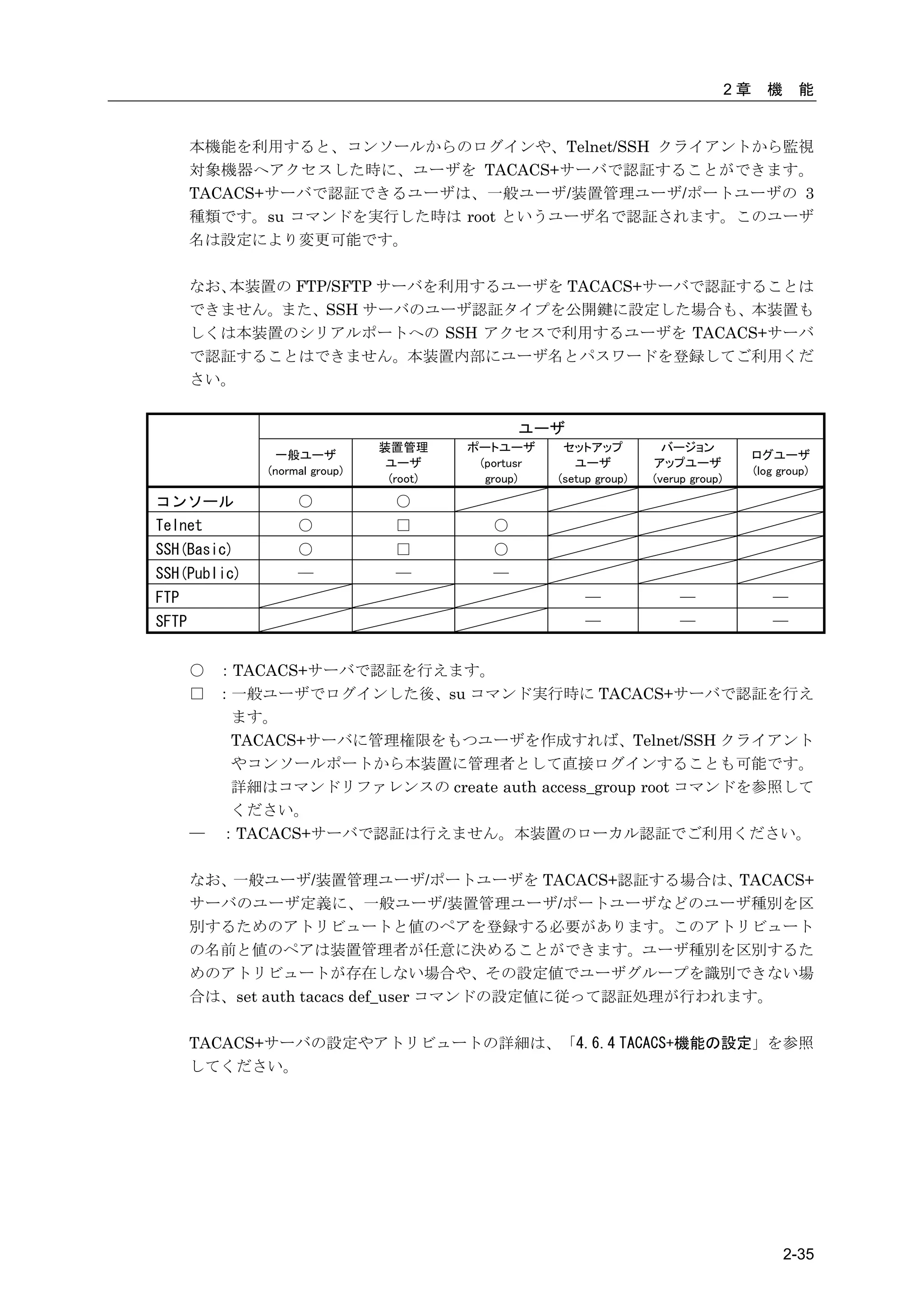
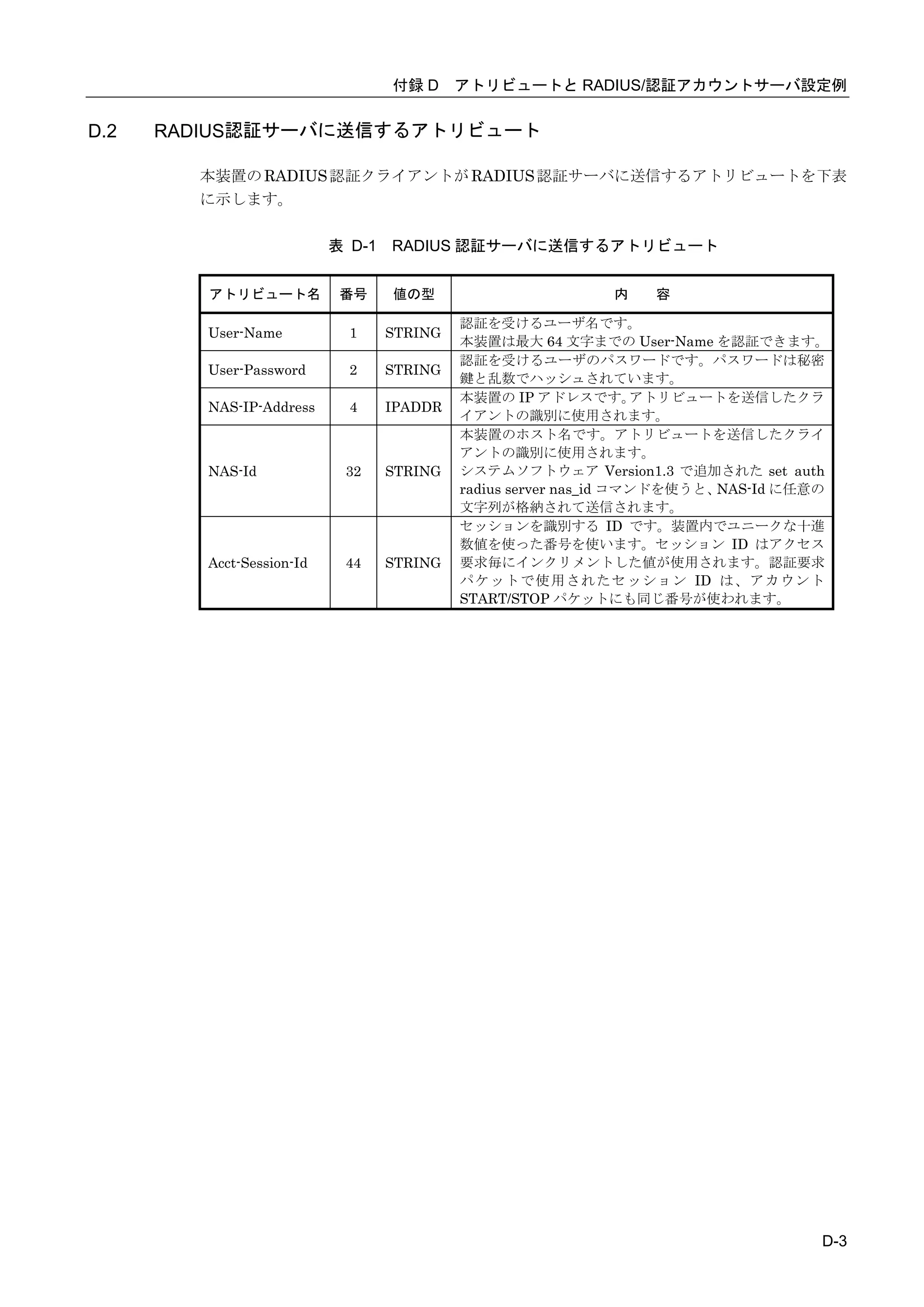
  • 340.
    認証に成功すると、Poderosaと本装置の間でSSHv2の通信が確立します。本装置でポート ログを保存する設定をしていれば、本装置のポートサーバメニュー画面が表示されます。 ポートログを保存しない設定であれば、そのままシリアルポートにつながれた監視対象機 器に接続されます。 図 C-29 Poderosa公開鍵認証(本装置のポートサーバメニュー画面) C-24
  • 341.
    付録D アトリビュートと RADIUS認証/アカウントサーバ設定例 付録 D では、アトリビュートと RADIUS 認証/アカウントサーバ設定例について説明してい ます。 本章の内容 D.1 RADIUS 認証機能/RADIUS アカウント機能 D.2 RADIUS 認証サーバに送信するアトリビュート D.3 本装置が処理する RADIUS 認証サーバのアトリビュート D.4 RADIUS アカウントサーバに送信するアトリビュート D.5 RADIUS 認証/アカウントサーバ側の設定例 D.5.1 クライアントの登録 D.5.2 ユーザの登録 D.6 RADIUS アカウントサーバのアカウントログ D-1
  • 342.
    D.1 RADIUS認証機能/RADIUSアカウント機能 本装置に RADIUS 認証機能の設定を行うと、本装置にログインした時や本装置のシリアルポ ートへアクセスした時に、 本装置の RADIUS 認証クライアントは指定された RADIUS 認証サ ーバへ認証要求(Access Request パケット)を送信してユーザの認証を行います。 RADIUS 認証サーバでユーザの認証が成功すると、RADIUS 認証サーバは認証成功のパケッ ト(Access Accept パケット)を本装置に送信します。本装置は受信した認証成功パケットに含 まれているアトリビュート情報に基づいて動作します。 RADIUS 認証サーバでユーザの認証に失敗すると、RADIUS 認証サーバは認証拒否のパケッ ト(Access Reject パケット)を本装置に送信します。 本装置に RADIUS アカウント機能の設定を行うと、ユーザのログインやログアウトのアカウ ント情報を RADIUS アカウントサーバに送信してアカウント情報を保存します。 RADIUS 認証サーバで認証に成功すると、本装置の RADIUS アカウントクライアントは RADIUS アカウントサーバにアカウント START パケットを送信します。 ユーザが本装置の利用を終了(ログアウト)したり、RADIUS 認証サーバで認証に失敗すると、 本装置の RADIUS アカウントクライアントは RADIUS アカウントサーバにアカウント STOP パケットを送信します。 D-2
  • 343.
    付録 D アトリビュートとRADIUS/認証アカウントサーバ設定例 D.2 RADIUS認証サーバに送信するアトリビュート 本装置の RADIUS 認証クライアントが RADIUS 認証サーバに送信するアトリビュートを下表 に示します。 表 D-1 RADIUS 認証サーバに送信するアトリビュート アトリビュート名 番号 値の型 内 容 認証を受けるユーザ名です。 User-Name 1 STRING 本装置は最大 64 文字までの User-Name を認証できます。 認証を受けるユーザのパスワードです。パスワードは秘密 User-Password 2 STRING 鍵と乱数でハッシュされています。 本装置の IP アドレスです。 アトリビュートを送信したクラ NAS-IP-Address 4 IPADDR イアントの識別に使用されます。 本装置のホスト名です。アトリビュートを送信したクライ アントの識別に使用されます。 NAS-Id 32 STRING システムソフトウェア Version1.3 で追加された set auth radius server nas_id コマンドを使うと、NAS-Id に任意の 文字列が格納されて送信されます。 セッションを識別する ID です。装置内でユニークな十進 数値を使った番号を使います。セッション ID はアクセス Acct-Session-Id 44 STRING 要求毎にインクリメントした値が使用されます。認証要求 パケットで使用されたセッション ID は、アカウント START/STOP パケットにも同じ番号が使われます。 D-3
  • 344.
    D.3 本装置が処理するRADIUS認証サーバのアトリビュート 本装置が処理する RADIUS 認証サーバのアトリビュートを下表に示します。 下表以外のアトリビュートを受信した場合、本装置はそのアトリビュートを無視します。 表 D-2 本装置が処理する RADIUS 認証サーバのアトリビュート アトリビュート名 番号 値の型 内 容 Filter-Id 11 STRING ユーザに設定するフィルタ名です。ユーザの種別やポー トユーザがアクセス可能なシリアルポートを指定しま す。 ■一般ユーザ 以下の場合に一般ユーザとみなします。 本装置に set auth radius server normal filter_id_head NS2240_NORMAL が 設 定 さ れ て い る 場 合 に 、 “NS2240_NORMAL” から始まる Filter-Id を本装置が受 信した場合。 本 装 置 に create auth access_group normal radius filter_id normal_grp が 設 定 さ れ て い る 場 合 に、”normal_grp”と設定された Filter-Id を本装置が受信 した場合。 ■装置管理ユーザ 以下の場合に装置管理ユーザとみなします。 本装置に set auth radius server root filter_id_head NS2240_ROOT が 設 定 さ れ て い る 場 合 に 、 “NS2240_ROOT” から始まる Filter-Id を本装置が受信 した場合。 本装置に create auth access_group root radius filter_id admin_grp が設定されている場合に、”admin_grp”と 設定された Filter-Id を本装置が受信した場合。 ■ポートユーザ 以下の場合にポートユーザとみなします。 本装置に set auth radius server portusr filter_id_head NS2240_PORT が 設 定 さ れ て い る 場 合 に 、 “NS2240_PORT” から始まる Filter-Id を本装置が受信し た場合。なお、“NS2240_PORT1-16,24”と設定されてい る場合には、そのポートユーザはシリアルポート 1~ 16,24 にアクセスすることができます。 本装置に create auth access_group portusr port 1-16,24 radius filter_id port_grp が 設 定 さ れ て い る 場 合 に、”port_grp”と設定された Filter-Id を本装置が受信し た場合。なお、そのポートユーザはシリアルポート 1~ 16,24 にアクセスすることができます。 また、 Filter-Idが登録されていない場合やFilter-Idの値が set auth radius server {normal|root|portusr} filter_id_head コマンド、および、create auth access_group {normal | root | portusr } radius filter_idコマンドで指定したいず れ の 文 字 列 と も 一 致 し な い 場 合 は 、 set auth radius def_userコマンドの設置値に従って認証処理が行われま す (システムソフトウェアVersion1.2では、 ユーザグルー プが特定できないユーザをポートユーザとして扱い、全 てのシリアルポートにアクセスできる権限を付与しま す)。 D-4
  • 345.
    付録 D アトリビュートとRADIUS/認証アカウントサーバ設定例 RADIUS 認証サーバのユーザに複数の Filter-Id アトリビュートが設定され、それぞれのユー ザに該当する set auth radius server {normal | root | portusr } filter_id_head コマンドもし くは create auth access_group コマンドが設定されている場合は、 下表のユーザでログインし ます。 ログイン時の優先順は、①装置管理ユーザ(root)、②一般ユーザ(normal)、③ポートユーザ (portusr)です。 ダイレクトモードの場合には、 本体ログインではアクセス権限①②のうち優先度の高いもので ログインし、ポートサーバへのアクセスは③のアクセス権がある場合のみログインできます。 セレクトモードのログイン時には、 そのユーザの持つアクセス権限①②③のうちもっとも優先 度の高いものでログインします 表 D-3 複数 Filter-Id アトリビュート登録時に適用されるユーザ ・Filter-Id の設定内容 ダイレクトモード セレクトモード ・set auth radius server {normal | root | 本体アクセス ポートアクセス portusr }filter_id_head コマンドの設定も しくは create auth access_group コマンド の設定内容 装置管理ユーザ 装置管理ユーザ ×(アクセス不可) 装置管理ユーザ 一般ユーザ 一般ユーザ ×(アクセス不可) 一般ユーザ ポートユーザ ×(アクセス不可) ポートユーザ ポートユーザ 装置管理ユーザ/一般ユーザ 装置管理ユーザ ×(アクセス不可) 装置管理ユーザ 装置管理ユーザ/ポートユーザ 装置管理ユーザ ポートユーザ 装置管理ユーザ 一般ユーザ/ポートユーザ 一般ユーザ ポートユーザ 一般ユーザ 装置管理ユーザ/一般ユーザ/ポートユーザ 装置管理ユーザ ポートユーザ 装置管理ユーザ D-5
  • 346.
    D.4 RADIUSアカウントサーバに送信するアトリビュート 本装置の RADIUS アカウントクライアントが RADIUS アカウントサーバに送信するアトリビ ュートを下表に示します。 START に○がついているアトリビュートはアカウント START パケットに格納されます。 STOP に○がついているアトリビュートはアカウント STOP パケットに格納されます。 表 D-4 RADIUS アカウントサーバに送信するアトリビュート アトリビュート名 番号 値の型 START STOP 内 容 User-Name 1 STRING ○ ○ 認証を受けるユーザ名です。 本装置は最大 64 文字の User-Name を認証できます。 NAS-IP-Address 4 IPADDR ○ ○ 本装置の IP アドレスです。アトリビュートを送信した クライアントの識別に使用されます。 NAS-Id 32 STRING ○ ○ 本装置のホスト名です。 アトリビュートを送信したクラ イアントの識別に使用されます。 システムソフトウェア Version1.3 で追加された set auth radius server nas_id コマンドを使うと、NAS-Id に任意の文字列が格納されて送信されます。 NAS-Port 5 INTEGER ○ ○ 本装置の tty 番号です。 ダイレクトモードのポートユーザ:tty 番号(1~48) セレクトモードのポートユーザ:0 コンソールの一般/特権ユーザ:10000 telnet/ssh の一般/特権ユーザ:20000+装置内 pty 番号 Acct-Status-Type 40 ENUM ○ ○ アカウントログの種別です。 アカウント START パケットには 1(START)、カウント STOP パケットには 2(STOP)が格納されます。 1:START 2:STOP Acct-Session-Id 44 STRING ○ ○ アカウントのセッション ID です。アクセス要求毎にイ ンクリメントした値(ユニークな 10 進数値の番号)が使 用されます。 Acct-Authentic 45 ENUM ○ ○ ユーザの認証の方式です。 1: RADIUS 認証 2: LOCAL 認証 Acct-Session-Time 46 INTEGER × ○ ユーザがサービスを受けた時間(sec)です。 Acct-Terminate- 49 ENUM × ○ セッション切断理由です。 Cause 1: User-Request ユーザからの切断要求による切断 15: Service-Unavailable ユーザが要求するサービスを本装置が提供できない ために切断(例:認証失敗、TTY ポートのアクセス権限 がない場合など) D-6
  • 347.
    付録 D アトリビュートとRADIUS/認証アカウントサーバ設定例 D.5 RADIUS認証/アカウントサーバ側の設定例 ここでは Livingston 系の RADIUS サーバの設定例を説明します。 RADIUS サーバによって設定ファイル名やアトリビュートが異なりますので、必ず、ご利用 の RADIUS 認証/アカウントサーバのマニュアルを確認してください。 D.5.1 クライアントの登録 RADIUS 認証/アカウントサーバに RADIUS 認証/アカウントサーバを利用するクライアント (本装置)を登録します。 Livingston 系の RADIUS 認証/アカウントサーバでは、本装置の IP アドレスやホスト名なら びにシークレットキー(例:test123)を clients ファイルに登録します。 シークレットキーは本装置と RADIUS 認証/アカウントサーバで同じものを登録します。 RADIUS 認証/アカウントサーバの clients ファイルの設定例 #client Name Key SmartCS test123 RADIUS 認証/アカウントサーバの clients ファイルに本装置のホスト名を登録した場合は、 RADIUS 認証/アカウントサーバの hosts ファイルに本装置の IP アドレスを登録します。 RADIUS 認証/アカウントサーバの hosts ファイルの設定例 192.168.1.100 SmartCS D.5.2 ユーザの登録 RADIUS 認証サーバにユーザを登録します。 Livingston 系の RADIUS 認証サーバでは、ユーザ情報を users ファイルに登録します。 本装置で認証できる RADIUS ユーザ名の最大文字長は 64 文字です。 ポートユーザのみを RADIUS 認証サーバに登録する場合は、下記のように、ユーザ名とパス ワードを登録します。 users ファイル設定例1 #ポートユーザ(User01)の設定 User01 Password = “pass1111” #ポートユーザ(User02)の設定 User02 Password = “pass2222” #ポートユーザ(User03)の設定 User03 Password = “pass3333” D-7
  • 348.
    既に他のサービスで利用している RADIUS 認証サーバを使う場合、RADIUS認証サーバの users ファイルには本装置がサポートしていないアトリビュートが設定されていることがあり ます。 そのような場合でも、本装置は Filter-ID アトリビュートのみを評価しますので、特に問題な く認証が行えます。 例えば、下記のようなアトリビュートが設定されていたとしても認証できます。 users ファイル設定例 2 #ポートユーザ(User01)の設定 User01 Password = “pass1111” Service-Type = Framed-User, Framed-protocol = PPP, Framed-IP-Address = 255.255.255.254, Idle-Timeout = 3600 #ポートユーザ(User02)の設定 User02 Password = “pass2222” Service-Type = Callback-Framed-User, Framed-protocol = PPP, Framed-IP-Address = 255.255.255.254, Idle-Timeout = 1800 #ポートユーザ(User03)の設定 User03 Password = “pass3333” Service-Type = Login-User, [補足] システムソフトウェア Version1.3 で追加された set auth radius def_user none コマンドが設 定されている場合、上記の設定ではユーザのアクセスは拒否されてしまいます。 ポートユーザとしてアクセスを許可する場合は、 auth radius def_user portusr を設定して set ください。 装置管理ユーザ/一般ユーザ/ポートユーザなどのユーザグループを識別したい場合は、次ペー ジの Filter-Id アトリビュートを利用した設定例を参照して設定してください。 D-8
  • 349.
    付録 D アトリビュートとRADIUS/認証アカウントサーバ設定例 ポートユーザだけではなく、一般ユーザ/装置管理ユーザも RADIUS 認証する場合は、次のい ずれかのコマンドでユーザグループを識別するためのユーザ識別子を本装置に設定します。 ・filter_id_head を使用する場合 set auth radius server normal filter_id_head NS2240_NORMAL 【一般ユーザ】 set auth radius server root filter_id_head NS2240_ROOT 【装置管理ユーザ】 set auth radius server portusr filter_id_head NS2240_PORT 【ポートユーザ】 ・アクセスグルーピング機能を使用する場合 create auth access_group normal radius filter_id normal_grp 【一般ユーザ】 create auth access_group root radius filter_id admin_grp 【装置管理ユーザ】 create auth access_group portusr port 1-16 radius filter_id port_grp 【ポートユーザ】 RADIUS 認証サーバには、以下のように Filter-ID アトリビュートを設定してください。 users ファイル設定例 3(filter_id_head を使用する場合) # 一般ユーザの設定 somebody Password = “abc” Filter-Id = “NS2240_NORMAL”, # 装置管理ユーザの設定 root Password = “def” Filter-Id = “NS2240_ROOT”, # ポートユーザの設定(ポートを指定しない場合、全てのシリアルポートにアクセス可能) port01 Password = “port01” Filter-Id = “NS2240_PORT”, # ポートユーザの設定(アクセスできるシリアルポートを制限:1-16,24) port02 Password = “port02” Filter-Id = “NS2240_PORT1-16,24”, # ポートユーザの設定(アクセスできるシリアルポートを制限:20-24) port03 Password = “port03” Filter-Id = “NS2240_PORT20-24”, users ファイル設定例 3(アクセスグルーピング機能を使用する場合) # 一般ユーザの設定 somebody Password = “abc” Filter-Id = “normal_grp”, # 装置管理ユーザの設定 root Password = “def” Filter-Id = “admin_grp”, # ポートユーザの設定(シリアルポートのアクセス権は create auth access_group で指定) portZZ Password = “portZZ” Filter-Id = “port_grp”, D-9
  • 350.
    D.6 RADIUSアカウントサーバのアカウントログ RADIUS アカウントサーバに格納されるアカウントログの例を記載します。 Livingston 系の RADIUS アカウントサーバは detail ファイルにアカウントログを格納します。 アカウントログの出力は RADIUS アカウントサーバによって異なります。アカウントログの 詳細については、ご利用の RADIUS アカウントサーバのマニュアルを参照してください。 Tue Sep 23 13:51:12 2008 Acct-Status-Type = Start NAS-IP-Address = 192.168.1.100 NAS-Port = 32 User-Name = “portuser1” Acct-Session-Id = “25008291” Acct-Authentic = RADIUS Tue Sep 23 13:51:58 2008 Acct-Status-Type = Stop NAS-IP-Address = 192.168.1.100 Acct-Terminate-Cause = User-Request Acct-Session-Time = 46 NAS-Port = 32 User-Name = “portuser1” Acct-Session-Id = “25008291” Acct-Authentic = RADIUS Tue Sep 23 14:20:00 2008 Acct-Status-Type = Start NAS-IP-Address = 192.168.1.100 NAS-Port = 16 User-Name = “portuser2” Acct-Session-Id = “25001234” Acct-Authentic = RADIUS Tue Sep 23 14:30:58 2008 Acct-Status-Type = Stop NAS-IP-Address = 192.168.1.100 Acct-Terminate-Cause = User-Request Acct-Session-Time = 658 NAS-Port = 16 User-Name = “portuser2” Acct-Session-Id = “25001234” Acct-Authentic = RADIUS Tue Sep 23 15:01:11 2008 Acct-Status-Type = Start NAS-IP-Address = 192.168.1.100 NAS-Port = 10000 User-Name = “somebody” Acct-Session-Id = “25002251” Acct-Authentic = LOCAL D-10
  • 351.
    付録 D アトリビュートとRADIUS/認証アカウントサーバ設定例 Tue Sep 23 15:02:13 2008 Acct-Status-Type = Start NAS-IP-Address = 192.168.1.100 NAS-Port = 10000 User-Name = “root” Acct-Session-Id = “25002654” Acct-Authentic = LOCAL Tue Sep 23 15:04:15 2008 Acct-Status-Type = Stop NAS-IP-Address = 192.168.1.100 Acct-Terminate-Cause = User-Request Acct-Session-Time = 122 NAS-Port = 10000 User-Name = “root” Acct-Session-Id = “25002654” Acct-Authentic = LOCAL Tue Sep 23 15:04:14 2008 Acct-Status-Type = Stop NAS-IP-Address = 192.168.1.100 Acct-Terminate-Cause = User-Request Acct-Session-Time = 183 NAS-Port = 10000 User-Name = “somebody” Acct-Session-Id = “25002251” Acct-Authentic = LOCAL D-11
  • 352.
    付録E ROMモニタ 付録 E では、本装置の ROM モニタについて説明しています。 本章の内容 E.1 ROM モニタ E-1
  • 353.
    E.1 ROMモニタ 本装置で以下の操作を行うと ROM モニタに移行します。 ・ 本装置を shutdown コマンドでシャットダウンした場合 ・ 本装置を起動して「Hit [Enter] key to Enter Rom-Monitor...」が表示されたときにコ ンソールからリターンキーを押下した場合 ・ 本装置のシステムソフトウェアが何らかの理由でダウンした場合 ROM モニタに移行すると、MON>プロンプトが表示されます。 ROM モニタでは以下の操作を行うことができます。 コマンド 機能/説明 err エラーメッセージを表示します。 システムソフトウェアが何らかの理由でダウンした場合、本コマンドを実行 するとダウンした理由が表示されます。 (例)shutdown コマンドでシャットダウンさせた場合 MON> err No Error boot 起動オプションを指定してシステムソフトウェアを起動します。 [{-m|-b}] [{-i|-e}] -m: システムソフトウェア(main)で起動します [fileno=] -b: システムソフトウェア(backup)で起動します -i: 装置内部のスタートアップファイルを読み込んで起動します。 -e: 外部 CF カードのスタートアップファイルを読み込んで起動します。 fileno=: 指定された番号のスタートアップファイルを読み込んで起動しま す。指定できる番号は 1~4 です。 (例) MON> boot –b なお、オプションなしで boot コマンドを実行した場合は、以下で起動しま す。 ・システムソフトウェアは main で起動します。 ・ 外部 CF カードが挿入されていれば外部 CF カードのスタートアップフ ァイル、挿入されていなければ本装置内部のスタートアップファイル を読み込みます。 ・ システム設定の default startup コマンドで指定されている番号のス タートアップファイルを読み込みます。 E-2
  • 354.
  • 355.
    【A】 【R】 AC インレット ................. 1-11,1-16 RADIUS アカウントクライアント ......... 2-27, 4-25, 4-68, 6-15, D-2 RADIUS 認証クライアント 【B】 ... 2-27, 2-29, 4-25, 4-68, 6-14, D-2 Break 信号 ................... 2-18, 4-14 RESET スイッチ ..................... 1-11 ROM モニタ .......................... E-2 【C】 【S】 CF カードスロット .................. 1-11 CLI.......................... 3-15, 3-16 SNMP エージェント ............ 2-41, 4-40 CONSOLE ポート ................ 1-15, 4-5 SNTP クライアント ............ 2-41, 4-39 SSH クライアントソフト .............. C-2 SSH サーバ ........ 2-3, 4-37, 4-57, 4-60 【D】 STATUS ランプ .................. 3-9, 6-4 DNS クライアント .............. 2-41, 4-4 SYSLOG クライアント .......... 2-35, 4-43 DSR 信号遷移検出機能 .......... 2-42, 4-6 SYSLOG 送信 ........................ 4-19 【T】 【F】 Telnet サーバ ....................... 2-3 FTP サーバ ......................... 2-42 TACACS+ ......... 2-34, 4-33, 4-81, 4-86 FTP 送信 ........................... 4-19 【あ】 【L】 アクセスグルーピング LAN ポート ......................... 1-15 .......... 2-33, 4-28, 4,34, 4-76, 4-86 アクセス制限 ................ 2-40, 4-38 【P】 【い】 PCMCIA カードスロット .............. 1-11 インタフェースポート............... 1-15 索引-2
  • 356.
    索引 【う】 【す】 運用管理機能 ........................ 1-8 スタートアップファイル ... 3-20, 5-5, 5-7, 5-8, 5-9, 5-12 スタティックルーティング...... 2-41, 4-4 【お】 オペレーションモード ............... 3-16 【せ】 温度センサ................... 2-42, 4-43 セキュリティ機能 ................... 1-8 セッション中断文字コード..... 2-14, 4-15 【か】 セレクトモード ..... 1-7, 2-6, 4-8, 4-64 改行コード................... 2-18, 4-14 【た】 【き】 ダイレクトモード ......... 1-7, 2-4, 4-8 切替文字コード ............... 2-14, 4-15 第三者ソフトウェアライセンス.... ⅵ, A-1 【こ】 【て】 コンソールサーバ .................... 1-2 電源スイッチ ...................... 1-15 コンソールログ ................ 5-16, 6-5 コンフィグモード ................... 3-16 【と】 公開鍵(Public)認証 ...... 4-30, 4-53, C-9 工場出荷時の設定 .................... 3-6 トラップ .................... 2-41, 4-40 【さ】 【の】 サービスポート番号 ................. 4-11 ノーマルモード .......... 2-2, 2-4, 4-10 【し】 【は】 システムソフトウェア ... 5-18, 5-21, 5-22 バージョンアップ ............ 2-42, 5-22 シリアルポート ................ 1-15, 4-6 バージョンダウン ............ 2-42, 5-22 自動復帰機能 ....................... 2-42 パスワード .................. 4-24, 6-21 パスワード(Basic)認証... 4-37, 4-57, C-3 索引-3
  • 357.
    ランプ(POWER/カードアクセス/STATUS) 【ほ】 ............................. 1-11 ポートサーバメニュー ......... 2-12, 4-54 ランプ(シリアルポート)........... 1-15 ポートサーバ機能 ............... 1-7, 2-2 ポートセレクトメニュー .............. 2-8 ポートセレクト機能 ....... 2-6, 4-8, 4-64 ポートユーザ認証 ....... 2-15, 4-10, 4-55 ポートログ............................. ........... 4-16, 4-48, 4-52, 4-54, 5-26 ポートログタイムスタンプ ..... 2-21, 4-17 ポートログ機能 .......... 1-7, 2-19, 4-16 ポートログ送信機能 ................. 2-24 ポートログ表示機能 ................. 2-22 ポートログ保存機能 ................. 2-20 ポートログ容量 ............... 2-20, 4-17 【め】 メール送信......................... 4-18 【も】 モニターモード ........... 2-2, 2-4, 4-11 【ゆ】 ユーザ................. 2-25, 3-13, 4-22 ユーザパスワード ............. 4-23, 6-21 ユーザ権限.......................... B-2 【ら】 ラベリング................... 2-18, 4-13 ランニングコンフィグ .... 3-20, 5-11, 6-6 ランプ(CONSOLE ポート) ........... 1-15 ランプ(LAN ポート) ............... 1-15 索引-4