Tips and Tricks for
Building
High-Performance
Android Apps
using Native Code
Kenneth Geisshirt
kg@realm.io
Realm Inc.
@realm
http://github.com/Realm/
http://realm.io/
JD Hancock: Reign of The Android. http://bit.ly/1GN8vmg
Swen-Peter Ekkebus: Goal! http://bit.ly/1x1suYm
Avinash Sharma: http://bit.ly/1aRorcH
• Android development is not just
Java
• C and C++ can speed apps up
- and reuse old legacy code
• Learn a few tricks when
working with Java Native
Interface
• Hands-on exercises
Today’s Goal
Agenda
• Setting up your environment
• Java Native Interface
Exploratorium. After Dark: Time http://bit.ly/1aSQxo0
• Threading
• Using non-NDK libraries1
• Benchmarking
• Debugging
1NDK = Native Development Kit
Advantages
• Use C or C++ in your apps → no JIT needed as
always machine instructions
• Access to system calls (like mmap())
• Almost no limits on memory usage
• OpenGL programming
• Sharing code across platforms
• Reusing legacy libraries
Alan Bates. Good Times http://bit.ly/1BXX7FN
Disadvantages
• C and C++ memory
management → easy to crash
your app
• And debugging across
languages is hard
• Bionic C library isn’t the GNU C library
• Doing a native call is expensive (in time)
• Cumbersome to use non-NDK libraries
Rocher: That_Sux http://bit.ly/1BdGNhJ
Use Cases
• AndEngine (2D Game Engine)
http://www.andengine.org
• ImageMagick for Android
https://github.com/paulasiimwe/Android-ImageMagick
• LevelDB for Android
https://github.com/litl/android-leveldb
• Support Vector Machine for Android
https://github.com/cnbuff410/Libsvm-androidjni
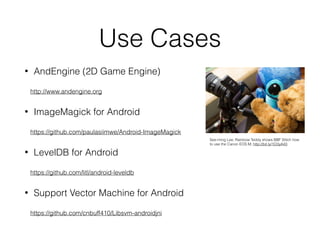
See-ming Lee; Rainbow Teddy shows BBF Stitch how
to use the Canon EOS M; http://bit.ly/1O3yA43
Playing with C++
Example: estimating π
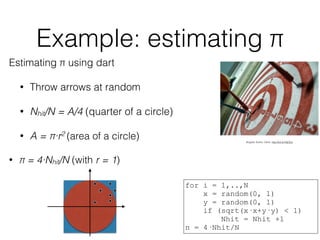
Estimating π using dart
• Throw arrows at random
• Nhit/N = A/4 (quarter of a circle)
• A = π·r2 (area of a circle)
• π = 4·Nhit/N (with r = 1)
Bogdan Suditu: Darts. http://bit.ly/18jCExj
for i = 1,..,N
x = random(0, 1)
y = random(0, 1)
if (sqrt(x·x+y·y) < 1)
Nhit = Nhit +1
π = 4·Nhit/N
Example: the classes
Random number generator
• Constructor with seed
• Method uniform() to
return random number
between 0.0 and 1.0
π estimator
• Constructor with
number of iteration
• Method estimate() to
calculate the value of π
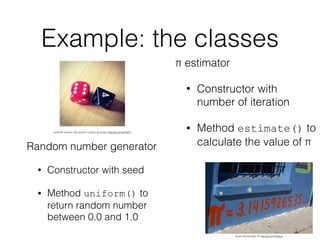
Quinn Dombrowski: Pi http://bit.ly/1Kz55cp
jeramiah.andrick. My random number generator http://bit.ly/1wbTbP2
• Implement two C++ classes
1. RNG - a random number generator
• uniform() returns a number in [0, 1[
2. pi - a π estimator using MC algorithm
• estimate() returns π
• Write simple test program
• Compile using clang++ or g++
• Go to https://github.com/kneth/AndroidCalcPi if lazy 😄
• Branch: initial
Exercise 1
The environment
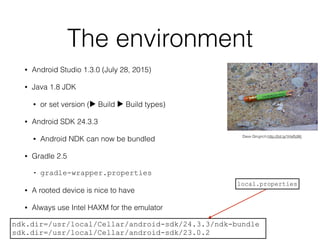
• Android Studio 1.3.0 (July 28, 2015)
• Java 1.8 JDK
• or set version (▶ Build ▶ Build types)
• Android SDK 24.3.3
• Android NDK can now be bundled
• Gradle 2.5
• gradle-wrapper.properties
• A rooted device is nice to have
• Always use Intel HAXM for the emulator
Dave Gingrich;http://bit.ly/1HxRJWj
ndk.dir=/usr/local/Cellar/android-sdk/24.3.3/ndk-bundle
sdk.dir=/usr/local/Cellar/android-sdk/23.0.2
local.properties
Java Native Interface
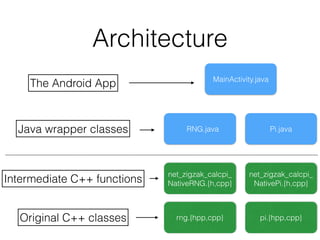
Architecture
MainActivity.java
RNG.java Pi.java
net_zigzak_calcpi_
NativeRNG.{h,cpp}
net_zigzak_calcpi_
NativePi.{h,cpp}
pi.{hpp,cpp}rng.{hpp,cpp}
The Android App
Java wrapper classes
Intermediate C++ functions
Original C++ classes
Organize your files
• Use the experimental Android plugin for Gradle
• Place C/C++ files in app/src/main/jni/
• Add ndk.dir to local.properties
• Add an ndk section to your app’s
build.gradle
android.ndk {
moduleName = "calcPi"
cppFlags += ["-fexceptions"]
stl = "gnustl_shared" // for exceptions
}
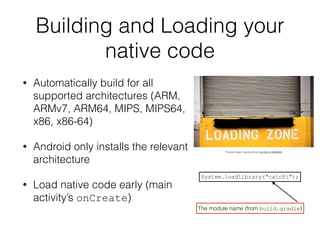
Building and Loading your
native code
• Automatically build for all
supported architectures (ARM,
ARMv7, ARM64, MIPS, MIPS64,
x86, x86-64)
• Android only installs the relevant
architecture
• Load native code early (main
activity’s onCreate)
System.loadLibrary("calcPi");
The module name (from build.gradle)
Thomas Hawk: Loading Zone http://bit.ly/1MoBk9S
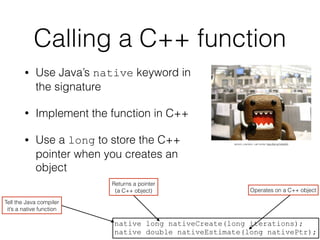
Calling a C++ function
• Use Java’s native keyword in
the signature
• Implement the function in C++
• Use a long to store the C++
pointer when you creates an
object
lamont_cranston: call center http://bit.ly/1A4JlK5
native long nativeCreate(long iterations);
native double nativeEstimate(long nativePtr);
Tell the Java compiler
it’s a native function
Returns a pointer
(a C++ object) Operates on a C++ object
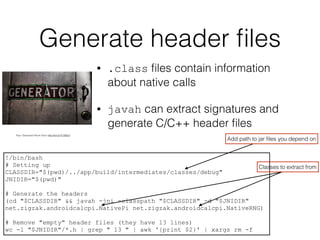
Generate header files
• .class files contain information
about native calls
• javah can extract signatures and
generate C/C++ header files
Paul: Generator Room Door http://bit.ly/1C3SSs7
!/bin/bash
# Setting up
CLASSDIR="$(pwd)/../app/build/intermediates/classes/debug"
JNIDIR="$(pwd)"
# Generate the headers
(cd "$CLASSDIR" && javah -jni -classpath "$CLASSDIR" -d "$JNIDIR"
net.zigzak.androidcalcpi.NativePi net.zigzak.androidcalcpi.NativeRNG)
# Remove "empty" header files (they have 13 lines)
wc -l "$JNIDIR"/*.h | grep " 13 " | awk '{print $2}' | xargs rm -f
Classes to extract from
Add path to jar files you depend on
Java types in C/C++
• Java types are mapped to C/C++
types
• Convert Date to long before call
• Pass pointers over as long/
jlong
Java C/C++
long jlong
String jstring
long[] jlongArray
Object jObject
float jfloat
JNIEXPORT jdouble JNICALL Java_net_zigzak_androidcalcpi_NativePi_nativeEstimate
(JNIEnv *, jobject, jlong nativePtr)
{
Pi *pi = reinterpret_cast<Pi *>(nativePtr);
double estimate = pi->estimate();
return estimate;
}
Generated function name
cast to a proper C++ pointer
The pointer
Define as a macro if used often:
#define P(x) reinterpret_cast<Pi *>(x)
Working with arrays
• Copy values from
JVM memory to C/C
++ memory
• Remember to free
C/C++ memory →
avoid memory leaks
jsize arr_len = env->GetArrayLength(columnIndexes);
jlong *arr = env->GetLongArrayElements(columnIndexes, NULL);
// use the elements of arr
env->ReleaseLongArrayElements(columnIndexes, arr, 0);
• Create a new
Java array
• Copy C/C++ array
to Java array
jArray = env->NewByteArray(jlen);
if (jArray)
// Copy data to Byte[]
env->SetByteArrayRegion(jArray, 0, jlen,
reinterpret_cast<const jbyte*>(bufPtr));
free(bufPtr);
return jArray;
Strings as trouble-makers• Java strings are in modified UTF-8
• null character encoded as 0xC0 0x80 (not valid UTF-8)
• Many C/C++ libraries assume plain UTF-8
jchar stack_buf[stack_buf_size];
// adding characters to stack_bf
jchar* out_begin = stack_buf;
if (int_cast_with_overflow_detect(out_curr - out_begin, out_size))
throw runtime_error("String size overflow");
return env->NewString(out_begin, out_size);
jstring s; // typical a JNI function parameter
jchar *c = e->GetStringChars(s, 0);
// use c
env->ReleaseStringChars(s, c);
Create a new Java string
• Copy Java string to C/C++ array
• Remember to deallocate C array
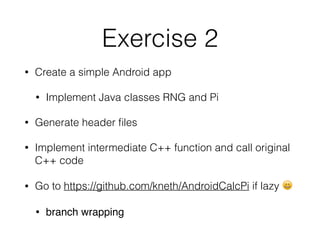
Exercise 2
• Create a simple Android app
• Implement Java classes RNG and Pi
• Generate header files
• Implement intermediate C++ function and call original
C++ code
• Go to https://github.com/kneth/AndroidCalcPi if lazy 😄
• branch wrapping
C++ exceptions
• C++ code can throw exceptions
• new can throw bad_alloc,etc.
• If uncaught the app crashes with hard-to-
understand messages in the log
Build fingerprint: 'generic_x86/sdk_x86/generic_x86:4.4.2/KK/999428:eng/test-keys'
Revision: '0'
pid: 1890, tid: 1890, name: t.zigzak.calcpi >>> net.zigzak.calcpi <<<
signal 6 (SIGABRT), code -6 (SI_TKILL), fault addr --------
eax 00000000 ebx 00000762 ecx 00000762 edx 00000006
esi 00000762 edi 0000000b
xcs 00000073 xds 0000007b xes 0000007b xfs 00000000 xss 0000007b
eip b7707c96 ebp b776cce0 esp bfa22090 flags 00200203
backtrace:
#00 pc 0003bc96 /system/lib/libc.so (tgkill+22)
#01 pc 00000005 <unknown>
stack:
bfa22050 00000001
bfa22054 b899c6d0 [heap]
bfa22058 00000015
bfa2205c b76d9ef9 /system/lib/libc.so (pthread_mutex_unlock+25)
bfa22060 a73bfd19 /data/app-lib/net.zigzak.calcpi-1/libgnustl_shared.so
bfa22064 b7767fcc /system/lib/libc.so
• Better solution:
• catch and
rethrow as
Java exception
Throwing a Java exception
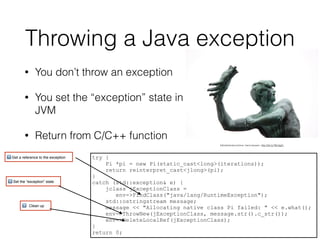
• You don’t throw an exception
• You set the “exception” state in the
JVM
• Return from C/C++ function
try {
Pi *pi = new Pi(static_cast<long>(iterations));
return reinterpret_cast<jlong>(pi);
}
catch (std::exception& e) {
jclass jExceptionClass =
env->FindClass("java/lang/RuntimeException");
std::ostringstream message;
message << "Allocating native class Pi failed: " << e.what();
env->ThrowNew(jExceptionClass, message.str().c_str());
env->DeleteLocalRef(jExceptionClass);
}
return 0;
" Get a reference to the exception
# Set the “exception” state
$ Clean up
followtheinstructrions: hand werpen http://bit.ly/1Bo3gZx
Logging
• JNI provides access to the Android log
• __android_log_print is a simple
variadic log function
• Linking with liblog is required
• size_t depends on bit width → cast
to int64_t before logging
vitelone: Deck Log Book http://bit.ly/1AXKZ0j
android.ndk {
moduleName = "calcPi"
cppFlags += ["-fexceptions"]
ldLibs += ["log"]
stl = "gnustl_shared" // for exceptions
}
Link flag
#define LOG(...) __android_log_print(ANDROID_LOG_DEBUG, "calcPi", __VA_ARGS__);
Macro to simplify logging
Tracing JNI calls
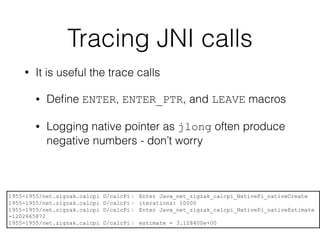
• It is useful the trace calls
• Define ENTER, ENTER_PTR, and LEAVE macros
• Logging native pointer as jlong often produce
negative numbers - don’t worry
1955-1955/net.zigzak.calcpi D/calcPi﹕ Enter Java_net_zigzak_calcpi_NativePi_nativeCreate
1955-1955/net.zigzak.calcpi D/calcPi﹕ iterations: 10000
1955-1955/net.zigzak.calcpi D/calcPi﹕ Enter Java_net_zigzak_calcpi_NativePi_nativeEstimate
-1202665872
1955-1955/net.zigzak.calcpi D/calcPi﹕ estimate = 3.128400e+00
Exercise 3
• Catch common C++ exceptions (bad_alloc)
• Rethrow as a Java exception
• Adding logging/tracing of JNI calls
• Go to https://github.com/kneth/AndroidCalcPi if
lazy 😄
• branch exceptions-and-logging
Tricks to compiling
and linking
Reduce size
• Compiler can optimise for size (-Os)
• Link Time Optimizations (LTO) can reduce size of native code
• Eliminate unused code (-ffunction-sections -fdata-
sections) and unused ELF symbols (-
fvisibility=hidden)
android.ndk {
moduleName = "calcPi"
cppFlags += ["-Os", "-fexceptions", "-fvisibility=hidden"
"-ffunction-sections", "-fdata-sections",
"-Wl,--gc-sections", "-flto"]
ldLibs += "log"
stl = "gnustl_shared" // for exceptions
ldFlags += ["-Wl,--gc-sections", "-flto"] // reduce size
}
http://realm.io/news/reducing-apk-size-native-libraries/
Threading
POSIX threads
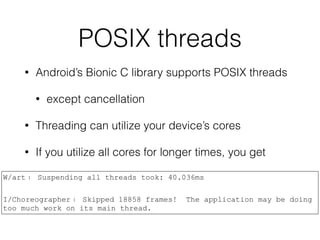
• Android’s Bionic C library supports POSIX threads
• except cancellation
• Threading can utilize your device’s cores
• If you utilize all cores for longer times, you get
W/art﹕ Suspending all threads took: 40.036ms
I/Choreographer﹕ Skipped 18858 frames! The application may be doing
too much work on its main thread.
Exercise 4
• Add a π estimator using POSIX threads
• reuse the estimate method
• Go to https://github.com/kneth/AndroidCalcPi if
lazy 😄
• branch posix-threads
Using non-NDK
libraries
Libraries
• NDK has some libraries
• Basic ones: standard C, logging, etc.
• Linked during build
• Android has many other libraries
• /system/lib is their home
• OpenSSL, XML2, SQLite, ICU
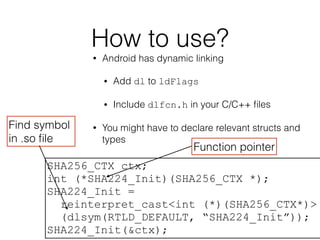
How to use?
• Android has dynamic linking
• Add dl to ldFlags
• Include dlfcn.h in your C/C++ files
• You might have to declare relevant structs and
types
SHA256_CTX ctx;
int (*SHA224_Init)(SHA256_CTX *);
SHA224_Init =
reinterpret_cast<int (*)(SHA256_CTX*)>
(dlsym(RTLD_DEFAULT, “SHA224_Init”));
SHA224_Init(&ctx);
Function pointer
Find symbol
in .so file
Exercise 5
• Add method to a class
• Load one or two libcrypto functions
• and call them
• Go to https://github.com/kneth/AndroidCalcPi if
lazy 😄
• branch non-ndk-libraries
Benchmarking
What makes benchmarking
hard?
• Android devices do many things
• checking for updates,
synchronising accounts, garbage
collection, etc.
• Android timers are not reliable
• Just-in-Time compilation
William Warby, Triple Timer; http://bit.ly/1TwetP4
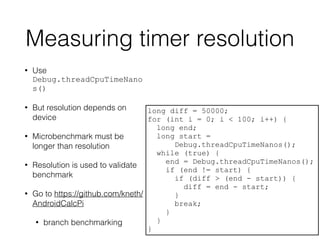
Measuring timer resolution
• Use
Debug.threadCpuTimeNano
s()
• But resolution depends on
device
• Microbenchmark must be
longer than resolution
• Resolution is used to validate
benchmark
• Go to https://github.com/kneth/
AndroidCalcPi
• branch benchmarking
long diff = 50000;
for (int i = 0; i < 100; i++) {
long end;
long start =
Debug.threadCpuTimeNanos();
while (true) {
end = Debug.threadCpuTimeNanos();
if (end != start) {
if (diff > (end - start)) {
diff = end - start;
}
break;
}
}
}
Debugging
Android Debug Bridge
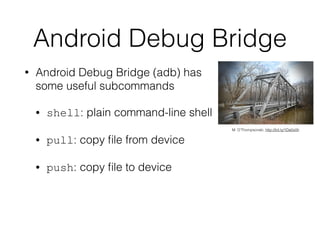
• Android Debug Bridge (adb) has
some useful subcommands
• shell: plain command-line shell
• pull: copy file from device
• push: copy file to device
M. O’Thompsonski, http://bit.ly/1Da0o0h
Get stack trace
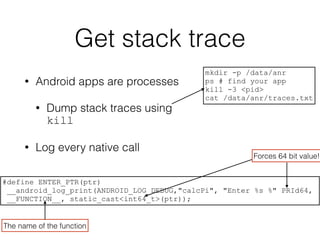
• Android apps are processes
• Dump stack traces using
kill
• Log every native call
mkdir -p /data/anr
ps # find your app
kill -3 <pid>
cat /data/anr/traces.txt
#define ENTER_PTR(ptr)
__android_log_print(ANDROID_LOG_DEBUG,"calcPi", "Enter %s %" PRId64,
__FUNCTION__, static_cast<int64_t>(ptr));
Forces 64 bit value!
The name of the function
Checking native memory
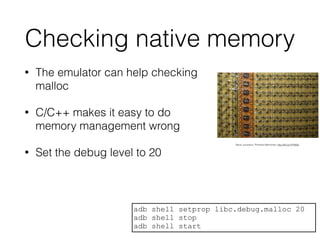
• The emulator can help checking
malloc
• C/C++ makes it easy to do
memory management wrong
• Set the debug level to 20
adb shell setprop libc.debug.malloc 20
adb shell stop
adb shell start
Steve Jurvetson, Primitive Memories; http://bit.ly/1HY80sf
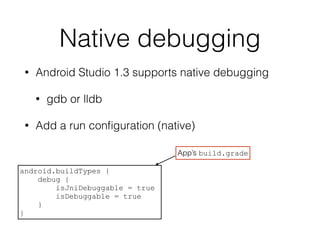
Native debugging
• Android Studio 1.3 supports native debugging
• gdb or lldb
• Add a run configuration (native)
android.buildTypes {
debug {
isJniDebuggable = true
isDebuggable = true
}
}
App’s build.grade
References
• High Performance Android Apps by Doug Sillars.
O’Reilly Media, 2015.
• Essential JNI by Rob Gordon. Prentice Hall, 1998.
• The Java Native Interface by Sheng Liang.
Addison-Wesley, 1999.
• Android NDK by Sylvian Rataboil. Packt Publishing,
2012.
Tips and tricks for building high performance android apps using native code

Tips and tricks for building high performance android apps using native code

  • 1.
    Tips and Tricksfor Building High-Performance Android Apps using Native Code Kenneth Geisshirt kg@realm.io Realm Inc. @realm http://github.com/Realm/ http://realm.io/ JD Hancock: Reign of The Android. http://bit.ly/1GN8vmg
  • 2.
    Swen-Peter Ekkebus: Goal!http://bit.ly/1x1suYm Avinash Sharma: http://bit.ly/1aRorcH • Android development is not just Java • C and C++ can speed apps up - and reuse old legacy code • Learn a few tricks when working with Java Native Interface • Hands-on exercises Today’s Goal
  • 3.
    Agenda • Setting upyour environment • Java Native Interface Exploratorium. After Dark: Time http://bit.ly/1aSQxo0 • Threading • Using non-NDK libraries1 • Benchmarking • Debugging 1NDK = Native Development Kit
  • 4.
    Advantages • Use Cor C++ in your apps → no JIT needed as always machine instructions • Access to system calls (like mmap()) • Almost no limits on memory usage • OpenGL programming • Sharing code across platforms • Reusing legacy libraries Alan Bates. Good Times http://bit.ly/1BXX7FN
  • 5.
    Disadvantages • C andC++ memory management → easy to crash your app • And debugging across languages is hard • Bionic C library isn’t the GNU C library • Doing a native call is expensive (in time) • Cumbersome to use non-NDK libraries Rocher: That_Sux http://bit.ly/1BdGNhJ
  • 6.
    Use Cases • AndEngine(2D Game Engine) http://www.andengine.org • ImageMagick for Android https://github.com/paulasiimwe/Android-ImageMagick • LevelDB for Android https://github.com/litl/android-leveldb • Support Vector Machine for Android https://github.com/cnbuff410/Libsvm-androidjni See-ming Lee; Rainbow Teddy shows BBF Stitch how to use the Canon EOS M; http://bit.ly/1O3yA43
  • 7.
  • 8.
    Example: estimating π Estimatingπ using dart • Throw arrows at random • Nhit/N = A/4 (quarter of a circle) • A = π·r2 (area of a circle) • π = 4·Nhit/N (with r = 1) Bogdan Suditu: Darts. http://bit.ly/18jCExj for i = 1,..,N x = random(0, 1) y = random(0, 1) if (sqrt(x·x+y·y) < 1) Nhit = Nhit +1 π = 4·Nhit/N
  • 9.
    Example: the classes Randomnumber generator • Constructor with seed • Method uniform() to return random number between 0.0 and 1.0 π estimator • Constructor with number of iteration • Method estimate() to calculate the value of π Quinn Dombrowski: Pi http://bit.ly/1Kz55cp jeramiah.andrick. My random number generator http://bit.ly/1wbTbP2
  • 10.
    • Implement twoC++ classes 1. RNG - a random number generator • uniform() returns a number in [0, 1[ 2. pi - a π estimator using MC algorithm • estimate() returns π • Write simple test program • Compile using clang++ or g++ • Go to https://github.com/kneth/AndroidCalcPi if lazy 😄 • Branch: initial Exercise 1
  • 11.
    The environment • AndroidStudio 1.3.0 (July 28, 2015) • Java 1.8 JDK • or set version (▶ Build ▶ Build types) • Android SDK 24.3.3 • Android NDK can now be bundled • Gradle 2.5 • gradle-wrapper.properties • A rooted device is nice to have • Always use Intel HAXM for the emulator Dave Gingrich;http://bit.ly/1HxRJWj ndk.dir=/usr/local/Cellar/android-sdk/24.3.3/ndk-bundle sdk.dir=/usr/local/Cellar/android-sdk/23.0.2 local.properties
  • 12.
  • 13.
  • 14.
    Organize your files •Use the experimental Android plugin for Gradle • Place C/C++ files in app/src/main/jni/ • Add ndk.dir to local.properties • Add an ndk section to your app’s build.gradle android.ndk { moduleName = "calcPi" cppFlags += ["-fexceptions"] stl = "gnustl_shared" // for exceptions }
  • 15.
    Building and Loadingyour native code • Automatically build for all supported architectures (ARM, ARMv7, ARM64, MIPS, MIPS64, x86, x86-64) • Android only installs the relevant architecture • Load native code early (main activity’s onCreate) System.loadLibrary("calcPi"); The module name (from build.gradle) Thomas Hawk: Loading Zone http://bit.ly/1MoBk9S
  • 16.
    Calling a C++function • Use Java’s native keyword in the signature • Implement the function in C++ • Use a long to store the C++ pointer when you creates an object lamont_cranston: call center http://bit.ly/1A4JlK5 native long nativeCreate(long iterations); native double nativeEstimate(long nativePtr); Tell the Java compiler it’s a native function Returns a pointer (a C++ object) Operates on a C++ object
  • 17.
    Generate header files •.class files contain information about native calls • javah can extract signatures and generate C/C++ header files Paul: Generator Room Door http://bit.ly/1C3SSs7 !/bin/bash # Setting up CLASSDIR="$(pwd)/../app/build/intermediates/classes/debug" JNIDIR="$(pwd)" # Generate the headers (cd "$CLASSDIR" && javah -jni -classpath "$CLASSDIR" -d "$JNIDIR" net.zigzak.androidcalcpi.NativePi net.zigzak.androidcalcpi.NativeRNG) # Remove "empty" header files (they have 13 lines) wc -l "$JNIDIR"/*.h | grep " 13 " | awk '{print $2}' | xargs rm -f Classes to extract from Add path to jar files you depend on
  • 18.
    Java types inC/C++ • Java types are mapped to C/C++ types • Convert Date to long before call • Pass pointers over as long/ jlong Java C/C++ long jlong String jstring long[] jlongArray Object jObject float jfloat JNIEXPORT jdouble JNICALL Java_net_zigzak_androidcalcpi_NativePi_nativeEstimate (JNIEnv *, jobject, jlong nativePtr) { Pi *pi = reinterpret_cast<Pi *>(nativePtr); double estimate = pi->estimate(); return estimate; } Generated function name cast to a proper C++ pointer The pointer Define as a macro if used often: #define P(x) reinterpret_cast<Pi *>(x)
  • 19.
    Working with arrays •Copy values from JVM memory to C/C ++ memory • Remember to free C/C++ memory → avoid memory leaks jsize arr_len = env->GetArrayLength(columnIndexes); jlong *arr = env->GetLongArrayElements(columnIndexes, NULL); // use the elements of arr env->ReleaseLongArrayElements(columnIndexes, arr, 0); • Create a new Java array • Copy C/C++ array to Java array jArray = env->NewByteArray(jlen); if (jArray) // Copy data to Byte[] env->SetByteArrayRegion(jArray, 0, jlen, reinterpret_cast<const jbyte*>(bufPtr)); free(bufPtr); return jArray;
  • 20.
    Strings as trouble-makers•Java strings are in modified UTF-8 • null character encoded as 0xC0 0x80 (not valid UTF-8) • Many C/C++ libraries assume plain UTF-8 jchar stack_buf[stack_buf_size]; // adding characters to stack_bf jchar* out_begin = stack_buf; if (int_cast_with_overflow_detect(out_curr - out_begin, out_size)) throw runtime_error("String size overflow"); return env->NewString(out_begin, out_size); jstring s; // typical a JNI function parameter jchar *c = e->GetStringChars(s, 0); // use c env->ReleaseStringChars(s, c); Create a new Java string • Copy Java string to C/C++ array • Remember to deallocate C array
  • 21.
    Exercise 2 • Createa simple Android app • Implement Java classes RNG and Pi • Generate header files • Implement intermediate C++ function and call original C++ code • Go to https://github.com/kneth/AndroidCalcPi if lazy 😄 • branch wrapping
  • 22.
    C++ exceptions • C++code can throw exceptions • new can throw bad_alloc,etc. • If uncaught the app crashes with hard-to- understand messages in the log Build fingerprint: 'generic_x86/sdk_x86/generic_x86:4.4.2/KK/999428:eng/test-keys' Revision: '0' pid: 1890, tid: 1890, name: t.zigzak.calcpi >>> net.zigzak.calcpi <<< signal 6 (SIGABRT), code -6 (SI_TKILL), fault addr -------- eax 00000000 ebx 00000762 ecx 00000762 edx 00000006 esi 00000762 edi 0000000b xcs 00000073 xds 0000007b xes 0000007b xfs 00000000 xss 0000007b eip b7707c96 ebp b776cce0 esp bfa22090 flags 00200203 backtrace: #00 pc 0003bc96 /system/lib/libc.so (tgkill+22) #01 pc 00000005 <unknown> stack: bfa22050 00000001 bfa22054 b899c6d0 [heap] bfa22058 00000015 bfa2205c b76d9ef9 /system/lib/libc.so (pthread_mutex_unlock+25) bfa22060 a73bfd19 /data/app-lib/net.zigzak.calcpi-1/libgnustl_shared.so bfa22064 b7767fcc /system/lib/libc.so • Better solution: • catch and rethrow as Java exception
  • 23.
    Throwing a Javaexception • You don’t throw an exception • You set the “exception” state in the JVM • Return from C/C++ function try { Pi *pi = new Pi(static_cast<long>(iterations)); return reinterpret_cast<jlong>(pi); } catch (std::exception& e) { jclass jExceptionClass = env->FindClass("java/lang/RuntimeException"); std::ostringstream message; message << "Allocating native class Pi failed: " << e.what(); env->ThrowNew(jExceptionClass, message.str().c_str()); env->DeleteLocalRef(jExceptionClass); } return 0; " Get a reference to the exception # Set the “exception” state $ Clean up followtheinstructrions: hand werpen http://bit.ly/1Bo3gZx
  • 24.
    Logging • JNI providesaccess to the Android log • __android_log_print is a simple variadic log function • Linking with liblog is required • size_t depends on bit width → cast to int64_t before logging vitelone: Deck Log Book http://bit.ly/1AXKZ0j android.ndk { moduleName = "calcPi" cppFlags += ["-fexceptions"] ldLibs += ["log"] stl = "gnustl_shared" // for exceptions } Link flag #define LOG(...) __android_log_print(ANDROID_LOG_DEBUG, "calcPi", __VA_ARGS__); Macro to simplify logging
  • 25.
    Tracing JNI calls •It is useful the trace calls • Define ENTER, ENTER_PTR, and LEAVE macros • Logging native pointer as jlong often produce negative numbers - don’t worry 1955-1955/net.zigzak.calcpi D/calcPi﹕ Enter Java_net_zigzak_calcpi_NativePi_nativeCreate 1955-1955/net.zigzak.calcpi D/calcPi﹕ iterations: 10000 1955-1955/net.zigzak.calcpi D/calcPi﹕ Enter Java_net_zigzak_calcpi_NativePi_nativeEstimate -1202665872 1955-1955/net.zigzak.calcpi D/calcPi﹕ estimate = 3.128400e+00
  • 26.
    Exercise 3 • Catchcommon C++ exceptions (bad_alloc) • Rethrow as a Java exception • Adding logging/tracing of JNI calls • Go to https://github.com/kneth/AndroidCalcPi if lazy 😄 • branch exceptions-and-logging
  • 27.
  • 28.
    Reduce size • Compilercan optimise for size (-Os) • Link Time Optimizations (LTO) can reduce size of native code • Eliminate unused code (-ffunction-sections -fdata- sections) and unused ELF symbols (- fvisibility=hidden) android.ndk { moduleName = "calcPi" cppFlags += ["-Os", "-fexceptions", "-fvisibility=hidden" "-ffunction-sections", "-fdata-sections", "-Wl,--gc-sections", "-flto"] ldLibs += "log" stl = "gnustl_shared" // for exceptions ldFlags += ["-Wl,--gc-sections", "-flto"] // reduce size } http://realm.io/news/reducing-apk-size-native-libraries/
  • 29.
  • 30.
    POSIX threads • Android’sBionic C library supports POSIX threads • except cancellation • Threading can utilize your device’s cores • If you utilize all cores for longer times, you get W/art﹕ Suspending all threads took: 40.036ms I/Choreographer﹕ Skipped 18858 frames! The application may be doing too much work on its main thread.
  • 31.
    Exercise 4 • Adda π estimator using POSIX threads • reuse the estimate method • Go to https://github.com/kneth/AndroidCalcPi if lazy 😄 • branch posix-threads
  • 32.
  • 33.
    Libraries • NDK hassome libraries • Basic ones: standard C, logging, etc. • Linked during build • Android has many other libraries • /system/lib is their home • OpenSSL, XML2, SQLite, ICU
  • 34.
    How to use? •Android has dynamic linking • Add dl to ldFlags • Include dlfcn.h in your C/C++ files • You might have to declare relevant structs and types SHA256_CTX ctx; int (*SHA224_Init)(SHA256_CTX *); SHA224_Init = reinterpret_cast<int (*)(SHA256_CTX*)> (dlsym(RTLD_DEFAULT, “SHA224_Init”)); SHA224_Init(&ctx); Function pointer Find symbol in .so file
  • 35.
    Exercise 5 • Addmethod to a class • Load one or two libcrypto functions • and call them • Go to https://github.com/kneth/AndroidCalcPi if lazy 😄 • branch non-ndk-libraries
  • 36.
  • 37.
    What makes benchmarking hard? •Android devices do many things • checking for updates, synchronising accounts, garbage collection, etc. • Android timers are not reliable • Just-in-Time compilation William Warby, Triple Timer; http://bit.ly/1TwetP4
  • 38.
    Measuring timer resolution •Use Debug.threadCpuTimeNano s() • But resolution depends on device • Microbenchmark must be longer than resolution • Resolution is used to validate benchmark • Go to https://github.com/kneth/ AndroidCalcPi • branch benchmarking long diff = 50000; for (int i = 0; i < 100; i++) { long end; long start = Debug.threadCpuTimeNanos(); while (true) { end = Debug.threadCpuTimeNanos(); if (end != start) { if (diff > (end - start)) { diff = end - start; } break; } } }
  • 39.
  • 40.
    Android Debug Bridge •Android Debug Bridge (adb) has some useful subcommands • shell: plain command-line shell • pull: copy file from device • push: copy file to device M. O’Thompsonski, http://bit.ly/1Da0o0h
  • 41.
    Get stack trace •Android apps are processes • Dump stack traces using kill • Log every native call mkdir -p /data/anr ps # find your app kill -3 <pid> cat /data/anr/traces.txt #define ENTER_PTR(ptr) __android_log_print(ANDROID_LOG_DEBUG,"calcPi", "Enter %s %" PRId64, __FUNCTION__, static_cast<int64_t>(ptr)); Forces 64 bit value! The name of the function
  • 42.
    Checking native memory •The emulator can help checking malloc • C/C++ makes it easy to do memory management wrong • Set the debug level to 20 adb shell setprop libc.debug.malloc 20 adb shell stop adb shell start Steve Jurvetson, Primitive Memories; http://bit.ly/1HY80sf
  • 43.
    Native debugging • AndroidStudio 1.3 supports native debugging • gdb or lldb • Add a run configuration (native) android.buildTypes { debug { isJniDebuggable = true isDebuggable = true } } App’s build.grade
  • 44.
    References • High PerformanceAndroid Apps by Doug Sillars. O’Reilly Media, 2015. • Essential JNI by Rob Gordon. Prentice Hall, 1998. • The Java Native Interface by Sheng Liang. Addison-Wesley, 1999. • Android NDK by Sylvian Rataboil. Packt Publishing, 2012.