1
NoCRM
Piotr Karwatka
CTO at Divante
Agenda
2
How to built CRM that users aren’t aware of.
What's wrong with CRMs?
The concept of CRM that doesn't exist
Architecture
Algorithms
1
2
3
4
What’s next?
Q/A
3
4
What’s wrong with CRMs?
3
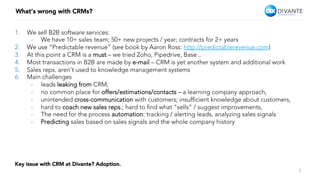
1.  We sell B2B software services:
-  We have 10+ sales team; 50+ new projects / year; contracts for 2+ years
2.  We use “Predictable revenue” (see book by Aaron Ross: http://predictablerevenue.com)
3.  At this point a CRM is a must – we tried Zoho, Pipedrive, Base ..
4.  Most transactions in B2B are made by e-mail – CRM is yet another system and additional work
5.  Sales reps. aren’t used to knowledge management systems
6.  Main challenges
-  leads leaking from CRM,
-  no common place for offers/estimations/contacts – a learning company approach,
-  unintended cross-communication with customers; insufficient knowledge about customers,
-  hard to coach new sales reps.; hard to find what “sells” / suggest improvements,
-  The need for the process automation: tracking / alerting leads, analyzing sales signals
-  Predicting sales based on sales signals and the whole company history


Key issue with CRM at Divante? Adoption.
4
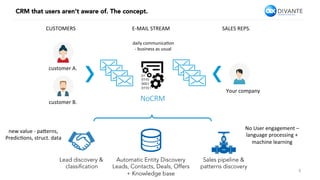
CRM that users aren’t aware of. The concept.
customer	A.	
Your	company	
NoCRM
daily	communica4on	
-	business	as	usual	
Lead discovery &
classification
new	value	-	pa9erns,		
Predic4ons,	struct.	data	
Automatic Entity Discovery
Leads, Contacts, Deals, Offers
+ Knowledge base
Sales pipeline &
patterns discovery
No	User	engagement	–		
language	processing	+		
machine	learning	
customer	B.	
CUSTOMERS	 E-MAIL	STREAM	 SALES	REPS.
5
CRM that users aren’t aware of. The concept.
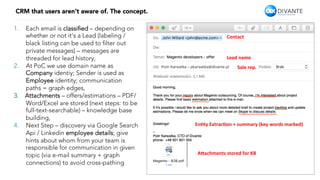
1.  Each email is classified – depending on
whether or not it’s a Lead (labeling /
black listing can be used to filter out
private messages) – messages are
threaded for lead history,
2.  At PoC we use domain name as
Company identiy; Sender is used as
Employee identity; communication
paths = graph edges,
3.  Attachments – offers/estimations – PDF/
Word/Excel are stored (next steps: to be
full-text-searchable) – knowledge base
building,
4.  Next Step – discovery via Google Search
Api / Linkedin employee details; give
hints about whom from your team is
responsible for communication in given
topic (via e-mail summary + graph
connections) to avoid cross-pathing
Contact	
Lead	name	
En-ty	Extrac-on	+	summary	(key	words	marked)	
A9achments	stored	for	KB	
Sale	rep.
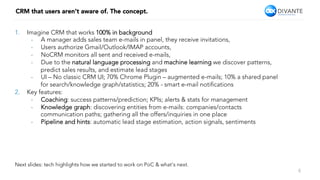
1.  Imagine CRM that works 100% in background
-  A manager adds sales team e-mails in panel, they receive invitations,
-  Users authorize Gmail/Outlook/IMAP accounts,
-  NoCRM monitors all sent and received e-mails,
-  Due to the natural language processing and machine learning we discover patterns,
predict sales results, and estimate lead stages
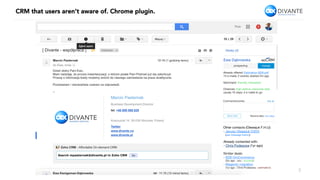
-  UI – No classic CRM UI; 70% Chrome Plugin – augmented e-mails; 10% a shared panel
for search/knowledge graph/statistics; 20% - smart e-mail notifications
2.  Key features:
-  Coaching: success patterns/prediction; KPIs; alerts & stats for management
-  Knowledge graph: discovering entities from e-mails: companies/contacts
communication paths; gathering all the offers/inquiries in one place
-  Pipeline and hints: automatic lead stage estimation, action signals, sentiments


CRM that users aren’t aware of. The concept.
6
Next slides: tech highlights how we started to work on PoC & what’s next.
CRM that users aren’t aware of. Chrome plugin.
7
CRM that users aren’t aware of. Knowledge base & stats.
8
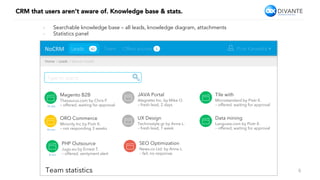
NoCRM	 Piotr Karwatka
Home	>	Leads	>	Search	results	
Leads 42
Type to search…
Team Offers archive 5
Magento B2B
Thesaurus.com by Chris P.
– offered, waiting for approval
JAVA Portal
Alegretto Inc. by Mike O.
– fresh lead, 2 days
Tile with
Microstandard by Piotr K.
– offered, waiting for approval
ORO Commerce
Minority Inc by Piotr K.
– not responding 3 weeks
UX Design
Technostyle.gr by Anna L.
– fresh lead, 1 week
Data mining
Langusta.com by Piotr K.
– offered, waiting for approval
PHP Outsource
Jugo.eu by Ernest T.
– offered, sentyment alert
SEO Optimization
News.co Ltd. by Anna L.
– fail, no response
Team statistics
15 min
10 min
8 min
-  Searchable knowledge base – all leads, knowledge diagram, attachments
-  Statistics panel
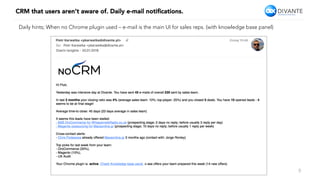
CRM that users aren’t aware of. Daily e-mail notifications.
9
Daily hints; When no Chrome plugin used – e-mail is the main UI for sales reps. (with knowledge base panel)
10
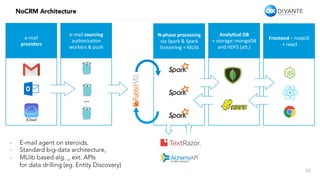
NoCRM Architecture
-  E-mail agent on steroids,
-  Standard big-data architecture,
-  MLlib based alg. _ ext. APIs
for data drilling (eg. Entity Discovery)
e-mail		
providers	
e-mail	sourcing	
authoriza4on	
workers	&	push	
N-phase	processing	
via	Spark	&	Spark		
Streaming	+	MLlib	
Analy-cal	DB	
+	storage:	mongoDB	
and	HDFS	(a9.)	
Frontend	–	nodeJS	
	+	react	
…
11
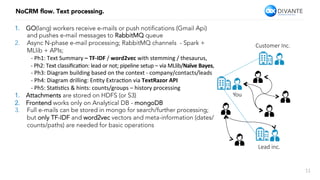
NoCRM flow. Text processing.
You
Customer Inc.
Lead inc.
1.  GO(lang) workers receive e-mails or push notifications (Gmail Api)
and pushes e-mail messages to RabbitMQ queue
2.  Async N-phase e-mail processing; RabbitMQ channels - Spark +
MLlib + APIs;
	-	Ph1:	Text	Summary	–	TF-IDF	/	word2vec	with	stemming	/	thesaurus,	
	-	Ph2:	Text	classifica4on:	lead	or	not;	pipeline	setup	–	via	MLlib/Naïve	Bayes,	
	-	Ph3:	Diagram	building	based	on	the	context	-	company/contacts/leads	
	-	Ph4:	Diagram	drilling:	En4ty	Extrac4on	via	TextRazor	API	
	-	Ph5:	Sta4s4cs	&	hints:	counts/groups	–	history	processing	
1.  Attachments are stored on HDFS (or S3)
2.  Frontend works only on Analytical DB - mongoDB
3.  Full e-mails can be stored in mongo for search/further processing;
but only TF-IDF and word2vec vectors and meta-information (dates/
counts/paths) are needed for basic operations
12
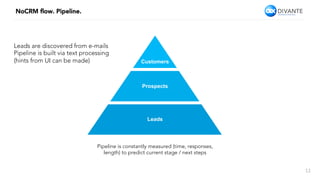
NoCRM flow. Pipeline.
Leads are discovered from e-mails
Pipeline is built via text processing
(hints from UI can be made)
Pipeline is constantly measured (time, responses,
length) to predict current stage / next steps
Leads
Prospects
Customers
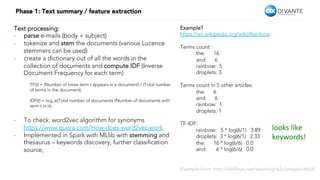
Phase 1: Text summary / feature extraction
Text processing:
-  parse e-mails (body + subject)
-  tokenize and stem the documents (various Lucence
stemmers can be used)
-  create a dictionary out of all the words in the
collection of documents and compute IDF (Inverse
Document Frequency for each term)
TF(t) = (Number of times term t appears in a document) / (Total number
of terms in the document).
IDF(t) = log_e(Total number of documents /Number of documents with
term t in it).
-  To check: word2vec algorithm for synonyms
https://www.quora.com/How-does-word2vec-work
-  Implemented in Spark with MLlib with stemming and
thesaurus – keywords discovery, further classification
source,
Example?
https://en.wikipedia.org/wiki/Rainbow
Terms count:
the: 16
and: 6
rainbow: 5
droplets: 3
Terms count in 5 other articles:
the: 6
and: 6
rainbow: 1
droplets: 1
TF-IDF:
rainbow: 5 * log(6/1) 3.89
droplets: 3 * log(6/1) 2.33
the: 16 * log(6/6) 0.0
and: 6 * log(6/6) 0.0
looks	like		
keywords!	
Example from: http://shiffman.net/teaching/a2z/analysis/#tfidf
14
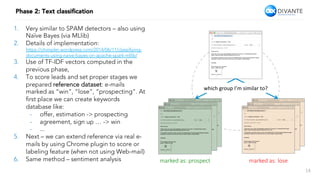
Phase 2: Text classification
1.  Very similar to SPAM detectors – also using
Naïve Bayes (via MLlib)
2.  Details of implementation:
https://chimpler.wordpress.com/2014/06/11/classifiying-
documents-using-naive-bayes-on-apache-spark-mllib/
3.  Use of TF-IDF vectors computed in the
previous phase,
4.  To score leads and set proper stages we
prepared reference dataset: e-mails
marked as “win”, “lose”, “prospecting”. At
first place we can create keywords
database like:
-  offer, estimation -> prospecting
-  agreement, sign up … -> win
-  ...
5.  Next – we can extend reference via real e-
mails by using Chrome plugin to score or
labeling feature (when not using Web-mail)
6.  Same method – sentiment analysis marked as: prospect
 marked as: lose
which	group	I’m	similar	to?
15
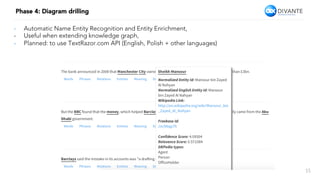
Phase 4: Diagram drilling
-  Automatic Name Entity Recognition and Entity Enrichment,
-  Useful when extending knowledge graph,
-  Planned: to use TextRazor.com API (English, Polish + other languages)
16
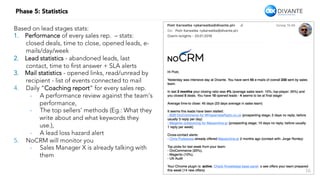
Phase 5: Statistics
Based on lead stages stats:
1.  Performance of every sales rep. – stats:
closed deals, time to close, opened leads, e-
mails/day/week
2.  Lead statistics - abandoned leads, last
contact, time to first answer + SLA alerts
3.  Mail statistics - opened links, read/unread by
recipient - list of events connected to mail
4.  Daily “Coaching report” for every sales rep.
-  A performance review against the team’s
performance,
-  The top sellers’ methods (Eg.: What they
write about and what keywords they
use.),
-  A lead loss hazard alert
5.  NoCRM will monitor you
-  Sales Manager X is already talking with
them
17
What’s next?
-  Smarter text analysis – use of Entity Recognition + gathering context data from Google
Search, Linkedin …
-  Website / e-mail tracking (tracking links / pixels in e-mails)
-  UI enhancements – panel & plugin development,
-  Tests, tests, tests, tests.
18
Q/A
Extended version of this presentaJon with text descripJon?
pkarwatka@divante.pl
THANK YOU
19
Piotr Karwatka, pkarwatka@divante.pl

NoCRM - BigData Amsterdam 4.0

  • 1.
  • 2.
    Agenda 2 How to builtCRM that users aren’t aware of. What's wrong with CRMs? The concept of CRM that doesn't exist Architecture Algorithms 1 2 3 4 What’s next? Q/A 3 4
  • 3.
    What’s wrong withCRMs? 3 1.  We sell B2B software services: -  We have 10+ sales team; 50+ new projects / year; contracts for 2+ years 2.  We use “Predictable revenue” (see book by Aaron Ross: http://predictablerevenue.com) 3.  At this point a CRM is a must – we tried Zoho, Pipedrive, Base .. 4.  Most transactions in B2B are made by e-mail – CRM is yet another system and additional work 5.  Sales reps. aren’t used to knowledge management systems 6.  Main challenges -  leads leaking from CRM, -  no common place for offers/estimations/contacts – a learning company approach, -  unintended cross-communication with customers; insufficient knowledge about customers, -  hard to coach new sales reps.; hard to find what “sells” / suggest improvements, -  The need for the process automation: tracking / alerting leads, analyzing sales signals -  Predicting sales based on sales signals and the whole company history Key issue with CRM at Divante? Adoption.
  • 4.
    4 CRM that usersaren’t aware of. The concept. customer A. Your company NoCRM daily communica4on - business as usual Lead discovery & classification new value - pa9erns, Predic4ons, struct. data Automatic Entity Discovery Leads, Contacts, Deals, Offers + Knowledge base Sales pipeline & patterns discovery No User engagement – language processing + machine learning customer B. CUSTOMERS E-MAIL STREAM SALES REPS.
  • 5.
    5 CRM that usersaren’t aware of. The concept. 1.  Each email is classified – depending on whether or not it’s a Lead (labeling / black listing can be used to filter out private messages) – messages are threaded for lead history, 2.  At PoC we use domain name as Company identiy; Sender is used as Employee identity; communication paths = graph edges, 3.  Attachments – offers/estimations – PDF/ Word/Excel are stored (next steps: to be full-text-searchable) – knowledge base building, 4.  Next Step – discovery via Google Search Api / Linkedin employee details; give hints about whom from your team is responsible for communication in given topic (via e-mail summary + graph connections) to avoid cross-pathing Contact Lead name En-ty Extrac-on + summary (key words marked) A9achments stored for KB Sale rep.
  • 6.
    1.  Imagine CRMthat works 100% in background -  A manager adds sales team e-mails in panel, they receive invitations, -  Users authorize Gmail/Outlook/IMAP accounts, -  NoCRM monitors all sent and received e-mails, -  Due to the natural language processing and machine learning we discover patterns, predict sales results, and estimate lead stages -  UI – No classic CRM UI; 70% Chrome Plugin – augmented e-mails; 10% a shared panel for search/knowledge graph/statistics; 20% - smart e-mail notifications 2.  Key features: -  Coaching: success patterns/prediction; KPIs; alerts & stats for management -  Knowledge graph: discovering entities from e-mails: companies/contacts communication paths; gathering all the offers/inquiries in one place -  Pipeline and hints: automatic lead stage estimation, action signals, sentiments CRM that users aren’t aware of. The concept. 6 Next slides: tech highlights how we started to work on PoC & what’s next.
  • 7.
    CRM that usersaren’t aware of. Chrome plugin. 7
  • 8.
    CRM that usersaren’t aware of. Knowledge base & stats. 8 NoCRM Piotr Karwatka Home > Leads > Search results Leads 42 Type to search… Team Offers archive 5 Magento B2B Thesaurus.com by Chris P. – offered, waiting for approval JAVA Portal Alegretto Inc. by Mike O. – fresh lead, 2 days Tile with Microstandard by Piotr K. – offered, waiting for approval ORO Commerce Minority Inc by Piotr K. – not responding 3 weeks UX Design Technostyle.gr by Anna L. – fresh lead, 1 week Data mining Langusta.com by Piotr K. – offered, waiting for approval PHP Outsource Jugo.eu by Ernest T. – offered, sentyment alert SEO Optimization News.co Ltd. by Anna L. – fail, no response Team statistics 15 min 10 min 8 min -  Searchable knowledge base – all leads, knowledge diagram, attachments -  Statistics panel
  • 9.
    CRM that usersaren’t aware of. Daily e-mail notifications. 9 Daily hints; When no Chrome plugin used – e-mail is the main UI for sales reps. (with knowledge base panel)
  • 10.
    10 NoCRM Architecture -  E-mailagent on steroids, -  Standard big-data architecture, -  MLlib based alg. _ ext. APIs for data drilling (eg. Entity Discovery) e-mail providers e-mail sourcing authoriza4on workers & push N-phase processing via Spark & Spark Streaming + MLlib Analy-cal DB + storage: mongoDB and HDFS (a9.) Frontend – nodeJS + react …
  • 11.
    11 NoCRM flow. Textprocessing. You Customer Inc. Lead inc. 1.  GO(lang) workers receive e-mails or push notifications (Gmail Api) and pushes e-mail messages to RabbitMQ queue 2.  Async N-phase e-mail processing; RabbitMQ channels - Spark + MLlib + APIs; - Ph1: Text Summary – TF-IDF / word2vec with stemming / thesaurus, - Ph2: Text classifica4on: lead or not; pipeline setup – via MLlib/Naïve Bayes, - Ph3: Diagram building based on the context - company/contacts/leads - Ph4: Diagram drilling: En4ty Extrac4on via TextRazor API - Ph5: Sta4s4cs & hints: counts/groups – history processing 1.  Attachments are stored on HDFS (or S3) 2.  Frontend works only on Analytical DB - mongoDB 3.  Full e-mails can be stored in mongo for search/further processing; but only TF-IDF and word2vec vectors and meta-information (dates/ counts/paths) are needed for basic operations
  • 12.
    12 NoCRM flow. Pipeline. Leadsare discovered from e-mails Pipeline is built via text processing (hints from UI can be made) Pipeline is constantly measured (time, responses, length) to predict current stage / next steps Leads Prospects Customers
  • 13.
    Phase 1: Textsummary / feature extraction Text processing: -  parse e-mails (body + subject) -  tokenize and stem the documents (various Lucence stemmers can be used) -  create a dictionary out of all the words in the collection of documents and compute IDF (Inverse Document Frequency for each term) TF(t) = (Number of times term t appears in a document) / (Total number of terms in the document). IDF(t) = log_e(Total number of documents /Number of documents with term t in it). -  To check: word2vec algorithm for synonyms https://www.quora.com/How-does-word2vec-work -  Implemented in Spark with MLlib with stemming and thesaurus – keywords discovery, further classification source, Example? https://en.wikipedia.org/wiki/Rainbow Terms count: the: 16 and: 6 rainbow: 5 droplets: 3 Terms count in 5 other articles: the: 6 and: 6 rainbow: 1 droplets: 1 TF-IDF: rainbow: 5 * log(6/1) 3.89 droplets: 3 * log(6/1) 2.33 the: 16 * log(6/6) 0.0 and: 6 * log(6/6) 0.0 looks like keywords! Example from: http://shiffman.net/teaching/a2z/analysis/#tfidf
  • 14.
    14 Phase 2: Textclassification 1.  Very similar to SPAM detectors – also using Naïve Bayes (via MLlib) 2.  Details of implementation: https://chimpler.wordpress.com/2014/06/11/classifiying- documents-using-naive-bayes-on-apache-spark-mllib/ 3.  Use of TF-IDF vectors computed in the previous phase, 4.  To score leads and set proper stages we prepared reference dataset: e-mails marked as “win”, “lose”, “prospecting”. At first place we can create keywords database like: -  offer, estimation -> prospecting -  agreement, sign up … -> win -  ... 5.  Next – we can extend reference via real e- mails by using Chrome plugin to score or labeling feature (when not using Web-mail) 6.  Same method – sentiment analysis marked as: prospect marked as: lose which group I’m similar to?
  • 15.
    15 Phase 4: Diagramdrilling -  Automatic Name Entity Recognition and Entity Enrichment, -  Useful when extending knowledge graph, -  Planned: to use TextRazor.com API (English, Polish + other languages)
  • 16.
    16 Phase 5: Statistics Basedon lead stages stats: 1.  Performance of every sales rep. – stats: closed deals, time to close, opened leads, e- mails/day/week 2.  Lead statistics - abandoned leads, last contact, time to first answer + SLA alerts 3.  Mail statistics - opened links, read/unread by recipient - list of events connected to mail 4.  Daily “Coaching report” for every sales rep. -  A performance review against the team’s performance, -  The top sellers’ methods (Eg.: What they write about and what keywords they use.), -  A lead loss hazard alert 5.  NoCRM will monitor you -  Sales Manager X is already talking with them
  • 17.
    17 What’s next? -  Smartertext analysis – use of Entity Recognition + gathering context data from Google Search, Linkedin … -  Website / e-mail tracking (tracking links / pixels in e-mails) -  UI enhancements – panel & plugin development, -  Tests, tests, tests, tests.
  • 18.
    18 Q/A Extended version ofthis presentaJon with text descripJon? pkarwatka@divante.pl
  • 19.
    THANK YOU 19 Piotr Karwatka,pkarwatka@divante.pl