ESL IS Important… One day, a mother rat and her son were searching for food in the kitchen. They met the cat. The mother rat barked like a dog at the cat. The cat got scared and ran away.  The mother rat said to her son, “ See, now you can understand the importance of a second language”.
Trends in Educational Technology:  Collective Intelligence Views on Adult Education Software, Websites and Technology Usage Judith Sotir, AELC Manager,  Waubonsee Community College
How open to change are you?
  tech change = f (user crisis vs. user's total perceived pain of adoption) In other words: If the 'crisis' is greater than total perceived 'pain of adoption,' users will change. They will adopt the new technology.  http://www.alwayson-network.com/comments Change is highly emotional
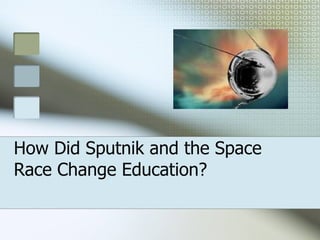
How Did Sputnik and the Space Race Change Education?
Impetus for Change Oct. 4, 1957, a 183 pound aluminum sphere forced us to change our thinking Feb. 7, 1958 President Eisenhower established ARPA (Advanced Research Projects Agency) to ‘prevent technological surprises’ The project was long-term, high risk, high-payoff and visionary
JCR Licklider First director of IT research at ARPA Pushed development of things such as time sharing, computer graphics, microprocessors and the Internet, developing the basis for the WWW Had a big budget, carte blanche for development and had access to the brightest and most visionary people
Marc Prensky “ It is now clear that as a result of this ubiquitous environment and the sheer volume of their interaction with it, today’s students think and process information differently than their predecessors.”
Prensky on People ‘ Digital natives’ and ‘digital immigrants’ (Prensky) Digi natives are usually under 25 from a developed nation. “You don’t need to teach kids to be digital. They are digital.” Digi immigrants are those over 25 for either social or economic reasons who become digital people.
The Largest Group: Analogists Over 25 Abundant Terrified of any whiff of technology Would consider a cell phone, and run from programming an iPod Pip Coburn  [ UBS Investment Bank
Question… How is teaching different using today’s technology than it was 5 years ago?  What are the changes that affect how we teach?
Community-Centered  Learning Environments Traditional classroom environment Knowledge that is individually processed but socially supported Discussion, collaboration, sharing and building knowledge with peers Can be online as well as classroom based
Learner Centered Learning Environment Using Computers Move at your own pace Individualized instruction Allows for variances in base knowledge, determined by: Locator-type pre-tests Prescriptions
Professional Learning  Communities Outside the school, there are online resources and sharing communities Websites, Blogs, Podcasts and Wikis Lead teacher concept Team centered approach Assignment flexibility and use of  grants and research materials
What does the future hold? Predicting the future of technology is not easy Computers and their counterparts are an integral part of economics and society: Digital Literacy Schools, at all levels, will continue to struggle to keep pace with the future of educational technology and technology in general
What other trends are noted? Lifelong learning applies to non-traditional students as well: reliance on Web-based tools  Economy will continue to dictate services needed for ESL populations Students demand more content, and content that is relevant to their individual needs
What can ESL teachers expect? Multi-national classes, with students from new and developing countries Less educated students, as well as more highly educated students An emphasis on developing English skills for  a particular purpose: work, higher education etc. A stronger need to learn English more quickly (Intensive)
Adding Digital Literacy to ESL Advantages?  Disadvantages? How important is technology in general to ESL instruction? How do you currently use technology? (personal and professional) How would you LIKE to use technology? What stops you from using technology?
What are 21st Century Skills? Problem solving  Synthesizing across content areas  Interpersonal communication  Search strategies  Information credibility  Dealing with information overload  How to write for an online, rather than print, environment  Computerized presentation skills  Workspace ergonomics  Basic understanding of usability concepts  Reflection  Cross-cultural communication
Tech Ideas 101 The emerging role of  web-based software  allowing web access to resources and lower hardware and support costs.  Unified desktops (portals)  that aggregate appropriate resources and allow single log ons to multiple applications. Technology can help in identifying  your students' learning styles.   Web 2.0 resources  to change the model from using web resources to creating web resources.
New Technologies The  coolest ,  w il d e s t and  best  technologies  on the market
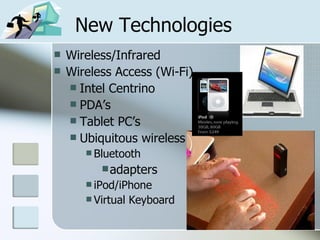
New Technologies Wireless/Infrared Wireless Access (Wi-Fi) Intel Centrino PDA’s Tablet PC’s Ubiquitous wireless Bluetooth adapters iPod/iPhone Virtual Keyboard
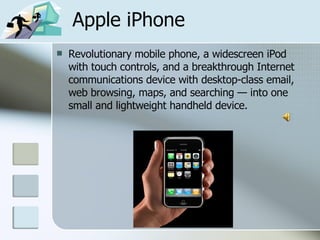
Apple iPhone Revolutionary mobile phone, a widescreen iPod with touch controls, and a breakthrough Internet communications device with desktop-class email, web browsing, maps, and searching — into one small and lightweight handheld device.
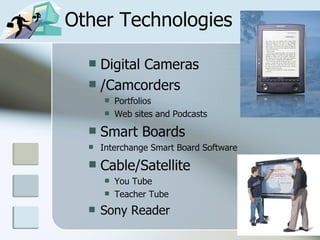
Other Technologies Digital Cameras /Camcorders  Portfolios Web sites and Podcasts Smart Boards Interchange Smart Board Software Cable/Satellite You Tube Teacher Tube Sony Reader
Podcasts A  podcast  is a media file that is distributed by subscription (paid or unpaid) over the  Internet  using  syndication   feeds , for playback on mobile devices and  personal computers   A  podcast  is distinguished from other digital audio formats by its ability to be downloaded automatically, using software capable of reading feed formats such as  RSS  or  Atom .
Podcasting Sites Podcasts for English Learning and Teaching  http://esl.about.com/od/podcasts/Podcasts_for_English_Learning_and_Teaching.htm Interesting Things for ESL Students  http://www.manythings.org/e/podcasts.html World News in Slow and Clear English  http://esl.podomatic.com/ UC Berkeley Lectures on YouTube  http://youtube.com/ucberkeley
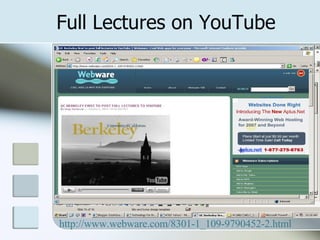
Full Lectures on YouTube http://www.webware.com/8301-1_109-9790452-2.html
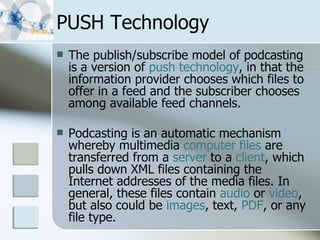
PUSH Technology The publish/subscribe model of podcasting is a version of  push technology , in that the information provider chooses which files to offer in a feed and the subscriber chooses among available feed channels.  Podcasting is an automatic mechanism whereby multimedia  computer files  are transferred from a  server  to a  client , which pulls down XML files containing the Internet addresses of the media files. In general, these files contain  audio  or  video , but also could be  images , text,  PDF , or any file type.
AELC 10 Minute Wonders Easy to use technologies
  An AELC 10 Minute Wonder:   WCC ESL Instructor Blog http://wccniuesl.blogspot.com/ Developed for the learning community of ESL instructors Open to anyone interested in ESL education Updated with new technology innovations
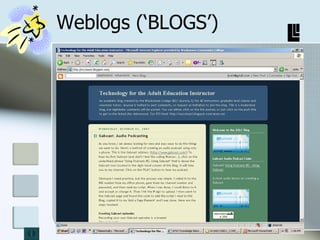
Weblogs (‘BLOGS’)
An AELC 10 Minute Wonder: BLOGs www.blogger.com BLOG is short for Weblog and is a website of personal or non-commercial origin that uses a dated log format and  is updated on a daily or frequent basis with new information pertinent to the stated blog purpose Examples are: Blogger, TypePad, MySpace, Live Journal
An AELC 10 Minute Wonder: WIKI’s www.wetpaint.com WIKI (for ‘quick’) is a  communications mechanism that  allows the organization of contributions  to be edited in addition to the content  itself. It claims to be the simplest  online database that could possibly  work.
Wiki’s Interactive exchange of ideas via the Internet for larger groups that lets authorized users create and modify pages, collaborate, contribute and easily find information on a given topic, and are more interactive than Web sites
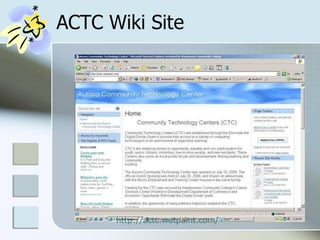
ACTC Wiki Site http://actc.wetpaint.com/
An AELC 10 Minute Wonder:   Google Web Page Creator http://pages.google.com/?pli=1 Google Page Creator is a free online tool that finally makes it easy for anyone to create and publish useful, attractive web pages in just minutes. Publish in seconds   With one click, the pages you create are ready  for your friends, family and the whole world  to see at  http://jsotir.googlepages.com/
An AELC 10 Minute Wonder: Teacher Tube www.teachertube.com Used for uploading video and podcasts Similar to You Tube, but with an academic focus Other instructor-made podcast  samples available
An AELC 10 Minute Wonder: Diet URL: Making it Tiny Are you sick of posting URLs in emails only to have it break when sent causing the recipient to have to cut and paste it back together? Then you've come to the right place. By entering in a URL in the text field below, we will create a tiny URL that will not break in email postings and never expires.
  An AELC 10 Minute Wonder:   Tiny URL Tiny URL takes long URLs and cuts them down to less than 30 characters: http:// tinyurl.com Example:  http://www.lausd.k12.ca.us/lausd/resources/shakespeare/caesarwebguide.html (76 characters) to  http://tinyurl.com/2rrxm4   (25 characters)
AELC 10 Minute Wonder:   Filamentality Hotlists http:// www.kn.sbc.com/wired/fil is a handy-dandy, webpage-spinning, learning activity builder. Fill-in-the-blanks on this interactive web site as you turn web resources into online activities appropriate for learners. At the end, you  will have a Website Hotlist for all the world to see.
  An AELC 10 Minute Wonder:  Gabcast: Easy to Use Podcast http:// www.gabcast.com   Simple to create podcasts using a land line or cell telephone and any computer with Internet connections. Similar to creating a voicemail message Easy to change and update Accessible as a Website, added to a Blog or Wiki, or via an MP3 or iPod
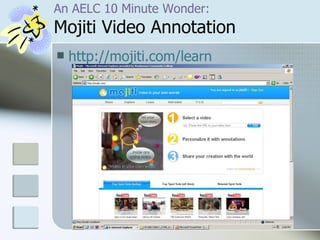
An AELC 10 Minute Wonder:  Mojiti Video Annotation http://mojiti.com/learn
Web 2.0 in just under 5 minutes… See the YouTube Video:  http:// youtube.com/watch?v = NLlGopyXT_g   http://mediatedcultures.net/ Use Mojiti to see it in an interactive format:  http://mojiti.com/kan/2024/3313   Read the written transcript of the video:  http://mediatedcultures.net/ksudigg/?p=78 Michael Wesch Assistant Professor of Cultural Anthropology Kansas State University
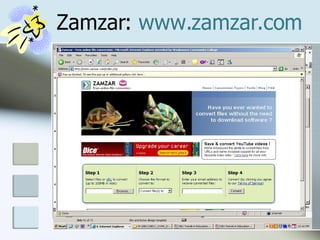
  An AELC 10 Minute Wonder:  Zamzar Format Conversion Tool This is a free tool to assist you in changing the format files to ones that your device or computer recognizes, or for mainstream video players.  Conversion support:  Document formats  Image formats  Music formats  Video formats  Compressed formats There is no need to download any software.
Zamzar:  www.zamzar.com
Interactive Communication http://www.dontclick.it/ An interesting site which teaches you how to navigate without clicking. This will showcase the versatility of a pen based tablet PC. It’s a bit of a psychological test of your ability to change an ingrained pattern, because if you click….
Collaborative Curriculum Design Tool (CCDT) http:// learnweb.harvard.edu/ccdt / The CCDT (Collaborative Curriculum Design Tool) is an online tool which supports the production of curricula which foster student learning through the application of the principles of Teaching for Understanding. There are tutorials which cover a single topic such as 'Starting with Designs' and consist of movies containing actual CCDT screen shots. Using this tool, you can work an a collaborative curriculum with people from across the campus to a across the world. A wonderful tool for learning and curriculum design.
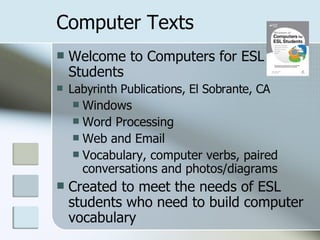
Computer Texts Welcome to Computers for ESL Students Labyrinth Publications, El Sobrante, CA Windows Word Processing Web and Email Vocabulary, computer verbs, paired conversations and photos/diagrams Created to meet the needs of ESL students who need to build computer vocabulary
Instructional Barriers when Using Technology Confidence-in-ability barriers : training alone is not enough, must be responsive to individual needs Logistical barriers : classroom size, electrical needs etc. Availability barriers:  equipment not easy to access, high demand etc. Maintenance barriers:  equipment is not consistently maintained and by whom?
ESL Website Tools Tools you can Use
Less Software, More Internet Downloadable software (Auralog) Subscription Software (Rosetta Stone) JIT software, textbooks More interactive sites Software for PDAs Online courses Effectiveness Accessibility W:\AELC\AELC_CORE_DOCUMENTS\Online_IEPs
Libraries changing? Many prominent libraries have accepted Google’s offer — including the  New York Public Library  and libraries at the  University of Michigan ,  Harvard , Stanford and Oxford to scan their collections at no cost to libraries. Google expects to scan 15 million books from those collections over the next decade.
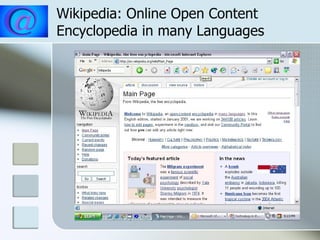
Wikipedia: Online Open Content Encyclopedia in many Languages http://en.wikipedia.org/wiki/Main_Page
Choosing Sites Choose sites from: AELC Lists AELC Instructor Blog Compendium Sites Sites from this workshop Choose sites that: Fit the course parameters Fit the reading level Express the skill in a variety of learning styles
Dave’s ESL Cafe http://www.pacificnet.net/~sperling/eslcafe.html Dave's ESL Cafe is for ESL/EFL students and teachers from around the world. Includes a Search Page, Quiz Center, Help Center, Idea Page, Graffiti Wall, Question Page, and more!
ESL Gold http://www.eslgold.com/ This site's primary materials are thematically organized into categories such as "Speaking," "Reading," "Listening," and "Writing." Within each of these sections, visitors can take a look through topical resources that compartmentalize different more digestible themes, such as "Topics for Writing" or "Organizing and Composing." Visitors can also find materials for beginning, intermediate, or advanced level students.
ESL Headquarters  www.eslhq.com What a selection of handouts! You can download worksheets, flashcards and articles as well as create your own. They would like to have you register, but the site is free.
ESL HOME:  Online Passages and Reading Exercises http://home.earthlink.net/~eslstudent/read/read.html This hotlist links to good resources created for older students to test reading comprehension. You can find quizzes, online activities and other helpful materials that are well-organized and easy to navigate.
Karen’s ESL PartyLand http://www.eslpartyland.com/teachers/Tinitial.htm The pages at ESL PartyLand are designed to provide you with the resources and connections you need to become a better ESL teacher.  You'll find loads of ideas and printable materials to use in class here, discussion forums, and employment opportunities.
ESL Monkeys  http://www.eslmonkeys.com/student/storyroom/storyroom.html  Free ESL Teaching Materials   - English as a Second Language Resources for Teachers! Lesson Plans & Ideas  |  Reading Materials Free ESL Books  |  Recommended ESL Books  |  TEFL Newsletter Forums - Discuss!  |  Blogs - Teach & Travel  |  Free English Lessons
Englishtown http://www.englishtown.com Improve your English with online English courses, chat rooms, games, international Pen Pal Club, meeting areas, and ESL/EFL lesson plans. There is a fee for English School, but other resources and activities are free.
ESL Cyber Listening Lab http://www.esl-lab.com/ The focus on the site is most definitely on developing users' listening skills, and it provides dozens of helpful audio that quizzes students on topics such as renting an apartment, understanding credit cards, and making doctor's appointments. Along with these more practical skills, it also deals with subjects that students might encounter in other situations, such as the TOEFL or more advanced conversations.
Listening and Dictation http://perso.orange.fr/michel.barbot/hotpot/movies.htm This is an interesting site created by a teacher that uses sound clips from movies to help students with listening and dictation skills. The clip is played, and the words are listed. The student places the words in order. Movies include: Forrest Gump, Dead Poet’s Society, Apollo Xlll and others. Beginning selections include the words for students to place in order, and advanced sections require students to type in the words they hear. There is an online check feature and hints for students as well.
Authentic News for ESL http://www.breakingnewsenglish.com Several new stories are presented each week at different levels with wonderful links. News articles can be viewed chronologically or by specific themes. These selections include a great variety of pre-reading activities to enhance vocabulary and overall comprehension and discussion questions with answers included. Listening is also available.
Great American Speeches http://www.pbs.org/greatspeeches/ Eighty years worth of great speeches are captured here, as well as some interesting exercises for students of speech and American History. The Critics Corner features Richard Nixon's Checkers' Speech, as well as background information, and links within the speech to explain the context of specific words or terms used in the speech. If you watch excerpts of Presidential speeches on tape, you should have students try  Could You Be A Politician , where they get a chance to read from a mock teleprompter while looking honest, sincere, and trustworthy. Some trick! Several more activities to liven up classrooms.
Puzzlemaker http:// www.puzzlemaker.com /   This site lets you create your own mazes, word searches, crosswords, number blocks, math squares, and more. All you do is enter information and click the "Create" button, wait a few seconds, then print your customized puzzle.
CESOL: Computers and English for Speakers of Other Languages http://tech.worlded.org/docs/cesol/index.htm The   CESOL  website is for teachers who are interested in integrating technology into primarily the adult ESOL/ ESL/EFL classroom:   teaching computers to ESOL / ESL / EFL students in a way that integrates technology into the curriculum;  using computer technology as a tool for improving teaching English language learning;  utilizing software appropriately in the computer-assisted language learning (CALL) lab.  See the  new articles on  Podcasting .
AltaVista BabelFish http:// babelfish.altavista.digital.com/cgi -bin/translate Submit text or a URL for a webpage and this tool will translate it from English to Spanish or Spanish to English with the click of the mouse! Grammar and accent marks are not perfect but a surprisingly understandable translation appears. Also translates from English to French, Portuguese, German, or Italian.
Software Requests, ESL Speaking/Listening/Pronunciation Grammar Vocabulary Writing Reading
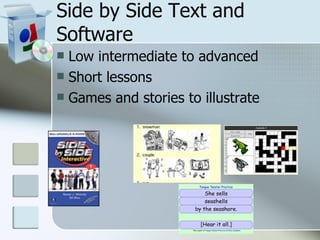
Side by Side Text and Software Low intermediate to advanced Short lessons Games and stories to illustrate
Other Software Rosetta Stone http://www.rosettastone.com/schools/esl Auralog/Tell Me More http://www.auralog.com/us/education_home.htm ELLIS http://www.pearsondigital.com/ellis/essentials.cfm
WCC/AELC Transparent resource environment IEPs Quick Notes Blogs, Wikis, Podcasting, other Resources Assets Certified instructors Techno Boot Camp/training
Digital Resources http://techsoup.org/  for non-profits www.syllabus.com  campus technology for higher education www.thejournal.com  educational journal www.edutopia.org  George Lucas Foundation www.wired.com  commercial magazine
AELC Blogs AELC Staff:  http://aelc.blogspot.com AELC Instructors:  http://wccniuesl.blogspot.com AELC Transition:  http://wcctransition.blogspot.com AELC Constitution:  http://constitutionaelc.blogspot.com AELC Family Tech:  http://wccfamtech.blogspot.com
AELC Created Wiki and WCC Site Aurora Community Technology Center:  http://actc.wetpaint.com/ Waubonsee Community College Website:  http://waubonsee.edu
Additional Information AELC (Adult Education Learning Center) Waubonsee Community College 5 E Galena Blvd Aurora, IL 60506 Judith Sotir, Manager x 4128

NIU Trends In Educational Technology 2008

  • 1.
    ESL IS Important…One day, a mother rat and her son were searching for food in the kitchen. They met the cat. The mother rat barked like a dog at the cat. The cat got scared and ran away. The mother rat said to her son, “ See, now you can understand the importance of a second language”.
  • 2.
    Trends in EducationalTechnology: Collective Intelligence Views on Adult Education Software, Websites and Technology Usage Judith Sotir, AELC Manager, Waubonsee Community College
  • 3.
    How open tochange are you?
  • 4.
    techchange = f (user crisis vs. user's total perceived pain of adoption) In other words: If the 'crisis' is greater than total perceived 'pain of adoption,' users will change. They will adopt the new technology. http://www.alwayson-network.com/comments Change is highly emotional
  • 5.
    How Did Sputnikand the Space Race Change Education?
  • 6.
    Impetus for ChangeOct. 4, 1957, a 183 pound aluminum sphere forced us to change our thinking Feb. 7, 1958 President Eisenhower established ARPA (Advanced Research Projects Agency) to ‘prevent technological surprises’ The project was long-term, high risk, high-payoff and visionary
  • 7.
    JCR Licklider Firstdirector of IT research at ARPA Pushed development of things such as time sharing, computer graphics, microprocessors and the Internet, developing the basis for the WWW Had a big budget, carte blanche for development and had access to the brightest and most visionary people
  • 8.
    Marc Prensky “It is now clear that as a result of this ubiquitous environment and the sheer volume of their interaction with it, today’s students think and process information differently than their predecessors.”
  • 9.
    Prensky on People‘ Digital natives’ and ‘digital immigrants’ (Prensky) Digi natives are usually under 25 from a developed nation. “You don’t need to teach kids to be digital. They are digital.” Digi immigrants are those over 25 for either social or economic reasons who become digital people.
  • 10.
    The Largest Group:Analogists Over 25 Abundant Terrified of any whiff of technology Would consider a cell phone, and run from programming an iPod Pip Coburn [ UBS Investment Bank
  • 11.
    Question… How isteaching different using today’s technology than it was 5 years ago? What are the changes that affect how we teach?
  • 12.
    Community-Centered LearningEnvironments Traditional classroom environment Knowledge that is individually processed but socially supported Discussion, collaboration, sharing and building knowledge with peers Can be online as well as classroom based
  • 13.
    Learner Centered LearningEnvironment Using Computers Move at your own pace Individualized instruction Allows for variances in base knowledge, determined by: Locator-type pre-tests Prescriptions
  • 14.
    Professional Learning Communities Outside the school, there are online resources and sharing communities Websites, Blogs, Podcasts and Wikis Lead teacher concept Team centered approach Assignment flexibility and use of grants and research materials
  • 15.
    What does thefuture hold? Predicting the future of technology is not easy Computers and their counterparts are an integral part of economics and society: Digital Literacy Schools, at all levels, will continue to struggle to keep pace with the future of educational technology and technology in general
  • 16.
    What other trendsare noted? Lifelong learning applies to non-traditional students as well: reliance on Web-based tools Economy will continue to dictate services needed for ESL populations Students demand more content, and content that is relevant to their individual needs
  • 17.
    What can ESLteachers expect? Multi-national classes, with students from new and developing countries Less educated students, as well as more highly educated students An emphasis on developing English skills for a particular purpose: work, higher education etc. A stronger need to learn English more quickly (Intensive)
  • 18.
    Adding Digital Literacyto ESL Advantages? Disadvantages? How important is technology in general to ESL instruction? How do you currently use technology? (personal and professional) How would you LIKE to use technology? What stops you from using technology?
  • 19.
    What are 21stCentury Skills? Problem solving Synthesizing across content areas Interpersonal communication Search strategies Information credibility Dealing with information overload How to write for an online, rather than print, environment Computerized presentation skills Workspace ergonomics Basic understanding of usability concepts Reflection Cross-cultural communication
  • 20.
    Tech Ideas 101The emerging role of web-based software allowing web access to resources and lower hardware and support costs. Unified desktops (portals) that aggregate appropriate resources and allow single log ons to multiple applications. Technology can help in identifying your students' learning styles. Web 2.0 resources to change the model from using web resources to creating web resources.
  • 21.
    New Technologies The coolest , w il d e s t and best technologies on the market
  • 22.
    New Technologies Wireless/InfraredWireless Access (Wi-Fi) Intel Centrino PDA’s Tablet PC’s Ubiquitous wireless Bluetooth adapters iPod/iPhone Virtual Keyboard
  • 23.
    Apple iPhone Revolutionarymobile phone, a widescreen iPod with touch controls, and a breakthrough Internet communications device with desktop-class email, web browsing, maps, and searching — into one small and lightweight handheld device.
  • 24.
    Other Technologies DigitalCameras /Camcorders Portfolios Web sites and Podcasts Smart Boards Interchange Smart Board Software Cable/Satellite You Tube Teacher Tube Sony Reader
  • 25.
    Podcasts A podcast is a media file that is distributed by subscription (paid or unpaid) over the Internet using syndication feeds , for playback on mobile devices and personal computers A podcast is distinguished from other digital audio formats by its ability to be downloaded automatically, using software capable of reading feed formats such as RSS or Atom .
  • 26.
    Podcasting Sites Podcastsfor English Learning and Teaching http://esl.about.com/od/podcasts/Podcasts_for_English_Learning_and_Teaching.htm Interesting Things for ESL Students http://www.manythings.org/e/podcasts.html World News in Slow and Clear English http://esl.podomatic.com/ UC Berkeley Lectures on YouTube http://youtube.com/ucberkeley
  • 27.
    Full Lectures onYouTube http://www.webware.com/8301-1_109-9790452-2.html
  • 28.
    PUSH Technology Thepublish/subscribe model of podcasting is a version of push technology , in that the information provider chooses which files to offer in a feed and the subscriber chooses among available feed channels. Podcasting is an automatic mechanism whereby multimedia computer files are transferred from a server to a client , which pulls down XML files containing the Internet addresses of the media files. In general, these files contain audio or video , but also could be images , text, PDF , or any file type.
  • 29.
    AELC 10 MinuteWonders Easy to use technologies
  • 30.
    AnAELC 10 Minute Wonder: WCC ESL Instructor Blog http://wccniuesl.blogspot.com/ Developed for the learning community of ESL instructors Open to anyone interested in ESL education Updated with new technology innovations
  • 31.
  • 32.
    An AELC 10Minute Wonder: BLOGs www.blogger.com BLOG is short for Weblog and is a website of personal or non-commercial origin that uses a dated log format and is updated on a daily or frequent basis with new information pertinent to the stated blog purpose Examples are: Blogger, TypePad, MySpace, Live Journal
  • 33.
    An AELC 10Minute Wonder: WIKI’s www.wetpaint.com WIKI (for ‘quick’) is a communications mechanism that allows the organization of contributions to be edited in addition to the content itself. It claims to be the simplest online database that could possibly work.
  • 34.
    Wiki’s Interactive exchangeof ideas via the Internet for larger groups that lets authorized users create and modify pages, collaborate, contribute and easily find information on a given topic, and are more interactive than Web sites
  • 35.
    ACTC Wiki Sitehttp://actc.wetpaint.com/
  • 36.
    An AELC 10Minute Wonder: Google Web Page Creator http://pages.google.com/?pli=1 Google Page Creator is a free online tool that finally makes it easy for anyone to create and publish useful, attractive web pages in just minutes. Publish in seconds With one click, the pages you create are ready for your friends, family and the whole world to see at http://jsotir.googlepages.com/
  • 37.
    An AELC 10Minute Wonder: Teacher Tube www.teachertube.com Used for uploading video and podcasts Similar to You Tube, but with an academic focus Other instructor-made podcast samples available
  • 38.
    An AELC 10Minute Wonder: Diet URL: Making it Tiny Are you sick of posting URLs in emails only to have it break when sent causing the recipient to have to cut and paste it back together? Then you've come to the right place. By entering in a URL in the text field below, we will create a tiny URL that will not break in email postings and never expires.
  • 39.
    AnAELC 10 Minute Wonder: Tiny URL Tiny URL takes long URLs and cuts them down to less than 30 characters: http:// tinyurl.com Example: http://www.lausd.k12.ca.us/lausd/resources/shakespeare/caesarwebguide.html (76 characters) to http://tinyurl.com/2rrxm4 (25 characters)
  • 40.
    AELC 10 MinuteWonder: Filamentality Hotlists http:// www.kn.sbc.com/wired/fil is a handy-dandy, webpage-spinning, learning activity builder. Fill-in-the-blanks on this interactive web site as you turn web resources into online activities appropriate for learners. At the end, you  will have a Website Hotlist for all the world to see.
  • 41.
    AnAELC 10 Minute Wonder: Gabcast: Easy to Use Podcast http:// www.gabcast.com Simple to create podcasts using a land line or cell telephone and any computer with Internet connections. Similar to creating a voicemail message Easy to change and update Accessible as a Website, added to a Blog or Wiki, or via an MP3 or iPod
  • 42.
    An AELC 10Minute Wonder: Mojiti Video Annotation http://mojiti.com/learn
  • 43.
    Web 2.0 injust under 5 minutes… See the YouTube Video: http:// youtube.com/watch?v = NLlGopyXT_g http://mediatedcultures.net/ Use Mojiti to see it in an interactive format: http://mojiti.com/kan/2024/3313 Read the written transcript of the video: http://mediatedcultures.net/ksudigg/?p=78 Michael Wesch Assistant Professor of Cultural Anthropology Kansas State University
  • 44.
    AnAELC 10 Minute Wonder: Zamzar Format Conversion Tool This is a free tool to assist you in changing the format files to ones that your device or computer recognizes, or for mainstream video players. Conversion support: Document formats Image formats Music formats Video formats Compressed formats There is no need to download any software.
  • 45.
  • 46.
    Interactive Communication http://www.dontclick.it/An interesting site which teaches you how to navigate without clicking. This will showcase the versatility of a pen based tablet PC. It’s a bit of a psychological test of your ability to change an ingrained pattern, because if you click….
  • 47.
    Collaborative Curriculum DesignTool (CCDT) http:// learnweb.harvard.edu/ccdt / The CCDT (Collaborative Curriculum Design Tool) is an online tool which supports the production of curricula which foster student learning through the application of the principles of Teaching for Understanding. There are tutorials which cover a single topic such as 'Starting with Designs' and consist of movies containing actual CCDT screen shots. Using this tool, you can work an a collaborative curriculum with people from across the campus to a across the world. A wonderful tool for learning and curriculum design.
  • 48.
    Computer Texts Welcometo Computers for ESL Students Labyrinth Publications, El Sobrante, CA Windows Word Processing Web and Email Vocabulary, computer verbs, paired conversations and photos/diagrams Created to meet the needs of ESL students who need to build computer vocabulary
  • 49.
    Instructional Barriers whenUsing Technology Confidence-in-ability barriers : training alone is not enough, must be responsive to individual needs Logistical barriers : classroom size, electrical needs etc. Availability barriers: equipment not easy to access, high demand etc. Maintenance barriers: equipment is not consistently maintained and by whom?
  • 50.
    ESL Website ToolsTools you can Use
  • 51.
    Less Software, MoreInternet Downloadable software (Auralog) Subscription Software (Rosetta Stone) JIT software, textbooks More interactive sites Software for PDAs Online courses Effectiveness Accessibility W:\AELC\AELC_CORE_DOCUMENTS\Online_IEPs
  • 52.
    Libraries changing? Manyprominent libraries have accepted Google’s offer — including the New York Public Library and libraries at the University of Michigan , Harvard , Stanford and Oxford to scan their collections at no cost to libraries. Google expects to scan 15 million books from those collections over the next decade.
  • 53.
    Wikipedia: Online OpenContent Encyclopedia in many Languages http://en.wikipedia.org/wiki/Main_Page
  • 54.
    Choosing Sites Choosesites from: AELC Lists AELC Instructor Blog Compendium Sites Sites from this workshop Choose sites that: Fit the course parameters Fit the reading level Express the skill in a variety of learning styles
  • 55.
    Dave’s ESL Cafehttp://www.pacificnet.net/~sperling/eslcafe.html Dave's ESL Cafe is for ESL/EFL students and teachers from around the world. Includes a Search Page, Quiz Center, Help Center, Idea Page, Graffiti Wall, Question Page, and more!
  • 56.
    ESL Gold http://www.eslgold.com/This site's primary materials are thematically organized into categories such as "Speaking," "Reading," "Listening," and "Writing." Within each of these sections, visitors can take a look through topical resources that compartmentalize different more digestible themes, such as "Topics for Writing" or "Organizing and Composing." Visitors can also find materials for beginning, intermediate, or advanced level students.
  • 57.
    ESL Headquarters www.eslhq.com What a selection of handouts! You can download worksheets, flashcards and articles as well as create your own. They would like to have you register, but the site is free.
  • 58.
    ESL HOME: Online Passages and Reading Exercises http://home.earthlink.net/~eslstudent/read/read.html This hotlist links to good resources created for older students to test reading comprehension. You can find quizzes, online activities and other helpful materials that are well-organized and easy to navigate.
  • 59.
    Karen’s ESL PartyLandhttp://www.eslpartyland.com/teachers/Tinitial.htm The pages at ESL PartyLand are designed to provide you with the resources and connections you need to become a better ESL teacher.  You'll find loads of ideas and printable materials to use in class here, discussion forums, and employment opportunities.
  • 60.
    ESL Monkeys http://www.eslmonkeys.com/student/storyroom/storyroom.html Free ESL Teaching Materials   - English as a Second Language Resources for Teachers! Lesson Plans & Ideas | Reading Materials Free ESL Books | Recommended ESL Books | TEFL Newsletter Forums - Discuss! | Blogs - Teach & Travel | Free English Lessons
  • 61.
    Englishtown http://www.englishtown.com Improveyour English with online English courses, chat rooms, games, international Pen Pal Club, meeting areas, and ESL/EFL lesson plans. There is a fee for English School, but other resources and activities are free.
  • 62.
    ESL Cyber ListeningLab http://www.esl-lab.com/ The focus on the site is most definitely on developing users' listening skills, and it provides dozens of helpful audio that quizzes students on topics such as renting an apartment, understanding credit cards, and making doctor's appointments. Along with these more practical skills, it also deals with subjects that students might encounter in other situations, such as the TOEFL or more advanced conversations.
  • 63.
    Listening and Dictationhttp://perso.orange.fr/michel.barbot/hotpot/movies.htm This is an interesting site created by a teacher that uses sound clips from movies to help students with listening and dictation skills. The clip is played, and the words are listed. The student places the words in order. Movies include: Forrest Gump, Dead Poet’s Society, Apollo Xlll and others. Beginning selections include the words for students to place in order, and advanced sections require students to type in the words they hear. There is an online check feature and hints for students as well.
  • 64.
    Authentic News forESL http://www.breakingnewsenglish.com Several new stories are presented each week at different levels with wonderful links. News articles can be viewed chronologically or by specific themes. These selections include a great variety of pre-reading activities to enhance vocabulary and overall comprehension and discussion questions with answers included. Listening is also available.
  • 65.
    Great American Speecheshttp://www.pbs.org/greatspeeches/ Eighty years worth of great speeches are captured here, as well as some interesting exercises for students of speech and American History. The Critics Corner features Richard Nixon's Checkers' Speech, as well as background information, and links within the speech to explain the context of specific words or terms used in the speech. If you watch excerpts of Presidential speeches on tape, you should have students try Could You Be A Politician , where they get a chance to read from a mock teleprompter while looking honest, sincere, and trustworthy. Some trick! Several more activities to liven up classrooms.
  • 66.
    Puzzlemaker http:// www.puzzlemaker.com/ This site lets you create your own mazes, word searches, crosswords, number blocks, math squares, and more. All you do is enter information and click the "Create" button, wait a few seconds, then print your customized puzzle.
  • 67.
    CESOL: Computers andEnglish for Speakers of Other Languages http://tech.worlded.org/docs/cesol/index.htm The CESOL website is for teachers who are interested in integrating technology into primarily the adult ESOL/ ESL/EFL classroom: teaching computers to ESOL / ESL / EFL students in a way that integrates technology into the curriculum; using computer technology as a tool for improving teaching English language learning; utilizing software appropriately in the computer-assisted language learning (CALL) lab. See the new articles on Podcasting .
  • 68.
    AltaVista BabelFish http://babelfish.altavista.digital.com/cgi -bin/translate Submit text or a URL for a webpage and this tool will translate it from English to Spanish or Spanish to English with the click of the mouse! Grammar and accent marks are not perfect but a surprisingly understandable translation appears. Also translates from English to French, Portuguese, German, or Italian.
  • 69.
    Software Requests, ESLSpeaking/Listening/Pronunciation Grammar Vocabulary Writing Reading
  • 70.
    Side by SideText and Software Low intermediate to advanced Short lessons Games and stories to illustrate
  • 71.
    Other Software RosettaStone http://www.rosettastone.com/schools/esl Auralog/Tell Me More http://www.auralog.com/us/education_home.htm ELLIS http://www.pearsondigital.com/ellis/essentials.cfm
  • 72.
    WCC/AELC Transparent resourceenvironment IEPs Quick Notes Blogs, Wikis, Podcasting, other Resources Assets Certified instructors Techno Boot Camp/training
  • 73.
    Digital Resources http://techsoup.org/ for non-profits www.syllabus.com campus technology for higher education www.thejournal.com educational journal www.edutopia.org George Lucas Foundation www.wired.com commercial magazine
  • 74.
    AELC Blogs AELCStaff: http://aelc.blogspot.com AELC Instructors: http://wccniuesl.blogspot.com AELC Transition: http://wcctransition.blogspot.com AELC Constitution: http://constitutionaelc.blogspot.com AELC Family Tech: http://wccfamtech.blogspot.com
  • 75.
    AELC Created Wikiand WCC Site Aurora Community Technology Center: http://actc.wetpaint.com/ Waubonsee Community College Website: http://waubonsee.edu
  • 76.
    Additional Information AELC(Adult Education Learning Center) Waubonsee Community College 5 E Galena Blvd Aurora, IL 60506 Judith Sotir, Manager x 4128