

Presentation to
Siltek Software Solutions (I) Pvt. Ltd.
Why does RoR interest us?
 Learn “new” concepts and terms.
 Look at “new” architecture.
 Find out what is good and what is dubious.
 May well come across RoR or a Rails-like framework in near
future.
 May want to learn an object-oriented language relatively
painlessly.
 RoR is easy to install, learn and use. You might want to try
it out for yourself!
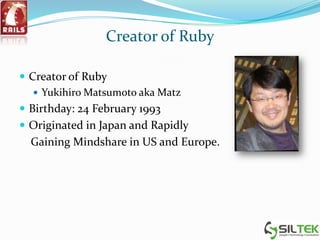
Creator of Ruby
 Creator of Ruby
 Yukihiro Matsumoto aka Matz
 Birthday: 24 February 1993
 Originated in Japan and Rapidly
Gaining Mindshare in US and Europe.
Presentation Agenda
 Brief overview of Ruby
 Rails Demonstration
 Description of Rails framework
 Questions and Answers
Why Ruby?
 Write more understandable code in less lines
 Free (Very open license)
 Extensible
What is Ruby?
Dynamic, high level, interpreted, pure object-orientated
language.
“Ruby is designed to make programmers happy”
Yukihiro Matsumoto aka Matz
What is Ruby?
 Ruby is a pure object-oriented programming language with a super
clean syntax that makes programming elegant and fun.
 In Ruby, everything is an object
 Ruby is an interpreted scripting language, just like Perl, Python and
PHP.
 Ruby successfully combines Smalltalk's conceptual elegance, Python's
ease of use and learning and Perl's pragmatism.
 Ruby is a metaprogramming language. Metaprogramming is a means
of writing software programs that write or manipulate other programs
thereby making coding faster and more reliable.
Ruby is Truly Object-Oriented
 All classes derived from Object including Class (like Java)
but there are no primitives (not like Java at all)
 Ruby uses single-inheritance
 Mixins give you the power of multiple inheritance
without the headaches
 Modules allow addition of behaviors to a class
 Reflection is built in along with lots of other highly
dynamic metadata features
 Things like ‘=‘ and ‘+’ that you might think are operators
are actually methods (like Smalltalk)
Dynamic Programming
 Duck Typing
Based on signatures, not class inheritance
 Dynamic Dispatch
A key concept of OOP: methods are actually messages that are
sent to an object instance
 Dynamic Behavior
 Reflection
 Scope Reopening (Kind of like AOP)
 Eval
 Breakpoint debugger
What about Ruby on Rails?
Terms and Concepts
 MVC (Model-View-Controller)
 Duck Typing
 DRY (Don’t Repeat Yourself)
 Convention Over Configuration
 Scaffolding
 Migrations
 Validations
 Associations
 Mailers
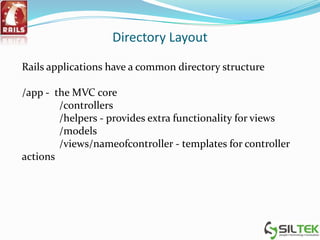
Directory Layout
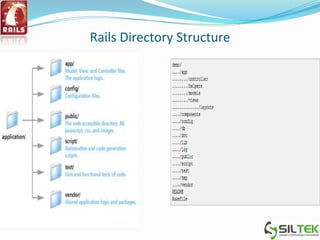
Rails applications have a common directory structure
/app - the MVC core
/controllers
/helpers - provides extra functionality for views
/models
/views/nameofcontroller - templates for controller
actions
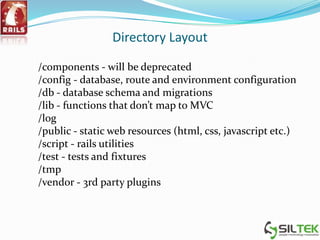
Directory Layout
/components - will be deprecated
/config - database, route and environment configuration
/db - database schema and migrations
/lib - functions that don’t map to MVC
/log
/public - static web resources (html, css, javascript etc.)
/script - rails utilities
/test - tests and fixtures
/tmp
/vendor - 3rd party plugins
Rails Directory Structure
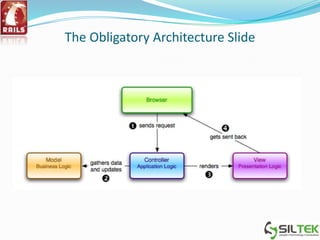
MVC Architecture
The Obligatory Architecture Slide
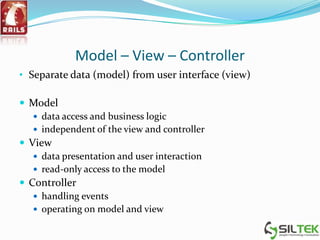
Model – View – Controller
• Separate data (model) from user interface (view)
 Model
 data access and business logic
 independent of the view and controller
 View
 data presentation and user interaction
 read-only access to the model
 Controller
 handling events
 operating on model and view
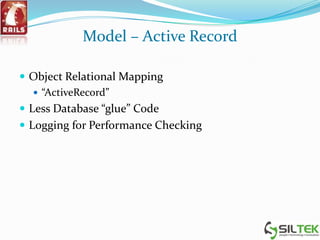
Model – Active Record
 Object Relational Mapping
 “ActiveRecord”
 Less Database “glue” Code
 Logging for Performance Checking
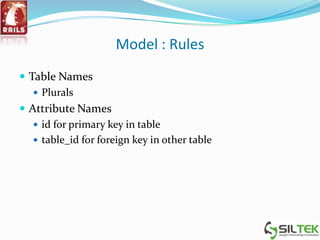
Model : Rules
 Table Names
 Plurals
 Attribute Names
 id for primary key in table
 table_id for foreign key in other table
View – Action View
 multiple template types
 oldest and basic: erb (embedded ruby), similar to e.g. jsp
 remote javascript templates
 xml templates
 easy reuse of view elements
 file inclusion – layouts, templates, partials
 multiple standard "helpers" – common html element
generators (e.g. form elements, paginators)
 easy AJAX integration
Controller : ActionController
 Method name matches view folder
 users_controller.rb works for /views/users/***.rhtml
 called “actions”
 all view’s methods will sit there
 Ability to
 CRUD
 Flash
 Redirect
Database Persistence
 OR mapping
 Active Record design pattern
 migrations
 incremental schema management
 multiple db adapters
 MySQL, PostgreSQL, SQLite, SQL Server, IBM DB2,
Informix, Oracle
Duck Typing in Ruby
 Objects are dynamic, and their types are determined at
runtime
 The type of a Ruby object is much less important than it’s
capabilities
 If a Ruby object walks like a duck and talks like a duck,
then it can be treated as a duck
Convention over Configuration
 fixed directory structure
 everything has its place – source
files, libs, plugins, database files, documentation etc
 file naming conventions
 e.g. camel case class name, underscore file name
 database naming conventions
 table names, primary and foreign keys
 standard configuration files
 e.g. database connections, environment setting
definitions (development, production, test)
DRY - Don’t Repeat Yourself
 reusing code
 e.g. view elements
 reusing data
 e.g. no need to declare table field names – can be read
from the database
 making each line of code work harder
 e.g. mini languages for specific domains
 object-relational mapping
 metaprogramming
 dynamically created methods
Rails Environment Modes
 Rails runs in different modes, depending on the parameters
given to the server on startup. Each mode defaults to it’s
own database schema
Development (verbose logging and error messages)
Test
Production
Web Servers
 Lighttpd
 Mongrel
 WEBrick
 Apache
RoR Databases
 Mysql
 Oracle
 Postgre Sql
 SqlLite
Scaffolding
 Rails can generate all the basic CRUD operations
for simple models via scaffolding.
 Scaffolding is temporary way to get applications
wired quickly.
 ruby script/generate scaffold_resource
bookmark url:string title:string
Migrations
 Rails uses migrations to version the database.
 Rails tries to minimize SQL at every opportunity
 Migrations are automatically created whenever you
generate a new model
 Migration files are located in db/migrations
 The version number is stored in a table called
schema_info
Running the Migration
 Rake is the general purpose build tool for
rails, much like make, or ant. It has many
functions, one of which is to control migrations.
 rake db:migrate
 Now the table has been created
Validations
 Rails has a number of validation helpers that can
be added to the model.
class Bookmark < ActiveRecord::Base
validates_presence_of :url, :title
end
Validations
 validates_presence_of
 validates_length_of
 validates_acceptance_of
 validates_confirmation_of
 validates_uniqueness_of
 validates_format_of
 validates_numericality_of
 validates_inclusion_in
 validates_exclusion_of
 validates_associated :relation
Associations
 Rails uses associations to build relationships
between tables
 Associations are independent of database foreign
key constraints
Types of Associations
 has_one
 belongs_to
 has_many
 has_and_belongs_to_many
 has_many :model1, :through => :model2
Mailers
 Action Mailer allows you to send emails from your
application using a mailer model and views. So, in
Rails, emails are used by creating models that
inherit from ActionMailer::Base that live alongside
other models in app/models. Those models have
associated views that appear alongside controller
views in app/views.
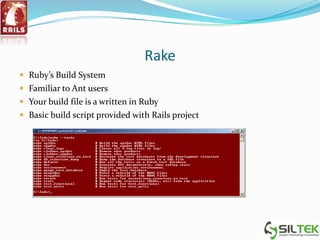
Rake
 Ruby’s Build System
 Familiar to Ant users
 Your build file is a written in Ruby
 Basic build script provided with Rails project
Recommended Rails reading
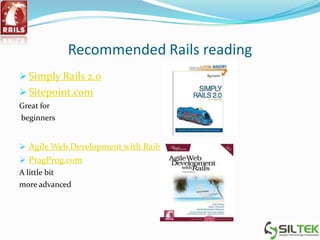
 Simply Rails 2.0
 Sitepoint.com
Great for
beginners
 Agile Web Development with Rails
 PragProg.com
A little bit
more advanced
Resources
 Ruby on Rails: Talk (Google Group)
 http://groups.google.com/group/rubyonrails-talk
 Railscasts (free Ruby on Rails screencasts)
 http://railscasts.com
 Peep Code (paid Rails-related screencasts)
 http://peepcode.com
 Phusion Passenger (easy deployment module)
 http://www.modrails.com
 Agile Web Development (plugin central)
 http://agilewebdevelopment.com/
Who uses Ruby on Rails?
References
 www.slideshare.net
 www.youtube.com
 www.google.com
 http://www.netbeans.org/kb/docs/ruby/rapid-ruby-
weblog.html
 http://guides.rails.info/getting_started.html
 www.rubyonrails.org
 http://www.tutorialspoint.com/ruby-on-rails-2.1
Ruby on rails for beginers

Ruby on rails for beginers

  • 1.
    Presentation to Siltek SoftwareSolutions (I) Pvt. Ltd.
  • 2.
    Why does RoRinterest us?  Learn “new” concepts and terms.  Look at “new” architecture.  Find out what is good and what is dubious.  May well come across RoR or a Rails-like framework in near future.  May want to learn an object-oriented language relatively painlessly.  RoR is easy to install, learn and use. You might want to try it out for yourself!
  • 3.
    Creator of Ruby Creator of Ruby  Yukihiro Matsumoto aka Matz  Birthday: 24 February 1993  Originated in Japan and Rapidly Gaining Mindshare in US and Europe.
  • 4.
    Presentation Agenda  Briefoverview of Ruby  Rails Demonstration  Description of Rails framework  Questions and Answers
  • 5.
    Why Ruby?  Writemore understandable code in less lines  Free (Very open license)  Extensible
  • 6.
    What is Ruby? Dynamic,high level, interpreted, pure object-orientated language. “Ruby is designed to make programmers happy” Yukihiro Matsumoto aka Matz
  • 7.
    What is Ruby? Ruby is a pure object-oriented programming language with a super clean syntax that makes programming elegant and fun.  In Ruby, everything is an object  Ruby is an interpreted scripting language, just like Perl, Python and PHP.  Ruby successfully combines Smalltalk's conceptual elegance, Python's ease of use and learning and Perl's pragmatism.  Ruby is a metaprogramming language. Metaprogramming is a means of writing software programs that write or manipulate other programs thereby making coding faster and more reliable.
  • 8.
    Ruby is TrulyObject-Oriented  All classes derived from Object including Class (like Java) but there are no primitives (not like Java at all)  Ruby uses single-inheritance  Mixins give you the power of multiple inheritance without the headaches  Modules allow addition of behaviors to a class  Reflection is built in along with lots of other highly dynamic metadata features  Things like ‘=‘ and ‘+’ that you might think are operators are actually methods (like Smalltalk)
  • 9.
    Dynamic Programming  DuckTyping Based on signatures, not class inheritance  Dynamic Dispatch A key concept of OOP: methods are actually messages that are sent to an object instance  Dynamic Behavior  Reflection  Scope Reopening (Kind of like AOP)  Eval  Breakpoint debugger
  • 10.
    What about Rubyon Rails?
  • 11.
    Terms and Concepts MVC (Model-View-Controller)  Duck Typing  DRY (Don’t Repeat Yourself)  Convention Over Configuration  Scaffolding  Migrations  Validations  Associations  Mailers
  • 12.
    Directory Layout Rails applicationshave a common directory structure /app - the MVC core /controllers /helpers - provides extra functionality for views /models /views/nameofcontroller - templates for controller actions
  • 13.
    Directory Layout /components -will be deprecated /config - database, route and environment configuration /db - database schema and migrations /lib - functions that don’t map to MVC /log /public - static web resources (html, css, javascript etc.) /script - rails utilities /test - tests and fixtures /tmp /vendor - 3rd party plugins
  • 14.
  • 15.
  • 16.
  • 17.
    Model – View– Controller • Separate data (model) from user interface (view)  Model  data access and business logic  independent of the view and controller  View  data presentation and user interaction  read-only access to the model  Controller  handling events  operating on model and view
  • 18.
    Model – ActiveRecord  Object Relational Mapping  “ActiveRecord”  Less Database “glue” Code  Logging for Performance Checking
  • 19.
    Model : Rules Table Names  Plurals  Attribute Names  id for primary key in table  table_id for foreign key in other table
  • 20.
    View – ActionView  multiple template types  oldest and basic: erb (embedded ruby), similar to e.g. jsp  remote javascript templates  xml templates  easy reuse of view elements  file inclusion – layouts, templates, partials  multiple standard "helpers" – common html element generators (e.g. form elements, paginators)  easy AJAX integration
  • 21.
    Controller : ActionController Method name matches view folder  users_controller.rb works for /views/users/***.rhtml  called “actions”  all view’s methods will sit there  Ability to  CRUD  Flash  Redirect
  • 22.
    Database Persistence  ORmapping  Active Record design pattern  migrations  incremental schema management  multiple db adapters  MySQL, PostgreSQL, SQLite, SQL Server, IBM DB2, Informix, Oracle
  • 23.
    Duck Typing inRuby  Objects are dynamic, and their types are determined at runtime  The type of a Ruby object is much less important than it’s capabilities  If a Ruby object walks like a duck and talks like a duck, then it can be treated as a duck
  • 24.
    Convention over Configuration fixed directory structure  everything has its place – source files, libs, plugins, database files, documentation etc  file naming conventions  e.g. camel case class name, underscore file name  database naming conventions  table names, primary and foreign keys  standard configuration files  e.g. database connections, environment setting definitions (development, production, test)
  • 25.
    DRY - Don’tRepeat Yourself  reusing code  e.g. view elements  reusing data  e.g. no need to declare table field names – can be read from the database  making each line of code work harder  e.g. mini languages for specific domains  object-relational mapping  metaprogramming  dynamically created methods
  • 26.
    Rails Environment Modes Rails runs in different modes, depending on the parameters given to the server on startup. Each mode defaults to it’s own database schema Development (verbose logging and error messages) Test Production
  • 27.
    Web Servers  Lighttpd Mongrel  WEBrick  Apache
  • 28.
    RoR Databases  Mysql Oracle  Postgre Sql  SqlLite
  • 29.
    Scaffolding  Rails cangenerate all the basic CRUD operations for simple models via scaffolding.  Scaffolding is temporary way to get applications wired quickly.  ruby script/generate scaffold_resource bookmark url:string title:string
  • 30.
    Migrations  Rails usesmigrations to version the database.  Rails tries to minimize SQL at every opportunity  Migrations are automatically created whenever you generate a new model  Migration files are located in db/migrations  The version number is stored in a table called schema_info
  • 31.
    Running the Migration Rake is the general purpose build tool for rails, much like make, or ant. It has many functions, one of which is to control migrations.  rake db:migrate  Now the table has been created
  • 32.
    Validations  Rails hasa number of validation helpers that can be added to the model. class Bookmark < ActiveRecord::Base validates_presence_of :url, :title end
  • 33.
    Validations  validates_presence_of  validates_length_of validates_acceptance_of  validates_confirmation_of  validates_uniqueness_of  validates_format_of  validates_numericality_of  validates_inclusion_in  validates_exclusion_of  validates_associated :relation
  • 34.
    Associations  Rails usesassociations to build relationships between tables  Associations are independent of database foreign key constraints
  • 35.
    Types of Associations has_one  belongs_to  has_many  has_and_belongs_to_many  has_many :model1, :through => :model2
  • 36.
    Mailers  Action Mailerallows you to send emails from your application using a mailer model and views. So, in Rails, emails are used by creating models that inherit from ActionMailer::Base that live alongside other models in app/models. Those models have associated views that appear alongside controller views in app/views.
  • 37.
    Rake  Ruby’s BuildSystem  Familiar to Ant users  Your build file is a written in Ruby  Basic build script provided with Rails project
  • 38.
    Recommended Rails reading Simply Rails 2.0  Sitepoint.com Great for beginners  Agile Web Development with Rails  PragProg.com A little bit more advanced
  • 39.
    Resources  Ruby onRails: Talk (Google Group)  http://groups.google.com/group/rubyonrails-talk  Railscasts (free Ruby on Rails screencasts)  http://railscasts.com  Peep Code (paid Rails-related screencasts)  http://peepcode.com  Phusion Passenger (easy deployment module)  http://www.modrails.com  Agile Web Development (plugin central)  http://agilewebdevelopment.com/
  • 40.
    Who uses Rubyon Rails?
  • 41.
    References  www.slideshare.net  www.youtube.com www.google.com  http://www.netbeans.org/kb/docs/ruby/rapid-ruby- weblog.html  http://guides.rails.info/getting_started.html  www.rubyonrails.org  http://www.tutorialspoint.com/ruby-on-rails-2.1