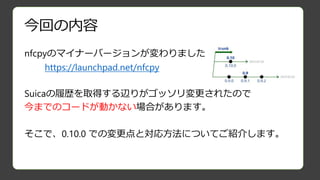
対応方法(0.10.0に移行する場合)
Before
After
data = tag.read([i],service_code)
# data は str型
print "" . join(['%02x ' % ord(s) for s in data])
sc = nfc.tag.tt3.ServiceCode(service_code >> 6 ,service_code & 0x3f)
bc = nfc.tag.tt3.BlockCode(i,service=0)
data = tag.read_without_encryption([sc],[bc])
# data は bytearray型
print "" . join(['%02x ' % s for s in data])
ポイント:
・従来のサービスコードから、上位10bit,下位6bitで分離してServiceCodeを生成する
・読出し用のメソッドは read_without_encryption
・結果は bytearray 型で返る
12.
対応方法(0.10.0に移行する場合)
Before After
import nfc
servicecode = 0x090f
num_blocks = 20
def connected(tag):
if isinstance(tag, nfc.tag.tt3.Type3Tag):
try:
for i in range(num_blocks):
sc = nfc.tag.tt3.ServiceCode(service_code >> 6 ,service_code & 0x1f)
bc = nfc.tag.tt3.BlockCode(i,service=0)
data = tag.read_without_encryption([sc],[bc])
# data は bytearray型
print "" . join(['%02x ' % s for s in data])
except Exception as e:
print "error: %s" % e
else:
print "error: tag isn't Type3Tag"
# 接続開始
clf = nfc.ContactlessFrontend('usb')
clf.connect(rdwr={'on-connect': connected})
import nfc
service code = 0x090f
num_blocks = 20
def connected(tag):
if isinstance(tag, nfc.tag.tt3.Type3Tag):
try:
for i in range(num_blocks):
data = tag.read ([i],service_code)
# data は str型
print "" . join(['%02x ' % ord(s) for s in data])
except Exception as e:
print "error: %s" % e
else:
print "error: tag isn't Type3Tag"
# 接続開始
clf = nfc.ContactlessFrontend('usb')
clf.connect(rdwr={'on-connect': connected})
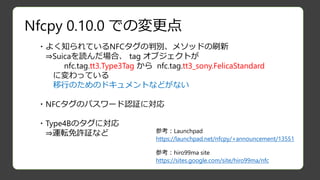
Suicaのデータを垂れ流すだけのコード

![Nfcpy 0.10.0 での変更点(詳細)
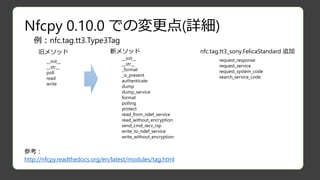
str nfc.tag.tt3.Type3Tag.read(int[] blockList, int serviceCode)
以前のデータ取得メソッド
bytearray nfc.tag.tt3.Type3Tag.read_without_encryption(
nfc.tag.tt3.ServiceCode[] blockList
, nfc.tag.tt3.BlockCode[] serviceCode
)
新しいデータ取得メソッド
nfc.tag.tt3.ServiceCode( number, attribute )
number : 16bitの serviceCodeの上位10bit で、service type
attribute : 16bitの serviceCodeの下位6bit で、アクセス権限
nfc.tag.tt3.BlockCode( number, access=0, service=0 )
number : データブロックの番号(suicaなら0~19)
access : 3bit の access mode
service : 4bit ServiceCodeリストのindex
nfcpy/nfc/tag/tt3.py
70行~ に定義](https://image.slidesharecdn.com/iotlt6nfcpy10-150819084629-lva1-app6892/85/nfcpy-0-10-0-9-320.jpg)
![対応方法(0.10.0に移行する場合)
Before
After
data = tag.read ([i],service_code)
# data は str型
print "" . join(['%02x ' % ord(s) for s in data])
sc = nfc.tag.tt3.ServiceCode(service_code >> 6 ,service_code & 0x3f)
bc = nfc.tag.tt3.BlockCode(i,service=0)
data = tag.read_without_encryption([sc],[bc])
# data は bytearray型
print "" . join(['%02x ' % s for s in data])
ポイント:
・従来のサービスコードから、上位10bit,下位6bitで分離してServiceCodeを生成する
・読出し用のメソッドは read_without_encryption
・結果は bytearray 型で返る](https://image.slidesharecdn.com/iotlt6nfcpy10-150819084629-lva1-app6892/85/nfcpy-0-10-0-11-320.jpg)
![対応方法(0.10.0に移行する場合)
Before After
import nfc
service code = 0x090f
num_blocks = 20
def connected(tag):
if isinstance(tag, nfc.tag.tt3.Type3Tag):
try:
for i in range(num_blocks):
sc = nfc.tag.tt3.ServiceCode(service_code >> 6 ,service_code & 0x1f)
bc = nfc.tag.tt3.BlockCode(i,service=0)
data = tag.read_without_encryption([sc],[bc])
# data は bytearray型
print "" . join(['%02x ' % s for s in data])
except Exception as e:
print "error: %s" % e
else:
print "error: tag isn't Type3Tag"
# 接続開始
clf = nfc.ContactlessFrontend('usb')
clf.connect(rdwr={'on-connect': connected})
import nfc
service code = 0x090f
num_blocks = 20
def connected(tag):
if isinstance(tag, nfc.tag.tt3.Type3Tag):
try:
for i in range(num_blocks):
data = tag.read ([i],service_code)
# data は str型
print "" . join(['%02x ' % ord(s) for s in data])
except Exception as e:
print "error: %s" % e
else:
print "error: tag isn't Type3Tag"
# 接続開始
clf = nfc.ContactlessFrontend('usb')
clf.connect(rdwr={'on-connect': connected})
Suicaのデータを垂れ流すだけのコード](https://image.slidesharecdn.com/iotlt6nfcpy10-150819084629-lva1-app6892/85/nfcpy-0-10-0-12-320.jpg)