NEXT.JS
Next.js is a flexible React framework that gives you building blocks to
create fast web applications.
1
Binumon Joseph, Assistant Professor
MASTERI
NG SERVER-SI
DE
RENDERI
NG WI
TH NEXT.JS:
A COMPREHENSIVE
TUTORIAL
Binumon Joseph, Assistant Professor 2
INTRODUCTION
Server-Side Rendering (SSR)is
a technique that allows your
web application to pre-render
HTML on a server,providing
faster load times and a better
user experience.In this tutorial,
we'll cover Next.js,a framework
for building server-rendered
React applications.
Binumon Joseph, Assistant Professor 3
WhyUseSSR?
SSR can improve SEO,performance,
and user experience. It allows search
engines to better crawl your site,
reduces the time to first paint,and
provides users with a fully rendered
page on the initial load. Next.js
simplifies the process of building
SSR applications.
Binumon Joseph, Assistant Professor 4
GETTINGSTARTEDWITHNEXT.JS
To get started with Next.js,you'll
need to install it and create a
new project.Next.js provides
several built-in features,such as
dynamic imports,automatic
code splitting,and server-side
rendering.You can also easily
add custom routes and API
endpoints.
Binumon Joseph, Assistant Professor 5
T
o build pages with Next.js,you'll
create a pages directory and add
React components for each page.
Next.js uses getI
nitialProps to
fetch data and render the page on
the server.You can also use
dynamic routing and static site
generation to optimize
performance.
BUILDINGPAGESWITHNEXT.JS
Binumon Joseph, Assistant Professor 6
Deploying
Your
Next.js
App
Next.js makes it easy to deploy
your app to Vercel,a cloud
platform for static and serverless
sites.Vercel provides automatic
SSL,custom domains,and
global CDN.You can also deploy
to other platforms such as
Heroku or AWS.
Binumon Joseph, Assistant Professor 7
DeployingYourNext.jsApp
Next.js provides a powerful framework for building
server-rendered React applications. By using SSR,
you can improve SEO, performance, and user
experience. With Next.js, you can easily create
dynamic routes, API endpoints, and deploy your app
to the cloud. Keep learning and building!
CONCLUSION
Binumon Joseph, Assistant Professor 8
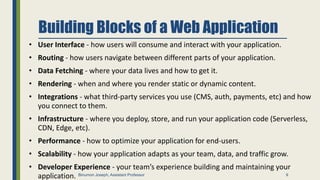
Building Blocks of a Web Application
• User Interface - how users will consume and interact with your application.
• Routing - how users navigate between different parts of your application.
• Data Fetching - where your data lives and how to get it.
• Rendering - when and where you render static or dynamic content.
• Integrations - what third-party services you use (CMS, auth, payments, etc) and how
you connect to them.
• Infrastructure - where you deploy, store, and run your application code (Serverless,
CDN, Edge, etc).
• Performance - how to optimize your application for end-users.
• Scalability - how your application adapts as your team, data, and traffic grow.
• Developer Experience - your team’s experience building and maintaining your
application. 9
Binumon Joseph, Assistant Professor
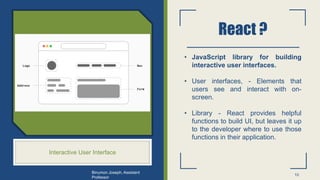
React ?
Interactive User Interface
• JavaScript library for building
interactive user interfaces.
• User interfaces, - Elements that
users see and interact with on-
screen.
• Library - React provides helpful
functions to build UI, but leaves it up
to the developer where to use those
functions in their application.
10
Binumon Joseph, Assistant
Professor
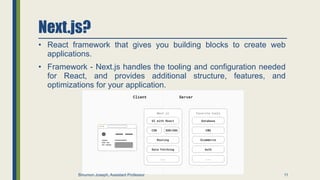
Next.js?
• React framework that gives you building blocks to create web
applications.
• Framework - Next.js handles the tooling and configuration needed
for React, and provides additional structure, features, and
optimizations for your application.
11
Binumon Joseph, Assistant Professor
From JavaScript to React
12
Binumon Joseph, Assistant Professor
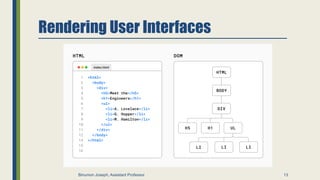
Rendering User Interfaces
13
Binumon Joseph, Assistant Professor
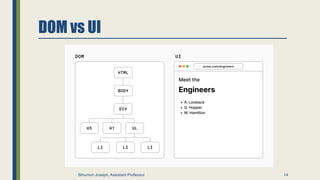
DOM vs UI
14
Binumon Joseph, Assistant Professor
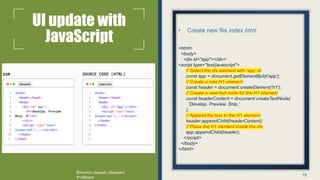
UI update with
JavaScript
• Create new file index.html
<html>
<body>
<div id="app"></div>
<script type="text/javascript">
// Select the div element with 'app' id
const app = document.getElementById('app');
// Create a new H1 element
const header = document.createElement('h1');
// Create a new text node for the H1 element
const headerContent = document.createTextNode(
'Develop. Preview. Ship.',
);
// Append the text to the H1 element
header.appendChild(headerContent);
// Place the H1 element inside the div
app.appendChild(header);
</script>
</body>
</html>
15
Binumon Joseph, Assistant
Professor
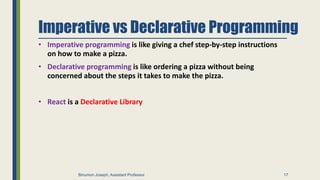
Imperative vs Declarative Programming
• Imperative programming is like giving a chef step-by-step instructions
on how to make a pizza.
• Declarative programming is like ordering a pizza without being
concerned about the steps it takes to make the pizza.
• React is a Declarative Library
16
Binumon Joseph, Assistant Professor
Imperative vs Declarative Programming
• Imperative programming is like giving a chef step-by-step instructions
on how to make a pizza.
• Declarative programming is like ordering a pizza without being
concerned about the steps it takes to make the pizza.
• React is a Declarative Library
17
Binumon Joseph, Assistant Professor
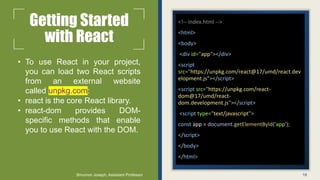
Getting Started
with React
• To use React in your project,
you can load two React scripts
from an external website
called unpkg.com:
• react is the core React library.
• react-dom provides DOM-
specific methods that enable
you to use React with the DOM.
<!-- index.html -->
<html>
<body>
<div id="app"></div>
<script
src="https://unpkg.com/react@17/umd/react.dev
elopment.js"></script>
<script src="https://unpkg.com/react-
dom@17/umd/react-
dom.development.js"></script>
<script type="text/javascript">
const app = document.getElementById('app');
</script>
</body>
</html>
18
Binumon Joseph, Assistant Professor
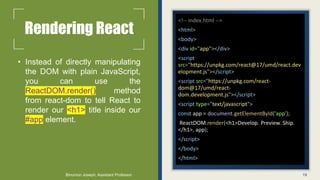
Rendering React
• Instead of directly manipulating
the DOM with plain JavaScript,
you can use the
ReactDOM.render() method
from react-dom to tell React to
render our <h1> title inside our
#app element.
<!-- index.html -->
<html>
<body>
<div id="app"></div>
<script
src="https://unpkg.com/react@17/umd/react.dev
elopment.js"></script>
<script src="https://unpkg.com/react-
dom@17/umd/react-
dom.development.js"></script>
<script type="text/javascript">
const app = document.getElementById('app');
ReactDOM.render(<h1>Develop. Preview. Ship.
</h1>, app);
</script>
</body>
</html>
19
Binumon Joseph, Assistant Professor
JSX- JavaScript
Syntax Extension
• JSX is a syntax extension for JavaScript
that allows you to describe your UI in a
familiar HTML-like syntax.
• The nice thing about JSX is that apart from
following three JSX rules, you don’t need
to learn any new symbols or syntax outside
of HTML and JavaScript.
• Note that browsers don’t understand JSX
out of the box, so you’ll need a JavaScript
compiler, such as a Babel, to transform
your JSX code into regular JavaScript.
<html>
<body>
<div id="app"></div>
<script
src="https://unpkg.com/react@17/umd/react.developm
ent.js"></script>
<script src="https://unpkg.com/react-
dom@17/umd/react-dom.development.js"></script>
<!-- Babel Script -->
<script
src="https://unpkg.com/@babel/standalone/babel.min.j
s"></script>
<script type="text/jsx">
const app = document.getElementById('app');
ReactDOM.render(<h1>Develop. Preview. Ship. </h1>,
app);
</script>
</body>
</html>
20
Binumon Joseph, Assistant Professor
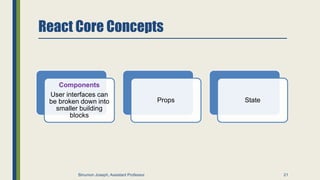
React Core Concepts
Components
User interfaces can
be broken down into
smaller building
blocks
Props State
21
Binumon Joseph, Assistant Professor
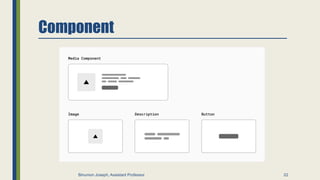
Component
22
Binumon Joseph, Assistant Professor
Component
• Creating components
• In React, components are functions. Inside
your script tag, write a function called
Header
<html>
<body>
<div id="app"></div>
<script
src="https://unpkg.com/react@17/umd/react.development.js">
</script>
<script src="https://unpkg.com/react-dom@17/umd/react-
dom.development.js"></script>
<script
src="https://unpkg.com/@babel/standalone/babel.min.js"></scr
ipt>
<script type="text/jsx">
const app = document.getElementById('app');
function Header() {
return <h1>Develop. Preview. Ship. </h1>;
}
ReactDOM.render(<Header />, app);
</script>
</body>
</html>
23
Binumon Joseph, Assistant Professor
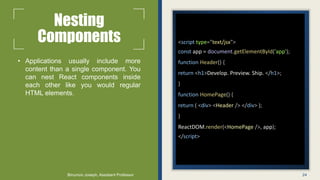
Nesting
Components
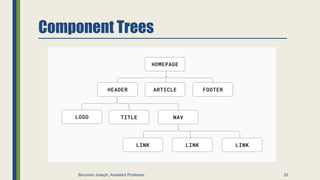
• Applications usually include more
content than a single component. You
can nest React components inside
each other like you would regular
HTML elements.
<script type="text/jsx">
const app = document.getElementById('app');
function Header() {
return <h1>Develop. Preview. Ship. </h1>;
}
function HomePage() {
return ( <div> <Header /> </div> );
}
ReactDOM.render(<HomePage />, app);
</script>
24
Binumon Joseph, Assistant Professor
Component Trees
25
Binumon Joseph, Assistant Professor
Displaying Data with Props
• Regular HTML elements have attributes that you can use to pass
pieces of information that change the behavior of those elements.
For example, changing the src attribute of an <img> element
changes the image that is shown. Changing the href attribute of an
<a> tag changes the destination of the link.
• In the same way, you can pass pieces of information as properties
to React components. These are called props.
26
Binumon Joseph, Assistant Professor
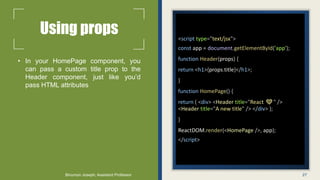
Using props
• In your HomePage component, you
can pass a custom title prop to the
Header component, just like you’d
pass HTML attributes
<script type="text/jsx">
const app = document.getElementById('app');
function Header(props) {
return <h1>{props.title}</h1>;
}
function HomePage() {
return ( <div> <Header title="React 💙" />
<Header title="A new title" /> </div> );
}
ReactDOM.render(<HomePage />, app);
</script>
27
Binumon Joseph, Assistant Professor
Iterating through
lists
• It’s common to have data that you
need to show as a list. You can use
array methods to manipulate your data
and generate UI elements that are
identical in style but hold different
pieces of information.
function HomePage() {
const names = ['Ada Lovelace', 'Grace Hopper',
'Margaret Hamilton’];
return (
<div>
<Header title="Develop. Preview. Ship. " />
<ul>
{names.map((name) => (
<li key={name}>{name}</li>
))}
</ul>
</div>
);
}
28
Binumon Joseph, Assistant Professor
Adding Interactivity with State
• Listening to Events
• Handling Events
• State and Hooks
29
Binumon Joseph, Assistant Professor
State
• Listening to Events
• Handling Events
• State and Hooks
function HomePage() {
const [likes, setLikes] = React.useState(0);
function handleClick() {
setLikes(likes + 1);
}
return ( <div> {/* ... */}
<button onClick={handleClick}>Likes
({likes})</button>
</div> );
}
30
Binumon Joseph, Assistant Professor
From React to Next.js
31
Binumon Joseph, Assistant Professor
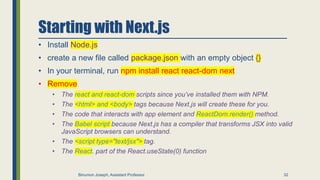
Starting with Next.js
• Install Node.js
• create a new file called package.json with an empty object {}
• In your terminal, run npm install react react-dom next
• Remove
• The react and react-dom scripts since you’ve installed them with NPM.
• The <html> and <body> tags because Next.js will create these for you.
• The code that interacts with app element and ReactDom.render() method.
• The Babel script because Next.js has a compiler that transforms JSX into valid
JavaScript browsers can understand.
• The <script type="text/jsx"> tag.
• The React. part of the React.useState(0) function
32
Binumon Joseph, Assistant Professor
// index.html
import { useState } from 'react’;
function Header({ title }) {
return <h1>{title ? title : 'Default
title'}</h1>;
}
function HomePage() {
const names = ['Ada Lovelace', 'Grace
Hopper', 'Margaret Hamilton’];
const [likes, setLikes] = useState(0);
function handleClick() {
setLikes(likes + 1);
}
return ( <div> <Header title="Develop.
Preview. Ship. " />
<ul>
{names.map((name) => (
<li key={name}>{name}</li>
))}
</ul>
<button onClick={handleClick}>Like
({likes})</button> </div>
);
}
33
Binumon Joseph, Assistant Professor
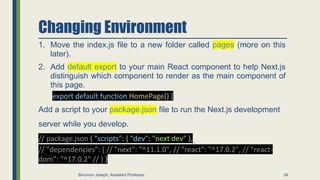
Changing Environment
1. Move the index.js file to a new folder called pages (more on this
later).
2. Add default export to your main React component to help Next.js
distinguish which component to render as the main component of
this page.
export default function HomePage() {
Add a script to your package.json file to run the Next.js development
server while you develop.
// package.json { "scripts": { "dev": "next dev" },
// "dependencies": { // "next": "^11.1.0", // "react": "^17.0.2", // "react-
dom": "^17.0.2" // } }
34
Binumon Joseph, Assistant Professor
Running the development server
import { useState } from 'react’;
function Header({ title }) {
return <h1>{title ? title : 'Default title'}</h1>;
}
export default function HomePage() {
const names = ['Ada Lovelace', 'Grace Hopper', 'Margaret Hamilton’];
const [likes, setLikes] = useState(0);
function handleClick() {
setLikes(likes + 1);
}
return ( <div> <Header title="Develop. Preview. Ship. " />
<ul>
{names.map((name) => (
<li key={name}>{name}</li>
))}
</ul>
<button onClick={handleClick}>Like ({likes})</button>
</div> );
}
npm run dev
35
Binumon Joseph, Assistant Professor
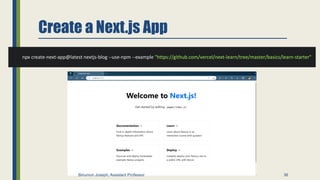
Create a Next.js App
npx create-next-app@latest nextjs-blog --use-npm --example "https://github.com/vercel/next-learn/tree/master/basics/learn-starter"
36
Binumon Joseph, Assistant Professor
Link Component
• On your pages/index.js
• To include link
<Link href="/posts/first-post">this page!</Link>
import Link from 'next/link';
37
Binumon Joseph, Assistant Professor
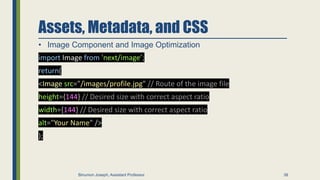
Assets, Metadata, and CSS
• Image Component and Image Optimization
import Image from 'next/image’;
return(
<Image src="/images/profile.jpg" // Route of the image file
height={144} // Desired size with correct aspect ratio
width={144} // Desired size with correct aspect ratio
alt="Your Name" />
);
38
Binumon Joseph, Assistant Professor
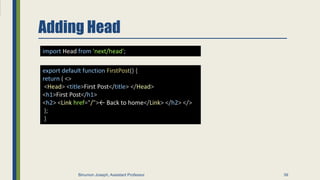
Adding Head
39
import Head from 'next/head';
export default function FirstPost() {
return ( <>
<Head> <title>First Post</title> </Head>
<h1>First Post</h1>
<h2> <Link href="/">← Back to home</Link> </h2> </>
);
}
Binumon Joseph, Assistant Professor
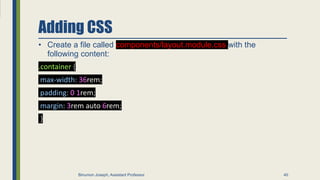
Adding CSS
• Create a file called components/layout.module.css with the
following content:
.container {
max-width: 36rem;
padding: 0 1rem;
margin: 3rem auto 6rem;
}
40
Binumon Joseph, Assistant Professor
Adding CSS
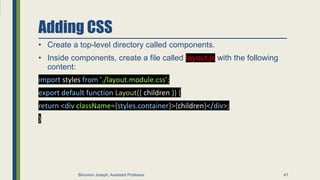
• Create a top-level directory called components.
• Inside components, create a file called layout.js with the following
content:
import styles from './layout.module.css’;
export default function Layout({ children }) {
return <div className={styles.container}>{children}</div>;
}
41
Binumon Joseph, Assistant Professor
Adding CSS
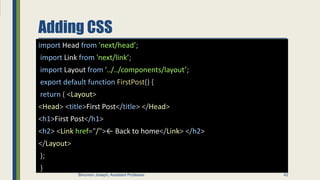
import Head from 'next/head’;
import Link from 'next/link’;
import Layout from '../../components/layout’;
export default function FirstPost() {
return ( <Layout>
<Head> <title>First Post</title> </Head>
<h1>First Post</h1>
<h2> <Link href="/">← Back to home</Link> </h2>
</Layout>
);
}
42
Binumon Joseph, Assistant Professor
THANKS
Do you have any questions?
binumonjosephk@amaljyothi.ac.in
+
919539 373 1
71
Binumon Joseph, Assistant Professor 43

NEXT.JS

  • 1.
    NEXT.JS Next.js is aflexible React framework that gives you building blocks to create fast web applications. 1 Binumon Joseph, Assistant Professor
  • 2.
    MASTERI NG SERVER-SI DE RENDERI NG WI THNEXT.JS: A COMPREHENSIVE TUTORIAL Binumon Joseph, Assistant Professor 2
  • 3.
    INTRODUCTION Server-Side Rendering (SSR)is atechnique that allows your web application to pre-render HTML on a server,providing faster load times and a better user experience.In this tutorial, we'll cover Next.js,a framework for building server-rendered React applications. Binumon Joseph, Assistant Professor 3
  • 4.
    WhyUseSSR? SSR can improveSEO,performance, and user experience. It allows search engines to better crawl your site, reduces the time to first paint,and provides users with a fully rendered page on the initial load. Next.js simplifies the process of building SSR applications. Binumon Joseph, Assistant Professor 4
  • 5.
    GETTINGSTARTEDWITHNEXT.JS To get startedwith Next.js,you'll need to install it and create a new project.Next.js provides several built-in features,such as dynamic imports,automatic code splitting,and server-side rendering.You can also easily add custom routes and API endpoints. Binumon Joseph, Assistant Professor 5
  • 6.
    T o build pageswith Next.js,you'll create a pages directory and add React components for each page. Next.js uses getI nitialProps to fetch data and render the page on the server.You can also use dynamic routing and static site generation to optimize performance. BUILDINGPAGESWITHNEXT.JS Binumon Joseph, Assistant Professor 6
  • 7.
    Deploying Your Next.js App Next.js makes iteasy to deploy your app to Vercel,a cloud platform for static and serverless sites.Vercel provides automatic SSL,custom domains,and global CDN.You can also deploy to other platforms such as Heroku or AWS. Binumon Joseph, Assistant Professor 7 DeployingYourNext.jsApp
  • 8.
    Next.js provides apowerful framework for building server-rendered React applications. By using SSR, you can improve SEO, performance, and user experience. With Next.js, you can easily create dynamic routes, API endpoints, and deploy your app to the cloud. Keep learning and building! CONCLUSION Binumon Joseph, Assistant Professor 8
  • 9.
    Building Blocks ofa Web Application • User Interface - how users will consume and interact with your application. • Routing - how users navigate between different parts of your application. • Data Fetching - where your data lives and how to get it. • Rendering - when and where you render static or dynamic content. • Integrations - what third-party services you use (CMS, auth, payments, etc) and how you connect to them. • Infrastructure - where you deploy, store, and run your application code (Serverless, CDN, Edge, etc). • Performance - how to optimize your application for end-users. • Scalability - how your application adapts as your team, data, and traffic grow. • Developer Experience - your team’s experience building and maintaining your application. 9 Binumon Joseph, Assistant Professor
  • 10.
    React ? Interactive UserInterface • JavaScript library for building interactive user interfaces. • User interfaces, - Elements that users see and interact with on- screen. • Library - React provides helpful functions to build UI, but leaves it up to the developer where to use those functions in their application. 10 Binumon Joseph, Assistant Professor
  • 11.
    Next.js? • React frameworkthat gives you building blocks to create web applications. • Framework - Next.js handles the tooling and configuration needed for React, and provides additional structure, features, and optimizations for your application. 11 Binumon Joseph, Assistant Professor
  • 12.
    From JavaScript toReact 12 Binumon Joseph, Assistant Professor
  • 13.
    Rendering User Interfaces 13 BinumonJoseph, Assistant Professor
  • 14.
    DOM vs UI 14 BinumonJoseph, Assistant Professor
  • 15.
    UI update with JavaScript •Create new file index.html <html> <body> <div id="app"></div> <script type="text/javascript"> // Select the div element with 'app' id const app = document.getElementById('app'); // Create a new H1 element const header = document.createElement('h1'); // Create a new text node for the H1 element const headerContent = document.createTextNode( 'Develop. Preview. Ship.', ); // Append the text to the H1 element header.appendChild(headerContent); // Place the H1 element inside the div app.appendChild(header); </script> </body> </html> 15 Binumon Joseph, Assistant Professor
  • 16.
    Imperative vs DeclarativeProgramming • Imperative programming is like giving a chef step-by-step instructions on how to make a pizza. • Declarative programming is like ordering a pizza without being concerned about the steps it takes to make the pizza. • React is a Declarative Library 16 Binumon Joseph, Assistant Professor
  • 17.
    Imperative vs DeclarativeProgramming • Imperative programming is like giving a chef step-by-step instructions on how to make a pizza. • Declarative programming is like ordering a pizza without being concerned about the steps it takes to make the pizza. • React is a Declarative Library 17 Binumon Joseph, Assistant Professor
  • 18.
    Getting Started with React •To use React in your project, you can load two React scripts from an external website called unpkg.com: • react is the core React library. • react-dom provides DOM- specific methods that enable you to use React with the DOM. <!-- index.html --> <html> <body> <div id="app"></div> <script src="https://unpkg.com/react@17/umd/react.dev elopment.js"></script> <script src="https://unpkg.com/react- dom@17/umd/react- dom.development.js"></script> <script type="text/javascript"> const app = document.getElementById('app'); </script> </body> </html> 18 Binumon Joseph, Assistant Professor
  • 19.
    Rendering React • Insteadof directly manipulating the DOM with plain JavaScript, you can use the ReactDOM.render() method from react-dom to tell React to render our <h1> title inside our #app element. <!-- index.html --> <html> <body> <div id="app"></div> <script src="https://unpkg.com/react@17/umd/react.dev elopment.js"></script> <script src="https://unpkg.com/react- dom@17/umd/react- dom.development.js"></script> <script type="text/javascript"> const app = document.getElementById('app'); ReactDOM.render(<h1>Develop. Preview. Ship. </h1>, app); </script> </body> </html> 19 Binumon Joseph, Assistant Professor
  • 20.
    JSX- JavaScript Syntax Extension •JSX is a syntax extension for JavaScript that allows you to describe your UI in a familiar HTML-like syntax. • The nice thing about JSX is that apart from following three JSX rules, you don’t need to learn any new symbols or syntax outside of HTML and JavaScript. • Note that browsers don’t understand JSX out of the box, so you’ll need a JavaScript compiler, such as a Babel, to transform your JSX code into regular JavaScript. <html> <body> <div id="app"></div> <script src="https://unpkg.com/react@17/umd/react.developm ent.js"></script> <script src="https://unpkg.com/react- dom@17/umd/react-dom.development.js"></script> <!-- Babel Script --> <script src="https://unpkg.com/@babel/standalone/babel.min.j s"></script> <script type="text/jsx"> const app = document.getElementById('app'); ReactDOM.render(<h1>Develop. Preview. Ship. </h1>, app); </script> </body> </html> 20 Binumon Joseph, Assistant Professor
  • 21.
    React Core Concepts Components Userinterfaces can be broken down into smaller building blocks Props State 21 Binumon Joseph, Assistant Professor
  • 22.
  • 23.
    Component • Creating components •In React, components are functions. Inside your script tag, write a function called Header <html> <body> <div id="app"></div> <script src="https://unpkg.com/react@17/umd/react.development.js"> </script> <script src="https://unpkg.com/react-dom@17/umd/react- dom.development.js"></script> <script src="https://unpkg.com/@babel/standalone/babel.min.js"></scr ipt> <script type="text/jsx"> const app = document.getElementById('app'); function Header() { return <h1>Develop. Preview. Ship. </h1>; } ReactDOM.render(<Header />, app); </script> </body> </html> 23 Binumon Joseph, Assistant Professor
  • 24.
    Nesting Components • Applications usuallyinclude more content than a single component. You can nest React components inside each other like you would regular HTML elements. <script type="text/jsx"> const app = document.getElementById('app'); function Header() { return <h1>Develop. Preview. Ship. </h1>; } function HomePage() { return ( <div> <Header /> </div> ); } ReactDOM.render(<HomePage />, app); </script> 24 Binumon Joseph, Assistant Professor
  • 25.
  • 26.
    Displaying Data withProps • Regular HTML elements have attributes that you can use to pass pieces of information that change the behavior of those elements. For example, changing the src attribute of an <img> element changes the image that is shown. Changing the href attribute of an <a> tag changes the destination of the link. • In the same way, you can pass pieces of information as properties to React components. These are called props. 26 Binumon Joseph, Assistant Professor
  • 27.
    Using props • Inyour HomePage component, you can pass a custom title prop to the Header component, just like you’d pass HTML attributes <script type="text/jsx"> const app = document.getElementById('app'); function Header(props) { return <h1>{props.title}</h1>; } function HomePage() { return ( <div> <Header title="React 💙" /> <Header title="A new title" /> </div> ); } ReactDOM.render(<HomePage />, app); </script> 27 Binumon Joseph, Assistant Professor
  • 28.
    Iterating through lists • It’scommon to have data that you need to show as a list. You can use array methods to manipulate your data and generate UI elements that are identical in style but hold different pieces of information. function HomePage() { const names = ['Ada Lovelace', 'Grace Hopper', 'Margaret Hamilton’]; return ( <div> <Header title="Develop. Preview. Ship. " /> <ul> {names.map((name) => ( <li key={name}>{name}</li> ))} </ul> </div> ); } 28 Binumon Joseph, Assistant Professor
  • 29.
    Adding Interactivity withState • Listening to Events • Handling Events • State and Hooks 29 Binumon Joseph, Assistant Professor
  • 30.
    State • Listening toEvents • Handling Events • State and Hooks function HomePage() { const [likes, setLikes] = React.useState(0); function handleClick() { setLikes(likes + 1); } return ( <div> {/* ... */} <button onClick={handleClick}>Likes ({likes})</button> </div> ); } 30 Binumon Joseph, Assistant Professor
  • 31.
    From React toNext.js 31 Binumon Joseph, Assistant Professor
  • 32.
    Starting with Next.js •Install Node.js • create a new file called package.json with an empty object {} • In your terminal, run npm install react react-dom next • Remove • The react and react-dom scripts since you’ve installed them with NPM. • The <html> and <body> tags because Next.js will create these for you. • The code that interacts with app element and ReactDom.render() method. • The Babel script because Next.js has a compiler that transforms JSX into valid JavaScript browsers can understand. • The <script type="text/jsx"> tag. • The React. part of the React.useState(0) function 32 Binumon Joseph, Assistant Professor
  • 33.
    // index.html import {useState } from 'react’; function Header({ title }) { return <h1>{title ? title : 'Default title'}</h1>; } function HomePage() { const names = ['Ada Lovelace', 'Grace Hopper', 'Margaret Hamilton’]; const [likes, setLikes] = useState(0); function handleClick() { setLikes(likes + 1); } return ( <div> <Header title="Develop. Preview. Ship. " /> <ul> {names.map((name) => ( <li key={name}>{name}</li> ))} </ul> <button onClick={handleClick}>Like ({likes})</button> </div> ); } 33 Binumon Joseph, Assistant Professor
  • 34.
    Changing Environment 1. Movethe index.js file to a new folder called pages (more on this later). 2. Add default export to your main React component to help Next.js distinguish which component to render as the main component of this page. export default function HomePage() { Add a script to your package.json file to run the Next.js development server while you develop. // package.json { "scripts": { "dev": "next dev" }, // "dependencies": { // "next": "^11.1.0", // "react": "^17.0.2", // "react- dom": "^17.0.2" // } } 34 Binumon Joseph, Assistant Professor
  • 35.
    Running the developmentserver import { useState } from 'react’; function Header({ title }) { return <h1>{title ? title : 'Default title'}</h1>; } export default function HomePage() { const names = ['Ada Lovelace', 'Grace Hopper', 'Margaret Hamilton’]; const [likes, setLikes] = useState(0); function handleClick() { setLikes(likes + 1); } return ( <div> <Header title="Develop. Preview. Ship. " /> <ul> {names.map((name) => ( <li key={name}>{name}</li> ))} </ul> <button onClick={handleClick}>Like ({likes})</button> </div> ); } npm run dev 35 Binumon Joseph, Assistant Professor
  • 36.
    Create a Next.jsApp npx create-next-app@latest nextjs-blog --use-npm --example "https://github.com/vercel/next-learn/tree/master/basics/learn-starter" 36 Binumon Joseph, Assistant Professor
  • 37.
    Link Component • Onyour pages/index.js • To include link <Link href="/posts/first-post">this page!</Link> import Link from 'next/link'; 37 Binumon Joseph, Assistant Professor
  • 38.
    Assets, Metadata, andCSS • Image Component and Image Optimization import Image from 'next/image’; return( <Image src="/images/profile.jpg" // Route of the image file height={144} // Desired size with correct aspect ratio width={144} // Desired size with correct aspect ratio alt="Your Name" /> ); 38 Binumon Joseph, Assistant Professor
  • 39.
    Adding Head 39 import Headfrom 'next/head'; export default function FirstPost() { return ( <> <Head> <title>First Post</title> </Head> <h1>First Post</h1> <h2> <Link href="/">← Back to home</Link> </h2> </> ); } Binumon Joseph, Assistant Professor
  • 40.
    Adding CSS • Createa file called components/layout.module.css with the following content: .container { max-width: 36rem; padding: 0 1rem; margin: 3rem auto 6rem; } 40 Binumon Joseph, Assistant Professor
  • 41.
    Adding CSS • Createa top-level directory called components. • Inside components, create a file called layout.js with the following content: import styles from './layout.module.css’; export default function Layout({ children }) { return <div className={styles.container}>{children}</div>; } 41 Binumon Joseph, Assistant Professor
  • 42.
    Adding CSS import Headfrom 'next/head’; import Link from 'next/link’; import Layout from '../../components/layout’; export default function FirstPost() { return ( <Layout> <Head> <title>First Post</title> </Head> <h1>First Post</h1> <h2> <Link href="/">← Back to home</Link> </h2> </Layout> ); } 42 Binumon Joseph, Assistant Professor
  • 43.
    THANKS Do you haveany questions? binumonjosephk@amaljyothi.ac.in + 919539 373 1 71 Binumon Joseph, Assistant Professor 43