© Instil Software 2017
October 2017
eamonn.boyle@instil.coeamonn.boyle@instil.cogarth.gilmour@instil.co | eamonn.boyle@instil.co
ASP .NET Core
New SPA Templates
© Instil Software 2017
• I want new people on-boarded as quickly as possible
• I want to be able to add new features easily
• I want computers to do most of my work for me
• I don’t want the headache and hassle of bugs
Who am I?
© Instil Software 2017
Release Notes
• Razor Pages
• Single ASP .NET Core & EF Core meta-package
• Microsoft.AspNetCore.All
• Uses the Runtime Store
• Minor API Changes
• Logging, Configuration, WebBuilder
• Major API Changes
• Authentication, Identity, WebListener-> Http.sys
• New Single Page Application (SPA) Templates
• React [+ Redux], Angular and more
• Major Kestrel Updates – Internet Facing Supported
• Razor Pre-compilation
• And more…
ASP .NET Core 2.0
© Instil Software 2017
Release Notes
• Razor Pages
• Single ASP .NET Core & EF Core meta-package
• Microsoft.AspNetCore.All
• Uses the Runtime Store
• Minor API Changes
• Logging, Configuration, WebBuilder
• Major API Changes
• Authentication, Identity, WebListener-> Http.sys
• New Single Page Application (SPA) Templates
• React [+ Redux], Angular
• Major Kestrel Updates – Internet Facing Supported
• Razor Pre-compilation
• And more…
ASP .NET Core 2.0
© Instil Software 2017
Web Applications originally relied heavily on server side rendering:
Pros
• Templating frameworks easy for basic content
• Encapsulates business logic
• Small initial downloads for user/browser
• Works well with SEO
Cons
• Limited user experience -> Page Refreshes
• Over time, more data transferred – feels slower
• Heavy load on server
Server Side Rendering
© Instil Software 2017
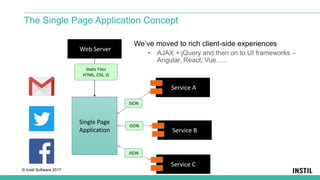
The Single Page Application Concept
Service A
Service B
Service C
Single Page
Application
JSON
JSON
JSON
Web Server
Static Files
HTML, CSS, JS
We’ve moved to rich client-side experiences
• AJAX + jQuery and then on to UI frameworks –
Angular, React, Vue…..
© Instil Software 2017
Pros
• Separation of Concerns – Client-Server
• Very rich UX
• Only data transferred during interaction
• Lower load on server
• Easy deployment – static files
Cons
• Slow initial load – vendor download
• Does not play well with SEO
• Complex build mechanism
• Complex content definition
Single Page Application (SPA)
© Instil Software 2017
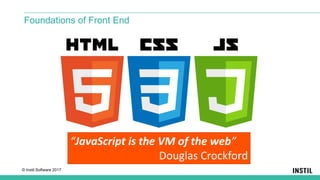
Foundations of Front End
“JavaScript is the VM of the web”
Douglas Crockford
© Instil Software 2017
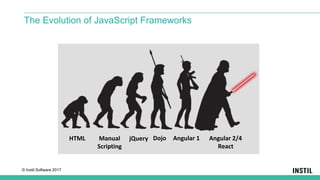
The Evolution of JavaScript Frameworks
Angular 2/4
React
Angular 1DojojQueryManual
Scripting
HTML
© Instil Software 2017
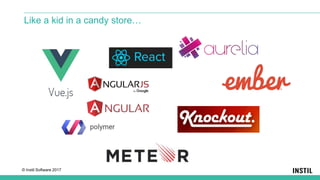
Like a kid in a candy store…
© Instil Software 2017
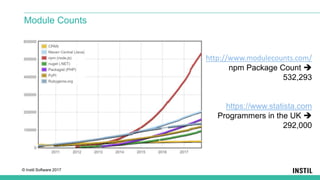
Module Counts
http://www.modulecounts.com/
npm Package Count 
532,293
https://www.statista.com
Programmers in the UK 
292,000
© Instil Software 2017
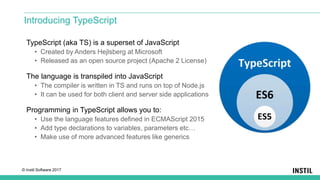
TypeScript (aka TS) is a superset of JavaScript
• Created by Anders Hejlsberg at Microsoft
• Released as an open source project (Apache 2 License)
The language is transpiled into JavaScript
• The compiler is written in TS and runs on top of Node.js
• It can be used for both client and server side applications
Programming in TypeScript allows you to:
• Use the language features defined in ECMAScript 2015
• Add type declarations to variables, parameters etc…
• Make use of more advanced features like generics
Introducing TypeScript
© Instil Software 2017
JavaScriptServices is a series of packages for using client-side technologies
• Microsoft.AspNetCore.NodeServices
• Microsoft.AspNetCore.SpaServices
• Microsoft.AspNetCore.SpaTemplates
Useful when
• Run JavaScript on the server
• Use a SPA framework or library
• Build client-side assets with Webpack
JavaScriptServices
© Instil Software 2017
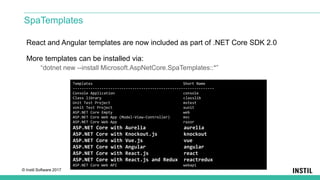
React and Angular templates are now included as part of .NET Core SDK 2.0
More templates can be installed via:
“dotnet new --install Microsoft.AspNetCore.SpaTemplates::*”
SpaTemplates
Templates Short Name
----------------------------------------------------------------
Console Application console
Class library classlib
Unit Test Project mstest
xUnit Test Project xunit
ASP.NET Core Empty web
ASP.NET Core Web App (Model-View-Controller) mvc
ASP.NET Core Web App razor
ASP.NET Core with Aurelia aurelia
ASP.NET Core with Knockout.js knockout
ASP.NET Core with Vue.js vue
ASP.NET Core with Angular angular
ASP.NET Core with React.js react
ASP.NET Core with React.js and Redux reactredux
ASP.NET Core Web API webapi
© Instil Software 2017
A TypeScript based web app platform
• Open source – led by team at Google
• Replaces AngularJS
• Provides services for UI, communication, DI etc
UI decomposed into components
• Follows an MVC pattern
• HTML for the View – annotated with special directives
• Component localised CSS for styling
• TypeScript for component Code Behind
• Augmented with other services, model etc.
Angular
@Component({
selector: ‘app-menubar',
templateUrl: ‘./menubar.component.html’
styleUrls: [‘./menubar.component.css’]
})
export class FetchDataComponent {
<h1>This is a HTML file</h1>
<app-menubar></app-menubar>
© Instil Software 2017
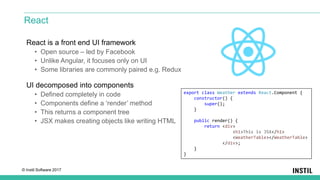
React is a front end UI framework
• Open source – led by Facebook
• Unlike Angular, it focuses only on UI
• Some libraries are commonly paired e.g. Redux
UI decomposed into components
• Defined completely in code
• Components define a ‘render’ method
• This returns a component tree
• JSX makes creating objects like writing HTML
React
export class Weather extends React.Component {
constructor() {
super();
}
public render() {
return <div>
<h1>This is JSX</h1>
<WeatherTable></WeatherTable>
</div>;
}
}
© Instil Software 2017
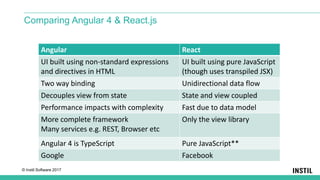
Comparing Angular 4 & React.js
Angular React
UI built using non-standard expressions
and directives in HTML
UI built using pure JavaScript
(though uses transpiled JSX)
Two way binding Unidirectional data flow
Decouples view from state State and view coupled
Performance impacts with complexity Fast due to data model
More complete framework
Many services e.g. REST, Browser etc
Only the view library
Angular 4 is TypeScript Pure JavaScript**
Google Facebook
© Instil Software 2017
NodeServices allow us to run JavaScript easily from within .NET code
• Runs Node.js in the background
• Uses an async API
• Can easily pass parameters, return results and catch errors
NodeServices
© Instil Software 2017
module.exports = function(callback, name) {
if (!name) {
callback("Error - no name provided", "Value not used");
}
else {
callback(null, "Hello " + name);
}
}
Node/HelloWorld.js
Invoking JavaScript from Within C#
© Instil Software 2017
[Route("api/[controller]")]
public class NodeController : Controller {
private readonly INodeServices nodeServices;
public NodeController(INodeServices nodeServices) {
this.nodeServices = nodeServices;
}
[HttpGet("HelloWorld/{name?}")]
public async Task<string> GetHelloWorld(string name) {
try {
return await nodeServices.InvokeAsync<string>("Node/HelloWorld", name);
}
catch (NodeInvocationException e) {
return "Caught error from Node - " + e.Message;
}
}
}
NodeController.cs
Invoking JavaScript from Within C#
© Instil Software 2017
Makes developing Single Page Applications with a .NET backend easier
• Builds upon NodeServices where Node.js is required
• SpaServices allows the development of the two to be more aligned
• Single server providing content and services
We can keep our backend services and client side projects separated
• Clear separation of client/server
• Optimised workflows
• Separate tooling
• Seaparate teams
SpaServices
© Instil Software 2017
Provides useful features such as:
• Server-side prerendering
• Webpack Dev Middleware & Hot Module Replacement
• Routing helpers
What you will need:
• Node version 6+
• ASP .NET Core 2.0
SpaServices
© Instil Software 2017
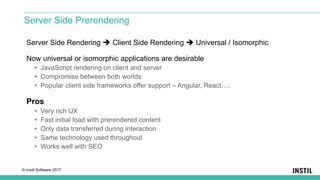
Server Side Rendering  Client Side Rendering  Universal / Isomorphic
Now universal or isomorphic applications are desirable
• JavaScript rendering on client and server
• Compromise between both worlds
• Popular client side frameworks offer support – Angular, React….
Pros
• Very rich UX
• Fast initial load with prerendered content
• Only data transferred during interaction
• Same technology used throughout
• Works well with SEO
Server Side Prerendering
© Instil Software 2017
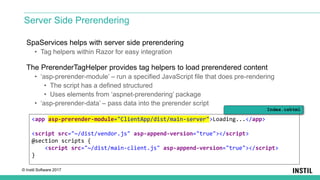
SpaServices helps with server side prerendering
• Tag helpers within Razor for easy integration
The PrerenderTagHelper provides tag helpers to load prerendered content
• ‘asp-prerender-module’ – run a specified JavaScript file that does pre-rendering
• The script has a defined structured
• Uses elements from ‘aspnet-prerendering’ package
• ‘asp-prerender-data’ – pass data into the prerender script
Server Side Prerendering
<app asp-prerender-module="ClientApp/dist/main-server">Loading...</app>
<script src="~/dist/vendor.js" asp-append-version="true"></script>
@section scripts {
<script src="~/dist/main-client.js" asp-append-version="true"></script>
}
Index.cshtml
© Instil Software 2017
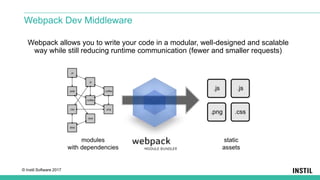
Webpack allows you to write your code in a modular, well-designed and scalable
way while still reducing runtime communication (fewer and smaller requests)
Webpack Dev Middleware
© Instil Software 2017
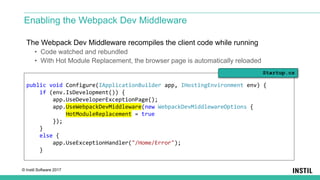
The Webpack Dev Middleware recompiles the client code while running
• Code watched and rebundled
• With Hot Module Replacement, the browser page is automatically reloaded
Enabling the Webpack Dev Middleware
public void Configure(IApplicationBuilder app, IHostingEnvironment env) {
if (env.IsDevelopment()) {
app.UseDeveloperExceptionPage();
app.UseWebpackDevMiddleware(new WebpackDevMiddlewareOptions {
HotModuleReplacement = true
});
}
else {
app.UseExceptionHandler("/Home/Error");
}
Startup.cs
© Instil Software 2017
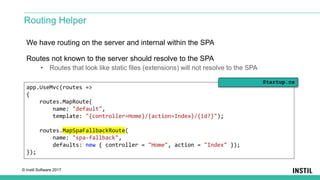
We have routing on the server and internal within the SPA
Routes not known to the server should resolve to the SPA
• Routes that look like static files (extensions) will not resolve to the SPA
Routing Helper
app.UseMvc(routes =>
{
routes.MapRoute(
name: "default",
template: "{controller=Home}/{action=Index}/{id?}");
routes.MapSpaFallbackRoute(
name: "spa-fallback",
defaults: new { controller = "Home", action = "Index" });
});
Startup.cs
© Instil Software 2017
• The SPA templates provide quick solution for ASP .NET Core
• A few commands and you have a functioning app you can expand
• Keeps everything in one place
• Good example of desired build properties
• Optimised bundling
• Watch and Hot Module Replacement
• Prerendering for faster initial page loads
But…
• Tooling is currently sub-optimal compared to separate projects
• There are better SPA centric workflows
• E.g. Angular CLI + WebStorm / Visual Studio Code
Summary

ASP .Net Core SPA Templates

  • 1.
    © Instil Software2017 October 2017 eamonn.boyle@instil.coeamonn.boyle@instil.cogarth.gilmour@instil.co | eamonn.boyle@instil.co ASP .NET Core New SPA Templates
  • 2.
    © Instil Software2017 • I want new people on-boarded as quickly as possible • I want to be able to add new features easily • I want computers to do most of my work for me • I don’t want the headache and hassle of bugs Who am I?
  • 3.
    © Instil Software2017 Release Notes • Razor Pages • Single ASP .NET Core & EF Core meta-package • Microsoft.AspNetCore.All • Uses the Runtime Store • Minor API Changes • Logging, Configuration, WebBuilder • Major API Changes • Authentication, Identity, WebListener-> Http.sys • New Single Page Application (SPA) Templates • React [+ Redux], Angular and more • Major Kestrel Updates – Internet Facing Supported • Razor Pre-compilation • And more… ASP .NET Core 2.0
  • 4.
    © Instil Software2017 Release Notes • Razor Pages • Single ASP .NET Core & EF Core meta-package • Microsoft.AspNetCore.All • Uses the Runtime Store • Minor API Changes • Logging, Configuration, WebBuilder • Major API Changes • Authentication, Identity, WebListener-> Http.sys • New Single Page Application (SPA) Templates • React [+ Redux], Angular • Major Kestrel Updates – Internet Facing Supported • Razor Pre-compilation • And more… ASP .NET Core 2.0
  • 5.
    © Instil Software2017 Web Applications originally relied heavily on server side rendering: Pros • Templating frameworks easy for basic content • Encapsulates business logic • Small initial downloads for user/browser • Works well with SEO Cons • Limited user experience -> Page Refreshes • Over time, more data transferred – feels slower • Heavy load on server Server Side Rendering
  • 6.
    © Instil Software2017 The Single Page Application Concept Service A Service B Service C Single Page Application JSON JSON JSON Web Server Static Files HTML, CSS, JS We’ve moved to rich client-side experiences • AJAX + jQuery and then on to UI frameworks – Angular, React, Vue…..
  • 7.
    © Instil Software2017 Pros • Separation of Concerns – Client-Server • Very rich UX • Only data transferred during interaction • Lower load on server • Easy deployment – static files Cons • Slow initial load – vendor download • Does not play well with SEO • Complex build mechanism • Complex content definition Single Page Application (SPA)
  • 8.
    © Instil Software2017 Foundations of Front End “JavaScript is the VM of the web” Douglas Crockford
  • 9.
    © Instil Software2017 The Evolution of JavaScript Frameworks Angular 2/4 React Angular 1DojojQueryManual Scripting HTML
  • 10.
    © Instil Software2017 Like a kid in a candy store…
  • 11.
    © Instil Software2017 Module Counts http://www.modulecounts.com/ npm Package Count  532,293 https://www.statista.com Programmers in the UK  292,000
  • 12.
    © Instil Software2017 TypeScript (aka TS) is a superset of JavaScript • Created by Anders Hejlsberg at Microsoft • Released as an open source project (Apache 2 License) The language is transpiled into JavaScript • The compiler is written in TS and runs on top of Node.js • It can be used for both client and server side applications Programming in TypeScript allows you to: • Use the language features defined in ECMAScript 2015 • Add type declarations to variables, parameters etc… • Make use of more advanced features like generics Introducing TypeScript
  • 13.
    © Instil Software2017 JavaScriptServices is a series of packages for using client-side technologies • Microsoft.AspNetCore.NodeServices • Microsoft.AspNetCore.SpaServices • Microsoft.AspNetCore.SpaTemplates Useful when • Run JavaScript on the server • Use a SPA framework or library • Build client-side assets with Webpack JavaScriptServices
  • 14.
    © Instil Software2017 React and Angular templates are now included as part of .NET Core SDK 2.0 More templates can be installed via: “dotnet new --install Microsoft.AspNetCore.SpaTemplates::*” SpaTemplates Templates Short Name ---------------------------------------------------------------- Console Application console Class library classlib Unit Test Project mstest xUnit Test Project xunit ASP.NET Core Empty web ASP.NET Core Web App (Model-View-Controller) mvc ASP.NET Core Web App razor ASP.NET Core with Aurelia aurelia ASP.NET Core with Knockout.js knockout ASP.NET Core with Vue.js vue ASP.NET Core with Angular angular ASP.NET Core with React.js react ASP.NET Core with React.js and Redux reactredux ASP.NET Core Web API webapi
  • 15.
    © Instil Software2017 A TypeScript based web app platform • Open source – led by team at Google • Replaces AngularJS • Provides services for UI, communication, DI etc UI decomposed into components • Follows an MVC pattern • HTML for the View – annotated with special directives • Component localised CSS for styling • TypeScript for component Code Behind • Augmented with other services, model etc. Angular @Component({ selector: ‘app-menubar', templateUrl: ‘./menubar.component.html’ styleUrls: [‘./menubar.component.css’] }) export class FetchDataComponent { <h1>This is a HTML file</h1> <app-menubar></app-menubar>
  • 16.
    © Instil Software2017 React is a front end UI framework • Open source – led by Facebook • Unlike Angular, it focuses only on UI • Some libraries are commonly paired e.g. Redux UI decomposed into components • Defined completely in code • Components define a ‘render’ method • This returns a component tree • JSX makes creating objects like writing HTML React export class Weather extends React.Component { constructor() { super(); } public render() { return <div> <h1>This is JSX</h1> <WeatherTable></WeatherTable> </div>; } }
  • 17.
    © Instil Software2017 Comparing Angular 4 & React.js Angular React UI built using non-standard expressions and directives in HTML UI built using pure JavaScript (though uses transpiled JSX) Two way binding Unidirectional data flow Decouples view from state State and view coupled Performance impacts with complexity Fast due to data model More complete framework Many services e.g. REST, Browser etc Only the view library Angular 4 is TypeScript Pure JavaScript** Google Facebook
  • 18.
    © Instil Software2017 NodeServices allow us to run JavaScript easily from within .NET code • Runs Node.js in the background • Uses an async API • Can easily pass parameters, return results and catch errors NodeServices
  • 19.
    © Instil Software2017 module.exports = function(callback, name) { if (!name) { callback("Error - no name provided", "Value not used"); } else { callback(null, "Hello " + name); } } Node/HelloWorld.js Invoking JavaScript from Within C#
  • 20.
    © Instil Software2017 [Route("api/[controller]")] public class NodeController : Controller { private readonly INodeServices nodeServices; public NodeController(INodeServices nodeServices) { this.nodeServices = nodeServices; } [HttpGet("HelloWorld/{name?}")] public async Task<string> GetHelloWorld(string name) { try { return await nodeServices.InvokeAsync<string>("Node/HelloWorld", name); } catch (NodeInvocationException e) { return "Caught error from Node - " + e.Message; } } } NodeController.cs Invoking JavaScript from Within C#
  • 21.
    © Instil Software2017 Makes developing Single Page Applications with a .NET backend easier • Builds upon NodeServices where Node.js is required • SpaServices allows the development of the two to be more aligned • Single server providing content and services We can keep our backend services and client side projects separated • Clear separation of client/server • Optimised workflows • Separate tooling • Seaparate teams SpaServices
  • 22.
    © Instil Software2017 Provides useful features such as: • Server-side prerendering • Webpack Dev Middleware & Hot Module Replacement • Routing helpers What you will need: • Node version 6+ • ASP .NET Core 2.0 SpaServices
  • 23.
    © Instil Software2017 Server Side Rendering  Client Side Rendering  Universal / Isomorphic Now universal or isomorphic applications are desirable • JavaScript rendering on client and server • Compromise between both worlds • Popular client side frameworks offer support – Angular, React…. Pros • Very rich UX • Fast initial load with prerendered content • Only data transferred during interaction • Same technology used throughout • Works well with SEO Server Side Prerendering
  • 24.
    © Instil Software2017 SpaServices helps with server side prerendering • Tag helpers within Razor for easy integration The PrerenderTagHelper provides tag helpers to load prerendered content • ‘asp-prerender-module’ – run a specified JavaScript file that does pre-rendering • The script has a defined structured • Uses elements from ‘aspnet-prerendering’ package • ‘asp-prerender-data’ – pass data into the prerender script Server Side Prerendering <app asp-prerender-module="ClientApp/dist/main-server">Loading...</app> <script src="~/dist/vendor.js" asp-append-version="true"></script> @section scripts { <script src="~/dist/main-client.js" asp-append-version="true"></script> } Index.cshtml
  • 25.
    © Instil Software2017 Webpack allows you to write your code in a modular, well-designed and scalable way while still reducing runtime communication (fewer and smaller requests) Webpack Dev Middleware
  • 26.
    © Instil Software2017 The Webpack Dev Middleware recompiles the client code while running • Code watched and rebundled • With Hot Module Replacement, the browser page is automatically reloaded Enabling the Webpack Dev Middleware public void Configure(IApplicationBuilder app, IHostingEnvironment env) { if (env.IsDevelopment()) { app.UseDeveloperExceptionPage(); app.UseWebpackDevMiddleware(new WebpackDevMiddlewareOptions { HotModuleReplacement = true }); } else { app.UseExceptionHandler("/Home/Error"); } Startup.cs
  • 27.
    © Instil Software2017 We have routing on the server and internal within the SPA Routes not known to the server should resolve to the SPA • Routes that look like static files (extensions) will not resolve to the SPA Routing Helper app.UseMvc(routes => { routes.MapRoute( name: "default", template: "{controller=Home}/{action=Index}/{id?}"); routes.MapSpaFallbackRoute( name: "spa-fallback", defaults: new { controller = "Home", action = "Index" }); }); Startup.cs
  • 28.
    © Instil Software2017 • The SPA templates provide quick solution for ASP .NET Core • A few commands and you have a functioning app you can expand • Keeps everything in one place • Good example of desired build properties • Optimised bundling • Watch and Hot Module Replacement • Prerendering for faster initial page loads But… • Tooling is currently sub-optimal compared to separate projects • There are better SPA centric workflows • E.g. Angular CLI + WebStorm / Visual Studio Code Summary