The New Office Web Apps Story


Jason Himmelstein
jhimmelstein@sentri.com
@sharepointlhorn
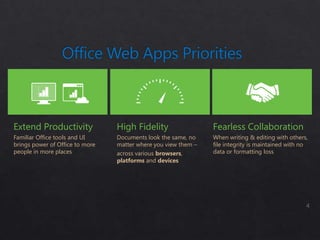
Extend Productivity              High Fidelity                  Fearless Collaboration
Familiar Office tools and UI     Documents look the same, no    When writing & editing with others,
brings power of Office to more   matter where you view them –   file integrity is maintained with no
people in more places            across various browsers,       data or formatting loss
                                 platforms and devices
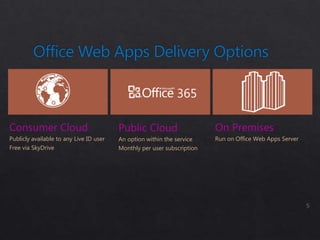
365

Consumer Cloud                           Public Cloud                    On Premises
Publicly available to any Live ID user   An option within the service    Run on Office Web Apps Server
Free via SkyDrive                        Monthly per user subscription
Mobile Workers                 Deskless Workers                Students & Home
Anywhere access to files and   Provide cost effective access   Shared access and editing to
common productivity tools      to productivity tools to        regularly updated group
when Office isn't available.   remote or branch                information.
                               employees.
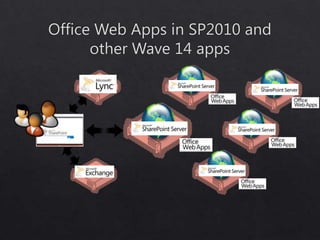
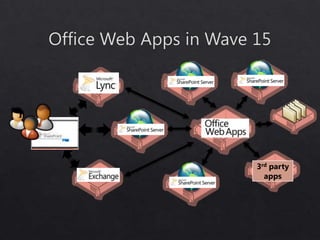
3rd party
  apps
Document Review         Multi-user Authoring         Meetings

    Editing              OneNote Web App       Presentation Broadcast

Change tracking            Excel Web App          Lync Integration

  Commenting            PowerPoint Web App       Async Navigation

                          Word Web App            Media Playback


                  With anyone with a browser
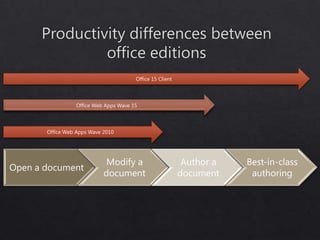
Office 15 Client


                 Office Web Apps Wave 15


       Office Web Apps Wave 2010


                             Modify a                      Author a   Best-in-class
Open a document
                            document                      document     authoring
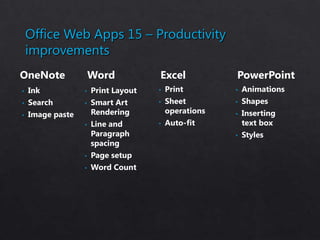
Office Web Apps 15 – Productivity
    improvements
OneNote               Word           Excel            PowerPoint
•   Ink           •   Print Layout   •   Print        •   Animations
•   Search        •   Smart Art      •   Sheet        •   Shapes
•   Image paste       Rendering          operations   •   Inserting
                  •   Line and       •   Auto-fit         text box
                      Paragraph                       •   Styles
                      spacing
                  •   Page setup
                  •   Word Count
SharePoint Farm


    1


        Office Web Apps   3
2       Farm
Never be without
the tools you need.
Access, work together
& share from anywhere
with anyone
Scenario                                                                  Internal User

        Read Office documents via Office Web                                      Free, no Office client required
        Apps
        Edit Office documents via Office Web Apps                                 Requires Office 2013 Standard or Professional
                                                                                  Plus


• Our company users (who are licensed for Office Client) are working with external users on projects,
  what licensing do those external users need to access Office documents via Office Web Apps?

       Scenario                                                                  External User*

       Read Office documents via Office Web                                      Free, no Office client required
       Apps
       Edit Office documents via Office Web Apps                                 Free, no Office client required

     *External Users: defined as users that are not either your or your affiliates’ employees, or your or your affiliates’ onsite contractors or onsite agents.


                                                                          www.office365.com
New Office Web Apps story

New Office Web Apps story

  • 1.
    The New OfficeWeb Apps Story Jason Himmelstein jhimmelstein@sentri.com @sharepointlhorn
  • 4.
    Extend Productivity High Fidelity Fearless Collaboration Familiar Office tools and UI Documents look the same, no When writing & editing with others, brings power of Office to more matter where you view them – file integrity is maintained with no people in more places across various browsers, data or formatting loss platforms and devices
  • 5.
    365 Consumer Cloud Public Cloud On Premises Publicly available to any Live ID user An option within the service Run on Office Web Apps Server Free via SkyDrive Monthly per user subscription
  • 6.
    Mobile Workers Deskless Workers Students & Home Anywhere access to files and Provide cost effective access Shared access and editing to common productivity tools to productivity tools to regularly updated group when Office isn't available. remote or branch information. employees.
  • 8.
  • 11.
    Document Review Multi-user Authoring Meetings Editing OneNote Web App Presentation Broadcast Change tracking Excel Web App Lync Integration Commenting PowerPoint Web App Async Navigation Word Web App Media Playback With anyone with a browser
  • 12.
    Office 15 Client Office Web Apps Wave 15 Office Web Apps Wave 2010 Modify a Author a Best-in-class Open a document document document authoring
  • 13.
    Office Web Apps15 – Productivity improvements OneNote Word Excel PowerPoint • Ink • Print Layout • Print • Animations • Search • Smart Art • Sheet • Shapes • Image paste Rendering operations • Inserting • Line and • Auto-fit text box Paragraph • Styles spacing • Page setup • Word Count
  • 16.
    SharePoint Farm 1 Office Web Apps 3 2 Farm
  • 19.
    Never be without thetools you need. Access, work together & share from anywhere with anyone
  • 22.
    Scenario Internal User Read Office documents via Office Web Free, no Office client required Apps Edit Office documents via Office Web Apps Requires Office 2013 Standard or Professional Plus • Our company users (who are licensed for Office Client) are working with external users on projects, what licensing do those external users need to access Office documents via Office Web Apps? Scenario External User* Read Office documents via Office Web Free, no Office client required Apps Edit Office documents via Office Web Apps Free, no Office client required *External Users: defined as users that are not either your or your affiliates’ employees, or your or your affiliates’ onsite contractors or onsite agents. www.office365.com