New features in Meteodyn WT 4.6
10/2013
Release information
•
•
•
•
•
•
•
•

User account control
Processing monitoring window
New stability tool
Synthesis – meso-scale data files
Automatic report
IEC export
ATLAS option
Other
Release information
•
•
•
•
•
•
•
•

User account control
Processing monitoring window
New stability tool
Synthesis – meso-scale data files
Automatic report
IEC export
ATLAS option
Other
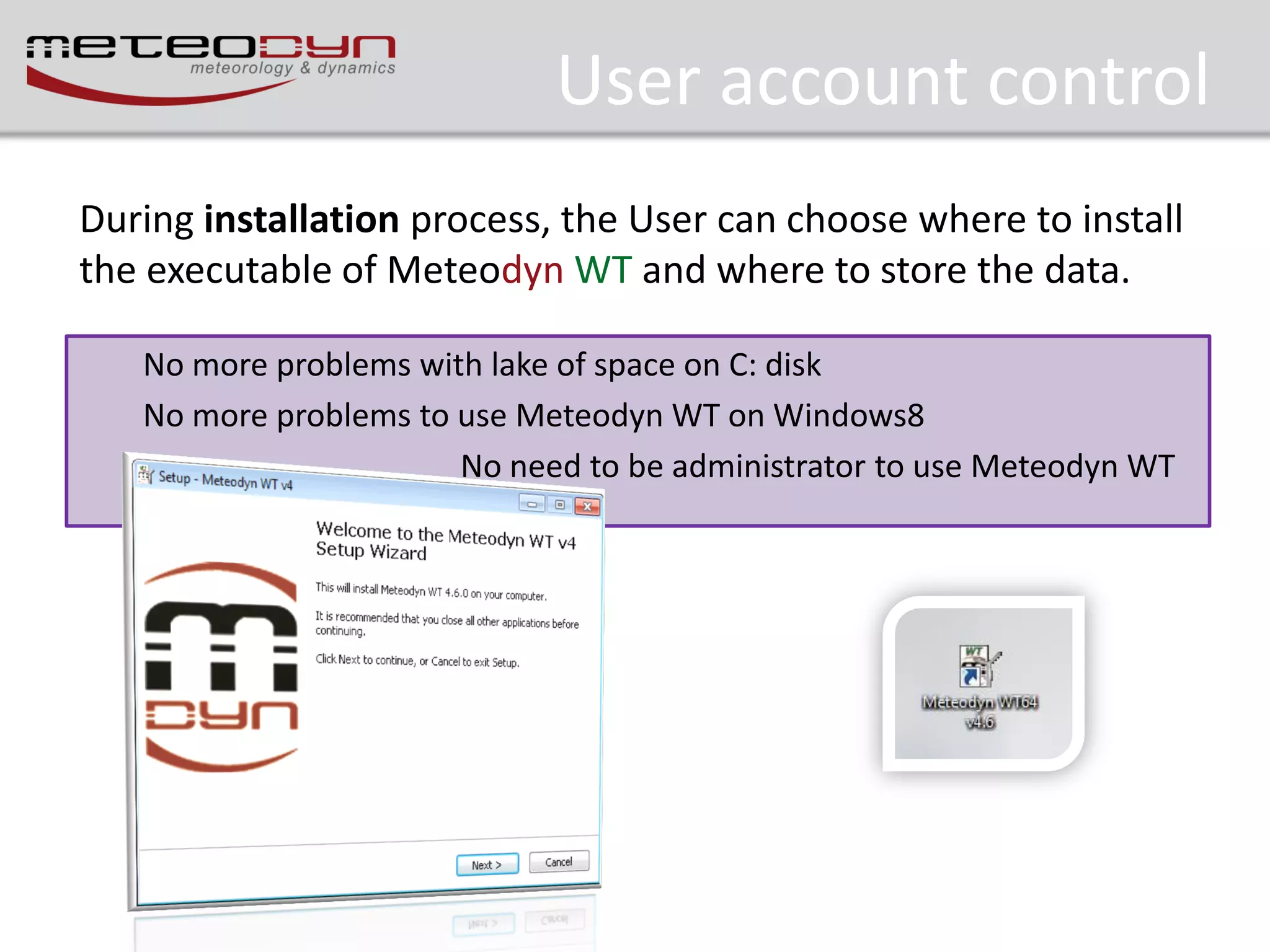
User account control
During installation process, the User can choose where to install
the executable of Meteodyn WT and where to store the data.
No more problems with lake of space on C: disk
No more problems to use Meteodyn WT on Windows8
No need to be administrator to use Meteodyn WT
Release information
•
•
•
•
•
•
•
•

User account control
Processing monitoring window
New stability tool
Synthesis – meso-scale data files
Automatic report
IEC export
ATLAS option
Other
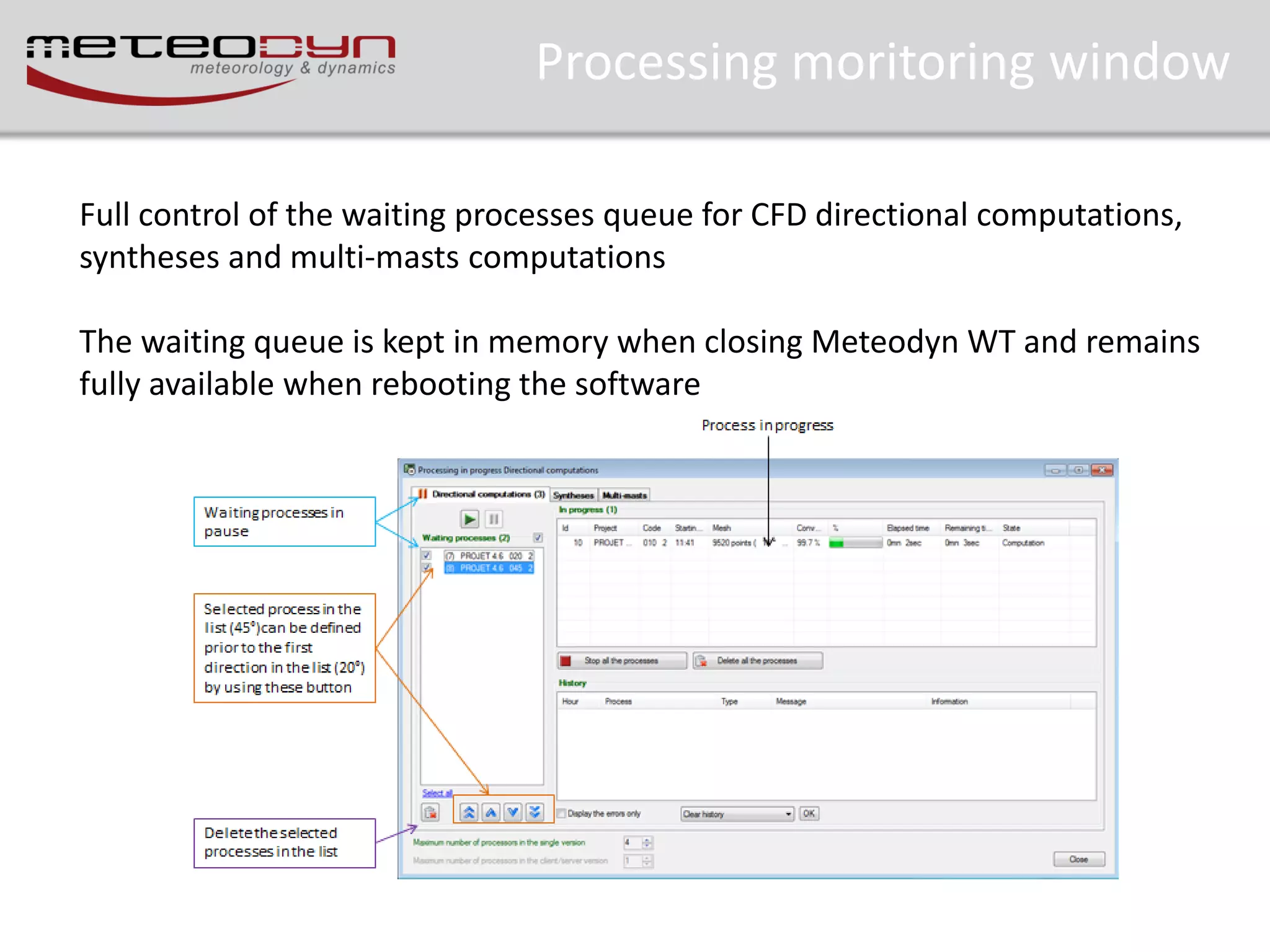
Processing moritoring window
Full control of the waiting processes queue for CFD directional computations,
syntheses and multi-masts computations
The waiting queue is kept in memory when closing Meteodyn WT and remains
fully available when rebooting the software
Release information
•
•
•
•
•
•
•
•

User account control
Processing monitoring window
New stability tool
Synthesis – meso-scale data files
Automatic report
IEC export
ATLAS option
Other
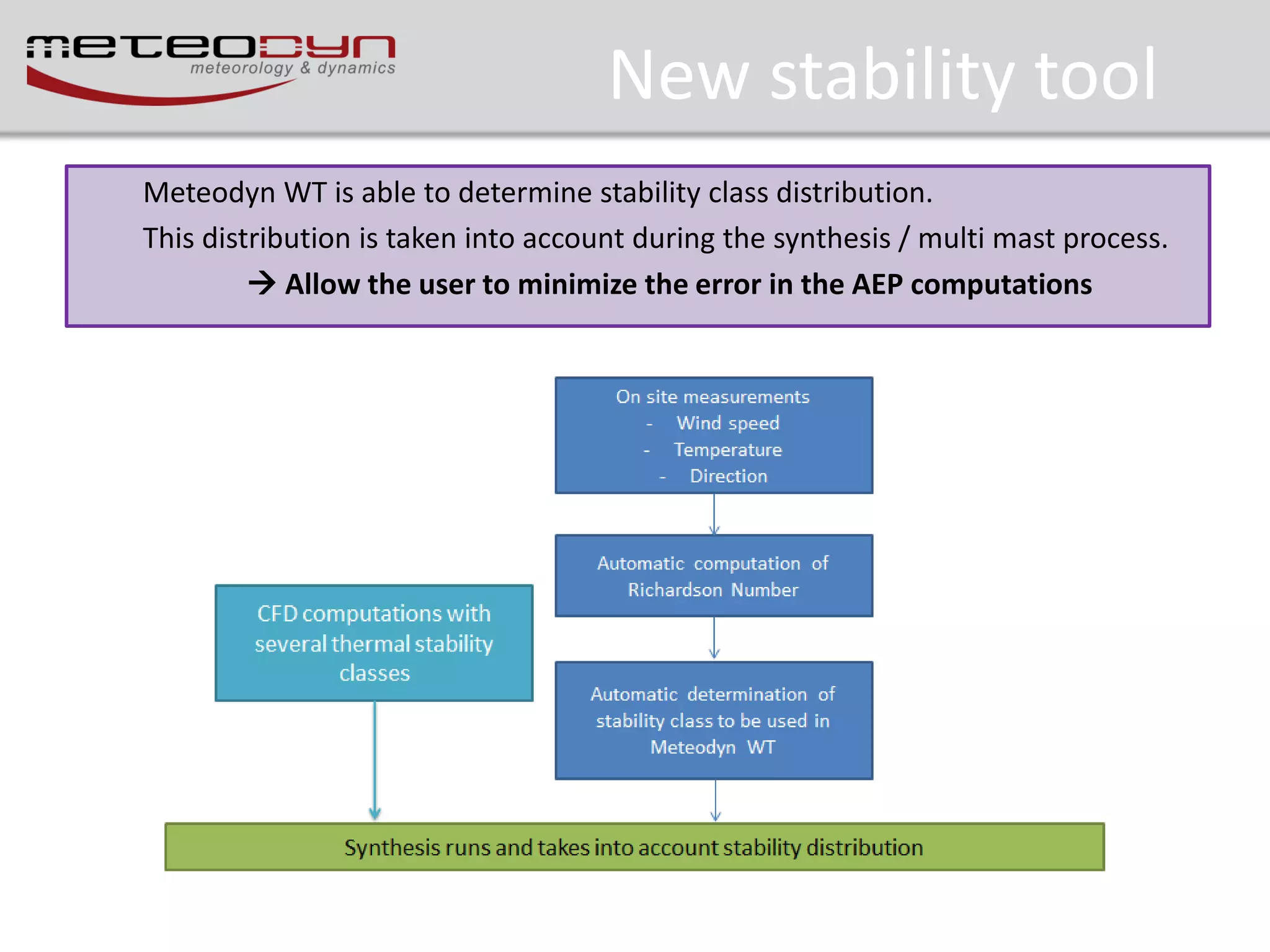
New stability tool
Meteodyn WT is able to determine stability class distribution.
This distribution is taken into account during the synthesis / multi mast process.
 Allow the user to minimize the error in the AEP computations
New stability tool
In a complex terrain, and particularly at the summit of a hill or a mountain, it is not possible to consider
the mean speed vertical gradient deduced from measurements, because if there is a speed-up effect, this
gradient is very localized, and is not representative of the gradient in a large area, which is the one which
determines the stability. For instance at the top of a hill the speed-up effects can lead to zero gradient
between 2 points.
Then the procedure in Meteodyn WT is to determine, thanks to the computed speed-up the undisturbed
wind gradient, considering flat terrain and the average roughness over the site. The procedure is iterative
as the speed-up coefficients are depending on the thermal stability.

Gradient Richardon Number:

Ri 

g  v / z

θv:: Virtual potential temperature

 v V / z 2

Relation between Monin-Obukhov length and Richardson number
2
M
z / L  Ri
H

Ф: Monin-Obukhov functions of the similarity theory
Ri: Richardson Number
z: height
L: Monin-Obukhov length
New stability tool
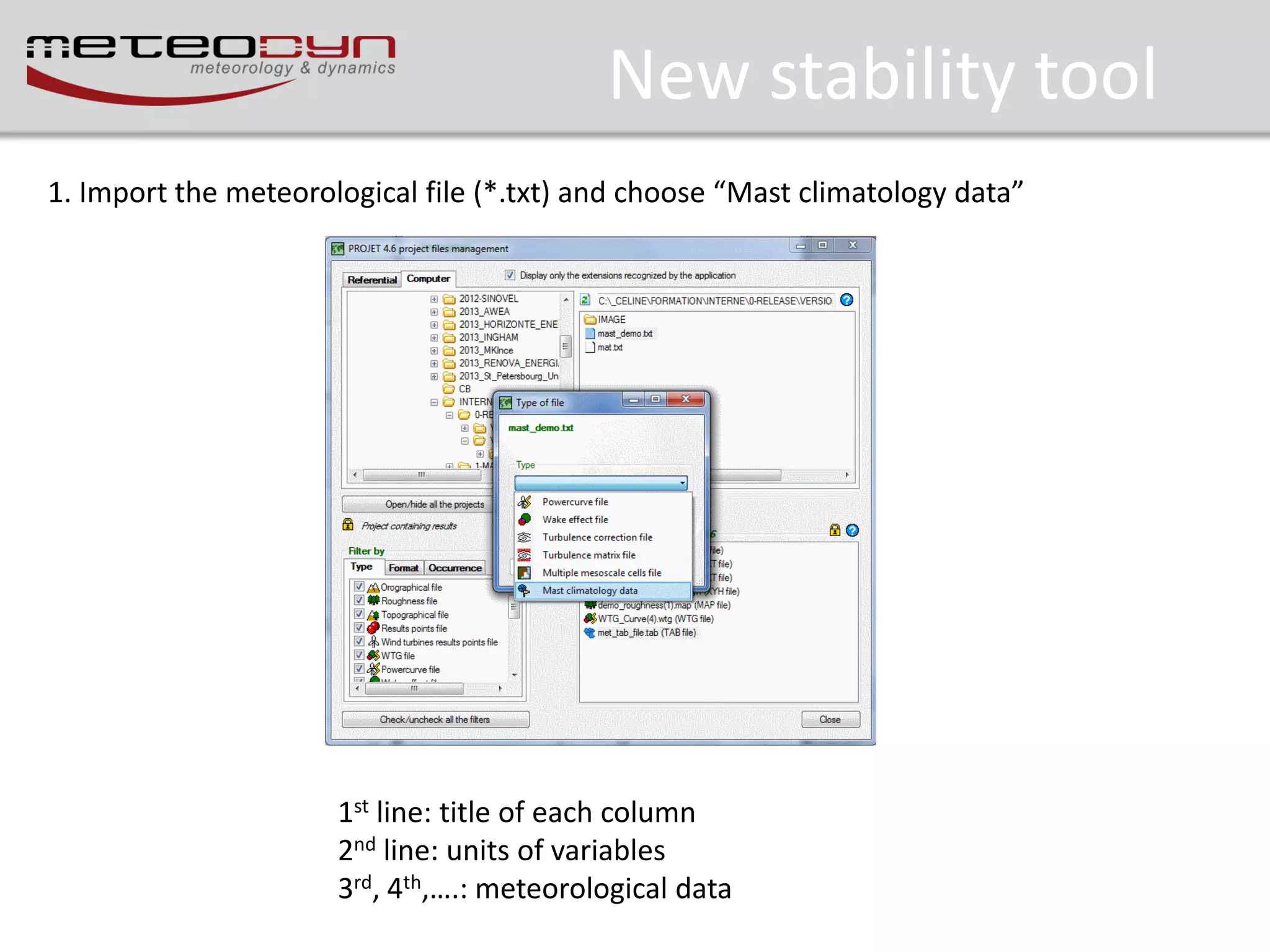
1. Import the meteorological file (*.txt) and choose “Mast climatology data”

1st line: title of each column
2nd line: units of variables
3rd, 4th,….: meteorological data
New stability tool
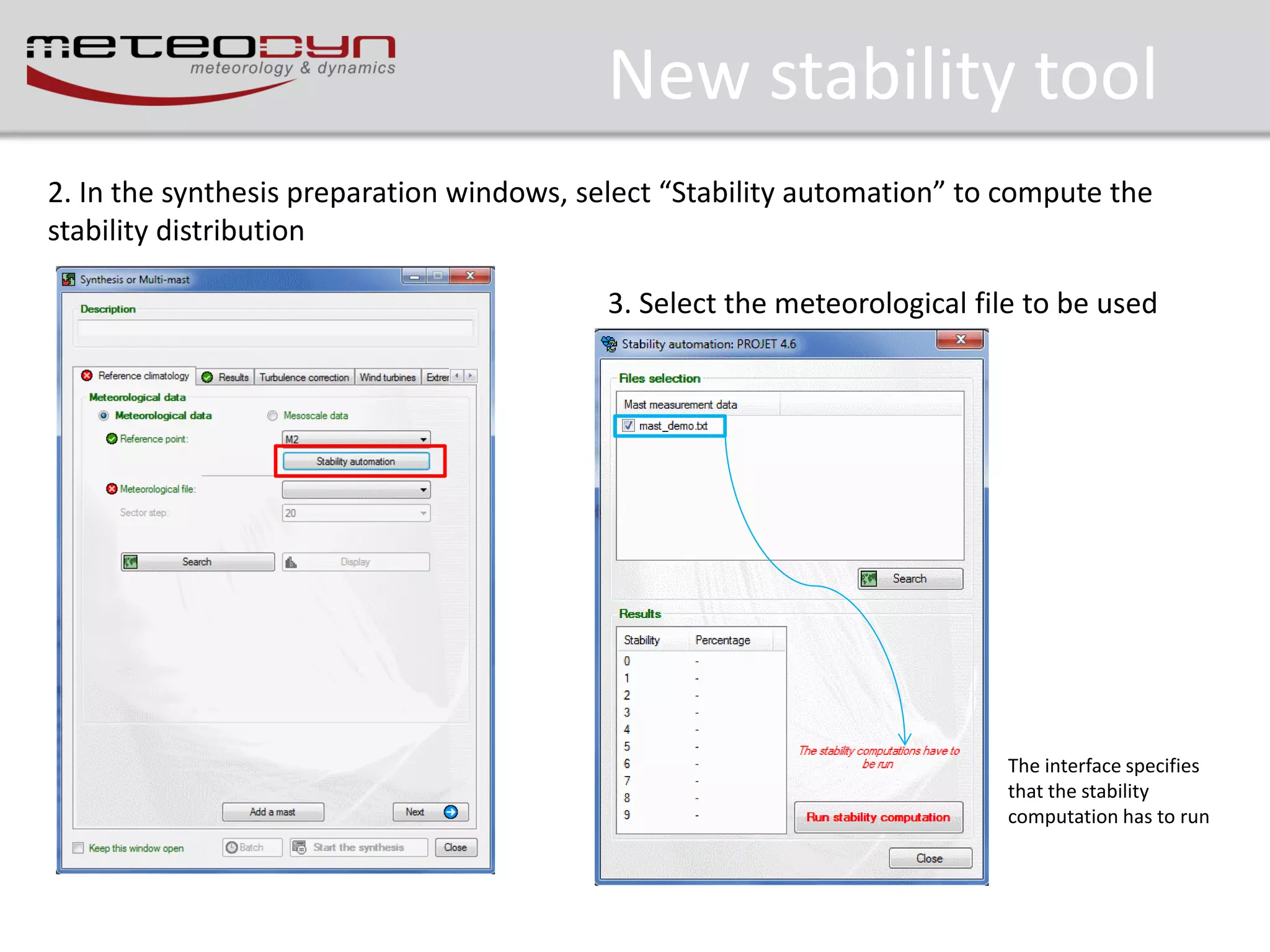
2. In the synthesis preparation windows, select “Stability automation” to compute the
stability distribution
3. Select the meteorological file to be used

The interface specifies
that the stability
computation has to run
New stability tool
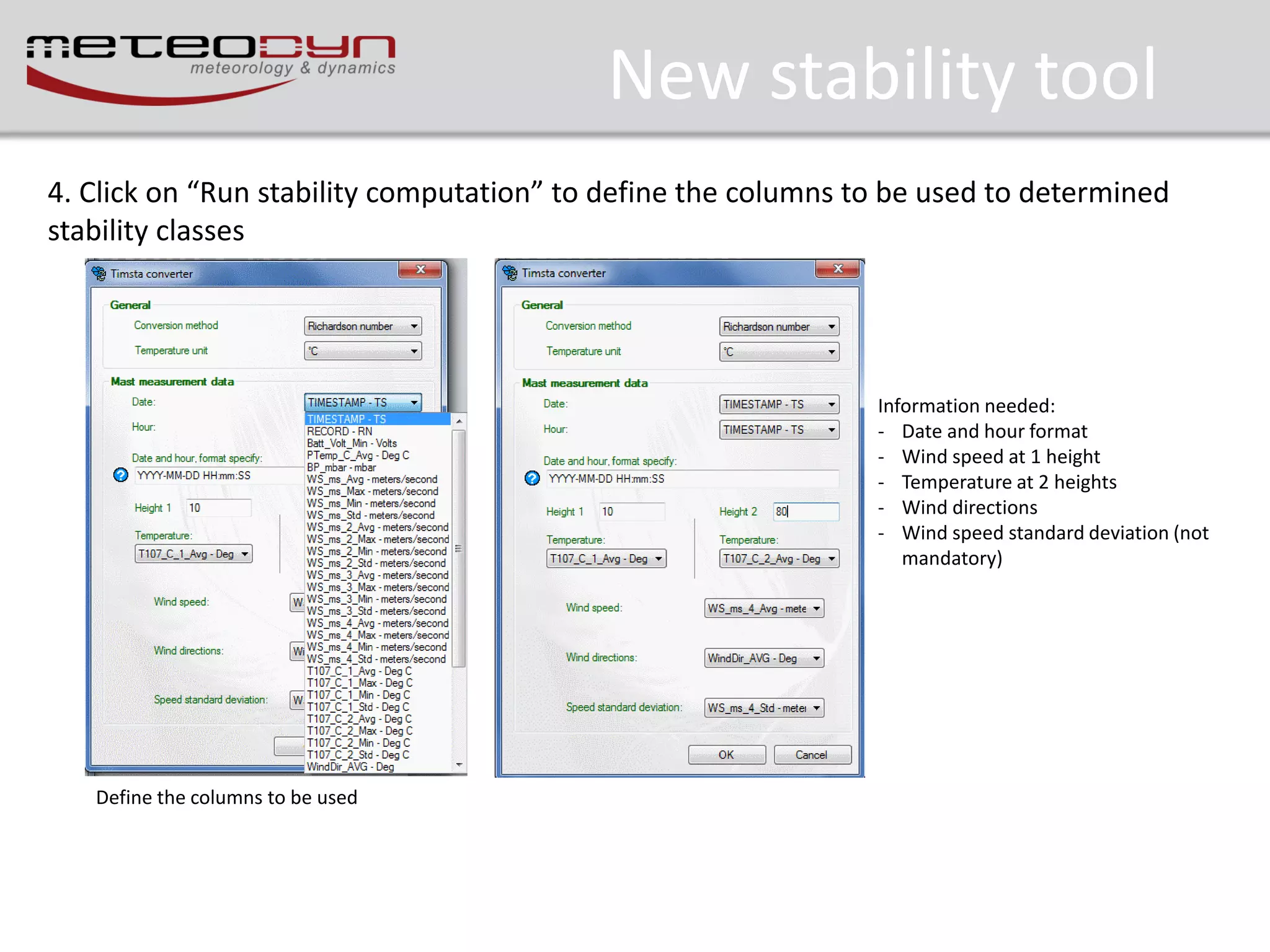
4. Click on “Run stability computation” to define the columns to be used to determined
stability classes

Information needed:
- Date and hour format
- Wind speed at 1 height
- Temperature at 2 heights
- Wind directions
- Wind speed standard deviation (not
mandatory)

Define the columns to be used
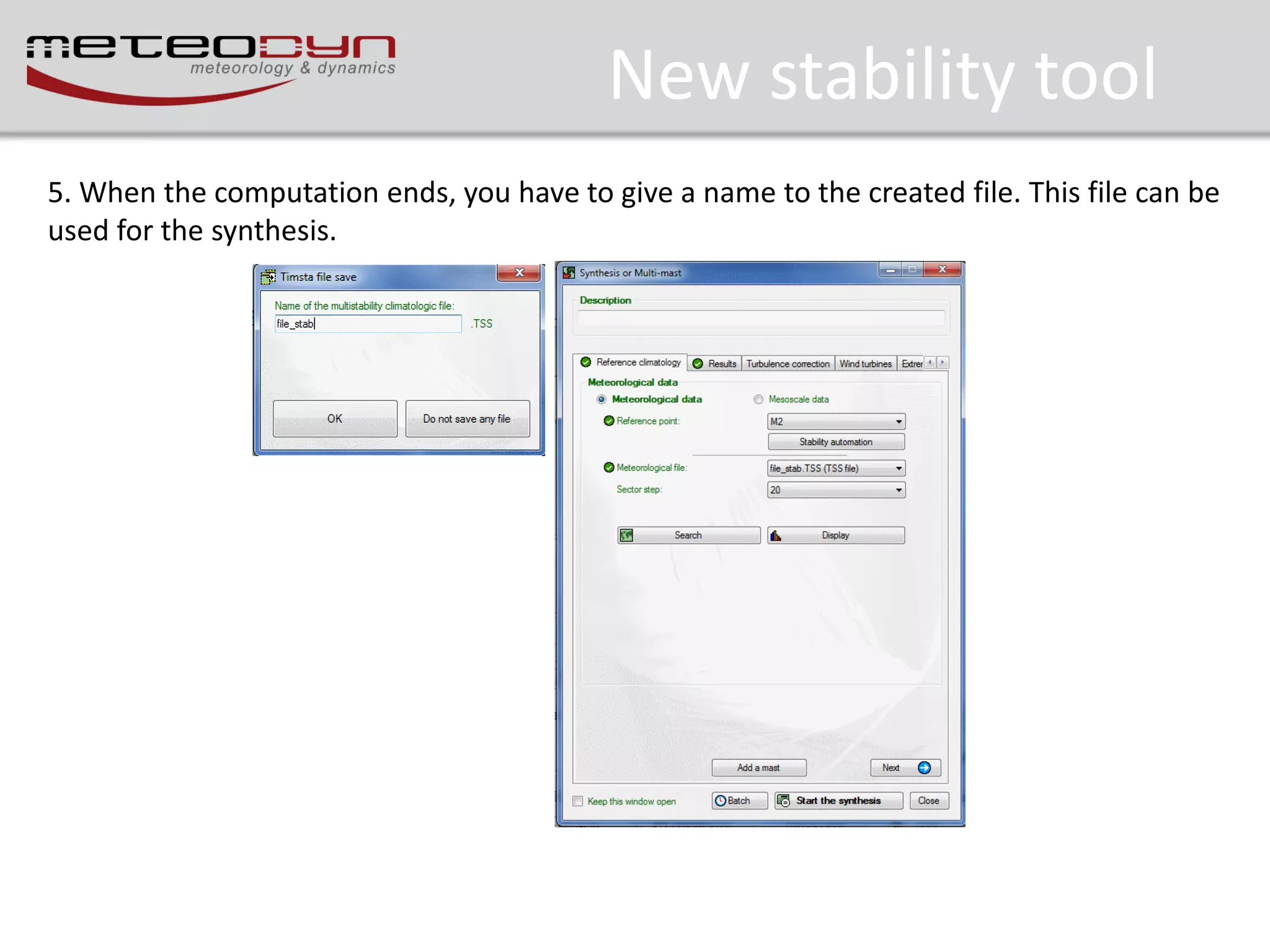
New stability tool
5. When the computation ends, you have to give a name to the created file. This file can be
used for the synthesis.
Release information
•
•
•
•
•
•
•
•

User account control
Processing monitoring window
New stability tool
Synthesis – meso-scale data files
Automatic report
IEC export
ATLAS option
Other
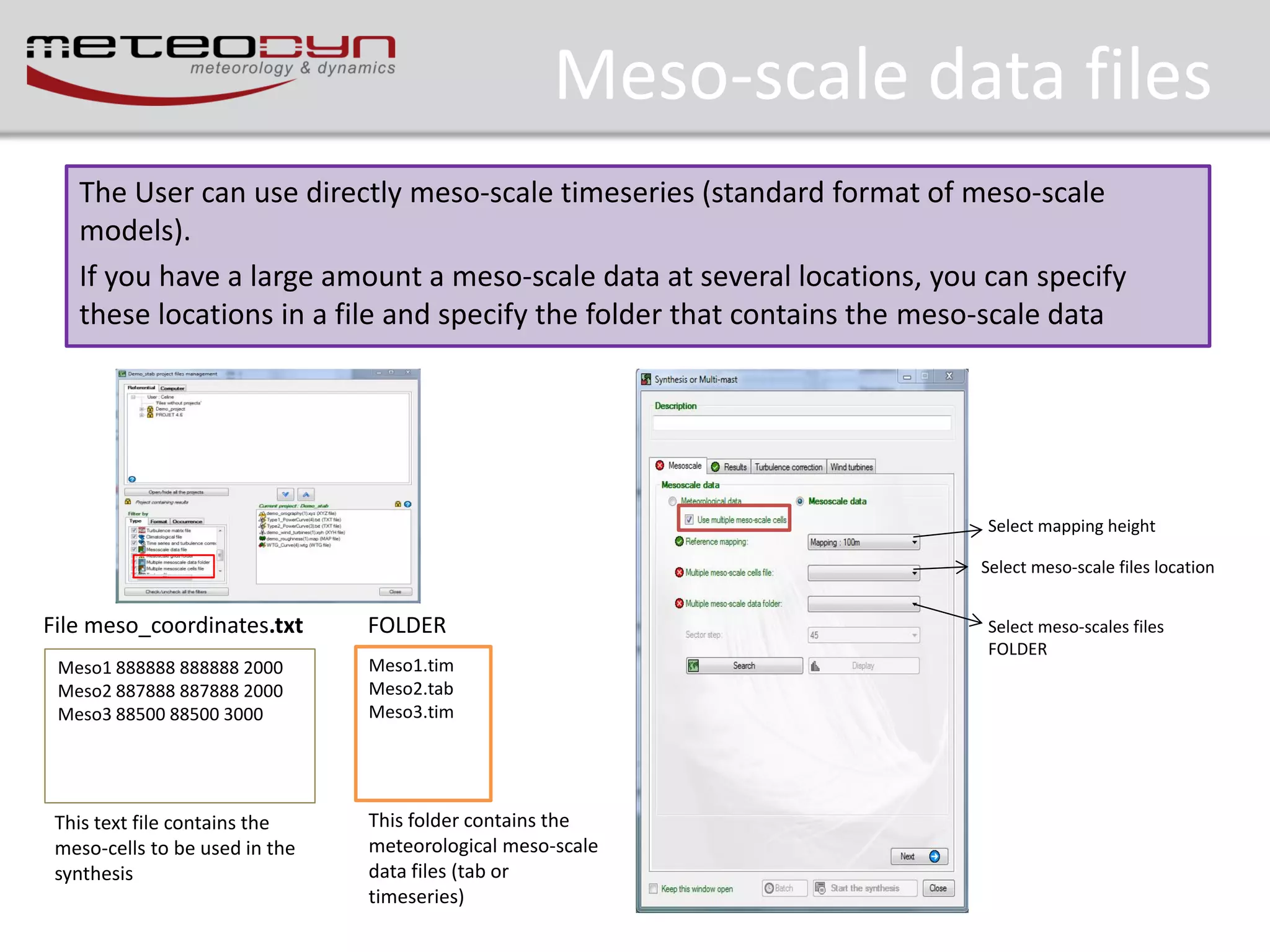
Meso-scale data files
The User can use directly meso-scale timeseries (standard format of meso-scale
models).
If you have a large amount a meso-scale data at several locations, you can specify
these locations in a file and specify the folder that contains the meso-scale data

Select mapping height
Select meso-scale files location

File meso_coordinates.txt

FOLDER

Meso1 888888 888888 2000
Meso2 887888 887888 2000
Meso3 88500 88500 3000

Meso1.tim
Meso2.tab
Meso3.tim

This text file contains the
meso-cells to be used in the
synthesis

This folder contains the
meteorological meso-scale
data files (tab or
timeseries)

Select meso-scales files
FOLDER
Release information
•
•
•
•
•
•
•
•

User account control
Processing monitoring window
New stability tool
Synthesis – meso-scale data files
Automatic report
IEC export
ATLAS option
Other
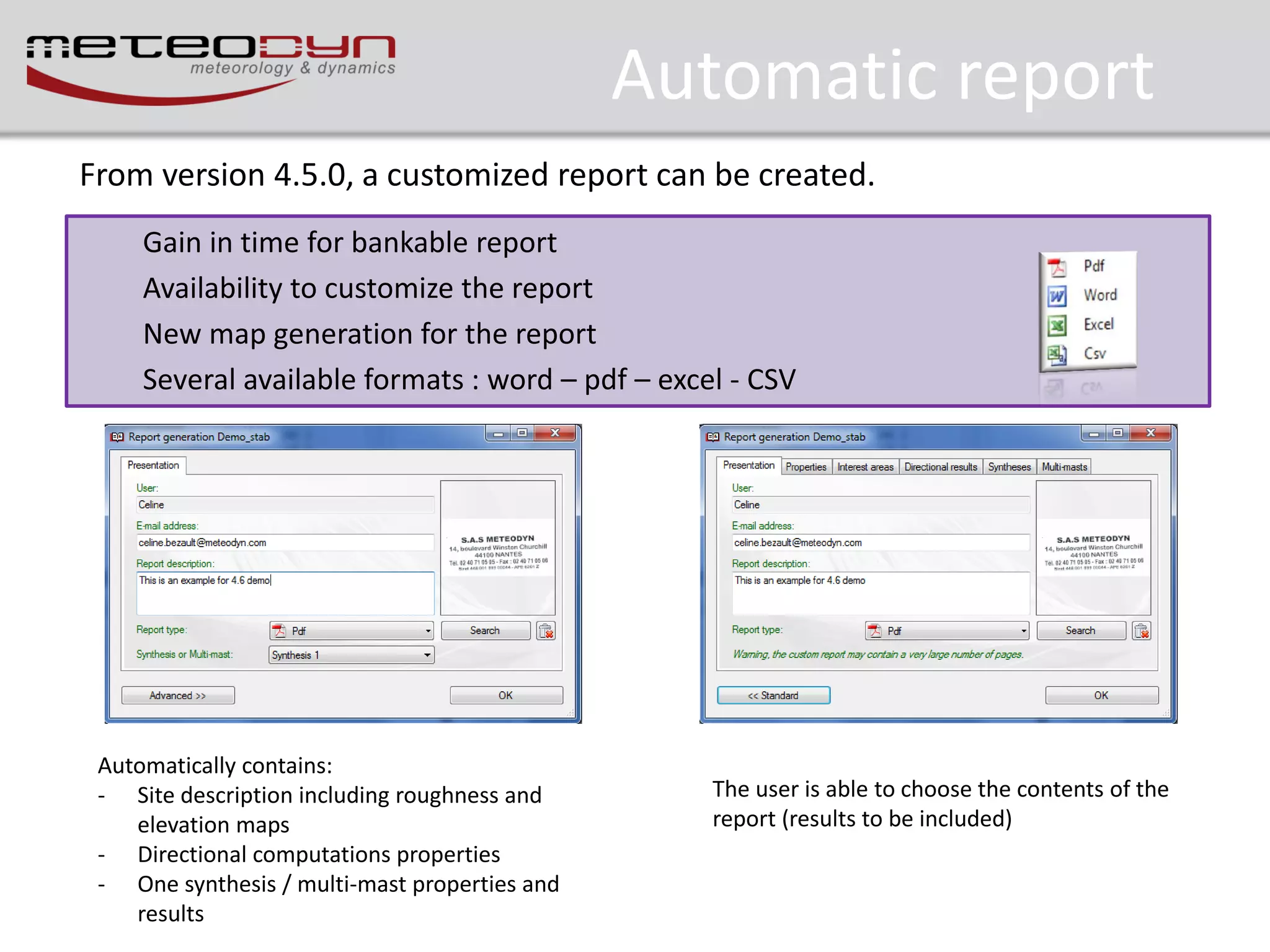
Automatic report
From version 4.5.0, a customized report can be created.
Gain in time for bankable report
Availability to customize the report
New map generation for the report
Several available formats : word – pdf – excel - CSV

Automatically contains:
- Site description including roughness and
elevation maps
- Directional computations properties
- One synthesis / multi-mast properties and
results

The user is able to choose the contents of the
report (results to be included)
Release information
•
•
•
•
•
•
•
•

User account control
Processing monitoring window
New stability tool
Synthesis – meso-scale data files
Automatic report
IEC export
ATLAS option
Other
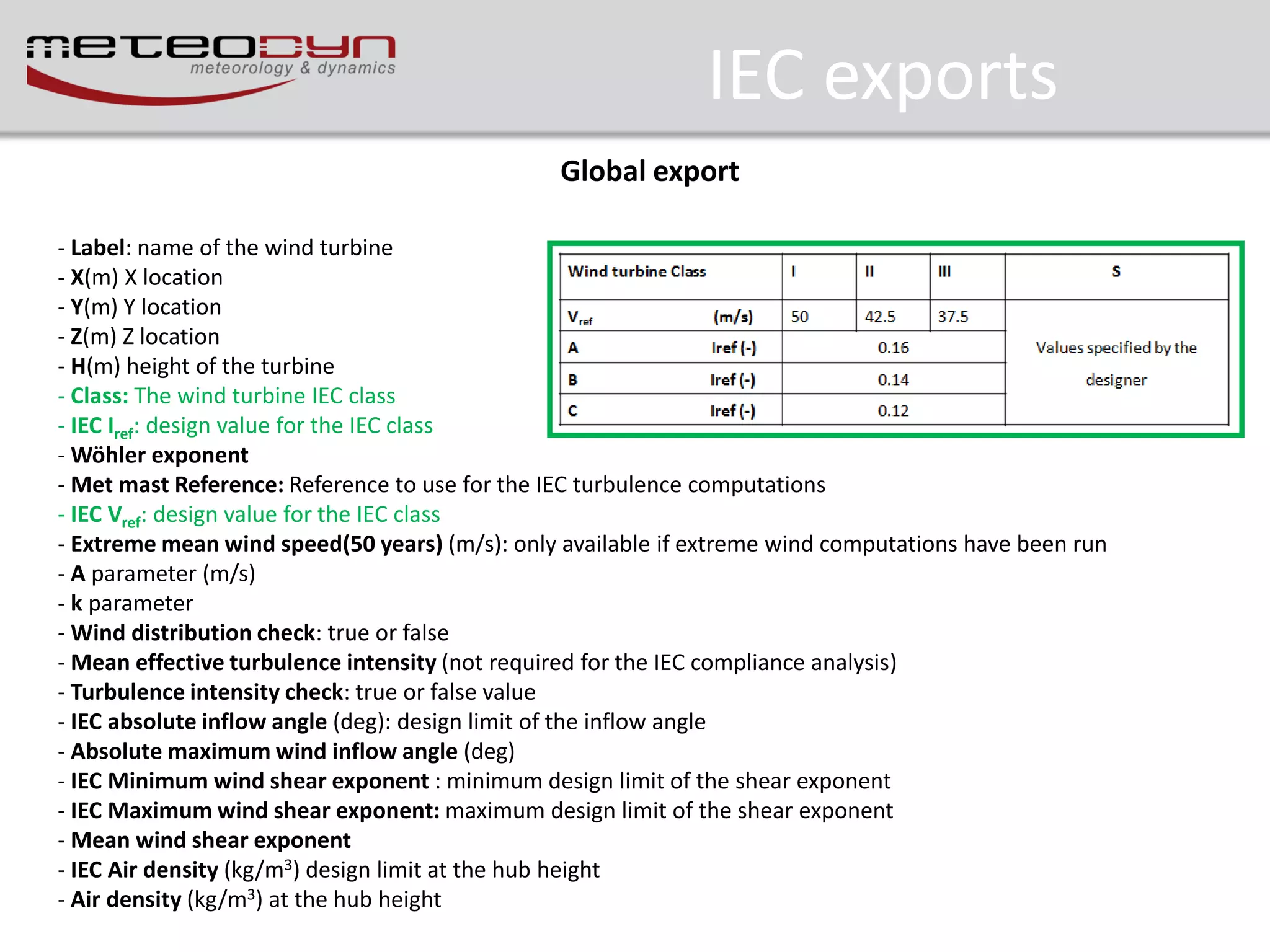
IEC exports
– IEC exports fully compatible with standards
– Several editions available (ed2, ed3, ed3 with amendment 1)
– Simplest presentation of results

61400-1 edition can be chosen in the User
parameters – synthesis tab:
- Edition 2.0: global export – outdated
- Edition3.0: global and detailed export outdated
- Edition 3.0 Amendment 1: global and
detailed export -recommended
IEC exports
Global export
- Label: name of the wind turbine
- X(m) X location
- Y(m) Y location
- Z(m) Z location
- H(m) height of the turbine
- Class: The wind turbine IEC class
- IEC Iref: design value for the IEC class
- Wöhler exponent
- Met mast Reference: Reference to use for the IEC turbulence computations
- IEC Vref: design value for the IEC class
- Extreme mean wind speed(50 years) (m/s): only available if extreme wind computations have been run
- A parameter (m/s)
- k parameter
- Wind distribution check: true or false
- Mean effective turbulence intensity (not required for the IEC compliance analysis)
- Turbulence intensity check: true or false value
- IEC absolute inflow angle (deg): design limit of the inflow angle
- Absolute maximum wind inflow angle (deg)
- IEC Minimum wind shear exponent : minimum design limit of the shear exponent
- IEC Maximum wind shear exponent: maximum design limit of the shear exponent
- Mean wind shear exponent
- IEC Air density (kg/m3) design limit at the hub height
- Air density (kg/m3) at the hub height
Release information
•
•
•
•
•
•
•
•

User account control
Processing monitoring window
New stability tool
Synthesis – meso-scale data files
Automatic report
IEC export
ATLAS option
Other
ATLAS option
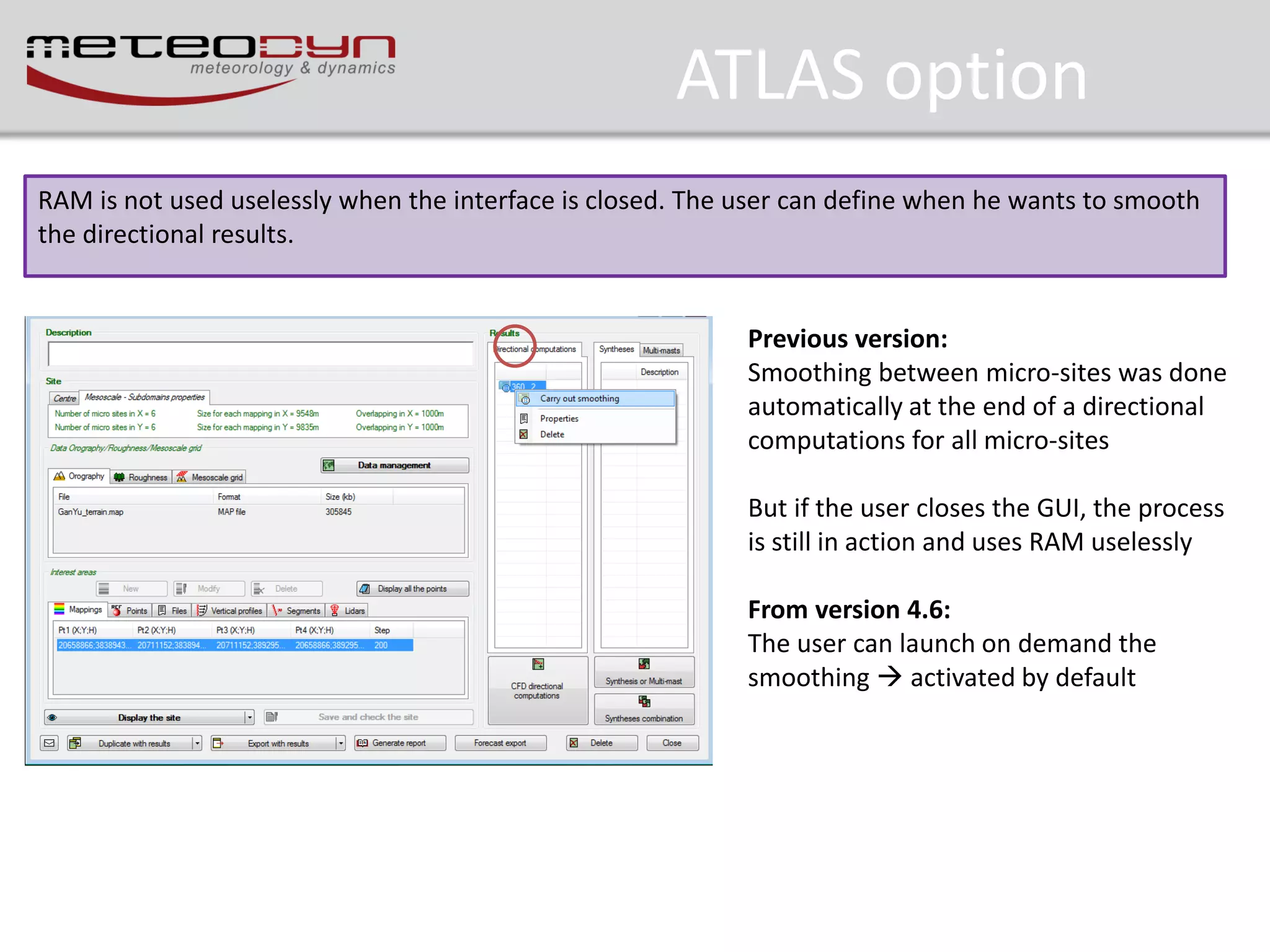
RAM is not used uselessly when the interface is closed. The user can define when he wants to smooth
the directional results.

Previous version:
Smoothing between micro-sites was done
automatically at the end of a directional
computations for all micro-sites
But if the user closes the GUI, the process
is still in action and uses RAM uselessly

From version 4.6:
The user can launch on demand the
smoothing  activated by default
Release information
•
•
•
•
•
•
•
•

User account control
Processing monitoring window
New stability tool
Synthesis – meso-scale data files
Automatic report
IEC export
ATLAS option
Other
Other

New features in the version 4.6 of the CFD meteodyn WT dedicated to wind resource assessment

  • 1.
    New features inMeteodyn WT 4.6 10/2013
  • 2.
    Release information • • • • • • • • User accountcontrol Processing monitoring window New stability tool Synthesis – meso-scale data files Automatic report IEC export ATLAS option Other
  • 3.
    Release information • • • • • • • • User accountcontrol Processing monitoring window New stability tool Synthesis – meso-scale data files Automatic report IEC export ATLAS option Other
  • 4.
    User account control Duringinstallation process, the User can choose where to install the executable of Meteodyn WT and where to store the data. No more problems with lake of space on C: disk No more problems to use Meteodyn WT on Windows8 No need to be administrator to use Meteodyn WT
  • 5.
    Release information • • • • • • • • User accountcontrol Processing monitoring window New stability tool Synthesis – meso-scale data files Automatic report IEC export ATLAS option Other
  • 6.
    Processing moritoring window Fullcontrol of the waiting processes queue for CFD directional computations, syntheses and multi-masts computations The waiting queue is kept in memory when closing Meteodyn WT and remains fully available when rebooting the software
  • 7.
    Release information • • • • • • • • User accountcontrol Processing monitoring window New stability tool Synthesis – meso-scale data files Automatic report IEC export ATLAS option Other
  • 8.
    New stability tool MeteodynWT is able to determine stability class distribution. This distribution is taken into account during the synthesis / multi mast process.  Allow the user to minimize the error in the AEP computations
  • 9.
    New stability tool Ina complex terrain, and particularly at the summit of a hill or a mountain, it is not possible to consider the mean speed vertical gradient deduced from measurements, because if there is a speed-up effect, this gradient is very localized, and is not representative of the gradient in a large area, which is the one which determines the stability. For instance at the top of a hill the speed-up effects can lead to zero gradient between 2 points. Then the procedure in Meteodyn WT is to determine, thanks to the computed speed-up the undisturbed wind gradient, considering flat terrain and the average roughness over the site. The procedure is iterative as the speed-up coefficients are depending on the thermal stability. Gradient Richardon Number: Ri  g  v / z θv:: Virtual potential temperature  v V / z 2 Relation between Monin-Obukhov length and Richardson number 2 M z / L  Ri H Ф: Monin-Obukhov functions of the similarity theory Ri: Richardson Number z: height L: Monin-Obukhov length
  • 10.
    New stability tool 1.Import the meteorological file (*.txt) and choose “Mast climatology data” 1st line: title of each column 2nd line: units of variables 3rd, 4th,….: meteorological data
  • 11.
    New stability tool 2.In the synthesis preparation windows, select “Stability automation” to compute the stability distribution 3. Select the meteorological file to be used The interface specifies that the stability computation has to run
  • 12.
    New stability tool 4.Click on “Run stability computation” to define the columns to be used to determined stability classes Information needed: - Date and hour format - Wind speed at 1 height - Temperature at 2 heights - Wind directions - Wind speed standard deviation (not mandatory) Define the columns to be used
  • 13.
    New stability tool 5.When the computation ends, you have to give a name to the created file. This file can be used for the synthesis.
  • 14.
    Release information • • • • • • • • User accountcontrol Processing monitoring window New stability tool Synthesis – meso-scale data files Automatic report IEC export ATLAS option Other
  • 15.
    Meso-scale data files TheUser can use directly meso-scale timeseries (standard format of meso-scale models). If you have a large amount a meso-scale data at several locations, you can specify these locations in a file and specify the folder that contains the meso-scale data Select mapping height Select meso-scale files location File meso_coordinates.txt FOLDER Meso1 888888 888888 2000 Meso2 887888 887888 2000 Meso3 88500 88500 3000 Meso1.tim Meso2.tab Meso3.tim This text file contains the meso-cells to be used in the synthesis This folder contains the meteorological meso-scale data files (tab or timeseries) Select meso-scales files FOLDER
  • 16.
    Release information • • • • • • • • User accountcontrol Processing monitoring window New stability tool Synthesis – meso-scale data files Automatic report IEC export ATLAS option Other
  • 17.
    Automatic report From version4.5.0, a customized report can be created. Gain in time for bankable report Availability to customize the report New map generation for the report Several available formats : word – pdf – excel - CSV Automatically contains: - Site description including roughness and elevation maps - Directional computations properties - One synthesis / multi-mast properties and results The user is able to choose the contents of the report (results to be included)
  • 18.
    Release information • • • • • • • • User accountcontrol Processing monitoring window New stability tool Synthesis – meso-scale data files Automatic report IEC export ATLAS option Other
  • 19.
    IEC exports – IECexports fully compatible with standards – Several editions available (ed2, ed3, ed3 with amendment 1) – Simplest presentation of results 61400-1 edition can be chosen in the User parameters – synthesis tab: - Edition 2.0: global export – outdated - Edition3.0: global and detailed export outdated - Edition 3.0 Amendment 1: global and detailed export -recommended
  • 20.
    IEC exports Global export -Label: name of the wind turbine - X(m) X location - Y(m) Y location - Z(m) Z location - H(m) height of the turbine - Class: The wind turbine IEC class - IEC Iref: design value for the IEC class - Wöhler exponent - Met mast Reference: Reference to use for the IEC turbulence computations - IEC Vref: design value for the IEC class - Extreme mean wind speed(50 years) (m/s): only available if extreme wind computations have been run - A parameter (m/s) - k parameter - Wind distribution check: true or false - Mean effective turbulence intensity (not required for the IEC compliance analysis) - Turbulence intensity check: true or false value - IEC absolute inflow angle (deg): design limit of the inflow angle - Absolute maximum wind inflow angle (deg) - IEC Minimum wind shear exponent : minimum design limit of the shear exponent - IEC Maximum wind shear exponent: maximum design limit of the shear exponent - Mean wind shear exponent - IEC Air density (kg/m3) design limit at the hub height - Air density (kg/m3) at the hub height
  • 21.
    Release information • • • • • • • • User accountcontrol Processing monitoring window New stability tool Synthesis – meso-scale data files Automatic report IEC export ATLAS option Other
  • 22.
    ATLAS option RAM isnot used uselessly when the interface is closed. The user can define when he wants to smooth the directional results. Previous version: Smoothing between micro-sites was done automatically at the end of a directional computations for all micro-sites But if the user closes the GUI, the process is still in action and uses RAM uselessly From version 4.6: The user can launch on demand the smoothing  activated by default
  • 23.
    Release information • • • • • • • • User accountcontrol Processing monitoring window New stability tool Synthesis – meso-scale data files Automatic report IEC export ATLAS option Other
  • 24.